lock MERCEDES-BENZ C-CLASS COUPE 2011 Owners Manual
[x] Cancel search | Manufacturer: MERCEDES-BENZ, Model Year: 2011, Model line: C-CLASS COUPE, Model: MERCEDES-BENZ C-CLASS COUPE 2011Pages: 373, PDF Size: 8.17 MB
Page 278 of 373
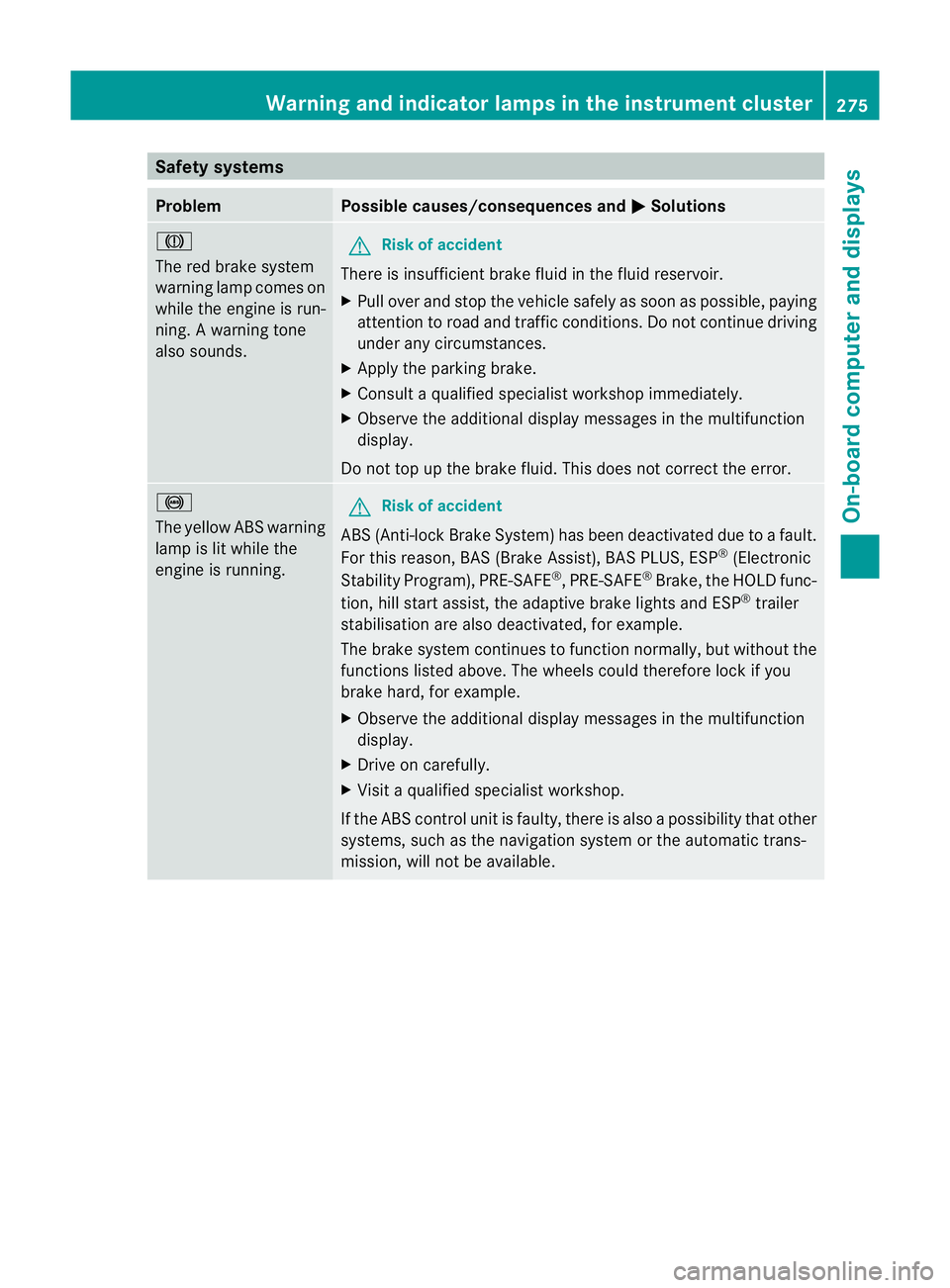
Safety systems
Problem Possible causes/consequences and
M Solutions
J
The red brake system
warning lamp comes on
while the engine is run-
ning. A warning tone
also sounds.
G
Risk of accident
There is insufficient brake fluid in the fluid reservoir.
X Pull over and stop the vehicle safely as soon as possible, paying
attention to road and traffic conditions. Do not continue driving
under any circumstances.
X Apply the parking brake.
X Consult a qualified specialist workshop immediately.
X Observe the additional display messages in the multifunction
display.
Do not top up the brake fluid. This does not correct the error. !
The yellow ABS warning
lamp is lit while the
engine is running.
G
Risk of accident
ABS (Anti-lock Brake System) has been deactivated due to a fault.
For this reason, BAS (Brake Assist), BAS PLUS, ESP ®
(Electronic
Stability Program), PRE-SAFE ®
,P RE-SAFE ®
Brake ,the HOLD func-
tion, hill start assist, the adaptive brake lights and ESP ®
trailer
stabilisation are also deactivated, for example.
The brake system continues to function normally, but without the
functions listed above. The wheels could therefore lock if you
brake hard, for example.
X Observe the additional display messages in the multifunction
display.
X Drive on carefully.
X Visit a qualified specialist workshop.
If the ABS control unit is faulty, there is also a possibility that other
systems, such as the navigation system or the automatic trans-
mission, will not be available. Warning and indicator lamps in the instrument cluster
275On-board computer and displays Z
Page 279 of 373
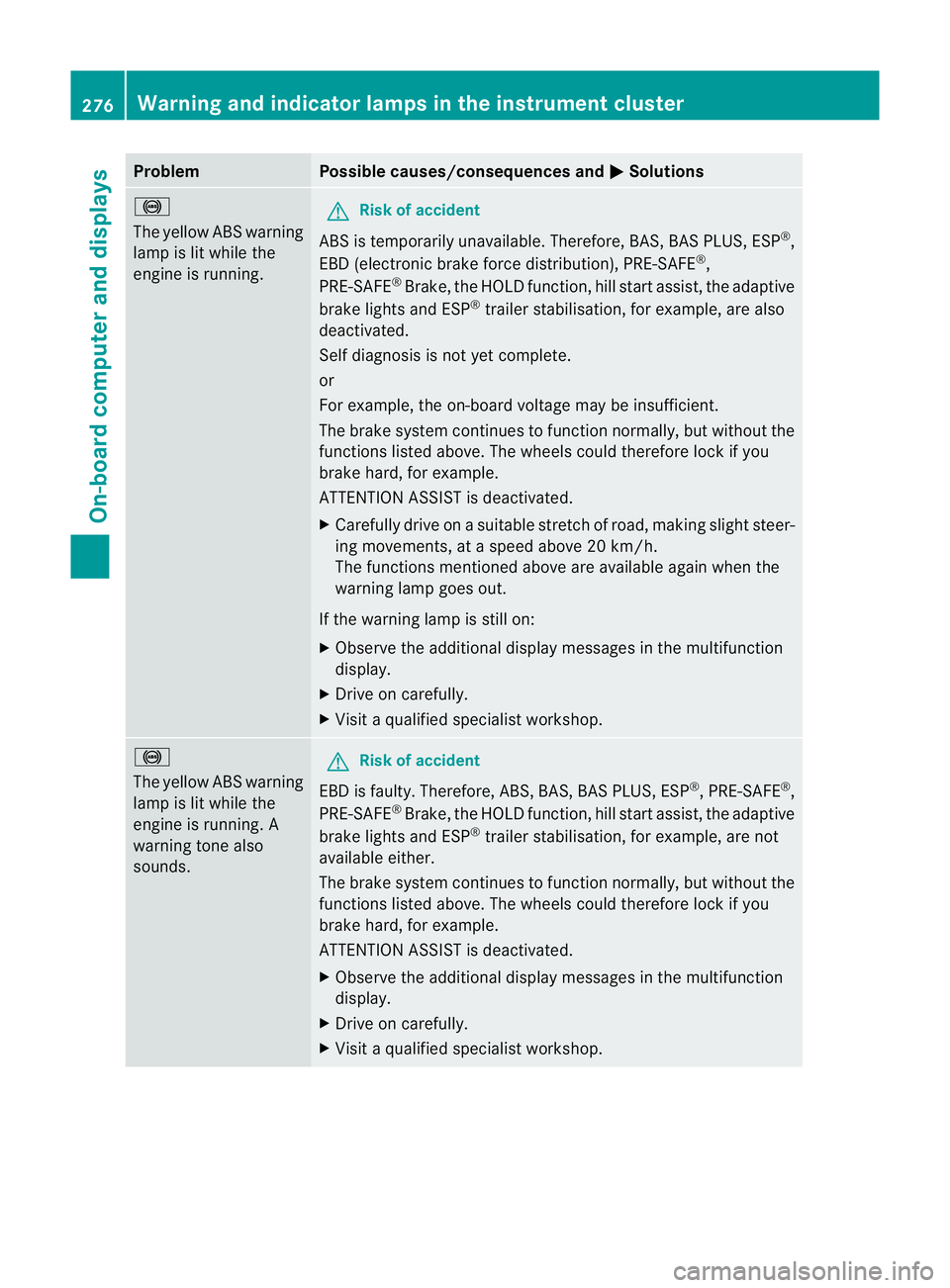
Problem Possible causes/consequences and
M Solutions
!
The yellow ABS warning
lamp is lit while the
engine is running. G
Risk of accident
ABS is temporarily unavailable. Therefore, BAS, BAS PLUS, ESP ®
,
EBD (electronic brake force distribution), PRE-SAFE ®
,
PRE-SAFE ®
Brake, the HOLD function, hill start assist, the adaptive
brake lights and ESP ®
trailer stabilisation, for example, are also
deactivated.
Self diagnosis is not yet complete.
or
For example, the on-board voltage may be insufficient.
The brake system continues to function normally, but without the
functions listed above. The wheels could therefore lock if you
brake hard, for example.
ATTENTION ASSIST is deactivated.
X Carefully drive on a suitable stretch of road, making slight steer-
ing movements, at a speed above 20 km/h.
The functions mentioned above are available again when the
warning lamp goes out.
If the warning lamp is still on:
X Observe the additional display messages in the multifunction
display.
X Drive on carefully.
X Visit a qualified specialist workshop. !
The yellow ABS warning
lamp is lit while the
engine is running. A
warning tone also
sounds. G
Risk of accident
EBD is faulty. Therefore, ABS,B AS, BAS PLUS, ESP®
, PRE-SAFE ®
,
PRE-SAFE ®
Brake, the HOLD function, hill start assist, the adaptive
brake lights and ESP ®
trailer stabilisation, for example, are not
available either.
The brake system continue sto function normally, but without the
functions listed above. The wheels could therefore lock if you
brake hard, for example.
ATTENTION ASSIST is deactivated.
X Observe the additional display messages in the multifunction
display.
X Drive on carefully.
X Visit a qualified specialist workshop. 276
Warning and indicator lamps in the instrument clusterOn-board computer and displays
Page 280 of 373
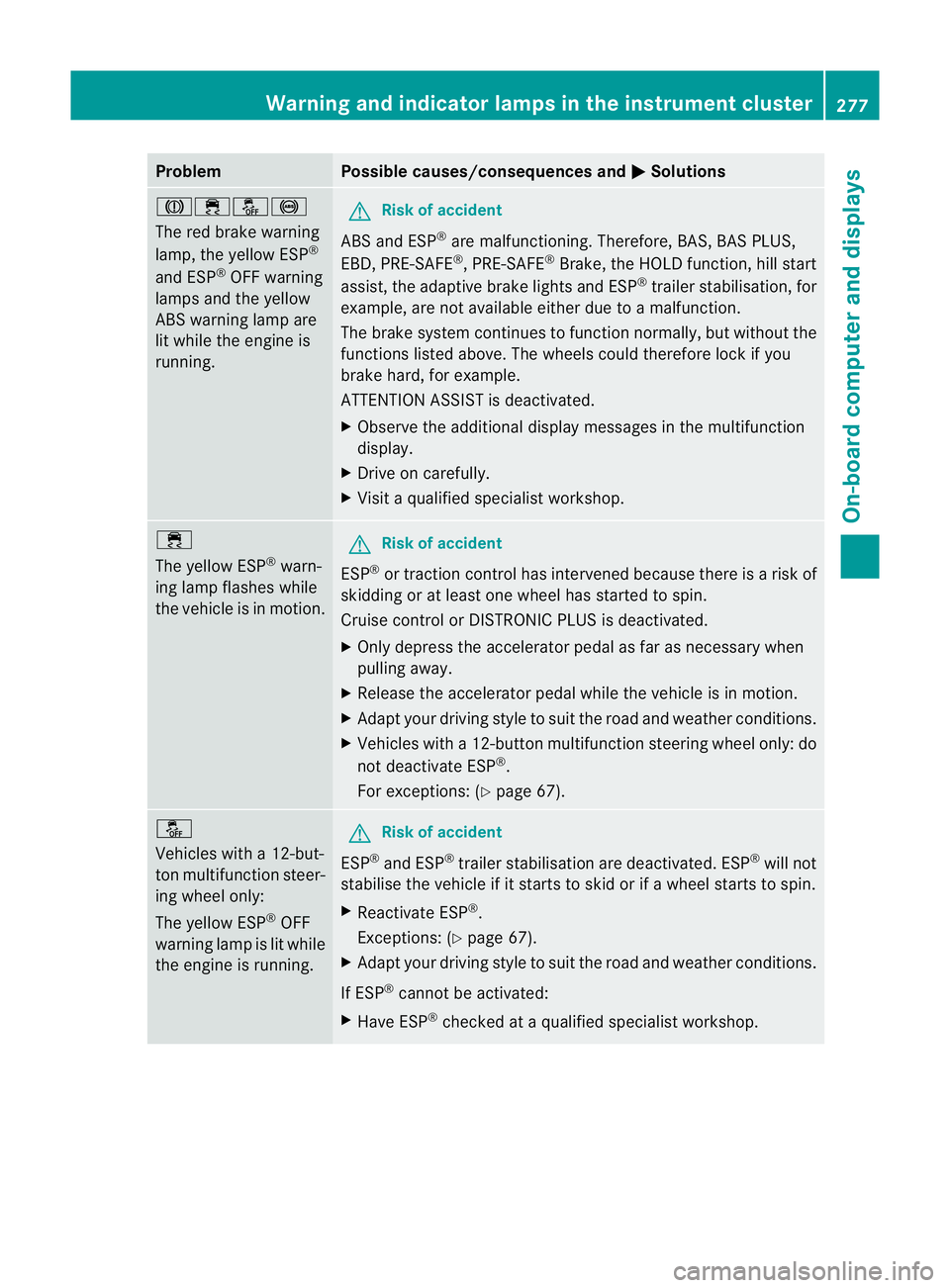
Problem Possible causes/consequences and
M Solutions
J֌!
The red brake warning
lamp, the yellow ESP
®
and ESP ®
OFF warning
lamps and the yellow
ABS warning lamp are
lit while the engine is
running. G
Risk of accident
ABS and ESP ®
are malfunctioning. Therefore, BAS, BAS PLUS,
EBD, PRE-SAFE ®
, PRE-SAFE ®
Brake, the HOLD function, hill start
assist, the adaptive brake lights and ESP ®
trailer stabilisation, for
example, are not available either due to a malfunction.
The brake system continues to function normally, but without the
functions listed above. The wheels could therefore lock if you
brake hard, for example.
ATTENTION ASSIST is deactivated.
X Observe the additional display messages in the multifunction
display.
X Drive on carefully.
X Visit a qualified specialist workshop. ÷
The yellow ESP
®
warn-
ing lamp flashes while
the vehicle is in motion. G
Risk of accident
ESP ®
or traction control has intervened because there is a risk of
skidding or at least one wheel has started to spin.
Cruise control or DISTRONIC PLUS is deactivated.
X Only depress the accelerator pedal as far as necessary when
pulling away.
X Release the accelerator pedal while the vehicle is in motion.
X Adapt your driving style to suit the road and weather conditions.
X Vehicles with a 12-button multifunction steering wheel only: do
not deactivate ESP ®
.
For exceptions: (Y page 67). å
Vehicles with a 12-but-
ton multifunction steer-
ing wheel only:
The yellow ESP
®
OFF
warning lamp is lit while
the engine is running. G
Risk of accident
ESP ®
and ESP ®
trailer stabilisation are deactivated. ESP ®
will not
stabilise the vehicle if it starts to skid or if awheel starts to spin.
X Reactivate ESP ®
.
Exceptions: (Y page 67).
X Adapt your driving style to suit the road and weather conditions.
If ESP ®
cannot be activated:
X Have ESP ®
checked at a qualified specialist workshop. Warning and indicator lamps in the instrument cluster
277On-board computer and displays Z
Page 282 of 373
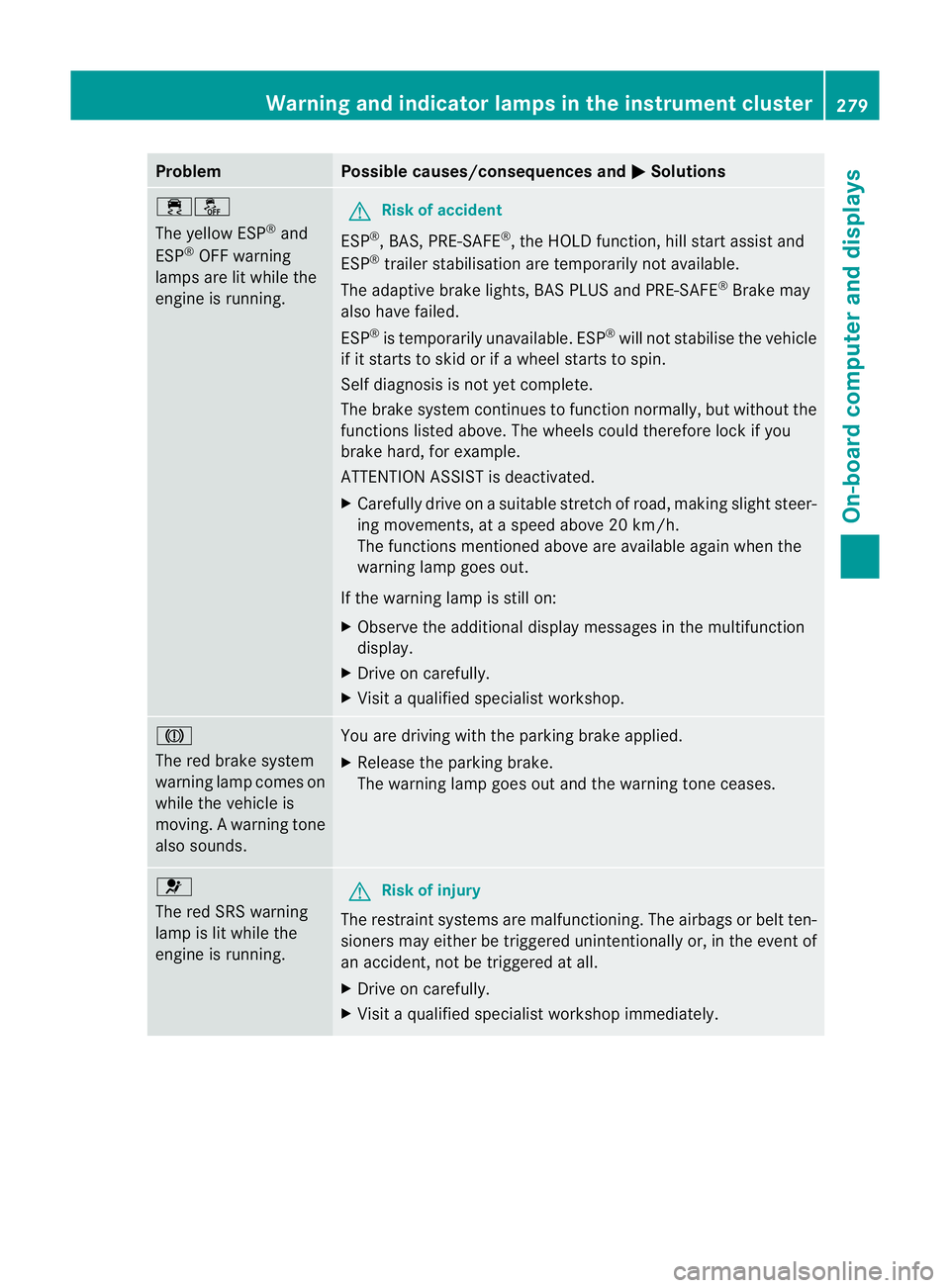
Problem Possible causes/consequences and
M Solutions
֌
The yellow ESP
®
and
ESP ®
OFF warning
lamps are lit while the
engine is running. G
Risk of accident
ESP ®
, BAS, PRE-SAFE ®
, the HOLD function, hill start assist and
ESP ®
trailer stabilisation are temporarily not available.
The adaptive brake lights, BAS PLUS and PRE-SAFE ®
Brake may
also have failed.
ESP ®
is temporarily unavailable. ESP ®
will not stabilise the vehicle
if it starts to skid or if a wheel starts to spin.
Self diagnosis is not yet complete.
The brake system continues to function normally, but without the
functions listed above. The wheels could therefore lock if you
brake hard, for example.
ATTENTION ASSIST is deactivated.
X Carefully drive on a suitable stretch of road, making slight steer-
ing movements, at a speed above 20 km/h.
The functions mentioned above are available again when the
warning lamp goes out.
If the warning lamp is still on:
X Observe the additional display messages in the multifunction
display.
X Drive on carefully.
X Visit a qualified specialist workshop. J
The red brake system
warning lamp comes on
while the vehicle is
moving. A warning tone
also sounds.
You are driving with the parking brake applied.
X
Release the parking brake.
The warning lamp goes out and the warning tone ceases. 6
The red SRS warning
lamp is lit while the
engine is running.
G
Risk of injury
The restraint systems are malfunctioning. The airbags or belt ten-
sioners may either be triggered unintentionally or, in the event of
an accident, not be triggered at all.
X Drive on carefully.
X Visit a qualified specialist workshop immediately. Warning and indicator lamps in the instrument cluster
279On-board computer and displays Z
Page 284 of 373
Problem Possible causes/consequences and
M Solutions
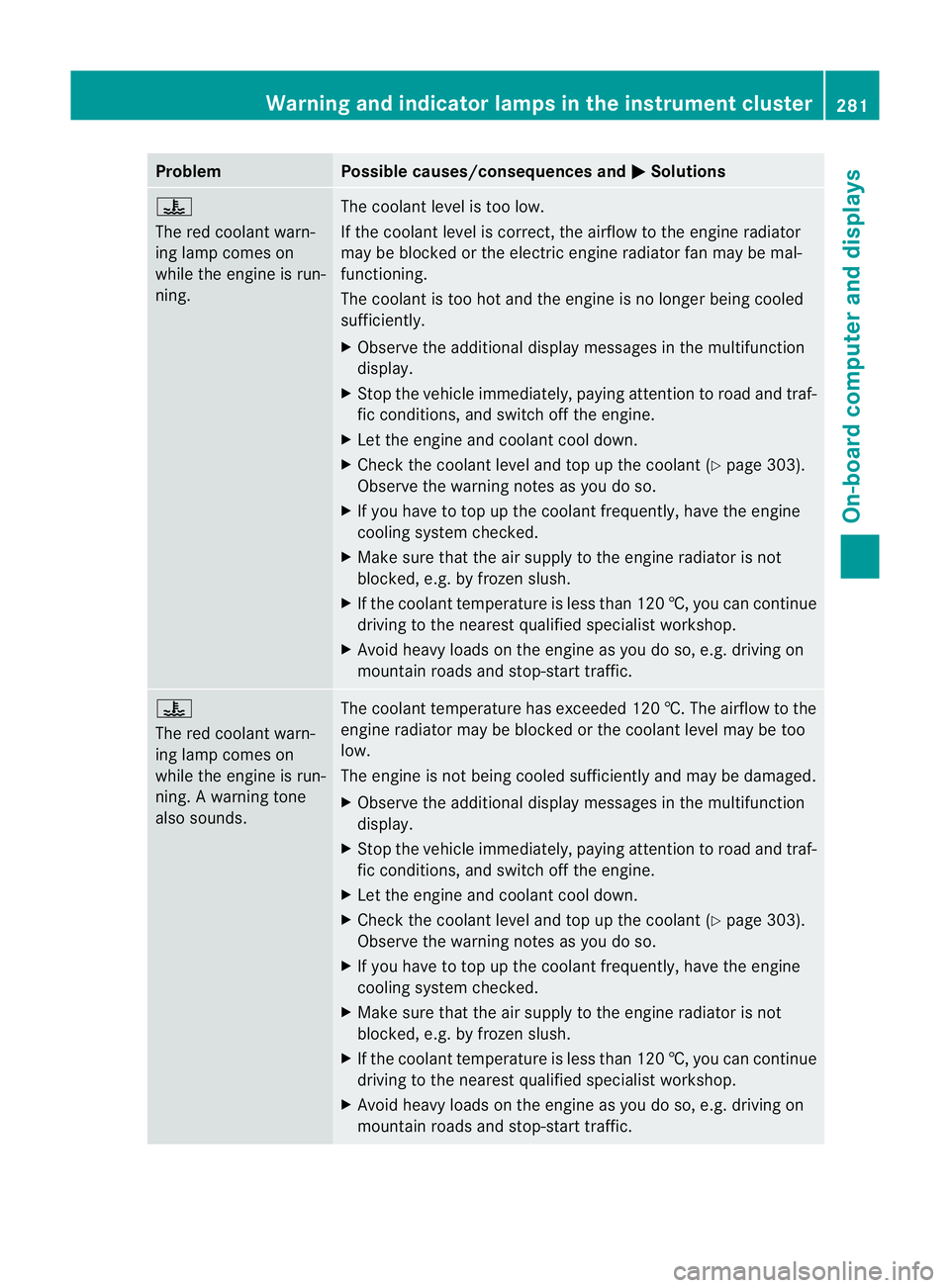
?
The red coolant warn-
ing lamp comes on
while the engine is run-
ning.
The coolant level is too low.
If the coolant level is correct, the airflow to the engine radiator
may be blocked or the electric engine radiator fan may be mal-
functioning.
The coolant is too hot and the engine is no longer being cooled
sufficiently.
X Observe the additional display messages in the multifunction
display.
X Stop the vehicle immediately, paying attention to road and traf-
fic conditions, and switch off the engine.
X Let the engine and coolant cool down.
X Check the coolant level and top up the coolant (Y page 303).
Observe the warning notes as you do so.
X If you have to top up the coolant frequently, have the engine
cooling system checked.
X Make sure that the air supply to the engine radiator is not
blocked, e.g. by frozen slush.
X If the coolant temperature is less than 120 †, you can continue
driving to the nearest qualified specialist workshop.
X Avoid heavy loads on the engine as you do so, e.g. driving on
mountain roads and stop-start traffic. ?
The red coolant warn-
ing lamp comes on
while the engine is run-
ning. A warning tone
also sounds.
The coolant temperature has exceeded 120 †. The airflow to the
engine radiator may be blocked or the coolant level may be too
low.
The engine is not being cooled sufficiently and may be damaged.
X
Observe the additional display messages in the multifunction
display.
X Stop the vehicle immediately, paying attention to road and traf-
fic conditions, and switch off the engine.
X Let the engine and coolant cool down.
X Check the coolant level and top up the coolant (Y page 303).
Observe the warning notes as you do so.
X If you have to top up the coolant frequently, have the engine
cooling system checked.
X Make sure that the air supply to the engine radiator is not
blocked, e.g. by frozen slush.
X If the coolant temperature is less than 120 †, you can continue
driving to the nearest qualified specialist workshop.
X Avoid heavy loads on the engine as you do so, e.g. driving on
mountain roads and stop-start traffic. Warning and indicator lamps in the instrument cluster
281On-board computer and displays Z
Page 287 of 373
Useful information
i This Owner's Manual describes all models
and all standard and optional equipment
available to your vehicle at the time of pub-
lication of the Owner's Manual. Country-
specific deviations are possible. Please
note that your vehicle may not be equipped
with all features described. This also
applies to safety-relevan tsystems and
functions.
i Please read the information on qualified
specialist workshops (Y page 26).Loading guidelines
G
WARNING
Secure and position the load as described in
the loading guidelines.
Otherwise, vehicle occupants could
be injured by the load being throw naround in
the event of sharp braking, a sudden change
in direction or an accident.
You will find further informatio ninthe "Secur-
ing a load" section.
Even if you follow all the loading guidelines,
the load will increase the risk of injury in the
event of an accident. G
WARNING
Keep the boot lid closed while the vehicle is
in operation. Otherwise, you could be pois-
oned by exhaust fumes entering the vehicle.
The handling characteristics of a laden vehi-
cle are dependent on the distribution of the
load within the vehicle. For this reason, you
should observe the following notes when
transporting a load:
R when transporting a load, never exceed the
maximum permissible gross vehicle weight or the permissible axle loads for the vehicle
(including occupants).
R position heavy loads as far forwards as pos-
sible and as low down in the boot as pos-
sible.
R the load must not protrude above the upper
edge of the seat backrests.
R always place the load against the rear or
front seat backrests. Make sure that the
seat backrests are securely locked into
place.
R always place the load behind unoccupied
seats if possible.
R secure the load with sufficiently strong and
wear-resistant lashing material. pad sharp
edges for protection.
i Load restraints are available at any quali-
fied specialist workshop, e.g. a Mercedes-
Benz Service Centre. Stowage areas
Stowage compartments
Important safety notes G
WARNING
The stowage compartments must be closed
when items are stored in them. Luggage nets
are not designed to secure heavy items of
luggage.
You or other vehicle occupants could be
injured by objects being thrown around if you:
R brake sharply
R change direction suddenly
R are involved in an accident
Sharp-edged and fragile objects must not be
placed in the luggage net.
Do not place hard objects in the map pockets.
Objects must not protrude from the map
pockets. 284
Stowage areasStowing and features
Page 288 of 373
Front stowage compartments
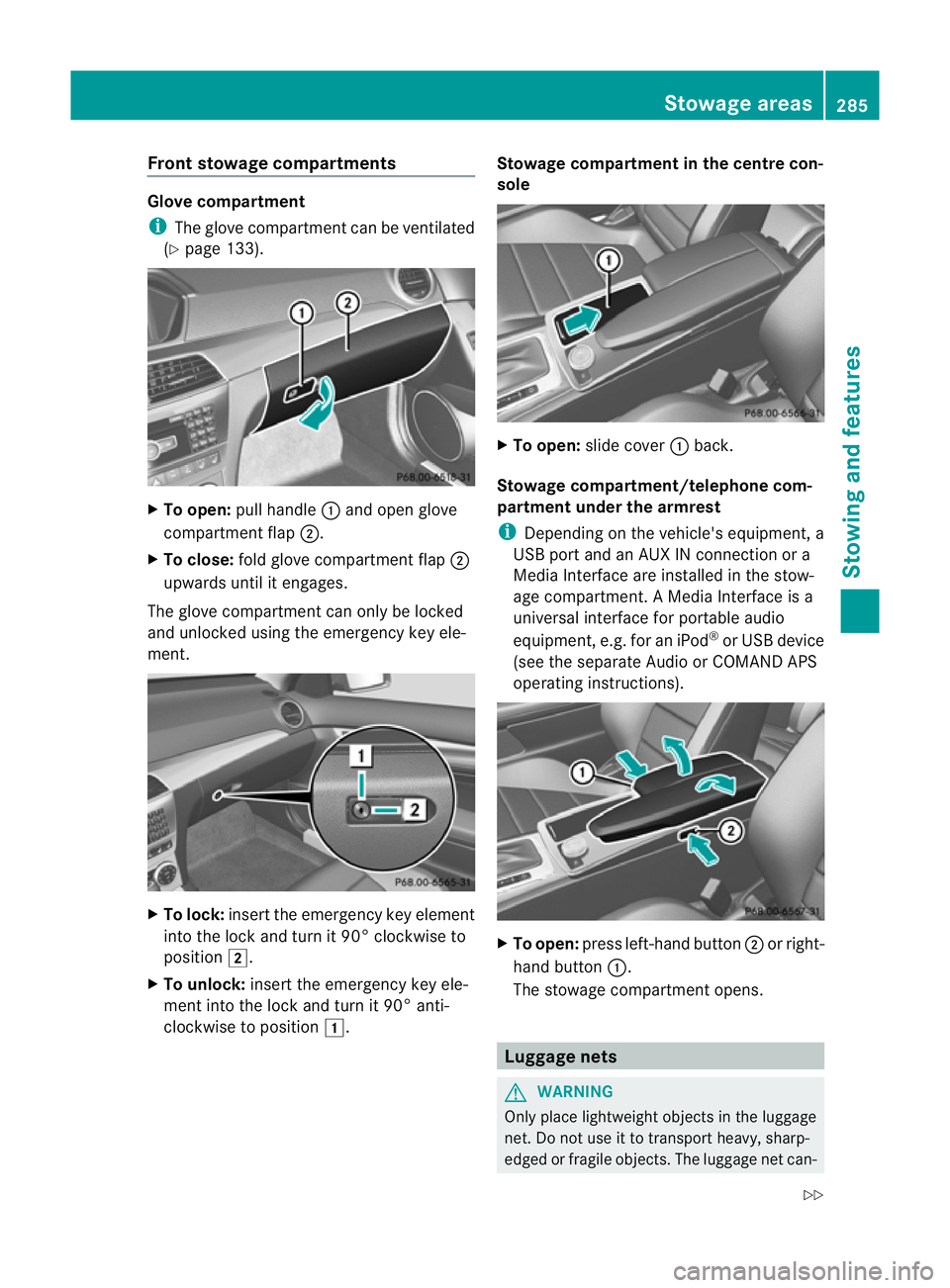
Glove compartment
i
The glove compartmen tcan be ventilated
(Y page 133). X
To open: pull handle :and open glove
compartment flap ;.
X To close: fold glove compartmen tflap ;
upwards until it engages.
The glove compartmen tcan only be locked
and unlocked using the emergency key ele-
ment. X
To lock: insert the emergency key element
into the lock and turn it 90° clockwise to
position 2.
X To unlock: insert the emergency key ele-
ment into the lock and turn it 90° anti-
clockwise to position 1. Stowage compartment in the centre con-
sole
X
To open: slide cover :back.
Stowage compartment/telephone com-
partment under the armrest
i Depending on the vehicle's equipment, a
USB port and an AUX IN connection or a
Media Interface are installed in the stow-
age compartment. A Media Interface is a
universal interface for portable audio
equipment, e.g .for an iPod ®
or USB device
(see the separate Audio or COMAND APS
operating instructions). X
To open: press left-hand button ;or right-
hand button :.
The stowage compartment opens. Luggage nets
G
WARNING
Only place lightweight object sinthe luggage
net. Do not use it to transport heavy, sharp-
edged or fragile objects. The luggage net can- Stowage areas
285Stowing and features
Z
Page 294 of 373
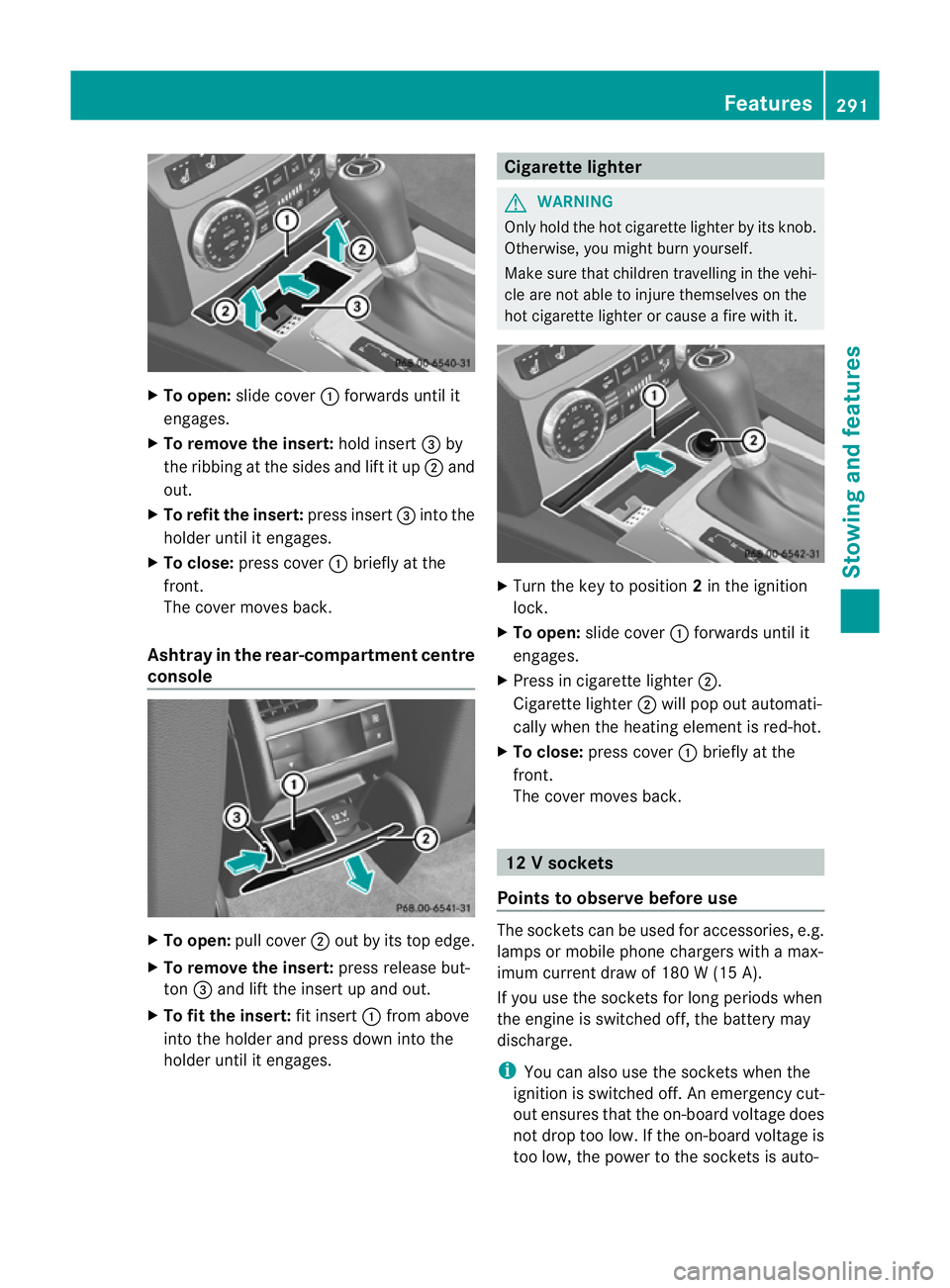
X
To open: slide cover :forwards until it
engages.
X To remove the insert: hold insert=by
the ribbing at the sides and lift it up ;and
out.
X To refi tthe insert: press insert =into the
holder until it engages.
X To close: press cover :briefly at the
front.
The cover moves back.
Ashtray in the rear-compartment centre
console X
To open: pull cover ;out by its top edge.
X To remove the insert: press release but-
ton =and lift the insert up and out.
X To fit the insert: fit insert:from above
into the holder and press dow ninto the
holde runtil it engages. Cigarette lighter
G
WARNING
Only hold the hot cigarette lighte rby its knob.
Otherwise, you might burn yourself.
Make sure that children travelling in the vehi-
cle are no table to injure themselves on the
hot cigarette lighter or cause a fire with it. X
Turn the key to position 2in the ignition
lock.
X To open: slide cover :forwards until it
engages.
X Press in cigarette lighter ;.
Cigarette lighter ;will pop out automati-
cally when the heating element is red-hot.
X To close: press cover :briefly at the
front.
The cover moves back. 12
Vsockets
Points to observe before use The sockets can be used for accessories, e.g.
lamps or mobile phone chargers with a max-
imum current draw of 180 W (15 A).
If you use the sockets for long periods when
the engine is switched off
,the battery may
discharge.
i You can also use the sockets when the
ignition is switched off. An emergency cut-
out ensures that the on-board voltage does
not drop too low. If the on-board voltage is
too low, the power to the sockets is auto- Features
291Stowing and features Z
Page 296 of 373
i
There are various mobile phone brackets
that may be fitted to your vehicle; in some
cases, these are country-specific.
i Even if your vehicle is equppied with con-
venience telephony, you can connect a
Bluetooth ®
-capable mobile phone with
Audio 20 or COMAND Online via the Blue-
tooth ®
interface.
More information on suitable mobile phones,
mobile phone brackets and on connecting
Bluetooth ®
-capable mobile phones with
Audio 20 or COMAND Online can be obtained:
R at your Mercedes-Benz Service Centre
R on the Internet at http://www.mercedes-
benz.com/connect
i The functions and services available when
you use the phone depend on your mobile
phone model and service provider.
Inserting the mobile phone X
Open the telephone compartment
(Y page 285).
X Place the mobile phone bracket into the
pre-installed bracket (see the separate
mobile phone bracket installation instruc-
tions).
X Insert the mobile phone into the mobile
phone bracket (see the separate mobile
phone bracket installation instructions).
If the mobile phone is inserted in the mobile
phone bracket, you can speak to the person
you are calling using the hands-free system.
i On some mobile phone brackets, first you
have to connect the mobile phone via Blue-
tooth ®
with a mobile phone bracket (see
the separate operating instructions for the
mobile phone bracket).
On these mobile phone brackets, the
mobile phone does not have to be inserted
into the bracket for you to be able to use
the telephone functions. In this case, the
charging function and aerial function are
not available. Operating the mobile phone You can operate the telephone using the
6
and~ buttons on the luxury multi-
function steering wheel. You can operate
other mobile phone functions via the on-
board computer (Y page 219).
When you take the key out of the ignition lock,
the mobile phone stays on but you can no
longer use the hands-free system.
If you are making a call and you would like to
take the key out of the ignition lock, first
remove the mobile phone from the bracket.
Otherwise, the call will be ended.
i When a mobile phone bracket is used that
is connected to the mobile phone via Blue-
tooth ®
: if you want to continue a call in
"Private mode", you have to perform the
necessary steps on the mobile phone (see
the separate mobile phone operating
instructions).
You can fold the pre-installed bracket up to
improve access to the stowage space
beneath it. Depending on the vehicle's equip-
ment,t here is aUSB connection and an AUX-
IN connection/Media Interface fitted in the
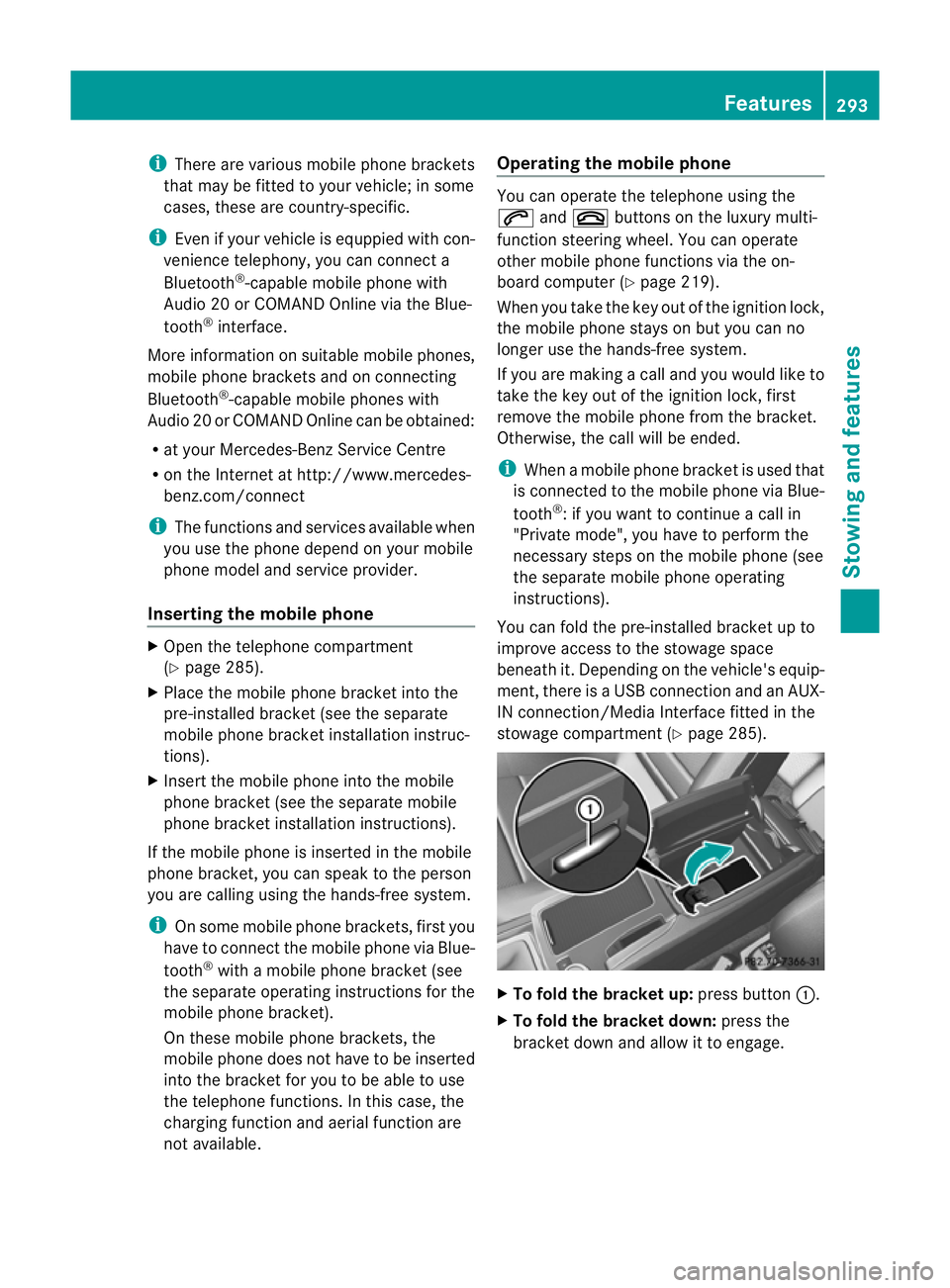
stowage compartment (Y page 285). X
To fold the bracket up: press button:.
X To fold the bracket down: press the
bracket dow nand allow it to engage. Features
293Stowing an d features Z
Page 297 of 373
Garage door opener
Important safety notes The HomeLink
®
garage door opener integra-
ted in the rear-view mirror allows you to oper-
ate up to three different door and gate sys-
tems.
i The garage door opener is only available
for certain countries. Observe the legal
requirements in each country.
The HomeLink ®
garage door opener is
compatible with most Europea ngarage and
gate opener drives. More informatio non
HomeLink ®
and/o rcompatible products is
available from:
R any Mercedes-Benz Service Centre
R the HomeLink ®
hotline
(0) 08000 466 354 65 (free of charge) or
+49 (0) 6838 907 277 (charges apply)
R on the Internet at:
http://www.homelink.com
Programming the integrated garage
door opener in the rear-view mirror Programming
G
WARNING
Only press the transmitter button on the inte-
grated garage door opener if there are no per-
sons or objects present within the sweep of
the garage door. Persons could otherwise be
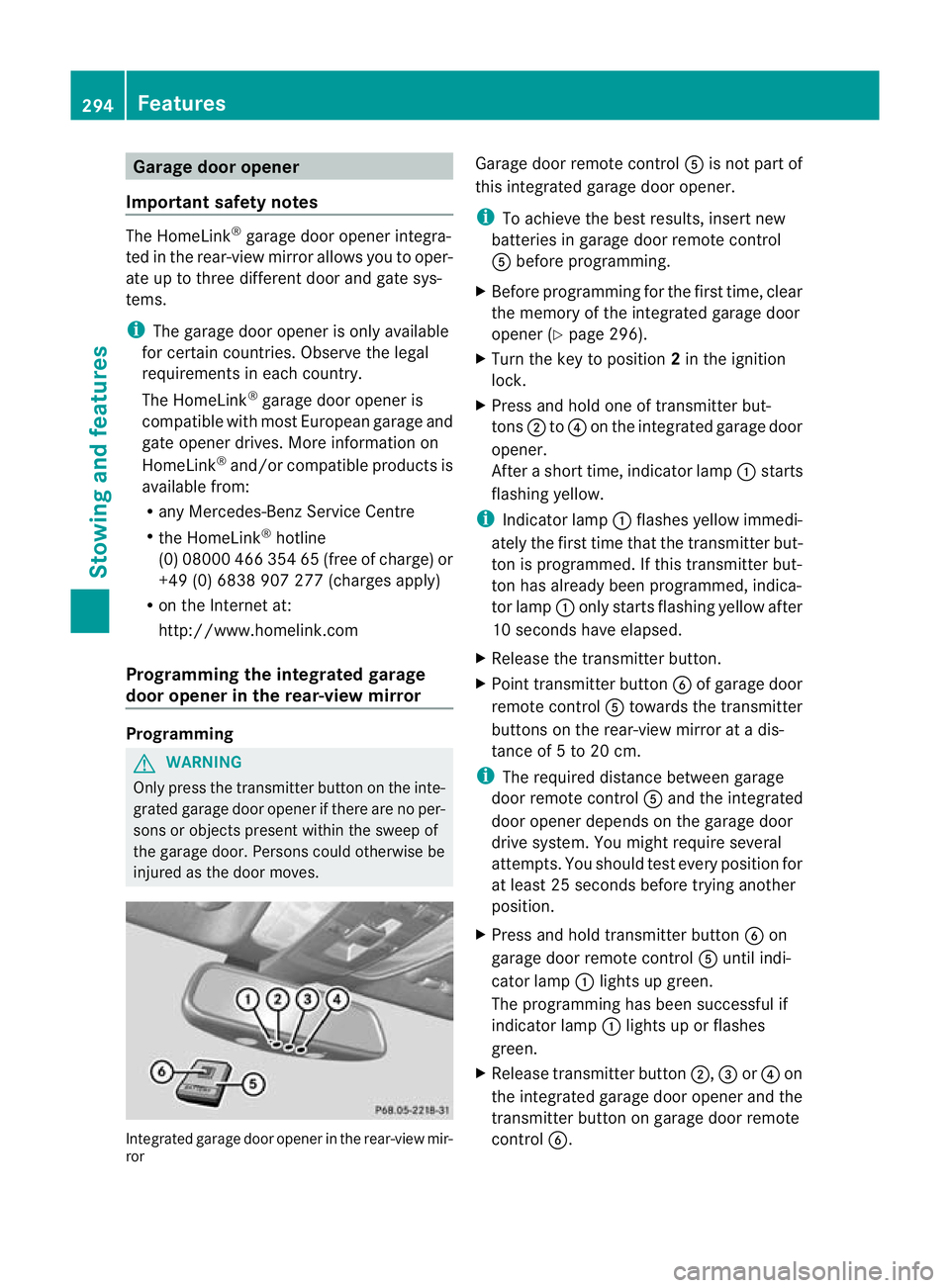
injured as the door moves. Integrated garage door opener in the rear-view mir-
ror Garage door remote control
Ais not part of
this integrated garage door opener.
i To achieve the best results, insert new
batteries in garage door remote control
A before programming.
X Before programming for the first time, clear
the memory of the integrated garage door
opener (Y page 296).
X Turn the key to position 2in the ignition
lock.
X Press and hold one of transmitter but-
tons ;to? on the integrated garage door
opener.
After a short time, indicator lamp :starts
flashing yellow.
i Indicator lamp :flashes yellow immedi-
ately the first time that the transmitter but-
ton is programmed. If this transmitter but-
ton has already been programmed, indica-
tor lamp :only starts flashing yellow after
10 seconds have elapsed.
X Release the transmitter button.
X Point transmitter button Bof garage door
remote control Atowards the transmitter
buttons on the rear-view mirror at a dis-
tance of 5 to 20 cm.
i The required distance between garage
door remote control Aand the integrated
door opener depends on the garage door
drive system. You might require several
attempts. You should test every position for
at least 25 seconds before trying another
position.
X Press and hold transmitter button Bon
garage door remote control Auntil indi-
cator lamp :lights up green.
The programming has been successful if
indicator lamp :lights up or flashes
green.
X Release transmitter button ;,=or? on
the integrated garage door opener and the
transmitter button on garage door remote
control B. 294
FeaturesStowing and features