sensor MERCEDES-BENZ C-CLASS COUPE 2011 Service Manual
[x] Cancel search | Manufacturer: MERCEDES-BENZ, Model Year: 2011, Model line: C-CLASS COUPE, Model: MERCEDES-BENZ C-CLASS COUPE 2011Pages: 373, PDF Size: 8.17 MB
Page 245 of 373
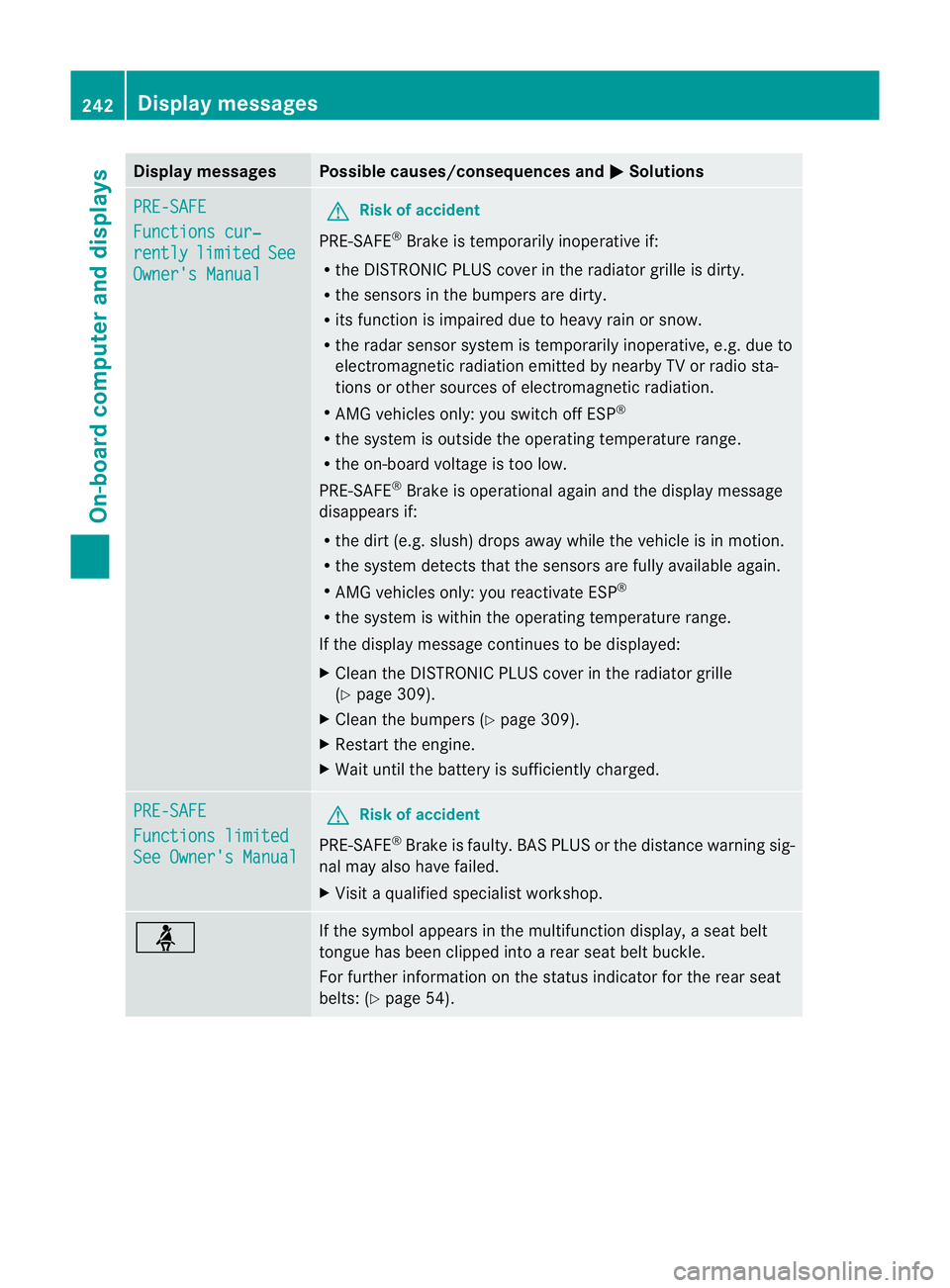
Display messages Possible causes/consequences and
M Solutions
PRE-SAFE
Functions cur‐
rently limited See
Owner's Manual G
Risk of accident
PRE-SAFE ®
Brake is temporarily inoperative if:
R the DISTRONIC PLUS cover in the radiator grille is dirty.
R the sensors in the bumpers are dirty.
R its function is impaired due to heavy rain or snow.
R the rada rsensor system is temporarily inoperative, e.g. due to
electromagnetic radiation emitted by nearby TV or radio sta-
tions or other sources of electromagnetic radiation.
R AMG vehicles only: you switch off ESP ®
R the system is outside the operating temperature range.
R the on-board voltage is too low.
PRE-SAFE ®
Brake is operational again and the display message
disappears if:
R the dirt (e.g. slush) drops away while the vehicle is in motion.
R the system detects that the sensors are fully available again.
R AMG vehicles only: you reactivate ESP ®
R the system is within the operating temperature range.
If the display message continues to be displayed:
X Clean the DISTRONIC PLUS cover in the radiator grille
(Y page 309).
X Clean the bumpers (Y page 309).
X Restart the engine.
X Wait until the battery is sufficiently charged. PRE-SAFE
Functions limited
See Owner's Manual G
Risk of accident
PRE-SAFE ®
Brake is faulty. BASP LUS or the distance warning sig-
nal may also have failed.
X Visit a qualified specialist workshop. ü If the symbol appears in the multifunction display,
aseat belt
tongue has been clipped into a rear seat belt buckle.
For further information on the status indicator for the rear seat
belts: (Y page 54). 242
Display messagesOn-board computer and displays
Page 246 of 373
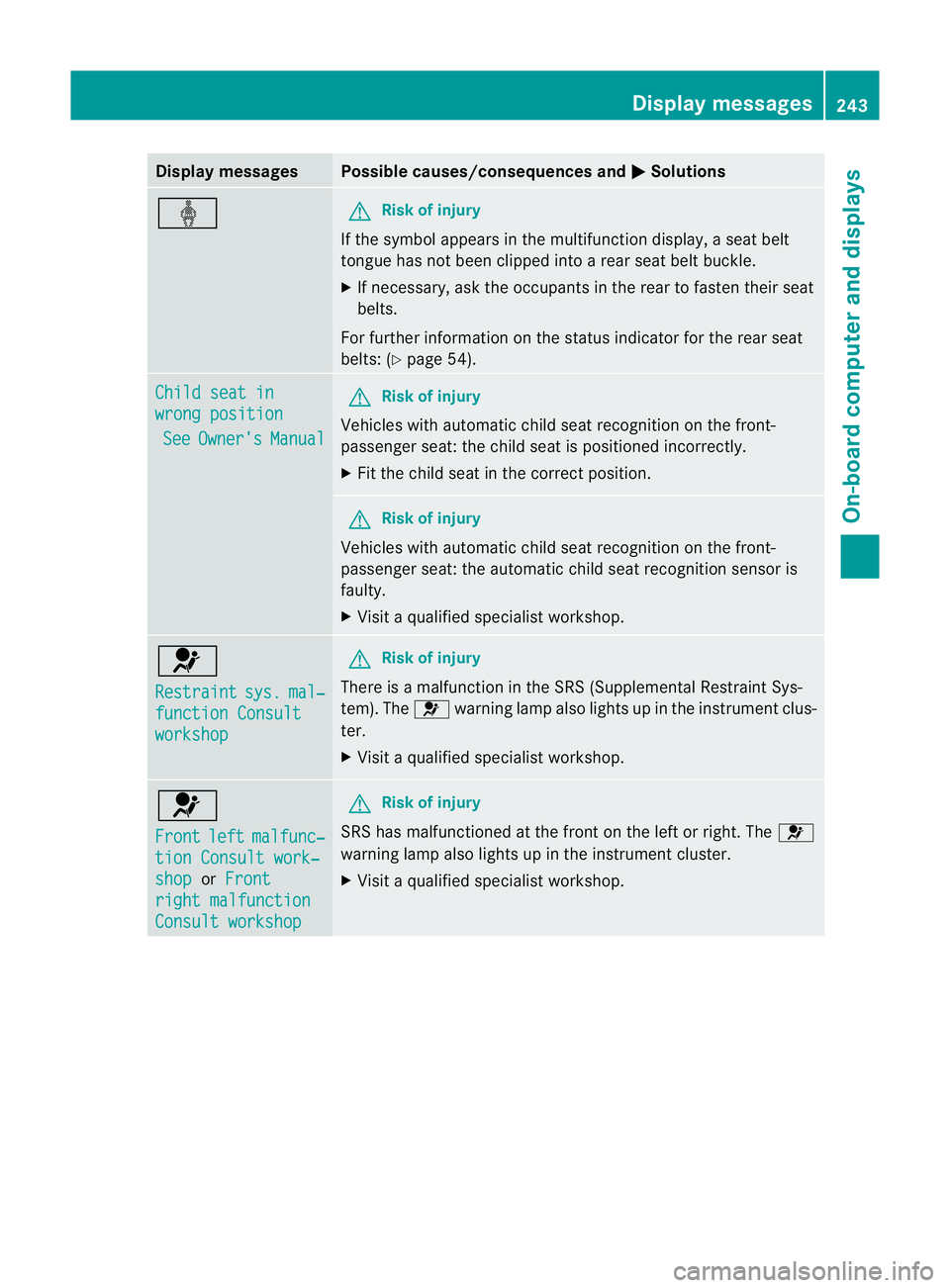
Display messages Possible causes/consequences and
M Solutions
ý G
Risk of injury
If the symbol appears in the multifunction display, aseat belt
tongue has not been clipped into a rear seat belt buckle.
X If necessary, ask the occupants in the rear to fasten their seat
belts.
For further information on the status indicator for the rear seat
belts: (Y page 54). Child seat in
wrong position
See Owner's Manual G
Risk of injury
Vehicles with automatic child seat recognition on the front-
passenger seat: the child seat is positioned incorrectly.
X Fit the child seat in the correct position. G
Risk of injury
Vehicles with automatic child seat recognition on the front-
passenger seat: the automatic child seat recognition sensor is
faulty.
X Visit a qualified specialist workshop. 6
Restraint
sys. mal‐
function Consult
workshop G
Risk of injury
There is a malfunction in the SRS (Supplemental Restraint Sys-
tem). The 6warning lamp also lights up in the instrument clus-
ter.
X Visit a qualified specialist workshop. 6
Front
left malfunc‐
tion Consult work‐
shop or
Front right malfunction
Consult workshop G
Risk of injury
SRS has malfunctioned at the front on the left or right. The 6
warning lamp also lights up in the instrument cluster.
X Visit a qualified specialist workshop. Display messages
243On-board computer and displays Z
Page 250 of 373
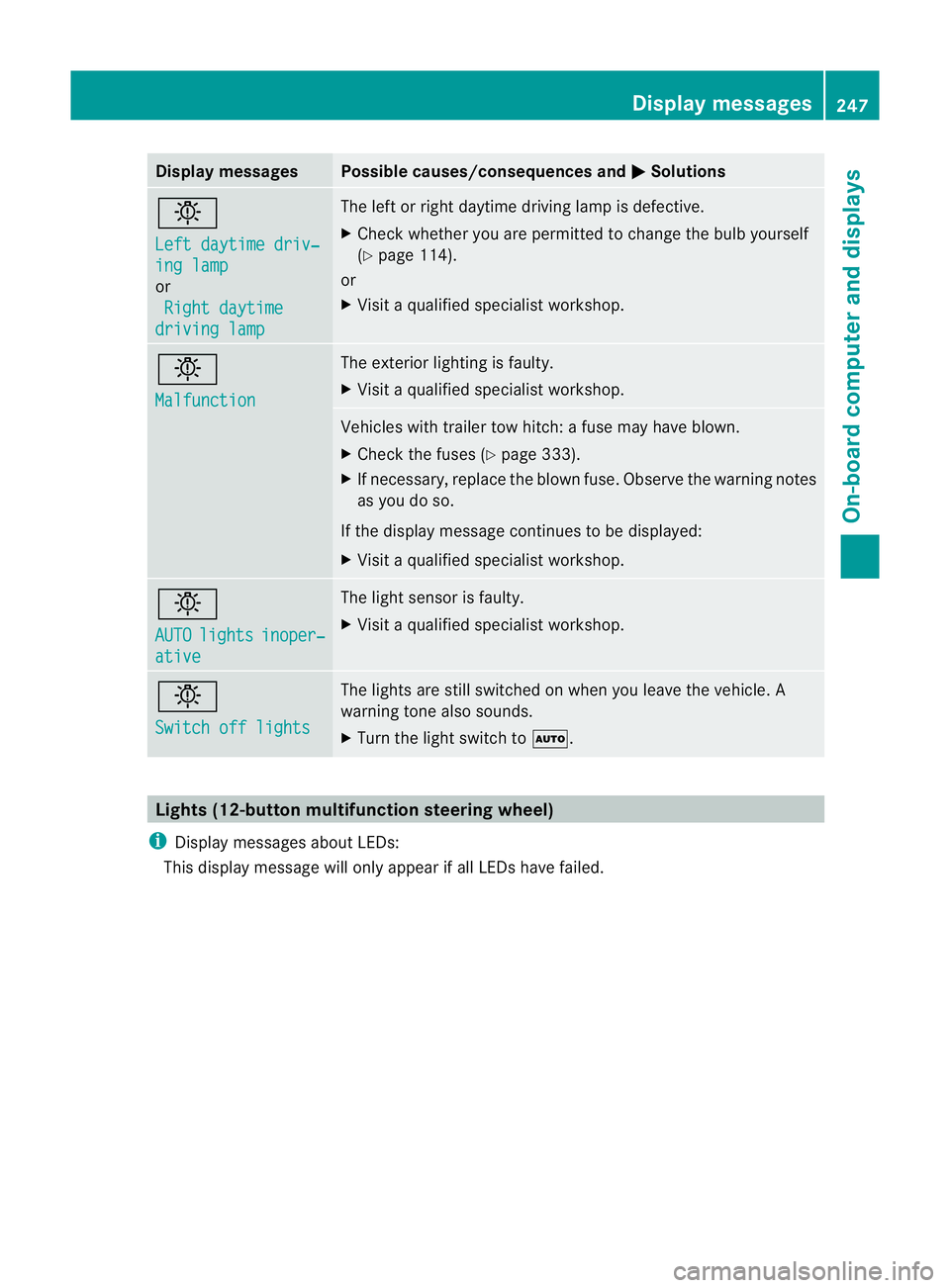
Display messages Possible causes/consequences and
M Solutions
b
Left daytime driv‐
ing lamp
or
Right daytime driving lamp The lef
torright daytime driving lamp is defective.
X Check whether you are permitted to change the bulb yourself
(Y page 114).
or
X Visit a qualified specialist workshop. b
Malfunction The exterior lighting is faulty.
X
Visit a qualified specialist workshop. Vehicles with trailer tow hitch: a fuse may have blown.
X
Check the fuses (Y page 333).
X If necessary, replace the blown fuse. Observe the warning notes
as you do so.
If the display message continues to be displayed:
X Visit a qualified specialist workshop. b
AUTO
lights inoper‐
ative The light sensor is faulty.
X
Visit a qualified specialist workshop. b
Switch off lights The lights are still switched on when you leave the vehicle. A
warning tone also sounds.
X
Turn the light switch to Ã.Lights (12-button multifunction steering wheel)
i Display messages about LEDs:
This display message will only appear if all LEDs have failed. Display messages
247On-board computer and displays Z
Page 253 of 373
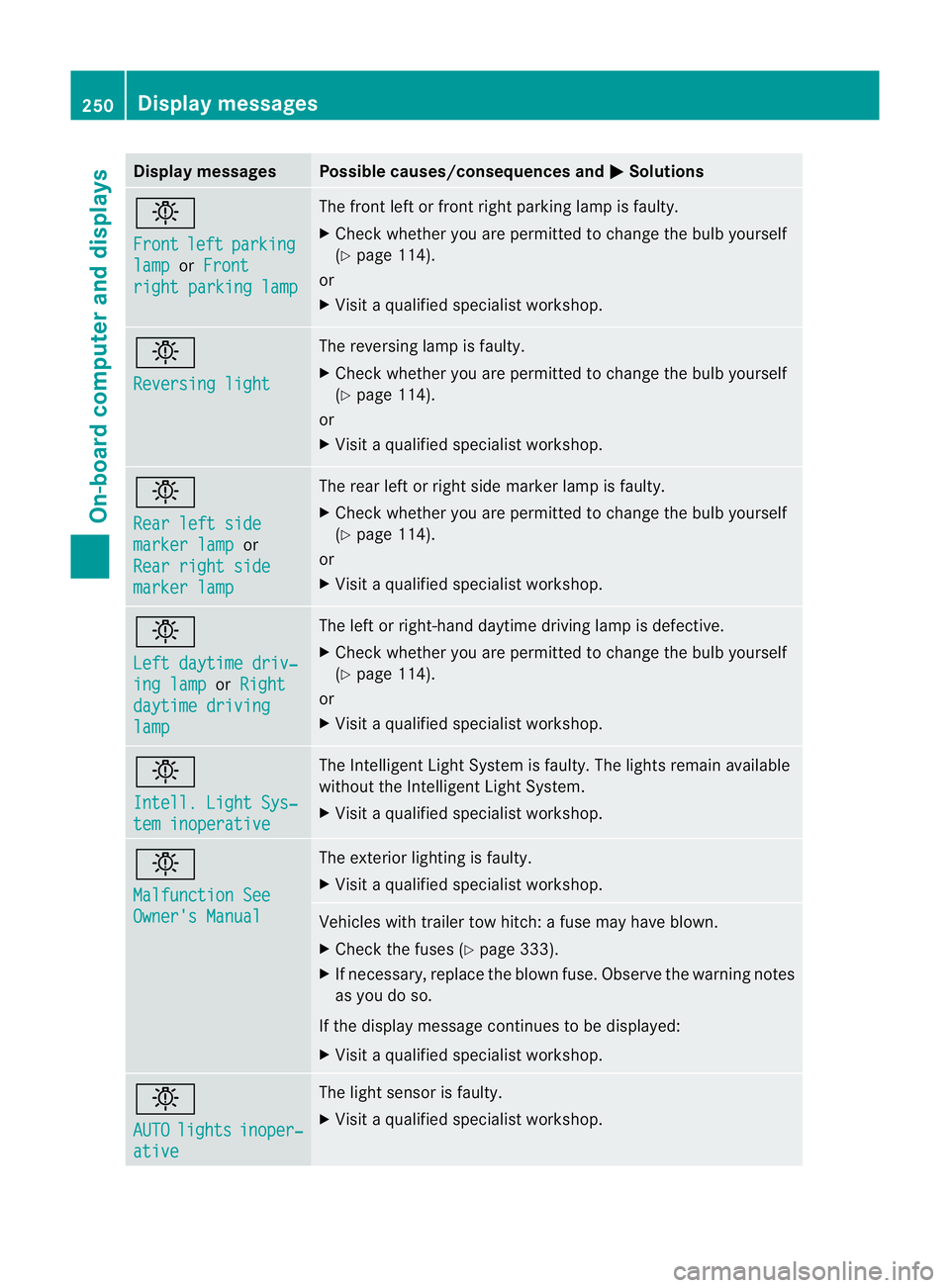
Display messages Possible causes/consequences and
M Solutions
b
Front
left parking
lamp or
Front right parking lamp The front left or front right parking lamp is faulty.
X
Chec kwhether you are permitted to change the bulb yourself
(Y page 114).
or
X Visit a qualified specialist workshop. b
Reversing light The reversing lamp is faulty.
X
Check whether you are permitted to change the bulb yourself
(Y page 114).
or
X Visit a qualified specialist workshop. b
Rear left side
marker lamp or
Rear right side marker lamp The rear left or right side marker lamp is faulty.
X
Check whether you are permitted to change the bulb yourself
(Y page 114).
or
X Visit a qualified specialist workshop. b
Left daytime driv‐
ing lamp or
Right daytime driving
lamp The left or right-hand daytime driving lamp is defective.
X
Check whether you are permitted to change the bulb yourself
(Y page 114).
or
X Visit a qualified specialist workshop. b
Intell. Light Sys‐
tem inoperative The Intelligent Light System is faulty. The lights remain available
without the Intelligent Light System.
X
Visit a qualified specialist workshop. b
Malfunction See
Owner's Manual The exterior lighting is faulty.
X
Visit a qualified specialist workshop. Vehicles with trailer tow hitch: a fuse may have blown.
X
Check the fuses (Y page 333).
X If necessary, replace the blown fuse. Observe the warning notes
as you do so.
If the display message continues to be displayed:
X Visit a qualified specialist workshop. b
AUTO
lights inoper‐
ative The light sensor is faulty.
X
Visit a qualified specialist workshop. 250
Display messagesOn-board computer and displays
Page 260 of 373
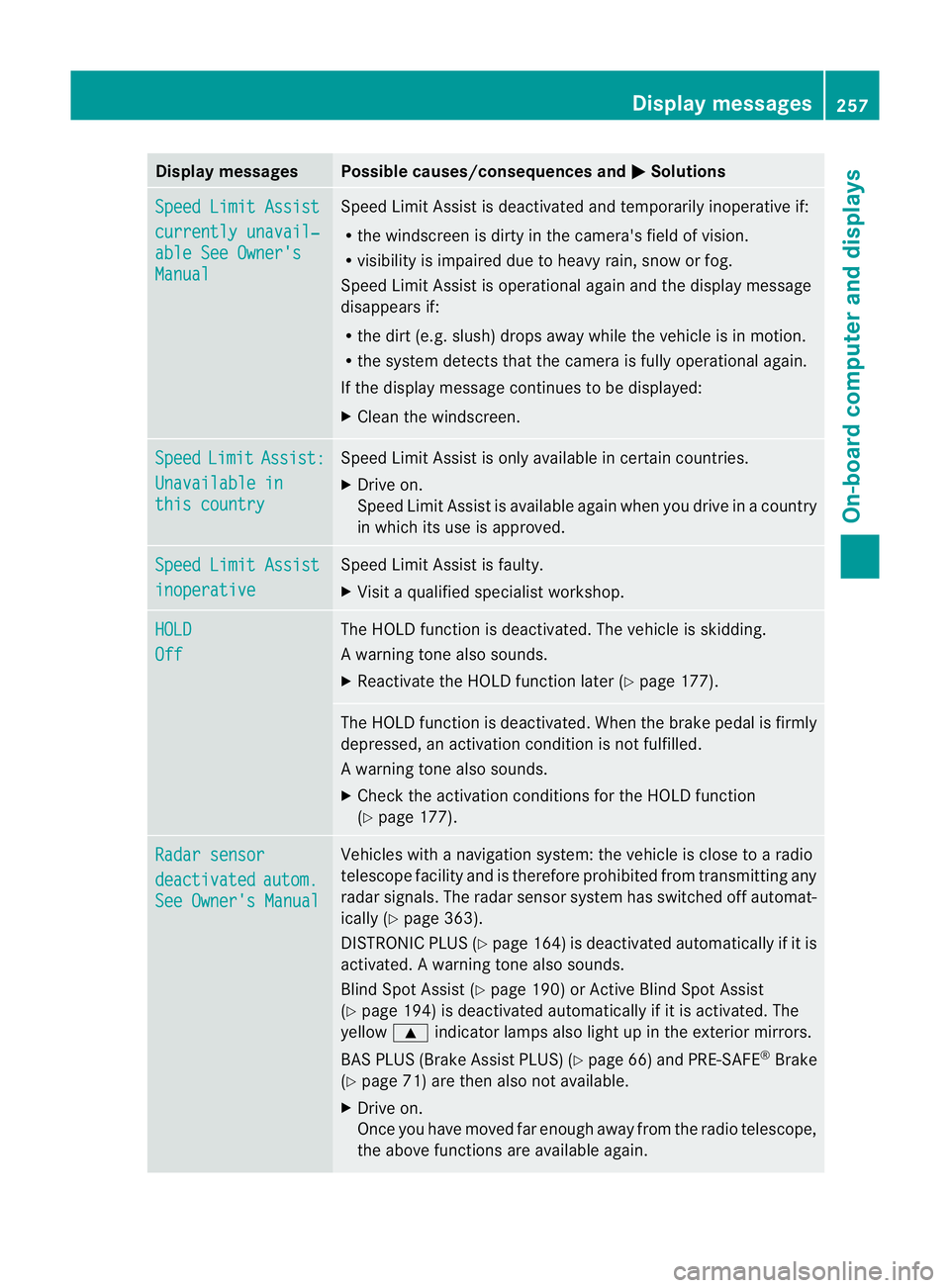
Display messages Possible causes/consequences and
M Solutions
Speed Limit Assist
currently unavail‐
able See Owner's
Manual Speed Limit Assis
tis deactivated and temporarily inoperative if:
R the windscreen is dirty in the camera's field of vision.
R visibility is impaired due to heavy rain, snow or fog.
Speed Limit Assist is operational againa nd the display message
disappears if:
R the dirt (e.g. slush) drops away while the vehicle is in motion.
R the system detects tha tthe camera is fully operational again.
If the display message continues to be displayed:
X Cleant he windscreen. Speed Limit Assist:
Unavailable in
this country Speed Limit Assist is only available in certain countries.
X
Drive on.
Speed Limit Assist is available again when you drive in a country
in which its use is approved. Speed Limit Assist
inoperative Speed Limit Assist is faulty.
X
Visit a qualified specialist workshop. HOLD
Off The HOLD function is deactivated. The vehicle is skidding.
Aw
arning tone also sounds.
X Reactivate the HOLD function later (Y page 177). The HOLD function is deactivated. When the brak
epedal is firmly
depressed, an activation condition is not fulfilled.
Aw arning tone also sounds.
X Check the activation conditions for the HOLD function
(Y page 177). Radar sensor
deactivated autom.
See Owner's Manual Vehicles with a navigation system: the vehicle is close to a radio
telescope facility and is therefore prohibited from transmitting any
radar signals. The radar sensor system has switched off automat-
ically (Y
page 363).
DISTRONI CPLUS (Y page 164) is deactivated automatically if it is
activated. Awarning tone also sounds.
Blind Spo tAssist (Y page 190) or Active Blind Spot Assist
(Y page 194) is deactivated automatically if it is activated. The
yellow 9indicator lamps also light up in the exterior mirrors.
BAS PLUS (Brake Assist PLUS) (Y page 66) and PRE-SAFE®
Brake
(Y page 71) are then also not available.
X Drive on.
Once you have moved far enough away from the radio telescope,
the above functions are available again. Display messages
257On-board computer and displays Z
Page 261 of 373
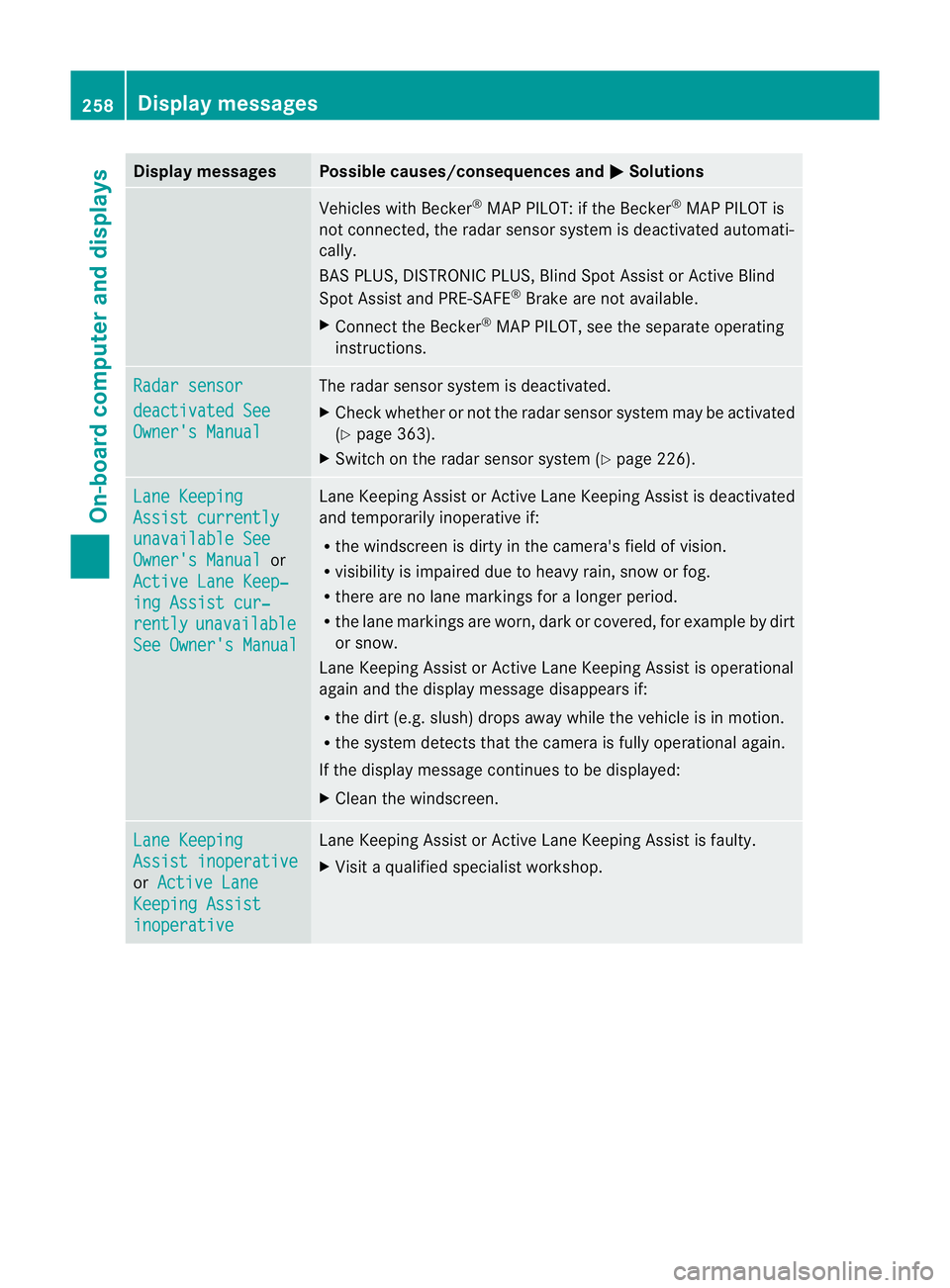
Display messages Possible causes/consequences and
M Solutions
Vehicles with Becker
®
MAP PILOT: if the Becker ®
MAP PILOT is
no tc onnected, the radar sensor system is deactivated automati-
cally.
BAS PLUS, DISTRONIC PLUS, Blind Spot Assist or Active Blind
Spot Assist and PRE-SAFE ®
Brake are not available.
X Connect the Becker ®
MAP PILOT, see the separate operating
instructions. Radar sensor
deactivated See
Owner's Manual The radar sensor system is deactivated.
X
Check whether or not the radar sensor system may be activated
(Y page 363).
X Switch on the radar sensor system (Y page 226).Lane Keeping
Assist currently
unavailable See
Owner's Manual or
Active Lane Keep‐ ing Assist cur‐
rently unavailable
See Owner's Manual Lane Keeping Assist or Active Lane Keeping Assist is deactivated
and temporarily inoperative if:
R
the windscreen is dirty in the camera's field of vision.
R visibility is impaired due to heavy rain, snow or fog.
R there are no lane markings for a longer period.
R the lane markings are worn, dark or covered, for example by dirt
or snow.
Lane Keeping Assist or Active Lane Keeping Assist is operational
again and the display message disappears if:
R the dirt (e.g. slush) drops away while the vehicle is in motion.
R the system detects that the camera is fully operational again.
If the display message continues to be displayed:
X Clean the windscreen. Lane Keeping
Assist inoperative
or
Active Lane Keeping Assist
inoperative Lane Keeping Assist or Active Lane Keeping Assist is faulty.
X
Visit a qualified specialist workshop. 258
Display messagesOn-board computer and displays
Page 262 of 373
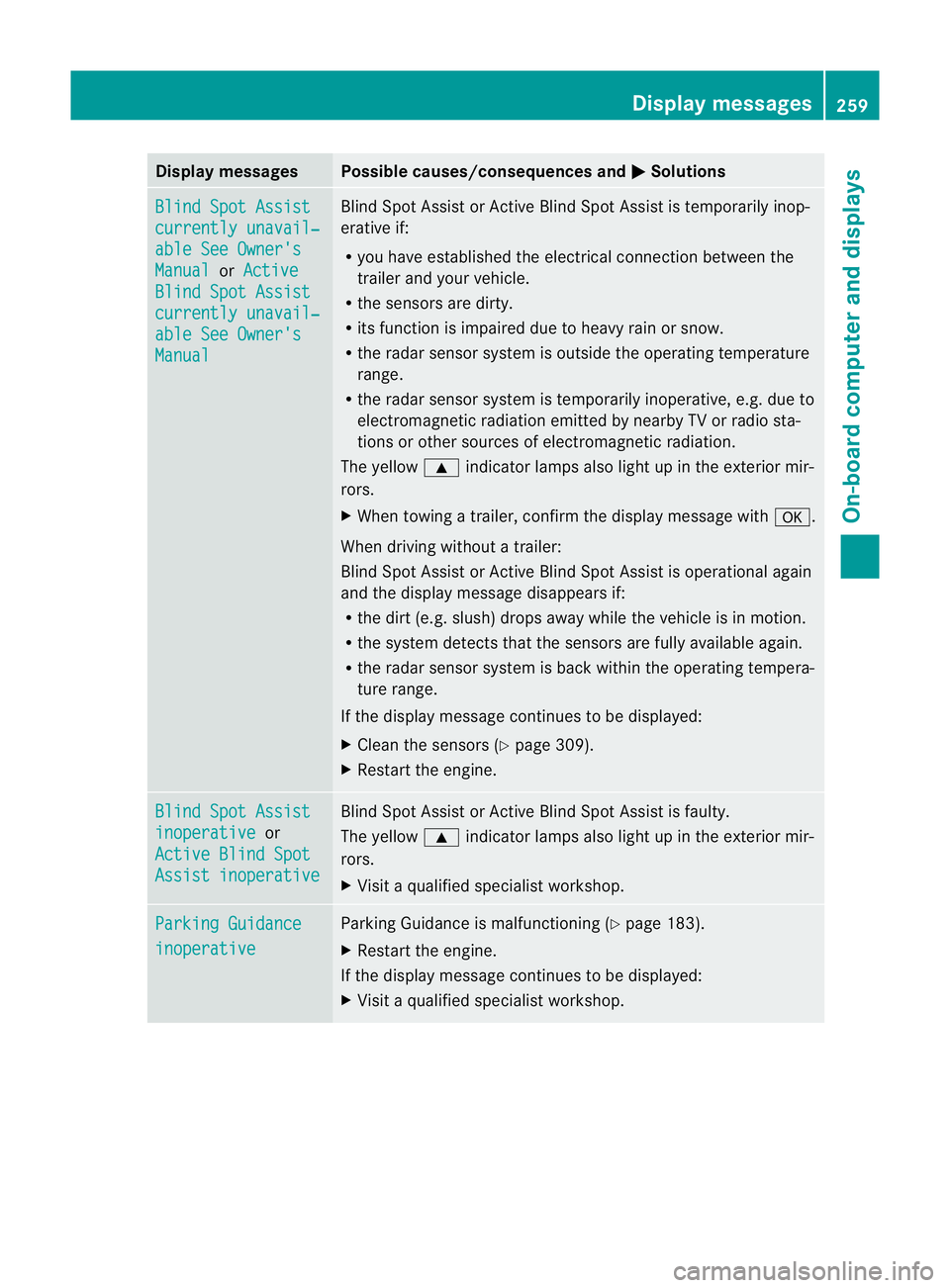
Display messages Possible causes/consequences and
M Solutions
Blind Spot Assist
currently unavail‐
able See Owner's
Manual or
Active Blind Spot Assist
currently unavail‐
able See Owner's
Manual Blind Spot Assis
torActive Blind Spot Assist is temporarily inop-
erative if:
R you have established the electrical connection between the
traile rand your vehicle.
R the sensors are dirty.
R its functio nis impaired due to heavy rain or snow.
R the radar sensor system is outside the operating temperature
range.
R the radar sensor system is temporarily inoperative, e.g. due to
electromagnetic radiation emitted by nearby TV or radio sta-
tions or other sources of electromagnetic radiation.
The yellow 9indicator lamps also light up in the exterior mir-
rors.
X When towing a trailer, confirm the display message with a.
When driving without a trailer:
Blind Spot Assist or Active Blind Spot Assist is operational again
and the display message disappears if:
R the dirt (e.g. slush) drops away while the vehicle is in motion.
R the system detects that the sensors are fully available again.
R the radar sensor system is back within the operating tempera-
ture range.
If the display message continues to be displayed:
X Cleant he sensors (Y page 309).
X Restart the engine. Blind Spot Assist
inoperative or
Active Blind Spot Assist inoperative Blind Spot Assist or Active Blind Spot Assist is faulty.
The yellow
9indicator lamps also light up in the exterior mir-
rors.
X Visit a qualified specialist workshop. Parking Guidance
inoperative Parking Guidance is malfunctioning (Y
page 183).
X Restart the engine.
If the display message continues to be displayed:
X Visit a qualified specialist workshop. Display messages
259On-board computer and displays Z
Page 263 of 373
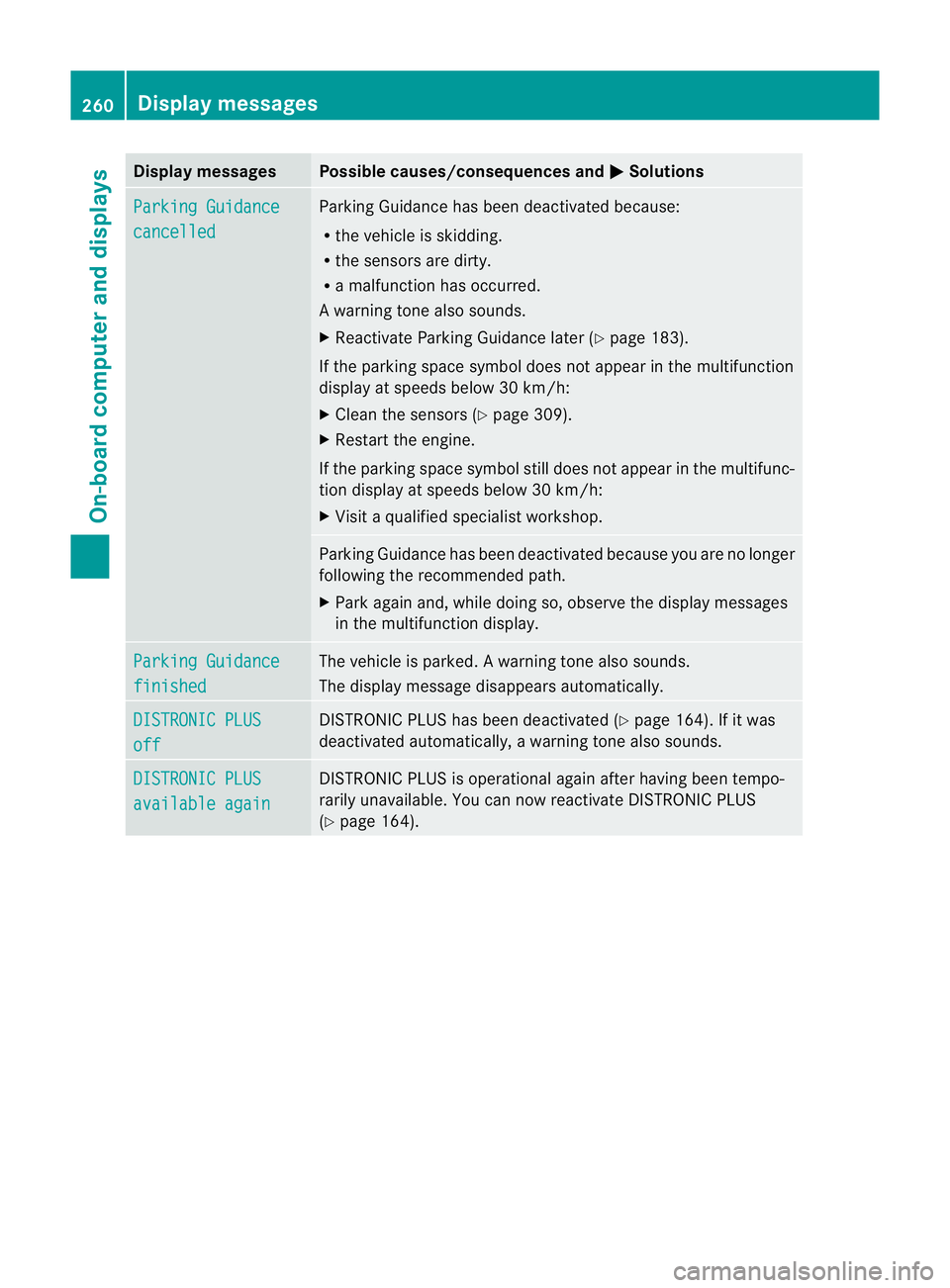
Display messages Possible causes/consequences and
M Solutions
Parking Guidance
cancelled Parking Guidance has been deactivated because:
R
the vehicle is skidding.
R the sensors are dirty.
R a malfunction has occurred.
Aw arning tone also sounds.
X Reactivate Parking Guidance late r(Y page 183).
If the parking space symbol does not appear in the multifunction
display at speeds below 30 km/h:
X Clean the sensors (Y page 309).
X Restart the engine.
If the parking space symbol still does not appear in the multifunc-
tion display at speeds below 30 km/h:
X Visit a qualified specialist workshop. Parking Guidance has been deactivated because you are no longer
following the recommended path.
X
Park again and, while doing so, observe the display messages
in the multifunction display. Parking Guidance
finished The vehicle is parked.
Awarning tone also sounds.
The display message disappears automatically. DISTRONIC PLUS
off DISTRONIC PLU
Shas been deactivated (Y page 164). If it was
deactivated automatically, a warning tone also sounds. DISTRONIC PLUS
available again DISTRONIC PLU
Sis operational againa fter having beentempo-
rarily unavailable. You can now reactivate DISTRONIC PLUS
(Y page 164). 260
Display messagesOn-board computer and displays
Page 264 of 373
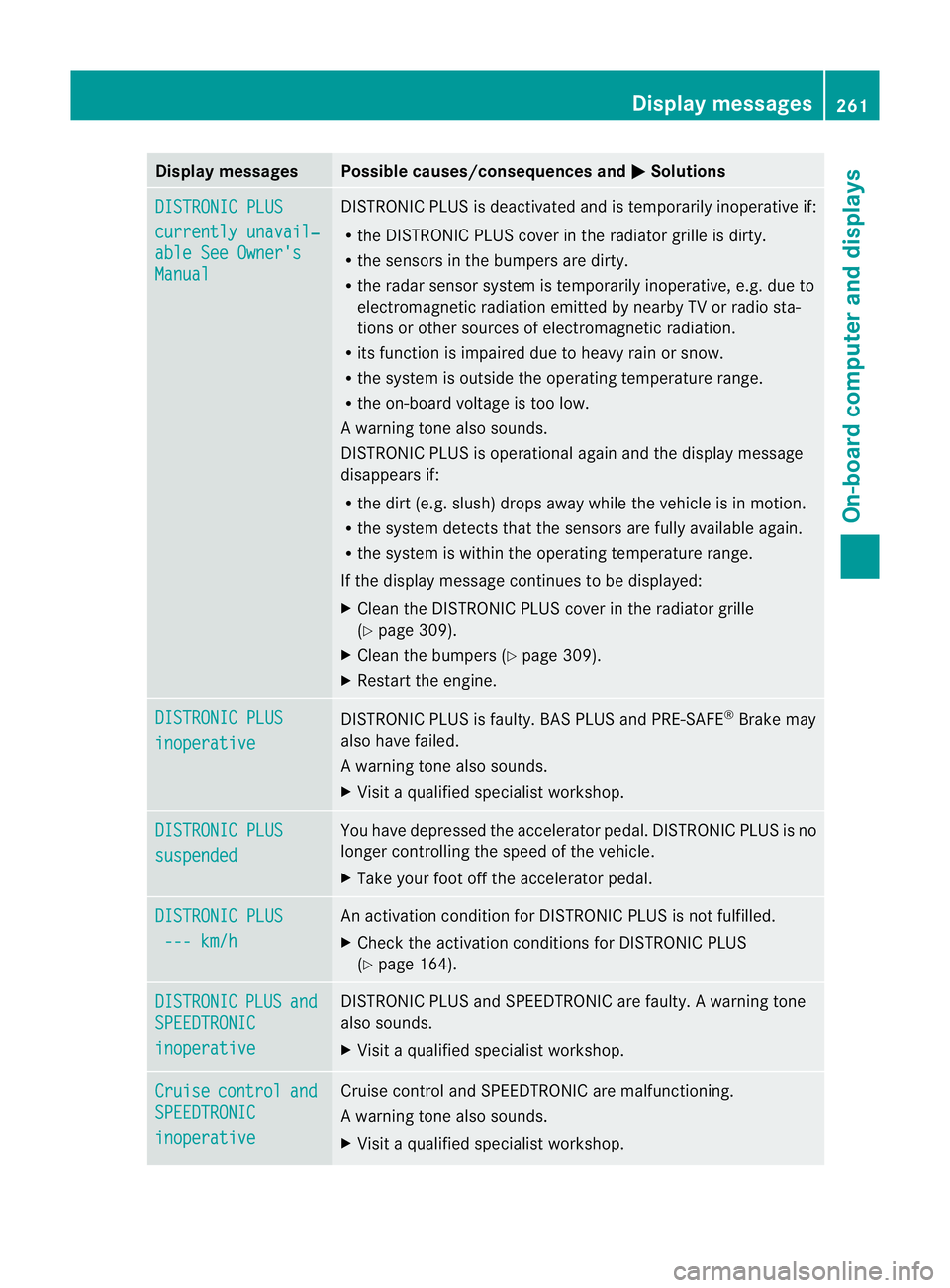
Display messages Possible causes/consequences and
M Solutions
DISTRONIC PLUS
currently unavail‐
able See Owner's
Manual DISTRONIC PLU
Sis deactivated and is temporarily inoperative if:
R the DISTRONIC PLUS cover in the radiator grille is dirty.
R the sensors in the bumpers are dirty.
R the radar sensor system is temporarily inoperative, e.g. due to
electromagnetic radiation emitted by nearby TV or radio sta-
tions or other sources of electromagnetic radiation.
R its function is impaired due to heavy rain or snow.
R the system is outside the operating temperature range.
R the on-board voltage is too low.
Aw arning tone also sounds.
DISTRONIC PLU Sis operational againa nd the display message
disappears if:
R the dirt (e.g. slush) drops away while the vehicle is in motion.
R the system detects tha tthe sensors are fully available again.
R the system is within the operating temperature range.
If the display message continues to be displayed:
X Clean the DISTRONIC PLUS cover in the radiator grille
(Y page 309).
X Cleant he bumpers (Y page 309).
X Restart the engine. DISTRONIC PLUS
inoperative DISTRONIC PLUS is faulty. BAS PLUS and PRE-SAFE
®
Brake may
also have failed.
Aw arning tone also sounds.
X Visi taqualified specialist workshop. DISTRONIC PLUS
suspended You have depressed the accelerator pedal. DISTRONIC PLUS is no
longer controlling the speed of the vehicle.
X
Take your foot off the accelerator pedal. DISTRONIC PLUS
--- km/h An activation condition for DISTRONIC PLUS is not fulfilled.
X
Check the activation conditions for DISTRONIC PLUS
(Y page 164). DISTRONIC PLUS and
SPEEDTRONIC
inoperative DISTRONIC PLUS and SPEEDTRONIC are faulty. A warning tone
also sounds.
X
Visit a qualified specialist workshop. Cruise control and
SPEEDTRONIC
inoperative Cruise control and SPEEDTRONIC are malfunctioning.
Aw
arning tone also sounds.
X Visi taqualified specialist workshop. Display messages
261On-board computer and displays Z
Page 266 of 373
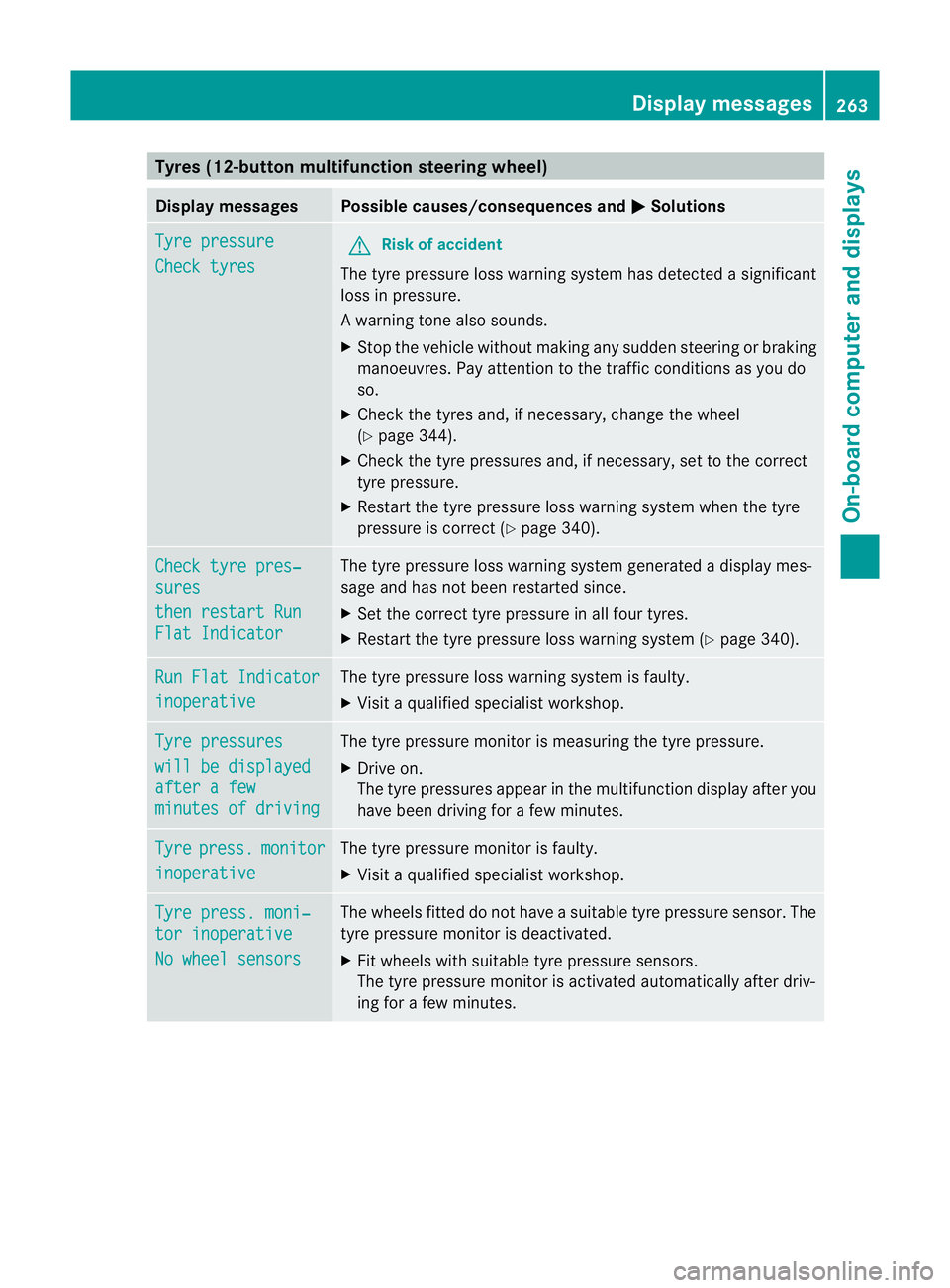
Tyres (12-button multifunction steering wheel)
Display messages Possible causes/consequences and
M Solutions
Tyre pressure
Check tyres G
Ris
kofa ccident
The tyre pressure loss warning system has detected a significant
loss in pressure.
Aw arning tone also sounds.
X Stop the vehicle without making any sudde nsteering or braking
manoeuvres .Pay attentio nto the traffic conditions as you do
so.
X Check the tyres and, if necessary, change the wheel
(Y page 344).
X Check the tyre pressures and, if necessary, set to the correct
tyre pressure.
X Restart the tyre pressure loss warning system when the tyre
pressure is correc t(Ypage 340). Check tyre pres‐
sures
then restart Run
Flat Indicator The tyre pressure loss warning system generated a display mes-
sage and has not been restarted since.
X Set the correct tyre pressure in all four tyres.
X Restart the tyre pressure loss warning system (Y page 340).Run Flat Indicator
inoperative The tyre pressure loss warning system is faulty.
X
Visit a qualified specialist workshop. Tyre pressures
will be displayed
after a few
minutes of driving The tyre pressure monitor is measuring the tyre pressure.
X
Drive on.
The tyre pressures appear in the multifunction display after you
have been driving for a few minutes. Tyre press. monitor
inoperative The tyre pressure monitor is faulty.
X
Visit a qualified specialist workshop. Tyre press. moni‐
tor inoperative
No wheel sensors The wheels fitted do not have a suitable tyre pressure sensor. The
tyre pressure monitor is deactivated.
X
Fit wheels with suitable tyre pressure sensors.
The tyre pressure monitor is activated automatically after driv-
ing for a few minutes. Display messages
263On-board computer and displays Z