alarm MERCEDES-BENZ C-CLASS COUPE 2011 Owners Manual
[x] Cancel search | Manufacturer: MERCEDES-BENZ, Model Year: 2011, Model line: C-CLASS COUPE, Model: MERCEDES-BENZ C-CLASS COUPE 2011Pages: 373, PDF Size: 8.17 MB
Page 7 of 373
1, 2, 3 ...
12-button multifunction steering
wheel Operating the on-board computer .211
Overview .......................................... 39
12 Vsocket
see Sockets
4-button multifunction steering
wheel
Overview .......................................... 38
4-button multifunction steering
wheel
Operating the on-board computer .207 A
ABS (Anti-lock Braking System) Display message (12-button mul-
tifunctio nsteering wheel) ..............238
Display message (4-button multi-
function steering wheel) ................234
Function/notes ................................ 65
Important safety notes ....................65
Warning lamp ................................. 275
Activating/deactivating air-recir-
culation mode .................................... 127
Activating/deactivating cooling
with air dehumidification .................124
Active Blin dSpot Assist
Display message (12-button mul-
tifunction steering wheel) ..............259
Function/notes ............................. 194
Switching on/off (on-board com-
puter, 12-button multifunction
steering wheel) .............................. 222
Towing atrailer .............................. 197
Active Driving Assistance package .194
Active Lane Keeping Assist Display message (12-button mul-
tifunctio nsteering wheel) ..............258
Function/informatio n.................... 197
Switching on/off (on-board com-
puter, 12-button multifunction
steering wheel) .............................. 222
Towing atrailer .............................. 199
Active light function .........................111Active Service Syste
mPLUS
see ASSYS TPLUS service interval
display
ADAPTIVE BRAKE .................................71
Adaptive brake lamps .........................67
Adaptive Highbeam Assist Function/notes ............................. 112
Adaptive Main-beam Assist
Display message (12-button mul-
tifunctio nsteering wheel) ..............251
Adaptive Main-Beam Assist
Switching on/off (on-board com-
puter) ............................................. 225
Additional speedometer ...................223
Additives (engine oil) ........................356
Adjusting the headlamp range .........110
Airbags Activation ......................................... 45
Front airbag (driver, front
passenger )....................................... 48
Important safety guidelines .............46
Kneebag .......................................... .48
Pelvis airbag .................................... 49
Sidebag ............................................ 48
Windowba g...................................... 49
Air-conditioning system
see Climate control
Airf ilter
Display message (12-button mul-
tifunction steering wheel) ..............255
Display message (4-button multi-
function steering wheel) ................253
Air pressure
see Tyre pressure
Airv ents
Glove compartmen t....................... 133
Important safety notes ..................132
Rea r............................................... 133
Setting ........................................... 132
Setting the centre air vents ...........133
Setting the side air vents ...............133
Alarm system
see ATA (Anti-Theft Alarm system)
Alertness Assistant
see ATTENTION ASSIST
AMGMenu (on-board computer) ....... 229
Anti-glare film .................................... 2974
Index
Page 8 of 373
Anti-lock Braking System
see ABS (Anti-lock Braking System)
Anti-Theft Alarm system
see ATA (Anti-Theft Alarm system)
Anti-theft system
Immobilise r...................................... 73
Aquaplaning ....................................... 161
Ashtray ............................................... 290
ASSYST PLUS see ASSYST PLUS service interval
display
ASSYST PLUS service interval dis-
play
Displaying service messages .........305
Hiding service messages ...............305
Notes ............................................. 305
Service messages ..........................305
ATA (Anti-Theft Alarm system)
Activating/deactivating ...................73
ATA (Anti-Theft Alarm system) .........73
Function .......................................... .73
Interior motion sensor .....................74
Switching off the alarm ....................73
Tow-away protection ........................ 73
ATTENTIO NASSIST
Activating/deactivating .................222
Display message (12-button mul-
tifunctio nsteering wheel) ..............256
Function/notes ............................. 188
Audio DVD (12-button multifunc-
tion steering wheel) ..........................218
Audio menu (on-board computer,
12-button multifunction steering
wheel) ................................................ .217
AUTO lights Display message (12-button mul-
tifunctio nsteering wheel) ..............250
see Lights
Automatic engine start (ECO start/
stop function) .................................... 142
Automatic engine switch-off (ECO
start/stop function) ..........................141
Automatic headlamp mode ..............109
Automatic transmission Accelerator pedal position .............147
Automatic drive program ...............148
Changing gea r............................... 146Display message (4-button multi-
function steering wheel)
................265
Driving tips .................................... 147
Emergency running mode ..............152
Kickdow n....................................... 147
Manual drive program ....................150
Problem (fault) ............................... 152
Progra mselector button ................147
Pulling away ................................... 140
Releasing the parking lock man-
ually ............................................... 152
Selector leve r................................ 146
Shift range s................................... 149
Starting the engine ........................139
Steering wheel gearshif tpaddles ...148
Trailer towing ................................. 147
Transmission position displa y........ 146
Transmissio npositions .................. 146
Automatic transmission emer-
gency running mode .........................152
Automatic transmissions Display message (12-button mul-
tifunctio nsteering wheel) ..............267
Auxiliary heating
Activating/deactivating .................128
Activating/deactivating (on the
centre console ).............................. 128
Important safety notes ..................128
Problem (display message) ............132
Remote control .............................. 129
Setting (on-board computer, 12-
button multifunction steering
wheel) ............................................ 227
Setting the departur etime ............ .130
Auxiliary ventilation
Activating/deactivating .................128
Activating/deactivating (on the
centre console ).............................. 128
Problem (display message) ............132
Remote control .............................. 129
Axle load, permissible (traile rtow-
ing) ...................................................... 363 Index
5
Page 23 of 373
Speed Limit Assist
Activating/deactivating the warn-
ing function .................................... 220
Displaying ...................................... 220
Display message (12-button mul-
tifunctio nsteering wheel) ..............257
Display message in the multifunc-
tion displa y.................................... 189
Important safety notes ..................189
Speedometer
Activating/deactivating the addi-
tional speedometer ........................223
Digita l............................................ 215
In the instrument cluster (12-but-
ton multifunctio nsteering wheel) ....35
In the instrument cluster (4-but-
ton multifunctio nsteering wheel) ....32
Segments ...................................... 211
Selecting the unit of measure-
ment .............................................. 223
see Instrument cluster
SPEEDTRONIC
Deactivating variabl e..................... 175
Display message (12-button mul-
tifunctio nsteering wheel) ..............261
Display message (4-button multi-
function steering wheel) ................256
Function/notes ............................. 173
Important safety notes ..................173
LIM indicator lamp .........................174
Permanent ..................................... 176
Selecting ........................................ 174
Storing the current spee d.............. 175
Variabl e......................................... 174
SPORT handling mode
Activating/deactivating (AMG
vehicles) .......................................... 69
Warning lamp ................................. 278
SRS (Supplemental Restraint Sys-
tem)
Display message (12-button mul-
tifunctio nsteering wheel) ..............243
Display message (4-button multi-
function steering wheel) ................237
Introduction ..................................... 45
Warning lamp ................................. 279
Warning lamp (function) ................... 45
Starting (engine) ................................ 138 Station
see Radio
Steering
Display message (12-button mul-
tifunctio nsteering wheel) ..............269
Display message (4-button multi-
function steering wheel) ................267
Steering wheel
Adjusting (electrically). ..................102
Adjusting (manually). .....................101
Buttons (12-button multifunction
steering wheel) .............................. 211
Buttons (4-button multifunction
steering wheel) .............................. 207
Gearshift paddles ........................... 148
Important safety notes ..................101
Storing settings (memory func-
tion) ............................................... 105
Steering wheel gearshift paddles ....148
Stopwatch (RACETIMER) ................... 229
Stowage compartments Armrest (under) ............................. 285
Centre console .............................. 285
Cuph older..................................... 289
Glove compartment .......................285
Important safety information .........284
Luggage net ................................... 285
Stowage well beneath the boot
floor .................................................... 288
Summer opening see Convenience opening feature
Summer tyres .................................... 337
Sun visor ............................................ 290
Supplement Restraint System see SRS (Supplemental Restraint
System)
Surround lighting (12-button mul-
tifunction steering wheel) ................225
Switching off the alarm (ATA) ............73 20
Index
Page 76 of 373
Vehicles with COMAND and navigation sys-
tem: the radar sensor system is switched off
automatically in the vicinity of radio telescope
facilities (Y page 363).
Vehicles without COMAND and a navigation
system and vehicles for Australia:t he radar
sensor system and on-board computer must
be switched off in the vicinity of radio tele-
scope facilities (Y page 226).
For PRE-SAFE ®
Brake to assist you when driv-
ing, the radar sensor system must be
switched on (Y page 226) and be opera-
tional.
Following damage to the front end of the vehi-
cle, have the configuration and operation of
the radar sensors checked at a qualified spe-
cialist workshop. This also applies to colli-
sions at slow speeds where there is no visible
damage to the front of the vehicle. Anti-theft systems
Immobiliser
The immobiliser prevents your vehicle from
being started without the correct key.
X To activate with the key: remove the key
from the ignition lock.
X To activate with KEYLESS-GO: switch the
ignition off and open the driver's door.
X To deactivate: switch on the ignition.
i The immobiliser is always deactivated
when you start the engine. ATA (Anti-Theft Alarm system)
Av isual and audible alarm is triggered if the
alarm system is primed and you open:
R a door
R the vehicle with the emergency key ele-
ment
R the boot lid
R the bonnet The alarm is not switched off, even if you
close the open door that has triggered it, for
example.
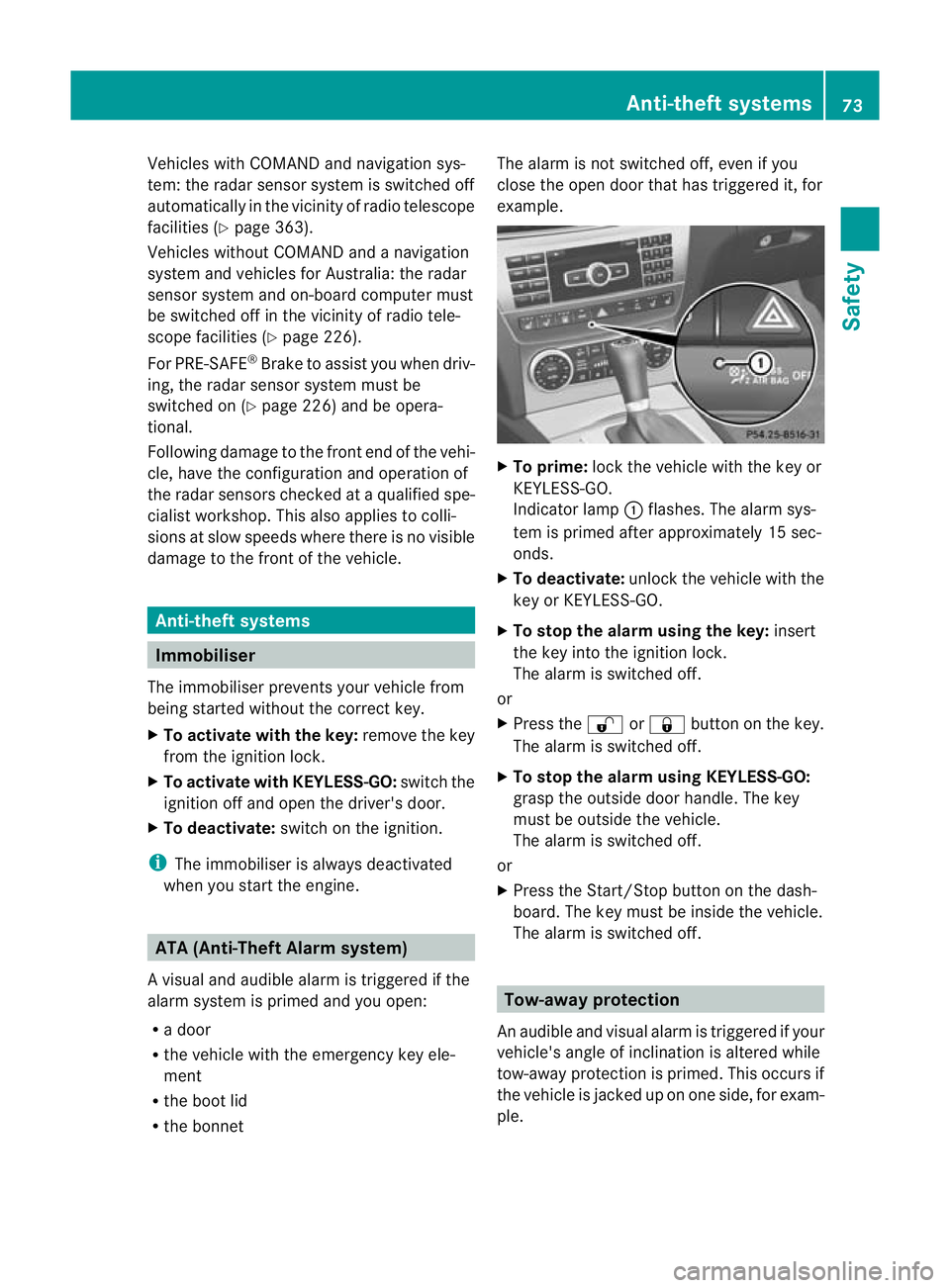
X
To prime: lock the vehicle with the key or
KEYLESS-GO.
Indicator lamp :flashes .The alarm sys-
tem is primed after approximately 15 sec-
onds.
X To deactivate: unlock the vehicle with the
key or KEYLESS-GO.
X To stop the alarm using the key: insert
the key into the ignition lock.
The alarm is switched off.
or
X Press the %or& button on the key.
The alarm is switched off.
X To stop the alarm using KEYLESS-GO:
grasp the outside door handle. The key
must be outside the vehicle.
The alarm is switched off.
or
X Press the Start/Stop button on the dash-
board. The key must be inside the vehicle.
The alarm is switched off. Tow-away protection
An audible and visual alarm is triggered if your
vehicle's angle of inclination is altered while
tow-away protection is primed. This occurs if
the vehicle is jacked up on one side, for exam-
ple. Anti-theft systems
73Safety Z
Page 77 of 373
X
To prime: lock the vehicle with the key or
KEYLESS-GO.
Tow-away protection is primed after
approximately 30 seconds.
X To deactivate: unlock the vehicle with the
key or KEYLESS-GO.
Tow-away protection is deactivated auto-
matically.
To prevent a false alarm, deactivate tow-away
protection manually if your vehicle:
R is being transported
R is being loaded onto a ferry or car trans-
porter, for example
R is parked on a movable surface, e.g .ina
split-level garage
Deactivating:
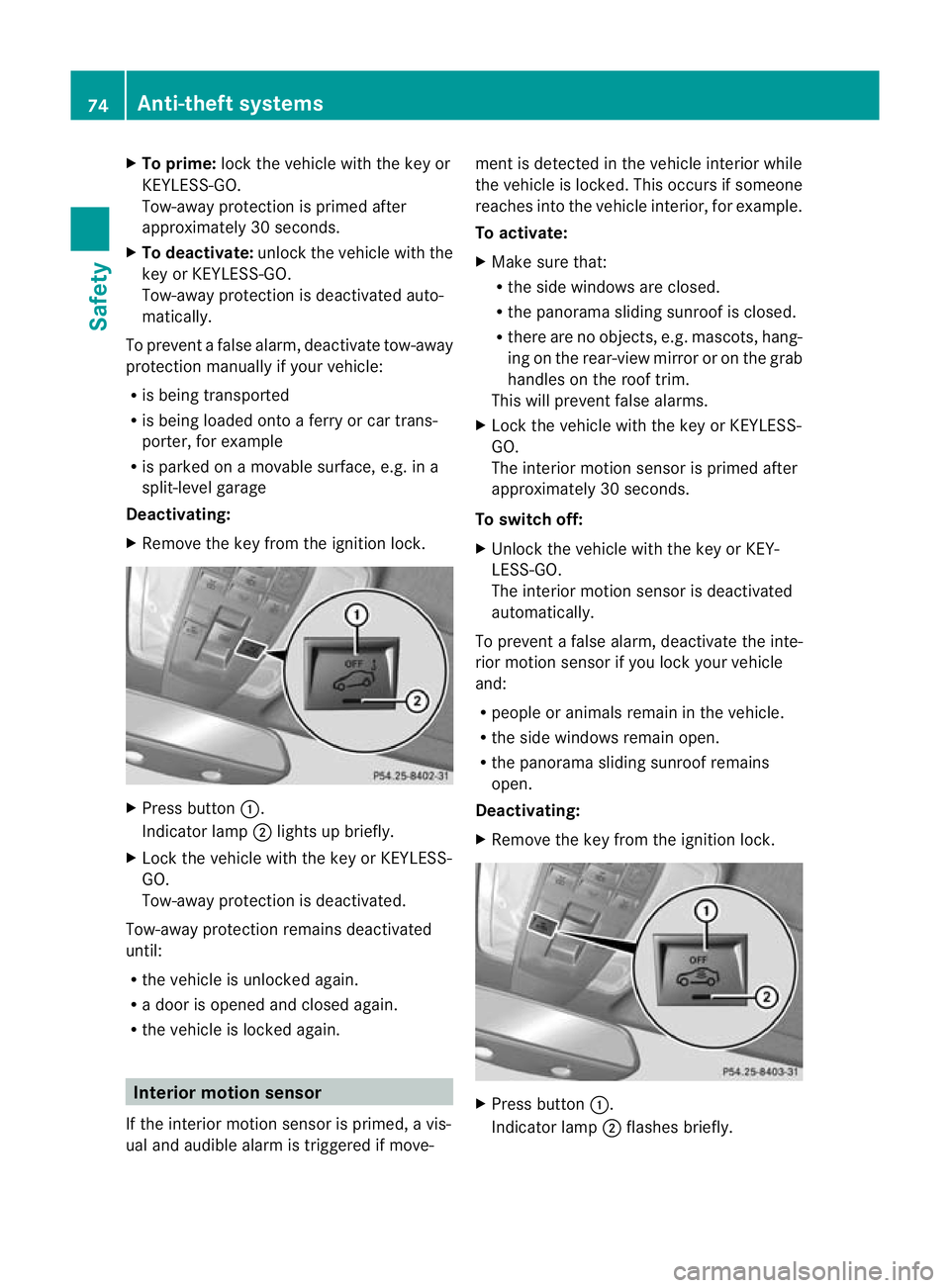
X Remove the key from the ignition lock. X
Press button :.
Indicator lamp ;lights up briefly.
X Lock the vehicle with the key or KEYLESS-
GO.
Tow-away protection is deactivated.
Tow-away protection remains deactivated
until:
R the vehicle is unlocked again.
R a door is opened and closed again.
R the vehicle is locked again. Interior motion sensor
If the interior motion sensor is primed, a vis-
ual and audible alarm is triggered if move- ment is detected in the vehicle interior while
the vehicle is locked. This occurs if someone
reaches into the vehicle interior, for example.
To activate:
X
Make sure that:
R
the side windows are closed.
R the panorama sliding sunroof is closed.
R there are no objects, e.g. mascots, hang-
ing on the rear-view mirror or on the grab
handles on the roof trim.
This will prevent false alarms.
X Lock the vehicle with the key or KEYLESS-
GO.
The interior motion sensor is primed after
approximately 30 seconds.
To switch off:
X Unlock the vehicle with the key or KEY-
LESS-GO.
The interior motion sensor is deactivated
automatically.
To prevent a false alarm, deactivate the inte-
rior motion sensor if you lock your vehicle
and:
R people or animals remain in the vehicle.
R the side windows remain open.
R the panorama sliding sunroof remains
open.
Deactivating:
X Remove the key from the ignition lock. X
Press button :.
Indicator lamp ;flashes briefly. 74
Anti-theft systemsSafety
Page 83 of 373
Restoring the factory settings
X Press the %and& buttons simulta-
neously for approximately six seconds until
the battery check lamp flashes twice. Emergenc
ykey element
General notes If the vehicle can no longer be locked or
unlocked with the key, use the emergency
key element.
If you use the emergency key element to
unlock and open the driver's door or the boot
lid, the anti-thef talarm system will be trig-
gered (Y page 73).
There are several ways to tur noff the alarm:
X To turn the alarm off with the key: press
the % or& button on the key.
or
X Insert the key into the ignition lock.
or
X To deactivate the alarm with KEYLESS-
GO: press the Start/Stop button in the igni-
tion lock. The key must be in the vehicle.
or
X Lock or unlock the vehicle using KEYLESS-
GO. The key must be outside the vehicle.
If you unlock the vehicle using the emergency
key element, the fuel filler flap will not be
unlocked automatically.
X To unlock the fuel filler flap: insert the
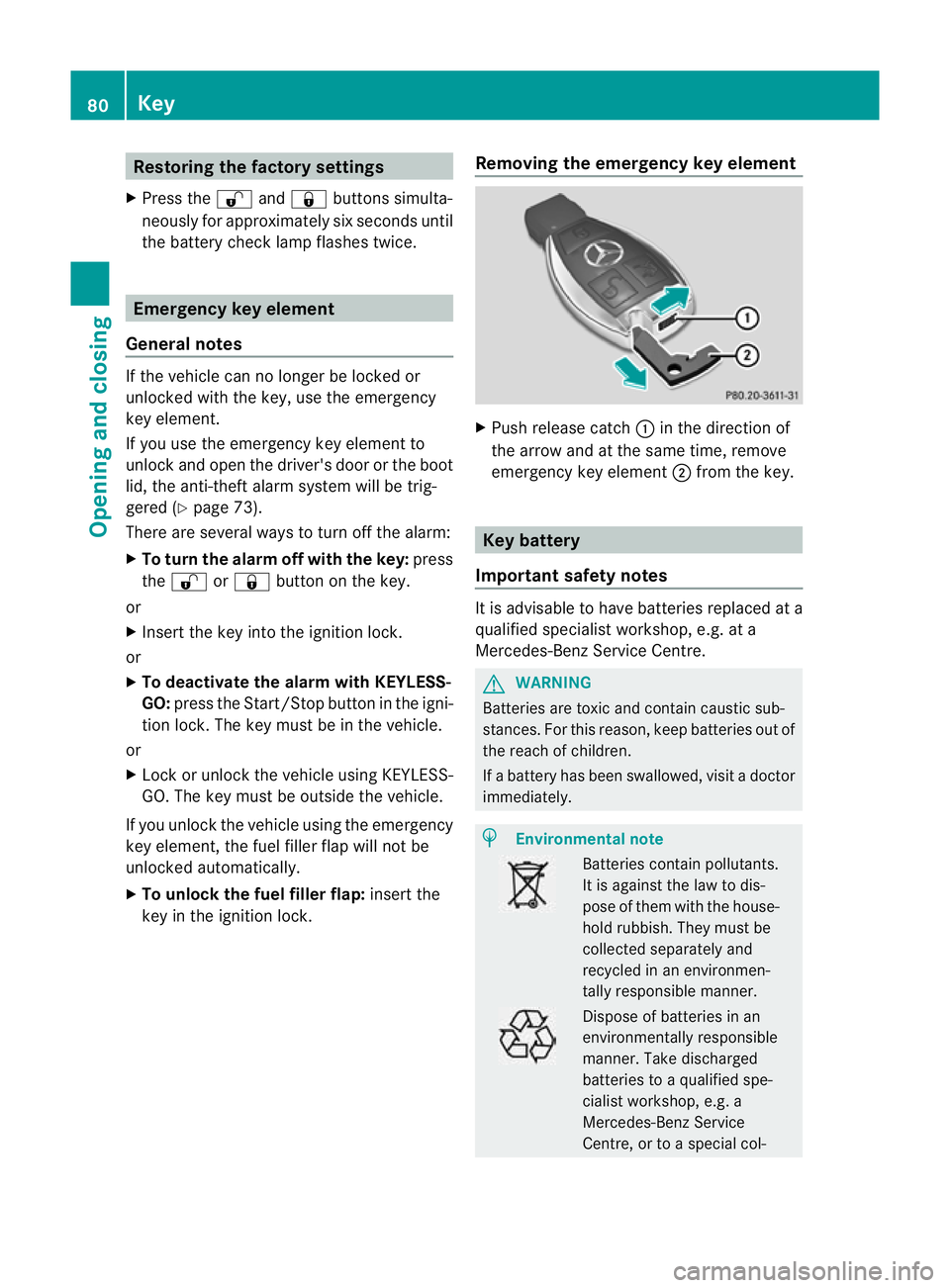
key in the ignition lock. Removing the emergency key element X
Push release catch :in the direction of
the arrow and at the same time, remove
emergency key element ;from the key. Key battery
Important safety notes It is advisable to have batteries replaced at a
qualified specialist workshop, e.g. at a
Mercedes-Benz Service Centre.
G
WARNING
Batteries are toxic and contain caustic sub-
stances. For this reason, keep batteries out of
the reach of children.
If a battery has been swallowed, visi tadoctor
immediately. H
Environmental note Batteries contain pollutants.
It is against the law to dis-
pose of them with the house-
hold rubbish. They must be
collected separately and
recycled in an environmen-
tally responsible manner. Dispose of batteries in an
environmentally responsible
manner. Take discharged
batteries to a qualified spe-
cialist workshop, e.g. a
Mercedes-Benz Service
Centre, or to a special col-80
KeyOpening and closing
Page 88 of 373
Unlocking the driver's door (emer-
gency key element)
If the vehicle can no longer be unlocked with
the key, use the emergency key element.
If you use the emergency key element to
unlock and open the driver's door, the anti-
thef talarm system will be triggered
(Y page 73).
X Take the emergency key elemen tout of the
key (Y page 80).
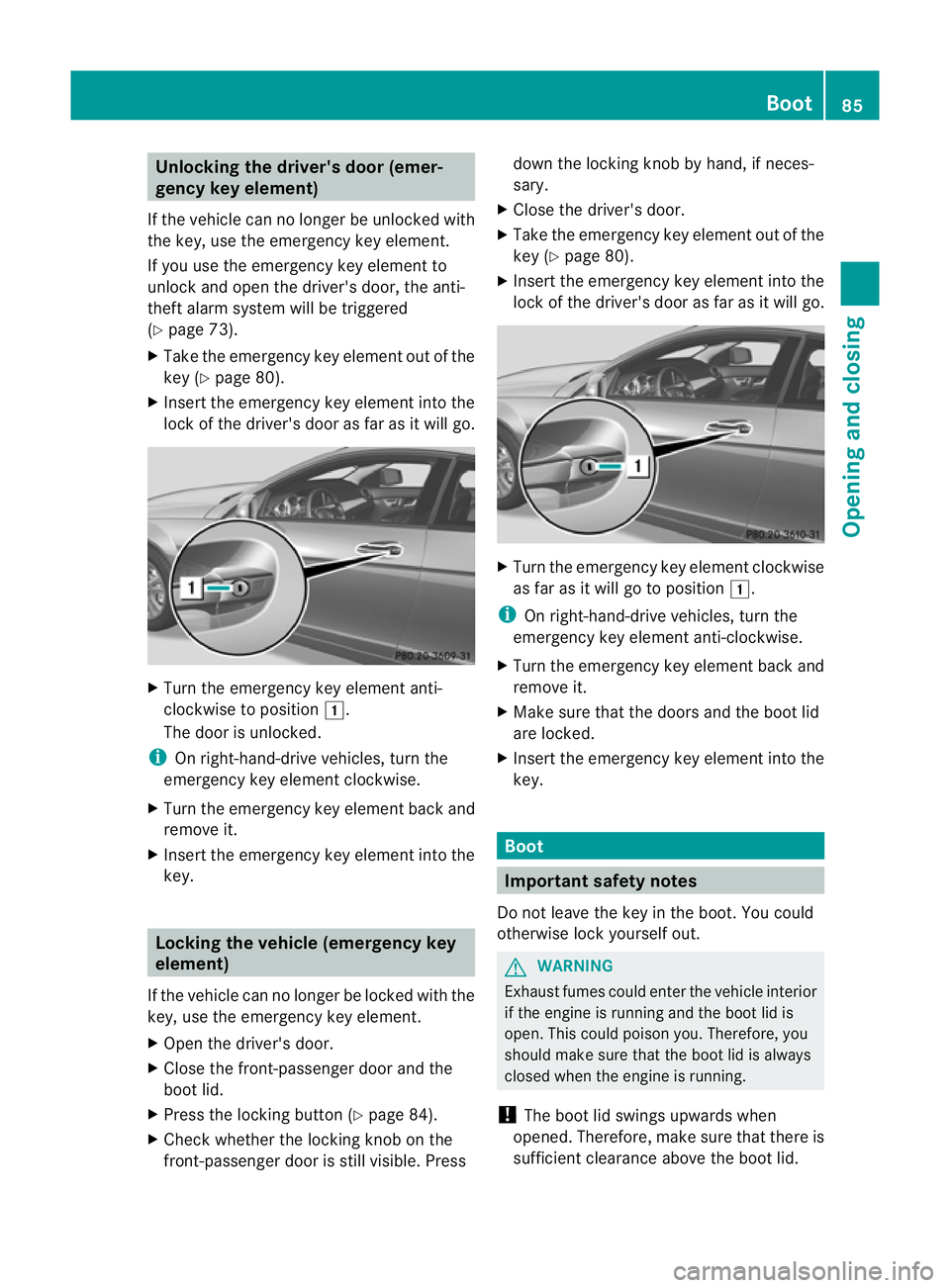
X Inser tthe emergency key element into the
lock of the driver's door as far as it will go. X
Turn the emergency key element anti-
clockwise to position 1.
The door is unlocked.
i On right-hand-drive vehicles, turn the
emergency key element clockwise.
X Turn the emergency key element back and
remove it.
X Insert the emergency key element into the
key. Locking the vehicle (emergency key
element)
If the vehicle can no longer be locked with the
key, use the emergency key element.
X Open the driver's door.
X Close the front-passenger door and the
boot lid.
X Press the locking button (Y page 84).
X Check whether the locking knob on the
front-passenger door is still visible. Press down the locking knob by hand, if neces-
sary.
X Close the driver's door.
X Take the emergency key element out of the
key (Y page 80).
X Insert the emergency key element into the
lock of the driver's door as far as it will go. X
Turn the emergency key element clockwise
as far as it will go to position 1.
i On right-hand-drive vehicles, turn the
emergency key element anti-clockwise.
X Turn the emergency key element back and
remove it.
X Make sure that the doors and the boot lid
are locked.
X Insert the emergency key element into the
key. Boot
Important safety notes
Do not leave the key in the boot. You could
otherwise lock yourself out. G
WARNING
Exhaust fumes could enter the vehicle interior
if the engine is running and the boot lid is
open. This could poison you. Therefore, you
should make sure that the boot lid is always
closed when the engine is running.
! The boot lid swings upwards when
opened. Therefore, make sure that there is
sufficient clearance above the boot lid. Boot
85Opening and closing Z
Page 90 of 373
X
Press and hold the Fbutton on the key
until the boot lid opens.
or
X If the boot is unlocked, pull on the boot lid
handle and let it go again immediately. Opening automatically from inside
You can open the boot lid from the driver's
seat when the vehicle is stationary and
unlocked. X
To open: pull remote operating switch for
boot lid :until the boot lid opens. Locking the boot separately
In some countries, you can lock the boot sep-
arately. If you then unlock the vehicle cen-
trally, the boot remains locked and cannot be
opened.
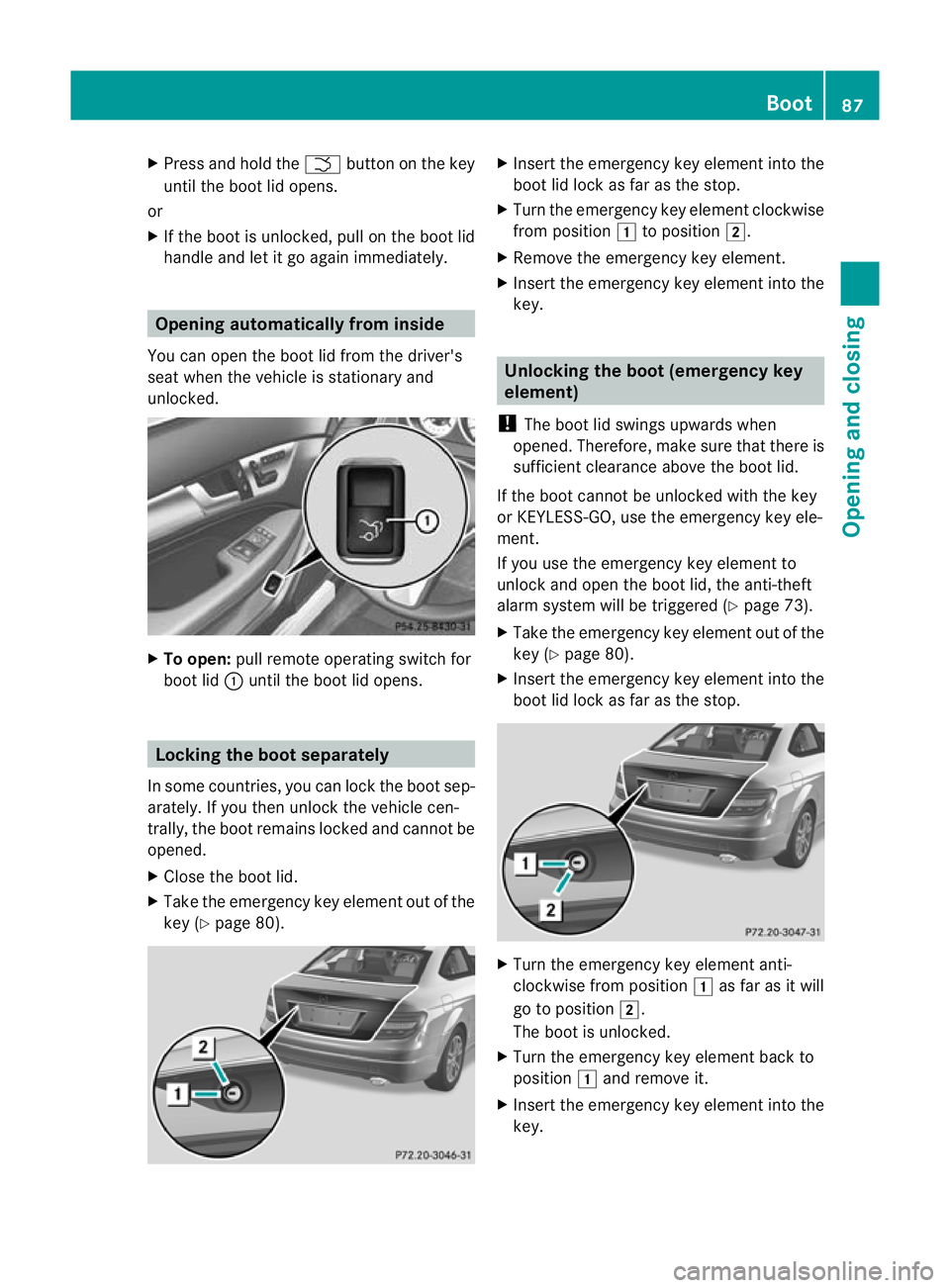
X Close the boot lid.
X Take the emergency key element out of the
key (Y page 80). X
Inser tthe emergency key element into the
boot lid lock as far as the stop.
X Turn the emergency key element clockwise
from position 1to position 2.
X Remove the emergency key element.
X Insert the emergency key element into the
key. Unlocking the boot (emergency key
element)
! The boot lid swings upwards when
opened. Therefore, make sure that there is
sufficient clearance above the boot lid.
If the boot cannot be unlocked with the key
or KEYLESS-GO, use the emergency key ele-
ment.
If you use the emergency key element to
unlock and open the boot lid, the anti-theft
alarm system will be triggered (Y page 73).
X Take the emergency key element out of the
key (Y page 80).
X Insert the emergency key element into the
boot lid lock as far as the stop. X
Turn the emergency key element anti-
clockwise from position 1as far as it will
go to position 2.
The boot is unlocked.
X Turn the emergency key element back to
position 1and remove it.
X Insert the emergency key element into the
key. Boot
87Opening and closing Z
Page 269 of 373
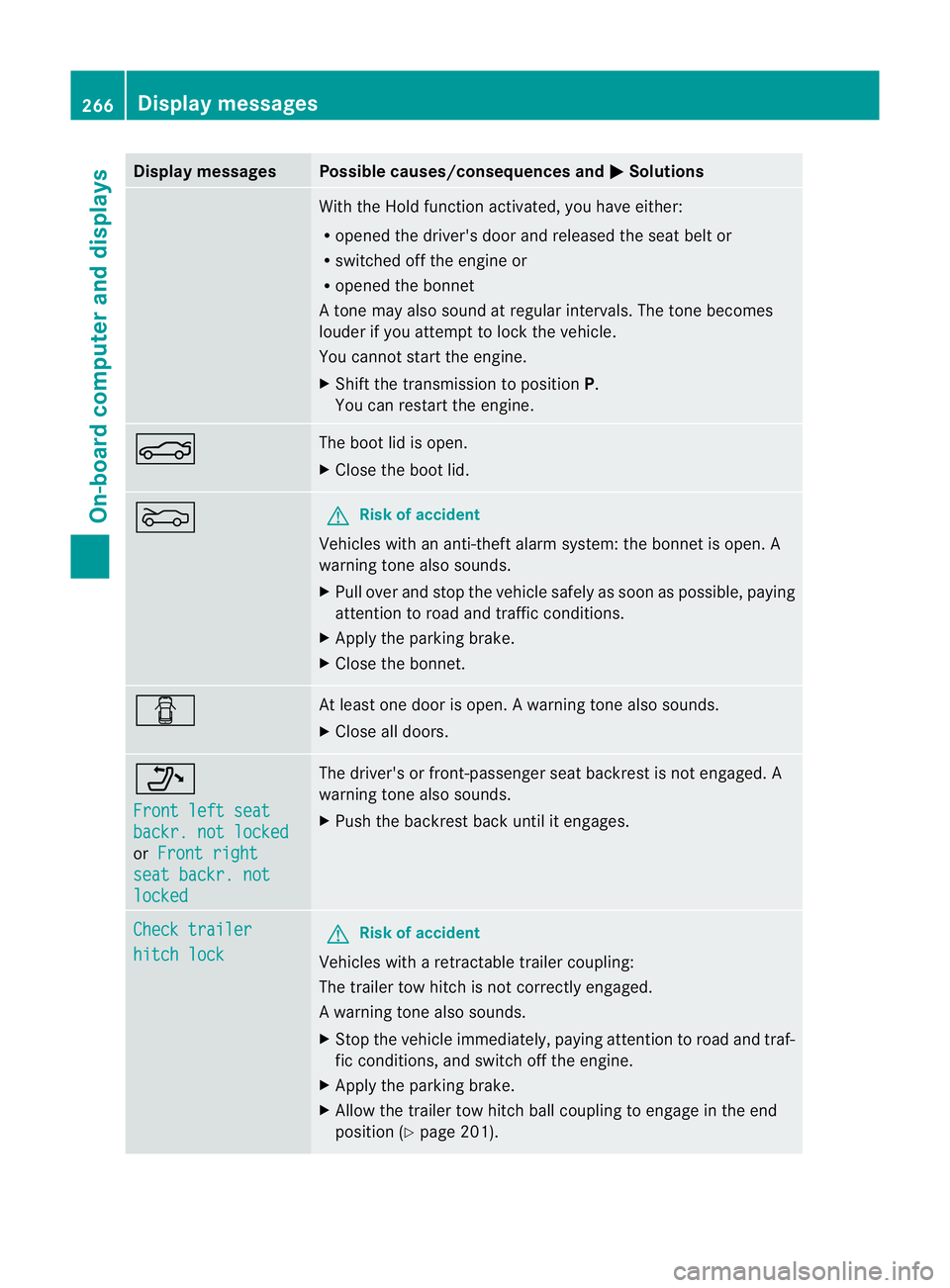
Display messages Possible causes/consequences and
M Solutions
With the Hold function activated, you have either:
R
opened the driver's doo rand released the sea tbelt or
R switched off the engine or
R opened the bonnet
At one may also sound at regular intervals. The tone becomes
louder if you attempt to lock the vehicle.
You cannot start the engine.
X Shift the transmission to position P.
You can restart the engine. N The boot lid is open.
X
Close the boot lid. M G
Risk of accident
Vehicles with an anti-theft alarm system: the bonnet is open. A
warning tone also sounds.
X Pull over and stop the vehicle safely as soon as possible, paying
attention to road and traffic conditions.
X Apply the parking brake.
X Close the bonnet. C At least one door is open.
Awarning tone also sounds.
X Close all doors. _
Front left seat
backr. not locked
or
Front right seat backr. not
locked The driver's or front-passenger seat backres
tis not engaged. A
warning tone also sounds.
X Push the backrest back until it engages. Check trailer
hitch lock G
Risk of accident
Vehicles with a retractable trailer coupling:
The trailer tow hitch is not correctly engaged.
Aw arning tone also sounds.
X Stop the vehicle immediately, paying attentio ntoroad and traf-
fic conditions, and switch off the engine.
X Apply the parking brake.
X Allow the trailer tow hitch ball coupling to engage in the end
position (Y page 201).266
Display messagesOn-board computer and displays