cooling MERCEDES-BENZ C-Class COUPE 2012 CL204 Owner's Manual
[x] Cancel search | Manufacturer: MERCEDES-BENZ, Model Year: 2012, Model line: C-Class COUPE, Model: MERCEDES-BENZ C-Class COUPE 2012 CL204Pages: 336, PDF Size: 12.67 MB
Page 6 of 336
1, 2, 3 ...
115 V socket ...................................... 249
12 V socket see Sockets
A
ABS (Anti-lock Braking System) Display message ............................ 202
Function/notes ................................ 57
Important safety notes ....................57
Warning lamp ................................. 230
Activating/deactivating cooling
with air dehumidification ................. 117
Active Blind Spot Assist Activating/deactivating (on-
board computer) ............................ 193
Function/information ....................174
Active Driving Assistance package . 174
Active Lane Keeping Assist Activating/deactivating (on-
board computer) ............................ 193
Display message ............................ 217
Function/information ....................177
Active Light System
Display message ............................ 212
Active service system PLUS
see ASSYST PLUS service interval
display
ADAPTIVE BRAKE ................................. 62
Adaptive Highbeam Assist Display message ............................ 213
Function/notes ............................. 104
Switching on/off (on-board
computer) ...................................... 195
Additives (engine oil) ........................ 330
Air bags Display message ............................ 209
Front air bag (driver, front
passenger) ....................................... 39
Important safety notes ....................38
Knee bag .......................................... 40
PASSENGER AIR BAG OFF
indicator lamp .................................. 42
Pelvis air bag ................................... 41
Safety guidelines ............................. 37
Side impact air bag ..........................40
Window curtain air bag ....................42
Air-conditioning system
see Climate control
Air pressure
see Tire pressure
Air vents
Glove box ....................................... 121
Important safety notes ..................120
Rear ............................................... 122
Setting ........................................... 120
Setting the center air vents ...........121
Setting the side air vents ...............121
Alarm system
see ATA (Anti-Theft Alarm system)
Alertness Assistant
see ATTENTION ASSIST
AMG menu (on-board computer) ..... 198
Anti-lock Braking System see ABS (Anti-lock Braking System)
Anti-Theft Alarm system
see ATA (Anti-Theft Alarm system)
Ashtray ............................................... 248
Assistance menu (on-board
computer) .......................................... 192
ASSYST PLUS see ASSYST PLUS service interval
display
ATA (Anti-Theft Alarm system)
Activating/deactivating ...................64
Function ........................................... 64
Switching off the alarm ....................64
ATTENTION ASSIST
Activating/deactivating .................193
Display message ............................ 216
Function/notes ............................. 169
Audio menu (on-board computer) .... 189
Audio system see separate operating instructions
Authorized Mercedes-Benz Center
see Qualified specialist workshop
AUTO lights
Display message ............................ 213
see Lights
Automatic headlamp mode .............. 1024Index
Page 8 of 336
Matte finish ................................... 272
Notes ............................................. 269
Paint .............................................. 271
Plastic trim .................................... 274
Power washer ................................ 271
Rear view camera .......................... 273
Roof lining ...................................... 275
Seat belt ........................................ 275
Seat cover ..................................... 274
Sensors ......................................... 273
Steering wheel ............................... 274
Tail pipes ....................................... 273
Trim pieces .................................... 274
Washing by hand ........................... 270
Wheels ........................................... 271
Windows ........................................ 272
Wiper blades .................................. 272
Wooden trim .................................. 274
Cargo tie down rings ......................... 245
Car wash (care) ................................. 270
CD player/CD changer (on-board
computer) .......................................... 190
Cell phone see Mobile phone
Center console ..................................... 32
Central locking Automatic locking (on-board
computer) ...................................... 196
Locking/unlocking (SmartKey) ........68
Changing bulbs
Brake lamps ................................... 110
Cornering light function .................109
High-beam headlamps ...................108
Important safety notes ..................106
Low-beam headlamps ....................108
Overview of bulb types ..................107
Parking lamps ................................ 109
Reversing lamps ............................ 110
Standing lamps (front) ...................109
Children
In the vehicle ................................... 52
Restraint systems ............................ 52
Child seat
LATCH-type (ISOFIX) child seat
anchors ............................................ 54
Special seat belt retractor ...............54
Top Tether ....................................... 55
Cigarette lighter ................................ 248Climate control
Controlling automatically ...............117
Cooling with air dehumidification ..117
Defrosting the windows .................119
Defrosting the windshield ..............119
Dual-zone automatic climate
control ........................................... 115
Important safety notes ..................114
Indicator lamp ................................ 117
Maximum cooling .......................... 119
Notes on using automatic climate
control ........................................... 116
Overview of systems ......................114
Problems with cooling with air
dehumidification ............................ 117
Problem with the rear window
defroster ........................................ 120
Refrigerant ..................................... 330
Setting the air distribution .............118
Setting the airflow .........................118
Setting the air vents ......................120
Setting the temperature ................118
Switching air-recirculation mode
on/off ............................................ 120
Switching on/off ........................... 117
Switching the rear window
heating on/off ............................... 120
Switching the ZONE function on/
off .................................................. 118
Cockpit
Overview .......................................... 28
see Instrument cluster
COMAND
see separate operating instructions
Combination switch .......................... 103
Compass Calibrating ..................................... 261
Calling up ....................................... 260
Setting ........................................... 260
Consumption statistics (on-board
computer) .......................................... 187
Convenience closing feature .............. 82
Convenience opening feature ............ 82
Coolant (engine) Checking the level .........................266
Display message ............................ 213
Notes ............................................. 331
Temperature (on-board computer) . 1986Index
Page 9 of 336
Temperature gauge ........................ 182
Warning lamp ................................. 235
Cooling
see Climate control
Cornering light function
Changing bulbs .............................. 109
Display message ............................ 210
Function/notes ............................. 104
Crash-responsive emergency
lighting ............................................... 106
Cruise control Cruise control lever .......................147
Deactivating ................................... 148
Display message ............................ 221
Driving system ............................... 146
Function/notes ............................. 146
Important safety notes ..................146
LIM indicator lamp .........................147
Setting a speed .............................. 147
Storing and maintaining current
speed ............................................. 147
Cup holder
Center console .............................. 247
Important safety notes ..................246
Rear compartment .........................247
Customer Assistance Center (CAC) ... 24
Customer Relations Department ....... 24
D
Dashboard see Cockpit
Data
see Technical data
Daytime running lamps
Display message ............................ 212
Switching on/off (on-board
computer) ...................................... 195
Switching on/off (switch) ..............101
Delayed switch-off
Exterior lighting (on-board
computer) ...................................... 195
Interior lighting .............................. 196
Digital speedometer ......................... 187
Display (cleaning instructions) ........ 274
Display messages Calling up (on-board computer) .....201
Driving systems ............................. 216
Engine ............................................ 213
General notes ................................ 201
Hiding (on-board computer) ...........201
KEYLESS-GO .................................. 226
Lights ............................................. 210
Safety systems .............................. 202
Service interval display ..................268
SmartKey ....................................... 226
Tires ............................................... 221
Vehicle ........................................... 224
Distance display (on-board
computer) .......................................... 192
Distance recorder ............................. 187
see Odometer
see Trip odometer
Distance warning (warning lamp) .... 237
DISTRONIC PLUS Deactivating ................................... 156
Display message ............................ 219
Displays in the multifunction
display ........................................... 155
Driving tips .................................... 157
Function/notes ............................. 148
Important safety notes ..................148
Setting the specified minimum
distance ......................................... 155
Warning lamp ................................. 237
Doors
Automatic locking (on-board
computer) ...................................... 196
Automatic locking (switch) ............... 76
Central locking/unlocking
(SmartKey) ....................................... 68
Control panel ................................... 34
Display message ............................ 225
Emergency locking ........................... 77
Emergency unlocking .......................77
Important safety notes ....................75
Opening (from inside) ......................76
Drinking and driving ......................... 142
Drinks holder see Cup holder
Drive program
Automatic ...................................... 134
Display ........................................... 131
Manual ........................................... 135
SETUP (on-board computer) ..........198
Drive program selector ..................... 133Index7
Page 116 of 336
Useful information
i This Operator's Manual describes all
models and all standard and optional
equipment of your vehicle available at the
time of publication of the Operator's
Manual. Country-specific differences are
possible. Please note that your vehicle may
not be equipped with all features
described. This also applies to safety-
related systems and functions.
i Please read the information on qualified
specialist workshops ( Y page 23).
Overview of climate control systems
Important safety notes
GWARNING
Severe conditions (e.g. strong air pollution)
may require replacement of the filter before
its scheduled replacement interval. A clogged
filter will reduce the air volume to the interior
and the windows could fog up, impairing
visibility and endangering you and others.
Have a blocked filter replaced at a Mercedes-
Benz Center as soon as possible.
GWARNING
Follow the recommended settings for heating
and cooling given on the following pages.
Otherwise, the windows could fog up,
impairing visibility and endangering you and
others.
Automatic climate control controls the
temperature and the humidity in the vehicle
interior and filters undesirable substances
from the air.
Automatic climate control is only operational
when the engine is running. Optimum
operation is only achieved if you drive with the
side windows and panorama roof with power
tilt/sliding panel closed.
i Ventilate the vehicle for a brief period
during warm weather, e.g. using the
convenience opening feature ( Y page 82).
This will speed up the cooling process and
the desired vehicle interior temperature
will be reached more quickly.
i The integrated filter can filter out most
particles of dust and completely filters out
pollen. A clogged filter reduces the amount
of air supplied to the vehicle interior. For
this reason, you should always observe the
interval for replacing the filter, which is
specified in the Service Booklet. As it
depends on environmental conditions, e.g.
heavy air pollution, the interval may be
shorter than stated in the Service Booklet.
i It is possible that the residual heat
function may be activated automatically an
hour after the SmartKey is removed. The
vehicle is then ventilated for 30 minutes to
dry the air-conditioning system.114Overview of climate control systemsClimate control
Page 117 of 336
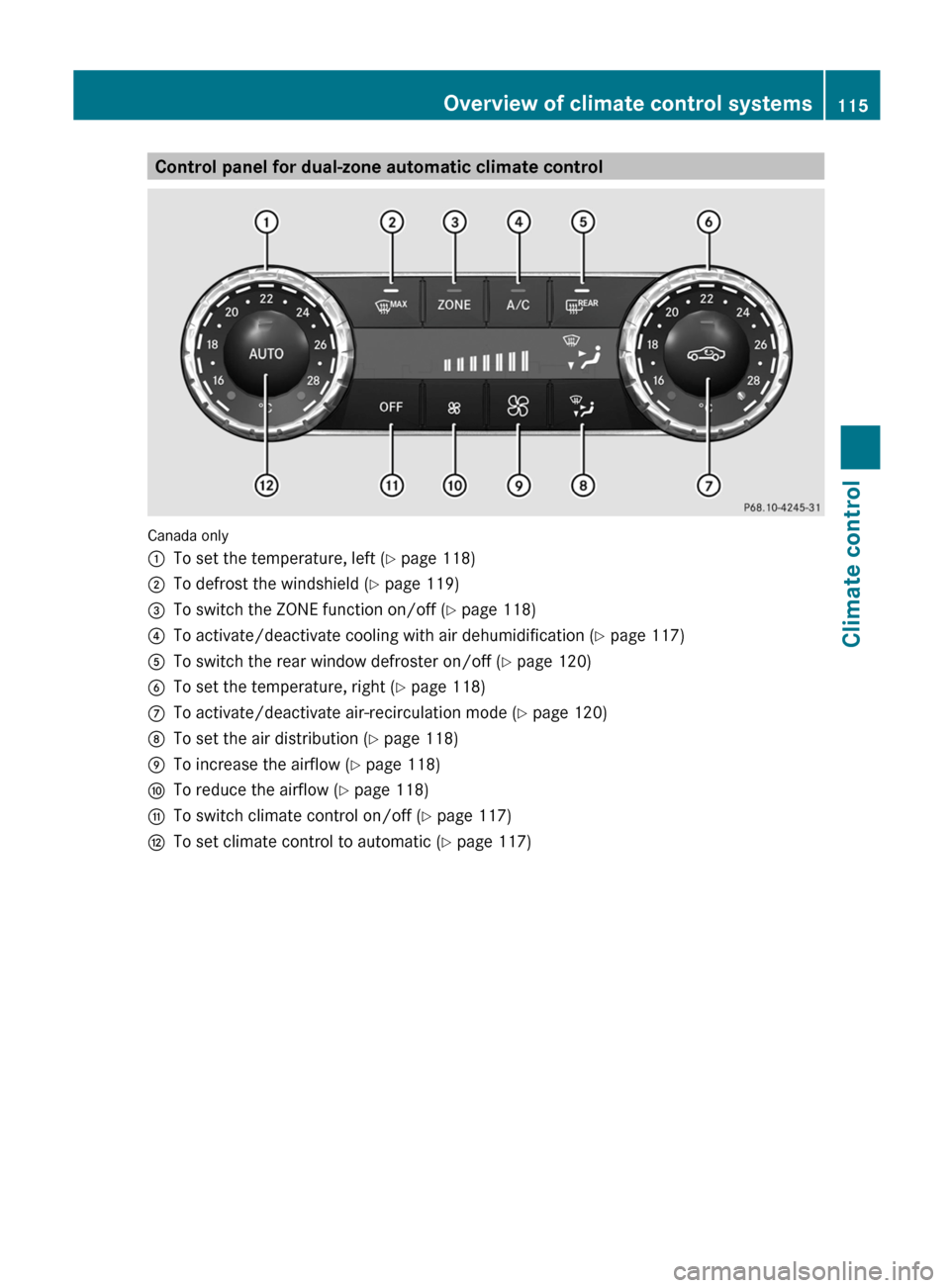
Control panel for dual-zone automatic climate control
Canada only
:To set the temperature, left (Y page 118);To defrost the windshield ( Y page 119)=To switch the ZONE function on/off ( Y page 118)?To activate/deactivate cooling with air dehumidification ( Y page 117)ATo switch the rear window defroster on/off ( Y page 120)BTo set the temperature, right ( Y page 118)CTo activate/deactivate air-recirculation mode ( Y page 120)DTo set the air distribution ( Y page 118)ETo increase the airflow ( Y page 118)FTo reduce the airflow ( Y page 118)GTo switch climate control on/off ( Y page 117)HTo set climate control to automatic ( Y page 117)Overview of climate control systems115Climate controlZ
Page 118 of 336
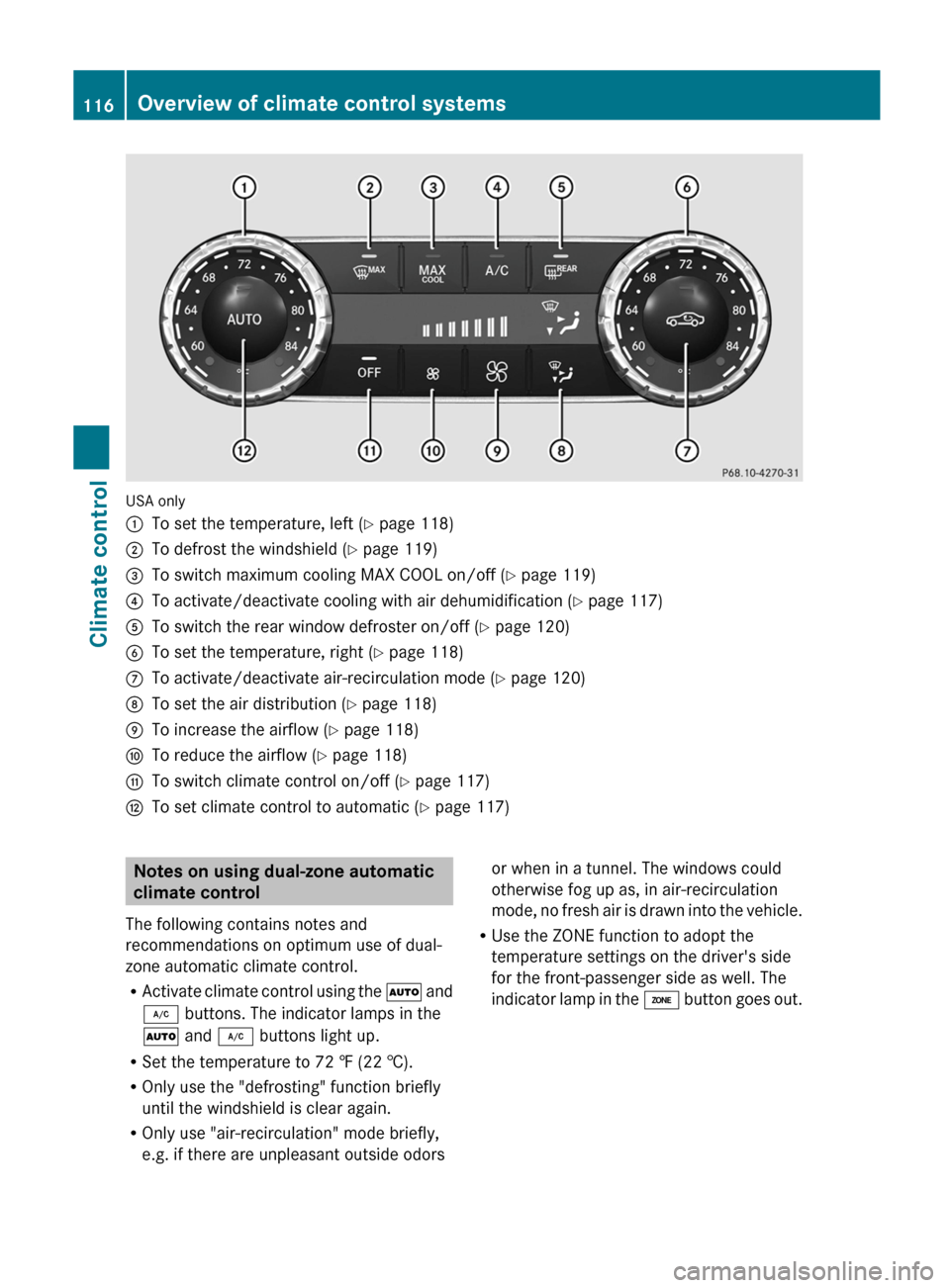
USA only
:To set the temperature, left (Y page 118);To defrost the windshield ( Y page 119)=To switch maximum cooling MAX COOL on/off ( Y page 119)?To activate/deactivate cooling with air dehumidification ( Y page 117)ATo switch the rear window defroster on/off ( Y page 120)BTo set the temperature, right ( Y page 118)CTo activate/deactivate air-recirculation mode ( Y page 120)DTo set the air distribution ( Y page 118)ETo increase the airflow ( Y page 118)FTo reduce the airflow ( Y page 118)GTo switch climate control on/off ( Y page 117)HTo set climate control to automatic ( Y page 117)Notes on using dual-zone automatic
climate control
The following contains notes and
recommendations on optimum use of dual-
zone automatic climate control.
R Activate climate control using the à and
¿ buttons. The indicator lamps in the
à and ¿ buttons light up.
R Set the temperature to 72 ‡ (22 †).
R Only use the "defrosting" function briefly
until the windshield is clear again.
R Only use "air-recirculation" mode briefly,
e.g. if there are unpleasant outside odorsor when in a tunnel. The windows could
otherwise fog up as, in air-recirculation
mode, no fresh air is drawn into the vehicle.
R Use the ZONE function to adopt the
temperature settings on the driver's side
for the front-passenger side as well. The
indicator lamp in the á button goes out.116Overview of climate control systemsClimate control
Page 119 of 336
Operating the climate control system
Activating/deactivating climate
control
Important information
GWARNING
When the climate control system is
deactivated, the outside air supply and
circulation are also deactivated. Only choose
this setting for a short time. Otherwise the
windows could fog up, impairing visibility and
endangering you and others.
i Switch on climate control primarily using
the à button ( Y page 117).
Activating/deactivating
XTurn the SmartKey to position 2 in the
ignition lock.XTo switch on: press the à button.
The indicator lamp in the à button lights
up. Airflow and air distribution are set to
automatic mode.
or
XPress the ^ button.
The indicator lamp in the ^ button goes
out. The previously selected settings come
into effect again.XTo switch off: press the ^ button.
The indicator lamp in the ^ button lights
up.
Activating/deactivating the cooling
with air dehumidification function
Important information
The cooling with air dehumidification function
is only available when the engine is running.
The air inside the vehicle is cooled and
dehumidified according to the temperature
selected.
GWARNING
If you switch off the cooling function, the
vehicle will not be cooled when weather
conditions are warm. The windows can fog up
more quickly. Window fogging may impair
visibility and endanger you and others.
Condensation may drip from the underside of
the vehicle when it is in cooling mode. This is
normal and not a sign that there is a
malfunction.
i The cooling with air dehumidification
function uses refrigerant R134a. This
coolant does not contain
chlorofluorocarbons, and therefore does
not damage the ozone layer.
Activating/deactivating
XTo activate: press the ¿ button.
The indicator lamp in the ¿ button lights
up.XTo switch off: press the ¿ button.
The indicator lamp in the ¿ button goes
out. The cooling with air dehumidification
function has a delayed switch-off feature.
Problems with the cooling with air
dehumidification function
When you press the ¿ button, the
indicator lamp in the button flashes three
times or remains off. You can no longer switch
on the cooling with air dehumidification
function.
XConsult a qualified specialist workshop.
Setting climate control to automatic
GWARNING
If you switch off the cooling function, the
vehicle will not be cooled when weather
conditions are warm. The windows can fog up
more quickly. Window fogging may impair
visibility and endanger you and others.
Operating the climate control system117Climate controlZ
Page 120 of 336
In automatic mode, the set temperature is
maintained automatically at a constant level.
The system automatically regulates the
temperature of the dispensed air, the airflow
and the air distribution.
Automatic mode will achieve optimal
operation if cooling with air dehumidification
is also activated. If desired, cooling with air
dehumidification can be deactivated.XTurn the SmartKey to position 2 in the
ignition lock.XSet the desired temperature.XTo activate: press the à button.
The indicator lamp in the à button lights
up. Automatic air distribution and airflow
are activated.XTo switch off: press the _ button.
or
XPress the K or I button.
The indicator lamp in the à button goes
out. Automatic air distribution and airflow
are deactivated.
Setting the temperature
Different temperatures can be set for the
driver's and front-passenger sides.
XTurn the SmartKey to position 2 in the
ignition lock.XTo increase/reduce: turn controls : and
B clockwise or counter-clockwise
( Y page 115).
Only change the temperature setting in
small increments. Start at 72 † (22 †).Setting the air distribution
Air distribution settingsPDirects air through the center and side
air ventsODirects the airflow through the
footwell air ventsSDirects air through the center, side and
footwell vents¯Directs air through the defroster ventsbDirects the airflow through the
defroster, center and side air vents 8aDirects air through the defroster and
footwell vents_Directs the airflow through the
defroster, center and side air vents as
well as the footwell air vents 8
i
Regardless of the air distribution setting,
airflow is always directed through the side
air vents.. The side air vents can only be
closed when the controls on the side air
vents are turned downwards.
XTurn the SmartKey to position 2 in the
ignition lock.XPress the _ button repeatedly until the
desired symbol appears in the display.
The indicator lamp in the à button goes
out. Automatic control is deactivated and
the air distribution is controlled according
to the selected setting.
Setting the airflow
XTurn the SmartKey to position 2 in the
ignition lock.XTo increase/reduce: press the K or
I button.
Switching the ZONE function on/off
This function is only available in vehicles for
Canada.
8 Canada only.118Operating the climate control systemClimate control
Page 121 of 336
XTo switch on: press the á button.
The indicator lamp in the á button lights
up.
The temperature setting for the driver's
side is not adopted for the front-passenger
side.
When the buttons for temperature, airflow or
air distribution are activated, the temperature
setting for the driver's side is not adopted for
the other climate control zones.
XTo switch off: press the á button.
The indicator lamp in the á button goes
out.
The temperature setting for the driver's
side is adopted for the front-passenger
side.
Defrosting the windshield
You can use this function to defrost the
windshield or to defrost the inside of the
windshield and the side windows.
i You should only select the defrosting
function until the windshield is clear again.
XTurn the SmartKey to position 2 in the
ignition lock.XTo activate: press the ¬ button.
The indicator lamp in the ¬ button lights
up.
The climate control system switches to the
following functions:
R cooling with air dehumidification on
R high airflow 9
R high temperature 9
R air distribution to the windshield and
front side windows
R air-recirculation mode offXTo switch off: press the ¬ button.
The indicator lamp in the ¬ button goes
out. The previously selected settings come
into effect again. The cooling with airdehumidification function remains on. Air-
recirculation mode remains deactivated.
or
XPress the à button.
The indicator lamp in the ¬ button goes
out. Airflow and air distribution are set to
automatic mode.
or
XTurn temperature control : or B
clockwise or counter-clockwise
( Y page 115).
or
XPress the K or I button.
MAX COOL maximum cooling
The MAX COOL function is only available in
vehicles for the USA.
MAX COOL is only operational when the
engine is running.
When you activate MAX COOL, climate
control switches to the following functions:
R maximum cooling
R maximum airflow
R air-recirculation mode on
XTo activate: press the Ù button.
The indicator lamp in the button lights up.XTo deactivate: press the Ù button
again.
The indicator lamp goes out. The previously
selected settings come into effect again.
Defrosting the windows
Windows fogged up on the inside
XActivate the cooling with air
dehumidification function ¿.XActivate automatic mode Ã.XIf the windows continue to fog up, activate
the defrosting function ( Y page 119).9
Depending on the outside temperature.Operating the climate control system119Climate controlZ
Page 123 of 336
Always keep sufficient distance between
unprotected parts of the body and the air
vents. If necessary, use the air distribution
adjustment to direct the air to air vents in the
vehicle interior that are not in the immediate
area of unprotected skin.
In order to ensure the direct flow of fresh air
through the air vents into the vehicle interior,
please observe the following notes:
R never cover the air vents or air intake grille
in the vehicle interior.
i For virtually draft-free ventilation, adjust
the sliders of the air vents to the center
position.
Setting the center air vents
:Center air vent, left;Center air vent, right=Center vent thumbwheel, right?Center vent thumbwheel, leftXTo open/close: turn thumbwheels =
and ? up or down.Setting the side air ventsXTo open/close: turn thumbwheel = to the
left or right.
i Side window defroster vent : is never
completely shut, even if side air vent ; is
shut.
Setting the glove box air vent
When automatic climate control is activated,
the glove box can be ventilated, for instance
to cool its contents. The level of airflow
depends on the airflow and air distribution
settings.
! Close the air vent when heating the
vehicle.
At high outside temperatures, open the air
vent and activate the "cooling with air
dehumidification" function. Otherwise,
temperature-sensitive items stored in the
glove box could be damaged.
:Air vent thumbwheel;Air ventSetting the air vents121Climate controlZ