brake sensor MERCEDES-BENZ C-CLASS COUPE 2015 User Guide
[x] Cancel search | Manufacturer: MERCEDES-BENZ, Model Year: 2015, Model line: C-CLASS COUPE, Model: MERCEDES-BENZ C-CLASS COUPE 2015Pages: 385, PDF Size: 13.12 MB
Page 83 of 385
Key
Important safety notes
United Kingdom only: G
WARNING
Whe nthe doubl elocks are activated, the
door scan no longer be opened from the
inside. People in th evehicl ecan no longer get
out ,e.g.inh azardous situations. There is a
ris kofi njury.
Therefore ,donotleav eany people unsuper-
vised in th evehicle, particularly children ,eld-
erl yp eople or people in need of special assis-
tance .Don otactivat ethe doubl eloc kw hen
people are in th evehicle.
If th evehicl ehas been locke dfromt heoutside,
th ed oubl eloc kf unction is activated as stand-
ard. It is then no tpossibl etoopen th edoors
from inside th evehicle. You can deactivat ethe
doubl eloc kfunction by deactivating th einterior
motion sensor (see th eseparat emultimedia
system operating instructions). The door scan
then be opened from th einside after th evehicle
has been locke dfromt heoutside .The anti-theft
alarm system is triggered if th edoor is opened
from th einside. Switc hoff th ealarm
(Y page 78).
All countries: G
WARNING
If children are lef tunsupervised in th evehicle,
they could:
R open doors, thereby endangering other per-
son sorr oad users
R get out and be struc kbyoncomingt raffic
R operate vehicl eequipmen tand become
trapped ,for example
In addition ,the children could also set the
vehicl einm otion,for example, if they:
R release th eparking brake
R shift th eautomatic transmission out of park
position Porshift manual transmission into
neutral
R start th eengine
There is ariskofana ccidentand injury. Whe
nleaving th evehicle, always tak ethe key
wit hyou and loc kthe vehicle. Never leave
children and animals unattended in th evehi-
cle .Keept he keys out of th ereac hofc hildren. G
WARNING
If you attach heav yorlargeobjects to th ekey,
th ek eycould be unintentionally turne dinthe
ignition lock. This could caus ethe engin eto
be switched off .There is ariskofana ccident.
Do no tattach any heav yorlargeobjects to the
key. Remove any bulk ykeyrings before insert-
ing th ekeyintot he ignition lock.
! Kee
pthe keya way from stron gmagnetic
fields. Otherwise ,the remot econtro lfunction
could be affected.
Stron gmagnetic fields can occur in th evicin-
it yofp owerful electrical installations.
Do no tkeept he key:
R wit he lectronic devices, e.g. amobile phone
or another key
R wit hm etallic objects ,e.g.c oins or metal film
R inside metallic objects ,e.g.a metal case
This can affec tthe key's functionality.
Vehicles wit hKEYLESS-G Ostart function: do
no tk eept he keyo nthe parcel shelf or in the
boot .Otherwise ,the keym ay no tbed etected,
e.g. when starting th eengineu singthe Start/
Stop button.
Ac heck whichperiodically establishes aradio
connection between th evehicl eand th ekey
determine swhether avalid ke yisint hevehicle.
This occurs, for example:
R when starting th eengine
R whils tdriving
R when th eexternal door handles are touched
R during convenience closing 80
KeyOpening and closing
Page 90 of 385
G
WARNING
If children are left unsupervised in the vehicle, they could:
R open doors, thereby endangering other per-
sons or road users
R get out and be struck by oncoming traffic
R operate vehicl eequipment and become
trapped, for example
In addition, the children coul dalsos et the
vehicl einm otion, for example, if they:
R release the parking brake
R shift the automatic transmission out of park
position Porshift manua ltransmission into
neutral
R start the engine
There is arisk of an accident and injury.
When leaving the vehicle, alwayst ake the key
with you and lock the vehicle. Never leave
children and animals unattended in the vehi-
cle. Keep the keys out of the reach of children. Unlocking and opening the doors
from the inside
Unite dKingdom only: if the vehiclehas been
locked with the key or with KEYLESS-GO, the
double lock function is activated as standard. It is then not possible to open the doors from
insid ethe vehicle. You can deactivate the dou-
ble lock function by deactivating the interior
motion sensor (see the Digita lOwner's Manual).
The doors can then be opened from the inside
after the vehicl ehas been locked from the out-
side .The anti-theft alarm system is triggere dif
the door is opened from the inside. Switch off
the alarm (Y page78).
For all countries except the Unite dKingdom:
You can open adoor from insid ethe vehicle
even if it has been locked. If the vehicl ehas pre-
viously been locked with the key or with KEY-
LESS-GO, opening adoor from the insid ewill
trigger the anti-theft alarm system. Switch off
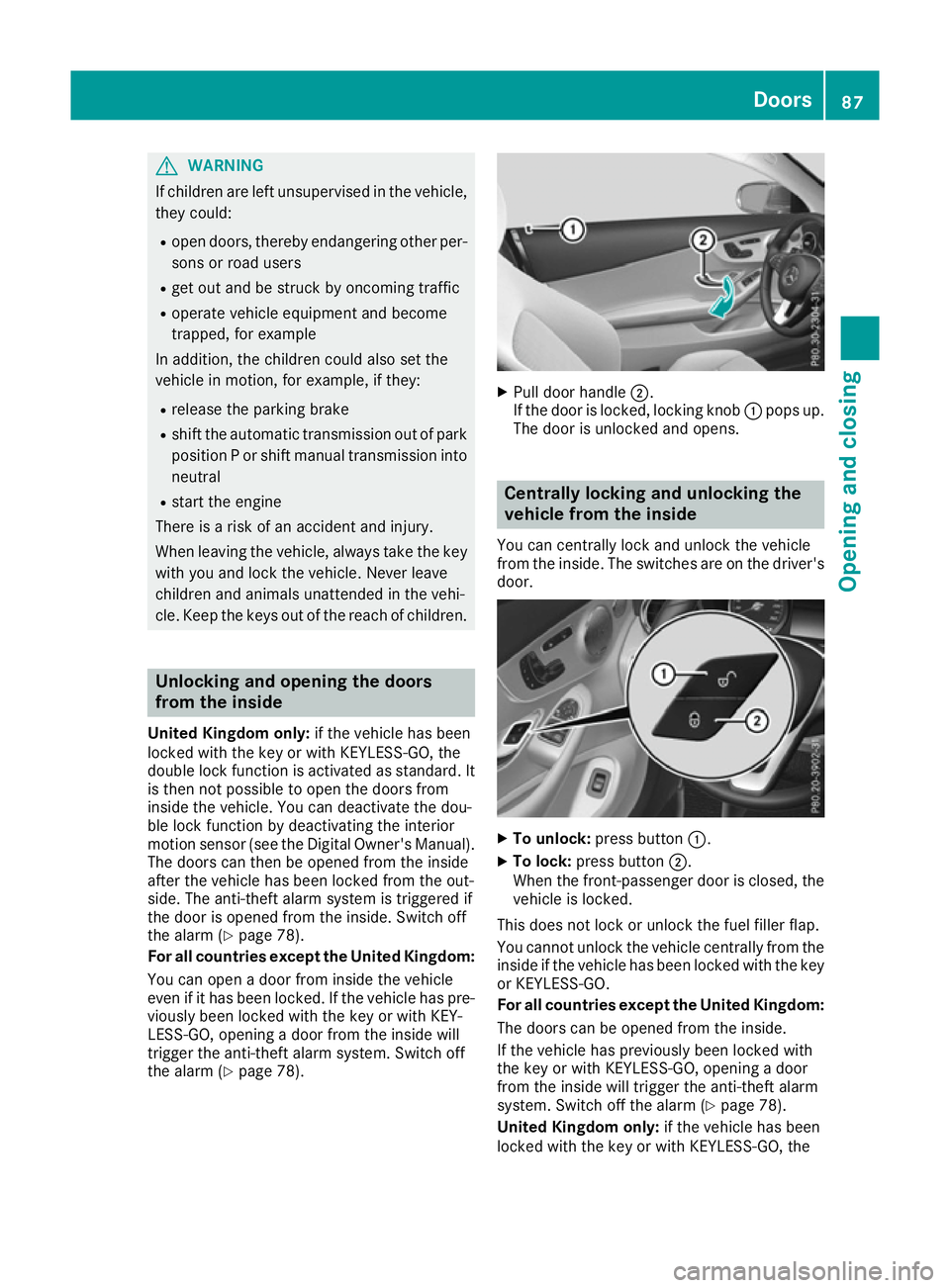
the alarm (Y page78). X
Pulld oor handle ;.
If the door is locked, locking knob :pops up.
The door is unlocked and opens. Centrally locking and unlockin
gthe
vehicle from the inside
You can centrally lock and unlock the vehicle
from the inside. The switches are on the driver's door. X
To unlock: press button :.
X To lock: press button ;.
When the front-passenge rdoor is closed ,the
vehicl eislocked.
This does not lock or unlock the fuel filler flap.
You cannot unlock the vehicl ecentrally from the
insid eifthe vehicl ehas been locked with the key
or KEYLESS-GO.
For all countries except the Unite dKingdom:
The doors can be opened from the inside.
If the vehicl ehas previousl ybeen locked with
the key or with KEYLESS-GO, opening adoor
from the insid ewillt rigger the anti-theft alarm
system. Switch off the alarm (Y page78).
Unite dKingdom only: if the vehiclehas been
locked with the key or with KEYLESS-GO, the Doors
87Opening and closing Z
Page 124 of 385
The hazard warning lamps switch off automati-
cally if the vehicle reaches aspeed of above
10 km/ha gain afterafull brake application.
The hazard warning lamps continue to operate
even if the ignition is switched off. Intelligen
tLight System
General notes The Intelligent Light System is
asystem that
adjusts the headlamps automatically to suit the
prevailing driving and weather conditions. It
offers advanced functions for improved illumi-
nation of the road surface, e.g. depending on the vehicle speed or weather conditions. The sys-
tem includes the active light function, cornering light function, motorway mode, extended range
foglamps and off-road lights. The system is only
active when it is dark.
You can activate or deactivate the "Intelligent
Light System" function using the on-board com- puter (Y page 247).
Active light function The active light function is
asystem that moves
the headlamps according to the steerin gmove-
mentsoft he front wheels. In this way, relevant
areas remain illuminated while you are driving.
This allows you to recognise pedestrians,
cyclists and animals.
Active: when the lights are switched on.
Cornering light function The cornering light function improves the illu-
mination of the road over
awide angle in the
direction you are turning, enabling better visi-
bility in tight bends, for example. It can only be
activated when the dipped-beam headlamps are
switched on.
Active:
R if you are driving at speeds below 40 km/h
and switch on the turn signal or turn the steer- ing wheel
R if you are driving at speeds between 40 km/h
and 70 km/ha nd turnthe steering wheel
The cornering light function may remain lit for a
shor ttime, but is automatically switched off
after no mor ethant hree minutes. Motorwa
ymode Active:
if you are driving at aspee dabove
11 0k m/ hand do no tmakea ny large steering
movements for at least 1000 morify ou are
driving at aspee dabov e130 km/h.
Not active: if you are driving at speeds below
80 km/h followin gactivation.
Extended range foglamps The extended range foglamps reduc
ethe glare
experienced by th edriver and improve th eillu-
minatio noftheedge of th ecarriageway.
Active: if you are driving at speeds below
70 km/h and you switch on th erear foglamp.
Not active: if, followingactivation ,you are driv-
ing at speeds abov e100 km/h or if you switch
off th erear foglamp. Adaptive Highbeam Assist Plus
General notes Wit
hA daptiv eHighbeam Assist Plus, you can
automatically switch between dipped-beam,
partial main-beam and main-beam headlamps.
Partial main-beam illuminatio nisaformofi llu-
minatio nwhereby th emain beam is directed
past other road users. Other road user sare kept
out of th emain-beam. This prevent sglare .If
there is avehicle in front, for example, th emain-
beam headlamps illuminate th eareas to its right
and left ,and th evehicle in fron tisilluminate dby
th ed ipped-beam headlamps.
The system automatically adapt sthe dipped-
beam headlam prange dependin gonthedis-
tance to th eother vehicle .Oncet he system no
longer detect sany other vehicles, it switches on
th em ain-beam headlamps again.
If th emain-beam or partial main-beam head-
lamps are causing to omuchr eflectio nfromt raf-
fic signs, th elight sare automatically dimmed
and glare for th edriver caused by th ereflections
is thus avoided.
The system' soptical sensor is locate dbehind
th ew indscreen near th eoverhead control
panel. Exterior lighting
121Lightsand windscreen wipers Z
Page 147 of 385
Running-i
nnotes Important safety notes
In certain driving and driving safety systems ,the
sensors adjust automaticall ywhile acertain dis-
tance is being driven afte rthe vehicl ehasbeen
delivered or afte rrepairs. Ful lsystem effective-
ness is not reached unti lthe end of this teach-in
process.
Brake pads/linings and discs that are either new or have bee nreplaced only achieve optimum
braking effect afte rsevera lhun dre dkilometres
of driving .Com pensate for the reduce dbraking
effect by applying greate rforce to the brake
pedal. The firs
t1,50 0km
If yo utrea tthe engine with sufficient care from
the very start, yo uwillber ewarded with excel-
lent performance for the remainder of the
engine's life.
R Drive at varying roa dspeeds and engine
speeds for the firs t1,500 km.
R Avoi doverstraining the vehicl eduring this
period, e.g. driving at ful lthrottle.
R Whe nchanging gears manually ,change up in
goo dtime ,before the rev counter needle rea-
ches Ôof the wa ytothe red are aofthe rev
counter.
R Do not shift dow nagearm anually in order to
brake.
R Vehicles with automatic transmission: try to
avoid depressing the accelerato rpedal
beyond the point of resistance (kickdown).
Additiona lnotes on running in Mercedes-AMG
vehicles:
R For the firs t1,500 km do not drive at speeds
above 140 km/h.
R Only allo wthe engine to reach amaximum
engine speed of 4,500 rpm briefly.
R Drive the vehicl emainly in drive program Cfor
the firs t1,500 km.
After 1,500 km ,you may gradually accelerate
the vehicl etofullr oa da nd engine speeds.
Yo us houl dalsoo bserve thes enotes on running-
in if the engine or parts of the drive trai nonyour
vehicl ehaveb eenr eplaced.
Alway sobserve the maximum permissible
speed. Self-lockin
grear axl edifferential
(Mercedes-AM Gvehicles)
Your vehicl eisequipped with aself-locking dif-
ferentia lonthe rea raxle.
Chang ethe oi ltoimprove protectio nofthe rear
axl ed ifferential:
R afte rar unning-in perio dof3,000 km
R every 50,00 0kmo r3y ears
These oi lchanges prolong the service life of the
differential. Have the oi lchange carrie doutat a
qualified specialist workshop. Driving
Important safety notes
G
WARNING
Objects in the driver' sfootwell may restrict
the clearance around the pedal sorblock a
depressed pedal .Thisj eopardise sthe oper-
ating and roa dsafety of the vehicle. There is a
ris kofana ccident.
Stow al lobjects securel yinthe vehicl esothat
they do not get into the driver' sfootwell.
Alway sfit the floormats securel yand as pre-
scribed in order to ensure that there is always sufficient roo mfor the pedals. Do not use
loose floormats and do not place severa lfloor-
mats on top of one another. G
WARNING
Unsuitabl efootwear can hinder correct usage
of the pedals, e.g.:
R shoes with thick soles
R shoes with hig hheels
R slippers
There is ariskofana ccident.
Wea rsuitabl efootwear to ensure correct
usag eoft he pedals. G
WARNING
If yo uswitch off the ignition whil edriving,
safety-relevant functions are only available
with limitations ,ornot at all. Thi scould affect,
for example, the power steering and the brake 144
DrivingDriving and parking
Page 187 of 385
Switching SPEEDTRONIC to passive
If you depress the accelerator pedal beyond the
pressure point (kickdown), SPEEDTRONIC is
switched to passive mode. The SPEEDTRONIC SPEEDTRONIC
suspended
suspended message appears in the multifunc-
tion display.
You can then exceed the stored speed. SPEED-
TRONIC is activated again if you:
R drive slower than the stored speed without
kickdown
R set anew speed or
R call up the last speed stored again
The SPEEDTRONIC suspended SPEEDTRONIC suspended message in the
multifunction display disappears.
Deactivating variable SPEEDTRONIC
It is not possible to deactivate variable SPEED-
TRONIC by braking.
There are several ways to deactivate variable
SPEEDTRONIC:
X Briefly press the cruise control lever forwards
B.
or X Briefly press the cruise control lever in the
direction of arrow A.
LIM indicator lamp ;in the cruise control
lever goes out. Variable SPEEDTRONIC is
deactivated.
Cruise control or DISTRONIC PLUS is selec-
ted.
i The last speed stored is cleared when you
switch off the engine.
Permanent SPEEDTRONIC
You can use the on-board computer to limit the
speed permanently to avalue between
160 km/h(e.g. for driving on winter tyres) and
the maximum speed (Y page 248).
Shortly before the stored speed is reached, it
appears in the multifunction display.
Permanent SPEEDTRONIC remains active, even
if variable SPEEDTRONIC is deactivated.
You cannot exceed the stored limit speed, even if you depress the accelerator pedal beyond the
pressure point (kickdown). DISTRONIC PLUS
General notes DISTRONIC PLUS regulates the speed and auto-
matically helps you maintain the distance to the
vehicle detected in front.V ehicles are detected
with the aid of the radar sensor system.
DISTRONIC PLUS brakes automatically so that
the set speed is not exceeded.
Change into alower gear in good time on long
and steep downhill gradients. Take particular
note of this when driving aladen vehicle. By
doing so, you will make use of the braking effect
of the engine. This relieves the load on the brake
system and preventst he brakes from overheat-
ing and wearing too quickly.
If DISTRONIC PLUS detectst hat there isarisk of
ac ollision, you will be warned visuallya nd
acoustically. Without your intervention,
DISTRONIC PLUS cannot prevent acollision. An
intermittent warning tone will then sound and
the distance warning lamp will light up in the
instrumen tcluster. Brake immediately to
increase the distance to the vehicle driving in
front,ort ake evasive action, provided it is safe
to do so.
DISTRONIC PLUS operates in the range
between 0km/h and 200 km/h.
Do not use DISTRONIC PLUS while driving on
roads with steep gradients.
Important safety notes G
WARNING
DISTRONIC PLUS does not react to:
R people or animals
R stationary obstacles on the road, e.g. stop-
ped or parked vehicles
R oncominga nd crossing traffic
As aresult, DISTRONIC PLUS may neither give
warnings nor interveneins uch situations.
There is arisk of an accident.
Always pay careful attention to the traffic sit- uation and be ready to brake. G
WARNING
DISTRONIC PLUS cannot always clearly rec-
ognise other road users and complex traffic
conditions. 184
Driving systemsDriving and parking
Page 188 of 385
In such cases, DISTRONIC PLUS may:
R give an unnecessary warning and then
brake the vehicle
R neither give awarning nor intervene
R accelerate or brake unexpectedly
There is arisk of an accident.
Continue to drive carefully and be prepared to
brake, particularly if DISTRONIC PLUS warns
you. G
WARNING
DISTRONIC PLUS brakes yourv ehicle with up
to 50% of the maximum possible deceleration.
If this deceleration is not sufficient,
DISTRONIC PLUS alerts you with avisuala nd
acoustic warning. There is arisk of an acci-
dent.
Apply the brakes yourself in these situations
and try to take evasive action.
! When DISTRONIC PLUS or the HOLD func-
tion is activated, the vehicle brakes automat- icallyinc ertain situations.
To avoid damage to the vehicle ,deactivate
DISTRONIC PLUS and the HOLD function in
the following or similar situations:
R when towing away
R in ac ar wash
If you fail to adapt yourd riving style, DISTRONIC
PLUS can neither reduce the risk of an accident
nor override the lawsofp hysics. DISTRONIC
PLUS cannot take road and weather conditions
or traffic conditions into account. DISTRONIC
PLUS is only an aid.Y ou are responsible for the
distance to the vehicle in front, for vehicle
speed,f or braking in good time, and for staying
in lane.
Do not use DISTRONIC PLUS:
R in road and traffic conditions which do not
allow you to maintain aconstant speed,e .g. in
heavy traffic or on winding roads
R on smooth or slippery roads. Braking or accel-
erating can cause the drive wheelstol ose
traction and the vehicle could then skid
R when there is poor visibility, e.g. due to fog,
heavy rain or snow DISTRONIC PLUS may not detect narrow vehi-
cles driving in front, e.g. motorcycles, or vehi-
cles driving on
adifferent line.
In particular, the detection of obstacle scan be
impaired in the case of:
R dirt on the sensors or obscured sensors
R snow or heavy rain
R interference by other radars ources
R the possibility of strong radarr eflections, for
example ,inmulti-storey car parks
If DISTRONIC PLUS no longer detects avehicle
in front, it may unexpectedly accelerate to the
speed stored.
This speed can:
R be too high for afilter lane or aslip road
R be so high in the right lane that you pass vehi-
cles driving on the left (left-hand drive coun-
tries)
R be so high in the left lane that you pass vehi-
cles driving on the right (right-hand drive
countries)
If there is achange of drivers, advise the new
driver of the speed stored.
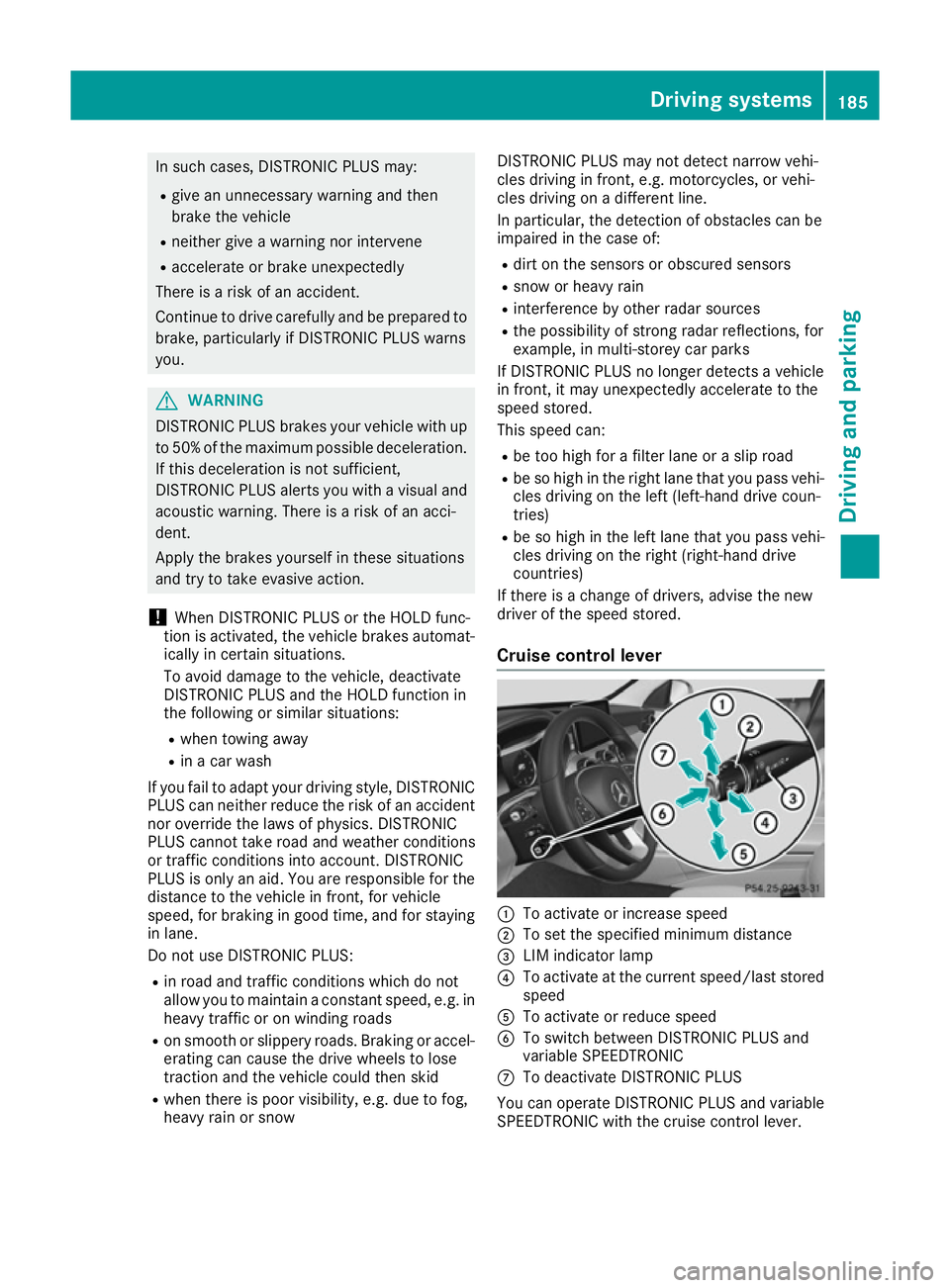
Cruise control lever :
To activate or increase speed
; To set the specifie dminimum distance
= LIM indicator lamp
? To activate at the current speed/last stored
speed
A To activate or reduce speed
B To switch betwee nDISTRONIC PLUS and
variable SPEEDTRONIC
C To deactivate DISTRONIC PLUS
You can operate DISTRONIC PLUS and variable
SPEEDTRONIC with the cruise control lever. Driving systems
185Driving and parking Z
Page 201 of 385
and parking remains with you. Mak
esure that
there are no persons, animals or object sin
range while manoeuvrin gand parking.
! When parking
,pay particular attention to
object sabov eorb elow th esensors, suc has
flowe rpotsort railer drawbars. PARKTRONIC
does no tdetect suc hobject swhen they are in
th ei mmediat evicinit yoft hevehicle .You
coul ddamage th evehicle or th eobjects.
The sensor smay no tdetect snow and objects
whic habsor bultrasonic sources.
Ultrasonic sources ,suc hasana utomatic car
wash, alorry's compressed-air brakes or a
pneumatic drill ,coul dc aus ePARKTRONIC to
malfunction.
PARKTRONIC may no tfunction correctly on
uneven terrain.
! Fol
dint heball coupling if th etrailer tow
hitch is no trequired. PARKTRONIC measures
th em inimum detection range to an obstacle
from th ebumper, no tthe ball coupling.
PARKTRONIC is activated automatically when
you: R switch on th eignition
R shif ttop osition D,Ror Non vehicle swith
automatic transmission
PARKTRONIC is deactivate datspeeds above
18 km/h. It is reactivate datlower speeds.
PARKTRONIC is deactivate dfor th erear area
when you establish an electrical connection
between your vehicle and atrailer.
Range of th esensors General notes
PARKTRONIC does no ttak eintoa ccoun tobsta-
cle slocated:
R below th edetection range, e.g .persons, ani-
mals or objects
R abov ethe detection range, e.g .overhanging
loads, tail sections or loadin gramps of goods
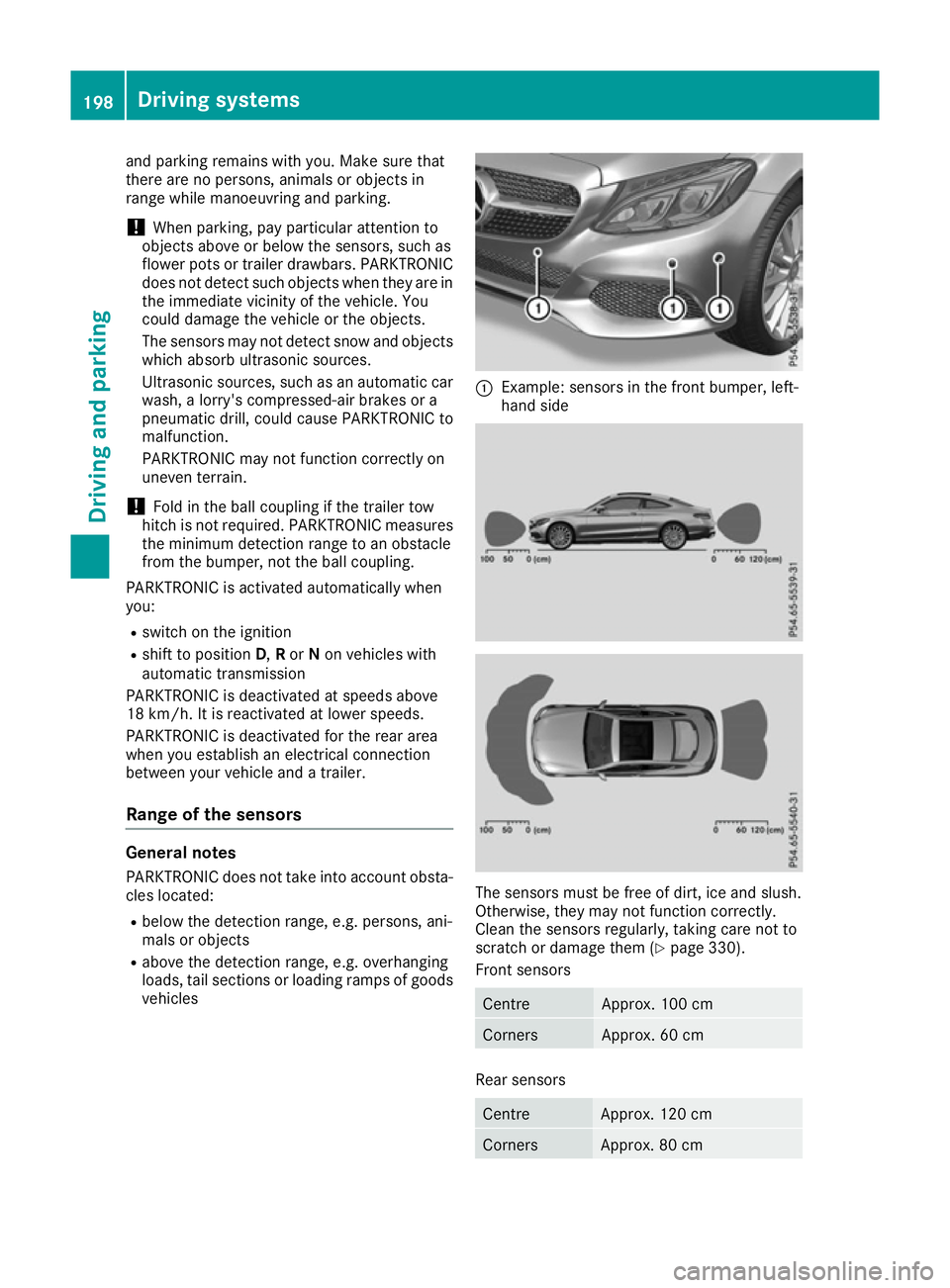
vehicles :
Example :sensor sinthefron tbumper, left-
han dside The sensor
smust be free of dirt ,ice and slush.
Otherwise, they may no tfunction correctly.
Clean th esensor sregularly, taking car enotto
scratch or damage them (Y page 330).
Fron tsensors Centre Approx
.100 cm Corners Approx
.60cm Rear sensors
Centre Approx
.120 cm Corners Approx
.80cm 198
Driving systemsDriving and parking
Page 204 of 385
Problems with PARKTRONIC
Problem
Possible causes/consequences and
M
MSolutions Only the red segments in
the PARKTRONIC warn-
ing displaysa re lit. You
also hear awarning tone
for approximately two
seconds.
PARKTRONIC is then
deactivated and the indi-
cator lamp on the
PARKTRONIC button
lights up. PARKTRONIC has malfunctioned and has been deactivated.
X If problems persist, have PARKTRONIC checked at aqualified spe-
cialist workshop. Only the red segments in
the PARKTRONIC warn-
ing displaysa re lit.
PARKTRONIC is then
deactivated. The PARKTRONIC sensors are dirty or there is interference.
X
Clean the PARKTRONIC sensors (Y page 330).
X Switch the ignition back on. The problem may be caused by an external source of radio or ultra-
sound waves.
X See if PARKTRONIC functions in adifferent location. Active Parking Assist
General notes Active Parking Assist is an electronic parking aid
with ultrasound. It measures the road on both
sides of the vehicle. Aparking symbol indicates
as uitable parking space. Active steering inter-
vention and brake application can assist you
during parking and when exiting aparking
space. You may also use PARKTRONIC
(Y page 197).
Important safety notes Active Parking Assist is only an aid. It is not a
substitute for your attention to the immediate
surroundings. The responsibility for safe
manoeuvring and parking remains with you.
Make sure that no persons, animals or objects
are in the manoeuvring range.
When PARKTRONIC is deactivated, Active Park-
ing Assist is also unavailable.
For vehicles with the trailer tow hitch folded out,
the minimum length for parking spaces is
slightly longer.
If you have attached atrailer to your vehicle, you
should not use Active Parking Assist. Once the
electrical connection is established between your vehicle and the trailer, Active Parking
Assist is no longer available. PARKTRONIC is
deactivated for the rear area. G
WARNING
While parking or pulling out of aparking
space, the vehicle swings out and can drive
onto areas of the oncomingl ane. This could
cause you to collide with other road users.
There is arisk of an accident.
Pay attention to other road users. Stop the
vehicle if necessary or cancel the Active Park- ing Assist parking procedure.
! If unavoidable, you should drive over obsta-
cles such as kerbs slowly and not at asharp
angle. Otherwise, you may damage the
wheels or tyres.
Active Parking Assist may also display spaces
not suitable for parking, e.g.: R parking or stopping restrictions
R in front of driveways or entrances and exits
R unsuitable surfaces Driving systems
201Driving and parking Z
Page 226 of 385
Visual and acousti
ccollision warning
If yo uswitch on the turn signal stochange lanes
and avehicl eisd etected in the sid emonitoring
range, yo ureceive avisua land acoustic collision
warning .You will then hea radoublewarning
tone and red warning lamp :flashes. If the turn
signal remains on, detected vehicles are indica-
ted by the flashing of red warning lamp :.
There are no further warning tones.
Course-correctin gbrake application
If Active Blind Spot Assist detects ariskofa side
impact in the monitoring range, acourse-cor-
recting brake application is carrie dout.T hisis
designed to hel pyou avoid acollision. G
WARNING
Ac ourse-correcting brake application cannot
always prevent acollision. There is ariskofan
accident.
Alway ssteer, brake or accelerate yourself,
especially if Active Blind Spot Assist warns
yo uorm akesac ourse-correcting brake appli-
cation. Alway smaintai nasafed istance at the
sides.
If ac ourse-correcting brake application occurs,
red warning lamp :flashe sinthe exterio rmir-
ror and adualw arning tone sounds. In addition,
display ;underlining the danger of asidec ol-
lisio nappea rs in the multifunctio ndisplay.
In very rar ecases, the system may make an
inappropriate brake application. Acourse-cor-
recting brake application may be interrupted at
any time if yo ustee rslightl yint he opposite
direction or accelerate.
The course-correcting brake application is avail-
able in the speed rang ebetween 30 km/h and
200 km/h.
Eithe racourse-correcting brake application
appropriate to the driving situation, or none at
all, may occu rif:
R ther eare vehicles or obstacles, e.g. crash
barriers ,onboth sides of your vehicle
R av ehicl eapproaches too closel yonthe side
R youh avea dopte das porty driving style with
high cornering speeds
R youc learl ybrake or accelerate
R ad riving safety system intervenes, such as
ESP ®
or PRE-SAFE ®
Brake R
ESP ®
is deactivated
R al ossoft yre pressure or adefective tyre is
detected
Activatin gActive Blind Spo tAssist
X Make sure tha tActive Blind Spot Assist is
activate dinthe on-board computer
(Y page 245).
X Turn the key to position 2in the ignition lock.
Warning lamps :in the exterio rmirrors light
up red for approximatel y1.5 seconds .Grey
radar waves propagating backwards appear
next to the vehicl einthe assistance display in
the multifunctio ndisplay.
Towin gatrailer
If yo ucoupl eupa trailer, make sure tha tyou
have correctly established the electrical con-
nection. Thi scan be accomplished by checking
the traile rlighting. Active Blind Spot Assist is
then deactivated. The radar waves next to the
vehicl eare hidden in the assistance display .The
Active Blind Spo tAssist not availa‐
Active Blind Spo tAssist not availa‐
ble ble when
when towing a
towing a trailer
trailerSee
SeeOwner's
Owner's
Manual
Manual message appears in the multifunction
display.
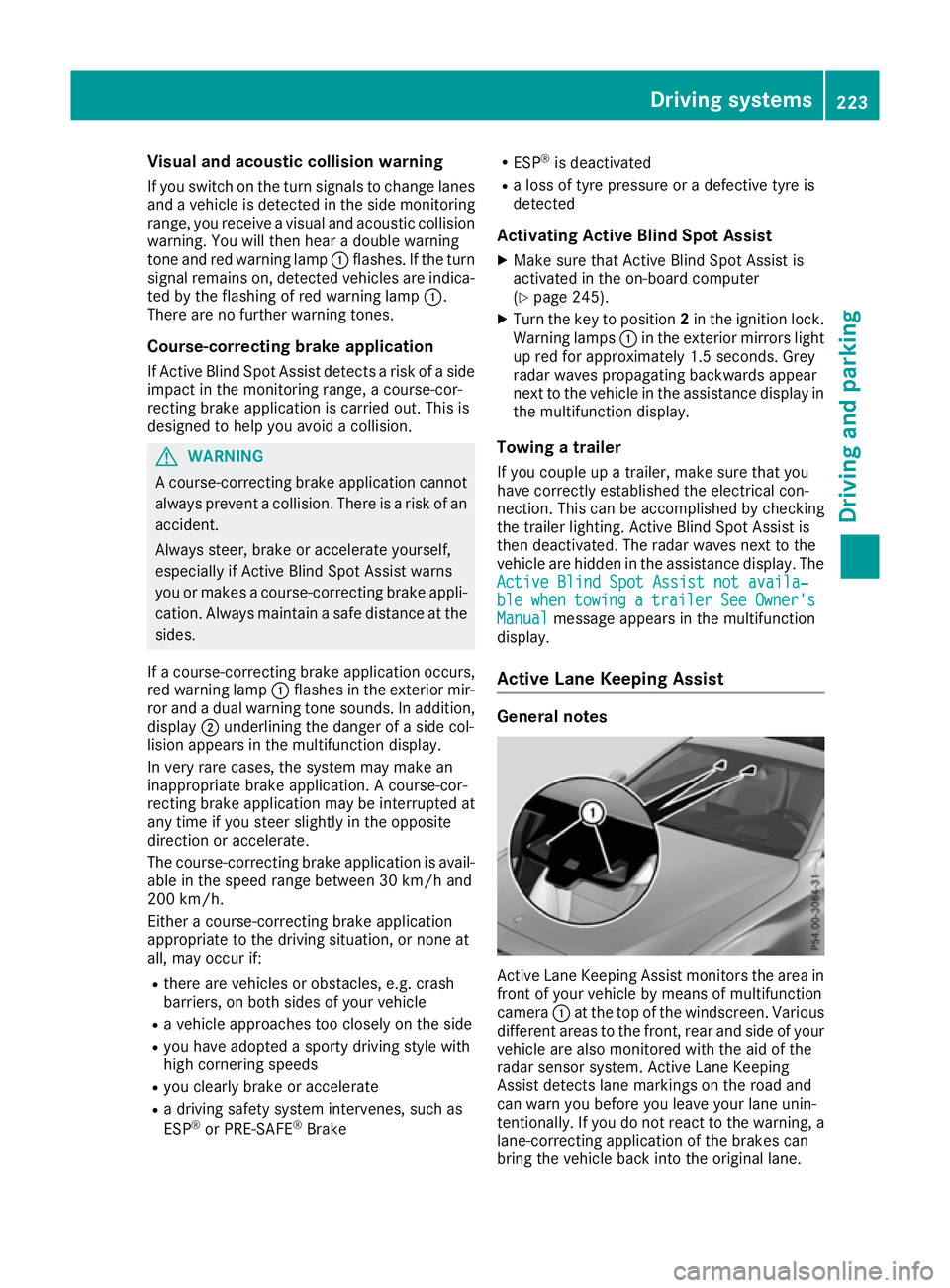
Active Lan eKeeping Assist General notes
Active Lane Keeping Assist monitors the are
ain
front of your vehicl ebymeans of multifunction
camera :at the top of the windscreen. Various
different areas to the front, rea rand sid eofyour
vehicl eare also monitore dwitht he ai doft he
radar sensor system .Active Lane Keeping
Assist detects lane marking sonthe roa dand
can warn yo ubefore yo uleave your lane unin-
tentionally .Ifyoudo not react to the warning ,a
lane-correcting application of the brakes can
bring the vehicl ebacki nto the original lane. Driving systems
223Driving and parking Z
Page 263 of 385
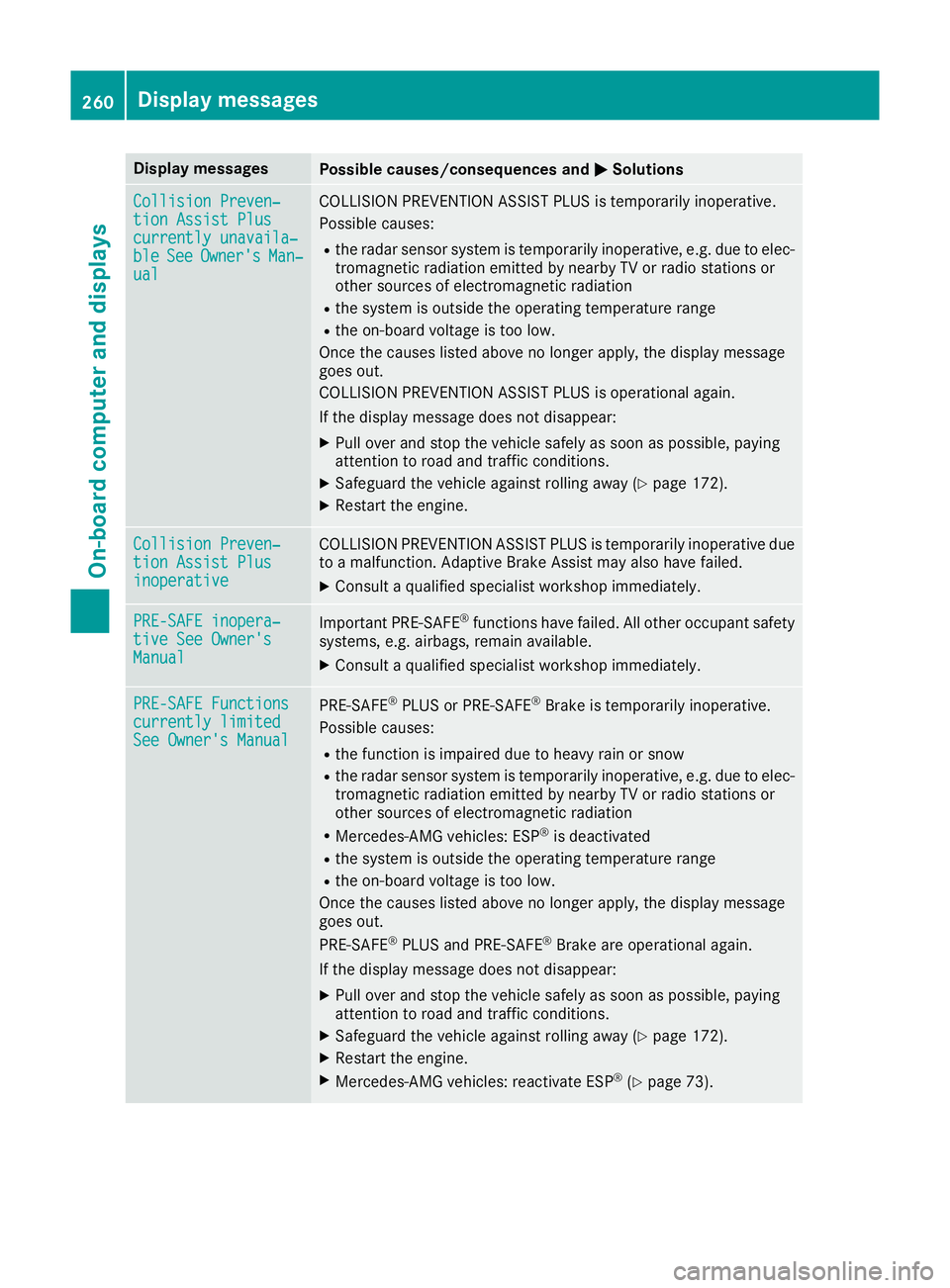
Display messages
Possible causes/consequences and
M
MSolutions Collision Preven‐
Collision Preven‐
tio
nA ssist Plus
tio nA ssist Plus
currently unavaila‐ currently unavaila‐
ble ble See
SeeOwner's
Owner's Man‐
Man‐
ual
ual COLLISION PREVENTION ASSIST PLU
Sistemporarily inoperative.
Possibl ecauses:
R ther adar sensor system is temporarily inoperative, e.g. due to elec-
tromagneti cradiation emitted by nearby TV or radi ostation sor
other source sofelectromagneti cradiation
R thes ystem is outside th eoperating temperature range
R theo n-bo ardv oltag eistoolow.
Once th ecauses listed abov enolonger apply, th edisplay message
goe sout.
COLLISION PREVENTION ASSIST PLU Sisoperational again.
If th edisplay message does no tdisappear:
X Pull ove rand stop th evehicl esafely as soo naspossible, paying
attention to roa dand traffic conditions.
X Safeguar dthe vehicl eagainst rollin gaway (Y page 172).
X Restart th eengine. Collision Preven‐
Collision Preven‐
tio
nA ssist Plus
tio nA ssist Plus
inoperative inoperative COLLISION PREVENTION ASSIST PLU
Sistemporarily inoperative due
to am alfunction .Adaptive Brake Assis tmay also hav efailed.
X Consult aqualified specialist workshop immediately. PRE-SAFE inopera‐
PRE-SAFE inopera‐
tiv
eS ee Owner's
tiv eS ee Owner's
Manual Manual Importan
tPRE-SAFE ®
function shavef ailed. Al lother occupant safety
systems ,e.g.a irbags, remain available.
X Consult aqualified specialist workshop immediately. PRE-SAFE Functions
PRE-SAFE Functions
currently limited currently limited
See Owner'
sManual
See Owner' sManual PRE
‑SAFE ®
PLU SorP RE‑SAFE ®
Brake is temporarily inoperative.
Possibl ecauses:
R thef unction is impaire ddue to heav yrain or snow
R ther adar sensor system is temporarily inoperative, e.g. due to elec-
tromagneti cradiation emitted by nearby TV or radi ostation sor
other source sofelectromagneti cradiation
R Mercedes-AMG vehicles: ESP ®
is deactivated
R thes ystem is outside th eoperating temperature range
R theo n-bo ardv oltag eistoolow.
Once th ecauses listed abov enolonger apply, th edisplay message
goe sout.
PRE ‑SAFE ®
PLU Sand PRE ‑SAFE®
Brake are operational again.
If th edisplay message does no tdisappear:
X Pull ove rand stop th evehicl esafely as soo naspossible, paying
attention to roa dand traffic conditions.
X Safeguar dthe vehicl eagainst rollin gaway (Y page 172).
X Restart th eengine.
X Mercedes-AMG vehicles: reactivat eESP®
(Y page 73). 260
Display
messagesOn-boardcomputer an ddisplays