radio MERCEDES-BENZ C-CLASS COUPE 2015 User Guide
[x] Cancel search | Manufacturer: MERCEDES-BENZ, Model Year: 2015, Model line: C-CLASS COUPE, Model: MERCEDES-BENZ C-CLASS COUPE 2015Pages: 385, PDF Size: 13.12 MB
Page 236 of 385
The segment
sbetween the speed of the vehi-
cle in front and the stored speed light up. Rev counter
! Do not drive in the overrevving range. Doing
so will damage the engine.
The red band in the rev counter indicates the
engine's overrevving range.
The fuel supply is interrupted to protec tthe
engine when the red band is reached. Outside temperature display
You should pay special attention to road condi-
tions when temperatures are around freezing
point.
Bear in mind that the outside temperature dis-
play indicates the measured air temperature
and not the road surface temperature.
The outside temperature display is in the multi-
function display (Y page 234).
Changes in the outside temperature are dis-
played after ashort delay. Coolant temperature gauge
G
WARNING
If you open the bonnet while the engine is
overheatin gorwhile there is afire in the
engine compartment,y ou could come into
contact with hot gases or other leaking ser-
vice products. There is adanger of injury.
Allow an overheatin gengine to cool down
before opening the bonnet .Ifthere is afire in
the engine compartment,l eave the bonnet
closed and notify the fire brigade.
The multifunction display shows the coolant
temperature gauge in the lower section of the
rev counter (Y page 32).
At high outside temperatures and when driving
uphill, the coolant temperature may rise to the
end of the scale.
Under normal operating conditions and with the
specified coolant level, the coolant temperature may rise to 120 †. Operating the on-board computer
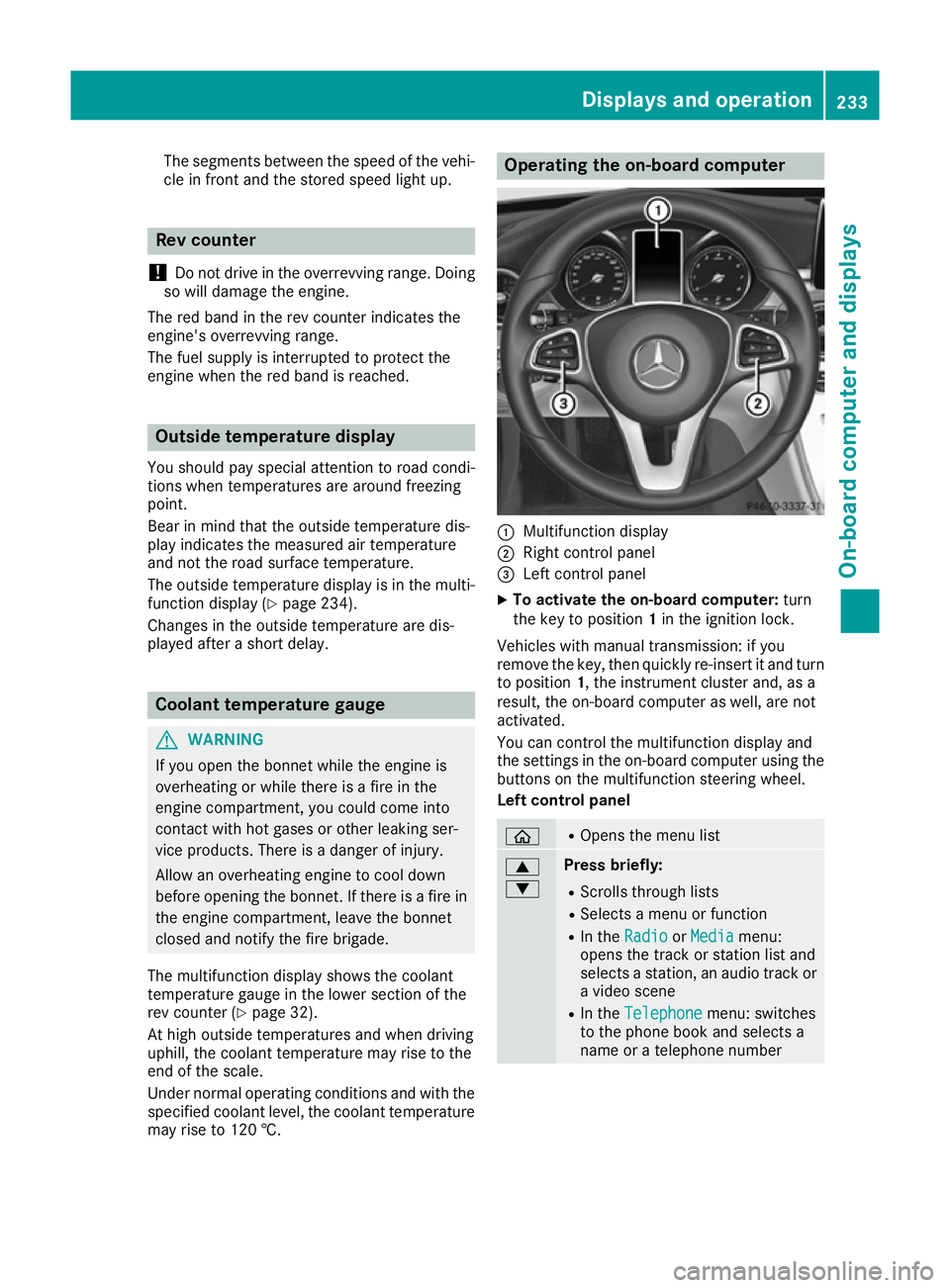
:
Multifunction display
; Right control panel
= Left control panel
X To activat ethe on-board computer: turn
the key to position 1in the ignition lock.
Vehicles with manual transmission: if you
remove the key, then quickly re-insert it and turn
to position 1,the instrument cluster and, as a
result, the on-board computer as well, are not
activated.
You can control the multifunction display and
the settings in the on-board computer using the button sonthe multifunction steerin gwheel.
Left control panel ò R
Opens the menu list 9
: Press briefly:
R Scrolls through lists
R Select samenu or function
R In the Radio Radio orMedia
Media menu:
opens the track or station list and
selects astation ,anaudio track or
av ideo scene
R In the Telephone Telephone menu: switches
to the phone book and selects a
name or atelephone number Displays and operation
233On-board computer and displays Z
Page 237 of 385
9
: Press and hold:
R
Scrolls quickly through all lists
R In the Radio Radio orMedia Media menu:
selects astation, audio track or
video scene using rapid scrolling
R In the Telephone
Telephone menu: starts
rapid scrolling if the phone book is open a R
In all menus: confirmst he selected
entryint he list
R In the Radio
Radio orMedia
Media menu:
opens the list of available radio
sources or media
R In the Telephone Telephone menu: switches
to the phone book and starts dial-
ling the selected number ñ R
Vehicles with Audio 20:
Switches off voice-operated con-
trol for navigation (see manufac-
turer's operating instructions)
R Vehicles with COMAND Online:
Switches off LINGUATRONIC (see
the separate operating instruc-
tions) % Press briefly:
R Back
R In the Radio Radio orMedia
Media menu: dese-
lects the track or station list or list
of available radio sources or media
R Hides display messages
R Exitst he telephone book/redial
memory % Press and hold:
R
Callsupt he standard display in the
Trip Trip menu Right control panel
~ R
Rejects or ends acall
R Exitst he telephone book/redial
memory 6 R
Makes or accepts acall
R Switches to the redial memory W
X R
Adjusts the volume 8 R
Mute ó R
Vehicles with Audio 20:
Switches on voice-operated con-
trol for navigation (see manufac-
turer's operating instructions)
R Vehicles with COMAND Online:
Switches on LINGUATRONIC (see
the separate operating instruc-
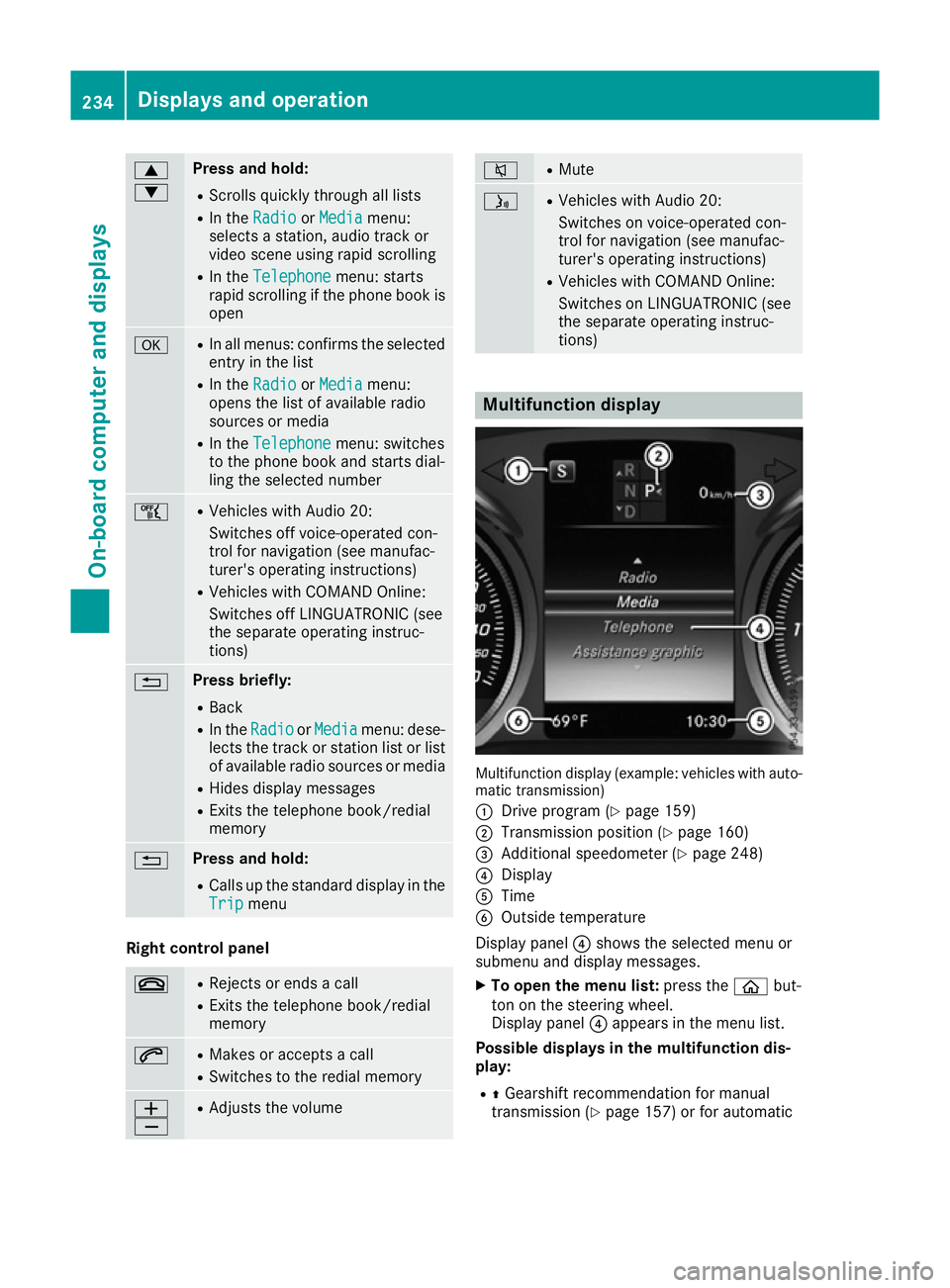
tions) Multifunction display
Multifunction display (example: vehicles with auto-
matic transmission)
: Drive program (Y page 159)
; Transmission position (Y page 160)
= Additional speedometer (Y page 248)
? Display
A Time
B Outside temperature
Display panel ?shows the selected menu or
submenu and display messages.
X To open the menu list: press theòbut-
ton on the steering wheel.
Display panel ?appears in the menu list.
Possible displays in the multifunction dis-
play:
R ZGearshift recommendation for manual
transmission (Y page 157) or for automatic234
Displays and operationOn-board computer and displays
Page 239 of 385
AMG displays in th
ehead-up display
AM Gd isplays are available in Mercedes-AMG
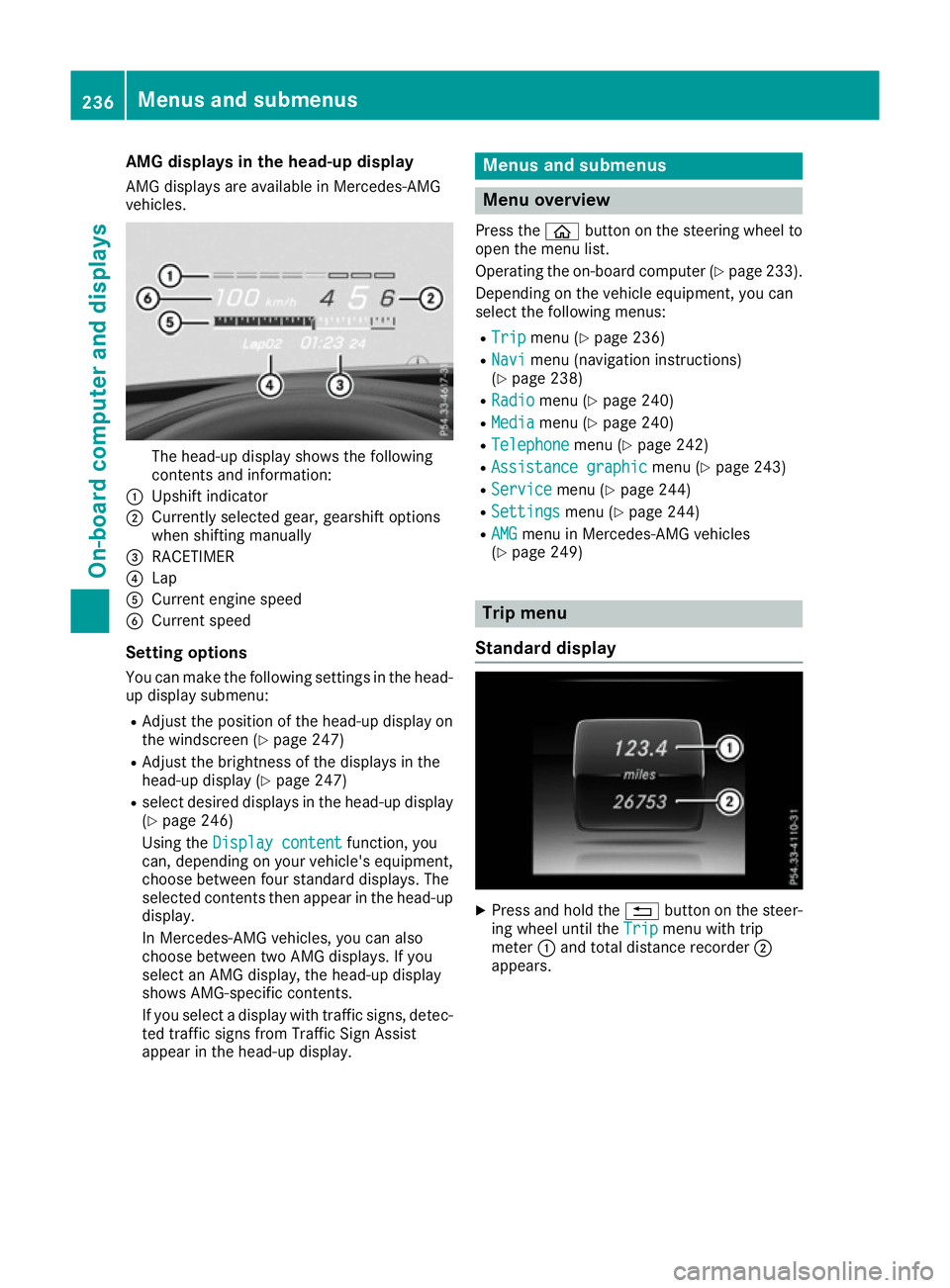
vehicles. The head-up display shows th
efollowing
contents and information:
: Upshif tindicator
; Currently selected gear ,gearshif toptions
when shiftin gmanually
= RACETIMER
? Lap
A Curren tengines peed
B Curren tspeed
Settin goptions
You can mak ethe followin gsettings in th ehead-
up display submenu:
R Adjus tthe positio nofthehead-up display on
th ew indscree n(Ypage 247)
R Adjus tthe brightness of th edisplays in the
head-up display (Y page 247)
R select desired displays in th ehead-up display
(Y page 246)
Usin gthe Displa ycontent
Displa ycontent function ,you
can ,depending on your vehicle's equipment,
choos ebetween four standard displays. The
selected contents then appear in th ehead-up
display.
In Mercedes-AM Gvehicles, you can also
choos ebetween two AM Gdisplays. If you
select an AM Gdisplay, th ehead-up display
shows AMG-specific contents.
If you select adisplay wit htraffic signs, detec-
te dt raffic sign sfromT raffic Sig nAssist
appear in th ehead-up display. Menu
sand submenus Menu overview
Press the òbuttonont hesteering whee lto
open th emenulist.
Operating th eon-bo ard computer (Y page 233).
Dependin gonthevehicl eequipment, you can
select th efollowin gmenus:
R Trip Trip menu(Ypage 236)
R Navi
Navi menu(navigation instructions)
(Y page 238)
R Radio
Radio menu(Ypage 240)
R Media
Media menu(Ypage 240)
R Telephone
Telephone menu(Ypage 242)
R Assistanc egraphic
Assistanc egraphic menu(Ypage 243)
R Service
Service menu(Ypage 244)
R Settings
Settings menu(Ypage 244)
R AMG
AMG men uinM ercedes-AM Gvehicles
(Y page 249) Trip menu
Standar ddisplay X
Press and hold the %buttonont hesteer-
ing whee luntil the Trip Tripmenuwitht rip
meter :and total distanc erecorder ;
appears. 236
Menu
sand submenusOn-boar dcomputer and displays
Page 243 of 385
Other status indicator
softhe naviga-
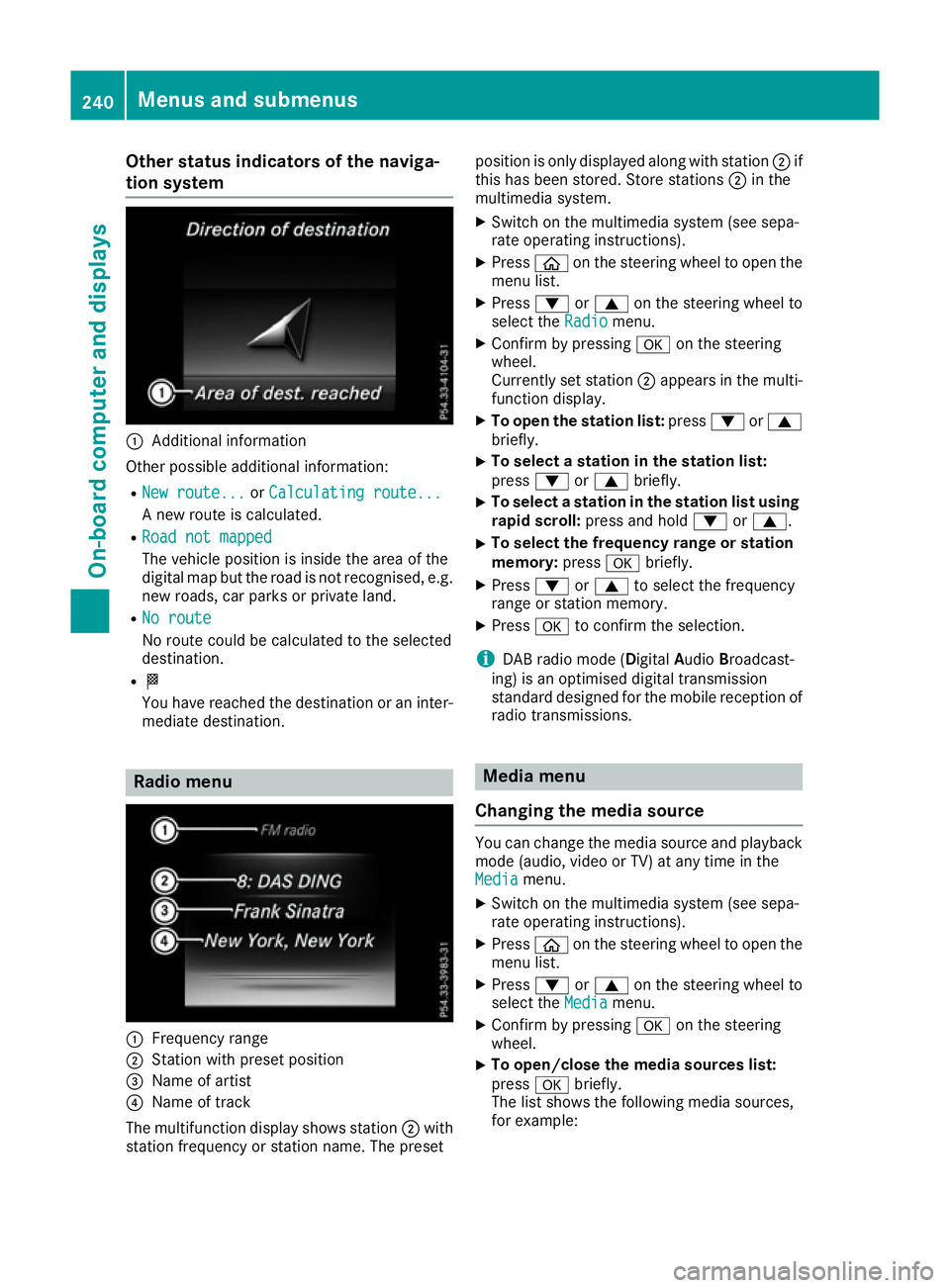
tion system :
Additional information
Other possible additional information: R New route...
New route... orCalculating route...
Calculating route...
An ew route is calculated.
R Road not mapped
Road not mapped
The vehicle position is inside the area of the
digital map but the road is not recognised, e.g. new roads, car parks or private land.
R No route No route
No route could be calculated to the selected
destination.
R O
You have reached the destination or an inter-
mediate destination. Radio menu
:
Frequenc yrange
; Station with preset position
= Name of artist
? Name of track
The multifunction display shows station ;with
station frequenc yorstation name. The preset position is only displayed along with station
;if
this has been stored. Store stations ;in the
multimedia system.
X Switc hont he multimedia system (see sepa-
rate operatin ginstructions).
X Press òon the steering wheel to open the
menu list.
X Press :or9 on the steering wheel to
select the Radio
Radio menu.
X Confirm by pressing aon the steering
wheel.
Currently set station ;appears in the multi-
function display.
X To open the station list: press:or9
briefly.
X To select
astation in the station list:
press :or9 briefly.
X To select
astation in the station list using
rapid scroll: press and hold :or9.
X To select the frequency range or station
memory:
pressabriefly.
X Press :or9 to select the frequency
range or station memory.
X Press ato confirm the selection.
i DABr
adio mode (Digital AudioBroadcast-
ing) is an optimised digital transmission
standard designed for the mobile reception of
radio transmissions. Media menu
Changing the media source You can change the media source and playback
mode (audio, video or TV) at any time in the
Media Media menu.
X Switc hont he multimedia system (see sepa-
rate operatin ginstructions).
X Press òon the steering wheel to open the
menu list.
X Press :or9 on the steering wheel to
select the Media
Mediamenu.
X Confirm by pressing aon the steering
wheel.
X To open/close the media sources list:
press
abriefly.
The list shows the following media sources,
for example: 240
Menus and submenusOn-boar
dcomputer and displays
Page 323 of 385
X
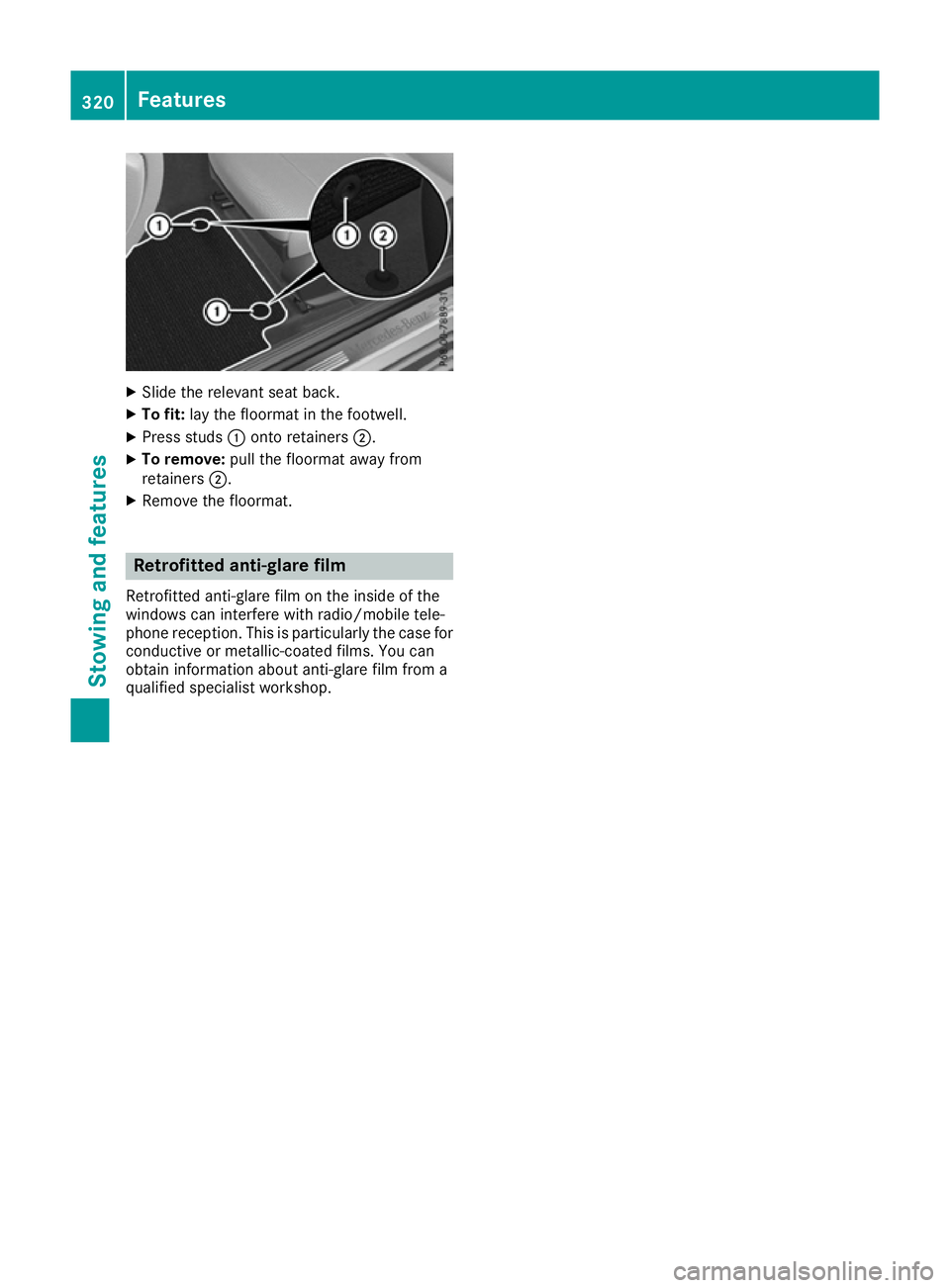
Slide the relevant sea tback.
X To fit: layt he floorma tinthe footwell.
X Press studs :onto retainers ;.
X To remove: pull the floorma tawa yfrom
retainers ;.
X Remove the floormat. Retrofitte
danti-glare film
Retrofitted anti-glare fil monthe inside of the
window scan interfere with radio/mobil etele-
phone reception. Thi sisparticularly the cas efor
conductive or metallic-coate dfilms. You can
obtain information abou tanti-glare fil mfrom a
qualified specialist workshop. 320
FeaturesStowin
gand features
Page 362 of 385
If you wish to cancel th
erestart:
X Press the %button.
or X If the Tyrep ressure now OK?
Tyr ep ressure now OK? message
appears, press 9or: to select Can‐
Can‐
cel
cel .
X Press ato confirm.
The tyr epressure values store datthelast
restar twill continue to be monitored. Tyre pressure monitor
General notes If
at yrep ressure monito rsystem is fitted, the
vehicle's wheels have sensor sfitte dthatm oni-
to rt he tyrep ressure sinall four tyres. The tyre
pressure monito rwarn syou if th epressure
drops in on eormoreoft hetyres. The tyr epres-
sure monito ronlyf unction sifthecorresponding
sensor sare fitte dtoall wheels.
Information on tyr epressure sisshown in the
multifunction display. Afte rafew minute sof
driving ,the curren ttyrep ressure of each tyr eis
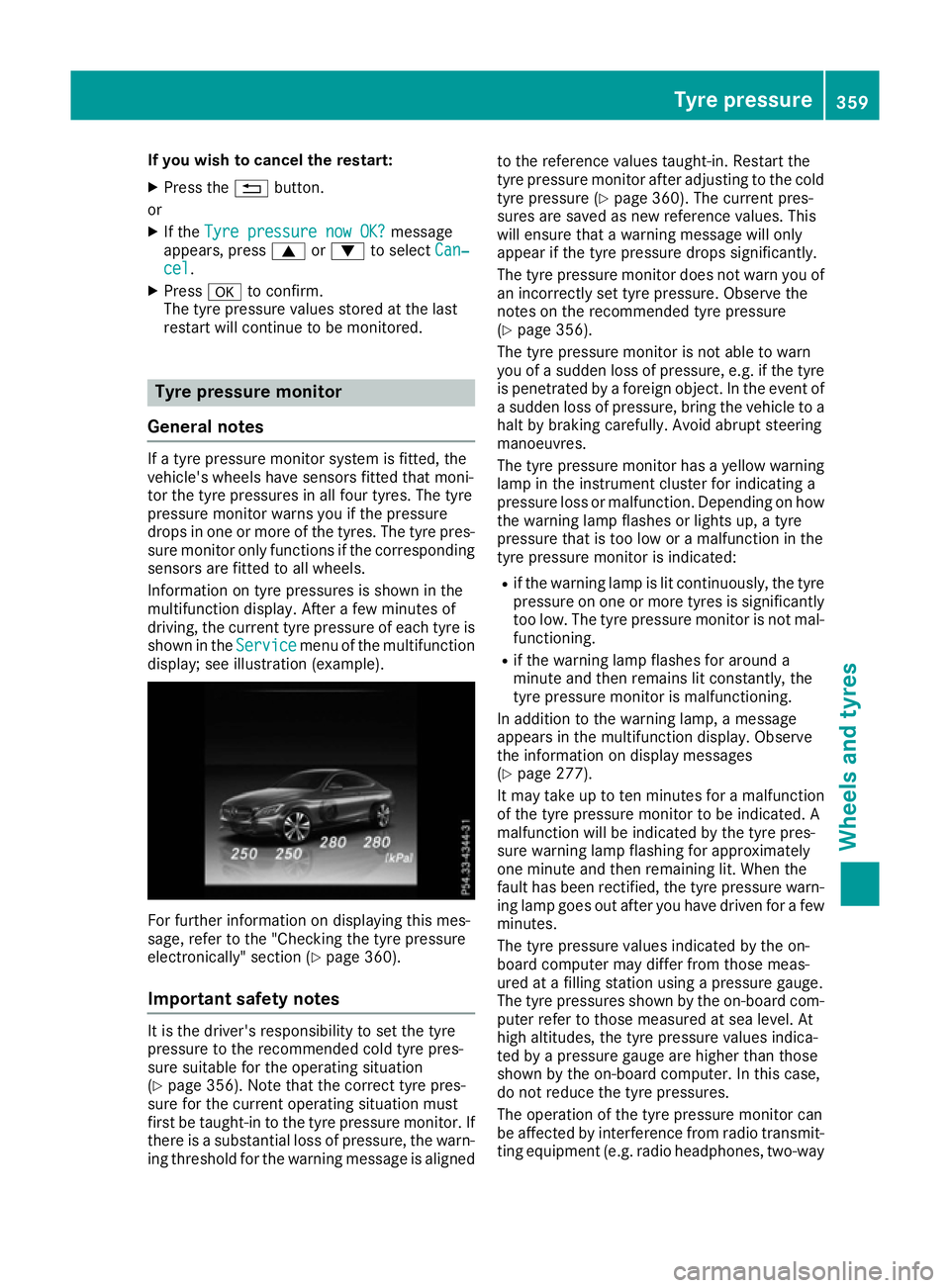
shown in the Service
Service menuoft hemultifunction
display; see illustration (example). For further informatio
nondisplaying this mes-
sage, refer to th e"Checkin gthe tyrep ressure
electronically" sectio n(Ypage 360).
Important safety notes It is th
edriver' sresponsibility to set th etyre
pressure to th erecommended col dtyrep res-
sure suitable for th eoperatin gsituation
(Y page 356). Not ethatthe correc ttyrep res-
sure for th ecurren toperatin gsituatio nmust
first be taught-in to th etyrep ressure monitor. If
there is asubstantial loss of pressure ,the warn-
ing threshold for th ewarning message is aligned to th
ereferenc evalues taught-in .Restart the
tyr ep ressure monito rafter adjusting to th ecold
tyr ep ressure (Y page 360). The curren tpres-
sure sare save dasnew reference values. This
will ensure that awarning message will only
appear if th etyrep ressure drops significantly.
The tyr epressure monito rdoes no twarn you of
an incorrectly set tyr epressure .Observ ethe
note sont herecommended tyr epressure
(Y page 356).
The tyr epressure monito risnotable to warn
you of asudde nloss of pressure ,e.g.ift hetyre
is penetrated by aforeign object .Intheevent of
as udde nloss of pressure ,brin gthe vehicle to a
halt by braking carefully. Avoid abrupt steering
manoeuvres.
The tyr epressure monito rhas ay ellow warning
lamp in th einstrumen tcluste rfor indicating a
pressure loss or malfunction. Dependin gonhow
th ew arning lamp flashes or light sup,at yre
pressure that is to olow or amalfunctio ninthe
tyr ep ressure monito risindicated:
R if th ewarning lamp is lit continuously, th etyre
pressure on on eormoret yres is significantly
to ol ow. The tyr epressure monito risnotmal-
functioning.
R if th ewarning lamp flashes for aroun da
minute and then remains lit constantly, the
tyr ep ressure monito rismalfunctioning.
In addition to th ewarning lamp, amessage
appear sinthemultifunction display. Observe
th ei nformatio nondisplay messages
(Y page 277).
It may tak euptotenminute sfor am alfunction
of th etyrep ressure monito rtobeindicated. A
malfunctio nwill be indicated by th etyrep res-
sure warning lamp flashin gfor approximately
on em inute and then remaining lit .When the
fault has been rectified, th etyrep ressure warn-
ing lamp goes out after you have driven for afew
minutes.
The tyr epressure values indicated by th eon-
boar dcomputer may differ from those meas-
ured at afilling statio nusingap ressure gauge.
The tyr epressure sshown by th eon-board com-
puter refer to those measured at sea level. At
high altitudes, th etyrep ressure values indica-
te dbyap ressure gauge are higher than those
shown by th eon-board computer. In this case,
do no treduc ethe tyrep ressures.
The operatio nofthetyrep ressure monito rcan
be affected by interferenc efromr adio transmit-
tin ge quipmen t(e.g. radio headphones, two-way Tyre pressure
359Wheels and tyres Z
Page 363 of 385
radios) that may be being operated in or near the
vehicle.
Checking the tyre pressure electroni-
cally X
Make sure that the key is in position 2in the
ignitio nlock (Y page145).
X Press òon the steering whee ltocall up
the menu list.
X Press 9or: on the steering whee lto
select the Service
Servicemenu.
X Confirm by pressing aon the steering
wheel.
X Select Tyre pressure
Tyre pressure with9 or:.
X Press ato confirm.
The multifunction display shows the current
tyre pressure of each wheel.
If the vehicl ewas parked for longer than
20 minutes ,the following message appears:
Tyre pressure swill be displayed
Tyre pressure swill be displayed
after afew minutes of driving
after afew minutes of driving.
After ateach-in period, the tyre pressure moni-
tor automatically detects new wheels or new
sensors. As long as acleara llocation of the tyre
pressure values to the individualw heels is not
possible, the Tyre Tyrepressure
pressure monitor
monitoractive
active
message is shown instead of the tyre pressure
display.T he tyre pressures are already being
monitored.
If an emergency spare whee lisfitted, for afew
minutes the system may continue to show the
tyre pressure of the whee lthat has been
removed .Ifthis occurs, note that the valu edis-
played for the position where the spare whee lis
fitted is not the same as the current tyre pres-
sure of the emergency spare wheel.
Warning message softhe tyre pressure
monitor If the tyre pressure monitor detects
apressure
loss in one or more tyres, awarning message is
shown in the multifunction display.T he yellow
tyre pressure warning lamp then lights up.
R If the Please correct tyre pressure
Please correct tyre pressure
message appears in the multifunction display,
the tyre pressure in at least one tyre is too
low.T he tyre pressure must be corrected
when the opportunity arises.
R If the Check Check tyre(s)
tyre(s) message appears in the
multifunction display,t he tyre pressure in at least one tyre has dropped significantly. The
tyres must be checked.
R If the Warning tyre defect Warning tyre defect message
appears in the multifunction display,t he tyre
pressure in at least one tyre has dropped sud- denly .The tyres must be checked.
Observe the instructions and safety notes in the display messages in the "Tyres" section
(Y page2 77).
If the whee lpositions on the vehicl eare inter-
changed ,the tyre pressures may be displayed
for the wrong positions for ashort time. After a
few minutes of driving, this is rectified and the
tyre pressures are displayed for the correct
positions.
Restarting the tyre pressure monitor When you restart the tyre pressure monitor, all
existing warning messages are deleted and the
warning lamp sgoout. The monitor uses the cur-
rently set tyre pressures as the reference values
for monitoring. In most cases, the tyre pressure monitor willa utomatically detect the new refer-
ence values after you have changed the tyre
pressure. However, you can alsos et reference
values manually as described here. The tyre
pressure monitor then monitors the new tyre
pressure values.
X Use the table on the insid eofthe fuel filler flap
to ensure that the tyre pressure is set cor-
rectly in all four tyres for the current operating
conditions.
Also observe the notes in the section on tyre
pressures (Y page356).
X Make sure that the key is in position 2in the
ignitio nlock (Y page145).
X Press òon the steering whee ltocall up
the menu list.
X Press 9or: on the steering whee lto
select the Service Servicemenu.
X Confirm by pressing aon the steering
wheel.
X Select Tyre pressure
Tyre pressure with9 or:.
X Press ato confirm.
The multifunction display shows the current
tyre pressure of each whee lortheTyre Tyre 360
Tyre pressureWheels and tyres
Page 372 of 385

Information on technica
ldata
i The technical dat
awas determine din
accordanc ewithEUD irectives .All data
applie stothevehicle's standard equipment.
The dat amay therefor ediffer for vehicles with
optional equipment. You can obtain further
information from aMercedes-Ben zService
Centre. Vehicle electronics
Tampering with th
eengin eelectron-
ics
! Only have wor
kcarried out on th eengine
electronics and it sassociated parts, suc has
control units, sensors, actuating components
and connecto rleads ,ataq ualified specialist
workshop. Vehicl ecom ponent smay other-
wise wear mor equickly and th evehicle's
operating permit may be invalidated. Retrofitting two-way radio
sand
mobile phones (RF transmitters) G
WARNING
If RF transmitters are tampered wit hornot
properly retrofitted, th eelectromagneti cradi-
ation they emit can interfere wit hthe vehicle
electronics .This may jeopardise th eopera-
tional safet yofthevehicle. Ther eisariskofan
accident.
You should hav eall wor kone lectrical and
electronic component scarried out at aquali-
fie ds pecialist workshop. G
WARNING
If you operate RF transmitters incorrectl yin
th ev ehicle, th eelectromagneti cradiation
could interfere wit hthe vehicl eelectronics,
e.g.:
R if th eRFt ransmitte risnotconnecte dtoan
exterio raerial
R thee xter iora erial has been fitte dincor-
rectl yorisn otalow-reflection type This could jeopardise th
eoperating safet yof
th ev ehicle. Ther eisariskofana ccident.
Hav ethe low-reflection exterio raerial fitte dat
aq ualified specialist workshop. When oper-
ating RF transmitters in th evehicle, always
connec tthe mtot helow-reflection exterior
aerial.
! The operating permit may be invalidated if
th ei nstruction sfor installation and use of RF
transmitters are no tobserved.
In particular, th efollowin gconditi onsm ust be
complied with:
R only approve dwavebands may be used.
R observ ethe maximum permissible output
in these wavebands.
R only approve daerial position smay be
used.
Excessiv elevels of electromagneti cradiation
may caus edamag etoy our healt hand to the
healt hofo thers. The use of an exterio raerial
takes int oconsid eration th escientific discus-
sion surroundin gthe possible healt hriskp osed
by electromagneti cfields. Approved aerial positions
:
Fron troo fa rea
; Rear roo farea
= Rear wing
? Tailgate
i On vehicles wit
hpanoram asliding sunroof,
fitting an aerial to th efront or rear roo farea is
no tp ermitted.
On th erear wing, it is recommended that you
position th eaerial on th eside of th evehicle
closes ttothecentre of th eroad.
Use Technical Specification ISO/TS 21609
(Road Vehicles –"EM Cg uidelines for fitting Vehicle electronics
369Technical data Z
Page 373 of 385

aftermarket radio frequency transmittin
gequip-
ment") when retrofitting RF (radio frequency)
transmitters. Compl ywith th elegal require-
ments for add-on parts.
If your vehicle has fittings for two-way radio
equipment ,use th epower supply or aerial con-
nections intended for use with th ebasic wiring.
Be sure to observ ethe manufacturer' saddi-
tional instruction swhen installing.
Deviation swith respec ttowavebands, maxi-
mum transmission outputs or aerial positions
must be approved by Mercedes-Benz.
The maximum transmission output (PEAK )atthe
base of th eaerial must no texceed th efollowing
values: Waveband Maximum
transmission output Short wave
3-54M
Hz 10
0W 4mw
aveband
74 -88M Hz 30 W
2mw
aveband
14 4-1 74MHz 50 W
Trunke
dradio/Tetra
38 0-4 60MHz 10 W
70 cm waveband
40
0-4 60MHz 35 W
Mobil
ecommunications
(2G/3G/4G) 10 W
The followin
gcan be used in th evehicle without
restrictions:
R RF transmitters with amaximum transmis-
sion output of up to 10 0mW
R RF transmitters with transmitte rfrequencies
in th e380 -410 MHz waveban dand am axi-
mum transmission output of up to 2W
(trunked radio/Tetra)
R Mobil etelephones (2G/3G/4G)
Ther eare no restriction swhen positioning the
aerial on th eoutside of th evehicle for th efol-
lowin gwavebands:
R Trunke dradio/Tetra
R 70 cm waveband
R 2G/3G/4G Identification plates
Vehicle identification plate with vehi-
cle identification number (VIN)
X
Open th eright-han ddoor.
You will see vehicle identification plate :. Vehicle identification plat
e(example :vehicle swith
at railer to whitch)
: Vehicle identification plate
; Vehicle manufacturer (Daimler AG)
= EU type approval number (only for certain
countries)
? VIN
A Maximum permissible gross vehicle weight
(kg)
B Maximum permissible gross weigh tofvehi-
cle/trailer combinatio n(kg)(only for spe-
cific countries)
C Maximum permissible fron taxle load (kg)
D Maximum permissible rear axle load (kg)
E Pain tcode
i The dat
ashow nont hevehicle identification
plat eise xample data. This dat aisdifferen tfor
ever yvehicle and can deviate from th edata
show nhere. You can fin dthe dat aapplicable
to your vehicle on th evehicle's identification
plate. 370
Identification platesTechnical data