seat memory MERCEDES-BENZ C-CLASS COUPE 2015 User Guide
[x] Cancel search | Manufacturer: MERCEDES-BENZ, Model Year: 2015, Model line: C-CLASS COUPE, Model: MERCEDES-BENZ C-CLASS COUPE 2015Pages: 385, PDF Size: 13.12 MB
Page 119 of 385
X
Press memory button M: and one of the
arrows on adjustmen tbutton ;within three
seconds.
The parking position is stored if the exterior
mirror does not move.
X If the mirror moves out of position, repeat the
steps.
X After successfully storing, reset the driving
position of the exterior mirror.
Calling up astored parking position X
Turn the key to position 2in the ignition lock
(Y page 145).
X Adjust the exterior mirror on the front-
passenger side using button =.
X Engage reverse gear.
The exterior mirror on the front-passenger
side moves to the stored parking position.
The exterior mirror on the front-passenger side
moves back to its original position:
R as soon as you exceed aspeed of 15 km/h
R about ten seconds after you have disengaged
reverse gear
R if you press button ?for the exterior mirror
on the driver's side Memory function
Important safety notes
G
WARNING
If you use the memory function on the driver's side while driving, the adjustments could
cause you to lose control of the vehicle. There
is ar isk of an accident.
Only use the memory function on the driver's
side while the vehicle is stationary. G
WARNING
When the memory function adjusts the seat or steerin gwheel, you and other vehicle occu-
pants –particularly children –could become
trapped. There is arisk of injury.
While the memory function is making adjust-
ments, make sure that no one has any body
parts in the sweep of the seat or steering
wheel. If somebody becomes trapped, imme- diately release the memory function position
button .The adjustmen tprocess is stopped. G
WARNING
If children activat ethe memory function, they
could become trapped, especially if they are
unattended. There is arisk of injury.
When leaving the vehicle, alway stake the key
with you and lock the vehicle. Never leave
children unattended in the vehicle.
The memory function can be used at any time,
e.g. even when the key is not in the ignition lock. Storing settings
With the memory function, you can store up to
three different settings, e.g. for three different
people.
The following settings are stored as asingle
memory preset:
R position of the seat, backrest and head
restraint
R driver's side: position of the exterior mirrors
on the driver's and front-passenger sides
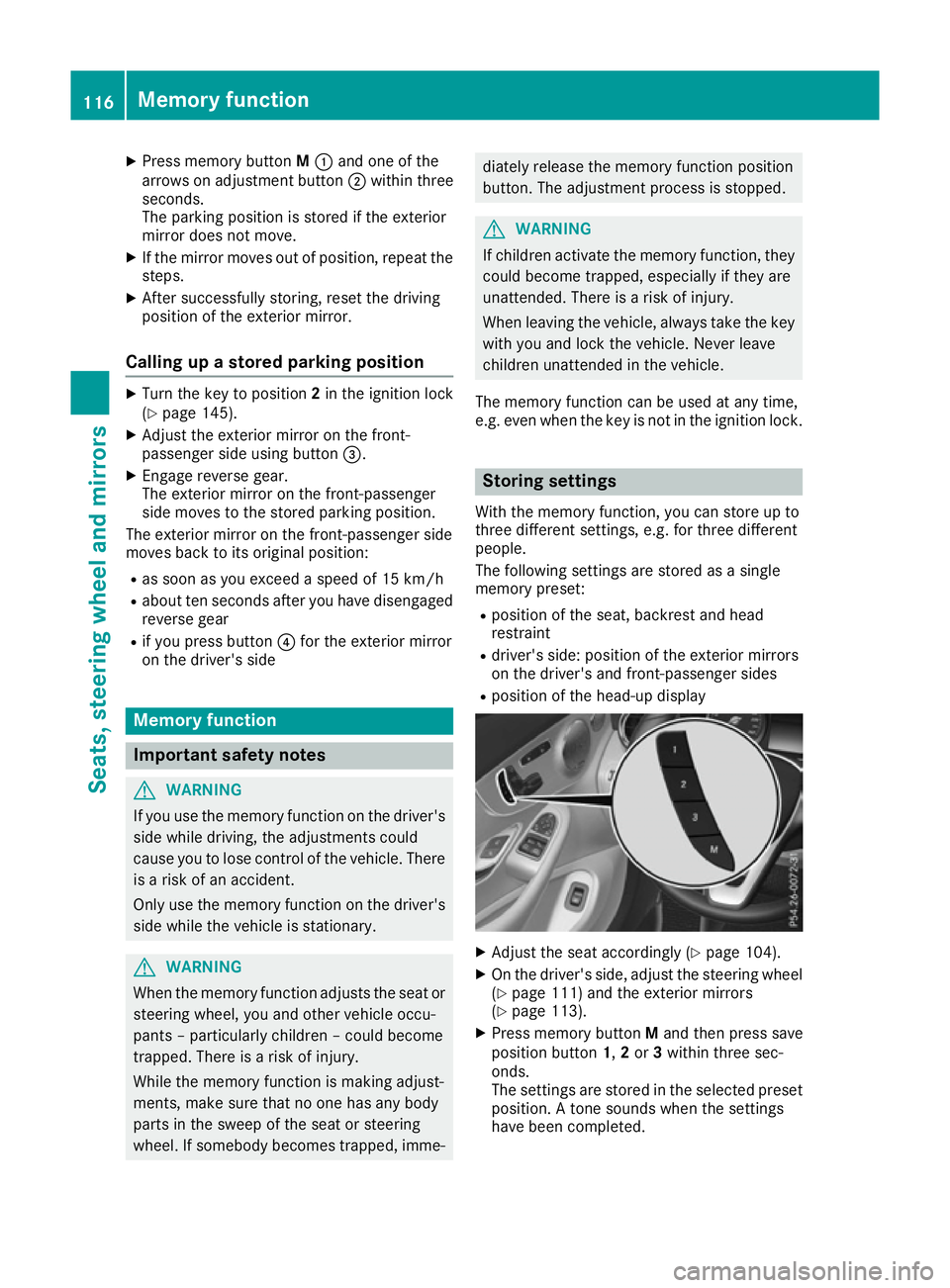
R position of the head-up display X
Adjust the seat accordingly (Y page 104).
X On the driver's side, adjust the steerin gwheel
(Y page 111) and the exterior mirrors
(Y page 113).
X Press memory button Mand then press save
position button 1,2or 3within three sec-
onds.
The settings are stored in the selected preset
position. Atones ounds when the settings
have been completed. 116
Memoryf
unctionSeats, steering wheel and mirrors
Page 120 of 385

Callin
gupas tored setting
X Press and hold th erelevan tsave positio nbut-
ton 1,2 or 3until the:
R Seat
R Steering wheel
R Exterior mirrors
R Head-up display
are in th estoredp osition.
i If you release th
estorag epositio nbutton,
th es eat ,steering wheel and mirror setting
function sstopi mmediately. The adjustment
of th ehead-up display is still carried out. Memory function
117Seats, steeringwheel and mirrors Z
Page 250 of 385
Setting the position
You can adjust the position of the head-up dis-
play on the windscreen. You can compensate for
height differences if the seat positions are
changed, for example.
X Switch on the head-up display (Y page 235).
X Press òon the steering wheel to open the
menu list.
X Press :or9 on the steering wheel to
select the Settings
Settings menu.
X Confirm by pressing aon the steering
wheel.
X Press :or9 to select the Head-up Head-up
display
display submenu.
X Press ato confirm.
X Press :or9 to select the Position
Position
function.
X Press ato save the setting.
X Press :or9 to adjust the position to a
level from Level
Level +5
+5(up) to Level
Level -5
-5(down).
X Press aor% to save the setting.
Using the Memory function, you can save and
call up the set position of the head-up display as as ingle memory preset (Y page 116).
Adjusting the brightness
The brightness of the head-up display is auto-
matically adjusted to the surrounding light con-
ditions. You can also individually adjust the
brightness of the head-up display.
X Switch on the head-up display (Y page 235).
X Press òon the steering wheel to open the
menu list.
X Press :or9 on the steering wheel to
select the Settings
Settings menu.
X Confirm by pressing aon the steering
wheel.
X Use : or9 to select the Head-up
Head-up
display
display submenu.
X Press ato confirm.
X Press :or9 to select the Brightness
Brightness
function.
X Press the abutton to save the setting.
X Press :or9 to adjust the brightness
to alevel from Level
Level +5
+5(bright) to Level
Level-5
-5
(dark).
X Press the aor% button to save the
setting. Light submenu Switching the Intelligent Light System
on/off
X Press òon the steering wheel to open the
menu list.
X Press :or9 on the steering wheel to
select the Settings Settings menu.
X Confirm by pressing aon the steering
wheel.
X Press :or9 to select the Lights
Lights
submenu.
X Press ato confirm.
X Press :or9 to select the Intelli‐
Intelli‐
gent Light System
gent Light System function.
If the Intelligent Light System
Intelligent Light System function
has been switched on, the cone of light and
the L symbol in the multifunction display
are shown in white.
X Press the abutton to save the setting.
If you switch on the Intelligent
Intelligent Light
LightSys‐
Sys‐
tem
tem function, the following functions are activa-
ted:
R Motorway mode
R Active light function
R Cornering light function
R Extended range foglamps
If you set the dipped-beam headlamps for driv-
ing on the right/left ,the multifunction display
shows the Inactive Inactive for
forleft-side
left-side traffic
traffic
or Inactive for right-side traffic
Inactive for right-side traffic dis-
play message in the Lights
Lightssubmenu instead of
the Intelligent Light System
Intelligent Light System function
(Y page 247). This display message will only
appear if the settingf or driving on the left/right
is set opposite to your vehicle's countryv ersion.
Further information on the Intelligent Light Sys-
tem (Y page 121).
Setting the dipped-beam headlamps for
driving on the left/right
This function is only available in vehicles with
the Intelligent Light System.
You can use this function to switch between
symmetrical and asymmetrical dipped beam
(Y page 118).
X Press òon the steering wheel to open the
menu list.
X Press :or9 on the steering wheel to
select the Settings
Settings menu. Menus and submenus
247On-board computer and displays Z
Page 313 of 385
In stowage space
:in the doors you can store
bottles with acapacity of up to 1.0 l,ar olled-up
fluorescent jacke t(driver' sdoor )and th evehicle
documen twallet (front-passenger door).
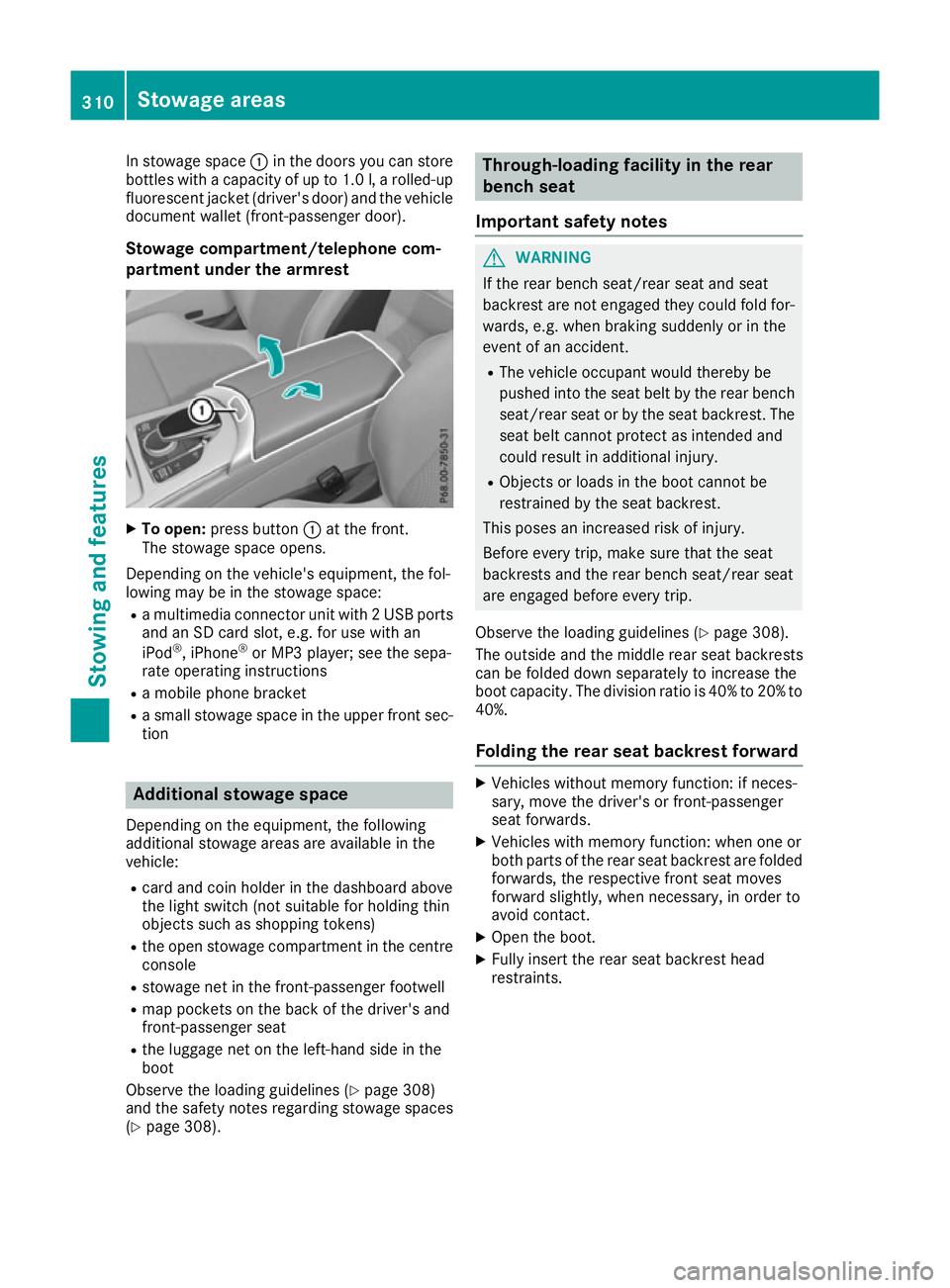
Stowage compartment/telephone com-
partmen tunder th earmre st X
To open: pressbutton :at th efront.
The stowage spac eopens.
Dependin gonthevehicle's equipment ,the fol-
lowin gmay be in th estowage space:
R am ultimedia connecto runit with 2USBports
and an SD car dslot,e.g.f or use with an
iPod ®
,i Phone ®
or MP3 player; see th esepa-
rat eo peratin ginstructions
R am obile phon ebracket
R as mall stowage spac eintheupper fron tsec-
tion Additional stowage space
Dependin gontheequipment ,the following
additional stowage areas are availabl einthe
vehicle:
R car dand coi nholde rint hedashboard above
th el ight switch (no tsuitable for holding thin
object ssuchass hoppin gtokens)
R theo pen stowage compartmen tinthecentre
console
R stowage net in th efront-pa ssenger footwell
R map pockets on th eback of th edriver' sand
front-passenger seat
R thel uggage net on th eleft-hand side in the
boot
Observ ethe loadin gguidelines (Y page 308)
and th esafety note sregardin gstowage spaces
(Y page 308). Through-loading facilit
yintherear
bench seat
Important safety notes G
WARNING
If th erear bench seat/rear seat and seat
backres tare no tengaged they coul dfold for-
wards ,e.g.w hen braking suddenly or in the
even tofana ccident.
R The vehicle occupant would thereb ybe
pushe dintot he seat belt by th erear bench
seat/rear seat or by th eseat backrest. The
seat belt canno tprotect as intended and
coul dresult in additional injury.
R Object sorloads in th eboot canno tbe
restraine dbytheseat backrest.
This pose sanincreased risk of injury.
Before ever ytrip, mak esure that th eseat
backrests and th erear bench seat/rear seat
are engaged before ever ytrip.
Observ ethe loadin gguidelines (Y page 308).
The outside and th emiddle rear seat backrests
can be folded down separately to increas ethe
boot capacity. The division ratio is 40 %to20%to
40%.
Foldin gthe rea rseat backres tforward X
Vehicle swithout memory function :ifneces-
sary, mov ethe driver' sorfront-pa ssenger
seat forwards.
X Vehicle swith memory function :when on eor
bot hpartsoft herear seat backres tare folded
forwards ,the respectiv efront seat moves
forward slightly, when necessary, in orde rto
avoid contact.
X Open th eboot.
X Fully insert th erear seat backres thead
restraints. 310
Stowage areasStowing and features
Page 314 of 385
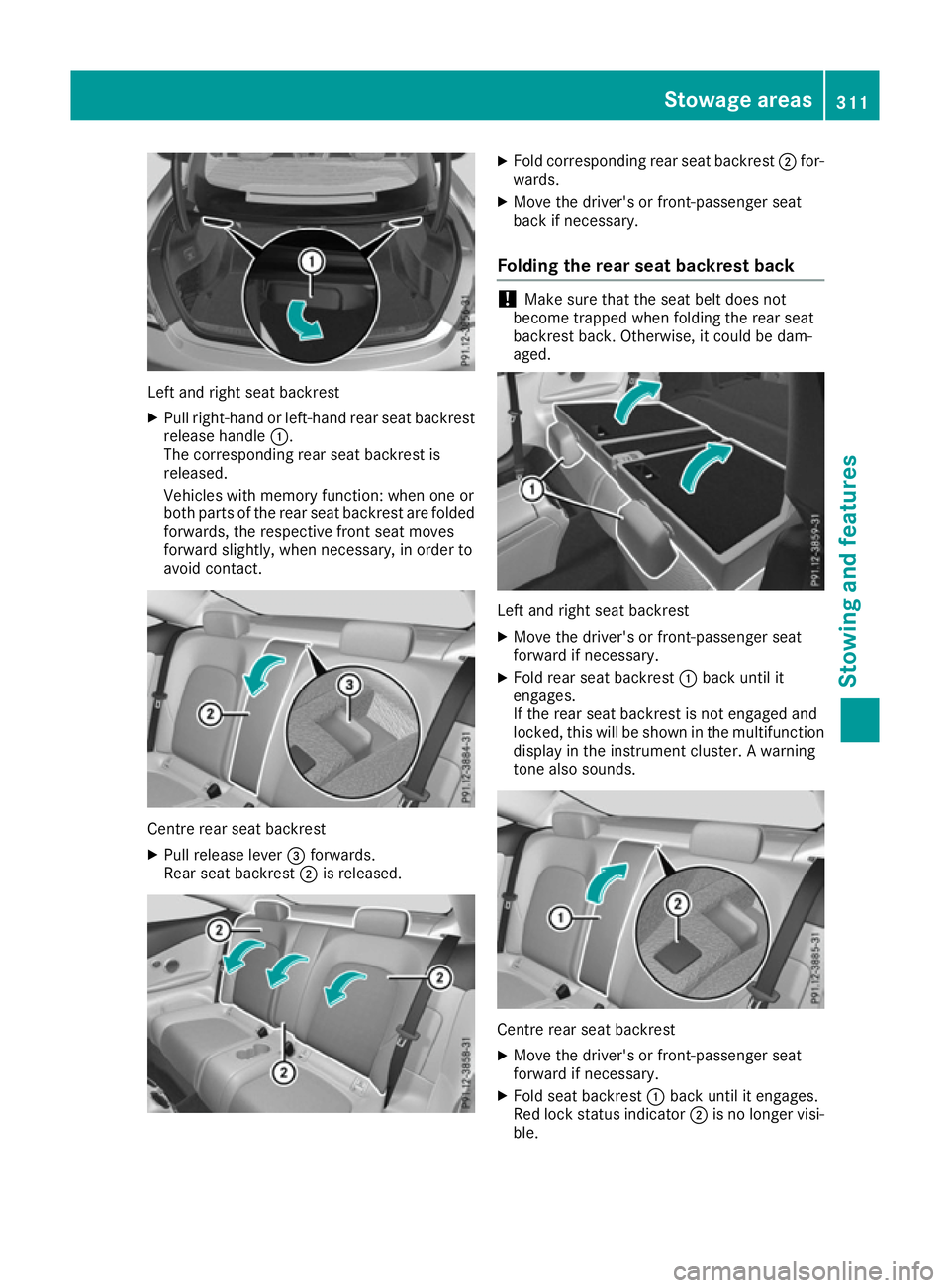
Left and right seat backrest
X Pullr ight-hand or left-hand rear seat backrest
release handle :.
The corresponding rear seat backrest is
released.
Vehicle swith memory function: when one or
both parts of the rear seat backrest are folded
forwards, the respective front seat moves
forward slightly, when necessary ,inorder to
avoid contact. Centre rear seat backrest
X
Pullr elease lever =forwards.
Rears eat backrest ;is released. X
Fold corresponding rear seat backrest ;for-
wards.
X Move the driver's or front-passenger seat
back if necessary.
Folding the rear seat backrest back !
Make sure that the seat belt does not
become trapped when folding the rear seat
backrest back. Otherwise ,itcould be dam-
aged. Left and right seat backrest
X Move the driver's or front-passenger seat
forward if necessary.
X Fold rear seat backrest :back until it
engages.
If the rear seat backrest is not engaged and
locked, this willbes hown in the multifunction
display in the instrument cluster. Awarning
tone also sounds. Centre rear seat backrest
X
Move the driver's or front-passenger seat
forward if necessary.
X Fold seat backrest :back until it engages.
Red lock status indicator ;is no longer visi-
ble. Stowagea
reas
311Stowing and features Z