wipers MERCEDES-BENZ C-CLASS COUPE 2015 User Guide
[x] Cancel search | Manufacturer: MERCEDES-BENZ, Model Year: 2015, Model line: C-CLASS COUPE, Model: MERCEDES-BENZ C-CLASS COUPE 2015Pages: 385, PDF Size: 13.12 MB
Page 129 of 385
If the wiper blades are worn, the windscreen will
no longer be wiped properly. This could mean
you are unabletoo bserve the traffic conditions. Replacin
gthe wiperb lades
Important safety notes G
WARNING
If the windscree nwipers begin to move while
you are changing the wiper blades, you can be trapped by the wiper arm. There is arisk of
injury.
Alwayss witch off the windscreen wipers and
ignition before changing the wiper blades.
! Never open the bonnet/tailgate if
awiper
arm is folded awayf rom the windscreen/rear
window.
Never fold awindscreen wiper arm withou ta
wiper blade back onto the windscreen/rear
window.
Hold the windscree nwiper arm firmly when
you change the wiper blade. If you release the
wiper arm withou tawiper blade and it falls
onto the windscreen/rear window ,the wind-
screen/rear window may be damaged by the
force of the impact.
Mercedes-Benz recommends that you have
the wiper blades changed at aqualifieds pe-
cialist workshop.
! To avoid damaging the windscreen wiper
blades, make sure that you touch only the
wiper arm of the windscreen wiper.
Replacing the windscreen wiperb ladesMovingt
he wiperb lades to the vertical
position
On vehicles without KEYLESS-GO:
X Turn the key to position 1or 2in the ignition
lock (Y page 145).
X Set the windscree nwipers to the °posi-
tion.
X When the wiper arms have reached the verti-
cal position, turn the key to position 0and
remove it from the ignition lock.
X Fold the wiper arm awayf rom the windscreen.On vehicles with KEYLESS-GO:
X Switch off the engine.
X Remove yourf oot from the brake pedal.
X Set the windscree nwipers to the °posi-
tion.
X Press the Start/Stop button repeatedly until
the windscree nwipers start.
X When the wiper arms have reached the verti-
cal position, press the Start/Stop button.
X Fold the wiper arm awayf rom the windscreen.
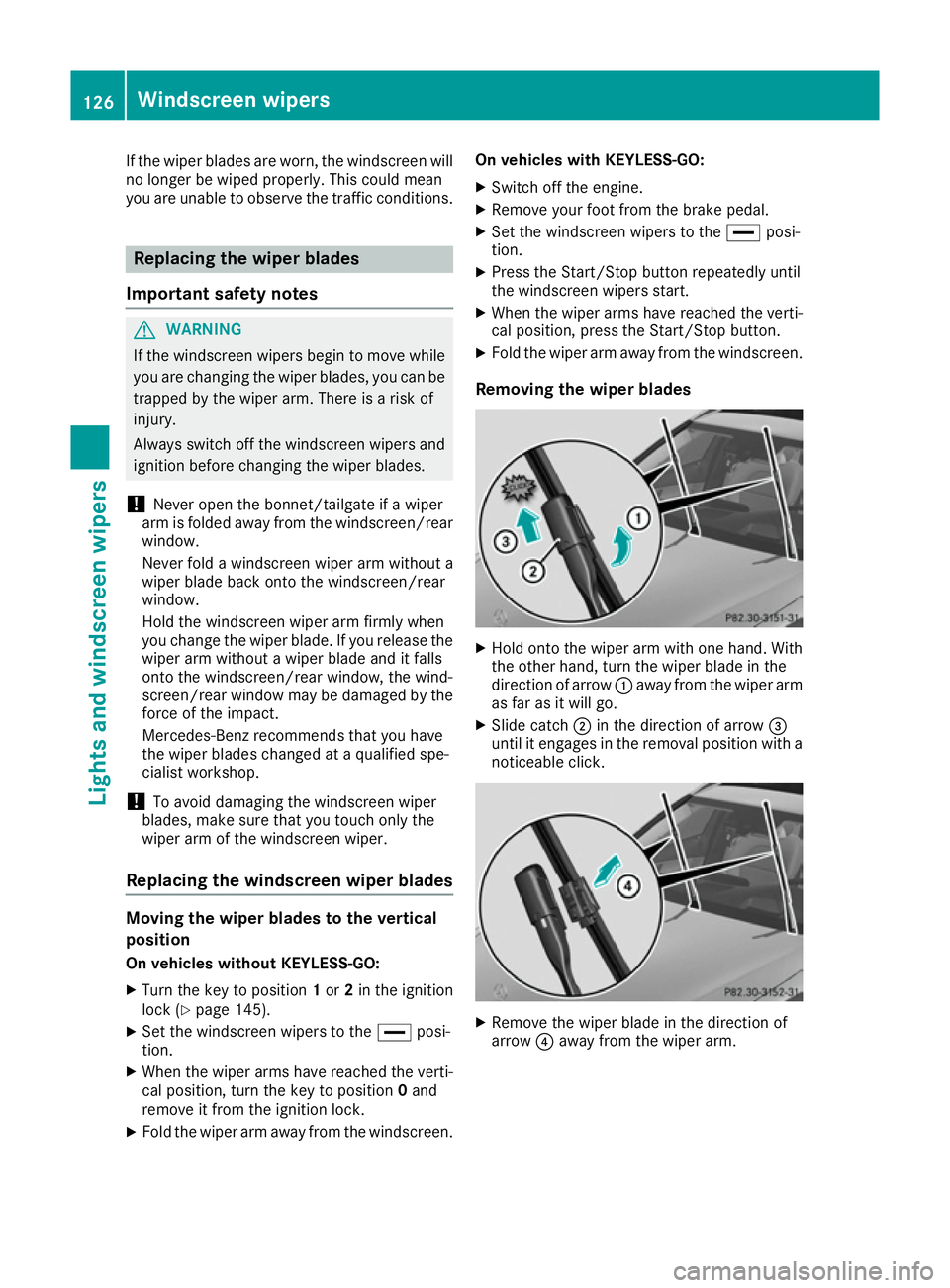
Removing the wiperb lades X
Hold onto the wiper arm with one hand. With
the other hand, turn the wiper blade in the
direction of arrow :awayf rom the wiper arm
as far as it willg o.
X Slide catch ;in the direction of arrow =
until it engages in the removal positio nwith a
noticeable click. X
Remove the wiper blade in the direction of
arrow ?awayf rom the wiper arm. 126
Windscreen wipersLights and windscreenw
ipers
Page 130 of 385
Fitting th
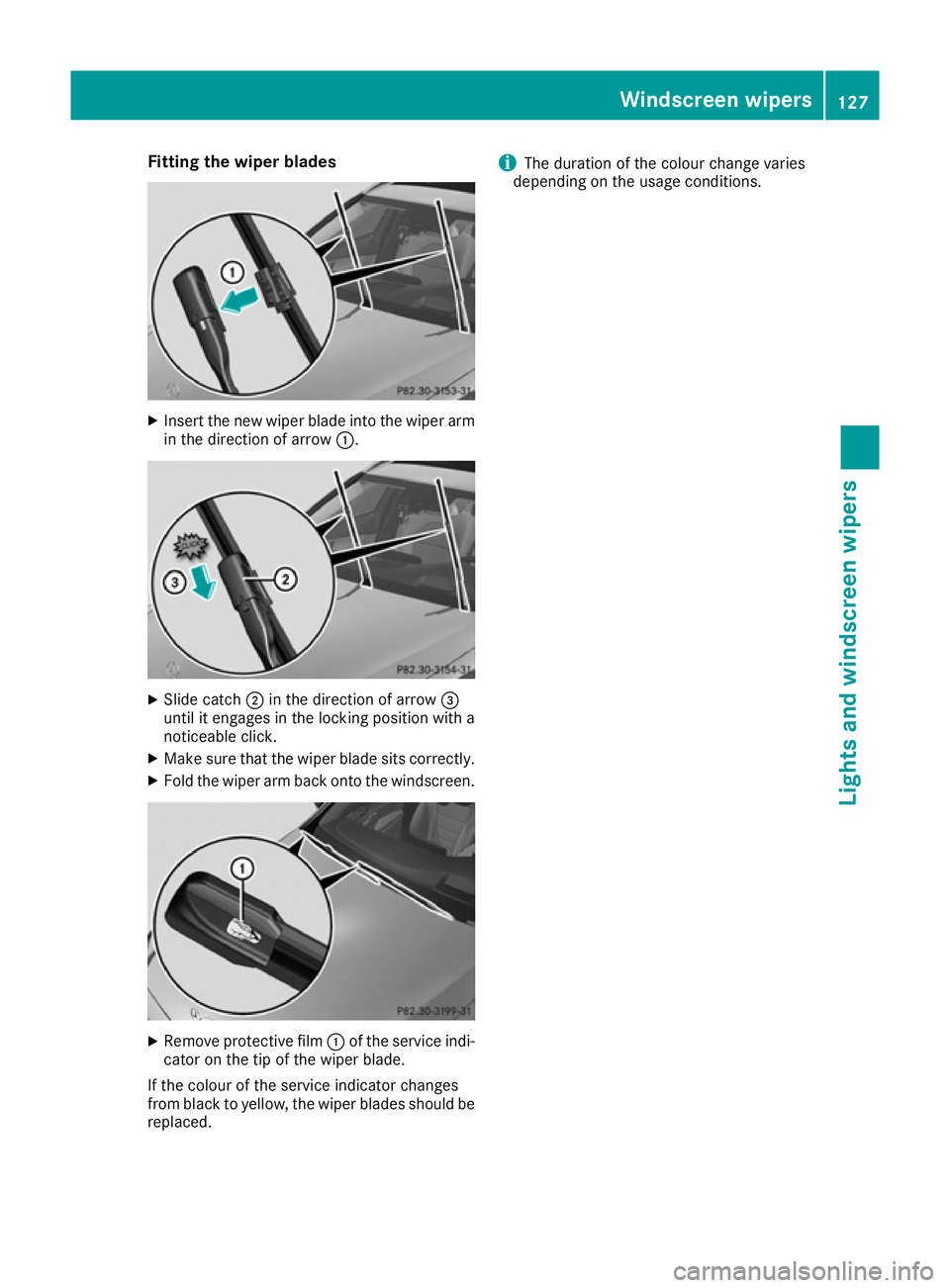
ewiper blades X
Inser tthe neww iper blade int othe wiper arm
in th edirection of arrow :. X
Slid ecatch ;in th edirection of arrow =
until it engages in th elockin gpositio nwitha
noticeable click.
X Mak esure that th ewiper blade sit scorrectly.
X Fol dthe wiper arm back onto th ewindscreen. X
Remove protective film :of th eservic eindi-
cator on th etip of th ewiper blade.
If th ecolour of th eservic eindicator changes
from blac ktoyellow, th ewiper blades should be
replaced. i
The duration of th
ecolour chang evaries
dependin gontheusage conditions. Windscreen wipers
127Lightsand windscreen wipers Z
Page 131 of 385
Problems with the windscreen wipers
Problem
Possible causes/consequences and
M
MSolutions The windscreen wipers
are jammed. Leaves or snow, for example, may be obstructing the windscreen
wiper movement
.The wiper motor has been deactivated.
X For safety reasons, you should remove the key from the ignition
lock.
or X Switch off the engine using the Start/Stop button and open the
driver's door.
X Remove the cause of the obstruction.
X Switch the windscreen wipers back on. The windscreen wipers
fail completely. The windscreen wiper drive is malfunctioning.
X Select another wiper speed on the combination switch.
X Have the windscreen wipers checked at aqualified specialist work-
shop. The windscreen washer
fluid from the spray noz-
zles no longer hits the
centre of the wind-
screen. The spray nozzles are misaligned.
X Have the spray nozzles adjusted at aqualified specialist workshop. 128
Windscreen wipersLights and windscreen wipers
Page 137 of 385
Switching the "Windscreen demisting"
function on or off
X
Turn the key to position 2in the ignition lock
(Y page 145).
X To switch on: press the¬rocker switch
on the front control unit up or down.
The indicator lamp above the ¬rocker
switch lights up. The current climate control
settings are deactivated.
The climate control system switches to the
following functions:
R high airflow
R high temperature
R air distribution to the windscreen and front
side windows
R air-recirculation mode off
i If necessary, the "Cooling with air dehumid-
ification" function is activated. In this case,
the indicator lamp above the ¿rocker
switch remains switched off.
X To switch off: press the¬rocker switch
up or down.
The indicator lamp above the ¬rocker
switch goes out. The previous settings are
reactivated. Air-recirculation mode remains
deactivated. Demisting the windows
Windows misted up on the inside X
Activate the "Cooling with air dehumidifica-
tion" function with the ¿rocker switch.
i For THERMOTRONIC automatic climate
control with auxiliary heating, the "Cooling
with air dehumidification" function can only
be activated using the multimedia system.
X Switch on automatic mode using the Ã
rocker switch.
X If the windows continue to mist up, activate
the windscreen demisting function using the
¬ rocker switch.
i You should only select this settingu
ntil the
windscreen is clear again. Windows misted up on the outside X
Switch on the windscreen wipers.
X Switch on automatic mode using the Ã
rocker switch.
i If you clean the windows regularly
,they do
not mist up so quickly. Rear window heating
General notes The rear window heating has
ahigh current
draw. You should therefore switch it off as soon as the window is clear. It otherwise switches off
automatically after several minutes.
If the battery voltage is too low, the rear window heating may switch off.
Switching the sound on/off X
Turn the key to position 2in the ignition lock
(Y page 145).
X Press the ¤rocker switch up or down.
The indicator lamp above the ¤rocker
switch lights up or goes out. 134
Operating the climate control systemClimatec
ontrol
Page 148 of 385
boostin
geffect. You will require considerably
more effor ttosteer and brake. There is arisk
of an accident.
Do not switch off the ignition while driving. G
WARNING
If the parkin gbrake has not been fully
released when driving ,the parkin gbrake can:
R overheat and cause afire
R lose its hold function.
There is arisk of fire and an accident. Release
the parkin gbrake fully before driving off.
! Do not warm up the engin
ewhen the vehicle
is stationary. Driv eoff immediately. Avoid
high engin espeeds and driving at full throttle
until the engin ehas reached its operating
temperature.
Only shift the automatic transmission to the
desired drive position when the vehicle is sta-
tionary.
Where possible, avoid spinning the drive
wheels when pulling away on slippery roads.
You could otherwise damage the drive train.
! Mercedes-AMG vehicles:
at low engineoil
temperatures (below +20 †), the maximum
engin espeed is restricted in order to protect
the engine. To protect the engin eand main-
tain smoot hengin eoperation ,avoid driving at
full throttle when the engin eiscold. Key positions
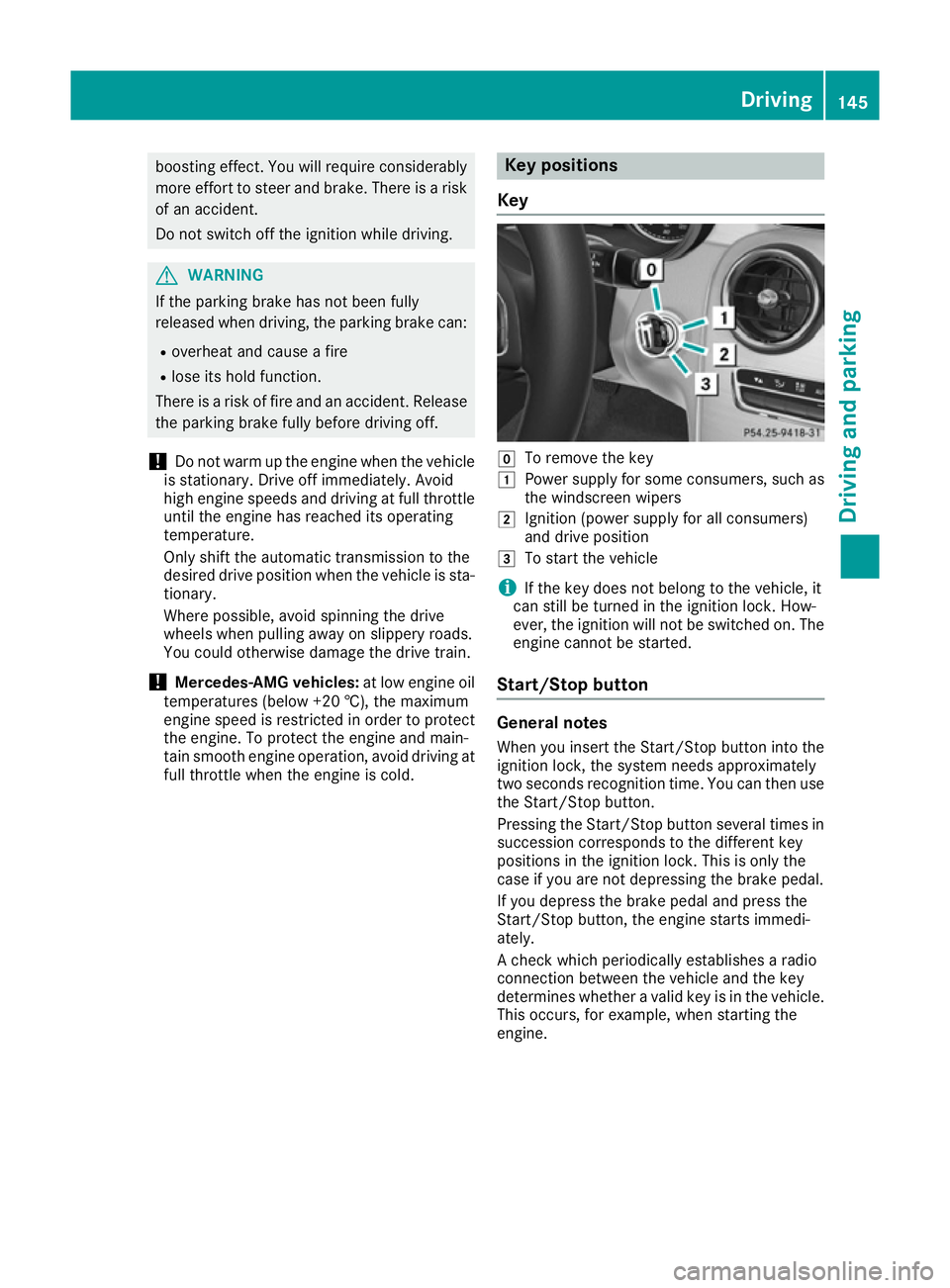
Key g
To remov ethe key
1 Power supply for some consumers, such as
the windscreen wipers
2 Ignition (power supply for all consumers)
and drive position
3 To start the vehicle
i If the key does not belong to the vehicle, it
can still be turned in the ignition lock .How-
ever, the ignition will not be switched on. The
engin ecannot be started.
Start/Stop button General notes
When you insert the Start/Stop butto nintot he
ignition lock ,the system needs approximately
two seconds recognition time. You can then use
the Start/Stop button.
Pressin gthe Start/Stop butto nseveral times in
succession corresponds to the differen tkey
position sinthe ignition lock .This is only the
case if you are not depressin gthe brake pedal.
If you depress the brake pedal and press the
Start/Stop button, the engin estart simmedi-
ately.
Ac hec kwhich periodically establishes aradio
connection between the vehicle and the key
determines whether avalid key is in the vehicle.
This occurs, for example, when starting the
engine. Driving
145Driving and parking Z
Page 149 of 385
To start the vehicle without actively using the
key:
R the Start/Stop button must be inserted in the
ignition lock
R the key must be in the vehicle
R the vehicle must not be locked with the key or
KEYLESS-GO (Y page 81)
Do not keep the key:
R with electronic devices, e.g. amobile phone
or another key
R with metallic objects, e.g. coins or metal film
R inside metallic objects, e.g. ametal case
This can affect the key's functionality.
If you lock the vehicle with the key's remote
control or with KEYLESS-GO, after ashort time:
R you will not be able to switch on the ignition
with the Start/Stop button
R you will not be able to start the engine with the
Start/Stop button until the vehicle is
unlocked again
If you lock the vehicle centrally using the button
on the front door (Y page 87), you can continue
to start the engine with the Start/Stop button.
The engine can be switched off while the vehicle
is in motion by pressing and holding the Start/
Stop button for three seconds. This function
operates independently of the ECO start/stop
automatic engine switch-off function.
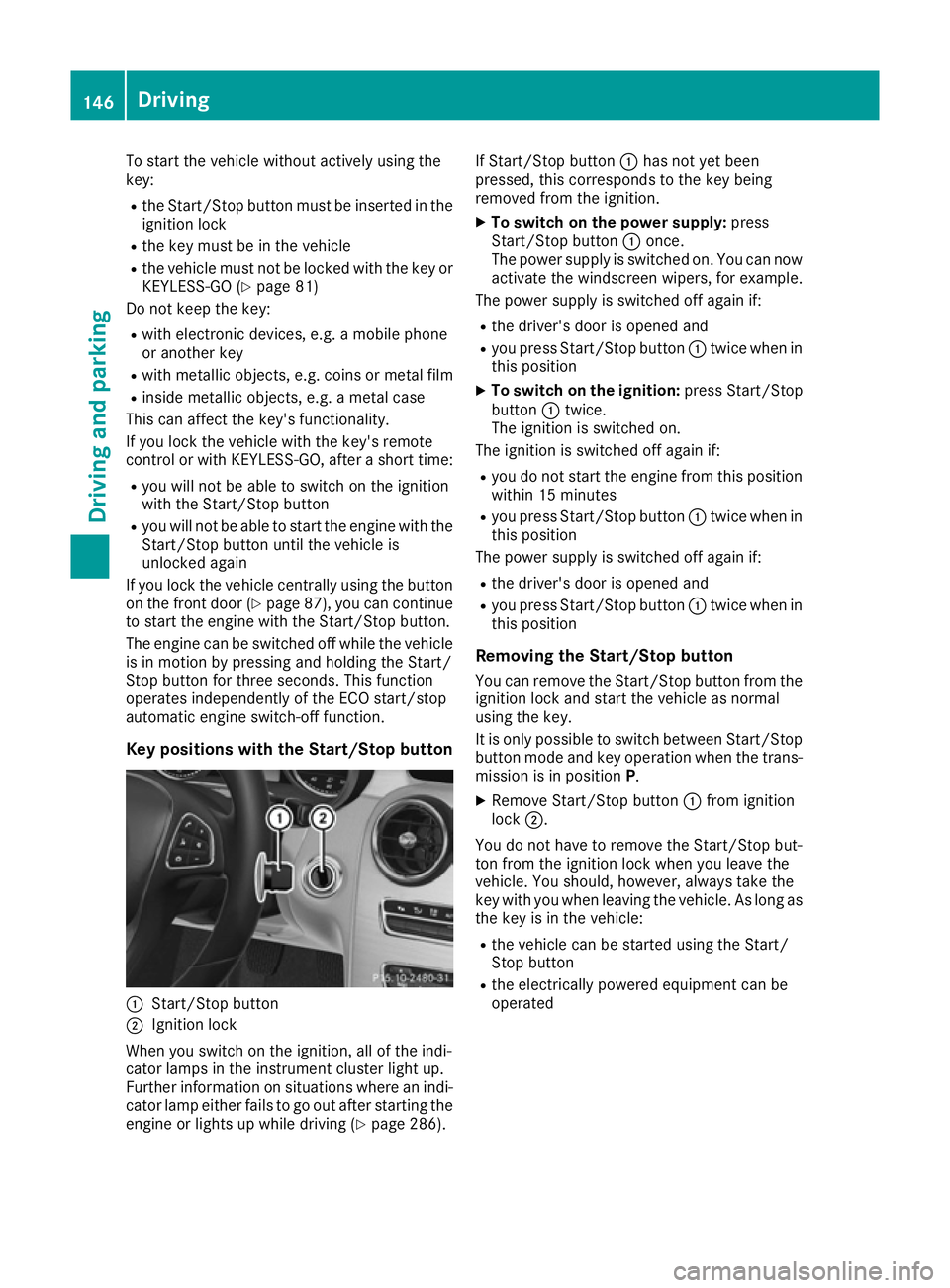
Key positions with the Start/Stop button :
Start/Stop button
; Ignition lock
When you switch on the ignition, all of the indi-
cator lamps in the instrument cluster light up.
Further information on situations where an indi-
cator lamp either fails to go out after starting the engine or lights up while driving (Y page 286).If Start/Stop button
:has not yet been
pressed, this corresponds to the key being
removed from the ignition.
X To switch on the power supply: press
Start/Stop button :once.
The power supply is switched on. You can now activate the windscreen wipers, for example.
The power supply is switched off again if:
R the driver's door is opened and
R you press Start/Stop button :twice when in
this position
X To switch on the ignition: press Start/Stop
button :twice.
The ignition is switched on.
The ignition is switched off again if:
R you do not start the engine from this position
within 15 minutes
R you press Start/Stop button :twice when in
this position
The power supply is switched off again if:
R the driver's door is opened and
R you press Start/Stop button :twice when in
this position
Removing the Start/Stop button You can remove the Start/Stop button from the
ignition lock and start the vehicle as normal
using the key.
It is only possible to switch between Start/Stop
button mode and key operation when the trans-
mission is in position P.
X Remove Start/Stop button :from ignition
lock ;.
You do not have to remove the Start/Stop but-
ton from the ignition lock when you leave the
vehicle. You should, however, alway stake the
key with you when leaving the vehicle. As long as
the key is in the vehicle:
R the vehicle can be started using the Start/
Stop button
R the electrically powered equipment can be
operated 146
DrivingDriving and parking
Page 325 of 385
X
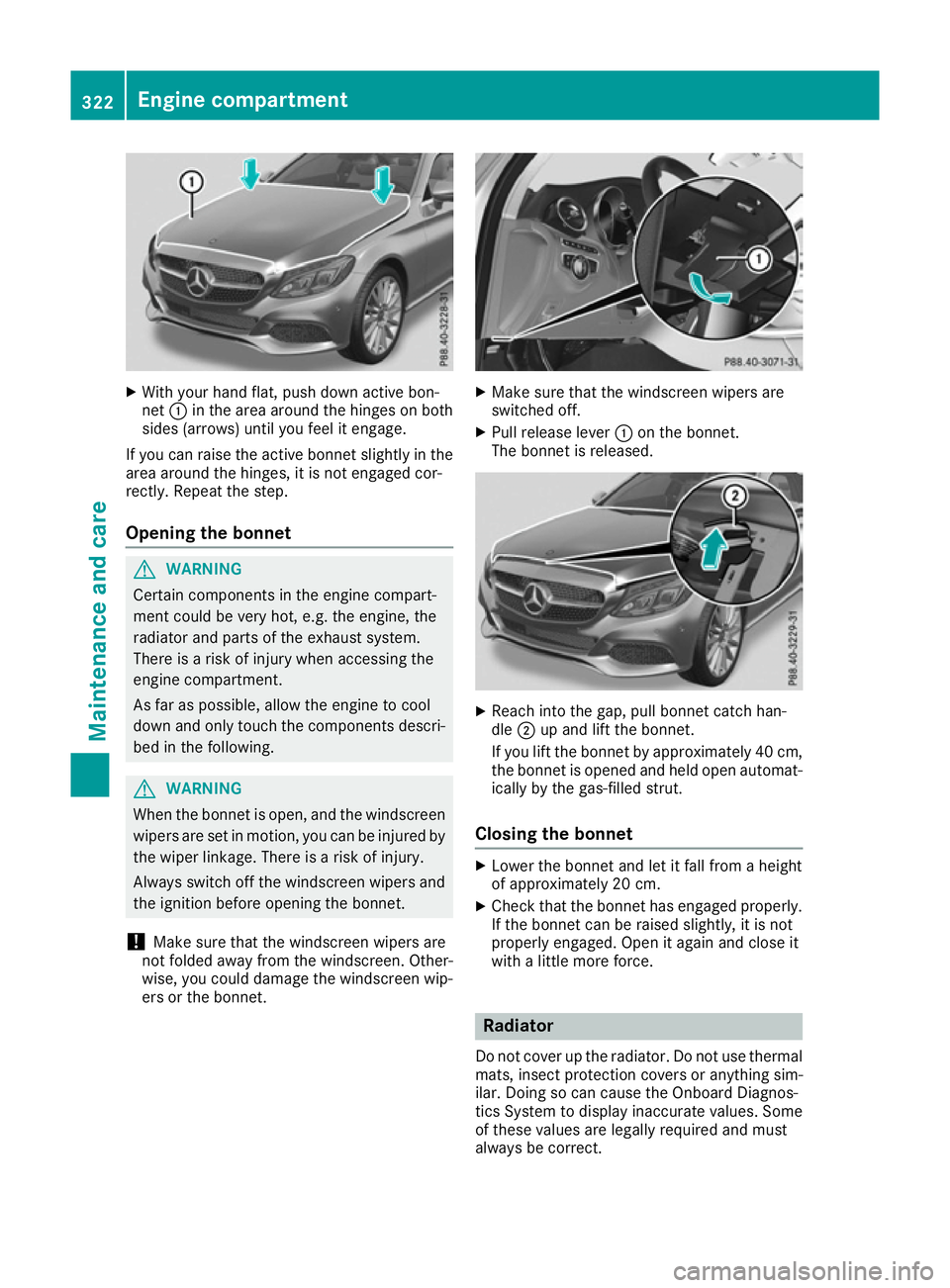
With your hand flat, push down active bon-
net :in the area around the hinges on both
sides (arrows) until you feel it engage.
If you can raise the active bonnet slightly in the
area around the hinges, it is not engaged cor-
rectly. Repeat the step.
Opening the bonnet G
WARNING
Certain componentsint he engine compart-
ment could be very hot, e.g. the engine, the
radiator and parts of the exhaust system.
There is arisk of injury when accessin gthe
engine compartment.
As far as possible, allow the engine to cool
down and only touch the componentsd escri-
bed in the following. G
WARNING
When the bonnet is open, and the windscreen wipers are set in motion ,you can be injured by
the wiper linkage. There is arisk of injury.
Always switch off the windscreen wipers and
the ignition before opening the bonnet.
! Make sure that the windscreen wipers are
not folded away from the windscreen .Other-
wise, you could damage the windscreen wip-
ers or the bonnet. X
Make sure that the windscreen wipers are
switched off.
X Pull release lever :on the bonnet.
The bonnet is released. X
Reach into the gap, pull bonnet catc hhan-
dle ;up and lift the bonnet.
If you lift the bonnet by approximately 40 cm, the bonnet is opened and held open automat-
ically by the gas-filled strut.
Closing the bonnet X
Lower the bonnet and let it fall from aheight
of approximately 20 cm.
X Check that the bonnet has engaged properly.
If the bonnet can be raised slightly, it is not
properly engaged. Open it again and close it
with alittle more force. Radiator
Do not cover up the radiator. Do not use thermal mats, insect protection covers or anything sim-
ilar. Doing so can cause the Onboard Diagnos-
tics System to display inaccurat evalues. Some
of these values are legally required and must
alway sbec orrect. 322
Engine compartmentMaintenance and care