mirror MERCEDES-BENZ C-CLASS COUPE 2015 Owner's Guide
[x] Cancel search | Manufacturer: MERCEDES-BENZ, Model Year: 2015, Model line: C-CLASS COUPE, Model: MERCEDES-BENZ C-CLASS COUPE 2015Pages: 385, PDF Size: 13.12 MB
Page 216 of 385
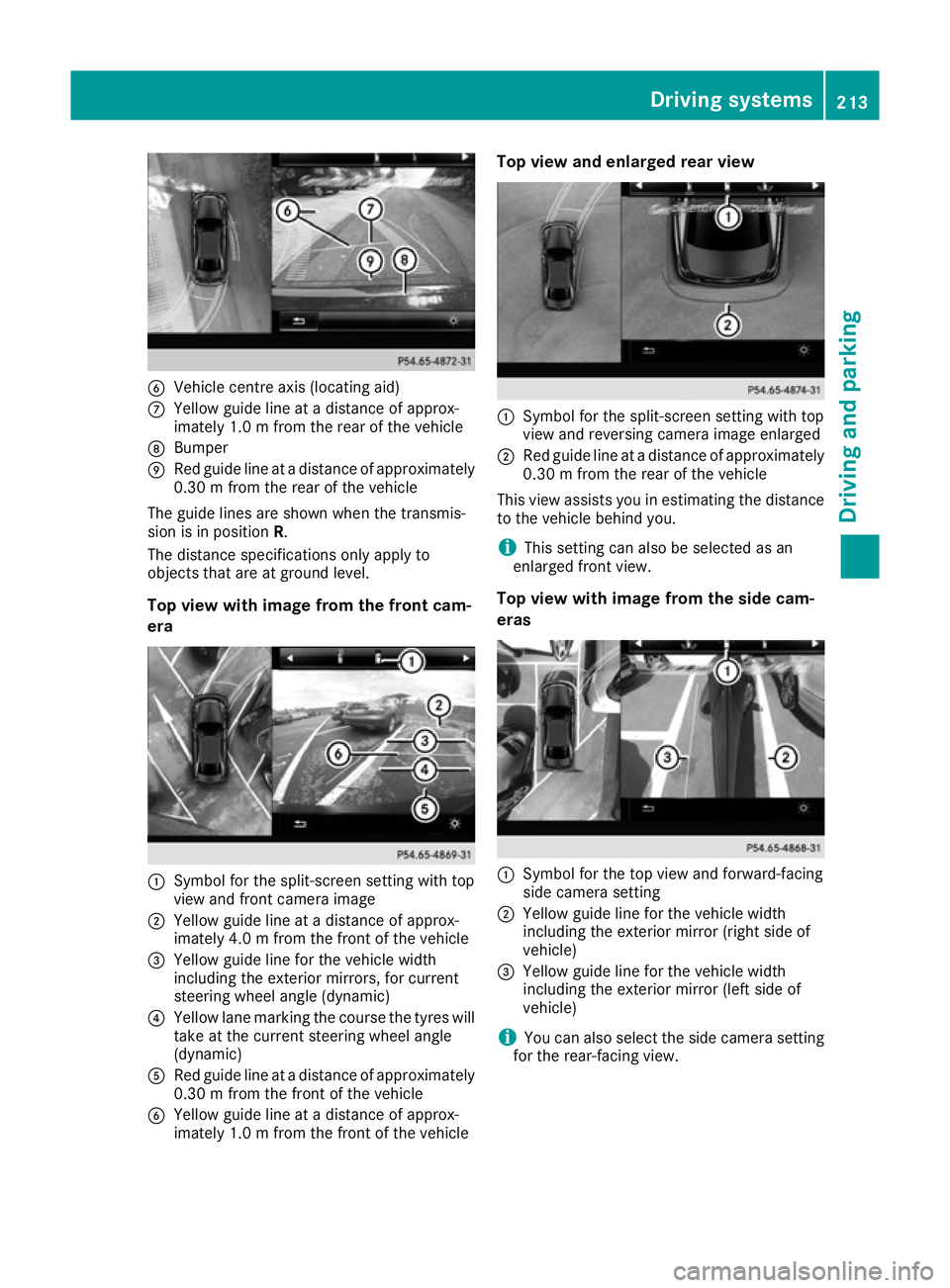
B
Vehicle centre axis (locating aid)
C Yellow guidel ine atadistance of approx-
imately 1.0 mfrom the rear of the vehicle
D Bumper
E Red guidel ine atadistance of approximately
0.30 mfrom the rear of the vehicle
The guidel ines are shown when the transmis-
sion is in position R.
The distance specifications only applyto
objects that are at ground level.
Top view with image from the front cam-
era :
Symbol for the split-screen setting with top
view and front camera image
; Yellow guidel ine atadistance of approx-
imately 4.0 mfrom the front of the vehicle
= Yellow guidel ine for the vehicle width
including the exterior mirrors, for current
steering wheel angle (dynamic)
? Yellow lane marking the course the tyres will
take at the current steering wheel angle
(dynamic)
A Red guidel ine atadistance of approximately
0.30 mfrom the front of the vehicle
B Yellow guide line at adistance of approx-
imately 1.0 mfrom the front of the vehicle Top vie
wand enlarged rear view :
Symbo lfor the split-screen setting with top
view and reversing camera image enlarged
; Red guide line at adistance of approximately
0.30 mfrom the rear of the vehicle
This view assists you in estimating the distance to the vehicl ebehind you.
i This setting can als
obeselected as an
enlarged front view.
Top vie wwithi mage from the side cam-
eras :
Symbo lfor the top view and forward-facing
side camera setting
; Yellow guide line for the vehicl ewidth
including the exterior mirror (right side of
vehicle)
= Yellow guide line for the vehicl ewidth
including the exterior mirror (left side of
vehicle)
i You can als
oselect the side camera setting
for the rear-facing view. Driving systems
213Driving and parking Z
Page 221 of 385
Blind Spo
tAssist General notes
Blind Spo tAssist monitors the areas on either
side of the vehicl ethata re not visible to the
driver with two lateral, rear-facing radar sen-
sors. Awarning display in the exterio rmirrors
draws your attentio ntovehicles detecte dinthe
monitore darea. If yo uthen switch on the cor-
responding turn signa ltochange lanes, yo uwill
also receive avisua land audibl ecollision warn-
ing.
Blind Spo tAssist supports yo ufrom aspeed of
approximatel y30km/h.
Important safety notes G
WARNING
Blind Spo tAssist does not react to vehicles:
R overtake ntoo closel yonthe side ,placing
them in the blind spo tarea
R when the difference in the speed of
approach and overtaking is too great
As aresult, Blind Spo tAssist canno twarn
driver sinthesesituations. There is ariskofan
accident.
Alway spaycarefu lattentio ntothe traffic sit-
uatio nand maintain asafed istance at the side
of the vehicle.
Blind Spo tAssist is onl yanaid.Itm ayfailto
detect som evehicles and is no substitute for
attentive driving .Alway sensure tha tther eis
sufficient distance to the side for othe rroad
users and obstacles.
Radar sensors
The radar sensors for Blind Spo tAssist are inte-
grated into the rea rbum per. Make sure tha tthe
bumpers are free from dirt, ice or slush. The
sensors must not be covered ,for exampl eby
cycl eracks or overhanging loads. Following a
severe impact or in the event of damage to the
bumpers, have the functio nofthe radar sensors
checked at aquali fied specialist workshop.
Blind Spo tAssist ma ynolonger work properly. Monitorin
grange
In particular, the detection of obstacle scan be
impaired in the cas eof:
R dirt on the sensors or obscured sensors
R poor visibility ,e.g.d ue to fog ,heavy rain,
snow or spray
R narrow vehicles, e.g .motorcycle sorbicycles
R ver yw idel an es
R narrow lanes
R vehicles not driving in the middl eoftheirlane
R barriers or othe rroa db oundaries
Vehicles in the monitoring rang eare then not
indicated. Blind Spo
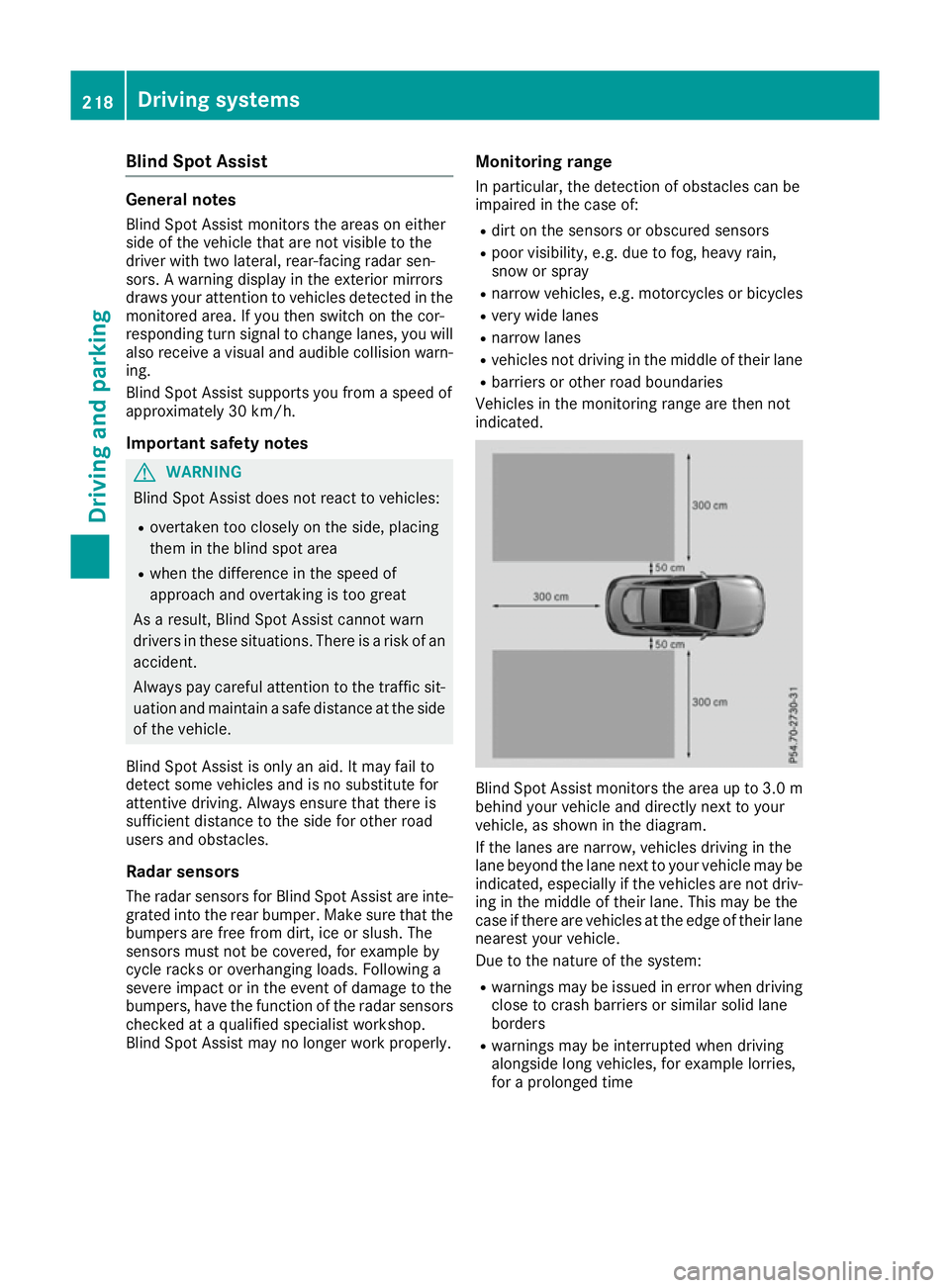
tAssist monitors the are aupto3.0 m
behind your vehicl eand directl ynext to your
vehicle, as shown in the diagram.
If the lanes are narrow ,vehicles driving in the
lane beyond the lane next to your vehicl emaybe
indicated ,especially if the vehicles are not driv-
ing in the middl eoftheirlan e. Thi smaybe the
cas eift hereare vehicles at the edge of thei rlane
neares tyou rv ehicle.
Due to the nature of the system:
R warning smaybe issued in error when driving
close to crash barriers or similar solid lane
borders
R warning smaybe interrupte dwhend riving
alongsid elon gv ehicles, for exampl elorries,
for aprolonged time 218
Driving systemsDriving an
dparking
Page 222 of 385
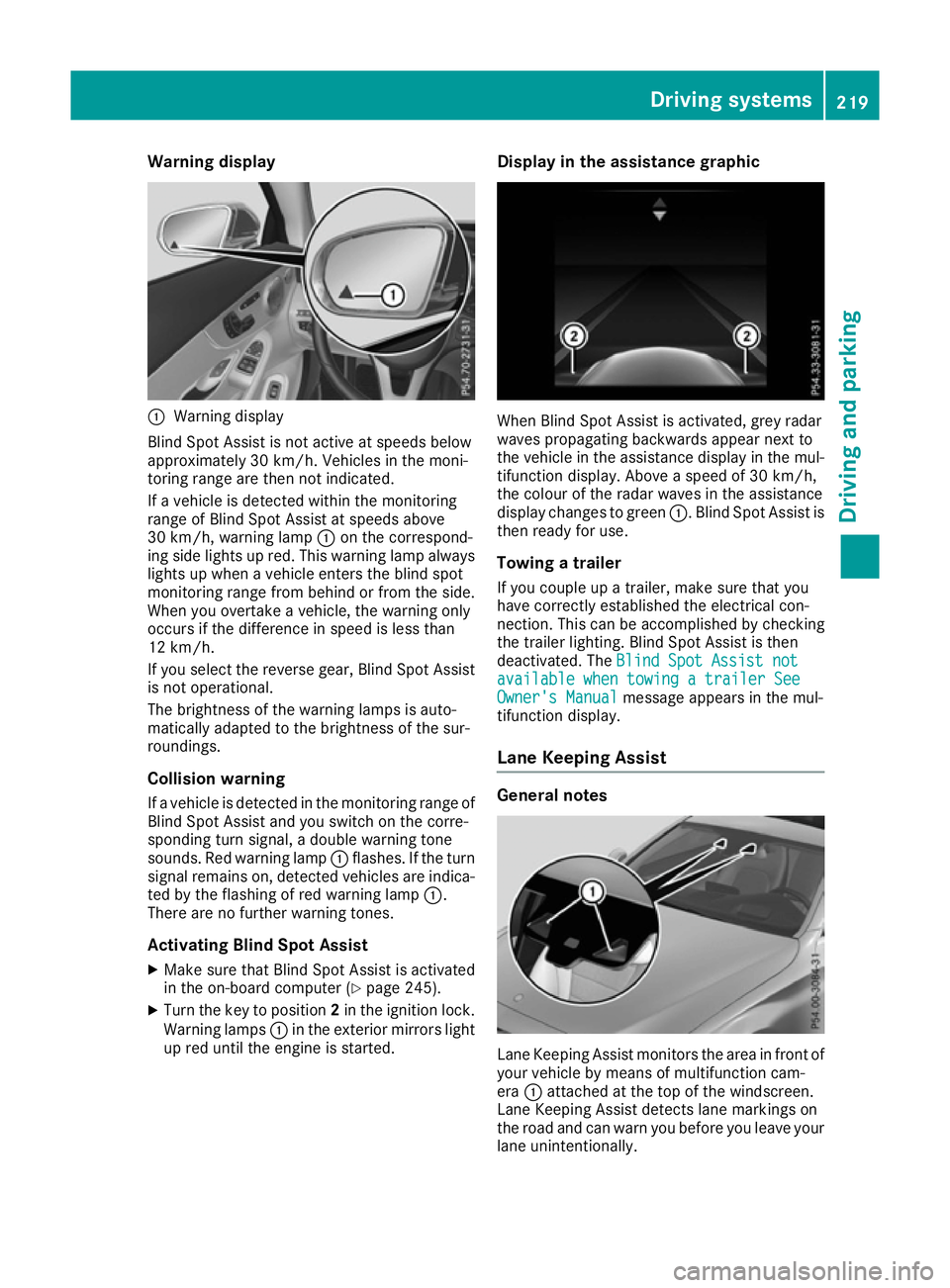
Warning display
:
Warning display
Blind Spot Assist is not active at speeds below
approximately 30 km/h. Vehicles in the moni-
toring range are then not indicated.
If av ehicl eisd etected withi nthe monitoring
range of Blind Spot Assist at speeds above
30 km/h, warning lamp :on the correspond-
ing side lights up red. This warning lamp always lights up when avehicl eenters the blind spot
monitoring range from behind or from the side.
When you overtake avehicle, the warning only
occurs if the difference in spee disless than
12 km/h.
If you select the reverse gear, Blind Spot Assist
is not operational.
The brightness of the warning lamp sisauto-
matically adapted to the brightness of the sur-
roundings.
Collisionw arning
If av ehicl eisd etected in the monitoring range of
Blind Spot Assist and you switch on the corre-
sponding turn signal, adouble warning tone
sounds. Red warning lamp :flashes. If the turn
signa lremains on, detected vehicles are indica-
ted by the flashing of red warning lamp :.
There are no further warning tones.
Activating Blind Spot Assist X Make sure that Blind Spot Assist is activated
in the on-board computer (Y page245).
X Turn the key to position 2in the ignition lock.
Warning lamps :in the exterior mirrors light
up red until the engine is started. Display in the assistance graphic
When Blind Spot Assist is activated, grey radar
waves propagating backwards appear next to
the vehicl einthe assistance display in the mul-
tifunction display .Above aspee dof30k m/h,
the colou rofthe rada rwaves in the assistance
display changes to green :.Blind Spot Assist is
then read yfor use.
Towing atrailer
If you coupl eupatrailer, make sure that you
have correctly established the electrical con-
nection. This can be accomplishe dbychecking
the trailer lighting. Blind Spot Assist is then
deactivated. The Blind Spot Assist not Blind Spot Assist not
available when towing atrailer See
available when towing atrailer See
Owner's Manual
Owner's Manual message appears in the mul-
tifunction display.
Lane Keepin gAssist General notes
Lane Keeping Assist monitors the area in front of
you rvehicl ebym eans of multifunction cam-
era :attached at the top of the windscreen.
Lane Keeping Assist detects lane markings on
the road and can warn you before you leave your lane unintentionally. Driving systems
219Driving and parking Z
Page 226 of 385
Visual and acousti
ccollision warning
If yo uswitch on the turn signal stochange lanes
and avehicl eisd etected in the sid emonitoring
range, yo ureceive avisua land acoustic collision
warning .You will then hea radoublewarning
tone and red warning lamp :flashes. If the turn
signal remains on, detected vehicles are indica-
ted by the flashing of red warning lamp :.
There are no further warning tones.
Course-correctin gbrake application
If Active Blind Spot Assist detects ariskofa side
impact in the monitoring range, acourse-cor-
recting brake application is carrie dout.T hisis
designed to hel pyou avoid acollision. G
WARNING
Ac ourse-correcting brake application cannot
always prevent acollision. There is ariskofan
accident.
Alway ssteer, brake or accelerate yourself,
especially if Active Blind Spot Assist warns
yo uorm akesac ourse-correcting brake appli-
cation. Alway smaintai nasafed istance at the
sides.
If ac ourse-correcting brake application occurs,
red warning lamp :flashe sinthe exterio rmir-
ror and adualw arning tone sounds. In addition,
display ;underlining the danger of asidec ol-
lisio nappea rs in the multifunctio ndisplay.
In very rar ecases, the system may make an
inappropriate brake application. Acourse-cor-
recting brake application may be interrupted at
any time if yo ustee rslightl yint he opposite
direction or accelerate.
The course-correcting brake application is avail-
able in the speed rang ebetween 30 km/h and
200 km/h.
Eithe racourse-correcting brake application
appropriate to the driving situation, or none at
all, may occu rif:
R ther eare vehicles or obstacles, e.g. crash
barriers ,onboth sides of your vehicle
R av ehicl eapproaches too closel yonthe side
R youh avea dopte das porty driving style with
high cornering speeds
R youc learl ybrake or accelerate
R ad riving safety system intervenes, such as
ESP ®
or PRE-SAFE ®
Brake R
ESP ®
is deactivated
R al ossoft yre pressure or adefective tyre is
detected
Activatin gActive Blind Spo tAssist
X Make sure tha tActive Blind Spot Assist is
activate dinthe on-board computer
(Y page 245).
X Turn the key to position 2in the ignition lock.
Warning lamps :in the exterio rmirrors light
up red for approximatel y1.5 seconds .Grey
radar waves propagating backwards appear
next to the vehicl einthe assistance display in
the multifunctio ndisplay.
Towin gatrailer
If yo ucoupl eupa trailer, make sure tha tyou
have correctly established the electrical con-
nection. Thi scan be accomplished by checking
the traile rlighting. Active Blind Spot Assist is
then deactivated. The radar waves next to the
vehicl eare hidden in the assistance display .The
Active Blind Spo tAssist not availa‐
Active Blind Spo tAssist not availa‐
ble ble when
when towing a
towing a trailer
trailerSee
SeeOwner's
Owner's
Manual
Manual message appears in the multifunction
display.
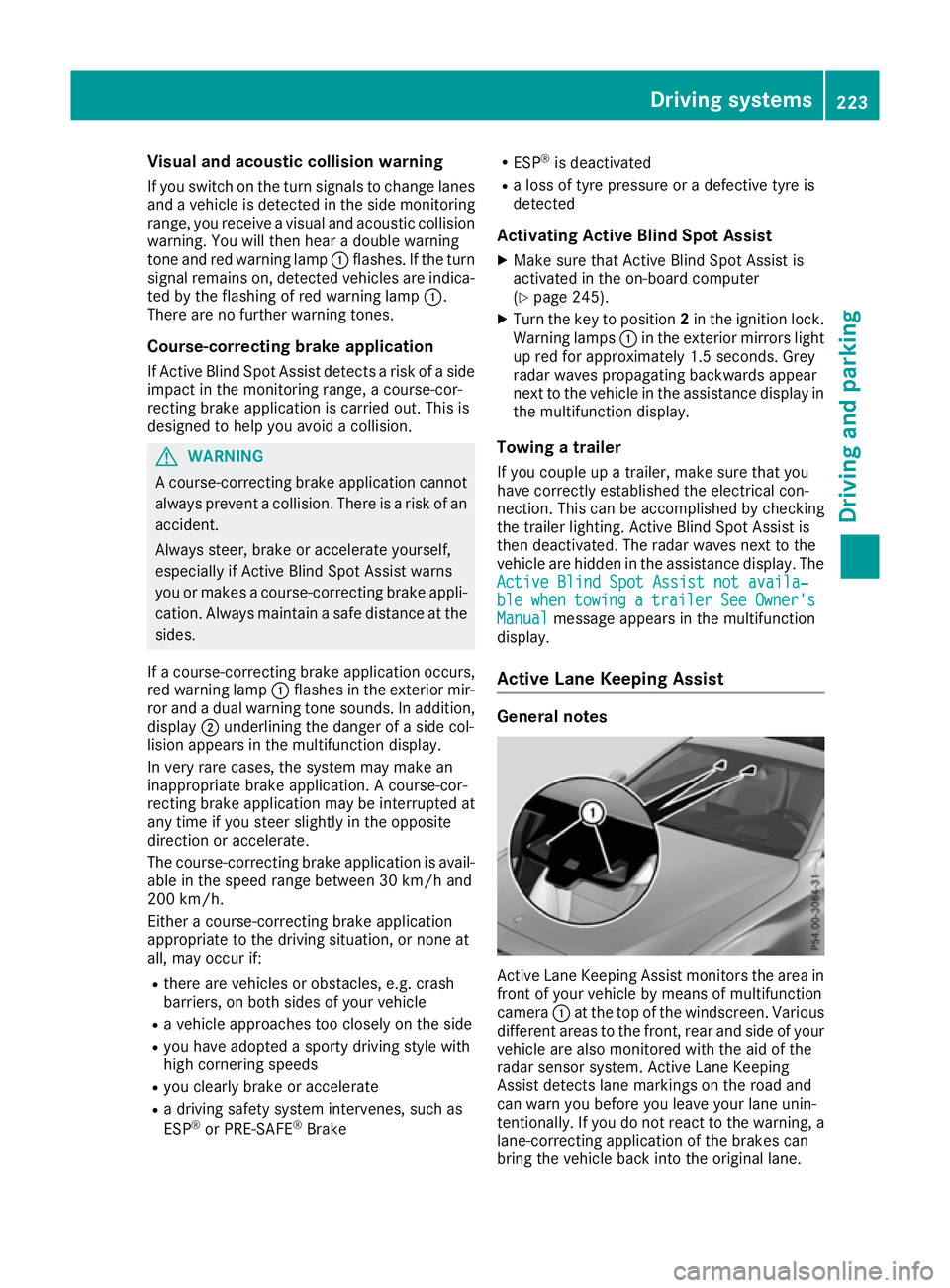
Active Lan eKeeping Assist General notes
Active Lane Keeping Assist monitors the are
ain
front of your vehicl ebymeans of multifunction
camera :at the top of the windscreen. Various
different areas to the front, rea rand sid eofyour
vehicl eare also monitore dwitht he ai doft he
radar sensor system .Active Lane Keeping
Assist detects lane marking sonthe roa dand
can warn yo ubefore yo uleave your lane unin-
tentionally .Ifyoudo not react to the warning ,a
lane-correcting application of the brakes can
bring the vehicl ebacki nto the original lane. Driving systems
223Driving and parking Z
Page 318 of 385
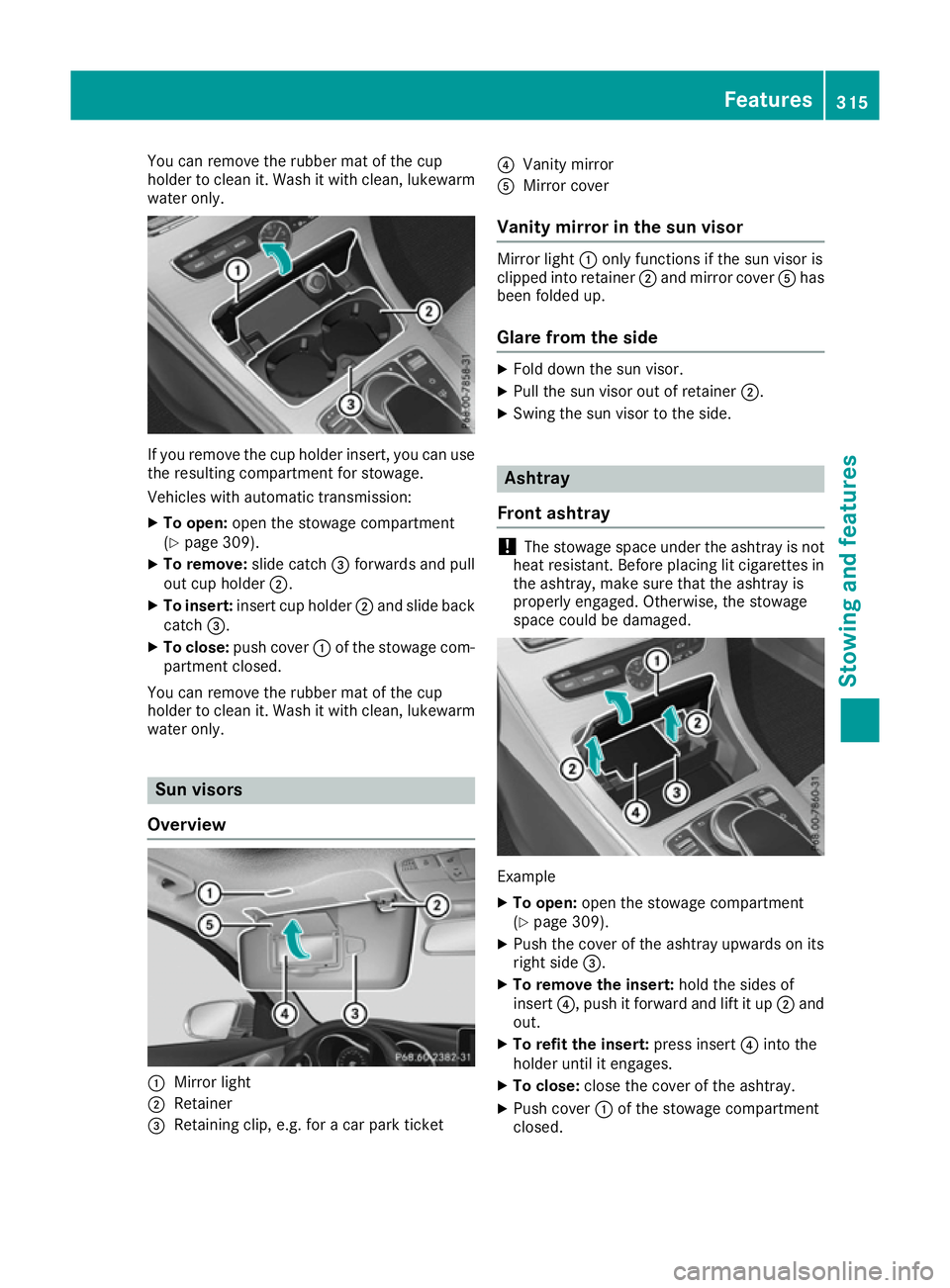
You can remove the rubber mat of the cup
holder to clean it. Wash it with clean ,lukewarm
water only. If you remove the cup holder insert, you can use
the resulting compartmen tfor stowage.
Vehicles with automatic transmission:
X To open: open the stowage compartment
(Y page 309).
X To remove: slide catch=forwards and pull
out cup holder ;.
X To insert: insertcup holder ;and slide back
catch =.
X To close: push cover :of the stowage com-
partmen tclosed.
You can remove the rubber mat of the cup
holder to clean it. Wash it with clean ,lukewarm
water only. Sun visors
Overview :
Mirro rlight
; Retainer
= Retaining clip, e.g. for acar park ticket ?
Vanit ymirror
A Mirro rcover
Vanity mirror in th esun visor Mirro
rlight :only function sifthe sun visor is
clipped int oretainer ;and mirror cover Ahas
been folded up.
Glar efromt heside X
Fold down the sun visor.
X Pull the sun visor out of retainer ;.
X Swin gthe sun visor to the side. Ashtray
Front ashtray !
The stowage space under the ashtray is not
heat resistant .Before placin glit cigarettes in
the ashtray, make sure that the ashtray is
properly engaged. Otherwise, the stowage
space could be damaged. Example
X To open: open the stowage compartment
(Y page 309).
X Push the cover of the ashtray upwards on its
right side =.
X To remove th einsert: hold the sides of
insert ?,push it forwar dand lift it up ;and
out.
X To refit th einsert: press insert ?intot he
holder until it engages.
X To close: close the cover of the ashtray.
X Push cover :of the stowage compartment
closed. Features
315Stowing and features Z
Page 333 of 385
Alway
sswitch off the windscree nwiper sand
the ignition before cleaning the windscree nor
wipe rblade s.
! Do not pull on the wipe
rblade .Otherwise,
the wipe rblade could be damaged.
! Do not clean wipe
rblade stoo ofte nand do
not ru bthem too hard. Otherwise, the graph-
ite coating could be damaged .Thisc ould
cause wipe rnoise.
! Hol
dthe wipe rarm securel ywhenf olding
back. The windscree ncould be damaged if
the wipe rarm hits against it suddenly.
X Fol dthe wipe rarm sa wayfrom the wind-
screen (Y page 126).
X Clea nthe wipe rblade scarefull yusing adamp
cloth.
X Fol dthe windscree nwiper sbacka gain before
switching on the ignition.
Cleanin gthe exterior lighting !
Onl
yusecleaning agents or cleaning cloths
tha tare suitabl efor plastic lenses .Unsuitable
cleaning agents or cleaning cloths could
scratch or damage the plastic lenses of the
exterio rlighting.
X Clea nthe plastic lenses of the exterio rlight-
ing using awetsponge and amildc leaning
agent, e.g .Mercedes-Benz car shampo oor
cleaning cloths.
Cleanin gthe mirro rturn signal !
Onl
yusecleaning agents or cleaning cloths
tha tare suitabl efor plastic lenses .Unsuitable
cleaning agents or cleaning cloths could
scratch or damage the plastic lenses of the
mirror turn signals.
X Clea nthe plastic lenses of the mirror turn sig-
nal sint he exterio rmirror housing using awet
sponge and mil dcleaning agent, e.g.
Mercedes-Benz car shampo oorcleaning
cloths.
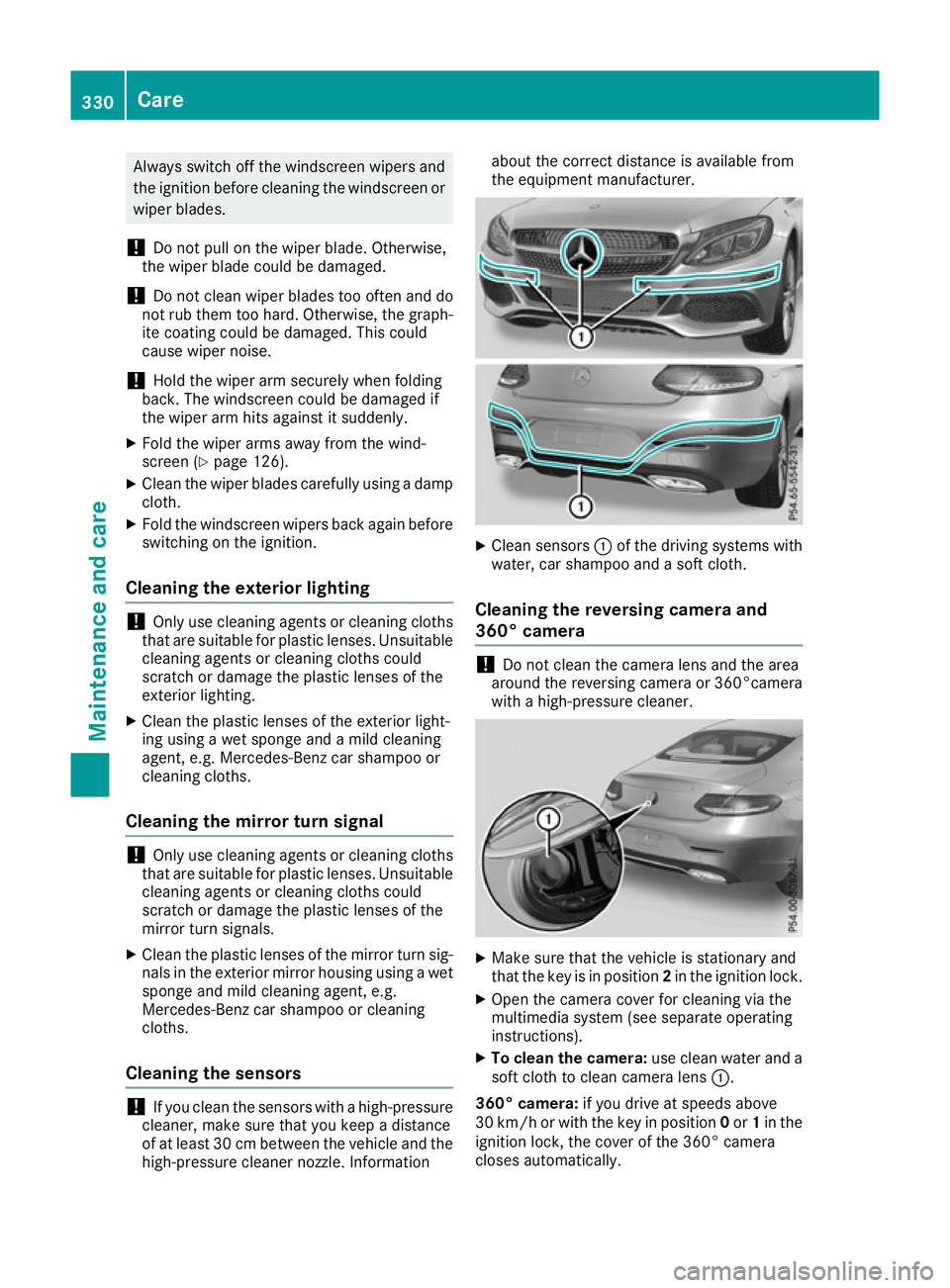
Cleanin gthe sensors !
If yo
uclean the sensors with ahigh-pressure
cleaner, make sure tha tyou kee pad istance
of at leas t30cmb etween the vehicl eand the
high-pressure cleane rnozzle. Information abou
tthe correct distance is availabl efrom
the equipment manufacturer. X
Clea nsensors :of the driving system swith
water, car shampo oand asoftc loth.
Cleanin gthe reversin gcamera and
360° camera !
Do not clean the camera lens and the area
around the reversing camera or 360°camera
with ahigh-pressure cleaner. X
Make sure tha tthe vehicl eisstationar yand
tha tthe key is in position 2in the ignition lock.
X Ope nthe camera cove rfor cleaning via the
multimedia system (se eseparate operating
instructions).
X To clean the camera: usec lean water and a
sof tcloth to clean camera lens :.
360° camera: if youdrive at speed sabove
30 km/h or with the key in position 0or 1in the
ignition lock, the cove rofthe 360° camera
closes automatically. 330
CareMaintenance and care
Page 380 of 385
i
The coolant is checked at every mainte-
nancei nterval at aqualified specialist work-
shop. Windscreen washer system
Important safety notes G
WARNING
If windscreen washer concentrate comes into contact with hot components of the engine or
the exhaust system, it can ignite. There is a
risk of fire and injury.
Make sure the windscreen washer concen-
trated oes not come into contact with the filler
neck.
! Only use washer fluid that is suitable for
plastic lamp lenses, e.g. MB SummerFit or MB
WinterFit. Unsuitable washer fluid could dam-
age the plastic lenses of the headlamps.
! Only the washer fluids SummerFit and Win-
terFit can be mixed. Otherwise, the spraying
nozzles could become blocked.
Do not use distilled or de-ionised water as the
level sensor may be triggered erroneously.
When handling washer fluid, observe the impor- tant safety notes on service products
(Y page 371).
At temperatures above freezing:
X Fill the washer fluid reservoir with amixture of
water and washer fluid, e.g. MB SummerFit.
Mix 1part MB SummerFit to 100 parts water.
At temperatures below freezing:
X Fill the washer fluid reservoir with amixture of
water and washer fluid, e.g. MB WinterFit.
For the correc tmixing ratio refer to the infor-
mation on the antifreeze reservoir.
i Add washer fluid concentrate, e.g. MB Sum-
merFit or MB WinterFit, to the washer fluid all
year round. Vehicle data
General notes
Please notet hat for the specified vehicle data:
R the heights specified may vary as aresult of:
- tyres
- load
- condition of the suspension
- optional equipment
R optional equipment reduces the maximum
payload
R only for certain countries: you can find vehi-
cle-specific vehicle data in the COC docu-
ments( CERTIFICATE OF CONFORMITY).
These document sare delivered with your
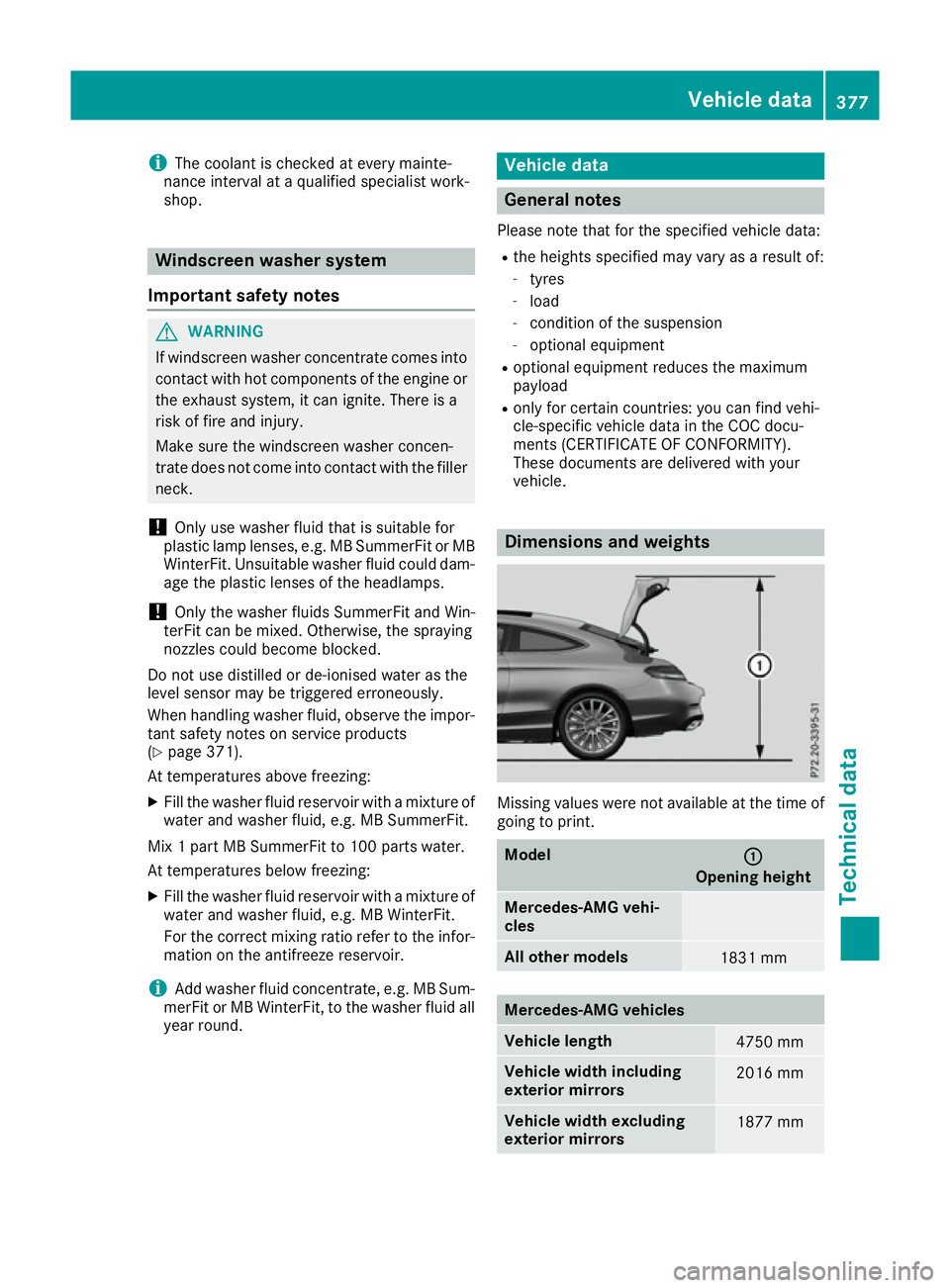
vehicle. Dimensions and weights
Missing values were not availabl
eatthe time of
going to print. Model
: :
Opening height Mercedes-AMG vehi-
cles
All other models
1831 mm
Mercedes-AMG vehicles
Vehicle length
4750 mm
Vehicle width including
exterior mirrors
2016 mm
Vehicle width excluding
exterior mirrors
1877 mmVehicle data
377Technical data Z
Page 381 of 385
Mercedes-AMG vehicles
Vehicle height, Mercedes
AMG
C63 1400 mm
Vehicle height, Mercedes
AMG
C63S 1402 mm
Wheelbase
2840 mm
Maximum roof load
75 kg
Maximum bootl
oad 100 kg
All other models
Vehicle length
4686 mm
Vehicle width including
exterio
rmirrors 2016 mm
Vehicle width excluding
exterio
rmirrors 1810 mm
Vehicle height
1405 mm
Wheelbase
2840 mm
Maximum roof load
75 kg
Maximum bootl
oad 100 kg
Trailer tow hitch
Mountin
gdimensions
! If you have
atrailer tow hitch retrofitted,
changes to the engine cooling system may be necessary ,depending on the vehicl etype.
If you have atrailer tow hitch retrofitted,
observe the anchorage points on the chassis.
The retrofitting of atrailer tow hitch is only per-
missible if atowing weight is specified in your
vehicl edocuments. If this is not the case, then
the vehicl eisnot approved for the towing of a
trailer.
For more information, please contact aqualified
specialist workshop.
Towing atrailer is not possible with all models.
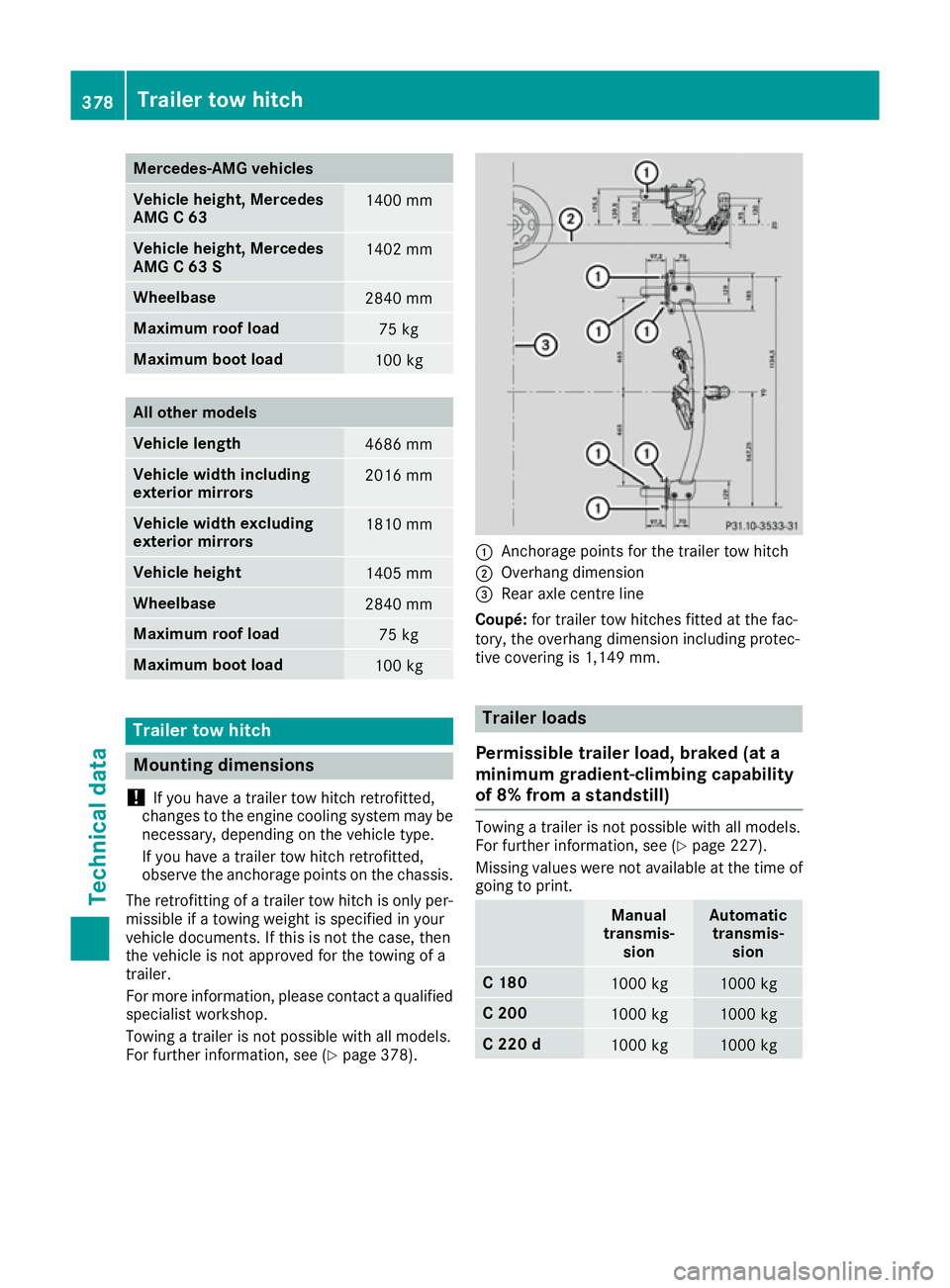
For further information, see (Y page378). :
Anchorage points for the trailer tow hitch
; Overhang dimension
= Reara xle centre line
Coupé: for trailer tow hitches fitted at the fac-
tory, the overhang dimension including protec-
tive covering is 1,149 mm. Trailer loads
Permissible trailer load, braked (at a
minimum gradient-climbing capability
of 8% from astandstill) Towing
atrailer is not possible with all models.
For further information, see (Y page227).
Missing values were not available at the time of
going to print. Manual
transmis- sion Automatic
transmis- sion C1
80 1000 kg 1000 kg
C2
00 1000 kg 1000 kg
C2
20 d 1000 kg 1000 kg378
Trailer tow hitchTechnical data