ad blue MERCEDES-BENZ C-CLASS COUPE 2015 Owners Manual
[x] Cancel search | Manufacturer: MERCEDES-BENZ, Model Year: 2015, Model line: C-CLASS COUPE, Model: MERCEDES-BENZ C-CLASS COUPE 2015Pages: 385, PDF Size: 13.12 MB
Page 6 of 385
1, 2,
3...
12 Vsocket
see Socket (12 V)
230 Vpower socket .......................... 317
360° camera
Cleaning .........................................3 30
Display in the multimedi asystem .. 212
Function/notes ............................ .210 A
ABS (Anti-lock Braking System) Display message ............................ 254
Function/notes ................................ 66
Important safety notes .................... 66
Warning lamp ................................. 287
Accident
Automatic measure safter an acci-
dent ................................................. 55
Activatin gmedia mode
General notes ................................ 306
Activating/deactivating air-recir-
culation mode ................................... .135
Activating/deactivating cooling
with air dehumidification ................. 132
Active Blin dSpot Assist
Activating/deactivating (on-
board computer) ............................ 245
Display message ............................ 272
Active Lane Keepin gAssist
Activating/deactivating (on-
board computer) ............................ 246
Display message ............................ 271
Function/notes ............................ .223
Active light function ......................... 121
Active Light System
Display message ............................ 265
Active Parking Assist
Cancelling ...................................... 205
Detecting parking spaces .............. 202
Display message ............................ 272
Exiting aparking space .................. 204
Function/notes ............................ .201
Important safety notes .................. 201
Parking .......................................... 203
Towing atrailer .............................. 201
ADAPTIVE BRAKE ................................. 75 Adaptive Brake Assist
Function/notes ................................ 70
Adaptive brake lights .......................... 71
Adaptive Dampin gSystem
Function/notes ............................ .197
Adaptive Dampin gSyste m(ADS)..... 196
Adaptive Highbeam Assist Plus
Display message ............................ 266
Function/notes ............................ .121
Switching on/off ........................... 122
AdBlue ®
Additive ......................................... 374
Display message ............................ 269
Displaying leve land range ............. 244
Filling capacity ............................... 375
Important safety notes .................. 374
Low outside temperatures ............. 374
Purity ............................................. 374
Topping up ..................................... 169
Additional speedometer ................... 248
Additives (engine oil) ........................ 376
Address book
See also Digita lOwner' sManual ... 296
Adjustin gthe headlamp range ......... 120
Adjustin gthe volume
Multimedi asystem ........................ 297
Airc onditioning
General notes ................................ 129
Airf ilter(wh ite display message) .... 269
Airp ressure
see Tyr epressure
Airv ents
Important safety notes .................. 143
Rea r............................................... 143
Setting .......................................... .143
Setting the centre airv ents ........... 143
Setting the sid eairvents .............. .143
Air-conditionin gsystem
see Climate control
Airbag
Automatic front-passenger front
airba gdeactivatio n......................... .47
Introduction ..................................... 44
PASSENGER AIR BAG indicator
lamps ............................................... 40
Airbags
Display message ............................ 263 Index
3
Page 8 of 385
Rocking th
evehicl efree. .............. .161
Startin gthe engin e....................... .147
Steerin gwhee lgearshift paddles .. .163
Trailer towing ................................. 161
Transmissio nposition display
(DIREC TSELECT lever) ................... 159
Transmissio npositions .................. 160
Automatic transmission emer-
gency runnin gmode ......................... 166
Auxiliary heating/ventilation
Display message ............................ 282
Important safety notes .................. 138
Problem (display message) ............ 143
Remote control .............................. 140
Setting the departur etime ............. 141
Switching on/off (on the centre
console )......................................... 139
Axl eload, permissible (traile rtow-
ing) ...................................................... 380 B
Back button ....................................... 297
Bag hook ............................................ 312
Ball coupling
Folding in ....................................... 228
Folding in/ou t................................ 228
Folding out ..................................... 228
BAS (Brake Assist System) ................. 67
BAS PLU SwithC ross-Traffic Assist
(Brake Assist PLU SwithC ross-
Traffic Assist)
Function/notes ................................ 67
Important safety notes .................... 68
Battery (key)
Checking .......................................... 83
Important safety notes .................... 83
Replacing ......................................... 83
Battery (vehicle)
Charging ........................................ 343
Display message ............................ 267
Important safety notes .................. 341
Jump starting ................................. 345
Belt
see Seat belts
Belt tensioner
Activatio n......................................... 52 Blin
dSpot Assist
Activating/deactivating (on-
board computer) ............................ 245
Display message ............................ 272
Notes/function .............................. 218
see Active Blind Spot Assist
BlueTEC
see AdBlue ®
Bluetooth ®
Connecting another mobile
phone ............................................ 303
Searching for amobile phone ....... .303
See also Digita lOwner' sManual ... 296
Telephony ...................................... 302
Bonnet
Active bonnet (pedestrian protec-tion) ............................................... 321
Closing .......................................... .322
Display message ............................ 281
Important safety notes .................. 321
Opening ......................................... 322
Boot
Important safety notes .................... 89
Locking separatel y........................... 93
Opening/closing (automatically
from inside) ...................................... 92
Opening/closing (automatically
from outside) ................................... 90
Opening/closing (from the out-
side, HANDS-FREE ACCESS) ............ 91
Opening/closing (manually from
outside) ............................................ 89
Boot lid
Display message ............................ 281
Obstacle recognition ........................ 89
Opening dimensions ..................... .377
Opening/closing .............................. 89
Boot load (maximum) ........................ 377
Brake
EBD ................................................. .75
Brake Assist
see BAS (Brake Assist System)
Brake fluid
Displa ymessage ............................ 259
Note s............................................. 376 Index
5
Page 11 of 385
Storing the current speed or call-
ing up the last store dspeed .......... 181
Cup holder
Centre console .............................. 314
Important safety notes .................. 314 D
Data see Technica ldata
Data carrier
Selecting ........................................ 241
Data mode mmode
Telephone with Bluetooth ®
(SAP
profile) ........................................... 306
Daytime driving lights
Displa ymessage ............................ 265
Function/note s............................. 118
Dealership
see Qualifie dspecialist workshop
Declarations of conformity ................. 27
Diagnostic sconnection ...................... 27
Diesel .................................................. 373
Digital Owner's Manual
Help................................................. 24
Introduction ..................................... 24
Digital speedometer ......................... 237
Dipped-beam headlamps
Changing bulb s.............................. 124
Displa ymessage ............................ 265
Setting for driving abroa d(sym-
metrical )........................................ 118
Setting for driving on the right/
left ................................................. 247
Switching on/of f........................... 119
DIREC TSELECT lever
Automati ctransmissio n................. 158
Display
see Displa ymessage
see Warning and indicator lamps
Display message
Driving systems ............................. 270
Display messages
ASSYST PLU S................................ 325
Calling up (on-board computer) ..... 253
Engine ............................................ 266
Genera linformation ....................... 253
Hiding (on-board computer) ........... 253 Introduction ................................... 253
Key ................................................ 284
Lights ............................................. 265
Safety systems .............................. 254
Tyres .............................................. 277
Vehicl e........................................... 279
Distance warnin gfunction
Function/note s................................ 69
Distance warnin gsigna l(wa rning
lamp) .................................................. 293
DISTRONI CPLUS
Activating ....................................... 186
Activation conditions ..................... 186
Cruise control lever ....................... 185
Deactivating ................................... 190
Displa ymessage ............................ 273
Displays in the instrument cluster .. 189
Driving tip s.................................... 190
Driving with DISTRONIC PLU S....... 186
Function/note s............................. 184
Important safety notes .................. 184
Selecting ........................................ 186
Setting the specified minimum
distance ......................................... 188
Setting the speed .......................... 188
Stopping ........................................ 188
with Steering Assist and Stop&Go Pilo t............................................... 191
Door
Automati cloc king (switch) ............... 88
Central locking/unlocking (key) ...... 81
Control panel ................................... 38
Displa ymessage ............................ 281
Emergency locking ........................... 88
Emergency unlocking ....................... 88
Important safety notes .................... 86
Opening (fro mthe inside )................ 87
Drive program
Manua ltransmission ...................... 157
Drive programs
Automati ctransmission ................. 161
Displa y(DIRECT SELECT lever) ...... 159
Driver's door
see Door
Drivin gabroad
Mercedes-Benz Service ................. 326
Symmetrical dipped beam ............. 118
Drivin gAssis tance Plus package ..... 2218
Index
Page 17 of 385
Locking (doors)
Automatic ........................................ 88
Emergenc ylocking .......................... .88
From inside (centra llocking but-
ton) .................................................. 87
Locking centrally
see Central locking
Lumbar support
Adjusting the 4-wa ylum bars up-
port ................................................ 107 M
M+S tyres ........................................... 355
Main-beam headlamps
Adaptiv eHighbea mAssist PLUS .... 121
Changing bulb s.............................. 124
Displa ymessage ............................ 265
Switching on/of f........................... 120
Manual transmission
Drive progra m................................ 157
DYNAMIC SELECT switch .............. 154
Engaging reverse gea r................... 156
Gear lever ...................................... 156
Pulling away ................................... 148
Shift recommendation ................... 157
Shifting to neutral .......................... 156
Starting the engine ........................ 147
Matt finis h(clea ning instructions) .. 329
Memory card (audio) ......................... 241
Memory function
Seats, steering wheel, exterior
mirrors ........................................... 116
Mercedes-Benz Contact
Displa ymessage ............................ 259
Genera lnotes ................................ 318
Info cal lbutton .............................. 319
Roadsid eAssistance cal lbutton .... 319
Mercedes-Benz emergenc ycall
system
Switch in the overhead control
panel .............................................. 318
Mercedes-Benz Intelligent Drive
360°camera .................................. 210
Active Blind Spot Assist ................. 221
Active Lane Keeping Assist ............ 223
Active Parking Assist ..................... 201
ATTENTIO NASSIST ........................ 215 Blind Spot Assist ............................ 218
DISTRONIC PLU
S........................... 184
DISTRONIC PLU SwithS teering
Assist and Stop&G oPilot ............... 191
Genera lnotes ................................ 180
Lane Keeping Assist ...................... 219
PARKTRONIC ................................. 197
PRE-SAFE ®
(anticipatory occu-
pant protection) ............................... 54
PRE-SAFE ®
PLU S(anticipatory
occupant protectio nPLUS) .............. 54
Reversing camera .......................... 206
Traffic Sig nAssist .......................... 216
Mercedes-Benz Servic eCentre
see Qualifie dspecialist workshop
Messag ememory (on-board com-
puter) .................................................. 253
Messages
see Displa ymessages
see Warning and indicator lamps
Mirro rturn signal
Cleaning ......................................... 330
Mirrors
see Exterior mirrors
see Rear-vie wmirror
see Vanity mirror (i nsun visor)
Mobil ephone
Connecting (Bluetooth ®
inter-
face ).............................................. 302
Connecting another mobile
phone ............................................ 303
Connecting the telephone module
with Bluetooth ®
(SAP profile) ......... 305
Frequencie s................................... 369
Installation ..................................... 369
Menu (on-board computer) ............ 242
Transmission outpu t(maximum) .... 369
Modifying the programming (key) ..... 82
MOExtende dtyres ............................. 337
Motorway mode ................................ 121
MP3
Operating ....................................... 241
See also Digital Owner' sManual... 296
Multifunctio ndisplay
Function/note s............................. 234
Multifunctio nsteering wheel
Operating the on-board compute r..2 33 14
Index
Page 20 of 385
R
RAC ESTART (Mercedes-AMG vehi-
cles) .................................................... 194
RACETIMER (on-board computer) .... 251
Radiato rcover ................................... 322
Radio
Selecting astation ......................... 240
Radio mode
See also Digital Owner's Manua l... 296
Radio-based vehicle components
Declaration of conformity ................ 27
Rain closin gfeature
Sliding sunroo f................................. 98
Reading lamp ..................................... 123
Rear compartment
Setting the ai rvents ...................... 143
Rear foglamp
Displa ymessage ............................ 265
Switching on/of f........................... 119
Rear lamps
see Lights
Rear seat (folding the backres tfor-
wards/back) ...................................... 310
Rear windo wheating
Problem (fault) ............................... 135
Switching on/of f........................... 134
Rear-compartment seat belt sta-
tus indicator ........................................ 44
Rear-vie wmirror
Anti-dazzle mod e(automatic) ........ 114
Dipping (manual) ........................... 113
Reflective safety vest ....................... 334
Refuelling
AdBlue ®
......................................... 169
Fue lgauge ....................................... 32
Important safety notes .................. 166
Note sfor Mercedes‑ AMG vehi-
cle s................................................ 373
Refuelling process ......................... 167
see Fuel
Remote control
Auxiliary heating/ventilation .......... 140
Changing the batteries (auxiliary
heating) ......................................... 141
Replacing bulbs
Important safety notes .................. 123
Overview of bulb types .................. 124 Removing/replacing the cover
(front whee
larch) .......................... 124
Replacing the battery (auxiliary
heatin gremote control) .................... 141
Rescue card ......................................... 28
Reserve (fuel tank)
see Fuel
Reserve fuel
Displa ymessage ............................ 269
Warning lamp ................................. 290
Residual hea t(clim ate control) ........ 136
Restrain tsystem
Displa ymessage ............................ 261
Introduction ..................................... 39
Warning lamp ................................. 290
Warning lamp (function) ................... 40
Rev counter ........................................ 233
Revers egear
Engaging (manua ltransmission) .... 156
Reversin gcamera
Cleaning instructions ..................... 330
Displa yinthe multimedi asystem .. 207
Function/note s............................. 206
Switching on/of f........................... 206
Reversin gfeature
Panorama sliding sunroo f................ 97
Roller sunblind s............................... 99
Sid ew indow s................................... 93
Sliding sunroo f................................. 97
Reversin gfunction
Boot li d............................................ 89
Reversin glamp (display message) .. 265
Rolle rsunblind
Panorama sliding sunroo f................ 99
Roo fcarrier ........................................ 313
Roo flinin gand carpets (cleaning
instructions) ...................................... 333
Roo floa d( maximum) ........................ 377
Route guidance
See also Digital Owner' sManual... 296 S
Safety Childre ninthe vehicl e..................... 55
see Occupant safety
see Operating safety Index
17
Page 21 of 385
Safety system
see Driving safety systems
SD memory card
Ejecting .......................................... 307
Inserting ........................................3 07
Inserting/removing ........................ 307
See also Digita lOwner' sManual ... 296
Selecting ........................................ 241
Seat
Adjusting (Performance Seat) ....... .107
Seat backres tdispla ymessage ..... 281
Seat belt
Correct usage .................................. 42
Seat belts
Adjusting the driver's and front-
passenger sea tbelt. ........................ 44
Cleaning ......................................... 332
Fastening ......................................... 43
Important safety guideline s............. 41
Introduction ..................................... 41
Rear sea tbelts tatus indicator ......... 44
Releasing ......................................... 44
Warning lamp ................................. 285
Warning lamp (function) ................... 44
Seats
Adjusting (electrically) ................... 104
Adjusting (manuall yand electri-
cally ).............................................. 104
Adjusting the 4-wa ylum bars up-
por t................................................ 107
Adjusting the hea drestraint .......... 105
Calling up astore dsetting (mem-
ory function) .................................. 117
Cleaning the cove r......................... 332
Correct driver' sseatp osition ........ 102
Folding the backrests forward/
back ............................................... 106
Important safety notes .................. 102
Sea theating .................................. 108
Sea theating problem .................... 110
Storing settings (memory func-
tion) ............................................... 116
Switching sea theating on/of f....... 108
Switching the sea tventilation on/
off .................................................. 108
Securing aload
see Stowag espace
Securing luggage ............................... 312 Selecto
rlever
Cleaning ......................................... 332
see Automati ctransmission
Sensors (cleaning instructions) ....... 330
Service
see ASSYST PLUS
Servic eCentre
see Qualifie dspecialist workshop
Servic emenu( on-board com-
puter) .................................................. 244
Servic emessage
see ASSYST PLUS
Servic eproducts
AdBlue ®
specia laddit ives.............. 374
Brake fluid ..................................... 376
Coolant (engine) ............................ 376
Engine oi l....................................... 375
Fue l................................................ 371
Important safety notes .................. 371
Washe rfluid ................................... 377
Setting the date/time format
See also Digital Owner' sManual... 296
Setting the language
See also Digital Owner' sManual... 296
Setting the time
See also Digital Owner' sManual... 296
Settings
Factory (on-board computer) ......... 249
On-board compute r....................... 244
SETUP (on-board computer) ............. 250
Shiftin gtoneutral (manual trans-
mission) ............................................. 156
Side lamps
Switching on/of f........................... 119
Side windows
Convenience closing ........................ 94
Convenience opening ...................... 94
Important safety notes .................... 93
Opening/closing .............................. 94
Problem (malfunction) ..................... 96
Resetting ......................................... 95
Reversing feature ............................. 93
Sidebag ................................................ 46
Sliding sunroof
Opening/closing .............................. 97
Rain closing feature ......................... 98
Resetting ......................................... 98 18
Index
Page 111 of 385
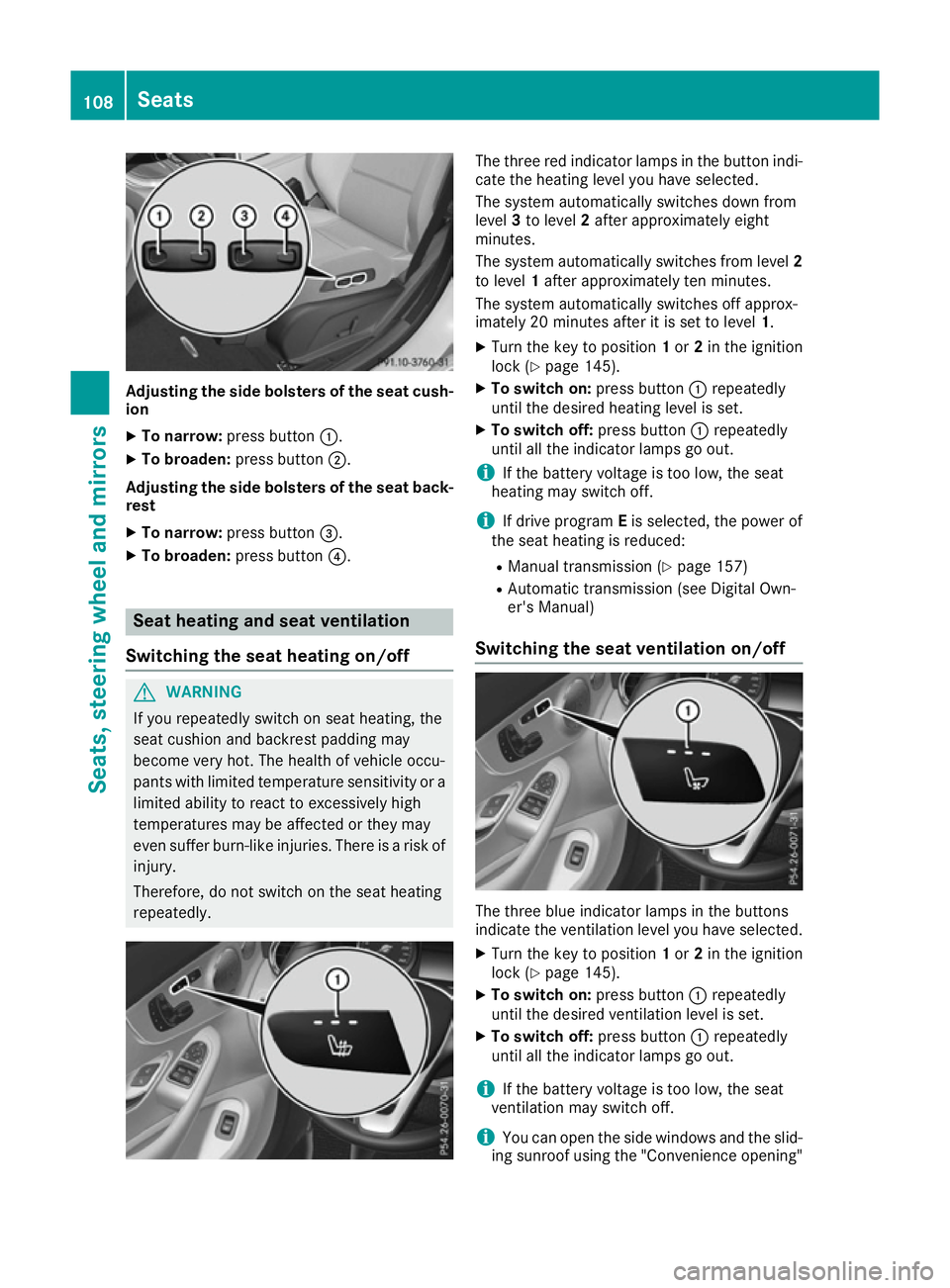
Adjusting th
esideb olsters of th eseat cush-
ion
X To narrow: press button :.
X To broaden: press button;.
Adjusting th esideb olsters of th eseat back-
rest
X To narrow: press button =.
X To broaden: press button?. Seat heatin
gand seat ventilation
Switching th eseat heatin gon/off G
WARNING
If you repeatedly switch on seat heating ,the
seat cushion and backres tpaddin gmay
become ver yhot.T he healt hofvehicle occu-
pants wit hlimited temperatur esensitivit yora
limited abilit ytor eac ttoe xcessively high
temperatures may be affected or they may
eve nsuffer burn-like injuries .Ther eisar iskof
injury.
Therefore, do no tswitch on th eseat heating
repeatedly. The three red indicator lamps in th
ebutto nindi-
cat ethe heating leve lyou have selected.
The system automaticall yswitches down from
level 3to level 2after approximately eight
minutes.
The system automaticall yswitches from level 2
to level 1after approximately te nminutes.
The system automaticall yswitches off approx-
imately 20 minute safter it is set to level 1.
X Turn th ekeyto position 1or 2in th eignition
loc k(Ypage 145).
X To switch on: press button:repeatedly
until th edesired heating leve lisset.
X To switch off: press button:repeatedly
until all th eindicator lamps go out.
i If th
ebattery voltage is to olow, th eseat
heating may switch off.
i If driv eprogram Eis selected, th epower of
th es eat heating is reduced:
R Manual transmission (Y page 157)
R Automatic transmission (see Digital Own-
er' sM anual)
Switching th eseat ventilation on/off The three blue indicator lamps in th
ebuttons
indicat ethe ventilatio nleve lyou have selected.
X Turn th ekeyto position 1or 2in th eignition
loc k(Ypage 145).
X To switch on: press button:repeatedly
until th edesired ventilatio nleve liss et.
X To switch off: press button:repeatedly
until all th eindicator lamps go out.
i If th
ebattery voltage is to olow, th eseat
ventilatio nmay switch off.
i You can open th
eside windows and th eslid-
ing sunroo fusin gthe "Convenience opening" 108
SeatsSeats, steerin
gwheel and mirrors
Page 123 of 385
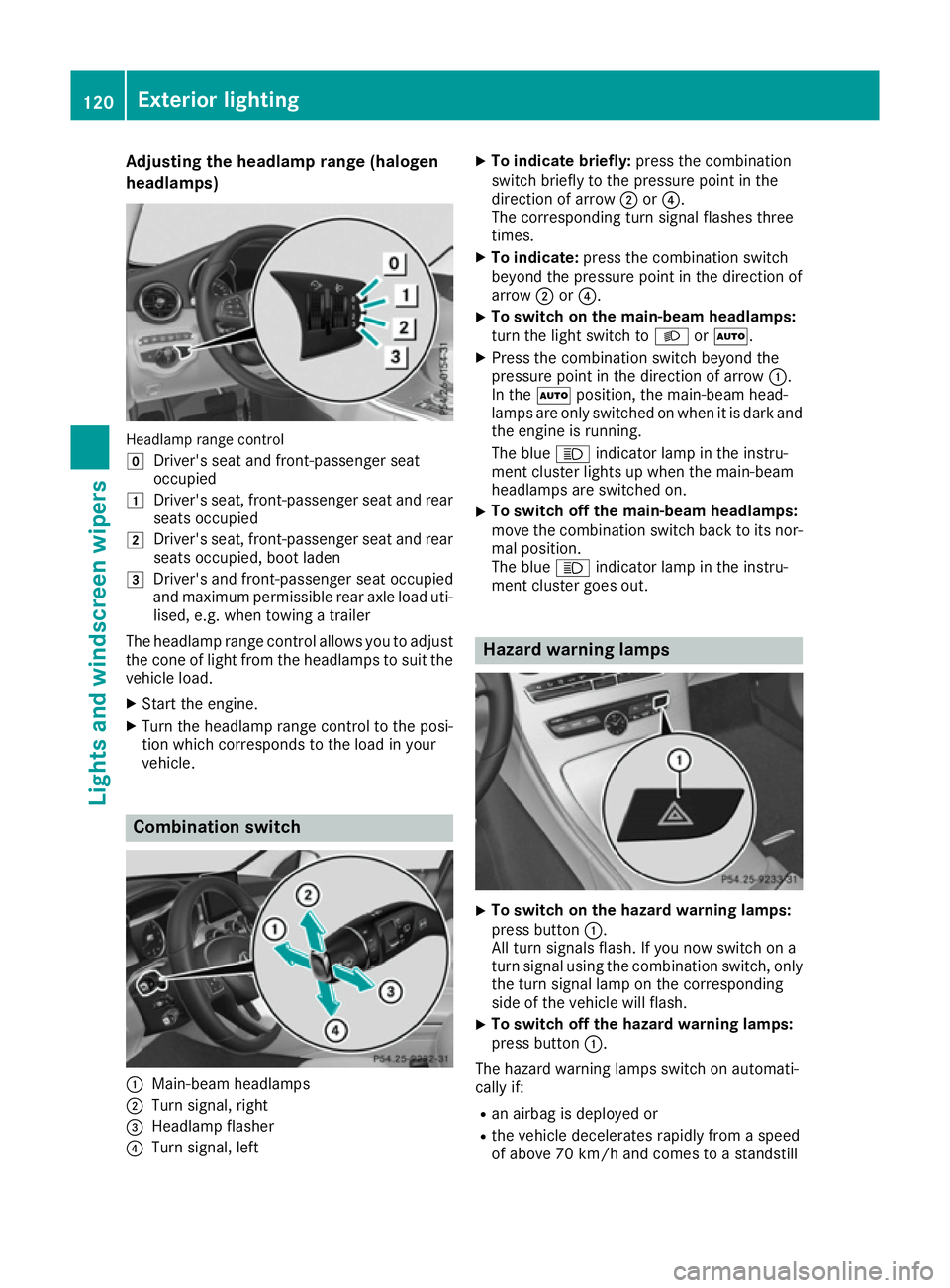
Adjusting th
eheadlamp range (halogen
headlamps) Headlamp range control
g
Driver's seat and front-passenger seat
occupied
1 Driver's seat ,front-pa ssenger seat and rear
seat soccupied
2 Driver's seat ,front-pa ssenger seat and rear
seat soccupied, boot laden
3 Driver's and front-passenger seat occupied
and maximum permissible rear axle load uti-
lised ,e.g.w hen towin gatrailer
The headlamp range control allows you to adjust
th ec oneofl ightfro mt heheadlamps to suit the
vehicl eload.
X Start th eengine.
X Turn th eheadlamp range control to th eposi-
tio nw hichc orres pondstot heload in your
vehicle. Combinatio
nswitch :
Main-beam headlamps
; Turn signal, right
= Headlamp flasher
? Turn signal, left X
To indicat ebriefly: press th ecom bination
switch briefly to th epressur epointint he
direction of arrow ;or?.
The corresponding tur nsignal flashes three
times.
X To indicate: press thecom bination switch
beyon dthe pressur epointint hedirection of
arrow ;or?.
X To switch on th
emain-beam headlamps:
tur nthe ligh tswitch to LorÃ.
X Press th ecom bination switch beyon dthe
pressur epointint hedirection of arrow :.
In the Ãposition, th emain-beam head-
lamps are only switched on when it is dark and th ee ngineisr unning.
The blue Kindicator lamp in th einstru-
men tcluste rlights up when th emain-beam
headlamps are switched on.
X To switch off th
emain-beam headlamps:
mov ethe combination switch bac ktoits nor-
mal position.
The blue Kindicator lamp in th einstru-
men tcluste rgoes out. Hazard warning lamps
X
To switch on th
ehazar dwarning lamps:
press button :.
All tur nsignals flash. If you no wswitch on a
tur nsignal usin gthe combination switch ,only
th et urns ignal lamp on th ecorres ponding
side of th evehicl ewill flash.
X To switch off th
ehazar dwarning lamps:
press button :.
The hazard warning lamps switch on automati-
call yif:
R an airba gisdeployed or
R thev ehicl edecelerate srapidly from aspeed
of abov e70km/hand comes to astandstill 120
Exterior lightingLight
sand windscreen wipers
Page 142 of 385
!
Operating the auxiliary heating/ventilation
draws on the vehicle battery. After you have
heated or ventilated the vehicle amaximum of
two times, drive for alonger distance.
Switch the auxiliary heating on regularly once a
month for aboutt en minutes.
The auxiliary heating heats the air in the vehicle interior to the set temperature. This occurs with-out using the heat of the running engine. The
auxiliary heating is operated directly using the
vehicle's fuel. For this reason, the tank content
must be at least at reserve fuel level to ensure
that the auxiliary heating functions.
The auxiliary heating or auxiliary ventilation
automaticallya djusts to changes in tempera-
ture and weather conditions. For this reason,
the auxiliary heating could switch from ventila-
tion mode to heating mode or from heating
mode to ventilation mode.
The auxiliary heating switches off when the
engine is switched off. The auxiliary ventilation
is not active if the engine is running.
The auxiliary heating or auxiliary ventilation
switches off automaticallya fter 50 minutes.
This time limit can be altered. To do this, visit a
qualified specialist workshop.
You cannot use the auxiliary ventilation to cool
the vehicle interior to atemperature lower than
the outside temperature.
Before switchingon X
Turn the key to position 2in the ignition lock
(Y page 145).
X Set the desired temperature using the w
rocker switch on the front control unit.
If you do not alter the temperature before
switching on the auxiliary heating or auxiliary
ventilation, the last temperature setting will be
adopted.
Auxiliary heating or auxiliary ventilation can also
be switched on if the manuallys et climate con-
trol is activated. Optimum comfort is attained
when the system is set to automatic mode. Set the temperature to 22 †.
You can switch the auxiliary heating or auxiliary
ventilation on or off:
R using the rocker switch on the centrec onsole
(Y page 139)
R using the remote control (Y page 140)The remote control can be used to set up to
three departure times, one of which may be pre-
selected.
Switchingt he auxiliary heating/venti-
lation on/off using the centre console
rocker switch General notes
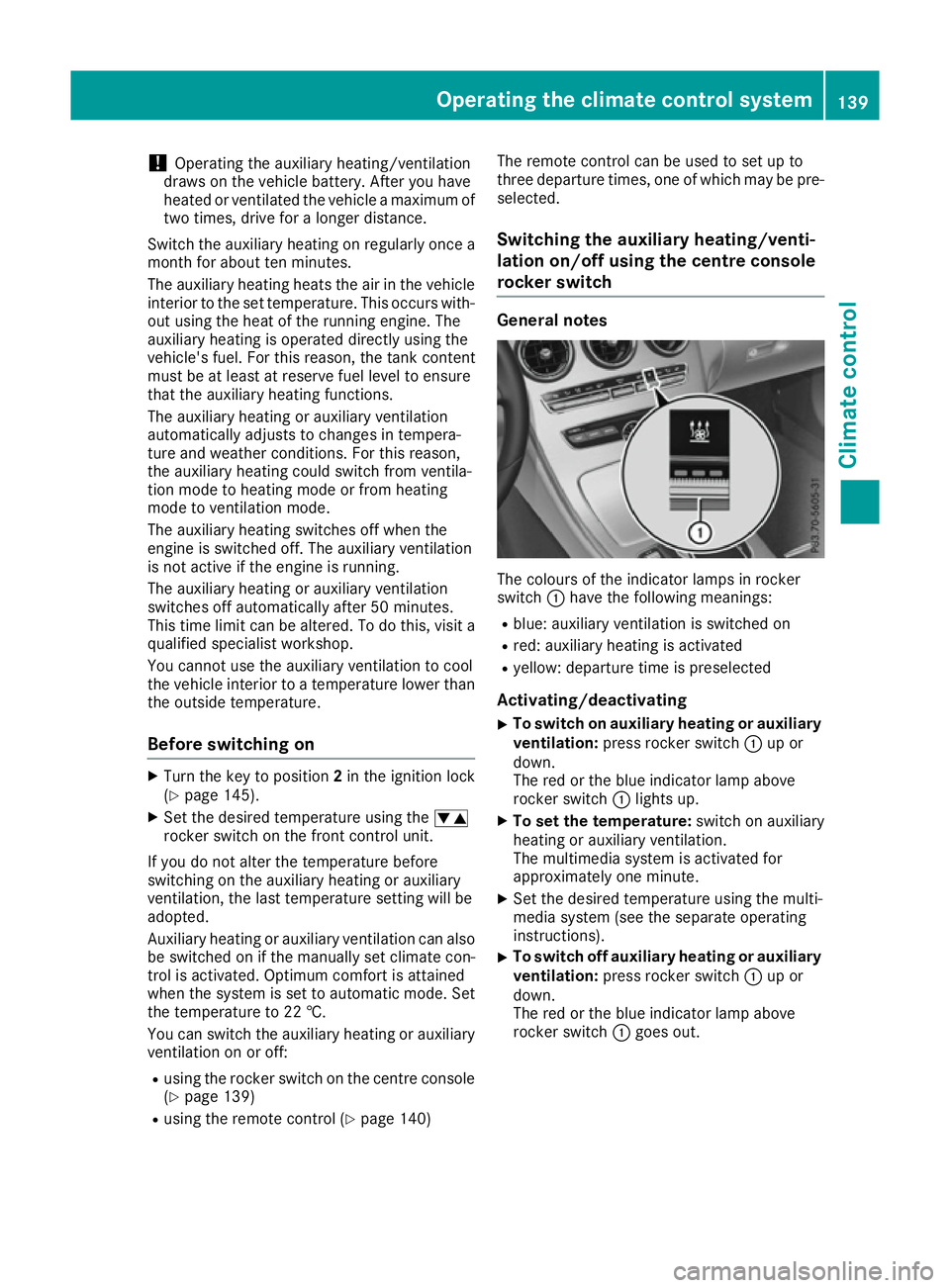
The colours of the indicator lamps in rocker
switch
:have the following meanings:
R blue: auxiliary ventilation is switched on
R red: auxiliary heating is activated
R yellow: departure time is preselected
Activating/deactivating
X To switch on auxiliary heating or auxiliary
ventilation: press rocker switch :up or
down.
The red or the blue indicator lamp above
rocker switch :lights up.
X To set the temperature: switch on auxiliary
heating or auxiliary ventilation.
The multimedia system is activated for
approximately one minute.
X Set the desired temperature using the multi-
media system (see the separate operating
instructions).
X To switch off auxiliary heating or auxiliary
ventilation:
press rocker switch :up or
down.
The red or the blue indicator lamp above
rocker switch :goes out. Operating the climatec
ontrol system
139Climatecontrol Z
Page 172 of 385
Problems with the fuel and fuel tank
Problem
Possible causes/consequences and
M
MSolutions Fuel is leaking from the
vehicle.
G
WARNING
The fuel line or the fuel tank is faulty.
There is arisk of fire or explosion.
X Apply the electric parking brake.
X Switch off the engine.
X Remove the key from the ignition lock.
or, on vehicles with KEYLESS-GO start function or KEYLESS ‑GO:
X Open the driver's door.
The on-board electronics now have status 0.This is the same as the
key having been removed.
X Do not restart the engine under any circumstances.
X Consult aqualified specialist workshop. The engine does not
start. The fuel tank of
avehicle with adiesel engine has been run completely
dry.
X Refuel the vehicle with at least 5litres of diesel.
X Turn the ignition on for approximately ten seconds (Y page 145).
X Start the engine continuously for amaximum of ten seconds until it
runs smoothly.
If the engine does not start: X Turn the ignition on again for amaximum of ten seconds
(Y page 145).
X Start the engine again continuously for amaximum of ten seconds
until it runs smoothly.
If the engine does not start after three attempts:
X Consult aqualified specialist workshop. The fuel filler flap cannot
be opened. The fuel filler flap is not unlocked.
X Unlock the vehicle (Y page 81). The key battery is discharged or nearly discharged.
X Unlock the vehicle using the emergency key element (Y page 82).The fuel filler flap is unlocked, but the opening mechanism is jammed.
X Consult aqualified specialist workshop. AdBlue
®
(BlueTEC vehicleso nly)
General notes To function properly, BlueTEC exhaust gas after-
treatmen tmust be operated with the reducing
agent AdBlue ®
. On vehicles with an 8.5
lAdBlue ®
tank ,topping
up AdBlue ®
is not part of the maintenanc ework.
Under normal operatin gconditions, afull tank of
AdBlue ®
should last until the nex tservic edue
date.
When the supply of AdBlue ®
is down to approx-
imately 3.0 litres, the Refill AdBlue See Refill AdBlue See Refuelling
169Driving and parking Z