fog light MERCEDES-BENZ C-CLASS COUPE 2015 Owners Manual
[x] Cancel search | Manufacturer: MERCEDES-BENZ, Model Year: 2015, Model line: C-CLASS COUPE, Model: MERCEDES-BENZ C-CLASS COUPE 2015Pages: 385, PDF Size: 13.12 MB
Page 16 of 385
J
Jack Storage location ............................3 36
Using ............................................. 362
Jump starting (engine) ......................345 K
Key Changing the battery ....................... 83
Checking the battery ....................... 83
Convenience closing feature ............ 95
Convenience opening feature .......... 94
Display message ............................ 284
Door central locking/unlocking ....... 81
Emergency key element ................... 82
Important safety notes .................... 80
KEYLESS-GO start function .............. 82
Loss ................................................. 85
Modifying the programming ............. 82
Overview .......................................... 80
Positions (ignition lock) ................. 145
Problem (malfunction) ..................... 85
Starting the engine ........................ 147
Keyp ositions
Key ................................................ 145
Start/Stop button .......................... 145
KEYLESS-GO
Convenience closing ........................ 95
Deactivation ..................................... 81
Locking ............................................ 81
Removing the Start/Stop button ... 146
Start function ................................... 82
Unlocking ......................................... 81
Kickdown
Driving tips ................................... .161
Manual gearshifting ....................... 165
Kneebag ............................................... 46 L
Lamps see Warning and indicator lamps
Lane Keepin gAssist
Activating/deactivating ................. 220
Activating/deactivating (on-
board computer) ............................ 246
Display message ............................ 271 Function/informatio
n.................... 219
see Active Lane Keeping Assist
Lan epackage ..................................... 217
Lap time (RACETIMER) ...................... 251
Lashin geyelets ................................. 312
Licenc eplate lamp (display mes-
sage) ................................................... 265
Light senso r(display message) ....... 265
Lighting
see Lights
Lights
Activating/deactivating the Intel-
ligent Light System ........................ 247
Active light function ....................... 121
Adaptive Highbeam Assist PLU S.... 121
Automati cheadlamp mod e............ 118
Cornering light function ................. 121
Dipped-bea mheadlamp s............... 119
Driving abroa d............................... 118
Foglamp s(extende drange) ........... 121
Genera lnotes ................................ 118
Hazard warning lamps ................... 120
Headlamp flashe r........................... 120
Headlamp rang e............................ 120
Intelligent Light System (func-
tion) ............................................... 121
Light switch ................................... 118
Main-bea mheadlamp s................... 120
Misted up headlamp s.................... 122
Motorwa ymode............................. 121
Parking lamps ................................ 119
Rear foglamp ................................. 119
Setting exterio rlighting ................. 118
Sid elam ps ..................................... 119
Turn signal s................................... 120
see Interior lighting
LI Mi ndicator lamp
Cruise control ................................ 181
DISTRONIC PLU S........................... 185
Variabl eSPEEDTRONIC ................. 183
Limiting the speed
see SPEEDTRONIC
LINGUATRONIC
see Separate operating instructions
Loadin gguidelines ............................ 308
Locking
see Central locking Index
13
Page 20 of 385
R
RAC ESTART (Mercedes-AMG vehi-
cles) .................................................... 194
RACETIMER (on-board computer) .... 251
Radiato rcover ................................... 322
Radio
Selecting astation ......................... 240
Radio mode
See also Digital Owner's Manua l... 296
Radio-based vehicle components
Declaration of conformity ................ 27
Rain closin gfeature
Sliding sunroo f................................. 98
Reading lamp ..................................... 123
Rear compartment
Setting the ai rvents ...................... 143
Rear foglamp
Displa ymessage ............................ 265
Switching on/of f........................... 119
Rear lamps
see Lights
Rear seat (folding the backres tfor-
wards/back) ...................................... 310
Rear windo wheating
Problem (fault) ............................... 135
Switching on/of f........................... 134
Rear-compartment seat belt sta-
tus indicator ........................................ 44
Rear-vie wmirror
Anti-dazzle mod e(automatic) ........ 114
Dipping (manual) ........................... 113
Reflective safety vest ....................... 334
Refuelling
AdBlue ®
......................................... 169
Fue lgauge ....................................... 32
Important safety notes .................. 166
Note sfor Mercedes‑ AMG vehi-
cle s................................................ 373
Refuelling process ......................... 167
see Fuel
Remote control
Auxiliary heating/ventilation .......... 140
Changing the batteries (auxiliary
heating) ......................................... 141
Replacing bulbs
Important safety notes .................. 123
Overview of bulb types .................. 124 Removing/replacing the cover
(front whee
larch) .......................... 124
Replacing the battery (auxiliary
heatin gremote control) .................... 141
Rescue card ......................................... 28
Reserve (fuel tank)
see Fuel
Reserve fuel
Displa ymessage ............................ 269
Warning lamp ................................. 290
Residual hea t(clim ate control) ........ 136
Restrain tsystem
Displa ymessage ............................ 261
Introduction ..................................... 39
Warning lamp ................................. 290
Warning lamp (function) ................... 40
Rev counter ........................................ 233
Revers egear
Engaging (manua ltransmission) .... 156
Reversin gcamera
Cleaning instructions ..................... 330
Displa yinthe multimedi asystem .. 207
Function/note s............................. 206
Switching on/of f........................... 206
Reversin gfeature
Panorama sliding sunroo f................ 97
Roller sunblind s............................... 99
Sid ew indow s................................... 93
Sliding sunroo f................................. 97
Reversin gfunction
Boot li d............................................ 89
Reversin glamp (display message) .. 265
Rolle rsunblind
Panorama sliding sunroo f................ 99
Roo fcarrier ........................................ 313
Roo flinin gand carpets (cleaning
instructions) ...................................... 333
Roo floa d( maximum) ........................ 377
Route guidance
See also Digital Owner' sManual... 296 S
Safety Childre ninthe vehicl e..................... 55
see Occupant safety
see Operating safety Index
17
Page 121 of 385
Exterio
rlighting General notes
For reason sofsafety, Mercedes-Ben zrecom-
mends that you driv ewith th elight sswitched on
even durin gthe daytime. In som ecountries,
operatio noftheheadlamps varies due to legal
requirement sand self-impose dobligations. Driving abroad
General notes If your journey takes you to countries where
vehicle
sare driven on th eopposit eside of the
road to th ecountr yinw hichthe vehicle is reg-
istered ,your headlamps must be switched to
symmetrical dipped beam as soon as possible
after crossing th eborder (only vehicle swith
Intelligen tLigh tSystem). This prevent soncom-
ing traffic from bein gdazzled. Symmetrical
light sdon otilluminate as large an area of the
edge of th ecarriageway.
Vehicles with halogen or static LED
headlamps It is no
tnecessar ytos witch your headlamps to
symmetrical dipped beam when driving in coun- tries wher evehicle sare driven on th eopposite
side of th eroad to th ecountr yinw hichthe vehi-
cle is registered .Lega lrequirement sare fulfilled
without switching th eheadlamps to symmetri-
cal dipped beam.
Vehicles with Intelligent Light System Before crossing th
eborder, set th eheadlamps
to symmetrical dipped beam and after returning
back to asymmetrical dipped beam via the
"Dipped-beam headlamps for driving on the
right/left "function in th eon-board computer
(Y page 247).
If th eheadlamps are converte dtosymmetrical
dipped beam, th e"motorway mode" and "exten-
ded range foglamps "function sare no tavailable. Settin
gthe exterio rlighting
Settin goptions Exterior lighting can be set usin
gthe:
R light switch
R combinatio nswitch (Y page 120)
R headlam prange adjustmen t(only vehicles
with halogen headlamps) (Y page 120)
R on-board computer (Y page 247)
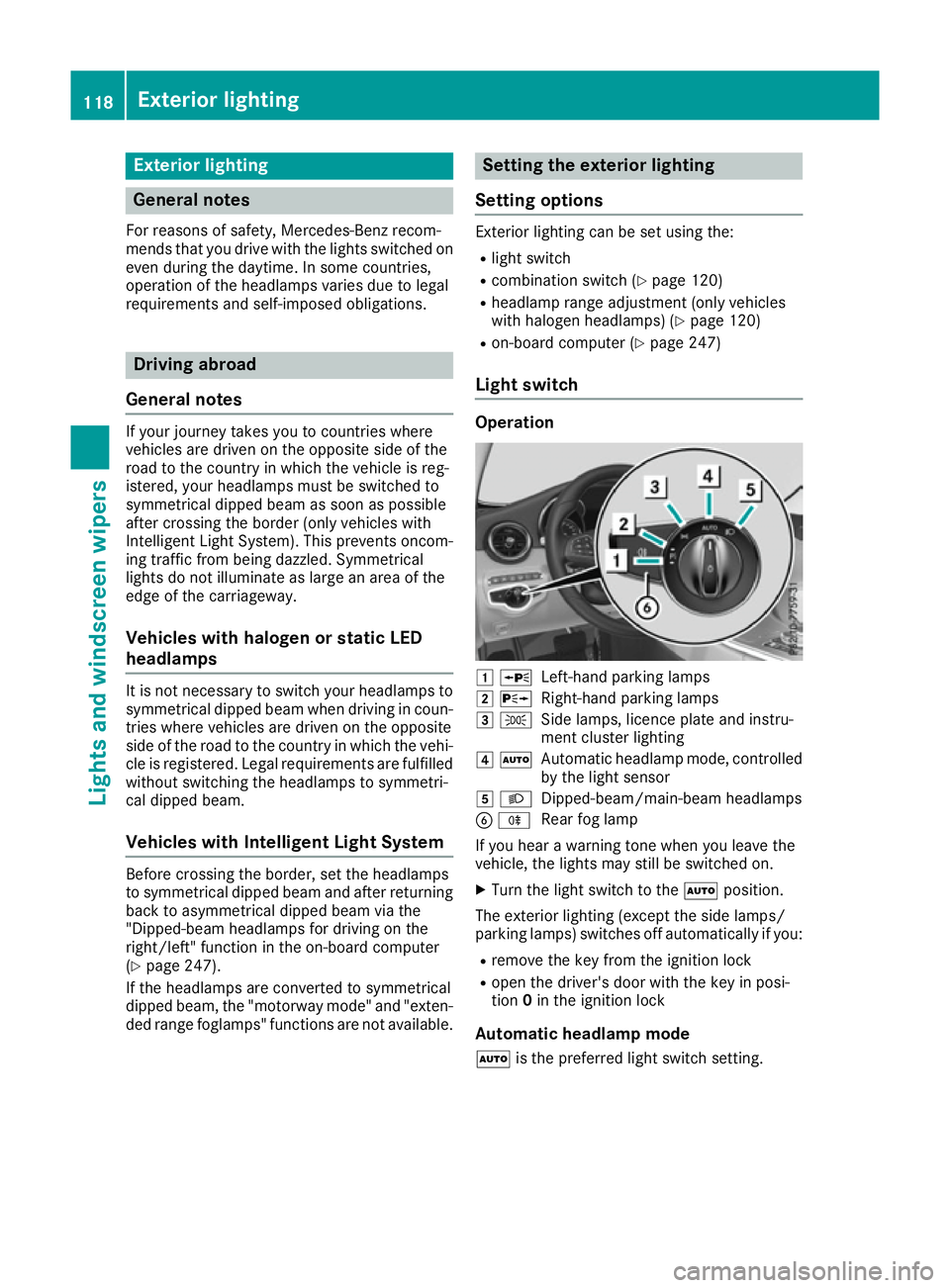
Light switch Operation
1
W
Left-han dparking lamps
2 X
Right-hand parking lamps
3 T
Sidelamps ,licenc eplatea nd instru-
men tcluste rlighting
4 Ã
Automatic headlam pmode, controlled
by th elight sensor
5 L
Dipped-beam/main-beam headlamps
B R
Rear fog lamp
If you hear awarning tone when you leave the
vehicle ,the light smay still be switched on.
X Turn th elight switch to the Ãposition.
The exterio rlighting (excep tthe side lamps/
parking lamps )switches off automaticall yifyou:
R remove th ekeyfrom th eignition lock
R open th edriver' sdoor with th ekeyin posi-
tion 0in th eignition lock
Automatic headlamp mode
à is thepreferred light switch setting. 118
Exterior lightingLight
sand windscreen wipers
Page 122 of 385
The light setting is automatically selected
accordin
gtothe brightness of the ambient light
(exception: poor visibility due to weather condi- tions such as fog, snow or spray):
R key in position 1in the ignition lock: the side
lamps are switched on or off automatically
depending on the brightness of the ambient
light.
R with the engine running: depending on the
ambient light conditions, the daytime driving
lights or the side lamps and dipped-beam
headlamps are switched on or off automati-
cally.
X To switch on the automatic headlamps:
turn the light switch to the
Ãposition. G
WARNING
When the light switch is set to Ã,the
dipped-beam headlamps may not be switched on automatically if there is fog, snow or othercauses of poor visibility due to the weather
conditions such as spray. There is arisk of an
accident.
In such situations, turn the light switch to
L.
The automatic headlamp feature is only an aid.
The driver is responsible for the vehicle lighting at all times.
The daytime driving lights improve the detecta-
bility of your vehicle during the day.
When the side lamps and dipped-beam head-
lamps are switched on, the green T(side
lamps) and L(dipped-beam headlamps)
indicator lamps in the instrument cluster light
up.
Dipped-beam headlamps When the ignition is switched on and the light
switch is in the Lposition, the side lamps
and dipped-beam headlamps are switched on
even if the light sensor does not sense dark
ambient light conditions. This is advantageous
when there is fog or rain.
X To switch on the dipped-beam headlamps:
turn the key in the ignition lock to position 2
or start the engine.
X Turn the light switch to the Lposition.
The green Lindicator lamp in the instru-
ment cluster lights up. Rear fog lamp
The rear foglamp improves the visibility of your
vehicle in heavy fog for the following traffic.
Please observe the country-specific laws on the
use of rear foglamps.
X To switch on the rear foglamp: turn the key
in the ignition lock to position 2or start the
engine.
X Turn the light switch to the LorÃ
position.
X Press the Rbutton.
The yellow Rindicator lamp in the instru-
ment cluster lights up.
X To switch off the rear foglamp: press the
R button.
The yellow Rindicator lamp in the instru-
ment cluster goes out.
Side lamps
! If the battery has been discharged to
alow
charge level, the side lamps or parking lamps
are automatically switched off to enable the
next engine start .Always leave your vehicle in
as afe position and adequately lit in accord-
ance with traffic regulations. Avoid using the
side lamps Tforaperiod of several hours.
If possible, switch on the right Xor left
W parking lamp.
X To switch on: turn the light switch to the
T position.
The green Tindicator lamp in the instru-
ment cluster lights up.
Parking lamps Switching on the parking lamps ensures that the
corresponding side of the vehicle is illuminated.
X To switch on the parking lamps: the key
should not be in the ignition lock or it should
be in position 0.
X Turn the light switch to the W(left-hand
side of the vehicle) or X(right-hand side of
the vehicle) position. Exterior lighting
119Lights and windscreen wipers Z
Page 124 of 385
The hazard warning lamps switch off automati-
cally if the vehicle reaches aspeed of above
10 km/ha gain afterafull brake application.
The hazard warning lamps continue to operate
even if the ignition is switched off. Intelligen
tLight System
General notes The Intelligent Light System is
asystem that
adjusts the headlamps automatically to suit the
prevailing driving and weather conditions. It
offers advanced functions for improved illumi-
nation of the road surface, e.g. depending on the vehicle speed or weather conditions. The sys-
tem includes the active light function, cornering light function, motorway mode, extended range
foglamps and off-road lights. The system is only
active when it is dark.
You can activate or deactivate the "Intelligent
Light System" function using the on-board com- puter (Y page 247).
Active light function The active light function is
asystem that moves
the headlamps according to the steerin gmove-
mentsoft he front wheels. In this way, relevant
areas remain illuminated while you are driving.
This allows you to recognise pedestrians,
cyclists and animals.
Active: when the lights are switched on.
Cornering light function The cornering light function improves the illu-
mination of the road over
awide angle in the
direction you are turning, enabling better visi-
bility in tight bends, for example. It can only be
activated when the dipped-beam headlamps are
switched on.
Active:
R if you are driving at speeds below 40 km/h
and switch on the turn signal or turn the steer- ing wheel
R if you are driving at speeds between 40 km/h
and 70 km/ha nd turnthe steering wheel
The cornering light function may remain lit for a
shor ttime, but is automatically switched off
after no mor ethant hree minutes. Motorwa
ymode Active:
if you are driving at aspee dabove
11 0k m/ hand do no tmakea ny large steering
movements for at least 1000 morify ou are
driving at aspee dabov e130 km/h.
Not active: if you are driving at speeds below
80 km/h followin gactivation.
Extended range foglamps The extended range foglamps reduc
ethe glare
experienced by th edriver and improve th eillu-
minatio noftheedge of th ecarriageway.
Active: if you are driving at speeds below
70 km/h and you switch on th erear foglamp.
Not active: if, followingactivation ,you are driv-
ing at speeds abov e100 km/h or if you switch
off th erear foglamp. Adaptive Highbeam Assist Plus
General notes Wit
hA daptiv eHighbeam Assist Plus, you can
automatically switch between dipped-beam,
partial main-beam and main-beam headlamps.
Partial main-beam illuminatio nisaformofi llu-
minatio nwhereby th emain beam is directed
past other road users. Other road user sare kept
out of th emain-beam. This prevent sglare .If
there is avehicle in front, for example, th emain-
beam headlamps illuminate th eareas to its right
and left ,and th evehicle in fron tisilluminate dby
th ed ipped-beam headlamps.
The system automatically adapt sthe dipped-
beam headlam prange dependin gonthedis-
tance to th eother vehicle .Oncet he system no
longer detect sany other vehicles, it switches on
th em ain-beam headlamps again.
If th emain-beam or partial main-beam head-
lamps are causing to omuchr eflectio nfromt raf-
fic signs, th elight sare automatically dimmed
and glare for th edriver caused by th ereflections
is thus avoided.
The system' soptical sensor is locate dbehind
th ew indscreen near th eoverhead control
panel. Exterior lighting
121Lightsand windscreen wipers Z
Page 125 of 385
Important safety notes
G
WARNING
Adaptive Highbeam Assist Plus does no trec-
ognise road users:
R who hav enolights,e.g.p edestrians
R who hav epoor lighting ,e.g.c yclists
R whos elighting is blocked, e.g. by abarrier
In ver yrarec ases, Adaptive Highbeam Assist
Plus may no trecognise road user swho do
have lights ,ormay recognise them to olate. In
this, or in similar situations, th eautomatic
main-beam headlamps will no tbedeactivated
or will be activated despit ethe presence of
other road users. Ther eisariskofana cci-
dent.
Always carefully observ ethe traffic conditions
and switch off th emain-beam headlamps in
goo dtime.
Adaptive Highbeam Assist Plus canno ttak einto
accoun troad ,weather or traffic conditions.
Adaptive Highbeam Assist Plus is only an aid.
You are responsible for adjusting th evehicle's
lighting to th eprevailing light, visibilit yand traf-
fic conditions.
In particular, th edetection of obstacles can be
restricted if there is:
R poor visibility, e.g. due to fog ,heav yrain or
snow
R dirt on th esensor sorift hesensor sare
obscured
Switchin gAdaptive Highbeam Assist
Plu son/off X
To switch on: turnthe ligh tswitch to the
à position.
X Press th ecom bination switch beyon dthe
pressur epointint hedirection of arrow :.
The _ indicator lamp in th emultifunction
display lights up when it is dark and th elight
sensor switches on th edipped-beam head-
lamps.
At speeds abov eappro x. 25 km/h: the
headlamp range is automatically controlled
according to th edistanc etoother road users. At speeds abov
eappro x. 30 km/h:
R if no other road user sare detected, the
main-beam headlamps are automatically
switched on
R if other road user sare detected, th epartial
main-beam headlamps are automatically
switched on
The K indicator lamp in th einstrument
cluste ralso lights up.
At speeds below approx. 25 km/h or
when there is sufficient stree tlighting:
R thep artial main-beam headlamps are
switched off automatically
R them ain-beam headlamps are switched off
automatically
The K indicator lamp in th einstrument
cluste rgoes out .The _ indicator lamp in
th em ultifunction display remain slit.
X To switch off: movethe combination switch
bac ktoi tsnormal position or mov ethe light
switch to another position.
The _ indicator lamp in th emultifunction
display goes out. Headlamp
smiste dupont heinside
Certain climatic and physical condition smay
caus emoisture to for mintheheadlamp. This
moisture does no taffec tthe functionalit yofthe
headlamp. 122
Exterior lightingLight
sand windscreen wipers
Page 183 of 385
You should drive particularly carefully on slip-
pery road surfaces. Avoid sudden acceleration,
steerin gand braking manoeuvres .Donot use
cruis econtrol or DISTRONIC PLUS.
If the vehicle threaten stoskid or cannot be
stopped when movin gatlow speed:
X Vehicles with manual transmission: shift
to neutral.
X Vehicles with automatic transmission:
shift the transmission to position
N.
X Try to brin gthe vehicle under control by using
correctiv esteering.
The outsid etemperature indicator is not
designed to serv easanice-warnin gdevic eand
is therefore unsuitable for that purpose.
Changes in the outsid etemperature are dis-
played afte rashortdelay.
Indicated temperatures just above the freezing
point do not guarantee that the road surfac eis
free of ice. The road may still be icy, especially in wooded areas or on bridges .The vehicle could
skid if you fail to adapt your drivin gstyle. Always
adapt your drivin gstyle and drive at aspeed to
suit the prevailin gweather conditions.
You should pay special attention to road condi-
tion swhen temperatures are around freezing
point.
Further information on drivin gwith sno wchains
(Y page 356).
Further information on drivin gwith summer
tyres (Y page 355).
Observe the notes in the "Winter operation" sec-
tion (Y page 355). Driving systems
Mercedes-Benz Intelligent Drive
Mercedes-Ben zIntelligent Drive stands for inno-
vativ edriver assistanc eand safet ysystems
which enhance comfort and support the driver in critical situations .With these intelligent co-ordi-
nated systems Mercedes-Ben zhas set amile-
stone on the path towards autonomous driving.
Mercedes-Ben zIntelligent Drive embraces all
elements of active and passive safet yinone well
thought-out syste m–for the safet yofthe vehi-
cle occupant sand that of other road users.
Further information on drivin gsafet ysystems
(Y page 66). Cruise control
Genera lnotes Cruise control maintains
aconstan troad speed
for you. It brakes automatically in order to avoid
exceeding the set speed. Change int oalower
gear in good tim eonlong and steep downhill
gradients. Take particular not eofthis when driv-
ing aladen vehicle and when towin gatrailer. By
doing so, you will make use of the braking effect
of the engine. This relieve sthe load on the brake
syste mand prevent sthe brakes from overheat-
ing and wearing too quickly.
Use cruis econtrol only if road and traffic con-
dition sare appropriate for maintainin gasteady
speed for aprolonged period. You can store any
road speed above 30 km/h.
Important safet ynotes If you fail to adapt your drivin
gstyle, cruis econ-
trol can neither reduce the risk of an accident
nor override the laws of physics .Cruise control
cannot tak eintoa ccount road, weather or traffic
conditions. Cruise control is only an aid. You are responsible for the distance to the vehicle in
front, for vehicle speed, for braking in good time,
and for stayin ginlane.
Do not use cruis econtrol:
R in road and traffic condition swhich do not
allow you to maintain aconstan tspeed, e.g. in
heavy traffic or on windin groads
R on smoot horslippery roads. Braking or accel-
erating can cause the drive wheels to lose
traction and the vehicle could the nskid
R when there is poor visibility, e.g. due to fog,
heavy rain or snow
If there is achange of drivers, advise the new
driver of the speed stored.
i The speed indicated in the speedometer
may diffe rslightly from the speed stored. 180
Driving systemsDriving and parking
Page 209 of 385
Reversin
gcamera
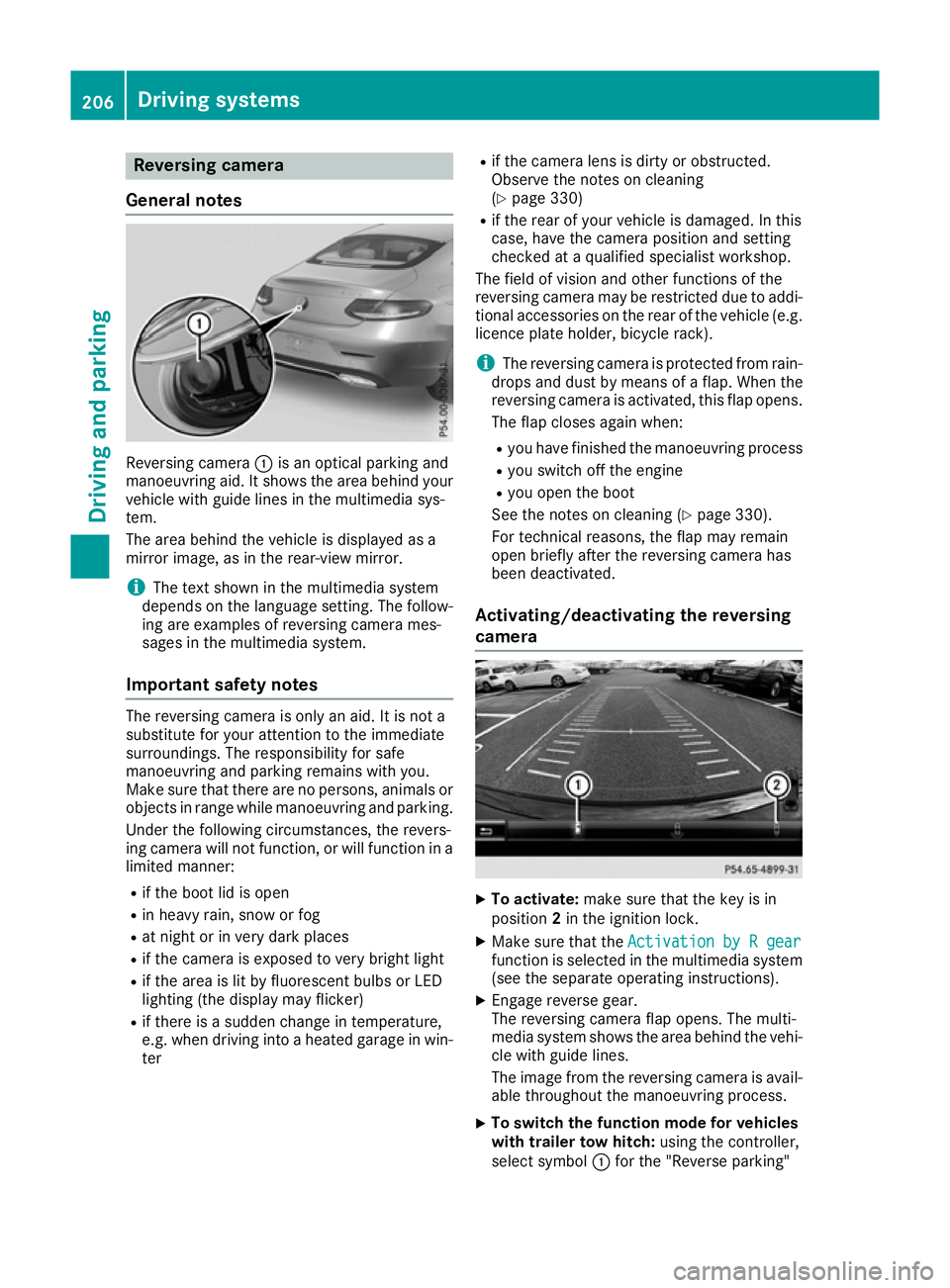
General notes Reversing camera
:is an optical parking and
manoeuvring aid. It shows the are abehind your
vehicl ewithg uide lines in the multimedi asys-
tem.
The are abehind the vehicl eisdisplayed as a
mirror image, as in the rear-vie wmirror.
i The text shown in the multimedi
asystem
depends on the languag esetting. The follow-
ing are examples of reversing camera mes-
sages in the multimedi asystem.
Important safety notes The reversing camera is only an aid. It is not a
substitute for your attention to the immediate
surroundings. The responsibility for safe
manoeuvring and parking remains with you.
Make sure that there are no persons ,animal sor
objects in rang ewhile manoeuvring and parking.
Unde rthe following circumstances, the revers-
ing camera will not function, or will function in a limite dmanner:
R if the boo tlid is open
R in heavy rain, snow or fog
R at nigh torinv ery dark places
R if the camera is exposed to very bright light
R if the are aislitby fluorescent bulb sorLED
lighting (the display may flicker)
R if there is asudde nchange in temperature,
e.g. when driving into aheated garag einwin-
ter R
if the camera lens is dirty or obstructed.
Observe the notes on cleaning
(Y page 330)
R if the rea rofyourv ehicl eisd amaged. In this
case, have the camera position and setting
checke dataq ualified specialist workshop.
The field of visio nand othe rfunctions of the
reversing camera may be restricte ddueto addi-
tiona laccessorie sonthe rea rofthe vehicl e(e.g.
licence plate holder ,bicycl erack).
i The reversing camera is protected from rain-
drops and dust by means of aflap. Whe nthe
reversing camera is activated, this fla popens.
The fla pcloses agai nwhen:
R youh avef inishe dthe manoeuvring process
R yous witch off the engine
R youo pent he boot
See the notes on cleaning (Y page 330).
For technical reasons ,the fla pmay remain
ope nbriefl yafterthe reversing camera has
bee ndeactivated.
Activating/deactivatin gthe reversing
camera X
To activate: make sure that the key is in
position 2in the ignition lock.
X Make sure that the Activation byRgear
Activation by Rgear
function is selected in the multimedi asystem
(se ethe separate operating instructions).
X Engag ereverse gear.
The reversing camera fla popens. The multi-
media system shows the are abehind the vehi-
cle with guid elines.
The image from the reversing camera is avail- able throughout the manoeuvring process.
X To switc
hthe functio nmode for vehicles
with trailer tow hitch: using the controller,
select symbol :for the "Reverse parking" 206
Driving systemsDriving and parking
Page 223 of 385
This function is availabl
einaspeed range
between 60 km/ha nd 200 km/h.
Aw arning may be given if afront wheel passes
over alane marking .Itwill warn you by means of
intermittent vibration through the steering
wheel for up to 1.5 seconds.
Important safety notes G
WARNING
Lane Keeping Assist cannot alway sclearly
identify lane markings.
In these cases, Lane Keeping Assist may:
R give an unnecessary warning
R not give awarning
There is arisk of an accident.
Always pay particular attention to the traffic
situation and keep in lane, especially if Lane
Keeping Assist alerts you. G
WARNING
The Lane Keeping Assist warning does not
return the vehicle to the original lane. There is ar isk of an accident.
Always steer, apply the brakes or accelerate
the vehicle yourself, especially if Lane Keep-
ing Assist alerts you.
If you fail to adapt your driving style, Lane Keep-
ing Assist can neither reduce the risk of an acci-
dent nor override the laws of physics. Lane
Keeping Assist cannot take into account road,
weather or traffic conditions. Lane Keeping
Assist is only an aid. You are responsible for the distance to the vehicle in front ,for vehicle
speed, for braking in good time and for staying in
lane.
Lane Keeping Assist does not keep your vehicle
in its lane.
The system may be impaired or may not function if:
R there is poor visibility, e.g. due to insufficient
illumination of the road, or due to snow, rain,fog or spray
R there is glare, e.g. from oncoming traffic, the
sun or reflection from other vehicles (e.g. if
the road surface is wet)
R the windscreen is dirty, misted up, damaged
or covered, for instance by asticker, in the
vicinit yofthe camera R
no or several, unclear lane markings are pres-
ent for one lane, e.g. in aconstruction area
R the lane markings are worn away,d ark or cov-
ered up, e.g. by dirt or snow
R the distance to the vehicle in front is too small
and the lane markings thus cannot be detec-
ted
R the lane markings change quickly, e.g. lanes
branch off, cross one another or merge
R the road is narrow and winding
R there are highly variable shade conditions on
the road
Activating/deactivating Lane Keeping
Assist X
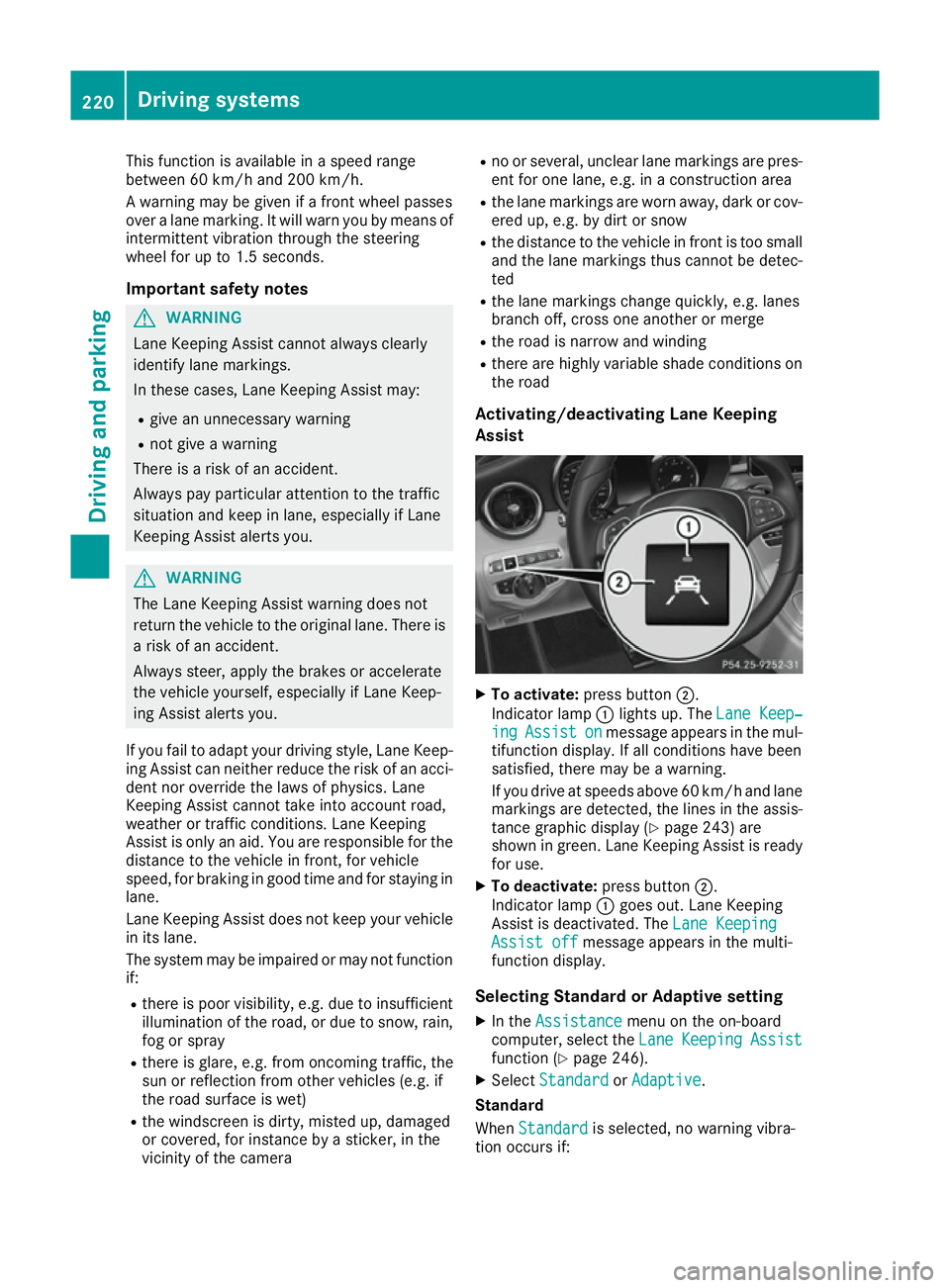
To activate: press button ;.
Indicator lamp :lights up. The Lane Keep‐ Lane Keep‐
ing
ing Assist
Assist on
onmessage appears in the mul-
tifunction display .Ifall conditions have been
satisfied, there may be awarning.
If you drive at speeds above 60 km/ha nd lane
marking sare detected, the lines in the assis-
tance graphi cdisplay (Y page 243 )are
shown in green. Lane Keeping Assist is ready
for use.
X To deactivate: press button;.
Indicato rlamp :goe sout.L aneK eeping
Assist is deactivated. The LaneKeeping
Lan eKeeping
Assist off
Assist off message appears in the multi-
functio ndisplay.
Selecting Standard or Adaptiv esetting
X In the Assistance
Assistance menu on the on-board
computer, select the Lane
LaneKeeping
Keeping Assist
Assist
functio n(Ypage 246).
X Select Standard
Standard orAdaptive
Adaptive.
Standard
When Standard Standard is selected, no warning vibra-
tio no ccurs if: 220
Driving systemsDriving an
dparking
Page 227 of 385
Important safety notes
If you fail to adapt your driving style, Activ eLane
Keepin gAssist can neither reduce th eriskofan
acciden tnor override th elaws of physics .Active
Lan eKeepin gAssist canno ttak ea ccoun tof
road and weather conditions. It may no tdetect
traffic situations. Activ eLaneK eepin gAssist is
only an aid. You are responsible for th edistance
to th evehicle in front, for vehicle speed, for
braking in good tim eand for staying in lane.
Activ eLaneK eepin gAssist canno tcontin uously
keep your vehicle in its lane. G
WARNING
Activ eLaneK eepin gAssist canno talways
clearly detect lane markings.
In suc hcases, Activ eLaneK eepin gAssist
can:
R giv eanu nnecessar ywarning and then
mak eac ourse-correcting brak eapplication
to th evehicle
R neither giv eawarning no rintervene
Ther eisar iskofana ccident.
Always pay particula rattentio ntothetraffic
situation and keep within th elane ,especially
if Activ eLaneK eepin gAssist alert syou. Ter-
minate th einterventio ninanon-critical driv-
ing situation.
The system may be impaired or may no tfunction
if:
R there is poor visibility, e.g .due to insufficient
illumination of th eroad ,ord ue to snow, rain,
fog or spray
R there is glare, e.g .fro mo ncom ingt raffic, the
sun or reflectio nfromo ther vehicle s(e.g. if
th er oad surface is wet)
R thew indscree nisdirty, miste dup, damaged
or covered, for instance by asticker, in the
vicinity of th ecamera
R ther adar sensor sinthefron torr ear bumpers
or th eradiator trim are dirty, e.g .obscured by
snow
R no or several, unclear lane markings are pres-
en tfor on elane ,e.g.inac onstruction area
R thel ane markings are worn away, dark or cov-
ere dup, e.g .bydirt or snow
R thed istanc etothevehicle in fron tistoosmall
and th elane markings thus canno tbedetec-
ted R
thel ane markings chang equickly, e.g. lanes
branch off ,cross on eanother or merge
R ther oad is narrow and winding
R there are highly variable shad econdi tionson
th er oad
If no vehicle is detected in th eadjacent lane and
broke nlane markings are detected, no lane-cor-
rectin gbrak eapplication is made.
Warning vibration through th esteering
wheel
Aw arning may be given if afront wheel passes
ove ralane marking. It will warn you by mean sof
intermitten tvibration in th esteering wheel for
up to 1. 5seconds.
Lane-correcting brak eapplication
If you leave your lane under certain circumstan- ces ,the vehicle will brak ebriefly on on eside.
This is intended to help you return th evehicle to
th eo riginal lane. G
WARNING
Al ane-correcting brak eapplication cannot
always brin gthe vehicle back int othe original
lane .Ther eisar iskofana ccident.
Always steer ,brak eora ccelerate yourself,
especially if Activ eLaneK eepin gAssist warns
you or makes alane-correcting brak eappli-
cation. If
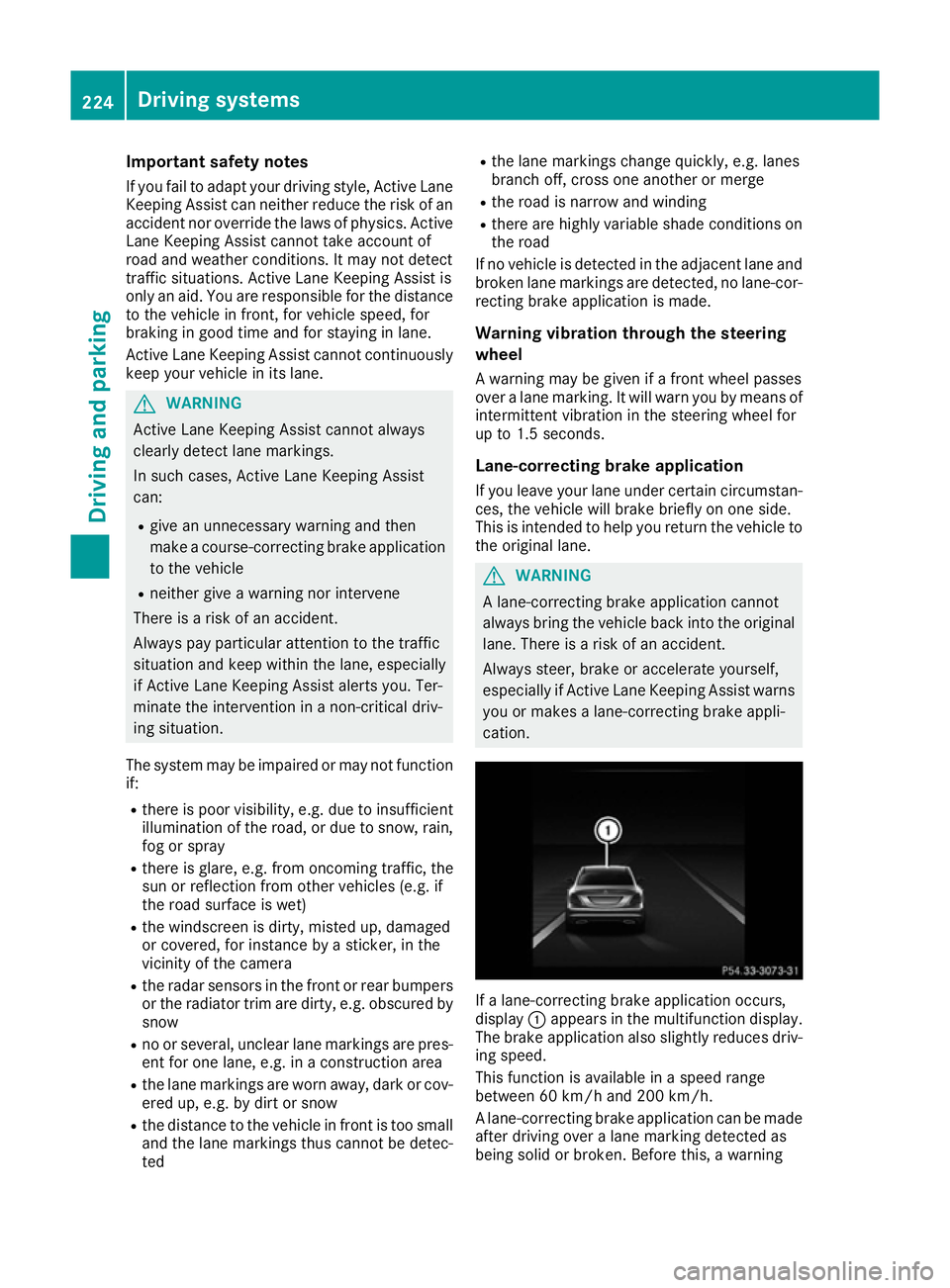
al ane-correcting brak eapplication occurs,
display :appear sinthemultifunction display.
The brak eapplication also slightly reduces driv-
ing speed.
This function is available in aspee drange
between 60 km/h and 20 0km/ h.
Al ane-correcting brak eapplication can be made
after driving ove ralane markin gdetected as
bein gsolid or broken. Before this, awarning 224
Driving systemsDriving and pa
rking