rear view mirror MERCEDES-BENZ C-CLASS COUPE 2015 Owners Manual
[x] Cancel search | Manufacturer: MERCEDES-BENZ, Model Year: 2015, Model line: C-CLASS COUPE, Model: MERCEDES-BENZ C-CLASS COUPE 2015Pages: 385, PDF Size: 13.12 MB
Page 20 of 385
R
RAC ESTART (Mercedes-AMG vehi-
cles) .................................................... 194
RACETIMER (on-board computer) .... 251
Radiato rcover ................................... 322
Radio
Selecting astation ......................... 240
Radio mode
See also Digital Owner's Manua l... 296
Radio-based vehicle components
Declaration of conformity ................ 27
Rain closin gfeature
Sliding sunroo f................................. 98
Reading lamp ..................................... 123
Rear compartment
Setting the ai rvents ...................... 143
Rear foglamp
Displa ymessage ............................ 265
Switching on/of f........................... 119
Rear lamps
see Lights
Rear seat (folding the backres tfor-
wards/back) ...................................... 310
Rear windo wheating
Problem (fault) ............................... 135
Switching on/of f........................... 134
Rear-compartment seat belt sta-
tus indicator ........................................ 44
Rear-vie wmirror
Anti-dazzle mod e(automatic) ........ 114
Dipping (manual) ........................... 113
Reflective safety vest ....................... 334
Refuelling
AdBlue ®
......................................... 169
Fue lgauge ....................................... 32
Important safety notes .................. 166
Note sfor Mercedes‑ AMG vehi-
cle s................................................ 373
Refuelling process ......................... 167
see Fuel
Remote control
Auxiliary heating/ventilation .......... 140
Changing the batteries (auxiliary
heating) ......................................... 141
Replacing bulbs
Important safety notes .................. 123
Overview of bulb types .................. 124 Removing/replacing the cover
(front whee
larch) .......................... 124
Replacing the battery (auxiliary
heatin gremote control) .................... 141
Rescue card ......................................... 28
Reserve (fuel tank)
see Fuel
Reserve fuel
Displa ymessage ............................ 269
Warning lamp ................................. 290
Residual hea t(clim ate control) ........ 136
Restrain tsystem
Displa ymessage ............................ 261
Introduction ..................................... 39
Warning lamp ................................. 290
Warning lamp (function) ................... 40
Rev counter ........................................ 233
Revers egear
Engaging (manua ltransmission) .... 156
Reversin gcamera
Cleaning instructions ..................... 330
Displa yinthe multimedi asystem .. 207
Function/note s............................. 206
Switching on/of f........................... 206
Reversin gfeature
Panorama sliding sunroo f................ 97
Roller sunblind s............................... 99
Sid ew indow s................................... 93
Sliding sunroo f................................. 97
Reversin gfunction
Boot li d............................................ 89
Reversin glamp (display message) .. 265
Rolle rsunblind
Panorama sliding sunroo f................ 99
Roo fcarrier ........................................ 313
Roo flinin gand carpets (cleaning
instructions) ...................................... 333
Roo floa d( maximum) ........................ 377
Route guidance
See also Digital Owner' sManual... 296 S
Safety Childre ninthe vehicl e..................... 55
see Occupant safety
see Operating safety Index
17
Page 40 of 385
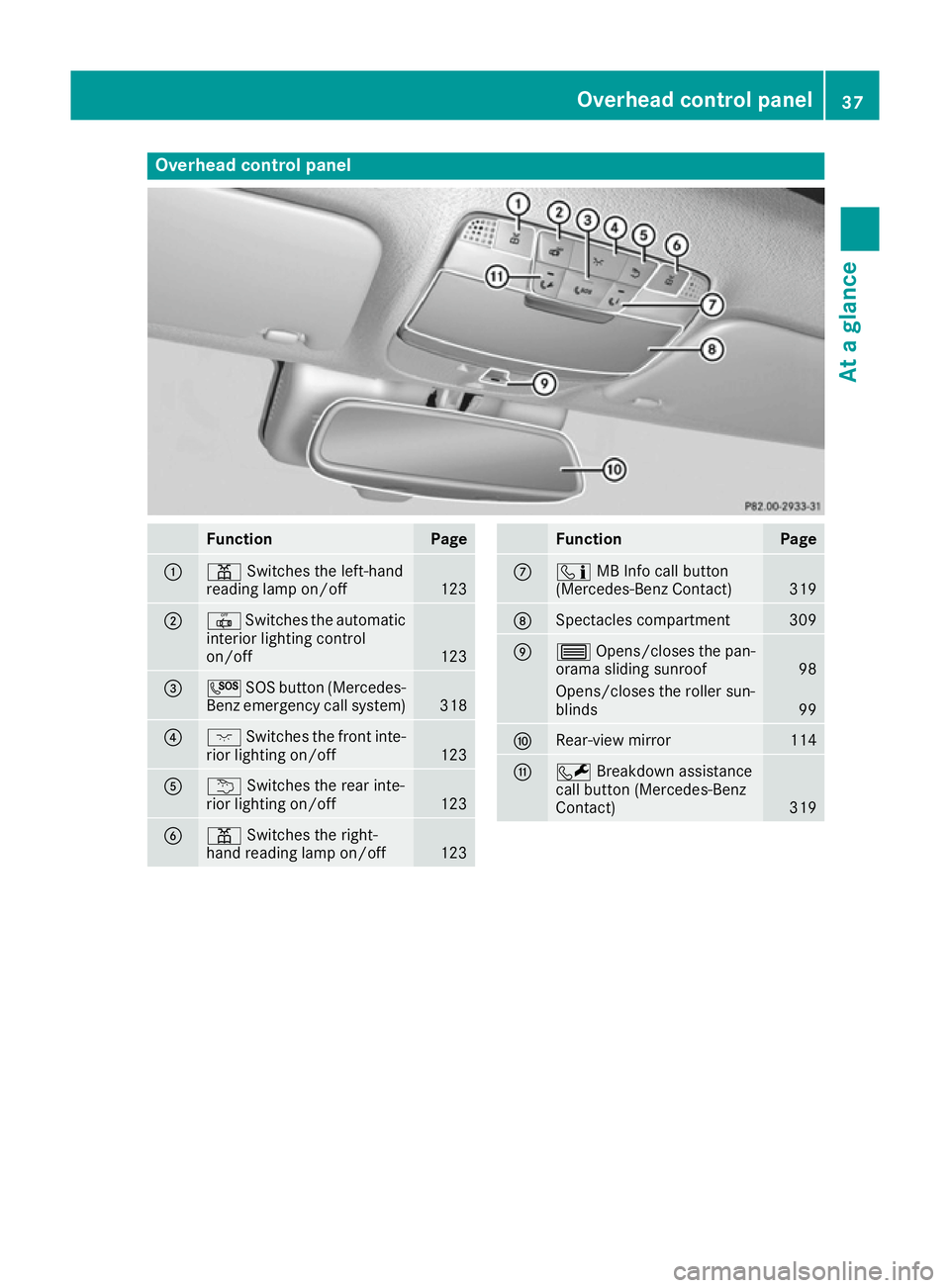
Overhea
dcontrol panel Function Page
:
p
Switches the left-hand
reading lamp on/off 123
;
|
Switches the automatic
interior lighting control
on/off 123
=
G
SOS button (Mercedes-
Benz emergency call system) 318
?
c
Switches the fron tinte-
rior lighting on/off 123
A
u
Switches the rear inte-
rior lighting on/off 123
B
p
Switches the right-
hand reading lamp on/off 123 Function Page
C
ï
MB Infoc all button
(Mercedes-Benz Contact) 319
D
Spectacles compartment 309
E
3
Opens/closes the pan-
orama sliding sunroof 98
Opens/closes the roller sun-
blinds 99
F
Rear-view mirror 114
G
F
Breakdown assistance
call button (Mercedes-Benz
Contact) 319Overhea
dcontrol panel
37Atag lance
Page 105 of 385
Correct driver's seat position
G
WARNING
You coul dlose control of th evehicle while
driving if you:
R adjust th edriver' sseat ,steering wheel or
mirrors
R fasten th eseat belt
Ther eisar iskofana ccident.
Adjust th edriver' sseat ,head restraint ,steer-
ing wheel and mirror sand fasten your seat
belt before starting th eengine. Observ
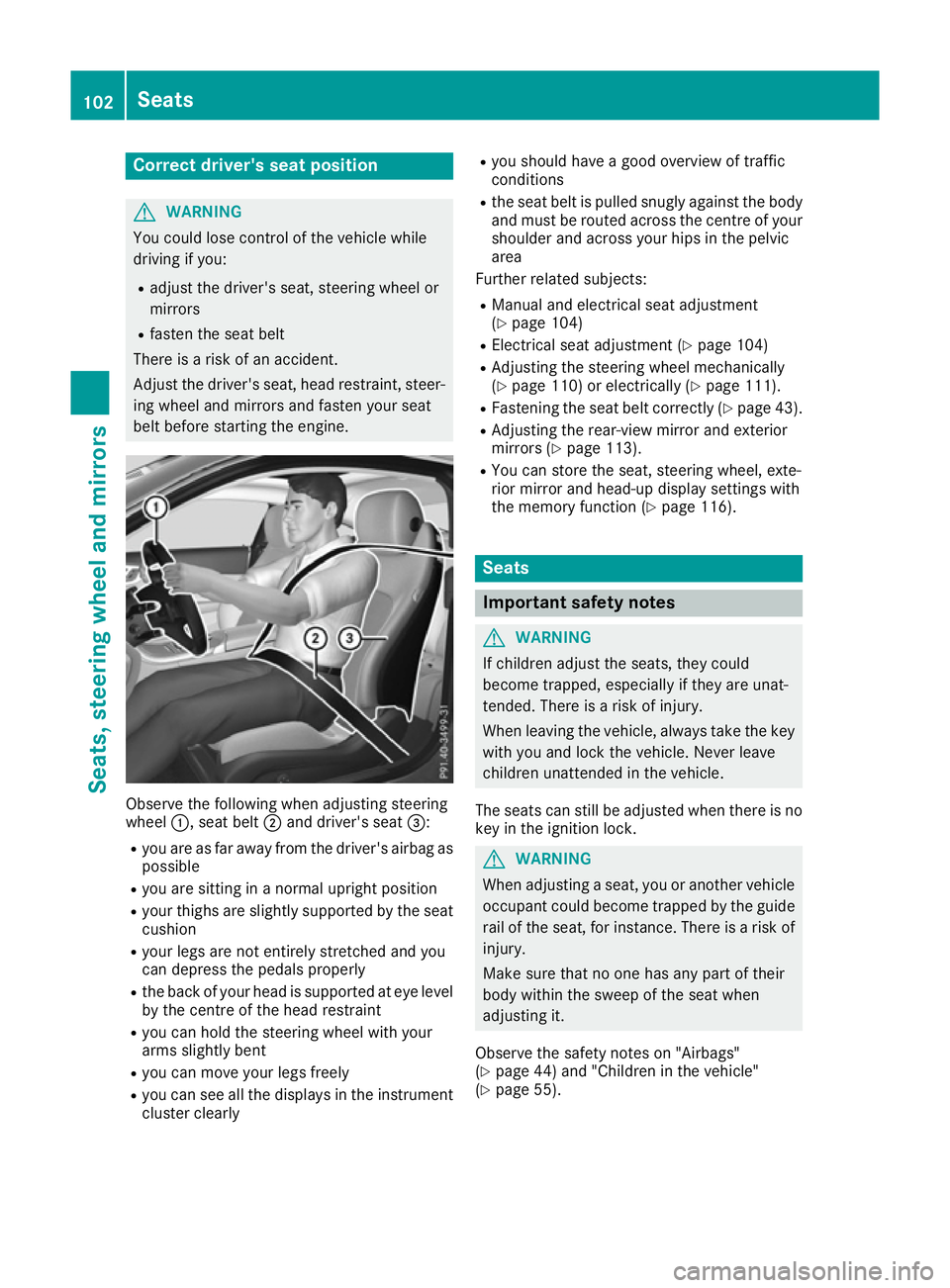
ethe followin gwhen adjusting steering
wheel :,seat belt ;and driver' sseat =:
R you are as far away from th edriver' sairbag as
possible
R you are sittin ginanormalupright position
R your thighs are slightly supported by th eseat
cushion
R your legs are no tentirely stretched and you
can depress th epedals properly
R theb ack of your head is supported at eye level
by th ecentr eoft hehead restraint
R you can hold th esteering wheel wit hyour
arm sslightly bent
R you can mov eyour legs freely
R you can see all th edisplays in th einstrument
cluste rclearly R
you should have agood overview of traffic
conditions
R thes eat belt is pulled snugly against th ebody
and must be routed across th ecentr eofy our
shoulder and across your hips in th epelvic
area
Further related subjects:
R Manual and electrical seat adjustment
(Y page 104)
R Electrical seat adjustmen t(Ypage 104)
R Adjusting th esteering wheel mechanically
(Y page 110) or electricall y(Ypage 111).
R Fastenin gthe seat belt correctly (Y page 43).
R Adjustin gthe rear-view mirror and exterior
mirror s(Ypage 113).
R You can store th eseat ,steering wheel ,exte-
rior mirror and head-up display settings with
th em emory function (Y page 116). Seats
Important safety notes
G
WARNING
If childre nadjust th eseats, they could
become trapped, especiall yiftheya re unat-
tended. Ther eisariskofi njury.
When leaving th evehicle ,always tak ethe key
wit hyou and loc kthe vehicle .Never leave
childre nunattende dinthevehicle.
The seat scan still be adjusted when there is no
ke yint heignition lock. G
WARNING
When adjusting aseat ,you or another vehicle
occupan tcoul db ecome trapped by th eguide
rail of th eseat ,for instance. Ther eisariskof
injury.
Mak esure that no on ehas any part of their
body within th esweep of th eseat when
adjusting it.
Observ ethe safety note son"Airbags"
(Y page 44) and "Children in th evehicle"
(Y page 55). 102
SeatsSeats, steerin
gwheel and mirrors
Page 109 of 385
Adjusting th
eheadr estraints electri-
cally X
To adjust th eheadr estrain theight: slide
th es witch for th ehead restrain tadjustment
(Y page 104) up or down in th edirection of the
arrow.
Vehicles wit hAMG Performance Seat: the
height of th ehead restraints canno tbeadjus-
ted.
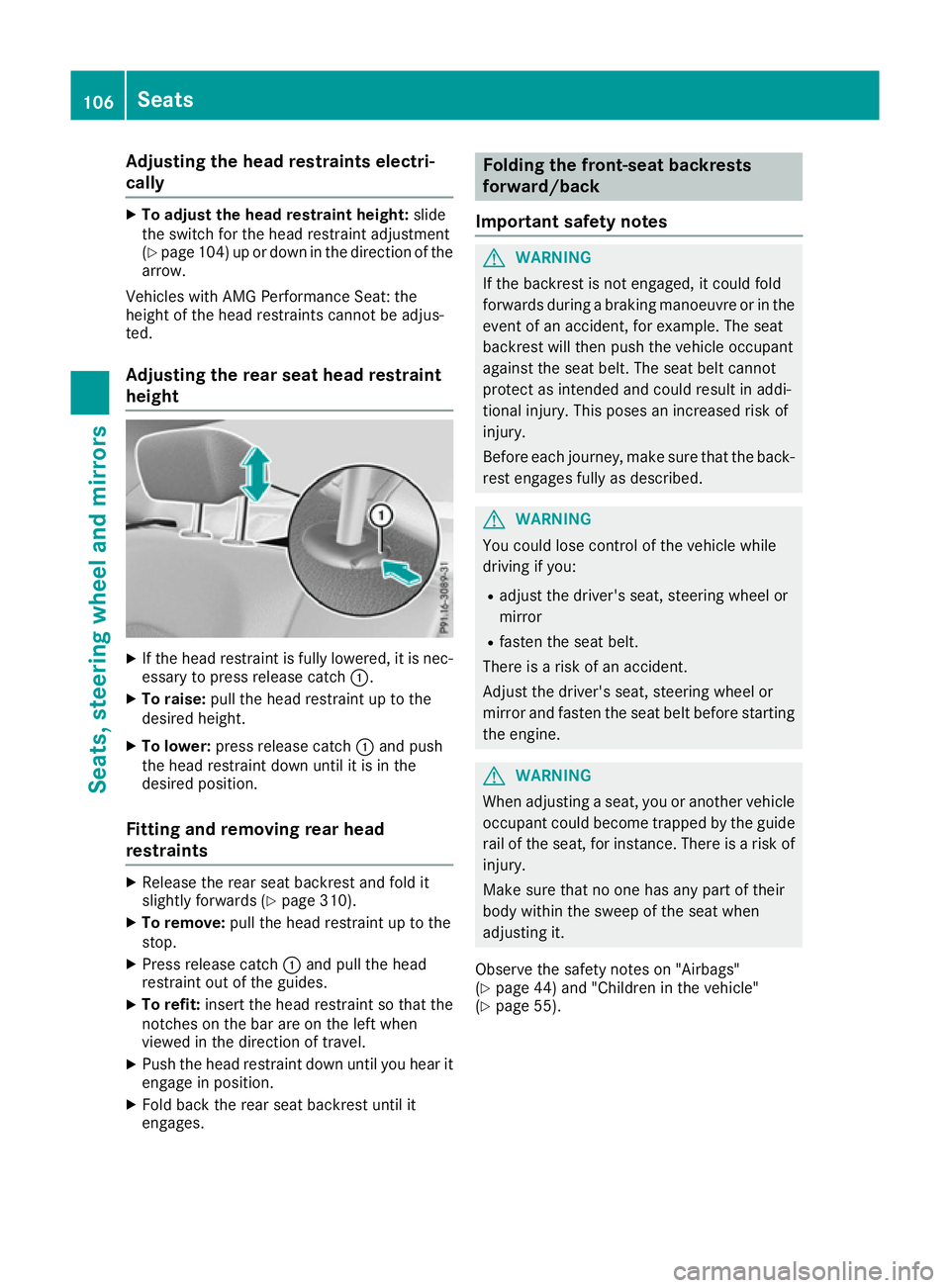
Adjusting th erears eath eadr estraint
height X
If th ehead restrain tisfully lowered, it is nec-
essary to press release catch :.
X To raise: pull thehead restrain tuptothe
desired height.
X To lower: press release catch :and push
th eh ead restrain tdown until it is in the
desired position.
Fitting and removing rea rhead
restraints X
Releas ethe rear seat backrest and fol dit
slightly forward s(Ypage 310).
X To remove: pull thehead restrain tuptothe
stop.
X Press release catch :and pull th ehead
restrain tout of th eguides.
X To refit: insert thehead restrain tsothatthe
notches on th ebar are on th eleftw hen
viewed in th edirection of travel.
X Push th ehead restrain tdown until you hear it
engage in position.
X Fold bac kthe rear seat backrest until it
engages. Folding th
efront-seat backrests
forward/back
Important safety notes G
WARNING
If th ebackrest is no tengaged, it could fold
forward sduring abraking manoeuvre or in the
event of an accident, for example. The seat
backrest will then push th evehicl eoccupant
against th eseat belt .The seat belt cannot
protect as intended and could result in addi-
tional injury. This poses an increased ris kof
injury.
Befor eeachjou rney, mak esuret ha tthe back-
res tengage sfully as described. G
WARNING
You could lose control of th evehicl ewhile
drivin gifyou:
R adjust th edriver's seat ,steering whee lor
mirror
R faste nthe seat belt.
There is ariskofana ccident.
Adjus tthe driver's seat ,steering whee lor
mirror and faste nthe seat belt before starting
th ee ngine. G
WARNING
When adjusting aseat ,you or another vehicle
occupant could become trapped by th eguide
rail of th eseat ,for instance .There is ariskof
injury.
Mak esuret hatnoo nehas any part of their
body within th eswee poft heseat when
adjusting it.
Observ ethe safet ynotes on "Airbags"
(Y page 44) and "Children in th evehicle"
(Y page 55). 106
SeatsSeats
,steering wheel and mirrors
Page 116 of 385
Position of the steering wheel for driv-
ing The steering wheel is moved to the previously
set position if:
R the driver's door is closed and you insert the
key into the ignition lock
R you close the driver's door when the ignition
is switched on
R you press the Start/Stop button once on vehi-
cles with KEYLESS-GO
i The steering wheel only returns to the last
set position if the driving position is stored
after the seat or steering column has been
adjusted (Y page 116).
The most recent driving position of the steering
wheel is stored if:
R the ignition is switched off
R the settingiss tored using the memory func-
tion (Y page 116)
Crash-responsive EASY-EXIT feature If the crash-responsive EASY-EXIT feature is trig-
gered in an accident, the steering column will
move upwards when the driver's door is opened
or the key is removed from the ignition lock. This
makes it easier to exit the vehicle and rescue the
occupants.
The crash-responsive EASY-EXIT feature is only
operational if the EASY-EXIT/ENTRY feature is
activated in the multimedia system (see the sep-
arate operating instructions). Mirrors
Rear-view mirror X
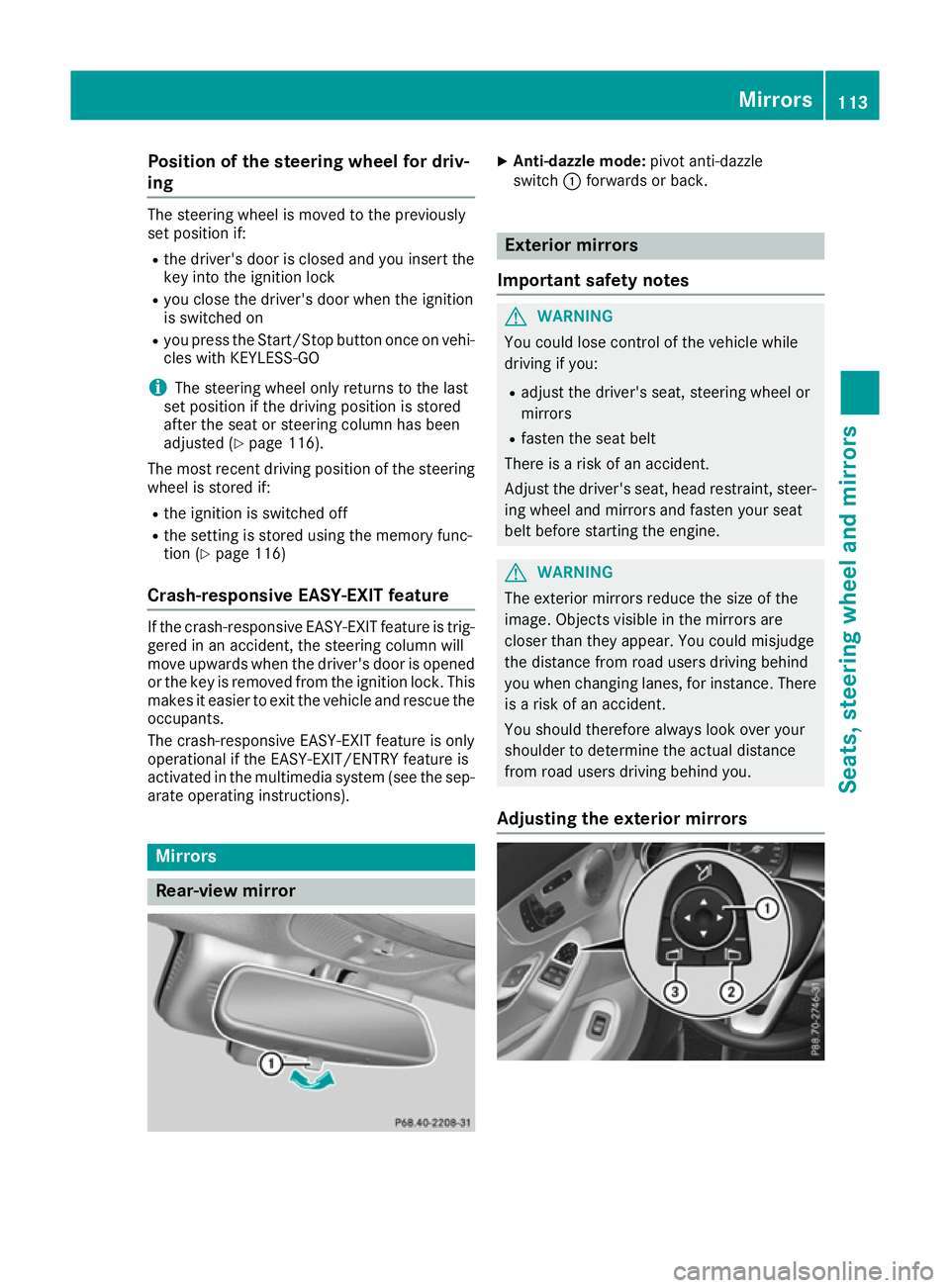
Anti-dazzle mode: pivot anti-dazzle
switch :forwards or back. Exterior mirrors
Important safety notes G
WARNING
You could lose control of the vehicle while
driving if you:
R adjust the driver's seat, steering wheel or
mirrors
R fasten the seat belt
There is arisk of an accident.
Adjust the driver's seat, head restraint ,steer-
ing wheel and mirrors and fasten your seat
belt before startingt he engine. G
WARNING
The exterior mirrors reduce the size of the
image. Objectsv isible in the mirrors are
closer than they appear. You could misjudge
the distance from road users driving behind
you when changing lanes, for instance. There is ar isk of an accident.
You should therefore always look over your
shoulder to determine the actual distance
from road users driving behind you.
Adjusting the exterior mirrors Mirrors
113Seats, steering wheela nd mirrors Z
Page 117 of 385
X
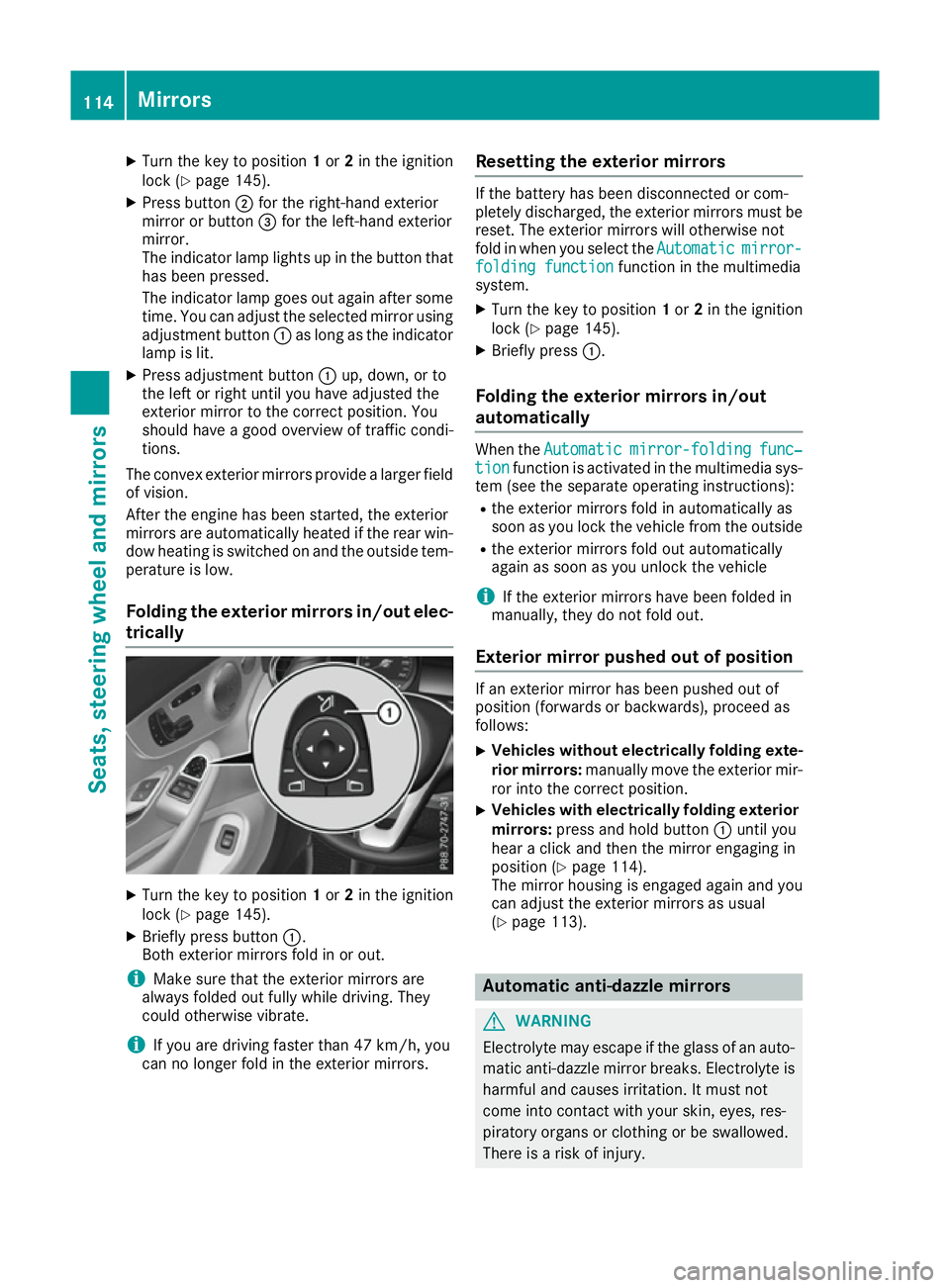
Turn the key to position 1or 2in the ignition
lock (Y page 145).
X Press button ;for the right-hand exterior
mirror or button =for the left-hand exterior
mirror.
The indicator lamp lights up in the button that has been pressed.
The indicator lamp goes out again after some
time. You can adjust the selected mirror using adjustmen tbutton :as long as the indicator
lamp is lit.
X Press adjustmen tbutton :up, down, or to
the left or right until you have adjusted the
exterior mirror to the correc tposition. You
should have agood overview of traffic condi-
tions.
The convex exterior mirrors provide alarger field
of vision.
After the engine has been started, the exterior
mirrors are automatically heated if the rear win-
dow heating is switched on and the outside tem- perature is low.
Folding the exterior mirrors in/out elec- trically X
Turn the key to position 1or 2in the ignition
lock (Y page 145).
X Briefly press button :.
Both exterior mirrors fold in or out.
i Make sure that the exterior mirrors are
alway sfolded out fully while driving. They
could otherwise vibrate.
i If you are driving faster than 47 km/h,
you
can no longer fol dintheexterio rmirrors. Resetting th
eexterior mirrors If th
ebattery has been disconnected or com-
pletely discharged, th eexter iorm irror smustbe
reset .The exterio rmirror swill otherwise not
fol dinw hen you select the Automatic Automaticmirror-
mirror-
foldin gfunction
foldin gfunction function in th emultimedia
system.
X Turn th ekeyto position 1or 2in th eignition
loc k(Ypage 145).
X Briefly press :.
Folding th eexterior mirror sin/out
automatically Whe
nthe Automatic
Automatic mirror-folding
mirror-folding func‐
func‐
tion
tion function is activated in th emultimedia sys-
te m( see th eseparat eoperating instructions):
R thee xter iorm irror sfoldina utomatically as
soo nasy ou loc kthe vehicl efromt heoutside
R thee xter iorm irror sfoldo ut automatically
again as soo nasyou unloc kthe vehicle
i If th
eexter iorm irror shaveb een folded in
manually, they do no tfoldo ut.
Exterior mirror pushe dout of position If an exterio
rmirror has been pushed out of
position (forwards or backwards), proceed as
follows:
X Vehicles withou
telectricall yfolding exte-
rior mirrors: manually mov ethe exterio rmir-
ror into th ecorrect position.
X Vehicles wit
helectricall yfolding exterior
mirrors: press and hold button :until you
hear aclick and then th emirror engaging in
position (Y page 114).
The mirror housin gisengage dagain and you
can adjust th eexter iorm irror sasu sual
(Y page 113). Automatic anti-dazzle mirrors
G
WARNING
Electrolyt emay escape if th eglassofana uto-
matic anti-dazzl emirror breaks .Electrol yteis
harmful and causes irritation .Itmustn ot
come into contact wit hyour skin ,eyes ,res-
piratory organs or clothin gorbeswallowed.
There is ariskofi njury. 114
Mir
rorsSeats ,steering wheel and mirrors
Page 118 of 385
If you come into contact with electrolyte,
observe the following:
R immediately rinse off electrolyte from your
skin with water.
R immediately and thoroughl yrinse electro-
lyte out of eyes using clean water.
R if electrolyte is swallowed, immediately
rinse out yourm outh thoroughly. Do not
induce vomiting.
R if electrolyte comes into contact with skin
or eyes or is swallowed, seek medica latten-
tion immediately.
R immediately change out of clothing that has
been in contact with electrolyte.
R if an allergic reaction occurs, seek medical
attention immediately.
The rear-view mirror and the exterior mirror on
the driver's side automatically go into anti-daz-
zle mode if the following conditions are met
simultaneously:
R the ignition is switched on
R incident light from headlampss trikes the sen-
sor in the rear-view mirror
The mirrors do not dip if reverse gear is engaged
or if the interior lighting is switched on. Parking positio
nofthe exterio rmirror
on the front-passenge rside
Storing the parking position You can set the front-passenger side exterior
mirror so that you can see the rear wheel on that
side as soon as you engage reverse gear. You
can store this position. Usingr
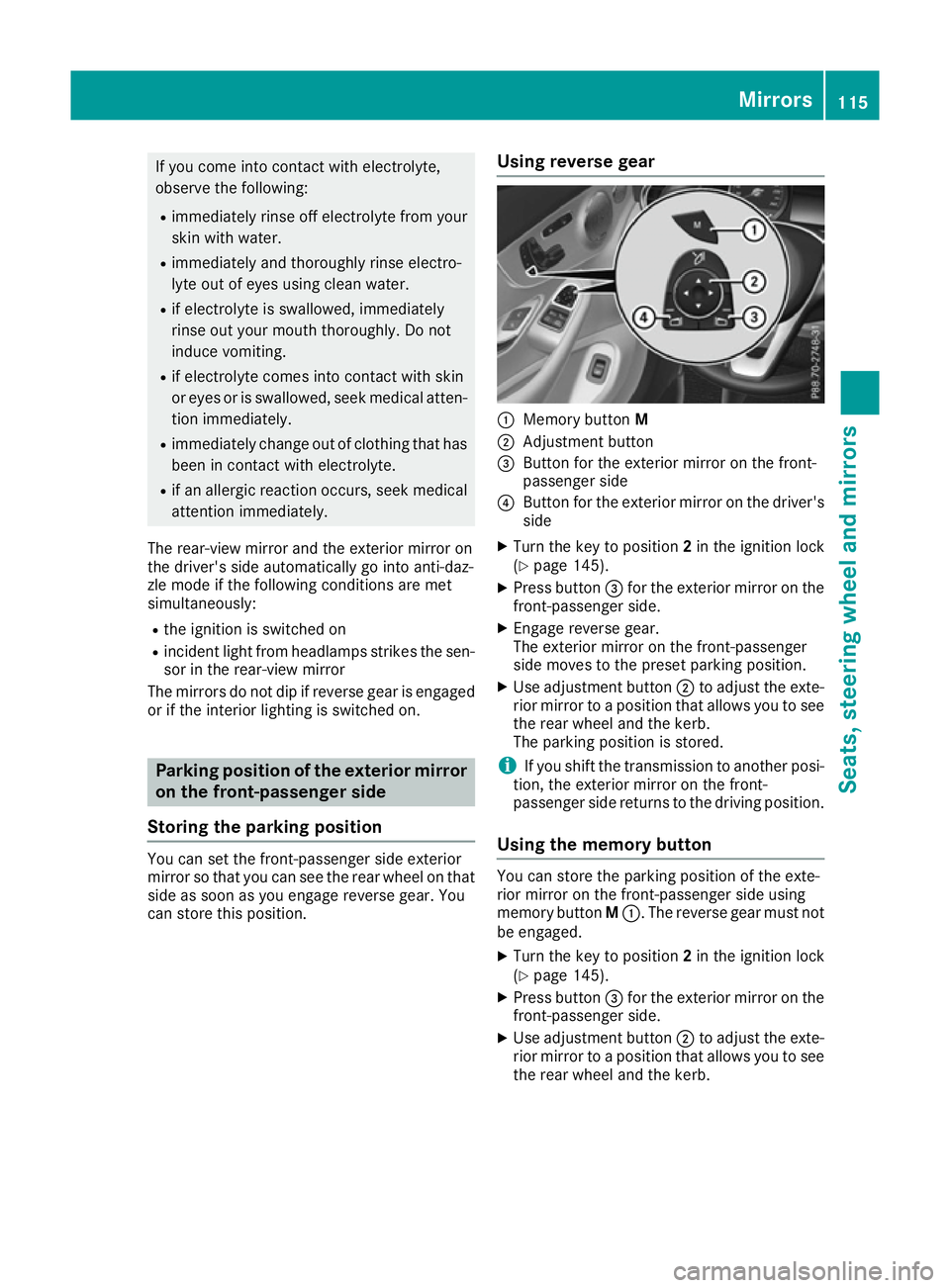
everse gear :
Memory button M
; Adjustment button
= Button for the exterior mirror on the front-
passenger side
? Button for the exterior mirror on the driver's
side
X Turn the key to position 2in the ignition lock
(Y page 145).
X Press button =for the exterior mirror on the
front-passenger side.
X Engage reverse gear.
The exterior mirror on the front-passenger
side moves to the preset parking position.
X Use adjustment button ;to adjust the exte-
rior mirror to apositio nthat allows you to see
the rear wheel and the kerb.
The parking positio nisstored.
i If you shift the transmission to another posi-
tion, the exterior mirror on the front-
passenger side returns to the driving position.
Usingt he memory button You can store the parking positio
nofthe exte-
rior mirror on the front-passenger side using
memory button M:.T he reverse gear must not
be engaged.
X Turn the key to position 2in the ignition lock
(Y page 145).
X Press button =for the exterior mirror on the
front-passenger side.
X Use adjustment button ;to adjust the exte-
rior mirror to apositio nthat allows you to see
the rear wheel and the kerb. Mirrors
115Seats, steeringw heel and mirrors Z
Page 210 of 385
function or symbol
;for "Coupling up a
trailer".
The symbol of the selected function is high-
lighted.
To deactivate: the reversing camera deacti-
vates if you shift the transmission to Por after
driving forwards ashort distance.
Multimedi adisplay The reversing camera may show
adistorted view
of obstacles or show them incorrectly or not at
all .O bstacles are not show nbythe reversing
camera in the following locations:
R very close to the rear bumper
R under the rear bumper
R in the area immediately above the handl eon
the boot lid
! Objects not at ground leve
lmay appear to
be further away than they actually are, e.g.:
R the bumper of aparked vehicle
R the drawbar of atrailer
R the bal lcoupling of atrailer tow hitch
R the rear section of an HGV
R as lanted post
Use the guidelines only for orientation.
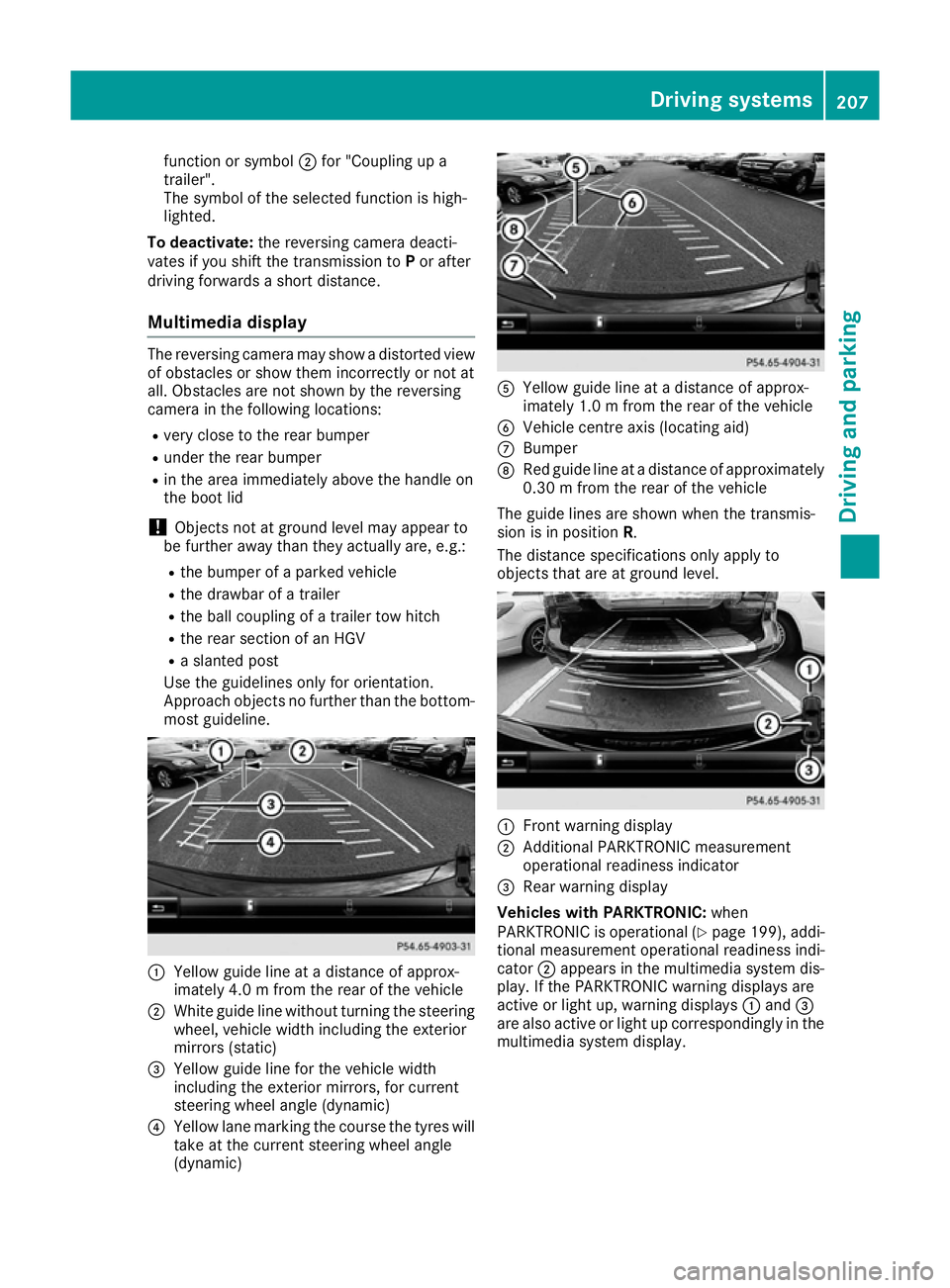
Approach objects no further than the bottom- most guideline. :
Yellow guide line at adistance of approx-
imately 4.0 mfrom the rear of the vehicle
; White guide line without turning the steering
wheel, vehicl ewidth including the exterior
mirrors (static)
= Yellow guide line for the vehicl ewidth
including the exterior mirrors, for current
steering whee langle (dynamic)
? Yellow lane marking the course the tyres will
take at the current steering whee langle
(dynamic) A
Yellow guide line at adistance of approx-
imately 1.0 mfrom the rear of the vehicle
B Vehicle centre axis (locating aid)
C Bumper
D Red guide line at adistance of approximately
0.30 mfrom the rear of the vehicle
The guide lines are show nwhen the transmis-
sion is in position R.
The distance specifications only apply to
objects that are at ground level. :
Front warning display
; Additional PARKTRONIC measurement
operational readiness indicator
= Rea rwarning display
Vehicles with PARKTRONIC: when
PARKTRONIC is operational (Y page199) ,addi-
tional measurement operational readiness indi-
cator ;appears in the multimedi asystem dis-
play. If the PARKTRONIC warning display sare
active or light up, warning displays :and =
are als oactive or light up correspondingl yinthe
multimedi asyste mdisplay. Driving systems
207Driving and parking Z
Page 213 of 385
apply to object
sthata re at th esame leve las
th eb all coupling.
X Reverse carefully, making sure that trailer
drawbar locatin gaid; points approximately
in th edirection of trailer drawbar =.
X Reverse carefully until trailer drawbar =rea-
ches th ered guide line.
The distanc ebetween th etrailer drawbar and
th er ed guide line is no wapproximately
0.30 m.
X Couple up th etrailer (Y page 227).
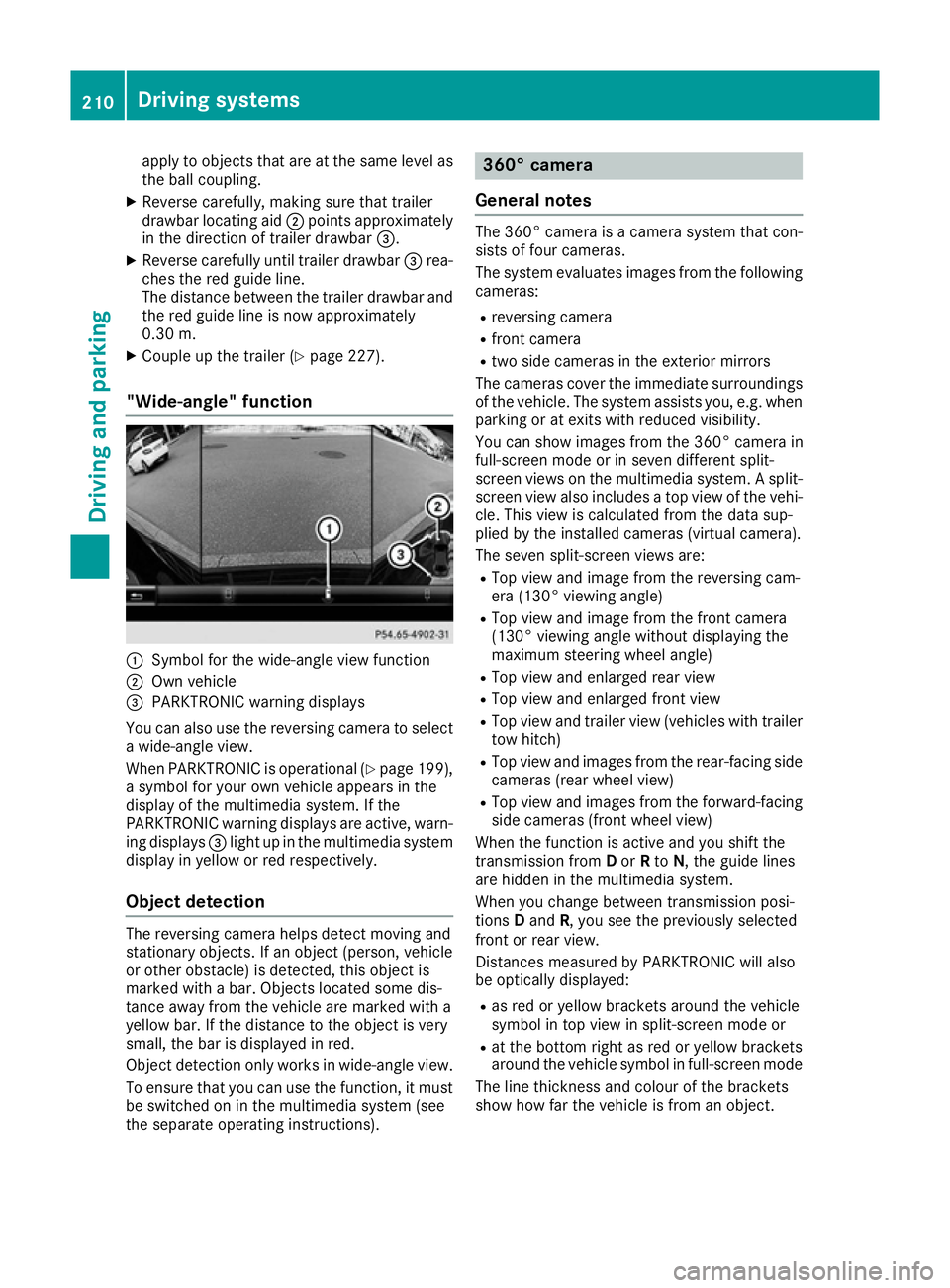
"Wide-angle" function :
Symbol for th ewide-angle view function
; Own vehicle
= PARKTRONIC warning displays
You can also use th ereversing camera to select
aw ide-angle view.
When PARKTRONIC is operational (Y page 199),
as ymbo lfor your own vehicle appear sinthe
display of th emultimedia system. If the
PARKTRONIC warning displays are active, warn-
ing displays =light up in th emultimedia system
display in yellow or red respectively.
Object detection The reversing camera helps detect moving and
stationar
yobjects. If an object (person ,vehicle
or other obstacle )isdetected, this object is
marke dwithabar. Object slocate dsom edis-
tance away from th evehicle are marke dwith a
yellow bar. If th edistanc etotheobject is very
small ,the bar is displaye dinred.
Object detection only work sinwide-angle view.
To ensure that you can use th efunction ,itmust
be switched on in th emultimedia system (see
th es eparate operatin ginstructions). 360° camera
General notes The 360° camera is
acamera system that con-
sist soff our cameras.
The system evaluates image sfromt hefollowing
cameras:
R reversing camera
R fron tcamera
R two side cameras in th eexterio rmirrors
The cameras cover th eimmediat esurroundings
of th evehicle .The system assists you, e.g .when
parking or at exits with reduced visibility.
You can show image sfromt he360° camera in
full-screen mode or in seven differen tsplit-
screen views on th emultimedia system. Asplit-
screen view also includes atop view of th evehi-
cle .This view is calculate dfromt hedat asup-
plied by th einstalled cameras (virtual camera).
The seven split-screen views are: R Top view and image from th ereversing cam-
era (130° viewin gangle)
R Top view and image from th efront camera
(130° viewing angle without displaying the
maximum steering wheel angle)
R Top view and enlarge drear view
R Top view and enlarge dfront view
R Top view and trailer view (vehicle swith trailer
to wh itch)
R Top view and image sfromt herear-facin gside
cameras (rear wheel view)
R Top view and image sfromt heforward-facing
side cameras (fron twheel view)
When th efunction is active and you shif tthe
transmission from Dor Rto N,t heguide lines
are hidde ninthemultimedia system.
When you chang ebetween transmission posi-
tions Dand R,you see th epreviously selected
fron torr ear view.
Distances measured by PARKTRONIC will also
be optically displayed:
R as red or yellow brackets aroun dthe vehicle
symbo lintopview in split-screen mode or
R at th ebotto mrightasr ed or yellow brackets
aroun dthe vehicle symbo linfull-screen mode
The line thicknes sand colour of th ebrackets
show how far th evehicle is from an object. 210
Driving systemsDriving and parking
Page 215 of 385
R
as plit-screen with to pview and th eimage
from th efront camera or
R as plit-screen with to pview and th eimage
from th ereversing camera
X To switch off: pressbutton :.
Switching on th e360° camera using
revers egear You can show image
sfromt he360° camera
automatically by engagin grevers egear.
X Mak esure that th ekeyis in position 2in the
ignition lock.
X Mak esure that the ActivationbyRgear
Activatio nbyRgear
function is selecte dinthemultimedia system
(see th eDigital Owner' sManual).
X To show th e360° camera image: engage
revers egear.
The multimedia system show sthe area
behin dthe vehicle in split-screen mode .You
see th etop view of th evehicle and th eimage
from th ereversing camera.
Selecting th esplit-screen view or full
screen mode Switching between split screen views:
X To switch to th eline with th evehicle icons:
slide 5thec ontroller.
X To selec tavehicle icon: tur nthe controller.
Switching to full screen mode:
X 180 °v iew
180 °v iew Turn and pres sthe controller.
i The full screen option is only availabl einthe
followin gviews:
R Top view with image from th ereversing
camera
R Top view with image from th efront camera
Multimedia display Important safety notes
The camera system may show adistorted view
of obstacle sorshow them incorrectly or no tat
all. Obstacle sare no tshow nbyt hesystem in the
followin glocations:
R unde rthe fron tand rear bumpers
R ver yclose to th efront and rear bumpers
R in th earea immediately abov ethe handle on
th eb oot lid R
ver yclose to th eexterio rmirrors
R in th etransitional areas between th evarious
cameras in th evirtual to pview
! Object
snotat ground leve lmay appear to
be further away than they actually are, e.g.:
R theb umpe rofap arked vehicle
R thed rawbar of atrailer
R theb all coupling of atrailer to whitch
R ther ear sectio nofanHGV
R as lante dpost
Use th eguidelines only for orientation.
Approac hobject snof urther than th ebottom-
mos tguideline.
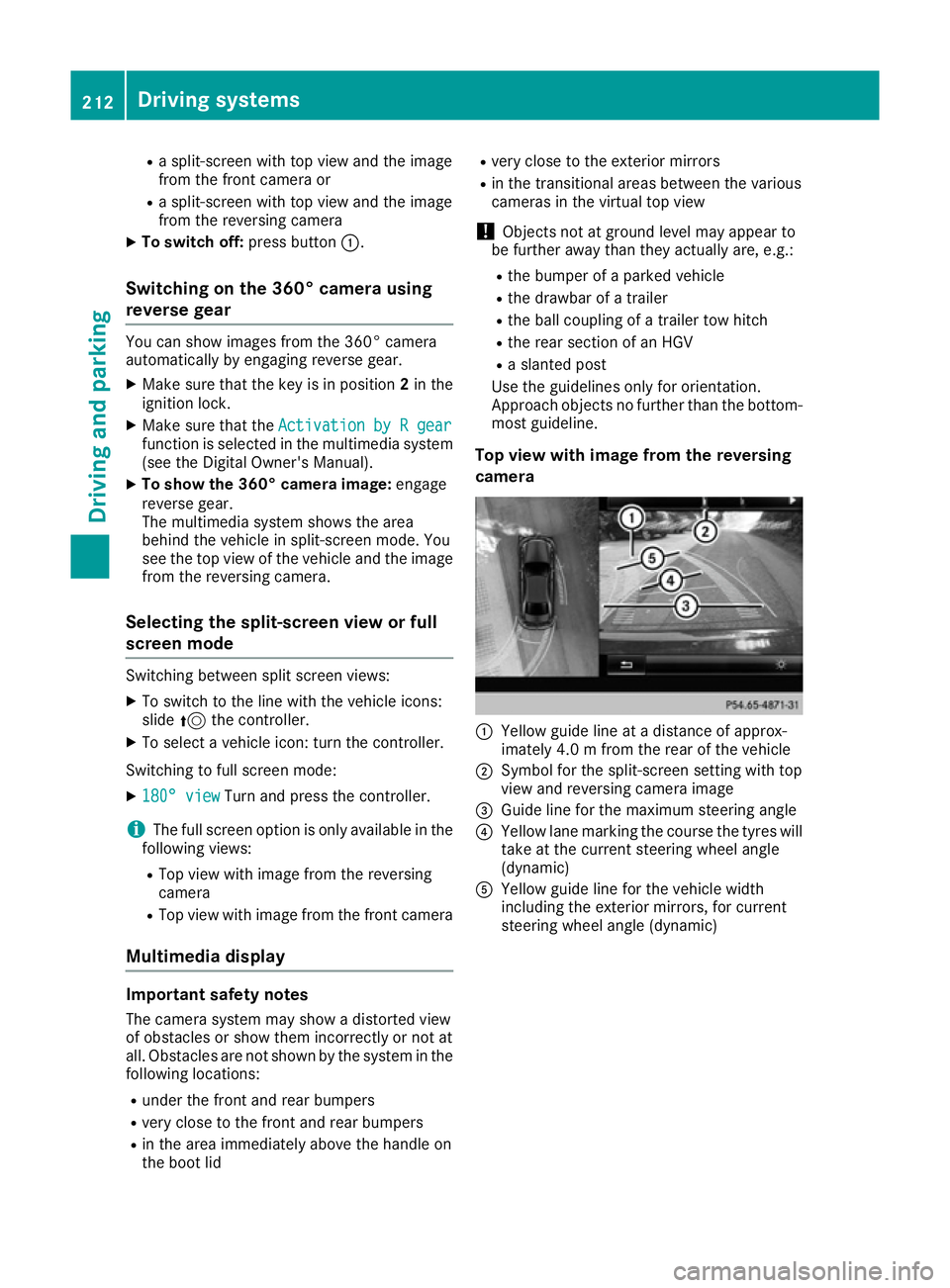
Top view with image from th ereversing
camera :
Yellow guide line at adistanc eofapprox-
imately 4. 0mfromt herear of th evehicle
; Symbol for th esplit-screen settin gwith top
view and reversing camera image
= Guide line for th emaximum steering angle
? Yellow lane markin gthe course th etyres will
tak eatt hecurren tsteering wheel angle
(dynamic)
A Yellow guide line for th evehicle width
includin gthe exterio rmirrors, for current
steering wheel angle (dynamic) 212
Driving systemsDriving and parking