ECO mode MERCEDES-BENZ C-CLASS COUPE 2018 Owner's Manual
[x] Cancel search | Manufacturer: MERCEDES-BENZ, Model Year: 2018, Model line: C-CLASS COUPE, Model: MERCEDES-BENZ C-CLASS COUPE 2018Pages: 593, PDF Size: 10.86 MB
Page 372 of 593
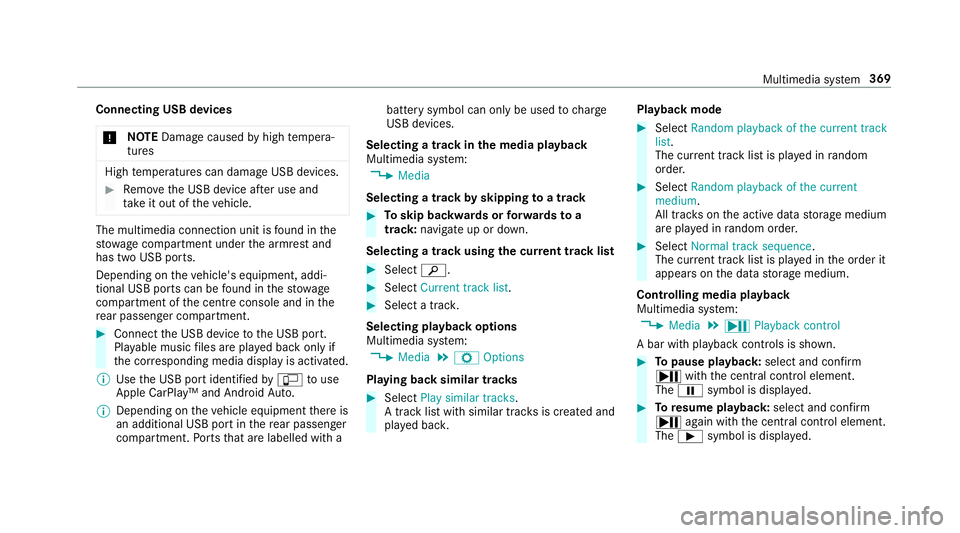
Connecting USB devices
000E NO
TEDama gecaused byhigh temp era‐
tures High
temp eratures can damage USB devices. 0007
Remo vethe USB device af ter use and
ta ke it out of theve hicle. The multimedia connection unit is
found in the
stow age compartment under the armrest and
has two USB ports.
Depending on theve hicle's equipment, addi‐
tional USB ports can be found in thestow age
compartment of the cent reconsole and in the
re ar passenger compartment. 0007
Connect the USB device tothe USB port.
Pla yable music files are pla yed back only if
th e cor responding media display is activated.
0009 Use the USB port identified by00C2 touse
Apple CarPlay™ and Android Auto.
0009 Depending on theve hicle equipment there is
an additional USB port in there ar passenger
compartment. Ports th at are labelled with a bat
tery symbol can only be used tocharge
USB devices.
Selecting a track in the media playba ck
Multimedia sy stem:
0018 Media
Selecting a track byskipping toa track 0007
Toskip backwards or forw ards toa
track: navigate up or down.
Selecting a track using the cur rent track list 0007
Select 00D3. 0007
Select Current track list. 0007
Select a tra ck.
Selecting playback options
Multimedia sy stem:
0018 Media 0019
Z Options
Playing back similar trac ks 0007
Select Play similar tracks.
A track li stwith similar trac ksis created and
pla yed bac k. Playback mode 0007
Select Random playback of the current track
list.
The cur rent track li stis pla yed in random
orde r. 0007
Select Random playback of the current
medium.
All trac kson the active data storage medium
are pla yed in random orde r. 0007
Select Normal track sequence .
The cur rent track li stis pla yed in the order it
appears on the data storage medium.
Controlling media playback
Multimedia sy stem:
0018 Media 0019
Y Playback control
A bar with playback controls is shown. 0007
Topause playback: select and confirm
Y with th e cent ral control element.
The 00CF symbol is displa yed. 0007
Toresume playback: select and confirm
Y again with the cent ral control element.
The 00D0 symbol is displa yed. Multimedia sy
stem 369
Page 388 of 593
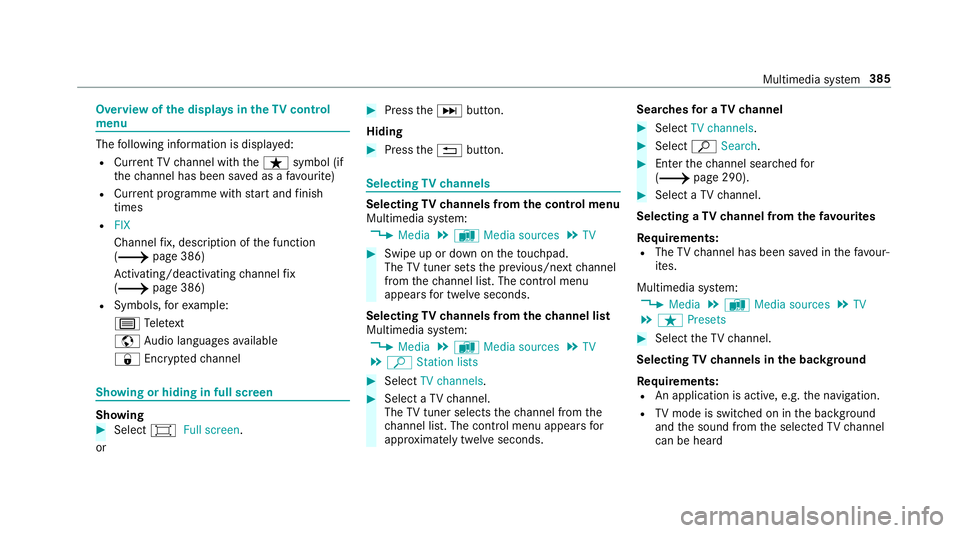
Overview of
the displa ysintheTV cont rol
menu The
following information is displa yed:
R Cur rent TV channel with theß symbol (if
th ech annel has been sa ved as a favo urite)
R Cur rent programme wi thstart and finish
times
R FIX
Channel fix, description of the function
(0013 page 386)
Ac tivating/deactivating channel fix
( 0013 page 386)
R Symbols, forex ample:
p Telete xt
z Audio languages available
r Encryp tedch annel Showing or hiding in full screen
Showing
0007
Select 0008Full screen .
or 0007
Press the0055 button.
Hiding 0007
Press the0038 button. Selecting
TVchannels Selecting
TVchannels from the control menu
Multimedia sy stem:
0018 Media 0019
à Media sources 0019
TV 0007
Swipe up or down on theto uchpad.
The TVtuner sets the pr evious/n extch annel
from thech annel list. The control menu
appears for twelve seconds.
Selecting TVchannels from thech annel list
Multimedia sy stem:
0018 Media 0019
à Media sources 0019
TV
0019 ª Station lists 0007
Select TV channels. 0007
Select a TVchannel.
The TVtuner selects thech annel from the
ch annel list. The control menu appears for
appr oximately twelve seconds. Sear
ches for a TVchannel 0007
Select TV channels . 0007
Select ªSearch . 0007
Enter thech annel sear ched for
( 0013 page 290). 0007
Select a TVchannel.
Selecting a TVchannel from thefa vo urites
Re quirements:
R The TVchannel has been sa ved in thefa vo ur‐
ites.
Multimedia sy stem:
0018 Media 0019
à Media sources 0019
TV
0019 ß Presets 0007
Select theTV channel.
Selecting TVchannels in the bac kground
Re quirements:
R An application is active, e.g. the navigation.
R TVmode is switched on in the bac kground
and the sound from the selected TVchannel
can be heard Multimedia sy
stem 385
Page 390 of 593
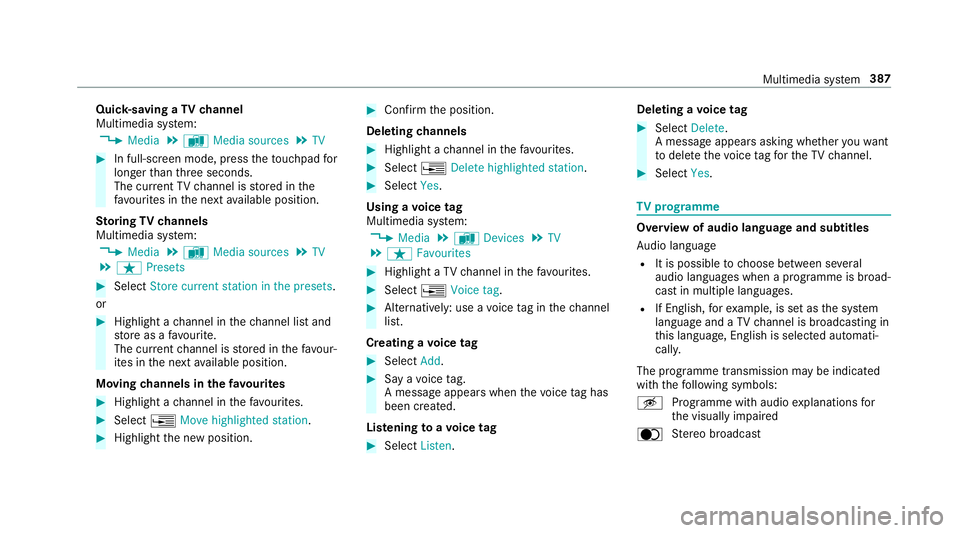
Quic
k-saving a TVchannel
Multimedia sy stem:
0018 Media 0019
à Media sources 0019
TV 0007
In full-screen mode, press theto uchpad for
longer than thre e seconds.
The cur rent TV channel is stored in the
fa vo urites in the next available position.
St oring TVchannels
Multimedia sy stem:
0018 Media 0019
à Media sources 0019
TV
0019 ß Presets 0007
Select Store current station in the presets .
or 0007
Highlight a channel in thech annel list and
st ore as a favo urite.
The cur rent channel is stored in thefa vo ur‐
ites in the next available position.
Moving channels in thefa vo urites 0007
Highlight a channel in thefa vo urites. 0007
Select 0080Move highlighted station. 0007
Highlight the new position. 0007
Confirm the position.
Deleting channels 0007
Highlight a channel in thefa vo urites. 0007
Select 0080Delete highlighted station. 0007
Select Yes.
Using a voice tag
Multimedia sy stem:
0018 Media 0019
à Devices 0019
TV
0019 ß Favourites 0007
Highlight a TVchannel in thefa vo urites. 0007
Select 0080Voice tag . 0007
Alternatively: use a voice tag inthech annel
list.
Creating a voice tag 0007
Select Add. 0007
Say a voice tag.
A messa geappears when thevo ice tag has
been created.
Lis tening toavo ice tag 0007
Select Listen. Deleting a
voice tag 0007
Select Delete.
A message appears asking whe ther youwa nt
to dele tethevo ice tagfo rth eTV channel. 0007
Select Yes. TV
prog ramme Overvi
ewof audio language and subtitles
Au dio language
R It is possible tochoose between se veral
audio languages when a programme is broad‐
cast in multiple languages.
R If En glish, forex ample, is set as the sy stem
language and a TVchannel is broadcasting in
th is language, En glish is selec ted automati‐
cally.
The prog ramme transmission may be indica ted
with thefo llowing symbols:
m Programme with audio explanations for
th e visually impaired
o Stereo broadcast Multimedia sy
stem 387
Page 416 of 593
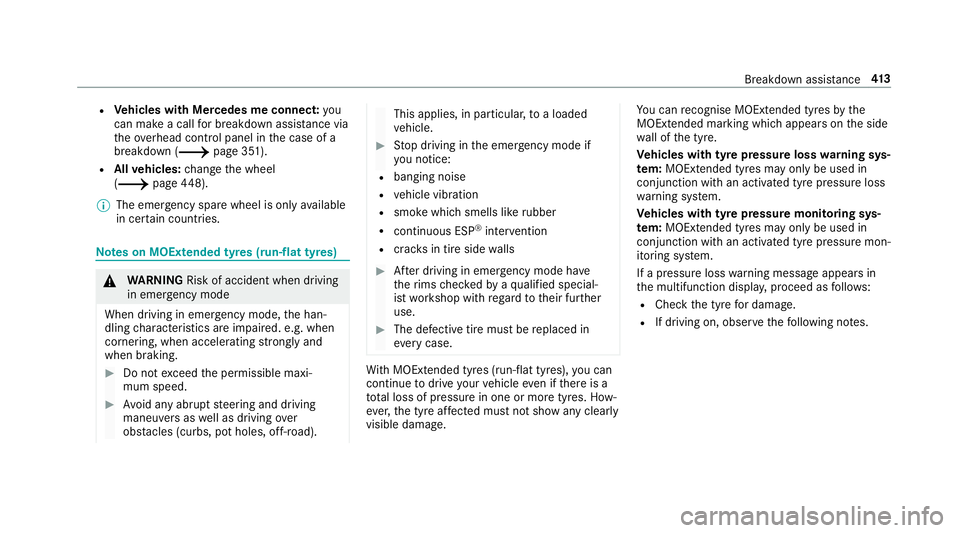
R
Vehicles with Mercedes me connect: you
can make a call for breakdown assi stance via
th eove rhead control panel in the case of a
breakdown (0013 page 351).
R Allvehicles: change the wheel
(0013 page448).
0009 The emer gency spa rewheel is only available
in cer tain countries. Note
s on MOExtended tyres (run-flat tyres) 000A
WARNING Risk of accident when driving
in eme rgency mode
When driving in emer gency mode, the han‐
dling characteristics are impaired. e.g. when
cornering, when accelerating stronglyand
when braking. 0007
Do not exceed the permissible maxi‐
mum speed. 0007
Avoid any abrupt steering and driving
maneuvers as well as driving over
obs tacles (curbs, pot holes, off-road). This applies, in pa
rticular, toa loaded
ve hicle. 0007
Stop driving in the emer gency mode if
yo u notice:
R banging noise
R vehicle vibration
R smoke which smells like rubber
R continuous ESP ®
inter vention
R crac ksin tire side walls 0007
After driving in emergency mode ha ve
th erims checkedby aqu alified special‐
ist workshop with rega rd totheir fur ther
use. 0007
The defective tire must be replaced in
eve rycase. Wi
th MOExtended tyres (run-flat tyres), you can
continue todrive your vehicle even if there is a
tot al loss of pressure in one or more tyres. How‐
eve r,th e tyre af fected must not show any clearly
visible damage. Yo
u can recognise MOExtended tyres bythe
MOExtended marking which appears onthe side
wa ll of the tyre.
Ve hicles with tyre pressure loss warning sys‐
te m: MOExtended tyres may only be used in
conjunction wi than activated tyre pressure loss
wa rning sy stem.
Ve hicles with tyre pressure monitoring sys‐
te m: MOExtended tyres may only be used in
conjunction wi than activated tyre pressure mon‐
itoring sy stem.
If a pressure loss warning message appears in
th e multifunction displa y,proceed as follo ws:
R Check the tyre for dama ge.
R If driving on, obser vethefo llowing no tes. Breakdown assis
tance 413
Page 445 of 593
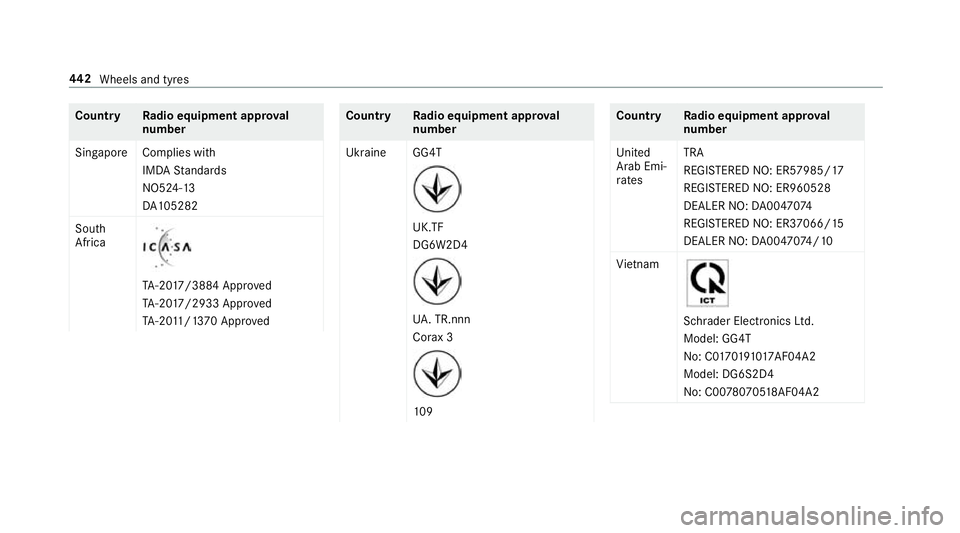
Count
ryRadio equipment appr oval
number
Singapo reComplies with
IMDA Standards
NO5 24-13
DA 105282
South
Africa TA
-20 17/3884 Appr oved
TA -20 17/2933 Appr oved
TA -20 11/1 370 Appr oved Count
ryRadio equipment appr oval
number
Ukraine GG4T UK.TF
DG6W2D4
UA
. TR.nnn
Co rax 3 109 Count
ryRadio equipment appr oval
number
United
Arab Emi‐
ra tes TRA
REGISTERED NO: ER57985/17
REGISTERED NO: ER960528
DEALER NO: DA00470 74
REGI STERED NO: ER37066/ 15
DEALER NO: DA00470 74/10
Vi etnam Schrader Electronics Ltd.
Model: GG4T
No: C0 17019101 7AF04A2
Model: DG6S2D4
No: C00 78070518 AF04A2 442
Wheels and tyres
Page 447 of 593
0007
Select Yes. 0007
Toconfirm restart, press Touch Control on
th e left-hand side of thesteering wheel.
The Run Flat Indicator restarted message is
shown in the multifunction displa y.
Af teryo u ha vedriven for a few minutes, the
tyre pressu reloss warning sy stem monitors
th e set tyre pressures of all the tyres.
Be sure toalso obse rveth efo llowing fur ther
re lated subjects:
R Notes on tyre pressure (0013 page 435)Wheel
change Note
s on selecting, fitting and replacing
tyres Mercedes
-AMG vehicles: observeth e no tes in
th e Supplement. Otherwise, you may failto rec‐
ognise dangers.
Yo u can ask for information rega rding permit ted
wheel/tyre combinations at a Mercedes-Benz
Service Cent re. 000A
WARNING Risk of accident due toincor‐
re ct dimensions of wheels and tyres
If wheels and tyres of the wrong size are
used, the wheel brakes or wheel suspension
components may become damaged. 0007
Alw aysre place wheels and tyres with
th ose that fulfil the specifications of the
original part.
When replacing wheels, make sure tofit the
cor rect:
R Designation
R Type
When replacing tyres, make sure tofit the
cor rect:
R Designation
R Manufactu rer
R Type 000A
WARNING Risk of inju rythro ugh exceed‐
ing the specified tyre load-bearing capa‐
city or the permissible speed rating
Exceeding the specified tyre load-bearing
capacity or the permissible speed rating may
lead totyre dama geand tothe tyres bur st‐
ing. 0007
Therefore, only use tyre types and sizes
appr ovedfo ryo ur vehicle model. 0007
Obser vethe tyre load-bearing capacity
ra ting and speed rating requ iredfor
yo ur vehicle. 000E
NO
TEVehicle and tyre damage thro ugh
tyre types and sizes that ha venot been
appr oved Fo
r saf etyre asons, on lyuse tyres, wheels
and accessories which ha vebeen specially
appr ovedby Mercedes-Benz foryo ur vehicle. 444
Wheels and tyres
Page 449 of 593
Before pu
rchasing and using non-appr oved
accesso ries, visit a qualified specialist workshop
and enquire about:
R Suitability
R Legal stipulations
R Factory recommendations 000A
WARNING Risk of accident wi thhigh
per form ance tyres
The special tyre tread in combination with
th e optimised tyre compound, means that
th erisk of skidding or hydroplaning on wet
ro ads is inc reased.
In addition, the tyre grip is greatly reduced at
a low outside temp erature and tyre running
te mp erature. 0007
Switch on the ESP ®
and adapt your
driving style accordingly. 0007
Use M+S tyres at outside temp eratures
of less than 50 °F. Obse
rveth efo llowing when selecting, fitting and
re placing tyres:
R Countr y-specific requirements for tyre
appro valth at define a specific tyre type for
yo ur vehicle.
Fu rthermore, the use of cer tain tyre types in
cer tain regions and areas of operation can
be highly beneficial.
R Only use tyres and wheels of the same type
(summer tyres, winter tyres, MOEx tended
tyres) and the same make.
R Only fit wheels of the same size on one axle
(left and right).
It is only permissible tofit a di fferent wheel
size in theeve nt of a flat tyre in order to
drive tothe specialist workshop.
R Only fit tyres of the cor rect size onto the
wheels.
R Do not make any modifications tothe brake
sy stem, the wheels or the tyres.
The use of shims or brake dust shields is not
permitted and may in validate theve hicle's
ge neral operating pe rmit. R
Vehicles with a tyre pressure monitoring
sy stem: allfitted wheels mu stbe equipped
with functioning sensors forth e tyre pres‐
sure monitoring sy stem.
R Attemp eratures below 7 °C, use winter tyres
or all-season tyres mar ked M+S for all
wheels.
Wi nter tyres bearing the004D snowflake
symbol in addition tothe M+S marking pro‐
vide the best possible grip in wintry road
conditions.
R For M+S tyres, only use tyres with the same
tread.
R Obser vethe maximum permissible speed for
th e M+S tyres fitted.
If th is is below theve hicle's maximum speed,
th is must be indicated byan appropriate
label in the driver's field of vision.
R Run in new tyres at moderate speeds forthe
fi rs t10 0 km.
R Replace the tyres af ter six years at the latest,
re ga rdless of wear. 446
Wheels and tyres
Page 467 of 593
The
recommended octane number foryo ur vehi‐
cle can also be found on the instruction label in
th e fuel filler flap (0013 page173).
As a temp orary measure, if there commended
fuel is not available, you may also use regular
unleaded petrol with at leas t:
R C18 0:93 RON
R allother models: 91RON
This may reduce engine output and increase fuel
consum ption.
Ne verre fuel using petrol with an even lo wer
RO N.
Fu rther information on fuel can be obtained at a
fi lling station or a qualified specialist workshop.
Information on additives in petrol
Obser vethe no tes on operating fluids
(0013 page 461).
000E NO
TEDama gefrom use of unsuitable
additives Even small amounts of
the wrong additive
may lead tomalfunctions occur ring. 0007
Only add cleaning additives recommen‐
ded byMercedes-Benz tothe fuel. Mercedes-Benz
recommends that you use fuel
brands that ha veadditives.
In some countries, the fuel available may not
ha ve suf ficient additives. Residue could build up
in the fuel injection sy stem as a result. In this
case, in consultation with a Mercedes-Benz
service centre, the fuel may be mixed with the
cleaning additive recommended byMercedes-
Benz. Be sure toobser vethe no tes and mixing
ra tios speci fied on the conta iner.
Information on fuel grades forve hicles with
a diesel engine
Gene ral no tes
Obser vethe no tes on operating fluids
(0013 page 461). 000A
WARNING Risk offire from fuel mixture
If yo u mix diesel fuel with petrol, theflash
point of the fuel mixture is lo werth an that of
pure diesel fuel. While
the engine is running, component
pa rts in theex haust sy stem may overheat
without warning. 0007
Neverre fuel using petrol in diesel
engines. 0007
Never mix petrol with diesel fuel. 000E
NO
TEDama gecaused bythe wrong fuel Even small amounts of
the wrong fuel could
re sult in damage tothe fuel sy stem, the
engine and the emission control sy stem. 0007
Only refuel using sulphu r-free diesel
fuel that con form sto European stand‐
ard EN 590, or an equivalent specifica‐
tion.
In countries without sulphur-f ree diesel
fuel, refuel using only lo w-sulphur diesel
fuel with a sulphur content less than
50 ppm. 0007
Vehicles without diesel particulate
fi lter: refuel using only diesel fuel with
a sulphur content less than 500 ppm. 464
Tech nical da ta
Page 470 of 593
Ad
Blue ®
filling capacity and consum ption
To tal capacity of AdBlue ®
tank Mode
lT otal capacity
All models 25 litresAd
Blue ®
consu mption
Like fuel consu mption, AdBlue ®
consu mption is
highly dependent upon driving style and operat‐
ing conditions. Forth is reason, your vehicle's
actual consum ption figures under normal operat‐
ing conditions may dif fer from the consum ption
fi gures calculated. AdBlue ®
consu mption is
between 1% and 5% of fuel consumption. Ha ve
th eAd Blue ®
supply checked at a qualified spe‐
cialist workshop before making journe ysoutside
of Europe. Before a longer stay outside of
Europe, consult a qualified specialist workshop.
Display theAd Blue ®
ra nge and le vel
( 0013 page 260). Engine oil
Note
s on engine oil
Obser vethe no tes on operating fluids
(0013 page 461). 000E
NO
TEEngine dama gecaused byan
incor rect oil filter, incor rect oil or addi‐
tives 0007
Do not use engine oils or oil filters
which do not cor respond tothe specifi‐
cations explicitly prescribed forthe
service inter vals. 0007
Do not alter the engine oil or oil filter in
order toachie velonger change inter vals
th an presc ribed. 0007
Do not use additives. 0007
Have the engine oil rene we d at regular
inter vals. Mercedes-Benz
recommends that you ha vethe
oil change car ried out at a qualified specialist
wo rkshop.
Only Mercedes-Benz appr oved engine oils may
be used in Mercedes-Benz engines.
Fu rther information on engine oil and oil filters is
av ailable at thefo llowing locations:
R inthe Mercedes-Benz Specifications for
Operating Fluids byentering the designation
- at http://be vo.mercedes-benz.com
- inthe Mercedes-Benz BeVo app
R at a qualified specialist workshop
Pet rol engines: for cer tain countries, dif fere nt
engine oils can be used in conjunction wi th
re duced maintenance inter vals. Te
ch nical da ta467
Page 550 of 593
Immobiliser ............................................
94
Anti-theft pr otection
see ATA (anti-theft alarm sy stem)
Anticipatory occupant pr otection
see PRE- SAFE®
(anticipatory occu‐
pant pr otection)
see PRE-SAFE ®
PLUS (anticipatory
occupant pr otection plus)
Apple CarPlay™ ....................................... 347
Connecting an iPhone ®
....................... 347
Ending .................................................3 48
No tes ................................................... 347
Overview ............................................. 347
Sound settings .................................... 348
Tr ans ferred vehicle data ......................3 50
Ashtr ay
Fr ont centre console ............................ 121
Re ar passenger compartment ............ .122
Using ................................................... 121
Assistance sy stems
see Driving saf ety sy stem
Assistant display Menu (on-board computer) .................. 260 ASS
YST PLUS ........................................... 392
Battery disconnection pe riods .............3 93
Displ aying the service due date ........... 392
Fu nction/no tes ................................... 392
Re gular maintenance work .................. 392
Special service requ irements .............. 392
ATA (anti-theft ala rmsystem) .................. .94
Deactivating the alarm .......................... 94
Fu nction ................................................ 94
Fu nction of interior pr otection ............... 95
Priming/deactivating interior pr otec‐
tion ........................................................ 96
Priming/deactivating tow- aw ay pro‐
te ction ................................................... 95
To w- aw ay protection function ................95
AT TENTION ASSI ST......................... 238, 239
Fu nction .............................................. 238
Setting ................................................. 239
Sy stem limitations ...............................2 38
At tention assistant
see ATTENTION ASSIST
Au dio mode
Connecting USB devices ..................... 369
Co pyrights ...........................................3 66Information .......................................... 365
Inserting/removing an SD card ........... 366
Media sea rch ....................................... 372
Overview ............................................. 368
Pa use and playback function .............. .369
Selecting a track ................................. 369
Selecting playba ckoptions .................. 369
Switching on media mode ...................3 66
Tr ack list .............................................. 369
Au thorised workshop
see Qualified specialist workshop
Au tomatic distance control
see Active Dis tance Assi stDISTRONIC
Au tomatic driving lights .........................127
Au tomatic engine start (ECO start/
sto p function) .......................................... 15 9
Au tomatic engine stop (ECO start/
sto p function) .......................................... 15 9
Au tomatic front passen ger front air‐
bag deacti vation sy stem
see Automatic front passenger front
airbag shutoff Index
547