brake light MERCEDES-BENZ C-CLASS COUPE 2018 Owner's Manual
[x] Cancel search | Manufacturer: MERCEDES-BENZ, Model Year: 2018, Model line: C-CLASS COUPE, Model: MERCEDES-BENZ C-CLASS COUPE 2018Pages: 593, PDF Size: 10.86 MB
Page 213 of 593
Also,
the speed is reduced if the turn signal to
ch ange lanes is swit ched on and one of thefo l‐
lowing situations is de tected:
R Turning off at junctions
R Driving on slowing-down lanes
R Driving on lanes adjacent toslowing-down
lanes
The driver is responsible forch oosing theright
speed and observing other road users. This
applies in particular tojunctions, roundabouts
and traf fic lights, as route-based speed adap ta‐
tion does not brake theve hicle toast andstill.
When route guidance is active, thefirs t speed
adjustment is car ried out automaticall y.Ifthe
turn signal indica tor is switched on, the selected
ro ute is confirmed and fur ther speed adjustment
is activated.
Speed adjustment is cancelled in thefo llowing
cases:
R Ifth e turn signal indicator is switched off
before thero ute event.
R Ifth e driver depresses the accelera tor or
brake pedal during the process. Sy
stem limitations
Ro ute-based speed adap tation does not take
ri ght of wayre gulations into account. The driver
is responsible for complying with road traf fic
re gulations and driving at a suitable speed.
In dif ficult conditions (e.g. unclear roads, nar row
lanes, wetro ad sur faces, snow or ice) or when
driving wi tha trailer, the speed adjustment made
by the sy stem may not alw ays be suitable. In
th ese situations the driver must inter vene
acco rding ly. 000A
WARNING Risk of accident in spi teof
ro ute-based speed adjustment
Ro ute-based speed adjustment might mal‐
function or be temp orarily una vailable in the
fo llowing situations:
R If map data is not up todate or available
R Ifyo u do not follow the selected route
guidance
R Ifth e set route is re-planned
R Inroad con stru ction areas R
When towing a trailer
R In bad weather or road conditions
R Ifth e accelera tor pedal is depressed 0007
Adjust the speed tothe traf fic situation. Setting
route-based speed adjustment Re
quirements:
R Active Dis tance Assi stDISTRONIC is acti va‐
te d.
Multimedia sy stem:
0018 Vehicle 0019
k Assistance
0019 Speed adjustment 0007
Activate 0073or deacti vate 0053 the function. Ac
tive Steering Assist Fu
nction of Active Steering Assist
0009 Active Steering Assist is count ry-dependent
and only available forve hicles with the Driv‐
ing Assis tance Package. 210
Driving and pa rking
Page 217 of 593
000A
WARNING Risk of accident if Lane
Change Assi stunexpectedly stops func‐
tioning
If th e sy stem limitations for Lane Change
Assist ha vebeen reached, there is no guar‐
antee that the sy stem will remain active.
Lane Change Assist cannot then assist you
by applying steering torques. 0007
Alw ays monitor the lane change and
ke ep your hands on thesteering wheel.
Obser vethe tra ffic conditions and steer
and/or brake if necessar y.Sy
stem limitations
The sy stem limitations of Active Steering Assist
apply toActive Lane Change Assi st
( 0013 page210).
The sy stem may also be impaired or may not
function in thefo llowing situations:
R The sensors in there ar bumper are dirty,
damaged or co vered, for ins tance by a
st icke r or ice and sno w.
R The exterior lighting is malfunctioning. Ac
tivating/deactivating Active Lane Change
Assi st
Multimedia sy stem:
0018 Vehicle 0019
k Assistance 0007
Select Lane change assist. 0007
Activate 0073or deacti vate 0053 the function.
Fu nction of Active Eme rgency Stop Assist
If th e driver continually ignores the visual or
acoustic warning toput their hands on thesteer‐
ing wheel, theBeginning emergency stop mes‐
sage appears in the multifunction displa y.Ifthe
driver still does not respond, Active Dis tance
Assi stDISTRONIC reduces the speed. The vehi‐
cle is decelerated in stages toast andstill. At
speeds below 60 km/h the hazard warning
lights switch on automaticall y.
When theve hicle is stationar y,thefo llowing
actions are car ried out:
R theve hicle is secured with the electric park‐
ing brake
R Active Dis tance Assi stDISTRONIC is ended
R theve hicle is unloc ked R
if possible, an emer gency call is placed to
th e Mercedes-Benz emer gency call centre
The driver can cancel the deceleration at any
time byper form ing one of thefo llowing actions:
R steering
R braking or accelerating
R pressing a steering wheel button
R operating Touch Control
R activating or deactivating Active Dis tance
Assi stDISTRONIC Overvi
ewofActive Di stance Assist
DISTRO NIC displa ysinthe instrument clus‐
ter The assis
tance graphic and thest atus display
show thest atus of thefo llowing functions in the
instrument clus ter:
R Active Dis tance Assi stDISTRONIC
R Route-based speed adap tation
R Active Steering Assist 214
Driving and pa rking
Page 234 of 593
th
eir setting checked at a qualified specialist
wo rkshop.
0009 Do not use the 360° Camera under such cir‐
cums tances. You could otherwise injure oth‐
ers or collide with objects when parking the
ve hicle.
If th eve hicle is car rying a heavy load, leaving the
st andard height can result in inaccuracies in the
guide lines and in the display of thege nerated
ima ges, depending on tech nical conditions.
The field of vision and other functions of the
came rasystem may be restricted due toaddi‐
tional attachments on theve hicle (e.g. licence
plate brac ket, bicycle rack ).
0009 The contrast of the display may be impaired
by abrupt direct sunlight or by other light
sources, e.g. when driving out of a garage . In
th is case, pay particular attention.
0009 Have the display repaired or replaced if, for
ex ample, pixel er rors considerably restrict its
use.
See the no tes on cleaning the 360° Camera
(0013 page 406). Selecting a view
for the 360° camera
Requ irements:
R The Auto reversing camera function is selec‐
te d in the multimedia sy stem. 0007
Enga gereve rsege ar. 0007
Inthe multimedia sy stem, select the desired
vie w.
Switching reve rsing camera automatic mode
on/off
The reve rsing camera is only an aid. It is not a
substitute foryo ur attention tothe sur roundings.
The responsibility for safe manoeuvring and
parking remains with you. Make sure that no
persons, animals or objects etc. are in the
manoeuvring range. Pay attention to your sur‐
ro undings and be ready tobrake at all times.
Multimedia sy stem:
0018 Vehicle 0019
k Assistance
0019 Camera & Park. Assist
0019 Auto reversing camera 0007
Activate 0073or deacti vate 0053 the function. Opening
the camera co ver of the reve rsing
camera
Multimedia sy stem:
0018 Vehicle 0019
k Assistance
0019 Camera & Park. Assist 0007
Select Open camera cover.
0009 The camera co ver closes auto maticallyafter
some time or af ter an ignition cycle.
Setting the camera as a favo urite
Yo u can call up the camera view directly in the
multimedia sy stem bysetting it as a favo urite. 0007
Press the00E2 button on the control ele‐
ment.
The main functions are displa yed. 0007
Navigate down wards twice.
The Favourites menu appears. 0007
Select New favourite. 0007
Select Vehicle . 0007
Select Camera. Driving and parking
231
Page 247 of 593
The course-cor
recting brake application is availa‐
ble in the speed range between appr oximately
30 km/h and 200 km/h. 000A
WARNING Risk of accident despi te
brake application of Active Blind Spot
Assi st
A cou rse-co rrecting brake application cann ot
alw ays pr event a collision. 0007
Alw aysst eer, brake or accelera teyour‐
self, especially if Active Blind Spot
Assi stwa rnsyo u or makes a course-
co rrecting brake application. 0007
Alw ays maintain a safe dis tance at the
sides. 000A
WARNING Risk of accident despi te
Ac tive Blind Spot Assi st
Ac tive Blind Spot Assi stdoes not react tothe
fo llowing:
R ifve hicles overtake too closely on the
side, placing them in the blind spot area R
vehicles approaching and overtaking you
at a greatly di fferent speed
As a result, Active Blind Spot Assi stmay nei‐
th er give warnings nor inter vene in su chsit‐
uations. 0007
Alw ays pay careful attention tothe traf‐
fi c situation and maintain a safe dis‐
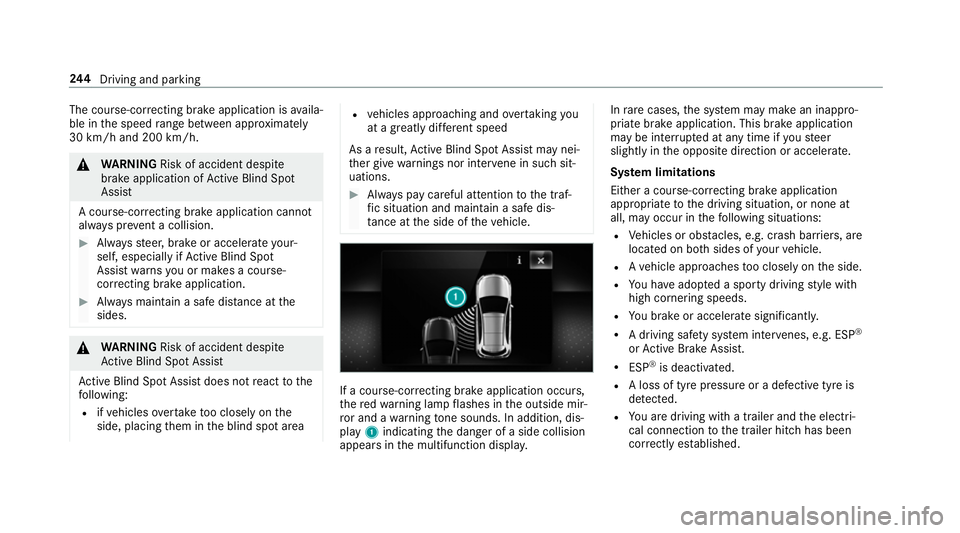
ta nce at the side of theve hicle. If a course-cor
recting brake application occu rs,
th ere dwa rning lamp flashes in the outside mir‐
ro r and a warning tone sounds. In addition, dis‐
pl ay 1 indicating the danger of a side collision
appears in the multifunction displa y.In
rare cases, the sy stem may make an inappro‐
priate brake application. This brake application
may be inter rupte d at any time if yousteer
slightly in the opposite direction or accelera te.
Sy stem limitations
Either a course-cor recting brake application
appropria teto the driving situation, or none at
all, may occur in thefo llowing situations:
R Vehicles or obs tacles, e.g. crash ba rriers, are
located on bo thsides of your vehicle.
R Ave hicle approaches too closely on the side.
R You ha veadop ted a sporty driving style with
high cornering speeds.
R You brake or accelerate significantl y.
R A driving sa fety sy stem inter venes, e.g. ESP ®
or Active Brake Assi st.
R ESP ®
is deacti vated.
R A loss of tyre pressure or a defective tyre is
detected.
R You are driving with a trailer and the electri‐
cal connection tothe trailer hitch has been
cor rectly es tablished. 244
Driving and pa rking
Page 250 of 593
Ac
tivating/deactivating Active Lane Keeping
Assist (vehicles with Parking Assist
PA RKTRONIC) 000A
WARNING Risk of accident despi te
Ac tive Lane Keeping Assist warning
A lane-cor recting brake application cannot
al wa ys bring theve hicle back into the origi‐
nal lane. 0007
Alw aysst eer, brake or accelera teyour‐
self, especially if Active Lane Keeping
Assist warnsyo u or makes a lane-cor‐
re cting brake application. 000A
WARNING Risk of accident despi teinter‐
ve ntion of Active Lane Keeping Assist
Ac tive Lane Keeping Assist does not de tect
traf fic conditions or road users. In very rare
cases, the sy stem may make an inappropri‐
ate brake application, e.g. af ter intentional ly
driving over a solid lane marking.
The brake application can be inter rupte d at
any time if yousteer slightly in the opposite
direction. 0007
Alw ays make sure that there is suf fi‐
cient di stance tothe side forot her traf‐
fi c or obs tacles. 000A
WARNING Risk of accident despi teLane
Ke eping Assist
Lane Keeping Assist cann otalw ays clearly
de tect lane markings.
In su chcases, Lane Keeping Assist can:
R give an unnecessary warning
R not give a warning 0007
Alw ays pay particular attention tothe
traf fic situation and keep within the
lane, especially if Active Lane Keeping
Assist alerts you. Be sure
toobser vethe sy stem limitations of
Ac tive Lane Keeping Assist. 0007
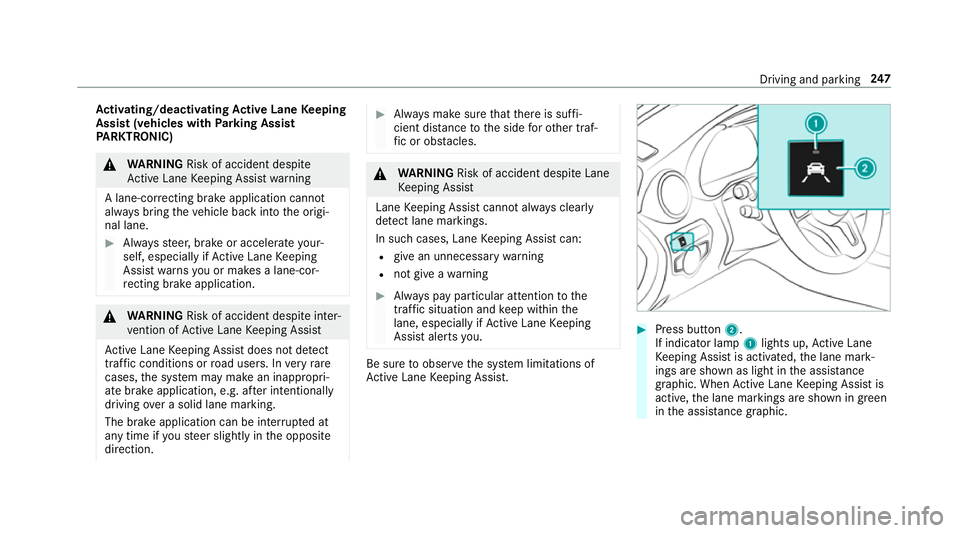
Press button 2.
If indicator lamp 1lights up, Active Lane
Ke eping Assist is activated, the lane mark‐
ings are shown as light in the assis tance
graphic. When Active Lane Keeping Assist is
active, the lane markings are shown in green
in the assis tance graphic. Driving and pa
rking 247
Page 254 of 593
Coupling up a trailer
000E NO
TEDama getotheve hicle battery due
to full discharge Charging
the trailer battery using the po wer
supply of the trailer can damage theve hicle
batter y. 0007
Do not use theve hicle's po wer supply
to charge the trailer batter y. 0007
Remo vethe co ver from the ball head and
st ore it in a safe place (0013 page111). 0007
Position the trailer on a le vel sur face behind
th eve hicle and couple it up totheve hicle. 0007
Open the soc ket cap. 0007
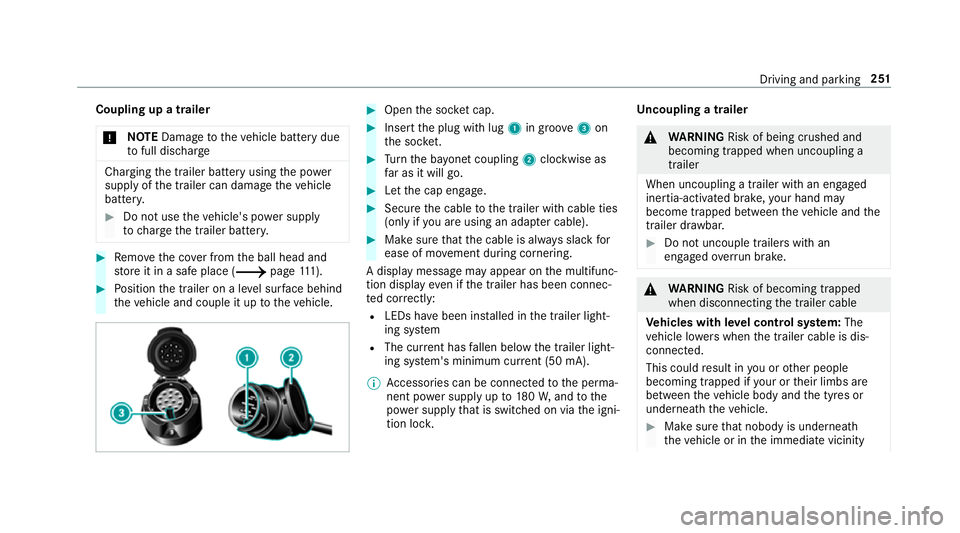
Inse rtthe plug with lug 1in groo ve3 on
th e soc ket. 0007
Turn the ba yonet coupling 2clockwise as
fa r as it will go. 0007
Let the cap engage. 0007
Secure the cable tothe trailer with cable ties
(only if you are using an adap ter cable). 0007
Make sure that the cable is alw ays slack for
ease of mo vement during cornering.
A display messa gemay appear on the multifunc‐
tion display even if the trailer has been connec‐
te d cor rectly:
R LEDs ha vebeen ins talled in the trailer light‐
ing sy stem
R The cur rent has fallen below the trailer light‐
ing sy stem's minimum cur rent (50 mA).
0009 Accessories can be connected tothe perma‐
nent po wer supp lyup to180W, and tothe
po we r supp lythat is swit ched on via the igni‐
tion loc k. Un
coupling a trailer 000A
WARNING Risk of being crushed and
becoming trapped when uncoupling a
trailer
When uncoupling a trailer wi than engaged
ine rtia-activated brake, your hand may
become trapped between theve hicle and the
trailer dr awbar. 0007
Do not uncouple trailers with an
engaged overrun brake. 000A
WARNING Risk of becoming trapped
when disconnecting the trailer cable
Ve hicles with le vel control sy stem: The
ve hicle lo werswhen the trailer cable is dis‐
connected.
This could result in you or other people
becoming trapped if your or their limbs are
between theve hicle body and the tyres or
underneath theve hicle. 0007
Make sure that nobody is unde rneath
th eve hicle or in the immediate vicinity Driving and parking
251
Page 406 of 593
Note
s on paint work/matt finish paint workcare Obser
vethefo llowing information: Cleaning and car
eA voiding paintwork damage
Pa intwork R
Insect remains: soak with insect remo ver and rinse off the
trea ted areas af terw ards.
R Bird droppings: soak with water and rinse off af terw ards.
R Tree resin, oils, fuels and greases: remo veby rubbing gen‐
tly wi tha clo thsoaked in petroleum ether or lighter fluid.
R Coolant and brake fluid: remo vewith a damp clo thand
clean water.
R Tarst ains: use tarre mo ver.
R Wax: use silicone remo ver. R
Do not attach sticke rs,fi lms or similar.
R Remo vedirt immediatel y,where possible. Maintenance and care
403
Page 478 of 593
Saf
ety sy stems Display messages
Possible causes/consequences and 0050
0050Solutions
00E5 currently unavailable See
Owner's Manual *
ESP ®
is temp orarily una vailable.
Other drive sy stems and driving saf ety sy stems may also be malfunctioning. 000A
WARNING Risk of skidding if ESP ®
is malfunctioning
If ESP ®
is malfunctioning, ESP ®
cannot car ryout vehicle stabilisation. In addition, other driving saf ety sy stems
are switched off. 0007
Drive on carefull y. 0007
Have ESP ®
ch ecked at a qualified specialist workshop. 0007
Carefully drive on a suitable stre tch of road, making slight steering mo vements at a speed abo ve30 km/h. 0007
Ifth e display message does not disappear, consult a qualified specialist workshop immediately. Drive carefully.
Brake immediately *
Ve hicles with manual transmission: a malfunction has occurred while the HOLD function was activated.
A tone may also sound at regular inter vals. If you attem pttolock theve hicle, theto ne will become louder.
Yo u cannot start the engine. 0007
Immediately depress the brake pedal firm lyuntil the display message disappears.
Yo u can restart the engine. Display messages and
warning/indicator lamps 475
Page 485 of 593
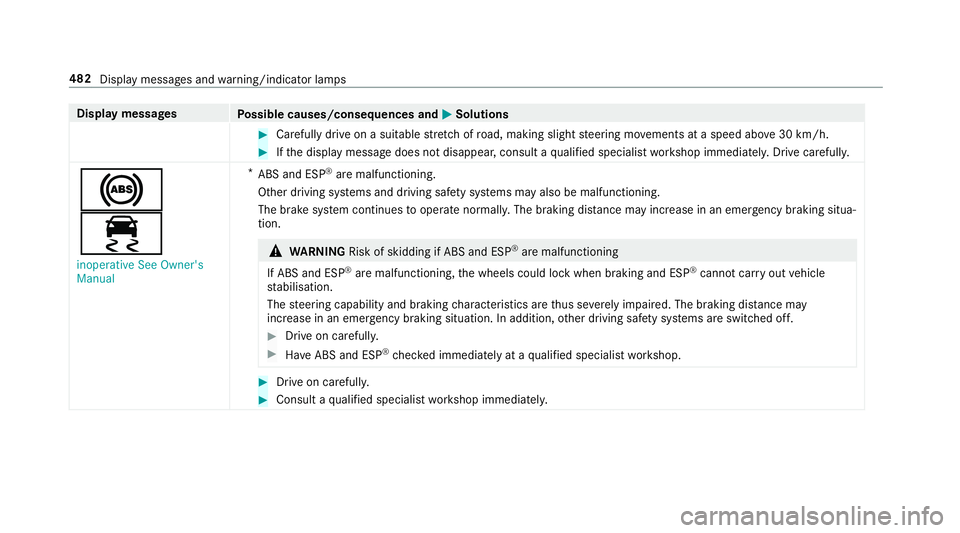
Display messages
Possible causes/consequences and 0050
0050Solutions 0007
Carefully drive on a suitable stre tch of road, making slight steering mo vements at a speed abo ve30 km/h. 0007
Ifth e display message does not disappear, consult a qualified specialist workshop immediately. Drive carefully.
0025
00E5
inoperative See Owner's
Manual *
ABS and ESP ®
are malfunctioning.
Other driving sy stems and driving saf ety sy stems may also be malfunctioning.
The brake sy stem continues tooperate normally. The braking dis tance may increase in an emergency braking situa‐
tion. 000A
WARNING Risk of skidding if ABS and ESP ®
are malfunctioning
If ABS and ESP ®
are malfunctioning, the wheels could lock when braking and ESP ®
cann otcar ryout vehicle
st abilisation.
The steering capability and braking characteristics are thus se verely impaired. The br aking distance may
increase in an emergency braking situation. In addition, other driving saf ety sy stems are switched off. 0007
Drive on carefull y. 0007
Have ABS and ESP ®
ch ecked immediately at a qualified specialist workshop. 0007
Drive on carefully. 0007
Consult a qualified specialist workshop immediatel y.482
Display messages and warning/indicator lamps
Page 490 of 593
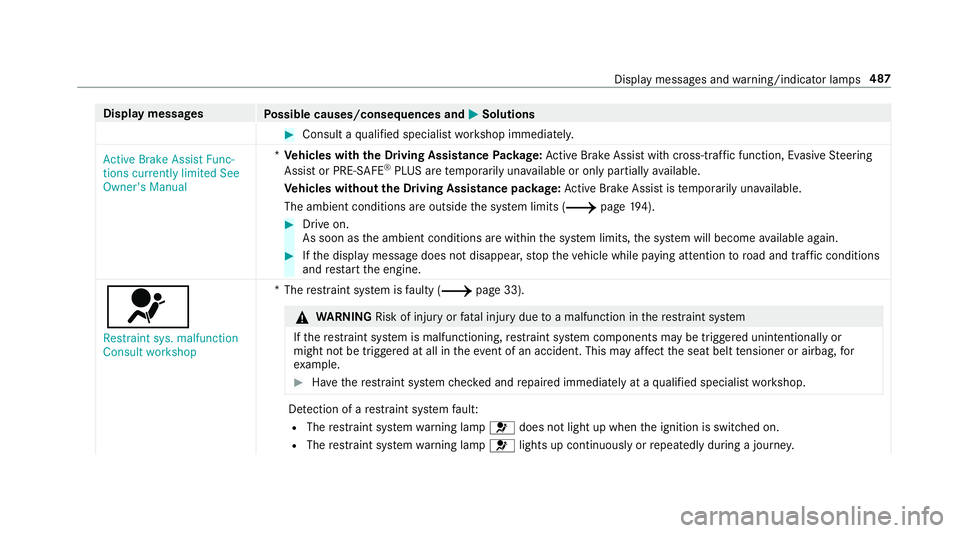
Display messages
Possible causes/consequences and 0050
0050Solutions 0007
Consult a qualified specialist workshop immediatel y.
Active Brake Assist Func-
tions currently limited See
Owner's Manual *
Ve hicles with the Driving Assistance Package: Active Brake Assi stwith cross-traf fic function, Evasi veSteering
Assist or PRE‑SAFE ®
PLUS are temp orarily una vailable or only partially available.
Ve hicles without the Driving Assistance pa ckage: Active Brake Assi stistemp orarily una vailable.
The ambient conditions are outside the sy stem limits (0013 page194). 0007
Drive on.
As soon as the ambient conditions are within the sy stem limits, the sy stem will become available again. 0007
Ifth e display message does not disappear, stop theve hicle while paying attention toroad and traf fic conditions
and restart the engine.
0075
Restraint sys. malfunction
Consult workshop *T
herestra int sy stem is faulty (0013 page 33). 000A
WARNING Risk of inju ryor fata l injury due toa malfunction in there stra int sy stem
If th ere stra int sy stem is malfunctioning, restra int sy stem components may be triggered unintentionally or
might not be triggered at all in theeve nt of an accident. This may af fect the seat belt tensioner or airbag, for
ex ample. 0007
Have there stra int sy stem checked and repaired immediately at a qualified specialist workshop. De
tection of a restra int sy stem fault:
R The restra int sy stem warning lamp 0075does not light up when the ignition is switched on.
R The restra int sy stem warning lamp 0075lights up continuously or repeatedly during a journe y. Displ
aymessa ges and warning/indicator lamps 487