key MERCEDES-BENZ C-CLASS COUPE 2018 Owner's Manual
[x] Cancel search | Manufacturer: MERCEDES-BENZ, Model Year: 2018, Model line: C-CLASS COUPE, Model: MERCEDES-BENZ C-CLASS COUPE 2018Pages: 593, PDF Size: 10.86 MB
Page 110 of 593
0007
Toswitch on/increase the le vel:press but‐
to n1 repeatedly until the desired ventila‐
tion le vel is set.
Depending on theve ntilation le vel, up to
th re e indicator lamps light up. 0007
Toswitch off/reduce the le vel:press but‐
to n1 repeatedly until the desired ventila‐
tion le vel is set.
If all indicator lamps are off, the seat ventila‐
tion is switched off. Ste
ering wheel Ad
justing the steering wheel manually 000A
WARNING Risk of inju rythro ugh adjust‐
ing vehicle settings while theve hicle is in
motion
Yo u could lose cont rol of theve hicle in the
fo llowing situations:
R ifyo u adjust the driver's seat, the head
re stra ints, thesteering wheel or the mir‐
ro r while theve hicle is in motion R
ifyo ufast enyour seat belt while theve hi‐
cle is in motion 0007
Before starting the engine: adjust the
driver's seat, the head restra ints, the
st eering wheel or the mir ror and fasten
yo ur seat belt. 000A
WARNING Risk of entrapment forch il‐
dren when adjusting thesteering wheel
Children could injure themselves if they
adjust thesteering wheel. 0007
Never lea vechildren unat tended in the
ve hicle. 0007
When leaving theve hicle, alw aysta ke
th eke y with you and lock theve hicle.
This also applies tothe digital vehicle
ke y if the "Digital Vehicle Key" function
is activated via Mercedes me connect. 0007
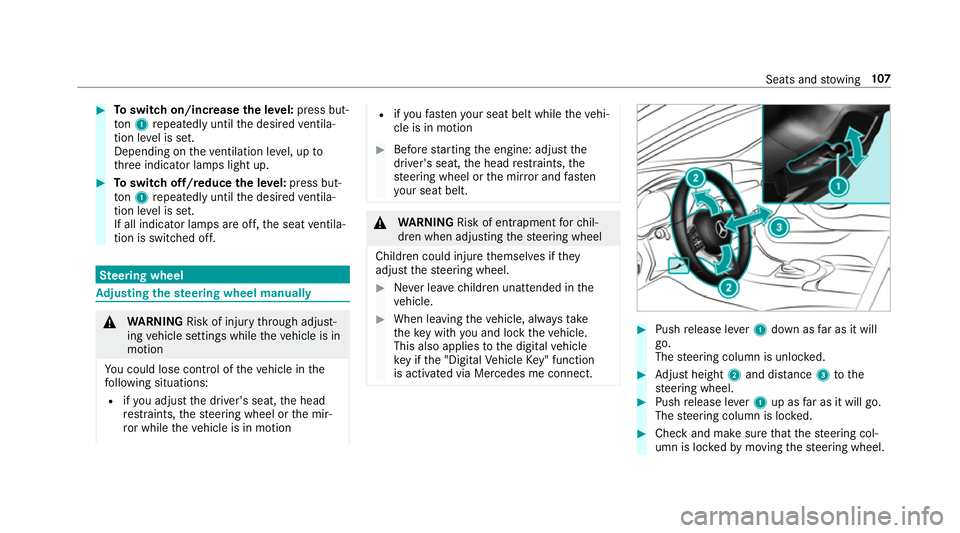
Push release le ver1 down as far as it will
go.
The steering column is unloc ked. 0007
Adjust height 2and di stance 3tothe
st eering wheel. 0007
Push release le ver1 up as far as it will go.
The steering column is loc ked. 0007
Check and make sure that thesteering col‐
umn is loc kedby moving thesteering wheel. Seats and
stowing 107
Page 113 of 593
000A
WARNING Risk of entrapment when set‐
ting the seat with the memory function
When the memory function adjusts the seat
or steering wheel, you and other vehicle
occupants – particularly children – could
become trapped. 0007
During the setting procedure of the
memory function, ensure that no body
parts are in the sweep of the seat or
th esteering wheel. 0007
If somebody becomes trapped, immedi‐
ately release the memory function posi‐
tion button.
The adjustment process is stopped. 000A
WARNING Risk of entrapment if the
memory function is activated bychildren
Children could become trapped if they acti‐
va te the memory function, particularly when
unattended. 0007
Never lea vechildren unat tended in the
ve hicle. 0007
When leaving theve hicle, alw aysta ke
th eke y with you and lock theve hicle.
This also applies tothe digital vehicle
ke y if the "Digital Vehicle Key" function
is activated via Mercedes me connect. The memory function can be used when
the igni‐
tion is switched off.
St oring
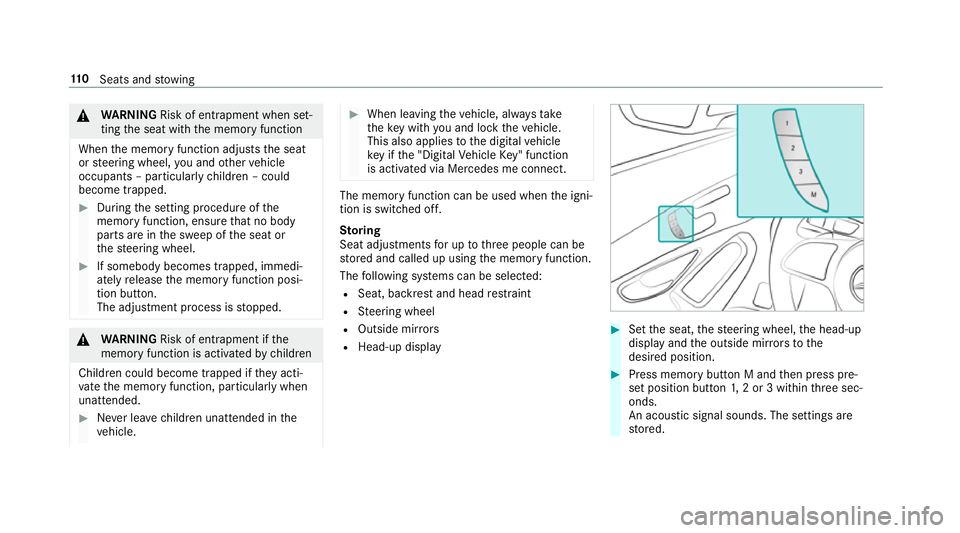
Seat adjustments for up tothre e people can be
st ored and called up using the memory function.
The following sy stems can be selected:
R Seat, backrest and head restra int
R Steering wheel
R Outside mir rors
R Head-up display 0007
Set the seat, thesteering wheel, the head-up
display and the outside mir rors to the
desired position. 0007
Press memory button M and then press pre‐
set position button 1,2 or 3 within thre e sec‐
onds.
An acoustic signal sounds. The settings are
st ored. 11 0
Seats and stowing
Page 115 of 593
0007
Alw ays be particular lycareful when in
th e vicinity of theta ilpipe and tailpipe
trims and supervise children very
closely when in this area. 0007
Before any con tact, allow the car parts
to cool down. The driving
characteristics of your vehicle are
dependent on the distribution of the load within
th eve hicle. You should bear thefo llowing in
mind when loading theve hicle:
R neverex ceed the permissible gross mass or
th e permissible axle loads forth eve hicle
(including occupants).
Information can be found on theve hicle iden‐
tification plate (0013 page 459).
R the load must not pr otru de abo vethe upper
edge of the seat backrests.
R always place the load behind unoccupied
seats if possible.
R secure the load using the tie-down eyes and
distribute the load evenly. St
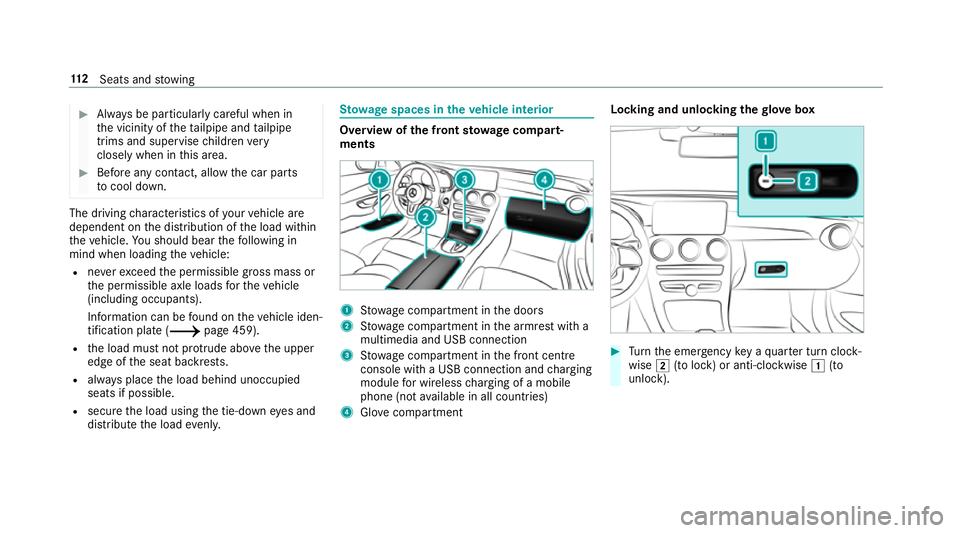
ow age spaces in theve hicle interior Overview of
the front stowage compa rt‐
ments 1
Stow age compartment in the doors
2 Stow age compartment in the armrest with a
multimedia and USB connection
3 Stow age compartment in the front cent re
console wi tha USB connection and charging
module for wireless charging of a mobile
phone (not available in all countries)
4 Glovecompa rtment Locking and unlo
cking thegl ove box 0007
Turn the emer gency key a quarter turn clock‐
wise 0048(to lock) or anti-clockwise 0047(to
unlock). 11 2
Seats and stowing
Page 155 of 593
Driving
Note
s on Mercedes-AMG vehicles Obser
vethe no tes on thefo llowing topics in the
Supplement, as you may otherwise failto recog‐
nise dangers:
R Rear axle locking dif fere ntial
R AMG Performance exhaust sy stem
R AMG ceramic high-per form ance composite
brake sy stem
R RACE START
R AMG RIDE CONTROL Switching
the po wer supp lyor ignition on
without starting the engine 000A
WARNING Risk of accident and inju ry
due tochildren left unat tended in the
ve hicle
If ch ildren are left unat tended in theve hicle,
th ey could:
R open doo rs,th ereby endangering other
persons or road users.
R get out of theve hicle and be hit by
oncoming traf fic.
R ope rate ve hicle equipment and become
trapped, forex ample.
In addition, children could also set theve hi‐
cle in motion, forex ample, by:
R releasing the parking brake.
R shifting the automatic transmission out of
park position 005Dor shifting manual trans‐
mission into idle position.
R starting the engine. 0007
Never lea vechildren and animals unat‐
te nded in theve hicle. 0007
When leaving theve hicle, alw aysta ke
th eke y with you and lock theve hicle.
This also applies tothe Digital Vehicle
Ke y if the "Digital Vehicle Key" function
is activated via Mercedes me connect. 0007
Keep theve hicle key out of reach of
ch ildren. This also applies tothe Digital
Ve hicle Key if the "Digital Vehicle Key"
function is activated via Mercedes me
connect. Re
quirements:
R theke y is in theve hicle and is recognised.
R or: a Digi talVe hicle Key is located in the
mar ked space (0013 page154).
R the brake pedal is not depressed. 15 2
Driving and pa rking
Page 156 of 593
0007
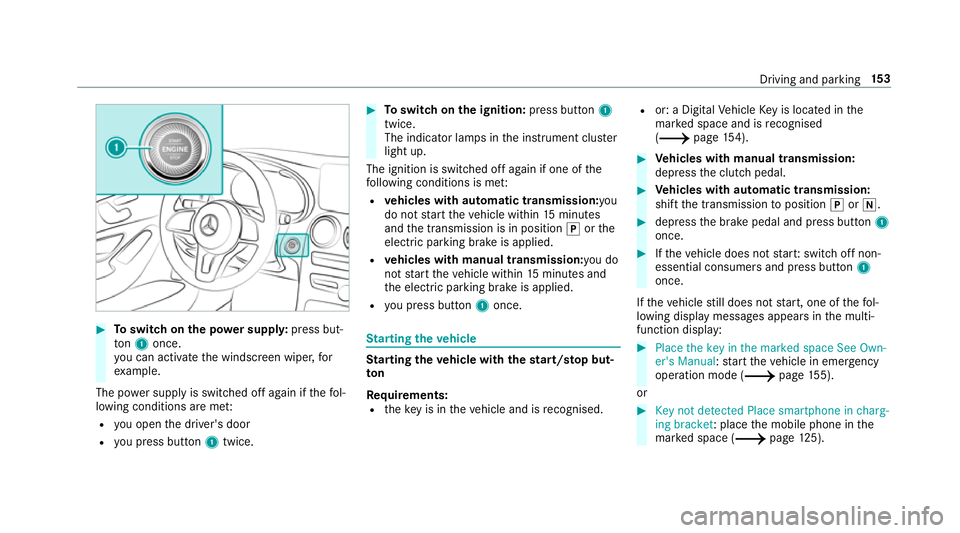
Toswitch on the po wer supp ly:press but‐
to n1 once.
yo u can activate the windscreen wiper, for
ex ample.
The po wer supp lyis switched off again if thefo l‐
lowing conditions are me t:
R you open the driver's door
R you press but ton1 twice. 0007
Toswitch on the ignition: press button 1
twice.
The indicator lamps in the instrument clus ter
light up.
The ignition is switched off again if one of the
fo llowing conditions is me t:
R vehicles with automatic transmission:you
do not start theve hicle within 15minutes
and the transmission is in position 005Dorthe
electric parking brake is applied.
R vehicles with manual transmission: you do
not start theve hicle within 15minutes and
th e electric parking brake is applied.
R you press but ton1 once. St
arting theve hicle St
arting theve hicle with thest art/s top but‐
ton
Requ irements:
R theke y is in theve hicle and is recognised. R
or: a Digi talVe hicle Key is located in the
mar ked space and is recognised
(0013 page 154). 0007
Vehicles with manual transmission:
depress the clutch pedal. 0007
Vehicles with automatic transmission:
shift the transmission toposition 005Dor005C. 0007
depress the brake pedal and press button 1
once. 0007
Ifth eve hicle does not star t:switch off non-
essential consumers and press button 1
once.
If th eve hicle still does not start, one of thefo l‐
lowing display messages appears in the multi‐
function display: 0007
Place the key in the marked space See Own-
er's Manual :st art theve hicle in emer gency
operation mode (0013 page 155).
or 0007
Key not detected Place smartphone in charg-
ing bracket: place the mobile phone in the
mar ked space (0013 page125). Driving and pa
rking 15 3
Page 157 of 593
Yo
u can swit choff the engine while driving by
pressing button 1for about thre e seconds or
by pressing button 1thre e times within a sec‐
ond. Be sure toobser vethe saf ety no tes under
"Driving tips".
St arting theve hicle with a Digital Vehicle
Key
Re quirements:
R one of thefo llowing versions of the Digital
Ve hicle Key is available:
- suitable mobile phone
- Digital Vehicle Keyst icker
R theve hicle is equipped with the "Digital Vehi‐
cle Key" function.
R the "Digital Vehicle Key" function is activated
via Mercedes me connec t:http://
www.mercedes.me.
R the mobile phone is suf ficiently charge d.
0009 You can check the suitability of your mobile
phone byentering the phone number at
http://www.mercedes.me. Information about suitable mobile phones
can be obtained from your Mercedes-Benz
service centre or at http://www.mercedes-
benz.com/connect.
0009 Mercedes-Benz recommends that you car ry
th e emer gency key in case of function
re strictions.
0009 The function is only available in combination
with Mercedes me connect and on lyin cer‐
ta in countries.
0009 Protective cases around the mobile phone
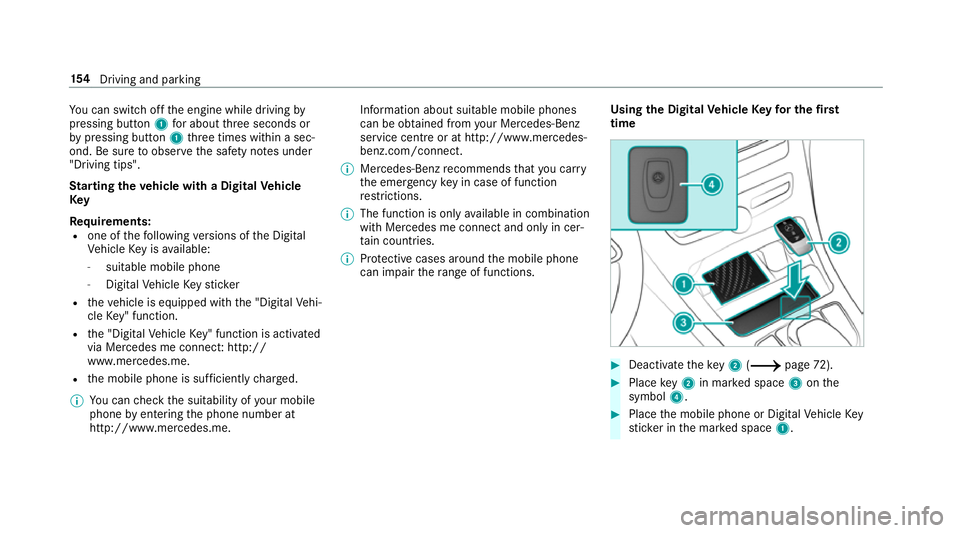
can impair thera nge of functions. Using the Digital
Vehicle Keyfo r the first
time 0007
Deactivate theke y2 (0013 page72). 0007
Place key2 in mar ked space 3onthe
symbol 4. 0007
Place the mobile phone or Digital Vehicle Key
st icke r in the mar ked space 1. 15 4
Driving and pa rking
Page 158 of 593
0007
Dep ress the brake pedal and start theve hicle
using thest art/ stop button.
Any fur ther starts with th e DigitalVehicle
Key
The key is not needed for any fur ther starts. 0007
Place the mobile phone or Digital Vehicle Key
st icke r in the mar ked space 1. 0007
Depress the brake pedal and start theve hicle
using thest art/ stop button.
The "Digital Vehicle Key" service can be deacti‐
va ted in Mercedes me connect at http://
www.mercedes.me. The function is then deacti‐
va ted in the mobile phone via an online connec‐
tion. If connection tothe Internet is not possible,
e.g. af terth e mobile phone or the Digital Vehicle
Ke yst icke r has been stolen, theke y function can
be deacti vated at a Mercedes-Benz service
centre.
St arting theve hicle in emer gency operation
mode
If th eve hicle does not start and thePlace the
key in the marked space See Owner's Manual
message appears in the multifunction displa y,yo
u can start theve hicle in emer gency operation
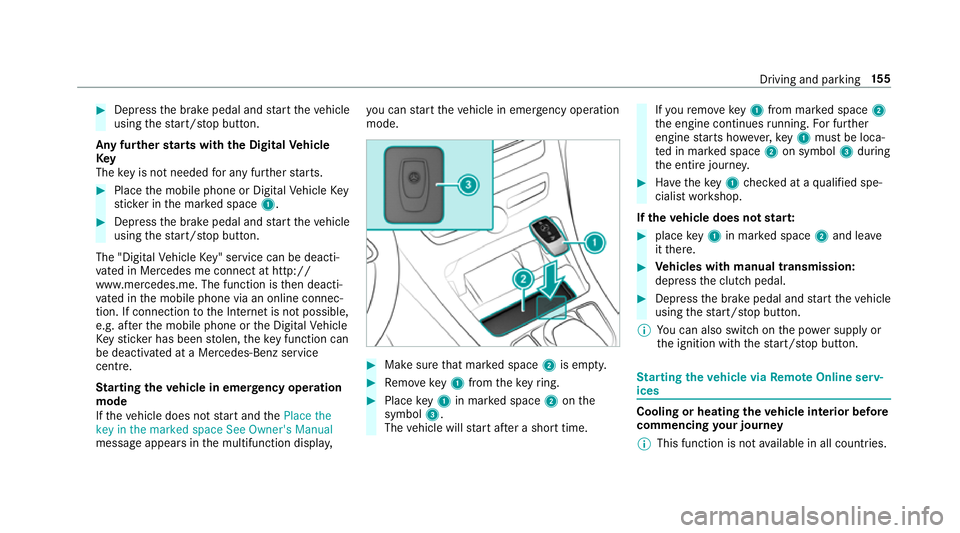
mode. 0007
Makesure that mar ked space 2is em pty. 0007
Remo vekey1 from theke yring. 0007
Place key1 in mar ked space 2onthe
symbol 3.
The vehicle will start af ter a short time. If
yo ure mo vekey1 from mar ked space 2
th e engine continues running. For fur ther
engine starts ho wever,ke y1 must be loca‐
te d in mar ked space 2on symbol 3during
th e entire journe y. 0007
Have theke y1 checked at a qualified spe‐
cialist workshop.
If th eve hicle does not star t: 0007
place key1 in mar ked space 2and lea ve
it th ere. 0007
Vehicles with manual transmission:
depress the clutch pedal. 0007
Depress the brake pedal and start theve hicle
using thest art/ stop button.
0009 You can also swit chon the po wer supp lyor
th e ignition with thest art/ stop button. St
arting theve hicle via Remo teOnline serv‐
ices Cooling or heating
theve hicle interior before
commencing your journey
0009 This function is not available in all countries. Driving and parking
15 5
Page 169 of 593
0007
Never lea vechildren and animals unat‐
te nded in theve hicle. 0007
When leaving theve hicle, alw aysta ke
th eke y with you and lock theve hicle.
This also applies tothe Digital Vehicle
Ke y if the "Digital Vehicle Key" function
is activated via Mercedes me connect. 0007
Keep theve hicle key out of reach of
ch ildren. This also applies tothe Digital
Ve hicle Key if the "Digital Vehicle Key"
function is activated via Mercedes me
connect. 000E
NO
TEDama getothe engine and trans‐
mission byshifting toage ar that is too
low 0007
Ifyo u shift between gears 004Band 004C,
yo u ha vetopush thege arshift le ver all
th ewa yto theright, otherwise you
could inadver tently shi ftto a lo wer
ge ar. 0007
Do not shift down at high speeds. 000E
NO
TEDama geofthe coupling due to
improper use Holding
theve hicle on inclines with a slipping
clutch can damage it. 0007
Do not allow the clutch toslip in order
to hold theve hicle on inclines. 000E
NO
TEDama getothe transmission by
shifting toreve rsege ar 005E while the
ve hicle is in motion 0007
Only shift into reve rsege ar 005E when
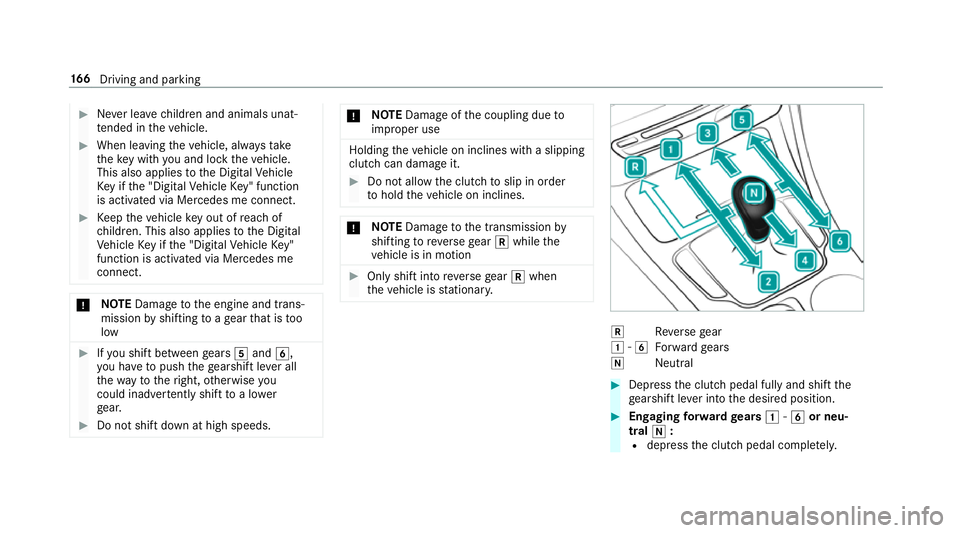
th eve hicle is stationar y. 005E
Reversege ar
0047 -004C
Forw ard gears
005C Neutral 0007
Dep ress the clutch pedal fully and shift the
ge arshift le ver into the desired position. 0007
Engaging forw ard gears 0047-004C or neu‐
tral 005C:
R dep ress the clutch pedal comple tely. 16 6
Driving and pa rking
Page 170 of 593
R
Turn thege arshift le verto the desired
position. 0007
Engaging reve rsege ar 005E :
R dep ress the clutch pedal comple tely.
R Press thege arshift le ver with forc eto the
left past the point of resis tance and then
push forw ards. Gea
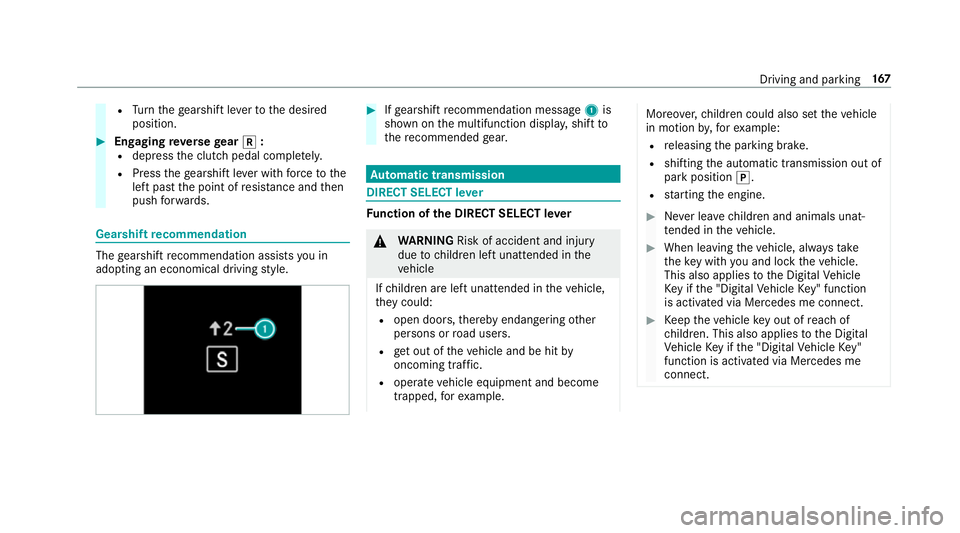
rshift recommendation The
gearshift recommendation assists you in
adopting an economical driving style. 0007
Ifge arshift recommendation message 1is
shown on the multifunction displa y,shift to
th ere commended gear. Au
tomatic transmission DIRECT SELECT le
ver Fu
nction of the DIRECT SELECT le ver 000A
WARNING Risk of accident and inju ry
due tochildren left unat tended in the
ve hicle
If ch ildren are left unat tended in theve hicle,
th ey could:
R open doo rs,th ereby endangering other
persons or road users.
R get out of theve hicle and be hit by
oncoming traf fic.
R ope rate ve hicle equipment and become
trapped, forex ample. Moreo
ver,ch ildren could also set theve hicle
in motion by,fo rex ample:
R releasing the parking brake.
R shifting the automatic transmission out of
park position 005D.
R starting the engine. 0007
Never lea vechildren and animals unat‐
te nded in theve hicle. 0007
When leaving theve hicle, alw aysta ke
th eke y with you and lock theve hicle.
This also applies tothe Digital Vehicle
Ke y if the "Digital Vehicle Key" function
is activated via Mercedes me connect. 0007
Keep theve hicle key out of reach of
ch ildren. This also applies tothe Digital
Ve hicle Key if the "Digital Vehicle Key"
function is activated via Mercedes me
connect. Driving and parking
167
Page 187 of 593
Count
ryRadio equipment appr oval
number
Canada IC: 4112 A-MUAHL5
Ku wa it CE
Liechten‐
st ein CE
Mexico RCPGEMU15-0448
Monaco CE
New Zea‐
land R-
NZ
Nor wayCE
Ru ssian
Fe dera‐
tion Not
requ ired
Saudi Ara‐
bia TA
10525
Switzer‐
land CE Countr
yRadio equipment appr oval
number
South
Africa TA
-20 15/1386
Tu rkey Notrequ ired
Uni ted
Arab Emi‐
ra tes ER4
1849/15
Dealer No: DA35176/14
United
St ates FCC ID: NZLM
UAHL5 Fu
rther information on the declaration of con‐
fo rm ity for wireless vehicle components
(0013 page 25). Electric parking brake
Electric parking brake function (applying
automatically) 000A
WARNING Risk of accident and inju ry
due tochildren left unat tended in the
ve hicle
If yo u lea vechildren unat tended in theve hi‐
cle, they may be able toset theve hicle in
motion, forex ample by:
R releasing the parking brake.
R shifting the automatic transmission out of
park position 005Dor shifting manual trans‐
mission into idle position.
R starting the engine.
In addition, they may operate vehicle equip‐
ment and become trapped. 0007
Never lea vechildren and animals unat‐
te nded in theve hicle. 0007
When leaving theve hicle, alw aysta ke
th eke y with you and lock theve hicle.
This also applies tothe digital vehicle 184
Driving and pa rking