ad blue MERCEDES-BENZ C-CLASS ESTATE 2014 Owners Manual
[x] Cancel search | Manufacturer: MERCEDES-BENZ, Model Year: 2014, Model line: C-CLASS ESTATE, Model: MERCEDES-BENZ C-CLASS ESTATE 2014Pages: 489, PDF Size: 15.08 MB
Page 7 of 489
1, 2, 3 ...
4ETS see ETS/4ETS (Electronic Trac-
tion System)
4MATIC (permanent four-wheel
drive) .................................................. 239
4MATIC off-road system ...................239
12 V socket
see Sockets
230 V power socket .......................... 386
360° camera
Cleaning ......................................... 405
Function/notes ............................ .253 A
ABS (Anti-lock Braking System) Display message ............................ 317
Function/notes ................................ 76
Important safety notes .................... 76
Warning lamp ................................. 357
Accident
Automatic measures after an acci-
dent ................................................. 63
Activating/deactivating air-recir-
culation mode ................................... .168
Activating/deactivating cooling
with air dehumidification ................. 161
Active Blind Spot Assist
Activating/deactivating (on-
board computer) ............................ 311
Display message ............................ 341
Function/notes ............................ .266
Towing a trailer .............................. 269
Active Lane Keeping Assist
Activating/deactivating (on-
board computer) ............................ 311
Display message ............................ 340
Function/notes ............................ .269
Towing a trailer .............................. 272
Active light function ......................... 138
Active Light System
Display message ............................ 333
Active Parking Assist
Detecting parking spaces .............. 244
Display message ............................ 341
Exiting a parking space .................. 247 Function/notes ............................
.243
Important safety notes .................. 243
Parking .......................................... 245
Towing a trailer .............................. 243
ADAPTIVE BRAKE ................................. 84
Adaptive Brake Assist
Function/notes ................................ 80
Adaptive brake lights .......................... 81
Adaptive Damping System (ADS) ..... 239
Adaptive Highbeam Assist Plus
Display message ............................ 334
Function/notes ............................ .139
Switching on/off ........................... 140
AdBlue®
Additive ......................................... 474
Display message ............................ 337
Displaying level and range ............. 309
Filling capacity ............................... 475
Important safety notes .................. 474
Low outside temperatures ............. 474
Purity ............................................. 475
Topping up ..................................... 208
Additional speedometer ................... 314
Additives (engine oil) ........................ 476
Adjusting the headlamp range ......... 136
AGILITY SELECT switch
Automatic transmission ................. 201
Climate control (THERMATIC 1-
zone) .............................................. 153
Climate control (THERMATIC 2-
zone) .............................................. 157
Climate control
(THERMOTRONIC ).......................... 160
Hybrid operation ............................ 280
Manual transmission ...................... 195
Air filter (white display message) .... 337
Air pressure
see Tyre pressure
Air vents
Important safety notes .................. 181
Rear ............................................... 182
Setting ........................................... 181
Setting the centre air vents ........... 182
Setting the side air vents ............... 182
Air-conditioning system
see Climate control 4
Index
Page 9 of 489
Transmission position display
(DIRECT SELECT lever) ...................1
99
Transmission positions .................. 199
Automatic transmission emer-
gency running mode ......................... 204
Auxiliary heating/ventilation
Important safety notes .................. 176
Problem (display message) ............ 181
Remote control .............................. 177
Setting the departure time ............. 179
Switching on/off (on the centre
console) ......................................... 177
Axle load, permissible (trailer tow-
ing) ...................................................... 482 B
Bag hook ............................................ 376
Ball coupling
Folding in ....................................... 289
Folding out ..................................... 288
BAS (Brake Assist System) ................. 76
BAS PLUS with Cross-Traffic Assist (Brake Assist PLUS with Cross-
Traffic Assist)
Function/notes ................................ 77
Important safety notes .................... 77
Battery (high-voltage)
see High-voltage battery
Battery (key)
Checking .......................................... 94
Important safety notes .................... 93
Replacing ......................................... 94
Battery (vehicle)
Charging ........................................ 420
Display message ............................ 336
Important safety notes .................. 416
Jump starting ................................. 422
Belt
see Seat belts
Belt tensioner
Activation ......................................... 60
Blind Spot Assist
Activating/deactivating (on-
board computer) ............................ 311
Display message ............................ 341
Notes/function .............................. 263
Trailer towing ................................. 264 see Active Blind Spot Assist
BlueTEC (AdBlue®) ............................ 474
BlueTEC®
Topping up AdBlue® ..................... .208
Bonnet
Active bonnet (pedestrian protec-
tion) ............................................... 394
Closing .......................................... .396
Display message ............................ 349
Important safety notes .................. 394
Opening ......................................... 395
Boot load (maximum) ........................ 478
Brake
EBD ................................................. .84
Brake Assist
see BAS (Brake Assist System)
Brake fluid
Display message ............................ 324
Note s............................................. 476
Brake force distribution, elec-
tronic
see EBD (electronic brake force
distribution)
Brake lamps
Adaptive ........................................... 81
Display message ............................ 332
Brake pedal
Pedal resistance/pedal travel .......... 44
Brakes
ABS .................................................. 76
Adaptive Brake Assist ...................... 80
BAS .................................................. 76
BAS PLUS with Cross-Traffic
Assist ............................................... 77
Brake fluid (notes) ......................... 476
Display message ............................ 317
Driving tip s.................................... 217
Hill start assist ............................... 189
HOLD function ............................... 236
Important safety notes .................. 217
Parking brake ................................ 213
RBS (Recuperative Brake Sys-
tem) ................................................. 44
RBS warning lamp .......................... 364
Warning lamp ................................. 355
Breakdown
see Flat tyre
see Towing away 6
Index
Page 22 of 489
Seat belts
Adjusting the driver's and front-
passenger seat belt .........................50
Adjusting the height ......................... 49
Cleaning ......................................... 408
Display message ............................ 326
Fastening ......................................... 49
Important safety guidelines ............. 47
Introduction .................................... .47
Rear seat belt status indicato r .........50
Releasin g......................................... 49
Warning lamp ................................. 353
Warning lamp (function) ................... 50
Seats
Adjusting (electrically) ................... 121
Adjusting (manually and electri-
cally) .............................................. 120
Adjusting the 4-way lumbar sup-
port ................................................ 123
Adjusting the head restraint .......... 121
Cleaning the cover ......................... 407
Correct driver's seat position ........ 118
Important safety notes .................. 119
Seat heating .................................. 123
Seat heating problem .................... 124
Seat ventilation .............................. 124
Seat ventilation problem ................ 125
Storing settings (memory func-
tion) ............................................... 131
Switching seat heating on/of f....... 123
Switching the seat ventilation on/
off .................................................. 124
Selector lever
Cleaning ......................................... 407
see Automatic transmission
Sensors (cleaning instructions) ....... 405
Service
see ASSYST PLUS
Service Centre
see Qualified specialist workshop
Service menu (on-board com-
puter) .................................................. 308
Service products
AdBlue® special additive s............. 474
Brake fluid ..................................... 476
Coolant (engine) ............................ 476
Engine oil ....................................... 475
Fuel ................................................ 470 Important safety notes .................. 470
Washer fluid ................................... 477
Settings
Factory (on-board computer) ......... 315
On-board compute r....................... 309
Shifting to neutral (manual trans-
mission) ............................................. 195
Side lamps
Switching on/of f........................... 136
Side windows
Convenience closing ...................... 108
Convenience opening .................... 108
Important safety notes .................. 106
Opening/closing ............................ 107
Problem (malfunction) ................... 110
Resetting ....................................... 109
Sidebag ................................................ 53
Sliding sunroof
Opening/closing ............................ 111
Rain closing feature ....................... 112
Resetting ....................................... 112
see Panorama sliding sunroof
Snow chains ...................................... 435
Sockets
Centre console .............................. 385
General notes ................................ 385
Rear compartment ......................... 386
Specialist workshop ............................ 27
Spectacles compartment ................. 371
Speed, controlling
see Cruise control
Speedometer
Activating/deactivating the addi-
tional speedometer ........................ 314
Digital ............................................ 301
In the Instrument cluster ................. 34
Segments ...................................... 294
Selecting the unit of measure-
ment .............................................. 314
see Instrument cluster
SPEEDTRONIC
Deactivating variable ..................... 225
Display message ............................ 343
Function/note s............................. 223
Important safety notes .................. 223
LIM indicator lamp ......................... 223
Permanent ..................................... 225 Index
19
Page 127 of 489
Problems with the seat heating
Problem
Possible causes/consequences and
M
MSolutions The seat heating has
switched off prema-
turely or cannot be
switched on. The on-board voltage is too low because too many electrical con-
sumers are switched on.
X Switch off electrical consumers that you do not need, such as
the rear window heating or interior lighting.
Once the battery is sufficiently charged, the seat heating can be
switched back on manually. Switching the seat ventilation on/off
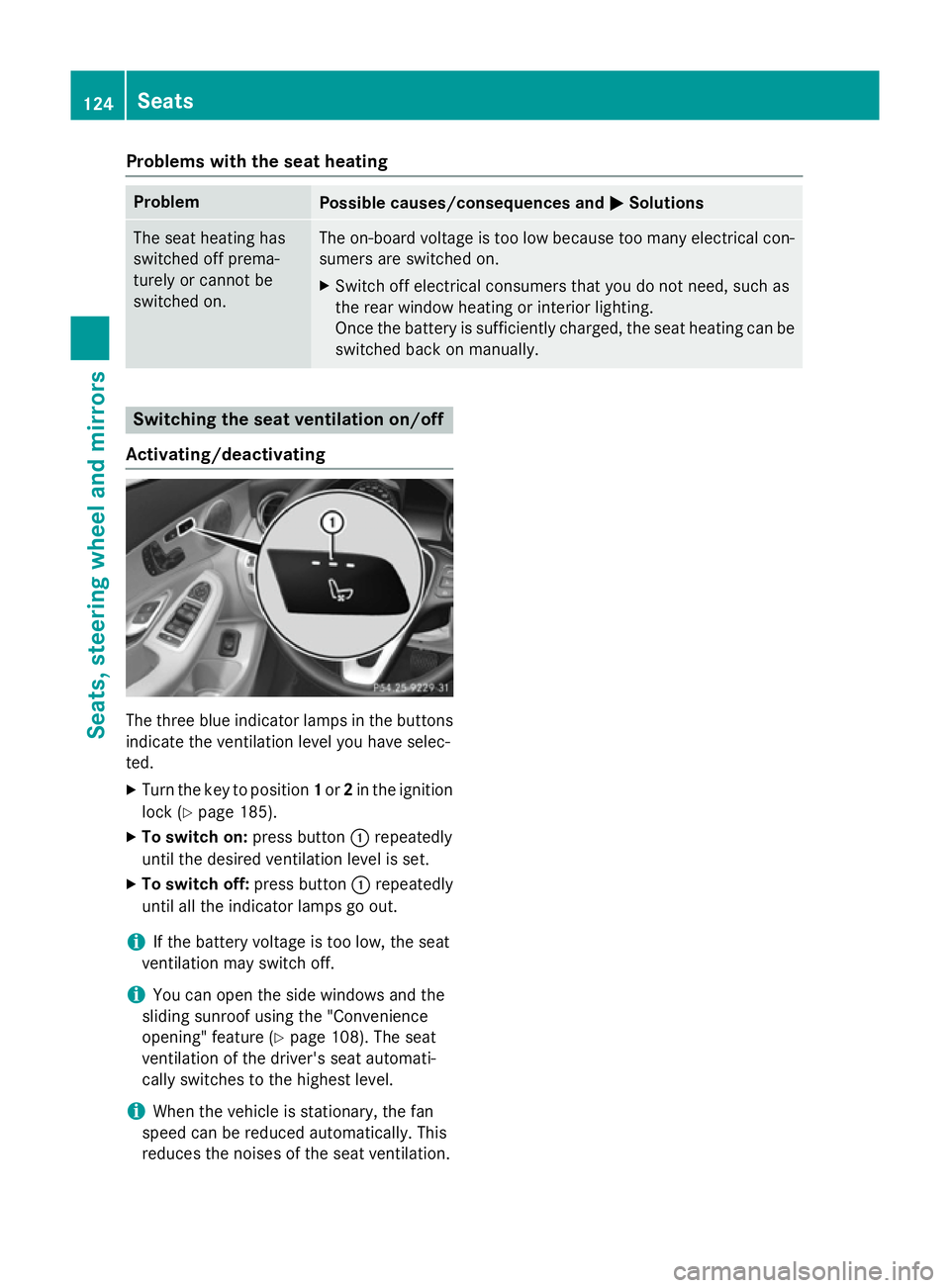
Activating/deactivating The three blue indicator lamps in the buttons
indicate the ventilation level you have selec-
ted.
X Turn the key to position 1or 2in the ignition
lock (Y page 185).
X To switch on: press button:repeatedly
until the desired ventilation level is set.
X To switch off: press button:repeatedly
until all the indicator lamps go out.
i If the battery voltage is too low, the seat
ventilation may switch off.
i You can open the side windows and the
sliding sunroof using the "Convenience
opening" feature (Y page 108). The seat
ventilation of the driver's seat automati-
cally switches to the highest level.
i When the vehicle is stationary, the fan
speed can be reduced automatically. This
reduces the noises of the seat ventilation. 124
SeatsSeats, steering wheel and mirrors
Page 140 of 489
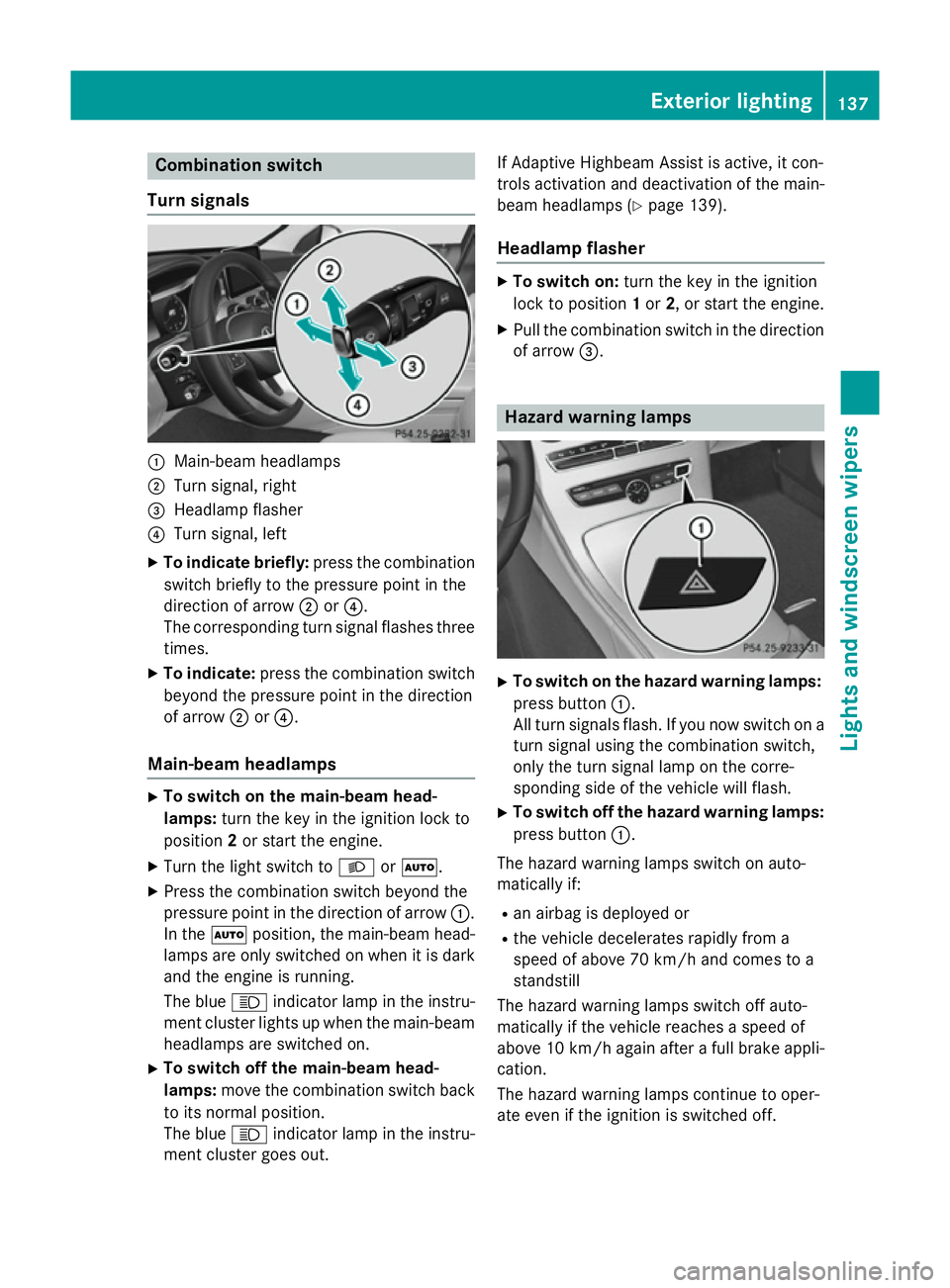
Combination switch
Turn signals :
Main-beam headlamps
; Turn signal, right
= Headlamp flasher
? Turn signal, left
X To indicate briefly: press the combination
switch briefly to the pressure point in the
direction of arrow ;or?.
The corresponding turn signal flashes three
times.
X To indicate: press the combination switch
beyond the pressure point in the direction
of arrow ;or?.
Main-beam headlamps X
To switch on the main-beam head-
lamps: turn the key in the ignition lock to
position 2or start the engine.
X Turn the light switch to LorÃ.
X Press the combination switch beyond the
pressure point in the direction of arrow :.
In the Ãposition, the main-beam head-
lamps are only switched on when it is dark
and the engine is running.
The blue Kindicator lamp in the instru-
ment cluster lights up when the main-beam headlamps are switched on.
X To switch off the main-beam head-
lamps: move the combination switch back
to its normal position.
The blue Kindicator lamp in the instru-
ment cluster goes out. If Adaptive Highbeam Assist is active, it con-
trols activation and deactivation of the main-
beam headlamps (Y page 139).
Headlamp flasher X
To switch on: turn the key in the ignition
lock to position 1or 2, or start the engine.
X Pull the combination switch in the direction
of arrow =. Hazard warning lamps
X
To switch on the hazard warning lamps:
press button :.
All turn signals flash. If you now switch on a turn signal using the combination switch,
only the turn signal lamp on the corre-
sponding side of the vehicle will flash.
X To switch off the hazard warning lamps:
press button :.
The hazard warning lamps switch on auto-
matically if:
R an airbag is deployed or
R the vehicle decelerates rapidly from a
speed of above 70 km/h and comes to a
standstill
The hazard warning lamps switch off auto-
matically if the vehicle reaches a speed of
above 10 km/h again after a full brake appli- cation.
The hazard warning lamps continue to oper-
ate even if the ignition is switched off. Exterior lighting
137Lights and windscreen wipers Z
Page 177 of 489
Problems with "Pre-entry climate control via key"
Problem
Possible causes/consequences and
M
MSolutions "Pre-entry climate con-
trol via key" cannot be
activated or has been
deactivated. The charge status of the high-voltage battery is under the specified
minimum charge status.
X Start the engine when the vehicle is at a standstill.
The internal combustion engine drives the electric motor. The
electric motor is operating as an alternator. The high-voltage
battery is charging.
Further information on charging the high-voltage battery
(Y page 420). The pre-entry climate control was started more than once when
the engine was switched off.
X Switch on the engine and let it run for more than ten seconds.
X Try again to activate "Pre-entry climate control via key". The difference between the interior temperature and the desired
temperature is too small.
X Increase the difference between the interior temperature and
the desired temperature. Remote activation of heating and ven-
tilation system
General notes Remote activation is only available on vehi-
cles with the BlueEFFICIENCY package.
The driver's and front-passenger seat areas
can also be heated or ventilated when the
engine is switched off.
The starter battery must be sufficiently
charged before remote activation can be acti-
vated.
When the vehicle is heated, the following
functions are activated:
R seat heating
R rear window heating
R exterior mirror heating
When the vehicle is ventilated, the following
functions are activated:
R blower
R seat ventilation If you have switched on the perfume atomiser
or ionisation using Audio 20/COMAND
Online, these will be activated together with
remote activation.
Activating the perfume atomiser/ionisation
(see separate COMAND Online operating
instructions).
Activating/deactivating the remote
activation function X
To switch on remote activation: push the
climate control symbol button on the key.
The air-conditioning functions are switched on, for up to 10 minutes for heating and up
to 120 minutes for ventilation.
At outside temperatures below 20 †, the
heating functions are activated.
At outside temperatures above 20 †, the
ventilation functions are activated. 174
Operating the climate control systemClimate control
Page 180 of 489
iliary heating could switch from ventilation
mode to heating mode or from heating mode to ventilation mode.
The auxiliary heating switches off when the
engine is switched off. The auxiliary ventila-
tion is not active if the engine is running.
The auxiliary heating/ventilation switches off
automatically after 30 minutes. This time limit can be altered. To do this, visit a qualified
specialist workshop.
You cannot use the auxiliary ventilation to
cool the vehicle interior to a temperature
lower than the outside temperature.
Before switching on X
Turn the key to position 2in the ignition
lock (Y page 185).
X Set the desired temperature using the
w rocker switch on the front control
unit.
or X Set the desired temperature using
Audio 20/COMAND Online; see the sepa-
rate operating instructions.
If you do not alter the temperature before
switching on the auxiliary heating, the last
temperature setting will be adopted.
Auxiliary heating or ventilation can also be
switched on if the manually set climate con-
trol is activated. Optimum comfort can be
attained when the system is set to automatic
mode. Set the temperature to 22 †.
You can activate or deactivate the auxiliary
heating/ventilation:
R using the rocker switch on the centre con-
sole (Y page 177)
R using the remote control (Y page 177)
The on-board computer can be used to spec- ify up to three departure times, one of which
may be preselected:
R using the remote control (Y page 177)
R using Audio 20/COMAND Online; see the
separate operating instructions Switching the auxiliary heating/venti-
lation on/off using the centre console
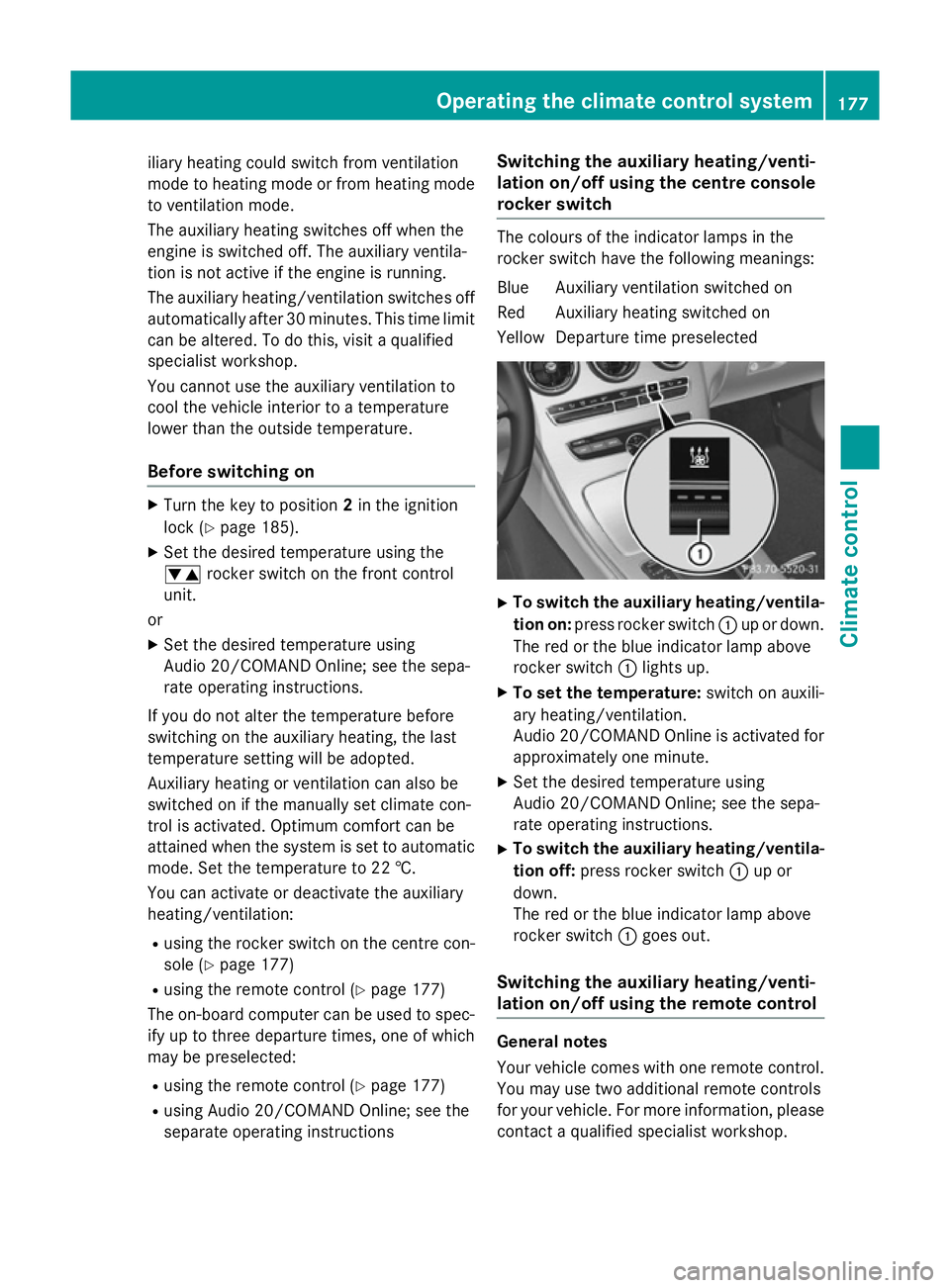
rocker switch The colours of the indicator lamps in the
rocker switch have the following meanings:
Blue Auxiliary ventilation switched on
Red Auxiliary heating switched on
Yellow Departure time preselected X
To switch the auxiliary heating/ventila-
tion on: press rocker switch :up or down.
The red or the blue indicator lamp above
rocker switch :lights up.
X To set the temperature: switch on auxili-
ary heating/ventilation.
Audio 20/COMAND Online is activated for approximately one minute.
X Set the desired temperature using
Audio 20/COMAND Online; see the sepa-
rate operating instructions.
X To switch the auxiliary heating/ventila-
tion off: press rocker switch :up or
down.
The red or the blue indicator lamp above
rocker switch :goes out.
Switching the auxiliary heating/venti-
lation on/off using the remote control General notes
Your vehicle comes with one remote control.
You may use two additional remote controls
for your vehicle. For more information, pleasecontact a qualified specialist workshop. Operating the climate control system
177Climate control Z
Page 198 of 489
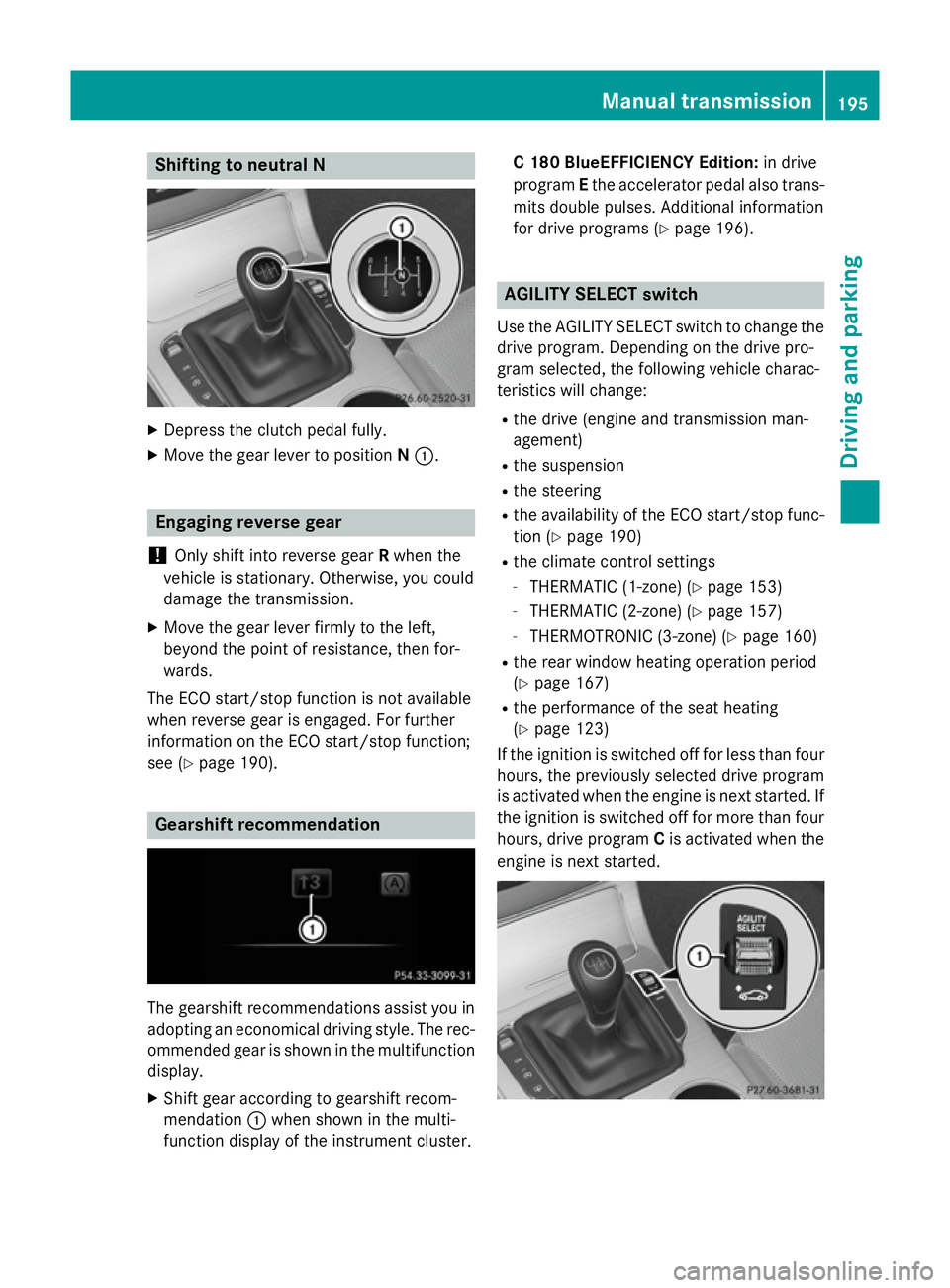
Shifting to neutral N
X
Depress the clutch pedal fully.
X Move the gear lever to position N:. Engaging reverse gear
! Only shift into reverse gear
Rwhen the
vehicle is stationary. Otherwise, you could
damage the transmission.
X Move the gear lever firmly to the left,
beyond the point of resistance, then for-
wards.
The ECO start/stop function is not available
when reverse gear is engaged. For further
information on the ECO start/stop function;
see (Y page 190). Gearshift recommendation
The gearshift recommendations assist you in
adopting an economical driving style. The rec- ommended gear is shown in the multifunction
display.
X Shift gear according to gearshift recom-
mendation :when shown in the multi-
function display of the instrument cluster. C 180 BlueEFFICIENCY Edition:
in drive
program Ethe accelerator pedal also trans-
mits double pulses. Additional information
for drive programs (Y page 196). AGILITY SELECT switch
Use the AGILITY SELECT switch to change the drive program. Depending on the drive pro-
gram selected, the following vehicle charac-
teristics will change:
R the drive (engine and transmission man-
agement)
R the suspension
R the steering
R the availability of the ECO start/stop func-
tion (Y page 190)
R the climate control settings
- THERMATIC (1-zone) (Y page 153)
- THERMATIC (2-zone) (Y page 157)
- THERMOTRONIC (3-zone) (Y page 160)
R the rear window heating operation period
(Y page 167)
R the performance of the seat heating
(Y page 123)
If the ignition is switched off for less than four
hours, the previously selected drive program
is activated when the engine is next started. If the ignition is switched off for more than fourhours, drive program Cis activated when the
engine is next started. Manual transmission
195Driving and parking Z
Page 199 of 489
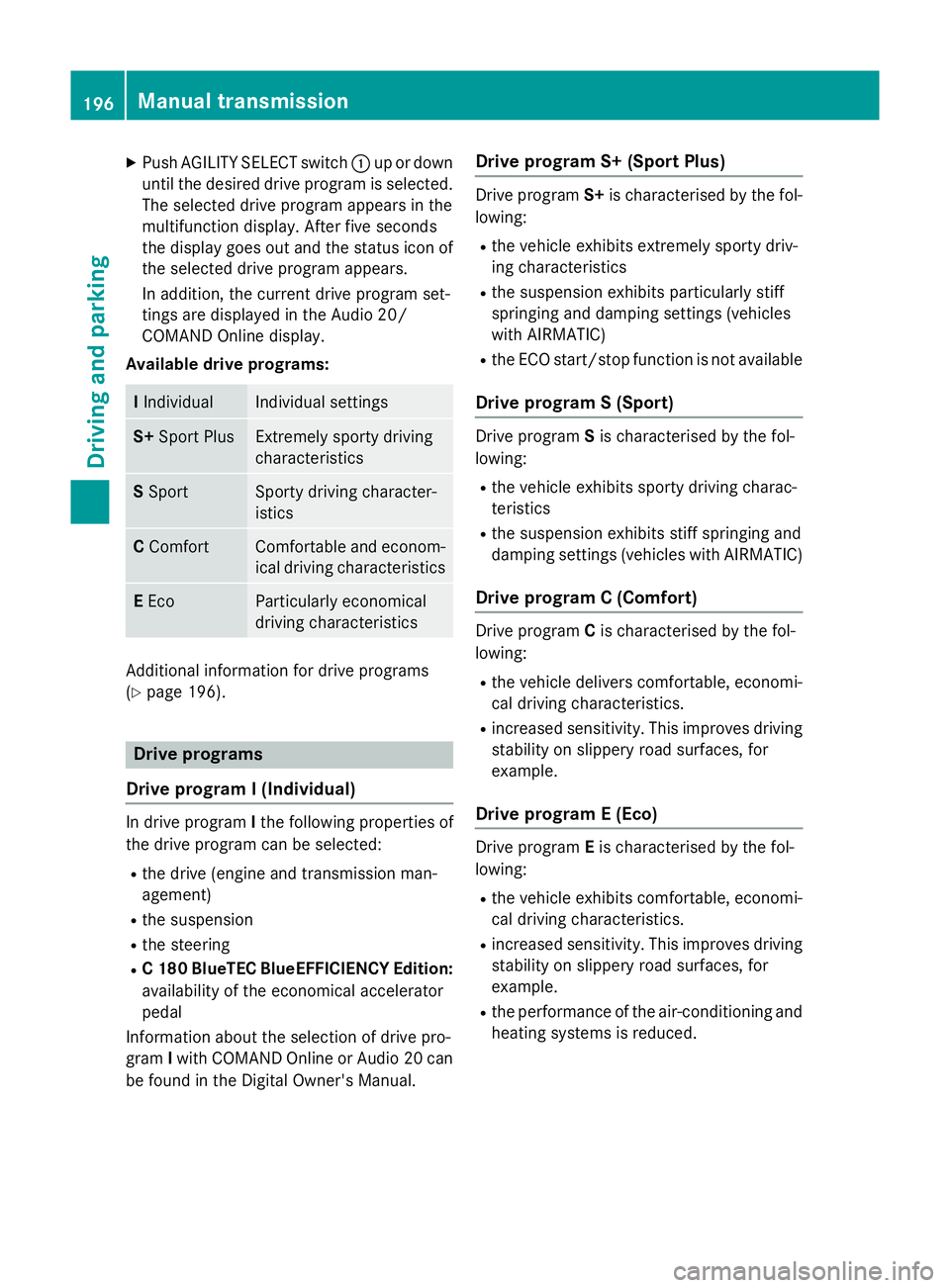
X
Push AGILITY SELECT switch :up or down
until the desired drive program is selected. The selected drive program appears in the
multifunction display. After five seconds
the display goes out and the status icon of
the selected drive program appears.
In addition, the current drive program set-
tings are displayed in the Audio 20/
COMAND Online display.
Available drive programs: I
Individual Individual settings
S+
Sport Plus Extremely sporty driving
characteristics
S
Sport Sporty driving character-
istics
C
Comfort Comfortable and econom-
ical driving characteristics E
Eco Particularly economical
driving characteristics
Additional information for drive programs
(Y page 196). Drive programs
Drive program I (Individual) In drive program
Ithe following properties of
the drive program can be selected:
R the drive (engine and transmission man-
agement)
R the suspension
R the steering
R C 180 BlueTEC BlueEFFICIENCY Edition:
availability of the economical accelerator
pedal
Information about the selection of drive pro-
gram Iwith COMAND Online or Audio 20 can
be found in the Digital Owner's Manual. Drive program S+ (Sport Plus) Drive program
S+is characterised by the fol-
lowing:
R the vehicle exhibits extremely sporty driv-
ing characteristics
R the suspension exhibits particularly stiff
springing and damping settings (vehicles
with AIRMATIC)
R the ECO start/stop function is not available
Drive program S (Sport) Drive program
Sis characterised by the fol-
lowing:
R the vehicle exhibits sporty driving charac-
teristics
R the suspension exhibits stiff springing and
damping settings (vehicles with AIRMATIC)
Drive program C (Comfort) Drive program
Cis characterised by the fol-
lowing:
R the vehicle delivers comfortable, economi-
cal driving characteristics.
R increased sensitivity. This improves driving
stability on slippery road surfaces, for
example.
Drive program E (Eco) Drive program
Eis characterised by the fol-
lowing:
R the vehicle exhibits comfortable, economi-
cal driving characteristics.
R increased sensitivity. This improves driving
stability on slippery road surfaces, for
example.
R the performance of the air-conditioning and
heating systems is reduced. 196
Manual transmissionDriving and parking
Page 211 of 489
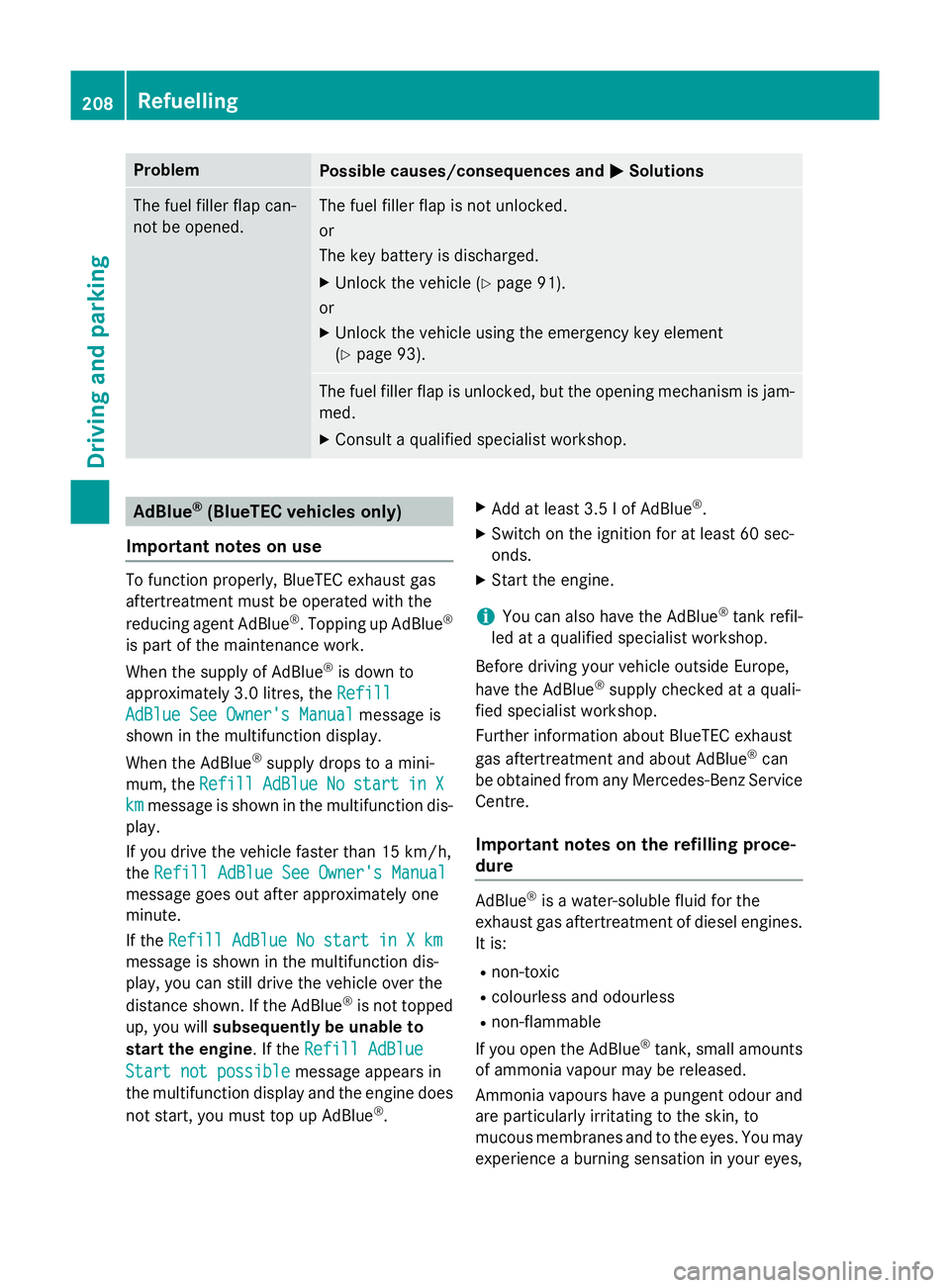
Problem
Possible causes/consequences and
M
MSolutions The fuel filler flap can-
not be opened. The fuel filler flap is not unlocked.
or
The key battery is discharged.
X Unlock the vehicle (Y page 91).
or
X Unlock the vehicle using the emergency key element
(Y page 93). The fuel filler flap is unlocked, but the opening mechanism is jam-
med.
X Consult a qualified specialist workshop. AdBlue
®
(BlueTEC vehicles only)
Important notes on use To function properly, BlueTEC exhaust gas
aftertreatment must be operated with the
reducing agent AdBlue ®
. Topping up AdBlue ®
is part of the maintenance work.
When the supply of AdBlue ®
is down to
approximately 3.0 litres, the Refill
Refill
AdBlue See Owner's Manual AdBlue See Owner's Manual message is
shown in the multifunction display.
When the AdBlue ®
supply drops to a mini-
mum, the Refill
Refill AdBlue
AdBlueNo
No start
start in
inX
X
km
km message is shown in the multifunction dis-
play.
If you drive the vehicle faster than 15 km/h,
the Refill AdBlue See Owner's Manual Refill AdBlue See Owner's Manual
message goes out after approximately one
minute.
If the Refill AdBlue No start in X km Refill AdBlue No start in X km
message is shown in the multifunction dis-
play, you can still drive the vehicle over the
distance shown. If the AdBlue ®
is not topped
up, you will subsequently be unable to
start the engine. If the Refill AdBlue
Refill AdBlue
Start not possible
Start not possible message appears in
the multifunction display and the engine does
not start, you must top up AdBlue ®
. X
Add at least 3.5 l of AdBlue ®
.
X Switch on the ignition for at least 60 sec-
onds.
X Start the engine.
i You can also have the AdBlue ®
tank refil-
led at a qualified specialist workshop.
Before driving your vehicle outside Europe,
have the AdBlue ®
supply checked at a quali-
fied specialist workshop.
Further information about BlueTEC exhaust
gas aftertreatment and about AdBlue ®
can
be obtained from any Mercedes-Benz Service Centre.
Important notes on the refilling proce-
dure AdBlue
®
is a water-soluble fluid for the
exhaust gas aftertreatment of diesel engines. It is:
R non-toxic
R colourless and odourless
R non-flammable
If you open the AdBlue ®
tank, small amounts
of ammonia vapour may be released.
Ammonia vapours have a pungent odour and
are particularly irritating to the skin, to
mucous membranes and to the eyes. You may experience a burning sensation in your eyes, 208
RefuellingDriving and parking