audio MERCEDES-BENZ C-CLASS ESTATE 2014 Owners Manual
[x] Cancel search | Manufacturer: MERCEDES-BENZ, Model Year: 2014, Model line: C-CLASS ESTATE, Model: MERCEDES-BENZ C-CLASS ESTATE 2014Pages: 489, PDF Size: 15.08 MB
Page 15 of 489
Flat tyre
Changing a wheel/fitting the
spare wheel .................................. .441
MOExtended tyres ......................... 413
Preparing the vehicle ..................... 412
TIREFIT kit ...................................... 414
see Emergency spare wheel
Floormat ............................................. 391
Foglamps (extended range) .............. 139
Fording
On flooded roads ........................... 219
Frequencies
Mobile phone ................................. 468
Two-way radio ................................ 468
Front-passenger front airbag deac-
tivation
Display message ............................ 330
Front-passenger front airbag deac-
tivation system
Operation ......................................... 54
Problems ......................................... 59
System self-test ............................... 57
Fuel
Additives ........................................ 473
Consumption information .............. 474
Consumption statistics .................. 301
Displaying the current consump-
tion ................................................ 300
Displaying the range ..................... .300
Driving tips ................................... .215
E10 ................................................ 472
Fuel gauge ....................................... 34
Grade (petrol) ................................ 472
Important safety notes .................. 471
Low outside temperatures ............. 473
Problem (malfunction) ................... 207
Quality (diesel )............................... 473
Refuelling ....................................... 204
Tank content/reserve fue l............. 471
Fuel consumption (Audio 20) ........... 279
Fuel consumption (COMAND
Online) ................................................ 279
Fuel filler flap
Opening ......................................... 206
Fuel filter (white display message) .. 337Fuel level
Calling up the range (on-board
computer) ...................................... 300
Gaug e.............................................. 34
Fuel tank
Capacity ........................................ 471
Problem (malfunction) ................... 207
Fuses
Allocation chart ............................. 430
Before changing ............................. 428
Dashboard fuse box ....................... 429
Fuse box in the engine compart-
ment .............................................. 429
Fuse box in the front-passenger
footwell .......................................... 429
Fuse box in the luggage compart-
ment .............................................. 430
Important safety notes .................. 428 G
Generated electrical energy (Audio 20) ...................................................... 279
Generated electrical energy
(COMAND Online) .............................. 279
Genuine Mercedes-Benz parts ........... 24
Glove compartment .......................... 371 H
HANDS-FREE ACCESS ....................... 103
Hazard warning lamps ...................... 137
Head restraints
Adjusting ....................................... 121
Adjusting (electrically) ................... 122
Adjusting (manually) ...................... 122
Adjusting (rear) .............................. 122
Fitting/removing (rear) .................. 122
Head-up display
Adjusting the brightness ................ 312
Function/note s............................. 297
Important safety notes .................. 297
Setting the position ....................... 312
Storing settings (memory func-
tion) ............................................... 131
Switching on or off ......................... 298
Switching the display on/off ......... 312 12
Index
Page 16 of 489
Headlamp
Cleaning system (notes) ............... .477
Headlamp flasher .............................. 137
Headlamps
Misting up ...................................... 140
see Automatic headlamp mode
Heating
see Climate control
High-pressure cleaners .................... 402
High-voltage battery
Charge leve l................................... 276
Charging ........................................ 420
Charging (on-board computer) ....... 277
General notes .................................. 43
Vehicle fire ....................................... 43
Hill start assist .................................. 189
HOLD function
Activating ....................................... 237
Deactivating ................................... 237
Display message ............................ 342
Function/note s............................. 236
Horn ...................................................... 32
Hybrid drive
Displaying the total range .............. 279
Generated electrical energy ........... 279
Hybrid operation
AGILITY SELECT switch .................. 280
Automatic engine start (ECO
Start/Stop function) ...................... 283
Automatic engine switch-off (ECO
start/stop function) ....................... 283
Driving tips .................................... 281
ECO start/stop function ................ 282
Energy flow display ........................ 276
Extended overrun mod e................. 283
Fuel consumption .......................... 279
General notes ................................ 272
Important safety notes .................. 273
Manual gearshifting ....................... 281
Noiseless start ............................... 280
Operating (on-board computer) ..... 276
Overrun mode ................................ 283
Overview (instrument cluster) ........ 275
Power display (electric motor) ....... 275
Problems ....................................... 285
Pulling away ................................... 280
RBS (Recuperative Brake Sys-
tem) ............................................... 273 Resetting values (Audio 20) ........... 279
Resetting values (COMAND
Online) ........................................... 279
Starting the engine ........................ 279
Hybrid system
Automatic deactivation .................... 42
Danger of electric shock .................. 42
Display message ............................ 338
High-voltage battery ........................ 43
Important safety notes .................... 42
Manual deactivation ......................... 43
Opening the bonnet ......................... 44
Overview ........................................ 274
Problems (malfunctions) ................ 285
READY indicator ............................. 279
Warning lamp ................................. 364
Hybrid vehicle
Climate control (THERMATIC) ........ 157
Climate control
(THERMOTRONIC) .......................... 160
Hybrid vehicles
Important safety notes .................... 42 I
Ignition lock see Key positions
Immobiliser .......................................... 86
Indicator and warning lamp
Restraint system ............................ 361
Indicator and warning lamps
COLLISION PREVENTION ASSIST
PLUS .............................................. 365
Coolant .......................................... 362
Engine diagnostics ......................... 362
Indicator lamps
Display message ............................ 332
see Warning and indicator lamps
Indicators
see Turn signals
Insect protection on the radiator .... 396
Instrument cluster
Overview .......................................... 34
Power display ................................ 275
Warning and indicator lamps ........... 35
Instrument cluster lighting .............. 294
Intelligent Light System
Activating/deactivating ................. 313 Index
13
Page 18 of 489
see Interior lighting
LIM indicator lamp
Cruise control ................................ 220
DISTRONIC PLUS ........................... 227
Variable SPEEDTRONIC ................. 223
Limiting the speed
see SPEEDTRONIC
Loading guidelines ............................370
Locking
see Central locking
Locking (doors)
Automatic ........................................ 98
Emergency locking ........................ 100
From inside (central locking but-
ton) ................................................. .97
Locking centrally
see Central locking
Luggage compartment
Opening/closing (from outside,
HANDS-FREE ACCESS ).................. 103
Luggage compartment cover
Important safety notes .................. 376
Luggage compartment enlarge-
ment ................................................... 373
Luggage compartment floor
opening/closing ............................ 380
stowage well, under ....................... 380
Lumbar support
Adjusting the 4-way lumbar sup-
port ................................................ 123 M
M+S tyres ........................................... 434
Main-beam headlamps
Adaptive Highbeam Assist PLUS .... 139
Changing bulb s.............................. 143
Display message ............................ 333
Switching on/of f........................... 137
Manual transmission
AGILITY SELECT switch .................. 195
Drive program ................................ 196
Engaging reverse gear ................... 195
Gear lever ...................................... 194
Pulling away ................................... 188
Shift recommendation ................... 195
Shifting to neutral .......................... 195
Starting the engine ........................ 187 Matt finish (cleaning instructions)
.. 403
Memory card (audio) ......................... 305
Memory function
Seats, steering wheel, exterior
mirrors ........................................... 130
Mercedes-Benz Contact
Info call button .............................. 389
Roadside Assistance call button .... 389
Mercedes-Benz emergency call
system
Switch in the overhead control
panel .............................................. 388
Mercedes-Benz Intelligent Drive
360°camera .................................. 253
Active Blind Spot Assist ................. 266
Active Lane Keeping Assist ............ 269
Active Parking Assist ..................... 243
ATTENTION ASSIST ........................ 258
Blind Spot Assist ............................ 263
DISTRONIC PLUS ........................... 226
DISTRONIC PLUS with Steering
Assist and Stop&Go Pilot ............... 234
General notes ................................ 220
Lane Keeping Assist ...................... 265
PARKTRONIC ................................. 240
PRE-SAFE® (anticipatory occu-
pant protection) ............................... 62
PRE-SAFE® PLUS (anticipatory
occupant protection PLUS) .............. 62
Reversing camera .......................... 248
Traffic Sign Assist .......................... 260
Mercedes-Benz Service Centre
see Qualified specialist workshop
Message memory (on-board com-
puter) .................................................. 316
Messages
see Display messages
see Warning and indicator lamps
Mirror turn signal
Cleaning ......................................... 404
Mirrors
see Exterior mirrors
see Rear-view mirror
see Vanity mirror (in sun visor)
Mobile phone
Frequencies ................................... 468
Installation ..................................... 468
Menu (on-board computer) ............ 306 Index
15
Page 28 of 489
!
Airbags and seat belt tensioners, as well
as control units and sensors for these
restraint systems, may be installed in the
following areas of your vehicle:
R doors
R door pillars
R door sills
R seats
R dashboard
R instrument cluster
R centre console
Do not install accessories such as audio
systems in these areas. Do not carry out
repairs or welding. You could impair the
operating efficiency of the restraint sys-
tems.
Have accessories retrofitted at a qualified
specialist workshop.
You could jeopardise the operating safety of
your vehicle if you use parts, tyres and wheels
as well as accessories relevant to safety
which have not been approved by Mercedes. This could lead to malfunctions in safety-rel-
evant systems, e.g. the brake system. Use
only genuine Mercedes-Benz parts or parts of
equal quality. Only use tyres, wheels and
accessories that have been specifically
approved for your vehicle.
Mercedes-Benz tests genuine parts and con-
version parts and accessories that have been specifically approved for your vehicle for their
reliability, safety and suitability. Despite
ongoing market research, Mercedes-Benz is
unable to assess other parts. Mercedes-Benz therefore accepts no responsibility for the
use of such parts in Mercedes-Benz vehicles, even if they have been officially approved or
independently approved by a testing centre.
In Germany, certain parts are only officially
approved for installation or modification if
they comply with legal requirements. This
also applies to some other countries. All gen-
uine Mercedes-Benz parts meet the approval
requirements. The use of non-approved parts may invalidate the vehicle's general operating
permit.
This is the case:
R if they cause a change of the vehicle type
from that for which the vehicle's general
operating permit was granted
R if other road users could be endangered
R if the emission or noise levels are adversely
affected
Always specify the vehicle identification num- ber (VIN) when ordering genuine Mercedes-
Benz parts (Y page 470). Owner's Manual
Vehicle equipment
This Owner's Manual describes all models
and all standard and optional equipment
available for your vehicle at the time of pub-
lication of the Owner's Manual. Country-spe-
cific differences are possible. Note that your
vehicle may not be fitted with all features
described. This is also the case for systems
and functions relevant to safety. Therefore,
the equipment on your vehicle may differ from that in the descriptions and illustrations.
The original purchase contract documenta-
tion for your vehicle contains a list of all of the
systems in your vehicle.
Should you have any questions concerning
equipment and operation, please consult a
Mercedes-Benz Service Centre.
The Owner's Manual and Service Booklet are important documents and should kept in the
vehicle. Operating safety
Important safety notes
G
WARNING
If you do not have the prescribed service/
maintenance work or necessary repairs car- Introduction
25 Z
Page 39 of 489
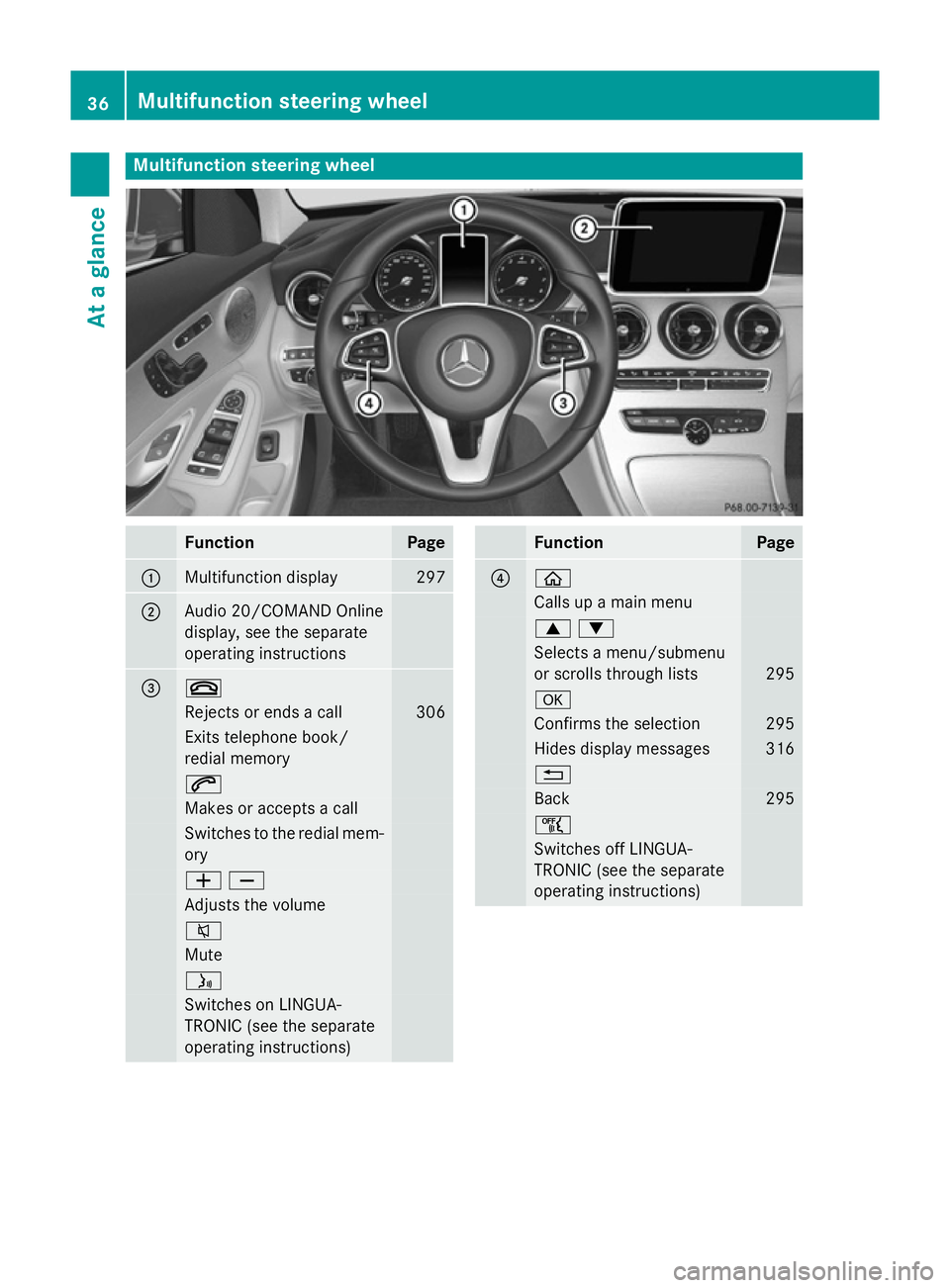
Multifunction steering wheel
Function Page
:
Multifunction display 297
;
Audio 20/COMAND Online
display, see the separate
operating instructions
= ~
Rejects or ends a call 306
Exits telephone book/
redial memory 6
Makes or accepts a call
Switches to the redial mem-
ory WX
Adjusts the volume
8
Mute
ó
Switches on LINGUA-
TRONIC (see the separate
operating instructions) Function Page
? ò
Calls up a main menu
9:
Selects a menu/submenu
or scrolls through lists
295
a
Confirms the selection 295
Hides display messages 316
%
Back 295
ñ
Switches off LINGUA-
TRONIC (see the separate
operating instructions)36
Multifunction steering wheelAt a glance
Page 41 of 489
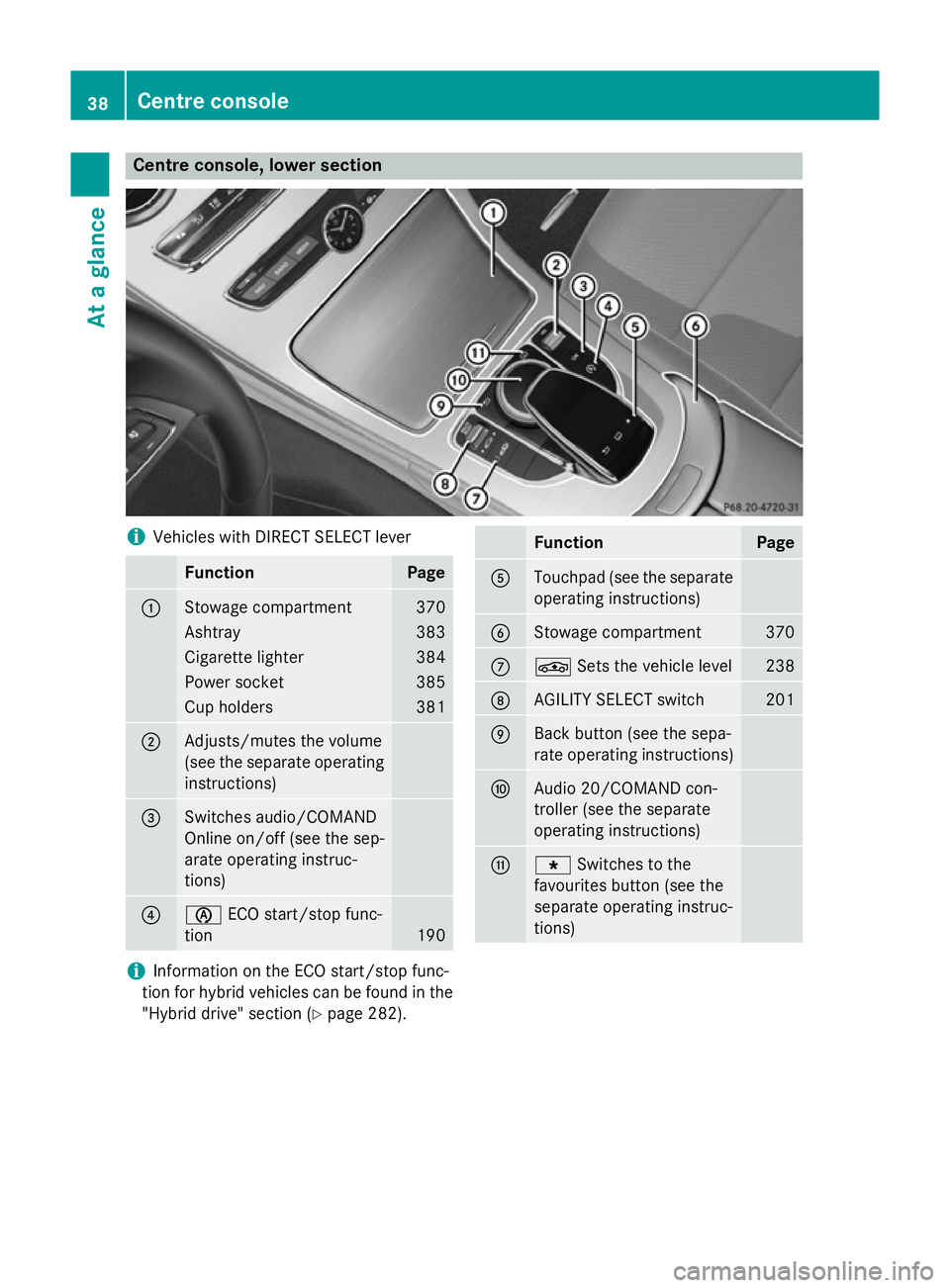
Centre console, lower section
i
Vehicles with DIRECT SELECT lever Function Page
:
Stowage compartment 370
Ashtray 383
Cigarette lighter 384
Power socket 385
Cup holders 381
;
Adjusts/mutes the volume
(see the separate operating
instructions) =
Switches audio/COMAND
Online on/off (see the sep-
arate operating instruc-
tions)
?
è
ECO start/stop func-
tion 190 Function Page
A
Touchpad (see the separate
operating instructions) B
Stowage compartment 370
C
É
Sets the vehicle level 238
D
AGILITY SELECT switch 201
E
Back button (see the sepa-
rate operating instructions)
F
Audio 20/COMAND con-
troller (see the separate
operating instructions)
G
g
Switches to the
favourites button (see the
separate operating instruc-
tions) i
Information on the ECO start/stop func-
tion for hybrid vehicles can be found in the "Hybrid drive" section (Y page 282).38
Centre consoleAt a glance
Page 53 of 489
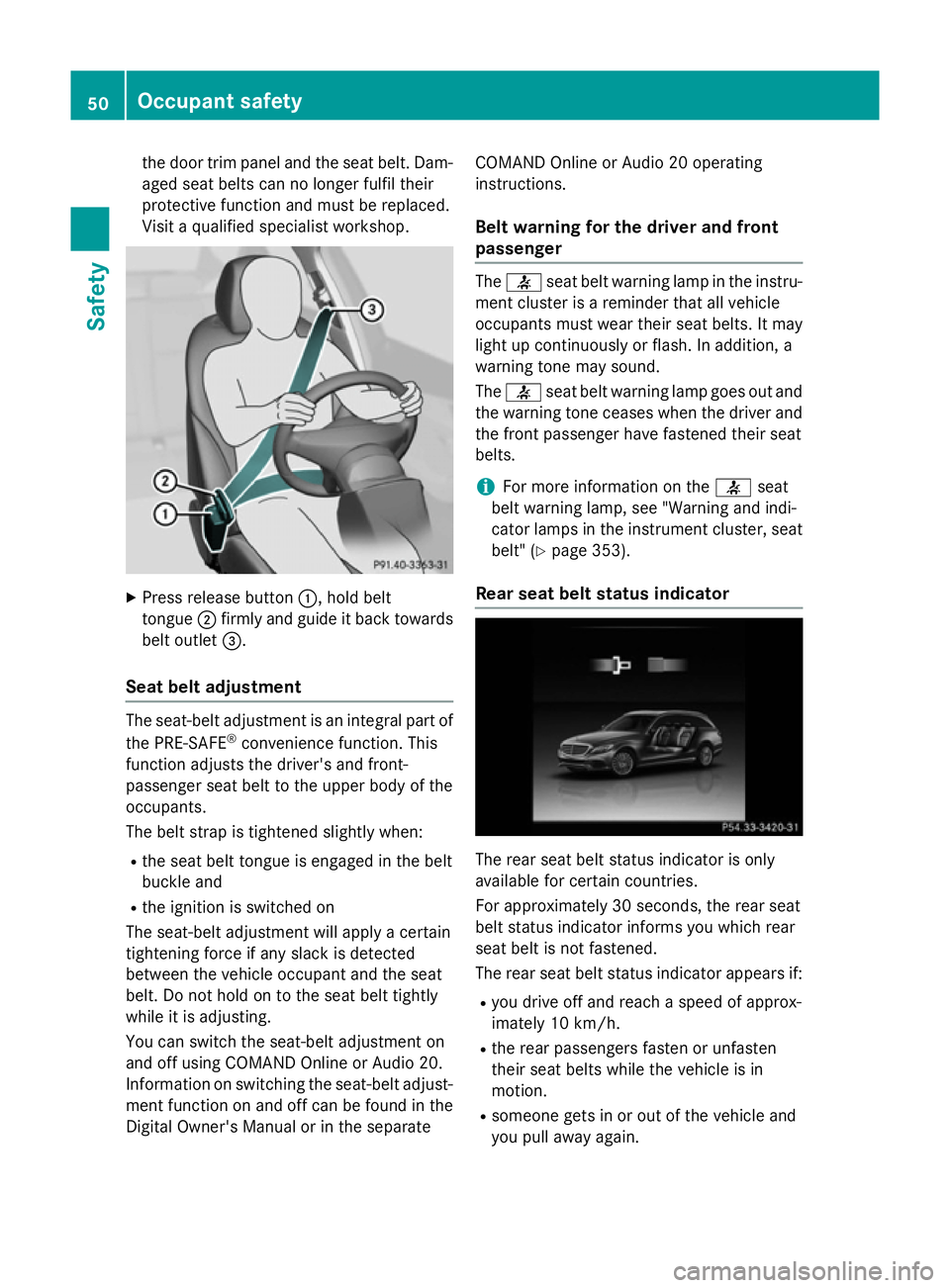
the door trim panel and the seat belt. Dam-
aged seat belts can no longer fulfil their
protective function and must be replaced.
Visit a qualified specialist workshop. X
Press release button :, hold belt
tongue ;firmly and guide it back towards
belt outlet =.
Seat belt adjustment The seat-belt adjustment is an integral part of
the PRE-SAFE ®
convenience function. This
function adjusts the driver's and front-
passenger seat belt to the upper body of the
occupants.
The belt strap is tightened slightly when:
R the seat belt tongue is engaged in the belt
buckle and
R the ignition is switched on
The seat-belt adjustment will apply a certain
tightening force if any slack is detected
between the vehicle occupant and the seat
belt. Do not hold on to the seat belt tightly
while it is adjusting.
You can switch the seat-belt adjustment on
and off using COMAND Online or Audio 20.
Information on switching the seat-belt adjust-
ment function on and off can be found in the
Digital Owner's Manual or in the separate COMAND Online or Audio 20 operating
instructions.
Belt warning for the driver and front
passenger The
7 seat belt warning lamp in the instru-
ment cluster is a reminder that all vehicle
occupants must wear their seat belts. It may
light up continuously or flash. In addition, a
warning tone may sound.
The 7 seat belt warning lamp goes out and
the warning tone ceases when the driver and
the front passenger have fastened their seat
belts.
i For more information on the
7seat
belt warning lamp, see "Warning and indi-
cator lamps in the instrument cluster, seat
belt" (Y page 353).
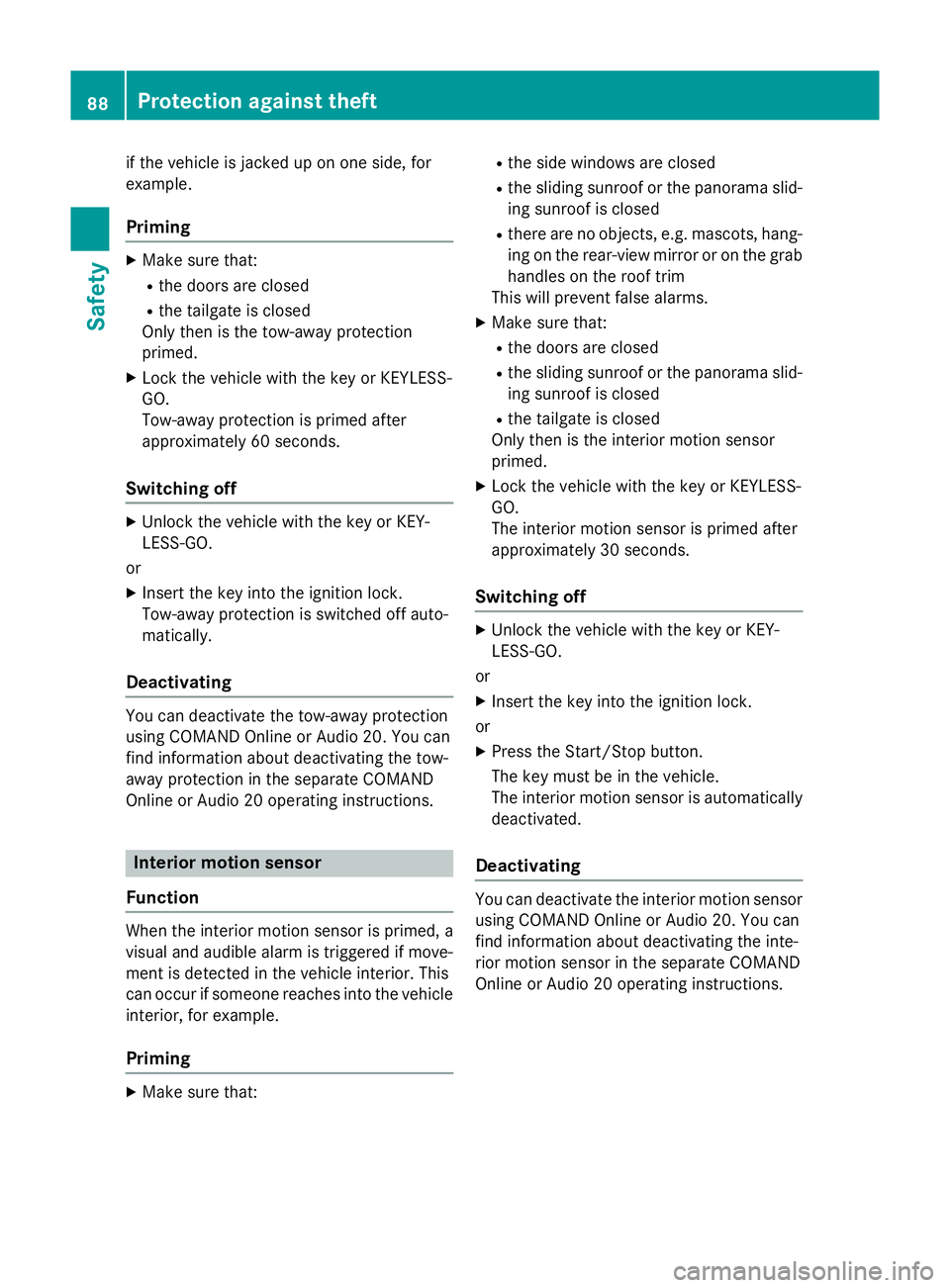
Rear seat belt status indicator The rear seat belt status indicator is only
available for certain countries.
For approximately 30 second s,the rear seat
belt status indicator informs you which rear
seat belt is not fastened.
The rear seat belt status indicator appears if:
R you drive off and reach a speed of approx-
imately 10 km/h.
R the rear passengers fasten or unfasten
their seat belts while the vehicle is in
motion.
R someone gets in or out of the vehicle and
you pull away again. 50
Occupant safetySafety
Page 91 of 489
if the vehicle is jacked up on one side, for
example.
Priming X
Make sure that:
R the doors are closed
R the tailgate is closed
Only then is the tow-away protection
primed.
X Lock the vehicle with the key or KEYLESS-
GO.
Tow-away protection is primed after
approximately 60 seconds.
Switching off X
Unlock the vehicle with the key or KEY-
LESS-GO.
or X Insert the key into the ignition lock.
Tow-away protection is switched off auto-
matically.
Deactivating You can deactivate the tow-away protection
using COMAND Online or Audio 20. You can
find information about deactivating the tow-
away protection in the separate COMAND
Online or Audio 20 operating instructions. Interior motion sensor
Function When the interior motion sensor is primed, a
visual and audible alarm is triggered if move-
ment is detected in the vehicle interior. This
can occur if someone reaches into the vehicle
interior, for example.
Priming X
Make sure that: R
the side windows are closed
R the sliding sunroof or the panorama slid-
ing sunroof is closed
R there are no objects, e.g. mascots, hang-
ing on the rear-view mirror or on the grab handles on the roof trim
This will prevent false alarms.
X Make sure that:
R the doors are closed
R the sliding sunroof or the panorama slid-
ing sunroof is closed
R the tailgate is closed
Only then is the interior motion sensor
primed.
X Lock the vehicle with the key or KEYLESS-
GO.
The interior motion sensor is primed after
approximately 30 seconds.
Switching off X
Unlock the vehicle with the key or KEY-
LESS-GO.
or X Insert the key into the ignition lock.
or X Press the Start/Stop button.
The key must be in the vehicle.
The interior motion sensor is automatically
deactivated.
Deactivating You can deactivate the interior motion sensor
using COMAND Online or Audio 20. You can
find information about deactivating the inte-
rior motion sensor in the separate COMAND
Online or Audio 20 operating instructions. 88
Protection against theftSafety
Page 94 of 489
A check which periodically establishes a radio
connection between the vehicle and the key
determines whether a valid key is in the vehi- cle. This occurs, for example:
R when starting the engine
R whilst driving
R when the external door handles are
touched
R during convenience closing Key functions
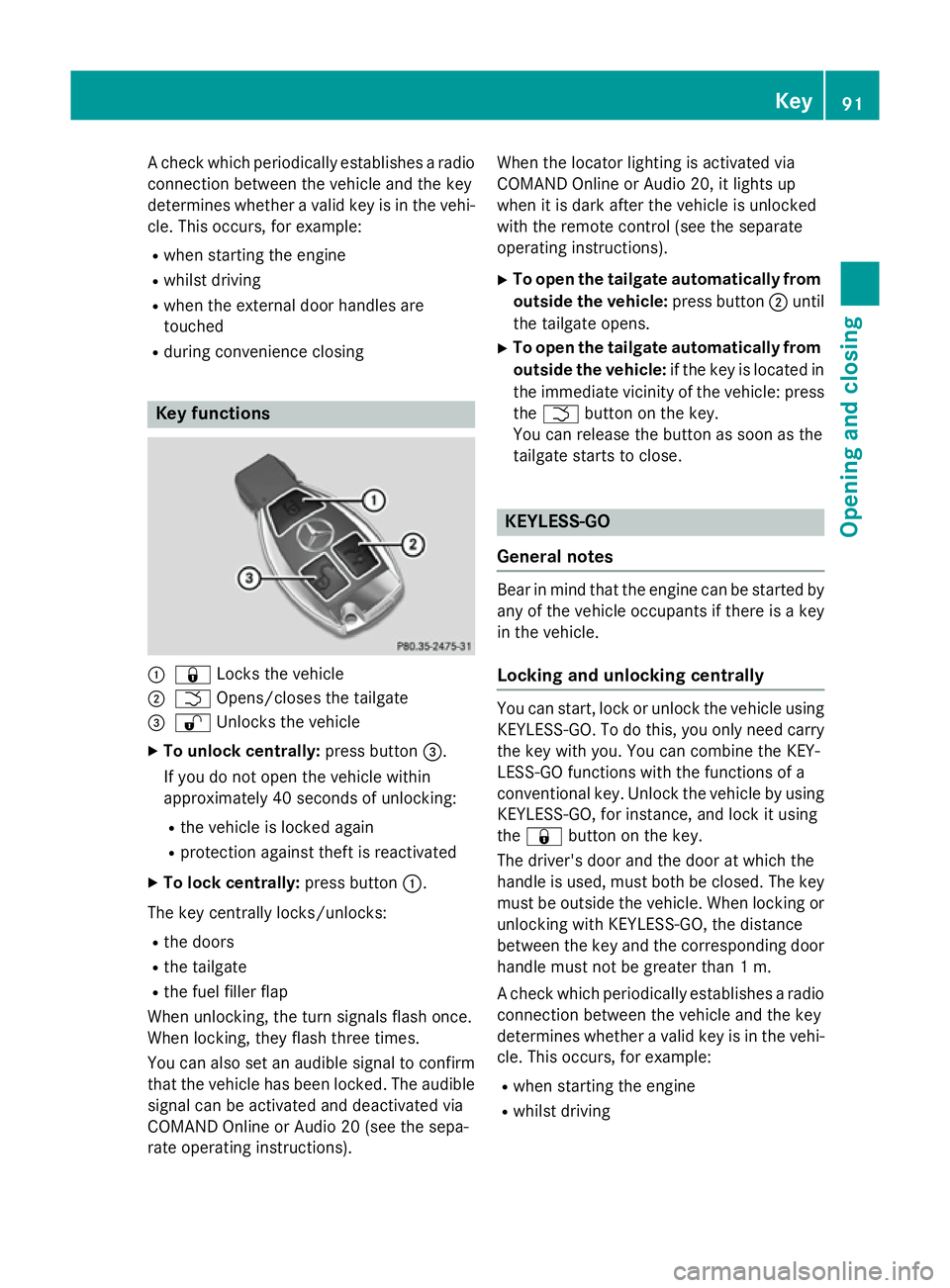
:
& Locks the vehicle
; F Opens/closes the tailgate
= % Unlocks the vehicle
X To unlock centrally: press button=.
If you do not open the vehicle within
approximately 40 second s of unlocking:
R the vehicle is locked again
R protection against theft is reactivated
X To lock centrally: press button:.
The key centrally locks/unlocks:
R the doors
R the tailgate
R the fuel filler flap
When unlocking, the turn signals flash once.
When locking, they flash three times.
You can also set an audible signal to confirm that the vehicle has been locked. The audible
signal can be activated and deactivated via
COMAND Online or Audio 20 (see the sepa-
rate operating instructions). When the locator lighting is activated via
COMAND Online or Audio 20, it lights up
when it is dark after the vehicle is unlocked
with the remote control (see the separate
operating instructions).
X To open the tailgate automatically from
outside the vehicle: press button;until
the tailgate opens.
X To open the tailgate automatically from
outside the vehicle: if the key is located in
the immediate vicinity of the vehicle: press the F button on the key.
You can release the button as soon as the
tailgate starts to close. KEYLESS-GO
General notes Bear in mind that the engine can be started by
any of the vehicle occupants if there is a key
in the vehicle.
Locking and unlocking centrally You can start, lock or unlock the vehicle using
KEYLESS-GO. To do this, you only need carry
the key with you. You can combine the KEY-
LESS-GO functions with the functions of a
conventional key. Unlock the vehicle by using KEYLESS-GO, for instance, and lock it using
the & button on the key.
The driver's door and the door at which the
handle is used, must both be closed. The key
must be outside the vehicle. When locking or unlocking with KEYLESS-GO, the distance
between the key and the corresponding door
handle must not be greater than 1 m.
A check which periodically establishes a radio
connection between the vehicle and the key
determines whether a valid key is in the vehi- cle. This occurs, for example:
R when starting the engine
R whilst driving Key
91Opening and closing Z
Page 102 of 489
Online or Audio 20 (see the separate oper-
ating instructions). Unlocking the driver's door (emer-
gency key element)
If the vehicle can no longer be locked or
unlocked with the key or KEYLESS-GO, use
the emergency key element.
X Take the emergency key element out of the
key (Y page 93).
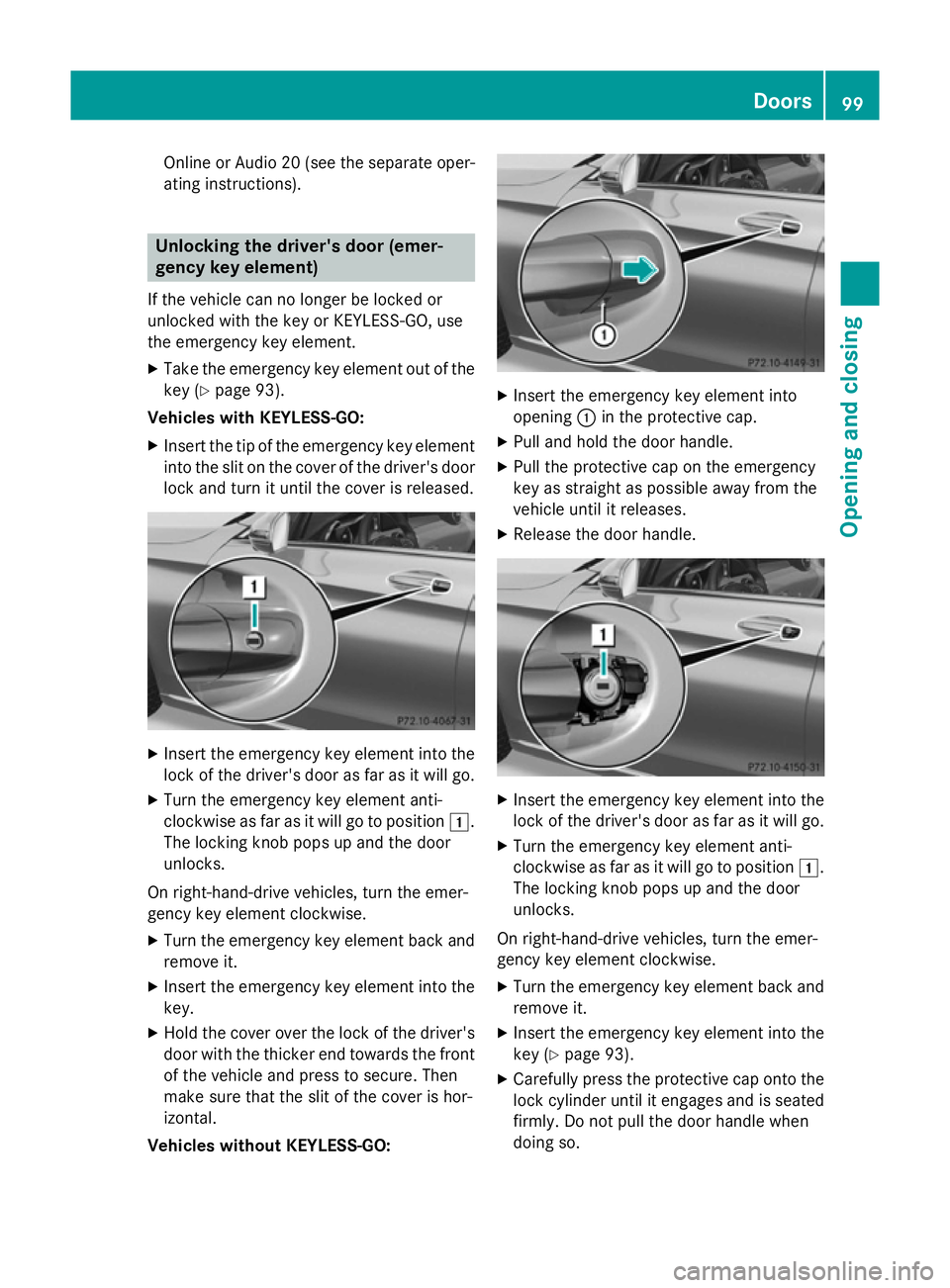
Vehicles with KEYLESS-GO:
X Insert the tip of the emergency key element
into the slit on the cover of the driver's doorlock and turn it until the cover is released. X
Insert the emergency key element into the
lock of the driver's door as far as it will go.
X Turn the emergency key element anti-
clockwise as far as it will go to position 1.
The locking knob pops up and the door
unlocks.
On right-hand-drive vehicles, turn the emer-
gency key element clockwise.
X Turn the emergency key element back and
remove it.
X Insert the emergency key element into the
key.
X Hold the cover over the lock of the driver's
door with the thicker end towards the front of the vehicle and press to secure. Then
make sure that the slit of the cover is hor-
izontal.
Vehicles without KEYLESS-GO: X
Insert the emergency key element into
opening :in the protective cap.
X Pull and hold the door handle.
X Pull the protective cap on the emergency
key as straight as possible away from the
vehicle until it releases.
X Release the door handle. X
Insert the emergency key element into the
lock of the driver's door as far as it will go.
X Turn the emergency key element anti-
clockwise as far as it will go to position 1.
The locking knob pops up and the door
unlocks.
On right-hand-drive vehicles, turn the emer-
gency key element clockwise. X Turn the emergency key element back and
remove it.
X Insert the emergency key element into the
key (Y page 93).
X Carefully press the protective cap onto the
lock cylinder until it engages and is seated firmly. Do not pull the door handle when
doing so. Doors
99Opening and closing Z