reset MERCEDES-BENZ C-CLASS ESTATE 2014 Owners Manual
[x] Cancel search | Manufacturer: MERCEDES-BENZ, Model Year: 2014, Model line: C-CLASS ESTATE, Model: MERCEDES-BENZ C-CLASS ESTATE 2014Pages: 489, PDF Size: 15.08 MB
Page 8 of 489
Airbag
Introduction .................................... .51
PASSENGER AIR BAG indicator
lamps ............................................... 46
Airbags
Display message ............................3 30
Front airbag (driver, front
passenger) ....................................... 52
Important safety guidelines ............. 51
Kneebag .......................................... .53
Sidebag ............................................ 53
Triggering ......................................... 60
Windowbag ...................................... 53
AIRMATIC
Display message ............................ 339
Function/note s............................. 238
AIRPANEL (cleaning instructions) .... 404
Alarm
ATA (Anti-Theft Alarm system) ......... 87
Switching off (ATA) .......................... 87
Switching the function on/off
(ATA) ................................................ 87
Alarm system
see ATA (Anti-Theft Alarm system)
Anti-glare film .................................... 391
Anti-lock braking system
see ABS (Anti-lock Braking System)
Anti-Theft Alarm system
see ATA (Anti-Theft Alarm system)
Aquaplaning ....................................... 218
Armrest
Stowage compartment .................. 372
Ashtray ............................................... 383
Assistance display (on-board com-
puter) .................................................. 308
Assistance menu (on-board com-
puter) .................................................. 309
ASSYST PLUS
Displaying a service message ........ 399
Hiding a service message .............. 399
Notes ............................................. 399
Resetting the service interval dis-
play ................................................ 399
Service message ............................ 399
Special service requirements ......... 400
ATA (Anti-Theft Alarm system)
Activating/deactivating ................... 87 Function ........................................... 87
Switching off the alarm .................... 87
ATTENTION ASSIST
Activating/deactivating ................. 311
Display message ............................ 339
Function/note s............................. 258
Authorised workshop
see Qualified specialist workshop
AUTO lights
Display message ............................ 334
see Lights
Automatic engine start (ECO start/
stop function) .................................... 191
Automatic engine switch-off (ECO
start/stop function) .......................... 190
Automatic front-passenger front
airbag deactivation
Display message ............................ 330
Automatic front-passenger front
airbag deactivation system
Operation ......................................... 54
Problems ......................................... 59
System self-test ............................... 57
Automatic headlamp mode .............. 135
Automatic transmission
Accelerator pedal position ............. 200
AGILITY SELECT switch .................. 201
Changing gear ............................... 200
DIRECT SELECT lever ..................... 197
Display message ............................ 347
Drive program display .................... 199
Drive programs .............................. 201
Driving tips .................................... 200
Emergency running mode .............. 204
Engaging drive position .................. 199
Engaging neutral ............................ 198
Engaging park position automati-
cally ............................................... 198
Engaging reverse gear ................... 198
Engaging the park position ............ 197
Kickdown ....................................... 200
Manual shifting .............................. 202
Overview ........................................ 197
Problem (fault) ............................... 204
Pulling away ................................... 189
Starting the engine ........................ 187
Steering wheel gearshift paddle s... 202
Trailer towing ................................. 200 Index
5
Page 14 of 489
Removing ........................................
.93
Emergency release
Driver's door .................................... 99
Emergency spare wheel
General notes ................................ 463
Important safety notes .................. 463
Inflating the collapsible spare
wheel ............................................ .464
Technical data ............................... 465
Emergency unlocking
Tailgate .......................................... 106
Vehicle ............................................. 99
Energy flow display ........................... 276
Engine
Display message ............................ 335
ECO start/stop function ................ 190
Engine number ............................... 470
Jump-starting ................................. 422
Running irregularl y......................... 193
Starting problems .......................... 193
Starting the engine with the key .... 188
Starting with the Start/Stop but-
ton ................................................. 188
Stopping ........................................ 212
Tow-starting (vehicle) ..................... 428
Warning lamp (engine diagnos-
tics) ............................................... 362
Engine electronics
Notes ............................................. 468
Problem (fault) ............................... 193
Engine oil
Additives ........................................ 476
Checking the oil level ..................... 396
Checking the oil level using the
dipstick .......................................... 396
Display message ............................ 337
Filling capacity ............................... 475
Notes about oil grade s................... 475
Notes on oil level/consumption .... 396
Topping up ..................................... 396
Viscosity ........................................ 476
Environmental protection
Returning an end-of-life vehicle ....... 24
ESP® (Electronic Stability Pro-
gram)
Activating/deactivating ................... 82
Characteristics ................................. 82
Deactivating/activating ................. 309 Display message ............................ 317
ETS/4ETS ........................................ 81
Function/note
s................................ 81
General notes .................................. 81
Important safety guidelines ............. 82
Trailer stabilisation .......................... 83
Warning lamp ................................. 359
ETS/4ETS (Electronic Traction Sys-
tem) ...................................................... 81
Exhaust
see Exhaust pipe
Exhaust pipe
Cleaning ......................................... 406
Exhaustive discharging (high-volt-
age battery) ....................................... 419
Extended overrun mode ................... 283
Exterior lighting
Cleaning ......................................... 404
see Lights
Exterior mirrors
Adjusting ....................................... 128
Anti-dazzle mode (automatic) ........ 129
Folding in/out (automatically )....... 128
Folding in/out (electrically) ........... 128
Out of position (troubleshooting) ... 129
Parking position ............................. 129
Resetting ....................................... 128
Storing settings (memory func-
tion) ............................................... 131 F
Fault message see Display messages
Features ............................................. 381
Filler cap
see Fuel filler flap
Fire extinguisher ............................... 411
First-aid kit ......................................... 410
Fitting a wheel
Fitting a wheel ............................... 446
Lowering the vehicle ...................... 447
Preparing the vehicle ..................... 442
Raising the vehicle ......................... 443
Removing a whee l.......................... 446
Securing the vehicle against roll-
ing away ........................................ 443 Index
11
Page 16 of 489
Headlamp
Cleaning system (notes) ............... .477
Headlamp flasher .............................. 137
Headlamps
Misting up ...................................... 140
see Automatic headlamp mode
Heating
see Climate control
High-pressure cleaners .................... 402
High-voltage battery
Charge leve l................................... 276
Charging ........................................ 420
Charging (on-board computer) ....... 277
General notes .................................. 43
Vehicle fire ....................................... 43
Hill start assist .................................. 189
HOLD function
Activating ....................................... 237
Deactivating ................................... 237
Display message ............................ 342
Function/note s............................. 236
Horn ...................................................... 32
Hybrid drive
Displaying the total range .............. 279
Generated electrical energy ........... 279
Hybrid operation
AGILITY SELECT switch .................. 280
Automatic engine start (ECO
Start/Stop function) ...................... 283
Automatic engine switch-off (ECO
start/stop function) ....................... 283
Driving tips .................................... 281
ECO start/stop function ................ 282
Energy flow display ........................ 276
Extended overrun mod e................. 283
Fuel consumption .......................... 279
General notes ................................ 272
Important safety notes .................. 273
Manual gearshifting ....................... 281
Noiseless start ............................... 280
Operating (on-board computer) ..... 276
Overrun mode ................................ 283
Overview (instrument cluster) ........ 275
Power display (electric motor) ....... 275
Problems ....................................... 285
Pulling away ................................... 280
RBS (Recuperative Brake Sys-
tem) ............................................... 273 Resetting values (Audio 20) ........... 279
Resetting values (COMAND
Online) ........................................... 279
Starting the engine ........................ 279
Hybrid system
Automatic deactivation .................... 42
Danger of electric shock .................. 42
Display message ............................ 338
High-voltage battery ........................ 43
Important safety notes .................... 42
Manual deactivation ......................... 43
Opening the bonnet ......................... 44
Overview ........................................ 274
Problems (malfunctions) ................ 285
READY indicator ............................. 279
Warning lamp ................................. 364
Hybrid vehicle
Climate control (THERMATIC) ........ 157
Climate control
(THERMOTRONIC) .......................... 160
Hybrid vehicles
Important safety notes .................... 42 I
Ignition lock see Key positions
Immobiliser .......................................... 86
Indicator and warning lamp
Restraint system ............................ 361
Indicator and warning lamps
COLLISION PREVENTION ASSIST
PLUS .............................................. 365
Coolant .......................................... 362
Engine diagnostics ......................... 362
Indicator lamps
Display message ............................ 332
see Warning and indicator lamps
Indicators
see Turn signals
Insect protection on the radiator .... 396
Instrument cluster
Overview .......................................... 34
Power display ................................ 275
Warning and indicator lamps ........... 35
Instrument cluster lighting .............. 294
Intelligent Light System
Activating/deactivating ................. 313 Index
13
Page 19 of 489
Notes/placing in the bracket .........3
90
Transmission output (maximum) .... 468
Modifying the programming (key) ..... 92
MOExtended tyres .............................413
Motorway mode ................................ 138
MP3
Operating ....................................... 305
Multifunction display
Function/notes ............................ .297
Permanent display ......................... 314
Multifunction steering wheel
Operating the on-board computer .. 295
Overview .......................................... 36 N
Navigation Menu (on-board computer) ............ 302
Notes on running in a new vehicle .. 184O
Occupant safety Automatic measures after an acci-
dent ................................................. 63
Children in the vehicle ..................... 63
Important safety notes .................... 45
Pets in the vehicle ........................... 75
PRE-SAFE® (anticipatory occu-
pant protection) ............................... 62
Seat belts ........................................ 47
Odometer .......................................... .300
Oil
see Engine oil
On-board computer
Assistance graphic menu .............. .308
Assistance menu ........................... 309
Display messages .......................... 316
Displaying a service message ....... .399
DISTRONIC PLUS ........................... 232
Factory settings ............................ .315
Head-up displa y............................. 297
Important safety notes .................. 294
Instrument cluster menu ............... 314
Light menu ..................................... 313
Media menu ................................... 304
Menu overview .............................. 299
Message memory .......................... 316 Navigation menu ............................ 302
Operating the TV ............................ 306
Operating video DVD ..................... 305
Operation ....................................... 295
Radio menu ................................... 304
Service menu ................................. 308
Settings menu ............................... 309
Standard display ............................ 300
Telephone menu ............................ 306
Trip menu ...................................... 300
Vehicle menu ................................. 315
Opening and closing the side trim
panels ................................................. 144
Operating instructions
Vehicle equipment ........................... 25
Operating mode
Overrun mode ................................ 282
Stationary vehicle .......................... 281
Operating safety
Declaration of conformity ................ 27
Important safety note ...................... 25
Operating system
see On-board computer
Outside temperature display ........... 295
Overhead control panel ...................... 39
Override feature
Rear side window s........................... 75
Overrun mode .................................... 283
Overrun mode, extended .................. 283
Owner's Manual
Overview .......................................... 25 P
Paint code .......................................... 470
Paintwork (cleaning instructions) ... 402
Panic alarm .......................................... 44
Panorama sliding sunroof
Important safety information ......... 110
Opening/closing ............................ 112
Problem (malfunction) ................... 115
Rain closing feature ....................... 113
Resetting ....................................... 114
Parking
Hybrid vehicles .............................. 284
Important safety notes .................. 211
Parking brake ................................ 213 16
Index
Page 22 of 489
Seat belts
Adjusting the driver's and front-
passenger seat belt .........................50
Adjusting the height ......................... 49
Cleaning ......................................... 408
Display message ............................ 326
Fastening ......................................... 49
Important safety guidelines ............. 47
Introduction .................................... .47
Rear seat belt status indicato r .........50
Releasin g......................................... 49
Warning lamp ................................. 353
Warning lamp (function) ................... 50
Seats
Adjusting (electrically) ................... 121
Adjusting (manually and electri-
cally) .............................................. 120
Adjusting the 4-way lumbar sup-
port ................................................ 123
Adjusting the head restraint .......... 121
Cleaning the cover ......................... 407
Correct driver's seat position ........ 118
Important safety notes .................. 119
Seat heating .................................. 123
Seat heating problem .................... 124
Seat ventilation .............................. 124
Seat ventilation problem ................ 125
Storing settings (memory func-
tion) ............................................... 131
Switching seat heating on/of f....... 123
Switching the seat ventilation on/
off .................................................. 124
Selector lever
Cleaning ......................................... 407
see Automatic transmission
Sensors (cleaning instructions) ....... 405
Service
see ASSYST PLUS
Service Centre
see Qualified specialist workshop
Service menu (on-board com-
puter) .................................................. 308
Service products
AdBlue® special additive s............. 474
Brake fluid ..................................... 476
Coolant (engine) ............................ 476
Engine oil ....................................... 475
Fuel ................................................ 470 Important safety notes .................. 470
Washer fluid ................................... 477
Settings
Factory (on-board computer) ......... 315
On-board compute r....................... 309
Shifting to neutral (manual trans-
mission) ............................................. 195
Side lamps
Switching on/of f........................... 136
Side windows
Convenience closing ...................... 108
Convenience opening .................... 108
Important safety notes .................. 106
Opening/closing ............................ 107
Problem (malfunction) ................... 110
Resetting ....................................... 109
Sidebag ................................................ 53
Sliding sunroof
Opening/closing ............................ 111
Rain closing feature ....................... 112
Resetting ....................................... 112
see Panorama sliding sunroof
Snow chains ...................................... 435
Sockets
Centre console .............................. 385
General notes ................................ 385
Rear compartment ......................... 386
Specialist workshop ............................ 27
Spectacles compartment ................. 371
Speed, controlling
see Cruise control
Speedometer
Activating/deactivating the addi-
tional speedometer ........................ 314
Digital ............................................ 301
In the Instrument cluster ................. 34
Segments ...................................... 294
Selecting the unit of measure-
ment .............................................. 314
see Instrument cluster
SPEEDTRONIC
Deactivating variable ..................... 225
Display message ............................ 343
Function/note s............................. 223
Important safety notes .................. 223
LIM indicator lamp ......................... 223
Permanent ..................................... 225 Index
19
Page 24 of 489
Telephone compartment ................3
72
Temperature
Coolant (display in the instrumentcluster) .......................................... 295
Coolant (display in the on-board
computer) ...................................... 309
Outside temperature ..................... .295
Setting (climate control) ................ 163
TEMPOMAT
Function/notes ............................ .220
TIREFIT kit .......................................... 414
Top Tether ............................................ 65
Total distance recorder .................... 300
Tow-away protection
Activating ......................................... 88
Deactivating ..................................... 88
Function .......................................... .87
Tow-starting
Emergency engine starting ............ 428
Important safety notes .................. 424
Towing
Important safety notes .................. 424
Notes for 4MATIC vehicles ............ 427
With the rear axle raised ................ 426
Towing a trailer
Active Blind Spot Assist ................. 269
Active Lane Keeping Assist ............ 272
Active Parking Assist ..................... 243
Axle load, permissibl e.................... 482
Bulb failure indicator for LED
lamps ............................................. 290
ESP® (Electronic Stability Pro-
gram) ............................................... 83
General notes ................................ 287
Pulling away with a traile r.............. 189
Trailer tow hitch display message .. 349
Towing away
Fitting the towing eye .................... 426
Removing the towing eye ............... 426
With both axles on the ground ....... 427
Towing eye ......................................... 411
Traffic Sign Assist
Activating ....................................... 261
Activating/deactivating the warn-
ing function .................................... 310
Display message ............................ 342
Function/note s............................. 260
Important safety notes .................. 261 Instrument cluster display ............. 261
Trailer coupling
see Towing a trailer
Trailer towing
7-pin connecto r............................. 290
Blind Spot Assist ............................ 264
Cleaning the trailer tow hitch ......... 406
Coupling up a traile r...................... 288
Decoupling a trailer ....................... 289
Driving tip s.................................... 287
Folding in the ball coupling ............ 289
Folding out the ball coupling .......... 288
Important safety notes .................. 286
Lights display message .................. 331
Mounting dimensions .................... 478
Parktronic ...................................... 240
Power supply ................................. 290
Problem (fault) ............................... 292
Trailer load s................................... 480
Transfer case ..................................... 204
Transmission
see Automatic transmission
see Manual transmission
Transmission position display ......... 199
Transmission position display
(DIRECT SELECT lever) ...................... 199
Transporting the vehicle .................. 427
Trim pieces (cleaning instruc-
tions) .................................................. 407
Trip computer (on-board com-
puter) .................................................. 301
Trip meter
Calling up ....................................... 300
Resetting (on-board computer) ...... 301
Turn signals
Changing bulbs (front) ................... 144
Changing bulbs (rear) .................... 144
Switching on/of f........................... 137
TV
Operating (on-board computer) ..... 306
Two-way radio
Frequencies ................................... 468
Installation ..................................... 468
Transmission output (maximum) .... 468
Type identification plate
see Vehicle identification plate Index
21
Page 30 of 489
warning stickers. The cables of the vehicle's
high-voltage electrical system are orange.
Vehicles with an electric motor generate sig-
nificantly less noise than vehicles with inter-
nal combustion engines. As a result, in certain situations your vehicle may not be heard by
other road users. This can happen, for exam-
ple, when you are parking and your vehicle is not seen by other road users. This requires
you to adopt a particularly anticipatory driving
style, as it is necessary to allow for the pos-
sibility that other road users may behave
unpredictably. Declarations of conformity
Wireless vehicle components The following information applies to all com-
ponents of the vehicle and the information
systems and communication devices integra-
ted into the vehicle which receive and/or
transmit radio waves:
The components of this vehicle that receive
and/or transmit radio waves are compliant
with the basic requirements and all other rel- evant conditions of Directive 1999/5/E C.
You can obtain further information from any
Mercedes-Benz Service Centre.
Electromagnetic compatibility The electromagnetic compatibility of the vehi-
cle components has been checked and certi-fied according to the currently valid version of
Regulation ECE-R 10. Diagnostics connection
The diagnostics connection is only intended
for the connection of diagnostic equipment at a qualified specialist workshop. G
WARNING
If you connect equipment to a diagnostics
connection in the vehicle, it can affect the
operation of the vehicle systems. This may affect the operating safety of the vehicle.
There is a risk of an accident.
Do not connect any equipment to a diagnos-
tics connection in the vehicle.
G
WARNING
Objects in the driver's footwell may restrict
the clearance around the pedals or block a
depressed pedal. This jeopardises the oper-
ating and road safety of the vehicle. There is a risk of an accident.
Stow all objects securely in the vehicle so that
they do not get into the driver's footwell.
Always fit the floormats securely and as pre-
scribed in order to ensure that there is always sufficient room for the pedals. Do not use
loose floormats and do not place several floor-mats on top of one another.
! If the engine is switched off and equip-
ment on the diagnostics connection is
used, the starter battery may discharge.
Connecting equipment to the diagnostics
connection can lead to emissions monitoring information being reset, for example. This
may lead to the vehicle failing to meet the
requirements of the next emissions test dur-
ing the main inspection. Qualified specialist workshop
A qualified specialist workshop has the nec-
essary special skills, tools and qualifications
to correctly carry out any necessary work on
your vehicle. This particularly applies to work
relevant to safety.
Observe the notes in the Service Booklet.
Always have the following work carried out at a qualified specialist workshop:
R work relevant to safety
R service and maintenance work
R repair work
R modifications, installations and conver-
sions Introduction
27 Z
Page 110 of 489
When closing make sure that no parts of the
body are in the closing area. If somebody
becomes trapped, release the switch or press the switch to open the side window again. G
WARNING
If children operate the side windows they
could become trapped, particularly if they are left unsupervised. There is a risk of injury.
Activate the override feature for the rear side
windows. When leaving the vehicle, always
take the key with you and lock the vehicle.
Never leave children unattended in the vehi-
cle. Side window reversing feature
The side windows are equipped with an auto-
matic reversing feature. If a solid object
blocks or restricts a side window from trav-
elling upwards during the automatic closing
process, the side window opens again auto-
matically. During the manual closing process, the side window only opens again automati-
cally after the corresponding switch is
released. The automatic reversing feature is
only an aid and is no substitute for your atten-
tion when closing a side window. G
WARNING
The reversing function does not react:
R to soft, light and thin objects, e.g. small fin-
gers
R while resetting
This means that the reversing feature cannot
prevent someone being trapped in these sit-
uations. There is a risk of injury.
When closing, make sure that no parts of the
body are in the closing area. If someone
becomes trapped, press the switch to open
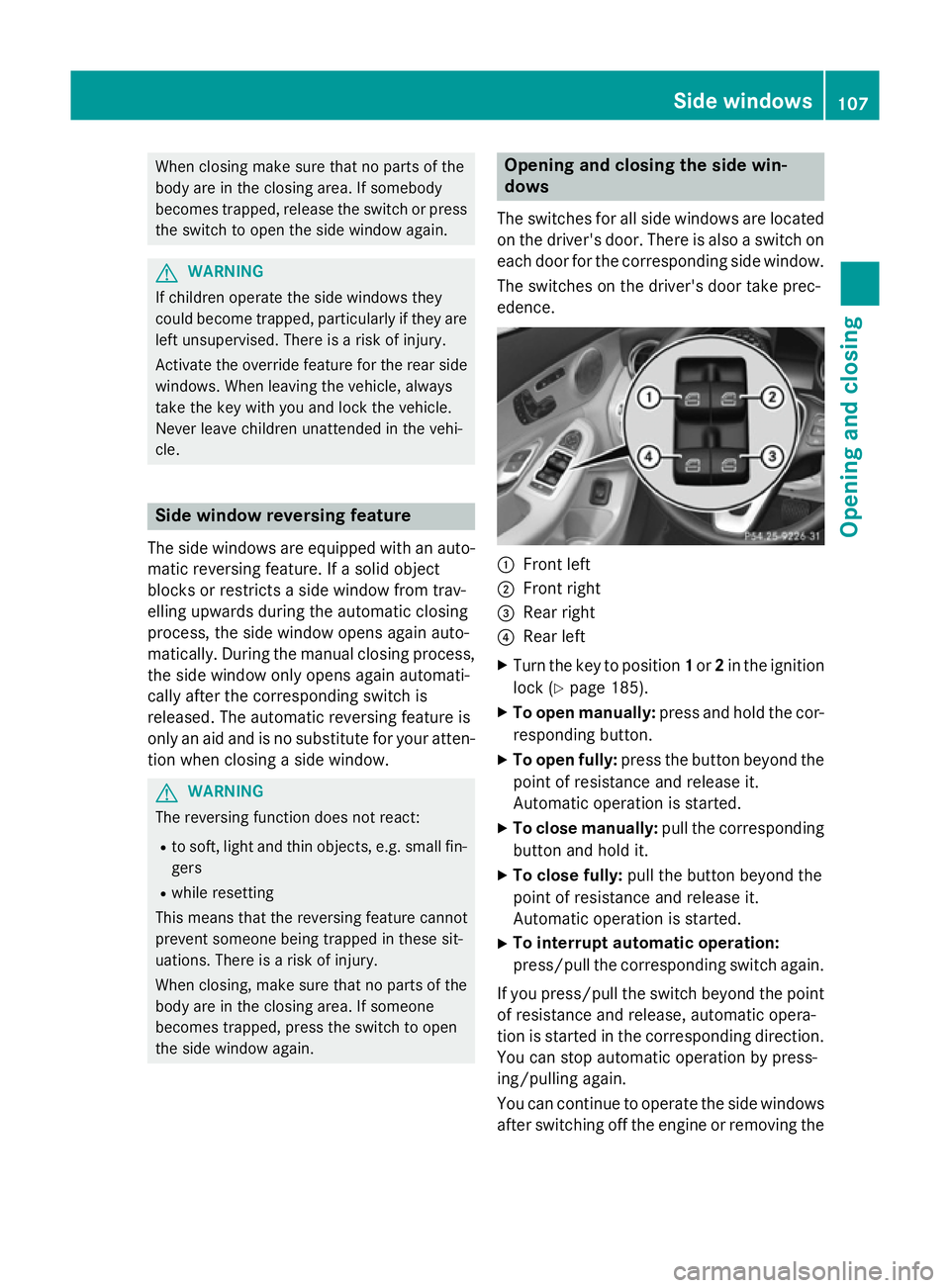
the side window again. Opening and closing the side win-
dows
The switches for all side windows are located
on the driver's door. There is also a switch on
each door for the corresponding side window.
The switches on the driver's door take prec-
edence. :
Front left
; Front right
= Rear right
? Rear left
X Turn the key to position 1or 2in the ignition
lock (Y page 185).
X To open manually: press and hold the cor-
responding button.
X To open fully: press the button beyond the
point of resistance and release it.
Automatic operation is started.
X To close manually: pull the corresponding
button and hold it.
X To close fully: pull the button beyond the
point of resistance and release it.
Automatic operation is started.
X To interrupt automatic operation:
press/pull the corresponding switch again.
If you press/pull the switch beyond the point
of resistance and release, automatic opera-
tion is started in the corresponding direction. You can stop automatic operation by press-
ing/pulling again.
You can continue to operate the side windowsafter switching off the engine or removing the Side windows
107Opening and closing Z
Page 112 of 489
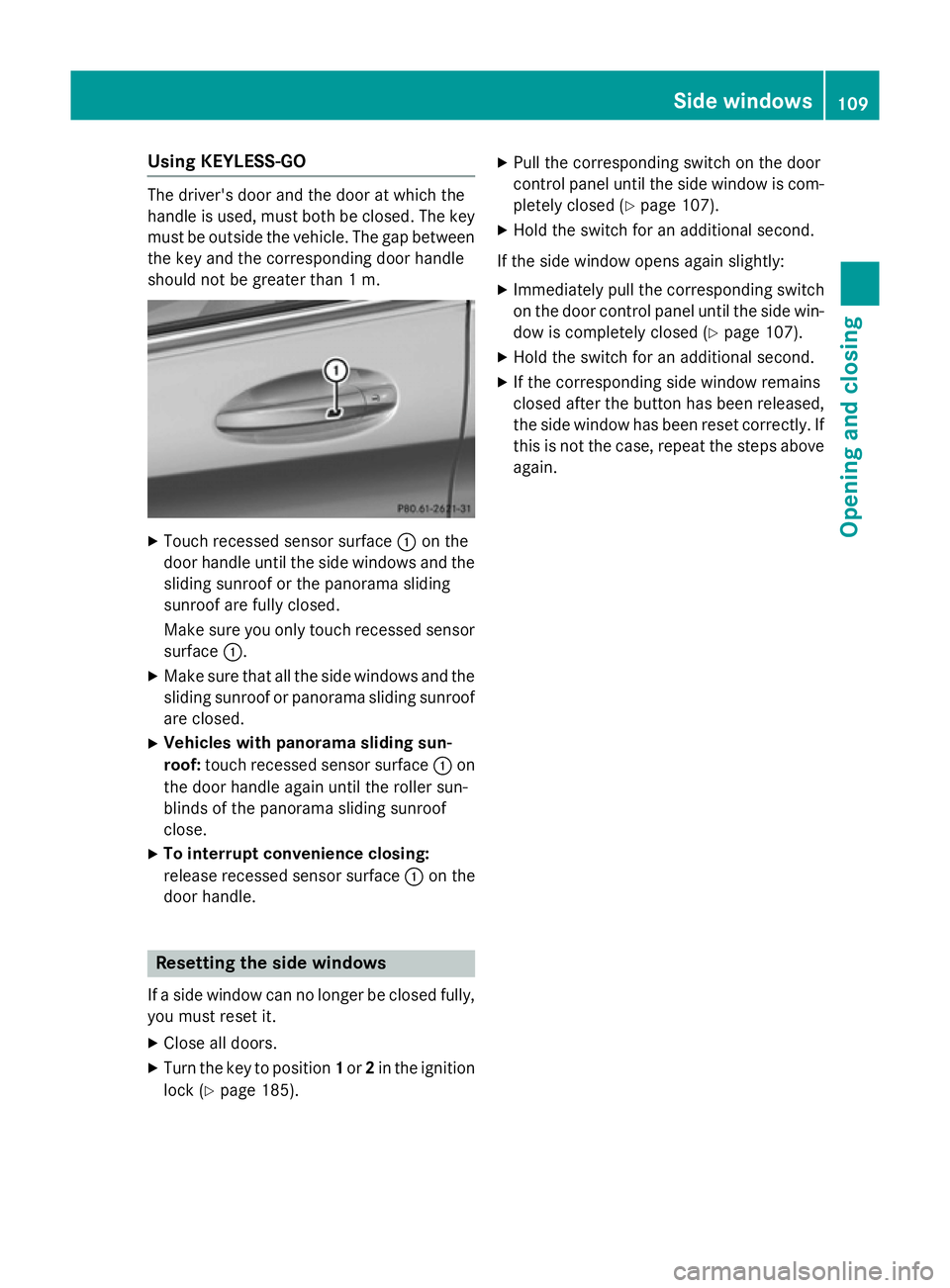
Using KEYLESS-GO
The driver's door and the door at which the
handle is used, must both be closed. The key
must be outside the vehicle. The gap between
the key and the corresponding door handle
should not be greater than 1 m. X
Touch recessed sensor surface :on the
door handle until the side windows and the sliding sunroof or the panorama sliding
sunroof are fully closed.
Make sure you only touch recessed sensor surface :.
X Make sure that all the side windows and the
sliding sunroof or panorama sliding sunroof
are closed.
X Vehicles with panorama sliding sun-
roof: touch recessed sensor surface :on
the door handle again until the roller sun-
blinds of the panorama sliding sunroof
close.
X To interrupt convenience closing:
release recessed sensor surface :on the
door handle. Resetting the side windows
If a side window can no longer be closed fully, you must reset it.
X Close all doors.
X Turn the key to position 1or 2in the ignition
lock (Y page 185). X
Pull the corresponding switch on the door
control panel until the side window is com- pletely closed (Y page 107).
X Hold the switch for an additional second.
If the side window opens again slightly: X Immediately pull the corresponding switch
on the door control panel until the side win-
dow is completely closed (Y page 107).
X Hold the switch for an additional second.
X If the corresponding side window remains
closed after the button has been released,
the side window has been reset correctly. If
this is not the case, repeat the steps aboveagain. Side windows
109Opening and closing Z
Page 113 of 489
Problems with the side windows
G
WARNING
If you close a side window again immediately after it has been blocked or reset, the side window
closes with increased or maximum force. The reversing function is then not active. Parts of the
body could be trapped in the closing area in the process. This poses an increased risk of injury or even fatal injury.
Make sure that no parts of the body are in the closing area. To stop the closing process, releasethe switch or push the switch again to reopen the side window. Problem
Possible causes/consequences and
M MSolutions A side window cannot
be closed because it is
blocked by objects, e.g.
leaves in the window
guide. X
Remove the objects.
X Close the side window. A side window cannot
be closed and you can-
not see the cause. If a side window is obstructed during closing and reopens again
slightly:
X Immediately after the window blocks, pull the corresponding
switch again until the side window has closed.
The side window is closed with increased force.
If a side window is obstructed again during closing and reopens
again slightly: X Immediately after the window blocks, pull the corresponding
switch again until the side window has closed.
The side window is closed without the anti-entrapment feature. Sliding sunroof
Important safety notes
Your vehicle may be fitted with a sliding sun-
roof or a panorama sliding sunroof. In this
section, the term "sliding sunroof" refers to
both types of sliding sunroof. G
WARNING
While opening and closing the sliding sunroof, body parts in close proximity could become
trapped. There is a risk of injury.
Make sure that no body parts are in close
proximity during the opening and closing pro- cedures. If somebody becomes trapped:
R release the switch immediately, or
R during automatic operation, press the
switch briefly in any direction
The opening or closing procedure will be stop-
ped. G
WARNING
If children operate the sliding sunroof they
could become trapped, particularly if they are left unsupervised. There is a risk of injury.
When leaving the vehicle, always take the key
with you and lock the vehicle. Never leave
children unattended in the vehicle. 110
Sliding sunroofOpening and closing