light MERCEDES-BENZ C-CLASS ESTATE 2018 Service Manual
[x] Cancel search | Manufacturer: MERCEDES-BENZ, Model Year: 2018, Model line: C-CLASS ESTATE, Model: MERCEDES-BENZ C-CLASS ESTATE 2018Pages: 609, PDF Size: 11.38 MB
Page 139 of 609
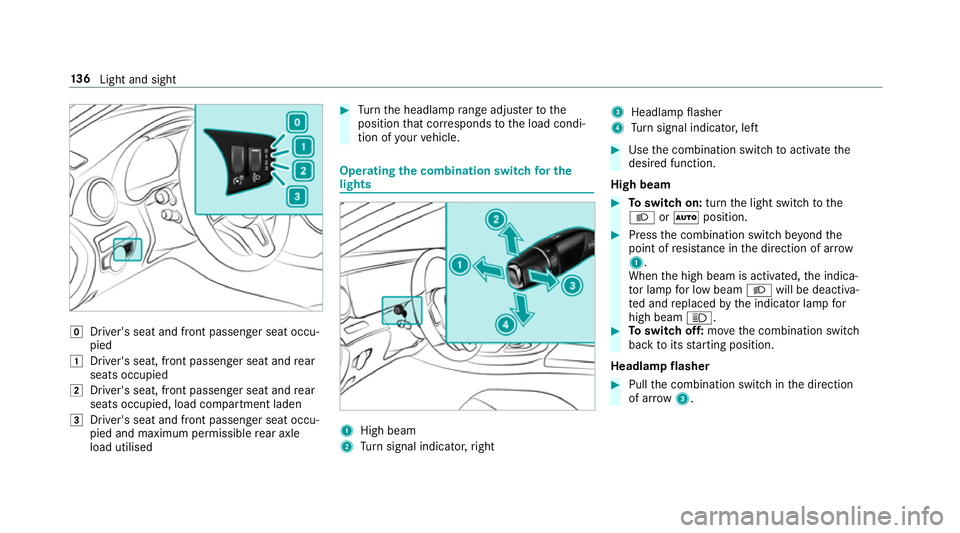
005A
Driver's seat and front passenger seat occu‐
pied
0047 Driver's seat, front passenger seat and rear
seats occupied
0048 Driver's seat, front passenger seat and rear
seats occupied, load compartment laden
0049 Driver's seat and front passenger seat occu‐
pied and maximum permissible rear axle
load utilised 0007
Turn the headlamp range adjus terto the
position that cor responds tothe load condi‐
tion of your vehicle. Operating
the combination switch for the
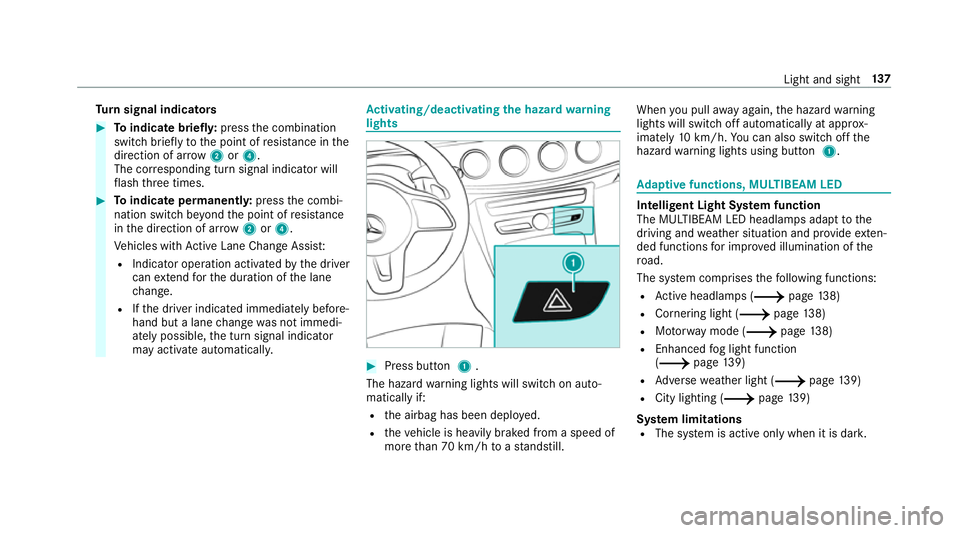
lights 1
High beam
2 Turn signal indicator, right 3
Headlamp flasher
4 Turn signal indicator, left 0007
Use the combination switch toactivate the
desired function.
High beam 0007
Toswitch on: turnthe light switch tothe
0058 or0058 position. 0007
Press the combination switch be yond the
point of resis tance in the direction of ar row
1 .
When the high beam is activated, the indica‐
to r lamp for low beam 0058will be deactiva‐
te d and replaced bythe indicator lamp for
high beam 0057. 0007
Toswitch off: movethe combination switch
back toits starting position.
Headla mpflasher 0007
Pull the combination switch in the direction
of ar row3. 13 6
Light and sight
Page 140 of 609
Tu
rn signal indicators 0007
Toindicate briefl y:press the combination
switch briefly tothe point of resis tance in the
direction of ar row2or4.
The cor responding turn signal indicator will
fl ash thre e times. 0007
Toindicate permanentl y:press the combi‐
nation switch be yond the point of resis tance
in the direction of ar row2or4.
Ve hicles with Active Lane Change Assi st:
R Indicator operation activated bythe driver
can extend forth e duration of the lane
ch ange.
R Ifth e driver indicated immediately before‐
hand but a lane change was not immedi‐
ately possible, the turn signal indicator
may activate automaticall y. Ac
tivating/deactivating the hazard warning
lights 0007
Press button 1.
The hazard warning lights will switch on auto‐
matically if:
R the airbag has been deplo yed.
R theve hicle is heavily braked from a speed of
more than 70 km/h toast andstill. When
you pull away again, the hazard warning
lights will switch off automatically at appr ox‐
imately 10km/h. You can also swit choff the
hazard warning lights using button 1. Ad
aptive functions, MULTIBEAM LED Intelligent Light Sy
stem function
The MULTIBEAM LED headlamps adapt tothe
driving and weather situation and pr ovide exten‐
ded functions for impr oved illumination of the
ro ad.
The sy stem comprises thefo llowing functions:
R Active headla mps (0013 page138)
R Cornering light (0013 page138)
R Motorw ay mode (0013 page138)
R Enhanced fog light function
(0013 page139)
R Adversewe ather light (0013 page139)
R City lighting (0013 page139)
Sy stem limitations
R The sy stem is active only when it is dar k. Light and sight
137
Page 141 of 609
Ac
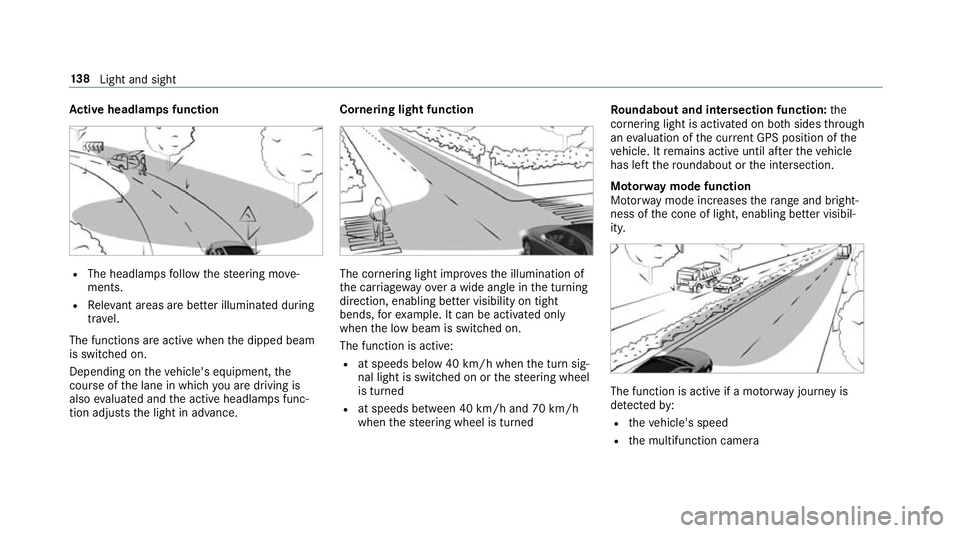
tive headlamps function R
The headlamps follow thesteering mo ve‐
ments.
R Releva nt areas are better illumina ted during
tra vel.
The functions are active when the dipped beam
is switched on.
Depending on theve hicle's equipment, the
cou rse of the lane in which you are driving is
also evaluated and the active headlamps func‐
tion adjusts the light in advance. Cornering light function
The cornering light impr
ovesth e illumination of
th e car riag ewa yove r a wide angle in the turning
direction, enabling better visibility on tight
bends, forex ample. It can be activated on ly
when the low beam is switched on.
The function is active:
R at speeds below 40 km/h when the turn sig‐
nal light is switched on or thesteering wheel
is turned
R at speeds between 40 km/h and 70 km/h
when thesteering wheel is turned Ro
undabout and intersection function: the
cornering light is acti vated on bo thsides thro ugh
an evaluation of the cur rent GPS position of the
ve hicle. It remains active until af terth eve hicle
has left thero undabout or the intersection.
Mo torw ay mode function
Mo torw ay mode increases thera nge and bright‐
ness of the cone of light, enabling better visibil‐
ity. The function is active if a mo
torw ay jou rney is
de tected by:
R theve hicle's speed
R the multifunction camera 13 8
Light and sight
Page 142 of 609
R
the GPS
The function is not active: R at speeds below 80 km/h.
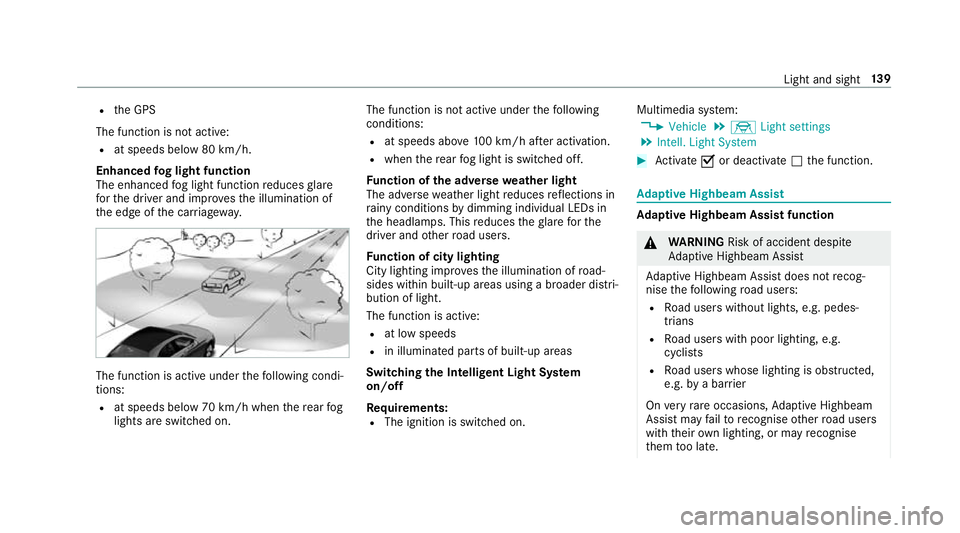
Enhanced fog light function
The enhanced fog light function reduces glare
fo rth e driver and impr ovesth e illumination of
th e edge of the car riag ewa y. The function is active under
thefo llowing condi‐
tions:
R at speeds below 70 km/h when there ar fog
lights are switched on. The function is not active under
thefo llowing
conditions:
R at speeds abo ve100 km/h af ter activation.
R when there ar fog light is switched off.
Fu nction of the ad versewe ather light
The adverse weather light reduces reflections in
ra iny conditions bydimming individual LEDs in
th e headlamps. This reduces theglare forthe
driver and other road users.
Fu nction of city lighting
City lighting impr ovesth e illumination of road‐
sides within built-up areas using a broader distri‐
bution of light.
The function is active:
R at low speeds
R in illuminated parts of built-up areas
Swit ching the Intelligent Light Sy stem
on/off
Re quirements:
R The ignition is switched on. Multimedia sy
stem:
0018 Vehicle 0019
÷ Light settings
0019 Intell. Light System 0007
Activate 0073or deacti vate 0053 the function. Ad
aptive Highbeam Assist Ad
aptive Highbeam Assist function 000A
WARNING Risk of accident despi te
Ad aptive Highbeam Assist
Ad aptive Highbeam Assist does not recog‐
nise thefo llowing road users:
R Road users without lights, e.g. pedes‐
trians
R Road users with poor lighting, e.g.
cyclists
R Road users whose lighting is obstructed,
e.g. bya bar rier
On very rare occasions, Adaptive Highbeam
Assist may failto recognise other road users
with their own lighting, or may recognise
th em too late. Light and sight
13 9
Page 143 of 609
In
this, or in similar situations, the automatic
main beam will not be deactivated or will be
activated despite the presence of other road
users. 0007
Alw ays obser vethe tra ffic carefully and
switch off the main beam in good time. Ad
aptive Highbeam Assist cannot take into
account road, weather or traf fic conditions.
De tection may be restricted in thefo llowing
cases:
R in poor visibilit y,e.g. fog, heavy rain or snow
R ifth ere is dirt on the sensors or the sensors
are obscured
Ad aptive Highbeam Assist is on lyan aid. You are
re sponsible for adju sting theve hicle's lighting to
th e pr evailing light, visibility and traf fic condi‐
tions. The
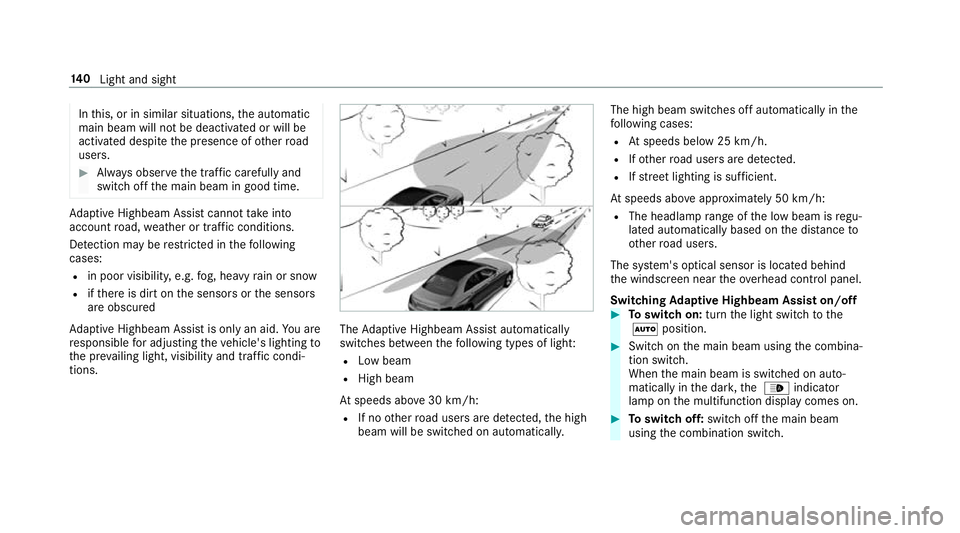
Adaptive Highbeam Assist automatically
swit ches between thefo llowing types of light:
R Low beam
R High beam
At speeds abo ve30 km/h:
R If no other road users are de tected, the high
beam will be switched on automaticall y.The high beam switches off automatically in
the
fo llowing cases:
R Atspeeds below 25 km/h.
R Ifot her road users are de tected.
R Ifstre et lighting is suf ficient.
At speeds abo veappr oximately 50 km/h:
R The headlamp range of the low beam is regu‐
lated automatically based on the dis tance to
ot her road users.
The sy stem's optical sensor is located behind
th e windscreen near theov erhead control panel.
Switching Adaptive Highbeam Assist on/off 0007
Toswitch on: turnthe light switch tothe
0058 position. 0007
Switch on the main beam using the combina‐
tion switch.
When the main beam is switched on auto‐
matically in the dar k,the 00CE indicator
lamp on the multifunction display comes on. 0007
Toswitch off: switch offthe main beam
using the combination switch. 14 0
Light and sight
Page 144 of 609
Ad
aptive Highbeam Assist Plus Ad
aptive Highbeam Assist Plus function 000A
WARNING Risk of accident despi te
Ad aptive Highbeam Assist Plus
Ad aptive Highbeam Assist Plus does not rec‐
ognise thefo llowing road users:
R Road users without lights, e.g. pedes‐
trians
R Road users with poor lighting, e.g.
cyclists
R Road users whose lighting is obstructed,
e.g. bya bar rier
On very rare occasions, Adaptive Highbeam
Assist Plus may failto recognise other road
users that ha velights, or may recognise
th em too late.
In this, or in similar situations, the automatic
main beam will not be deactivated or will be
activated despite the presence of other road
users. 0007
Alw ays obser vethe tra ffic carefully and
switch off the main beam in good time. Ad
aptive Highbeam Assist Plus cannot take into
account road, weather or traf fic conditions.
De tection may be restricted in thefo llowing
cases:
R in poor visibilit y,e.g. fog, heavy rain or snow
R ifth ere is dirt on the sensors or the sensors
are obscured
Ad aptive Highbeam Assist Plus is on lyan aid.
Yo u are responsible for adju sting theve hicle's
lighting tothe pr evailing light, visibility and traf‐
fi c conditions. The
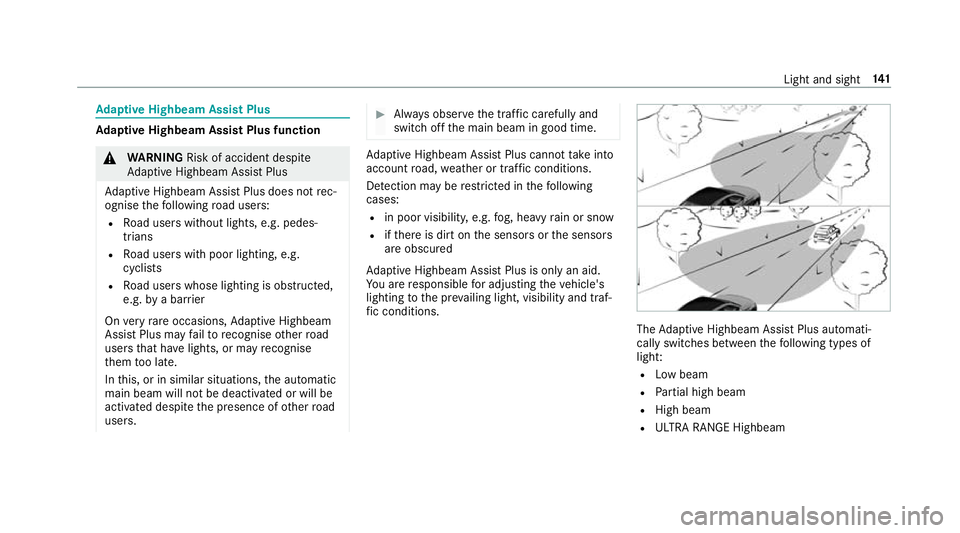
Adaptive Highbeam Assist Plus automati‐
cally swit ches between thefo llowing types of
light:
R Low beam
R Partial high beam
R High beam
R ULTRA RANGE Highbeam Light and sight
141
Page 145 of 609
ULTRA RANGE Highbeam increases
the bright‐
ness of the cone of light tothe legally permitted
maximum.
Pa rtial high beam uses the high beam toshine
past other road users rath er than dazzling them.
The vehicle in front is illuminated bythe low
beam.
At speeds below 25 km/h or when there is suf fi‐
cient stre et lighting:
R The partial high beam and the high beam
switch off automaticall y.
At speeds abo ve30 km/h:
R If no other road users are de tected, the high
beam is switched on automaticall y.
R Ifot her road users are de tected, the partial
high beam is switched on automaticall y.
At speeds abo ve40 km/h:
R If no other road users are de tected on a
st ra ight road, ULTRA RANGE Highbeam is
swit ched on automaticall y.
R Ifot her road users are de tected, the partial
high beam is switched on automaticall y.R
If highly reflective signs are de tected, ULTRA
RANGE Highbeam is switched off au tomati‐
cally.
At speeds abo veappr oximately 50 km/h:
R The headlamp range of the low beam is regu‐
lated automatically based on the dis tance to
ot her road users.
The sy stem's optical sensor is located behind
th e windscreen near theove rhead control panel.
Switching Adaptive Highbeam Assist Plus
on/off 0007
Toswitch on: turnthe light switch tothe
0058 position. 0007
Switch on the main beam using the combina‐
tion switch.
When the main beam is switched on auto‐
matically in the dar k,the 00CE indicator
lamp on the multifunction display will light
up. 0007
Toswitch off: switch offthe main beam
using the combination switch. Setting
the dipped beam Multimedia sy
stem:
0018 Vehicle 0019
÷ Light settings
0019 Dipped-beams 0007
Select Left-side traffic orRight-side traffic. Setting
theex terior lighting switch-off delay
time Multimedia sy
stem:
0018 Vehicle 0019
÷ Light settings
0019 Exterior light shut-off 0007
Set the switch-off delay time. Setting
the sur round lighting Multimedia sy
stem:
0018 Vehicle 0019
÷ Light settings
0019 Locator lighting 0007
Activate 0073or deacti vate 0053 the function.
If th e sur round lighting is swit ched on, theex te‐
ri or lighting remains lit for 40 seconds af terthe 14 2
Light and sight
Page 146 of 609
ve
hicle is unloc ked. When youstart theve hicle,
th e sur round lighting is deactivated and the
automatic driving lights are activated. Interior lighting
Ad
justing the in terior lighting Fr
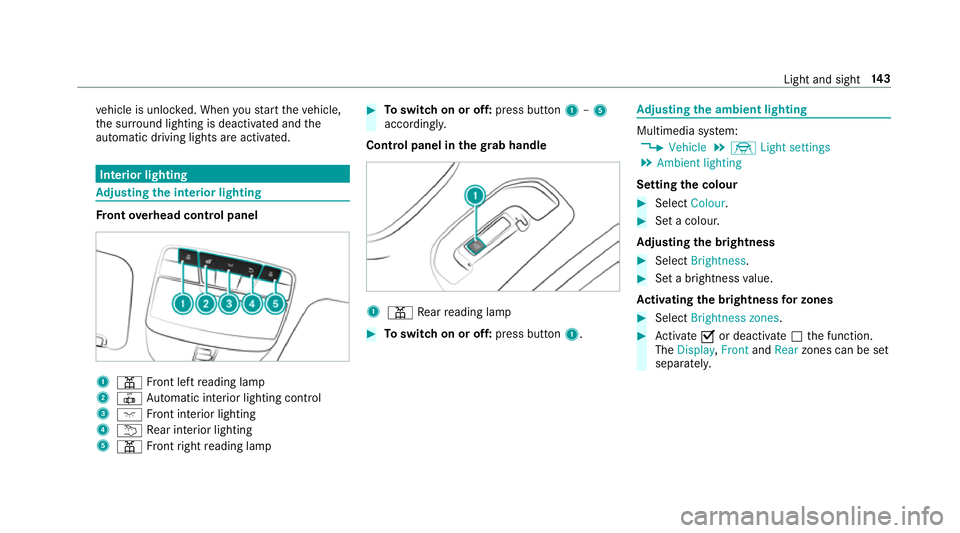
ont overhead control panel 1
003D Front left reading lamp
2 0033 Automatic interior lighting control
3 004A Front interior lighting
4 0042 Rear interior lighting
5 003D Front right reading lamp 0007
Toswitch on or off: press button1–5
accordingly.
Control panel in thegr ab handle 1
003D Rear reading lamp 0007
Toswitch on or off: press button1. Ad
justing the ambient lighting Multimedia sy
stem:
0018 Vehicle 0019
÷ Light settings
0019 Ambient lighting
Setting the colour 0007
Select Colour. 0007
Set a colour.
Ad justing the brightness 0007
Select Brightness . 0007
Set a brightness value.
Ac tivating the brightness for zones 0007
Select Brightness zones . 0007
Activate 0073or deacti vate 0053 the function.
The Display ,Front andRear zones can be set
separately. Light and sight
14 3
Page 147 of 609
Setting
the interior lighting switch-off delay
time Multimedia sy
stem:
0018 Vehicle 0019
÷ Light settings
0019 Interior light shut-off 0007
Set the switch-off delay time. Changing bulbs (only
forve hicles with halo‐
ge n headla mps) Note
s onchanging bulbs 000A
WARNING Risk of bu rns from hot com‐
ponent parts whilst replacing a bulb
Bulbs, lamps and plugs can become very hot
during operation.
When replacing a bulb, you could burn your‐
self on these component parts. 0007
Allow the component parts tocool
down before replacing the bulb. R
Do not use a bulb if it has been dropped or if
itsglass has been sc ratched. The bulb may
ot herwise explode.
R Do not touch theglass bulb with your bare
hands.
R Protect bulbs from moisture and do not allow
bulbs tocome into contact wi thliquids. Overview of
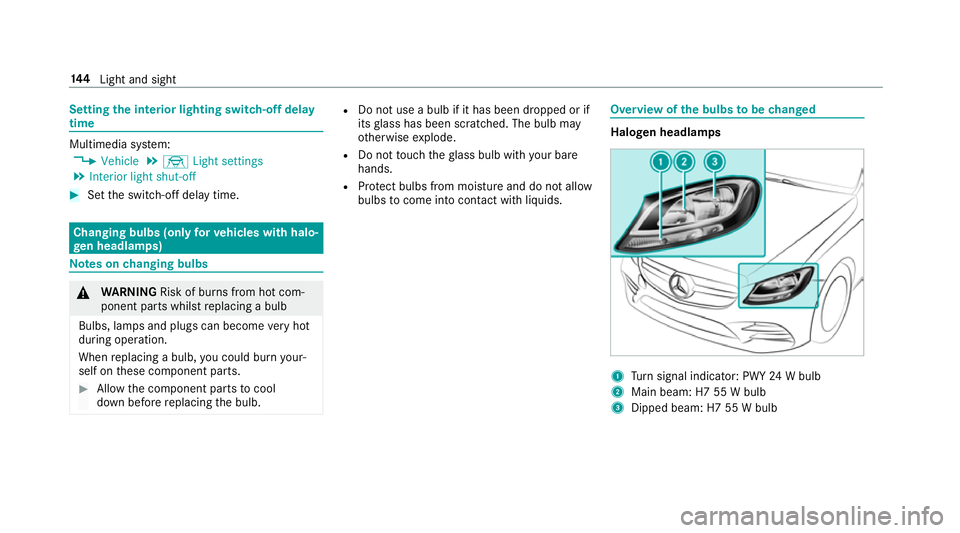
the bulbs tobe changed Halogen headlamps
1
Turn signal indicator: PWY 24W bulb
2 Main beam: H7 55 W bulb
3 Dipped beam: H7 55 W bulb 14 4
Light and sight
Page 148 of 609
Ta
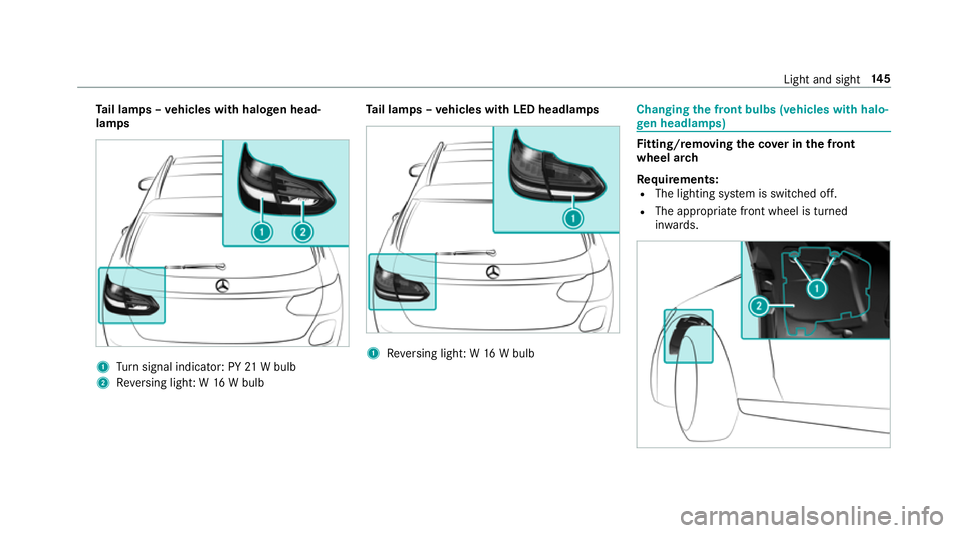
il lamps – vehicles with halogen head‐
lamps 1
Turn signal indicator: PY 21W bulb
2 Reversing light: W 16W bulb Ta
il lamps – vehicles with LED headlamps 1
Reversing light: W 16W bulb Changing
the front bulbs (vehicles with halo‐
ge n headla mps) Fi
tting/ removing the co ver in the front
wheel ar ch
Re quirements:
R The lighting sy stem is switched off.
R The appropriate front wheel is turned
in wa rds. Light and sight
14 5