battery MERCEDES-BENZ C-CLASS SALOON 2007 User Guide
[x] Cancel search | Manufacturer: MERCEDES-BENZ, Model Year: 2007, Model line: C-CLASS SALOON, Model: MERCEDES-BENZ C-CLASS SALOON 2007Pages: 377, PDF Size: 6.19 MB
Page 94 of 377

Seats
91
X
Make sure that the key is in position 2in
the ignition lock .
X Thigh cushion: use button 1to adjust the
thigh cushion to the desired position.
X Backrest contour in the lumbar region:
use button 2to adjust the lumbar regio n
support to the desired position.
X Backrest contour for the upper back:
use button 3to adjust the backrest con-
tour to the desired position.
X Backrest side bolsters :use button 4to
adjust the backrest side bolsters to the
desired position.
i If, after a certain amount of time, the seat
no longer has the desired contour, repeat
the adjustment. Seat heating*
The three red indicator lamps in the button
indicate the heating level you have selected . 1
Seat heating
i The system automatically switches down
from level 3to level 2after approximately
five minutes.
The system automatically switches down
from level 2to level 1after approximately
ten minutes.
The system automatically switches off
approximately 20 minutes after it is set to
level 1.
X Make sure that the key is in position 1or
2 in the ignition lock . X
To switch on: press button1repeatedly
until the desired heating level is set.
X To switch off: press button1repeatedly
until all the indicator lamps go out.
i If the battery voltage is too low, the seat
heating may switch off. One or more indi-
cator lamps will then light up once. Controls
* optional
204_AKB; 2; 3, en-GB
mkalafa
, 2007-06-26T23:11:51+02:00 - Seite 91
Page 97 of 377
Mirrors
94 Exterior mirrors
G
Risk of accident
The exterior mirrors reduce the size of the
image. Objects are actually closer than
they appear. You could misjudge the dis-
tance from vehicles driving behind and
cause an accident, e.g. when changing
lane. For this reason, make sure of the
actual distance from the vehicle driving
behind by glancing over your shoulder .
The convex exterior mirrors give a larger field
of vision.
At low outside temperatures, the exterior mir-
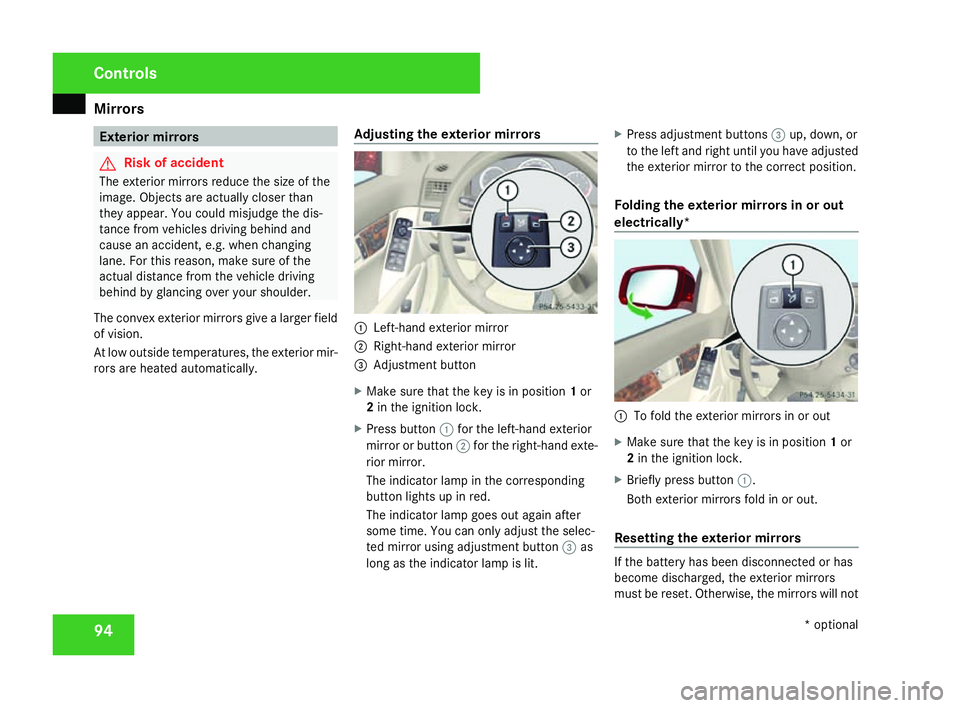
rors are heated automatically. Adjusting the exterior mirrors 1
Left-hand exterior mirror
2 Right-hand exterior mirror
3 Adjustment button
X Make sure that the key is in position 1or
2 in the ignition lock .
X Press button 1for the left-hand exterior
mirror or button 2for the right-hand exte-
rior mirror.
The indicator lamp in the corresponding
button lights up in red.
The indicator lamp goes out again after
some time. You can only adjust the selec-
ted mirror using adjustment button 3as
long as the indicator lamp is lit .X
Press adjustment buttons 3up, down, or
to the left and right until you have adjusted
the exterior mirror to the correct position .
Folding the exterior mirrors in or out
electrically * 1
To fold the exterior mirrors in or out
X Make sure that the key is in position 1or
2 in the ignition lock .
X Briefly press button 1.
Both exterior mirrors fold in or out.
Resetting the exterior mirrors If the battery has been disconnected or ha
s
become discharged, the exterior mirror s
must be reset. Otherwise, the mirrors will not Controls
* optional
204_AKB; 2; 3, en-GB
mkalafa,
2007-06-26T23:11:51+02:00 - Seite 94
Page 106 of 377
Light
s 103
!
Switch off the side lamps or parking lamp
when you leave the vehicle. This prevents
the battery from discharging.
Dipped-beam headlamps X
Make sure that the key is in position 2of
the ignition lock or that the engine is run-
ning.
X To switch on :turn the light switch to
B .
The dipped-beam headlamps, parking
lamps and licence plate lamps are switched
on. The parking lamp indicator lamp next to
the light switch is lit.
i On some country-specific vehicle models,
the dipped-beam headlamps come on as
soon as the ignition is switched on.
Daytime driving lights* On vehicles with a luxury multi-function steer-
ing wheel*, you can set the daytime driving
lights using the on-board computer
(
Y page 143). X
To switch on :turn the light switch to
M or* .
The dipped-beam headlamps, side lamps
and licence plate lighting are switched on
when the engine is running.
Automatic headlamp mode The side lamps, dipped-beam headlamps and
licence plate lighting are switched on or off
automatically, depending on the brightness of
the ambient light.
G
Risk of accident
If the light switch is set to *the head -
lamps may temporarily switch off due to
exposure to light, or the lights may not
come on automatically if it is foggy. This can
endanger yourself and others. Therefore,
turn the light switch to Bin the dark or
in fog.
The automatic headlamp feature is only an
aid. The driver is responsible for the vehicle
lighting at all times. G
Risk of accident
When it is dark or foggy, turn the light
switch quickly from *toB . You could otherwise cause an accident if the
headlamps were to switch off temporarily.
X To switch on :turn the light switch to
* .
The side lamps are switched on and off
automatically when the key is in position
1 in the ignition lock .
The dipped-beam headlamps, side lamps
and licence plate lighting are switched on
automatically when the engine is running.
When the parking lamp or dipped-beam
headlamps are switched on, the indicator
lamp next to the light switch lights up.
Front foglamps/rear foglamp G
Risk of accident
If you suspect that driving conditions will be
foggy, turn the light switch to Bbefore
you start your journey. Otherwise, your
vehicle may not be visible and you could
therefore endanger yourself and others. G
Risk of accident
When it is dark or foggy, turn the light
switch quickly from *toB . You Cont
rols
* optional
204_AKB; 2; 3, en-GB
mkalafa,
2007-06-26T23:11:51+02:00 - Seite 103 Z
Page 174 of 377
Thermotronic*
17
1
sliding sunroof* move back into their pre-
vious position.
The indicator lamp in the ,button is off.
Air-recirculation mode is deactivated.
i If you open a side window or the sliding/
tilting sunroof* or panorama sliding sun-
roof* manually after closing using the con-
venience closing feature, it will remain in
this position when opened using the con-
venience opening feature. Residual heat/auxiliary ventilation
It is possible to make use of the residual heat
of the engine to continue heating the station-
ary vehicle for up to 30 minutes after the
engine has been switched off. The heating
time depends on the coolant temperature and
on the interior temperature that has been set.
i If you activate residual heat at high tem-
peratures, only the ventilation is activated.
i The blower will run at a low speed regard-
less of the airflow setting.
X Make sure the key is in position 0in the
ignition lock or that it has been removed. X
To activate :press the Tbutton.
The indicator lamp in the Tbutton is lit.
The REST display message in the display is
lit.
X To deactivate: press theTbutton.
The indicator lamp in the Tbutton is off.
The REST display message in the display is
not lit.
i The residual heat/auxiliary ventilation is
automatically deactivated after about 30
minutes, or when:
R the ignition is switched on
R the battery voltage drops
R the coolant temperature is too lo w Cooling with air-dehumidification
G
Risk of accident
If you deactivate the cooling function with
air dehumidification, the vehicle will not be
cooled in warm weather and the air will not
be dehumidified. The windows could mis t
up more quickly. This may prevent you from
observing the traffic conditions, thereby
causing an accident. H
Environmental not
e
The cooling system uses the refrigerant
R134A. This refrigerant does not damage
the earth's ozone layer.
i Condensation may drip from the under-
side of the vehicle when Thermatic is in
cooling mode.
Cooling with dehumidification is operational
when the engine is running, and cools accord -
ing to the interior temperature selected. The
air inside the vehicle is also dried, thereby
preventing the windows from misting up.
X To activate :press the œbutton.
The indicator lamp in the œbutton is lit.
The cooling with dehumidification function
is activated. Controls
* optional
204_AKB; 2; 3, en-GB
mkalafa,
2007-06-26T23:11:51+02:00 - Seite 171 Z
Page 176 of 377
Sliding sunroof
173Rear window heating
G
Risk of accident
Clear all windows of ice or snow before set-
ting off. Impaired visibility could otherwise
endanger yourself and others.
i The rear window heating has a high cur-
rent draw. Therefore, switch it off as soon
as the rear window is free of snow and ice,
as it only switches itself off automatically
after between fifteen and thirty minutes.
i If the battery voltage is too low, the rear
window heating may switch off.
X Make sure that the key is in position 2in
the ignition lock .
X To switch on/off :press the ¯button.
The indicator lamp in the ¯switch is lit
or off. Sliding sunroof
Sliding/tilting sunroof*
G
Risk of injury
Never leave children unsupervised in the
vehicle. They could operate the sliding/tilt-
ing sunroof and injure themselves. Alway s
take the key with you when leaving the
vehicle, even if you only leave it for a short
time. G
Risk of injury
Make sure that nobody can become trap -
ped when you are opening and closing the
sliding/tilting sunroof. If danger threatens,
release the switch and push it briefly in any
direction to stop the sliding/tilting sunroof . G
Risk of injury
The glass in the sliding/tilting sunroof
could break in an accident. If you are not
wearing a seat belt, there is a risk that yo u
could be thrown through the opening in the
event of the vehicle overturning. Therefore,
always wear a seat belt to reduce the ris k
of injuries. !
Only open the sliding/tilting sunroof if it
is free of snow and ice. Otherwise, mal-
functions may occur.
Do not allow anything to protrude from the
sliding/tilting sunroof. The seals could oth-
erwise be damaged.
i Resonance noises can occur in addition
to the usual airflow noises when the slid -
ing/tilting sunroof is open. They are caused
by minor pressure fluctuations in the vehi-
cle interior .
Change the position of the sliding/tilting
sunroof or open a side window slightly to
reduce or eliminate these noises .
i It is also possible to open and close the
sliding/tilting sunroof from the outsid e
using the "Summer opening" (Y page 111 )
and "Convenience closing" (Y page 112 )
features respectively .
i If PRE-SAFE ®
has been activated, the slid-
ing/tilting sunroof closes automatically ,
leaving a small gap open . Cont
rols
* optional
204_AKB; 2; 3, en-GB
mkalafa,
2007-06-26T23:11:51+02:00 - Seite 173
Page 203 of 377
Features
200
X
Remove the cover of the aerial plug from
the back of the mobile phone and stow it in
a safe place. Example illustration
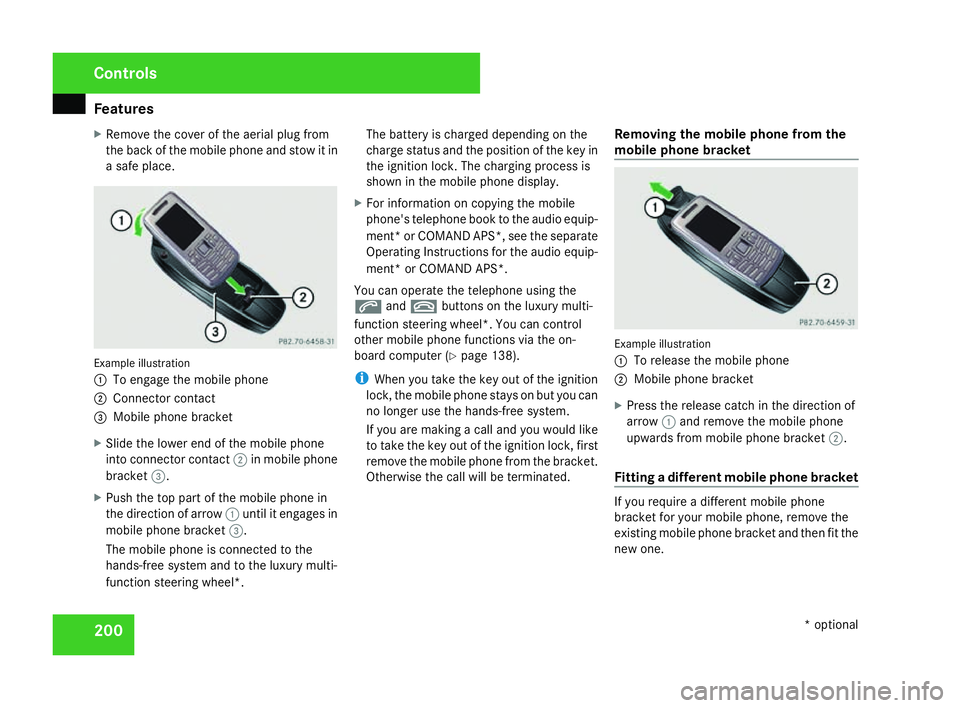
1
To engage the mobile phone
2 Connector contact
3 Mobile phone bracket
X Slide the lower end of the mobile phone
into connector contact 2in mobile phon e
bracket 3.
X Push the top part of the mobile phone in
the direction of arrow 1until it engages in
mobile phone bracket 3.
The mobile phone is connected to the
hands-free system and to the luxury multi-
function steering wheel*. The battery is charged depending on the
charge status and the position of the key in
the ignition lock. The charging process is
shown in the mobile phone display
.
X For information on copying the mobil e
phone's telephone book to the audio equip-
ment *or COMAND APS*, see the separate
Operating Instructions for the audio equip-
ment* or COMAND APS* .
You can operate the telephone using the
s andt buttons on the luxury multi-
function steering wheel*. You can contro l
other mobile phone functions via the on-
board computer (Y page 138).
i When you take the key out of the ignition
lock, the mobile phone stays on but you can
no longer use the hands-free system.
If you are making a call and you would like
to take the key out of the ignition lock, first
remove the mobile phone from the bracket .
Otherwise the call will be terminated. Removing the mobile phone from the
mobile phone bracket Example illustration
1
To release the mobile phone
2 Mobile phone bracket
X Press the release catch in the direction of
arrow 1and remove the mobile phon e
upwards from mobile phone bracket 2.
Fitting a different mobile phone bracket If you require a different mobile phon
e
bracket for your mobile phone, remove the
existing mobile phone bracket and then fit the
new one. Controls
* optional
204_AKB; 2; 3, en-GB
mkalafa,
2007-06-26T23:11:51+02:00 - Seite 200
Page 228 of 377
Trailer towing*
22
5 Trailer power suppl
y
When delivered from the factory, your vehi-
cle's trailer socket outlet is equipped with a
permanent power supply and a power supply
that is switched on via the ignition lock .
The permanent power supply is supplied via
trailer socket pin 9.
The power supply that is switched on via the
ignition lock is supplied via trailer socket pin
10.
! You can connect consumers with a power
rating of up to 240 W to the permanen t
power supply and up to 180 W to the power
supply that is switched on via the ignition
lock .
You must not charge a trailer battery using
the power supply.
You can obtain further information about
installing the trailer electrics from a qualified
specialist workshop, e.g. a Mercedes-Ben z
Service Centre.
X To switch the switched power supply on
or off: turn the key in the ignition lock to
position 2or 0, respectively. Trailer with 7-pin connector
If your trailer has a 7-pin connector, you can
connect it to the 13-pin socket on the ball
coupling using an adapter or, if necessary, an
adapter cable. Both of these can be obtained
at a qualified specialist workshop, e.g. at a
Mercedes-Benz Service Centre.
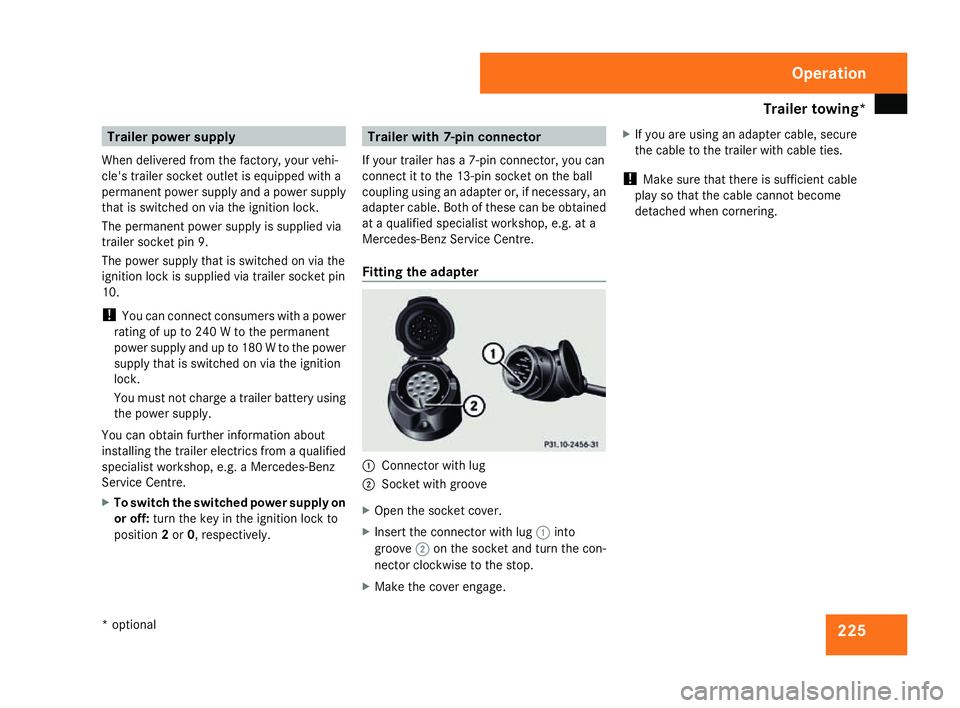
Fitting the adapter 1
Connector with lug
2 Socket with groove
X Open the socket cover.
X Insert the connector with lug 1into
groove 2on the socket and turn the con-
nector clockwise to the stop.
X Make the cover engage. X
If you are using an adapter cable, secure
the cable to the trailer with cable ties.
! Make sure that there is sufficient cable
play so that the cable cannot become
detached when cornering. Operation
* optional
204_AKB; 2; 3, en-GB
mkalafa
, 2007-06-26T23:11:51+02:00 - Seite 225
Page 229 of 377
Service
226 Service
Active Service System
ASSYST PLUS, the Active Service System,
tells you when the next service is due.
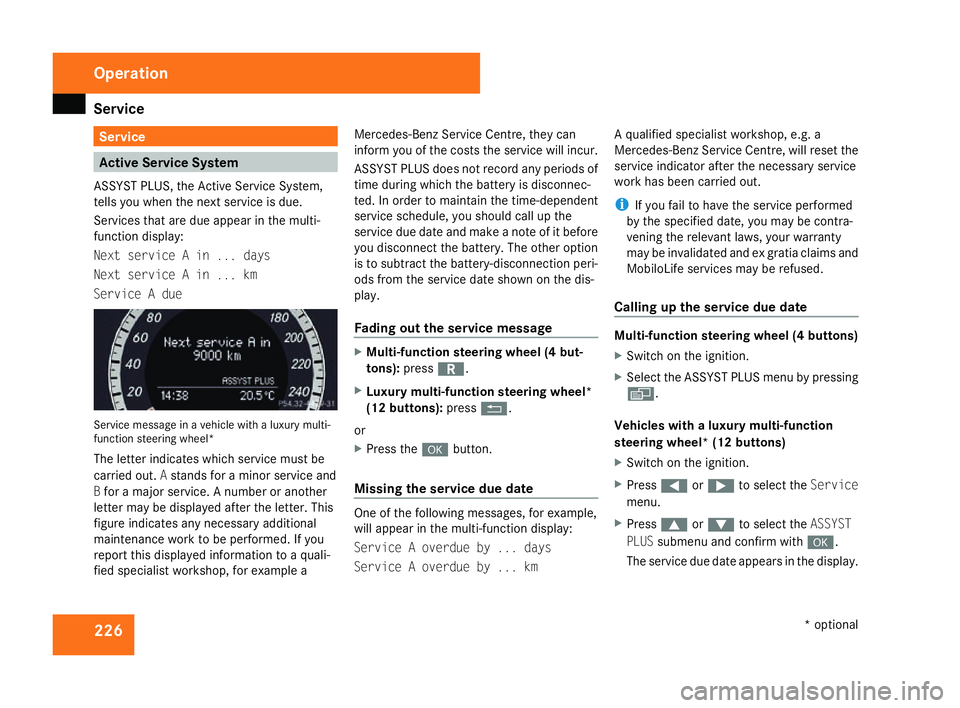
Services that are due appear in the multi-
function display:
Next service A in ... days
Next service A in ... km
Service A due Service message in a vehicle with a luxury multi-
function steering wheel*
The letter indicates which service must be
carried out. Astands for a minor service and
B for a major service. A number or another
letter may be displayed after the letter. This
figure indicates any necessary additiona l
maintenance work to be performed. If you
report this displayed information to a quali-
fied specialist workshop, for example aMercedes-Benz Service Centre, they can
inform you of the costs the service will incur.
ASSYST PLUS does not record any periods of
time during which the battery is disconnec-
ted. In order to maintain the time-dependent
service schedule, you should call up the
service due date and make a note of it befor
e
you disconnect the battery. The other option
is to subtract the battery-disconnection peri-
ods from the service date shown on the dis-
play.
Fading out the service message X
Multi-function steering wheel (4 but-
tons) :press í.
X Luxury multi-function steering wheel*
(12 buttons): pressL.
or
X Press the #button.
Missing the service due dat e One of the following messages, for example,
will appear in the multi-function display:
Service A overdue by ... days
Service A overdue by ... kmA qualified specialist workshop, e.g.
a
Mercedes-Benz Service Centre, will reset the
service indicator after the necessary service
work has been carried out.
i If you fail to have the service performed
by the specified date, you may be contra-
vening the relevant laws, your warranty
may be invalidated and ex gratia claims and
MobiloLife services may be refused .
Calling up the service due date Multi-function steering wheel (4 buttons)
X
Switch on the ignition.
X Select the ASSYST PLUS menu by pressing
è .
Vehicles with a luxury multi-function
steering wheel* (12 buttons)
X Switch on the ignition.
X Press (or& to select the Service
menu.
X Press $or% to select the ASSYST
PLU Ssubmenu and confirm with #.
The service due date appears in the display .Operation
* optional
204_AKB; 2; 3, en-GB
mkalafa,
2007-06-26T23:11:51+02:00 - Seite 226
Page 234 of 377
231
Where will I find...?
...........................232
Display messages ............................. 236
Troubleshooting ................................ 276
Locking/unlocking in an emer-
gency ................................................. 300
Resetting triggered NECK-PRO
head restraints .................................. 303
Changing the batteries .....................304
Changing the bulbs ...........................305
Replacing the wiper blades ..............312
Flat tyre ............................................. 313
Battery ............................................... 324
Jump-starting .................................... 328
Towing and tow-starting ..................329
Fuses .................................................. 332 Practical advice
204_AKB; 2; 3, en-GB
mkalafa,
2007-06-26T23:11:51+02:00 - Seite 231
Page 244 of 377
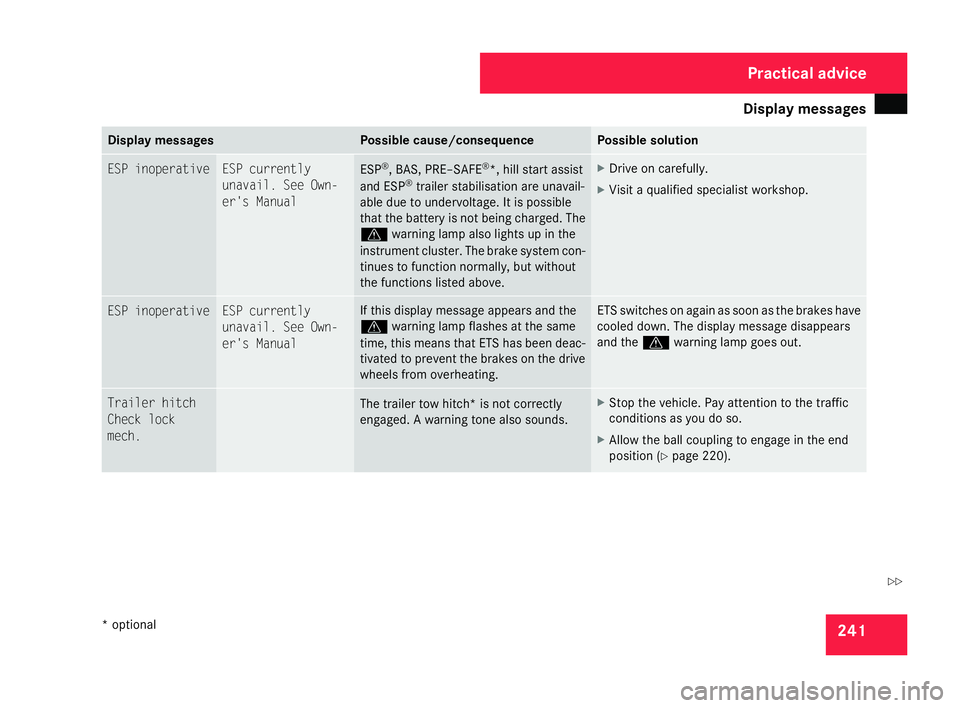
Display
messages 24
1 Display messages Possible cause/consequence Possible solution
ESP inoperative ESP currently
unavail. See Own
-
er's Manual ESP
®
, BAS, PRE–SAFE ®
*, hill start assist
and ESP ®
trailer stabilisation are unavail -
able due to undervoltage. It is possible
that the battery is not being charged. The
v warning lamp also lights up in th e
instrument cluster. The brake system con -
tinues to function normally, but without
the functions listed above . X
Drive on carefully.
X Visit a qualified specialist workshop. ESP inoperative ESP currently
unavail. See Own-
er's Manual If this display message appears and the
v
warning lamp flashes at the same
time, this means that ETS has been deac-
tivated to prevent the brakes on the driv e
wheels from overheating . ETS switches on again as soon as the brakes have
cooled down. The display message disappears
and the
vwarning lamp goes out. Trailer hitch
Check loc
k
mech. The trailer tow hitch* is not correctly
engaged. A warning tone also sounds. X
Stop the vehicle. Pay attention to the traffic
conditions as you do so.
X Allow the ball coupling to engage in the end
position (Y page 220). Practical advice
* optional
204_AKB; 2; 3, en-GB
mkalafa,
2007-06-26T23:11:51+02:00 - Seite 241 Z