ignition MERCEDES-BENZ C-CLASS SALOON 2007 Owner's Guide
[x] Cancel search | Manufacturer: MERCEDES-BENZ, Model Year: 2007, Model line: C-CLASS SALOON, Model: MERCEDES-BENZ C-CLASS SALOON 2007Pages: 377, PDF Size: 6.19 MB
Page 114 of 377
Side windows
111
You can disable the controls for the rear
side windows from the driver's seat
( Y page 66).
i If PRE-SAFE ®
has been activated, the side
windows close automatically, leaving a
small gap.
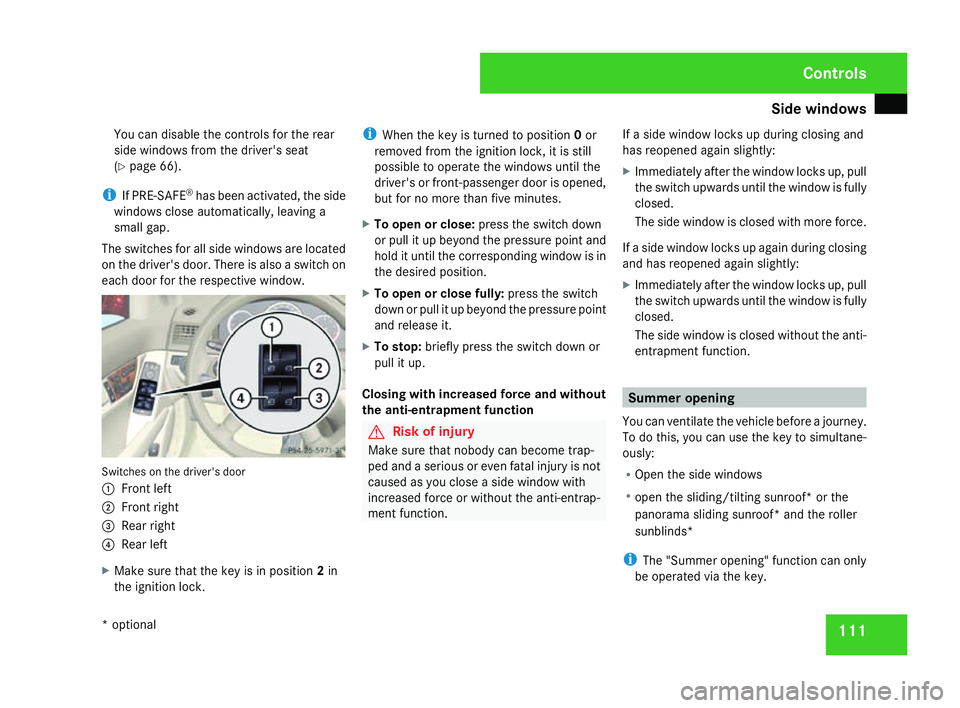
The switches for all side windows are located
on the driver's door. There is also a switch on
each door for the respective window. Switches on the driver's door
1
Front left
2 Front right
3 Rear right
4 Rear lef t
X Make sure that the key is in position 2in
the ignition lock . i
When the key is turned to position 0or
removed from the ignition lock, it is still
possible to operate the windows until the
driver's or front-passenger door is opened,
but for no more than five minutes.
X To open or close: press the switch down
or pull it up beyond the pressure point and
hold it until the corresponding window is in
the desired position.
X To open or close fully: press the switch
down or pull it up beyond the pressure point
and release it.
X To stop: briefly press the switch down or
pull it up .
Closing with increased force and without
the anti-entrapment function G
Risk of injury
Make sure that nobody can become trap -
ped and a serious or even fatal injury is not
caused as you close a side window with
increased force or without the anti-entrap-
ment function . If a side window locks up during closing and
has reopened again slightly:
X Immediately after the window locks up, pull
the switch upwards until the window is full y
closed.
The side window is closed with more force .
If a side window locks up again during closing
and has reopened again slightly:
X Immediately after the window locks up, pull
the switch upwards until the window is full y
closed.
The side window is closed without the anti -
entrapment function . Summer opening
You can ventilate the vehicle before a journey.
To do this, you can use the key to simultane-
ously:
R Open the side windows
R open the sliding/tilting sunroof* or the
panorama sliding sunroof* and the roller
sunblinds*
i The "Summer opening" function can only
be operated via the key. Controls
* optional
204_AKB; 2; 3, en-GB
mkalafa,
2007-06-26T23:11:51+02:00 - Seite 111
Page 117 of 377
Driving and pa
rking11
4
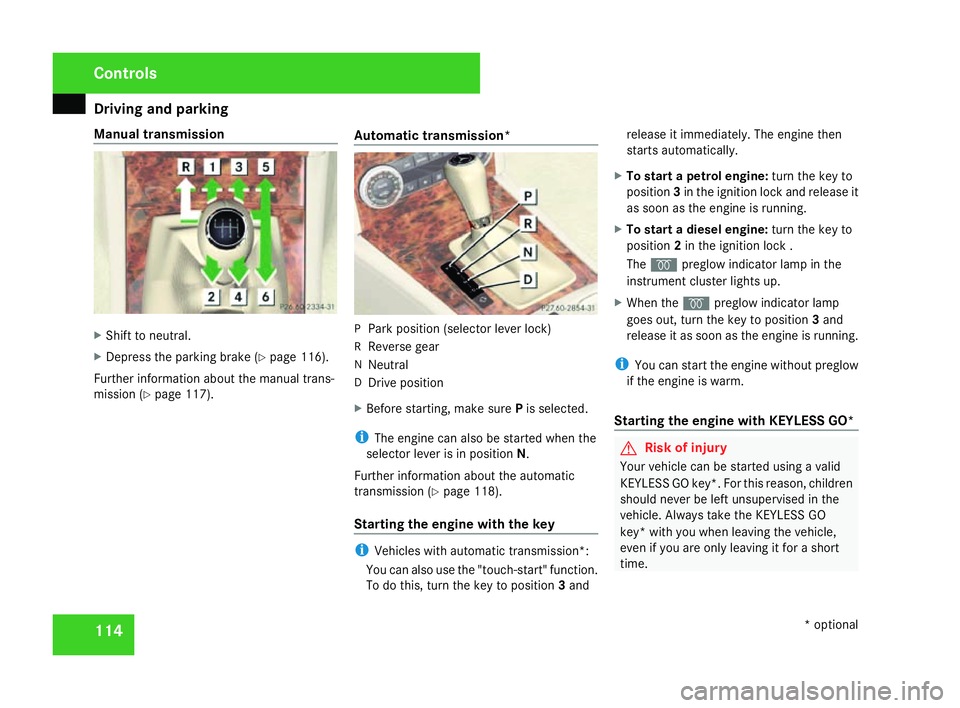
Manual transmission
X
Shift to neutral .
X Depress the parking brake (Y page 116).
Further information about the manual trans-
mission (Y page 117). Automatic transmission* P
Park position (selector lever lock)
R Reverse gear
N Neutral
D Drive positio n
X Before starting, make sure Pis selected.
i The engine can also be started when the
selector lever is in position N.
Further information about the automatic
transmission (Y page 118).
Starting the engine with the key i
Vehicles with automatic transmission*:
You can also use the "touch-start" function.
To do this, turn the key to position 3and release it immediately. The engine then
starts automatically.
X To start a petrol engine :turn the key to
position 3in the ignition lock and release it
as soon as the engine is running.
X To start a diesel engine :turn the key to
position 2in the ignition lock .
The q preglow indicator lamp in the
instrument cluster lights up.
X When the qpreglow indicator lamp
goes out, turn the key to position 3and
release it as soon as the engine is running.
i You can start the engine without preglow
if the engine is warm.
Starting the engine with KEYLESS GO* G
Risk of injury
Your vehicle can be started using a valid
KEYLESS GO key*. For this reason, childre n
should never be left unsupervised in the
vehicle. Always take the KEYLESS GO
key* with you when leaving the vehicle,
even if you are only leaving it for a short
time. Controls
* optional
204_AKB; 2; 3, en-GB
mkalafa,
2007-06-26T23:11:51+02:00 - Seite 114
Page 118 of 377
Driving and pa
rking 11
5
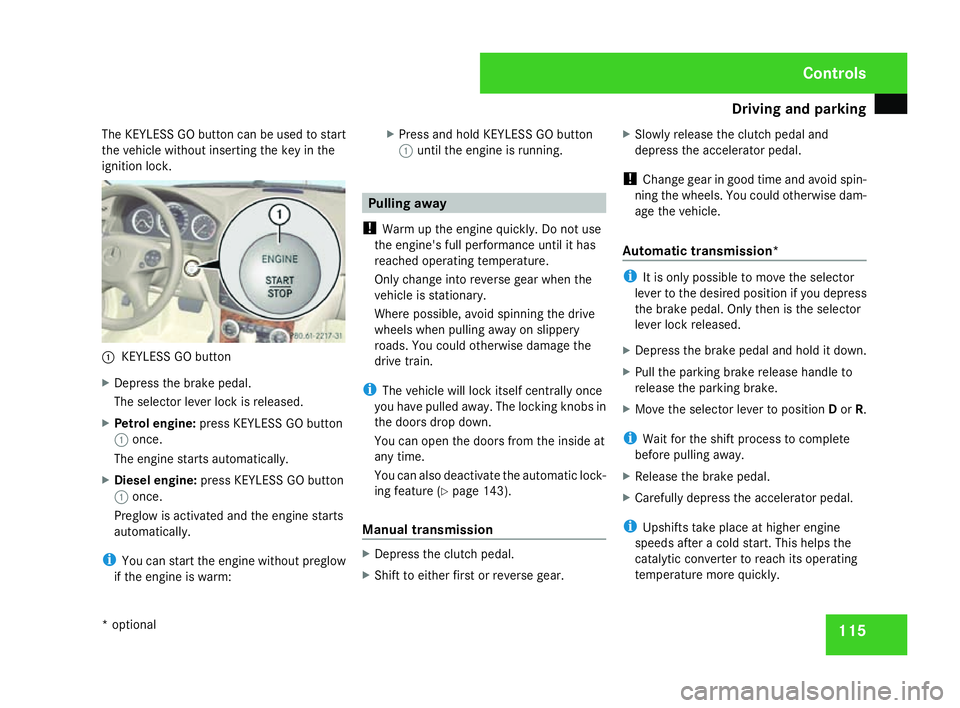
The KEYLESS GO button can be used to start
the vehicle without inserting the key in the
ignition lock. 1
KEYLESS GO button
X Depress the brake pedal.
The selector lever lock is released.
X Petrol engine: press KEYLESS GO button
1 once.
The engine starts automatically.
X Diesel engine: press KEYLESS GO butto n
1 once.
Preglow is activated and the engine starts
automatically.
i You can start the engine without preglow
if the engine is warm: X
Press and hold KEYLESS GO button
1 until the engine is running. Pulling awa
y
! Warm up the engine quickly. Do not use
the engine's full performance until it has
reached operating temperature.
Only change into reverse gear when the
vehicle is stationary.
Where possible, avoid spinning the drive
wheels when pulling away on slippery
roads. You could otherwise damage the
drive train.
i The vehicle will lock itself centrally once
you have pulled away. The locking knobs in
the doors drop down.
You can open the doors from the inside at
any time.
You can also deactivate the automatic lock-
ing feature (Y page 143).
Manual transmission X
Depress the clutch pedal.
X Shift to either first or reverse gear. X
Slowly release the clutch pedal and
depress the accelerator pedal.
! Change gear in good time and avoid spin-
ning the wheels. You could otherwise dam-
age the vehicle.
Automatic transmission * i
It is only possible to move the selector
lever to the desired position if you depres s
the brake pedal. Only then is the selector
lever lock released.
X Depress the brake pedal and hold it down.
X Pull the parking brake release handle to
release the parking brake.
X Move the selector lever to position Dor R.
i Wait for the shift process to complet e
before pulling away.
X Release the brake pedal .
X Carefully depress the accelerator pedal.
i Upshifts take place at higher engine
speeds after a cold start. This helps the
catalytic converter to reach its operating
temperature more quickly. Controls
* optional
204_AKB; 2; 3, en-GB
mkalafa,
2007-06-26T23:11:51+02:00 - Seite 115
Page 119 of 377
Driving and pa
rking11
6 Parking
G
Risk of accident
Only remove the key from the ignition lock
when the vehicle is stationary since yo u
cannot steer the vehicle with the key
removed .
Never leave children unsupervised in the
vehicle. They could release the parking
brake. This could lead to a serious or fatal
accident. G
Risk of fire
Make sure that the exhaust system doe s
not under any circumstances come into
contact with easily ignitable material such
as dry grass or petrol. The material could
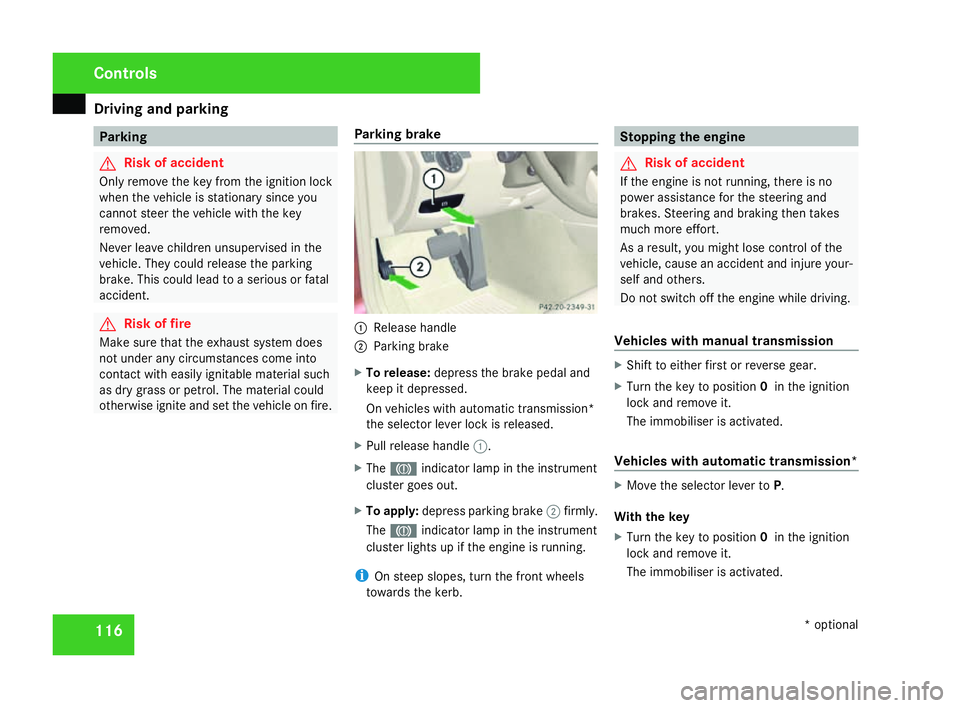
otherwise ignite and set the vehicle on fire. Parking brake 1
Release handle
2 Parking brake
X To release: depress the brake pedal and
keep it depressed.
On vehicles with automatic transmission*
the selector lever lock is released .
X Pull release handle 1.
X The 3 indicator lamp in the instrumen t
cluster goes out.
X To apply :depress parking brake 2firmly .
The 3 indicator lamp in the instrumen t
cluster lights up if the engine is running.
i On steep slopes, turn the front wheels
towards the kerb. Stopping the engine
G
Risk of accident
If the engine is not running, there is no
power assistance for the steering and
brakes. Steering and braking then takes
much more effort.
As a result, you might lose control of the
vehicle, cause an accident and injure your-
self and others.
Do not switch off the engine while driving .
Vehicles with manual transmission X
Shift to either first or reverse gear.
X Turn the key to position 0in the ignition
lock and remove it.
The immobiliser is activated.
Vehicles with automatic transmission* X
Move the selector lever to P.
With the key
X Turn the key to position 0in the ignition
lock and remove it.
The immobiliser is activated. Controls
* optional
204_AKB; 2; 3, en-GB
mkalafa,
2007-06-26T23:11:51+02:00 - Seite 116
Page 121 of 377
Transmission
11
8
X
Move the gear lever firmly to the left
beyond the point of resistance and then
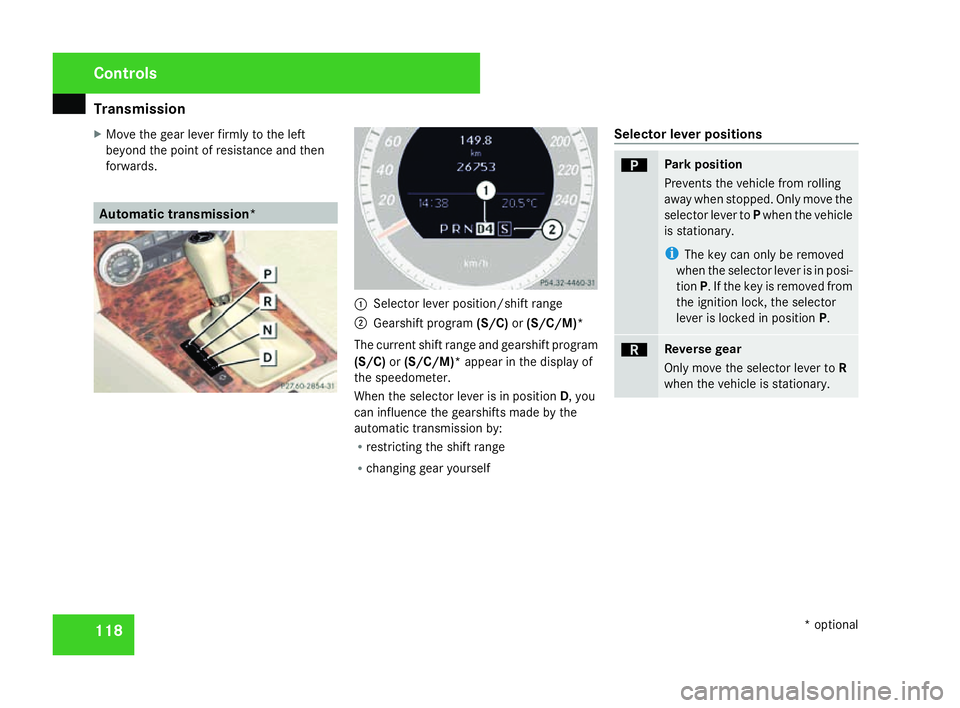
forwards. Automatic transmission*
1
Selector lever position/shift range
2 Gearshift program (S/C)or(S/C/M)*
The current shift range and gearshift program
(S/C) or(S/C/M)* appear in the display of
the speedometer.
When the selector lever is in position D, you
can influence the gearshifts made by the
automatic transmission by:
R restricting the shift range
R changing gear yoursel f Selector lever positions ì Park position
Prevents the vehicle from rolling
away when stopped. Only move the
selector lever to
Pwhen the vehicle
is stationary.
i The key can only be removed
when the selector lever is in posi-
tion P. If the key is removed from
the ignition lock, the selector
lever is locked in position P. í Reverse gear
Only move the selector lever to
R
when the vehicle is stationary. Controls
* optional
204_AKB; 2; 3, en-GB
mkalafa,
2007-06-26T23:11:51+02:00 - Seite 118
Page 126 of 377

Instrument cluste
r 123Instrument cluster
You will find an illustration of the instrumen t
cluster in the "At a glance" section
( Y page 28). G
Risk of accident
No messages can be displayed if instru -
ment cluster and/or the multi-function dis-
play fail .
This means that you will not see information
about the driving situation, such as the
speed, outside temperature, warning/indi-
cator lamps, display messages or system
failures. The vehicle's handling character-
istics may be affected. Adjust your driving
style and speed accordingly.
Immediately consult a qualified specialist
workshop which has the necessary special-
ist knowledge and tools to carry out the
work required. Mercedes-Benz recom-
mends that you use a Mercedes-Benz
Service Centre for this purpose. In particu-
lar, work relevant to safety or on safety-
related systems must be carried out at a
qualified specialist workshop. Activating the multi-function displa
y
X Switch on the ignition.
The multi-function display is also activate d
when you switch on the lights or open th e
driver's door. Adjusting the instrument cluster
lighting
1
Brightness control
X Brighter or dimmer: turn clockwise or
anti-clockwise. Coolant temperature gaug
e
The coolant temperature gauge is in the
instrument cluster on the left-hand side. The
coolant temperature may rise to 120 †under
normal operating conditions and if the con-
centration of antifreeze/corrosion inhibitor is
correct. The coolant temperature may rise to
the top end of the scale at high outside tem-
peratures and on long uphill stretches. Resetting the trip meter
Vehicles with a 4-button multi-function
steering wheel: you can reset the trip meter
in the standard displa ymenu
( Y page 128).
Vehicles with a 12-button luxury multi-
function steering wheel* :you can find th e
"Reset values" function in the Tripmenu in
the on-board computer (Y page 135). Controls
* optional
204_AKB; 2; 3, en-GB
mkalafa,
2007-06-26T23:11:51+02:00 - Seite 123
Page 128 of 377
On-board computer (vehicles with multi-function steering wheel, 4 buttons)
125On-board computer (vehicles with
multi-function steering wheel, 4 but-
tons)
The on-board computer is activated as soon
as you turn the key to position 2in the ignition
lock. You can use the on-board computer to
call up information relating to your vehicle
and to make and/or adjust settings. G
Risk of accident
Only use the on-board computer when roa d
and traffic conditions permit. You would
otherwise be distracted and unable to con-
centrate properly on driving, and could
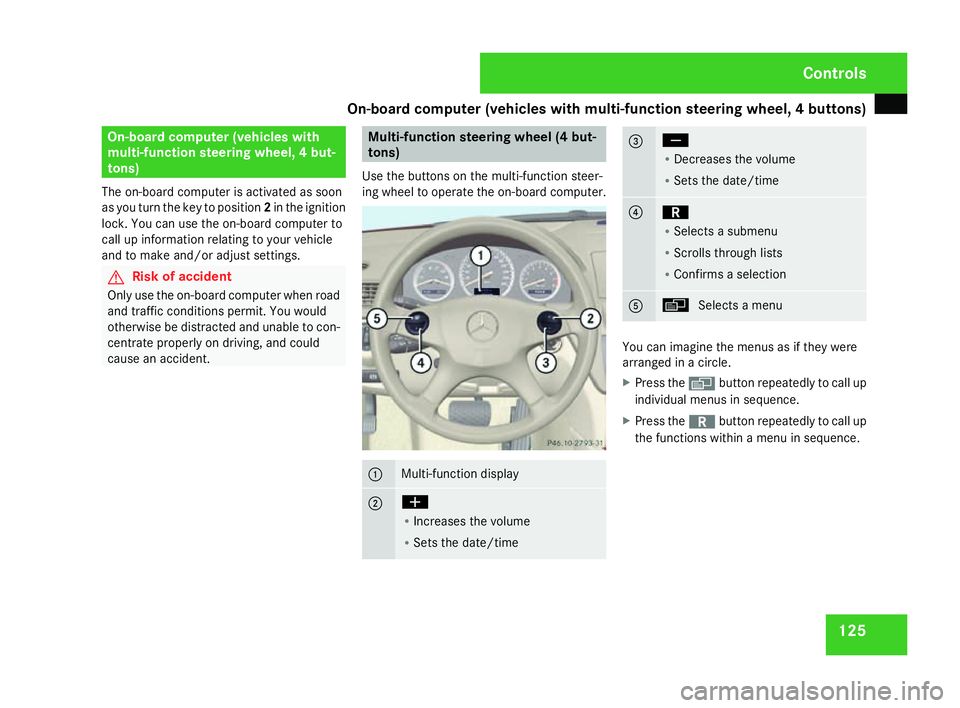
cause an accident. Multi-function steering wheel (4 but
-
tons)
Use the buttons on the multi-function steer-
ing wheel to operate the on-board computer. 1 Multi-function display
2 æ
R
Increases the volume
R Sets the date/tim e 3 ç
R
Decreases the volum e
R Sets the date/tim e 4 í
R
Selects a submenu
R Scrolls through lists
R Confirms a selection 5 è
Selects a menu You can imagine the menus as if they were
arranged in a circle.
X
Press the èbutton repeatedly to call up
individual menus in sequence.
X Press the íbutton repeatedly to call up
the functions within a menu in sequence. Controls
204_AKB; 2; 3, en-GB
mkalafa,
2007-06-26T23:11:51+02:00 - Seite 125
Page 132 of 377
On-board computer (vehicles with the luxury multi-function steering wheel*, 12 buttons)
129
X
Press the èbutton repeatedly until the
"Message memory" menu appears.
If there are no display messages, you will
see No messages. If there are messages,
the 2 Messages display, for instance, will
appear in the multi-function display.
X Press the íbutton to scroll through the
display messages.
i The possible display messages are
explained in the "Practical advice" section
( Y page 236).
All display messages are deleted when you
turn off the ignition.
Time/dat e This menu is only available on vehicles with-
out audio equipment or with Audio 20* .
X Press the èbutton repeatedly until the
"Time/date" menu appears.
X To set: use the íbutton to select the
display you want to change: hour, minutes,
day, month, year.
X Press æandç to set the selected
display. X
To save: press the íbutton.
The next display is selected. On-board computer (vehicles with the
luxury multi-function steering
wheel*, 12 buttons)
The on-board computer is activated as soon
as you turn the key to position 2in the ignition
lock. You can use the on-board computer to
call up information relating to your vehicle
and to make and/or adjust settings. G
Risk of accident
Only use the on-board computer when roa d
and traffic conditions permit. You would
otherwise be distracted and unable to con-
centrate properly on driving, and could
cause an accident. Controls
* optional
204_AKB; 2; 3, en-GB
mkalafa
, 2007-06-26T23:11:51+02:00 - Seite 129
Page 143 of 377
On-board computer (vehicles with the luxury multi-function steering wheel*, 12 buttons)
140 Service menu
i Menu overview (Y page 132), using the
on-board computer (Y page 130). In the
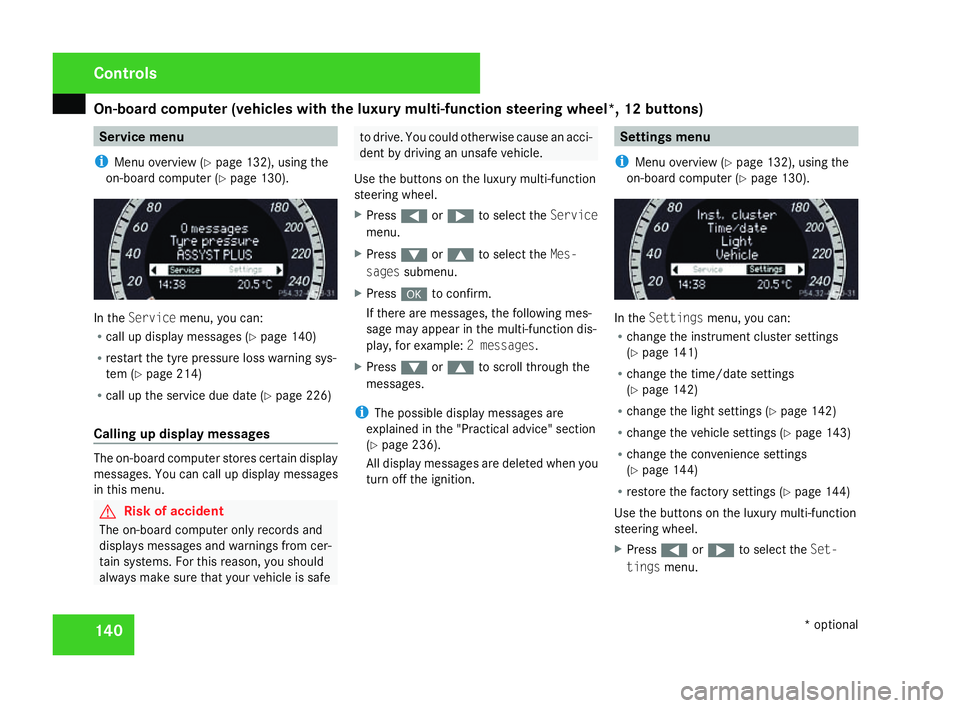
Servic emenu, you can:
R call up display messages (Y page 140 )
R restart the tyre pressure loss warning sys-
tem (Y page 214 )
R call up the service due date (Y page 226 )
Calling up display messages The on-board computer stores certain display
messages. You can call up display messages
in this menu. G
Risk of accident
The on-board computer only records and
displays messages and warnings from cer-
tain systems. For this reason, you shoul d
always make sure that your vehicle is safe to drive. You could otherwise cause an acci-
dent by driving an unsafe vehicle .
Use the buttons on the luxury multi-function
steering wheel.
X Press (or& to select the Service
menu.
X Press %or$ to select the Mes-
sages submenu.
X Press #to confirm.
If there are messages, the following mes -
sage may appear in the multi-function dis-
play, for example: 2 messages.
X Press %or$ to scroll through the
messages.
i The possible display messages are
explained in the "Practical advice" section
( Y page 236).
All display messages are deleted when you
turn off the ignition. Settings menu
i Menu overview (Y page 132), using the
on-board computer (Y page 130). In the
Settings menu, you can:
R change the instrument cluster settings
(Y page 141 )
R change the time/date settings
(Y page 142 )
R change the light settings (Y page 142 )
R change the vehicle settings (Y page 143 )
R change the convenience settings
(Y page 144 )
R restore the factory settings (Y page 144 )
Use the buttons on the luxury multi-function
steering wheel.
X Press (or& to select the Set-
tings menu. Controls
* optional
204_AKB; 2; 3, en-GB
mkalafa,
2007-06-26T23:11:51+02:00 - Seite 140
Page 146 of 377
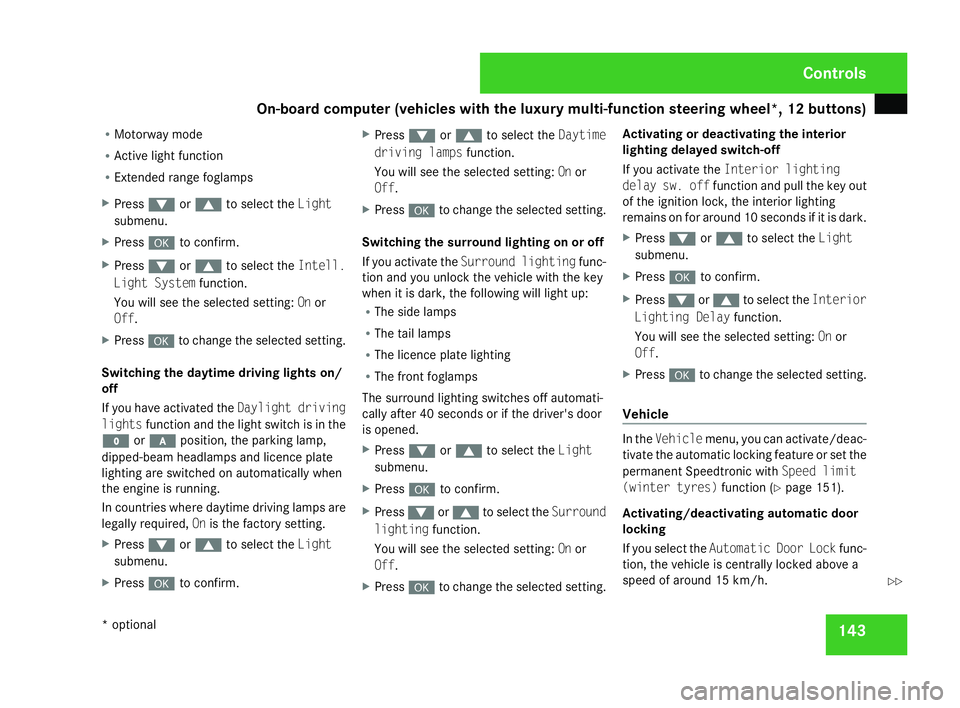
On-board computer (vehicles with the luxury multi-function steering wheel*, 12 buttons)
143
R
Motorway mode
R Active light functio n
R Extended range foglamps
X Press %or$ to select the Light
submenu.
X Press #to confirm.
X Press %or$ to select the Intell.
Light System function.
You will see the selected setting: Onor
Off.
X Press #to change the selected setting .
Switching the daytime driving lights on/
off
If you have activated the Daylight driving
lights function and the light switch is in the
M or* position, the parking lamp,
dipped-beam headlamps and licence plate
lighting are switched on automatically when
the engine is running.
In countries where daytime driving lamps are
legally required, Onis the factory setting.
X Press %or$ to select the Light
submenu.
X Press #to confirm. X
Press %or$ to select the Daytime
driving lamps function.
You will see the selected setting: Onor
Off.
X Press #to change the selected setting .
Switching the surround lighting on or off
If you activate the Surround lighting func-
tion and you unlock the vehicle with the key
when it is dark, the following will light up:
R The side lamps
R The tail lamps
R The licence plate lighting
R The front foglamps
The surround lighting switches off automati-
cally after 40 seconds or if the driver's door
is opened.
X Press %or$ to select the Light
submenu.
X Press #to confirm.
X Press %or$ to select the Surround
lighting function.
You will see the selected setting: Onor
Off .
X Press #to change the selected setting .Activating or deactivating the interior
lighting delayed switch-off
If you activate the
Interior lighting
delay sw. off function and pull the key out
of the ignition lock, the interior lighting
remains on for around 10 seconds if it is dark .
X Press %or$ to select the Light
submenu.
X Press #to confirm.
X Press %or$ to select the Interior
Lighting Delay function.
You will see the selected setting: Onor
Off .
X Press #to change the selected setting .
Vehicl e In the
Vehicle menu, you can activate/deac-
tivate the automatic locking feature or set the
permanent Speedtronic with Speed limit
(winter tyres) function(Y page 151).
Activating/deactivating automatic door
locking
If you select the Automatic Door Lock func-
tion, the vehicle is centrally locked above a
speed of around 15 km/h. Controls
* optional
204_AKB; 2; 3, en-GB
mkalafa,
2007-06-26T23:11:51+02:00 - Seite 143 Z