ignition MERCEDES-BENZ C-CLASS SALOON 2007 Repair Manual
[x] Cancel search | Manufacturer: MERCEDES-BENZ, Model Year: 2007, Model line: C-CLASS SALOON, Model: MERCEDES-BENZ C-CLASS SALOON 2007Pages: 377, PDF Size: 6.19 MB
Page 218 of 377
Tyres and wheels
21
5
X
Press the íbutton.
The following appears in the multi-function
display: Tyre press. OK?
Yes+ Cancel -
To confirm the restart of the tyre pressure
loss warning system:
X Press the +button.
The following appears in the multi-function
display: Run Flat Indicator restar -
ted.
After a teach-in period, the tyre pressure
loss warning system* will monitor the set
tyre pressures of all four tyres.
or
To cancel the restart of the tyre pressure
loss warning system:
X Press the -button.
The previous settings will not be changed.
Configuring with the luxury multi-func-
tion steering wheel*
X Make sure that the key is in position 2in
the ignition lock .
X Press (or& to select the Service
menu. X
Press $or% to select Tyre pres-
sur e.
X Press #.
The following appears in the multi-function
display: Run Flat Indicator active
Restart with OK
X Press #.
The following appears in the multi-function
display: Tyre press. now OK?
To confirm the restart of the tyre pressur e
loss warning system:
X Press $or% to select Yes.
X Press #.
The following appears in the multi-function
display: Run Flat Indicator restarted
After a teach-in period, the tyre pressure
loss warning system* will monitor the set
tyre pressures of all four tyres.
or
To cancel the restart of the tyre pressur e
loss warning system:
X Press $or% to select Cancel.
X Press #.
The previous settings will not be changed. Interchanging the wheels
G
Risk of accident
Interchange the front and rear wheels only
if they have the same dimensions, for exam-
ple size, offset, etc.
After every wheel interchange/change,
have the tightening torque checked at a
qualified specialist workshop that has the
necessary specialist knowledge and tools
to carry out the work required. Mercedes-
Benz recommends that you use a
Mercedes-Benz Service Centre for this pur-
pose. In particular, work relevant to safety
or on safety-related systems must be car-
ried out at a qualified specialist workshop.
The wheels could work loose if they are not
tightened to a tightening torque of
130 Nm.
For safety reasons, Mercedes-Benz recom -
mends that you only use wheel bolts of the
correct size which have been approved for
Mercedes-Benz vehicles.
The wheels may be interchanged every 5,000
km to 10,000 km depending on the degree of
tyre wear, provided that the vehicle has the
same size front and rear tyres. Do not reverse
the direction of tyre rotation. Operation
* optiona l
204_AKB; 2; 3, en-GB
mkalafa,
2007-06-26T23:11:51+02:00 - Seite 215 Z
Page 228 of 377
Trailer towing*
22
5 Trailer power suppl
y
When delivered from the factory, your vehi-
cle's trailer socket outlet is equipped with a
permanent power supply and a power supply
that is switched on via the ignition lock .
The permanent power supply is supplied via
trailer socket pin 9.
The power supply that is switched on via the
ignition lock is supplied via trailer socket pin
10.
! You can connect consumers with a power
rating of up to 240 W to the permanen t
power supply and up to 180 W to the power
supply that is switched on via the ignition
lock .
You must not charge a trailer battery using
the power supply.
You can obtain further information about
installing the trailer electrics from a qualified
specialist workshop, e.g. a Mercedes-Ben z
Service Centre.
X To switch the switched power supply on
or off: turn the key in the ignition lock to
position 2or 0, respectively. Trailer with 7-pin connector
If your trailer has a 7-pin connector, you can
connect it to the 13-pin socket on the ball
coupling using an adapter or, if necessary, an
adapter cable. Both of these can be obtained
at a qualified specialist workshop, e.g. at a
Mercedes-Benz Service Centre.
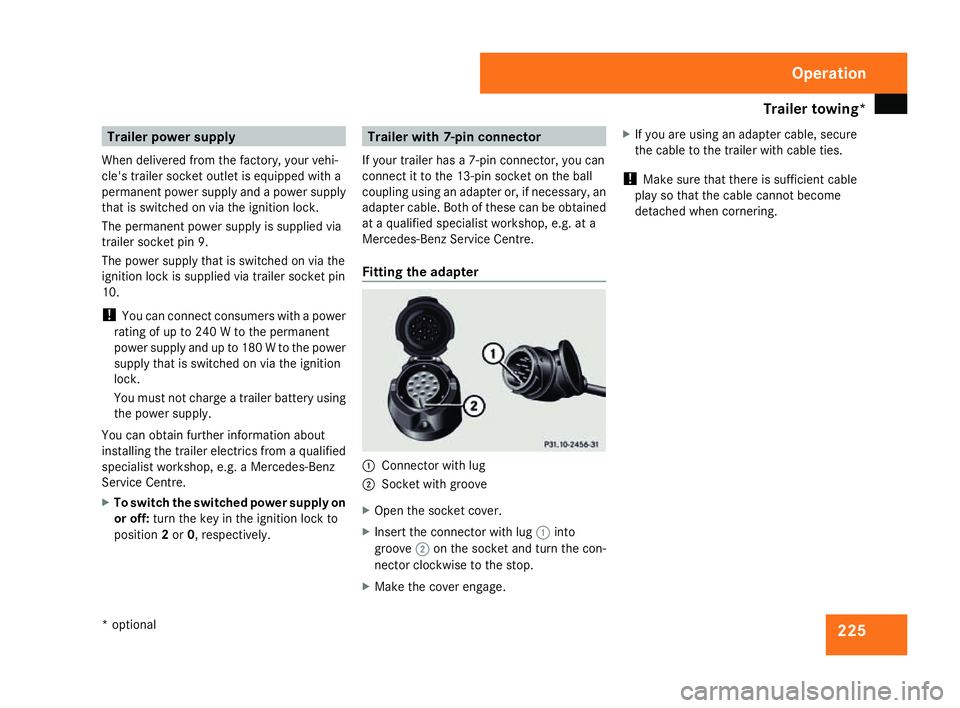
Fitting the adapter 1
Connector with lug
2 Socket with groove
X Open the socket cover.
X Insert the connector with lug 1into
groove 2on the socket and turn the con-
nector clockwise to the stop.
X Make the cover engage. X
If you are using an adapter cable, secure
the cable to the trailer with cable ties.
! Make sure that there is sufficient cable
play so that the cable cannot become
detached when cornering. Operation
* optional
204_AKB; 2; 3, en-GB
mkalafa
, 2007-06-26T23:11:51+02:00 - Seite 225
Page 229 of 377
Service
226 Service
Active Service System
ASSYST PLUS, the Active Service System,
tells you when the next service is due.
Services that are due appear in the multi-
function display:
Next service A in ... days
Next service A in ... km
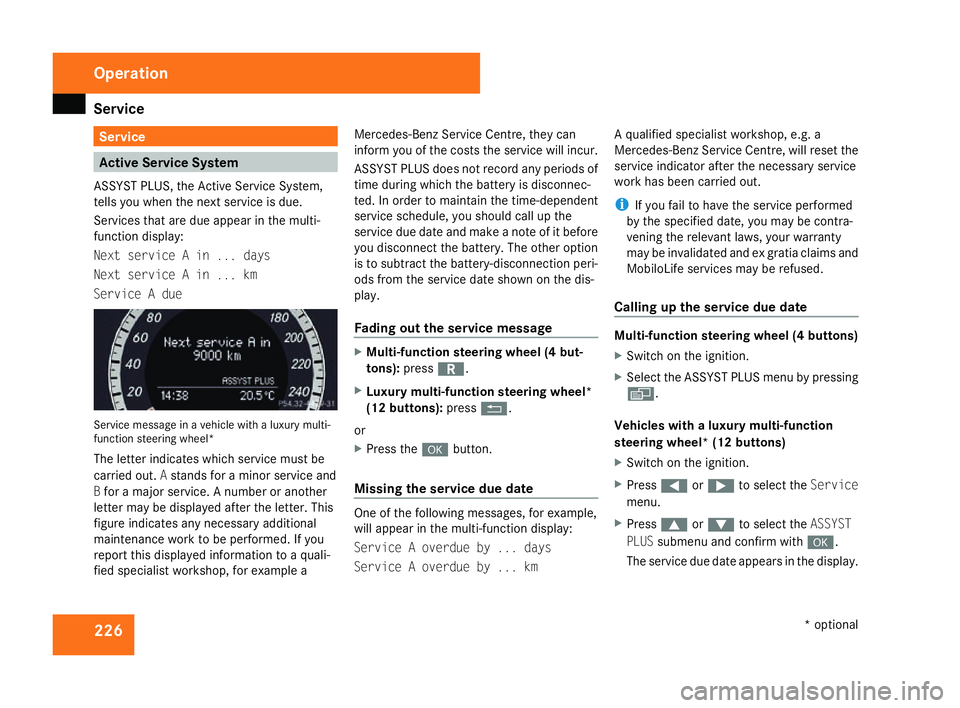
Service A due Service message in a vehicle with a luxury multi-
function steering wheel*
The letter indicates which service must be
carried out. Astands for a minor service and
B for a major service. A number or another
letter may be displayed after the letter. This
figure indicates any necessary additiona l
maintenance work to be performed. If you
report this displayed information to a quali-
fied specialist workshop, for example aMercedes-Benz Service Centre, they can
inform you of the costs the service will incur.
ASSYST PLUS does not record any periods of
time during which the battery is disconnec-
ted. In order to maintain the time-dependent
service schedule, you should call up the
service due date and make a note of it befor
e
you disconnect the battery. The other option
is to subtract the battery-disconnection peri-
ods from the service date shown on the dis-
play.
Fading out the service message X
Multi-function steering wheel (4 but-
tons) :press í.
X Luxury multi-function steering wheel*
(12 buttons): pressL.
or
X Press the #button.
Missing the service due dat e One of the following messages, for example,
will appear in the multi-function display:
Service A overdue by ... days
Service A overdue by ... kmA qualified specialist workshop, e.g.
a
Mercedes-Benz Service Centre, will reset the
service indicator after the necessary service
work has been carried out.
i If you fail to have the service performed
by the specified date, you may be contra-
vening the relevant laws, your warranty
may be invalidated and ex gratia claims and
MobiloLife services may be refused .
Calling up the service due date Multi-function steering wheel (4 buttons)
X
Switch on the ignition.
X Select the ASSYST PLUS menu by pressing
è .
Vehicles with a luxury multi-function
steering wheel* (12 buttons)
X Switch on the ignition.
X Press (or& to select the Service
menu.
X Press $or% to select the ASSYST
PLU Ssubmenu and confirm with #.
The service due date appears in the display .Operation
* optional
204_AKB; 2; 3, en-GB
mkalafa,
2007-06-26T23:11:51+02:00 - Seite 226
Page 231 of 377
Car
e 228
High-pressure cleaners G
Risk of accident
Do not use high-pressure cleaners with cir-
cular-jet nozzles (dirt grinders) to clean
your vehicle or - especially - the tyres. Yo u
could otherwise damage the tyres and
cause an accident.
! Observe the instructions issued by the
equipment manufacturer concerning the
distance to be maintained between the
nozzle of the high-pressure cleaner and the
vehicle (at least 30 cm).
Move the high-pressure cleaner nozzle
around when cleaning your vehicle .
Do not aim directly at any of the following:
R Tyres
R Door joint
R Electrical components
R Batter y
R Connectors
R Bulbs
R Seals
Damaged seals or electrical components
can lead to failures or leaks .Cleaning the wiper blades and the out
-
side of the windscreen G
Risk of injury
Turn the key to position 0in the ignition
lock before cleaning the windscreen or the
wiper blades. There is otherwise a risk of
the windscreen wipers being set in motion
and causing injury.
! Only fold the windscreen wipers away
from the windscreen when vertical, other-
wise you will damage the bonnet.
X Fold the wiper arms away from the wind-
screen until you feel them engage.
X Clean the windscreen and the wiper blades .
X Fold the windscreen wipers back agai n
before the ignition is switched on.
! Do not clean the wiper blades too often,
as otherwise the coating may come off.
This could cause wiper noise.
Cleaning the windows !
Do not use dry cloths, abrasive products,
solvents or cleaning agents containing sol-
vents to clean the inside of the windows. Clean the insides of the windows with
a
damp cloth or commercially-available glass
cleaner. Avoid touching the inside of the
rear windscreen and the side windows with
hard objects, e.g. ice scrapers or rings. You
could otherwise cause damage to the win-
dows, rear window heating or aerial on the
rear window.
i Anti-glare film retrofitted to the insides of
the windows could interfere with radio or
mobile phone reception, especially if it is
conductive or metal-coated film. Informa -
tion about anti-glare film can be obtained
from any Mercedes-Benz Service Centre.
Cleaning the headlamps X
Clean the headlamp lenses with a wet
sponge.
! Only use washer fluid which is suitable
for plastic lenses. Unsuitable washer fluid
could damage the plastic lenses of th e
headlamps.
Therefore, do not use the following:
R Dry cloths
R Abrasive cleaning agents Operatio
n
204_AKB; 2; 3, en-GB
mkalafa,
2007-06-26T23:11:51+02:00 - Seite 228
Page 240 of 377
Display
messages 23
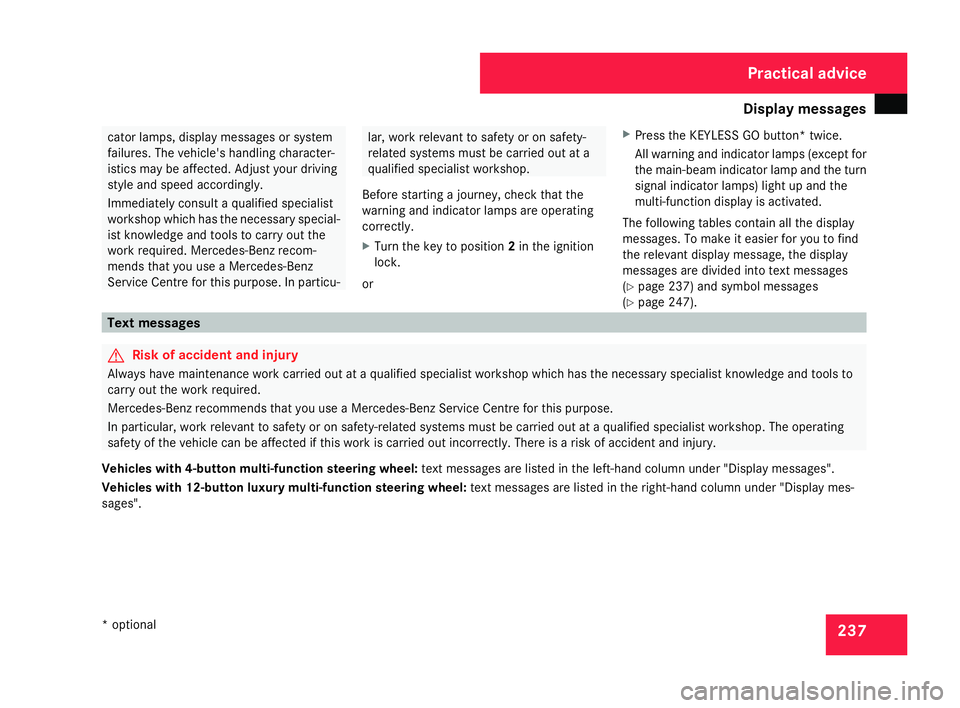
7 cator lamps, display messages or system
failures. The vehicle's handling character-
istics may be affected. Adjust your driving
style and speed accordingly .
Immediately consult a qualified specialist
workshop which has the necessary special-
ist knowledge and tools to carry out the
work required. Mercedes-Benz recom-
mends that you use a Mercedes-Benz
Service Centre for this purpose. In particu- lar, work relevant to safety or on safety-
related systems must be carried out at
a
qualified specialist workshop.
Before starting a journey, check that the
warning and indicator lamps are operatin g
correctly .
X Turn the key to position 2in the ignition
lock .
or X
Press the KEYLESS GO button* twice.
All warning and indicator lamps (except for
the main-beam indicator lamp and the turn
signal indicator lamps) light up and the
multi-function display is activated.
The following tables contain all the display
messages. To make it easier for you to find
the relevant display message, the display
messages are divided into text messages
( Y page 237) and symbol messages
( Y page 247). Text messages
G
Risk of accident and injury
Always have maintenance work carried out at a qualified specialist workshop which has the necessary specialist knowledge and tools to
carry out the work required .
Mercedes-Benz recommends that you use a Mercedes-Benz Service Centre for this purpose.
In particular, work relevant to safety or on safety-related systems must be carried out at a qualified specialist workshop. The operating
safety of the vehicle can be affected if this work is carried out incorrectly. There is a risk of accident and injury.
Vehicles with 4-button multi-function steering wheel: text messages are listed in the left-hand column under "Display messages".
Vehicles with 12-button luxury multi-function steering wheel: text messages are listed in the right-hand column under "Display mes-
sages". Practical advice
* optional
204_AKB; 2; 3, en-GB
mkalafa,
2007-06-26T23:11:51+02:00 - Seite 237
Page 246 of 377
Display
messages 24
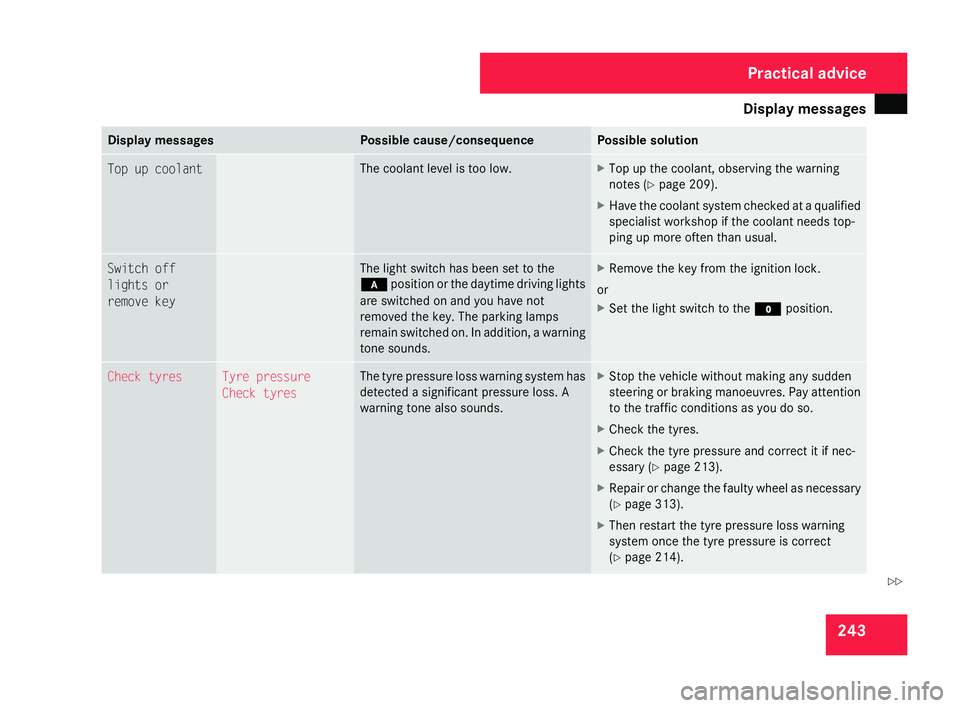
3 Display messages Possible cause/consequence Possible solution
Top up coolan
t The coolant level is too low. X
Top up the coolant, observing the warning
notes (Y page 209).
X Have the coolant system checked at a qualified
specialist workshop if the coolant needs top-
ping up more often than usual .Switch off
lights or
remove key The light switch has been set to the
*
position or the daytime driving lights
are switched on and you have not
removed the key. The parking lamps
remain switched on. In addition, a warning
tone sounds. X
Remove the key from the ignition lock.
or
X Set the light switch to the Mposition . Check tyres Tyre pressure
Check tyres The tyre pressure loss warning system has
detected a significant pressure loss.
A
warning tone also sounds. X
Stop the vehicle without making any sudden
steering or braking manoeuvres. Pay attention
to the traffic conditions as you do so.
X Check the tyres.
X Check the tyre pressure and correct it if nec-
essary (Y page 213).
X Repair or change the faulty wheel as necessar y
( Y page 313).
X Then restart the tyre pressure loss warning
system once the tyre pressure is correc t
( Y page 214). Practical advice
204_AKB; 2; 3, en-GB
mkalafa,
2007-06-26T23:11:51+02:00 - Seite 243 Z
Page 247 of 377
Display
messages 24
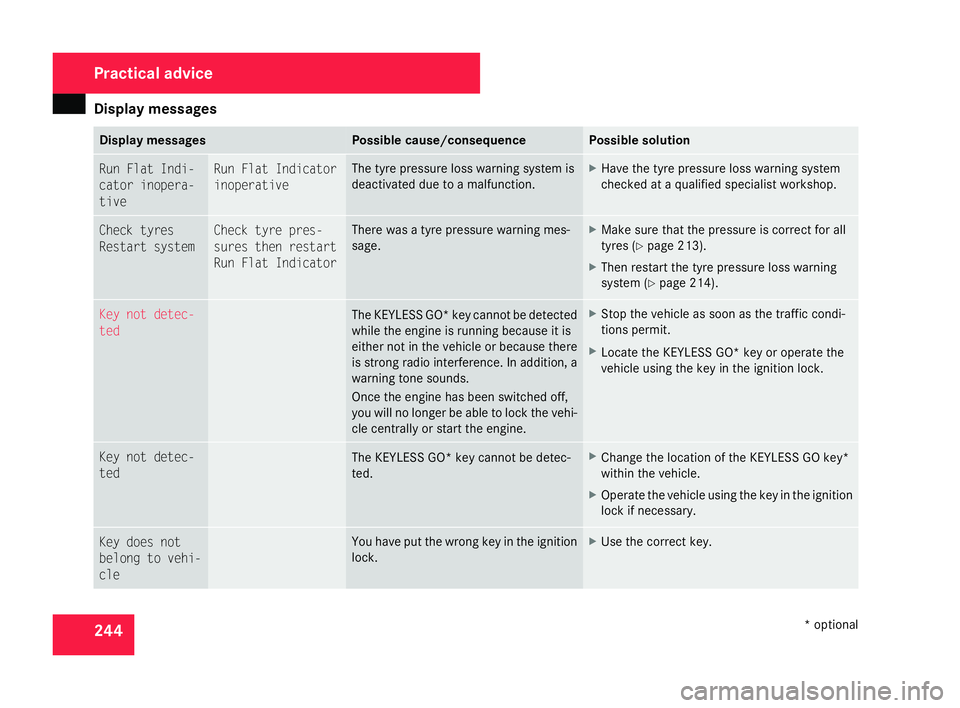
4 Display messages Possible cause/consequence Possible solution
Run Flat Indi-
cator inopera-
tiv
e Run Flat Indicator
inoperative The tyre pressure loss warning system is
deactivated due to a malfunction. X
Have the tyre pressure loss warning system
checked at a qualified specialist workshop .Check tyres
Restart system Check tyre pres-
sures then restart
Run Flat Indicator There was a tyre pressure warning mes-
sage. X
Make sure that the pressure is correct for all
tyres (Y page 213).
X Then restart the tyre pressure loss warning
system (Y page 214). Key not detec-
ted
The KEYLESS GO* key cannot be detected
while the engine is running because it is
either not in the vehicle or because ther
e
is strong radio interference. In addition, a
warning tone sounds.
Once the engine has been switched off ,
you will no longer be able to lock the vehi-
cle centrally or start the engine. X
Stop the vehicle as soon as the traffic condi -
tions permit.
X Locate the KEYLESS GO* key or operate the
vehicle using the key in the ignition lock. Key not detec-
ted
The KEYLESS GO* key cannot be detec-
ted. X
Change the location of the KEYLESS GO key*
within the vehicle .
X Operate the vehicle using the key in the ignition
lock if necessary. Key does not
belong to vehi-
cle You have put the wrong key in the ignition
lock. X
Use the correct key. Practical advice
* optional
204_AKB; 2; 3, en-GB
mkalafa,
2007-06-26T23:11:51+02:00 - Seite 244
Page 270 of 377
Display
messages 26
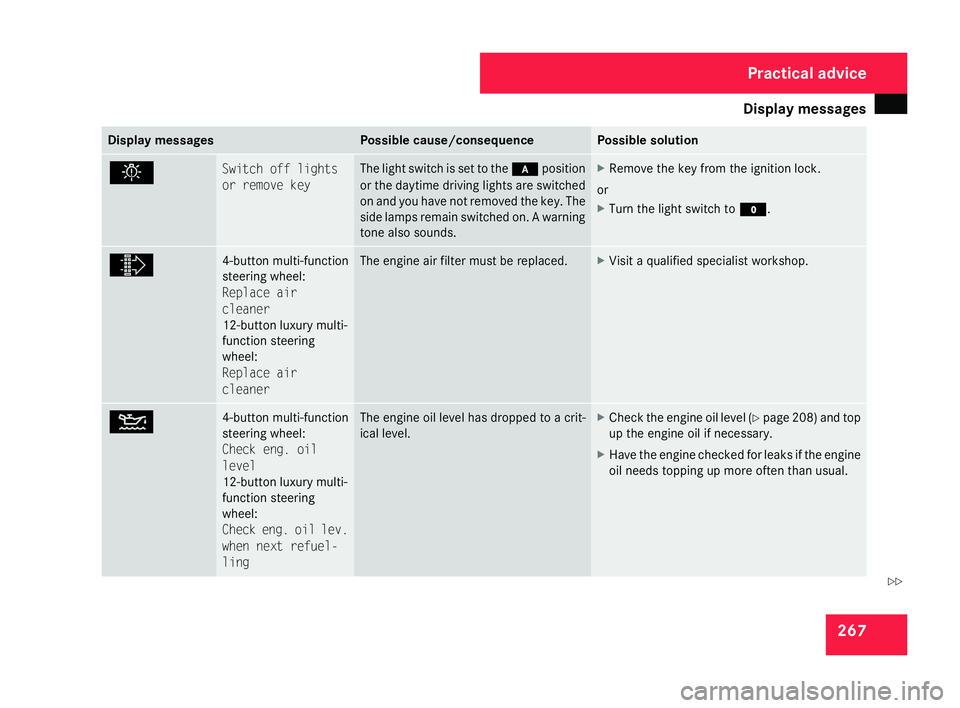
7 Display messages Possible cause/consequence Possible solution
. Switch off lights
or remove key The light switch is set to the
*position
or the daytime driving lights are switched
on and you have not removed the key. The
side lamps remain switched on. A warning
tone also sounds. X
Remove the key from the ignition lock.
or
X Turn the light switch to M. ò 4-button multi-function
steering wheel:
Replace air
cleane
r
12-button luxury multi-
function steering
wheel:
Replace air
cleane r The engine air filter must be replaced. X
Visit a qualified specialist workshop. N 4-button multi-function
steering wheel:
Check eng. oil
level
12-button luxury multi-
function steering
wheel:
Check eng. oil lev.
when next refuel
-
ling The engine oil level has dropped to a crit-
ical level. X
Check the engine oil level (Y page 208 )and top
up the engine oil if necessary .
X Have the engine checked for leaks if the engine
oil needs topping up more often than usual . Practical advice
204_AKB; 2; 3, en-GB
mkalafa,
2007-06-26T23:11:51+02:00 - Seite 267 Z
Page 271 of 377
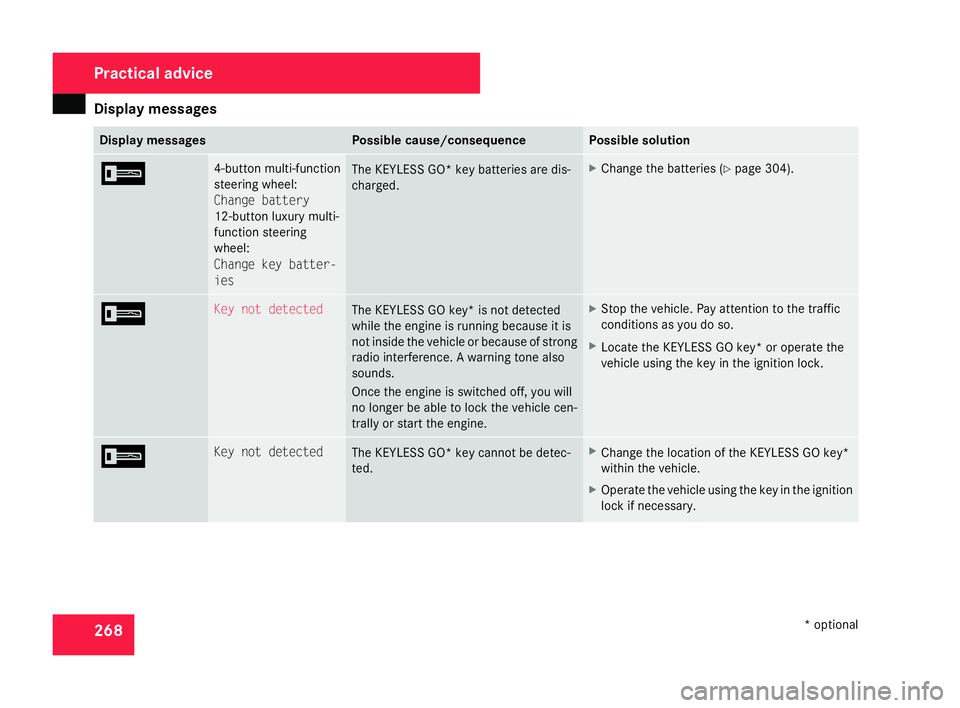
Display
messages 26
8 Display messages Possible cause/consequence Possible solution
I 4-button multi-function
steering wheel:
Change batter
y
12-button luxury multi-
function steering
wheel:
Change key batter -
ies The KEYLESS GO* key batteries are dis-
charged. X
Change the batteries (Y page 304). I Key not detected
The KEYLESS GO key* is not detected
while the engine is running because it is
not inside the vehicle or because of strong
radio interference. A warning tone also
sounds.
Once the engine is switched off, you will
no longer be able to lock the vehicle cen-
trally or start the engine. X
Stop the vehicle. Pay attention to the traffic
conditions as you do so.
X Locate the KEYLESS GO key* or operate the
vehicle using the key in the ignition lock. I Key not detected
The KEYLESS GO* key cannot be detec-
ted. X
Change the location of the KEYLESS GO key*
within the vehicle .
X Operate the vehicle using the key in the ignition
lock if necessary. Practical advice
* optional
204_AKB; 2; 3, en-GB
mkalafa,
2007-06-26T23:11:51+02:00 - Seite 268
Page 272 of 377
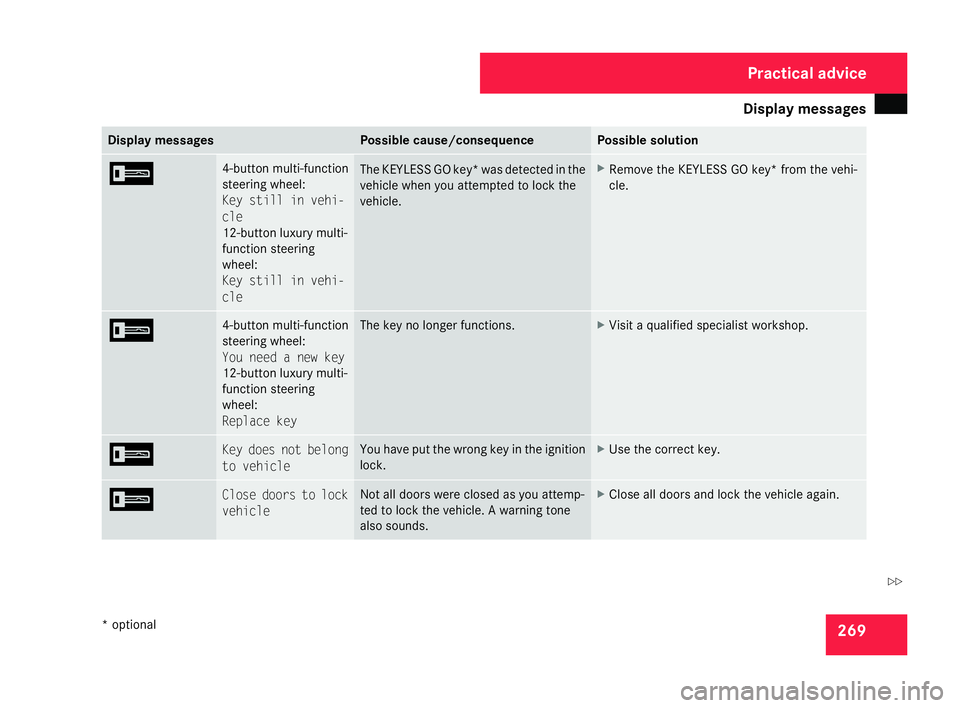
Display
messages 26
9 Display messages Possible cause/consequence Possible solution
I 4-button multi-function
steering wheel:
Key still in vehi-
cle
12-button luxury multi-
function steering
wheel:
Key still in vehi-
cle
The KEYLESS GO key* was detected in the
vehicle when you attempted to lock the
vehicle. X
Remove the KEYLESS GO key* from the vehi-
cle . I 4-button multi-function
steering wheel:
You need a new key
12-button luxury multi-
function steering
wheel:
Replace key The key no longer functions. X
Visit a qualified specialist workshop. I Key does not belong
to vehicle You have put the wrong key in the ignition
lock. X
Use the correct key. I Close doors to lock
vehicle Not all doors were closed as you attemp-
ted to lock the vehicle. A warning tone
also sounds. X
Close all doors and lock the vehicle again . Practical advice
* optional
204_AKB; 2; 3, en-GB
mkalafa,
2007-06-26T23:11:51+02:00 - Seite 269 Z