steering MERCEDES-BENZ C-CLASS SALOON 2007 Service Manual
[x] Cancel search | Manufacturer: MERCEDES-BENZ, Model Year: 2007, Model line: C-CLASS SALOON, Model: MERCEDES-BENZ C-CLASS SALOON 2007Pages: 377, PDF Size: 6.19 MB
Page 110 of 377
Light
s 107
R
controlling the brightness
R adapting the headlamp ranges
Motorway mode is activated if you are driving
faster than 110 km/h and do not make any
large steering movements for 1000 m. Your
vehicle then has two additional sources of
light inside the headlamps.
Extended range foglamp sThe extended range foglamps reduce the
glare experienced by the driver and improve
the illumination of the left-hand edge of the
carriageway when driving on the right-hand
side of the carriageway. In countries with left-
hand traffic, the light source for the extended
range foglamp function is in the front right-
hand lamp cluster.
X To switch on: switch on the rear foglamp.
The front foglamps and the rear foglamp
are switched on. The extended range fog -
lamps are activated if you are driving slower
than 70 km/h.
X To switch off: switch off the rear foglamp.
i The extended range foglamps are deacti-
vated automatically at speeds above
100 km/h. Interior lighting
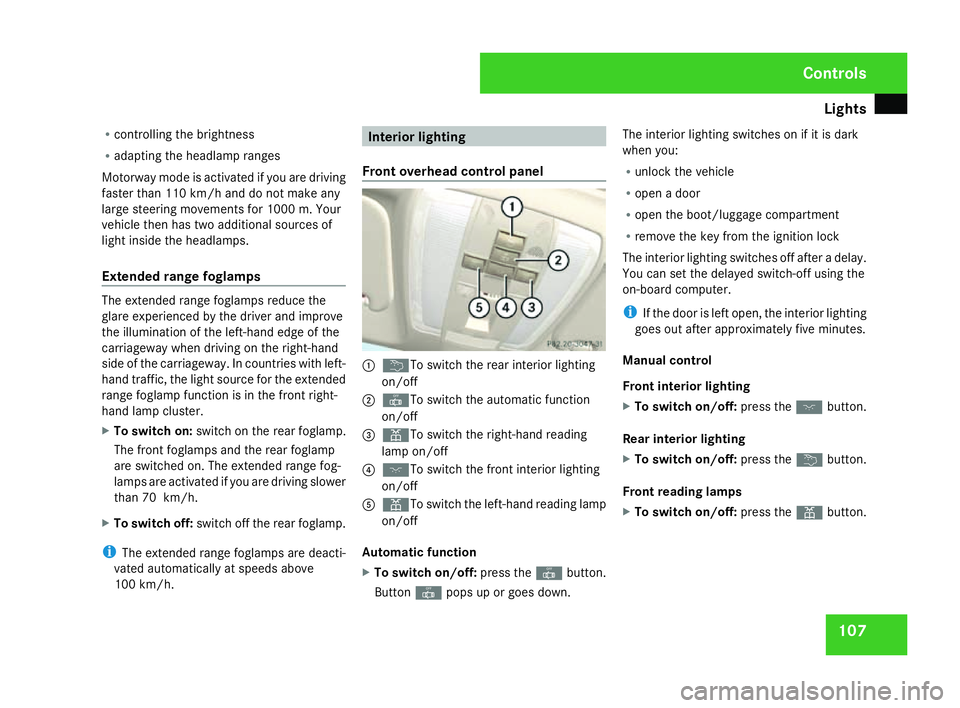
Front overhead control panel 1
¦ To switch the rear interior lighting
on/of f
2 ¥ To switch the automatic function
on/of f
3 X To switch the right-hand reading
lamp on/of f
4 ð To switch the front interior lighting
on/of f
5 X To switch the left-hand reading lamp
on/of f
Automatic function
X To switch on/off: press the¥button.
Button ¥pops up or goes down. The interior lighting switches on if it is dark
when you:
R
unlock the vehicl e
R open a door
R open the boot/luggage compartment
R remove the key from the ignition lock
The interior lighting switches off after a delay.
You can set the delayed switch-off using the
on-board computer .
i If the door is left open, the interior lighting
goes out after approximately five minutes.
Manual control
Front interior lightin g
X To switch on/off: press theðbutton.
Rear interior lighting
X To switch on/off: press the¦button.
Front reading lamps
X To switch on/off: press theXbutton. Controls
204_AKB; 2; 3, en-GB
mkalafa,
2007-06-26T23:11:51+02:00 - Seite 107
Page 119 of 377
Driving and pa
rking11
6 Parking
G
Risk of accident
Only remove the key from the ignition lock
when the vehicle is stationary since yo u
cannot steer the vehicle with the key
removed .
Never leave children unsupervised in the
vehicle. They could release the parking
brake. This could lead to a serious or fatal
accident. G
Risk of fire
Make sure that the exhaust system doe s
not under any circumstances come into
contact with easily ignitable material such
as dry grass or petrol. The material could
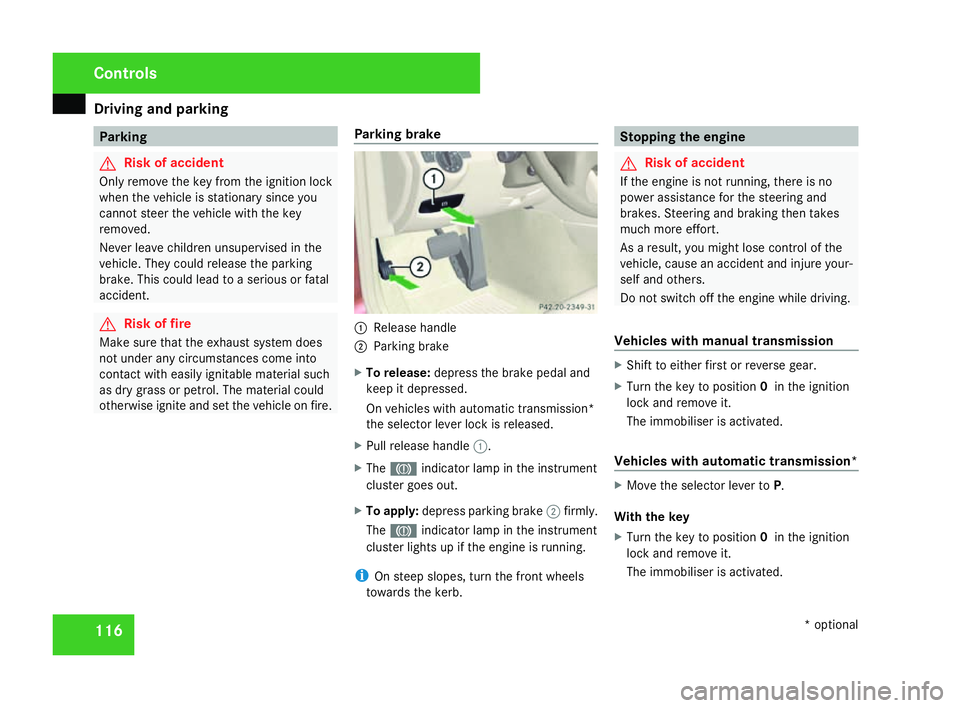
otherwise ignite and set the vehicle on fire. Parking brake 1
Release handle
2 Parking brake
X To release: depress the brake pedal and
keep it depressed.
On vehicles with automatic transmission*
the selector lever lock is released .
X Pull release handle 1.
X The 3 indicator lamp in the instrumen t
cluster goes out.
X To apply :depress parking brake 2firmly .
The 3 indicator lamp in the instrumen t
cluster lights up if the engine is running.
i On steep slopes, turn the front wheels
towards the kerb. Stopping the engine
G
Risk of accident
If the engine is not running, there is no
power assistance for the steering and
brakes. Steering and braking then takes
much more effort.
As a result, you might lose control of the
vehicle, cause an accident and injure your-
self and others.
Do not switch off the engine while driving .
Vehicles with manual transmission X
Shift to either first or reverse gear.
X Turn the key to position 0in the ignition
lock and remove it.
The immobiliser is activated.
Vehicles with automatic transmission* X
Move the selector lever to P.
With the key
X Turn the key to position 0in the ignition
lock and remove it.
The immobiliser is activated. Controls
* optional
204_AKB; 2; 3, en-GB
mkalafa,
2007-06-26T23:11:51+02:00 - Seite 116
Page 124 of 377
Transmission
12
1 Steering wheel gearshift paddles*
and manual gearshift program*
Steering wheel gearshift paddles It is possible to shift gear using either the
steering wheel gearshift paddles or the selec-
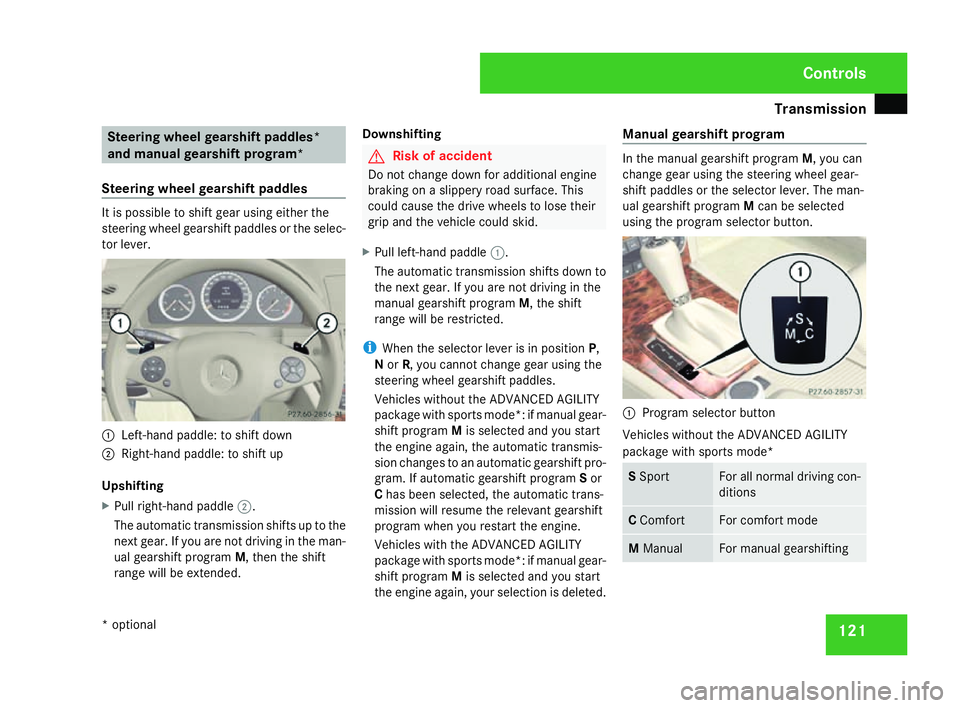
tor lever. 1
Left-hand paddle: to shift down
2 Right-hand paddle: to shift up
Upshifting
X Pull right-hand paddle 2.
The automatic transmission shifts up to the
next gear. If you are not driving in the man-
ual gearshift program M, then the shift
range will be extended. Downshifting G
Risk of accident
Do not change down for additional engine
braking on a slippery road surface. Thi s
could cause the drive wheels to lose thei r
grip and the vehicle could skid.
X Pull left-hand paddle 1.
The automatic transmission shifts down to
the next gear. If you are not driving in the
manual gearshift program M, the shift
range will be restricted.
i When the selector lever is in position P,
N or R, you cannot change gear using the
steering wheel gearshift paddles.
Vehicles without the ADVANCED AGILITY
package with sports mode*: if manual gear-
shift program Mis selected and you start
the engine again, the automatic transmis-
sion changes to an automatic gearshift pro-
gram. If automatic gearshift program Sor
C has been selected, the automatic trans-
mission will resume the relevant gearshift
program when you restart the engine.
Vehicles with the ADVANCED AGILITY
package with sports mode*: if manual gear-
shift program Mis selected and you start
the engine again, your selection is deleted. Manual gearshift progra
m In the manual gearshift program
M, you can
change gear using the steering wheel gear-
shift paddles or the selector lever. The man-
ual gearshift program Mcan be selected
using the program selector button. 1
Program selector button
Vehicles without the ADVANCED AGILITY
package with sports mode* S
Spor t For all normal driving con-
ditions
C
Comfort For comfort mod
e M
Manual For manual gearshifting Controls
* optional
204_AKB; 2; 3, en-GB
mkalafa,
2007-06-26T23:11:51+02:00 - Seite 121
Page 125 of 377
Transmission
12
2
i
On vehicles with the ADVANCED AGILITY
package with sports mode*, the program
S or Cis selected via the sport button
( Y page 152).
X To activate :press program selector but-
ton 1repeatedly until Mappears in th e
display.
If the selector lever is in position D, you can
shift up or down through the gears. The gear
currently selected and engaged is shown in
the display.
X To deactivate (vehicles with the
ADVANCED AGILITY package with
sports mode*) :press program selector
button 1repeatedly, until Sor Cappears.
To deactivate (vehicles without th e
ADVANCED AGILITY package with
sports mode*): press program selector
button 1.
M can no longer be seen in the display .
Upshifting
X Press the selector lever briefly to the right
towards D+.
or X
Pull the right-hand paddle on the steerin g
wheel (Y page 121).
The automatic transmission shifts up to the
next gear.
Downshifting G
Risk of accident
Do not change down for additional engine
braking on a slippery road surface. Thi s
could cause the drive wheels to lose thei r
grip and the vehicle could skid.
X Press the selector lever briefly to the left
towards D-.
or
X Pull the left-hand paddle on the steerin g
wheel (Y page 121).
The automatic transmission shifts down to
the next gear.
i For maximum acceleration, pull the left-
hand gearshift paddle until the transmis-
sion selects the optimum gear depending
on the speed.
Kickdown
You can also use kickdown for maximum
acceleration in manual gearshift program M. X
Depress the accelerator pedal beyond the
pressure point.
The transmission shifts to a lower gear
depending on the engine speed.
i It is not possible to shift gears using the
steering wheel gearshift paddles during
kickdown. Controls
* optional
204_AKB; 2; 3, en-GB
mkalafa
, 2007-06-26T23:11:51+02:00 - Seite 122
Page 126 of 377

Instrument cluste
r 123Instrument cluster
You will find an illustration of the instrumen t
cluster in the "At a glance" section
( Y page 28). G
Risk of accident
No messages can be displayed if instru -
ment cluster and/or the multi-function dis-
play fail .
This means that you will not see information
about the driving situation, such as the
speed, outside temperature, warning/indi-
cator lamps, display messages or system
failures. The vehicle's handling character-
istics may be affected. Adjust your driving
style and speed accordingly.
Immediately consult a qualified specialist
workshop which has the necessary special-
ist knowledge and tools to carry out the
work required. Mercedes-Benz recom-
mends that you use a Mercedes-Benz
Service Centre for this purpose. In particu-
lar, work relevant to safety or on safety-
related systems must be carried out at a
qualified specialist workshop. Activating the multi-function displa
y
X Switch on the ignition.
The multi-function display is also activate d
when you switch on the lights or open th e
driver's door. Adjusting the instrument cluster
lighting
1
Brightness control
X Brighter or dimmer: turn clockwise or
anti-clockwise. Coolant temperature gaug
e
The coolant temperature gauge is in the
instrument cluster on the left-hand side. The
coolant temperature may rise to 120 †under
normal operating conditions and if the con-
centration of antifreeze/corrosion inhibitor is
correct. The coolant temperature may rise to
the top end of the scale at high outside tem-
peratures and on long uphill stretches. Resetting the trip meter
Vehicles with a 4-button multi-function
steering wheel: you can reset the trip meter
in the standard displa ymenu
( Y page 128).
Vehicles with a 12-button luxury multi-
function steering wheel* :you can find th e
"Reset values" function in the Tripmenu in
the on-board computer (Y page 135). Controls
* optional
204_AKB; 2; 3, en-GB
mkalafa,
2007-06-26T23:11:51+02:00 - Seite 123
Page 127 of 377
Instrument cluste
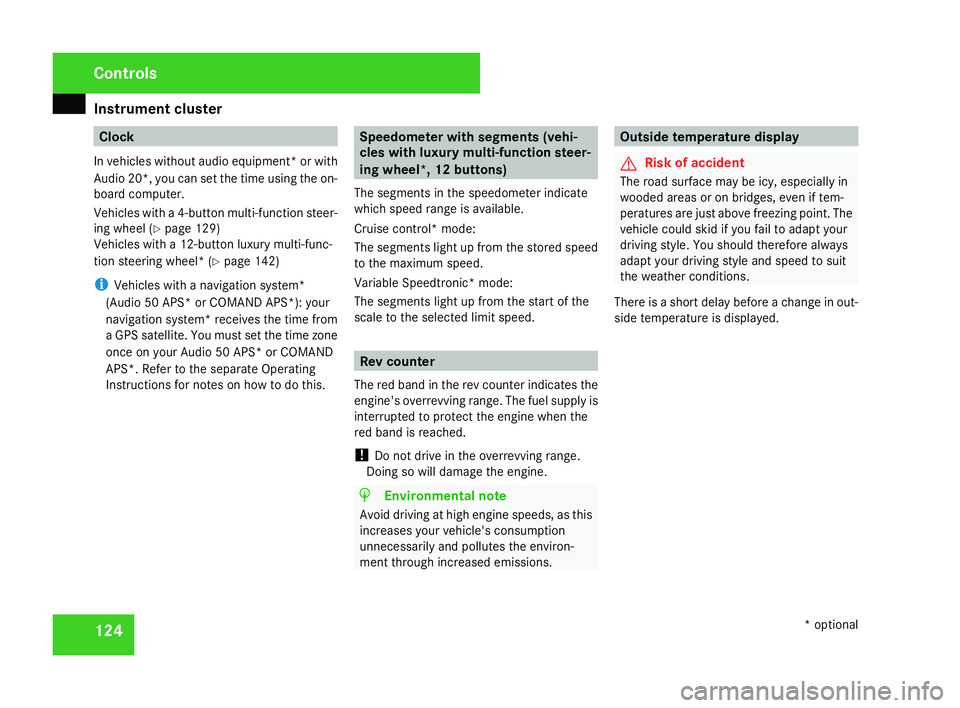
r124 Clock
In vehicles without audio equipment *or with
Audio 20*, you can set the time using the on-
board computer.
Vehicles with a 4-button multi-function steer-
ing wheel (Y page 129 )
Vehicles with a 12-button luxury multi-func-
tion steering wheel* (Y page 142 )
i Vehicles with a navigation system*
(Audio 50 APS* or COMAND APS*): your
navigation system *receives the time from
a GPS satellite. You must set the time zone
once on your Audio 50 APS* or COMAND
APS*. Refer to the separate Operating
Instructions for notes on how to do this. Speedometer with segments (vehi-
cles with luxury multi-function steer-
ing wheel*, 12 buttons)
The segments in the speedometer indicate
which speed range is available.
Cruise control* mode:
The segments light up from the stored speed
to the maximum speed.
Variable Speedtronic* mode:
The segments light up from the start of the
scale to the selected limit speed. Rev counter
The red band in the rev counter indicates the
engine's overrevving range. The fuel supply is
interrupted to protect the engine when the
red band is reached.
! Do not drive in the overrevving range.
Doing so will damage the engine. H
Environmental not
e
Avoid driving at high engine speeds, as thi s
increases your vehicle's consumption
unnecessarily and pollutes the environ -
ment through increased emissions. Outside temperature display
G
Risk of accident
The road surface may be icy, especially in
wooded areas or on bridges, even if tem-
peratures are just above freezing point. The
vehicle could skid if you fail to adapt your
driving style. You should therefore always
adapt your driving style and speed to suit
the weather conditions .
There is a short delay before a change in out-
side temperature is displayed. Controls
* optional
204_AKB; 2; 3, en-GB
mkalafa,
2007-06-26T23:11:51+02:00 - Seite 124
Page 128 of 377
On-board computer (vehicles with multi-function steering wheel, 4 buttons)
125On-board computer (vehicles with
multi-function steering wheel, 4 but-
tons)
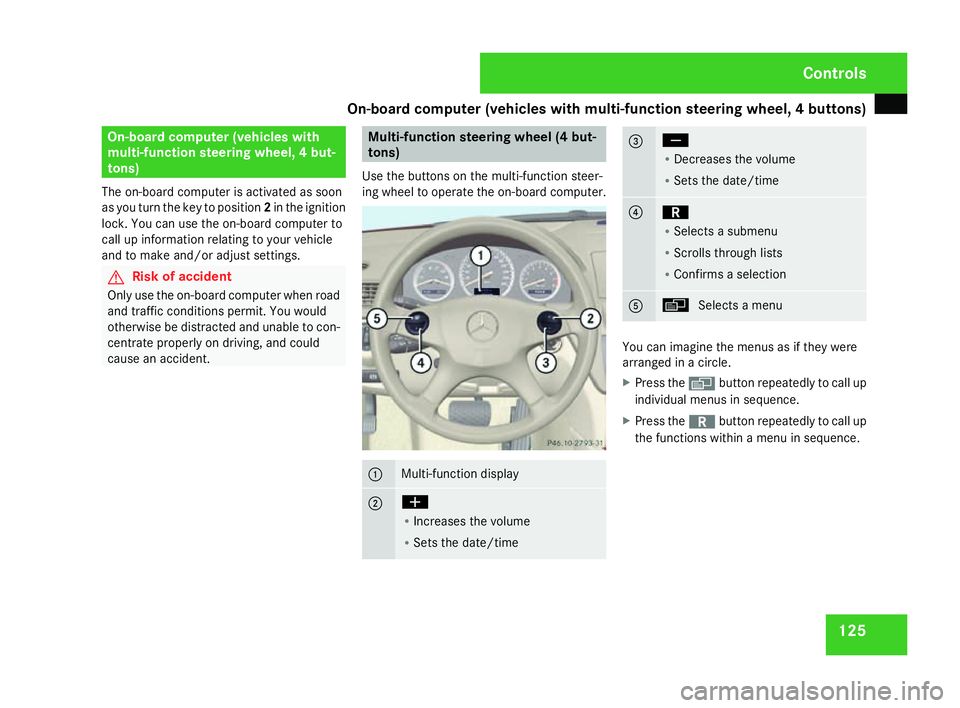
The on-board computer is activated as soon
as you turn the key to position 2in the ignition
lock. You can use the on-board computer to
call up information relating to your vehicle
and to make and/or adjust settings. G
Risk of accident
Only use the on-board computer when roa d
and traffic conditions permit. You would
otherwise be distracted and unable to con-
centrate properly on driving, and could
cause an accident. Multi-function steering wheel (4 but
-
tons)
Use the buttons on the multi-function steer-
ing wheel to operate the on-board computer. 1 Multi-function display
2 æ
R
Increases the volume
R Sets the date/tim e 3 ç
R
Decreases the volum e
R Sets the date/tim e 4 í
R
Selects a submenu
R Scrolls through lists
R Confirms a selection 5 è
Selects a menu You can imagine the menus as if they were
arranged in a circle.
X
Press the èbutton repeatedly to call up
individual menus in sequence.
X Press the íbutton repeatedly to call up
the functions within a menu in sequence. Controls
204_AKB; 2; 3, en-GB
mkalafa,
2007-06-26T23:11:51+02:00 - Seite 125
Page 129 of 377
On-board computer (vehicles with multi-function steering wheel, 4 buttons)
126 Multi-function displa
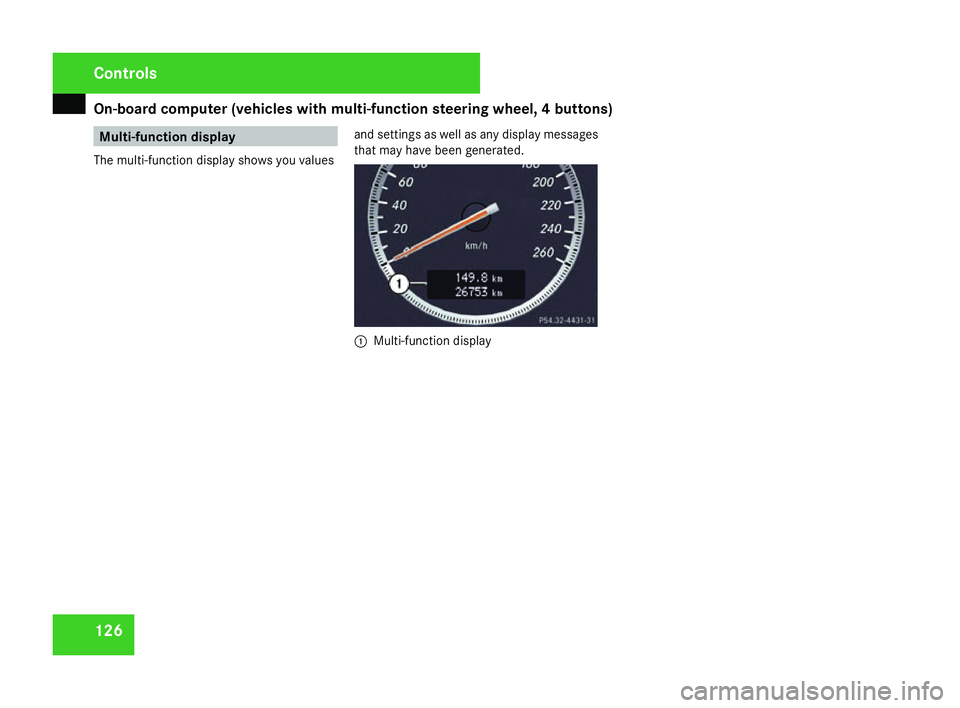
y
The multi-function display shows you values and settings as well as any display messages
that may have been generated. 1
Multi-function display Cont
rols
204_AKB; 2; 3, en-GB
mkalafa,
2007-06-26T23:11:51+02:00 - Seite 126
Page 130 of 377
On-board computer (vehicles with multi-function steering wheel, 4 buttons)
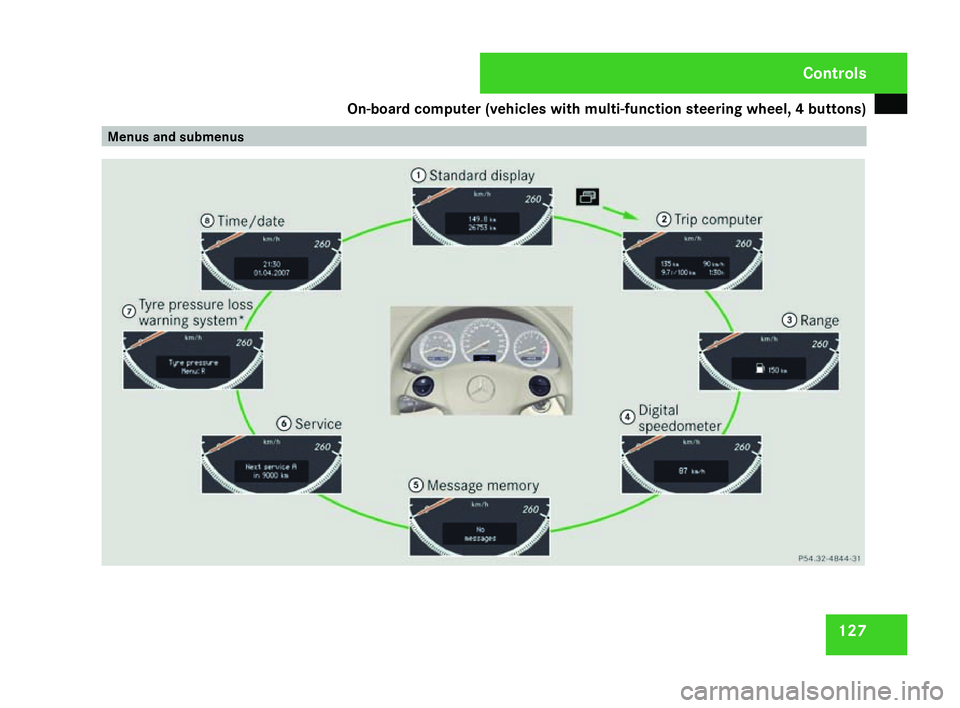
127Menus and submenu
s Cont
rols
204_AKB; 2; 3, en-GB
mkalafa,
2007-06-26T23:11:51+02:00 - Seite 127
Page 131 of 377
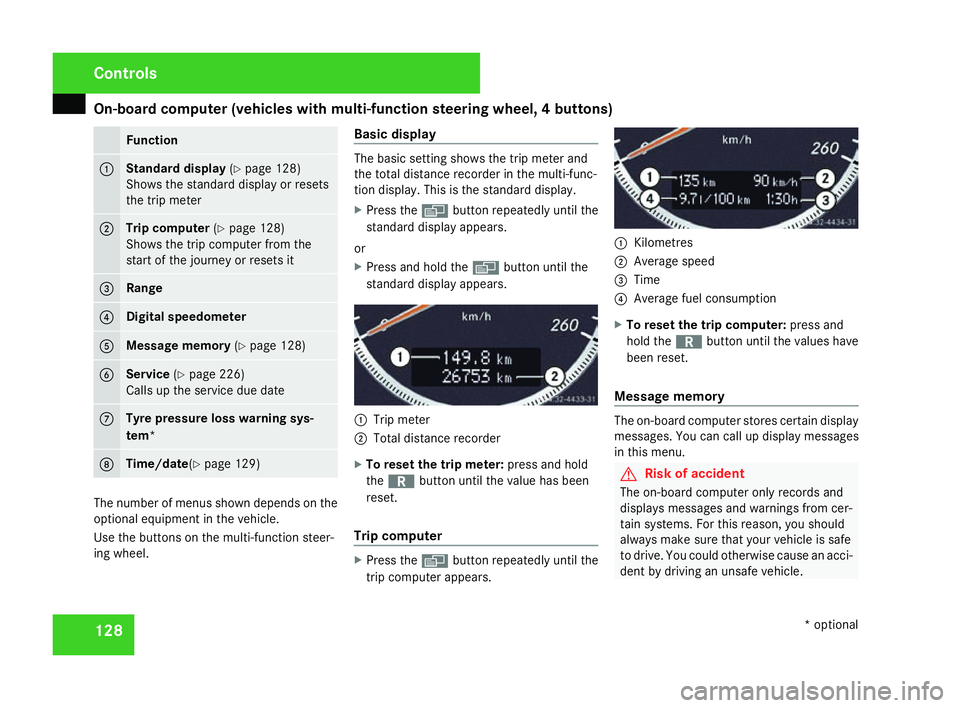
On-board computer (vehicles with multi-function steering wheel, 4 buttons)
128 Function
1 Standard display
(Y page 128 )
Shows the standard display or resets
the trip mete r 2 Trip computer
(Y page 128 )
Shows the trip computer from the
start of the journey or resets it 3 Rang
e 4 Digital speedomete
r5 Message memory
(Y page 128 ) 6 Service
(Y page 226 )
Calls up the service due dat e7 Tyre pressure loss warning sys
-
tem * 8 Time/date
(Y page 129 ) The number of menus shown depends on the
optional equipment in the vehicle.
Use the buttons on the multi-function steer-
ing wheel. Basic display The basic setting shows the trip meter and
the total distance recorder in the multi-func-
tion display. This is the standard display .
X Press the èbutton repeatedly until the
standard display appears.
or
X Press and hold the èbutton until the
standard display appears. 1
Trip meter
2 Total distance recorder
X To reset the trip meter: press and hold
the í button until the value has been
reset .
Trip compute r X
Press the èbutton repeatedly until the
trip computer appears. 1
Kilometres
2 Average spee d
3 Time
4 Average fuel consumption
X To reset the trip computer: press and
hold the íbutton until the values have
been reset .
Message memory The on-board computer stores certain display
messages. You can call up display messages
in this menu. G
Risk of accident
The on-board computer only records and
displays messages and warnings from cer-
tain systems. For this reason, you shoul d
always make sure that your vehicle is safe
to drive. You could otherwise cause an acci-
dent by driving an unsafe vehicle .Cont
rols
* optional
204_AKB; 2; 3, en-GB
mkalafa,
2007-06-26T23:11:51+02:00 - Seite 128