steering MERCEDES-BENZ C-CLASS SALOON 2007 Repair Manual
[x] Cancel search | Manufacturer: MERCEDES-BENZ, Model Year: 2007, Model line: C-CLASS SALOON, Model: MERCEDES-BENZ C-CLASS SALOON 2007Pages: 377, PDF Size: 6.19 MB
Page 142 of 377
On-board computer (vehicles with the luxury multi-function steering wheel*, 12 buttons)
139
Rejecting or ending a call X
Press t.
You can also reject or end a call if you have
not selected the Telmenu.
Dialling a number from the phone book For information on entering new phone num-
bers in the phone book, see the respectiv e
Operating Instructions for the mobile phone,
the audio equipment* or COMAND APS*.
If your mobile phone is able to receive calls,
you can search for and dial a number from the
phone book in the audio equipment* or
COMAND APS* at any time.
X Copy the phone book of your mobile phon e
to the audio equipment* or COMAND
APS*; see the separate Operating Instruc -
tions for the audio equipment* or COMAND
APS* .
X Press %,$ or# to call up the
phone book.
X Press %or$ to select the name yo u
are searching for .
To scroll rapidly, press and hold the %
or the $button for longer than 1 sec- ond. After four seconds, the rapid scroll
speeds up.
The rapid scroll stops when you release the
button or reach the end of the list.
X If only one telephone number is stored
for a name: presssor# to start
dialling.
The Connecting call.. .message and
the telephone number dialled appear in the
multi-function display. The name also
appears, provided it is stored in the phon e
book. The dialled number is stored in the
NOS. DIALLE Dlist .
If a call is connected, the phone book entry
appears in the multi-function display.
or
X If there is more than one number for a
particular name: presssor# to
display the numbers.
X Press %or$ to select the numbe r
you want to dial.
X Press sor# to start dialling.
The Connecting call.. .message and
the telephone number dialled appear in the
multi-function display. The name also
appears, provided it is stored in the phon ebook. The dialled number is stored in the
NOS. DIALLE Dlist .
If a call is connected, the phone book entry
appears in the multi-function display.
or
X If you do not want to make a call: press the
t button.
Redialling The on-board computer stores the most
recently dialled names and numbers from the
mobile phone.
X Press the sbutton to go to the most
recently dialled number or name in the
redial menu.
X Press %or$ to select the numbe r
or name you are looking for.
X Press sor# to start dialling. Controls
* optional
204_AKB; 2; 3, en-G
B
mkalafa , 2007-06-26T23:11:51+02:00 - Seite 139
Page 143 of 377
On-board computer (vehicles with the luxury multi-function steering wheel*, 12 buttons)
140 Service menu
i Menu overview (Y page 132), using the
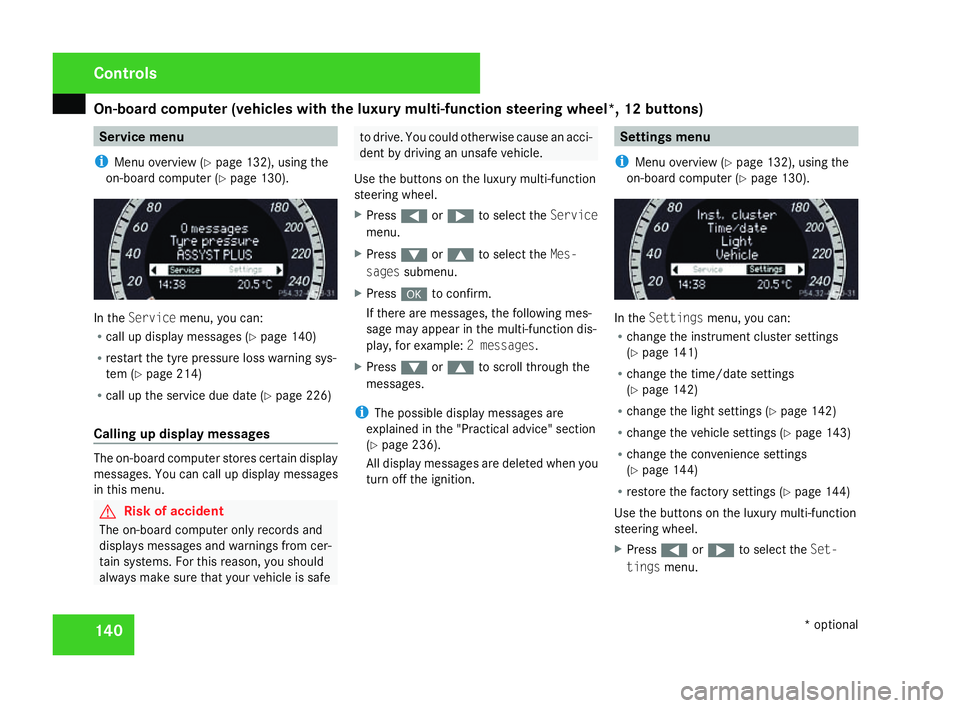
on-board computer (Y page 130). In the
Servic emenu, you can:
R call up display messages (Y page 140 )
R restart the tyre pressure loss warning sys-
tem (Y page 214 )
R call up the service due date (Y page 226 )
Calling up display messages The on-board computer stores certain display
messages. You can call up display messages
in this menu. G
Risk of accident
The on-board computer only records and
displays messages and warnings from cer-
tain systems. For this reason, you shoul d
always make sure that your vehicle is safe to drive. You could otherwise cause an acci-
dent by driving an unsafe vehicle .
Use the buttons on the luxury multi-function
steering wheel.
X Press (or& to select the Service
menu.
X Press %or$ to select the Mes-
sages submenu.
X Press #to confirm.
If there are messages, the following mes -
sage may appear in the multi-function dis-
play, for example: 2 messages.
X Press %or$ to scroll through the
messages.
i The possible display messages are
explained in the "Practical advice" section
( Y page 236).
All display messages are deleted when you
turn off the ignition. Settings menu
i Menu overview (Y page 132), using the
on-board computer (Y page 130). In the
Settings menu, you can:
R change the instrument cluster settings
(Y page 141 )
R change the time/date settings
(Y page 142 )
R change the light settings (Y page 142 )
R change the vehicle settings (Y page 143 )
R change the convenience settings
(Y page 144 )
R restore the factory settings (Y page 144 )
Use the buttons on the luxury multi-function
steering wheel.
X Press (or& to select the Set-
tings menu. Controls
* optional
204_AKB; 2; 3, en-GB
mkalafa,
2007-06-26T23:11:51+02:00 - Seite 140
Page 144 of 377
On-board computer (vehicles with the luxury multi-function steering wheel*, 12 buttons)
141
Instrument cluster The
Instrument cluster menu contains
the following functions:
R Units for speed and distance
R Language
R Dig. speedo, on vehicles with manual trans-
mission
R Permanent display*, on vehicles with auto-
matic transmission
Selecting the units for speed and distance
The Display Unit Speed-/Odometer func-
tion allows you to choose whether certain
displays appear in mph or km/h.
The selected units apply to:
R The total distance recorder and the trip
meter
R The trip computer
R The digital speedometer in the Tripmenu
R Cruise control *
R Speedtronic*
X Press %or$ to select the Instru-
ment cluster submenu.
X Press #to confirm. X
Press %or$ to select the Display
Unit Speed-/Odometer function.
You will see the selected setting: kmor
miles.
X Press #to change the selected setting .
Selecting the language
This menu is only available on vehicles with-
out audio equipment.
i Vehicles with Audio 20*, Audio 50 APS*
or COMAND APS*: this function is not avail-
able, since the language of the audio equip-
ment is used.
The Language function allows you to select
the language for the instrument cluster.
X Press %or$ to select the Instru-
ment cluster submenu.
X Press #to confirm.
X Press %or$ to select the Lan-
guage function.
You will see the selected language.
X Press #to see the list of languages .
X Press %or$ to select the desired
language: R
German
R Englis h
R French
R Italia n
R Spanish
R Dutch
R Danish
R Swedish
R Portuguese
R Turkish
R Russian
X Press #to save the selected language.
Activating or deactivating the additional
speedometer on vehicles with manual
transmission
i Vehicles for the United Kingdom: this
menu is not available.
The Speedometer (mph) function allows you
to select whether the multi-function display
shows the speed in mph.
X Press %or$ to select the Instru-
ment cluster submenu.
X Press #to confirm. Controls
* optional
204_AKB; 2; 3, en-G
B
mkalafa , 2007-06-26T23:11:51+02:00 - Seite 141 Z
Page 145 of 377
On-board computer (vehicles with the luxury multi-function steering wheel*, 12 buttons)
142
X
Press %or$ to select the Dig.
speedo (mph) function.
You will see the selected setting: Onor
Off.
X Press #to change the selected setting .
Selecting the permanent display* on vehi-
cles with automatic transmission*
i Vehicles for the United Kingdom: this
menu is not available.
The Permanent display function allows you
to choose whether the multi-function display
always shows the outside temperature or the
speed in mph.
X Press %or$ to select the Instru-
ment cluster submenu.
X Press #to confirm.
X Press %or$ to select the Perma-
nent displa yfunction.
You will see the selected setting: Outside
temperature orSpeedometer (mph).
X Press #to change the selected setting .Time/date This menu is only available on vehicles with-
out audio equipment or with Audio 20*
.
i Vehicles with Audio 50 APS* or COMAND
APS*: this function is not available, since
the time/date of the audio equipment* is
used.
The Time/date menu allows you to set the
time and the date.
X Press %or$ to select the Time/
Dat esubmenu.
X Press #to confirm.
Setting the time
X Press %or$ to select the Time
function.
You will see the time currently set.
X Press #to change it.
X Press (or& to select the display to
be changed: hours, minutes.
X Press %and$ to set the selected
display.
X Press #to store the entry .Setting the date
X
Press %or$ to select the Date
function.
You will see the date currently set.
X Press #to change it.
X Press (or& to select the display to
be changed: day, month, year .
X Press %and$ to set the selected
display.
X Press #to store the entry .
Light s The
Lights menu contains the following
functions:
R Intelligent Light System
R Daytime driving lamps
R Surround lighting
R Interior lighting delayed switch-off
Switching the Intelligent Light System*
on/off
When you activate Intell. Light System,
you activate the following functions: Cont
rols
* optional
204_AKB; 2; 3, en-GB
mkalafa,
2007-06-26T23:11:51+02:00 - Seite 142
Page 146 of 377
On-board computer (vehicles with the luxury multi-function steering wheel*, 12 buttons)
143
R
Motorway mode
R Active light functio n
R Extended range foglamps
X Press %or$ to select the Light
submenu.
X Press #to confirm.
X Press %or$ to select the Intell.
Light System function.
You will see the selected setting: Onor
Off.
X Press #to change the selected setting .
Switching the daytime driving lights on/
off
If you have activated the Daylight driving
lights function and the light switch is in the
M or* position, the parking lamp,
dipped-beam headlamps and licence plate
lighting are switched on automatically when
the engine is running.
In countries where daytime driving lamps are
legally required, Onis the factory setting.
X Press %or$ to select the Light
submenu.
X Press #to confirm. X
Press %or$ to select the Daytime
driving lamps function.
You will see the selected setting: Onor
Off.
X Press #to change the selected setting .
Switching the surround lighting on or off
If you activate the Surround lighting func-
tion and you unlock the vehicle with the key
when it is dark, the following will light up:
R The side lamps
R The tail lamps
R The licence plate lighting
R The front foglamps
The surround lighting switches off automati-
cally after 40 seconds or if the driver's door
is opened.
X Press %or$ to select the Light
submenu.
X Press #to confirm.
X Press %or$ to select the Surround
lighting function.
You will see the selected setting: Onor
Off .
X Press #to change the selected setting .Activating or deactivating the interior
lighting delayed switch-off
If you activate the
Interior lighting
delay sw. off function and pull the key out
of the ignition lock, the interior lighting
remains on for around 10 seconds if it is dark .
X Press %or$ to select the Light
submenu.
X Press #to confirm.
X Press %or$ to select the Interior
Lighting Delay function.
You will see the selected setting: Onor
Off .
X Press #to change the selected setting .
Vehicl e In the
Vehicle menu, you can activate/deac-
tivate the automatic locking feature or set the
permanent Speedtronic with Speed limit
(winter tyres) function(Y page 151).
Activating/deactivating automatic door
locking
If you select the Automatic Door Lock func-
tion, the vehicle is centrally locked above a
speed of around 15 km/h. Controls
* optional
204_AKB; 2; 3, en-GB
mkalafa,
2007-06-26T23:11:51+02:00 - Seite 143 Z
Page 147 of 377
On-board computer (vehicles with the luxury multi-function steering wheel*, 12 buttons)
144
You will find further information on automatic
locking in the "Automatic locking" section
(
Y page 79).
X Press %or$ to select the Vehicle
submenu.
X Press #to confirm.
X Press %or$ to select the Auto-
matic Door Loc kfunction.
You will see the selected setting: Onor
Off.
X Press #to change the selected setting .
Convenience In the
Convenience menu, you can activate/
deactivate the easy-entry/exit feature* and
the "Fold in mirrors when locking" function .
Activating or deactivating the easy-entry /
exit feature*
You can use the Easy-Entry/Exit function
to activate or deactivate the easy-entry/exit
feature (Y page 93). G
Risk of injury
When the easy-entry/exit feature is active,
the steering wheel moves. There is a risk of
occupants becoming trapped. Before acti - vating the easy-entry feature, make sure
that nobody can become trapped.
Do not leave children unsupervised in the
vehicle, even if they are secured in a child
restraint system. The children could open
the driver's door and thereby unintention-
ally activate the easy-entry feature and
become trapped.
X Press %or$ to select the Conve-
nience submenu.
X Press #to confirm.
X Press %or$ to select the easy-
entry/exi tfeature.
You will see the selected setting: Onor
Off.
X Press #to change the selected setting .
Activating or deactivating the "Fold in
mirrors when locking*" function
If you activate the Fold in mirrors whe n
locking function, the exterior mirrors fold in
when you lock the vehicle. When you switch
on the ignition, the exterior mirrors fold out
again.
If you have switched the function on and you
fold in the exterior mirrors using the button on the door
(Y page 94), they will not fold out
when the ignition is switched on. The exterior
mirrors can then only be folded out using the
button on the door.
X Press %or$ to select the Conve-
nience submenu.
X Press #to confirm.
X Press %or$ to select the Fold in
mirrors when lockin gfunction.
You will see the selected setting: Onor
Off.
X Press #to change the selected setting .
Restoring the factory setting s Most of the submenus can be restored to the
default settings in the
Factory Setting
menu.
For safety reasons, not all functions are reset:
the Speed limit (winter tyres) function
in permanent Speedtronic can only be set in
the Vehicle menu. The Daytime driving
lamps function in the Lightmenu is only
reset if the vehicle is stationary.
X Press %or$ to select the Factory
setting submenu.
X Press #to confirm. Controls
* optional
204_AKB; 2; 3, en-G
B
mkalafa , 2007-06-26T23:11:51+02:00 - Seite 144
Page 149 of 377
Driving sys
tems 14
6 Always pay attention to traffic conditions
even when cruise control is activated
.
Cruise control is only an aid designed to
assist driving. You are responsible for th e
vehicle's speed and for braking in good
time. G
Risk of accident
Do not use cruise control :
R in road and traffic conditions which do
not allow you to maintain a constant
speed (e.g. heavy traffic or windin g
roads). You could otherwise cause an
accident.
R on slippery roads. Braking or accelerat-
ing could cause the drive wheels to lose
traction and the vehicle could then skid.
R when there is poor visibility, e.g. due to
fog, heavy rain or snow
Cruise control display in speedometer
(vehicles with 12-button luxury multi-
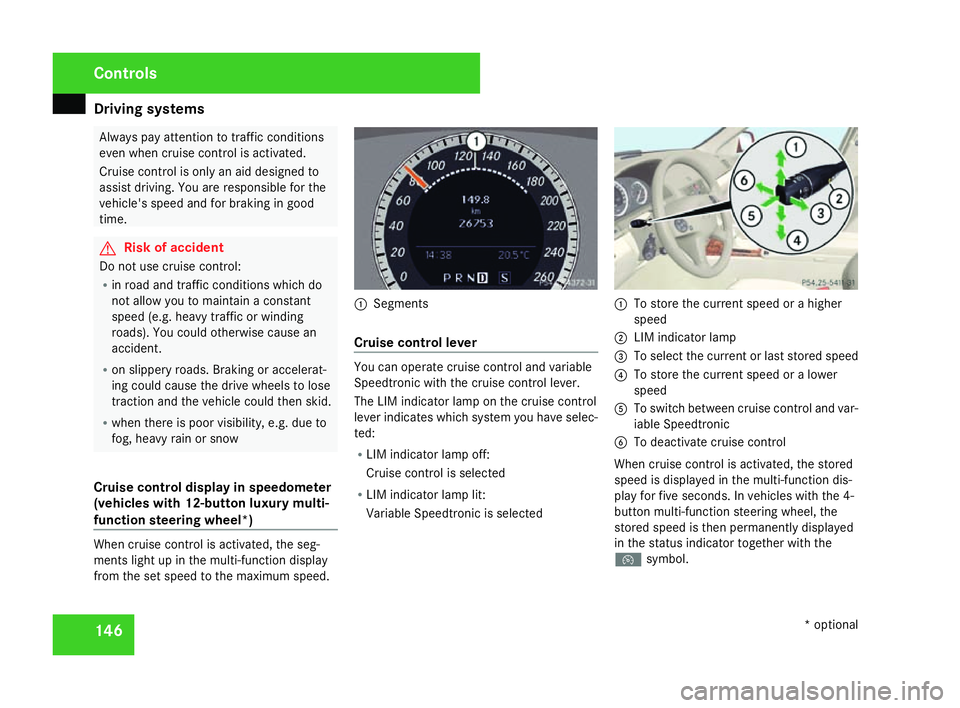
function steering wheel* )When cruise control is activated, the seg-
ments light up in the multi-function display
from the set speed to the maximum speed. 1
Segments
Cruise control leve r You can operate cruise control and variable
Speedtronic with the cruise control lever
.
The LIM indicator lamp on the cruise control
lever indicates which system you have selec-
ted:
R LIM indicator lamp off:
Cruise control is selected
R LIM indicator lamp lit:
Variable Speedtronic is selected 1
To store the current speed or a higher
speed
2 LIM indicator lamp
3 To select the current or last stored speed
4 To store the current speed or a lower
speed
5 To switch between cruise control and var-
iable Speedtronic
6 To deactivate cruise control
When cruise control is activated, the stored
speed is displayed in the multi-function dis-
play for five seconds. In vehicles with the 4-
button multi-function steering wheel, the
stored speed is then permanently displayed
in the status indicator together with the
Ñ symbol. Controls
* optional
204_AKB; 2; 3, en-GB
mkalafa,
2007-06-26T23:11:51+02:00 - Seite 146
Page 153 of 377
Driving sys
tems 15
0
Storing the current speed You can use the cruise control lever to restrict
the speed to any speed above 30 km/h whil e
the engine is running .
X Press the cruise control lever briefly to the
pressure point, either upwards 1or down-
wards 4.
The current speed is stored. For five sec-
onds, the multi-function display shows the
stored speed, e.g. Limit 100 km/h.
Vehicles with the 4-button multi-function
steering wheel: the stored speed is perma-
nently displayed in the status indicator, e.g.
LIM 100 km/h.
Vehicles with a 12-button luxury multi-
function steering wheel*: the segments
from the start of the scale up to the stored
speed light up in the speedometer.
Selecting the current or last stored
speed X
Pull the cruise control lever briefly towards
you 3. Making adjustments in 1 km/h incre-
ments X
Briefly press the cruise control lever up to
pressure point 1for a higher speed or
down 4for a lower speed.
or
X Keep the cruise control lever pressed to the
pressure point until the desired speed is
set. Press the cruise control lever up 1for
a higher speed or down 4for a lower
speed.
Making adjustments in 10 km/h incre-
ments X
Briefly press the cruise control lever
beyond pressure point 1for a higher
speed or down 4for a lower speed.
or
X Keep the cruise control lever pressed
beyond the pressure point until the desired
speed is set. Press the cruise control lever
up 1 for a higher speed or down 4for a
lower speed. Deactivating variable Speedtronic There are several ways to deactivate variable
Speedtronic
:
X Briefly press the cruise control lever for-
wards 6.
or
X Briefly press the cruise control lever in the
direction of arrow 5.
LIM indicator lamp 2in the cruise control
lever goes out. Variable Speedtronic is
deactivated.
Cruise control* is selected.
Variable Speedtronic is automatically deacti-
vated if you depress the accelerator pedal
beyond the pressure point (kickdown) and
your current speed does not differ by mor e
than 20 km/h from the stored speed. You will
hear a warning tone if this is the case. G
Risk of accident
It is not possible to deactivate variabl e
Speedtronic by braking.
i The last speed stored is cleared when you
switch off the engine. Controls
* optional
204_AKB; 2; 3, en-GB
mkalafa,
2007-06-26T23:11:51+02:00 - Seite 150
Page 155 of 377
Driving sys
tems 15
2foot off the brake pedal and carefully
depress the accelerator pedal
R in vehicles with automatic transmis-
sion* you take your foot off the brak e
pedal and carefully depress the acceler -
ator pedal
i Once you have taken your foot off the
brake pedal, the vehicle is held for around
one second.
Hill start assist does not function:
R if you are pulling away on a level surface or
a downhill gradien t
R in vehicles with automatic transmission *if
the gear selector lever is in the Nposition
R if the vehicle is secured with the parking
brak e
R if ES P®
is defectiv e ADVANCED AGILITY package with
sports mode*
The most important part of the ADVANCE D
AGILITY package with sports mode is the
adjustable suspension system. This automat-
ically controls and adapts the suspension to
the respective driving situation.
The calibration of the suspension depends
on:
R your driving style
R the road surface conditions
R your individual selection; see also the fol-
lowing description
If your vehicle is equipped with automati c
transmission*, the ADVANCED AGILITY pack-
age with sports mode also includes steering-
wheel gearshift paddles* with a manua l
gearshift program* (Y page 121). 1
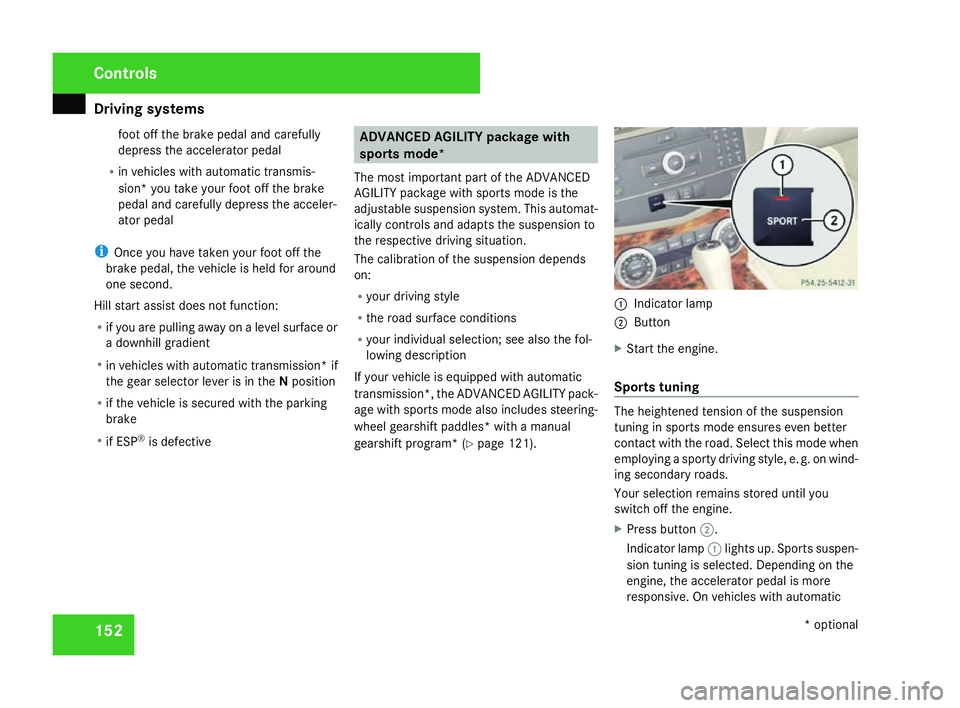
Indicator lamp
2 Button
X Start the engine.
Sports tuning The heightened tension of the suspensio
n
tuning in sports mode ensures even better
contact with the road. Select this mode when
employing a sporty driving style, e. g. on wind-
ing secondary roads .
Your selection remains stored until you
switch off the engine.
X Press button 2.
Indicator lamp 1lights up. Sports suspen -
sion tuning is selected. Depending on the
engine, the accelerator pedal is more
responsive. On vehicles with automatic Controls
* optional
204_AKB; 2; 3, en-GB
mkalafa,
2007-06-26T23:11:51+02:00 - Seite 152
Page 203 of 377
Features
200
X
Remove the cover of the aerial plug from
the back of the mobile phone and stow it in
a safe place. Example illustration
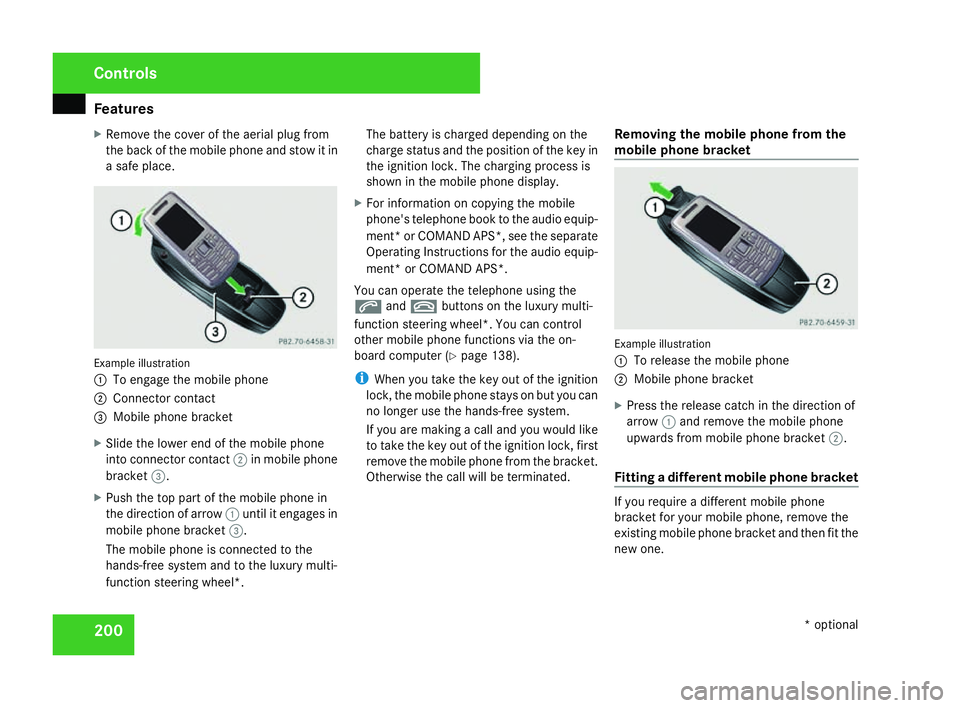
1
To engage the mobile phone
2 Connector contact
3 Mobile phone bracket
X Slide the lower end of the mobile phone
into connector contact 2in mobile phon e
bracket 3.
X Push the top part of the mobile phone in
the direction of arrow 1until it engages in
mobile phone bracket 3.
The mobile phone is connected to the
hands-free system and to the luxury multi-
function steering wheel*. The battery is charged depending on the
charge status and the position of the key in
the ignition lock. The charging process is
shown in the mobile phone display
.
X For information on copying the mobil e
phone's telephone book to the audio equip-
ment *or COMAND APS*, see the separate
Operating Instructions for the audio equip-
ment* or COMAND APS* .
You can operate the telephone using the
s andt buttons on the luxury multi-
function steering wheel*. You can contro l
other mobile phone functions via the on-
board computer (Y page 138).
i When you take the key out of the ignition
lock, the mobile phone stays on but you can
no longer use the hands-free system.
If you are making a call and you would like
to take the key out of the ignition lock, first
remove the mobile phone from the bracket .
Otherwise the call will be terminated. Removing the mobile phone from the
mobile phone bracket Example illustration
1
To release the mobile phone
2 Mobile phone bracket
X Press the release catch in the direction of
arrow 1and remove the mobile phon e
upwards from mobile phone bracket 2.
Fitting a different mobile phone bracket If you require a different mobile phon
e
bracket for your mobile phone, remove the
existing mobile phone bracket and then fit the
new one. Controls
* optional
204_AKB; 2; 3, en-GB
mkalafa,
2007-06-26T23:11:51+02:00 - Seite 200