bonnet MERCEDES-BENZ C-CLASS SALOON 2011 Owners Manual
[x] Cancel search | Manufacturer: MERCEDES-BENZ, Model Year: 2011, Model line: C-CLASS SALOON, Model: MERCEDES-BENZ C-CLASS SALOON 2011Pages: 401, PDF Size: 9.74 MB
Page 9 of 401
Problem (display message)
............147
Remote control .............................. 144
Axle load, permissible (traile rtow-
ing) ...................................................... 389 B
Bag hook ............................................ 308
Ball coupling Folding in ....................................... 218
Folding out ..................................... 217
BAS (Brake Assist System) .................73
Basic settings see Settings
BAS PLUS (Brake Assist System
PLUS) .................................................... 73
Battery (key) Checking .......................................... 87
Important safety notes ....................86
Replacing ......................................... 87
Battery (vehicle)
Charging ........................................ 349
Connecting .................................... 348
Disconnecting ................................ 348
Display message (12-button mul-
tifunctio nsteering wheel) ..............271
Display message (4-button multi-
function steering wheel) ................269
Important safety notes ..................346
Jump starting ................................. 350
Location ......................................... 347
Removing/fitting ........................... 348
Belt
see Seat belt
Belt force limiters (activation) ...........47
Belt tensioner Activation ......................................... 47
Function .......................................... .56
Blind Spo tAssist
Activating/deactivating .................238
Display message (12-button mul-
tifunctio nsteering wheel) ..............276
Notes/function .............................. 205
Trailer towing ................................. 207
see Active Blind Spot Assist Bonnet
Closing .......................................... .323
Display message (12-button mul-
tifunctio nsteering wheel) ..............286
Display message (4-button multi-
function steering wheel) ................284
Opening ......................................... 322
Boot
Emergency release ..........................95
Important safety guidelines .............92
Locking separatel y........................... 95
Opening/closing (automatically
from outside) ................................... 93
Opening (automatically from
inside) .............................................. 94
Boot lid
Display message (12-button mul-
tifunctio nsteering wheel) ..............286
Display message (4-button multi-
function steering wheel) ................284
Opening/closing .............................. 92
Opening dimensions ......................386
Brake Assist System
see BAS (Brake Assist System)
Brake fluid
Display message (12-button mul-
tifunctio nsteering wheel) ..............258
Display message (4-button multi-
function steering wheel) ................252
Notes ............................................. 383
Brake lamp
Display message (12-button mul-
tifunctio nsteering wheel) ..............265
Display message (4-button multi-
function steering wheel) ................262
Brake lamps
Adaptive .......................................... .74
Changin gbulbs .............................. 128
Brakes
ABS .................................................. 72
BAS .................................................. 73
BAS PLUS ........................................ 73
Brake fluid (notes) .........................383
Display message (12-button mul-
tifunctio nsteering wheel) ..............255
Display message (4-button multi-
function steering wheel) ................250
Driving tips .................................... 1756
Index
Page 35 of 401
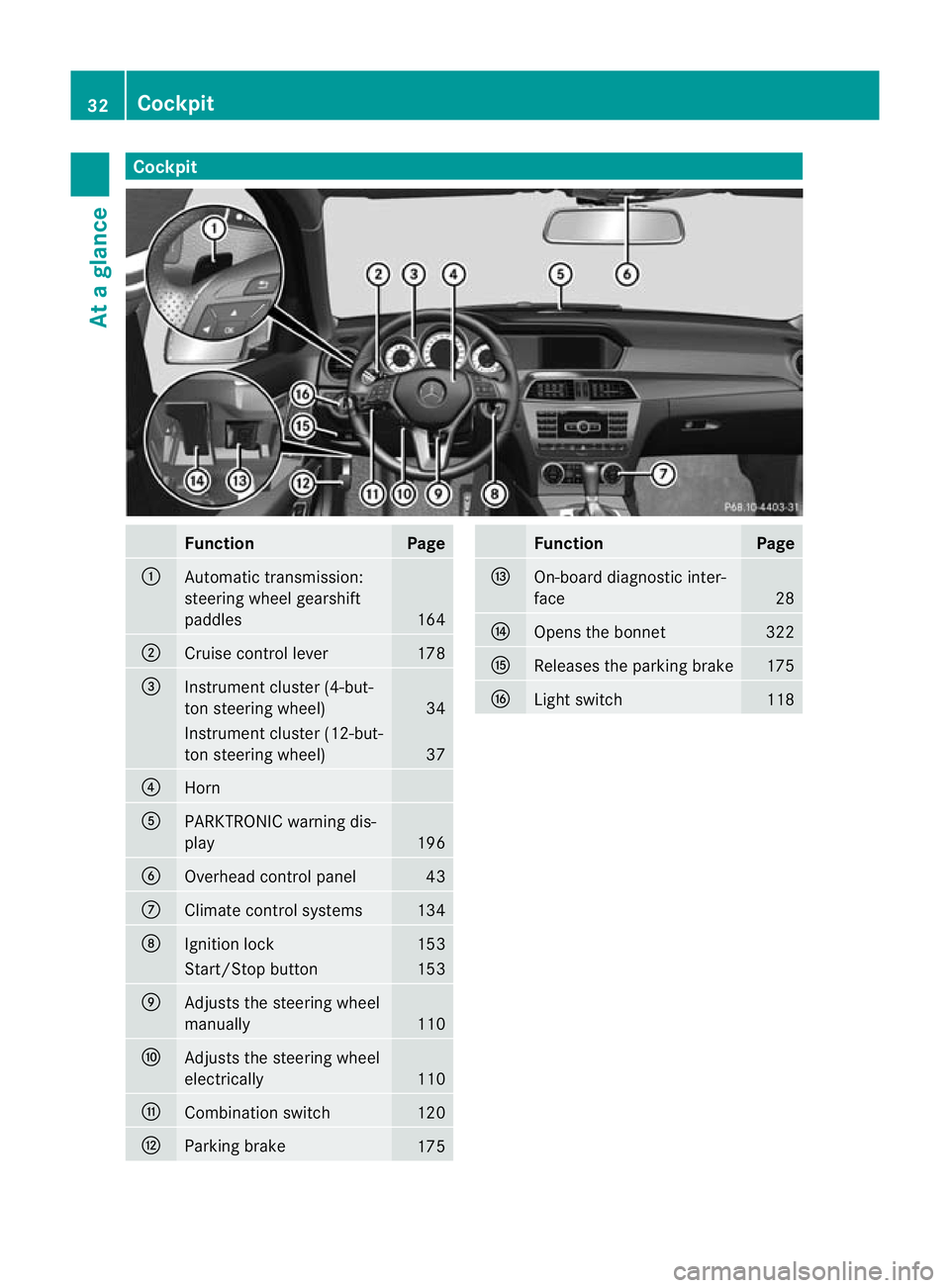
Cockpit
Function Page
:
Automatic transmission:
steering wheel gearshift
paddles
164
;
Cruise control lever 178
=
Instrument cluster (4-but-
to
ns teering wheel) 34
Instrument cluster (12-but-
ton steering wheel)
37
?
Horn
A
PARKTRONIC warning dis-
play
196
B
Overhead control panel 43
C
Climate control systems 134
D
Ignitio
nlock 153
Start/Stop button 153
E
Adjusts the steering wheel
manually
110
F
Adjusts the steering wheel
electrically
110
G
Combination switch 120
H
Parking brake
175 Function Page
I
On-board diagnostic inter-
face
28
J
Opens the bonnet 322
K
Releases the parking brake 175
L
Light switch 11832
CockpitAt a glance
Page 36 of 401
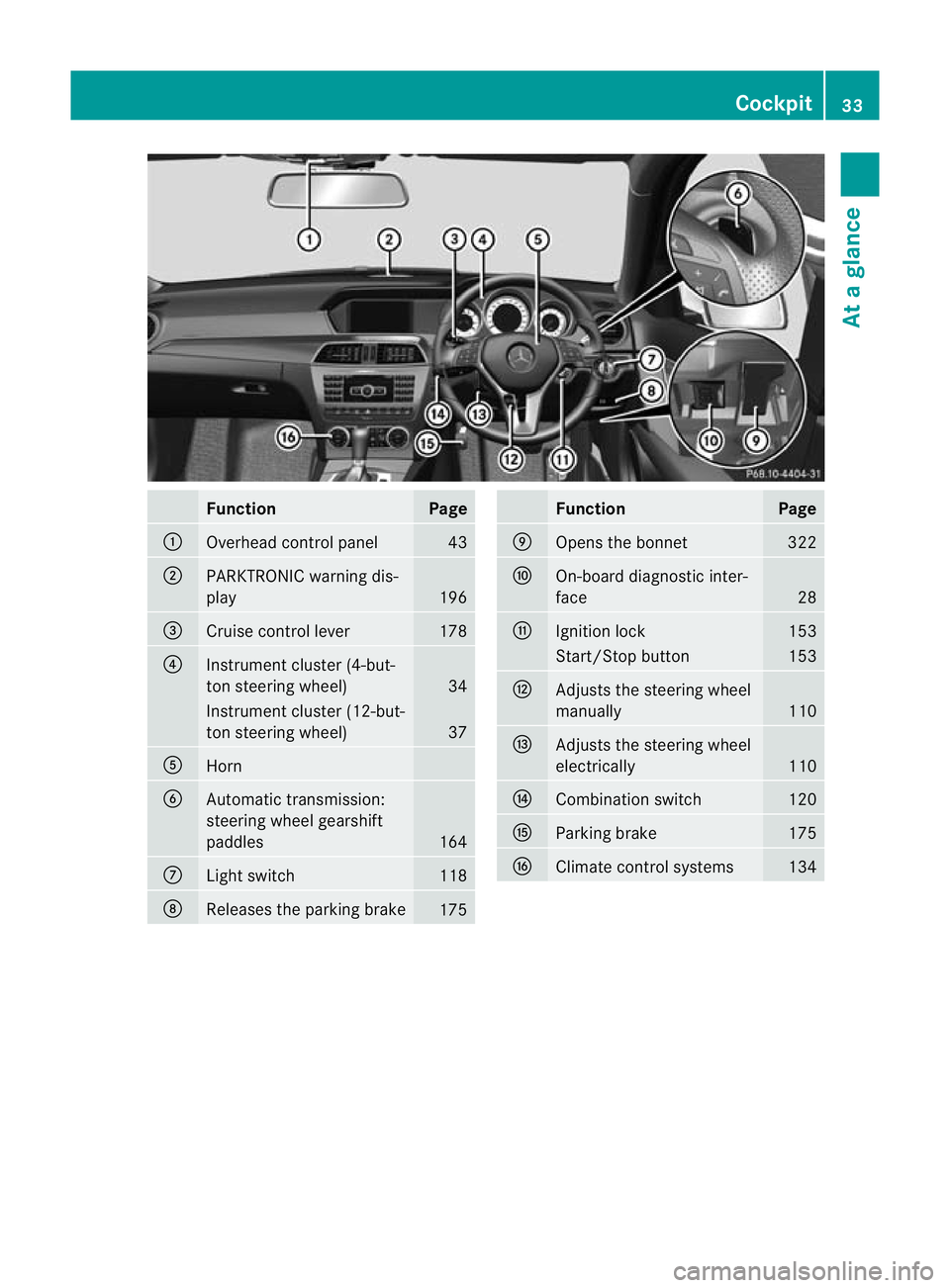
Function Page
:
Overhead control panel 43
;
PARKTRONIC warning dis-
play
196
=
Cruise control lever 178
?
Instrument cluster (4-but-
to
ns teering wheel) 34
Instrument cluster (12-but-
ton steering wheel)
37
A
Horn
B
Automatic transmission:
steering wheel gearshift
paddles
164
C
Ligh
tswitch 118
D
Releases the parking brake
175 Function Page
E
Opens the bonnet 322
F
On-board diagnostic inter-
face
28
G
Ignitio
nlock 153
Start/Stop button 153
H
Adjusts the steering wheel
manually
110
I
Adjusts the steering wheel
electrically
110
J
Combination switch 120
K
Parking brake 175
L
Climate control systems 134Cockpit
33At a glance
Page 51 of 401
of a collision. In the first deployment stage,
the front airbag is filled with enough propel-
lant gas to reduce the risk of injuries. The
front airbag is fully deployed if a second
deployment threshold is exceeded within a
few milliseconds.
The belt tensioner and airbag triggering
thresholds are variable and are adapted to the
rate of deceleration or acceleration of the
vehicle. This process is pre-emptive in nature.
The triggering process must take place in
good time at the start of the collision.
i Airbags are not deployed in all types of
accidents. Also, not all airbags are
deployed together in an accident .The dif-
ferent airbag systems work independently
of each other.
How the airbag system works is deter-
mined by the severity of the collision detec-
ted, especially the vehicle deceleration or
acceleration, and the apparent type of acci-
dent:
R head-on collision
R side impact
R rear impact
The rate of vehicle deceleration or accelera-
tion and the direction of the force are essen-
tially determined by:
R the distribution of forces during the colli-
sion
R the collision angle
R the deformation characteristics of the vehi-
cle
R the characteristics of the object with which
the vehicle has collided
Factors which can only be seen and measured
after a collision has occurred do not play a
decisive role in the deployment of an airbag,
nor do they provide an indication of airbag
deployment.
The vehicle may be deformed significantly,
e.g. the bonnet or the wing, without an airbag
being deployed. This is the case if only parts
which are relatively easily deformed are affec- ted and the rate of deceleration is not high.
Conversely, airbags may be deployed even
though the vehicle suffers only minor defor-
mation. This is the case if, for example, very
rigid vehicle parts such as longitudinal body
members are hit, and sufficient deceleration
occurs as a result.
Airbags
Important safety notes Airbag deployment slows down and restricts
the movement of the vehicle occupant.
If the airbags are deployed, you will hear a
bang and a small amount of powder may also
be released. Only in rare cases will the bang
affect your hearing. The powder that is
released generally does not constitute a
health hazard. The
6SRS warning lamp
lights up.
The airbag installation locations are identified
by the AIRBAG symbol. G
WARNING
Airbags provide additional protection; they
are not, however, a substitute for seat belts.
Observe the following notes to reduce the risk
of serious or even fatal injury caused by airbag
deployment:
R all vehicle occupants –inparticular, preg-
nant women – must wear their seat belt
correctly at all times and lean back against
the backrest, which should be positioned
as close to the vertical as possible. The
head restraint must support the back of the
head at about eye level.
R always secure childre nless than 1.50mt all
and unde r12years of age in suitable child
restraint systems.
R all vehicle occupants must select a seat
position that is as far away from the airbag
as possible. The driver's seat position must
allow the vehicle to be driven safely. The
driver's chest should be as far away from 48
Occupant safetySafety
Page 83 of 401
As a result, PRE-SAFE
®
Brake may not give
warnings or intervene in critical situations.
There is a ris kofanaccident. Always pay
careful attention to the traffi csituation and be
ready to brake.
In order to maintain the appropriate distance
to the vehicle in front and thus prevent a col-
lision, you must apply the brakes yourself.
X To activate/deactivate: activate or deac-
tivate PRE-SAFE ®
Brake in the on-board
computer (Y page 237).
The Ä symbol appears in the multifunc-
tion display as long as the HOL Dfunction
is not activated (Y page 193).
On vehicles with parking guidance, the
Ä symbol is displayed when Pis
engaged or you are driving faste rthan
35 km/h.
Vehicles with COMAND and navigation sys-
tem: the radar sensor system is switched off
automatically in the vicinity of radio telescope
facilities (Y page 389).
Vehicles without COMAND and a navigation
system and vehicles for Australia: the radar
sensor system and on-board computer must
be switched off in the vicinity of radio tele-
scope facilities (Y page 242).
For PRE-SAFE ®
Brake to assist you when driv-
ing, the radar sensor system must be
switched on (Y page 242) and be opera-
tional.
Following damage to the front end of the vehi-
cle, have the configuration and operation of
the radar sensors checked at a qualified spe-
cialist workshop. This also applies to colli-
sions at slow speeds where there is no visible
damage to the front of the vehicle. Anti-theft systems
Immobiliser
The immobiliser prevents your vehicle from
being started without the correct key. X
To activate with the key: remove the key
from the ignition lock.
X To activate with KEYLESS-GO: switch the
ignition off and open the driver's door.
X To deactivate: switch on the ignition.
i The immobiliser is always deactivated
when you start the engine. ATA (Anti-Theft Alarm system)
Av isual and audible alarm is triggered if the
alarm system is primed and you open:
R a door
R the vehicle with the emergency key ele-
ment
R the boot lid/tailgate
R the bonnet
The alarm is not switched off, even if you
close the open door that has triggered it, for
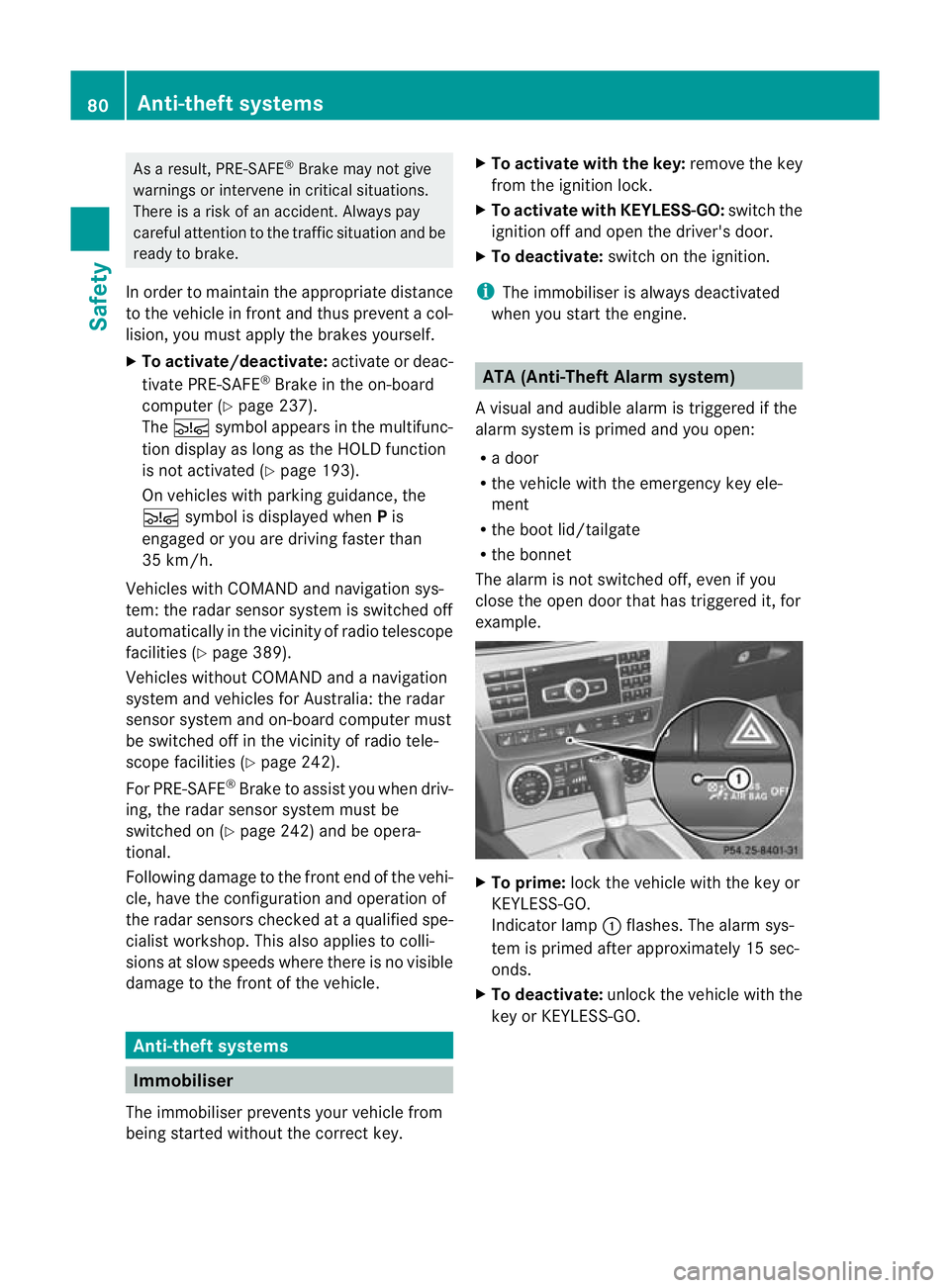
example. X
To prime: lock the vehicle with the key or
KEYLESS-GO.
Indicator lamp :flashes .The alarm sys-
tem is primed after approximately 15 sec-
onds.
X To deactivate: unlock the vehicle with the
key or KEYLESS-GO. 80
Anti-theft systemsSafety
Page 129 of 401

Never use a bulb which has been dropped.
Such a bulb may explode and injure you.
Halogenb ulbs are pressurised and could
explode when you change them, especially if
they are very hot .You should therefore wear
eye protection and gloves when you are
changing them. Overview of bulb replacement
–bulbs
You can replace the following bulbs. The
details for the bulb type can be found in the
legend. Halogen headlamps
:
Side lamp/parking lamp: W5W
; Main-beam headlamp: H7 55 W
= Dipped-beam headlamp: H7 55 W Bi-xenon headlamps
:
Cornering lamp: H7 55 W Tail lamps
:
Reversing lamp: P 21 W
; Brake lamp: P 21 W
= Brake lamp/side lamp: P 21 W Changing the front bulbs
Dipped-beam headlamps (halogen
headlamps) X
Switch off the lights.
X Open the bonnet.
X Turn housing cover :anti-clockwise and
pull it out.
X Turn bulb holder ;anti-clockwise and pull
it out.
X Take the bulb out of bulb holder ;.
X Insert the new bulb into bulb holder ;.
X Insert bulb holder ;into the lamp and turn
it clockwise.
X Align housing cover :and turn it clock-
wise until it engages. 126
Changing bulbsLights and windscreen wipers
Page 130 of 401

Main-beam headlamps (halogen head-
lamps) X
Switch off the lights.
X Open the bonnet.
X Turn housing cover :anti-clockwise and
pull it out.
X Turn bulb holder ;anti-clockwise and pull
it out.
X Take the bulb out of bulb holder ;.
X Insert the new bulb into bulb holder ;.
X Insert bulb holder ;into the lamp and turn
it clockwise.
X Align housing cover :and turn it clock-
wise until it engages.
Side lamps/parking lamps (halogen
headlamps) X
Switch off the lights.
X Open the bonnet.
X Turn housing cover :anti-clockwise and
pull it out.
X Pull out bulb holder ;. X
Take the bulb out of bulb holder ;.
X Insert the new bulb into bulb holder ;.
X Insert bulb holder ;.
X Align housing cover :and turn it clock-
wise until it engages.
Cornering light function (Intelligent
Light System) X
Switch off the lights.
X Open the bonnet.
X Turn housing cover :anti-clockwise and
pull it out.
X Turn bulb holder ;anti-clockwise and pull
it out.
X Take the bulb out of bulb holder ;.
X Insert the new bulb into bulb holder ;.
X Insert bulb holder ;into the lamp and turn
it clockwise.
X Align housing cover :and turn it clock-
wise until it engages. Changing the rear bulbs
Opening and closing the side trim pan-
els You must open the side trim panel in the lug-
gage compartment/boot and remove the
first-aid kit before you can change the bulbs
in the tail lamps. Changing bulbs
127Lights and windscreen wipers Z
Page 134 of 401
!
Never open the bonnet if a windscreen
wiper arm has been folded away from the
windscreen.
Never fold a windscreen wiper arm without
a wiper blade back onto the windscreen/
rear window.
Hold the windscreen wiper arm firmly when
you change the wiper blade. If you release
the windscreen wiper arm without a wiper
blade and it falls onto the windscreen, the
windscreen may be damaged by the force
of the impact.
Mercedes-Benz recommends that you have
the wiper blades replaced by aqualified
specialist workshop, e.g. at a Mercedes-
Benz Service Centre.
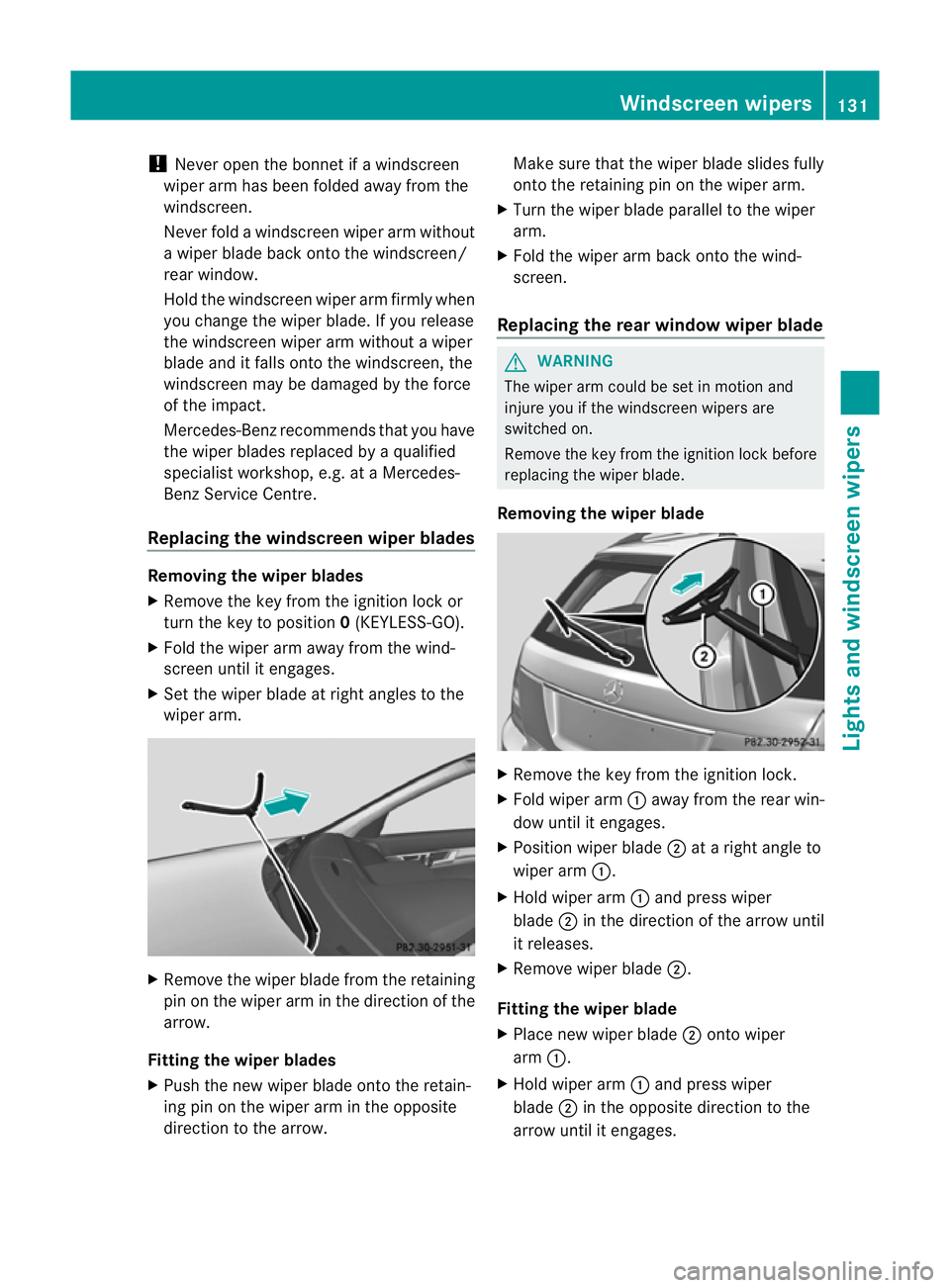
Replacing the windscreen wiper blades Removing the wiper blades
X
Remove the key from the ignition lock or
tur nthe key to position 0(KEYLESS-GO).
X Fold the wiper arm away from the wind-
screen until it engages.
X Set the wiper blade at right angles to the
wiper arm. X
Remove the wiper blade from the retaining
pin on the wiper arm in the direction of the
arrow.
Fitting the wiper blades
X Push the new wiper blade onto the retain-
ing pin on the wiper arm in the opposite
direction to the arrow. Make sure that the wiper blade slides fully
onto the retaining pin on the wiper arm.
X Turn the wiper blade parallel to the wiper
arm.
X Fold the wiper arm back onto the wind-
screen.
Replacing the rear window wiper blade G
WARNING
The wiper arm could be set in motion and
injure you if the windscreen wipers are
switched on.
Remove the key from the ignition lock before
replacing the wiper blade.
Removing the wiper blade X
Remove the key from the ignition lock.
X Fold wiper arm :away from the rear win-
dow until it engages.
X Position wiper blade ;at a right angle to
wiper arm :.
X Hold wiper arm :and press wiper
blade ;in the direction of the arrow until
it releases.
X Remove wiper blade ;.
Fitting the wiper blade
X Place new wiper blade ;onto wiper
arm :.
X Hold wiper arm :and press wiper
blade ;in the opposite direction to the
arrow until it engages. Windscreen wipers
131Lights and windscreen wipers Z
Page 150 of 401
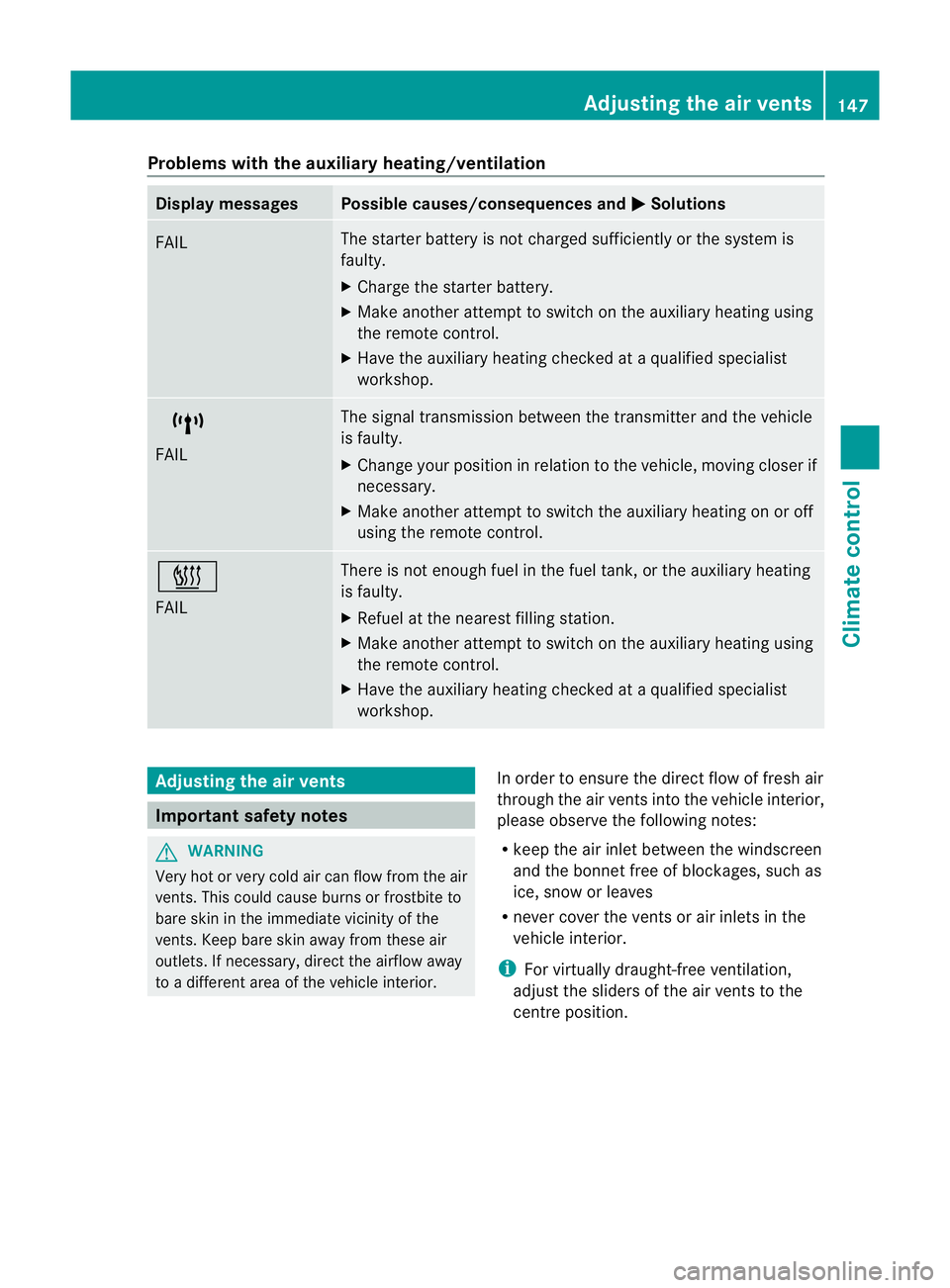
Problems with the auxiliary heating/ventilation
Display messages Possible causes/consequences and
M Solutions
FAIL The starter battery is not charged sufficiently or the system is
faulty.
X
Charge the starter battery.
X Make another attempt to switch on the auxiliary heating using
the remote control.
X Have the auxiliary heating checked at a qualified specialist
workshop. $
FAIL The signal transmission between the transmitter and the vehicle
is faulty.
X
Change your position in relation to the vehicle, moving closer if
necessary.
X Make another attempt to switch the auxiliary heating on or off
using the remote control. ©
FAIL There is not enough fuel in the fuel tank, or the auxiliary heating
is faulty.
X
Refuel at the nearest filling station.
X Make another attempt to switch on the auxiliary heating using
the remote control.
X Have the auxiliary heating checked at a qualified specialist
workshop. Adjusting the air vents
Important safety notes
G
WARNING
Very hot or very cold air can flow from the air
vents. This could cause burns or frostbite to
bare skin in the immediate vicinity of the
vents. Keep bare skin away from these air
outlets. If necessary, direct the airflow away
to a different area of the vehicle interior. In order to ensure the direct flow of fresh air
through the air vents into the vehicle interior,
please observe the following notes:
R
keep the air inlet between the windscreen
and the bonnet free of blockages, such as
ice, snow or leaves
R never cover the vents or air inlets in the
vehicle interior.
i For virtually draught-free ventilation,
adjust the sliders of the air vents to the
centre position. Adjusting the air vents
147Climate control Z
Page 160 of 401
!
Always switch the ignition off and take the
key with you when leaving the vehicle.
Automatic engine switch-off The engine is only switched off if:
R
the outside temperature is within the range
that is suitable for the system.
R the engine is at normal operating temper-
ature.
R the set temperature for the vehicle interior
has been reached.
R the battery is sufficiently charged.
R the system detects that the windscreen is
not misted up when the air-conditioning
system is switched on.
R the bonnet is closed.
R the vehicle is not being steered.
R the driver's door is closed and the seat belt
is fastened.
i The engine can be switched off automat-
ically a maximum of four times (first stop
and three subsequent stops) in succession.
The ¤ ECO symbol is shown in yellow in
the multifunction display after the engine
has been started automaticallyf or the
fourth time. The engine can only be
switched off automatically again when the
¤ ECO symbol is shown in green in the
multifunction display.
i During automatic engine switch-off, the
climate control system only operates at a
reduced capacity. If you require full climate
control capacity, the ECO start/stop func-
tion can be deactivated by pressing the
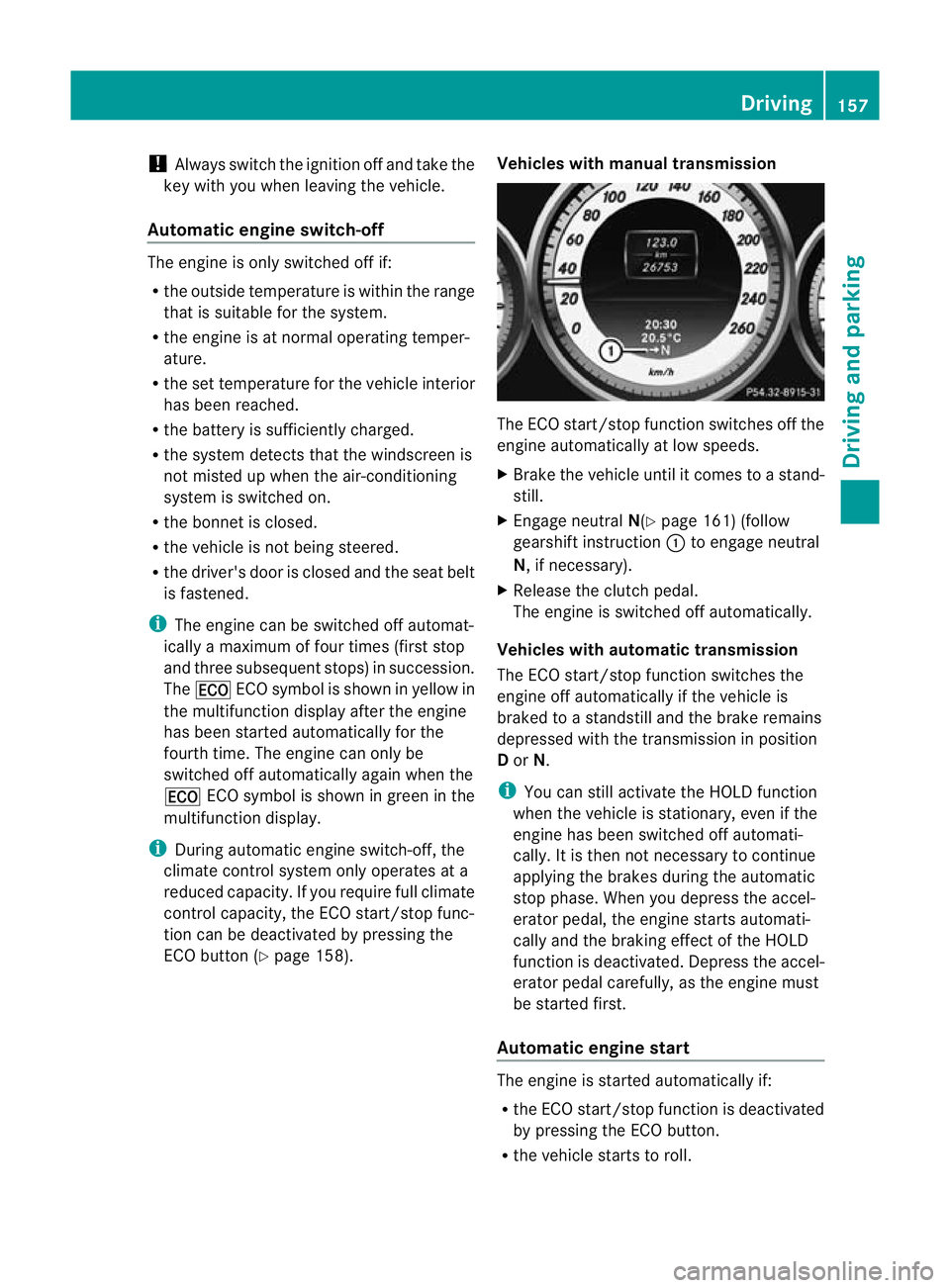
ECO button (Y page 158). Vehicles with manual transmission The ECO start/stop function switches off the
engine automatically at low speeds.
X
Brake the vehicle until it comes to a stand-
still.
X Engage neutral N(Ypage 161) (follow
gearshift instruction :to engage neutral
N, if necessary).
X Release the clutch pedal.
The engine is switched off automatically.
Vehicles with automatic transmission
The ECO start/stop function switches the
engine off automatically if the vehicle is
braked to a standstill and the brake remains
depressed with the transmission in position
D or N.
i You can still activate the HOLD function
when the vehicle is stationary, even if the
engine has been switched off automati-
cally. It is then not necessary to continue
applying the brakes during the automatic
stop phase. When you depress the accel-
erator pedal, the engine starts automati-
cally and the braking effect of the HOLD
function is deactivated. Depress the accel-
erator pedal carefully, as the engine must
be started first.
Automatic engine start The engine is started automatically if:
R
the ECO start/stop function is deactivated
by pressing the ECO button.
R the vehicle starts to roll. Driving
157Driving and parking Z