coolant temperature MERCEDES-BENZ C-CLASS SALOON 2011 Owners Manual
[x] Cancel search | Manufacturer: MERCEDES-BENZ, Model Year: 2011, Model line: C-CLASS SALOON, Model: MERCEDES-BENZ C-CLASS SALOON 2011Pages: 401, PDF Size: 9.74 MB
Page 25 of 401
Surround lighting (12-button mul-
tifunction steering wheel)
................241
Switching off the alarm (ATA) ............80 T
Tailgate Display message (12-button mul-
tifunctio nsteering wheel) ..............286
Display message (4-button multi-
function steering wheel) ................284
Emergency unlocking .......................95
Important safety notes ....................92
Limiting the opening angle ...............94
Opening/closing .............................. 92
Opening/closing (automatically
from inside) ...................................... 94
Opening/closing (automatically
from outside) ................................... 93
Opening dimensions ......................386
Tail lamp
Display message (12-button mul-
tifunctio nsteering wheel) ..............265
Display message (4-button multi-
function steering wheel) ................262
Tank
see Fuel tank
Tank content
Displaying the range (12-button
multifunctio nsteering wheel) ........231
Displaying the range (4-button
multifunctio nsteering wheel) ........226
Fuel gauge (12-button multifunc-
tion steering wheel) .........................37
Fuel gauge (4-button multifunc-
tion steering wheel) .........................34
Technical data
Notes ............................................. 376
Trailer loads ................................... 388
Tyres/wheels ................................. 366
Vehicle data ................................... 384
Telephone
Accepting acall............................. 235
Display message (12-button mul-
tifunctio nsteering wheel) ..............288
Menu (on-board computer) ............235
Number from the phone book ....... .235
Redialling ....................................... 236Rejecting/ending
acall................. 235
Telephone compartment ................303
Telescopic rod (Easy-Pac kfix kit) ....312
Temperature Coolant (12-button multifunction
steering wheel; AMG) ..................... 245
Coolant (12-button multifunction
steering wheel) .............................. 226
Coolant (4-button multifunction
steering wheel) .............................. 222
Engine oil (12-button multifunc-
tion steering wheel) .......................245
Outside temperature (12-button
multifunctio nsteering wheel) ........227
Outside temperature (4-button
multifunctio nsteering wheel) ........222
Setting (climate control) ................138
TEMPOMAT
Function/notes ............................. 178
Through-loading feature ...................304
Tilt/sliding sunroof see Sliding sunroof
Timing (RACETIMER) .........................245
TIREFIT kit .......................................... 337
Top Tether ............................................ 61
Total distance recorder Displaying (12-button multifunc-
tion steering wheel) .......................231
Displaying (4-button multifunc-
tion steering wheel) .......................225
Tow-away protection ..........................81
Towing Important safety notes ..................351
With the rear axle raised ................353
Towing atrailer
Activ eBlind Spot Assist .................212
Active Lane Keeping Assist ............215
Axle load, permissible ....................389
Bulb failure indicator for LED
lamps ............................................. 220
Lights display message (12-but-
ton multifunctio nsteering wheel) ..264
Lights display message (4-button
multifunctio nsteering wheel) ........261
Trailer tow hitch display message
(4-button multifunction steering
wheel) ............................................ 28522
Index
Page 37 of 401
Instrumen
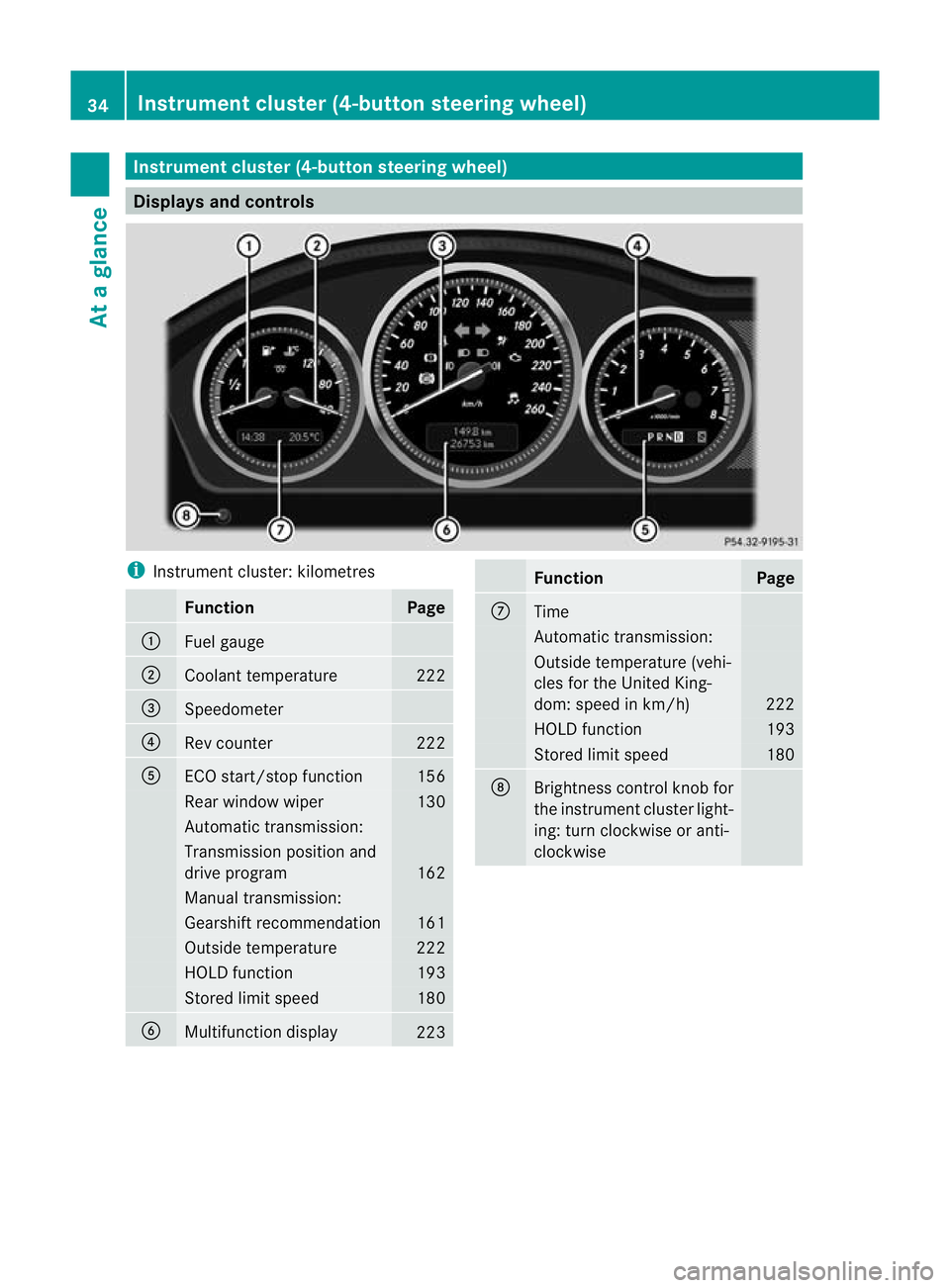
tcluster (4-button steering wheel) Displays and controls
i
Instrument cluster: kilometres Function Page
:
Fuel gauge
;
Coolant temperature 222
=
Speedometer
?
Rev counter 222
A
ECO start/stop function 156
Rear window wiper 130
Automatic transmission:
Transmission position and
drive program
162
Manual transmission:
Gearshif
trecommendation 161
Outside temperature 222
HOLD function 193
Stored limit speed 180
B
Multifunction display
223 Function Page
C
Time
Automatic transmission:
Outside temperature (vehi-
cles for the United King-
dom: speed in km/h)
222
HOLD function 193
Stored limit speed 180
D
Brightness control knob for
the instrument cluster light-
ing: turn clockwise or anti-
clockwise 34
Instrument cluster (4-button steering wheel)At a glance
Page 38 of 401
i
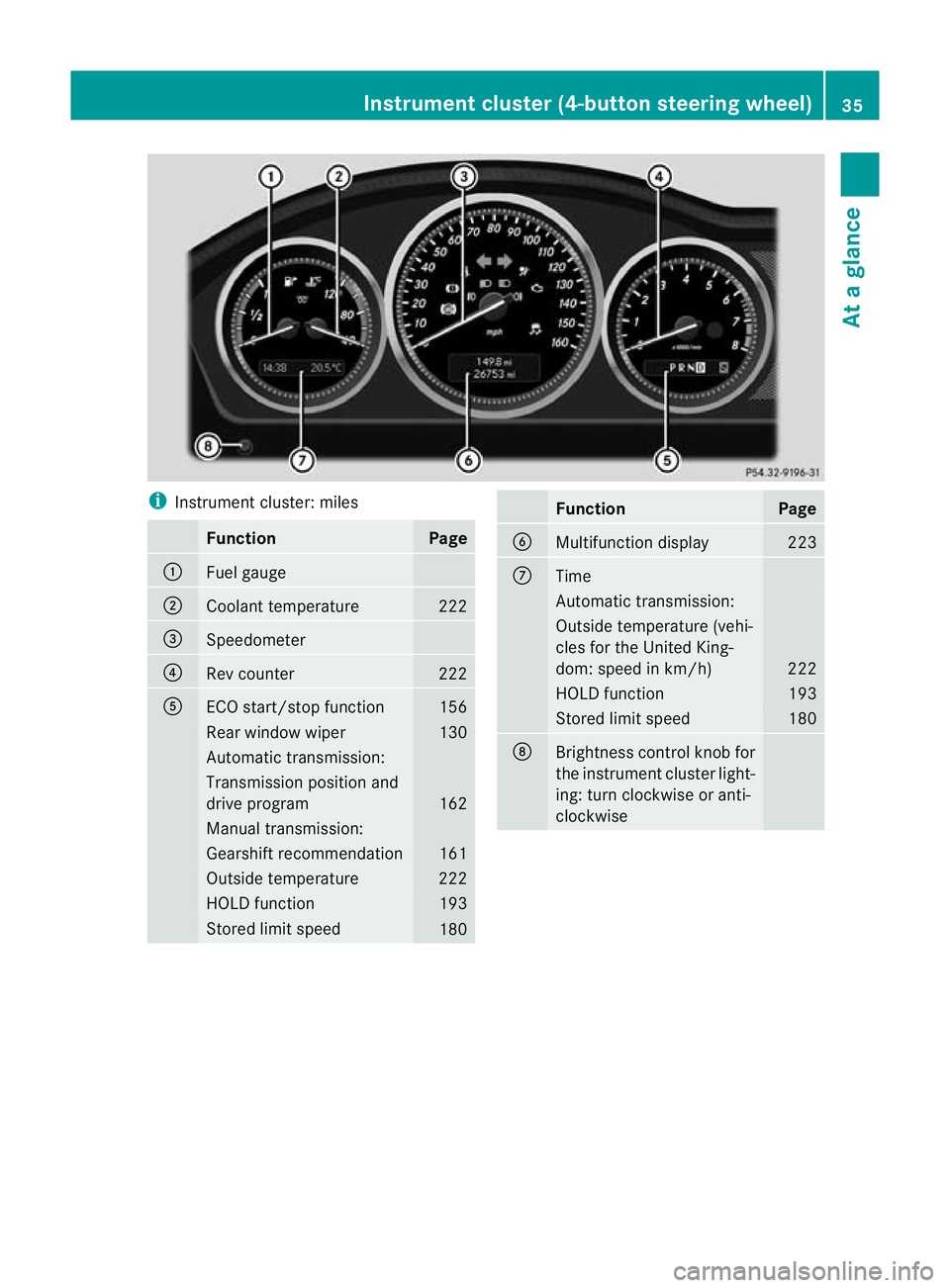
Instrument cluster: miles Function Page
:
Fuel gauge
;
Coolant temperature 222
=
Speedometer
?
Rev counter 222
A
ECO start/stop function 156
Rearw
indow wiper 130
Automatic transmission:
Transmission position and
drive program
162
Manual transmission:
Gearshif
trecommendation 161
Outside temperature 222
HOLD function 193
Stored limit speed
180 Function Page
B
Multifunction display 223
C
Time
Automatic transmission:
Outside temperature (vehi-
cles for the United King-
dom: speed in km/h)
222
HOLD function 193
Stored limit speed 180
D
Brightness control knob for
the instrument cluster light-
ing: turn clockwise or anti-
clockwiseInstrument cluster (4-button steering wheel)
35At a glance
Page 40 of 401
Instrumen
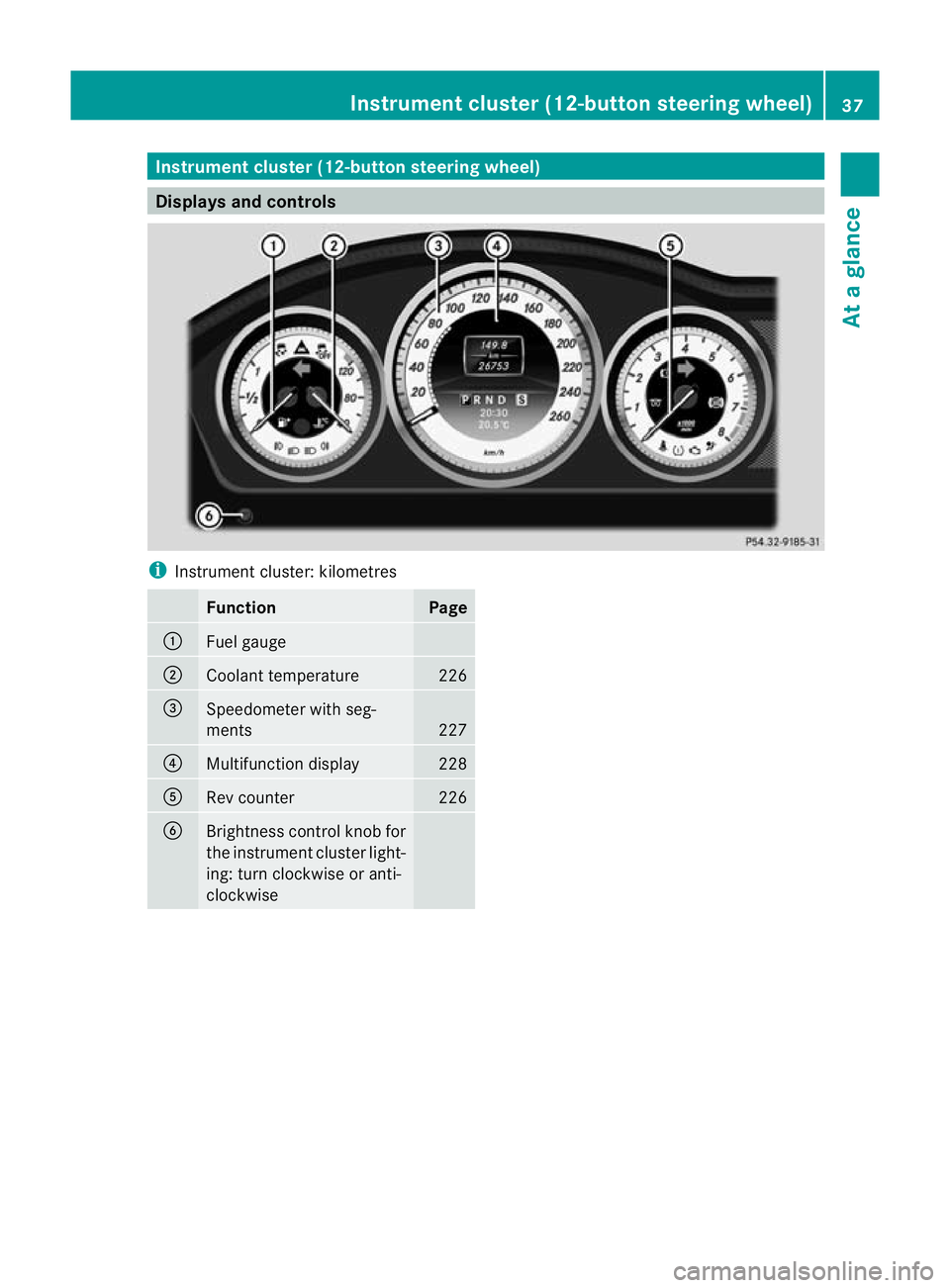
tcluster (12-button steering wheel) Displays and controls
i
Instrument cluster: kilometres Function Page
:
Fuel gauge
;
Coolant temperature 226
=
Speedometer with seg-
ments
227
?
Multifunction display 228
A
Rev counter 226
B
Brightness control knob for
the instrumen
tcluster light-
ing: turn clockwise or anti-
clockwise Instrument cluster (12-button steering wheel)
37At a glance
Page 41 of 401
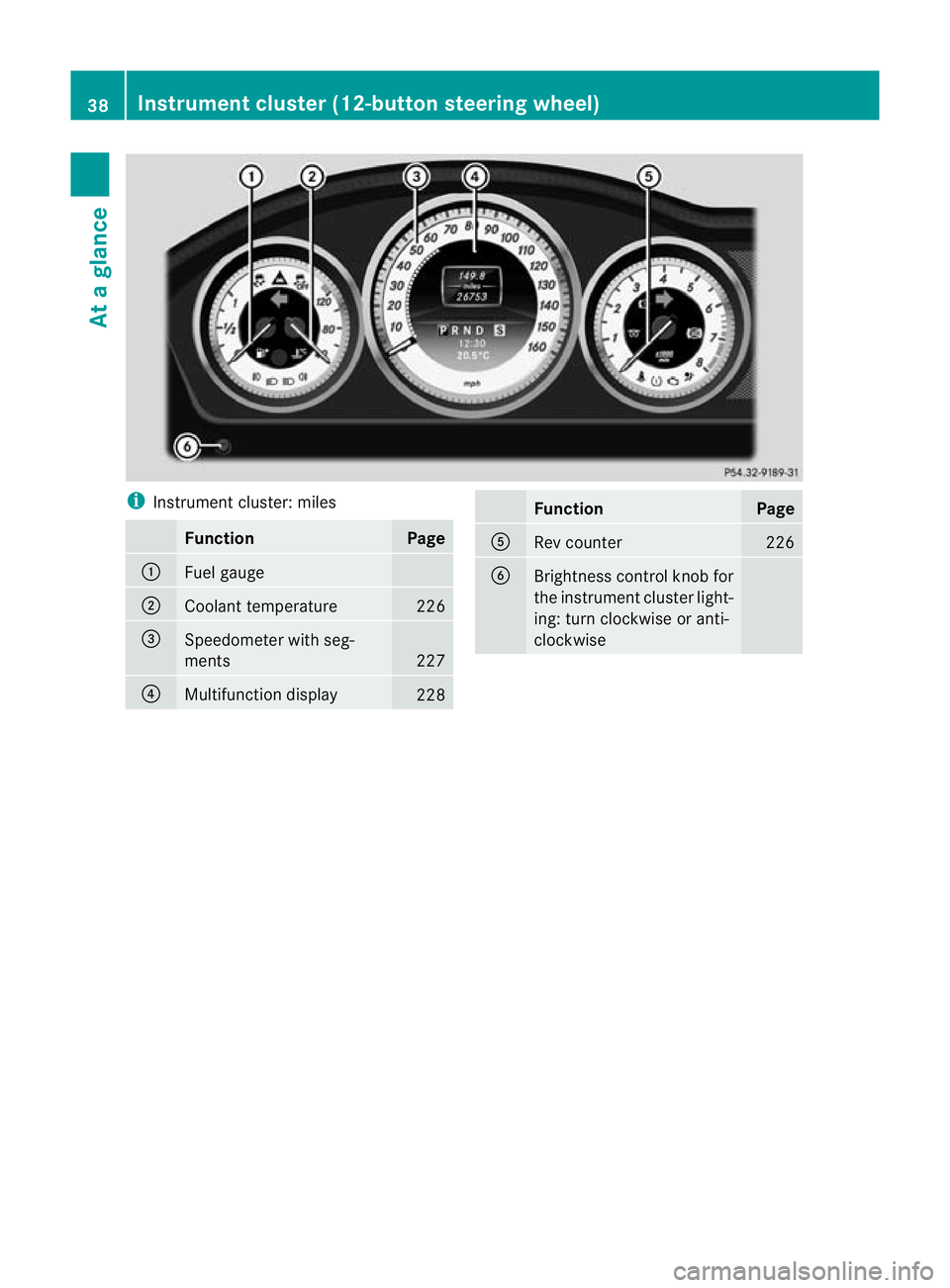
i
Instrument cluster: miles Function Page
:
Fuel gauge
;
Coolant temperature 226
=
Speedometer with seg-
ments
227
?
Multifunction display
228 Function Page
A
Rev counter 226
B
Brightness control knob for
the instrument cluster light-
ing: turn clockwise or anti-
clockwise38
Instrument cluster (12-button steering wheel)At a glance
Page 145 of 401
i
Air-recirculatio nmode deactivates auto-
matically:
R after approximately five minutes at out-
side temperatures below approximately
5 †
R after approximately five minutes if cool-
ing with air dehumidification is deactiva-
ted
R after approximately 30 minutes at out-
side temperatures above approximately
5 † Convenience opening/closing using
the air-recirculation button
G
WARNING
Make sure that nobody can become trapped
between the side window and the door frame
as the side windows are opened and closed.
Make sure that all object sand body parts are
clear of the side windows when they are being
opened or closed .You or the objects could be
drawn in or become trapped between the side
window and the door frame as the window
moves. If there is arisk of entrapment, oper-
ate the Wswitch to move the side window
in the opposite direction.
Make sure that nobody can become trapped
as the sliding sunroof/panorama sliding sun-
roof is opened and closed. If there is a risk of
entrapment, operate the 3switch to move
the sliding sunroof/panorama sliding sunroof
in the opposite direction.
X Convenience closing feature: press and
hold the gbutton until the side win-
dows and the sliding sunroof/panorama
sliding sunroof are closed.
The indicator lamp in the gbutton lights
up. Air-recirculation mode is activated.
X Convenience opening feature: press and
hold the gbutton until the side win-
dows and the sliding sunroof/panorama
sliding sunroof are opened. The side win-
dows and the sliding sunroof/panorama sliding sunroof move back to their original
position.
The indicator lamp in the
gbutton goes
out. Air-recirculation mode is deactivated.
i If you open the side windows or the sliding
sunroof/panorama sliding sunroof man-
ually after closing the mwith the conveni-
ence closing feature, they will remain in this
position when opened using the conveni-
ence opening feature. Activating/deactivating the residual
heat function
The residual heat function is only available
with THERMOTRONIC automatic climate con-
trol.
It is possible to make use of the residual heat
of the engine to continue heating the station-
ary vehicle for up to 30 minutes after the
engine has been switched off .The heating
time depends on the temperature that has
been set.
i The blower will run at a low speed regard-
less of the airflow setting.
i If you activate the residual heat function
at high temperatures, only the ventilation
will be activated. The blower runs at
medium speed.
X Turn the key to position 0in the ignition
lock or remove it.
X To activate: press theÌbutton.
The indicator lamp in the Ìbutton lights
up.
X To switch off: press theÌbutton.
The indicator lamp in the Ìbutton goes
out.
i Residual heat is deactivated automati-
cally:
R after about 30 minutes
R when the ignition is switched on
R if the battery voltage drops
R if the coolant temperature is too low 142
Operating the climate control systemClimate control
Page 163 of 401
Problem Possible causes/consequences and
M Solutions
Vehicles with a petrol
engine:
The engine is not run-
ning smoothly and is
misfiring. There is a malfunction in the engine electronics or in a mechanical
component of the engine management system.
X
Only depress the accelerator pedal slightly.
X Have the cause rectified immediately at a qualified specialist
workshop, e.g. a Mercedes-Benz Service Centre.
Otherwise, non-combusted fuel may get into the catalytic con-
verter and damage it. The coolant tempera-
ture display is showing
more than 120 †. The
coolant warning lamp
may also be lit and a
warning tone may
sound. The coolant level is too low. The coolant is too hot and the engine
is no longer being cooled sufficiently.
X
Stop as soon as possible and allow the engine and the coolant
to cool down.
X Check the coolant level (Y page 324). Observe the warning
notes as you do so and top up the coolant if necessary. If the coolant level is correct, the engine radiator fan may be faulty.
The coolant is too hot and the engine is no longer being cooled
sufficiently.
X
At coolant temperatures under 120 †, drive on to the nearest
qualified specialist workshop, e.g. to a Mercedes-Benz Service
Centre.
X Avoid heavy loads on the engine as you do so, e.g. driving on
mountain roads and stop-start traffic. Manual transmission
Important safety notes
G
WARNING
The movement of the pedals must not be
impaired in any way. Do not keep any objects
in the driver's footwell. Make sure that floor-
mats or carpets are correctly secured and
that there is sufficient clearance for the ped-
als.
Do not place several floormats on top of one
another. G
WARNING
Do not change down for additional engine
braking on a slippery road surface. This could
cause the drive wheels to lose their grip and
the vehicle could skid. This could cause you to lose control of your vehicle and cause an
accident.
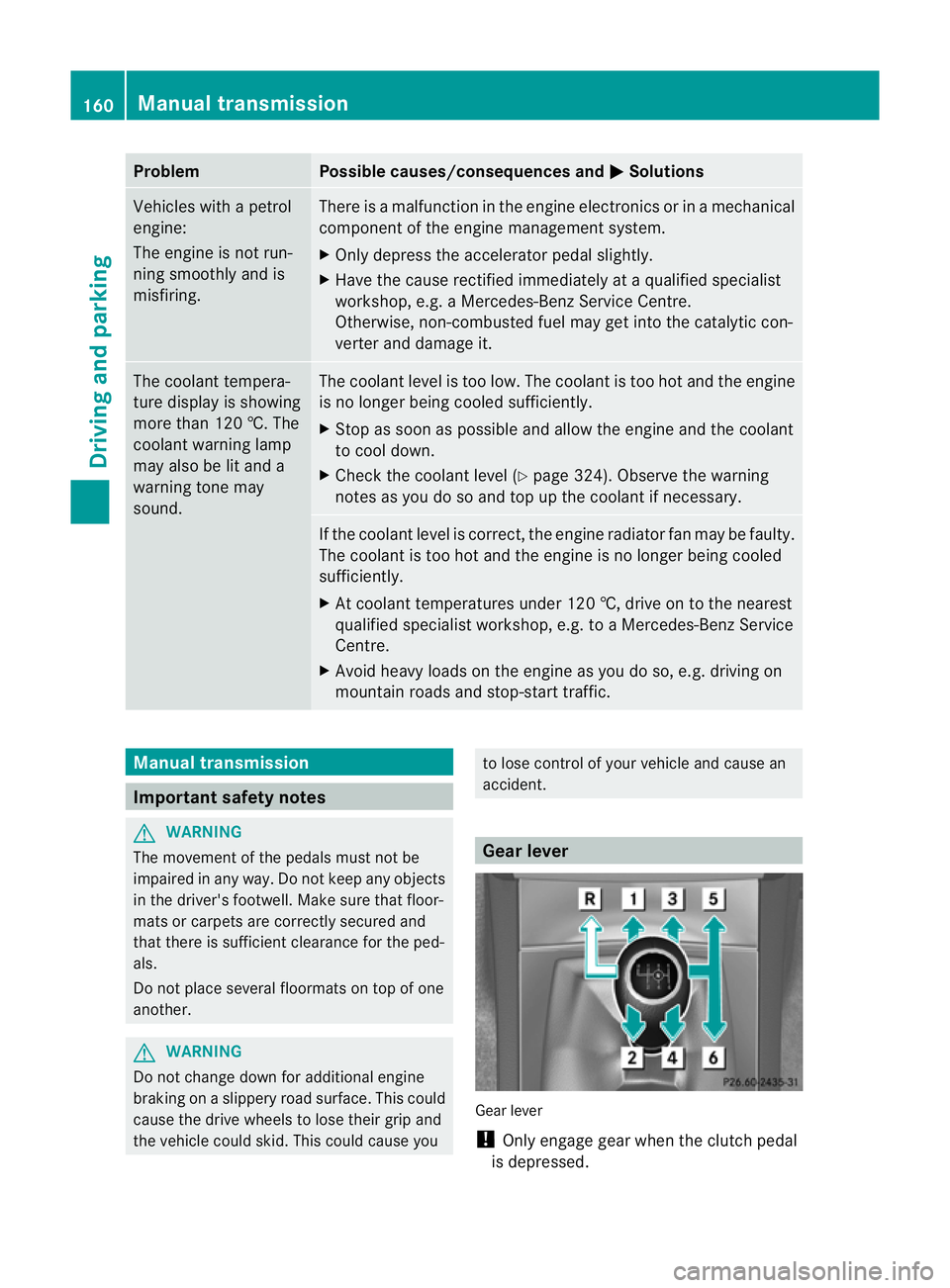
Gear lever
Gear lever
!
Only engage gear when the clutch pedal
is depressed. 160
Manual transmissionDriving and parking
Page 225 of 401
Useful information
i This Owner's Manual describes all models
and all standard and optional equipment
available to your vehicle at the time of pub-
lication of the Owner's Manual. Country-
specific deviations are possible. Please
note that your vehicle may not be equipped
with all features described. This also
applies to safety-relevan tsystems and
functions.
i Please read the information on qualified
specialist workshops (Y page 28).Important safety notes
You will find an illustration of the instrument
cluster in the "At a glance" section
(Y page 34). G
WARNING
Only use the on-board computer when road
and traffic conditions permit .You would oth-
erwise be distracted and unable to concen-
trate properly on driving, and could cause an
accident. G
WARNING
No messages will be displayed if either the
instrument cluster or the multifunction dis-
play is inoperative.
As a result, you will not be able to see infor-
mation about your driving conditions, such as
speed, outside temperature, warning and indi-
cator lamps, display messages or system fail-
ures. Driving characteristics may be impaired.
Adjust your driving style and vehicle speed
accordingly.
Contact a qualified specialist workshop
immediately. G
WARNING
The on-board computer only records and dis-
plays malfunctions and warnings from certain
systems. For this reason, you should always make sure that your vehicle is safe to use. You
could otherwise cause an accident by driving
an unsafe vehicle.
G
WARNING
The operating safety of your vehicle could be
impaired if maintenance work is carried out
incorrectly. This could cause you to lose con-
trol of your vehicle and cause an accident.
Moreover, the safety systems may no longer
be able to protect you or others as they are
designed to do.
Always have service work carried out at a
qualified specialist workshop. Displays and operation (4-button mul-
tifunction steering wheel)
Coolant temperature gauge
The coolant temperature gauge is in the
instrument cluster on the left-hand side.
Under normal operating conditions and with
the specified coolant level, the coolant tem-
perature may rise to 120 †.
The coolant temperature may rise to the top
end of the scale at high outside temperatures
and on long uphill stretches. Rev counter
The red band in the rev counter indicates the
engine's overrevving range.
! Do not drive in the overrevving range.
Doing so will damage the engine.
The fuel supply is interrupted to protec tthe
engine when the red band is reached. Outside temperature display
The outside temperature display is in the
instrument cluster (Y page 34).222
Displays and operation (4-button multifunction steering wheel)On-board computer and displays
Page 229 of 401

X
To reset the trip meter: press and hold
the V until the standard display
appears.
X Press and hold the Cbutton until the
value has been reset. Trip computer
X Press the Vbutton on the steering
wheel repeatedly until the trip computer
appears. :
Distance
; Average speed
= Time
? Average fuel consumption
X To reset the trip computer: press and
hold the Cbutton on the steering wheel
until the values have been reset. Calling up the range
X Press the Vbutton on the steering
wheel repeatedly until the approximate
range appears.
The approximate range which can be covered
depends on the fuel level and your current
driving style .Ifthere is only a small amount
of fuel left in the fuel tank, the display shows
a vehicle being refuelled Cinstead of the
range. Switching the daytime driving lights
on/off
If you have activated the Day. driv.lights: function and the light switch is in the Ã
position, the daytime driving lights are
automatically switched on during daylight
hours when the engine is running. When it is
dark, the side lamps and the dipped-beam
headlamps are switched on automatically.
On vehicles with daytime driving lamps, the
factory setting is on .
If you want to change the setting for the Day. driv. lights: function, you have to turn
the key in the ignition lock to position 1.
X Press the Vbutton on the steering
wheel repeatedly until the Day. driv. lights: menu appears.
You will see the selected setting: on or
off .
X Press the WorX button to change
the setting. Displays and operation (12-button
multifunction steering wheel)
Coolant temperature gauge
The coolant temperature gauge is in the
instrumentc lusteront he left-hand side.
Under normal operating conditions and with
the specified coolant level, the coolant tem-
perature may rise to 120 †.
At high outside temperatures and when driv-
ing uphill, the coolant temperature may rise
to the end of the scale. Rev counter
The red band in the rev counter indicates the
engine's overrevving range.
! Do not drive in the overrevving range.
Doing so will damage the engine.
The fuel supply is interrupted to protect the
engine when the red band is reached. 226
Displays and operation (12-button multifunction steering wheel)On-board computer and displays
Page 248 of 401
AMG men
uin AMG vehicles
AMG displays X
Press =or; on the steering wheel
to select the AMG menu.
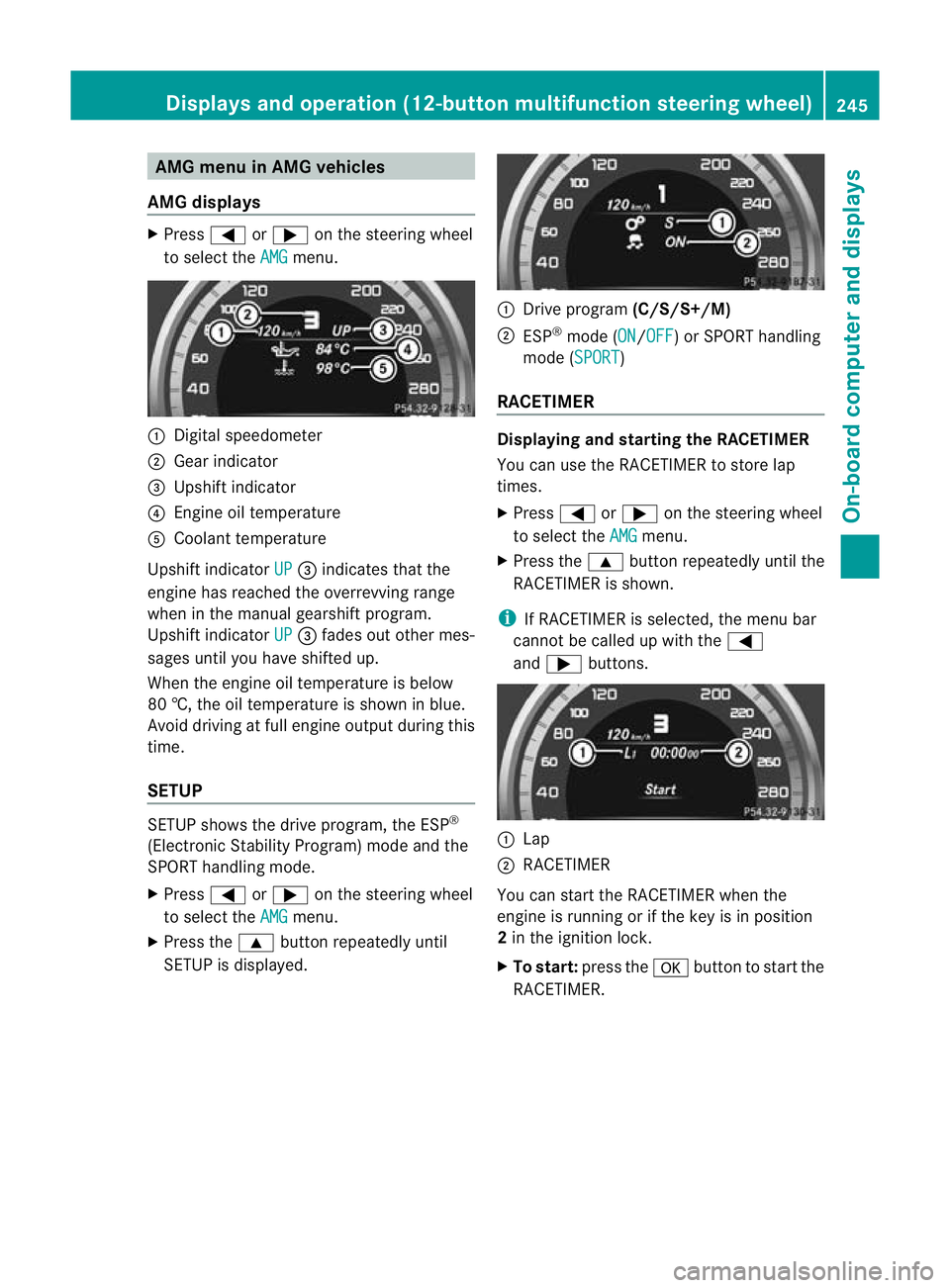
:
Digital speedometer
; Gear indicator
= Upshift indicator
? Engine oil temperature
A Coolant temperature
Upshift indicator UP =
indicates that the
engine has reached the overrevving range
when in the manual gearshift program.
Upshift indicator UP =
fades out other mes-
sages until you have shifted up.
When the engine oil temperature is below
80 †, the oil temperature is shown in blue.
Avoid driving at full engine output during this
time.
SETUP SETUP shows the drive program, the ESP
®
(Electronic Stability Program) mode and the
SPORT handling mode.
X Press =or; on the steering wheel
to select the AMG menu.
X Press the 9button repeatedly until
SETUP is displayed. :
Drive program (C/S/S+/M)
; ESP ®
mode (ON /OFF ) or SPORT handling
mode (SPORT )
RACETIMER Displaying and starting the RACETIMER
You can use the RACETIMER to store lap
times.
X
Press =or; on the steering wheel
to select the AMG menu.
X Press the 9button repeatedly until the
RACETIMER is shown.
i If RACETIMER is selected, the menu bar
cannot be called up with the =
and ; buttons. :
Lap
; RACETIMER
You can start the RACETIMER when the
engine is running or if the key is in position
2 in the ignition lock.
X To start: press the abutton to start the
RACETIMER. Displays and operation (12-button multifunction steering wheel)
245On-board computer and displays Z