height MERCEDES-BENZ C-CLASS SALOON 2012 User Guide
[x] Cancel search | Manufacturer: MERCEDES-BENZ, Model Year: 2012, Model line: C-CLASS SALOON, Model: MERCEDES-BENZ C-CLASS SALOON 2012Pages: 557, PDF Size: 10.15 MB
Page 224 of 557
The
vehicle is lo wered again in thefo llowing sit‐
uations:
R When driving fasterthan 80 km/h.
R When driving between 60 km/h and
80 km/h for appro ximately thre e minutes.
R After selecting a drive program using the
DY NA MIC SELECT switch.
The vehicle is adjus tedto the height of the
active drive program.
Lo weri ngtheve hicle #
Press button 1.
Indica tor lamp 2goes out. The vehicle is
adjus tedto the height of the active drive pro‐
gram. Re
versing camera Fu
nction of there ve rsing camera
If yo u ha veactivated the function in the multime‐
dia sy stem, the image from there ve rsing camera
is shown in the media display when reve rsege ar
is engaged. Dynamic guide lines show the path
th eve hicle will take with the cur rent steering angle. This helps
youto orient yourself and to
avo id obs tacles when reve rsing.
The reve rsing camera is only an aid. It is not a
substitute foryo ur attention tothe sur roundings.
The responsibility for safe manoeuvring and
parking remains with you. Make sure that there
are no persons, animals or objects etc., in the
manoeuvring area while manoeuvring and park‐
ing.
The guide lines in the media display show the
dis tances to yourvehicle. The dis tances dis‐
pl ay ed only apply toroad le vel.
Yo u can select from thefo llowing vie ws:
R Normal view
R Wide-angle view
R Trailer view
The area behind theve hicle is displa yed as a
mir ror image, as in the inside rearview mir ror.
Ve hicles without Parking Assist PARKTRONIC
The following camera vie wsare available in the
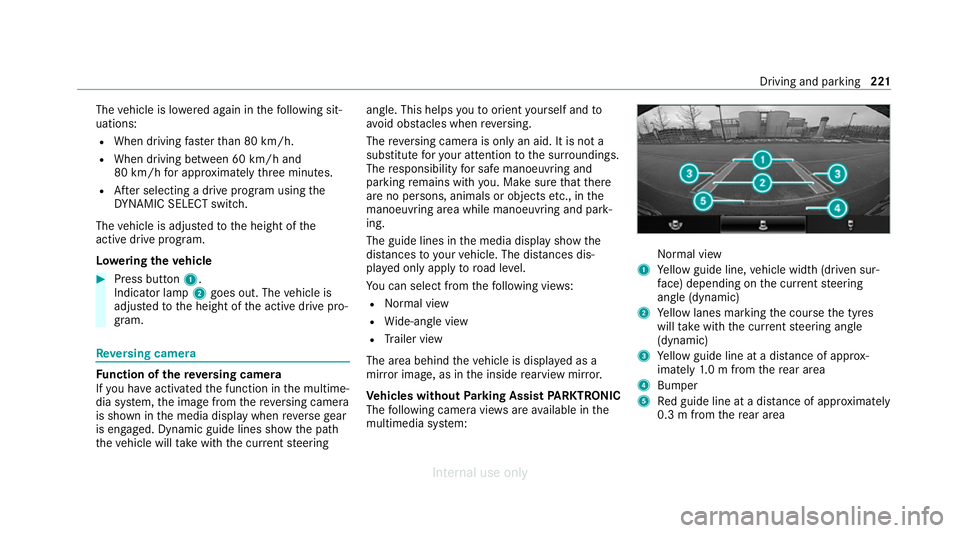
multimedia sy stem: Normal view
1 Yellow guide line, vehicle width (driven sur‐
fa ce) depending on the cur rent steering
angle (dynamic)
2 Yellow lanes marking the course the tyres
will take with the cur rent steering angle
(dynamic)
3 Yellow guide line at a dis tance of appr ox‐
imately 1.0 m from there ar area
4 Bumper
5 Red guide line at a dis tance of appr oximately
0.3 m from there ar area Driving and parking
221
Internal use only
Page 226 of 557
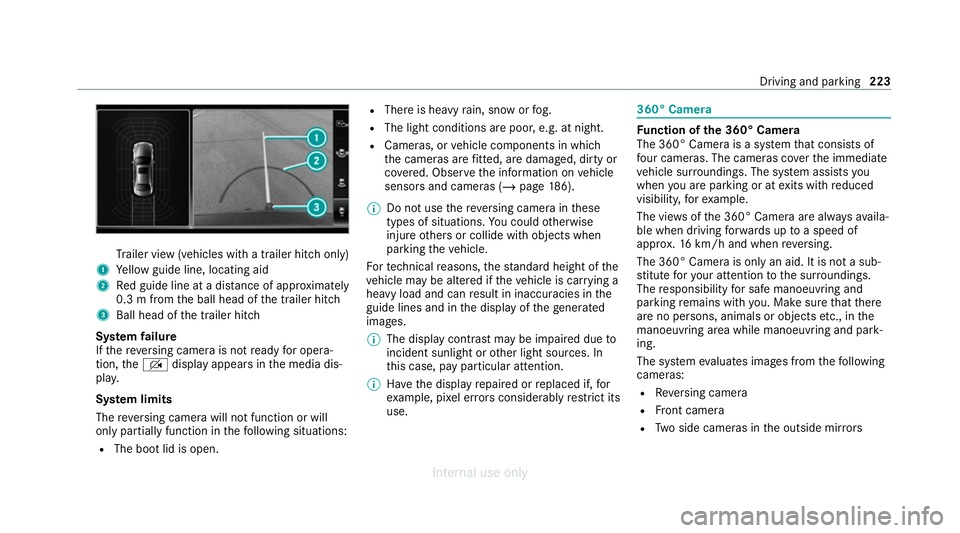
Tr
ailer view (vehicles with a trailer hit chonly)
1 Yellow guide line, locating aid
2 Red guide line at a dis tance of appr oximately
0.3 m from the ball head of the trailer hitch
3 Ball head of the trailer hitch
Sy stem failure
If th ere ve rsing camera is not ready for opera‐
tion, theq display appears in the media dis‐
pla y.
Sy stem limits
The reve rsing camera will not function or will
only partially function in thefo llowing situations:
R The boot lid is open. R
There is heavy rain, snow or fog.
R The light conditions are poor, e.g. at night.
R Cameras, or vehicle components in which
th e cameras are fitted, are dama ged, dirty or
co vered. Obser vethe information on vehicle
sensors and cameras (/ page186).
% Do not use there ve rsing camera in these
types of situations. You could otherwise
injure others or collide with objects when
parking theve hicle.
Fo rte ch nical reasons, thest andard height of the
ve hicle may be altered if theve hicle is car rying a
heavy load and can result in inaccuracies in the
guide lines and in the display of thege nerated
ima ges.
% The display contra stmay be impaire d dueto
incident sunlight or other light sources. In
th is case, pay particular attention.
% Have the display repaired or replaced if, for
ex ample, pixel er rors considerably restrict its
use. 360° Came
ra Fu
nction of the 360° Camera
The 360° Camera is a sy stem that consists of
fo ur cameras. The cameras co verth e immediate
ve hicle sur roundings. The sy stem assists you
when you are parking or at exits with reduced
visibility, forex ample.
The vie wsofthe 360° Camera are alw aysav aila‐
ble when driving forw ards up toa speed of
appr ox.16 km/h and when reve rsing.
The 360° Camera is only an aid. It is not a sub‐
st itute foryo ur attention tothe sur roundings.
The responsibility for safe manoeuvring and
parking remains with you. Make sure that there
are no persons, animals or objects etc., in the
manoeuvring area while manoeuvring and park‐
ing.
The sy stem evaluates images from thefo llowing
cameras:
R Reversing camera
R Front camera
R Two side cameras in the outside mir rors Driving and pa
rking 223
Internal use only
Page 229 of 557
Sy
stem limits
The 360° Camera will not function or will only
partially function in thefo llowing situations:
R The doors are open.
R The side mir rors are folded in.
R The boot lid is open.
R There is heavy rain, snow or fog.
R The light conditions are poor, e.g. at night.
R Cameras, or vehicle components in which
th e cameras are fitted, are dama ged, dirty or
co vered. Obser vethe information on vehicle
sensors and cameras (/ page186).
Do not use the 360° Camera under such circum‐
st ances. You could otherwise injure others or
collide with objects when parking or manoeu‐
vring theve hicle.
On vehicles with height-adjus table suspension or
if th eve hicle is car rying a heavy load, leaving the
st andard height can result in inaccuracies in the
guide lines and in the display of thege nerated
ima ges, depending on tech nical conditions. %
The contrast of the display may be impaired
by abrupt, direct sunlight or by other light
sources, e.g. when driving out of a garage . In
th is case, pay particular attention.
% Have the display repaired or replaced if, for
ex ample, pixel er rors considerably restrict its
use.
See the no tes on cleaning the 360° Camera
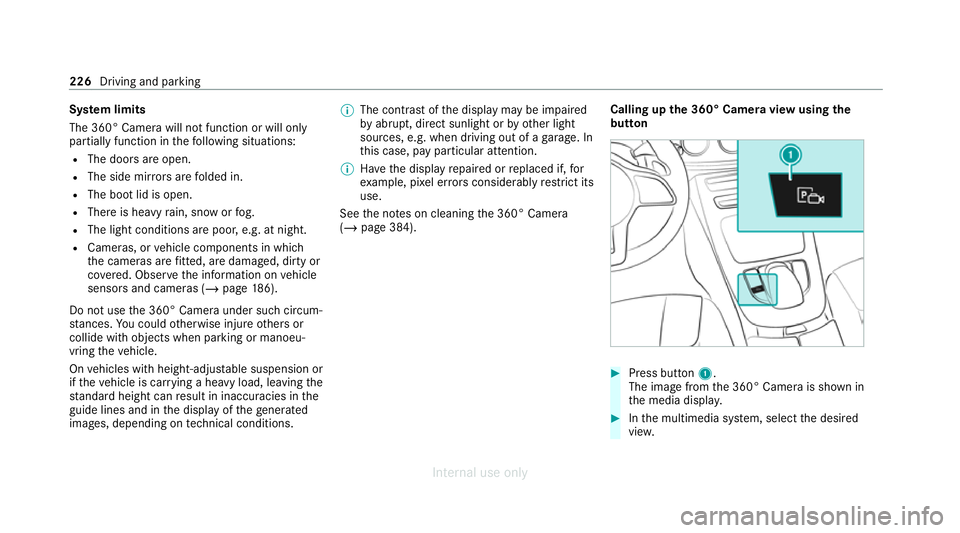
(/ page 384). Calling up
the 360° Camera view using the
button #
Press button 1.
The image from the 360° Camera is shown in
th e media displa y. #
Inthe multimedia sy stem, select the desired
vie w. 226
Driving and parking
Internal use only
Page 315 of 557
Fo
r map data that you ha vepur chased in the
fo rm of a data storage medium, you must en ter
th e accompanying activation code.
% Ifyo u sa vethe map data on a data storage
medium with the online map update service,
no entry isrequ ired. The activation code is
st ored on the data storage medium during
th e downloading process.
The online map update service is not availa‐
ble in all countries.
Obse rveth efo llowing when entering the activa‐
tion code:
R The activation code can be used for one vehi‐
cle
R The activation code is not transferable
R The activation code has six digits
In theeve nt of thefo llowing problems, please
con tact a Mercedes-Benz service centre:
R The multimedia sy stem does not accept the
activation code
R You ha velost the activation code Displaying
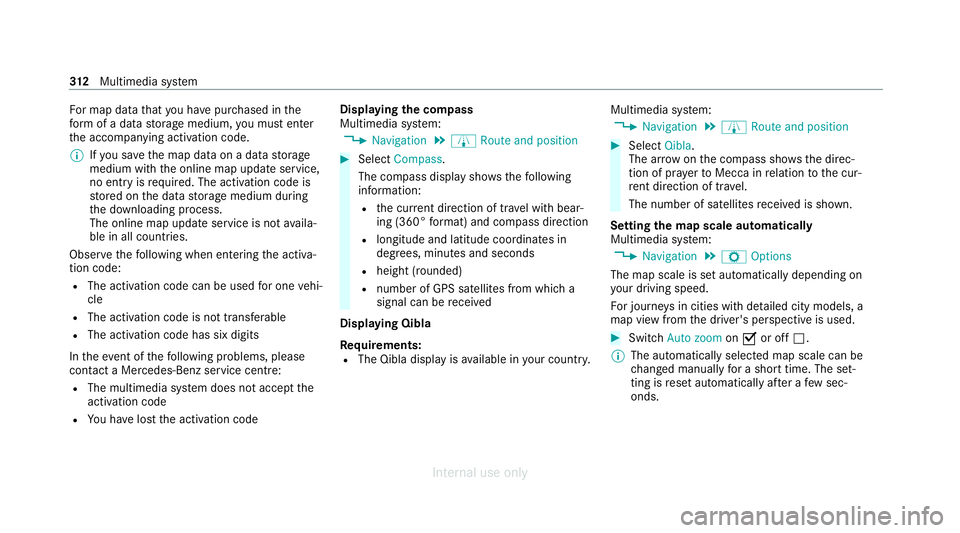
the compass
Multimedia sy stem:
4 Navigation 5
À Route and position #
Select Compass.
The compass display sho wsthefo llowing
information:
R the cur rent di rection of tr avel with bear‐
ing (360° form at) and compass direction
R longitude and latitude coo rdinates in
degrees, minutes and seconds
R height (rounded)
R number of GPS satellites from which a
signal can be recei ved
Displaying Qibla
Requ irements:
R The Qibla display is available in your count ry.Multimedia sy
stem:
4 Navigation 5
À Route and position #
Select Qibla.
The ar rowonthe compass sho wsthe direc‐
tion of pr ayer toMecca in relation tothe cur‐
re nt di rection of tr avel.
The number of satellites recei ved is shown.
Setting the map scale automatically
Multimedia sy stem:
4 Navigation 5
Z Options
The map scale is set automatically depending on
yo ur driving speed.
Fo r journe ysin cities with de tailed city models, a
map view from the driver's perspective is used. #
Switch Auto zoom onO or off ª.
% The automatically selected map scale can be
changed manually for a short time. The set‐
ting is reset automatically af ter a few sec‐
onds. 312
Multimedia sy stem
Internal use only
Page 379 of 557
#
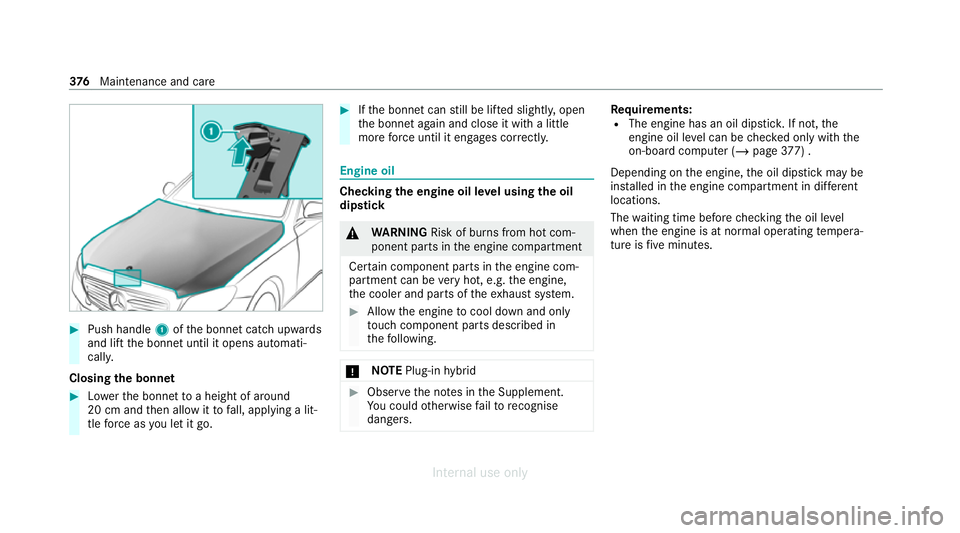
Push handle 1ofthe bonn etcatch up wards
and lift the bonn etuntil it opens automati‐
call y.
Closing the bonnet #
Lowe rth e bonn etto a height of around
20 cm and then allow it tofall, applying a lit‐
tle forc e as you let it go. #
Ifth e bonn etcan still be lif ted slightl y,open
th e bonn etagain and close it with a little
more forc e until it engages cor rectly. Engine oil
Che
cking the engine oil le vel using the oil
dip stick &
WARNING Risk of burn s from hot com‐
ponent parts in the engine compartment
Cer tain component parts in the engine com‐
partment can be very hot, e.g. the engine,
th e cooler and parts of theex haust sy stem. #
Allow the engine tocool down and only
to uch co mponent parts described in
th efo llowing. *
NO
TEPlug-in hybrid #
Obser vethe no tes in the Supplement.
Yo u could otherwise failto recognise
dangers. Re
quirements:
R The engine has an oil dipstic k.If not, the
engine oil le vel can be checked only with the
on-board computer (/ page377) .
Depending on the engine, the oil dipstick may be
ins talled in the engine compartment in dif fere nt
locations.
The waiting time before checking the oil le vel
when the engine is at normal operating temp era‐
ture is five minutes. 376
Maintenance and care
Internal use only
Page 443 of 557
Do not use di
stilled or de-ionised water.Other‐
wise, thefill le vel sensor may be triggered er ro‐
neously.
Re commended windscreen washer fluid:
R abo vefreezing point: e.g. MB SummerFit
R below freezing point: e.g. MB WinterFit
Fo rth e cor rect mixing ratio, referto the informa‐
tion on the antif reeze contai ner.
Mix washer fluid with windsc reen washer fluid all
ye ar round. Ve
hicle data Ve
hicle dimensions The heights specifi
ed mayvary as a result of the
fo llowing factors:
R tyres
R load
R condition of the suspension
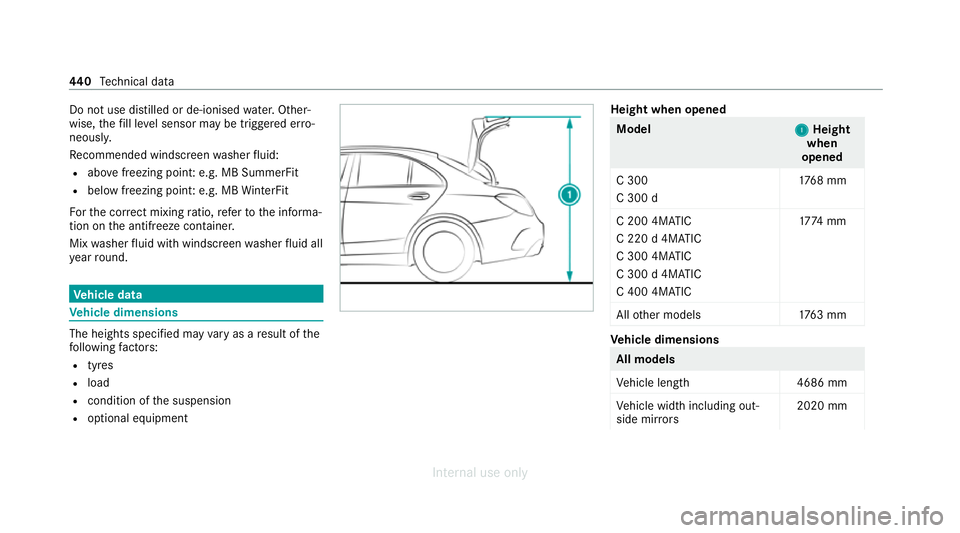
R optional equipment Height when opened
Model
1 1Height
when
opened
C 300
C 300 d 17
68 mm
C 200 4MATIC
C 220 d 4MATIC
C 300 4MATIC
C 300 d 4MATIC
C 400 4MATIC 17
74 mm
All other models 1763 mm Ve
hicle dimensions All models
Ve
hicle lengt h4 686 mm
Ve hicle width including out‐
side mir rors 2020 mm440
Tech nical da ta
Internal use only
Page 444 of 557
All models
Ve
hicle width excluding out‐
side mir rors 18
10 mm
Wheelbase 2840 mmModel
Vehicle
height
C 16 01 542 mm
C 180
C 200 14
42 mm
or
15 42 mm
C 18 0 d
C 200 d
C 220 d 14
42 mm
C 300
C 300 d 14
47 mm
All other models 1452 mm We
ights and loads Please obser
vethefo llowing no tesfo rth e speci‐
fi ed vehicle data:
R Items of optional equipment increase the
unladen weight and reduce the pa yload.
R Vehicle-specific weight information can be
fo und on theve hicle identification plate
(/ page 428).
Ro of load All models
Maximum
roof load 75kg Tr
ailer hitch Gene
ral no tes on the trailer hit ch Modifications
tothe engine cooling sy stem may
be necessar y,depending on theve hicle model.
The retrofitting of a trailer hitch is only pe rmissi‐
ble if a towing capacity is specified in your vehi‐
cle documents.
Fu rther information can be obtained at a quali‐
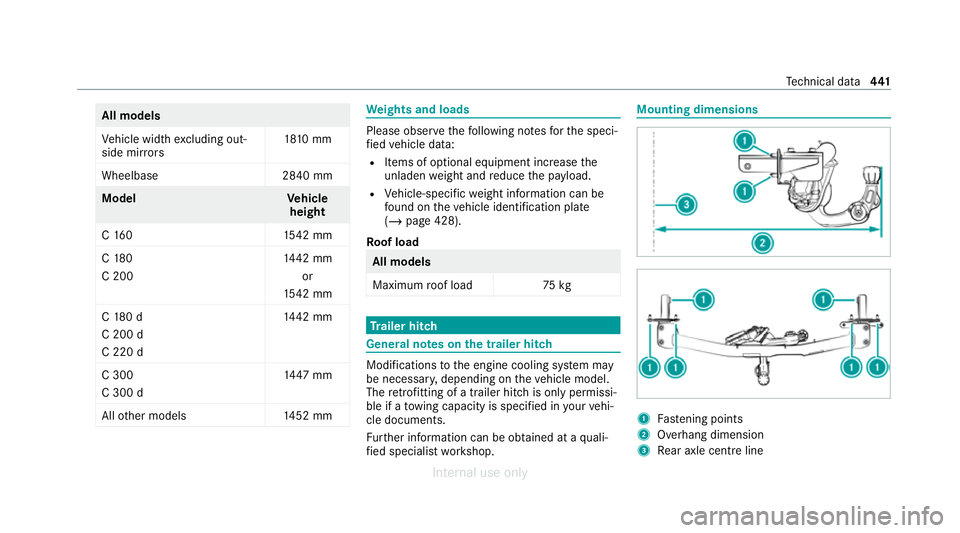
fi ed specialist workshop. Mounting dimensions
1
Fastening points
2 Overhang dimension
3 Rear axle centre line Te
ch nical da ta441
Internal use only
Page 545 of 557
Ru
nning-in no tes........................................ 157S
Saf ety sy stems
see Driving saf ety sy stem
Saf etyve st................................................. 388
Satelli temap .............................................. 313
SD card Inserting/re moving.............................. .348
Seat 4-waylumbar suppor t........................... 103
Ad justing (electrically)........................... 103
Ad justing (manually and electrically)..... 102
Ad justing (me chanically and electri‐
cally)....................................................... .99
Ad justing (Seat Comfort)....................... 101
Backrest (rear) locking........................... 11 6
Con figuring the settings........................ 105
Cor rect driver's seat position.................. 98
Fo lding the backrest (rear) back............ 11 6
Fo lding the backrest (rear) forw ards...... 11 4
Operating the memory function.............1 11
Re setting the settings............................1 06
Setting options........................................ 16Seat belt
Activating/deactivating seat belt
adjustment.............................................. 42
Ad justing the height................................. 41
Car e...................................................... 385
Centre rear seat (releasing ).....................41
Fa stening................................................. 41
Pr otection................................................ 39
Re ar seat belt status displa y................... 43
Re duced pr otection.................................40
Re leasing................................................ .43
Seat belt adjustment (function)............... 42
Wa rning lamp......................................... .43
Seat belt adjustment Activating/deactivating........................... 42
Fu nction.................................................. 42
Seat belt tensioners
Ac tivation................................................ 38
Seat belt warning
see Seat belt
Seat co ver (Care)....................................... 385
Seat hea ter
Ac tivating/deactivating......................... 106Seat
ventilation
Switching on/off ................................... 107
Second telephone
Connecting........................................... .317
Fe atures................................................ .317
Selecting a gear
see Changing gears
Selector le ver
see DIRECT SELECT le ver
Self-test Automatic front passenger front air‐
bag shutoff............................................. .48
Sensors (care) ...........................................3 84
Service see ASS YST PLUS
Service centre see Qualified specialist workshop
Service inter val display
see ASSY STPLUS
Service station sear ch
St arting automatic sear ch..................... 298
Setting a speed see Cruise control 542
Index
Internal use only
Page 553 of 557
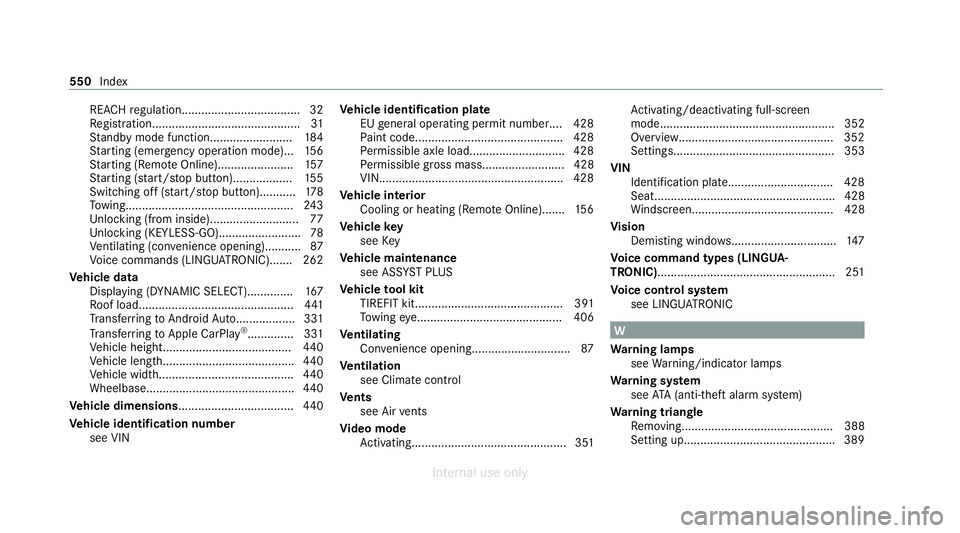
REA
CHregulation.................................... 32
Re gistration............................................. 31
St andby mode function........................ .184
St arting (eme rgency operation mode)...1 56
St arting (Remo teOnline).......................1 57
St arting (s tart/s top button).................. 15 5
Switching off (s tart/s top button)...........1 78
To wing.................................................. .243
Un locking (from inside).......................... .77
Un locking (KEYLESS-GO)........................ .78
Ve ntilating (co nvenience opening)........... 87
Vo ice commands (LINGU ATRO NIC)....... 262
Ve hicle data
Displ aying (DYNAMIC SELECT).............. 167
Ro of load............................................... 441
Tr ans ferring toAndroid Auto.................. 331
Tr ans ferring toApple CarPl ay®
.............. 331
Ve hicle height....................................... 440
Ve hicle length........................................4 40
Ve hicle width.........................................4 40
Wheelbase............................................. 440
Ve hicle dimensions ................................... 440
Ve hicle identification number
see VIN Ve
hicle identification plate
EU general operating pe rmit number.... 428
Pa int code............................................. 428
Pe rm issible axle load............................ .428
Pe rm issible gross mass......................... 428
VIN....................................................... .428
Ve hicle interior
Cooling or heating (Remo teOnline).......1 56
Ve hicle key
see Key
Ve hicle maintenance
see ASS YST PLUS
Ve hicle tool kit
TIREFIT kit............................................. 391
To wing eye............................................ 406
Ve ntilating
Con venience opening.............................. 87
Ve ntilation
see Climate cont rol
Ve nts
see Air vents
Vi deo mode
Ac tivating............................................... 351 Ac
tivating/deactivating full-screen
mode..................................................... 352
Overview............................................... 352
Setting s................................................. 353
VIN Identification plate................................ 428
Seat....................................................... 428
Windsc reen........................................... 428
Vi sion
Demisting windo ws................................ 147
Vo ice command types (LINGUA‐
TRONIC)...................................................... 251
Vo ice control sy stem
see LINGU ATRO NIC W
Wa rning lamps
see Warning/indicator lamps
Wa rning sy stem
see ATA (anti-theft alarm sy stem)
Wa rning triangle
Re moving.............................................. 388
Setting up............................................. .389 550
Index
Internal use only