wheel MERCEDES-BENZ C-CLASS SALOON 2012 Owner's Guide
[x] Cancel search | Manufacturer: MERCEDES-BENZ, Model Year: 2012, Model line: C-CLASS SALOON, Model: MERCEDES-BENZ C-CLASS SALOON 2012Pages: 557, PDF Size: 10.15 MB
Page 175 of 557
R
Speed
R Ope rating status of the engine
R Traf fic situation
% Glide mode can be ended bypressing a
st eering wheel gearshift paddle
(/ page 170). Fu
nction of the 4MATIC
4MATIC ensures that all four wheels are driven.
To get her with ESP ®
and 4ETS, 4MATIC impr oves
th e traction of your vehicle whene ver a driven
wheel spins due toinsuf ficient traction.
If yo ufa ilto adapt your driving style, 4MATIC can
neither reduce therisk of an accident nor over‐
ri de the la wsof ph ysics. 4MATIC cannot take
account of road, weather and traf fic conditions.
4MATIC is only an aid. You are responsible espe‐
cially for maintaining a safe dis tance from the
ve hicle in front, forve hicle speed, for braking in
good time and forst ay ing in lane.
% In wint ryroad conditions, the maximum
ef fect of 4MATIC can be achie ved only if you use winter tyres (M+S tyres), with sn
ow
ch ains if necessar y. Re
fuelling Re
fuelling theve hicle &
WARNING Risk offire or explosion from
fuel
Fu els are highly flammable. #
Fire, naked flames, smoking and crea‐
tion of spar ksmust be avoided. #
Swit choff the ignition and, if available,
th est ationary heater, before and while
re fuelling theve hicle. &
WARNING Risk of injury from fuels
Fu els are poisonous and hazardous to your
health. #
Do not swallow fuel or let it come into
contact with skin, eyes or clo thing. #
Do not inhale fuel vapour. #
Keep children away from fuel. #
Keep doors and windo wsclosed du ring
th ere fuelling process.
If yo u or other people come into contact with
fuel, obser vethefo llowing: #
Immediately rinse fuel off your skin with
soap and water. #
If fuel comes into contact with your
ey es, immediately rinse them thor‐
oughly with clean water.Seek medical
attention immediately. #
Ifyo u swallow fuel, seek medical atten‐
tion immediatel y.Do not induce vomit‐
ing. #
Change immediately out of clo thing that
has come into con tact with fuel. &
WARNING Risk offire and explosion due
to electros tatic charge
Electros tatic charge can igni tefuel vapour. 17 2
Driving and pa rking
Internal use only
Page 181 of 557
Ad
Blue ®
re fill canis ter4 can be remo ved
when it has been only partially em ptied. #
Unscr ew and close disposable hose 3and
Ad Blue ®
re fill canis ter4 inreve rse order. #
Replace AdBlue ®
filler cap 2and turn it
clockwise until it audibly engages. #
Close fuel filler flap 1. #
Swit chon the ignition for at least 60 sec‐
onds.
% Ifth e engine could not be star ted due tothe
Ad Blue ®
tan k being empty, it can take up to
60 seconds forth eto p up tobe de tected. #
Start theve hicle.
% Avoid storing AdBlue ®
re fill conta iners per‐
manently in theve hicle. Pa
rking Pa
rking theve hicle &
WARNING Risk of accident and inju ry
caused byan insuf ficiently secu redve hi‐
cle rolling away
If th eve hicle is not securely par ked suf fi‐
ciently, it can rollaw ay in an uncontro lled
wa yev en at a slight downhill gradient. #
On uphill or downhill gradients, turn the
front wheels so that theve hicle rolls
to wa rdsth eke rb if it starts moving. #
apply the parking brake. #
Switch the transmission toposition j. &
WARNING Risk offire caused byhot
ex haust sy stem parts
Flammable materials such as lea ves, grass or
twigs may ignite. #
Park theve hicle so that no flammable
material can come into con tact with hot
ve hicle components. #
In particular, do not park on dry grass‐
land or har vested grain fields. &
WARNING Risk of accident and inju ry
due toleaving children unat tended in the
ve hicle
If ch ildren are left unat tended in theve hicle,
th ey could, in part icular:
R open doors, thereby endangering other
persons or road users.
R get out and be stru ck byoncoming traf‐
fi c.
R ope rate ve hicle equipment and become
trapped, forex ample.
In addition, thech ildren could also set the
ve hicle in motion by,fo rex ample:
R releasing the parking brake.
R changing the transmission position.
R starting theve hicle. #
Never lea vechildren unat tended in the
ve hicle. 17 8
Driving and pa rking
Internal use only
Page 182 of 557
#
When leaving theve hicle, alw aysta ke
th eke y with you and lock theve hicle. #
Keep theve hicle key out of there ach of
ch ildren. *
NO
TEDama getotheve hicle due toit
ro lling away #
Alw ays secure theve hicle against roll‐
ing away. *
NO
TEDama gedue totheve hicle lo wer‐
ing Ve
hicles with AIRMATIC or le vel control:
The vehicle can lo wer because of temp era‐
ture dif fere nces or longer non-operational
times. This can cause dama getoparts of the
body. #
When stopping theve hicle and when
driving off, make sure that there are no
obs tacles su chas curbs under or in the
immediate vicinity of the body. #
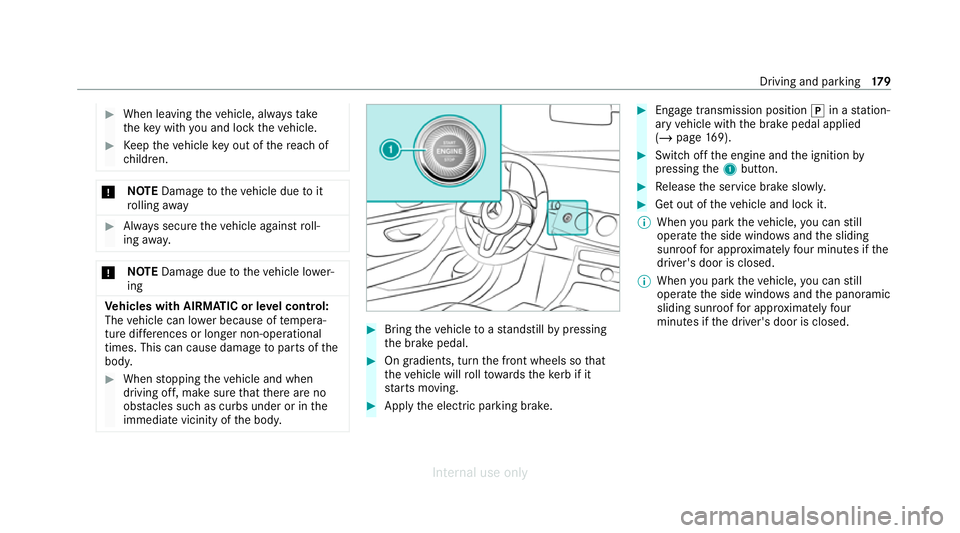
Bring theve hicle toast andstill bypressing
th e brake pedal. #
On gradients, turn the front wheels so that
th eve hicle will rollto wa rdsth eke rb if it
st arts moving. #
App lythe electric parking brake. #
Enga getransmission position jin a station‐
ary vehicle with the brake pedal applied
(/ page 169). #
Switch off the engine and the ignition by
pressing the1 button. #
Release the service brake slowl y. #
Get out of theve hicle and lock it.
% When you park theve hicle, you can still
operate the side windo wsand the sliding
sunroof for appro ximately four minutes if the
driver's door is closed.
% When you park theve hicle, you can still
operate the side windo wsand the panoramic
sliding sunroof for appro ximately four
minutes if the driver's door is closed. Driving and parking
17 9
Internal use only
Page 190 of 557
R
EBD ( Electronic Brakeforce Distribution)
(/ page 190)
R STEER CONTROL (/ page 190)
R HOLD fu nction (/ page 190)
R Hill Start Assist (/ page191)
R Adaptive Brake Lights (/ page192)
R ATTENTION ASSIST (/ page192)
R Cruise control (/ page194)
R Limi ter (/ page194)
R Traf fic Sign Assi st (/ page 211)
R DYNA MIC BODY CONTROL (/ page218)
R AIRMATIC (/ page219)
Driving Assistance pac kage
The following functions are part of the Driving
Assis tance Package. Cer tain functions are only
av ailable in some countries. Some functions are
also available without the Driving Assis tance
Pa ckage, albeit with restricted functionality.
R Active Dis tance Assi stDISTRONIC
(/ page 197) R
Active Speed Limit Assi st(countr y-depend‐
ent) (/ page 201)
R Route-based speed adap tation (countr y-
dependent) (/ page 202)
R Active Brake Assi st (/ page 206)
R Active Steering Assist (count ry-dependent)
(/ page 203)
R Active Emergency Stop Assist (countr y-
dependent) (/ page 206)
R Blind Spot Assist and Active Blind Spot Assi st
with exitwa rning (/ page213)
R Active Lane Keeping Assist (/ page216)
Park ingPackage
R Reversing camera (/ page 221)
R 360° Camera (/ page 223)
R Parking Assist PARKTRONIC ( /page 227)
R Active Parking Assist (/ page 231) Fu
nction of ABS The Anti-lock Brake Sy
stem (ABS) regulates the
brake pressure in critical driving situations:
R During braking, e.g. at full brake application
or insuf ficient tyre traction, the wheels are
pr eve nted from lock ing.
R Vehicle steerability while braking is ensured.
If ABS inter venes when braking, you will feel a
pulsing in the brake pedal. The pulsating brake
pedal can be an indication of hazardous road
conditions and can ser veas a reminder totake
ex tra care while driving. Fu
nction of BAS The Brake Assist Sy
stem (BAS) supports your
eme rgency braking situation with additional
brake forc e.
If yo u depress the brake pedal quickl y,BA S is
acti vated:
R BAS au tomatically boosts the brake pres‐
sure.
R BAS can sho rten the braking dis tance. Driving and pa
rking 187
Internal use only
Page 191 of 557
R
ABS pr events the wheels from locking.
The brakes will function as usual once you
re lease the brake pedal. BAS is deactivated. Fu
nction of ESP ®
(Electronic Stability Pro‐
gr am) &
WARNING Risk of skidding if ESP ®
is
deactivated
If yo u deactivate ESP ®
, ESP ®
cannot car ry
out vehicle stabilisation. #
ESP ®
should on lybe deactivated in the
fo llowing situations. *
NO
TEMercedes-AMG vehicles #
Obser vethe no tes in the Supplement.
Yo u could otherwise failto recognise
dangers. ESP
®
can moni tor and impr ovedriving stability
and traction in thefo llowing situations, within
ph ysical limits:
R When pulling away on wet or slippe rycar ria‐
ge wa ys.
R When braking.
If th eve hicle deviates from the direction desired
by the driver, ESP ®
can stabilise theve hicle by
inter vening in thefo llowing ways:
R One or more wheels are braked.
R The engine output is adap ted according to
th e situation.
When ESP ®
is deactivated, theå warning
lamp lights up continuously:
R Driving stability will no lon ger be impr oved.
R The drive wheels could spin.
R ETS/4ETS traction control is still active.
% When ESP ®
is deactivated, you are still assis‐
te dby ESP ®
when braking. When
the÷ warning lamp flashes, one or
se veral wheels has reached its grip limit:
R Adapt your driving style to suit the cur rent
ro ad and weather conditions.
R Do not deactivate ESP ®
.
R Only depress the accelerator pedal as far as
is necessary when pulling away.
Deactivate ESP ®
in thefo llowing situations to
impr ovetraction:
R When using snow chains.
R In deep snow.
R On sand or gr avel.
% Spinning the wheels results in a cutting
action, which enhances traction.
If th e÷ ESP®
wa rning lamp lights up continu‐
ousl y,ESP ®
is not available due toa malfunction.
Obse rveth efo llowing information:
R Warning and indicator lamps (/ page 498)
R Display messages (/ page445) 18 8
Driving and pa rking
Internal use only
Page 192 of 557
ETS/4ETS (Electronic
Traction Sy stem)
ETS/4ETS traction control is pa rtof ESP ®
and
makes it possible topull away and accelerate on
a slippe rycar riag ewa y.
ETS/4ETS can impr ovetheve hicle's traction by
inter vening in thefo llowing ways:
R The drive wheels are braked individually if
they spin.
R More drive torque is transferred tothe wheel
or wheels with traction.
Influence of drive prog rams on ESP ®
The drive prog rams enable ESP ®
to adapt todif‐
fe re nt we ather and road conditions as well as
th e driver's prefer red driving style. Depending on
th e selected drive program, the appropriate
ESP ®
mode will be activated. You can select the
drive prog rams using theDY NA MIC SELECT
switch (/ page166). Fu
nction of ESP ®
Crosswind Assist ESP
®
Crosswind Assist de tects sudden gu sts of
side wind and helps the driver tokeep theve hi‐
cle in the lane:
R ESP ®
Crosswind Assist is active at vehicle
speeds between appr ox.75 km/h and
200 km/h when driving stra ight ahead or
cornering slight ly.
R The vehicle is stabilised bymeans of individ‐
ual brake application on one side. Fu
nction of ESP ®
trailer stabilisation &
WARNING Risk of accident in poor road
and weather conditions
In poor road and weather conditions, the
trailer stabilisation cannot pr event lu rching of
th eve hicle/trailer combination. Trailers with
a high centre of gr avity may tip over before
ESP ®
de tects this. #
Alw ays adapt your driving style to suit
th e cur rent road and weather condi‐
tions. When driving with a trailer, ESP
®
can stabilise
yo ur vehicle if the trailer begins toswer vefrom
side toside:
R ESP ®
trailer stabilisation is active abo ve
speeds of 65 km/h.
R Slight swerving is reduced bymeans of a tar‐
ge ted, individual brake application on one
side.
R Intheeve nt of se vere swerving, the engine
output is also reduced and all wheels are
braked.
ESP ®
trailer stabilisation may be impaired or
may not function if:
R The trailer is not connec ted cor rectly or is
not de tected properl yby theve hicle. Driving and parking
18 9
Internal use only
Page 193 of 557
Ac
tivating/deactivating ESP ®
(Electronic Sta‐
bility Prog ram) Multimedia sy
stem:
4 Vehicle 5
k Assistance 5
ESP
Mercedes‑AMG vehicles: observeth e no tes in
th e Supplement. Otherwise, you may failto rec‐
ognise dangers. #
Activate Oor deacti vate ª the function.
ESP ®
is deactivated if theå ESP®
OFF warn‐
ing lamp lights up continuously in the instrument
clus ter.
Obser vethe information on warning lamps and
display messages which may be shown in the
instrument clus ter. Fu
nction of EBD Elect
ronic Breakforce Distribution (EBD) is char‐
acterised bythefo llowing:
R Monitoring and regulating the brake pressure
on there ar wheels. R
Impr oved driving stability when braking,
especially on bends. Fu
nction of STEER CONT ROL ST
EER CONTROL helps youby transmitting a
noticeable steering forc eto thesteering wheel in
th e direction requiredforve hicle stabilisation.
This steering recommendation is given in thefo l‐
lowing situations:
R both right wheels or bo thleft wheels are on a
we t or slippe ryroad sur face when you brake
R theve hicle starts toskid
Sy stem limits
ST EER CONTROL may be impaired or may not
function in thefo llowing situations:
R ESP ®
is deactivated.
R ESP ®
is malfunctioning.
R The steering is malfunctioning.
If ESP ®
is malfunctioning, you will be assis ted
fur ther by the electric po werst eering. HOLD function
HOLD function
The HOLD function holds
theve hicle at a stand‐
st ill without requ iring youto depress the brake
pedal, e.g. while waiting in traf fic.
The HOLD function is only an aid. The responsi‐
bility forth eve hicle safely standing still remains
with the driver.
Sy stem limits
The HOLD function is only intended toprov ide
assis tance when driving and is not a su fficient
means of safeguarding theve hicle against rolling
aw ay when stationar y.
R The incline must not be greater than 30%. 19 0
Driving and pa rking
Internal use only
Page 197 of 557
Cruise control and limiter
Fu
nction of cruise control
Cruise contro lre gulates the speed totheva lue
selec tedby the driver.
If yo u accelerate toove rtake, forex ample, the
st ored speed is not dele ted. If youre mo veyour
fo ot from the accelerator pedal af terove rtaking,
cruise control will resume speed regulation back
to thestored speed.
Yo u can store any speed abo ve20 km/h up to
th e maximum design speed or up tothe set win‐
te r tyre limit.
Obser vethe no tes on driving sy stems and your
re sponsibility; you may otherwise failto recog‐
nise dangers (/ page 185).
Me rcedes‑AMG vehicles: cruise control is avail‐
able up toa maximum speed of 250 km/h.
Displ ays on the multifunction display
R h (gre y): cruise contro l is selected but
not yet acti vated.
R h (green): cruise control is active. A
stored speed appears along with theh dis‐
pla y.
% The segments extending from the cur rent
st ored speed tothe end of the scale, or to
th e set winter tyre limit, light up in the
speedome ter.
Sy stem limits
Cruise control may be unable tomaintain the
st ored speed on uphill gradients. The stored
speed is resumed when the gradient evens out.
Change into a lo werge ar in good time on long
and steep downhill gradients. Take particular
no te ofthis when driving a laden vehicle. By
doing so, you will make use of the engine's brak‐
ing ef fect. This relie vesth e load on the brake
sy stem and pr events the brakes from overheat‐
ing and wearing tooqu ickl y.
Do not use cruise control in thefo llowing situa‐
tions:
R In traf fic situations whi chrequ ire frequent
ch anges of speed, e.g. in heavy traf fic, on
winding roads. R
On slippe ryroads. Accelerating can cause
th e drive wheels tolose traction and the
ve hicle could then skid.
R Ifyo u are driving when visibility is poor.
Fu nction of the limiter
The limiter restricts the speed of theve hicle. To
re duce the speed tothe set speed, the limiter
applies the brakes automaticall y.
Yo u can limit the speed as follo ws:
R Variable: for a short-term speed restriction,
e.g. in built-up areas
R Perm anen t:for a longer-term speed restric‐
tion, e.g. in winter tyre mode
Yo u can store any speed abo ve20 km/h up to
th e maximum design speed or up tothe set win‐
te r tyre limit. You can also per form settings
while theve hicle is stationary if theve hicle has
been star ted.
Obser vethe no tes on driving sy stems and your
re sponsibility; you may otherwise failto recog‐
nise dangers (/ page 185).
Mercedes‑AMG vehicles: the limiter is available
up toa maximum speed of 250 km/h. 194
Driving and pa rking
Internal use only
Page 198 of 557
Displa
yson the multifunction display
R È (grey):va riable limiter is selec ted but
not yet acti vated.
R È (green): variable limiter is activated.
A stored speed appears along with theÈ dis‐
pla y.The segments in the speedome ter light up,
up tothe cur rently stored speed.
When the driving speed is greater than the
st ored speed, theÈ display flashes.
Kickd own
If yo u depress the accelera tor pedal be yond the
pressure point (kickdown), theva riable limiter
swit ches topassive mode. The Limiter passive
message appears in the multifunction displa y.
Af ter completion of kickdown, theva riable lim‐
iter is activated again in thefo llowing situations:
R Ifth eve hicle speed drops below thestored
speed.
R Ifth estored speed is called up.
R Ifyo ustore a new speed. Operating cruise control or
theva riable lim‐
iter &
WARNING Risk of accident due tostored
speed
If yo u call up thestored speed and this is
lo we rth an your cur rent speed, theve hicle
decelerates. #
Take into account the tra ffic situation
before calling up thestored speed. Re
quirements:
Cruise control
R Cruise control is selected.
R ESP ®
must be activated, but not inter vening.
R The vehicle speed is at least 20 km/h.
R The transmission is in position h.
Va riable limiter
R The variable limiter is selec ted. #
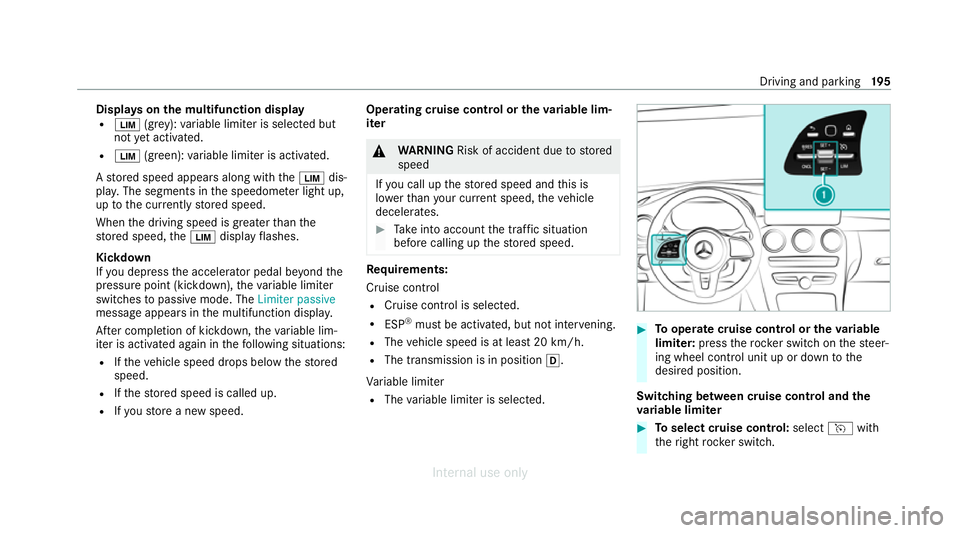
Tooperate cruise control or theva riable
limi ter: press thero ck er switch on thesteer‐
ing wheel control unit up or down tothe
desired position.
Switching between cruise control and the
va riable limi ter #
Toselect cruise control: selecthwith
th eright rock er switch. Driving and parking
19 5
Internal use only
Page 200 of 557
Setting
the limit speed for winter tyres
Multimedia sy stem:
4 Vehicle 5
î Vehicle settings
5 Winter tyres limit #
Select a speed or deactivate the function. Ac
tive Di stance Assist DISTRO NICFu
nction of Active Di stance Assist
DISTRO NIC
Ac tive Dis tance Assi stDISTRONIC maintains the
set speed on free-flowing roads. If vehicles in
front are de tected, the set dis tance is main‐
ta ined, if necessar y,until theve hicle comes to a
halt. The vehicle accelerates or brakes depend‐
ing on the dis tance totheve hicle in front and
th e set speed. The speed and dis tance tothe
ve hicle in front are set and sa ved using the
st eering wheel.
Av ailable speed range:
R Vehicles without Driving Assistance Pack‐
age: 20 km/h - 200 km/h
R Vehicles with Driving Assistance Pack‐
age: 20 km/h - 210 km/h %
Plug-in hybrid: the adjus table set speed can
be reduced due tothe selected drive pro‐
gram. Obser vethere leva nt no tes in the Sup‐
plement.
Other features of Active Dis tance Assi st
DISTRONIC:
R Adjusts the driving style depending on the
selected drive program (fuel-saving, comfort‐
able or dynamic)
R Initiates acceleration tothestored speed if
th e turn signal indicator is switched on to
ch ange totheove rtaking lane
R Vehicles with Driving Assistance Pack‐
age:
- Reacts tostationary vehicles de tected in
urban speed ranges (e xcept bicycles and
mo torcyc les)
- Take s one-sided overtaking restrictions
into account on mo torw ays or on multi-
lane roads with separate car riag ew ays
(countr y-dependent)
Ve hicles with Driving Assistance Package
and Park ingPackage: ifth eve hicle has been braked
toast andstill on multi-lane, separate
car riag ewa ysby Active Dis tance Assi st
DISTRONIC, it can au tomatically follow theve hi‐
cle in front driving off again within 30 seconds. If
a critical situation is de tected when driving off, a
visual and acoustic warning is given indicating
th at the driver must now take control of theve hi‐
cle. The vehicle is not accelerated any fur ther.
Obser vethe no tes on driving sy stems and your
re sponsibility; you may otherwise failto recog‐
nise dangers (/ page 185). Driving and pa
rking 197
Internal use only