steering MERCEDES-BENZ C-CLASS SALOON 2012 Repair Manual
[x] Cancel search | Manufacturer: MERCEDES-BENZ, Model Year: 2012, Model line: C-CLASS SALOON, Model: MERCEDES-BENZ C-CLASS SALOON 2012Pages: 557, PDF Size: 10.15 MB
Page 417 of 557
On-board computer:
4 Service 5
Tyres #
Swipe down wards on Touch Control on the
left-hand side of thesteering wheel.
The Use current tyre pressures as new refer-
ence values? message is shown in the multi‐
function displa y.#
Torestart, press Touch Control on the left-
hand side of thesteering wheel.
The Tyre press. monitor restarted message is
shown in the multifunction displa y.
Cur rent wa rning messages are dele ted and
th eye llow h warning lamp goes out.
Af teryo u ha vebeen driving for a few
minutes, the sy stem checks whe ther the cur‐
re nt tyre pressures are wi thin the specified
ra nge. The cur rent tyre pressures are then
accep ted as refere nce values and monitored.
Be sure toalso pay attention tothefo llowing
re lated topic:
R Notes on tyre pressure (/ page411) Wheel
change Note
s on selecting, fitting and replacing
tyres *
NO
TEMercedes-AMG vehicles #
Obser vethe no tes in the Supplement.
Yo u could otherwise failto recognise
dangers. &
WARNING Risk of accident due toincor‐
re ct dimensions of wheels and tyres
If wheels and tyres of the wrong size are
used, the wheel brakes or wheel suspension
components may become damaged. #
Alw aysre place wheels and tyres with
th ose that fulfil the specifications of the
original part.
When replacing wheels, make sure tofit the
cor rect:
R Designation
R Type When
replacing tyres, make sure tofit the
cor rect:
R Designation
R Manufactu rer
R Type &
WARNING Risk of injury thro ugh exceed‐
ing the specified tyre load-bearing capa‐
city or the permissible speed rating
Exceeding the load-bearing capacity of the
tyres can lead totyre dama geand could
cause the tyres toexplode. #
Therefore, only use tyre types and sizes
appr ovedfo ryo ur vehicle model. #
Obser vethe tyre load-bearing capacity
ra ting and speed rating requ iredfor
yo ur vehicle. 414
Wheels and tyres
Internal use only
Page 460 of 557
Display messages
Possible causes/consequences and M
MSolutions #
Do not couple up the trailer. Drive on without the trailer. No tethere duced ground clearance due tothe
unlo cked ball nec k. #
Consult a qualified specialist workshop.
*T he trailer hitch will not be operational when theve hicle is stationar y. #
Uncouple the coupled trailer and secure it against rolling away. #
Ifth e ball neck has been folded in: unlockthe ball neck (/ page 237). #
Swivel the ball neck into the end position manually and let it engage. #
Ifth e ball neck has been folded out: unlockthe ball neck (/ page 237). #
Swivel the ball neck beneath the bumper manually and let it engage.
If th e display message does not disappear, the trailer hitch is malfunctioning and the ball neck is not loc ked. #
Do not couple up the trailer. Drive on without the trailer. No tethere duced ground clearance due tothe
unlo cked ball nec k. #
Consult a qualified specialist workshop.
Ù Steering malfunction
Increased physical effort
See Owner's Manual *T
he po werst eering assis tance is malfunctioning. &
WARNING Risk of an accident due toaltered steering characteristics
If th e po wer assi stance of thesteering fails partially or comple tely, you will need touse more forc eto steer. #
If safe steering is possible, drive on carefully. Display messages and
warning/indicator lamps 457
Internal use only
Page 461 of 557
Display messages
Possible causes/consequences and M
MSolutions #
Visit or consult a qualified specialist workshop immediatel y.Ù
Steering malfunction Stop
immediately See Owner's
Manual *T
hesteering is malfunctioning. Steering capability is significant lyimpaired. &
WARNING Risk of accident if steering capability is impaired
If th esteering does not function as intended, theve hicle's operating saf ety is jeopardised. #
Pull over and stop theve hicle safely as soon as possible, paying attention toroad and traf fic conditions.
Do not continue driving under any circums tances. #
Consult a qualified specialist workshop. Active bonnet malfunction
See Owner's Manual
*T
he active bonnet (pedestrian pr otection) is malfunctioning or inoperative af ter having already been triggered. #
Consult a qualified specialist workshop.
C *A
t least one door is open. #
Close all doors.
M *T
he bonnet is open. &
WARNING Risk of accident due todriving with the bonn etunlo cked
The bonn etmay open and block your vie w. 458
Display messages and warning/indicator lamps
Internal use only
Page 476 of 557
Display messages
Possible causes/consequences and M
MSolutions #
Consult a qualified specialist workshop.
Active Distance Assist
available again *A
ctive Dis tance Assi stDISTRONIC is operational again. #
Switch on Active Dis tance Assi stDISTRONIC (/ page 199).
ð
Maximum speed exceeded *Y
ou ha veexceeded the maximum permissible speed (for cer tain countries only). #
Drive more slowl y.
Speed limit (winter tyres)
XXX km/h *Y
ou ha vereached the maximum permissible stored speed for winter tyres. It is not possible toexceed this speed.
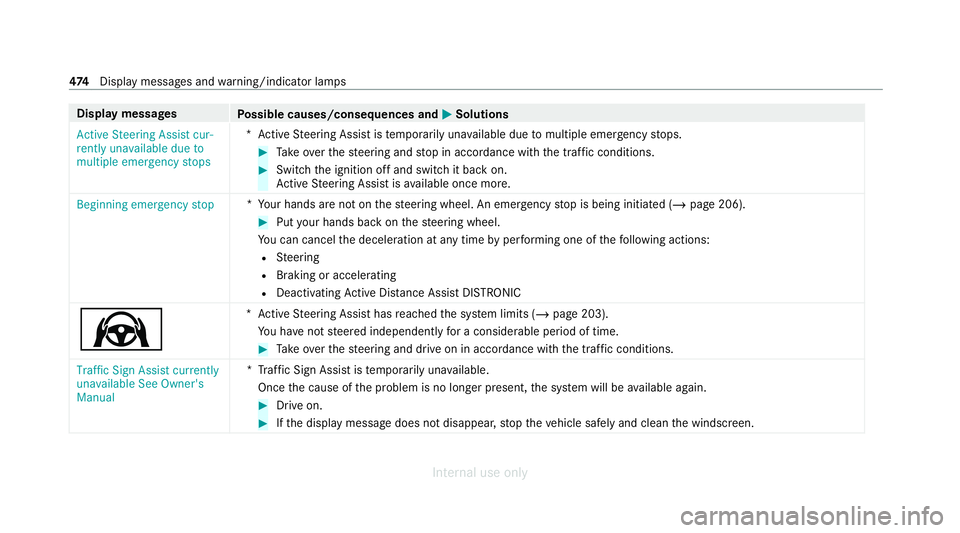
Active Steering Assist cur-
rently unavailable See Own-
er's Manual *A
ctive Steering Assist is temp orarily una vailable.
The ambient conditions are outside the sy stem limits (/ page 203).
As soon as the ambient conditions are within the sy stem limits, the sy stem will become available again. #
Drive on. #
If necessar y,clean the windscreen in the camera's field of vision. #
Check the tyre pressure if necessar y.
Active Steering Assist inop-
erative *A
ctive Steering Assist is malfunctioning. Active Dis tance Assi stDISTRONIC remains available. #
Consult a qualified specialist workshop. Display messages and
warning/indicator lamps 473
Internal use only
Page 477 of 557
Display messages
Possible causes/consequences and M
MSolutions
Active Steering Assist cur-
rently unavailable due to
multiple emergency stops *A
ctive Steering Assist is temp orarily una vailable due tomultiple emergency stops. #
Take ove rth esteering and stop in accordance with the tra ffic conditions. #
Swit chthe ignition off and switch it back on.
Ac tive Steering Assist is available once more.
Beginning emergency stop *Y
our hands are not on thesteering wheel. An emer gency stop is being initiated (/ page 206). #
Put your hands back on thesteering wheel.
Yo u can cancel the deceleration at any time byper form ing one of thefo llowing actions:
R Steering
R Braking or accelerating
R Deactivating Active Dis tance Assi stDISTRONIC
Ø *A
ctive Steering Assist has reached the sy stem limits (/ page 203).
Yo u ha venot steered independently for a considerable period of time. #
Take ove rth esteering and drive on in accordance with the traf fic conditions.
Traffic Sign Assist currently
unavailable See Owner's
Manual *T
raffic Sign Assist is temp orarily una vailable.
Once the cause of the problem is no longer present, the sy stem will be available again. #
Drive on. #
Ifth e display message does not disappear, stop theve hicle safely and clean the windscreen. 474
Displaymessa ges and warning/indicator lamps
Internal use only
Page 480 of 557
Display messages
Possible causes/consequences and M
MSolutions
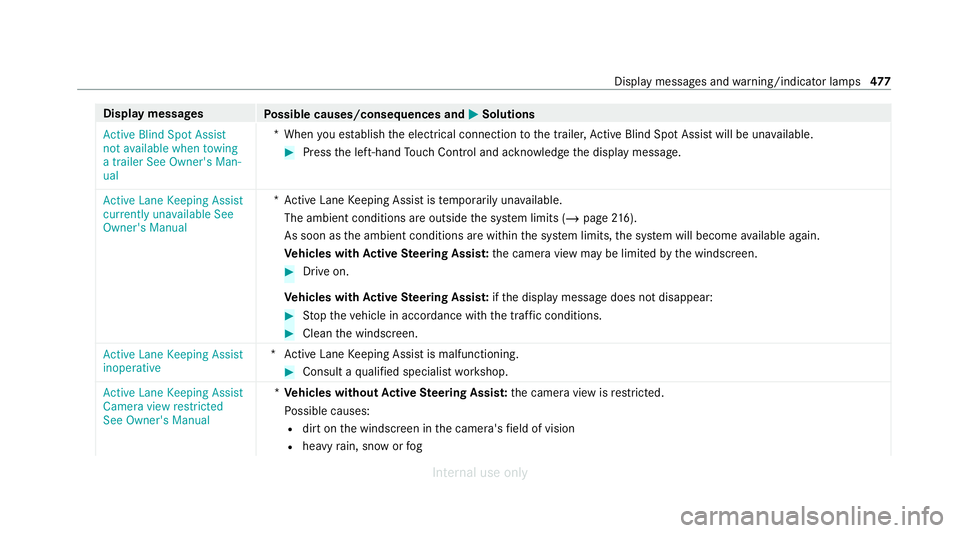
Active Blind Spot Assist
not available when towing
a trailer See Owner's Man-
ual *W
hen you es tablish the electrical connection tothe trailer, Active Blind Spot Assi stwill be una vailable. #
Press the left-hand Touch Control and ackn owledge the display message.
Active Lane Keeping Assist
currently unavailable See
Owner's Manual *A
ctive Lane Keeping Assist is temp orarily una vailable.
The ambient conditions are outside the sy stem limits (/ page216).
As soon as the ambient conditions are within the sy stem limits, the sy stem will become available again.
Ve hicles with Active Steering Assis t:the camera view may be limited bythe windscreen. #
Drive on.
Ve hicles with Active Steering Assis t:ifth e display message does not disappear: #
Stop theve hicle in accordance with the tra ffic conditions. #
Clean the windscreen.
Active Lane Keeping Assist
inoperative *A
ctive Lane Keeping Assist is malfunctioning. #
Consult a qualified specialist workshop.
Active Lane Keeping Assist
Camera view restricted
See Owner's Manual *
Ve hicles without Active Steering Assis t:the camera view is restricted.
Po ssible causes:
R dirt on the windscreen in the camera's field of vision
R heavy rain, snow or fog Displ
aymessa ges and warning/indicator lamps 477
Internal use only
Page 481 of 557
Display messages
Possible causes/consequences and M
MSolutions
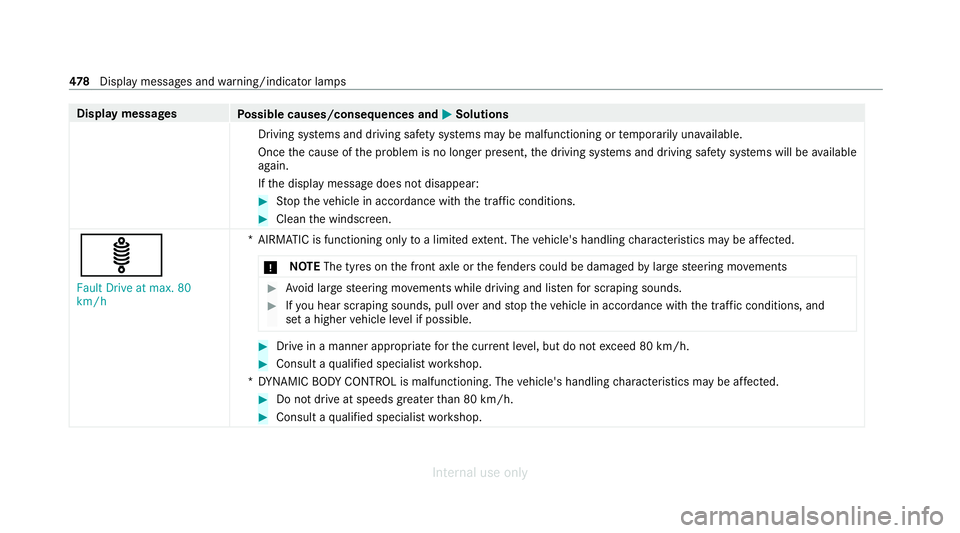
Driving sy stems and driving saf ety sy stems may be malfunctioning or temp orarily una vailable.
Once the cause of the problem is no longer present, the driving sy stems and driving saf ety sy stems will be available
again.
If th e display message does not disappear: #
Stop theve hicle in accordance with the tra ffic conditions. #
Clean the windscreen.
ä Fault Drive at max. 80
km/h *A
IRMATIC is functioning only toa limited extent. The vehicle's handling characteristics may be af fected.
* NO
TEThe tyres on the front axle or thefe nde rscould be damaged bylarge steering mo vements #
Avoid large steering mo vements while driving and lis tenfo r scraping sounds. #
Ifyo u hear sc raping sounds, pull over and stop theve hicle in accordance with the tra ffic conditions, and
set a higher vehicle le vel if possible. #
Drive in a manner appropriate forth e cur rent le vel, but do not exceed 80 km/h. #
Consult a qualified specialist workshop.
*D YNAMIC BODY CONT ROL is malfunctioning. The vehicle's handling characteristics may be af fected. #
Do not drive at speeds grea terth an 80 km/h. #
Consult a qualified specialist workshop. 478
Displaymessa ges and warning/indicator lamps
Internal use only
Page 482 of 557
Display messages
Possible causes/consequences and M
MSolutions
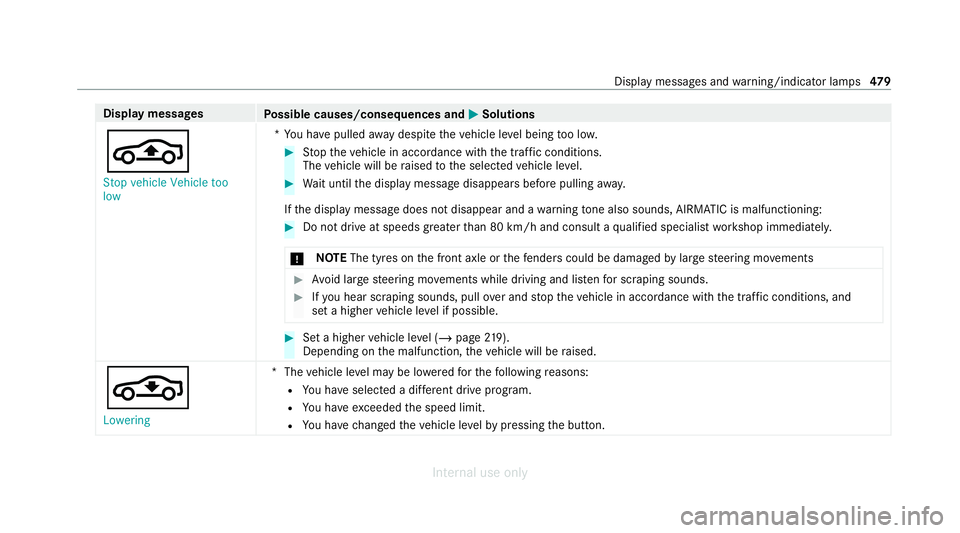
É Stop vehicle Vehicle too
low *Y
ou ha vepulled away despite theve hicle le vel being too lo w. #
Stop theve hicle in accordance with the tra ffic conditions.
The vehicle will be raised tothe selected vehicle le vel. #
Wait until the display message disappears before pulling away.
If th e display message does not disappear and a warning tone also sounds, AIRMATIC is malfunctioning: #
Do not drive at speeds grea terth an 80 km/h and consult a qualified specialist workshop immediately.
* NO
TEThe tyres on the front axle or thefe nde rscould be damaged bylarge steering mo vements #
Avoid large steering mo vements while driving and lis tenfo r scraping sounds. #
Ifyo u hear sc raping sounds, pull over and stop theve hicle in accordance with the tra ffic conditions, and
set a higher vehicle le vel if possible. #
Set a higher vehicle le vel (/ page 219).
Depending on the malfunction, theve hicle will be raised.
¢
Lowering *T
hevehicle le vel may be lo weredfo rth efo llowing reasons:
R You ha veselected a dif fere nt drive program.
R You ha veexceeded the speed limit.
R You ha vechanged theve hicle le velby pressing the button. Display messages and
warning/indicator lamps 47 9
Internal use only
Page 484 of 557
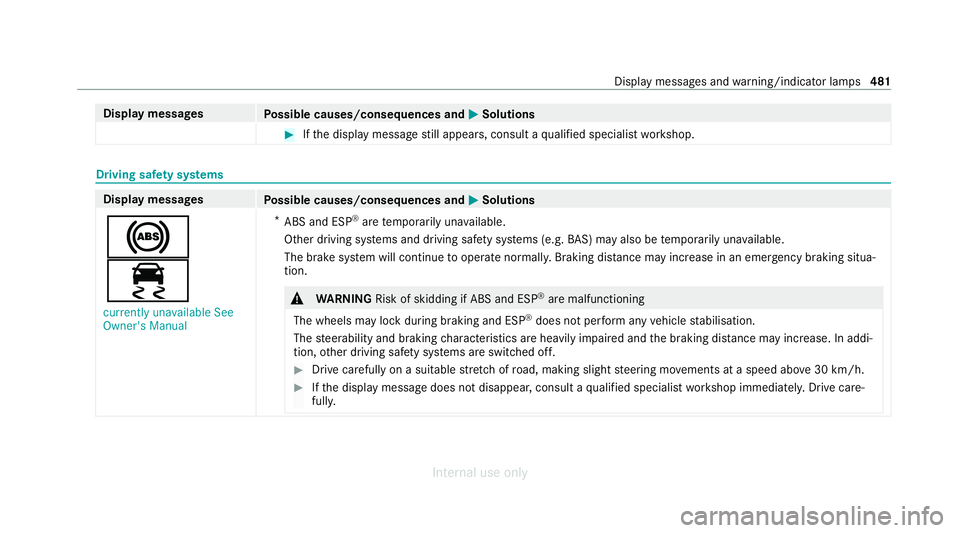
Display messages
Possible causes/consequences and M
MSolutions #
Ifth e display message still appears, consult a qualified specialist workshop. Driving saf
ety sy stems Display messages
Possible causes/consequences and M
MSolutions
!
÷ currently unavailable See
Owner's Manual *
ABS and ESP ®
are temp orarily una vailable.
Other driving sy stems and driving saf ety sy stems (e.g. BAS) may also be temp orarily una vailable.
The brake sy stem will continue tooperate normally. Braking dis tance may increase in an emergency braking situa‐
tion. &
WARNING Risk of skidding if ABS and ESP ®
are malfunctioning
The wheels may lock du ring braking and ESP ®
does not pe rform any vehicle stabilisation.
The steerability and braking characteristics are heavily impaired and the braking dis tance may increase. In addi‐
tion, other driving saf ety sy stems are switched off. #
Drive carefully on a suitable stre tch of road, making slight steering mo vements at a speed abo ve30 km/h. #
Ifth e display message does not disappear, consult a qualified specialist workshop immediately. Drive care‐
full y. Displ
aymessa ges and warning/indicator lamps 481
Internal use only
Page 485 of 557
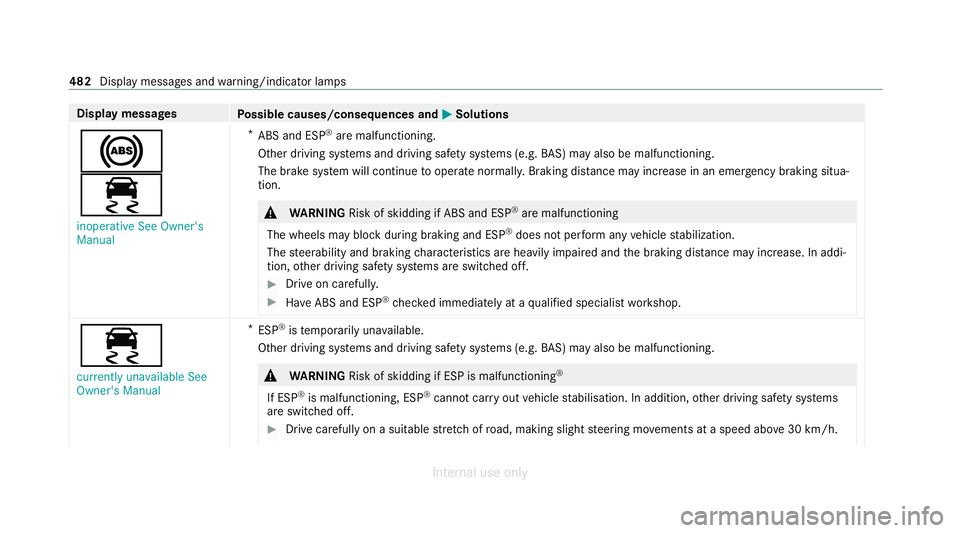
Display messages
Possible causes/consequences and M
MSolutions
!
÷ inoperative See Owner's
Manual *
ABS and ESP ®
are malfunctioning.
Other driving sy stems and driving saf ety sy stems (e.g. BAS) may also be malfunctioning.
The brake sy stem will continue tooperate normally. Braking dis tance may increase in an emergency braking situa‐
tion. &
WARNING Risk of skidding if ABS and ESP ®
are malfunctioning
The wheels may block duri ng braking and ESP®
does not pe rform any vehicle stabilization.
The steerability and braking characteristics are heavily impaired and the braking dis tance may increase. In addi‐
tion, other driving saf ety sy stems are switched off. #
Drive on carefull y. #
Have ABS and ESP ®
ch ecked immediately at a qualified specialist workshop. ÷
currently unavailable See
Owner's Manual *
ESP ®
is temp orarily una vailable.
Other driving sy stems and driving saf ety sy stems (e.g. BAS) may also be malfunctioning. &
WARNING Risk of skidding if ESP is malfunctioning ®
If ESP ®
is malfunctioning, ESP ®
cannot car ryout vehicle stabilisation. In addition, other driving saf ety sy stems
are switched off. #
Drive carefully on a suitable stre tch of road, making slight steering mo vements at a speed abo ve30 km/h. 482
Displaymessa ges and warning/indicator lamps
Internal use only