audio MERCEDES-BENZ C-CLASS SALOON 2014 User Guide
[x] Cancel search | Manufacturer: MERCEDES-BENZ, Model Year: 2014, Model line: C-CLASS SALOON, Model: MERCEDES-BENZ C-CLASS SALOON 2014Pages: 489, PDF Size: 14.88 MB
Page 101 of 489
X
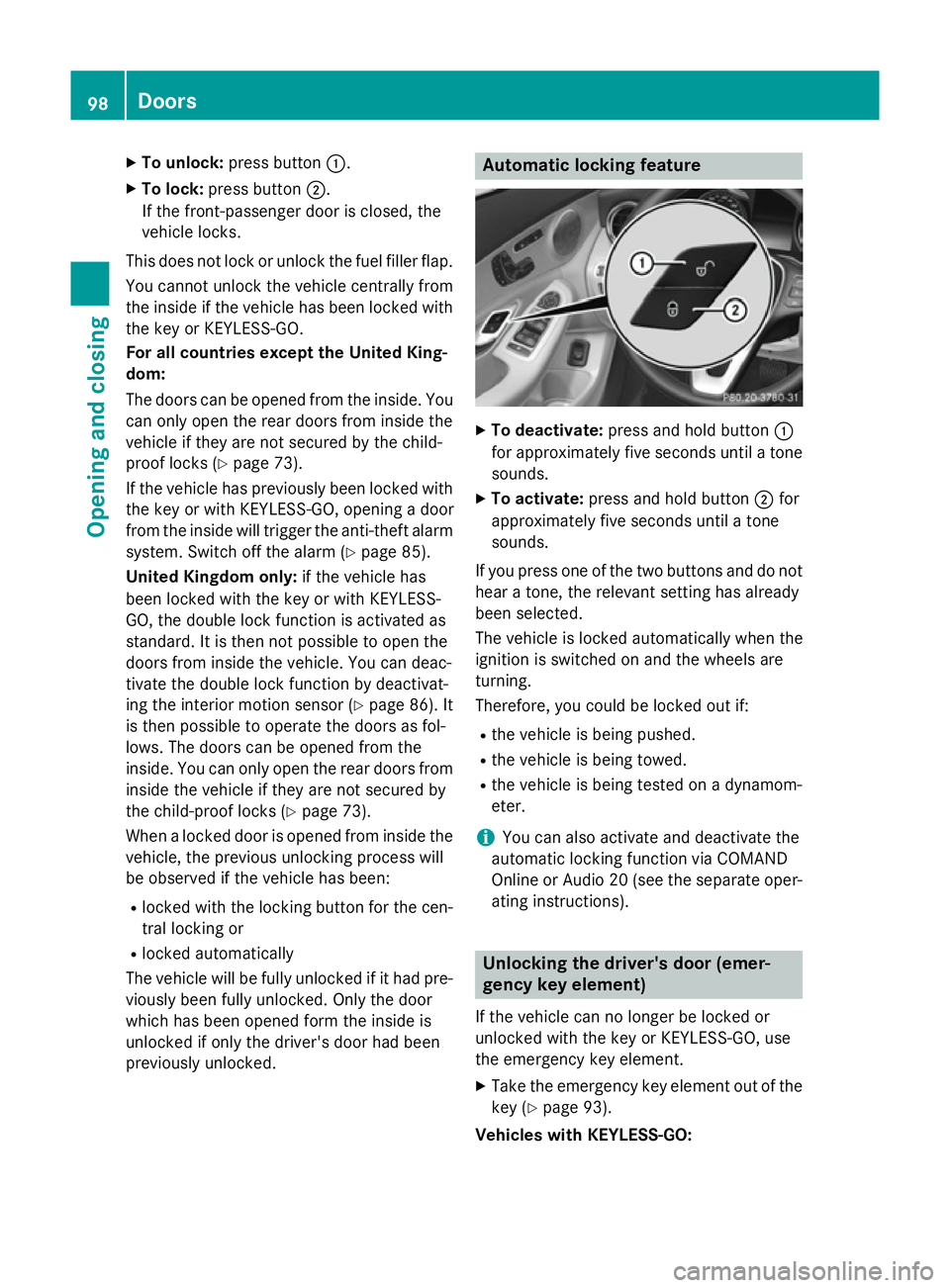
To unlock: press button :.
X To lock: press button ;.
If the front-passenger door is closed, the
vehicle locks.
This does not lock or unlock the fuel filler flap. You cannot unlock the vehicle centrally from
the inside if the vehicle has been locked with
the key or KEYLESS-GO.
For all countries except the United King-
dom:
The doors can be opened from the inside. You can only open the rear doors from inside the
vehicle if they are not secured by the child-
proof locks (Y page 73).
If the vehicle has previously been locked with the key or with KEYLESS-GO, opening a door
from the inside will trigger the anti-theft alarm system. Switch off the alarm (Y page 85).
United Kingdom only: if the vehicle has
been locked with the key or with KEYLESS-
GO, the double lock function is activated as
standard. It is then not possible to open the
doors from inside the vehicle. You can deac-
tivate the double lock function by deactivat-
ing the interior motion sensor (Y page 86). It
is then possible to operate the doors as fol-
lows. The doors can be opened from the
inside. You can only open the rear doors from
inside the vehicle if they are not secured by
the child-proof locks (Y page 73).
When a locked door is opened from inside the vehicle, the previous unlocking process will
be observed if the vehicle has been:
R locked with the locking button for the cen-
tral locking or
R locked automatically
The vehicle will be fully unlocked if it had pre- viously been fully unlocked. Only the door
which has been opened form the inside is
unlocked if only the driver's door had been
previously unlocked. Automatic locking feature
X
To deactivate: press and hold button :
for approximately five seconds until a tone sounds.
X To activate: press and hold button ;for
approximately five seconds until a tone
sounds.
If you press one of the two buttons and do not hear a tone, the relevant setting has already
been selected.
The vehicle is locked automatically when the
ignition is switched on and the wheels are
turning.
Therefore, you could be locked out if:
R the vehicle is being pushed.
R the vehicle is being towed.
R the vehicle is being tested on a dynamom-
eter.
i You can also activate and deactivate the
automatic locking function via COMAND
Online or Audio 20 (see the separate oper-
ating instructions). Unlocking the driver's door (emer-
gency key element)
If the vehicle can no longer be locked or
unlocked with the key or KEYLESS-GO, use
the emergency key element.
X Take the emergency key element out of the
key (Y page 93).
Vehicles with KEYLESS-GO: 98
DoorsOpening and closing
Page 104 of 489
X
Turn the emergency key element back and
remove it.
X Insert the emergency key element into the
key (Y page 93).
X Make sure that the doors and the boot lid
are locked.
X Carefully press the protective cap onto the
lock cylinder until it engages and is seated
firmly. Do not pull the door handle when
doing so.
All vehicles:
If you lock the vehicle as described above, the fuel filler flap is not locked. The anti-theft
alarm system is not primed. Boot
Important safety notes
G
WARNING
Combustion engines emit poisonous exhaust
gases such as carbon monoxide. Exhaust
gases can enter the vehicle interior if the boot
lid is open when the engine is running, espe-
cially if the vehicle is in motion. There is a risk of poisoning.
Always switch off the engine before opening
the boot lid. Never drive with the boot lid
open. G
WARNING
If objects, luggage or loads are not secured or not secured sufficiently, they could slip, tip
over or be flung around and thereby hit vehicle
occupants. There is a risk of injury, especially when braking or abruptly changing directions.
Always store objects so that they cannot be
flung around. Secure objects, luggage or
loads against slipping or tipping before the
journey.
! The boot lid swings upwards when
opened. Therefore, make sure that there is sufficient clearance above the boot lid. The opening dimensions on the boot lid can
be found in the "Vehicle data" section
(Y
page 476).
i You can limit the opening angle of the
boot lid in COMAND Online or Audio 20
(see the separate operating instructions).
Do not leave the key in the boot. You could
otherwise lock yourself out.
Stow luggage or loads preferably in the boot.
Observe the loading guidelines (Y page 368). Obstacle detection with boot lid
reversing feature
Vehicles with boot lid remote closing fea- ture: the boot lid is equipped with automatic
obstacle detection with reversing function. If
a solid object blocks or restricts the boot lid
when automatically opening, this procedure
is stopped. If a solid object blocks or restricts the boot lid when automatically closing, the
boot lid opens again automatically. The auto- matic obstacle recognition with reversing
function is only an aid. It is not a substitute for
your attentiveness when opening and closing the boot lid. G
WARNING
The reversing function does not react:
R to soft, light and thin objects, e.g. small fin-
gers
R over the last 8 mm of the closing path
This means that the reversing feature cannot
prevent someone being trapped in these sit-
uations. There is a risk of injury.
When closing make sure that no parts of the
body are in the closing area.
If someone is trapped:
R press the Fbutton on the key, or
R press the remote operating switch on the
driver's door, or
R press the closing or locking button on the
boot lid, or
R pull the boot lid handle Boot
101Opening and closing Z
Page 129 of 489
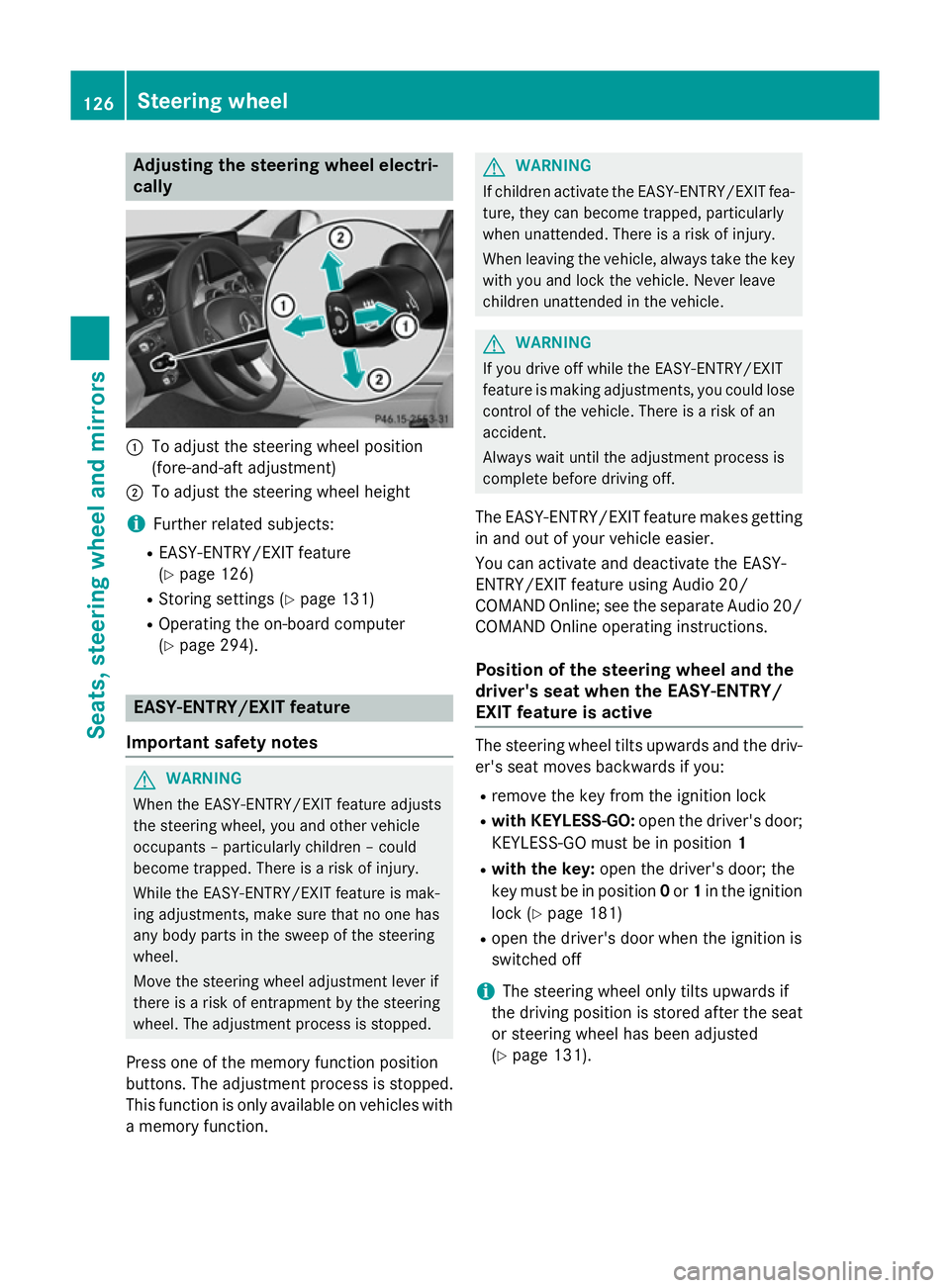
Adjusting the steering wheel electri-
cally :
To adjust the steering wheel position
(fore-and-aft adjustment)
; To adjust the steering wheel height
i Further related subjects:
R EASY-ENTRY/EXIT feature
(Y page 126)
R Storing settings (Y page 131)
R Operating the on-board computer
(Y page 294). EASY-ENTRY/EXIT feature
Important safety notes G
WARNING
When the EASY-ENTRY/EXIT feature adjusts
the steering wheel, you and other vehicle
occupants – particularly children – could
become trapped. There is a risk of injury.
While the EASY-ENTRY/EXIT feature is mak-
ing adjustments, make sure that no one has
any body parts in the sweep of the steering
wheel.
Move the steering wheel adjustment lever if
there is a risk of entrapment by the steering
wheel. The adjustment process is stopped.
Press one of the memory function position
buttons. The adjustment process is stopped.
This function is only available on vehicles with
a memory function. G
WARNING
If children activate the EASY-ENTRY/EXIT fea- ture, they can become trapped, particularly
when unattended. There is a risk of injury.
When leaving the vehicle, always take the key with you and lock the vehicle. Never leave
children unattended in the vehicle. G
WARNING
If you drive off while the EASY-ENTRY/EXIT
feature is making adjustments, you could lose
control of the vehicle. There is a risk of an
accident.
Always wait until the adjustment process is
complete before driving off.
The EASY-ENTRY/EXIT feature makes getting in and out of your vehicle easier.
You can activate and deactivate the EASY-
ENTRY/EXIT feature using Audio 20/
COMAND Online; see the separate Audio 20/ COMAND Online operating instructions.
Position of the steering wheel and the
driver's seat when the EASY-ENTRY/
EXIT feature is active The steering wheel tilts upwards and the driv-
er's seat moves backwards if you:
R remove the key from the ignition lock
R with KEYLESS-GO: open the driver's door;
KEYLESS-GO must be in position 1
R with the key: open the driver's door; the
key must be in position 0or 1in the ignition
lock (Y page 181)
R open the driver's door when the ignition is
switched off
i The steering wheel only tilts upwards if
the driving position is stored after the seat
or steering wheel has been adjusted
(Y page 131). 126
Steering wheelSeats
, steering wheel and mirrors
Page 130 of 489
The most recent driving position of the steer-
ing wheel is stored if:
R the ignition is switched off
R the setting is stored using the memory
function (Y page 131)
i The steering wheel only moves upwards if
it has not already reached the upper steer-
ing limiter.
Position of the steering wheel for driv-
ing The steering wheel is moved to the previously
set position if:
R the driver's door is closed and you insert
the key into the ignition lock
R you close the driver's door when the igni-
tion is switched on
R you press the Start/Stop button once on
vehicles with KEYLESS-GO
i The steering wheel only returns to the last
set position if the driving position is stored
after the seat or steering wheel has been
adjusted (Y page 131).
The most recent driving position of the steer-
ing wheel is stored if:
R the ignition is switched off
R the setting is stored using the memory
function (Y page 131)
Crash-responsive EASY-EXIT feature If the crash-responsive EASY-EXIT feature is
triggered in an accident, the steering column
will move upwards when the driver's door is
opened or the key is removed from the igni-
tion lock. This makes it easier to exit the vehi-
cle and rescue the occupants.
The crash-responsive EASY-EXIT feature is
only operational if the EASY-EXIT/ENTRY fea-
ture is activated in Audio 20/COMAND
Online; see the separate Audio 20/COMAND Online operating instructions. Mirrors
Rear-view mirror
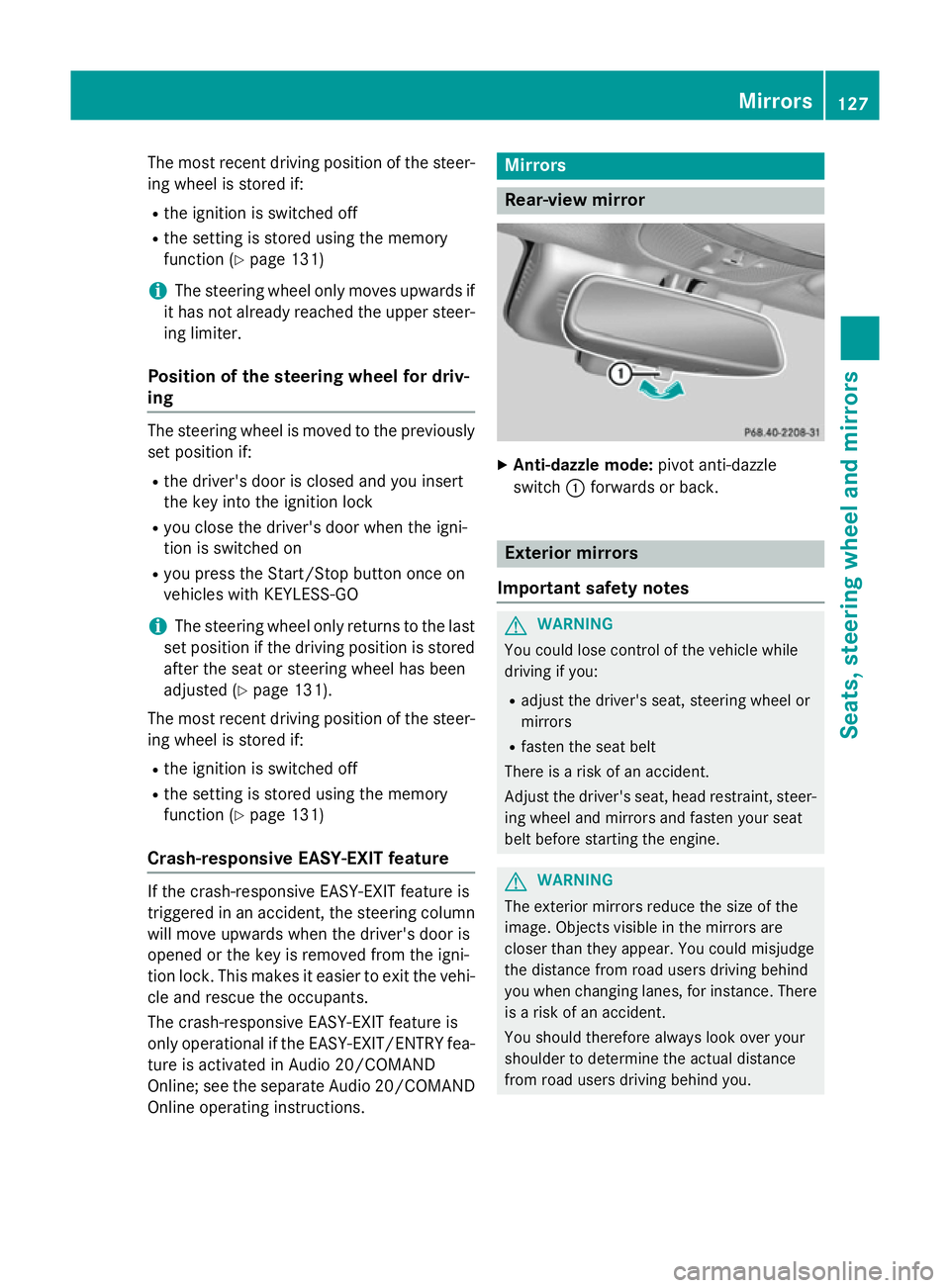
X
Anti-dazzle mode: pivot anti-dazzle
switch :forwards or back. Exterior mirrors
Important safety notes G
WARNING
You could lose control of the vehicle while
driving if you:
R adjust the driver's seat, steering wheel or
mirrors
R fasten the seat belt
There is a risk of an accident.
Adjust the driver's seat, head restraint, steer-
ing wheel and mirrors and fasten your seat
belt before starting the engine. G
WARNING
The exterior mirrors reduce the size of the
image. Objects visible in the mirrors are
closer than they appear. You could misjudge
the distance from road users driving behind
you when changing lanes, for instance. There is a risk of an accident.
You should therefore always look over your
shoulder to determine the actual distance
from road users driving behind you. Mirrors
127Seats, steering wheel and mirrors Z
Page 131 of 489
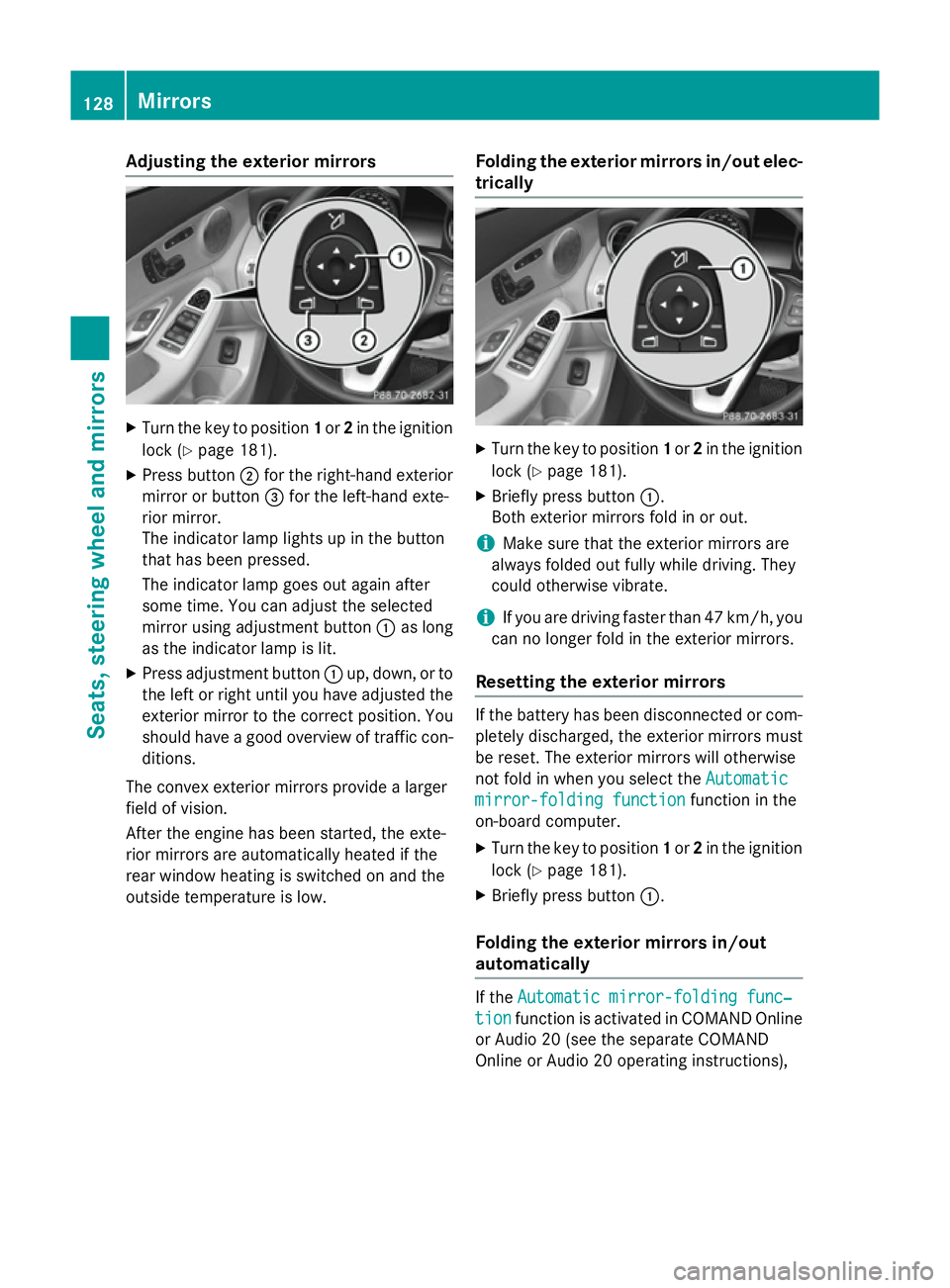
Adjusting the exterior mirrors
X
Turn the key to position 1or 2in the ignition
lock (Y page 181).
X Press button ;for the right-hand exterior
mirror or button =for the left-hand exte-
rior mirror.
The indicator lamp lights up in the button
that has been pressed.
The indicator lamp goes out again after
some time. You can adjust the selected
mirror using adjustment button :as long
as the indicator lamp is lit.
X Press adjustment button :up, down, or to
the left or right until you have adjusted the
exterior mirror to the correct position. You
should have a good overview of traffic con- ditions.
The convex exterior mirrors provide a larger
field of vision.
After the engine has been started, the exte-
rior mirrors are automatically heated if the
rear window heating is switched on and the
outside temperature is low. Folding the exterior mirrors in/out elec-
trically X
Turn the key to position 1or 2in the ignition
lock (Y page 181).
X Briefly press button :.
Both exterior mirrors fold in or out.
i Make sure that the exterior mirrors are
always folded out fully while driving. They
could otherwise vibrate.
i If you are driving faster than 47 km/h, you
can no longer fold in the exterior mirrors.
Resetting the exterior mirrors If the battery has been disconnected or com-
pletely discharged, the exterior mirrors must
be reset. The exterior mirrors will otherwise
not fold in when you select the Automatic Automatic
mirror-folding function
mirror-folding function function in the
on-board computer.
X Turn the key to position 1or 2in the ignition
lock (Y page 181).
X Briefly press button :.
Folding the exterior mirrors in/out
automatically If the
Automatic mirror-folding func‐ Automatic mirror-folding func‐
tion
tion function is activated in COMAND Online
or Audio 20 (see the separate COMAND
Online or Audio 20 operating instructions), 128
MirrorsSeats
, steering wheel and mirrors
Page 144 of 489
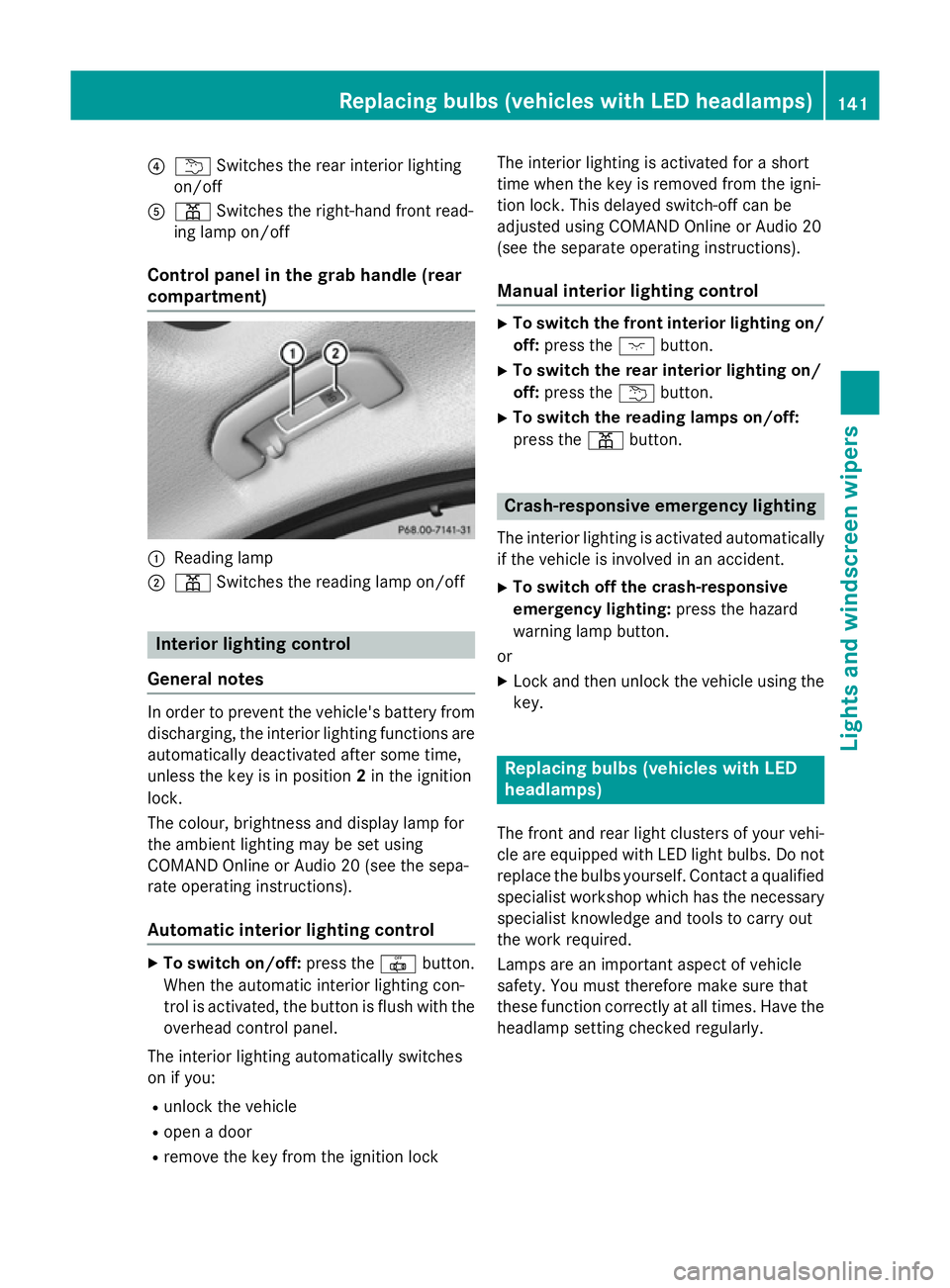
?
u Switches the rear interior lighting
on/off
A p Switches the right-hand front read-
ing lamp on/off
Control panel in the grab handle (rear
compartment) :
Reading lamp
; p Switches the reading lamp on/off Interior lighting control
General notes In order to prevent the vehicle's battery from
discharging, the interior lighting functions are
automatically deactivated after some time,
unless the key is in position 2in the ignition
lock.
The colour, brightness and display lamp for
the ambient lighting may be set using
COMAND Online or Audio 20 (see the sepa-
rate operating instructions).
Automatic interior lighting control X
To switch on/off: press the|button.
When the automatic interior lighting con-
trol is activated, the button is flush with the overhead control panel.
The interior lighting automatically switches
on if you:
R unlock the vehicle
R open a door
R remove the key from the ignition lock The interior lighting is activated for a short
time when the key is removed from the igni-
tion lock. This delayed switch-off can be
adjusted using COMAND Online or Audio 20
(see the separate operating instructions).
Manual interior lighting control X
To switch the front interior lighting on/
off: press the cbutton.
X To switch the rear interior lighting on/
off: press the ubutton.
X To switch the reading lamps on/off:
press the pbutton. Crash-responsive emergency lighting
The interior lighting is activated automatically
if the vehicle is involved in an accident.
X To switch off the crash-responsive
emergency lighting: press the hazard
warning lamp button.
or X Lock and then unlock the vehicle using the
key. Replacing bulbs (vehicles with LED
headlamps)
The front and rear light clusters of your vehi-
cle are equipped with LED light bulbs. Do not
replace the bulbs yourself. Contact a qualified specialist workshop which has the necessaryspecialist knowledge and tools to carry out
the work required.
Lamps are an important aspect of vehicle
safety. You must therefore make sure that
these function correctly at all times. Have the
headlamp setting checked regularly. Replacing bulbs (vehicles with LED headlamps)
141Lights and windscreen wipers Z
Page 154 of 489
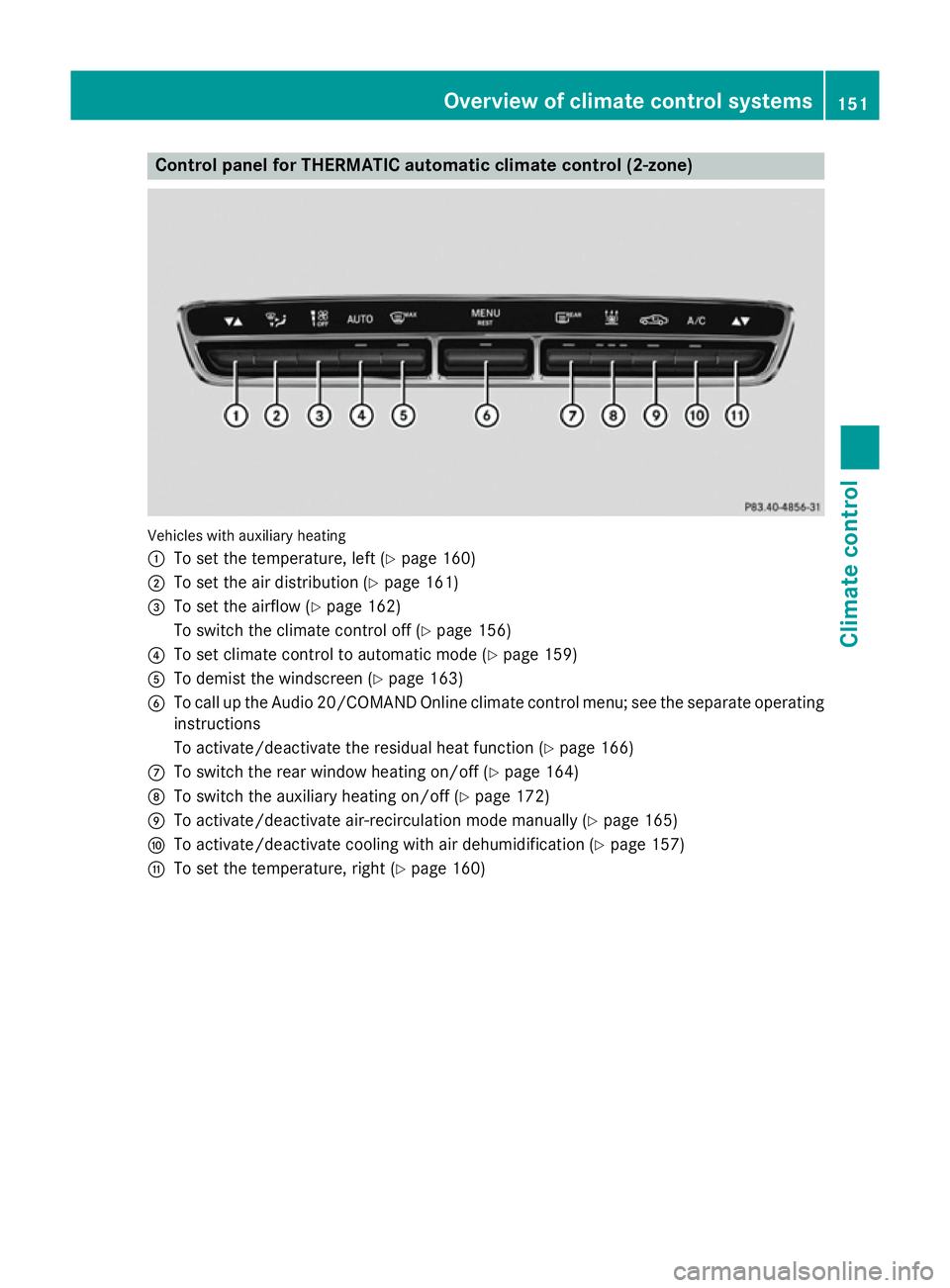
Control panel for THERMATIC automatic climate control (2-zone)
Vehicles with auxiliary heating
:
To set the temperature, left (Y page 160)
; To set the air distribution (Y page 161)
= To set the airflow (Y page 162)
To switch the climate control off (Y page 156)
? To set climate control to automatic mode (Y page 159)
A To demist the windscreen (Y page 163)
B To call up the Audio 20/COMAND Online climate control menu; see the separate operating
instructions
To activate/deactivate the residual heat function (Y page 166)
C To switch the rear window heating on/off (Y page 164)
D To switch the auxiliary heating on/off (Y page 172)
E To activate/deactivate air-recirculation mode manually (Y page 165)
F To activate/deactivate cooling with air dehumidification (Y page 157)
G To set the temperature, right (Y page 160) Overview of climate control systems
151Climate control
Page 155 of 489
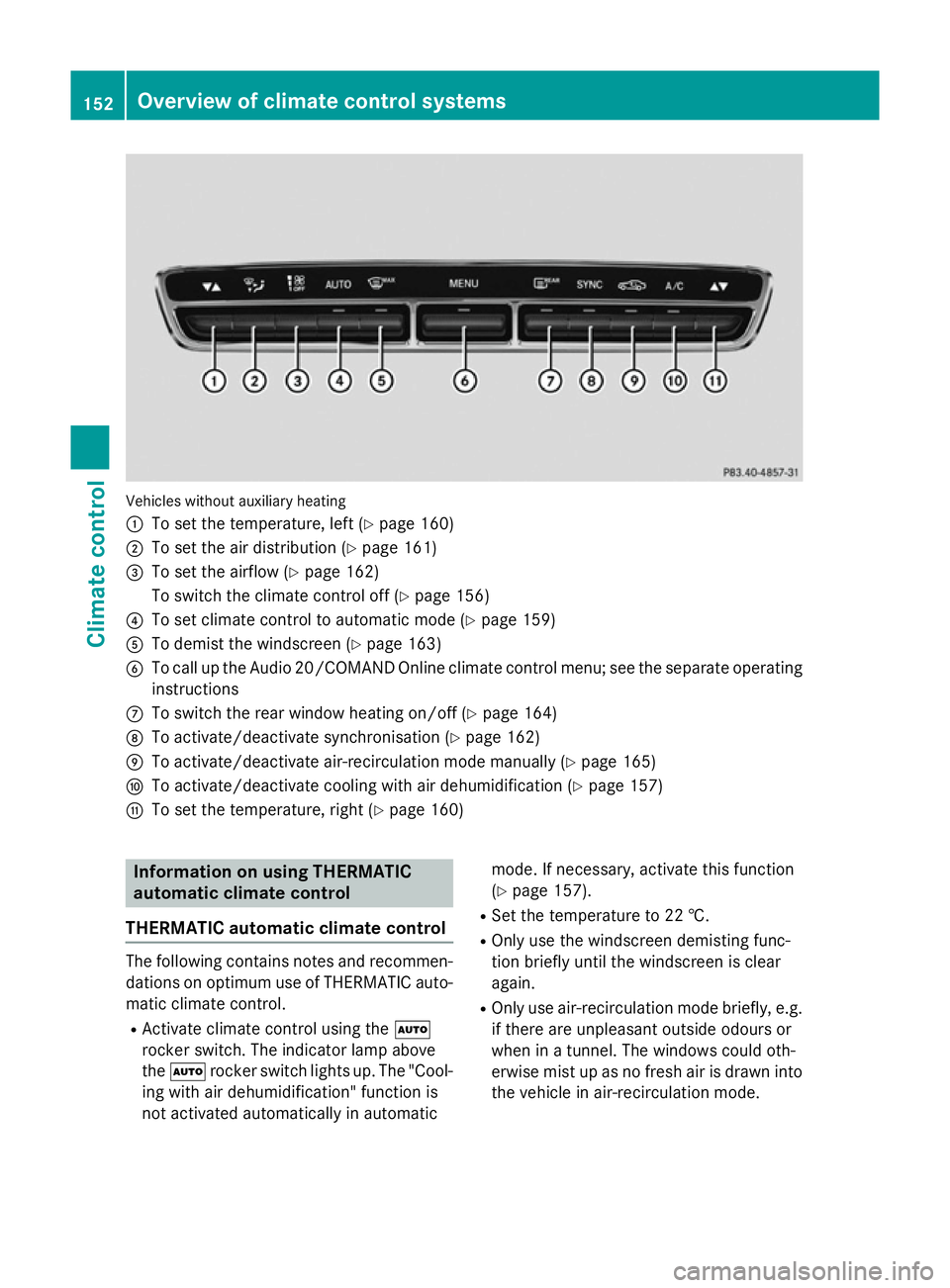
Vehicles without auxiliary heating
:
To set the temperature, left (Y page 160)
; To set the air distribution (Y page 161)
= To set the airflow (Y page 162)
To switch the climate control off (Y page 156)
? To set climate control to automatic mode (Y page 159)
A To demist the windscreen (Y page 163)
B To call up the Audio 20/COMAND Online climate control menu; see the separate operating
instructions
C To switch the rear window heating on/off (Y page 164)
D To activate/deactivate synchronisation (Y page 162)
E To activate/deactivate air-recirculation mode manually (Y page 165)
F To activate/deactivate cooling with air dehumidification (Y page 157)
G To set the temperature, right (Y page 160)Information on using THERMATIC
automatic climate control
THERMATIC automatic climate control The following contains notes and recommen-
dations on optimum use of THERMATIC auto-
matic climate control.
R Activate climate control using the Ã
rocker switch. The indicator lamp above
the à rocker switch lights up. The "Cool-
ing with air dehumidification" function is
not activated automatically in automatic mode. If necessary, activate this function
(Y page 157).
R Set the temperature to 22 †.
R Only use the windscreen demisting func-
tion briefly until the windscreen is clear
again.
R Only use air-recirculation mode briefly, e.g.
if there are unpleasant outside odours or
when in a tunnel. The windows could oth-
erwise mist up as no fresh air is drawn into
the vehicle in air-recirculation mode. 152
Overview of climate control systemsClimate control
Page 157 of 489
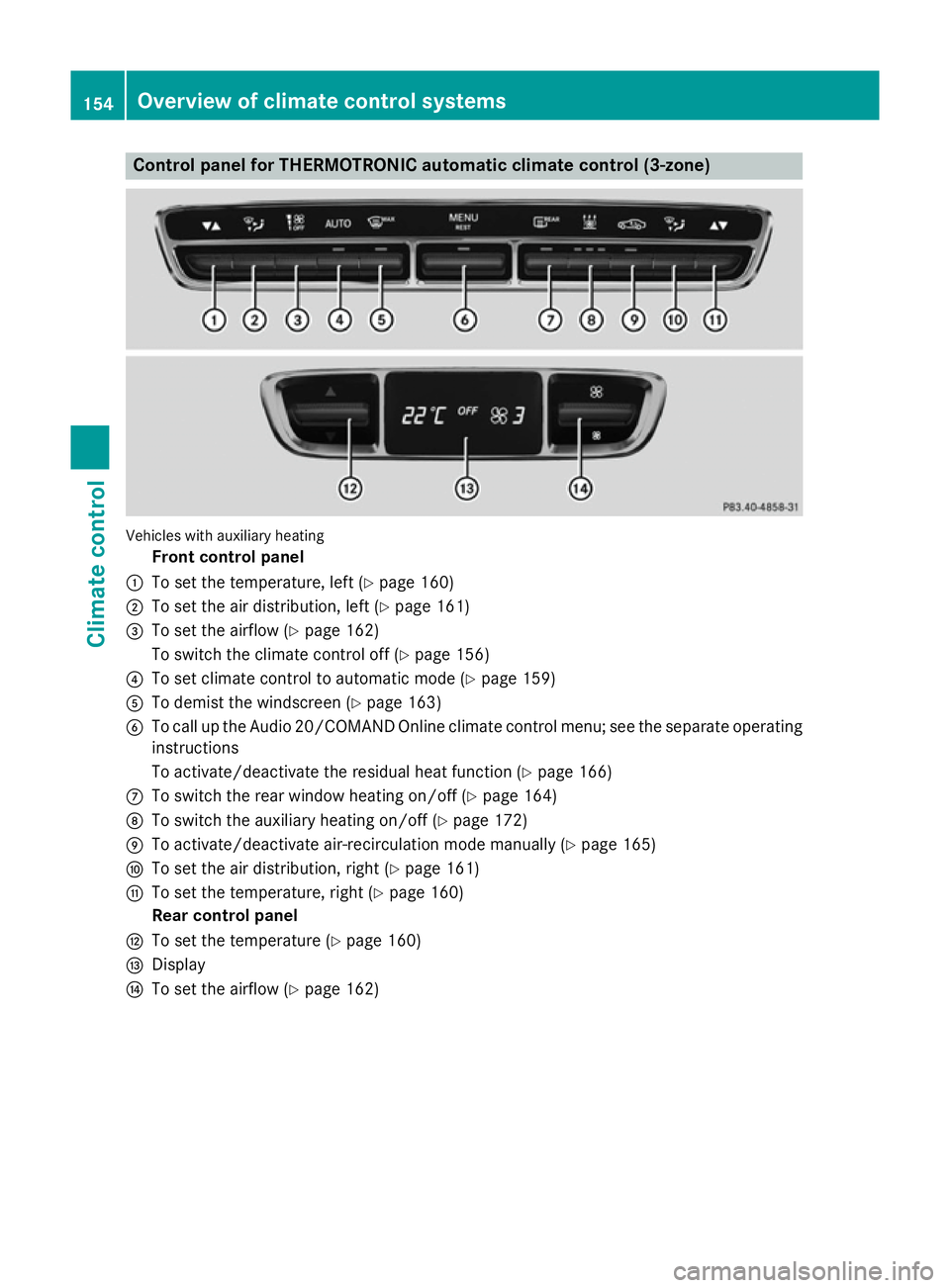
Control panel for THERMOTRONIC automatic climate control (3-zone)
Vehicles with auxiliary heating
Front control panel
: To set the temperature, left (Y page 160)
; To set the air distribution, left (Y page 161)
= To set the airflow (Y page 162)
To switch the climate control off (Y page 156)
? To set climate control to automatic mode (Y page 159)
A To demist the windscreen (Y page 163)
B To call up the Audio 20/COMAND Online climate control menu; see the separate operating
instructions
To activate/deactivate the residual heat function (Y page 166)
C To switch the rear window heating on/off (Y page 164)
D To switch the auxiliary heating on/off (Y page 172)
E To activate/deactivate air-recirculation mode manually (Y page 165)
F To set the air distribution, right (Y page 161)
G To set the temperature, right (Y page 160)
Rear control panel
H To set the temperature (Y page 160)
I Display
J To set the airflow (Y page 162)154
Overview of climate control systemsClimate control
Page 158 of 489
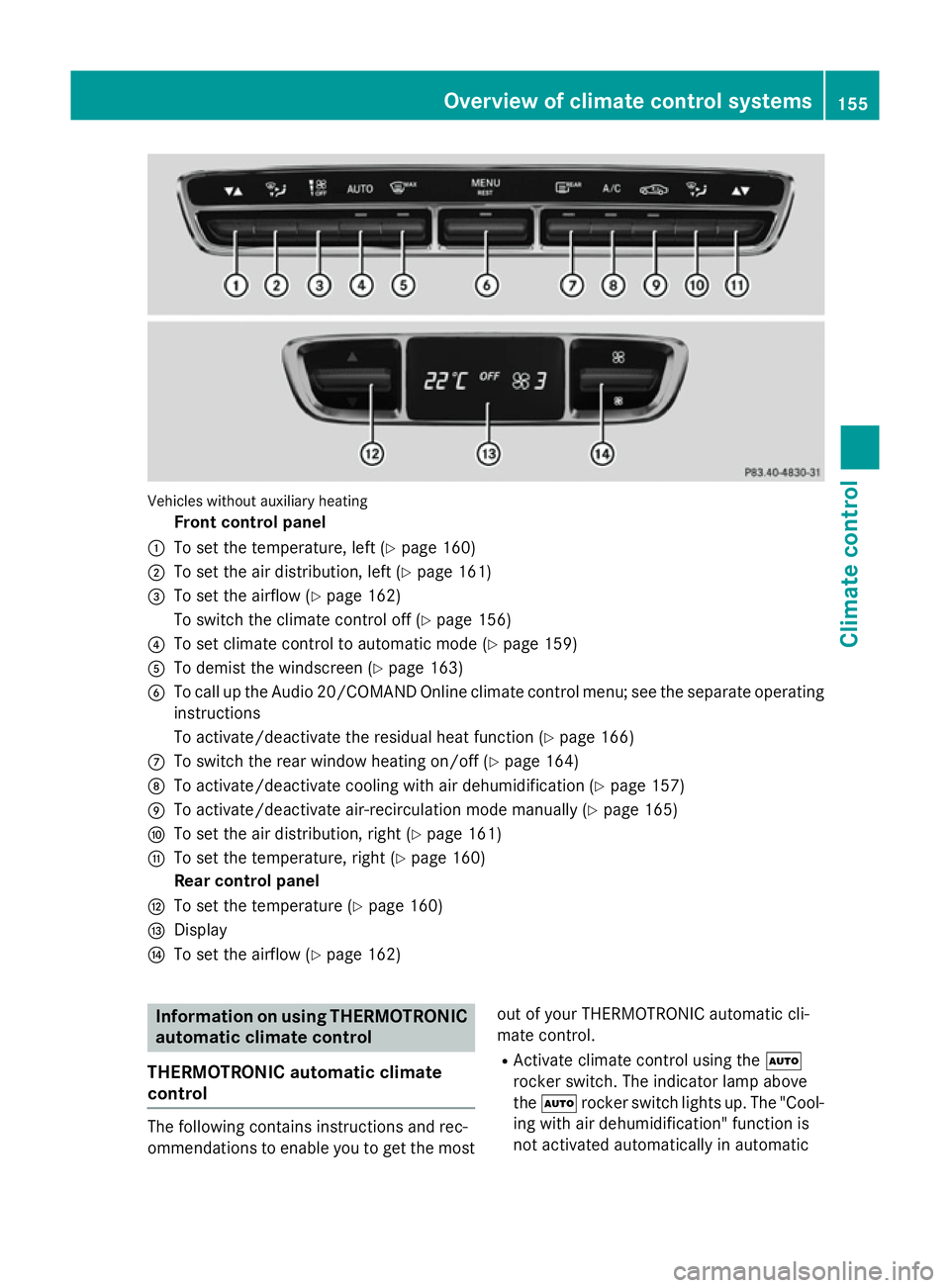
Vehicles without auxiliary heating
Front control panel
: To set the temperature, left (Y page 160)
; To set the air distribution, left (Y page 161)
= To set the airflow (Y page 162)
To switch the climate control off (Y page 156)
? To set climate control to automatic mode (Y page 159)
A To demist the windscreen (Y page 163)
B To call up the Audio 20/COMAND Online climate control menu; see the separate operating
instructions
To activate/deactivate the residual heat function (Y page 166)
C To switch the rear window heating on/off (Y page 164)
D To activate/deactivate cooling with air dehumidification (Y page 157)
E To activate/deactivate air-recirculation mode manually (Y page 165)
F To set the air distribution, right (Y page 161)
G To set the temperature, right (Y page 160)
Rear control panel
H To set the temperature (Y page 160)
I Display
J To set the airflow (Y page 162) Information on using THERMOTRONIC
automatic climate control
THERMOTRONIC automatic climate
control The following contains instructions and rec-
ommendations to enable you to get the most
out of your THERMOTRONIC automatic cli-
mate control.
R Activate climate control using the Ã
rocker switch. The indicator lamp above
the à rocker switch lights up. The "Cool-
ing with air dehumidification" function is
not activated automatically in automatic Overview of climate control systems
155Climate control