buttons MERCEDES-BENZ C-CLASS SALOON 2014 User Guide
[x] Cancel search | Manufacturer: MERCEDES-BENZ, Model Year: 2014, Model line: C-CLASS SALOON, Model: MERCEDES-BENZ C-CLASS SALOON 2014Pages: 489, PDF Size: 14.88 MB
Page 313 of 489
X
Press ato confirm.
The current selection Standard StandardorAdap‐ Adap‐
tive
tive is displayed.
X To change the setting: pressaagain.
For further information about Lane Keeping
Assist; see (Y page 261).
For further information about Active Lane
Keeping Assist; see (Y page 266).
Head-up display submenu Switching other displays on/off
This function is only available if the vehicle is
equipped with Navigation and/or Traffic Sign
Assist.
In the on-board computer, you can select
which contents are shown on the windscreen when the head-up display is activated
(Y page 295).
X Use ò on the steering wheel to call up
the list of menus.
X Press the :or9 button on the steer-
ing wheel to select the Settings Settingsmenu.
X Confirm by pressing aon the steering
wheel.
X Press the :or9 button to select the
Head-up display
Head-up display submenu.
X Press ato confirm.
X Press the :or9 buttons to select
Display content
Display content.
X Press ato confirm.
Switching the Traffic Sign Assist display
on/off
X Press the abutton to save the setting.
When you activate the Traffic Sign
Traffic Sign
Assist
Assist display, recognised traffic signs are
shown on the windscreen when the head-
up display is activated. Switching the navigation messages dis-
play on/off
X Vehicles with Traffic Sign Assist:
press :to select Navigation mes‐ Navigation mes‐
sages sages.
X Press the abutton to save the setting.
When you switch on the Navigation
Navigationmes‐
mes‐
sages
sages display, navigation messages are
shown on the windscreen when the head-
up display is activated.
For more information on navigation, see the
separate operating instructions.
Further information on Traffic Sign Assist
(Y page 256).
Setting the position
You can adjust the position of the displayed
contents on the windscreen. X Switch on the Head-up display
(Y page 296).
X Use ò on the steering wheel to call up
the list of menus.
X Press the :or9 button on the steer-
ing wheel to select the Settings
Settings menu.
X Confirm by pressing aon the steering
wheel.
X Press the :or9 button to select the
Head-up display Head-up display submenu.
X Press ato confirm.
X Use the :or9 button to select the
Position
Position function.
X Press the abutton to save the setting.
X Use the :or9 button to set the
position from Level +5
Level +5toLevel -5
Level -5.
X Press the aor% button to save the
setting.
Using the Memory function, you can save and
call up the position of the head-up display as a single memory preset (Y page 130).
Adjusting the brightness
You can adjust the brightness of the displayed
contents on the windscreen. 310
Menus and submenusOn-board computer and displays
Page 390 of 489
Operating the mobile phone
You can operate the telephone using the
6
and~ buttons on the multifunction
steering wheel. You can operate other mobile
phone functions via the on-board computer
(Y page 304).
When you remove the key from the ignition
lock, the mobile phone is disconnected from
the vehicle. You can then no longer make calls using the hands-free system.
If a call is active and you remove the key from
the ignition lock, the conversation is trans-
ferred over to the mobile telephone. It is then possible to continue the conversation on the
mobile phone. Floormats
G
WARNING
Objects in the driver's footwell may restrict
the clearance around the pedals or block a
depressed pedal. This jeopardises the oper-
ating and road safety of the vehicle. There is a risk of an accident.
Stow all objects securely in the vehicle so that
they do not get into the driver's footwell.
Always fit the floormats securely and as pre-
scribed in order to ensure that there is always sufficient room for the pedals. Do not use
loose floormats and do not place several floor- mats on top of one another. X
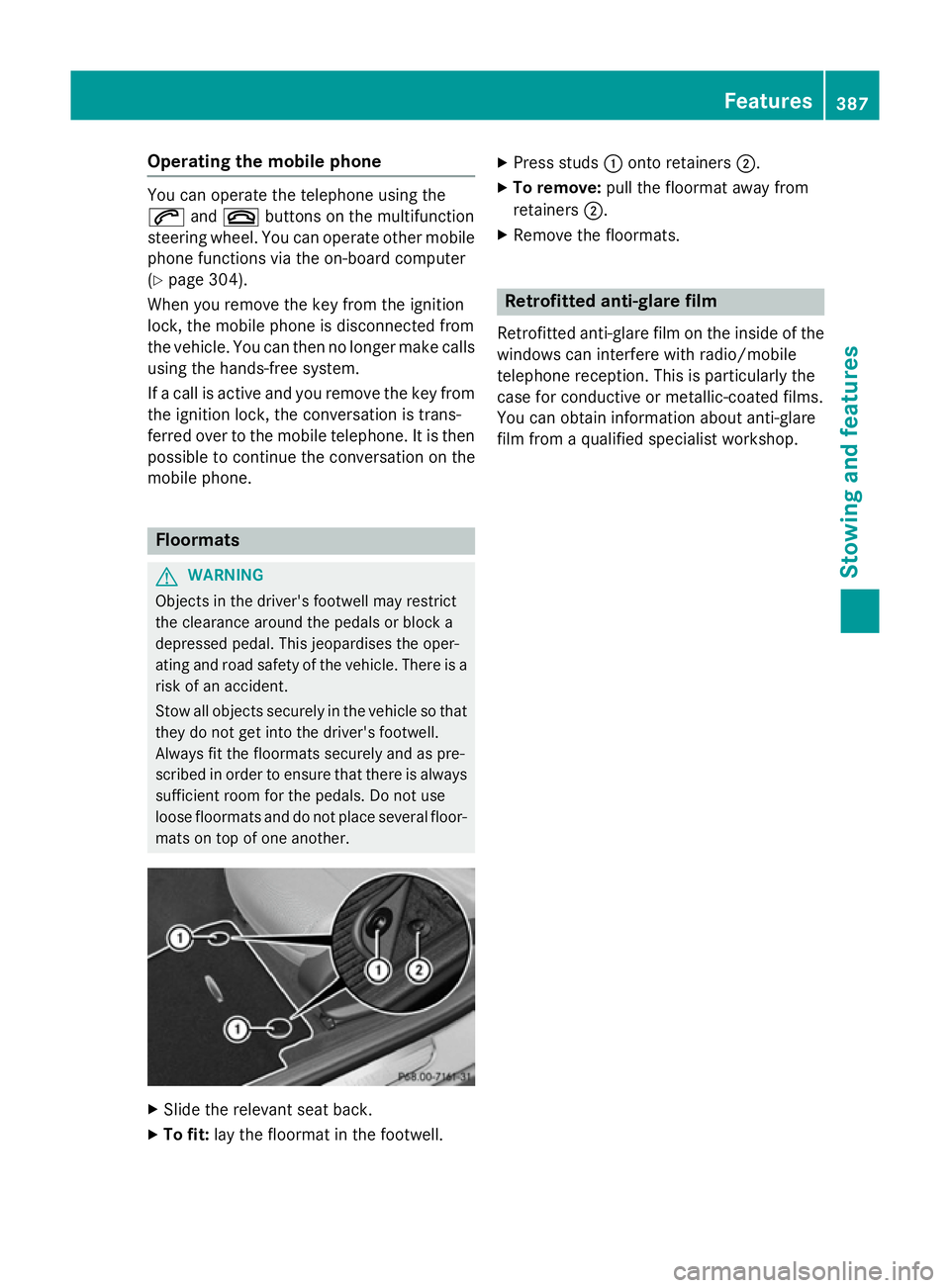
Slide the relevant seat back.
X To fit: lay the floormat in the footwell. X
Press studs :onto retainers ;.
X To remove: pull the floormat away from
retainers ;.
X Remove the floormats. Retrofitted anti-glare film
Retrofitted anti-glare film on the inside of the
windows can interfere with radio/mobile
telephone reception. This is particularly the
case for conductive or metallic-coated films.
You can obtain information about anti-glare
film from a qualified specialist workshop. Features
387Stowing and features Z