heating MERCEDES-BENZ C-CLASS SALOON 2014 Owner's Manual
[x] Cancel search | Manufacturer: MERCEDES-BENZ, Model Year: 2014, Model line: C-CLASS SALOON, Model: MERCEDES-BENZ C-CLASS SALOON 2014Pages: 489, PDF Size: 14.88 MB
Page 158 of 489
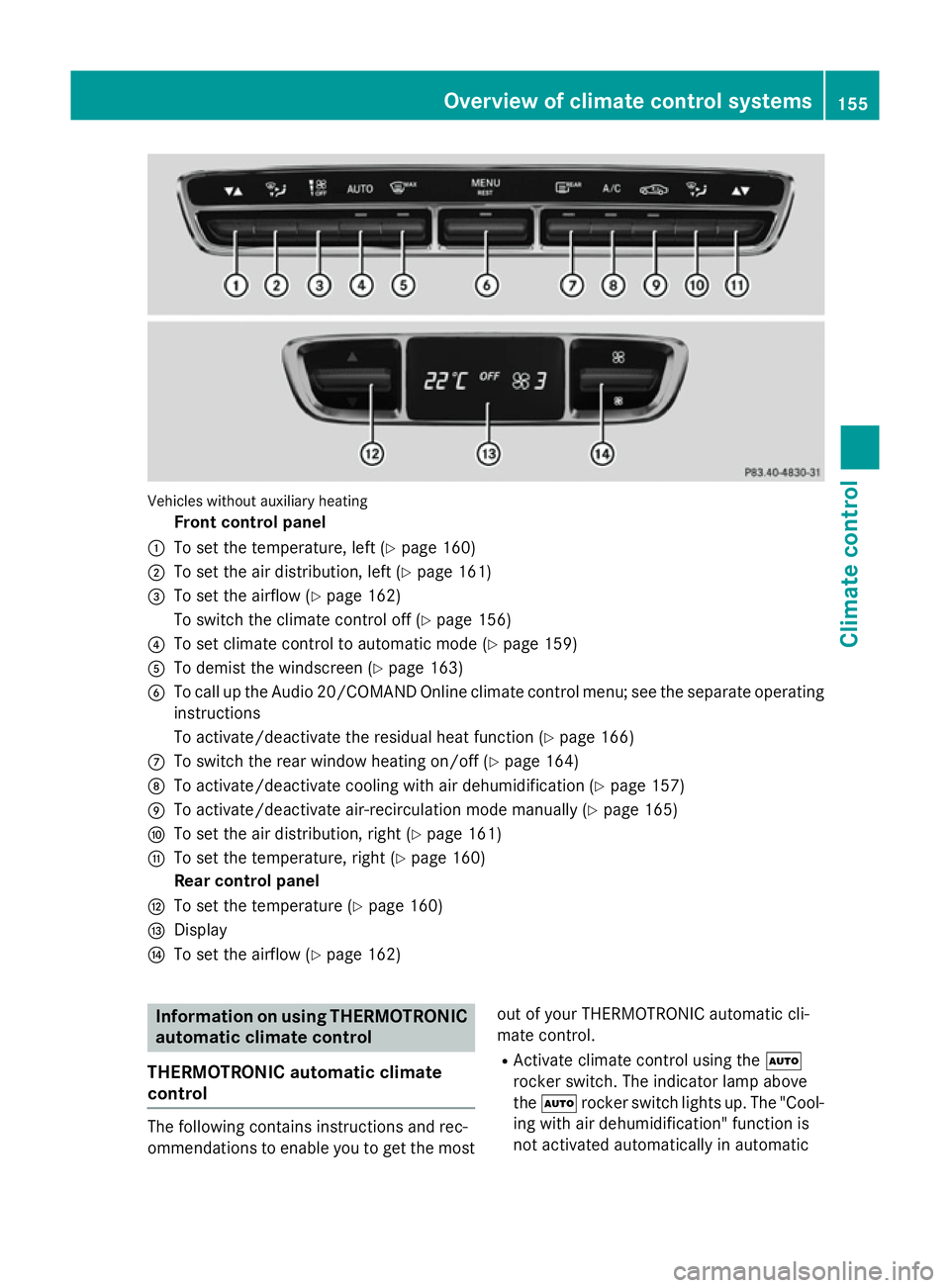
Vehicles without auxiliary heating
Front control panel
: To set the temperature, left (Y page 160)
; To set the air distribution, left (Y page 161)
= To set the airflow (Y page 162)
To switch the climate control off (Y page 156)
? To set climate control to automatic mode (Y page 159)
A To demist the windscreen (Y page 163)
B To call up the Audio 20/COMAND Online climate control menu; see the separate operating
instructions
To activate/deactivate the residual heat function (Y page 166)
C To switch the rear window heating on/off (Y page 164)
D To activate/deactivate cooling with air dehumidification (Y page 157)
E To activate/deactivate air-recirculation mode manually (Y page 165)
F To set the air distribution, right (Y page 161)
G To set the temperature, right (Y page 160)
Rear control panel
H To set the temperature (Y page 160)
I Display
J To set the airflow (Y page 162) Information on using THERMOTRONIC
automatic climate control
THERMOTRONIC automatic climate
control The following contains instructions and rec-
ommendations to enable you to get the most
out of your THERMOTRONIC automatic cli-
mate control.
R Activate climate control using the Ã
rocker switch. The indicator lamp above
the à rocker switch lights up. The "Cool-
ing with air dehumidification" function is
not activated automatically in automatic Overview of climate control systems
155Climate control
Page 159 of 489
mode. If necessary, activate this function
(Y
page 157).
R Set the temperature to 22 †.
R Only use the windscreen demisting func-
tion briefly until the windscreen is clear
again.
R Only use air-recirculation mode briefly, e.g.
if there are unpleasant outside odours or
when in a tunnel. The windows could oth-
erwise mist up as no fresh air is drawn into
the vehicle in air-recirculation mode.
R Use the residual heat function if you want to
heat or ventilate the vehicle interior when
the ignition is switched off. The residual
heat function can only be activated or deac- tivated with the ignition switched off. The
residual heat function is deactivated when
the ignition is switched on.
AGILITY SELECT switch You can choose between various drive pro-
grams with the AGILITY SELECT switch.
R Manual transmission (Y page 191)
R Automatic transmission (Y page 197)
If you have selected drive program E, the cli-
mate control switches to Eco mode.
In Eco mode:
R the cooling output is reduced when cooling
R when heating, the electrical heater booster
is deactivated and heat output is reduced
as a result
R the rear window heating running time is
reduced
If you have selected drive program C,Sor S+
the climate control switches to Comfort
mode. The current climate control settings
are maintained in Comfort mode.
ECO start/stop function During automatic engine switch-off, the cli-
mate control only operates at a reduced capa- city. If you require the full climate control out-
put, you can switch off the ECO start/stop function by pressing the ECO button
(Y
page 187).
Hybrid vehicles The cooling with air dehumidification function
is available when the vehicle is operational
and the READY indicator is lit (Y page 276).
If the internal combustion engine has been
shut off automatically, the set interior tem-
perature will be maintained for a certain
period of time. Operating the climate control system
Switching climate control on/off
General notes When the climate control is switched off, the
air supply and air circulation are also
switched off. The windows could mist up.
Therefore, only switch off climate control
briefly.
Switch on climate control primarily using the à rocker switch (Y page 159).
Activating/deactivating X
Turn the key to position 2in the ignition
lock (Y page 181).
X To switch on: press thet/!
rocker switch up or down.
The Audio 20/COMAND Online climate
control menu opens.
X Activate the climate control using the air-
conditioning function bar; see the separate
Audio 20/COMAND Online operating
instructions.
or
X Set the airflow to level 1 or higher using the
H button. 156
Operating the climate control systemClimate control
Page 160 of 489
X
To switch off: press thet/!
rocker switch up or down.
The Audio 20/COMAND Online climate
control menu opens.
X Deactivate the climate control using the
air-conditioning function bar; see the sep-
arate Audio 20/COMAND Online operating
instructions.
or
X Set the airflow to level 0 using the H
rocker switch. Activating/deactivating the cooling
with air dehumidification function
General notes If you deactivate the "Cooling with air-dehu-
midification" function, the air inside the vehi- cle will not be cooled. The air inside the vehi-
cle will also not be dehumidified. The win-
dows can mist up more quickly. Therefore,
deactivate the "Cooling with air-dehumidifi-
cation" function only briefly.
For vehicles without hybrid drive, the "Cooling with air dehumidification" function is availa-
ble when the engine is running. For hybrid
vehicles, the cooling with air dehumidification function is also available via the electric
refrigerant compressor when the engine is
not running. The air inside the vehicle is
cooled and dehumidified according to the
temperature selected.
Condensation may drip from the underside of
the vehicle when cooling mode is active. This is normal and not a sign that there is a mal-
function. Activating/deactivating THERMATIC automatic climate control
X To activate: press the¿rocker switch
up or down.
The indicator lamp above the rocker switch lights up.
or
X Activate the cooling with air dehumidifica-
tion function via Audio 20/COMAND
Online (see the separate operating instruc-
tions).
X To deactivate: press the¿rocker
switch up or down.
The indicator lamp above the rocker switch
goes out.
or
X Deactivate the cooling with air dehumidifi-
cation function via Audio 20/COMAND
Online (see the separate operating instruc-
tions).
THERMOTRONIC automatic climate con-
trol without auxiliary heating
X To activate: press the¿rocker switch
up or down.
The indicator lamp above the rocker switch lights up.
or
X Activate the cooling with air dehumidifica-
tion function via Audio 20/COMAND
Online (see the separate operating instruc-
tions).
X To deactivate: press the¿rocker
switch up or down.
The indicator lamp above the rocker switch
goes out.
or X Deactivate the cooling with air dehumidifi-
cation function via Audio 20/COMAND
Online (see the separate operating instruc-
tions). Operating the climate control system
157Climate control
Page 161 of 489

THERMOTRONIC automatic climate con-
trol with auxiliary heating
You can activate or deactivate the cooling
with air dehumidification function using
Audio 20/COMAND Online; see the separate operating instructions. 158
Operating the climate control systemClimate control
Page 162 of 489
Problems with the "Cooling with air dehumidification" function
Problem
Possible causes/consequences and
M
MSolutions THERMOTRONIC
with auxiliary heat-
ing:
cooling with air
dehumidification can
no longer be switched
on using Audio 20/
COMAND Online; see
the separate operating
instructions. The cooling with air dehumidification function has been deactiva-
ted due to a malfunction.
X Visit a qualified specialist workshop. THERMATIC/
THERMOTRONIC
without auxiliary
heating:
the indicator
lamp in the ¿but-
ton flashes three times
or remains off. The
cooling with air dehu-
midification function
can also no longer be
activated using Audio
20/COMAND Online
(see the separate oper-
ating instructions). The cooling with air dehumidification function has been deactiva-
ted due to a malfunction.
X Visit a qualified specialist workshop. Setting climate control to automatic
mode
General notes In automatic mode, the set temperature is
maintained automatically at a constant level. The system automatically regulates the tem-
perature of the dispensed air, the airflow and
the air distribution.
The automatic mode functions optimally
when the "Cooling with air dehumidification"
function is activated. The "Cooling with air
dehumidification" function must be activated
manually in automatic mode. If necessary,
"Cooling with air dehumidification" can also
be deactivated.
If you deactivate the "Cooling with air-dehu-
midification" function, the air inside the vehi- cle will not be cooled. The air inside the vehi-
cle will also not be dehumidified. The win-
dows can mist up more quickly. Therefore,
only switch off cooling with air dehumidifica-
tion for a short period. Operating the climate control system
159Climate control
Page 165 of 489
X
Press and hold the _button upwards
until the desired position is reached.
or X Set the air distribution using Audio 20/
COMAND Online; see the separate operat-
ing instructions. Setting the airflow
THERMATIC automatic climate control X
Turn the key to position 2in the ignition
lock (Y page 181).
X To increase/reduce: press the upper or
lower section of the Hrocker switch.
or
X Set the airflow using Audio 20/COMAND
Online; see the separate operating instruc-
tions.
THERMOTRONIC automatic climate
control Setting the front-compartment airflow
You can set the airflow separately for the
front and rear compartment. X Turn the key to position 2in the ignition
lock (Y page 181).
X To increase/reduce: press the upper or
lower section of the Hrocker switch.
or
X Set the airflow using Audio 20/COMAND
Online; see the separate operating instruc-
tions.
Setting the rear compartment airflow X Turn the key to position 2in the ignition
lock (Y page 181).
X Press the upper or lower section of
the ! rocker switch.
The Audio 20/COMAND Online climate
control menu opens.
X Select the synchronisation function in the
climate control menu; see separate Audio 20/COMAND Online operating
instructions.
The airflow setting for the front area is
adopted for the rear compartment.
Setting the rear compartment airflow
using the rear control panel
X Turn the key to position 2in the ignition
lock (Y page 181).
X To increase/reduce: press the upper or
lower section of the K/Irocker
switch on the rear control panel.
The selected airflow level is shown in the
rear-compartment display. Activating/deactivating the synchro-
nisation function
General notes Climate control can be set centrally using the
synchronisation function. The temperature
setting is adopted for the front-passenger
side. For THERMOTRONIC automatic climatecontrol, the temperature setting is adopted
for the front-passenger side and rear com-
partment.
Activating/deactivating THERMATIC automatic climate control
without auxiliary heating
X Press the 0rocker switch up or down.
The indicator lamp in the 0rocker
switch lights up or goes out.
or
X Activate/deactivate the synchronisation
function using Audio 20/COMAND Online;
see the separate operating instructions).
The synchronisation function deactivates if
the settings for the front-passenger side are
changed. 162
Operating the climate control systemClimate control
Page 166 of 489
THERMATIC automatic climate control
with auxiliary heating
X Activate/deactivate the synchronisation
function using Audio 20/COMAND Online;
see the separate operating instructions).
The synchronisation function deactivates if
the settings for the front-passenger side are
changed.
THERMOTRONIC automatic climate con-
trol
X Activate/deactivate the synchronisation
function using Audio 20/COMAND Online;
see the separate operating instructions).
The synchronisation function is deactivated:
R if the settings for the front-passenger side
are changed
R if the settings for the rear compartment are
changed Demisting the windscreen
General notes You can use this function to defrost the wind-
screen or to demist the inside of the wind-
screen and the front side windows.
Switch off the windscreen demisting function as soon as the windscreen is clear again.
Activating/deactivating the wind-
screen demisting function X
Turn the key to position 2in the ignition
lock (Y page 181).
X To activate: press the¬rocker switch
on the front control unit up or down.
The indicator lamp above the ¬rocker
switch lights up. The current climate con-
trol settings are deactivated.
The climate control system switches to the
following functions:
R high airflow
R high temperature R
air distribution to the windscreen and
front side windows
R air-recirculation mode off
i If necessary, the "Cooling with air dehu-
midification" function is activated. In this
case, the indicator lamp above the
¿ button remains switched off.
X To deactivate: press the¬rocker
switch up or down.
The indicator lamp above the ¬rocker
switch goes out. The previous settings are
reactivated. Air-recirculation mode
remains deactivated.
or
X Press the top or bottom section of the Ã
rocker switch. Demisting the windows
Windows misted up on the inside X
Activate the "Cooling with air dehumidifi-
cation" function with the ¿rocker
switch.
or
X Activate the cooling with air dehumidifica-
tion function via Audio 20/COMAND
Online; see the separate operating instruc-
tions.
For THERMOTRONIC automatic climate
control with auxiliary heating, the "Cooling
with air dehumidification" function can only be activated using Audio 20/COMAND
Online.
X Switch on automatic mode using the Ã
rocker switch.
X If the windows continue to mist up, activate
the windscreen demisting function using
the ¬ rocker switch.
i You should only select this setting until
the windscreen is clear again. Operating the climate control system
163Climate control
Page 167 of 489
Windows misted up on the outside
X
Activate the windscreen wipers.
X Switch on automatic mode using the Ã
rocker switch.
i If you clean the windows regularly, they
do not mist up so quickly. Rear window heating
General notes The rear window heating has a high current
draw. You should therefore switch it off as
soon as the window is clear. It otherwise
switches off automatically after several
minutes.
If the battery voltage is too low, the rear win-
dow heating may switch off.
Activating/deactivating X
Turn the key to position 2in the ignition
lock (Y page 181).
X Press the ¤rocker switch up or down.
The indicator lamp above the ¤rocker
switch lights up or goes out. 164
Operating the climate control systemClimate control
Page 168 of 489
Problems with the rear window heating
Problem
Possible causes/consequences and
M
MSolutions The rear window heat-
ing has switched off
prematurely or cannot
be activated. The battery has not been sufficiently charged.
X Switch off any consumers that are not required, e.g. reading
lamps, interior lighting or the seat heating.
When the battery is sufficiently charged, the rear window heat-
ing can be activated again. Activating/deactivating air-recircula-
tion mode
General notes You can also temporarily deactivate the flow
of fresh air manually if unpleasant odours are
entering the vehicle from outside. The air
already inside the vehicle will then be recir-
culated.
If you switch on air-recirculation mode, the
windows can mist up more quickly, in partic-
ular at low temperatures. Only use air-recir-
culation mode briefly to prevent the windows misting up.
Activating/deactivating X
Turn the key to position 2in the ignition
lock (Y page 181).
X To activate: press thegrocker switch
up or down.
The indicator lamp above the grocker
switch lights up.
Air-recirculation mode switches on automat-
ically:
R at high outside temperatures
R at high levels of pollution (THERMOTRONIC
automatic climate control only)
R in a tunnel (vehicles with a navigation sys-
tem only)
The indicator lamp above the grocker
switch is not lit when automatic air-recircula- tion mode is activated. Outside air is added
after about 30 minutes. X
To deactivate: press thegrocker
switch up or down.
The indicator lamp above the grocker
switch goes out.
Air-recirculation mode is deactivated auto-
matically:
R after approximately five minutes at outside
temperatures below approximately 5 †
R after approximately five minutes if cooling
with air dehumidification is deactivated
R after approximately 30 minutes at outside
temperatures above approximately 5 † if
the cooling with air dehumidification func-
tion is activated Convenience opening/closing using
the air-recirculation button G
WARNING
When the convenience closing feature is oper- ating, parts of the body could become trapped
in the closing area of the side window and the
sliding sunroof. There is a risk of injury.
Observe the complete closing procedure
when the convenience closing feature is oper-
ating. When closing make sure that no parts of the body are in the closing area. G
WARNING
During convenience opening parts of the body could be drawn in or become trapped
between the side window and window frame.
There is a risk of injury. Operating the climate control system
165Climate control
Z
Page 169 of 489
When opening, make sure that nobody is
touching the side window. If someone
becomes trapped, press the Wswitch
immediately to open/close the side window
in the door. The side window stops. To con-
tinue closing the side window, pull on the
W switch.
X Convenience closing feature (vehicles
with a sliding sunroof/panorama slid-
ing sunroof): press and hold the g
rocker switch up or down until the side win- dows and the sliding sunroof/panorama
sliding sunroof start to close automatically.The indicator lamp above the grocker
switch lights up. Air-recirculation mode is
activated.
X Convenience closing feature (vehicles
without a sliding sunroof/panorama
sliding sunroof): press and hold the g
rocker switch up or down until the side win- dows start to close automatically.
The indicator lamp above the grocker
switch lights up. Air-recirculation mode is
activated.
If you open the side windows or the sliding sunroof/panorama sliding sunroof man-
ually after closing them with the conveni-
ence closing feature, they will remain in this
position when opened using the conveni-
ence opening feature.
If parts of the body are in the closing area
during convenience closing, proceed as fol-
lows:
X Press the Wbutton for opening/closing
the side windows.
The side windows stop.
X To then open the side window, press the
W button again.
X Only vehicles with sliding sunroof/
panorama sliding sunroof: press the3
switch to open/close the sliding sun-
roof/panorama sliding sunroof.
The sliding sunroof/panorama sliding sun-
roof stops.
X To then open the sliding sunroof/pano-
rama sliding sunroof, pull back on the 3
button.
Notes on the automatic reversing feature for:
R the side windows (Y page 106)
R the sliding sunroof/panorama sliding sun-
roof (Y page 111)
X Convenience opening feature (vehicles
with a sliding sunroof/panorama slid-
ing sunroof): press and hold the g
rocker switch up or down until the side win- dows and the sliding sunroof/panorama
sliding sunroof start to open automatically.
The indicator lamp above the grocker
switch goes out. Air-recirculation mode is
deactivated.
X Convenience opening feature (vehicles
without a sliding sunroof/panorama
sliding sunroof): press and hold the g
rocker switch up or down until the side win- dows start to open automatically.
The indicator lamp above the grocker
switch goes out. Air-recirculation mode is
deactivated. Activating/deactivating the residual
heat function
General notes The residual heat function is only available
with THERMOTRONIC automatic climate con- trol and THERMATIC automatic climate con-
trol with auxiliary heating.
Once the engine is switched off, it is possible
to make use of the residual heat of the engine to continue heating or ventilating the front
compartment of the vehicle for approximately
30 minutes. The heating or ventilation time
depends on the set interior temperature. 166
Operating the climate control systemClimate control