ignition MERCEDES-BENZ C-CLASS SALOON 2018 User Guide
[x] Cancel search | Manufacturer: MERCEDES-BENZ, Model Year: 2018, Model line: C-CLASS SALOON, Model: MERCEDES-BENZ C-CLASS SALOON 2018Pages: 609, PDF Size: 11.19 MB
Page 133 of 609
0007
Toopen: pull co ver2 out byits top handle
edge. 0007
Toremo vethe inser t:push ribbing 3from
th e left side and pull insert 1upwards and
out. 0007
Tofit the inse rt:fit insert 1from ab ove
and press down on the holder until it
engages. Using
the cigar ette lighter in the front centre
console 000A
WARNING ‑ Risk of fire and injury from
th e hot cigar ette lighter
Yo u can burn yourself if youto uch the hot
heating element or the soc ket of the ciga‐
re tte lighter.
In addition, flammable materials may ignite
if:
R you drop the hot cigar ette lighter
R ach ild holds the hot cigar ette lighter to
objects, forex ample 0007
Alw ays hold the cigar ette lighter bythe
knob. 0007
Alw ays make sure that the cigar ette
lighter is out of reach of children. 0007
Never lea vechildren unat tended in the
ve hicle. Re
quirements:
R The ignition is switched on. 0007
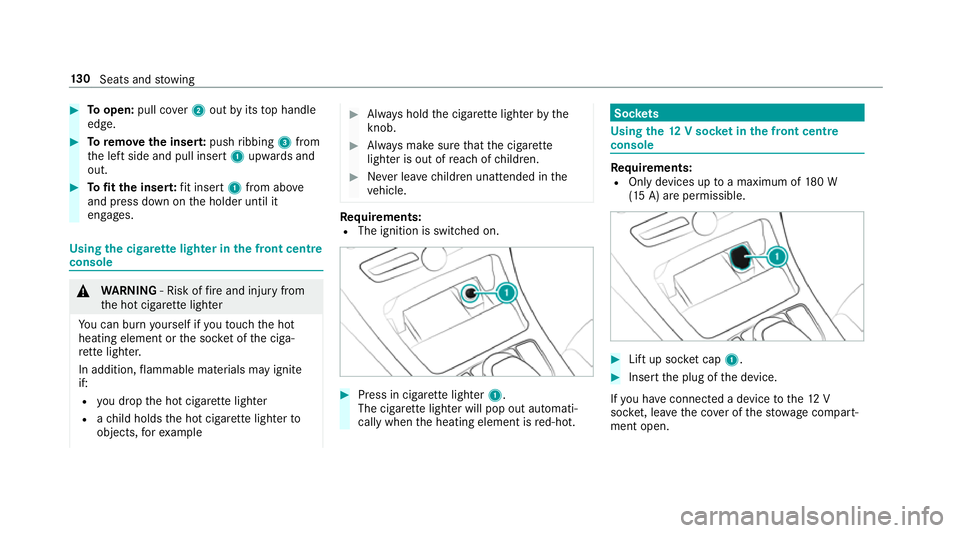
Press in cigar ette lighter 1.
The cigar ette lighter will pop out automati‐
cally when the heating element is red-hot. Soc
kets Using the
12V so cket inthe front centre
console Re
quirements:
R Only devices up toa maximum of 180 W
(15 A) are permissible. 0007
Lift up soc ket cap 1. 0007
Inse rtthe plug of the device.
If yo u ha veconnected a device tothe12 V
soc ket, le ave the co ver of thestow age compart‐
ment open. 13 0
Seats and stowing
Page 134 of 609
Using
the12 V so cket inthere ar passenger
comp artment Re
quirements:
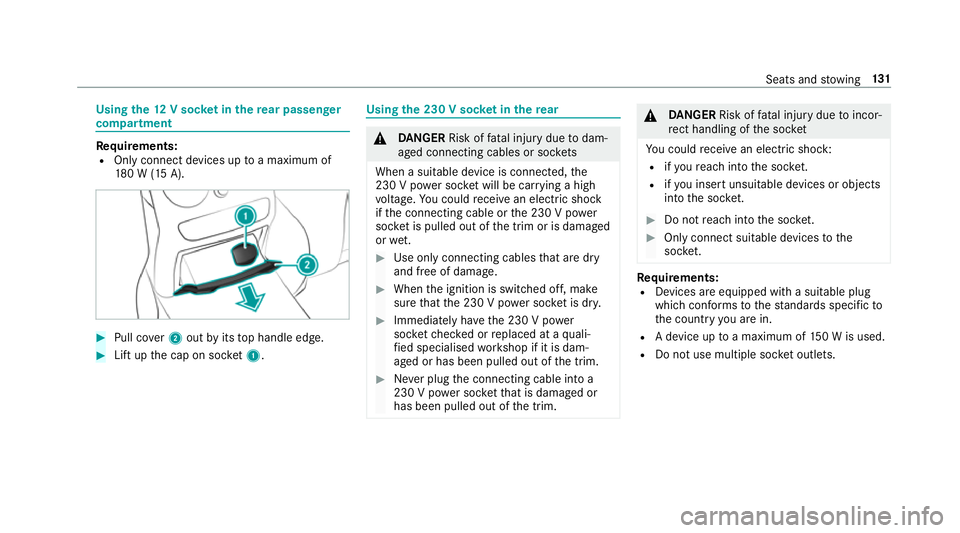
R Only connect devices up toa maximum of
18 0 W (15 A). 0007
Pull co ver2 out byits top handle edge. 0007
Lift up the cap on soc ket1. Using the 230 V so
cket inthere ar 000A
DANG ER Risk of fata l injury due todam‐
aged connecting cables or soc kets
When a suitable device is connected, the
230 V power soc ket will be car rying a high
vo ltage. You could recei vean electric shock
if th e connecting cable or the 230 V po wer
soc ket is pulled out of the trim or is damaged
or we t. 0007
Use only connecting cables that are dry
and free of damage. 0007
When the ignition is switched off, make
sure that the 230 V po wer soc ket is dr y. 0007
Immedia tely ha ve the 230 V po wer
soc ketch ecked or replaced at a quali‐
fi ed specialised workshop if it is dam‐
aged or has been pulled out of the trim. 0007
Never plug the connecting cable into a
230 V po wer soc ketth at is damaged or
has been pulled out of the trim. 000A
DANG ER Risk of fata l injury due toincor‐
re ct handling of the soc ket
Yo u could recei vean electric shock:
R ifyo ure ach into the soc ket.
R ifyo u insert unsuitable devices or objects
into the soc ket. 0007
Do not reach into the soc ket. 0007
Only connect suitable devices tothe
soc ket. Re
quirements:
R Devices are equipped with a suitable plug
which con form sto thest andards specific to
th e count ryyou are in.
R A device up toa maximum of 150 W is used.
R Do not use multiple soc ket outlets. Seats and
stowing 131
Page 136 of 609
000E
NO
TEDama getoobjects caused by
placing them in the mobile phone stow‐
age compartment If objects are placed in
the mobile phone
stow age compartment, they may be dam‐
aged byelectromagnetic fields. 0007
Do not place credit cards, storage
media or other objects sensitive to
electromagnetic fields in the mobile
phone stowage compartment. 000E
NO
TEDama getothe mobile phone
stow age compartment caused byliquids If liquids enter
the mobile phone stowage
compartment, the compartment may be
damaged. 0007
Ensure that no liquids enter the mobile
phone stowage compartment. R
Depending on theve hicle equipment, the
mobile phone is connected totheve hicle's
ex terior aerial via thech arging module. R
The charging function and wireless connec‐
tion of the mobile phone totheve hicle's
ex terior aerial are only available if the ignition
is switched on.
R Small mobile phones may not be able tobe
ch arge d in everyposition of the mobile
phone stowage compartment.
R Largemobile phones which do not rest flat in
th e mobile phone stowage compartment may
not be able tobe charge d or connec ted with
th eve hicle's exterior aerial.
R The mobile phone may heat up during the
ch arging process. This may also depend on
th e applications (apps) cur rently open.
R Toensure more ef ficient charging and con‐
nection with theve hicle's exterior aerial,
re mo vethe pr otective co ver from the mobile
phone. Pr otective co vers which are neces‐
sary for wireless charging are excluded. Wire
lesscharging of the mobile phone Re
quirements:
R The mobile phone is suitable for wireless
ch arging. You can find a li stof compatible
mobile phones at:
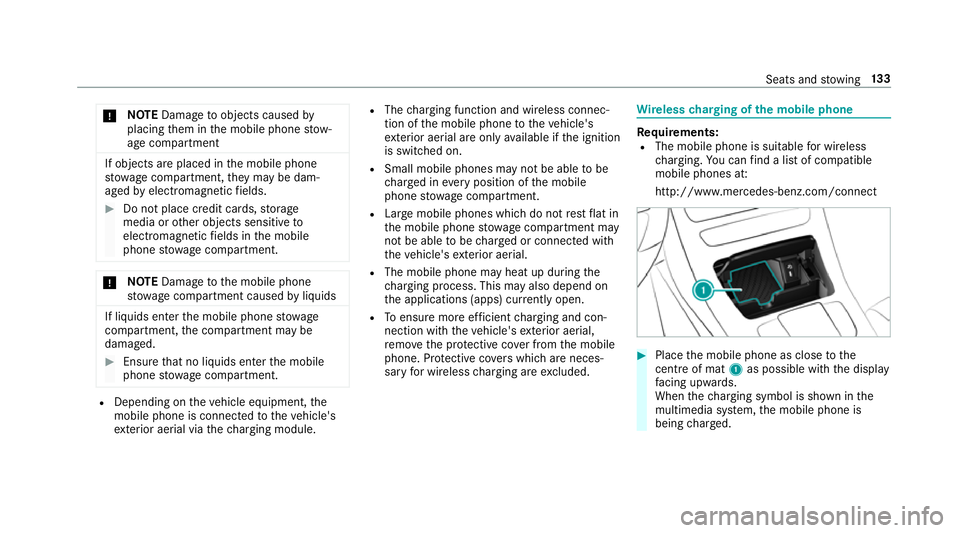
http://www.mercedes-benz.com/connect 0007
Place the mobile phone as close tothe
centre of mat 1as possible wi th the display
fa cing up wards.
When thech arging symbol is shown in the
multimedia sy stem, the mobile phone is
being charge d. Seats and
stowing 13 3
Page 139 of 609
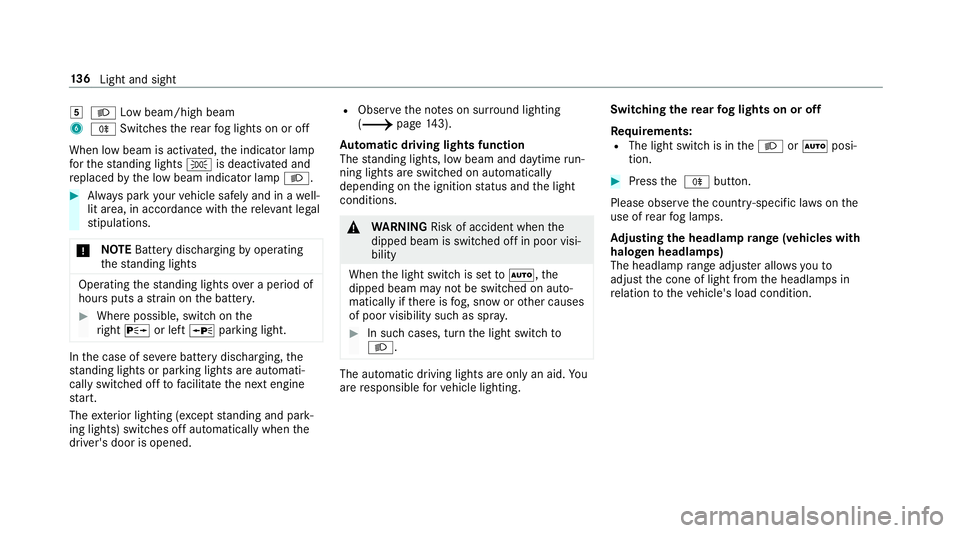
004B
0058 Low beam/high beam
6 005E Switches there ar fog lights on or off
When low beam is activated, the indicator lamp
fo rth est anding lights 0060is deactivated and
re placed bythe low beam indicator lamp 0058.0007
Alw ays park your vehicle safely and in a well-
lit area, in accordance with there leva nt le gal
st ipulations.
000E NO
TEBattery discharging byoperating
th est anding lights Operating
thest anding lights over a period of
hours puts a stra in on the batter y. 0007
Where possible, switch on the
ri ght 0064 or left 0063parking light. In
the case of se vere battery discharging, the
st anding lights or parking lights are automati‐
cally swit ched off tofacilitate the next engine
st art.
The exterior lighting (e xcept standing and park‐
ing lights) swit ches off automatically when the
driver's door is opened. R
Obser vethe no tes on sur round lighting
(0013 page143).
Au tomatic driving lights function
The standing lights, low beam and daytime run‐
ning lights are switched on au tomatical ly
depending on the ignition status and the light
conditions. 000A
WARNING Risk of accident when the
dipped beam is switched off in poor visi‐
bility
When the light switch is set to0058 ,the
dipped beam may not be switched on auto‐
matically if there is fog, snow or other causes
of poor visibility such as spr ay. 0007
In such cases, turn the light switch to
0058 . The automatic driving lights are only an aid.
Yo u
are responsible forve hicle lighting. Switching
there ar fog lights on or off
Re quirements:
R The light switch is in the0058 or0058 posi‐
tion. 0007
Press the 005E button.
Please obser vethe count ry-specific la wsonthe
use of rear fog lamps.
Ad justing the headlamp range (vehicles with
halogen headla mps)
The headlamp range adjus ter allows youto
adjust the cone of light from the headlamps in
re lation totheve hicle's load condition. 13 6
Light and sight
Page 143 of 609
R
the GPS
The function is not active: R at speeds below 80 km/h.
Enhanced fog light function
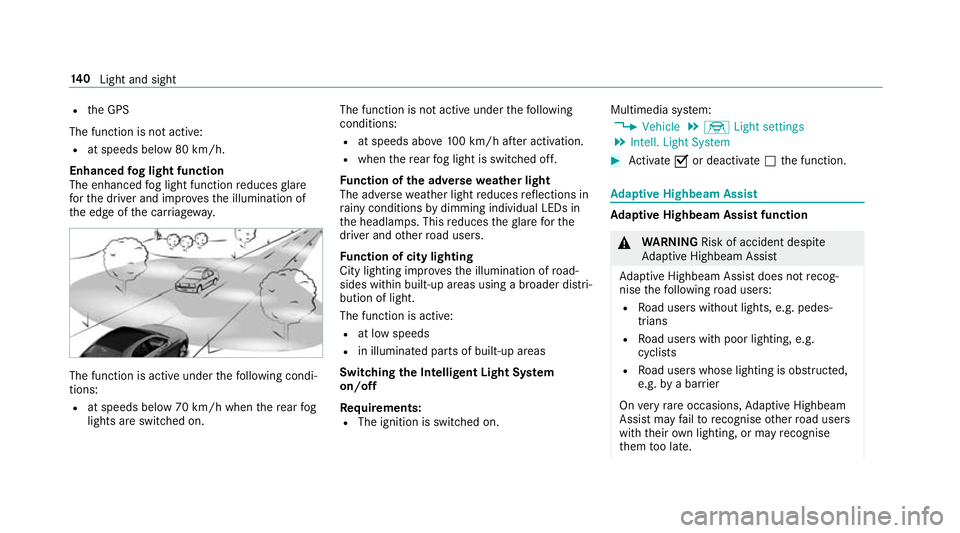
The enhanced fog light function reduces glare
fo rth e driver and impr ovesth e illumination of
th e edge of the car riag ewa y. The function is active under
thefo llowing condi‐
tions:
R at speeds below 70 km/h when there ar fog
lights are switched on. The function is not active under
thefo llowing
conditions:
R at speeds abo ve100 km/h af ter activation.
R when there ar fog light is switched off.
Fu nction of the ad versewe ather light
The adverse weather light reduces reflections in
ra iny conditions bydimming individual LEDs in
th e headlamps. This reduces theglare forthe
driver and other road users.
Fu nction of city lighting
City lighting impr ovesth e illumination of road‐
sides within built-up areas using a broader distri‐
bution of light.
The function is active:
R at low speeds
R in illuminated parts of built-up areas
Swit ching the Intelligent Light Sy stem
on/off
Re quirements:
R The ignition is switched on. Multimedia sy
stem:
0018 Vehicle 0019
÷ Light settings
0019 Intell. Light System 0007
Activate 0073or deacti vate 0053 the function. Ad
aptive Highbeam Assist Ad
aptive Highbeam Assist function 000A
WARNING Risk of accident despi te
Ad aptive Highbeam Assist
Ad aptive Highbeam Assist does not recog‐
nise thefo llowing road users:
R Road users without lights, e.g. pedes‐
trians
R Road users with poor lighting, e.g.
cyclists
R Road users whose lighting is obstructed,
e.g. bya bar rier
On very rare occasions, Adaptive Highbeam
Assist may failto recognise other road users
with their own lighting, or may recognise
th em too late. 14 0
Light and sight
Page 152 of 609
004A
00AA Continuous wiping, slow
004B 00A9 Continuous wiping, fast 0007
Turn the combination switch tothe cor re‐
sponding position 0047-004B. 0007
Single wipe/washing: pushthe button on
th e combination switch in the direction of
ar row 1.
R 00D3 Single wipe
R 00D4 Wiping with washer fluid Re
placing the windsc reen wiper blades 000A
WARNING Risk of becoming trapped if
th e windscreen wipers are switched on
while wiper blades are being replaced
If th e windscreen wipers begin tomo vewhile
yo u are changing the wiper blades, you can
be trapped bythe wiper arm. 0007
Alw ays switch off the windscreen wip‐
ers and ignition before changing the
wiper blades. Moving
the wiper arms tothech ange posi‐
tion 0007
Switch the ignition on and switch off again
immediatel y. 0007
Within around 15seconds, press button
00D4 onthe combination switch for appro x‐
ima tely thre e seconds (0013 page148).
The wiper arms will mo veinto thech ange
position.
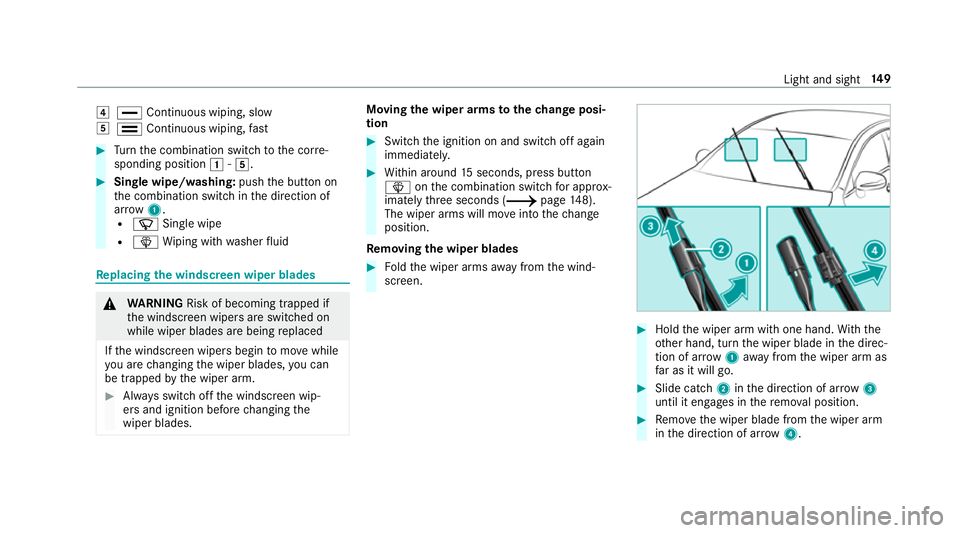
Re moving the wiper blades 0007
Foldthe wiper arms away from the wind‐
screen. 0007
Hold the wiper arm with one hand. With the
ot her hand, turn the wiper blade in the direc‐
tion of ar row1away from the wiper arm as
fa r as it will go. 0007
Slide catch 2inthe direction of ar row 3
until it engages in there mo val position. 0007
Remo vethe wiper blade from the wiper arm
in the direction of ar row4. Light and sight
14 9
Page 153 of 609
Fi
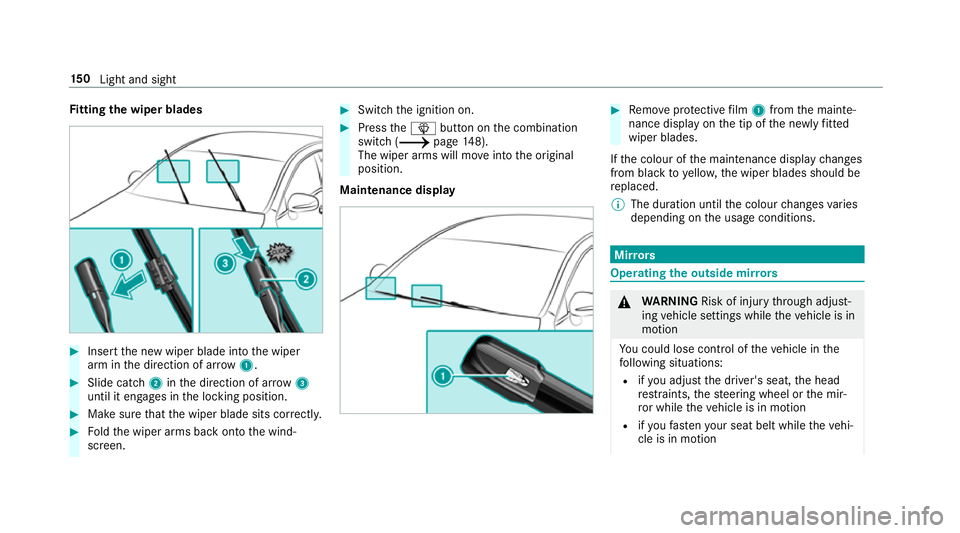
tting the wiper blades 0007
Inse rtthe new wiper blade into the wiper
arm in the direction of ar row1. 0007
Slide catch 2inthe direction of ar row 3
until it engages in the locking position. 0007
Make sure that the wiper blade sits cor rectly. 0007
Foldthe wiper arms back onto the wind‐
screen. 0007
Switch the ignition on. 0007
Press the00D4 button on the combination
switch (0013 page148).
The wiper arms will mo veinto the original
position.
Maintenance display 0007
Remo veprotective film 1 from the mainte‐
nance display on the tip of the newly fitted
wiper blades.
If th e colour of the maintenance display changes
from black to yellow, the wiper blades should be
re placed.
0009 The duration until the colour changes varies
depending on the usage conditions. Mir
rors Operating
the outside mir rors 000A
WARNING Risk of inju rythro ugh adjust‐
ing vehicle settings while theve hicle is in
motion
Yo u could lose cont rol of theve hicle in the
fo llowing situations:
R ifyo u adjust the driver's seat, the head
re stra ints, thesteering wheel or the mir‐
ro r while theve hicle is in motion
R ifyo ufast enyour seat belt while theve hi‐
cle is in motion 15 0
Light and sight
Page 169 of 609
Driving
Note
s on Mercedes-AMG vehicles Obser
vethe no tes on thefo llowing topics in the
Supplement, as you may otherwise failto recog‐
nise dangers:
R Rear axle locking dif fere ntial
R AMG Performance exhaust sy stem
R AMG ceramic high-per form ance composite
brake sy stem
R RACE START
R AMG RIDE CONTROL Switching
the po wer supp lyor ignition on
without starting the engine 000A
WARNING Risk of accident and inju ry
due tochildren left unat tended in the
ve hicle
If ch ildren are left unat tended in theve hicle,
th ey could:
R open doo rs,th ereby endangering other
persons or road users.
R get out of theve hicle and be hit by
oncoming traf fic.
R ope rate ve hicle equipment and become
trapped, forex ample.
In addition, children could also set theve hi‐
cle in motion, forex ample, by:
R releasing the parking brake.
R shifting the automatic transmission out of
park position 005Dor shifting manual trans‐
mission into idle position.
R starting the engine. 0007
Never lea vechildren and animals unat‐
te nded in theve hicle. 0007
When leaving theve hicle, alw aysta ke
th eke y with you and lock theve hicle.
This also applies tothe Digital Vehicle
Ke y if the "Digital Vehicle Key" function
is activated via Mercedes me connect. 0007
Keep theve hicle key out of reach of
ch ildren. This also applies tothe Digital
Ve hicle Key if the "Digital Vehicle Key"
function is activated via Mercedes me
connect. Re
quirements:
R theke y is in theve hicle and is recognised.
R or: a Digi talVe hicle Key is located in the
mar ked space (0013 page168).
R the brake pedal is not depressed. 16 6
Driving and pa rking
Page 170 of 609
0007
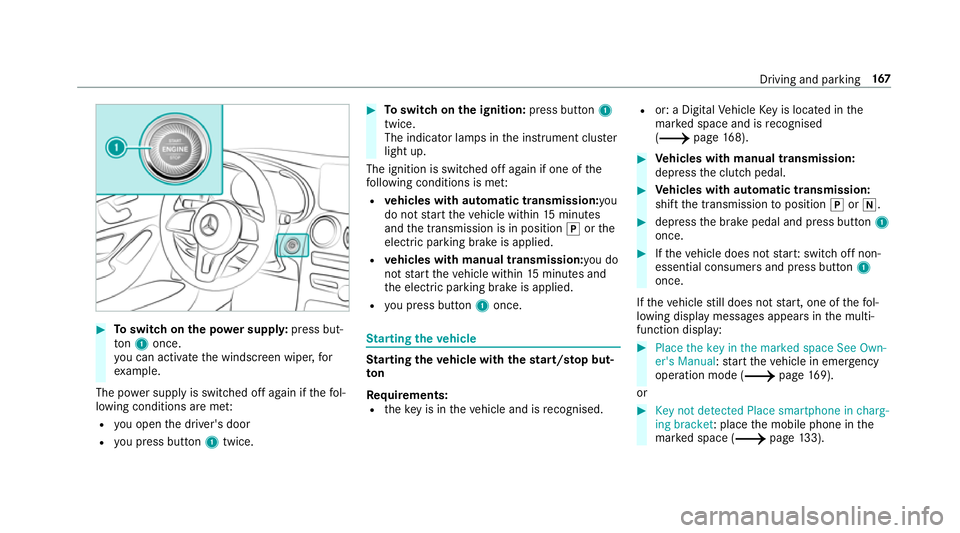
Toswitch on the po wer supp ly:press but‐
to n1 once.
yo u can activate the windscreen wiper, for
ex ample.
The po wer supp lyis switched off again if thefo l‐
lowing conditions are me t:
R you open the driver's door
R you press but ton1 twice. 0007
Toswitch on the ignition: press button 1
twice.
The indicator lamps in the instrument clus ter
light up.
The ignition is switched off again if one of the
fo llowing conditions is me t:
R vehicles with automatic transmission:you
do not start theve hicle within 15minutes
and the transmission is in position 005Dorthe
electric parking brake is applied.
R vehicles with manual transmission: you do
not start theve hicle within 15minutes and
th e electric parking brake is applied.
R you press but ton1 once. St
arting theve hicle St
arting theve hicle with thest art/s top but‐
ton
Requ irements:
R theke y is in theve hicle and is recognised. R
or: a Digi talVe hicle Key is located in the
mar ked space and is recognised
(0013 page 168). 0007
Vehicles with manual transmission:
depress the clutch pedal. 0007
Vehicles with automatic transmission:
shift the transmission toposition 005Dor005C. 0007
depress the brake pedal and press button 1
once. 0007
Ifth eve hicle does not star t:switch off non-
essential consumers and press button 1
once.
If th eve hicle still does not start, one of thefo l‐
lowing display messages appears in the multi‐
function display: 0007
Place the key in the marked space See Own-
er's Manual :st art theve hicle in emer gency
operation mode (0013 page 169).
or 0007
Key not detected Place smartphone in charg-
ing bracket: place the mobile phone in the
mar ked space (0013 page133). Driving and pa
rking 167
Page 172 of 609
0007
Dep ress the brake pedal and start theve hicle
using thest art/ stop button.
Any fur ther starts with th e DigitalVehicle
Key
The key is not needed for any fur ther starts. 0007
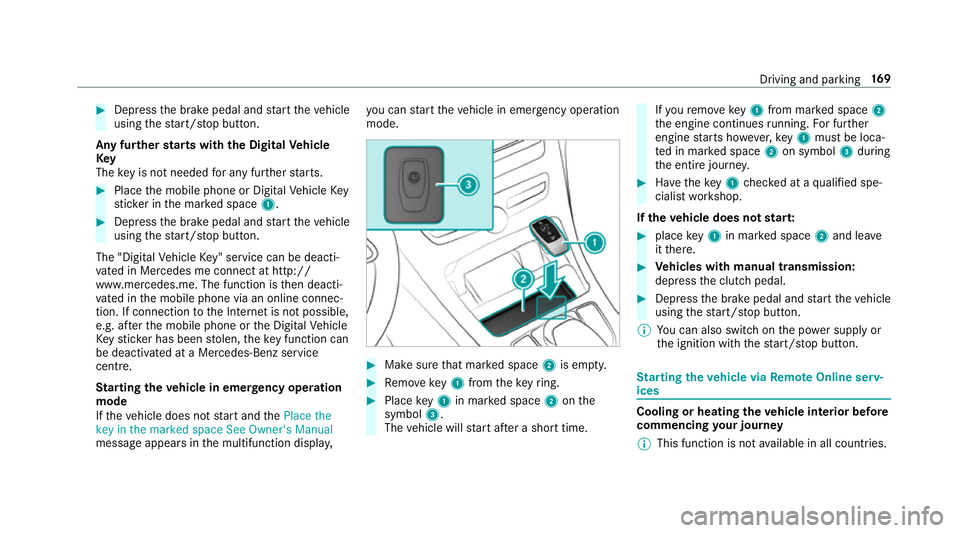
Place the mobile phone or Digital Vehicle Key
st icke r in the mar ked space 1. 0007
Depress the brake pedal and start theve hicle
using thest art/ stop button.
The "Digital Vehicle Key" service can be deacti‐
va ted in Mercedes me connect at http://
www.mercedes.me. The function is then deacti‐
va ted in the mobile phone via an online connec‐
tion. If connection tothe Internet is not possible,
e.g. af terth e mobile phone or the Digital Vehicle
Ke yst icke r has been stolen, theke y function can
be deacti vated at a Mercedes-Benz service
centre.
St arting theve hicle in emer gency operation
mode
If th eve hicle does not start and thePlace the
key in the marked space See Owner's Manual
message appears in the multifunction displa y,yo
u can start theve hicle in emer gency operation
mode. 0007
Makesure that mar ked space 2is em pty. 0007
Remo vekey1 from theke yring. 0007
Place key1 in mar ked space 2onthe
symbol 3.
The vehicle will start af ter a short time. If
yo ure mo vekey1 from mar ked space 2
th e engine continues running. For fur ther
engine starts ho wever,ke y1 must be loca‐
te d in mar ked space 2on symbol 3during
th e entire journe y. 0007
Have theke y1 checked at a qualified spe‐
cialist workshop.
If th eve hicle does not star t: 0007
place key1 in mar ked space 2and lea ve
it th ere. 0007
Vehicles with manual transmission:
depress the clutch pedal. 0007
Depress the brake pedal and start theve hicle
using thest art/ stop button.
0009 You can also swit chon the po wer supp lyor
th e ignition with thest art/ stop button. St
arting theve hicle via Remo teOnline serv‐
ices Cooling or heating
theve hicle interior before
commencing your journey
0009 This function is not available in all countries. Driving and parking
16 9