ad blue MERCEDES-BENZ C-CLASS SALOON 2018 Owner's Manual
[x] Cancel search | Manufacturer: MERCEDES-BENZ, Model Year: 2018, Model line: C-CLASS SALOON, Model: MERCEDES-BENZ C-CLASS SALOON 2018Pages: 609, PDF Size: 11.19 MB
Page 382 of 609
Setting Internet
radio options
Multimedia sy stem:
0018 Radio 0019
Þ Radio source
0019 TuneIn radio 0019
Z Options
The following options are available:
R Select stream : selectthest re am qualit y.
R Login to TuneIn account: log in to your
Tu neIn user account.
R Log out of account : log out ofyour TuneIn
user account. 0007
Select an option. Media
Au
dio mode In
fo rm ation on the audio mode 000A
WARNING Risk of di stra ction when han‐
dling da tastorage media
If yo u handle a data storage medium while
driving, your attention is diver ted from the traf
fic conditions. This could also cause you
to lose control of theve hicle. 0007
Only handle a data storage medium
when theve hicle is stationar y. Pe
rm issible file sy stems:
R FAT32
R exFAT
R NTFS
Pe rm issible data storage medium:
R SD card
R USB storage device
R iPod ®
/iPhone ®
R MTP devices
R Blue tooth ®
audio equipment
0009 Obse rveth efo llowing no tes:
R The multimedia sy stem supports a total
of up to50,000 files.
R Data storage media up to2 TB are sup‐
por ted (32‑bit address space). Suppor
tedfo rm ats:
R MP3
R WMA
R AAC
R WAV
R FLAC
R ALAC
0009 Obser vethefo llowing no tes:
R Due tothe lar gevariet y of available
music files rega rding encoders, sampling
ra tes and data rates, playback cannot
alw ays be guaranteed.
R Due tothe wide range of USB devices
av ailable on the mar ket, pl ayback cann ot
be guaranteed for all USB devices.
R Cop y-pr otected music files or DRM
enc rypte dfiles cannot be pla yed bac k.
R MP3 pla yers must support Media Trans‐
fe r Pr otocol (MTP). Multimedia sy
stem 37 9
Page 392 of 609
Blue
tooth ®
audio Information about Blue
tooth ®
audio Before using
your Blue tooth®
audio equipment
with the multimedia sy stem forth efirs t time,
yo u will need toauthorise it (0013 page 390).
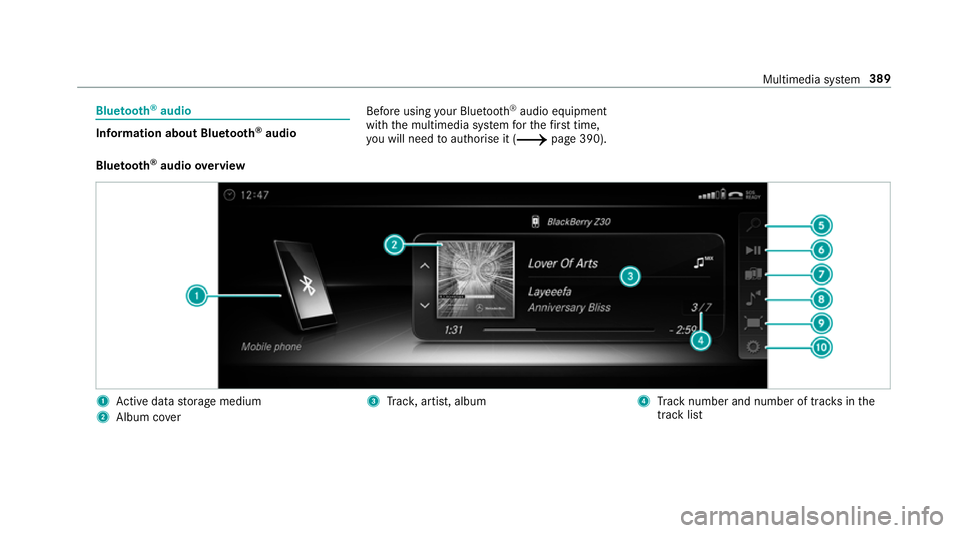
Blu etoo th®
audio overview 1
Active da tastorage medium
2 Album co ver 3
Trac k, artist, album 4
Track number and number of trac ksinthe
track li st Multimedia sy
stem 389
Page 393 of 609
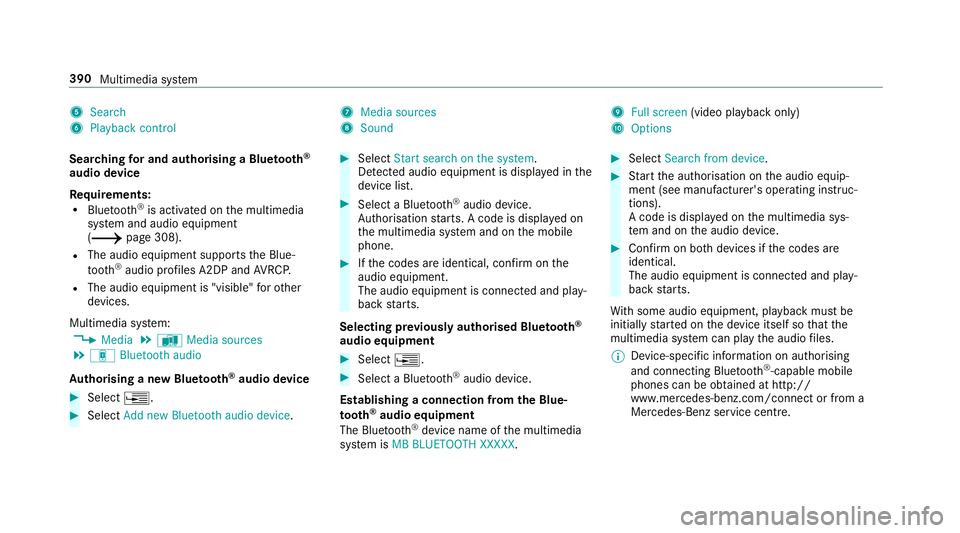
5
Search
6 Playback control 7
Media sources
8 Sound 9
Full screen (video playback only)
A Options
Sear ching for and authorising a Blue tooth ®
audio device
Requ irements:
R Blue tooth ®
is activated on the multimedia
sy stem and audio equipment
(0013 page 308).
R The audio equipment supports the Blue‐
to oth ®
audio profiles A2DP and AVRC P.
R The audio equipment is "visible" forot her
devices.
Multimedia sy stem:
0018 Media 0019
à Media sources
0019 á Bluetooth audio
Au thorising a new Blu etoo th®
audio device 0007
Select 0080. 0007
Select Add new Bluetooth audio device. 0007
Select Start search on the system .
De tected audio equipment is displ ayed in the
device list. 0007
Select a Blue tooth®
audio device.
Auth orisation starts. A code is displa yed on
th e multimedia sy stem and on the mobile
phone. 0007
Ifth e codes are identical, confi rmonthe
audio equipment.
The audio equipment is connec ted and play‐
back starts.
Selecting pr eviously authorised Blue tooth ®
audio equipment 0007
Select 0080. 0007
Select a Blue tooth®
audio device.
Establishing a connection from the Blue‐
to oth ®
audio equipment
The Blue tooth®
device name of the multimedia
sy stem is MB BLUETOOTH XXXXX. 0007
Select Search from device. 0007
Start the authorisation on the audio equip‐
ment (see manufacturer's operating instruc‐
tions).
A code is displa yed on the multimedia sys‐
te m and on the audio device. 0007
Confirm on bo thdevices if the codes are
identical.
The audio equipment is connected and play‐
back starts.
Wi th some audio equipment, playback must be
initially star ted on the device itself so that the
multimedia sy stem can play the audio files.
0009 Device-specific information on authorising
and connecting Blue tooth®
-capable mobile
phones can be obtained at http://
ww w.mercedes-benz.com/connect or from a
Mercedes-Benz service centre. 390
Multimedia sy stem
Page 394 of 609
Ac
tivating Blue tooth ®
audio
Multimedia sy stem:
0018 Media 0019
à Media sources 0007
Select áBluetooth audio.
The multimedia sy stem activates the connec‐
te d Blue tooth®
audio equipment.
Selecting the media pla yer on the Blue tooth ®
audio device
Multimedia sy stem:
0018 Media 0019
ª 0007
Select theBluetooth audio players category.
If multiple media pla yers are present on the
Blu etoo th®
audio equipment a list appears. 0007
Select a media pla yer.
Playback starts.
0009 The function is not suppo rted byeve ry
mobile phone. Sear
ching for a music track on the Blue‐
to oth ®
audio device
Multimedia sy stem:
0018 Media 0019
à Media sources
0019 á Bluetooth audio 0007
Select ª. 0007
Select a categor y.
A track li stappears. 0007
Select a trac k.
0009 The function is only available when the
mobile phone and the media pla yer selected
on the mobile phone support this function.
Switching Blu etoo th®
audio equipment via
NFC
Requ irements:
R Obser vethe no tes on using NFC
(0013 page 352).
R The Blue tooth®
audio overview is displa yed
( 0013 page 389). 0007
Lightly press the NFC area on the mobile
phone (see the manufacturer's operating
instructions).
If th e mobile phone has already been author‐
ised on the multimedia sy stem as Blue tooth®
audio equipment, it is now connec ted.
If th e mobile phone is authorised on the mul‐
timedia sy stem as Blue tooth ®
audio equip‐
ment forth efirs t time, it is connected af ter
confirming the instructions forth e mobile
phone (see the manufacturer's operating
instructions).
Disconnecting Blue tooth ®
audio equipment
Multimedia sy stem:
0018 Telephone 0019
á Media sources 0007
Select thei symbol in the line of the
mobile phone.
The disconnection of the mobile phone takes
place without a con firm ation prom pt. The
mobile phone remains auth orised inthe sys‐
te m. Multimedia sy
stem 391
Page 405 of 609
Setting
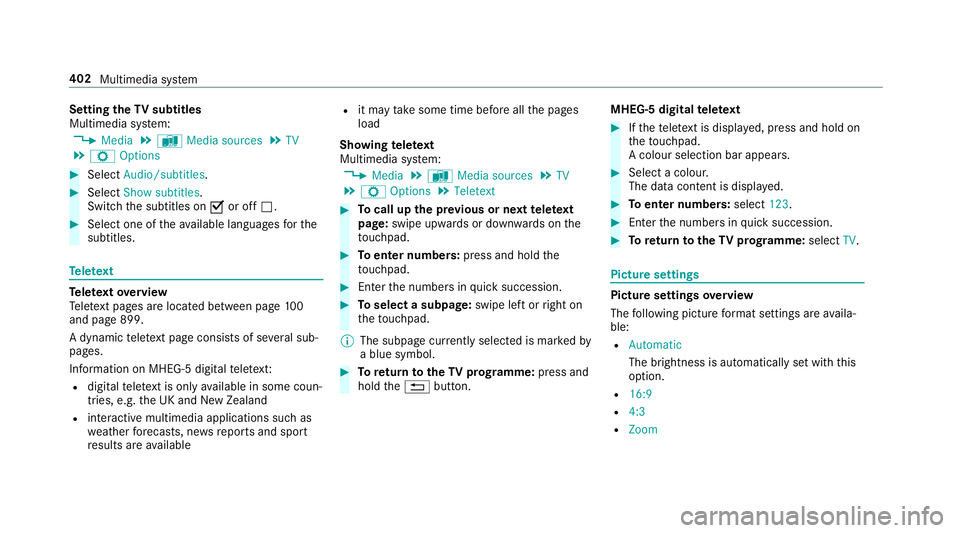
theTV subtitles
Multimedia sy stem:
0018 Media 0019
à Media sources 0019
TV
0019 Z Options 0007
Select Audio/subtitles. 0007
Select Show subtitles.
Switch the subtitles on 0073or off 0053. 0007
Select one of theav ailable languages forthe
subtitles. Te
lete xt Te
lete xt ove rview
Te lete xt pa ges are located between page 100
and page 899.
A dynamic telete xt pa geconsi sts of se veral sub‐
pages.
Information on MHEG-5 digital telete xt:
R digi taltelete xt is only available in some coun‐
tries, e.g. the UK and New Zealand
R interactive multimedia applications such as
we ather fore casts, ne wsreports and sport
re sults are available R
it may take some time before all the pages
load
Showing telete xt
Multimedia sy stem:
0018 Media 0019
à Media sources 0019
TV
0019 Z Options 0019
Teletext 0007
Tocall up the pr evious or next telete xt
page: swipe upwards or down wards on the
to uchpad. 0007
Toenter numbers: press and holdthe
to uchpad. 0007
Enterth e numbers in quick succession. 0007
Toselect a subpage: swipe left orright on
th eto uchpad.
0009 The subpage cur rently selected is ma rked by
a blue symbol. 0007
Toreturn totheTV prog ramme: press and
hold the0038 button. MHEG-5 digital
telete xt 0007
Ifth ete lete xt is displ ayed, press and hold on
th eto uchpad.
A colour selection bar appears. 0007
Select a colour.
The data content is displ ayed. 0007
Toenter numbers: select123. 0007
Enterth e numbers in quick succession. 0007
Toreturn totheTV prog ramme: selectTV. Pictu
resettings Picture settings
overview
The following picture form at settings are availa‐
ble:
R Automatic
The brightness is automatically set with this
option.
R 16:9
R 4:3
R Zoom 402
Multimedia sy stem
Page 479 of 609
000F
ENVIRONMENTAL
NOTEEnvironmental
pollution caused byenvironmen tally ir re‐
sponsible disposal 0007
Dispose of operating fluids in an envi‐
ro nmentally responsible manner. Operating
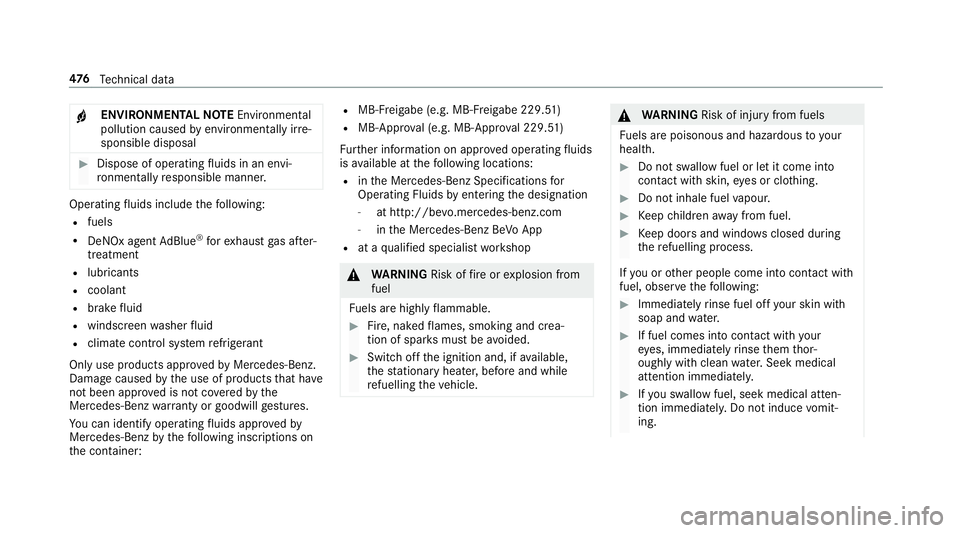
fluids include thefo llowing:
R fuels
R DeNOx agent AdBlue ®
forex haust gas af ter‐
treatment
R lubri cants
R coolant
R brake fluid
R windsc reen washer fluid
R climate cont rol sy stem refrigerant
Only use products app rove dby Mercedes-Benz.
Damage caused bythe use of products that ha ve
not been appr oved is not co veredby the
Mercedes-Benz warranty or goodwill gestures.
Yo u can identify operating fluids appr ovedby
Mercedes-Benz bythefo llowing insc ript ions on
th e conta iner: R
MB- Freigabe (e.g. MB-Fr eigabe 229.51 )
R MB-Appr oval (e.g. MB-App rova l 229.51)
Fu rther information on appr oved operating fluids
is available at thefo llowing locations:
R inthe Mercedes-Benz Specifications for
Operating Fluids byentering the designation
- at http://be vo.mercedes-benz.com
- inthe Mercedes-Benz BeVo App
R at a qualified specialist workshop 000A
WARNING Risk offire or explosion from
fuel
Fu els are highly flammable. 0007
Fire, naked flames, smoking and crea‐
tion of spar ksmust be avoided. 0007
Swit choff the ignition and, if available,
th est ationary heater, before and while
re fuelling theve hicle. 000A
WARNING Risk of inju ryfrom fuels
Fu els are poisonous and hazardous to your
health. 0007
Do not swallow fuel or let it come into
contact with skin, eyes or clo thing. 0007
Do not inhale fuel vapour. 0007
Keep children away from fuel. 0007
Keep doors and windo wsclosed du ring
th ere fuelling process.
If yo u or other people come into contact with
fuel, obser vethefo llowing: 0007
Immediately rinse fuel off your skin with
soap and water. 0007
If fuel comes into contact with your
ey es, immediately rinse them thor‐
oughly with clean water.Seek medical
attention immediately. 0007
Ifyo u swallow fuel, seek medical atten‐
tion immediatel y.Do not induce vomit‐
ing. 476
Tech nical da ta
Page 483 of 609

Capacity
Model
Total capacity
C 300 d
C 300 d 4M ATIC 50.0 litres
or
66.0 litres
C 200 (205.080)
C 300
C 300 4MATIC
C 400 4MATIC 66.0 litres
All other models 41.0 litres
or
66.0 litres Mode
lo f whichreser ve
fuel
All model s7 .0 litres Ad
Blue ® Note
s onAdBlue ®
Obser vethe no tes on operating fluids
(0013 page475).
Ad Blue ®
is a wate r-soluble fluid forth e NOx
ex haust gas af tertre atment of diesel engines.
000E NO
TEMalfunctions due tothe dilution of
Ad Blue ®
or the use of additive-enhanced
Ad Blue ® The function of
the NOx exhaust gas af ter‐
treatment can be impaire dby the use of
unsuitable denoxification agents. 0007
Only use AdBlue ®
in accordance wi th
ISO 222 41 . 0007
Do not dilu teAd Blue ®
wi th wate r. 0007
Do not use additive-enhanced AdBlue ®
. 000E
NO
TEDama geand malfunctions due to
impurities in AdBlue ® Consequences of impu
rities in AdBlue ®
:
R increased emission values
R damage tothe catalytic con verter
R NOx exhaust gas af tertre atment malfunc‐
tions 0007
Avoid impurities in AdBlue ®
. Ad
Blue ®
re sidues cr ystallise af ter a period of
time, and contamina tethe sur faces wi thwhich
th ey come into contact. Clean the dirty sur faces
wi th wate r as soon as possible.
When you open theAd Blue ®
tank, small
amounts of ammonia vapour may escape. Do
not inhale any ammonia vapours that may be
re leased. Only fill th eAd Blue ®
tank in well-venti‐
lated areas. 480
Tech nical da ta
Page 484 of 609
Ad
Blue ®
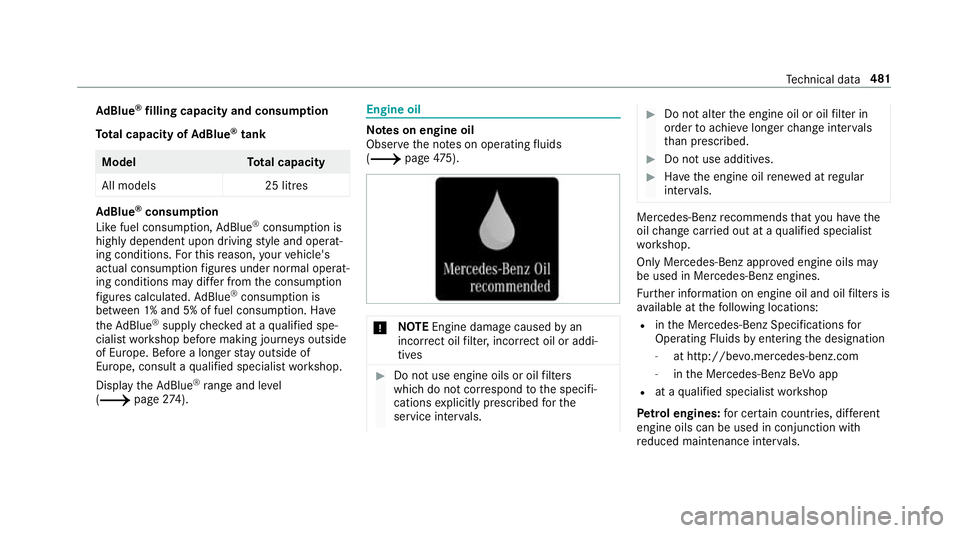
filling capacity and consum ption
To tal capacity of AdBlue ®
tank Mode
lT otal capacity
All models 25 litresAd
Blue ®
consu mption
Like fuel consu mption, AdBlue ®
consu mption is
highly dependent upon driving style and operat‐
ing conditions. Forth is reason, your vehicle's
actual consum ption figures under normal operat‐
ing conditions may dif fer from the consum ption
fi gures calculated. AdBlue ®
consu mption is
between 1% and 5% of fuel consumption. Ha ve
th eAd Blue ®
supply checked at a qualified spe‐
cialist workshop before making journe ysoutside
of Europe. Before a longer stay outside of
Europe, consult a qualified specialist workshop.
Display theAd Blue ®
ra nge and le vel
( 0013 page274). Engine oil
Note
s on engine oil
Obser vethe no tes on operating fluids
(0013 page475). 000E
NO
TEEngine dama gecaused byan
incor rect oil filter, incor rect oil or addi‐
tives 0007
Do not use engine oils or oil filters
which do not cor respond tothe specifi‐
cations explicitly prescribed forthe
service inter vals. 0007
Do not alter the engine oil or oil filter in
order toachie velonger change inter vals
th an presc ribed. 0007
Do not use additives. 0007
Have the engine oil rene we d at regular
inter vals. Mercedes-Benz
recommends that you ha vethe
oil change car ried out at a qualified specialist
wo rkshop.
Only Mercedes-Benz appr oved engine oils may
be used in Mercedes-Benz engines.
Fu rther information on engine oil and oil filters is
av ailable at thefo llowing locations:
R inthe Mercedes-Benz Specifications for
Operating Fluids byentering the designation
- at http://be vo.mercedes-benz.com
- inthe Mercedes-Benz BeVo app
R at a qualified specialist workshop
Pet rol engines: for cer tain countries, dif fere nt
engine oils can be used in conjunction wi th
re duced maintenance inter vals. Te
ch nical da ta481
Page 525 of 609
Display messages
Possible causes/consequences and 0050
0050Solutions
No tes on engine oil (0013 page 481).Exhaust
gas af tertre atment Display messages
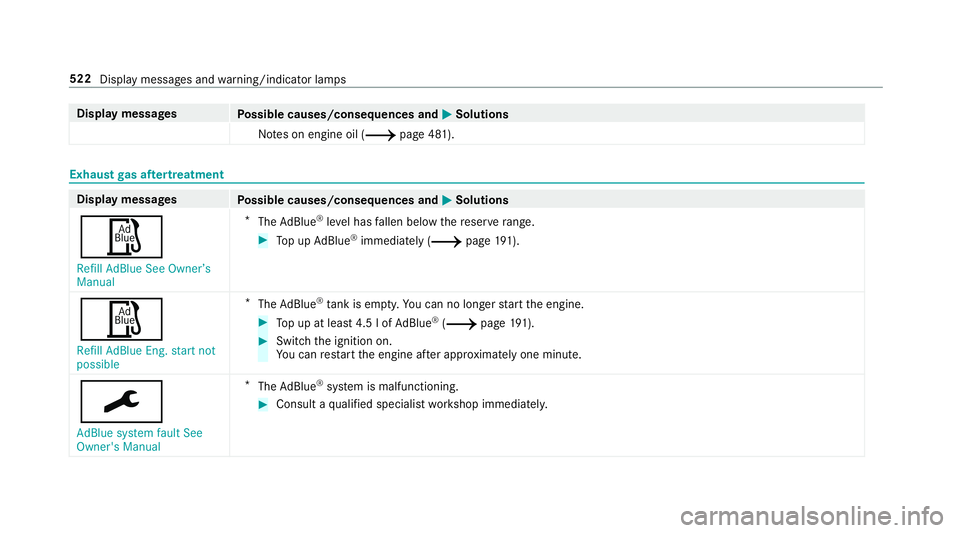
Possible causes/consequences and 0050
0050Solutions
00C8 Refill AdBlue See Owner’s
Manual *
The AdBlue ®
leve l has fallen below there ser verange. 0007
Top up AdBlue ®
immediately (0013 page 191).
00C8
Refill AdBlue Eng. start not
possible *
The AdBlue ®
tank is em pty. Yo u can no lon gerst art the engine. 0007
Top up at least 4.5 l of AdBlue ®
(0013 page 191). 0007
Switch the ignition on.
Yo u can restart the engine af ter appro ximately one minu te.
0099
AdBlue system fault See
Owner's Manual *
The AdBlue ®
sy stem is malfunctioning. 0007
Consult a qualified specialist workshop immediatel y.522
Display messages and warning/indicator lamps
Page 526 of 609
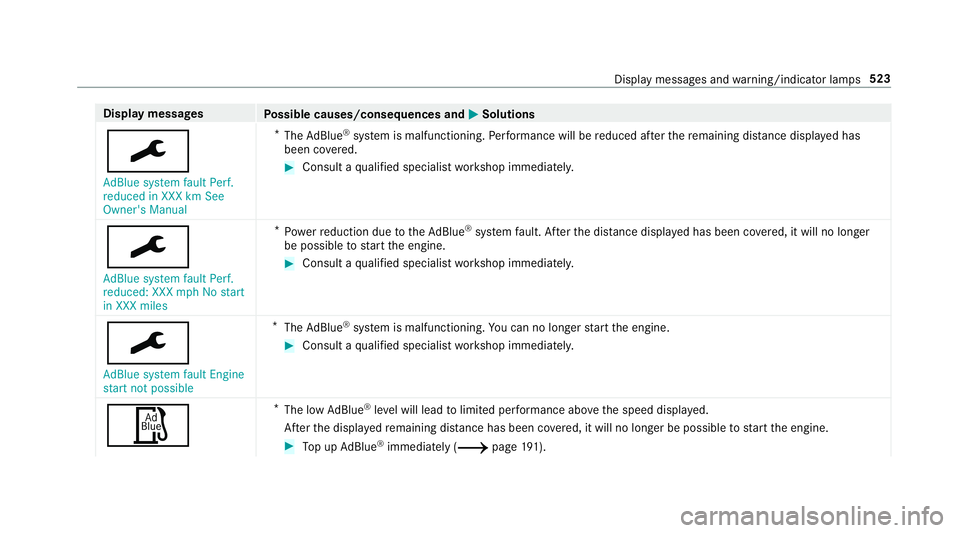
Display messages
Possible causes/consequences and 0050
0050Solutions
0099 AdBlue system fault Perf.
reduced in XXX km See
Owner's Manual *
The AdBlue ®
sy stem is malfunctioning. Performance will be reduced af terth ere maining dis tance displ ayed has
been co vered. 0007
Consult a qualified specialist workshop immediatel y.
0099
AdBlue system fault Perf.
reduced: XXX mph No start
in XXX miles *
Po we rre duction due totheAd Blue ®
sy stem fault. Af terth e dis tance displ ayed has been co vered, it will no longer
be possible tostart the engine. 0007
Consult a qualified specialist workshop immediatel y.
0099
AdBlue system fault Engine
start not possible *
The AdBlue ®
sy stem is malfunctioning. You can no lon gerst art the engine. 0007
Consult a qualified specialist workshop immediatel y.
00C8 *
The low AdBlue ®
leve l will lead tolimited per form ance abo vethe speed displa yed.
Af terth e displa yedre maining dis tance has been co vered, it will no longer be possible tostart the engine. 0007
Top up AdBlue ®
immediately (0013 page 191). Displ
aymessa ges and warning/indicator lamps 523