computer MERCEDES-BENZ C-Class SEDAN 2012 W204 User Guide
[x] Cancel search | Manufacturer: MERCEDES-BENZ, Model Year: 2012, Model line: C-Class SEDAN, Model: MERCEDES-BENZ C-Class SEDAN 2012 W204Pages: 356, PDF Size: 13.49 MB
Page 16 of 356
Position of exterior mirror, front-
passenger side ............................... 102
Rear view camera .......................... 181
see PARKTRONIC
Parking aid
Parking Guidance ........................... 178
see Exterior mirrors
see PARKTRONIC
Parking brake
Display message ............................ 216
Notes/function .............................. 154
Parking Guidance
Display message ............................ 230
Important safety notes ..................178
Parking lamps (changing bulbs) ...... 115
PARKTRONIC Deactivating/activating .................177
Driving system ............................... 175
Function/notes ............................. 175
Problem (malfunction) ...................178
Range of the sensors .....................176
Warning display ............................. 177
PASSENGER AIR BAG OFF indicator
lamp ...................................................... 42
Pedals ................................................. 155
Permanent four-wheel drive see 4MATIC (permanent four-
wheel drive)
Plastic trim (cleaning instructions) . 288
Power washers .................................. 284
Power windows see Side windows
PRE-SAFE ®
Brake (vehicles with
DISTRONIC PLUS) Display message ............................ 218
Function/notes ................................ 65
Switching on/off ........................... 205
Warning lamp ................................. 249
Preventive occupant safety
system
see PRE-SAFE ®
(Preventive
occupant safety system)
Product information ............................ 21
Program selector button .................. 144
Pulling away Automatic transmission .................139Q
Qualified specialist workshop ........... 24
R
RACE START (AMG vehicles) ............. 174
RACETIMER (on-board computer) .... 211
Radar sensor system Activating/deactivating .................208
Display message ............................ 229
Radio
Selecting a station .........................201
see separate operating instructions
Reading lamp ..................................... 112
Rear compartment Setting the airflow .........................129
Setting the air vents ......................133
Rear fog lamp
Display message ............................ 223
Switching on/off ........................... 108
Rear seat
Display message ............................ 237
Folding the backrest forwards/
back ............................................... 257
Rear view camera
Cleaning instructions .....................287
Function/notes ............................. 181
Rear-view mirror
Anti-glare (manual) ........................101
Dipping (automatic) .......................102
Rear window blind ............................ 261
Rear window defroster Problem (malfunction) ...................130
Rear window heating
Switching on/off ........................... 130
Rear window wiper
Replacing the wiper blade .............. 118
Switching on/off ........................... 117
Refueling
Fuel gauge ....................................... 29
Important safety notes ..................150
Refueling process ..........................151
see Fuel
Releasing the parking lock
manually (automatic
transmission) ..................................... 149
14Index
Page 17 of 356
Remote controlGarage door opener .......................270
Reporting safety defects .................... 25
Reserve (fuel tank) see Fuel
Reserve fuel
Display message ............................ 228
Warning lamp ................................. 246
see Fuel
Residual heat (climate control) ........ 131
Restraint system see SRS (Supplemental Restraint
System)
Reverse gear
Engaging (automatic
transmission) ................................. 142
Roadside Assistance (breakdown) .... 22
Roller blind see Roller sunblind
Roller sunblind
Panorama roof with power tilt/
sliding panel ..................................... 88
Rear side windows .........................261
Rear window .................................. 261
Roof carrier ........................................ 259
Roof lining and carpets (cleaning
guidelines) ......................................... 289
Roof load (maximum) ........................ 351
Route see Route guidance (navigation)
Route guidance (navigation) ............ 200
S
Safety Children in the vehicle .....................53
Child restraint systems ....................53
Occupant Classification System
(OCS) ............................................... 42
Overview of occupant safety
systems ........................................... 36
Safety systems
see Driving safety systems
Seat belts
Adjusting the height ......................... 51
Belt force limiters ............................ 52
Cleaning ......................................... 289
Correct usage .................................. 49
Emergency Tensioning Devices ........ 52
Fastening ......................................... 50
Important safety guidelines .............48
Releasing ......................................... 51
Safety guidelines ............................. 37
Special seat belt retractor ...............55
Warning lamp ................................. 239
Warning lamp (function) ................... 51
Seats
Adaptive seat backrests (AMG
vehicles) .......................................... 97
Adjusting (electrically) .....................94
Adjusting (manually and
electrically) ...................................... 94
Adjusting lumbar support ................97
Adjusting the 4-way lumbar
support ............................................ 97
Adjusting the head restraint ............95
Cleaning the cover .........................288
Correct driver's seat position ........... 92
Important safety notes ....................93
Seat heating problem ......................98
Seat ventilation problem ..................99
Storing settings (memory
function) ........................................ 103
Switching seat heating on/off .........98
Switching seat ventilation on/off ....98
Sensors (cleaning instructions) ....... 287
Service see ASSYST PLUS service interval
display
Service interval display
Displaying service messages .........283
Hiding service messages ...............283
Notes ............................................. 283
Service messages ..........................282
Service menu (on-board computer) . 206
Service products Brake fluid ..................................... 350
Capacities ...................................... 346
Coolant (engine) ............................ 350
Engine oil ....................................... 349
Fuel ................................................ 347
Important safety notes ..................344
Refrigerant (air-conditioning
system) .......................................... 350
Washer fluid ................................... 351Index15
Page 18 of 356
SettingsFactory (on-board computer) .........210
On-board computer .......................206
Setting the air distribution ............... 128
Setting the airflow ............................ 129
SETUP (on-board computer) ............. 210
Side impact air bag ............................. 40
Side marker lamp (display
message) ............................................ 224
Side windows Convenience closing feature ............84
Convenience opening feature ..........84
Important safety information ...........83
Opening/closing .............................. 83
Problem (malfunction) .....................86
Resetting ......................................... 85
Sliding sunroof
Important safety notes ....................86
Opening/closing .............................. 87
Problem (malfunction) .....................89
Resetting ......................................... 87
see Panorama roof with power
tilt/sliding panel
SmartKey
Changing the battery .......................74
Changing the programming .............73
Checking the battery .......................74
Convenience closing feature ............84
Convenience opening feature ..........84
Display message ............................ 238
Door central locking/unlocking .......70
Important safety notes ....................70
Loss ................................................. 76
Mechanical key ................................ 73
Positions (ignition lock) .................137
Problem (malfunction) .....................76
Starting the engine ........................139
Snow chains ...................................... 313
Sockets Points to observe before use .........263
Rear compartment .........................263
Spare wheel
Notes/data .................................... 337
Storage location ............................ 293
see Emergency spare wheel
Specialist workshop ............................ 24
Speed, controlling see Cruise control Speedometer
Digital ............................................ 199
In the Instrument cluster .................29
Segments ...................................... 195
Selecting the unit of
measurement ................................ 206
see Instrument cluster
SPORT handling mode
Activating/deactivating (AMG
vehicles) .......................................... 62
Warning lamp ................................. 244
SRS (Supplemental Restraint
System) Display message ............................ 219
Introduction ..................................... 36
Warning lamp ................................. 245
Warning lamp (function) ................... 36
Standing lamps
Changing bulbs .............................. 115
Display message ............................ 224
Switching on/off ........................... 106
Starting (engine) ................................ 138
Station see Radio
Steering (display message) .............. 237
Steering wheel Adjusting (electrically) ...................100
Adjusting (manually) ........................99
Button overview ............................... 31
Buttons (on-board computer) ......... 195
Cleaning ......................................... 288
Important safety notes ....................99
Paddle shifters ............................... 145
Storing settings (memory
function) ........................................ 103
Steering wheel paddle shifters ........ 145
Stopwatch (RACETIMER) ................... 211
Stowage compartments Armrest (under) ............................. 255
Cup holders ................................... 259
Eyeglasses compartment ...............255
Glove box ....................................... 254
Important safety information .........254
Parcel net ...................................... 256
Rear ............................................... 256
Under driver's seat/front-
passenger seat .............................. 25616Index
Page 19 of 356
Stowage well beneath the trunk
floor .................................................... 258
Summer opening see Convenience opening feature
Summer tires ..................................... 312
Sun visor ............................................ 260
Supplemental Restraint System see SRS (Supplemental Restraint
System)
Surround lighting (on-board
computer) .......................................... 207
Switching air-recirculation mode
on/off ................................................. 130
Switching off the alarm (ATA) ............ 67
T
Tachometer ........................................ 195
Tail lamps Display message ............................ 223
Tank
see Fuel tank
Tank content
Fuel gauge ....................................... 29
Technical data
Notes ............................................. 342
Tires/wheels ................................. 335
Vehicle data ................................... 351
TELEAID
Call priority .................................... 268
Display message ............................ 218
Downloading destinations
(COMAND) ..................................... 269
Emergency call .............................. 266
Important safety notes ..................264
Locating a stolen vehicle ...............270
MB info call button ........................268
Remote vehicle locking ..................270
Roadside Assistance button ..........267
Search & Send ............................... 269
Self-test ......................................... 265
System .......................................... 265
Vehicle remote unlocking ..............269
Telephone
Accepting a call ............................. 203
Display message ............................ 237
Menu (on-board computer) ............202
Number from the phone book ........ 203
Redialing ........................................ 203
Rejecting/ending a call .................203
Temperature
Coolant .......................................... 194
Coolant (on-board computer) ......... 210
Engine oil (on-board computer) ...... 210
Outside temperature ...................... 195
Setting (climate control) ................128
Theft deterrent systems
ATA (Anti-Theft Alarm system) .........67
Immobilizer ...................................... 66
Through-loading feature ................... 256
Tilt/sliding sunroof see Sliding sunroof
Timing (RACETIMER) ......................... 211
Tiredness assistant see ATTENTION ASSIST
Tire pressure
Calling up (on-board computer) .....319
Checking manually ........................317
Display message ............................ 233
Maximum ....................................... 316
Notes ............................................. 315
Pressure loss warning ....................317
Recommended ............................... 313
Tire pressure monitoring system
Function/notes ............................. 319
Restarting ...................................... 321
Warning lamp ................................. 250
Tires
Aspect ratio (definition) .................333
Average weight of the vehicle
occupants (definition) ....................331
Bar (definition) ............................... 331
Characteristics .............................. 331
Checking ........................................ 311
Definition of terms .........................331
Direction of rotation ......................334
Display message ............................ 233
Distribution of the vehicle
occupants (definition) ....................334
DOT, Tire Identification Number
(TIN) ............................................... 330
DOT (Department of
Transportation) (definition) ............331
GAWR (Gross Axle Weight Rating)
(definition) ..................................... 332Index17
Page 20 of 356
GVW (Gross Vehicle Weight)
(definition) ..................................... 332
GVWR (Gross Vehicle Weight
Rating) (definition) .........................332
Important safety notes ..................310
Increased vehicle weight due to
optional equipment (definition) ......332
Kilopascal (kPa) (definition) ...........332
Labeling (overview) ........................327
Load bearing index (definition) ......333
Load index ..................................... 330
Load index (definition) ...................332
Maximum loaded vehicle weight
(definition) ..................................... 332
Maximum load on a tire
(definition) ..................................... 333
Maximum permissible tire
pressure (definition) ....................... 333
Maximum tire load .........................325
Maximum tire load (definition) .......333
Optional equipment weight
(definition) ..................................... 333
PSI (pounds per square inch)
(definition) ..................................... 333
Replacing ....................................... 334
Service life ..................................... 311
Sidewall (definition) .......................333
Speed rating (definition) ................332
Storing ........................................... 335
Structure and characteristics
(definition) ..................................... 331
Temperature .................................. 327
TIN (Tire Identification Number)
(definition) ..................................... 333
Tire bead (definition) ......................333
Tire pressure (definition) ................333
Tire pressures (recommended) ......331
Tire size (data) ............................... 335
Tire size designation, load-bearing
capacity, speed rating .................... 328
Tire tread ....................................... 311
Tire tread (definition) .....................333
Total load limit (definition) .............334
Traction ......................................... 326
Traction (definition) .......................334
Tread wear ..................................... 326
Uniform Tire Quality Grading
Standards ...................................... 326Uniform Tire Quality Grading
Standards (definition) ....................331
Unladen weight (definition) ............332
Wear indicator (definition) .............334
Wheel rim (definition) ....................332
see Flat tire
Top Tether ............................................ 56
Towing Important safety guidelines ...........302
Installing the towing eye ................303
Removing the towing eye ...............304
With the rear axle raised ................304
Towing away
With both axles on the ground .......304
Tow-starting
Emergency engine starting ............305
Important safety notes ..................302
Transmission
see Automatic transmission
Transporting the vehicle .................. 304
Trim pieces (cleaning instructions) . 288
Trip computer (on-board
computer) .......................................... 199
Trip meter see Trip odometer
Trip odometer
Calling up ....................................... 199
Resetting (on-board computer) ......200
Trunk
Emergency release ..........................82
Important safety guidelines .............80
Locking separately ...........................82
Opening (automatically from
inside) .............................................. 81
Opening (automatically from
outside) ............................................ 81
Trunk lid
Display message ............................ 236
Opening/closing .............................. 80
Turn signals
Display message ............................ 222
Switching on/off ........................... 109
Type identification plate
see Vehicle identification plate 18Index
Page 68 of 356
brake, take evasive action or accelerate
significantly, the vehicle may perform
automatic emergency braking. Automatic
emergency braking is not performed until
immediately prior to an accident that can no
longer be avoided.GWARNING
Even if PRE-SAFE ®
Brake slows the vehicle
before an imminent rear-end collision, the
system cannot avert a collision without the
intervention of the driver. There is a risk of an
accident. Brake according to the situation or
take evasive action. Delayed intervention by
the driver can lead to an accident.
GWARNING
PRE-SAFE ®
Brake cannot always detect
complex traffic situations properly.
In these cases, PRE-SAFE(R) Brake may:
R give an unnecessary warning and then
brake the vehicle
R neither give a warning nor intervene
There is a risk of an accident. Always pay
particular attention to the traffic situation and
be ready to brake, especially if PRE-SAFE(R)
Brake warns you. Terminate the intervention
in a non-critical driving situation.
In particular, the detection of obstacles can
be impaired if there is:
R dirt on the sensors or anything else
covering the sensors
R snow or heavy rain
R interference by other radar sources
R the possibility of strong radar reflections,
for example in parking garages
R a narrow vehicle traveling in front, e.g. a
motorbike
R a vehicle traveling in front on a different line
GWARNING
PRE-SAFE ®
Brake does not react:
R to people or animals
R to oncoming vehicles
R
to crossing traffic
R in curves
As a result, PRE-SAFE ®
Brake cannot
intervene in critical situations. There is a risk
of an accident. Always pay careful attention
to the traffic situation and be ready to brake.
In order to maintain the appropriate distance
to the vehicle in front and thus prevent a
collision, you must apply the brakes yourself.XTo activate/deactivate: activate or
deactivate PRE-SAFE ®
Brake in the on-
board computer ( Y page 205).
The Ä symbol appears in the
multifunction display as long as the HOLD
function is not activated ( Y page 172).
On vehicles with Parking Guidance, the
Ä symbol is displayed when
transmission position P is selected or if you
drive faster than 22 mph (35 km/h).
For PRE-SAFE ®
Brake to assist you when
driving, the radar sensor system must be
switched on ( Y page 208) and operational.
Following damage to the front end of the
vehicle, have the configuration and operation
of the radar sensors checked at a qualified
specialist workshop. This also applies to
collisions at low speeds where there is no
visible damage to the front of the vehicle.
Theft deterrent locking systems
Immobilizer
The immobilizer prevents your vehicle from
being started without the correct SmartKey.
When leaving the vehicle, always take the
SmartKey with you and lock the vehicle. The
engine can be started by anyone with a valid
SmartKey that is left inside the vehicle.
XTo activate with the SmartKey: remove
the SmartKey from the ignition lock.XTo activate with KEYLESS-GO: switch the
ignition off and open the driver's door.XTo deactivate: switch on the ignition.66Theft deterrent locking systemsSafety
Page 73 of 356
Any unauthorized modification to this
device could void the user’s authority to
operate the equipment.
The Product label with FCC ID and IC
certification number can be found in the
battery case of the SmartKey.
i Canada only:
This device complies with RSS-210 of
Industry Canada. Operation is subject to
the following two conditions:
1. This device may not cause interference,
and
2. this device must accept any interference
received, including interference that may
cause undesired operation of the device.
Any unauthorized modification to this
device could void the user’s authority to
operate the equipment.
The Product label with FCC ID and IC
certification number can be found in the
battery case of the SmartKey.
Locking and unlocking centrally
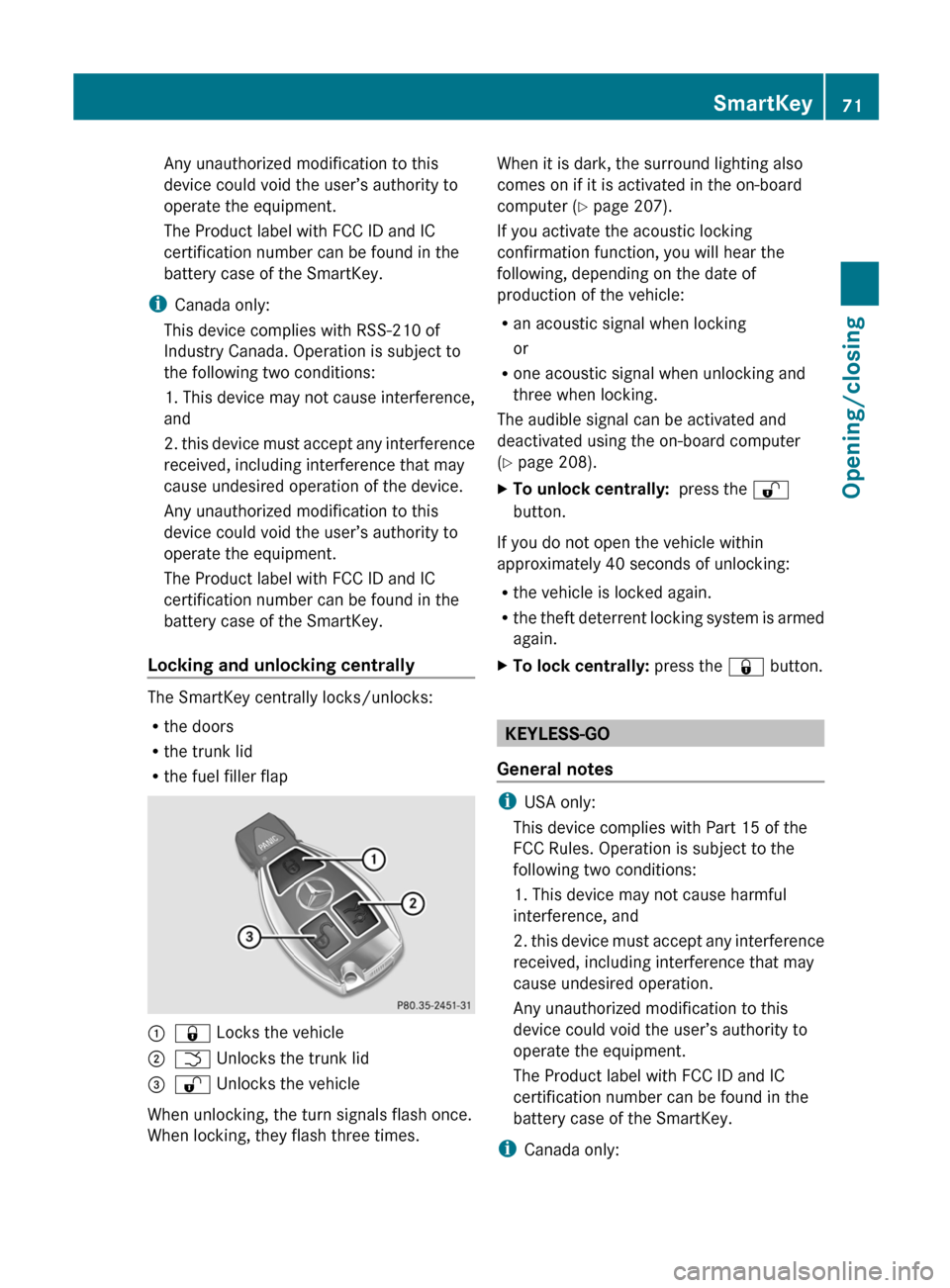
The SmartKey centrally locks/unlocks:
R the doors
R the trunk lid
R the fuel filler flap
:& Locks the vehicle;F Unlocks the trunk lid=% Unlocks the vehicle
When unlocking, the turn signals flash once.
When locking, they flash three times.
When it is dark, the surround lighting also
comes on if it is activated in the on-board
computer ( Y page 207).
If you activate the acoustic locking
confirmation function, you will hear the
following, depending on the date of
production of the vehicle:
R an acoustic signal when locking
or
R one acoustic signal when unlocking and
three when locking.
The audible signal can be activated and
deactivated using the on-board computer
( Y page 208).XTo unlock centrally: press the %
button.
If you do not open the vehicle within
approximately 40 seconds of unlocking:
R the vehicle is locked again.
R the theft deterrent locking system is armed
again.
XTo lock centrally: press the & button.
KEYLESS-GO
General notes
i USA only:
This device complies with Part 15 of the
FCC Rules. Operation is subject to the
following two conditions:
1. This device may not cause harmful
interference, and
2. this device must accept any interference
received, including interference that may
cause undesired operation.
Any unauthorized modification to this
device could void the user’s authority to
operate the equipment.
The Product label with FCC ID and IC
certification number can be found in the
battery case of the SmartKey.
i Canada only:
SmartKey71Opening/closingZ
Page 81 of 356
vehicle are turning at a speed of more than
9 mph (15 km/h).
You could therefore be locked out when:
R the vehicle is being pushed.
R the vehicle is being towed.
R the vehicle is being tested on a
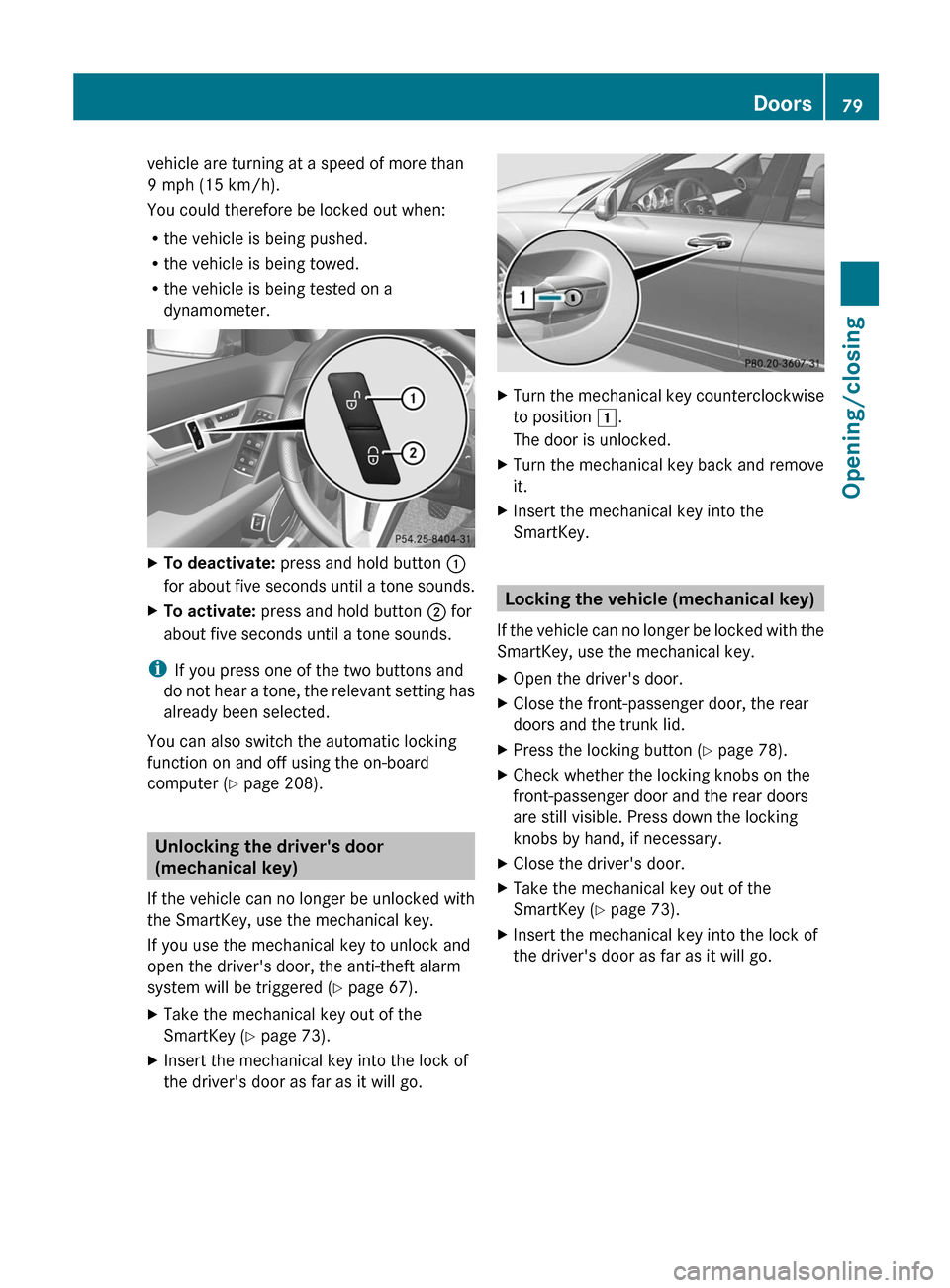
dynamometer.XTo deactivate: press and hold button :
for about five seconds until a tone sounds.XTo activate: press and hold button ; for
about five seconds until a tone sounds.
i If you press one of the two buttons and
do not hear a tone, the relevant setting has
already been selected.
You can also switch the automatic locking
function on and off using the on-board
computer ( Y page 208).
Unlocking the driver's door
(mechanical key)
If the vehicle can no longer be unlocked with
the SmartKey, use the mechanical key.
If you use the mechanical key to unlock and
open the driver's door, the anti-theft alarm
system will be triggered ( Y page 67).
XTake the mechanical key out of the
SmartKey ( Y page 73).XInsert the mechanical key into the lock of
the driver's door as far as it will go.XTurn the mechanical key counterclockwise
to position 1.
The door is unlocked.XTurn the mechanical key back and remove
it.XInsert the mechanical key into the
SmartKey.
Locking the vehicle (mechanical key)
If the vehicle can no longer be locked with the
SmartKey, use the mechanical key.
XOpen the driver's door.XClose the front-passenger door, the rear
doors and the trunk lid.XPress the locking button ( Y page 78).XCheck whether the locking knobs on the
front-passenger door and the rear doors
are still visible. Press down the locking
knobs by hand, if necessary.XClose the driver's door.XTake the mechanical key out of the
SmartKey ( Y page 73).XInsert the mechanical key into the lock of
the driver's door as far as it will go.Doors79Opening/closingZ
Page 102 of 356
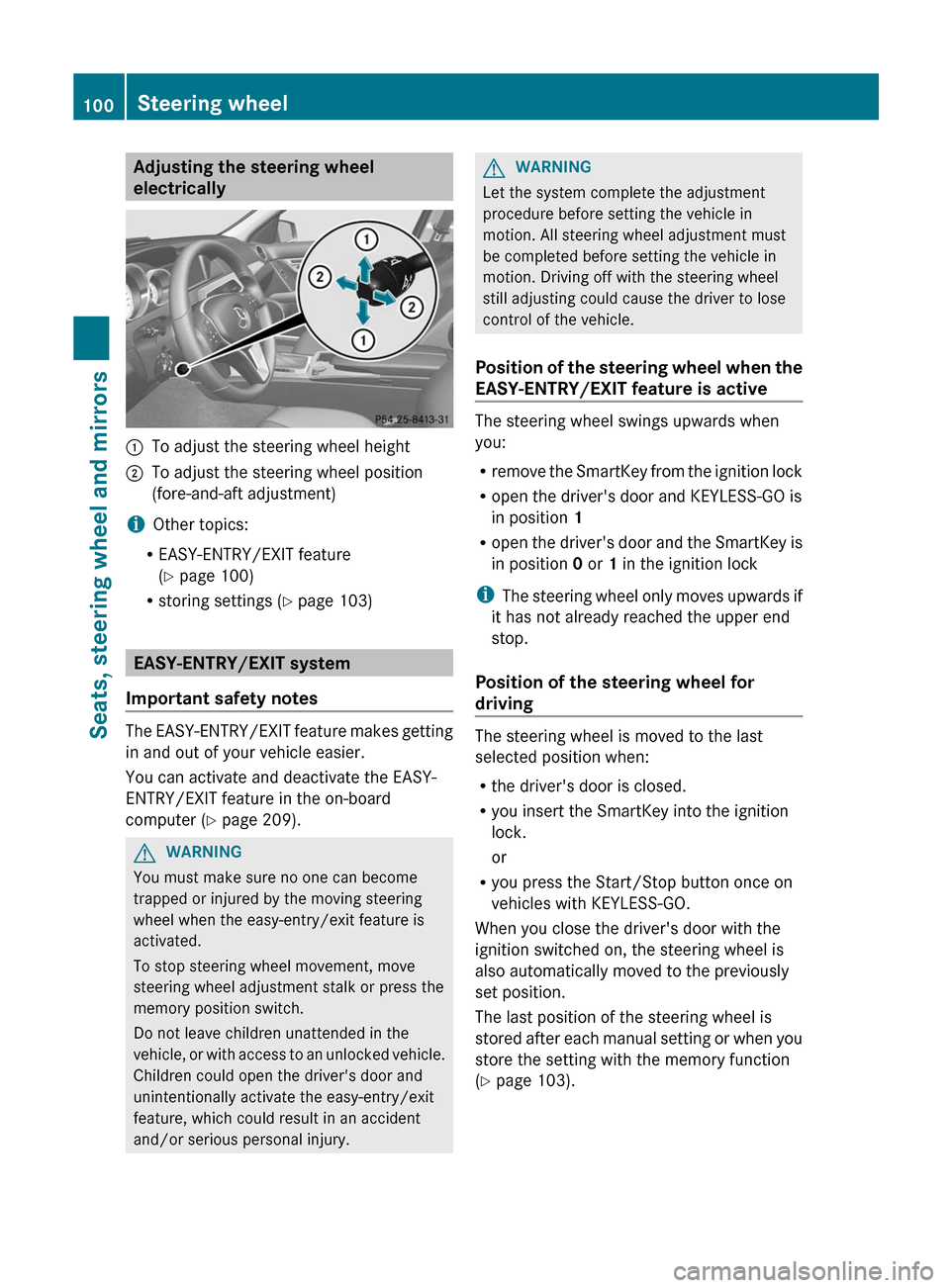
Adjusting the steering wheel
electrically:To adjust the steering wheel height;To adjust the steering wheel position
(fore-and-aft adjustment)
i Other topics:
R EASY-ENTRY/EXIT feature
( Y page 100)
R storing settings ( Y page 103)
EASY-ENTRY/EXIT system
Important safety notes
The EASY-ENTRY/EXIT feature makes getting
in and out of your vehicle easier.
You can activate and deactivate the EASY-
ENTRY/EXIT feature in the on-board
computer ( Y page 209).
GWARNING
You must make sure no one can become
trapped or injured by the moving steering
wheel when the easy-entry/exit feature is
activated.
To stop steering wheel movement, move
steering wheel adjustment stalk or press the
memory position switch.
Do not leave children unattended in the
vehicle, or with access to an unlocked vehicle.
Children could open the driver's door and
unintentionally activate the easy-entry/exit
feature, which could result in an accident
and/or serious personal injury.
GWARNING
Let the system complete the adjustment
procedure before setting the vehicle in
motion. All steering wheel adjustment must
be completed before setting the vehicle in
motion. Driving off with the steering wheel
still adjusting could cause the driver to lose
control of the vehicle.
Position of the steering wheel when the
EASY-ENTRY/EXIT feature is active
The steering wheel swings upwards when
you:
R remove the SmartKey from the ignition lock
R open the driver's door and KEYLESS-GO is
in position 1
R open the driver's door and the SmartKey is
in position 0 or 1 in the ignition lock
i The steering wheel only moves upwards if
it has not already reached the upper end
stop.
Position of the steering wheel for
driving
The steering wheel is moved to the last
selected position when:
R the driver's door is closed.
R you insert the SmartKey into the ignition
lock.
or
R you press the Start/Stop button once on
vehicles with KEYLESS-GO.
When you close the driver's door with the
ignition switched on, the steering wheel is
also automatically moved to the previously
set position.
The last position of the steering wheel is
stored after each manual setting or when you
store the setting with the memory function
( Y page 103).
100Steering wheelSeats, steering wheel and mirrors
Page 103 of 356
Crash-responsive EASY-EXIT feature
If the crash-responsive EASY-EXIT feature is
triggered in an accident, the steering column
will move upwards when the driver's door is
opened. This occurs irrespective of the
position of the SmartKey in the ignition lock.
This makes it easier to exit the vehicle and
rescue the occupants.
The crash-responsive EASY-EXIT feature is
only operational if the EASY-EXIT/ENTRY
feature is activated in the on-board computer.
Mirrors
Rear-view mirror
Rear-view mirror (manual anti-glare)
Xanti-glare mode: flick anti-glare
switch : forwards or back.
Exterior mirrors
Adjusting the exterior mirrors
GWARNING
Exercise care when using the passenger-side
exterior rear view mirror. The mirror surface
is convex (outwardly curved surface for a
wider field of view). Objects in mirror are
closer than they appear. Check your interior
rear view mirror and glance over your
shoulder before changing lanes.
The exterior mirrors are automatically heated
if the rear window defroster is switched on
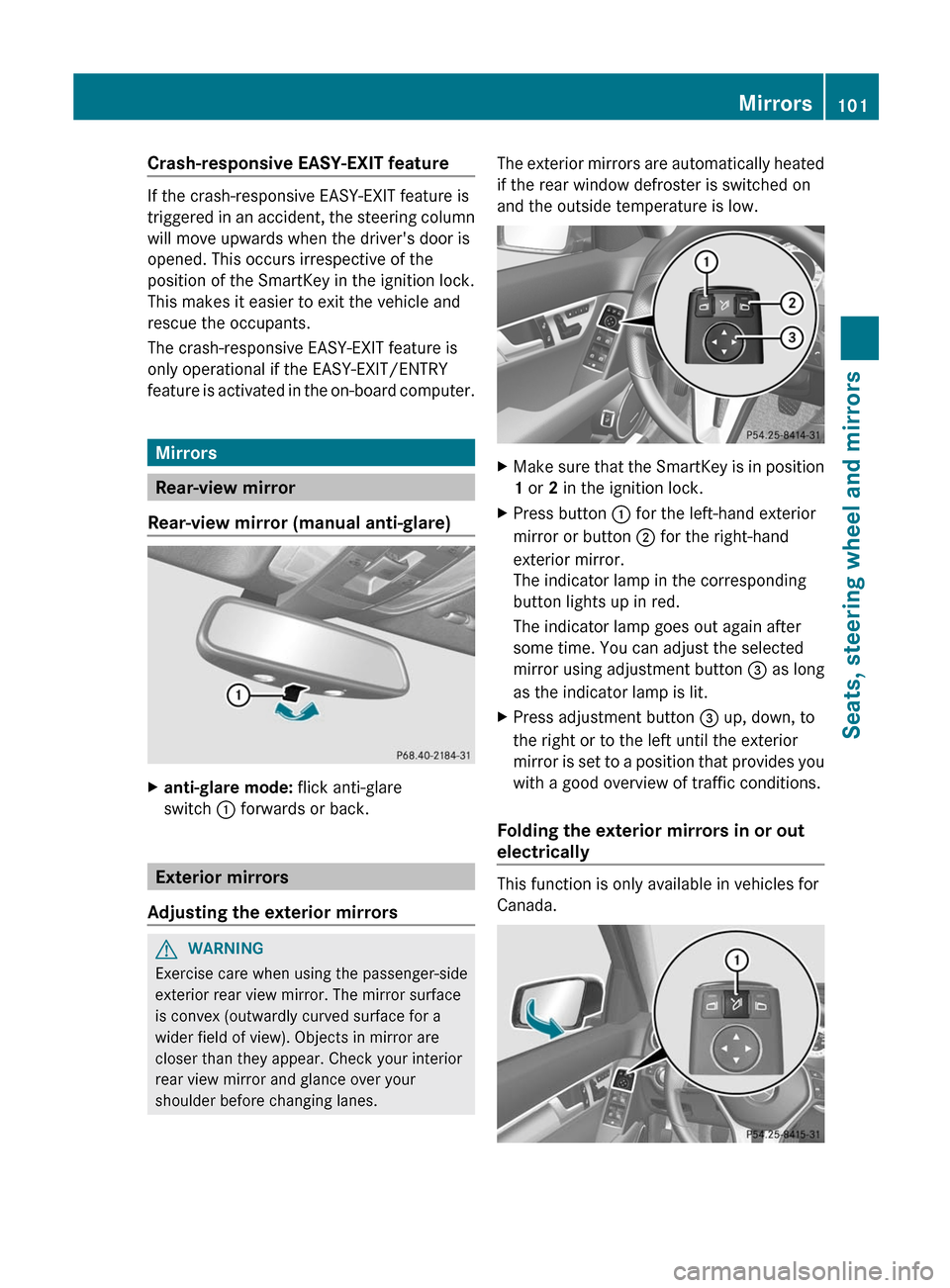
and the outside temperature is low.XMake sure that the SmartKey is in position
1 or 2 in the ignition lock.XPress button : for the left-hand exterior
mirror or button ; for the right-hand
exterior mirror.
The indicator lamp in the corresponding
button lights up in red.
The indicator lamp goes out again after
some time. You can adjust the selected
mirror using adjustment button = as long
as the indicator lamp is lit.XPress adjustment button = up, down, to
the right or to the left until the exterior
mirror is set to a position that provides you
with a good overview of traffic conditions.
Folding the exterior mirrors in or out
electrically
This function is only available in vehicles for
Canada.
Mirrors101Seats, steering wheel and mirrorsZ