display MERCEDES-BENZ C-Class SEDAN 2013 W204 Owner's Manual
[x] Cancel search | Manufacturer: MERCEDES-BENZ, Model Year: 2013, Model line: C-Class SEDAN, Model: MERCEDES-BENZ C-Class SEDAN 2013 W204Pages: 358, PDF Size: 4.85 MB
Page 320 of 358
Restarting the tire pressure loss
warning system Restar
tthe tire pressure loss warning system
if you have:
R changed the tire pressure
R changed the wheels or tires
R mounted new wheels or tires
X Before restarting, consult the Tire and
Loading Information placard on the
B-pillar on the driver's side or the tire
pressure table on the inside of the fuel filler
flap to ensure the tire pressure in all four
tires is set correctly for the current
operating conditions.
The tire pressure loss warning system can
only give reliable warnings if you have set
the correct tire pressure. If an incorrectt ire
pressure is set, these incorrect values will
be monitored.
X Observe the notes in the section on tire
pressures (Y page 313).
X Make sure that the SmartKey is in position
2(Y page 141) in the ignition lock .
X Press the 0002or0005 button to selec tthe
Service menu.
X Press the 0003or0004 button to select
Tire Pressure .
X Press the 000Bbutton.
The Run Flat Indicator Active Press 'OK' to Restart message
appears in the multifunction display.
If you wish to confirm the restart:
X Press the 000Bbutton.
The Tire Pressure Now OK? message
appears in the multifunction display.
X Press the 0003or0004 button to select
Yes .
X Press the 000Bbutton.
The Run Flat Indicator Restarted message appears in the multifunction
display. After a teach-in period, the tire pressure
loss warning system will monitor the set
tire pressures of all four tires.
If you wish to cancel the restart:
X Press the 0006button.
or
X If the Tire Pressure Now OK? message
appears, use the 0003or0004 button to
select Cancel .
X Press the 000Bbutton.
The tire pressure values stored at the last
restart will continue to be monitored. Tire pressure monitor
General notes If a tire pressure monitor is installed, the
vehicle's wheels have sensors that monitor
the tire pressures in all four tires. The tire
pressure monitor warns you if the pressure
drops in one or more of the tires. The tire
pressure monitor only functions if the correct
sensors are installed to all wheels.
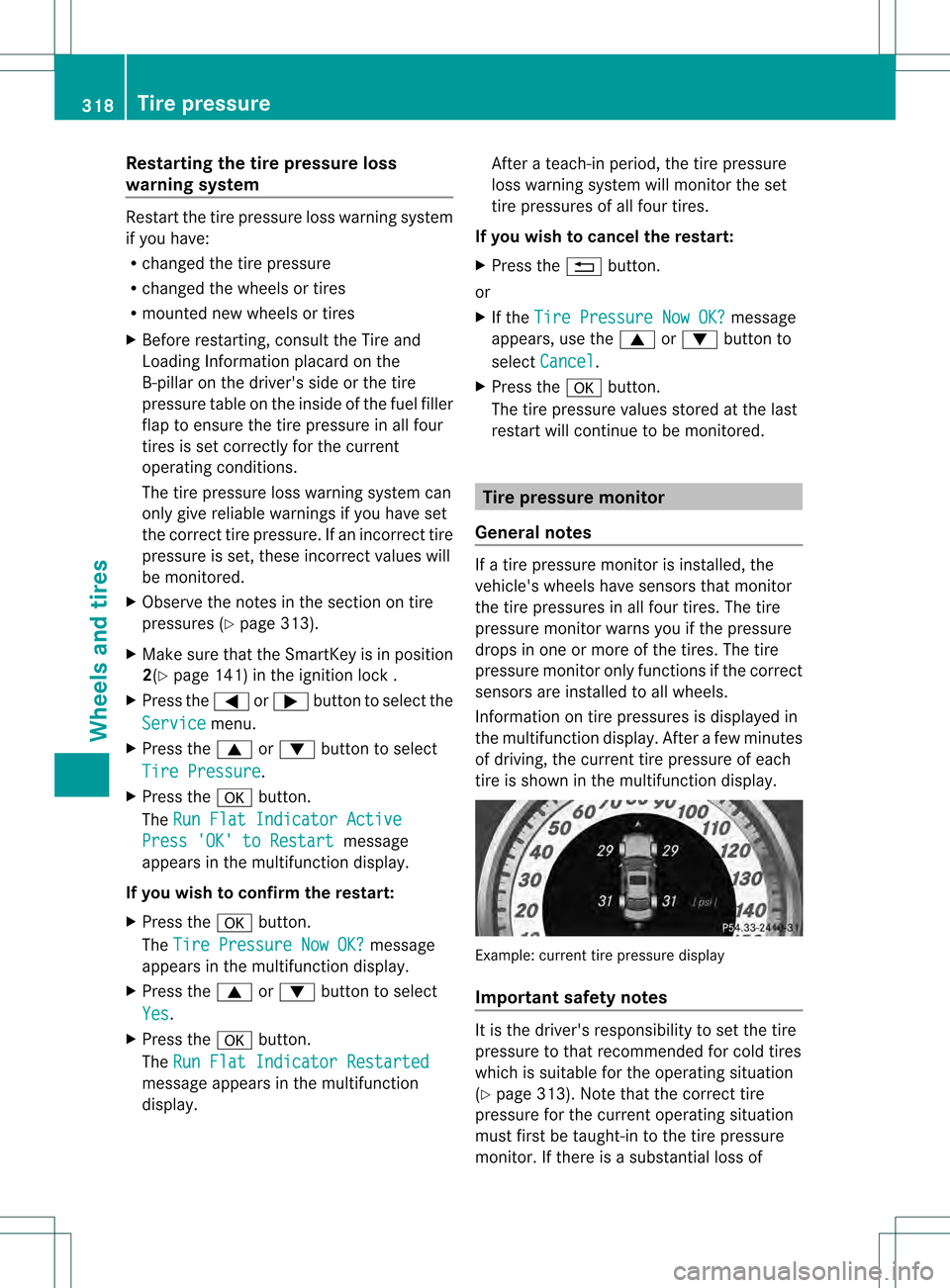
Information on tire pressures is displayed in
the multifunction display. After a few minutes
of driving, the current tire pressure of each
tire is shown in the multifunction display. Example: current tire pressure display
Important safety notes
It is the driver's responsibility to set the tire
pressure to that recommended for cold tires
which is suitable for the operating situation
(Y page 313). Note that the correct tire
pressure for the current operating situation
must first be taught-in to the tire pressure
monitor. If there is a substantial loss of 318
Tire pressureWheels and tires
Page 322 of 358
If the tire pressure monitor is
malfunctioning, it may take more than ten
minutes for the tire pressure warning lamp
to inform you of the malfunction by flashing
for approximately one minute and then
remaining lit.
When the malfunction has been rectified,
the tire pressure warning lamp goes out
after a few minutes of driving.
i The tire pressure values indicated by the
on-board computer may differ from those
measured at a gas station with a pressure
gauge. The tire pressures shown by the on-
board computer refer to those measured at
sea level.Ath igh altitudes, the tire pressure
values indicated by a pressure gauge are
higher than those shown by the on-board
computer. In this case, do not reduce the
tire pressures.
i The operation of the tir epressure monitor
can be affected by interference from radio
transmitting equipment (e.g. radio
headphones, two-way radios) that may be
being operated in or near the vehicle.
Checking the tire pressure
electronically X
Make sure that the SmartKey is in position
2(Y page 141) in the ignition lock .
X Press the 0002or0005 button on the
steering wheel to select the Servicemenu.
X Press the 0003or0004 button to select
Tire Pressure .
X Press the 000Bbutton.
The current tire pressure of each tire is
show ninthe multifunction display.
If the vehicle has been parked for over
20 minutes ,the Tire pressures will be
displayed after driving a few
minutes message appears.
After a teach-in process, the tire pressure
monitor automatically detects new wheels or
new sensors. As long as a clear allocation of
the tire pressure value to the individual wheels is not possible, the
Tire Pressure Monitor Active display message is shown
instead of the tire pressure display. The tire
pressures are already being monitored.
i If a spare wheel/emergency spare wheel
is mounted, the system may continue to
show the tire pressure of the wheel that has
been removed for a few minutes. If this
occurs, note that the value displayed for
the position where the spare tire is
mounted is not the same as the spare
wheel/emergency spare wheel's current
tire pressure.
Tire pressure monitor warning
messages If the tire pressure monitor detects a
significant pressure loss on one or more tires,
a warning message is shown in the
multifunction display.
Awarning tone also
sounds and the tire pressure warning lamp
lights up in the instrumen tcluster.
Each tire that is affected by a significant loss
of pressure is highlighted with a color.
If the following message appears in the
multifunction display: Correct Tire Pressure:
X
Check the tire pressure on all four wheels
and correct it if necessary.
i If the wheel positions on the vehicle are
rotated, the tire pressures may be
displayed for the wrong positions for a
shor ttime. This is rectified after a few
minutes of driving, and the tire pressures
are displayed for the correc tpositions.
Restarting the tire pressure monitor When you restart the tire pressure monitor,
all existing warning messages are deleted and
the warning lamps go out. The monitor uses
the currently set tire pressures as the
reference values for monitoring. In most
cases, the tire pressure monitoring system
recognizes the new reference values
automatically.320
Tire pressureWheels and tires
Page 323 of 358
However, you can also define reference
values manually as described here:
X
Set the tire pressure to the value
recommended for the corresponding
driving situation on the Tire and Loading
Information placard on the B-pillar on the
driver's side (Y page 313).
Additional tire pressure value sfor driving
at high speeds or with heavy loads can be
found in the tire pressure table on the
inside of the fuel filler flap.
X Make sure that the tire pressure is correct
on all four wheels.
X Make sure that the SmartKey is in position
2 in the ignition lock.
X Press the 0002or0005 button on the
steering wheel to select the Servicemenu.
X Press the 0003or0004 button to select
Tire Pressure .
X Press the 000Bbutton.
The multifunction display shows the
current tire pressure for the individual tires
or the Tire pressures will be displayed after driving a few
minutes message.
X Press the 0004button.
The Use Current Pressures as New Reference Values message appears in
the multifunction display.
If you wish to confirm the restart:
X Press the 000Bbutton.
The Tire Press. Monitor Restarted message appears in the multifunction
display.
After driving for a few minutes, the system
checks whether the current tire pressures
are within the specified range. The new tire
pressures are then accepted as reference
values and monitored. If you wish to cancel the restart:
X
Press the 0006button.
The tire pressure values stored at the last
restart will continue to be monitored. Loading the vehicle
Instruction labels for tires and loads
G
WARNING
Overloaded tires can overheat, causing a
blowout. Overloaded tires can also impair the
steering and driving characteristics and lead
to brake failure. There is a risk of accident.
Observe the load rating of the tires. The load
rating must be at least half of the GAWR of
your vehicle. Never overload the tires by
exceeding the maximum load.
Two instruction labels on your vehicle show
the maximum possible load.
(1) The Tire and Loading Information placard is on the B-pillar on the driver's side. The
Tire and Loading Information placard
shows the maximum permissible number
of occupants and the maximum
permissible vehicle load. It also contains
details of the tire sizes and
corresponding pressures for tires
mounted at the factory.
(2) The vehicle identification plate is on the B-pillar on the driver's side. The vehicle
identification plate informs you of the
gross vehicle weight rating. It is made up
of the vehicle weight, all vehicle
occupants, the fuel and the cargo. You
can also find information about the
maximum gross axle weight rating on the
front and rear axle.
The maximum gross axle weight rating is
the maximum weight that can be carried
by one axle (front or rear axle). Never
exceed the maximum load or the
maximum gross axle weight rating for the
front or rear axle. Loading the vehicle
321Wheels and tires Z
Page 345 of 358
Vehicles with tire pressure monitor:
afte rmounting an emergency spare wheel,
the system may still display the tire
pressure of the removed wheel for a few
minutes. The value displayed for the
mounted emergency spare wheel is not the
same as the current tire pressure of the
emergency spare wheel.
An emergency spare wheel may also be
mounted against the direction of rotation.
Observe the time restriction on use as well as
the speed limitation specified on the
emergency spare wheel.
Replace the tires after six years at the latest,
regardless of wear. This also applies to the
emergency spare wheel. "Minispare" emergency spare wheel
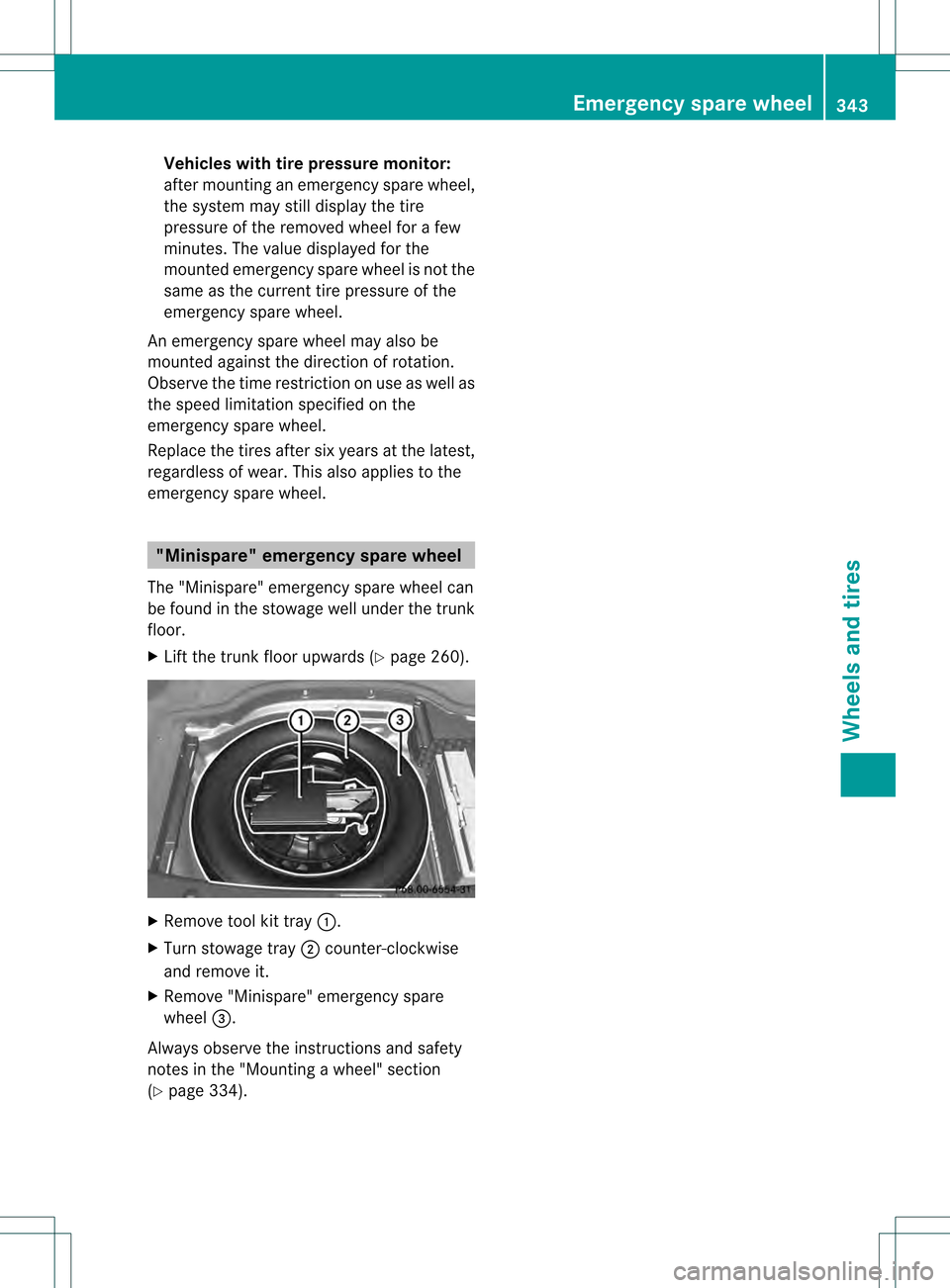
The "Minispare" emergency spare wheel can
be found in the stowage well under the trunk
floor.
X Lift the trunk floor upwards (Y page 260).X
Remove tool kit tray 0002.
X Turn stowage tray 0003counter-clockwise
and remove it.
X Remove "Minispare" emergenc yspare
wheel 0022.
Always observe the instructions and safety
notes in the "Mounting awheel" section
(Y page 334). Emergency spare wheel
343Wheels and tires Z
Page 353 of 358
Low outside temperatures
If the outside temperature is below 32 ‡
(0 †), the starting procedure can take
noticeably longer when operating with E85
fuel.
E8 5f uel is no tsuitable for use at outside
temperatures under -4 ‡ (-20 †). Engine oil
General notes !
Never use engine oil or an oil filter of a
specification other than is necessary to
fulfill the prescribed servic eintervals .Do
not change the engine oil or oil filter in
order to achieve longe rreplacement
intervals than those prescribed. You could
otherwise cause engine damage or damage
to the exhaust gas aftertreatment.
Follow the instructions in the service
interval display regarding the oil change.
Otherwise, you may damage the engine and
the exhaust gas aftertreatment.
When handling engine oil, observe the
important safety notes on service products
(Y page 347).
The engine oils are matched to the
performance of Mercedes-Benz engines and
service intervals. You should therefore only
use engine oils and oil filters that are
approved for vehicles with maintenance
systems.
For a list of approved engine oils and oil filters,
consult an authorized Mercedes-Benz
Center .Orvisit the website
http://bevo.mercedes-benz.com.
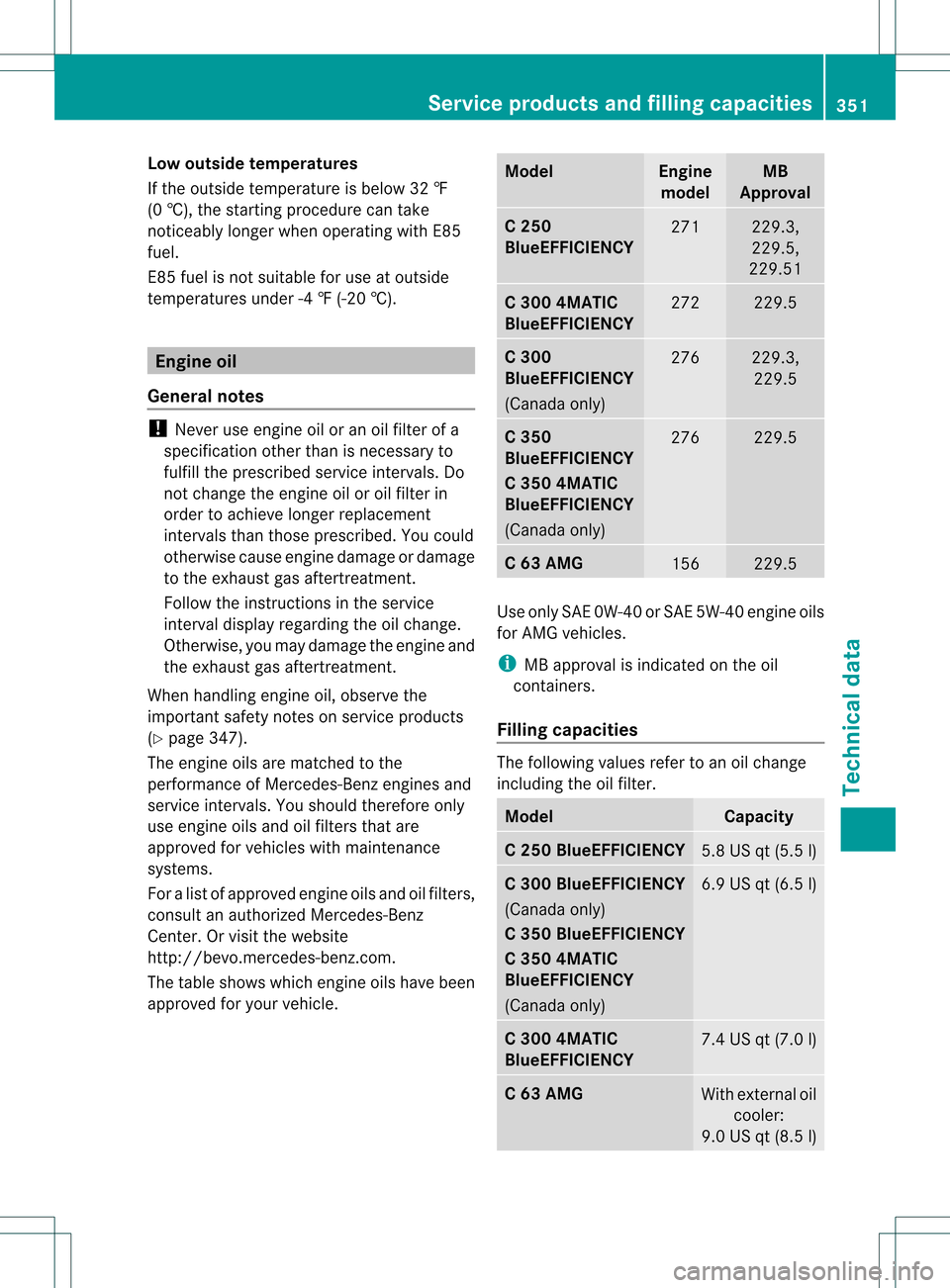
The table shows which engine oils have been
approved for your vehicle. Model Engine
model MB
Approval C 250
BlueEFFICIENCY
271 229.3,
229.5,
229.51 C 300 4MATIC
BlueEFFICIENCY
272 229.5
C 300
BlueEFFICIENCY
(Canada only)
276 229.3,
229.5 C 350
BlueEFFICIENCY
C 350 4MATIC
BlueEFFICIENCY
(Canada only)
276 229.5
C 63 AMG
156 229.5
Use only SAE 0W-40 or SAE 5W-40 engine oils
for AMG vehicles.
i
MB approval is indicated on the oil
containers.
Filling capacities The following values refer to an oil change
including the oil filter.
Model Capacity
C 250 BlueEFFICIENCY
5.8 US qt
(5.5 l) C 300 BlueEFFICIENCY
(Canada only)
C 350 BlueEFFICIENCY
C 350 4MATIC
BlueEFFICIENCY
(Canada only)
6.9 US qt
(6.5 l) C 300 4MATIC
BlueEFFICIENCY
7.4 US qt
(7.0 l) C 63 AMG
With external oil
cooler:
9.0 US qt (8.5 l) Service products and filling capacities
351Technical data Z