ABS MERCEDES-BENZ C-Class SEDAN 2013 W204 Owner's Manual
[x] Cancel search | Manufacturer: MERCEDES-BENZ, Model Year: 2013, Model line: C-Class SEDAN, Model: MERCEDES-BENZ C-Class SEDAN 2013 W204Pages: 358, PDF Size: 4.85 MB
Page 6 of 358
1, 2, 3 ...
115 Vsocket ...................................... 265
12 Vsocket
see Sockets
4ETS
see ETS/4ETS (Electronic
Tractio nSystem)
4MATIC (permanent four-wheel
drive) .................................................. 179A
ABS (Anti-lock Braking System) Display message ............................ 217
Function/notes ................................ 64
Important safety notes ....................64
Warning lamp ................................. 244
Activating/deactivating cooling
with air dehumidification .................131
Active Blin dSpot Assist
Activating/deactivating (on-
board computer) ............................ 208
Display message ............................ 232
Function/informatio n.................... 190
Active Driving Assistance package .190
Active Lane Keeping Assist Activating/deactivating (on-
board computer) ............................ 208
Display message ............................ 231
Function/informatio n.................... 193
Active light function .........................113
ADAPTIVE BRAKE ................................. 69
Adaptive Highbeam Assist Display message ............................ 227
Function/notes ............................. 114
Switching on/off (on-board
computer) ...................................... 210
Additives (engine oil) ........................352
Airb ags
Display message ............................ 223
Front air bag (driver, front
passenger )....................................... 44
Important safety notes ....................42
Knee bag .......................................... 44
PASSENGER AIR BAG OFF
indicator lamp .................................. 47
Pelvis airb ag................................... 45Safety guidelines
............................. 41
Side impact airb ag.......................... 45
Windo wcurtain air bag .................... 46
Air-conditioning system
see Climate control
AIRF LOW ........................................... 132
Airv ents
Glove box ....................................... 137
Important safet ynotes .................. 137
Rea r............................................... 138
Setting ........................................... 137
Setting the center air vents ...........137
Setting the side air vents ...............137
see Climate control
Alarm system
see ATA (Anti-Theft Alarm system)
AMG menu (on-board computer) .....212
Anti-loc kbraking system
see ABS (Anti-lock Braking System)
Anti-theft alarm system
see ATA (Anti-Theft Alarm system)
Ashtray ............................................... 263
Assistance menu (on-board
computer) .......................................... 206
ASSYST PLUS Displaying a service message ........282
Hiding a service message ..............282
Notes ............................................. 282
Resetting the service interval
displa y........................................... 282
Service message ............................ 282
Special service requirements ......... 283
ATA (Anti-Theft Alarm system)
Activating/deactivating ...................71
Function .......................................... .71
Switching off the alarm ....................71
ATTENTIO NASSIST
Activating/deactivating .................207
Display message ............................ 230
Function/notes ............................. 185
Audio menu (on-board
computer) .......................................... 204
Audio system see separate operating instructions
Authorized Centers
see Qualified specialist workshop 4
Index
Page 7 of 358
Authorized Mercedes-Benz Center
see Qualified specialist workshop
Authorized workshops
see Qualified specialist workshop
AUTO lights
Display message ............................ 227
see Lights
Automatic engine start (ECO start/
stop function) .................................... 146
Automatic engine switch-off (ECO
start/stop function) ..........................145
Automatic headlamp mode ..............111
Automatic transmission Automatic drive program ...............151
Changing gea r............................... 150
Display message ............................ 238
Driving tips .................................... 150
Emergency running mode ..............155
Kickdow n....................................... 150
Manual drive program ....................153
Overview ........................................ 148
Problem (malfunction) ...................155
Progra mselecto rbutton ................ 150
Pulling away ................................... 144
Releasing the parking lock
manually ........................................ 155
Selector leve r................................ 148
Shift range s................................... 152
Starting the engine ........................143
Steering wheel paddle shifters ......151
Transmission position displa y........ 149
Transmissio npositions .................. 149
Automatic transmission
emergency mode ............................... 155 B
Backup lamp Changing bulbs .............................. 120
Display message ............................ 226
Bag hook ............................................ 260
BAS (Brake Assist System) .................65
BAS PLUS (Brake Assist System
PLUS) .................................................... 65
Battery (SmartKey) Checking .......................................... 77
Important safety notes ....................76
Replacing ......................................... 77Battery (vehicle)
Charging ........................................ 300
Display message ............................ 229
Important safety notes ..................298
Jump starting ................................. 302
Blin dSpot Assist
Activating/deactivating .................208
Display message ............................ 232
Notes/function .............................. 186
see Active Blind Spot Assist
Brake Assist
see BAS (Brake Assist System)
Brake fluid
Display message ............................ 219
Notes ............................................. 352
Brake lamps
Changing bulbs .............................. 120
Display message ............................ 225
Brakes
ABS .................................................. 64
BAS .................................................. 65
BAS PLUS ........................................ 65
Brake fluid (notes) .........................352
Display message ............................ 217
Driving tips .................................... 162
High-performance brake system ....164
Important safety notes ..................162
Maintenance .................................. 163
Parking brake ................................ 159
Warning lamp ................................. 244
Breakdown
see Flat tire
see Towing away/tow-starting
Bulbs
see Changing bulbs C
California Important notice for retail
customers and lessees ....................23
Calling up a malfunction
see Display messages
Car
see Vehicle
Care
Carpets .......................................... 293
Car wash ........................................ 287 Index
5
Page 10 of 358
Driving tip
s.................................... 174
Function/notes ............................. 167
Important safety notes ..................167
Setting the specified minimum
distance ......................................... 172
Warning lamp ................................. 253
Doors
Automatic locking (on-board
computer) ...................................... 211
Automatic locking (switch) .............. .81
Central locking/unlocking
(SmartKey) ...................................... .74
Control panel ................................... 37
Display message ............................ 239
Emergency locking ........................... 81
Emergency unlocking .......................81
Important safety notes ....................79
Opening (from inside) ......................79
Drinking and driving .........................161
Drinks holder see Cuph older
Drive program
Automatic ...................................... 151
Display ........................................... 149
Manual .......................................... .153
SETUP (on-board computer) ..........213
Drive program selector .....................151
Driver's door see Doors
Driving abroad
Mercedes-Benz Service .................283
Symmetrical low bea m.................. 110
Driving lamps
see Daytime running lamps
Driving on flooded roads ..................164
Driving safety systems ABS (Anti-lock Braking System) .......64
ADAPTIVE BRAKE ............................. 69
BAS (Brake Assist System) ..............65
BAS PLUS (Brake Assist System
PLUS) .............................................. .65
Electroni cbrake force distribution ...69
ESP ®
(Electronic Stability
Program) .................................... 66, 67
ETS/4ETS (Electronic Traction
System) ........................................... 66
Important safety information ...........64 Overview
.......................................... 64
PRE-SAFE ®
Brake ............................ .69
Driving systems
Active Blind Spot Assis t................. 190
Active Driving Assistance package 190
Active Lane Keeping Assist ............193
ATTENTION ASSIST ........................185
Blind Spot Assist ............................ 186
Cruise control ................................ 165
Display message ............................ 230
DISTRONI CPLUS ........................... 167
Dynami chandling package with
sports mod e.................................. 175
HOLD function ............................... 176
Lane Keeping Assist ......................188
Lane Tracking package ..................186
Parking Guidance ........................... 182
PARKTRONI C................................. 179
RAC ESTART (AMG vehicles) ..........177
Rea rview camera .......................... 185
Driving tips
Automatic transmission .................150
Brakes ........................................... 162
Break-in period .............................. 140
DISTRONI CPLUS ........................... 174
Downhill gradient ........................... 162
Drinking and driving .......................161
Driving abroad ............................... 110
Driving in winter ............................ .165
Driving on flooded road s................ 164
Driving on wet road s...................... 164
Exhaust check ............................... 161
Fuel ................................................ 160
General .......................................... 160
Hydroplaning ................................. 164
Icy road surfaces ........................... 165
Limited braking efficiency on
salted road s................................... 163
Snow chains .................................. 313
Symmetrical low bea m.................. 110
Wet road surface ........................... 163
DVD audio (on-board computer) ......204
DVD video (on-board computer) ......205
Dynamic handling package with
sports mode ....................................... 1758
Index
Page 21 of 358
Trunk
Emergency release ..........................84
Important safety notes ....................82
Locking separatel y........................... 84
Opening (automatically from
inside) .............................................. 83
Opening (automatically from
outside) ............................................ 83
Trunk lid
Display message ............................ 239
Opening/closing .............................. 82
Opening dimensions ......................355
Trunk load (maximum) ......................355
Turn signals Display message ............................ 224
Switching on/off ........................... 112
see Turn signals
Type identification plate
see Vehicle identification plate U
Unlocking Emergency unlocking .......................81
From inside the vehicle (central
unlocking button) ............................. 80 V
Vanity mirror (in the sun visor) ........262
Vehicle Data acquisition ............................... 26
Display message ............................ 238
Emergency locking ........................... 81
Emergency unlocking .......................81
Equipment ....................................... 22
Individua lsettings .......................... 208
Limited Warranty ............................. 26
Loading .......................................... 321
Locking (in an emergency) ...............81
Locking (SmartKey) .......................... 74
Lowering ........................................ 338
Maintenance .................................... 23
Parking for a long period ................ 160
Pulling away ................................... 144
Raising ........................................... 335
Reporting problems .........................26
Securing from rolling away ............335 Towing away
.................................. 304
Transporting .................................. 306
Unlocking (in an emergency) ...........81
Unlocking (SmartKey) ......................74
Vehicle data ................................... 355
Vehicle data ....................................... 355
Vehicle dimensions ...........................355
Vehicle emergency locking ................81
Vehicle identification number see VIN
Vehicle identification plate ..............346
Vehicle tool kit .................................. 296
Video (DVD) ........................................ 205
VIN ...................................................... 346 W
Warning and indicator lamps ABS ................................................ 244
Brakes ........................................... 244
Check Engine ................................. 250
Coolant .......................................... 251
Distance warning ........................... 253
DISTRONI CPLUS ........................... 253
ESP ®
.............................................. 246
ESP ®
OFF ....................................... 247
Fuel tank ........................................ 250
Overview .......................................... 32
PASSENGER AIR BAG OFF
indicator lamp .................................. 47
Reserve fuel ................................... 250
Seat bel t........................................ 242
SPORT handling mode ...................247
SRS ................................................ 249
Tire pressure monitor ....................254
Warranty ............................................ 346
Washer fluid Display message ............................ 240
Wheel bol ttightening torque ...........338
Wheel chock ...................................... 335
Wheels Changing awheel .......................... 334
Checking ........................................ 311
Cleaning ......................................... 289
Cleaning (warning) .........................334
Emergency spare wheel .................342
Important safety notes ..................310
Interchanging/changing ................334 Index
19
Page 34 of 358
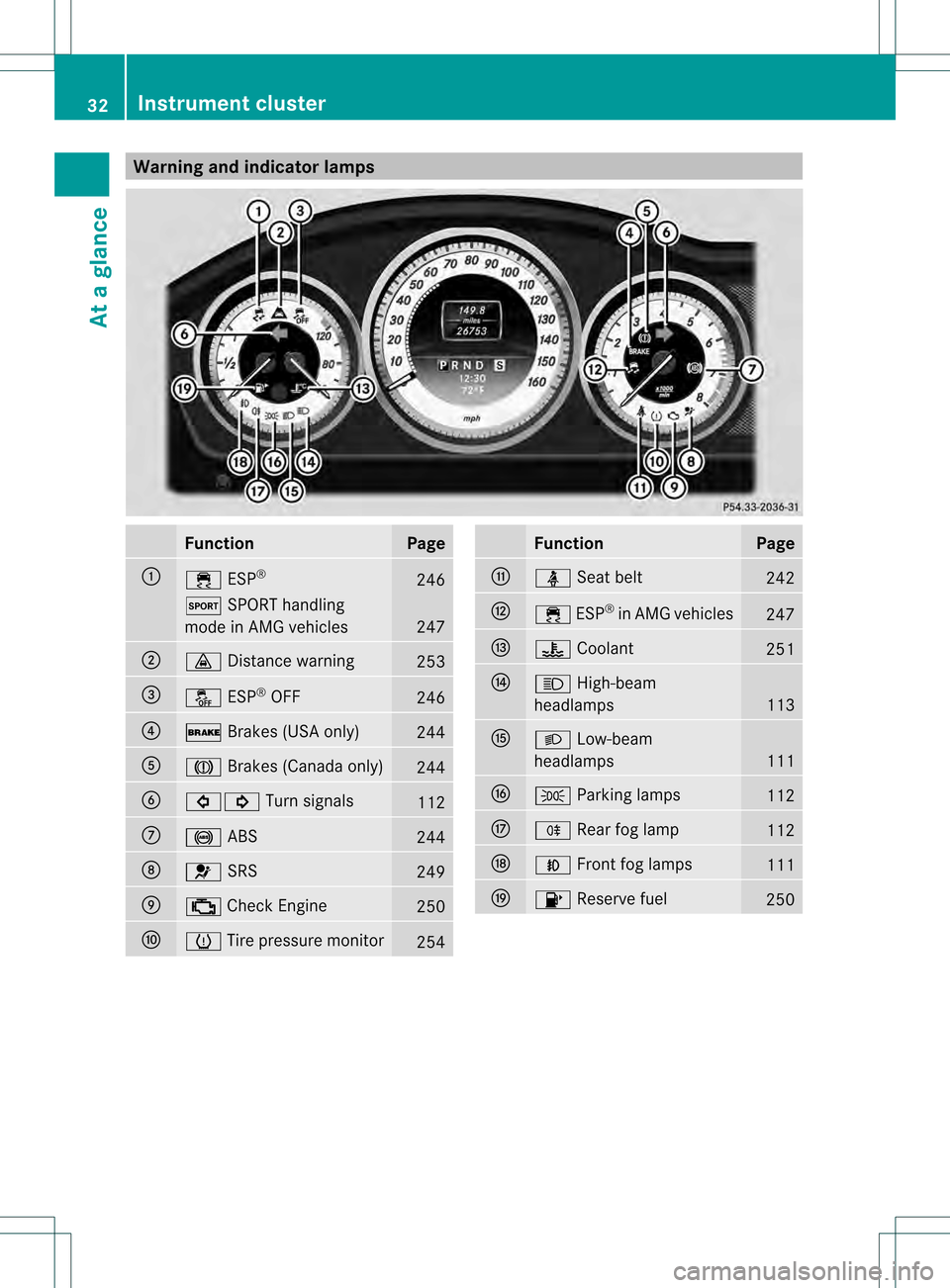
Warning and indicator lamps
Function Page
0002
000D
ESP® 246
0003
SPORT handling
mode in AMG vehicles 247
0003
000B
Distance warning 253
0022
0015
ESP®
OFF 246
0021
000C
Brakes (USA only) 244
001F
0006
Brakes (Canada only) 244
0020
00070006
Turn signals 112
0012
0018
ABS 244
0013
001E
SRS 249
0014
000E
Check Engine 250
0015
0014
Tire pressure monitor 254 Function Page
0016
0012
Seat belt 242
0018
000D
ESP®
in AMG vehicles 247
0019
000C
Coolant 251
001A
000A
High-beam
headlamps 113
001B
000B
Low-beam
headlamps 111
001D
0014
Parking lamps 112
001E
000E
Rearfog lamp 112
0023
000C
Front fog lamps 111
0024
0010
Reserve fuel 25032
Instrument clusterAt a glance
Page 66 of 358
operation is possible using the switches in
the rear compartment.
Driving safety systems
Overview of driving safety systems
In this section, you will find information about
the following driving safety systems:
R ABS (Anti-lock BrakingSystem)
R BAS (Brake AssistSystem)
R BAS PLUS ( BrakeAssist System Plus)
R ESP ®
(Electronic StabilityProgram)
R EBD ( Electronic Brake force Distribution)
R ADAPTIVE BRAKE
R PRE-SAFE ®
Brake Important safety notes
If you fail to adapt your driving style or
become distracted, the driving safety
systems can neither reduce the risk of
accident nor override the laws of physics.
Driving safety systems are merely aids
designed to assist driving. You are
responsible for the distance to the vehicle in
front, for vehicle speed and for braking in
good time. Always adapt your driving style to
suit the prevailing road and weather
conditions and maintain asafe distance from
the vehicle in front. Drive carefully.
i The driving safety systems described only
work as effectively as possible when there
is adequate contact between the tires and
the road surface. Please pay special
attention to the note son tires,
recommended minimu mtire tread depths,
etc. (Y page 310).
In wintry driving conditions, always use
winter tires (M+S tires) and if necessary,
snow chains. Only in this way will the
driving safety systems described in this
section work as effectively as possible. ABS (Anti-lock Braking System)
Important safety notes i
Observe the "Importan tsafety notes"
sectio n(Ypage 64). G
WARNING
If ABSi s faulty, the wheels could lock when
braking. The steerability and braking
characteristics may be severely impaired.
Additionally, further driving safety systems
are deactivated. There is an increased danger
of skidding and accidents.
Drive on carefully. Have ABS checked
immediately at a qualified specialist
workshop.
When ABS is malfunctioning, other systems,
including driving safety systems, will also
become inoperative. Observe the information
on the ABS warning lamp (Y page 244) and
display messages which may be shown in the
instrument cluster (Y page 217).
ABS regulates brake pressure in such a way
that the wheels do not lock when you brake.
This allows you to continue steering the
vehicle when braking.
ABS works from a speed of about 5 mph
(8 km/h) upwards, regardless of road-surface
conditions. ABS works on slippery surfaces,
even if you only brake gently.
The yellow 0018ABS warning lamp in the
instrument cluster lights up when the ignition
is switched on. It goes out when the engine is
running.
Braking X
If ABS intervenes: continue to depress the
brake pedal vigorously until the braking
situation is over.
X To make a full brake application:
depress the brake pedal with full force.
If ABS intervenes when braking, you will feel
a pulsing in the brake pedal.
The pulsating brake pedal can be an
indication of hazardous road conditions, and 64
Driving safety systemsSafety
Page 67 of 358
functions as a reminder to take extra care
while driving. BAS (Brake Assist System)
i Observe the "Important safety notes"
section (Y page 64). G
WARNING
If BAS is malfunctioning, the braking distance
in an emergency braking situation is
increased. There is a risk of an accident.
In an emergency braking situation, depress
the brake pedal with full force. ABS prevents
the wheels from locking.
BAS operates in emergency braking
situations. If you depress the brake pedal
quickly, BAS automatically boosts the braking
force, thus shortening the stopping distance.
X Keep the brake pedal depresse dfirmly until
the emergency braking situation is over.
ABS prevents the wheels from locking.
The brakes will function as usual once you
release the brake pedal. BA Sis deactivated. BAS PLUS (Brake AssistS
ystem
PLUS)
i Observe the "Important safety notes"
section (Y page 64).
BAS PLUS is only available in vehicles
equipped with DISTRONIC PLUS.
For BAS PLUS to assist you when driving, the
radar sensor system must be:
R activated (Y page 211)
R operational
With the help of the radar sensor system, BAS
PLUS can detect obstacles that are in the
path of yourv ehicle for an extended period of
time.
If the radar sensor system is malfunctioning,
BASP LUS will not be available. The brake
system is still available with complete brake
boosting effect and BAS. BAS PLUS provides braking assistance in
hazardous situations at speeds greater than
4 mph (7 km/h).
At speeds of up to approximately 40 mph
(70 km/h), BAS PLUS can also detect
stationary objects. Examples of stationary
objects are stopped or parked vehicles.
To prevent a front-end collision, BAS PLUS
calculates the brake force necessary if:
R
you approach an obstacle, and
R BAS PLUS has detected arisk of collision
At as pee dless than 20 mp h(30 km/h) : if
you depress the brake pedal, BASP LUS is
activated. Braking is performed as late as
possible.
At a speed greater than 20 mph
(30 km/h):ify ou depress the brake pedal
sharply, BAS PLUS automatically raises the
brake pressure to a value adapted to the
traffic situation.
If BAS PLUS demands particularly high
braking force, preventative passenger
protection measures (PRE-SAFE ®
) are
activated simultaneously.
X Keep the brake pedal depressed until the
emergency braking situation is over.
ABS prevents the wheels from locking.
BAS PLUS is deactivated and the brakes
function as usual, if:
R you release the brake pedal.
R there is no longer any danger of a rear-end
collision.
R no obstacle is detected in front of your
vehicle. G
WARNING
BAS PLUS cannot always clearly identify
objects and complex traffic situations. BAS
PLUS cannot intervene in these cases. There
is a risk of an accident.
Always pay careful attention to the traffic
situation and be ready to brake. Driving safety systems
65Safety Z
Page 79 of 358

Keep batteries out of the reach of children. If
a battery is swallowed, seek medical attention
immediately.
Checking the battery X
Press the 000Aor000B button.
The battery is working properly if battery
check lamp 0002lights up briefly.
If battery check lamp 0002does not lightup
briefly during the test, the battery is
discharged.
i If the SmartKey battery is checked within
the signal reception range of the vehicle,
pressing the 000Aor000B button:
R locks or
R unlocks the vehicle
X Change the battery (Y page 77).
i You can get a battery at a qualified
specialist workshop.
Replacing the battery You require a CR 2025 3 V cell battery.
X Take the mechanical key out of the
SmartKey (Y page 76). X
Press mechanical key 0003intothe SmartKey
opening in the direction of the arrow until
battery compartment cover 0002opens. Do
not hold battery compartment cover 0002
closed while doing so.
X Remove battery compartment cover 0002. X
Repeatedly tap the SmartKey against your
palm until battery 0022falls out.
X Insert the new battery with the positive
terminal facing upwards. Use a lint-free
cloth to do so.
X Make sure that the surface of the battery is
free from lint, grease and all other forms of
contamination.
X Insert the front tabs of battery
compartment cover 0002into the housing
first and then press to close it.
X Insert mechanical key 0003into the
SmartKey.
X Check the function of all SmartKey buttons
on the vehicle. SmartKey
77Opening and closing Z
Page 181 of 358
again after the vehicle has been driven a
certain distance. 4MATIC (permanent four-wheel drive)
If you fail to adapt your driving style, 4MATIC
can neither reduce the risk of accident nor
override the laws of physics. 4MATIC cannot
take account of road, weather and traffic
conditions. 4MATIC is only an aid. You are
responsible for the distance to the vehicle in
front, for vehicle speed, for braking in good
time and for staying in your lane.
If a drive wheel spins due to insufficient grip:
R Only depress the accelerato rpedal as far
as necessary when pulling away.
R Accelerate less when driving.
! Never tow the vehicle with one axle
raised. This may damage the transfer case.
Damage of this sort is not covered by the
Mercedes-Benz Limited Warranty. All
wheels must remain either on the ground
or be fully raised. Observe the instructions
for towing the vehicle with all wheels in full
contact with the ground.
4MATIC ensures that all four wheels are
permanently driven. Together with ESP ®
, it
improves the traction of your vehicle
whenever a drive wheel spins due to
insufficient grip.
i In wintry driving conditions, the maximum
effect of 4MATIC can only be achieved if
you use winter tires (M+S tires), with snow
chains if necessary. PARKTRONIC
Important safety notes PARKTRONIC is an electronic parking aid with
ultrasoni csensors. It indicates visually and
audibly the distance between your vehicle
and an object.
PARKTRONIC is only an aid. It is not a
replacement for your attention to your immediate surroundings. You are always
responsible for safe maneuvering, parking
and exiting a parking space. When
maneuvering, parking or pulling out of a
parking space, make sure that there are no
persons, animals or objects in the area in
which you are maneuvering.
!
When parking, pay particular attention to
objects above or below the sensors, such
as flower pots or trailer drawbars.
PARKTRONIC does not detec tsuch objects
when they are in the immediate vicinity of
the vehicle. You could damag ethe vehicle
or the objects.
The sensors may not detect snow and other
objects that absorb ultrasonic waves.
Ultrasonic sources such as an automatic
car wash, the compressed-air brakes on a
truck or a pneumatic drill could cause
PARKTRONIC to malfunction.
PARKTRONIC may not function correctly on
uneven terrain.
PARKTRONIC is activated automatically when
you:
R switch on the ignition
R shift the transmission to position D,Ror N
R release the parking brake
PARKTRONIC is deactivated at speeds above
11 mph (18 km/h). It is reactivated at lower
speeds.
PARKTRONIC monitors the area around your
vehicle using six sensors in the front and four
sensors in the rear. Driving systems
179Driving and parking Z
Page 192 of 358
symbol
0002is shown in green. Lane Keeping
Assist is ready for use.
Standard
If Standard is selected, no warning vibration
occurs if:
R you switch on the turn signals. In this event,
the warnings are suppressed for a certain
period of time.
R a driving safety system intervenes, such as
ABS, BAS or ESP ®
.
Adaptive
If Adaptive is selected, no warning vibration
occurs if:
R you switch on the turn signals. In this event,
the warnings are suppressed for a certain
period of time.
R a driving safety system intervenes, e.g.
ABS, BAS or ESP ®
.
R you accelerate hard, e.g. kickdown.
R you brake hard.
R you steer actively, e.g. swerve to avoid an
obstacle or change lanes quickly.
R you cut the corner on a sharp bend.
In order that you are warned only when
necessary and in good time if you cross the
lane marking, the system recognizes certain
conditions and warns you accordingly.
The warning vibration occurs earlieri f:
R you approach the outer lane marking on a
bend.
R the road has very wide lanes, e.g. a
highway.
R the system recognizes soli dlane markings.
The warning vibratio noccurs later if:
R the road has narrow lanes.
R you cut the corner on a bend. Active Driving Assistance package
General notes The Active Driving Assistance package
consists of DISTRONIC PLUS (Y
page 167),
Active Blind Spot Assist (Y page 190) and
Active Lane Keeping Assist (Y page 193).
Active Blind Spo tAssist General notes
Active Blind Spot Assist uses a radar sensor
system to monitor the side areas of your
vehicle which are behind the driver. Awarning
display in the exterior mirrors draws your
attentio nto vehicles detected in the
monitored area. If you then switch on the
corresponding turn signal to change lane, you
will also receive an optical and audible
warning. If a risk of lateral collision is
detected, corrective braking may help you
avoid a collision. To support the course-
correcting brake application, Active Blind
Spot Assist uses the forward-facing radar
sensor system. The space available in the
direction of travel as well as to the side of the
vehicle is evaluated before a course-
correcting braking application is performed.
Active Blind Spot Assist supports you from a
speed of approximately 20 mph (30 km/h).
For Active Blind Spot Assist to assist you
when driving, the radar sensor system must
be:
R activated(Y page 211)
R operational
Important safety notes
Active Blind Spot Assist is only an aid. It does
not detect all traffic situations and road users
and is no substitute for attentive driving.
Always ensure that there is sufficient
distance to the side for other road users and
obstacles. 190
Driving systemsDriving and parking