keyless MERCEDES-BENZ C-Class SEDAN 2013 W204 Owner's Manual
[x] Cancel search | Manufacturer: MERCEDES-BENZ, Model Year: 2013, Model line: C-Class SEDAN, Model: MERCEDES-BENZ C-Class SEDAN 2013 W204Pages: 358, PDF Size: 4.85 MB
Page 9 of 358
COMAND
see separate operating instructions
Combination switch ..........................112
Compass Calibrating ..................................... 279
Calling up ....................................... 278
Setting ........................................... 278
Consumption statistics (on-board
computer) .......................................... 201
Convenience closing feature ..............87
Convenience opening feature ............86
Coolan t(engine)
Checkin gthe level ......................... 286
Display message ............................ 228
Filling capacity ............................... 353
Important safety notes ..................352
Temperature (on-board computer) .212
Temperature gauge ........................ 198
Warning lamp ................................. 251
Cooling
see Climate control
Cornering light function
Changing bulbs .............................. 119
Display message ............................ 224
Function/notes ............................. 114
Crash-responsive emergency
lighting ............................................... 116
Cruise control Cruise control leve r....................... 166
Deactivating ................................... 167
Display message ............................ 235
Driving system ............................... 165
Function/notes ............................. 165
Important safety notes ..................165
Setting aspeed .............................. 167
Storing and maintaining current
speed ............................................ .166
Cup holder
Center console .............................. 261
Important safety notes ..................261
Rea rcompartmen t......................... 262
Customer Assistance Center (CAC) ...26
Customer Relations Department .......26 D
Dashboard see Instrument cluster
Dashboard lighting
see Instrument cluster lighting
Data
see Technical data
Daytime running lamps
Display message ............................ 226
Switching on/off (on-board
computer) ...................................... 209
Switching on/off (switch) ..............111
Dealerships
see Qualified specialist workshop
Declarations of conformity ................. 25
Delaye dswitch-off
Exterio rlighting (on-board
computer )...................................... 210
Interior lighting .............................. 210
Diagnostics connection ......................25
Digital speedometer .........................202
Display (cleaning instructions) ........291
Display messages ASSYST PLUS ................................ 282
Calling up (on-board computer) .....216
Driving systems ............................. 230
Engine ............................................ 228
General notes ................................ 216
Hiding (on-board computer) ...........216
KEYLESS-GO .................................. 240
Lights ............................................ .224
Safety systems .............................. 217
SmartKey ....................................... 240
Tires ............................................... 236
Vehicle .......................................... .238
Distance display (on-board
computer) .......................................... 206
Distance recorder ............................. 201
see Odometer
see Trip odometer
Distance warning (warning lamp) ....253
DISTRONIC PLUS Activatio ncondition s..................... 169
Deactivating ................................... 173
Display message ............................ 233
Displays in the multifunction
displa y........................................... 173 Index
7
Page 11 of 358
E
EASY-ENTRY feature Activating/deactivating .................211
Function/notes ............................. 102
EASY-EXIT feature
Crash-responsive ........................... 103
Function/notes ............................. 102
Switching on/off ........................... 211
EBD (electronic brake force
distribution)
Display message ............................ 218
Function/notes ................................ 69
ECO display
Function/notes ............................. 161
On-board computer .......................202
ECO start/stop function
Automatic engine start ..................146
Automatic engine switch-off ..........145
Deactivating/activating .................146
General information .......................145
Important safety notes ..................145
Electronic Stability Program
see ESP ®
(Electroni cStability Program)
Emergenc yrelease
Driver's door .................................... 81
Fuel filler fla p................................. 157
Trunk ............................................... 84
Vehicle ............................................. 81
Emergency spare wheel
General notes ................................ 342
Important safety notes ..................342
Storage location ............................ 343
Technical data ............................... 344
Emergency Tensioning Devices
Function .......................................... .58
Safety guideline s............................. 41
Emissions control
Service and warranty information ....22
Engine
Check Engine warning lamp ........... 250
Display message ............................ 228
ECO start/stop function ................145
Engine number ............................... 347
Irregularr unning............................ 147
Jump-starting ................................. 302
Starting problems ..........................147Starting the engine with the
SmartKey
....................................... 143
Starting with KEYLESS-GO .............143
Switching off .................................. 159
Tow-starting (vehicle) ..................... 306
Engine, jump starting
see Jump starting (engine)
Engine electronics
Problem (malfunction) ...................147
Engine oil
Adding ........................................... 285
Additives ........................................ 352
Checking the oil level ..................... 284
Checking the oil level using the
dipstick .......................................... 285
Display message ............................ 229
Filling capacity ............................... 351
Notes about oil grades ................... 351
Notes on oil level/consumption ....284
Temperature (on-board computer) .212
Viscosity ........................................ 352
ESP ®
(Electronic Stability
Program) AMG menu (on-board computer) ...213
Deactivating/activating (AMG
vehicles) .......................................... 68
Deactivating/activating (except
AMG vehicles) ................................ 207
Deactivating/activating (notes;
except AMG vehicles) ......................67
Display message ............................ 217
ETS/4ETS ........................................ 66
Function/notes ......................... 66, 67
Important safety information ...........66
Warning lamp ................................. 246
ETS/4ETS (Electronic Traction
System) ................................................ 66
Exhaus tcheck ................................... 161
Exhaus ttail pipe (cleaning
instructions) ...................................... 291
Exterior lighting Setting options .............................. 110
see Lights
Exterior mirrors
Adjusting ....................................... 103
Dipping (automatic) .......................105
Folding in/ou t(automatically) .......104 Index
9
Page 13 of 358
Installing/removing (rear)
................99
Luxury .............................................. 98
see NECK-PRO head restraints/
NECK-PRO luxury head restraints
Heating
see Climate control
High-beam headlamps
Changing bulbs .............................. 118
Display message ............................ 225
Switching Adaptive Highbeam
Assist on/off ................................. 114
Switching on/off ........................... 113
Hill start assist .................................. 144
HOLD function Deactivating ................................... 177
Display message ............................ 231
Function/notes ............................. 176
Hood
Closing .......................................... .284
Display message ............................ 239
Important safety notes ..................283
Opening ......................................... 284
Hydroplaning ..................................... 164I
Ignition lock see Key positions
Immobilizer .......................................... 71
Indicator lamps see Warning and indicator lamps
Instrument cluster
Overview .......................................... 31
Settings ......................................... 209
Warning and indicator lamps ...........32
Instrument cluster lighting ..............198
Interior lighting ................................. 115
Automatic control ..........................116
Delayed switch-off (on-board
computer) ...................................... 210
Emergency lighting ........................116
Manual control ............................... 116
Overview ........................................ 115
Reading lamp ................................. 115 J
Jack Storage location ............................ 296
Using ............................................. 335
Jump starting (engine) ......................302 K
KEYLESS-GO Convenience closing feature ............87
Display message ............................ 240
Locking ............................................ 75
Start/Stop button .......................... 142
Starting the engine ........................143
Unlocking ......................................... 75
Keyp ositions
KEYLESS-GO .................................. 142
SmartKey ....................................... 141
Kickdown
Driving tips .................................... 150
Manual drive program ....................154
Knee bag .............................................. 44 L
Lamps see Warning and indicator lamps
Lane Keeping Assist
Activating/deactivating .................208
Display message ............................ 231
Function/informatio n.................... 188
Lane Tracking package .....................186
Lap time (RACETIMER) ......................213
LATCH-type (ISOFIX) child seat
anchors ................................................ 61
Light function ,active
Display message ............................ 226
Lighting
Ligh tswitc h................................... 110
Lights
Activating/deactivating the
interio rlighting delayed switch-off .210
Active light function .......................113
Automatic headlamp mode ............111
Cornering light function .................114
Display message ............................ 224
Driving abroad ............................... 110
Fog lamps ...................................... 111 Index
11
Page 42 of 358
Useful information
i This Operator's Manual describes all
models and all standard and optional
equipment of your vehicle available at the
time of publication of the Operator's
Manual. Country-specific differences are
possible. Please note that your vehicle may
not be equipped with all features
described. This also applies to safety-
related systems and functions.
i Read the information on qualified
specialist workshops: (Y page 25).Panic alarm
X
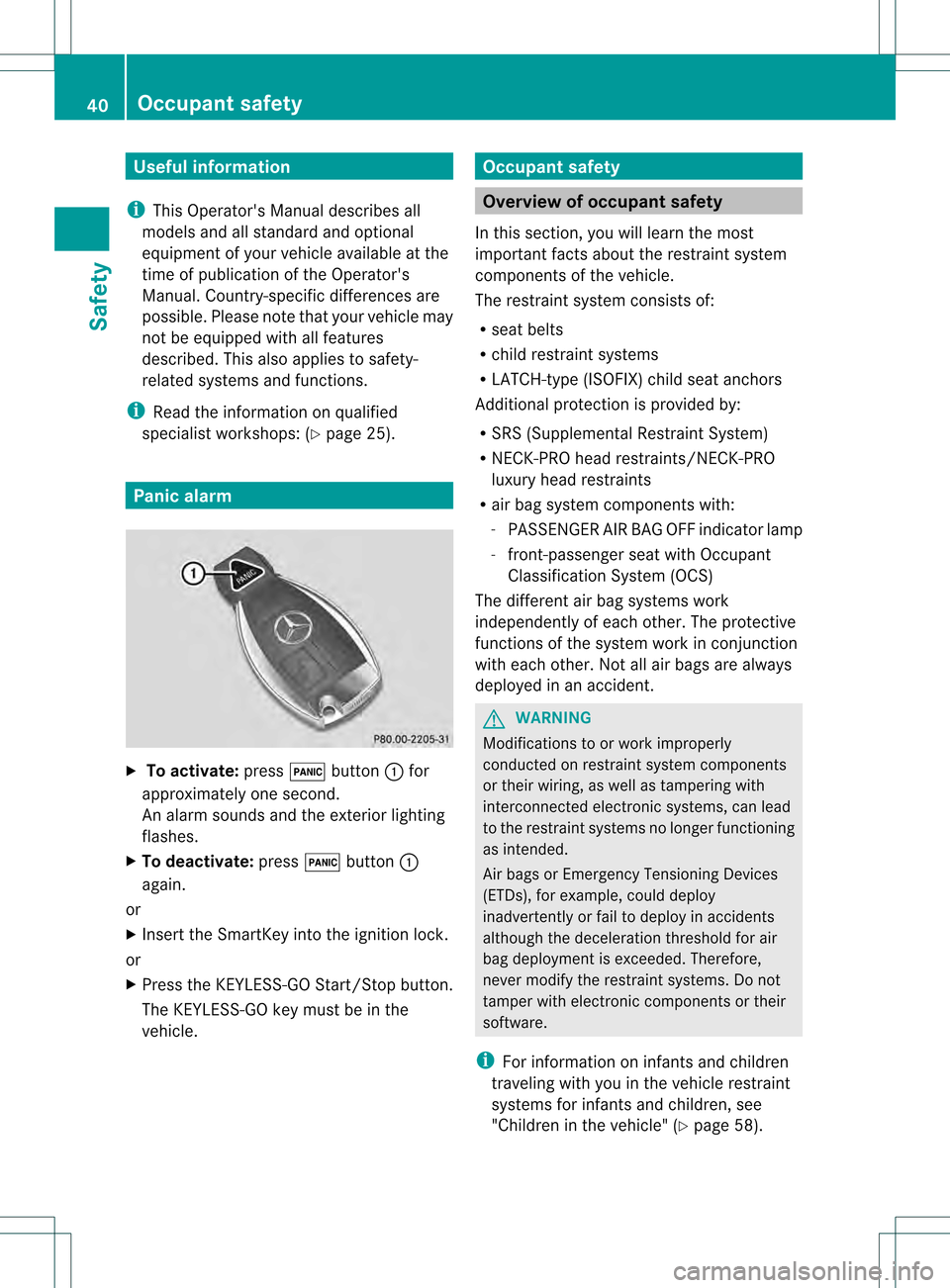
To activate: press000Cbutton 0002for
approximately one second.
An alarm sounds and the exterior lighting
flashes.
X To deactivate: press000Cbutton 0002
again.
or
X Insert the SmartKey into the ignition lock.
or
X Press the KEYLESS-GO Start/Stop button.
The KEYLESS-GO key must be in the
vehicle. Occupant safety
Overview of occupant safety
In this section, you will learn the most
important facts about the restraint system
components of the vehicle.
The restraint system consists of:
R seat belts
R child restraint systems
R LATCH-type (ISOFIX) child seat anchors
Additional protection is provided by:
R SRS (Supplemental Restrain tSystem)
R NECK-PRO head restraints/NECK-PRO
luxury head restraints
R air bag system components with:
-PASSENGER AI RBAG OFF indicator lamp
- front-passenge rseat with Occupant
Classification System (OCS)
The differen tair bag systems work
independently of each other. The protective
functions of the system work in conjunction
with each other. Not all air bags are always
deployed in an accident. G
WARNING
Modifications to or work improperly
conducted on restraint system components
or their wiring, as well as tampering with
interconnected electronic systems, can lead
to the restraint systems no longer functioning
as intended.
Air bags or Emergency Tensioning Devices
(ETDs), for example, could deploy
inadvertently or fail to deploy in accidents
although the deceleration threshold for air
bag deploymen tis exceeded. Therefore,
never modify the restraint systems. Do not
tamper with electronic components or their
software.
i For information on infants and children
traveling with you in the vehicle restraint
systems for infants and children, see
"Children in the vehicle" (Y page 58).40
Occupant safetySafety
Page 51 of 358
R
If you place a child in a forward-facing child
restraint on the front-passenger seat:
- move the seat as far back as possible
- use the proper child restraint
recommended for the age, size and
weight of the child
- secure child restraint with the vehicle's
seat belt according to the child seat
manufacturer's instructions
R For children larger than the typical 12-
month-old child, the front-passenger front
air bag may or may not be activated.
If the driver's air bag deploys, this does not
mean that the front-passenger front air bag
will also deploy.
The OCS may have detected that the seat:
R is either empty or occupie dby a person
with a weight up to that of a typical twelve-
month-old child seated in astandard child
restraint
R is occupied by a small individual, such as a
young teenager or a small adult
R is occupied by a child in a child restraint
system, whose weight is greate rthan that
of a typical twelve-month-old child.
These are examples of when the OCS
deactivates the front-passenger front air bag.
Deactivation takes place although the
collision fulfills the criteria for deploying the
driver's air bag. If the SmartKey has been removed from the
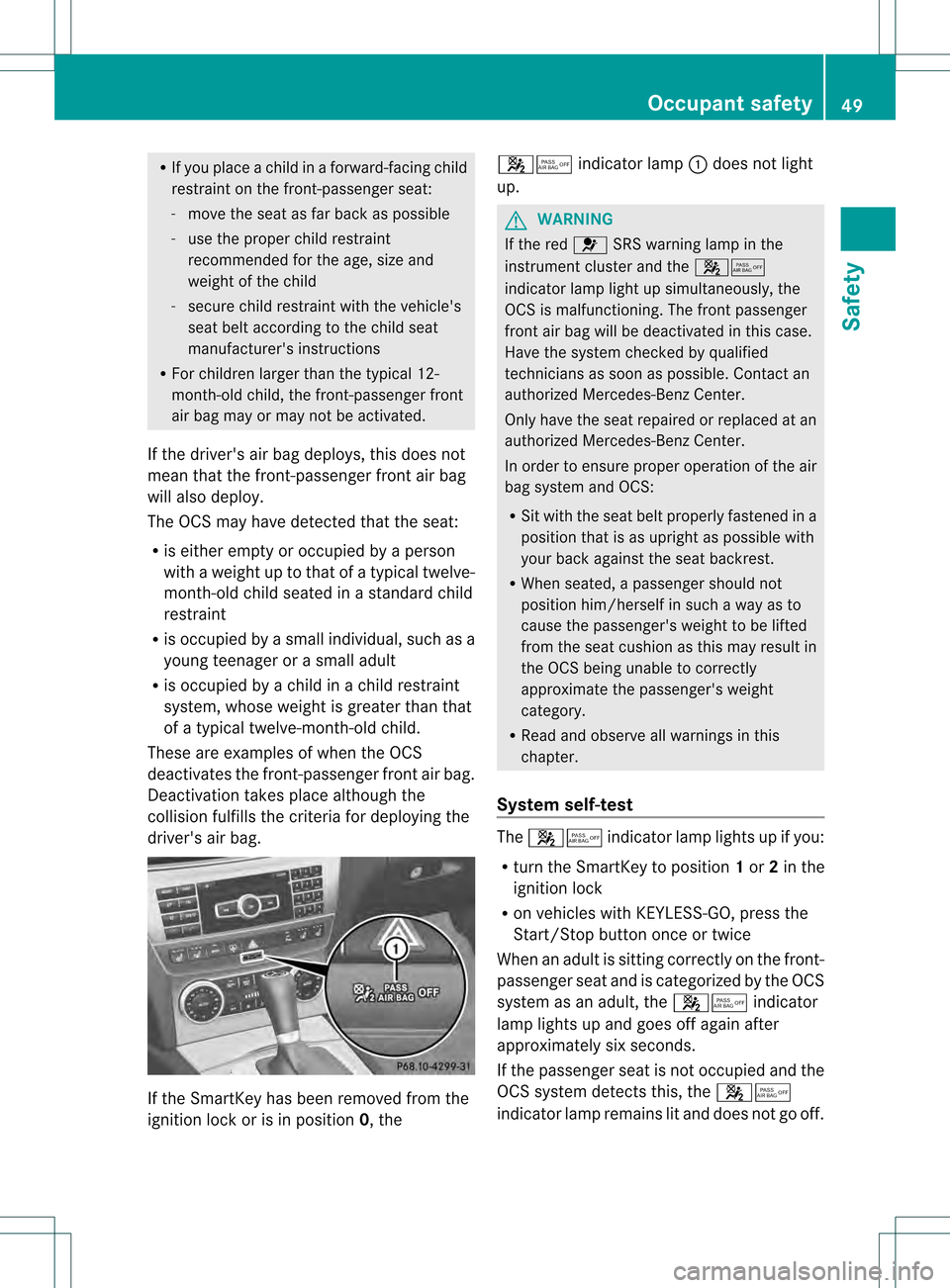
ignition lock or is in position 0, the0019001B
indicator lamp 0002does not light
up. G
WARNING
If the red 001ESRS warning lamp in the
instrument cluster and the 0019001B
indicator lamp light up simultaneously, the
OCS is malfunctioning. The front passenger
front air bag will be deactivated in this case.
Have the system checked by qualified
technicians as soon as possible. Contact an
authorized Mercedes-Ben zCenter.
Only have the seat repaired or replaced at an
authorized Mercedes-Benz Center.
In order to ensure proper operation of the air
bag system and OCS:
R Sit with the seat belt properly fastened in a
position that is as upright as possible with
your back against the seat backrest.
R When seated, a passenger should not
position him/herself in such a way as to
cause the passenger's weight to be lifted
from the seat cushion as this may result in
the OCS being unable to correctly
approximate the passenger's weight
category.
R Read and observe all warnings in this
chapter.
System self-test The
0019001B indicator lamp lights up if you:
R turn the SmartKey to position 1or 2in the
ignition lock
R on vehicles with KEYLESS-GO, press the
Start/Stop button once or twice
When an adult is sitting correctly on the front-
passenger seat and is categorized by the OCS
system as an adult, the 0019001Bindicator
lamp lights up and goes off again after
approximately six seconds.
If the passenger seat is not occupied and the
OCS system detects this, the 0019001B
indicator lamp remains lit and does not go off. Occupant safety
49Safety Z
Page 73 of 358
In particular, the detection of obstacles can
be impaired if:
R dirt on the sensors or anything else
covering the sensors
R snow or heavy rain
R interference by other radars ources
R there are strong radar reflections, for
example in parking garages
R a narrow vehicle traveling in front, e.g. a
motorbike
R a vehicle traveling in front on a different line
relative to the center of your vehicle G
WARNING
PRE-SAFE ®
Brake does not react:
R to people or animals
R to oncoming vehicles
R to crossing traffic
R when cornering
As a result, PRE-SAFE ®
Brake may neither
give warnings nor intervene in all critical
situations. There is a risk of an accident.
Always pay careful attention to the traffic
situation and be ready to brake.
In order to maintain an appropriate distance
from the vehicle in front and thus prevent a
collision, you must apply the brakes yourself.
X To activate/deactivate: activate or
deactivate PRE-SAFE ®
Brake in the on-
board computer (Y page 207).
When PRE-SAFE ®
Brake is activated, the
0001 symbol appears in the multifunction
display as long as the HOLD function is
deactivated (Y page 176).
On vehicles with Parking Guidance, the
0001 symbol is displayed when position P
is engaged or you are driving faster than
22 mph (35 km/h).
Following damage to the front end of the
vehicle, have the configuration and operation
of the radar sensors checked at a qualified
specialist workshop. This also applies to collisions at low speeds where there is no
visible damage to the front of the vehicle. Theft deterrent locking system
Immobilizer
The immobilizer prevents your vehicle from
being started without the correct SmartKey.
When leaving the vehicle, always take the
SmartKey with you and lock the vehicle. The
engine can be started by anyone with a valid
SmartKey that is left inside the vehicle.
X To activate with the SmartKey: remove
the SmartKey from the ignition lock.
X To activate with KEYLESS-GO: switch the
ignition off and open the driver's door.
X To deactivate: switch on the ignition.
i The immobilizer is always deactivated
when you start the engine.
In the event that the engine cannot be
started when the starter battery is fully
charged, the immobilizer may be faulty.
Contact an authorized Mercedes-Benz
Center or call 1-800-FOR-MERCedes (in the
USA) or 1-800-387-0100 (in Canada). ATA (anti-theft alarm system)
Av isual and audible alarm is triggered if the
alarm system is armed and you open:
R a door
R the vehicle with the mechanical key
R the trunk lid
R the hood
The alarm is not switched off, even if you
close the open door that triggered it, for
example. Theft deterrent locking system
71Safety Z
Page 74 of 358
i
If the alarm stays on for more than
30 seconds, the mbrace emergency call
system (USA only) or the Tele Aid system
(Canada only) initiates a call to the
Customer Assistance Center
automatically. The Tele Aid system will
initiate the call provided that:
R you have subscribed to the Tele Aid
service.
R the Tele Aid service has been activated
properly.
R the required mobile phone, powers upply
and GPS are available. X
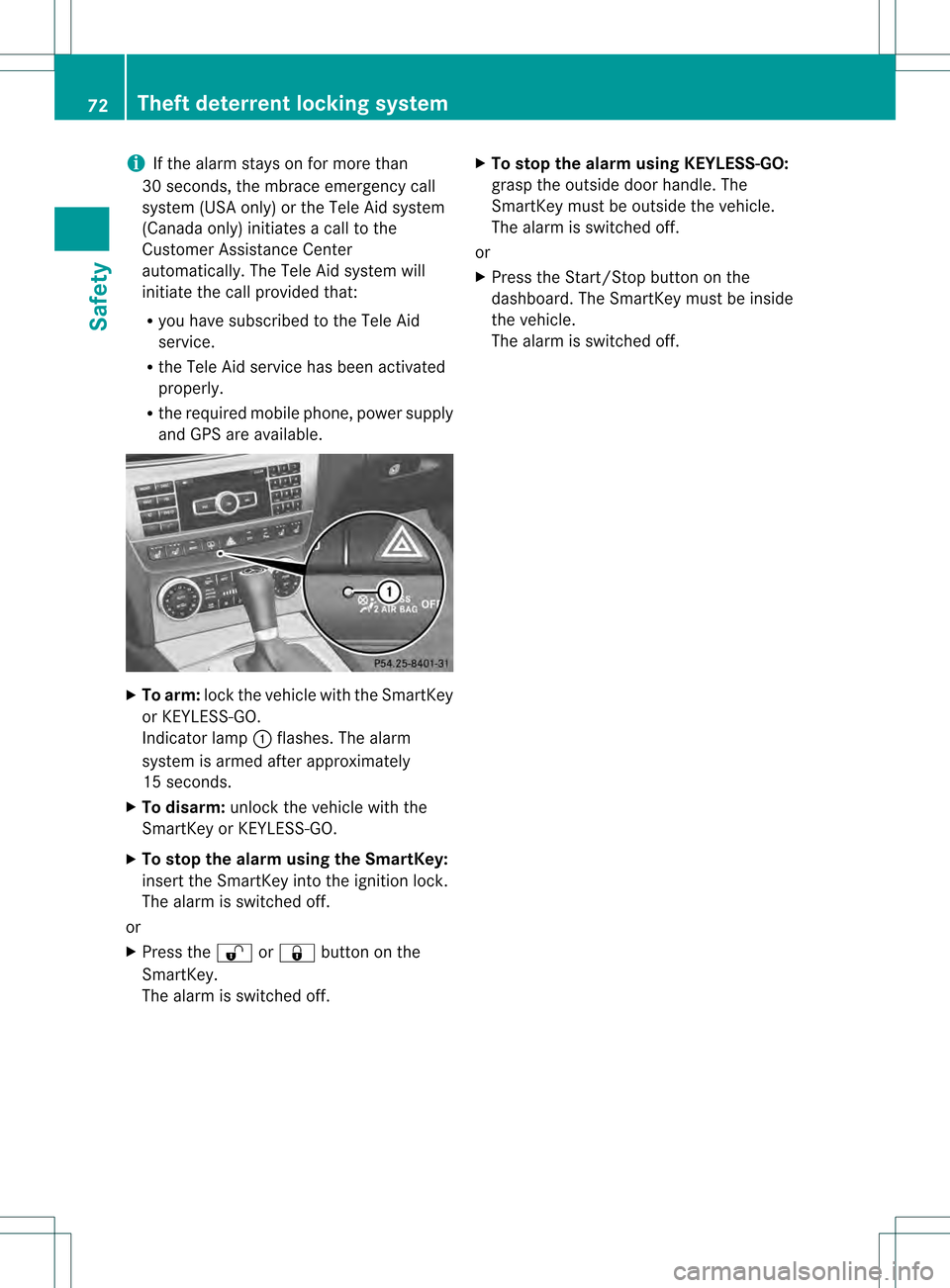
To arm: lockthe vehicle with the SmartKey
or KEYLESS-GO.
Indicator lamp 0002flashes. The alarm
system is armed after approximately
15 seconds.
X To disarm: unlock the vehicle with the
SmartKey or KEYLESS-GO.
X To stop the alarm using the SmartKey:
insert the SmartKey into the ignition lock.
The alarm is switched off.
or
X Press the 000Bor000A button on the
SmartKey.
The alarm is switched off. X
To stop the alarm using KEYLESS-GO:
grasp the outside door handle. The
SmartKey must be outside the vehicle.
The alarm is switched off.
or
X Press the Start/Stop button on the
dashboard. The SmartKey must be inside
the vehicle.
The alarm is switched off. 72
Theft deterrent locking systemSafety
Page 76 of 358
Useful information
i This Operator's Manual describes all
models and all standard and optional
equipment of your vehicle available at the
time of publication of the Operator's
Manual. Country-specific differences are
possible. Please note that your vehicle may
not be equipped with all features
described. This also applies to safety-
related systems and functions.
i Read the information on qualified
specialist workshops: (Y page 25).SmartKey
Important safety notes
G
WARNING
If children are left unsupervised in the vehicle,
they could:
R open the doors, thus endangering other
people or road users.
R get out and disrupt traffic.
R operate the vehicle's equipment.
Additionally, children could set the vehicle in
motion if, for example, they:
R release the parking brake.
R shifting the automatic transmission out of
park position P
R Start the engine.
There is a risk of an accident and injury.
When leaving the vehicle, always take the
SmartKey with you and lock the vehicle. Never
leave children or animals unattended in the
vehicle. Always keep the SmartKey out of
reach of children. G
WARNING
If persons, particularly children are subjected
to prolonged exposure to extreme heat or
cold, there is a risk of injury, possibly even
fatal. Never leave children unattended in the
vehicle. G
WARNING
If you attach heavy or large objects to the
SmartKey, the SmartKey could be
unintentionally turned in the ignition lock .This
could cause the engine to be switched off.
There is a risk of an accident.
Do not attach any heavy or large objects to
the SmartKey. Remove any bulky key rings
before inserting the SmartKey into the
ignition lock.
! Keep the SmartKey away from strong
magnetic fields. Otherwise, the remote
control function could be affected.
Strong magnetic fields can occur in the
vicinity of powerful electrical installations.
R Do not keep the KEYLESS-GO key:
-with electronic devices, e.g. a mobile
phone or another SmartKey
- with metallic objects, e.g. coins or metal
foil
- inside metallic objects e.g. a metal case
This can affect the functionality of the
SmartKey. SmartKey functions
The SmartKey centrally locks/unlocks:
R the doors
R the trunk lid
R the fuel filler flap 74
SmartKeyOpening and closing
Page 77 of 358
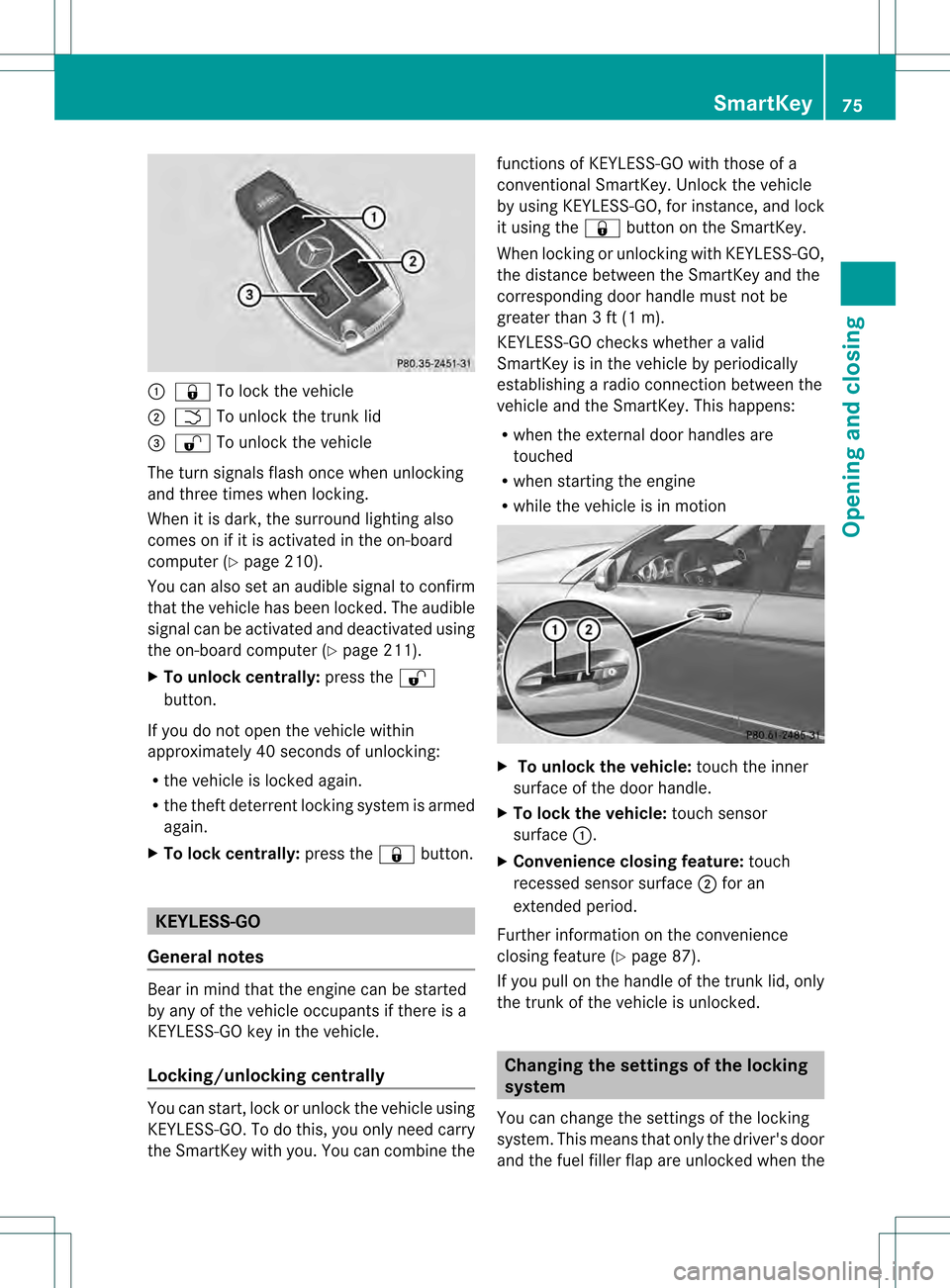
0002
000A To lock the vehicle
0003 0004 To unlock the trunk lid
0022 000B To unlock the vehicle
The turn signals flash once when unlocking
and three times when locking.
When it is dark, the surround lighting also
comes on if it is activated in the on-board
computer (Y page 210).
You can also set an audible signal to confirm
that the vehicle has been locked. The audible
signal can be activated and deactivated using
the on-board computer (Y page 211).
X To unlock centrally: press the000B
button.
If you do not open the vehicle within
approximately 40 seconds of unlocking:
R the vehicle is locked again.
R the theft deterren tlocking system is armed
again.
X To lock centrally: press the000Abutton. KEYLESS-GO
General notes Bear in mind that the engine can be started
by any of the vehicle occupants if there is a
KEYLESS-GO key in the vehicle.
Locking/unlocking centrally You can start, lock or unlock the vehicle using
KEYLESS-GO. To do this, you only need carry
the SmartKey with you. You can combine the functions of KEYLESS-GO with those of a
conventional SmartKey. Unlock the vehicle
by using KEYLESS-GO, for instance, and lock
it using the
000Abutton on the SmartKey.
When locking or unlockin gwith KEYLESS-GO,
the distance between the SmartKey and the
corresponding door handle must not be
greater than 3 ft (1 m).
KEYLESS-GO checks whether a valid
SmartKey is in the vehicle by periodically
establishing a radio connection between the
vehicle and the SmartKey. This happens:
R when the external door handles are
touched
R when starting the engine
R while the vehicle is in motion X
To unlock the vehicle: touch the inner
surface of the door handle.
X To lock the vehicle: touch sensor
surface 0002.
X Convenience closing feature: touch
recessed sensor surface 0003for an
extended period.
Further information on the convenience
closing feature (Y page 87).
If you pull on the handle of the trunk lid, only
the trunk of the vehicle is unlocked. Changing the settings of the locking
system
You can change the settings of the locking
system. This means that only the driver's door
and the fuel filler flap are unlocked when the SmartKey
75Opening and closing Z
Page 78 of 358

vehicle is unlocked
.This is useful if you
frequently travel on your own.
X To change the setting: press and hold
down the 000Band000A buttons
simultaneously for approximately six
seconds until the battery check lamp
(Y page 77) flashes twice.
i If the setting of the locking system is
changed within the signal range of the
vehicle, pressing the 000Aor000B button:
R locks or
R unlocks the vehicle
The SmartKey now functions as follows:
X To unlock the driver's door: press the
000B button once.
X To unlock centrally: press the000B
button twice.
X To lock centrally: press the000Abutton.
The KEYLESS-GO function is changed as
follows:
X To unlock the driver's door: touch the
inner surface of the door handle on the
driver's door.
X To unlock centrally: touch the inner
surface of the door handle on the front-
passenger door or the rear door.
X To lock centrally: touch the outer sensor
surface on one of the door handles
(Y page 75).
X To restore the factory settings: press
and hold down the 000Band000A buttons
simultaneously for approximately six
seconds until the battery check lamp
flashes twice. Mechanical key
General notes If the vehicle can no longer be locked or
unlocked with the SmartKey or the KEYLESS-
GO key, use the mechanical key. If you use the mechanical key to unlock and
open the driver's door or the trunk lid, the
anti-theft alarm system will be triggered
(Y
page 71).
X To end the alarm: insert the SmartKey into
the ignition lock.
i With KEYLESS-GO: remove the Start/
Stop button from the ignition lock
beforehand.
If you unlock the vehicle using the mechanical
key, the fuel filler flap will not be unlocked
automatically.
X To unlock the fuel filler flap: insert the
SmartKey into the ignition lock.
Removing the mechanical key X
Push release catch 0002in the direction of
the arrow and at the same time remove
mechanical key 0003from the SmartKey. SmartKey battery
Important safety notes Mercedes-Ben
zrecommends that you have
the batteries replaced at a qualified specialist
workshop. G
WARNING
Batteries contain toxic and corrosive
substances. If batteries are swallowed, it can
result in severe health problems. There is a
risk of fatal injury. 76
SmartKeyOpening and closing