ESP MERCEDES-BENZ C-Class SEDAN 2016 W205 Owners Manual
[x] Cancel search | Manufacturer: MERCEDES-BENZ, Model Year: 2016, Model line: C-Class SEDAN, Model: MERCEDES-BENZ C-Class SEDAN 2016 W205Pages: 398, PDF Size: 9.57 MB
Page 234 of 398
Automa tic engine start
The automatically switched-off internal combus -
tio nengin estart sautomatically in certai nsitua-
tions ,if:
Rth epower demand from th edriver via th e
accelerato rpedal is greate rthan th eelectric
motor alon ecan provide
Rth edriver switches to driv eprogram Sor M
Rthecondition of charge of th ehigh-voltage
battery has reached th elower limit
Rth esettings of th eautomatic climat econtrol
require it, e.g. at external temperatures abov e
30 †
Overru nmod e
In overrun mode, th ecombustio nengin eis
switched off and is disconnected from th edriv e
train. The electric motor:
Rgenerates low thrust ,whic hcorrespond sto
th eoverrun mod eof an active combustio n
engin e
Rfunction sas agenerator and produce sth e
necessary energ yfor th eauxiliary consumer s
and charge sth ehigh-voltage battery
Ove rrun mod eis available in driv eprogram E
below 16 0km/h.
In driv eprogram E,after th eaccelerato rpedal
has been released th ecoasting characteristic s
of th evehicl eare adapted to th etraffic condi-
tions .Further information about th ehaptic
accelerato rpedal (
Ypage 230).
Route-based energy management
Forroute-based energ ymanagement, th esys-
te m factors in information about th eexpecte d
rout ewhen rout eguidance is active.
The information on th erout eis provide dby th e
multimedia system and includes th efollowing:
Rroad categories
Rspee dlimitation s
Rdataon downhill gradients
The use of electric energ yis automatically opti-
mally distributed from th ebeginning to th een d
of th ejourney, usin ginformation about th e
route. The distribution is pre-emptive and takes
int oconsideration :
Rthesections of th ejourney ahead
Rth eenerg yconsumption on th ewhole rout eThe condition of charge of th
ehigh-voltage bat -
tery is thus systematically controlled. In addi-
tion, th econtrol function takes int oaccoun t
that:
Rth efuel saving sthroug hth euse of electrical
energ ycan vary, depending on th erout e(e.g.
urban ,interurban or highway)
Rth euse of electrical energ yis held available in
particular for electric operation (e.g. urban
routes)
The vehicl ethus automatically select sth eopti-
mum driving mod efor th erespectiv esectio nof
th eroute.
Route-based energ ymanagemen tis available
under th efollowin gconditions:
Rdriv eprogram Eis selected
RHYBRID driving mod eis selected
Ractive rout eguidance is activated
Rsuitable map dat ais available
When route-based energ ymanagemen tis in
operation ,th earea in fron tof th evehicl eis
shown as green in th emultifunction display.
Parking
XApply th eelectric parking brake.
The red !indicator lamp in th einstrumen t
cluste rlights up.
XUse th eDIRECT SELECT leve rto shif tth e
automatic transmission to P.
XSwitch theignition off .
The READY indicator in th einstrumen tcluste r
goes out .
Further information on parking and switching off
th einternal combustio nengin e (
Ypage 177).
232PLUG‑ IN HYBRID operation
Driving and parking
Page 237 of 398
Important safety notes
GWARNING
If you operate information systems and com-
munication equipmen tintegrate din th evehi-
cle while driving ,you will be distracte dfrom
traffic conditions. You could also lose control
of th evehicle. Ther eis aris kof an accident.
Only operate th eequipmen twhen th etraffic
situation permits. If you are no tsur ethat this
is possible ,park th evehicl epayin gattention
to traffic condition sand operate th eequip-
men twhen th evehicl eis stationary.
You must observ eth elegal requirements for th e
country in whic hyou are currentl ydriving when
operating th eon-board computer.
PLUG-IN HYBRID vehicles only :
GWARNING
If th einstrumen tcluste rhas faile dor mal-
functioned, you may no trecognize function
restriction sin systems relevan tto safety. The
operating safet yof your vehicl emay be
impaired .Ther eis aris kof an accident.
Pull ove ras soo nas it is saf eto do so and
consult aqualified specialist workshop.
All vehicles, excep tPLUG-IN HYBRID vehi-
cles:
GWARNIN G
If th einstrumen tcluste rhas faile dor mal-
functioned, you may no trecognize function
restriction sin systems relevan tto safety. The
operating safet yof your vehicl emay be
impaired .Ther eis aris kof an accident.
Drive on carefully. Hav eth evehicl echecke d
at aqualified specialist workshop immedi-
ately.
If th eoperating safet yof your vehicl eis
impaired ,pull ove ras soo nas it is saf eto do so.
Contac t aqualified specialist workshop.
The on-board computer only shows message sor
warning sfrom certain systems in th emultifunc-
tion display. You should therefor emak esur e
your vehicl eis operating safely at all times .Fo
ran overview, see th einstrumen tpanel illus-
tration (
Ypage 36).
Displays and operation
Instrument cluster lighting
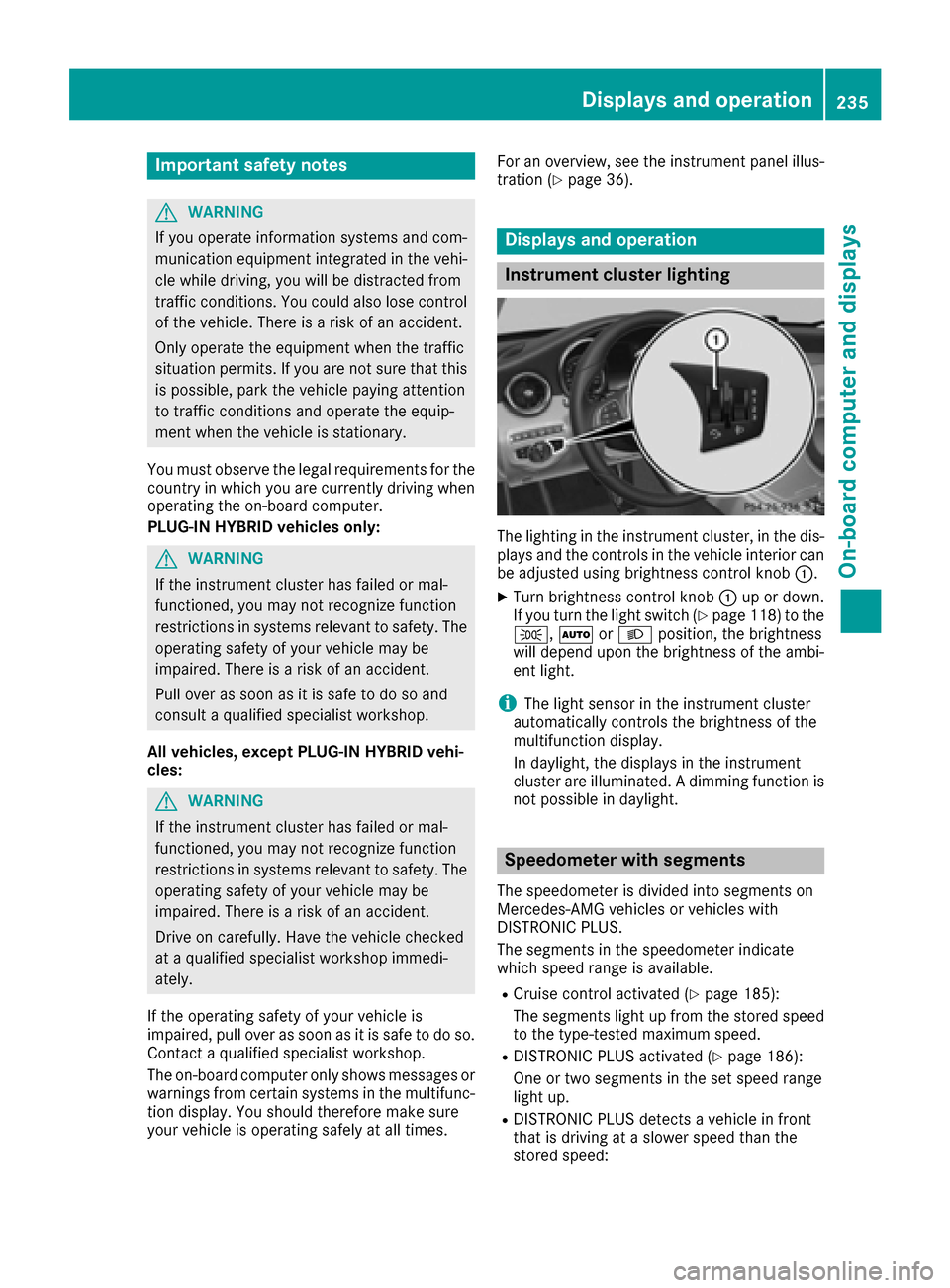
The lighting in th einstrumen tcluster, in th edis-
plays and th econtrol sin th evehicl einterior can
be adjusted usin gbrightness control knob :.
XTurn brightness control knob :up or down .
If you tur nth eligh tswitch (Ypage 118) to th e
T, ÃorL position ,th ebrightness
will depend upon th ebrightness of th eambi -
en tlight.
iThe ligh tsensor in th einstrumen tcluste r
automatically control sth ebrightness of th e
multifunction display.
In daylight, th edisplays in th einstrumen t
cluste rare illuminated. Adimming function is
no tpossibl ein daylight.
Speedometer with segments
The speedometer is divided int osegments on
Mercedes-AM Gvehicles or vehicles wit h
DISTRONI CPLUS.
The segments in th espeedometer indicat e
whic hspee drange is available.
RCruis econtrol activated (Ypage 185):
The segments ligh tup from th estore dspee d
to th etype-tested maximum speed.
RDISTRONI CPLU Sactivated (Ypage 186):
On eor two segments in th eset spee drange
ligh tup.
RDISTRONI CPLU Sdetects avehicl ein fron t
that is driving at aslower spee dthan th e
store dspeed:
Displays and operation235
On-board computer and displays
Z
Page 241 of 398
AMG displays inthe head-up display
AM Gdisplays are available in Mercedes-AM G
vehicles.
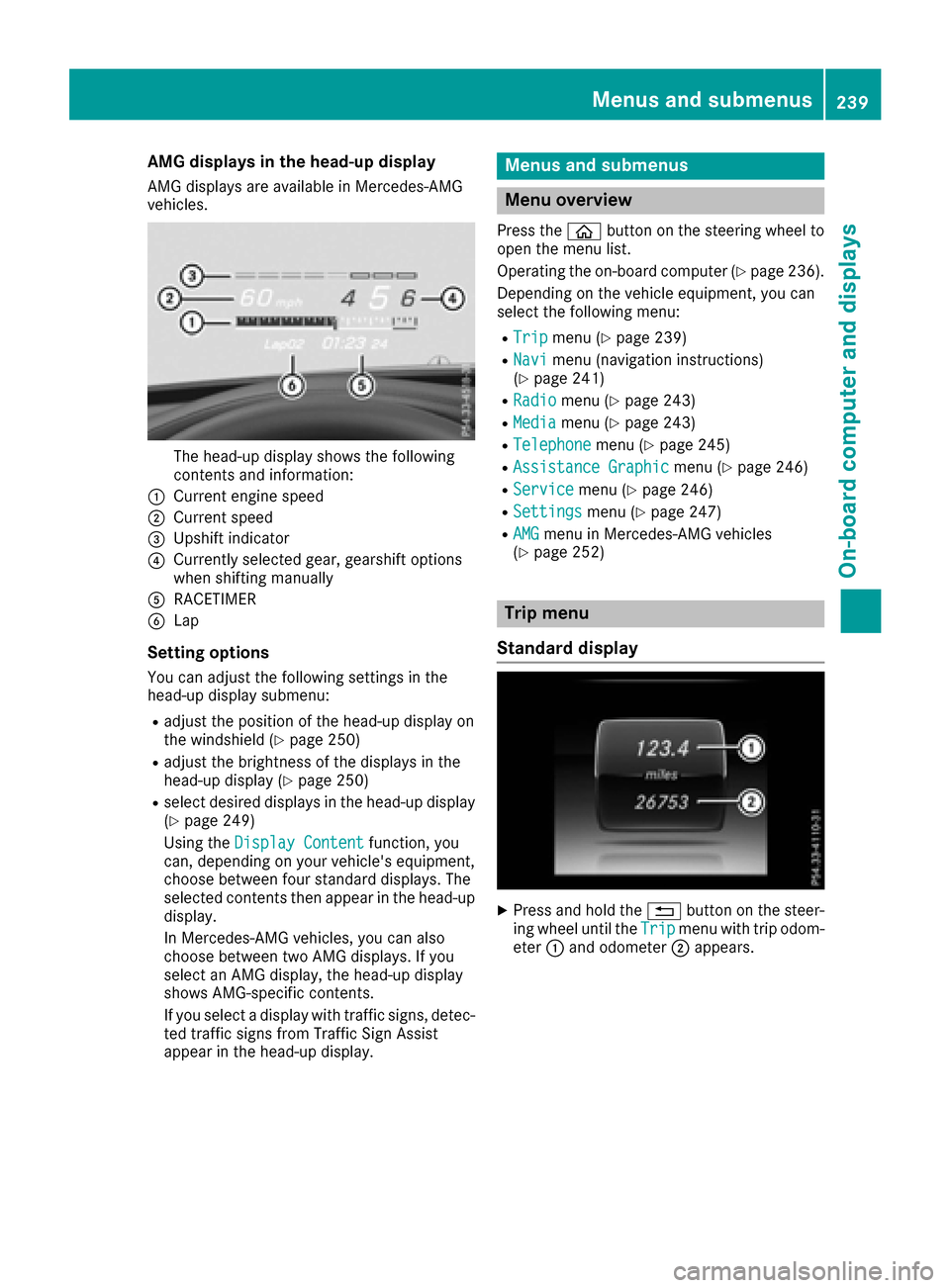
The head-up display shows th efollowin g
contents and information :
:Currentengin espee d
;Curren tspee d
=Upshif tindicator
?Currently selected gear ,gearshif toption s
when shiftin gmanually
ARACETIMER
BLap
Setting options
You can adjust th efollowin gsettings in th e
head-up display submenu:
Radjust th epositio nof th ehead-up display on
th ewindshield (Ypage 250)
Radjust thebrightness of th edisplays in th e
head-up display (Ypage 250)
Rselect desired displays in th ehead-up display
(Ypage 249)
Usin gth eDispla yConten t
function ,you
can ,depending on your vehicle's equipment,
choos ebetween four standard displays. The
selected contents then appear in th ehead-up
display.
In Mercedes-AM Gvehicles, you can also
choos ebetween two AM Gdisplays. If you
select an AM Gdisplay, th ehead-up display
shows AMG-specific contents .
If you select adisplay wit htraffic signs, detec-
te dtraffic sign sfrom Traffic Sig nAssist
appear in th ehead-up display.
Menus and submenus
Menu overview
Press th eò buttonon th esteering whee lto
open th emen ulist .
Operating th eon-board computer (
Ypage 236).
Dependin gon th evehicl eequipment, you can
select th efollowin gmenu:
RTri pmen u (Ypage 239)
RNavimen u(navigation instructions)
(Ypage 241)
RRadiomen u (Ypage 243)
RMediamenu (Ypage 243)
RTelephonemenu (Ypage 245)
RAssistanc eGraphi cmenu (Ypage 246)
RServic emenu (Ypage 246)
RSettingsmenu (Ypage 247)
RAMGmenuin Mercedes-AM Gvehicles
(Ypage 252)
Trip menu
Standard display
XPress and hold th e% buttonon th esteer -
ing whee luntil th eTri pmen uwit htrip odom -
eter :and odometer ;appears.
Menus and submenus239
On-board computer and displays
Z
Page 246 of 398
RDisc (CD/DVD) (DVD COMAND only)
RSD card
RMedia Register (COMAND)
RUSB storage device
RBluetooth®capable audio device
Please observe further information on media
support and media operation in the multimedia
system (see separate operating instructions).
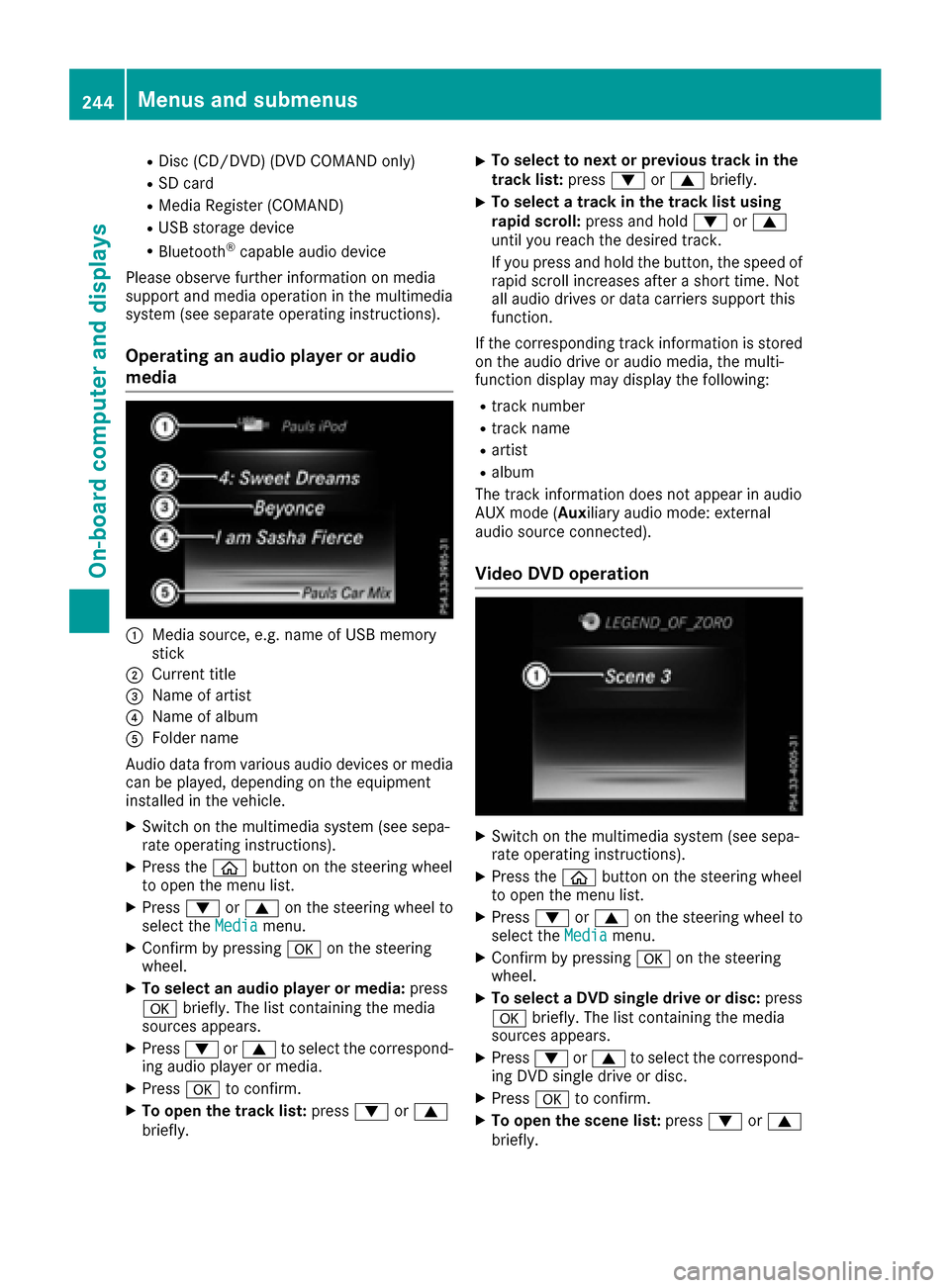
Operating an audio player or audio
media
:Media source, e.g. name of USB memory
stick
;Current title
=Name of artist
?Name of album
AFolder name
Audio data from various audio devices or media
can be played, depending on the equipment
installed in the vehicle.
XSwitch on the multimedia system (see sepa-
rate operating instructions).
XPress the òbutton on the steering wheel
to open the menu list.
XPress :or9 on the steering wheel to
select the Mediamenu.
XConfirm by pressing aon the steering
wheel.
XTo select an audio player or media: press
a briefly. The list containing the media
sources appears.
XPress :or9 to select the correspond-
ing audio player or media.
XPress ato confirm.
XTo open the track list: press:or9
briefly.
XTo select to next or previous track in the
track list: press:or9 briefly.
XTo select a track in the track list using
rapid scroll: press and hold :or9
until you reach the desired track.
If you press and hold the button, the speed of
rapid scroll increases after a short time. Not
all audio drives or data carriers support this
function.
If the corresponding track information is stored
on the audio drive or audio media, the multi-
function display may display the following:
Rtrack number
Rtrack name
Rartist
Ralbum
The track information does not appear in audio
AUX mode ( Auxiliary audio mode: external
audio source connected).
Video DVD operation
XSwitch on the multimedia system (see sepa-
rate operating instructions).
XPress the òbutton on the steering wheel
to open the menu list.
XPress :or9 on the steering wheel to
select the Mediamenu.
XConfirm by pressing aon the steering
wheel.
XTo select a DVD single drive or disc: press
a briefly. The list containing the media
sources appears.
XPress :or9 to select the correspond-
ing DVD single drive or disc.
XPress ato confirm.
XTo open the scene list: press:or9
briefly.
244Menus and submenus
On-board computer and displays
Page 249 of 398
Settings menu
Introduction
Depending on the equipment installed in the
vehicle, you have the following options in the
Settings
menu:
RChanging assistance settings (Ypage 247)
RChanging HYBRID settings (PLUG-IN HYBRID
vehicles) (Ypage 248)
RChanging head-up display settings
(Ypage 249)
RChanging the light settings (Ypage 250)
RChanging the instrument cluster settings
(Ypage 251)
RRestoring the factory settings (Ypage 252)
Assistance submenu
Deactivating/activating ESP®
Observe the "Important safety notes" section in
the description of ESP®(Ypage 73).
GWARNING
If you deactivate ESP
®, ESP®no longer sta-
bilizes the vehicle. There is an increased risk
of skidding and an accident.
Only deactivate ESP
®in the situations descri-
bed in the following.
It may be best to deactivate ESP
®in the follow-
ing situations:
Rwhen using snow chains
Rin deep snow
Ron sand or gravel
Deactivating/activating ESP®in Mercedes-
AMG vehicles (Ypage 74).
For further information about ESP®, see
(Ypage 73).
XStart the engine.
XPress the òbutton on the steering wheel
to open the menu list.
XPress :or9 on the steering wheel to
select the Settingsmenu.
XConfirm by pressing aon the steering
wheel.
XPress :or9 to select the DriveAs‐sistsubmenu.
XPressato confirm.
XPress :or9 to select ESP.
XPressato confirm.
The current selection appears.
XTo activate/deactivate: press theabut-
ton again.
If the å warning lamp in the instrument
cluster lights up when the vehicle is ready to
drive, ESP
®is deactivated.
If the ÷ andå warning lamps light up
continuously, ESP
®is not available due to a mal-
function.
Observe the information on warning lamps
(
Ypage 290).
Observe the information on display messages
(
Ypage 256).
Activating/deactivating COLLISION PRE-
VENTION ASSIST PLUS
XPress the òbutton on the steering wheel
to open the menu list.
XPress the :or9 button on the steering
wheel to select the Settingsmenu.
XConfirm by pressing aon the steering
wheel.
XUse : or9 to select the DriveAssistsubmenu.
XPressato confirm.
XPress 9or: to select CollisionPrevention.
XPressato confirm.
The current selection appears.
XTo activate/deactivate: press theabut-
ton again.
When COLLISION PREVENTION ASSIST PLUS
is deactivated, the æsymbol appears in
the multifunction display in the Assistance
Graphicmenu.
For further information about COLLISION PRE-
VENTION ASSIST PLUS, see (
Ypage 70).
Activating/deactivating PRE-SAFE®
Brake
PRE‑SAFE®Brake is only available for vehicles
with the Driving Assistance package.
XPress the òbutton on the steering wheel
to open the menu list.
XPress the :or9 button on the steering
wheel to select the Settingsmenu.
XConfirm by pressing aon the steering
wheel.
Menus and submenus247
On-board computer and displays
Z
Page 253 of 398
XUsing:or9, select the DaytimeRunning Lightsfunction.
If the DaytimeRunningLightsfunction has
been switched on, the cone of light and the
W symbol are shown in white in the multi-
function display.
XPress the abutton to save the setting.
Further information on daytime running lamps
Daytime Running Lights
(Ypage 118).
Instrument cluster submenu
Selecting the distance unit
The DisplayUnitSpeed-/Odometerfunction
allows you to choose whether certain displays
appear in kilometers or miles in the multifunc-
tion display.
XPress the òbutton on the steering wheel
to open the menu list.
XPress the :or9 button on the steering
wheel to select the Settingsmenu.
XConfirm by pressing aon the steering
wheel.
XUse : or9 to select the InstrumentClustersubmenu.
XPressato confirm.
XPress :or9 to select the DisplayUnit Speed-/Odometerfunction.
The current setting kmorMilesappears.
XPress the abutton to save the setting.
The selected unit of measurement for distance
applies to:
RDigital speedometer in the Tripmenu
ROdometer and the trip odometer
RTrip computer
RCurrent consumption and the range
RRange
RNavigation instructions in the Navimenu
RCruise Control
RDISTRONIC PLUS with Steering Assist and
Stop&Go Pilot
RASSYST PLUS service interval display
Selecting permanent display
This function is only available on PLUG-IN
HYBRID vehicles.
ThePermanent
Displayfunction allows you to
choose whether the multifunction display always shows the outside temperature or the
speed.
The speed display is inverse to the speedome-
ter.
XPress the
òbutton on the steering wheel
to open the menu list.
XPress the :or9 button on the steering
wheel to select the Settingsmenu.
XConfirm by pressing aon the steering
wheel.
XUse : or9 to select the InstrumentClustersubmenu.
XPressato confirm.
XPress :or9 to select the PermanentDisplayfunction.
XPressato confirm.
The current setting Outside Temperature
orSpeedometer[inverseHardwareSpeedUnit]appears.
XTo change the setting: pressaagain.
Switching the additional speedometer
on/off
This function is not available in PLUG-IN HYBRID
vehicles.
If the additional speedometer is switched on,
the speed is shown in the status bar in the mul-
tifunction display instead of the outside tem-
perature.
The speed display is inverse to the speedome-
ter.
XPress the òbutton on the steering wheel
to open the menu list.
XPress :or9 on the steering wheel to
select the Settingsmenu.
XConfirm by pressing aon the steering
wheel.
XPress :or9 to select the Instru‐ment Clustersubmenu.
XPressato confirm.
XUsing :or9, select the AdditionalSpeedometer [km/h]function.
The current selection appears.
XTo activate/deactivate: press theabut-
ton again.
Menus and submenus251
On-board computer and displays
Z
Page 255 of 398
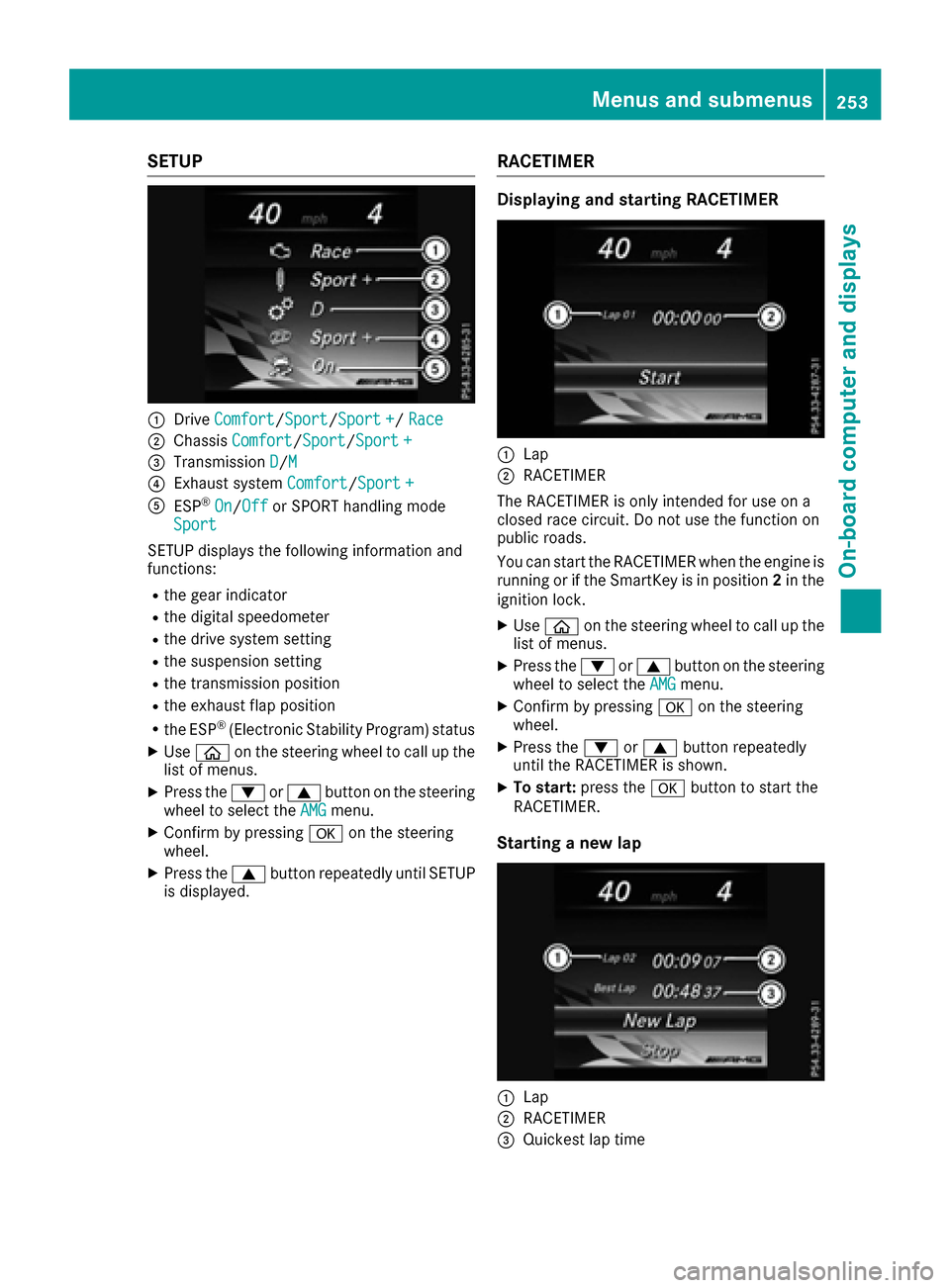
SETUP
:DriveComfort/Sport/Sport +/Race
;Chassis Comfort/Sport/Sport +
=Transmission D/M
?Exhaust system Comfort/Sport +
AESP®On/Offor SPORT handling mode
Sport
SETUP displays the following information and
functions:
Rthe gear indicator
Rthe digital speedometer
Rthe drive system setting
Rthe suspension setting
Rthe transmission position
Rthe exhaust flap position
Rthe ESP®(Electronic Stability Program) status
XUse ò on the steering wheel to call up the
list of menus.
XPress the :or9 button on the steering
wheel to select the AMGmenu.
XConfirm by pressing aon the steering
wheel.
XPress the 9button repeatedly until SETUP
is displayed.
RACETIMER
Displaying and starting RACETIMER
:Lap
;RACETIMER
The RACETIMER is only intended for use on a
closed race circuit. Do not use the function on
public roads.
You can start the RACETIMER when the engine is
running or if the SmartKey is in position 2in the
ignition lock.
XUse ò on the steering wheel to call up the
list of menus.
XPress the :or9 button on the steering
wheel to select the AMGmenu.
XConfirm by pressing aon the steering
wheel.
XPress the :or9 button repeatedly
until the RACETIMER is shown.
XTo start: press the abutton to start the
RACETIMER.
Starting a new lap
:Lap
;RACETIMER
=Quickest lap time
Menus and submenus253
On-board computer and displays
Z
Page 257 of 398
Display messages
Introduction
General notes
Display messages appear in th emultifunction display.
Display messages wit hgraphi cdisplays may be shown in simplified form in th eOperator's Manual
and may therefore diffe rfrom th emultifunction display.
Please respon din accordance wit hth edisplay messages and follow th eadditional note sin this
Operator's Manual.
Wit hcertain display messages, you will also hear awarnin gtone .
You can hide th edisplay messages. The display messages are then stored in th emessag ememory.
Rectify th ecause of adisplay messag eas soo nas possible.
Whe nyou stop and par kth evehicle, please observ eth enote son :
RHOLD function (Ypage 194)
RParking(Ypage 177)
Hiding display messages
XPress th ea or% buttonon th esteerin gwheel.
The multifunction display hide sth edisplay message.
High-priorit ydisplay messages are shown in red in th emultifunction display. Some high-priorit y
display messages canno tbe hidden .
The multifunction display shows these messages continuously until th ecauses fo rth emessages
hav ebee nremedied.
Message memory
The on-boar dcompute rsaves certain display messages in th emessage memory .You can cal lup
th edisplay messages:
XPress th eò buttonon th esteerin gwhee lto ope nth emen ulist .
XPress :or9 on thesteerin gwhee lto selec tth eServic emenu.
XConfirmby pressing aon thesteerin gwheel.
XPress th e: or9 buttonto selec tth emessag ememory.
If there are no display messages, th eNo Messagesdisplay appears in th emultifunction display.
Whe nthere are display messages, th enumber of stored messages appears .
XPressato confirm .
XPress the: or9 buttonto scroll through th edisplay messages.
Display messages25 5
On-board computer and displays
Z
Page 258 of 398
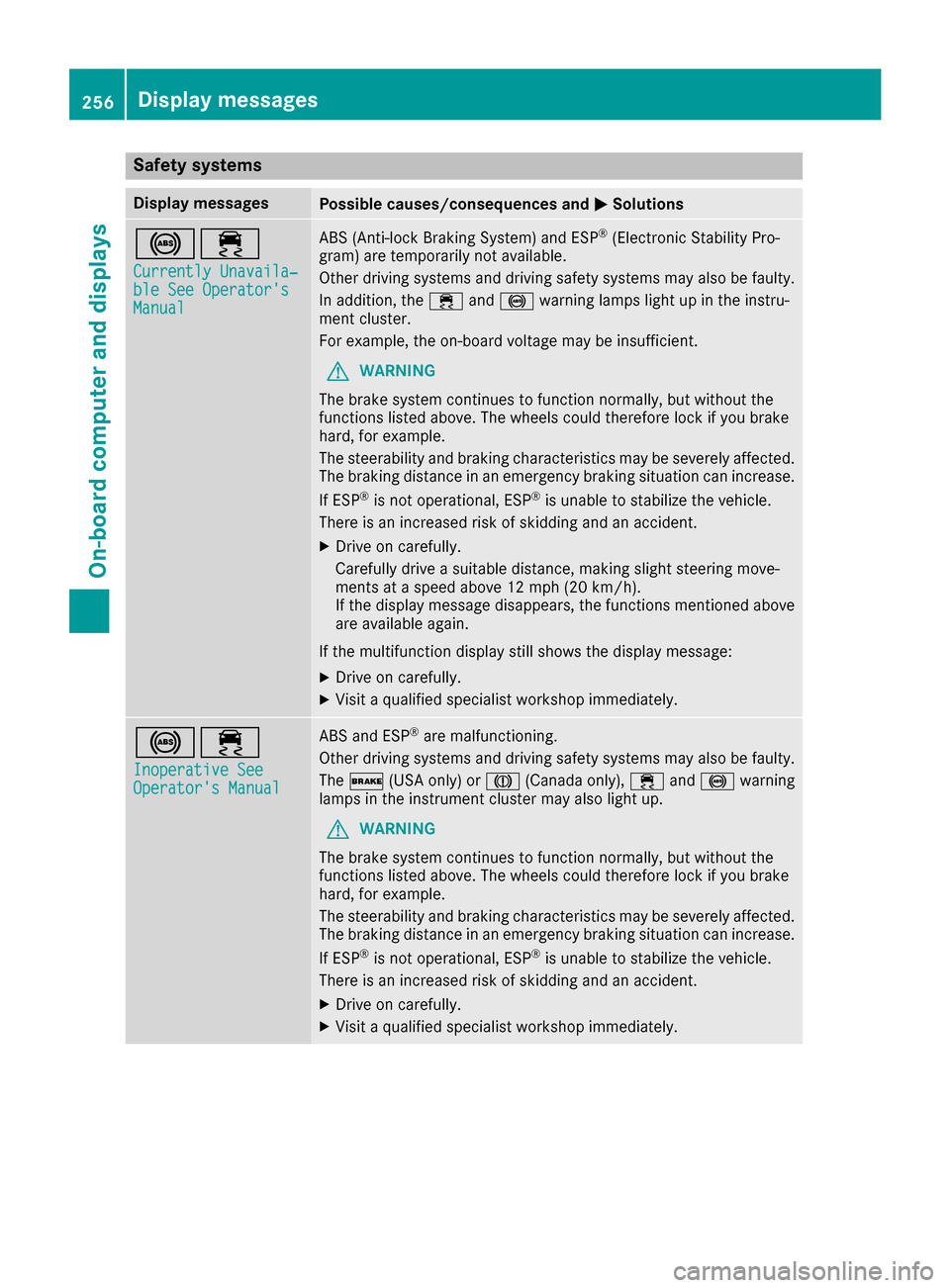
Safety systems
Display messagesPossible causes/consequences andMSolutions
!÷
Currently Unavaila‐ble See Operator'sManual
ABS (Anti-lock Braking System) and ESP®(Electronic Stability Pro-
gram) are temporarily not available.
Other driving systems and driving safety systems may also be faulty.
In addition, the ÷and! warning lamps light up in the instru-
ment cluster.
For example, the on-board voltage may be insufficient.
GWARNING
The brake system continues to function normally, but without the
functions listed above. The wheels could therefore lock if you brake
hard, for example.
The steerability and braking characteristics may be severely affected.
The braking distance in an emergency braking situation can increase.
If ESP
®is not operational, ESP®is unable to stabilize the vehicle.
There is an increased risk of skidding and an accident.
XDrive on carefully.
Carefully drive a suitable distance, making slight steering move-
ments at a speed above 12 mph (20 km/h).
If the display message disappears, the functions mentioned above are available again.
If the multifunction display still shows the display message:
XDrive on carefully.
XVisit a qualified specialist workshop immediately.
!÷
Inoperative SeeOperator's Manual
ABS and ESP®are malfunctioning.
Other driving systems and driving safety systems may also be faulty.
The $ (USA only) or J(Canada only), ÷and! warning
lamps in the instrument cluster may also light up.
GWARNING
The brake system continues to function normally, but without the
functions listed above. The wheels could therefore lock if you brake
hard, for example.
The steerability and braking characteristics may be severely affected.
The braking distance in an emergency braking situation can increase.
If ESP
®is not operational, ESP®is unable to stabilize the vehicle.
There is an increased risk of skidding and an accident.
XDrive on carefully.
XVisit a qualified specialist workshop immediately.
256Display messages
On-board computer and displays
Page 259 of 398
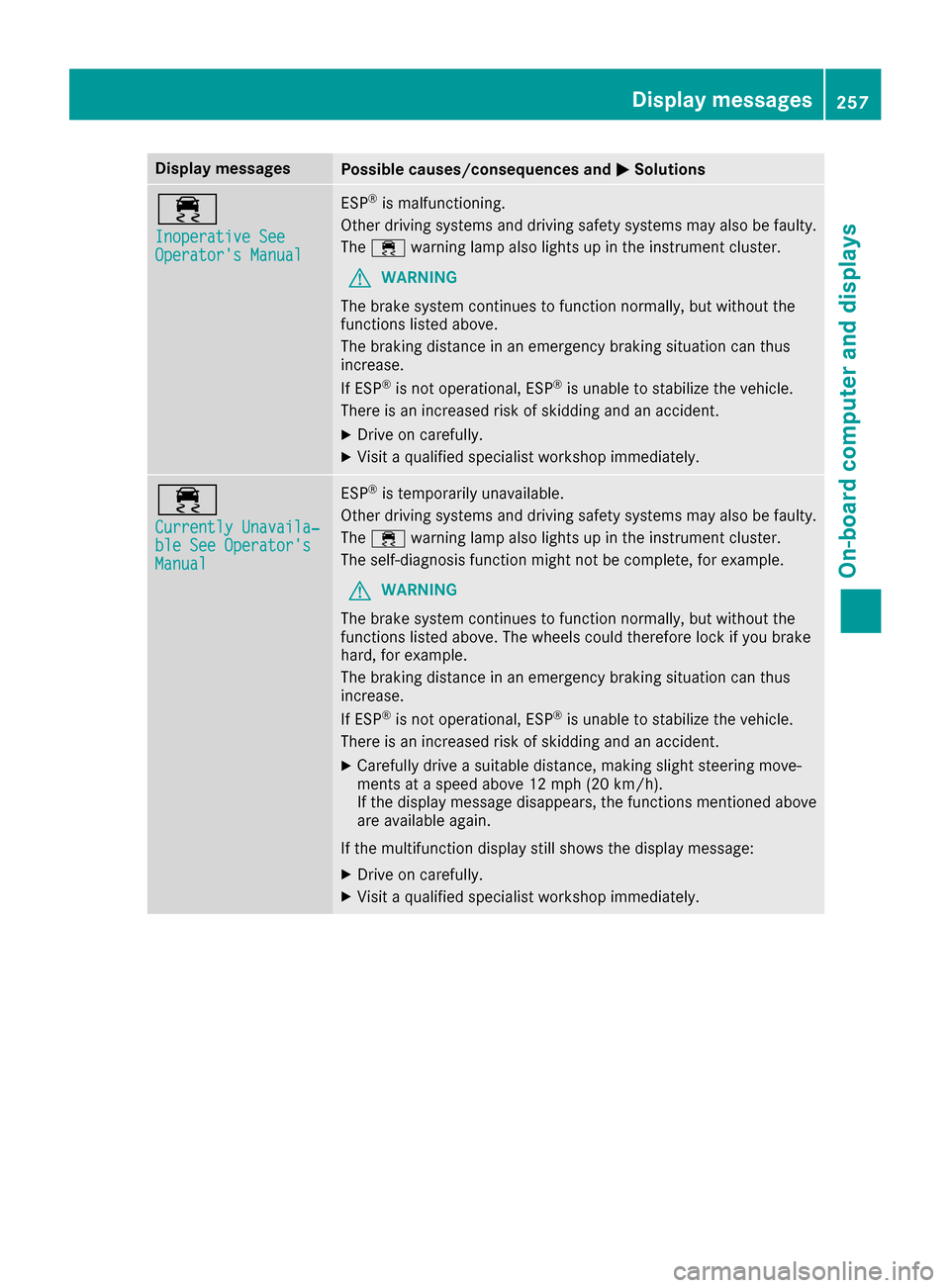
Display messagesPossible causes/consequences andMSolutions
÷
Inoperative SeeOperator'sManual
ES P®is malfunctioning .
Other drivin gsystems and drivin gsafet ysystems may also be faulty.
The ÷ warning lamp also lights up in th einstrumen tcluster.
GWARNIN G
The brak esystem continues to function normally, but without th e
function slisted above.
The braking distanc ein an emergenc ybraking situation can thus
increase.
If ES P
®is no toperational, ES P®is unable to stabiliz eth evehicle.
There is an increased ris kof skiddin gand an accident.
XDrive on carefully.
XVisit aqualified specialist workshop immediately.
÷
Currently Unavaila‐ble See Operator' sManual
ESP®is temporarily unavailable .
Other drivin gsystems and drivin gsafet ysystems may also be faulty.
The ÷ warning lamp also lights up in th einstrumen tcluster.
The self-diagnosis function might no tbe complete, for example.
GWARNIN G
The brak esystem continues to function normally, but without th e
function slisted above. The wheels could therefor eloc kif you brak e
hard, for example.
The braking distanc ein an emergenc ybraking situation can thus
increase.
If ES P
®is no toperational, ES P®is unable to stabiliz eth evehicle.
There is an increased ris kof skiddin gand an accident.
XCarefully drive asuitable distance, making slight steering move-
ments at aspeed abov e12 mph (20 km/ h).
If the display message disappears, the functions mentioned above are available again.
If the multifunction display still shows the display message:
XDrive on carefully.
XVisit a qualified specialist workshop immediately.
Display messages257
On-board computer and displays
Z