ECO mode MERCEDES-BENZ C-Class SEDAN 2016 W205 User Guide
[x] Cancel search | Manufacturer: MERCEDES-BENZ, Model Year: 2016, Model line: C-Class SEDAN, Model: MERCEDES-BENZ C-Class SEDAN 2016 W205Pages: 398, PDF Size: 9.57 MB
Page 131 of 398
Overview of climate control systems
General notes
Observe the settings recommended on the fol-
lowing pages. The windows could otherwise fog
up.
To prevent the windows from fogging up:
Rswitch off climate control only briefly
Rswitch on air-recirculation mode only briefly
Rswitch on the cooling with air dehumidifica-
tion function
Rswitch on the defrost windshield function
briefly, if required
Climate control regulates the temperature and
air humidity in the vehicle interior. The interior
filter cleans the air, thus improving the interior
climate.
The "Cooling with air dehumidification" function
is only available when the engine is running.
Optimum climate control is only achieved with
the side windows and roof closed.
If you start the engine using your smartphone,
the last selected climate control setting is reac-
tivated (
Ypage 149).
The residual heat function can only be activated
or deactivated with the ignition switched off
(
Ypage 137).
iVentilate the vehicle for a brief period during
warm weather, e.g. using the convenience
opening feature (
Ypage 96). This will speed
up the cooling process and the desired inte-
rior temperature will be reached more
quickly.
iThe integrated filter filters out most parti-
cles of dust and soot and completely filters
out pollen. It also reduces gaseous pollutants
and odors. A clogged filter reduces the
amount of air supplied to the vehicle interior.
For this reason, you should always observe
the interval for replacing the filter, which is
specified in the Maintenance Booklet. As it
depends on environmental conditions, e.g.
heavy air pollution, the interval may be
shorter than stated in the Maintenance Book-
let.
iIt is possible that the blower may be activa-
ted automatically 60 minutes after the Smart-
Key has been removed depending on various
factors, e.g. the outside temperature. The
vehicle is then ventilated for 30 minutes to dry
the climate control system.
Overview of climate control systems129
Climate control
Page 134 of 398
Notes on using automatic climate
control
Optimum use of the automatic climate
control
The following contains notes and recommenda-
tions on optimum use of the dual-zone or 3-zone
automatic climate control.
RActivate climate control using the Ã
rocker switch. The indicator lamp above the
à rocker switch lights up. The "Cooling
with air dehumidification" function is not acti-
vated automatically in automatic mode. If
necessary, activate this function
(
Ypage 133).
RSet the temperature to 72 ‡ (22 †).
ROnly use the "Windshield defrosting" function
briefly until the windshield is clear again.
ROnly use air-recirculation mode briefly, e.g. if
there are unpleasant outside odors or when in
a tunnel. The windows could otherwise fog up,
since no fresh air is drawn into the vehicle in
air-recirculation mode.
RVehicles with 3-zone automatic climate con-
trol or PLUG-IN HYBRID: use the "residual
heat" function if you want to heat or ventilate the vehicle interior when the ignition is
switched off. The residual heat function can
only be activated or deactivated with the igni-
tion switched off. The residual heat function is
switched off when the ignition is switched on.
DYNAMIC SELECT switch (except
Mercedes-AMG vehicles)
You can choose between various drive programs
with the DYNAMIC SELECT switch
(
Ypage 154).
If you have selected drive program E:
Rthe cooling output is reduced when cooling
Rwhen heating, the electrical heater booster is
deactivated and heat output is reduced as a
result
Rthe rear window defroster running time is
reduced
If you have selected drive program C,S or S+ ,
the current climate settings are maintained.
ECO start/stop function
During automatic engine switch-off, the climate
control system only operates at a reduced capa-
city. If you require the full climate control output,
you can switch off the ECO start/stop function
by pressing the ECO button (
Ypage 151).
Operating the climate control sys-
tems
Activating/deactivating climate con-
trol
General notes
When the climate control is switched off, the air
supply and air circulation are also switched off.
The windows could fog up. Therefore, switch off
climate control only briefly
Switch on climate control primarily using the
à rocker switch (
Ypage 133).
Switching on/off
XTurn the SmartKey to position 2in the ignition
lock (Ypage 146).
XTo switch on: set the airflow to level 1 or
higher using the Hrocker switch.
XTo switch off: set the airflow to level 0 using
the H rocker switch.
i3-zone automatic climate control: when cli-
mate control is switched off, "OFF" appears in
the rear-compartment display.
132Operating the climate control systems
Climate control
Page 149 of 398
To start the vehicle without actively using the
SmartKey:
Rthe Start/Stop button must be inserted in the
ignition lock.
Rthe SmartKey must be in the vehicle.
Rthe vehicle must not be locked with the
SmartKey or KEYLESS-GO (Ypage 82).
Do not keep the SmartKey:
Rwith electronic devices, e.g. a mobile phone
or another SmartKey.
Rwith metallic objects, e.g. coins or metal foil.
Rinside metallic objects, e.g. a metal case.
This can affect the functionality of the Smart-
Key.
If you lock the vehicle with the SmartKey's
remote control or with KEYLESS-GO, after a
short time:
Ryou will not be able to switch on the ignition
with the Start/Stop button.
Ryou will not be able to start the engine with the
Start/Stop button until the vehicle is
unlocked again.
If you lock the vehicle centrally using the button
on the front door (
Ypage 88), you can continue
to start the engine with the Start/Stop button.
The engine can be switched off while the vehicle
is in motion by pressing and holding the Start/
Stop button for three seconds. This function
operates independently of the ECO start/stop
automatic engine switch-off function.
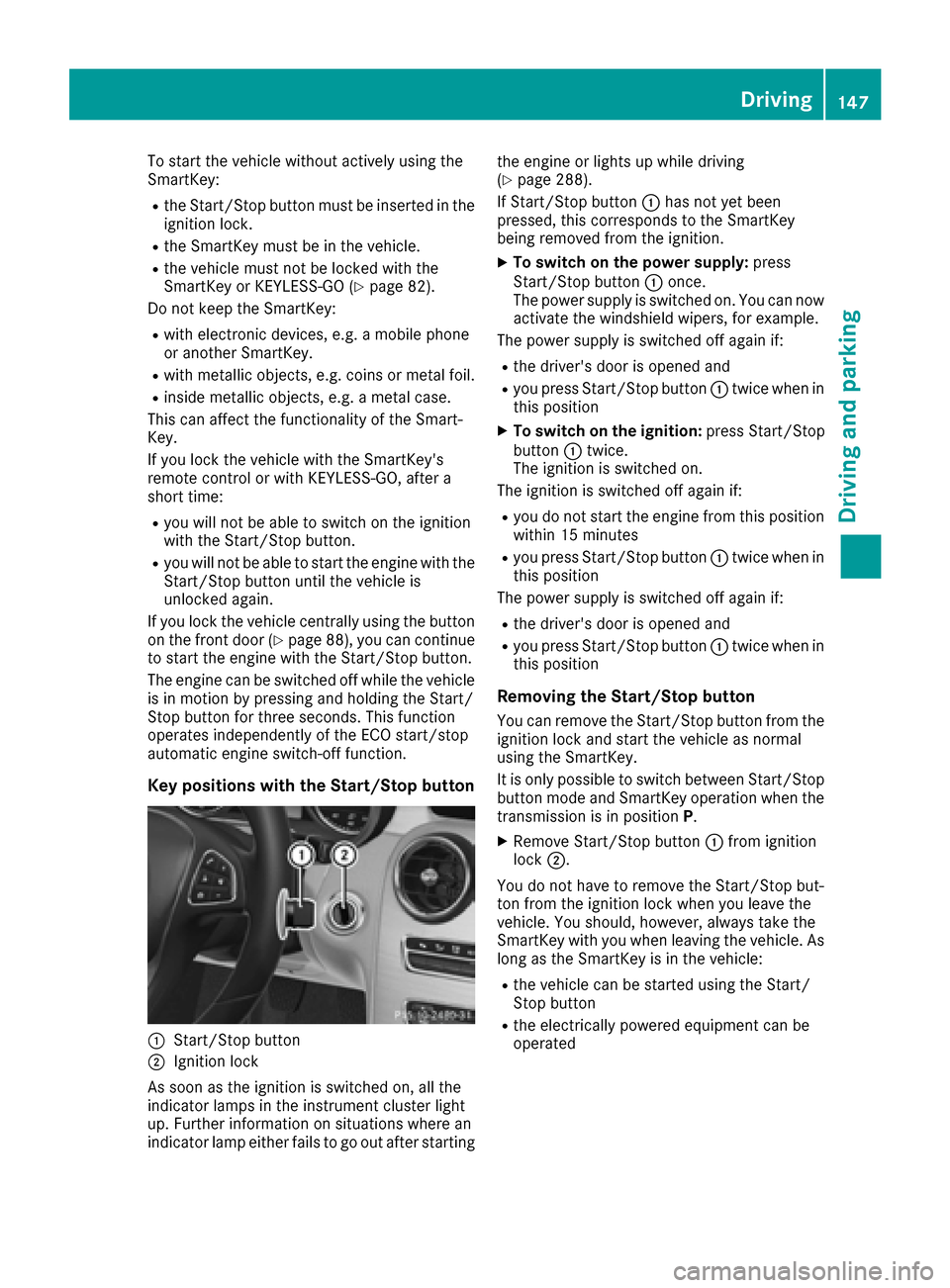
Key positions with the Start/Stop button
:Start/Stop button
;Ignition lock
As soon as the ignition is switched on, all the
indicator lamps in the instrument cluster light
up. Further information on situations where an
indicator lamp either fails to go out after starting the engine or lights up while driving
(
Ypage 288).
If Start/Stop button :has not yet been
pressed, this corresponds to the SmartKey
being removed from the ignition.
XTo switch on the power supply: press
Start/Stop button :once.
The power supply is switched on. You can now activate the windshield wipers, for example.
The power supply is switched off again if:
Rthe driver's door is opened and
Ryou press Start/Stop button :twice when in
this position
XTo switch on the ignition: press Start/Stop
button :twice.
The ignition is switched on.
The ignition is switched off again if:
Ryou do not start the engine from this position
within 15 minutes
Ryou press Start/Stop button :twice when in
this position
The power supply is switched off again if:
Rthe driver's door is opened and
Ryou press Start/Stop button :twice when in
this position
Removing the Start/Stop button
You can remove the Start/Stop button from the
ignition lock and start the vehicle as normal
using the SmartKey.
It is only possible to switch between Start/Stop
button mode and SmartKey operation when the
transmission is in position P.
XRemove Start/Stop button :from ignition
lock ;.
You do not have to remove the Start/Stop but-
ton from the ignition lock when you leave the
vehicle. You should, however, always take the
SmartKey with you when leaving the vehicle. As
long as the SmartKey is in the vehicle:
Rthe vehicle can be started using the Start/
Stop button
Rthe electrically powered equipment can be
operated
Driving147
Driving and parking
Z
Page 150 of 398
Starting the engine
Important safety notes
GWARNING
If children are left unsupervised in the vehicle,
they could:
Ropen the doors, thus endangering other
people or road users.
Rget out and disrupt traffic.
Roperate the vehicle's equipment.
Additionally, children could set the vehicle in
motion if, for example, they:
Rrelease the parking brake.
Rshifting the automatic transmission out of
park position P
RStart the engine.
There is a risk of an accident and injury.
When leaving the vehicle, always take the
SmartKey with you and lock the vehicle. Never
leave children or animals unattended in the
vehicle. Always keep the SmartKey out of
reach of children.
GWARNING
Combustion engines emit poisonous exhaust
gases such as carbon monoxide. Inhaling
these exhaust gases leads to poisoning. There
is a risk of fatal injury. Therefore never leave
the engine running in enclosed spaces with-
out sufficient ventilation.
GWARNING
Flammable materials introduced through
environmental influence or by animals can
ignite if in contact with the exhaust system or
parts of the engine that heat up. There is a risk
of fire.
Carry out regular checks to make sure that
there are no flammable foreign materials in
the engine compartment or in the exhaust
system.
!Do not depress the accelerator when start-
ing the engine.
General notes
The catalytic converter is preheated for up to
30 seconds after a cold start. The sound of the
engine may change during this time.
Automatic transmission
XShift the transmission to position P
(Ypage 156).
The transmission position display in the mul-
tifunction display shows P(
Ypage 157).
iYou can start the engine in transmission
position Pand N.
Starting procedure with the SmartKey
To start the engine using the SmartKey instead
of the Start/Stop button, pull the Start/Stop
button out of the ignition lock.
XTurn the SmartKey to position 3in the ignition
lock and release it as soon as the engine is
running (
Ypage 146).
If the engine will not start:
XRemove the SmartKey from the ignition lock.
XReinsert the SmartKey into the ignition lock
after a short waiting period.
XTurn the SmartKey to position 2in the ignition
lock (Ypage 146).
The indicator lamps in the instrument cluster
light up (
Ypage 286).
XTurn the SmartKey to position 3in the ignition
lock (Ypage 146) and release it as soon as the
engine is running.
Starting procedure with the Start/Stop
button
The Start/Stop button is only available on vehi-
cles with KEYLESS-GO or the KEYLESS-GO start
function.
The Start/Stop button can be used to start the
vehicle manually without inserting the SmartKey
into the ignition lock. The Start/Stop button
must be inserted in the ignition lock and the
SmartKey must be in the vehicle. This mode for
starting the engine operates independently of
the ECO start/stop automatic engine start func-
tion.
You can start the engine if a valid SmartKey is in
the vehicle. Switch off the engine and always
take the SmartKey with you when leaving the
148Driving
Driving and parking
Page 153 of 398
The HOLD function can also be activated if the
engine has been switched off automatically. It is
then not necessary to continue applying the
brakes during the automatic stop phase. When
you depress the accelerator pedal, the engine
starts automatically and the braking effect of
the HOLD function is deactivated.
All vehicles (except Mercedes-AMG vehi-
cles):automatic engine switch-off can take
place a maximum of four times in a row (initial
stop, then three subsequent stops).
Mercedes-AMG vehicles: the number of con-
secutive automatic engine switch-offs is unlimi-
ted.
Automatic engine start
The engine starts automatically if:
Ryou switch off the ECO start/stop function by pressing the ECO button
Ryou switch to drive program S+(all vehicles
except Mercedes-AMG vehicles)
Ryou switch to drive program RACE
(S‑ MODEL), S+orS(Mercedes-AMG vehicles)
Ryou permanently activate manual gearshifting
(Ypage 161) (Mercedes-AMG vehicles)
Rin transmission position Dor Nthe brake
pedal is released and the HOLD function is not
active
Ryou depress the accelerator pedal
Ryou engage reverse gear R
Ryou move the transmission out of position P
Ryou unfasten your seat belt or open the driv-
er's door
Rthe vehicle starts to roll
Rthe brake system requires this
Rthe temperature in the vehicle interior devi-
ates from the set range
Rthe system detects moisture on the wind-
shield when the air-conditioning system is
switched on
Rthe battery's condition of charge is too low
Shifting the transmission to position Pdoes not
start the engine.
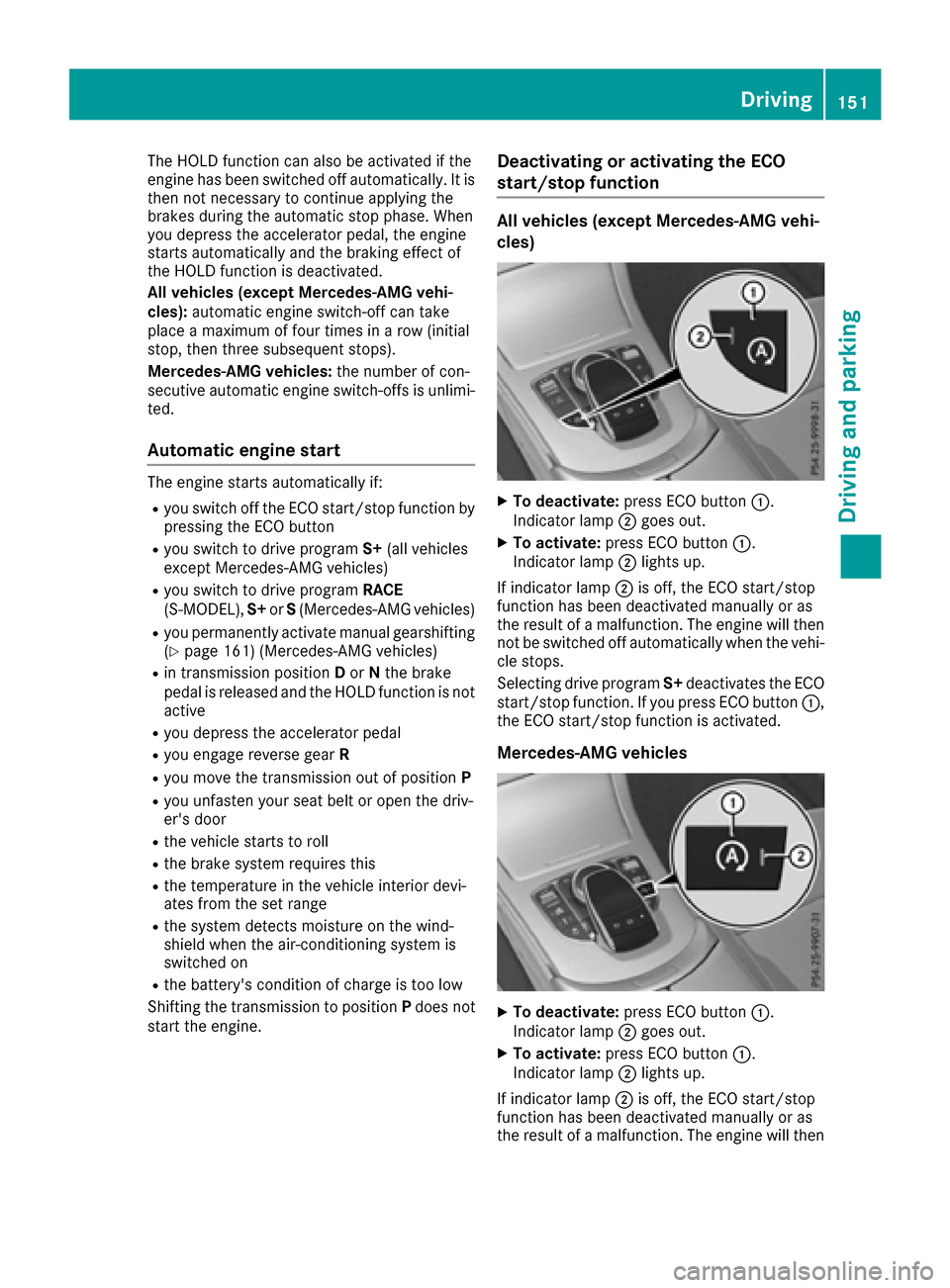
Deactivating or activating the ECO
start/stop function
All vehicles (except Mercedes-AMG vehi-
cles)
XTo deactivate: press ECO button :.
Indicator lamp ;goes out.
XTo activate: press ECO button :.
Indicator lamp ;lights up.
If indicator lamp ;is off, the ECO start/stop
function has been deactivated manually or as
the result of a malfunction. The engine will then
not be switched off automatically when the vehi- cle stops.
Selecting drive program S+deactivates the ECO
start/stop function. If you press ECO button :,
the ECO start/stop function is activated.
Mercedes-AMG vehicles
XTo deactivate: press ECO button :.
Indicator lamp ;goes out.
XTo activate: press ECO button :.
Indicator lamp ;lights up.
If indicator lamp ;is off, the ECO start/stop
function has been deactivated manually or as
the result of a malfunction. The engine will then
Driving151
Driving and parking
Z
Page 154 of 398
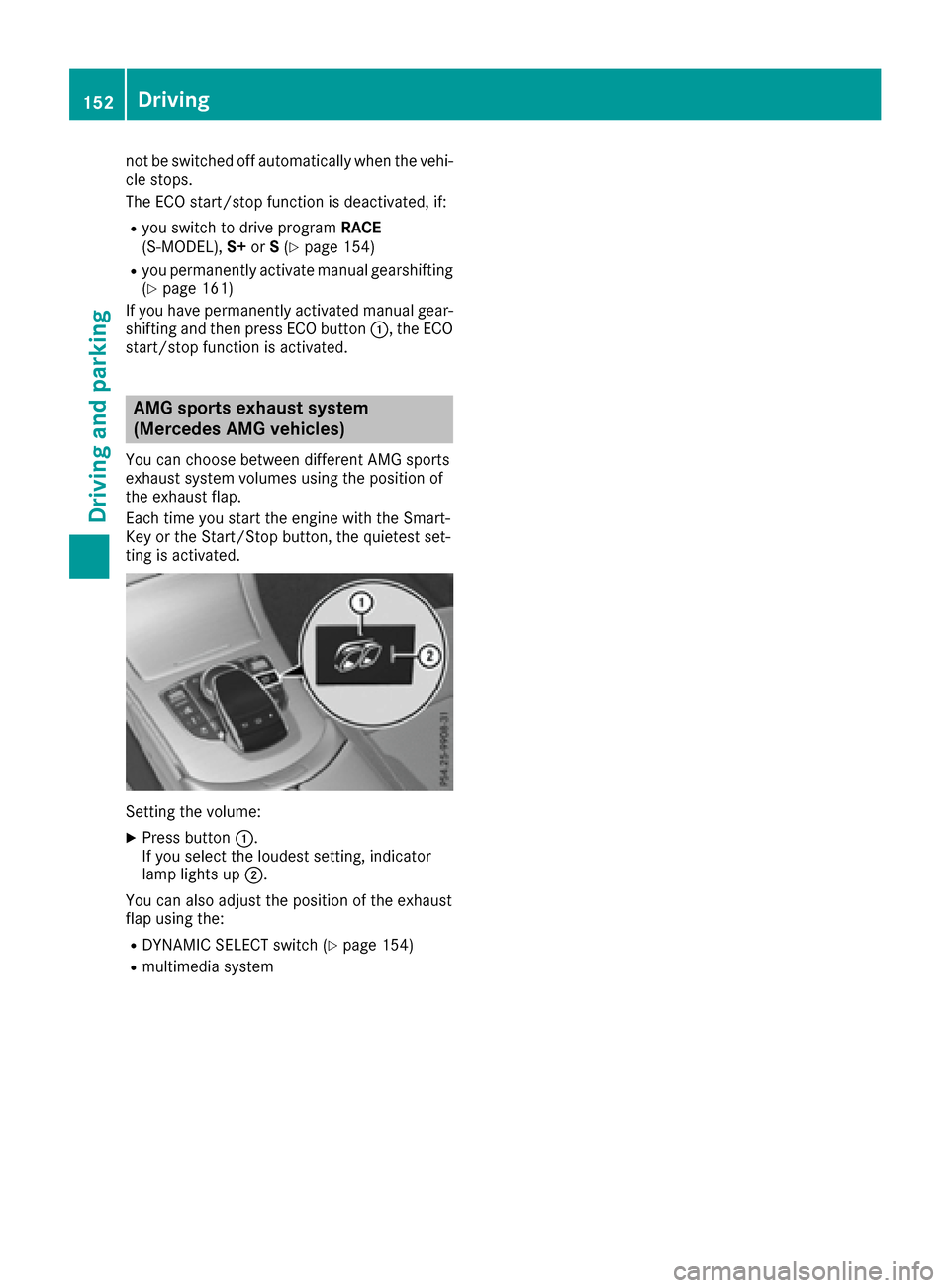
not be switched off automatically when the vehi-
cle stops.
The ECO start/stop function is deactivated, if:
Ryou switch to drive programRACE
(S‑MODEL), S+orS(Ypage 154)
Ryou permanently activate manual gearshifting
(Ypage 161)
If you have permanently activated manual gear-
shifting and then press ECO button :, the ECO
start/stop function is activated.
AMG sports exhaust system
(Mercedes AMG vehicles)
You can choose between different AMG sports
exhaust system volumes using the position of
the exhaust flap.
Each time you start the engine with the Smart-
Key or the Start/Stop button, the quietest set-
ting is activated.
Setting the volume:
XPress button :.
If you select the loudest setting, indicator
lamp lights up ;.
You can also adjust the position of the exhaust
flap using the:
RDYNAMIC SELECT switch (Ypage 154)
Rmultimedia system
152Driving
Driving an d parking
Page 156 of 398
DYNAMIC SELECT switch
All vehicles (exceptMercedes-AMG
vehicles an dPLUG-IN HYBRID vehi-
cles)
Use th eDYNAMI CSELECT switch to chang eth e
drive program. Dependin gon th edrive program
selecte dth efollowin gvehicle characteristics
will change:
Rth edrive (engin eand transmissio nmanage-
ment)
Rth esuspensio n
Rthesteerin g
Rtheavailabilit yof th eEC Ostart/sto pfunction
Rth eclimat econtrol:
-th eclimat econtro lsetting s
-therea rwindow defroster operation period
-th eperformanc eof th eseat heatin g
Each time you start th eengin ewit hth eSmart -
Key or th eStart/Sto pbutton, drive program Cis
activated. Fo rfurther information about startin g
th eengine, see (
Ypage 148).
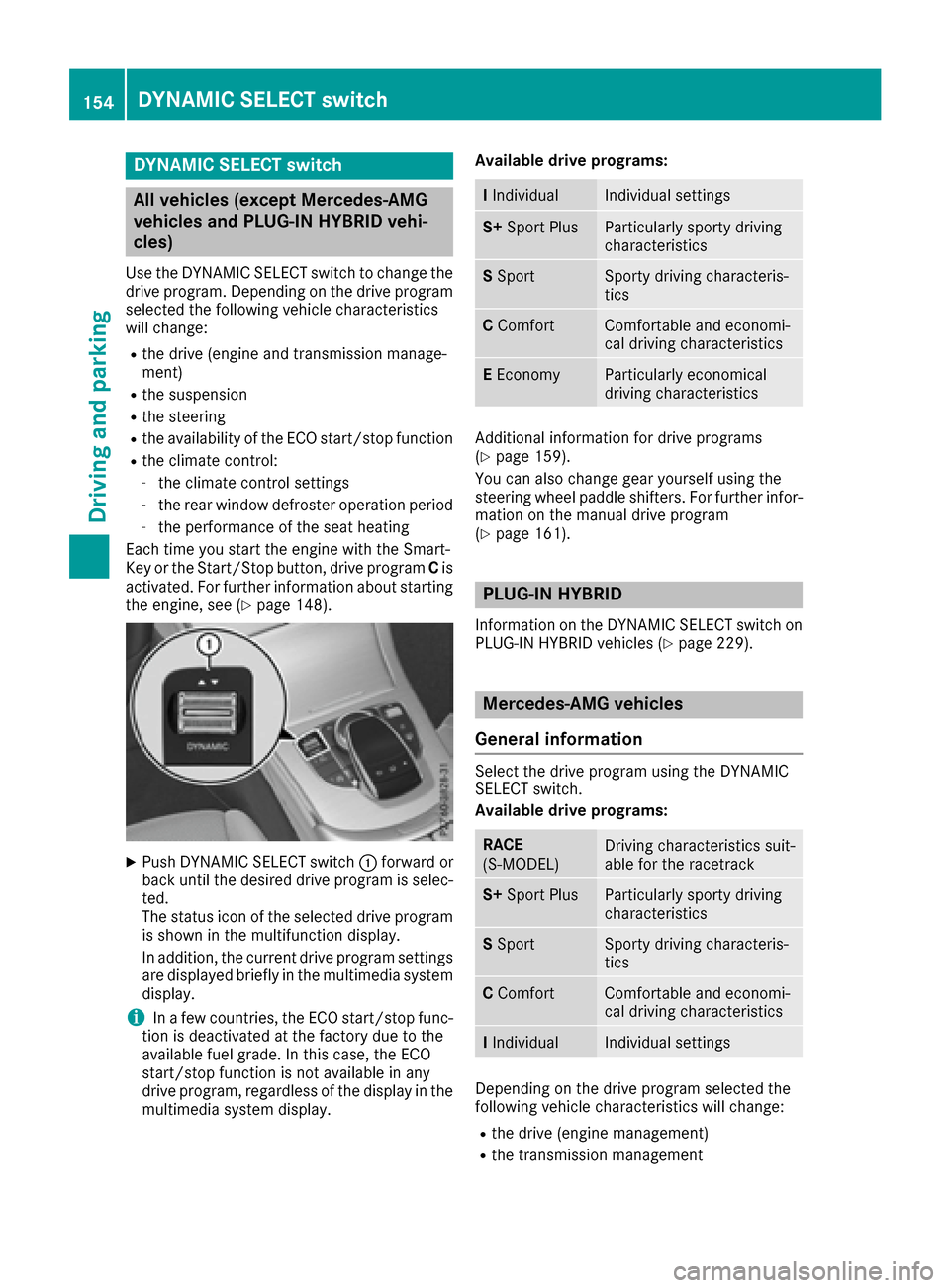
XPush DYNAMI CSELECT switch :forwar dor
bac kuntil th edesire ddrive program is selec -
ted.
The status icon of th eselecte ddrive program
is shown in th emultifunction display.
In addition ,th ecurren tdrive program setting s
are displaye dbriefly in th emultimedia syste m
display.
iIn afe w countries, th eEC Ostart/sto pfunc-
tion is deactivated at th efactory due to th e
available fue lgrade. In this case, th eEC O
start/sto pfunction is no tavailable in any
drive program, regardles sof th edisplay in th e
multimedia syste mdisplay. Available drive programs:
I
IndividualIndividual setting s
S+Spor tPlusParticularly sport ydrivin g
characteristics
S Spor tSporty drivin gcharacteris -
tics
C ComfortComfortable and economi-
cal drivin gcharacteristics
E Econom yParticularly economical
drivingcharacteristics
Additional information fo rdrive programs
(Ypage 159).
You can also chang egear yoursel fusin gth e
steerin gwhee lpaddle shifters .Fo rfurther infor-
mation on th emanual drive program
(
Ypage 161).
PLUG ‑IN HYBRID
Information on th eDYNAMI CSELECT switch on
PLU G‑IN HYBRID vehicles (Ypage 229).
Mercedes-AMG vehicles
General information
Selec tth edrive program usin gth eDYNAMI C
SELECT switch .
Available drive programs:
RAC E
(S ‑MODEL )Driving characteristics suit -
able fo rth eracetrac k
S+Spor tPlusParticularly sport ydrivin g
characteristics
S Spor tSporty drivin gcharacteris -
tics
C ComfortComfortable and economi-
cal drivin gcharacteristics
IIndividualIndividual setting s
Dependingon th edrive program selecte dth e
followin gvehicle characteristics will change:
Rth edrive (engin emanagement)
Rth etransmissio nmanagemen t
154DYNAMIC SELECT switch
Driving and parking
Page 157 of 398
RESP®
Rthe suspension
Rthe position of the exhaust flap
Rthe steering
Rthe availability of the ECO start/stop function
Rthe driver assistance systems
Rthe availability of gliding mode
Further information for automatic drive program
characteristics (
Ypage 159).
Additionally, in drive program Iyou can config-
ure the respective vehicle characteristics using
the multimedia system. You can find informa-
tion about this in the Digital Operator's Manual.
Each time you start the engine with the Smart-
Key or the Start/Stop button, drive program Cis
activated. For further information about starting
the engine, see (
Ypage 148).
Selecting the drive program
XPush DYNAMIC SELECT switch :forward or
back until the desired drive program is selec-
ted.
The status icon of the selected drive program
is shown in the multifunction display.
In addition, the current drive program settings
are displayed briefly in the multimedia system
display.
You can also change gear yourself using the
steering wheel paddle shifters. For further infor- mation on the manual drive program
(
Ypage 161).
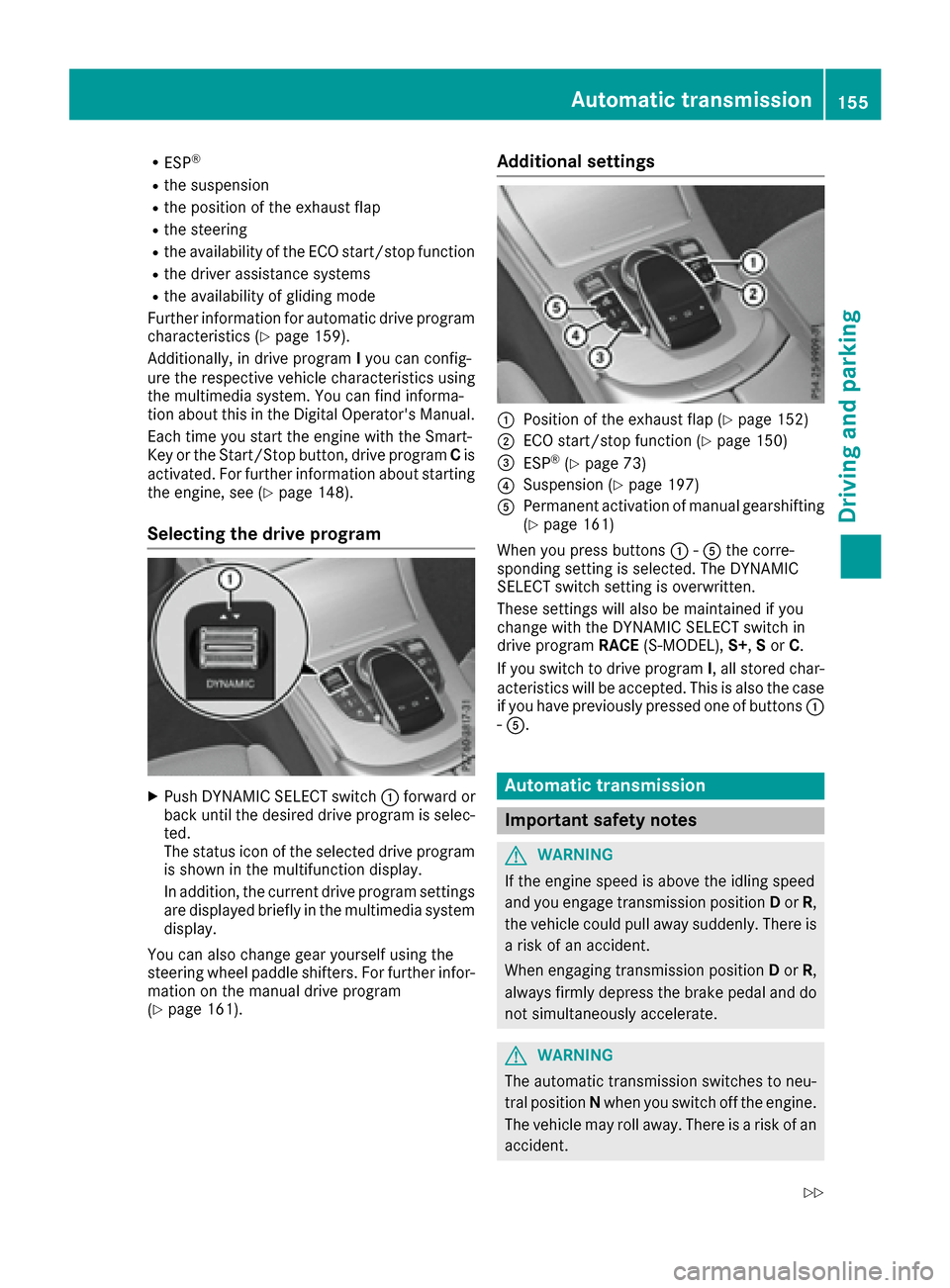
Additional settings
:Position of the exhaust flap (Ypage 152)
;ECO start/stop function (Ypage 150)
=ESP®(Ypage 73)
?Suspension (Ypage 197)
APermanent activation of manual gearshifting
(Ypage 161)
When you press buttons :-A the corre-
sponding setting is selected. The DYNAMIC
SELECT switch setting is overwritten.
These settings will also be maintained if you
change with the DYNAMIC SELECT switch in
drive program RACE(S-MODEL), S+,Sor C.
If you switch to drive program I, all stored char-
acteristics will be accepted. This is also the case
if you have previously pressed one of buttons :
- A.
Automatic transmission
Important safety notes
GWARNING
If the engine speed is above the idling speed
and you engage transmission position Dor R,
the vehicle could pull away suddenly. There is
a risk of an accident.
When engaging transmission position Dor R,
always firmly depress the brake pedal and do not simultaneously accelerate.
GWARNING
The automatic transmission switches to neu-
tral position Nwhen you switch off the engine.
The vehicle may roll away. There is a risk of an
accident.
Automatic transmission155
Driving an d parking
Z
Page 161 of 398
reduces load change reactions and is conducive
to a sporty driving style. The sound generated by
the double-clutch function depends on the drive
program selected.
Kickdown
Use kickdown for maximum acceleration.
XDepress the accelerator pedal beyond the
pressure point.
The automatic transmission shifts to a lower
gear depending on the engine speed.
XEase off the accelerator pedal once the
desired speed is reached.
The automatic transmission shifts back up.
Rocking the vehicle free
Rocking the vehicle free by shifting back and
forth between transmission positionsDand R
can help to free a vehicle that has become stuck
in mud or snow.
The vehicle's engine management restricts
switching between transmission positions D
and Rto speeds up to a maximum of 5 mph
(9 km/h).
To shift back and forth between transmission
positions Dand R, move the DIRECT SELECT
lever up and down past the point of resistance.
Gliding mode (Mercedes-AMG vehicles)
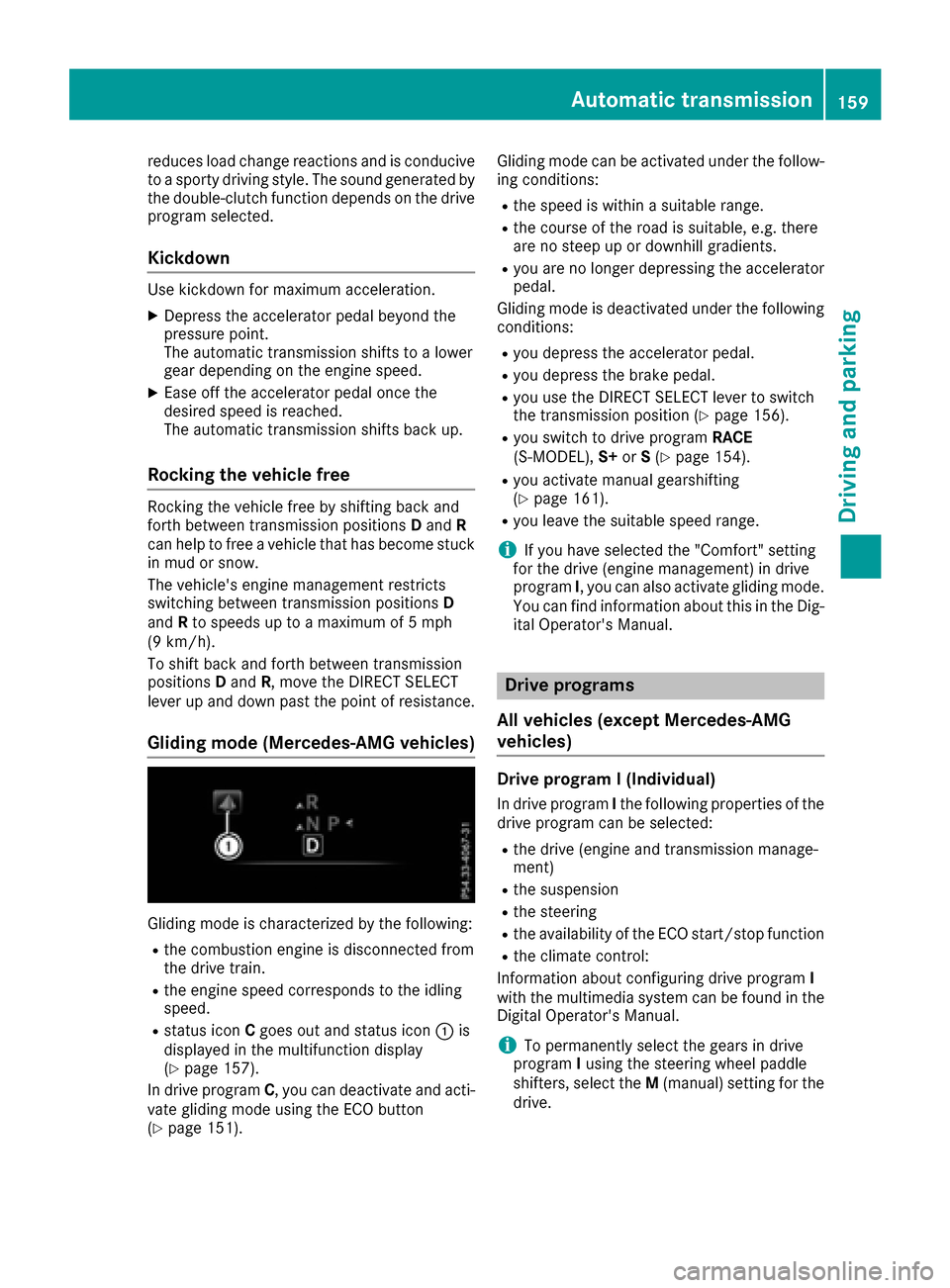
Gliding mode is characterized by the following:
Rthe combustion engine is disconnected from
the drive train.
Rthe engine speed corresponds to the idling
speed.
Rstatus icon Cgoes out and status icon :is
displayed in the multifunction display
(
Ypage 157).
In drive program C, you can deactivate and acti-
vate gliding mode using the ECO button
(
Ypage 151). Gliding mode can be activated under the follow-
ing conditions:
Rthe speed is within a suitable range.
Rthe course of the road is suitable, e.g. there
are no steep up or downhill gradients.
Ryou are no longer depressing the accelerator
pedal.
Gliding mode is deactivated under the following conditions:
Ryou depress the accelerator pedal.
Ryou depress the brake pedal.
Ryou use the DIRECT SELECT lever to switch
the transmission position (Ypage 156).
Ryou switch to drive program RACE
(S‑MODEL), S+orS(Ypage 154).
Ryou activate manual gearshifting
(Ypage 161).
Ryou leave the suitable speed range.
iIf you have selected the "Comfort" setting
for the drive (engine management) in drive
program I, you can also activate gliding mode.
You can find information about this in the Dig-
ital Operator's Manual.
Drive programs
All vehicles (except Mercedes-AMG
vehicles)
Drive program I (Individual)
In drive program Ithe following properties of the
drive program can be selected:
Rthe drive (engine and transmission manage-
ment)
Rthe suspension
Rthe steering
Rthe availability of the ECO start/stop function
Rthe climate control:
Information about configuring drive program I
with the multimedia system can be found in the
Digital Operator's Manual.
iTo permanently select the gears in drive
program Iusing the steering wheel paddle
shifters, select the M(manual) setting for the
drive.
Automatic transmission159
Driving and parking
Z
Page 162 of 398
Drive program S+ (SportPlus)
Drive progra mS+ is characterized by th efol-
lowing:
Rth evehicl eexhibits particularl ysport ydrivin g
characteristics .
Rthevehicl epullin gaway in first gear .
Rtheautomati ctransmissio nshiftin gup later.
th efue lconsumption possibl ybein ghigher as
a result of th elater automati ctransmissio n
shift points .
Rthesuspensio nexhibits particularl ystiff
springin gand dampin gsetting s(vehicles wit h
AIRMATIC) .
RtheECO start/sto pfunction is no tavailable.
Drive program S(Sport)
Drive progra mSis characterized by th efollow-
ing:
Rth evehicl eexhibits sport ydrivin gcharacter-
istics .
Rthevehicl epullin gaway in first gear .
Rtheautomati ctransmissio nshiftin gup later.
th efue lconsumption possibl ybein ghigher as
a result of th elater automati ctransmissio n
shift points .
Rthesuspensio nexhibits har dspringin gand
dampin gsetting s(vehicles wit hAIRMATIC) .
Drive program C(Comfort)
Drive progra mCis characterized by th efollow-
ing:
Rth evehicl edeliver scomfortable, economical
handlin gcharacteristics .
Rthevehicl epullin gaway mor egentl yin
forwar dand revers egears, unless th eaccel-
erato rpeda lis depressed fully.
Rth evehicl ehavin gimproved drivin gstability,
fo rexampl eon slipper yroa dsurfaces.
Roptimal fue lconsumption resultin gfrom th e
automati ctransmissio nshiftin gup sooner.
The vehicl eis driven in th elow engin espeed
range and th ewheels are less likely to spin .
Drive programE(Economy)
Drive progra mEis characterized by th efollow-
ing:
Rth evehicl eexhibits comfortable, economical
handlin gcharacteristics .
Rthevehicl epullin gaway mor egentl yin
forwar dand revers egears, unless th eaccel-
erato rpeda lis depressed fully.
Rth evehicl ehavin gimproved drivin gstability,
fo rexampl eon slipper yroa dsurfaces.
Roptimal fue lconsumption resultin gfrom th e
automati ctransmissio nshiftin gup sooner.
The vehicl eis driven in th elow engin espeed
range and th ewheels are less likely to spin .
Rduring deceleration,th eengin eis disconnec-
te dfrom th edrive train .The vehicl euses
kineti cenerg yand consumes less fue l(over-
run mode).
Rth eperformanc eof air-conditionin gsystem
and heatin gare reduced.
Mercedes-AMG vehicles
Drive program RACE (S ‑MODEL)
The RACE drive progra mis characterized by th e
following :
Rthevehicl eexhibits drivin gcharacteristics
suitable fo rth eracetrack.
Rall vehicl esystems are set fo rmaximum
sportiness .
Rthegearshift recommendation gives you
information fo rslowly warmin gup th edrive
assemblies and fo radopting afuel-efficien t
drivin gstyle (
Ypage 161). You can follow th e
gearshift recommendation sat all times and
shift gear accordingly usin gth esteerin g
whee lpaddl eshifters .On th ebasi sof th e
gearshift recommendation ,usin gth esteerin g
whee lpaddl eshifters ,you can optimiz eth e
drive train and engin eoperatin gmod eat any
time.
Rif you hav eselected agear manually, this will
be maintaine duntil th evehicl espeed increa-
ses or decreases dramatically.
Rth evehicl epullin gaway in first gear .
Rtheautomati ctransmissio nshiftin gup later.
th efue lconsumption possibl ybein ghigher as
a result of th elater automati ctransmissio n
shift points .
160Automatic transmission
Driving and parking