ECO mode MERCEDES-BENZ C-Class SEDAN 2016 W205 Owner's Guide
[x] Cancel search | Manufacturer: MERCEDES-BENZ, Model Year: 2016, Model line: C-Class SEDAN, Model: MERCEDES-BENZ C-Class SEDAN 2016 W205Pages: 398, PDF Size: 9.57 MB
Page 200 of 398
The damping is tuned individually to each wheel
and depends on:
Ryour driving style, e.g. sporty
Rthe road surface condition, e.g. bumps
Ryour individual selection of Sport, Sport + or
Comfort
The suspension setting is adjusted using the
corresponding button in the center console.
iThe mode can also be set using the
DYNAMIC SELECT switch (Ypage 154).
This is only possible if:
Rusing the AMG adaptive sport suspension
system button on the center console, and
Rusing the DYNAMIC SELECT switch, the
same mode is selected for the chassis. This
is the case, for example, when both are set
to Comfort mode.
Each time you start the engine with the ignition
key or the Start/Stop button, Comfort mode is
activated. For further information about starting
the engine, see (
Ypage 148).
Sport mode
The firmer setting of the suspension tuning in
Sport mode ensures even better contact with
the road. Select this mode when employing a
sporty driving style, e.g. on winding country
roads.
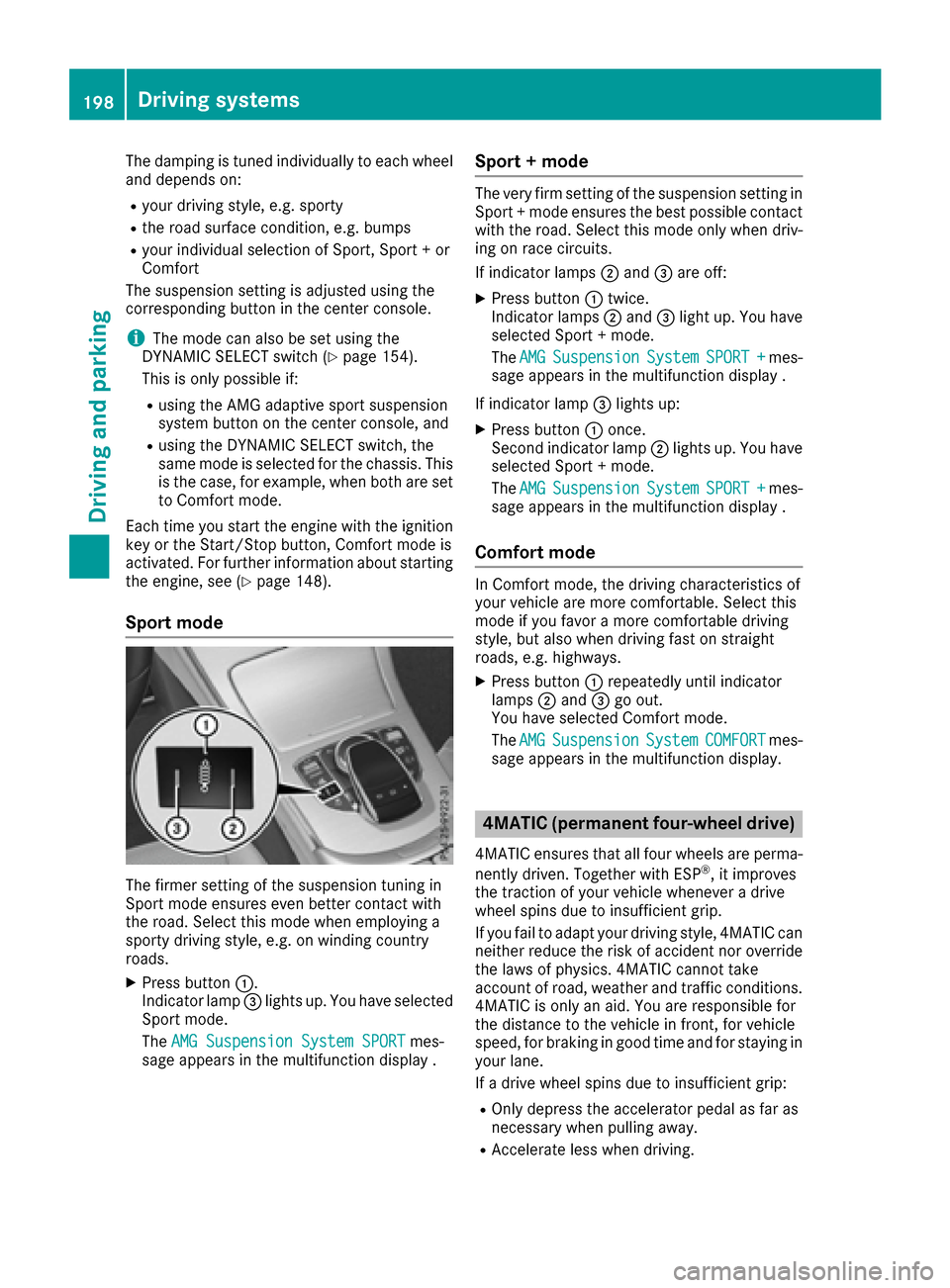
XPress button :.
Indicator lamp =lights up. You have selected
Sport mode.
The AMG Suspension System SPORT
mes-
sage appears in the multifunction display .
Sport + mode
The very firm setting of the suspension setting in
Sport + mode ensures the best possible contact
with the road. Select this mode only when driv-
ing on race circuits.
If indicator lamps ;and =are off:
XPress button :twice.
Indicator lamps ;and =light up. You have
selected Sport + mode.
The AMG
SuspensionSystemSPORT +mes-
sage appears in the multifunction display .
If indicator lamp =lights up:
XPress button :once.
Second indicator lamp ;lights up. You have
selected Sport + mode.
The AMG
SuspensionSystemSPORT +mes-
sage appears in the multifunction display .
Comfort mode
In Comfort mode, the driving characteristics of
your vehicle are more comfortable. Select this
mode if you favor a more comfortable driving
style, but also when driving fast on straight
roads, e.g. highways.
XPress button :repeatedly until indicator
lamps ;and =go out.
You have selected Comfort mode.
The AMG
SuspensionSystemCOMFORTmes-
sage appears in the multifunction display.
4MATIC (permanent four-wheel drive)
4MATIC ensures that all four wheels are perma-
nently driven. Together with ESP®, it improves
the traction of your vehicle whenever a drive
wheel spins due to insufficient grip.
If you fail to adapt your driving style, 4MATIC can
neither reduce the risk of accident nor override the laws of physics. 4MATIC cannot take
account of road, weather and traffic conditions.
4MATIC is only an aid. You are responsible for
the distance to the vehicle in front, for vehicle
speed, for braking in good time and for staying in
your lane.
If a drive wheel spins due to insufficient grip:
ROnly depress the accelerator pedal as far as
necessary when pulling away.
RAccelerate less when driving.
198Driving systems
Driving and parking
Page 216 of 398
iIf you select the%symbol in the display
and confirm with the controller, the split-
screen view appears.
Exiting 360° camera display mode
The 360° camera display is stopped
Rwhen you select transmission position P, or
Rwhen you are driving at moderate speeds
The view which was active before the 360° cam- era was displayed appears in the Audio 20 or
COMAND display. You can also stop the 360°
camera display split-screen view by selecting
the % symbol in the display and then con-
firming with the COMAND controller.
ATTENTION ASSIST
General notes
ATTENTION ASSIST helps you during long,
monotonous journeys, such as on highways. It is
active in the 37 mph (60 km/h) to 125 mph
(200 km/h) range. If ATTENTION ASSIST
detects typical indicators of fatigue or increas-
ing lapses in concentration on the part of the
driver, it suggests taking a break.
Important safety notes
ATTENTION ASSIST is only an aid to the driver. It might not always recognize fatigue or increasing
inattentiveness in time or fail to recognize them
at all. The system is not a substitute for a well-
rested and attentive driver.
The functionality of ATTENTION ASSIST is
restricted and warnings may be delayed or not
occur at all:
Rif the length of the journey is less than approx-
imately 30 minutes
Rif the road condition is poor, e.g. if the surface
is uneven or if there are potholes
Rif there is a strong side wind
Rif you have adopted a sporty driving style with high cornering speeds or high rates of accel-
eration
Rif you are predominantly driving slower than
37 mph (60 km/h) or faster than 125 mph
(200 km/h)
Rif you are driving with the active Steer Assist
of DISTRONIC PLUS
Rif the time has been set incorrectly
Rin active driving situations, such as when youchange lanes or change your speed
The ATTENTION ASSIST tiredness assessment
is deleted and restarted when continuing the
journey, if:
Ryou switch off the engine
Ryou take off your seat belt and open the driv-
er's door, e.g. for a change of drivers or to
take a break
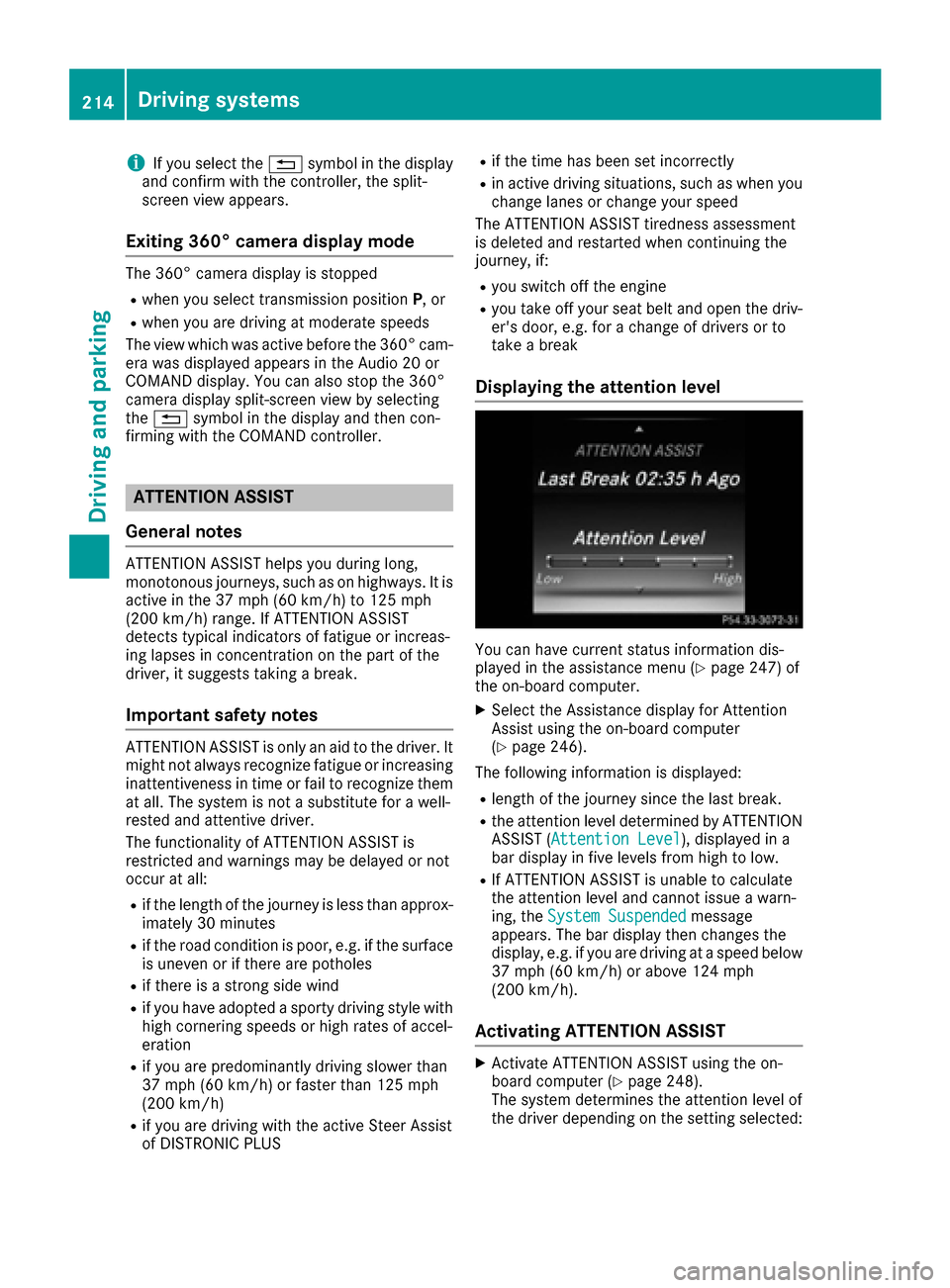
Displaying the attention level
You can have current status information dis-
played in the assistance menu (Ypage 247) of
the on-board computer.
XSelect the Assistance display for Attention
Assist using the on-board computer
(
Ypage 246).
The following information is displayed:
Rlength of the journey since the last break.
Rthe attention level determined by ATTENTION ASSIST ( Attention Level), displayed in a
bar display in five levels from high to low.
RIf ATTENTION ASSIST is unable to calculate
the attention level and cannot issue a warn-
ing, the System Suspended
message
appears. The bar display then changes the
display, e.g. if you are driving at a speed below
37 mph (60 km/h) or above 124 mph
(200 km/h).
Activating ATTENTION ASSIST
XActivate ATTENTION ASSIST using the on-
board computer (Ypage 248).
The system determines the attention level of
the driver depending on the setting selected:
214Driving systems
Driving and parking
Page 226 of 398
Ryou haveadopte d asport ydrivin gstyle wit h
high cornering speeds or high rates of accel-
eration .
RESP®is switched off .
Rthetransmission is no tin position D.
Raloss of tire pressur eor adefective tire has
been detecte dand displayed.
Ran obstacle in th elan ein whic hyou are drivin g
has been detected.
Active Lan eKeepin gAssis tmay no tdetec tother
roa duser sor traffic situations. An inappropriat e
brak eapplication may be interrupted at any time
if you:
Rsteer slightly in th eopposit edirection
Rswitch on th etur nsignal
Rclearly brak eor accelerate
A lane-correcting brak eapplication is interrup-
te dautomatically if:
Radrivin gsafet ysystem intervenes, e.g. ES P®,
PRE-SAF E®Brake or Active Blind Spot Assist.
Rlanemarking scan no longer be recognized.
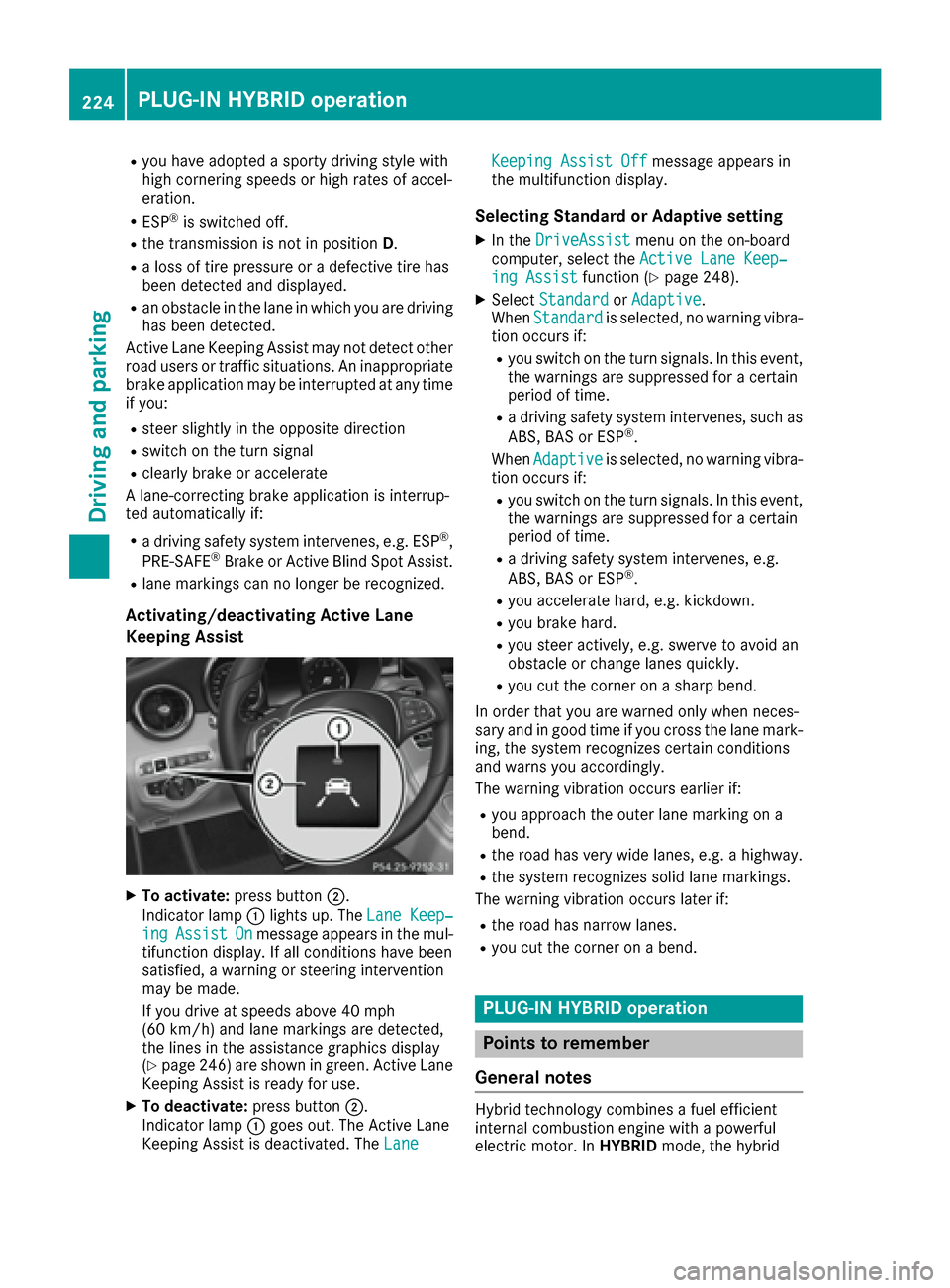
Activating/deactivating Active Lan e
Keeping Assis t
XTo activate:press button;.
Indicato rlamp :lights up. The LaneKeep‐
ingAssistOnmessage appears in th emul-
tifunction display. If all condition shav ebeen
satisfied, awarnin gor steerin gintervention
may be made .
If you drive at speeds abov e40 mph
(60 km/h) and lan emarking sare detected,
th elines in th eassistanc egraphic sdisplay
(
Ypage 246) are shown in green .Active Lan e
Keepin gAssis tis read yfor use.
XTo deactivate: press button;.
Indicato rlamp :goe sout .The Active Lan e
Keepin gAssis tis deactivated. The Lane
Keepin gAssist Offmessage appears in
th emultifunction display.
Selecting Standar dor Adaptive setting
XIn th eDriveAssistmen uon th eon-boar d
computer, select th eActive Lan eKeep‐
ing Assistfunction (Ypage 248).
XSelectStandardor Adaptive.
Whe nStandardis selected, no warnin gvibra-
tion occur sif:
Ryou switch on th etur nsignals. In this event ,
th ewarnings are suppressed for acertain
period of time.
Ra drivin gsafet ysystem intervenes, suc has
ABS, BA Sor ES P®.
Whe nAdaptive
is selected, no warnin gvibra-
tion occur sif:
Ryou switch on th etur nsignals. In this event ,
th ewarnings are suppressed for acertain
period of time.
Ra drivin gsafet ysystem intervenes, e.g.
ABS, BA Sor ES P®.
Ryou accelerate hard, e.g. kickdown .
Ryou brakehard.
Ryou steer actively, e.g. swerve to avoid an
obstacle or chang elanes quickly.
Ryou cut th ecorner on ashar pbend.
In order that you are warned only when neces-
sar yand in goo dtime if you cross th elan emark-
ing, th esystem recognizes certain condition s
and warn syou accordingly.
The warnin gvibration occur searlier if:
Ryou approac hth eouter lan emarking on a
bend.
Rth eroa dhas ver ywide lanes, e.g. ahighway.
Rth esystem recognizes soli dlan emarkings.
The warnin gvibration occur slater if:
Rth eroa dhas narrow lanes.
Ryou cut th ecorner on abend.
PLUG ‑IN HYBRID operation
Points to remember
Genera l notes
Hybrid technology combine s afuel efficien t
internal combustion engin ewit h a powerful
electric motor. In HYBRIDmode, thehybrid
224PLUG‑ IN HYBRID operation
Driving and parking
Page 227 of 398
drive system automatically selects the most effi-
cient operating mode for every driving situation.Drive the vehicle in the usual manner.
To save fuel in HYBRIDmode, the hybrid drive
system switches off the combustion engine as
often as possible during the journey when power
output requirements are low. When power out-
put requirements are low, the electric motor
powers the vehicle. When power output require-
ments are high, the combustion engine is auto-
matically switched on. The engine is usually
switched off when the vehicle is stationary. Con-
sequently, there is usually no engine idling as
with combustion engine vehicles.
For pulling away and accelerating, the electric
motor supports the internal combustion engine
using the power stored in the high-voltage bat-
tery. In addition, the power is used for partially
electric driving, operation of the electric coolant compressor and to support the 12 V on-board
electrical system. In this way the hybrid drive
system helps to reduce your vehicle's fuel con-
sumption.
Observe the driving tips on plug-in hybrid oper-
ation (
Ypage 230).
Recuperative Brake System
If you release the accelerator pedal when the
vehicle is in motion, overrun recuperation is ini-
tiated. The electric motor is operated as a gen-
erator when in overrun mode and when you
brake. Hybrid technology converts the kinetic
energy of the vehicle into electricity and stores
it in the high-voltage battery.
Observe the important safety notes for the
Recuperative Brake System (
Ypage 45).
Important safety notes
If the engine is switched off by the ECO start/
stop function and you open the driver's door:
Ra message appears in the multifunction dis-
play and
Ra warning tone sounds
Further information (
Ypage 272).
All of the vehicle's systems remain active, if:
Rthe vehicle is stationary
Rthe combustion engine is switched off and
Rthe READY indicator in the instrument cluster
lights up If you remove your foot from the brake pedal
while in transmission position D or R, the vehicle
may pull away automatically.
Observe the notes on the READY display of the
ECO start/stop function (
Ypage 231).
Vehicles with an electric motor generate much
less driving noise than vehicles with internal
combustion engines. As a result, your vehicle
may not be heard by other road users in certain
situations. This is the case, for example, when
you are parking and your vehicle is not seen by
other road users.
This requires you to adopt a particularly antici-
patory driving style, as it is necessary to allow
for the possibility that other road users may
behave erratically.
Displays and operation
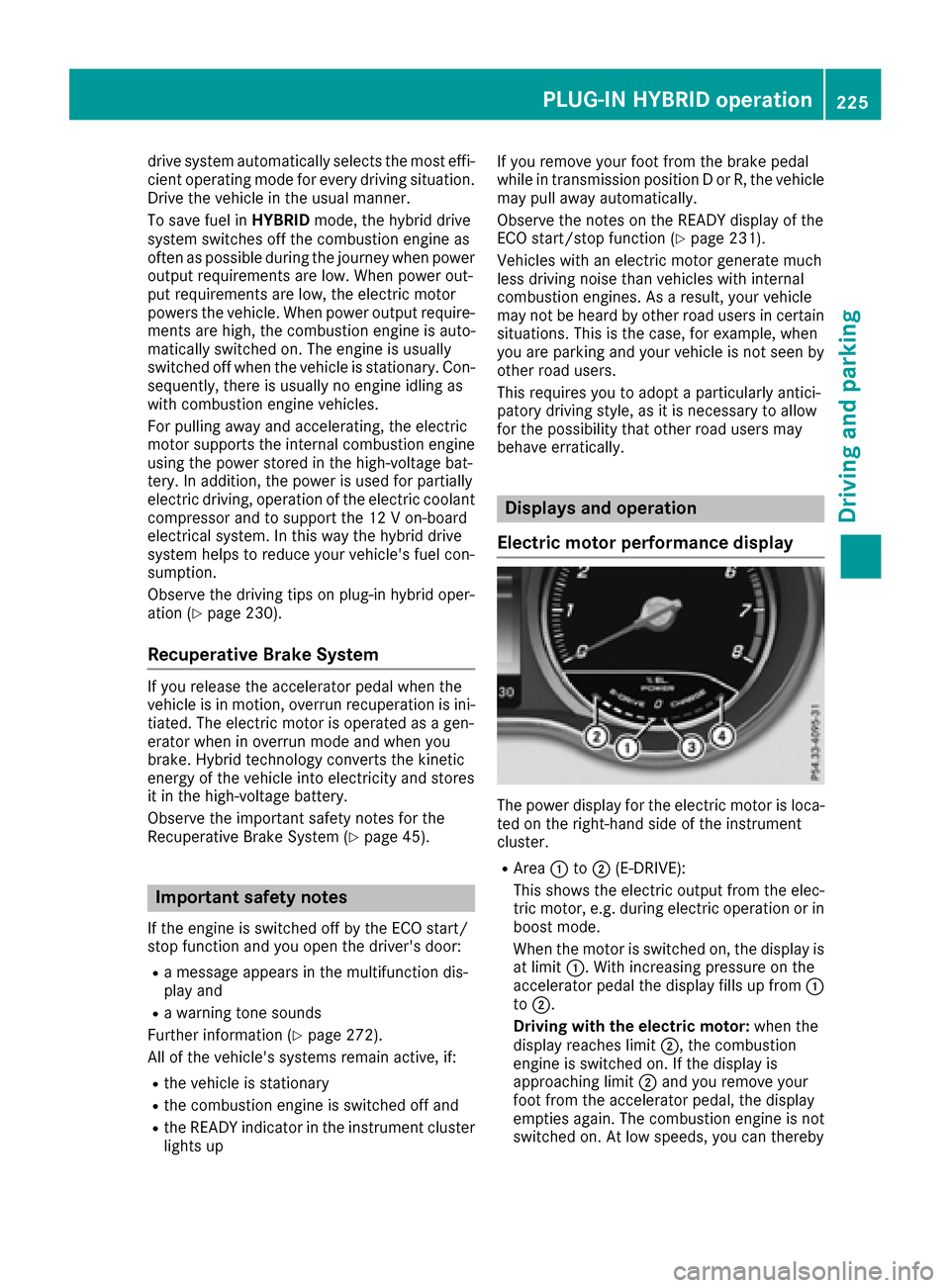
Electric motor performance display
The power display for the electric motor is loca-
ted on the right-hand side of the instrument
cluster.
RArea :to; (E-DRIVE):
This shows the electric output from the elec-
tric motor, e.g. during electric operation or in
boost mode.
When the motor is switched on, the display is
at limit :. With increasing pressure on the
accelerator pedal the display fills up from :
to ;.
Driving with the electric motor: when the
display reaches limit ;, the combustion
engine is switched on. If the display is
approaching limit ;and you remove your
foot from the accelerator pedal, the display
empties again. The combustion engine is not
switched on. At low speeds, you can thereby
PLUG‑IN HYBRID operation225
Driving and parking
Z
Page 232 of 398
Activating when driving with the electric motor:
XPull the left or right steering wheel paddle
shifter (Ypage 161).
The combustion engine is switched on. Man-
ual gearshifting is activated temporarily. The
selected gear and Mappear in the multifunc-
tion display.
Activating when driving with the combustion
engine:
XPull the left or right steering wheel paddle
shifter (Ypage 161).
Manual gearshifting is activated temporarily.
The selected gear and Mappear in the multi-
function display.
The ECO start/stop function is not available
when manually changing gear.
For further information on the manual drive pro-
gram (
Ypage 161).
Haptic accelerator pedal
General notes
The haptic accelerator pedal helps you to
reduce the fuel consumption and emissions of
your vehicle.
There are two different functions available for
this purpose:
Ran additional point of resistance in E-MODE
operating mode (Ypage 226)
Ra double pulse in drive program E
(Ypage 229)
Additional point of resistance in the hap-
tic accelerator pedal
The maximum available electric performance is
indicated by a tangible point of resistance in the
haptic accelerator pedal.
The additional point of resistance is available in
E-MODE operating mode (
Ypage 226).
If you depress the haptic accelerator pedal
beyond the pressure point, the combustion
engine is switched on.
Double pulses in the haptic accelerator
pedal
A tangible double pulse in the haptic accelerator
pedal gives you a recommendation to release
the accelerator pedal. By this means, in
HYBRID ,E-MODE orE-SAVE operating mode
the combustion engine can be switched off and disconnected from the power train (overrun
mode).
The double pulse is available in drive program
E
(
Ypage 229).
After the accelerator pedal has been released,
the coasting cha racteristi
cs of the vehicle are
adapted to the traffic conditions.
To avoid getting too close to the vehicle in front, you must apply the brakes manually when nec-
essary.
Driving tips
General driving tips
Drive carefully and maintain a safe distance
from the vehicle in front. Avoid frequent and
sudden acceleration as well as abrupt braking.
During partial electric driving, pulling away and
acceleration, the electric motor supports the
internal combustion engine.
During overrun in transmission position Dand
braking, the electric motor will operate as a gen- erator.
Further information on the ECO start/stop func-
tion (
Ypage 231).
Additional driving tips (
Ypage 179).
Stationary vehicle
If the vehicle is stopped, the combustion engine
is, for the most part, switched off. Automatic
climate control continues to function. The elec-
tromechanically assisted steering gear allows
you to use the power steering without reduced
comfort.
Acceleration
Depending on the operating mode, pulling away
and driving under low load conditions are per-
formed:
Rentirely by electric propulsion
Rin combination with the internal combustion
engine
When accelerating at an increased or full load,
boost mode is utilized. The electric motor sup-
ports the internal combustion engine by provid-
ing additional torque when the accelerator is
depressed rapidly.
230PLUG‑IN HYBRID operation
Driving an d parking
Page 233 of 398
Overrun mode or braking
There are three possible operating modes when
the hybrid vehicle is decelerating:
Renergy recovery takes place even when the
vehicle is decelerating purely in overrun mode
(
Ypage 225). The electric motor operates as
a generator and stores the recovered energy
in the high-voltage battery
Rwhen the brakes are applied lightly, the vehi-
cle is slowed down further by the electric
motor This increases the energy recovery tak-
ing place (
Ypage 225) The electric motor
operates as a generator and stores the recov- ered energy in the high-voltage battery.
Rwhen the brakes are applied with greater
force, the service brakes are also used to slow
the vehicle down. The two systems work
together
Urban driving
Energy is recuperated during frequent deceler-
ation and stopping in city traffic.
The vehicle can be driven by the electric motor
alone up to a speed of approximately 120 km/ h.
The vehicle is driven by the electric motor alone
only when all conditions for the automatic
engine switch-off are fulfilled.
Further information on the automatic engine
switch-off (
Ypage 231).
Driving on inter-urban roads
The following phases are possible when driving
on inter-urban roads:
Rrapid acceleration (boost mode)
Rconstant energy consumption
Renergy recuperation
Relectric operation mode
A great deal of recovered energy may be avail-
able, depending on the route profile. This
reduces consumption and emissions.
Highway driving
During highway driving, fuel consumption and
emissions are favorably influenced in particular
by reduced power losses.
If the driver removes his foot from the acceler-
ator pedal in drive program Eand a speed of
160 km/h is not exceeded, the combustion
engine is automatically switched off.
Further information on the automatic engine
switch-off (
Ypage 231).
ECO start/stop function
General notes
The ECO start/stop function switches the inter- nal combustion engine off automatically when
the vehicle stops moving and at high speeds
(
Ypage 232).
All vehicle systems remain active, e.g. the auto-
matic climate control.
The ECO start/stop function is only available in
drive programs Cand E. Electric-only operation
is only possible in drive programs Cand E. Addi-
tional information for drive programs
(
Ypage 229).
Automatic engine switch-off
The engine is switched off automatically, includ-
ing when:
Rthe driver removes his foot from the acceler-
ator in drive program Eand a speed of
160 km/h is not exceeded (
Ypage 232)
Rthe engine has reached its operating temper- ature
Rthe driver’s seat belt is fastened and the
driver’s door is closed
Rthe driver only slightly depresses the accel-
erator pedal in order to, for example, maintain
the current speed for a limited distance
Rthe hood is closed and engaged properly
Rthe high-voltage battery is charged suffi-
ciently
Rno malfunctions are present in the hybrid
drive system
The internal combustion engine will not be
switched off automatically, if:
Rthe self-diagnosis function of the engine con-
trol unit is still active
Rthere is a malfunction in the hybrid drive sys-
tem
Rthe climate control of the vehicle requires it
Rthe high-voltage battery is being charged
(Ypage 227)
Rautomatic emissions tests are running
PLUG‑IN HYBRID operation231
Driving and parking
Z
Page 234 of 398
Automa tic engine start
The automatically switched-off internal combus -
tio nengin estart sautomatically in certai nsitua-
tions ,if:
Rth epower demand from th edriver via th e
accelerato rpedal is greate rthan th eelectric
motor alon ecan provide
Rth edriver switches to driv eprogram Sor M
Rthecondition of charge of th ehigh-voltage
battery has reached th elower limit
Rth esettings of th eautomatic climat econtrol
require it, e.g. at external temperatures abov e
30 †
Overru nmod e
In overrun mode, th ecombustio nengin eis
switched off and is disconnected from th edriv e
train. The electric motor:
Rgenerates low thrust ,whic hcorrespond sto
th eoverrun mod eof an active combustio n
engin e
Rfunction sas agenerator and produce sth e
necessary energ yfor th eauxiliary consumer s
and charge sth ehigh-voltage battery
Ove rrun mod eis available in driv eprogram E
below 16 0km/h.
In driv eprogram E,after th eaccelerato rpedal
has been released th ecoasting characteristic s
of th evehicl eare adapted to th etraffic condi-
tions .Further information about th ehaptic
accelerato rpedal (
Ypage 230).
Route-based energy management
Forroute-based energ ymanagement, th esys-
te m factors in information about th eexpecte d
rout ewhen rout eguidance is active.
The information on th erout eis provide dby th e
multimedia system and includes th efollowing:
Rroad categories
Rspee dlimitation s
Rdataon downhill gradients
The use of electric energ yis automatically opti-
mally distributed from th ebeginning to th een d
of th ejourney, usin ginformation about th e
route. The distribution is pre-emptive and takes
int oconsideration :
Rthesections of th ejourney ahead
Rth eenerg yconsumption on th ewhole rout eThe condition of charge of th
ehigh-voltage bat -
tery is thus systematically controlled. In addi-
tion, th econtrol function takes int oaccoun t
that:
Rth efuel saving sthroug hth euse of electrical
energ ycan vary, depending on th erout e(e.g.
urban ,interurban or highway)
Rth euse of electrical energ yis held available in
particular for electric operation (e.g. urban
routes)
The vehicl ethus automatically select sth eopti-
mum driving mod efor th erespectiv esectio nof
th eroute.
Route-based energ ymanagemen tis available
under th efollowin gconditions:
Rdriv eprogram Eis selected
RHYBRID driving mod eis selected
Ractive rout eguidance is activated
Rsuitable map dat ais available
When route-based energ ymanagemen tis in
operation ,th earea in fron tof th evehicl eis
shown as green in th emultifunction display.
Parking
XApply th eelectric parking brake.
The red !indicator lamp in th einstrumen t
cluste rlights up.
XUse th eDIRECT SELECT leve rto shif tth e
automatic transmission to P.
XSwitch theignition off .
The READY indicator in th einstrumen tcluste r
goes out .
Further information on parking and switching off
th einternal combustio nengin e (
Ypage 177).
232PLUG‑ IN HYBRID operation
Driving and parking
Page 240 of 398
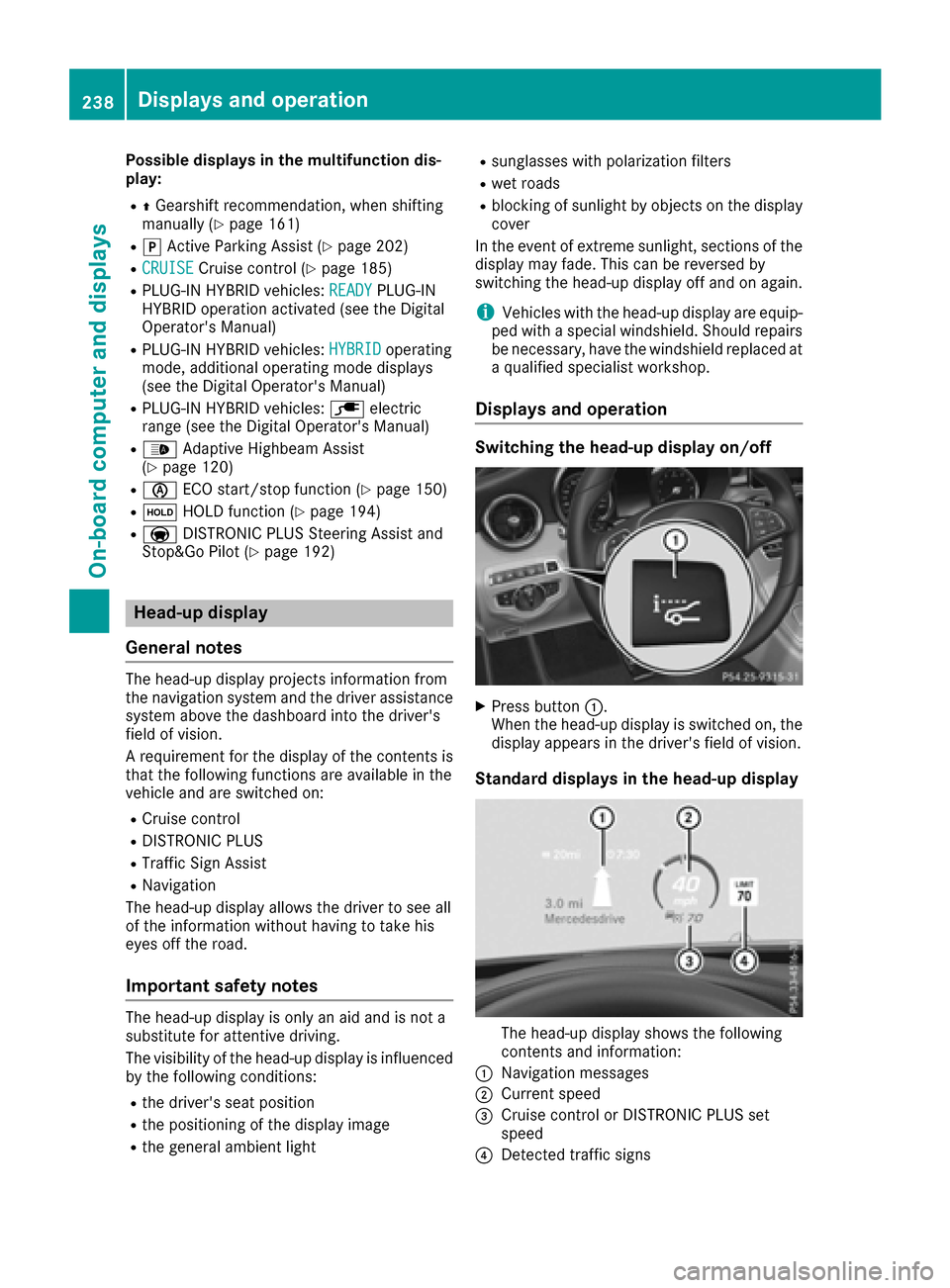
Possible displays in the multifunction dis-
play:
RZGearshift recommendation, when shifting
manually (Ypage 161)
Rj Active Parking Assist (Ypage 202)
RCRUISECruise control (Ypage 185)
RPLUG-IN HYBRID vehicles: READYPLUG-IN
HYBRID operation activated (see the Digital
Operator's Manual)
RPLUG-IN HYBRID vehicles: HYBRIDoperating
mode, additional operating mode displays
(see the Digital Operator's Manual)
RPLUG-IN HYBRID vehicles: èelectric
range (see the Digital Operator's Manual)
R_ Adaptive Highbeam Assist
(Ypage 120)
Rè ECO start/stop function (Ypage 150)
RëHOLD function (Ypage 194)
RaDISTRONIC PLUS Steering Assist and
Stop&Go Pilot (Ypage 192)
Head-up display
General notes
The head-up display projects information from
the navigation system and the driver assistance
system above the dashboard into the driver's
field of vision.
A requirement for the display of the contents is
that the following functions are available in the
vehicle and are switched on:
RCruise control
RDISTRONIC PLUS
RTraffic Sign Assist
RNavigation
The head-up display allows the driver to see all
of the information without having to take his
eyes off the road.
Important safety notes
The head-up display is only an aid and is not a
substitute for attentive driving.
The visibility of the head-up display is influenced by the following conditions:
Rthe driver's seat position
Rthe positioning of the display image
Rthe general ambient light
Rsunglasses with polarization filters
Rwet roads
Rblocking of sunlight by objects on the display
cover
In the event of extreme sunlight, sections of the
display may fade. This can be reversed by
switching the head-up display off and on again.
iVehicles with the head-up display are equip-
ped with a special windshield. Should repairs
be necessary, have the windshield replaced at
a qualified specialist workshop.
Displays and operation
Switching the head-up display on/off
XPress button :.
When the head-up display is switched on, the display appears in the driver's field of vision.
Standard displays in the head-up display
The head-up display shows the following
contents and information:
:Navigation messages
;Current speed
=Cruise control or DISTRONIC PLUS set
speed
?Detected traffic signs
238Displays and operation
On-board computer and displays
Page 242 of 398
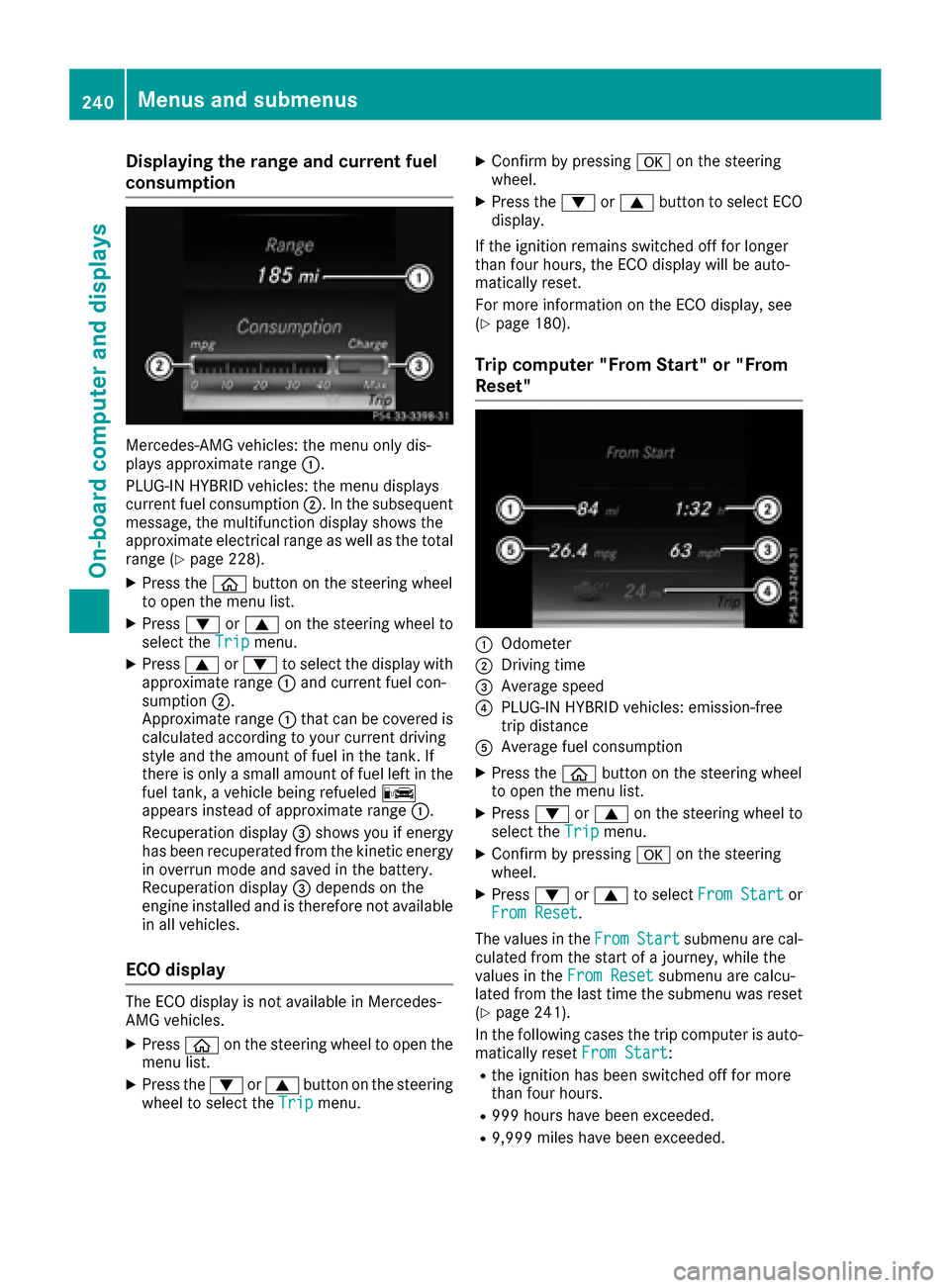
Displaying therange an dcurrent fuel
consumption
Mercedes-AMG vehicles :th emen uonly dis -
plays approximat erange :.
PLUG-I NHYBRID vehicles :th emen udisplays
curren tfue lconsumption ;.In th esubsequent
message, th emultifunction display shows th e
approximat eelectrical range as well as th etota l
range (
Ypage 228).
XPress th eò buttonon th esteerin gwhee l
to ope nth emen ulist .
XPress :or9 on thesteerin gwhee lto
selec tth eTri pmenu.
XPress 9or: to selec tth edisplay wit h
approximat erange :and curren tfue lcon-
sumption ;.
Approximat erange :that can be covered is
calculated accordin gto your curren tdrivin g
style and th eamount of fue lin th etank .If
there is only asmall amount of fue llef tin th e
fue ltank , avehicle bein grefuele dC
appears instead of approximat erange :.
Recuperation display =shows you if energ y
has bee nrecuperated from th ekineti cenerg y
in overrun mode and saved in th ebattery.
Recuperation display =depend son th e
engin einstalled and is therefore no tavailable
in all vehicles .
ECO display
The ECOdisplay is no tavailable in Mercedes -
AM Gvehicles .
XPressòon thesteerin gwhee lto ope nth e
men ulist .
XPress th e: or9 buttonon th esteerin g
whee lto selec tth eTri pmenu.
XConfir mby pressing aon thesteerin g
wheel.
XPress th e: or9 buttonto selec tEC O
display.
If th eignition remain sswitched of ffo rlonger
than four hours, th eEC Odisplay will be auto-
matically reset .
Fo rmore information on th eEC Odisplay, see
(
Ypage 180).
Trip compute r"From Start" or "From
Reset "
:Odometer
;Driving time
=Average speed
?PLUG-I NHYBRID vehicles :emission-free
trip distanc e
AAverage fue lconsumption
XPress th eò buttonon th esteerin gwhee l
to ope nth emen ulist .
XPress :or9 on thesteerin gwhee lto
selec tth eTri pmenu.
XConfir mby pressing aon thesteerin g
wheel.
XPress :or9 to selec tFro mStartor
Fro mReset.
The values in th eFro m
Startsubmen uare cal -
culated from th estart of ajourney, whil eth e
values in th eFro mReset
submen uare calcu-
lated from th elast time th esubmen uwas reset
(
Ypage 241).
In th efollowin gcases th etrip compute ris auto-
matically reset FromStart
:
Rtheignition has bee nswitched of ffo rmore
than four hours.
R99 9hour shav ebee nexceeded.
R9,999 miles hav ebee nexceeded.
240Menus and submenus
On-board computer and displays
Page 245 of 398
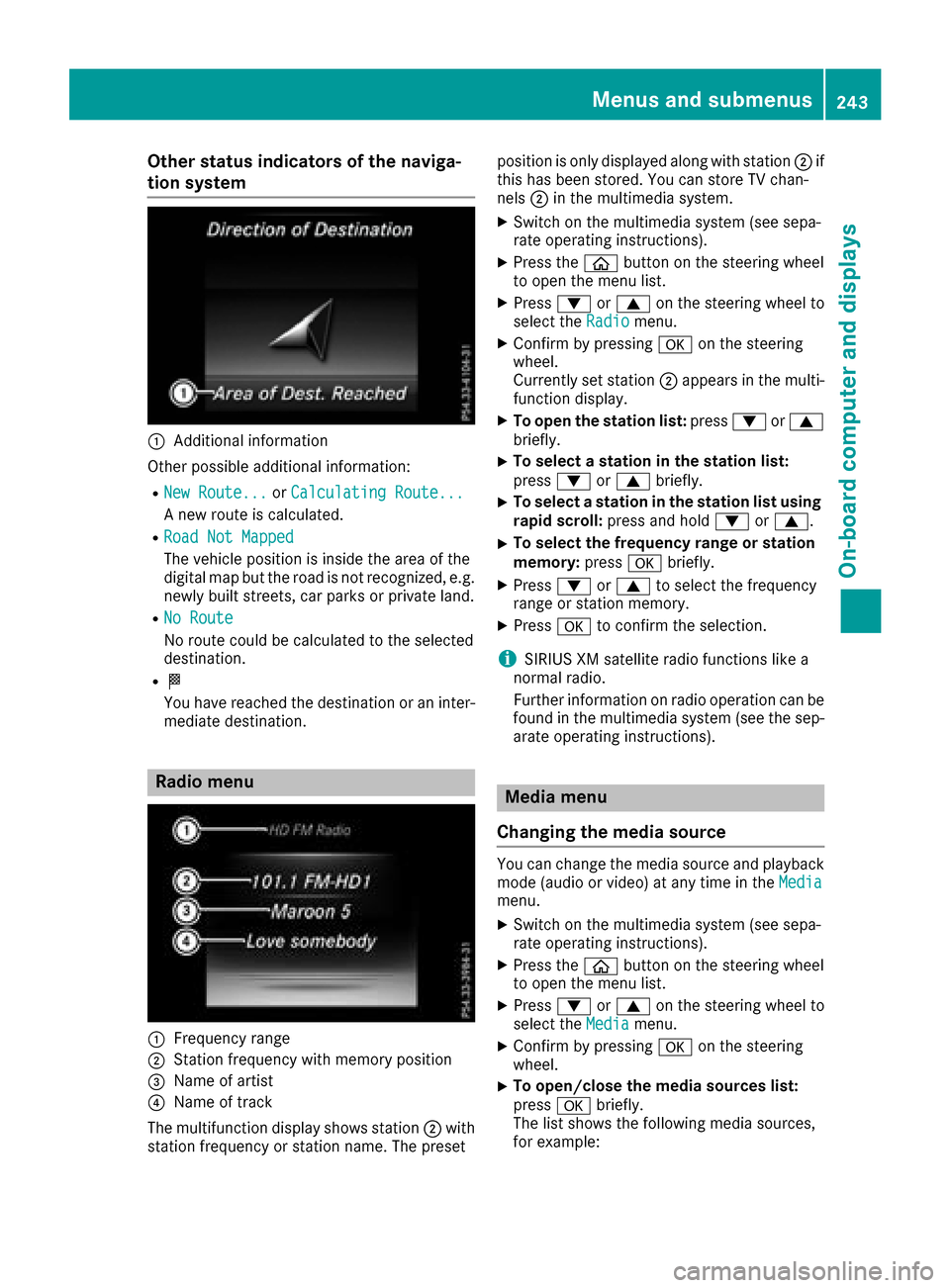
Other status indicators of the naviga-
tion system
:Additional information
Other possible additional information:
RNew Route...or Calculating Route...
A new route is calculated.
RRoad Not Mapped
The vehicle position is inside the area of the
digital map but the road is not recognized, e.g.
newly built streets, car parks or private land.
RNo Route
No route could be calculated to the selected
destination.
RO
You have reached the destination or an inter-
mediate destination.
Radio menu
:Frequency range
;Station frequency with memory position
=Name of artist
?Name of track
The multifunction display shows station ;with
station frequency or station name. The preset position is only displayed along with station
;if
this has been stored. You can store TV chan-
nels ;in the multimedia system.
XSwitch on the multimedia system (see sepa-
rate operating instructions).
XPress the òbutton on the steering wheel
to open the menu list.
XPress :or9 on the steering wheel to
select the Radiomenu.
XConfirm by pressing aon the steering
wheel.
Currently set station ;appears in the multi-
function display.
XTo open the station list: press:or9
briefly.
XTo select a station in the station list:
press :or9 briefly.
XTo select a station in the station list using
rapid scroll: press and hold :or9.
XTo select the frequency range or station
memory: pressabriefly.
XPress :or9 to select the frequency
range or station memory.
XPress ato confirm the selection.
iSIRIUS XM satellite radio functions like a
normal radio.
Further information on radio operation can be
found in the multimedia system (see the sep-
arate operating instructions).
Media menu
Changing the media source
You can change the media source and playback
mode (audio or video) at any time in the Media
menu.
XSwitch on the multimedia system (see sepa-
rate operating instructions).
XPress theòbutton on the steering wheel
to open the menu list.
XPress :or9 on the steering wheel to
select the Mediamenu.
XConfirm by pressing aon the steering
wheel.
XTo open/close the media sources list:
press abriefly.
The list shows the following media sources,
for example:
Menus and submenus243
On-board computer and displays
Z