Manual MERCEDES-BENZ C-Class SEDAN 2016 W205 Workshop Manual
[x] Cancel search | Manufacturer: MERCEDES-BENZ, Model Year: 2016, Model line: C-Class SEDAN, Model: MERCEDES-BENZ C-Class SEDAN 2016 W205Pages: 398, PDF Size: 9.57 MB
Page 164 of 398
Temporary setting
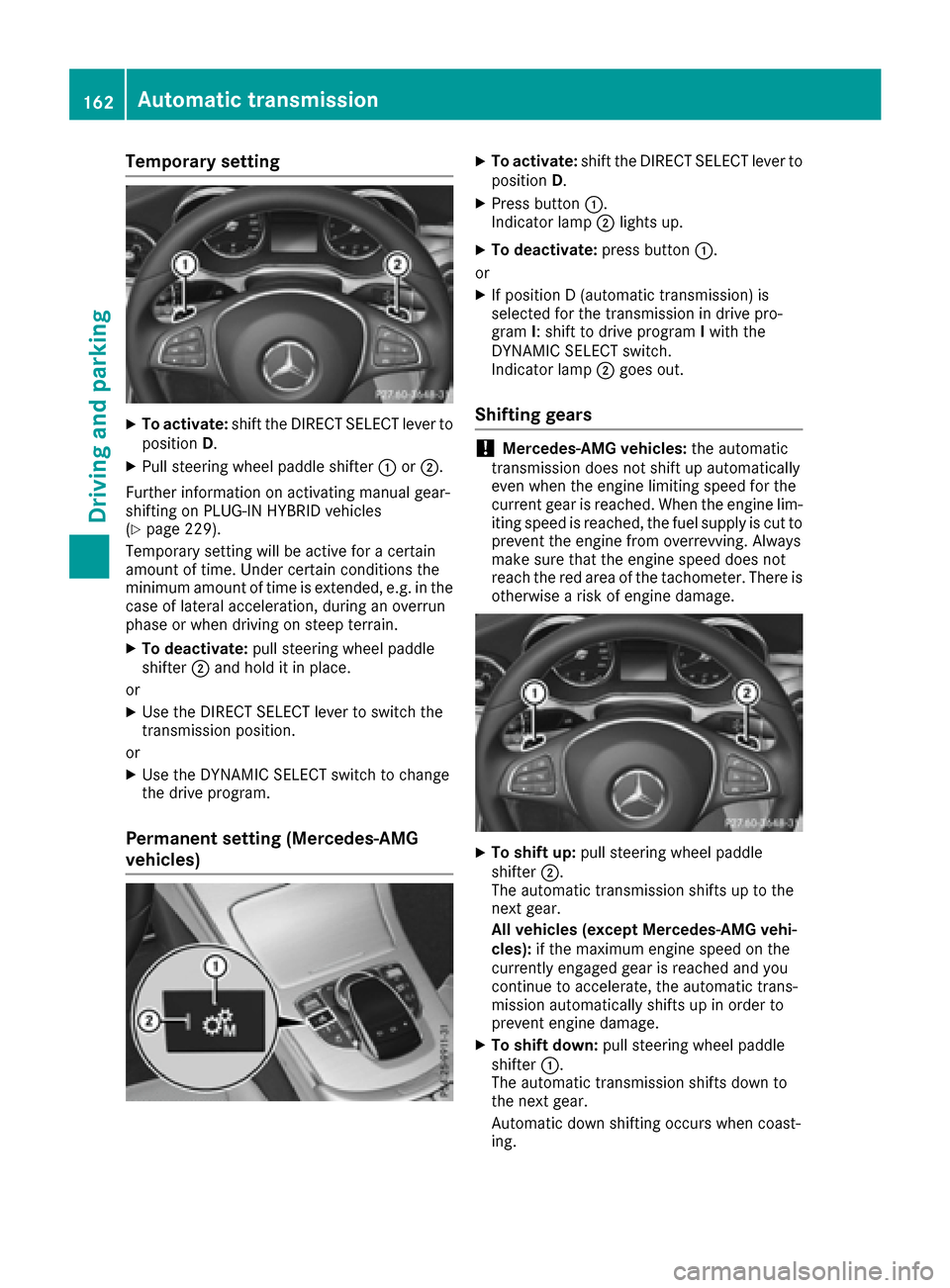
XTo activate:shift the DIRECT SELECT lever to
position D.
XPull steering wheel paddle shifter :or;.
Further information on activating manual gear-
shifting on PLUG-IN HYBRID vehicles
(
Ypage 229).
Temporary setting will be active for a certain
amount of time. Under certain conditions the
minimum amount of time is extended, e.g. in the
case of lateral acceleration, during an overrun
phase or when driving on steep terrain.
XTo deactivate: pull steering wheel paddle
shifter ;and hold it in place.
or
XUse the DIRECT SELECT lever to switch the
transmission position.
or
XUse the DYNAMIC SELECT switch to change
the drive program.
Permanent setting (Mercedes-AMG
vehicles)
XTo activate: shift the DIRECT SELECT lever to
position D.
XPress button :.
Indicator lamp ;lights up.
XTo deactivate: press button:.
or
XIf position D (automatic transmission) is
selected for the transmission in drive pro-
gram I: shift to drive program Iwith the
DYNAMIC SELECT switch.
Indicator lamp ;goes out.
Shifting gears
!Mercedes-AMG vehicles: the automatic
transmission does not shift up automatically
even when the engine limiting speed for the
current gear is reached. When the engine lim-
iting speed is reached, the fuel supply is cut to
prevent the engine from overrevving. Always
make sure that the engine speed does not
reach the red area of the tachometer. There is
otherwise a risk of engine damage.
XTo shift up: pull steering wheel paddle
shifter ;.
The automatic transmission shifts up to the
next gear.
All vehicles (except Mercedes-AMG vehi-
cles): if the maximum engine speed on the
currently engaged gear is reached and you
continue to accelerate, the automatic trans-
mission automatically shifts up in order to
prevent engine damage.
XTo shift down: pull steering wheel paddle
shifter :.
The automatic transmission shifts down to
the next gear.
Automatic down shifting occurs when coast-
ing.
162Automatic transmission
Driving an d parking
Page 178 of 398
Online access to the vehicle
General information
GWARNING
If you operate information systems and com-
munication equipment integrated in the vehi-
cle while driving, you will be distracted from
traffic conditions. You could also lose control
of the vehicle. There is a risk of an accident.
Only operate the equipment when the traffic
situation permits. If you are not sure that this
is possible, park the vehicle paying attention
to traffic conditions and operate the equip-
ment when the vehicle is stationary.
iOperation of integrated information sys-
tems and communications equipment in
the vehicle: you must observe the legal
requirements for the country in which you are currently driving.
You can call up remote query and remote con-
figuration functions for your vehicle using online
access to the vehicle. This is possible from an
Internet-enabled computer, as well as many
modern smartphones.
Please call the Mercedes-Benz Customer Assis-
tance Center (USA) at the hotline number
1-800-FOR-MERCedes (1-800-367-6372) to
obtain the relevant Internet address.
Online access to the vehicle is restricted to the
contractual periods of mbrace. Activated
access to the mbrace emergency call system is
required for use.
In order to be able to use online access to the
vehicle, you must agree to the local terms of
use.
Further information on supported devices, avail-
able languages and contractual periods can be
obtained from any authorized Mercedes-Benz
Center.
In order to be able to call up online access to the vehicle, the vehicle must be connected to the
Internet (
Ypage 176).
Notes on data protection
Remember that online access to the vehicle
offers access to your data.
iPrevent unauthorized persons from
accessing this data. Every person who has access to the informa-
tion stated can use the functions of the online
access to the vehicle.
iInformation when selling a vehicle or
buying a used vehicle:
RIf you sell your vehicle, you are obliged to
delete the vehicle from your personal area
on the online access to the vehicle.
RIf you have bought a used vehicle, it is pos-
sible that the previous owner still has
access to the online access to the vehicle.
Calling up functions
The online access to the vehicle allows you
access to your vehicle's information and func-
tions using remote query and remote configu-
ration.
The following functions can be accessed:
Rrequest the current condition of charge of the
high-voltage battery
Rprogram the departure time (Ypage 249)
Rset or activate the "Pre-entry climate control
at departure time" function (see the Digital
Operator's Manual)
Information on additional functions and operat- ing instructions can be found within the online
access to the vehicle.
Connecting the vehicle to the Internet
iThis function is not available in all countries
and requires activated access to the mbrace
emergency call system.
You can use the online access to the vehicle if
the vehicle has a connection to the Internet via a mobile phone network. The necessary data is
transmitted by radio. The vehicle automatically
recognizes whether a connection to the Internet
is possible or not. No presets are necessary.
iRestrictions in reception are possible if the
vehicle is in an underground car park, for
example. Restrictions may also occur in areas
with poor mobile network coverage.
176Charging the high-voltage battery (PLUG-IN HYBRID vehicles)
Driving and parking
Page 180 of 398
XDepress the brake pedal and keep it
depressed.
XShift to neutralN.
XRelease the brake pedal.
XRelease the electric parking brake.
XSwitch off the ignition and leave the SmartKey
in the ignition lock.
The engine can be switched off in an emergency
while the vehicle is in motion by pressing and
holding the Start/Stop button for three sec-
onds. This function operates independently of
the ECO start/stop automatic engine switch-off
function.
Electric parking brake
General notes
GWARNING
If you leave children unsupervised in the vehi-
cle, they could set it in motion by, for example:
Rrelease the parking brake.
Rshift the automatic transmission out of the
parking position P.
Rstart the engine.
In addition, they may operate vehicle equip-
ment and become trapped. There is a risk of
an accident and injury.
When leaving the vehicle, always take the
SmartKey with you and lock the vehicle. Never
leave children unsupervised in the vehicle.
The function of the electric parking brake is
dependent on the on-board voltage. If the on-
board voltage is low or there is a malfunction in
the system, it may not be possible to apply the
released parking brake.
XIf this is the case, only park the vehicle on
level ground and secure it to prevent it rolling
away.
XShift the automatic transmission to position
P .
It may not be possible to release an applied
parking brake if the on-board voltage is low or
there is a malfunction in the system. Contact a
qualified specialist workshop.
The electric parking brake performs a function
test at regular intervals while the engine is switched off. The sounds that
can b
e heard while
this is occurring are normal.
Applying or releasing manually
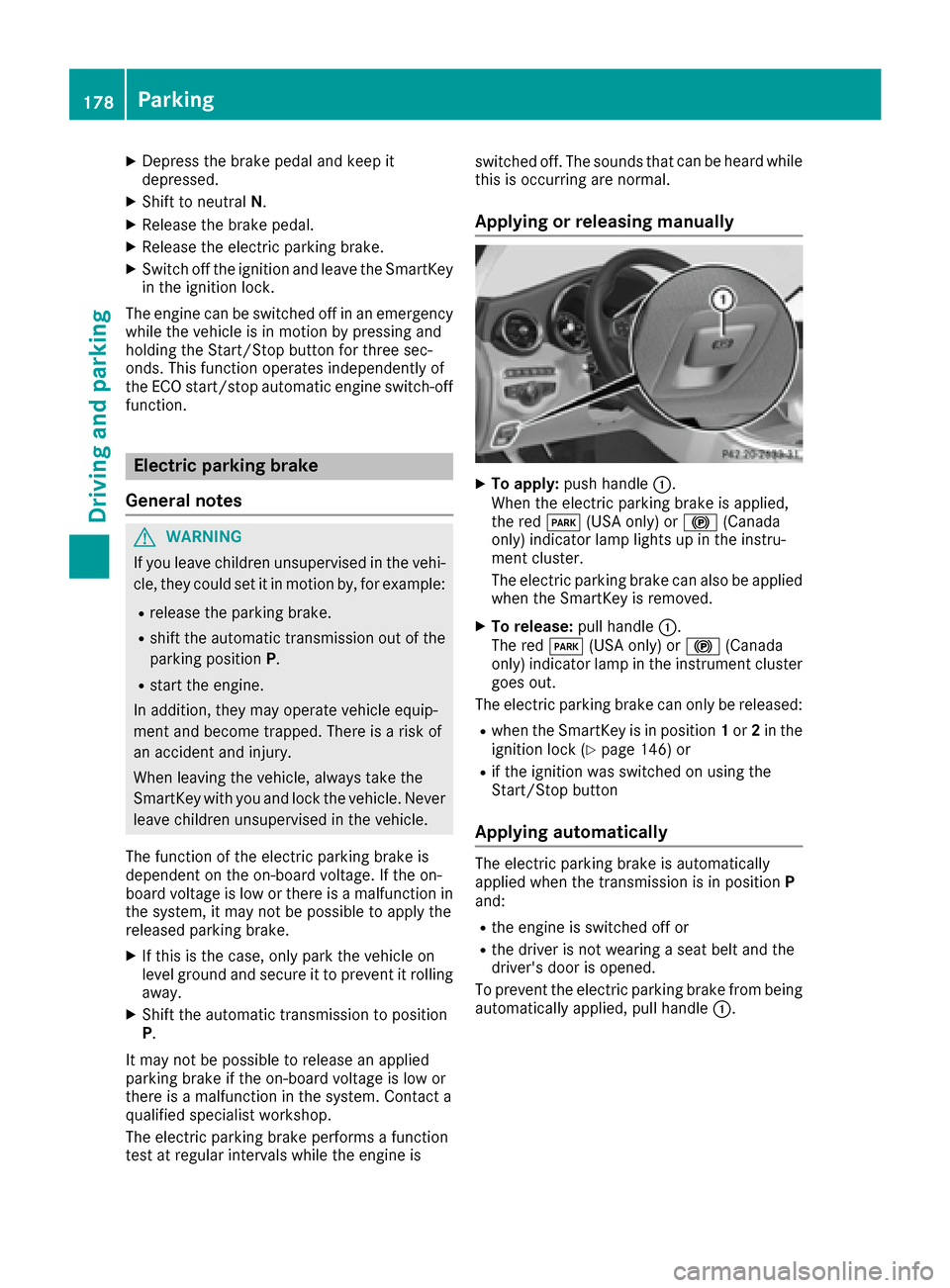
XTo apply: push handle :.
When the electric parking brake is applied,
the red F(USA only) or !(Canada
only) indicator lamp lights up in the instru-
ment cluster.
The electric parking brake can also be applied
when the SmartKey is removed.
XTo release: pull handle:.
The red F(USA only) or !(Canada
only) indicator lamp in the instrument cluster
goes out.
The electric parking brake can only be released:
Rwhen the SmartKey is in position 1or 2in the
ignition lock (Ypage 146) or
Rif the ignition was switched on using the
Start/Stop button
Applying automatically
The electric parking brake is automatically
applied when the transmission is in position P
and:
Rthe engine is switched off or
Rthe driver is not wearing a seat belt and the
driver's door is opened.
To prevent the electric parking brake from being
automatically applied, pull handle :.
178Parking
Driving and parking
Page 184 of 398
In addition to driving style, the actual consump-
tion is affected by other factors, such as:
Rload
Rtire pressure
Rcold start
Rchoice of route
Relectrical consumers switched on
These factors are not included in the ECO dis-
play.
An economical driving style specially requires
driving at moderate engine speeds.
Achieving a higher value in the categories
"Acceleration" and "Constant":
Robserve the gearshift recommendations.
Rdrive in drive program E.
On long journeys at a constant speed, e.g. on the
highway, only the outer area for "constant" will
change.
The ECO display summarizes the driving style
from the start of the journey to its completion.
Therefore, there are more marked changes in
the outer areas at the start of a journey. On lon-
ger journeys, there are fewer changes. For more
marked changes, perform a manual rest
(
Ypage 241).
For further information on the ECO display, see
(
Ypage 240).
Braking
Important safety notes
GWARNING
If you shift down on a slippery road surface in an attempt to increase the engine's braking
effect, the drive wheels could lose their grip.
There is an increased danger of skidding and
accidents.
Do not shift down for additional engine brak-
ing on a slippery road surface.
Downhill gradients
!On long and steep gradients, you must
reduce the load on the brakes by shifting early
to a lower gear. This allows you to take
advantage of the engine braking effect and
helps avoid overheating and excessive wear
of the brakes. When you take advantage of the engine brak-
ing effect, a drive wheel may not turn for some
time, e.g. on a slippery road surface. This
could cause damage to the drive train. This
type of damage is not covered by the
Mercedes-Benz warranty.
Heavy and light loads
GWARNING
If you rest your foot on the brake pedal while
driving, the braking system can overheat. This increases the stopping distance and can even
cause the braking system to fail. There is a
risk of an accident.
Never use the brake pedal as a footrest. Never
depress the brake pedal and the accelerator
pedal at the same time.
!Depressing the brake pedal constantly
results in excessive and premature wear to
the brake pads.
If the brakes have been subjected to a heavy
load, do not stop the vehicle immediately. Drive
on for a short while. This allows the airflow to
cool the brakes more quickly.
Wet roads
If you have driven for a long time in heavy rain
without braking, there may be a delayed reac-
tion from the brakes when braking for the first
time. This may also occur after the vehicle has
been washed or driven through deep water.
You have to depress the brake pedal more
firmly. Maintain a greater distance from the
vehicle in front.
After driving on a wet road or having the vehicle
washed, brake firmly while paying attention to
the traffic conditions. This will warm up the
brake discs, thereby drying them more quickly
and protecting them against corrosion.
Limited braking performance on salt-
treated roads
If you drive on salted roads, a layer of salt resi-
due may form on the brake discs and brake
pads. This can result in a significantly longer
braking distance.
182Driving tips
Driving and parking
Page 189 of 398
Change into a lower gearingood time on long
and steep downhillgradients. This isespecially
impo rtant ifthe veh icle isladen. By doing so, you
will make use of the braking effect of the engine.
This relieves the load on the brake system and
prevents the brakes from overheating and wear-
ing too quickly.
If DI ST RONIC PLUS detects that there isa risk of
a co llisio n, you will be warned visually and
acoustically. DI STRONIC PLUS cannot prevent a
co llisio nwit hout your intervention. An intermit-
tent warning tone willthen sound and the dis-
tance warning lamp willlight up inthe instru-
ment cluster. Brake immediately inorder to
increase the distance to the veh icle infront or
take evasive action pro videdit is safe to doso.
DI ST RONIC PLUS operates inrange between
0 mph (0 km/h) and 120 mph (200 km/h).
Do not use DI STRONIC PLUS while driving on
roads with steep gradients.
As DI STRONIC PLUS transmits radar waves, it
can resemble the radar detectors of the respon-
sible authorities. You can refer to the relevant
chapter inthe Operator's Manual ifquestions
are asked about this.
iUSA only: This device has been approved by
the FCC as a "Vehicular Radar System". The
radar sensor isintended for use inan auto-
motive radar system only. Removal, tamper-
in
g, or altering of the device willvoid any war-
ranties, and isnot permitted bythe FCC. Do
not tamper with, alter, or use inany non-
approved way.
Any unauthorized mod ification to th isdevice
could void the user's authority to operate the
equipm ent.
iCanada only: This device co mplieswit h
RSS -210 of Industry Canada. Operation is
subject to the foll owing two conditions:
1. This device may not cause harmful inter-
ference, and
2. This device must accept any interference
receive d,inc ludin g interference that may
cause undesired operation of the device.
Removal, tampering, or altering of the device
will void any warranties, and isnot permitte d.
Do not tamper with, alter, or use inany non-
approved way.
Any unauthorized mod ification to th isdevice
could void the user's authority to operate the
equipm ent.
Important safety notes
GWARNING
DISTRONIC PLUS does not react to:
Rpeople or animals
Rstationary obstacles on the road, e.g. stop- ped or parked vehicles
Roncoming and crossing traffic
As a result, DI STRONIC PLUS may neither give
warnings nor intervene insuch situations.
There is a risk of an accident.
Alwa ys pay careful attention to the traff icsit-
uation and be ready to brake.
GWARNING
DISTRONIC PLUS cannot always clearly iden-
tify other road users and co mplex traffic sit-
uations.
In such cases, DI STRONIC PLUS may:
Rgive an unnecessary warning and then
brake the vehicle
Rneither givea warning nor intervene
Raccelerate or brake unexpect edly
There isa risk of an accident.
Continue to drive carefully and be ready to
brake, in particular when warned to do so by
DISTRONIC PLU S.
GWARNING
DISTRONIC PLUS brakes your vehicle with up to 50 %of the maximum possible deceleration.
If this braking force is insufficient, DISTRONIC
PLUS warns you visually and audibly. There is a risk of an accident.
In such cases, apply the brakes yourself and
try to take evasive action.
!If DISTRONIC PLUS or the HOLD function is
activated, the vehicle brakes automatically in
certain situations.
To prevent damage to the vehicle, deactivate
DISTRONIC PLUS and the HOLD function in
the following or other similar situations:
Rwhen towing the vehicle
Rin the car wash
Driving systems187
Driving and parking
Z
Page 198 of 398
Rthe vehicle is stationary and the brake pedal is
depressed (left foot).
Rthe transmission is in positionD.
Activating RACE START
iWhen manual mode (Ypage 161) is active,
the transmission automatically shifts up to
RACE START in the drive program. This func-
tion supports maximum acceleration with
RACE START. After going through an acceler-
ating process once from a stationary position, this function is automatically deactivated.
XDepress the brake pedal with your left foot
and keep it depressed.
XPull and hold both steering wheel paddle shift-
ers (Ypage 161).
The RACE START Confirm: Paddle UP
Cancel: Paddle DOWNmessage appears in
the multifunction display.
XRelease both steering wheel paddle shifters
(Ypage 161).
iIf the activation conditions are no longer ful-
filled, RACE START is canceled. The RACE
START Canceledmessage appears in the
multifunction display.
XTo cancel: pull the left steering wheel paddle
shifter (Ypage 161).
or
XTo confirm: pull the right steering wheel pad- dle shifter (Ypage 161).
The RACESTARTAvailableDepressgaspedal.message appears in the multifunction
display.
iIf you do not depress the accelerator pedal
fully within two seconds, RACE START is can-
celed. The RACE
STARTNotPossibleSeeOperator'sManualmessage appears in the
multifunction display.
XFully depress the accelerator pedal.
The engine speed rises to approximately
3,500 rpm.
The RACE
STARTReleasebraketostartmessage appears in the multifunction display.
iIf you do not release the brake pedal within
five seconds, RACE START is canceled. The RACE START Canceled
message appears in
the multifunction display.
XTake your foot off the brake, but keep the
accelerator pedal depressed.
The vehicle pulls away at maximum acceler-
ation.
The RACE
STARTActivemessage appears in
the multifunction display.
RACE START is deactivated when the vehicle
reaches a speed of approximately 30 mph (Can-
ada: 50 km/h).
RACE START is deactivated immediately if you
release the accelerator pedal during RACE
START or if any of the activation conditions are
no longer fulfilled. The RACE START Not Pos‐
sible See Operator's ManualorRACESTART Canceledmessage appears in the mul-
tifunction display.
iIf RACE START is used repeatedly within a
short period of time, it is only available again
after the vehicle has been driven a certain
distance.
AIRMATIC
General notes
AIRMATIC is an air suspension with variable
damping for improved driving comfort. All-round
level control ensures the best possible suspen-
sion and constant ground clearance, even with a
laden vehicle. When you drive fast, the vehicle is
lowered automatically to improve driving safety
and to reduce fuel consumption. There is also
the option to manually adjust the vehicle level.
AIRMATIC consists of level setting, level control
and the Adaptive Damping System ADS.
Important safety notes
GWARNING
When the vehicle is being lowered, people
could become trapped if their limbs are
between the vehicle body and the wheels or
underneath the vehicle. There is a risk of
injury.
Make sure no one is underneath the vehicle or
in the immediate vicinity of the wheel arches
when the vehicle is being lowered.
196Driving system s
Driving an d parking
Page 214 of 398
XMake sure that the SmartKey is in position2
in the ignition lock.
XMake sure that the Activation by R gearfunction is selected in the multimedia system
(see the Digital Operator's Manual).
XTo show the 360° camera image: engage
reverse gear.
The multimedia system shows the area
behind the vehicle in split-screen mode. You
see the top view of the vehicle and the image
from the rear view camera.
Selecting the split-screen view or full
screen mode
Switching between split screen views:
XTo switch to the line with the vehicle icons:
slide 5the controller.
XTo select a vehicle icon: turn the controller.
Switching to full screen mode:
X180° ViewTurn and press the controller.
iThe full screen option is only available in the
following views:
RTop view with picture from the rear view
camera
RTop view with picture from the front camera
Multimedia display
Important safety notes
The camera system may show a distorted view
of obstacles, show them incorrectly or not at all.
Obstacles are not shown by the system in the
following locations:
Runder the front and rear bumpers
Rvery close to the front and rear bumpers
Rin close range above the handle on the trunk
lid
Rvery close to the exterior mirrors
Rin the transitional areas between the various
cameras in the virtual top view
!Objects not at ground level may appear to
be further away than they actually are, e.g.:
Rthe bumper of a parked vehicle
Rthe drawbar of a trailer
Rthe ball coupling of a trailer tow hitch
Rthe rear section of an HGV
Ra slanted post
Use the guidelines only for orientation.
Approach objects no further than the bottom-
most guideline.
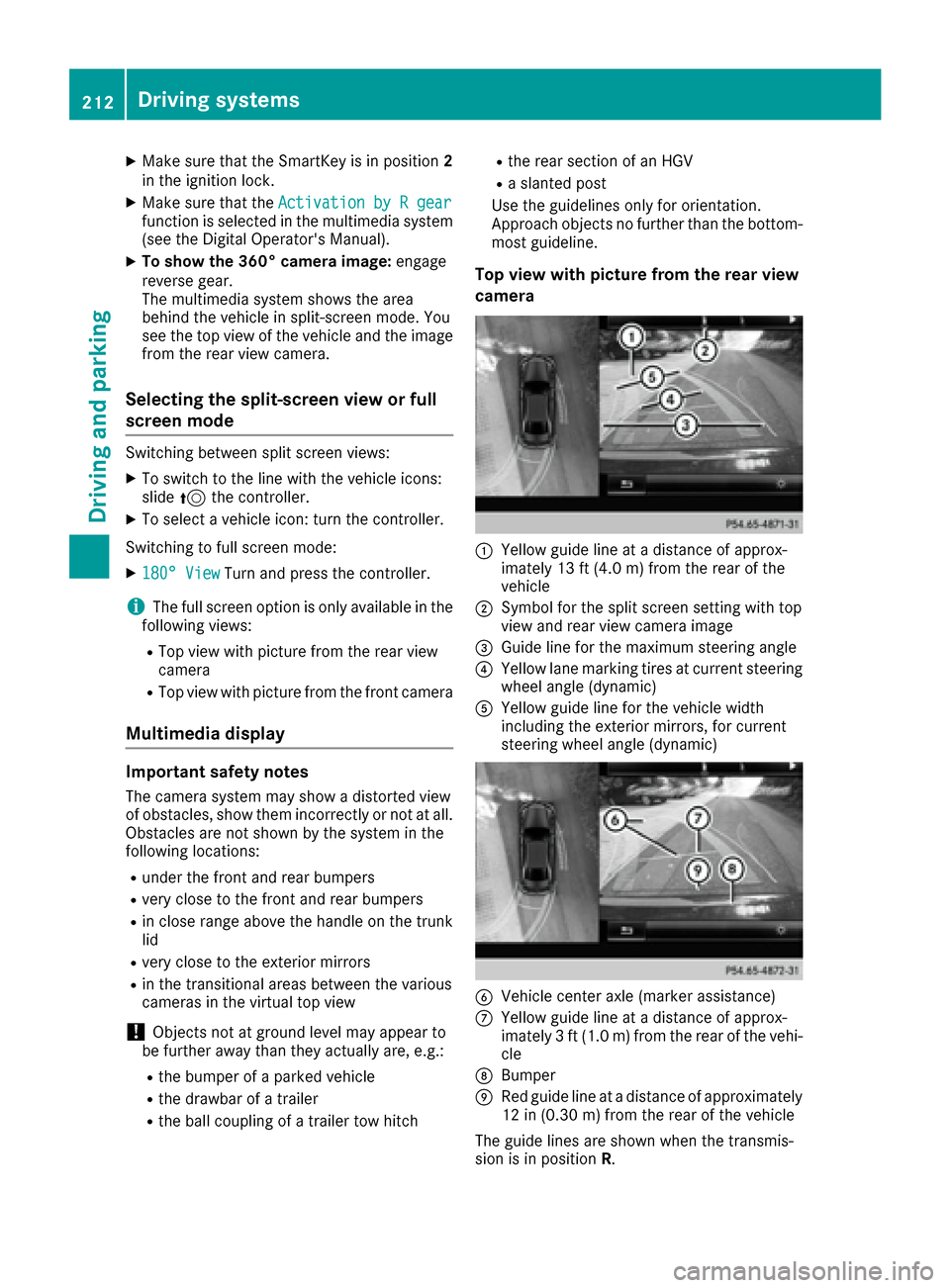
Top view with picture from the rear view
camera
:Yellow guide line at a distance of approx-
imately 13 ft (4.0 m) from the rear of the
vehicle
;Symbol for the split screen setting with top
view and rear view camera image
=Guide line for the maximum steering angle
?Yellow lane marking tires at current steering
wheel angle (dynamic)
AYellow guide line for the vehicle width
including the exterior mirrors, for current
steering wheel angle (dynamic)
BVehicle center axle (marker assistance)
CYellow guide line at a distance of approx-
imately 3 ft (1.0 m) from the rear of the vehi-
cle
DBumper
ERed guide line at a distance of approximately
12 in (0.30 m) from the rear of the vehicle
The guide lines are shown when the transmis-
sion is in position R.
212Driving systems
Driving and parking
Page 229 of 398
E-SAVERElectric mode or driving
with the internal combus-
tion engine is possible
RAutomatic selection of
drive mode with electric
mode as often as possi-
ble
RThe current condition of
charge of the high-volt-
age battery is maintained
so the electrical energy
can be used at a later
time
CHARGERElectric drive is not pos-
sible
RCharging the high-volt-
age battery while driving
using the combustion
engine
In automatic drive programS(Ypage 229) and
during manual gearshifting (Ypage 229), only
HYBRID operating mode is available.
If you switch from automatic drive program Sto
automatic drive program E,HYBRID operating
mode continues to be selected.
If manual drive program Mis deactivated, the
automatic transmission shifts:
Rinto the automatic drive program that was last
selected
Rinto the driving mode that was last selected
Each time the engine is started, HYBRIDmode
is automatically selected.
Operating the on-board computer
You can display the current operating condition
of the hybrid drive system in the multifunction
display and on the display of the multimedia
system (
Ypage 227).
In the multimedia system display, you can also
call up a graphic display of the fuel consumption
and generated electricity (
Ypage 228).
Menus and submenus
Selecting displays in the display of the
multimedia system
XPress the Øbutton on the controller.
The vehicle menu is displayed.
XTo select Energy Flow: turn and press the
controller.
The energy flow is displayed.
or
XTo select Consumption: turn and press the
controller.
Fuel consumption and the generated electric
energy are displayed.
XTo exit the display: press the %button on
the controller.
Selecting the energy flow display in the
multifunction display
XUse Ñ on the steering wheel to call up the
list of menus.
XPress the :or9 button on the steering
wheel to select the Travelmenu.
XConfirm by pressing aon the steering
wheel.
XSelect Energy Flowwith: or9 .
The active hybrid components are highlighted
in the energy flow display.
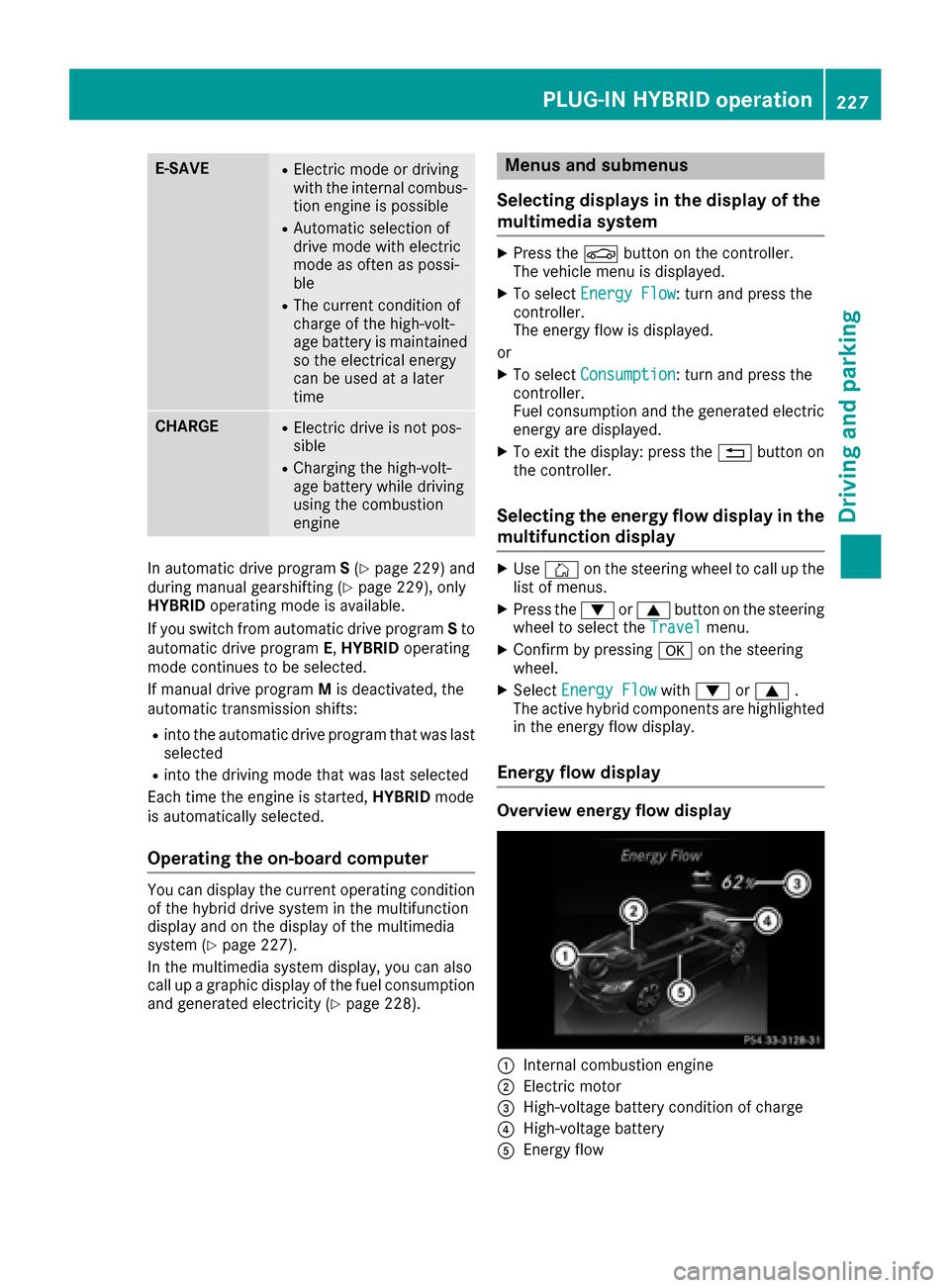
Energy flow display
Overview energy flow display
:Internal combustion engine
;Electric motor
=High-voltage battery condition of charge
?High-voltage battery
AEnergy flow
PLUG‑IN HYBRID operation227
Driving and parking
Z
Page 231 of 398
XReleaseth ebrak epedal .
XCarefully depress th eaccelerato rpedal .
Fo rfurther information on pullin gaway
(
Ypage 149).
Driving
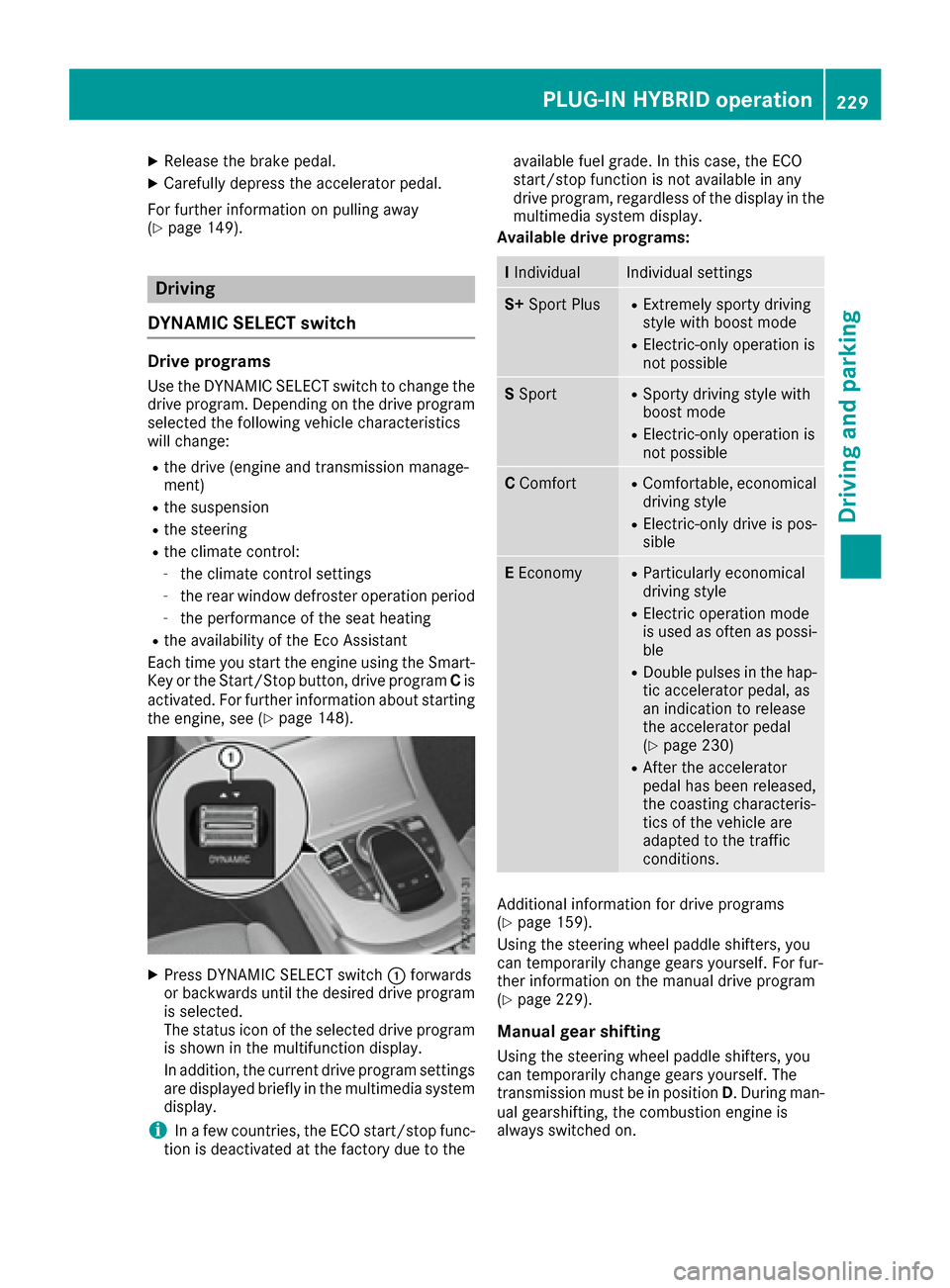
DYNAMIC SELECT switch
Dri veprogram s
Use theDYNAMIC SELECT switch to chang eth e
driv eprogram .Dependin gon th edriv eprogram
selected th efollowin gvehicl echaracteristics
will change:
Rth edriv e(engin eand transmission manage-
ment)
Rth esuspension
Rth esteering
Rth eclimat econtrol :
-theclimat econtrol setting s
-therear window defroste roperation period
-th eperformance of th eseat heating
Rth eavailabilit yof th eEc oAssistant
Eac htime you start th eengin eusin gth eSmart -
Key or th eStart/Sto pbutton, driv eprogram Cis
activated. Fo rfurther information about starting
th eengine, see (
Ypage 148).
XPress DYNAMIC SELECT switch :forwards
or backwards until th edesired driv eprogram
is selected.
The status ico nof th eselected driv eprogram
is shown in th emultifunction display.
In addition ,th ecurren tdriv eprogram setting s
are displayed briefly in th emultimedia system
display.
iIn afew countries, th eECO start/sto pfunc-
tion is deactivated at th efactory due to th eavailable fuel grade. In this case, th
eECO
start/sto pfunction is no tavailable in any
driv eprogram ,regardless of th edisplay in th e
multimedia system display.
Available drive programs:
I IndividualIndividual setting s
S+Sport PlusRExtremely sport ydriving
style wit hboos tmod e
RElectric-only operation is
notpossibl e
SSportRSport ydriving style wit h
boos tmod e
RElectric-only operation is
notpossibl e
CComfortRComfortable, economical
driving style
RElectric-only driv eis pos -
sibl e
EEconomyRParticularly economical
driving style
RElectric operation mod e
is used as often as possi-
ble
RDouble pulse sin th ehap-
ti c accelerato rpedal ,as
an indication to release
th eaccelerato rpedal
(
Ypage 230)
RAfte rth eaccelerato r
pedal has been released,
th ecoasting characteris -
tics of th evehicl eare
adapted to th etraffic
conditions.
Additional information for driv eprogram s
(Ypage 159).
Using th esteering whee lpaddl eshifters, you
can temporarily chang egear syourself .Fo rfur -
ther information on th emanual driv eprogram
(
Ypage 229).
Manua lgear shi fting
Using th esteering whee lpaddl eshifters, you
can temporarily chang egear syourself .The
transmission mus tbe in position D.During man -
ual gearshifting ,th ecombustion engin eis
always switched on .
PLUG‑IN HYBRID operation229
Driving and parking
Z
Page 232 of 398
Activating when driving with the electric motor:
XPull the left or right steering wheel paddle
shifter (Ypage 161).
The combustion engine is switched on. Man-
ual gearshifting is activated temporarily. The
selected gear and Mappear in the multifunc-
tion display.
Activating when driving with the combustion
engine:
XPull the left or right steering wheel paddle
shifter (Ypage 161).
Manual gearshifting is activated temporarily.
The selected gear and Mappear in the multi-
function display.
The ECO start/stop function is not available
when manually changing gear.
For further information on the manual drive pro-
gram (
Ypage 161).
Haptic accelerator pedal
General notes
The haptic accelerator pedal helps you to
reduce the fuel consumption and emissions of
your vehicle.
There are two different functions available for
this purpose:
Ran additional point of resistance in E-MODE
operating mode (Ypage 226)
Ra double pulse in drive program E
(Ypage 229)
Additional point of resistance in the hap-
tic accelerator pedal
The maximum available electric performance is
indicated by a tangible point of resistance in the
haptic accelerator pedal.
The additional point of resistance is available in
E-MODE operating mode (
Ypage 226).
If you depress the haptic accelerator pedal
beyond the pressure point, the combustion
engine is switched on.
Double pulses in the haptic accelerator
pedal
A tangible double pulse in the haptic accelerator
pedal gives you a recommendation to release
the accelerator pedal. By this means, in
HYBRID ,E-MODE orE-SAVE operating mode
the combustion engine can be switched off and disconnected from the power train (overrun
mode).
The double pulse is available in drive program
E
(
Ypage 229).
After the accelerator pedal has been released,
the coasting cha racteristi
cs of the vehicle are
adapted to the traffic conditions.
To avoid getting too close to the vehicle in front, you must apply the brakes manually when nec-
essary.
Driving tips
General driving tips
Drive carefully and maintain a safe distance
from the vehicle in front. Avoid frequent and
sudden acceleration as well as abrupt braking.
During partial electric driving, pulling away and
acceleration, the electric motor supports the
internal combustion engine.
During overrun in transmission position Dand
braking, the electric motor will operate as a gen- erator.
Further information on the ECO start/stop func-
tion (
Ypage 231).
Additional driving tips (
Ypage 179).
Stationary vehicle
If the vehicle is stopped, the combustion engine
is, for the most part, switched off. Automatic
climate control continues to function. The elec-
tromechanically assisted steering gear allows
you to use the power steering without reduced
comfort.
Acceleration
Depending on the operating mode, pulling away
and driving under low load conditions are per-
formed:
Rentirely by electric propulsion
Rin combination with the internal combustion
engine
When accelerating at an increased or full load,
boost mode is utilized. The electric motor sup-
ports the internal combustion engine by provid-
ing additional torque when the accelerator is
depressed rapidly.
230PLUG‑IN HYBRID operation
Driving an d parking