Free MERCEDES-BENZ C300 4MATIC 2010 W204 Owner's Guide
[x] Cancel search | Manufacturer: MERCEDES-BENZ, Model Year: 2010, Model line: C300 4MATIC, Model: MERCEDES-BENZ C300 4MATIC 2010 W204Pages: 364, PDF Size: 8.23 MB
Page 171 of 364
system. Please make sure any other
Bluetooth ®
device linked with the mobile
phone is switched off before you use the
telephone functions with the audio system.
Changes or modifications not expressly
approved by the party responsible for
compliance could void the user’s authority to
operate the equipment.
The head unit internal Bluetooth ®
transmitter
must not be co-located or operated in
conjunction with any other antenna or
transmitter.
This equipment complies with FCC/IC
radiation exposure limits set forth for
uncontrolled equipment and meets the FCC
radio frequency (RF) Exposure Guidelines in
Supplement C to OET65 and RSS-102 of the
IC radio frequency (RF) Exposure rules. This
equipment has very low levels of RF energy
that it is deemed to comply without testing of
specific absorption ratio (SAR).
Unless otherwise indicated, the descriptions
and illustrations in this section refer to the
audio system.
Caller ID
The audio system can display the telephone
number and the name of the caller, e.g. for an
incoming call and also in other menus or
displays.
For the telephone number to be displayed,
the caller must transmit their telephone
number. Otherwise Unknown will be shown on
the audio display.
This is also the case for name displays. For
this, the telephone number and the name of
the caller must also be saved in the telephone
book.
Functional restrictions
You will not be able to use the mobile phone,
or you may have to wait a while, in the
following situations:
R If the mobile phone is switched off.
R If the mobile phone is not connected via the
Bluetooth ®
interface to the audio system.R If the mobile phone is locked.
R If the mobile phone has not yet acquired a
network signal.
The mobile phone automatically tries to log
into a network. If no network is available,
you will also not be able to make a “911”
emergency call. If you attempt to make an
outgoing call, the No Service message will
appear for a short while.
R If you switch off the audio system in the
middle of a call, e.g. by switching off the
ignition, that call will be cut off. You can
prevent this from happening as follows:
- Switch the mobile phone to “private
mode” before switching the audio
system off (see mobile phone operating
instructions).
Activating the mobile phone
Prerequisites for the mobile phone
For making calls using the audio system via
the Bluetooth ®
interface, you will need a
Bluetooth ®
enabled mobile phone.
Your mobile phone must support the
Bluetooth ®
hands-free profile 1.0 or higher to
make or receive calls (see mobile phone
operating instructions).
i For further information on suitable mobile
phones and connecting Bluetooth ®
-
enabled mobile phones to the audio system
R visit www.mbusa-mobile.com
R call the Mercedes-Benz Customer
Assistance Center at
1-800-FOR-MERCedes
(1-800-367-6372) (in the USA)
R call Customer Service at
1-800-387-0100 (in Canada)
Activating Bluetooth ®
XSwitch on the mobile phone (see mobile
phone operating instructions).XEnter the PIN (not necessary with some
mobile phones or network).Audio system169Controls in detail204_AKB; 5; 23, en-USd2ureepe,Version: 2.11.8.12009-07-16T17:54:06+02:00 - Seite 169Z
Page 173 of 364
iThe passcode is any one- to sixteen-digit
number, which you can set yourself. For the
quality of coding of the connection it is
recommend to use a passcode of at least
four digits. You must enter the same
passcode into the audio system and the
device to be authorized. Also refer to the
operating instructions of the mobile phone.
On the audio system, you can enter the
passcode via the digits in the on-screen menu
bar or via the telephone keypad in the audio
control unit.
With the audio controller:XEntering passcode: Select the digits in the
menu bar one by one, by sliding XV Y or
rotating cV d the audio controller.XPress W to confirm each digit.XConfirming passcode: Select ¬ in the
menu bar and press W to confirm.XDeleting digits: Select 2 in the menu
bar and briefly press W to delete one digit,
or press and hold W to delete all entered
digits.XCanceling entry: Press button k in the
center console ( Y page 141).
With keypad on audio control unit:
XEntering passcode: Press the desired
numbers on the keypad.XConfirming passcode: Press button
6 or button m in the audio control
unit to confirm.XDeleting digits: Briefly press button
2 in the audio control unit to delete one
number, or press and hold button 2 to
delete all entered numbers.XCanceling entry: Press button k in the
center console ( Y page 141).
Entering passcode into the mobile phone
If a Bluetooth ®
connection is established
successfully, you will be prompted to enter a
code into the mobile phone (see mobile
phone operating instructions).
XEnter the same passcode on the mobile
phone as you did on the audio system.
i You may need to confirm the authorizing
on the mobile phone. Check your mobile
phone display.
If the message Authorization
Procedure Unsuccessful appears on the
audio system display, you may have
exceeded the preset period for
authorization. Repeat the process.
The device is authorized. You can now make
calls via the audio system hands-free device
using the authorized mobile phone.
External authorization
If the audio system cannot find your mobile
phone, this may be due to special security
settings on your mobile phone. In this case,
you can check whether, conversely, your
mobile phone can find the audio system. The
audio system’s Bluetooth ®
device name is
“MB Bluetooth”.
X% Q Tel Q Bluetooth Phones
Q Update Q Options Q External
Authorization .
The message Ready for External
Authorization appears.XStart Bluetooth®
search procedure on the
mobile phone (see mobile phone operating
instructions).XSelect the audio system (“MB Bluetooth”)
at your mobile phone.XWhen prompted to do so, enter the
passcode on the mobile phone and then on
the audio system.
Displaying details on a mobile phone
X% Q Tel Q Bluetooth Phones .XSelect the mobile phone from the list.Audio system171Controls in detail204_AKB; 5; 23, en-USd2ureepe,Version: 2.11.8.12009-07-16T17:54:06+02:00 - Seite 171Z
Page 179 of 364
mobile phone and only use the audio
system’s hands-free device, these calls will
not be listed.
Calling up the list
X% Q Call Lists.XSelect Calls Received or Calls
Dialed.
The appropriate list appears.
iIf there is a symbol with a telephone
receiver in front of the phone number or the
name, then you have missed this call (e.g.
in the highlighted line of the following
figure).
XSlide ZVÆ or rotate cVd the audio
controller until the desired entry is
highlighted.
XInitiating call: Press button W or 6.XTo close the lists: Press button k.
Deleting call lists
iThe saved call lists are retained in the
audio system, even if you use the audio
system with another mobile phone. For this
reason you should delete any call lists
before handing over or selling the vehicle.
XIn the phone main menu select Call
Lists.
XSelect Delete Call Lists.
You will be prompted to confirm that you
really want to delete the entry. The
question Do you want to delete the
call lists appears in the display.
XSelect Yes or No.XPress W to confirm.
If you select Yes both lists are deleted.
Making calls
XPress button % on the audio control unit
to call up the telephone mode.
When the mobile phone is ready for
operation, the display will look similar like
this:
Initiating an outgoing call
Entering phone number via the audio
control unit
You can enter numbers and special
characters via the telephone keypad.
XEntering: Use x to s, m and
l to enter characters.
You can enter the * character by pressing
button l once. You can enter the +
character by pressing button l once
and then again within approx. 1.5 seconds.
XInitiating a call: Press button 6.XDeleting individual digits: Briefly press
button 2 in the audio control unit.
Audio system177Controls in detail204_AKB; 5; 23, en-USd2ureepe,Version: 2.11.8.12009-07-16T17:54:06+02:00 - Seite 177Z
Page 181 of 364
Aborting dial or ending a callX% Q ¢ and press W.
or
XPress button ~ on the audio control unit
or on the multifunction steering wheel.
Rejecting or accepting calls
You will be notified of an incoming call by the
ringing tone and a message on the display.
iDepending on the mobile phone you are
using, the audio system’s ringing tone may
differ from the one you have set on your
mobile phone. You may hear
Rthe ringing tone set on the mobile phone
Rthe audio system’s preset ringing tone
Rthe audio system’s preset ringing tone
and the ringing tone set on the mobile
phone
If the caller’s name and number are among
the entries in the audio system’s phone book
and the caller has not withheld this
information, it will appear on the display. If
the caller withholds this information, you will
see:
XAccepting: Press button 6 on audio
control unit or on the multifunction steering
wheel.
or
XPress W.XRejecting: Press button ~ on audio
control unit.
or
XSlide XV or rotate cVd the audio
controller to select Reject, and press W
to confirm.
The call is rejected.
If you have accepted the call using the audio
control unit, audio controller, or the
multifunction steering wheel, the call will be
conducted via the hands-free system. The
volume of the call can be adjusted
(Y page 144).
Further operating functions can be found in
the “Functions during a single-call” section
(Y page 179).
You can also accept a call if the audio display
is showing a screen other than the telephone
mode screen. After accepting the call, the
display switches to the phone display. Once
the call is over, the display for the previous
mode will appear again.
Functions during a single call
Switching hands-free microphone on or
off
The menu bar changes when you make or
receive a call. Instead of the Call Lists
menu item, Mic Off or Mic On will appear.
XSwitching off: Select Mic Off.
The following message will flash up on the
display: The microphone is off.
When the microphone is switched off the
symbol Q appears in the main area.
XSwitching on: Select Mic On.
The following message will flash up on the
display: The microphone is on.
The microphone is switched on and the
symbol Q disappears in the main area.
iYou can also switch the microphone on or
off by pressing button 8.
Audio system179Controls in detail204_AKB; 5; 23, en-USd2ureepe,Version: 2.11.8.12009-07-16T17:54:06+02:00 - Seite 179Z
Page 186 of 364
ground. Observe instructions for towing the
vehicle with all wheels on the ground.
! Only conduct operational or performance
tests on a two-axle dynamometer. If such
tests are necessary, contact an authorized
Mercedes-Benz Center. You could
otherwise seriously damage the brake
system and/or the transfer case which is
not covered by the Mercedes-Benz Limited
Warranty.
iIn winter operation, the maximum
effectiveness of the 4MATIC is only
achieved with winter tires (Y page 252) or
snow chains as required.
Dynamic handling package with sport
driving mode
The most important part of the dynamic
handling package with sport driving mode is
the variable damping system. It adjusts the
damping to the respective driving condition
automatically.
The damping adjustment depends on
Ryour driving style
Rthe road condition
Ryour individual selection, see the following
description
Vehicles with automatic transmission: The
sport driving mode button selects the
automatic shift programs C/S. For
information on the automatic shift programs,
see “Automatic shift programs”
(Y page 111). The automatic transmission
with dynamic handling package with sport
driving mode contains additional steering
wheel gearshift controls, see “One-touch
gearshifting” (Y page 112).
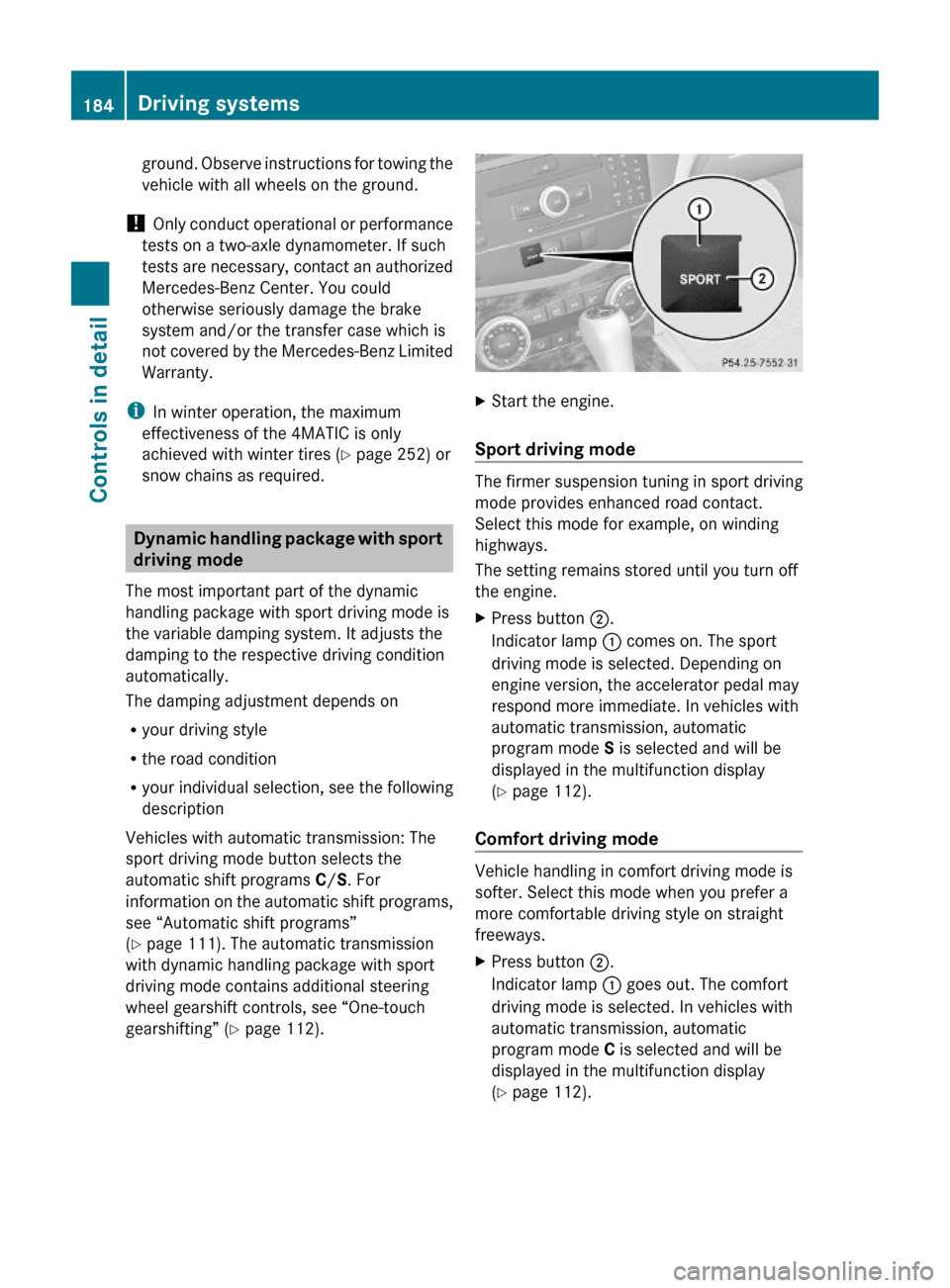
XStart the engine.
Sport driving mode
The firmer suspension tuning in sport driving
mode provides enhanced road contact.
Select this mode for example, on winding
highways.
The setting remains stored until you turn off
the engine.
XPress button ;.
Indicator lamp : comes on. The sport
driving mode is selected. Depending on
engine version, the accelerator pedal may
respond more immediate. In vehicles with
automatic transmission, automatic
program mode S is selected and will be
displayed in the multifunction display
(Y page 112).
Comfort driving mode
Vehicle handling in comfort driving mode is
softer. Select this mode when you prefer a
more comfortable driving style on straight
freeways.
XPress button ;.
Indicator lamp : goes out. The comfort
driving mode is selected. In vehicles with
automatic transmission, automatic
program mode C is selected and will be
displayed in the multifunction display
(Y page 112).
184Driving systemsControls in detail
204_AKB; 5; 23, en-USd2ureepe,Version: 2.11.8.12009-07-16T17:54:06+02:00 - Seite 184
Page 187 of 364
Parktronic system (Parking assist)
This feature is only available in Canada
vehicles.
The Parktronic system is an electronic
parking aid with ultrasonic sensors designed
to assist the driver during parking maneuvers.
The Parktronic system indicates the relative
distance between the vehicle and an obstacle
visually and audibly.
The Parktronic system is activated
automatically when
Ryou switch on the ignition
and
Ryou release the parking brake
and
Rvehicles with automatic transmission: the
automatic transmission is in drive position
D, reverse gear R, or neutral position N
The Parktronic system deactivates at speeds
above approximately 11 mph (18 km/h). At
lower speeds, the Parktronic system
activates again.
The Parktronic system also deactivates when
you shift the automatic transmission into
park position P or engage the parking brake.
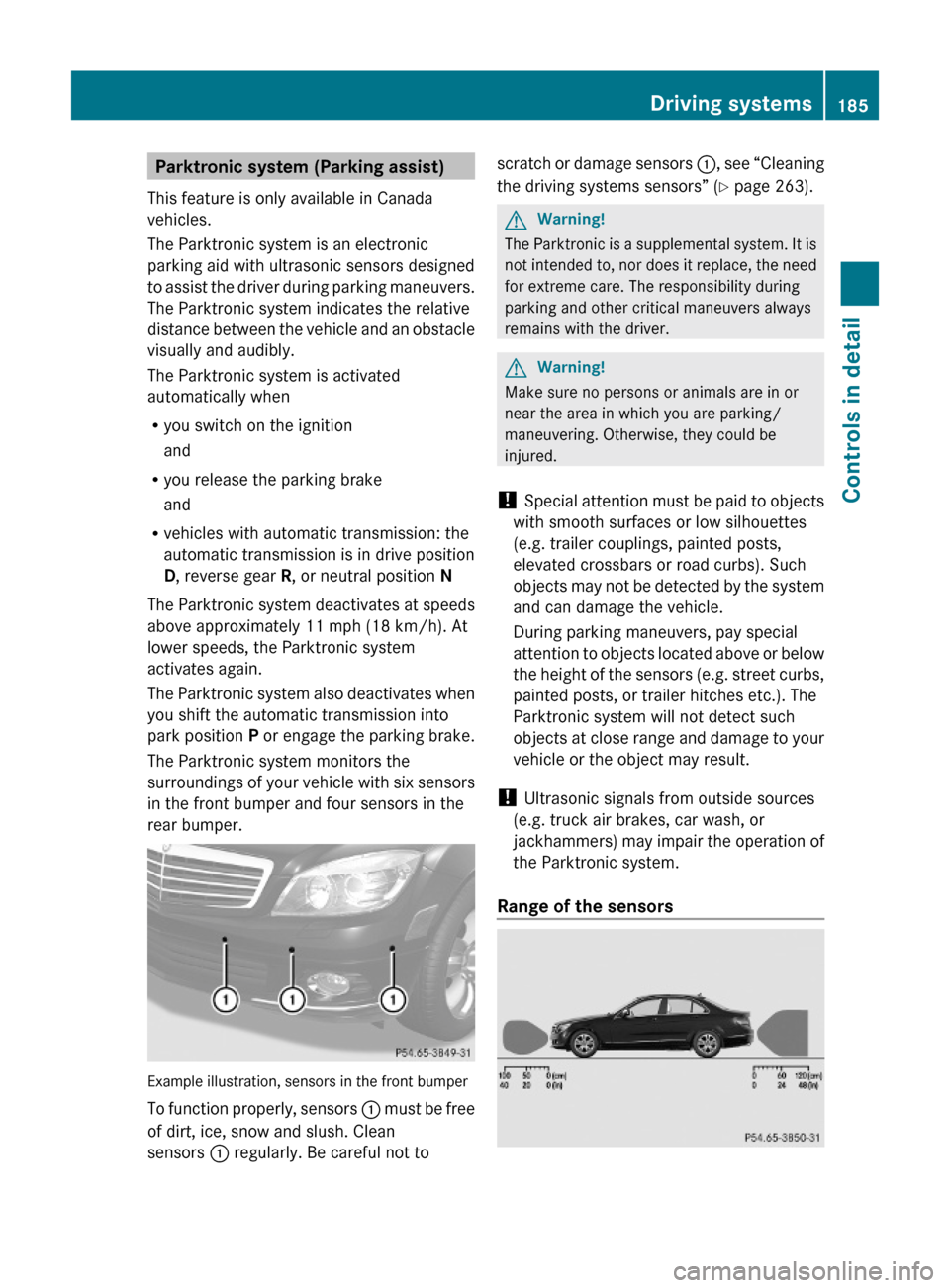
The Parktronic system monitors the
surroundings of your vehicle with six sensors
in the front bumper and four sensors in the
rear bumper.
Example illustration, sensors in the front bumper
To function properly, sensors : must be free
of dirt, ice, snow and slush. Clean
sensors : regularly. Be careful not to
scratch or damage sensors :, see “Cleaning
the driving systems sensors” (Y page 263).
GWarning!
The Parktronic is a supplemental system. It is
not intended to, nor does it replace, the need
for extreme care. The responsibility during
parking and other critical maneuvers always
remains with the driver.
GWarning!
Make sure no persons or animals are in or
near the area in which you are parking/
maneuvering. Otherwise, they could be
injured.
! Special attention must be paid to objects
with smooth surfaces or low silhouettes
(e.g. trailer couplings, painted posts,
elevated crossbars or road curbs). Such
objects may not be detected by the system
and can damage the vehicle.
During parking maneuvers, pay special
attention to objects located above or below
the height of the sensors (e.g. street curbs,
painted posts, or trailer hitches etc.). The
Parktronic system will not detect such
objects at close range and damage to your
vehicle or the object may result.
! Ultrasonic signals from outside sources
(e.g. truck air brakes, car wash, or
jackhammers) may impair the operation of
the Parktronic system.
Range of the sensors
Driving systems185Controls in detail204_AKB; 5; 23, en-USd2ureepe,Version: 2.11.8.12009-07-16T17:54:06+02:00 - Seite 185Z
Page 190 of 364
XSwitch off the ignition.XClean the Parktronic system sensors
(Y page 263).
XSwitch on the ignition.
or
XCheck the Parktronic system operation at
another location to rule out interference
from outside radio or ultrasonic signals.
Rear view camera
The rear view camera is an optical parking aid.
The area behind the vehicle appears in the
COMAND system display as a mirror image,
like in the rear view mirror.
GWarning!
Make sure no persons or animals are in or
near the area in which you are parking/
maneuvering. Otherwise, they could be
injured.
GWarning!
The rear view camera is only an aid and may
display obstacles
Rfrom a distorted perspective
Rinaccurately
Rmay not display obstacles at all
The rear view camera does not relieve you of
the responsibility to be cautious. Take care
and pay careful attention. The rear view
camera may not show objects which are
Rvery close to the rear bumper
Runder the rear bumper
Rabove the trunk handle
You are responsible for safety at all times and
must continue to pay attention to the
immediate surroundings when parking and
maneuvering. This includes the area behind,
in front of, and beside the vehicle. Otherwise
you could endanger yourself and/or others.
GWarning!
The rear view camera either will not function
or will not function to its full capability if
Rthe trunk lid is open
Rit is raining very hard, snowing or foggy
Rit is night or you are parking/maneuvering
your vehicle in an area where it is very dark
Rthe camera is exposed to a very bright white
light
Rthe immediate surroundings are
illuminated with fluorescent light (the
COMAND system display can flicker)
Rthere is a sudden change in temperature,
e.g. if you drive into a heated garage from
the cold (lens condensation)
Rthe camera lens is dirty or covered
Rthe rear of your vehicle is damaged
In this case, have the position and setting
of the camera checked by a qualified
specialist workshop. Mercedes-Benz
recommends that you contact a Mercedes-
Benz Center for this purpose.
Do not use the rear view camera in these
situations. Otherwise you could injure
yourself or others and/or damage property
including your vehicle while parking/
maneuvering.
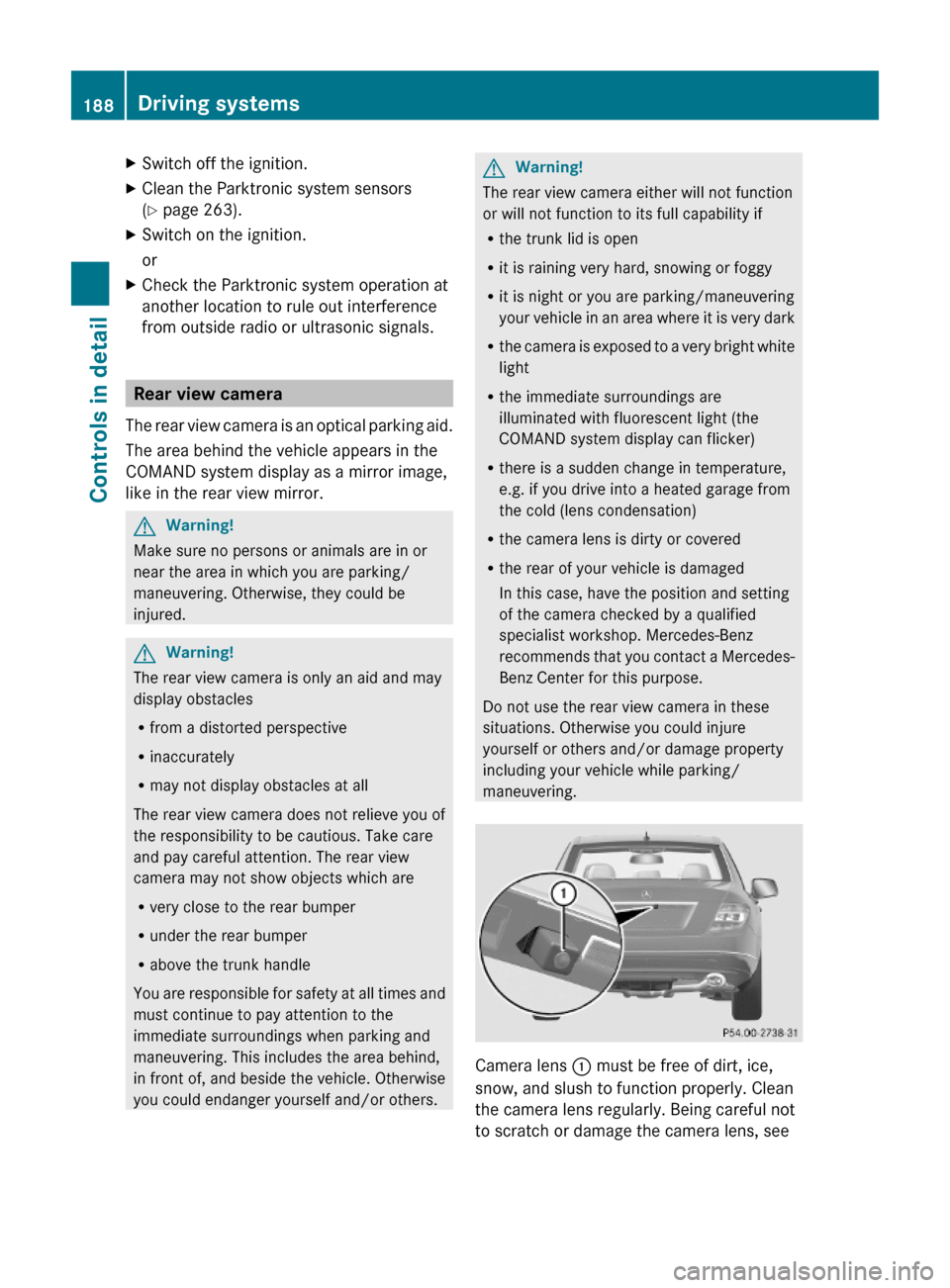
Camera lens : must be free of dirt, ice,
snow, and slush to function properly. Clean
the camera lens regularly. Being careful not
to scratch or damage the camera lens, see
188Driving systemsControls in detail
204_AKB; 5; 23, en-USd2ureepe,Version: 2.11.8.12009-07-16T17:54:06+02:00 - Seite 188
Page 193 of 364
GWarning!
Severe conditions (e.g. strong air pollution)
may require replacement of the filter before
its scheduled replacement interval. A clogged
filter will reduce the air volume to the interior
and the windows could fog up, impairing
visibility and endangering you and others.
Have a clogged filter replaced as soon as
possible at an authorized Mercedes-Benz
Center.
The air conditioning will not engage (no
cooling) if the A/C mode ( Y page 191) is
deactivated.
GWarning!
Follow the recommended settings for heating
and cooling given on the following pages.
Otherwise the windows could fog up,
impairing visibility and endangering you and
others.
XKeep the air intake grille in front of the
windshield free of snow and debris.
Do not obstruct air flow by placing objects on
the air flow-through exhaust slots below the
rear window.
i If the vehicle interior is hot, ventilate the
interior before driving off, see “Summer
opening feature” ( Y page 99). The climate
control will then adjust the interior
temperature to the set value much faster.
Deactivating the climate control
system
GWarning!
When the climate control system is
deactivated, the outside air supply and
circulation are also deactivated. Only choose
this setting for a short time. Otherwise the
windows could fog up, impairing visibility and
endangering you and others.
XDeactivating: Press button ^.
The indicator lamp in the button comes on.XReactivating: Press button ^.
The indicator lamp in the button goes out.
The previous settings are once again in
effect.
or
XPress button Ã.
The indicator lamp in the button comes on.
Air volume and air distribution are adjusted
automatically.
Air conditioning
The air conditioning is operational while the
engine is running and cools the interior air to
the temperature set by the operator. In
addition, the air conditioning dehumidifies
the interior air and helps prevent window
fogging.
GWarning!
If you deactivate the air conditioning, the
vehicle will not be cooled when weather
conditions are warm. The windows can fog up
more quickly. Window fogging may impair
visibility and endanger you and others.
i Condensated water may drip out from
underneath the vehicle. This is normal and
not an indication of a malfunction.
The air conditioning uses the refrigerant
R134a. This refrigerant is free of CFCs which
are harmful to the ozone layer.
Deactivating
It is possible to deactivate the air
conditioning. The interior air will then no
longer be cooled or dehumidified.
XPress button ¿.
The indicator lamp in the button goes out.
The cooling function switches off after a
short delay.Climate control system191Controls in detail204_AKB; 5; 23, en-USd2ureepe,Version: 2.11.8.12009-07-16T17:54:06+02:00 - Seite 191Z
Page 195 of 364
For best possible performance of the climate
control:
XKeep the air intake grille in front of the
windshield free of snow, leaves, sticks, and
any other debris.
XAlways keep all air vents and grilles in the
passenger compartment free from
obstruction.
iFor draft-free ventilation, move the
adjustable center and side air vents to the
middle position.
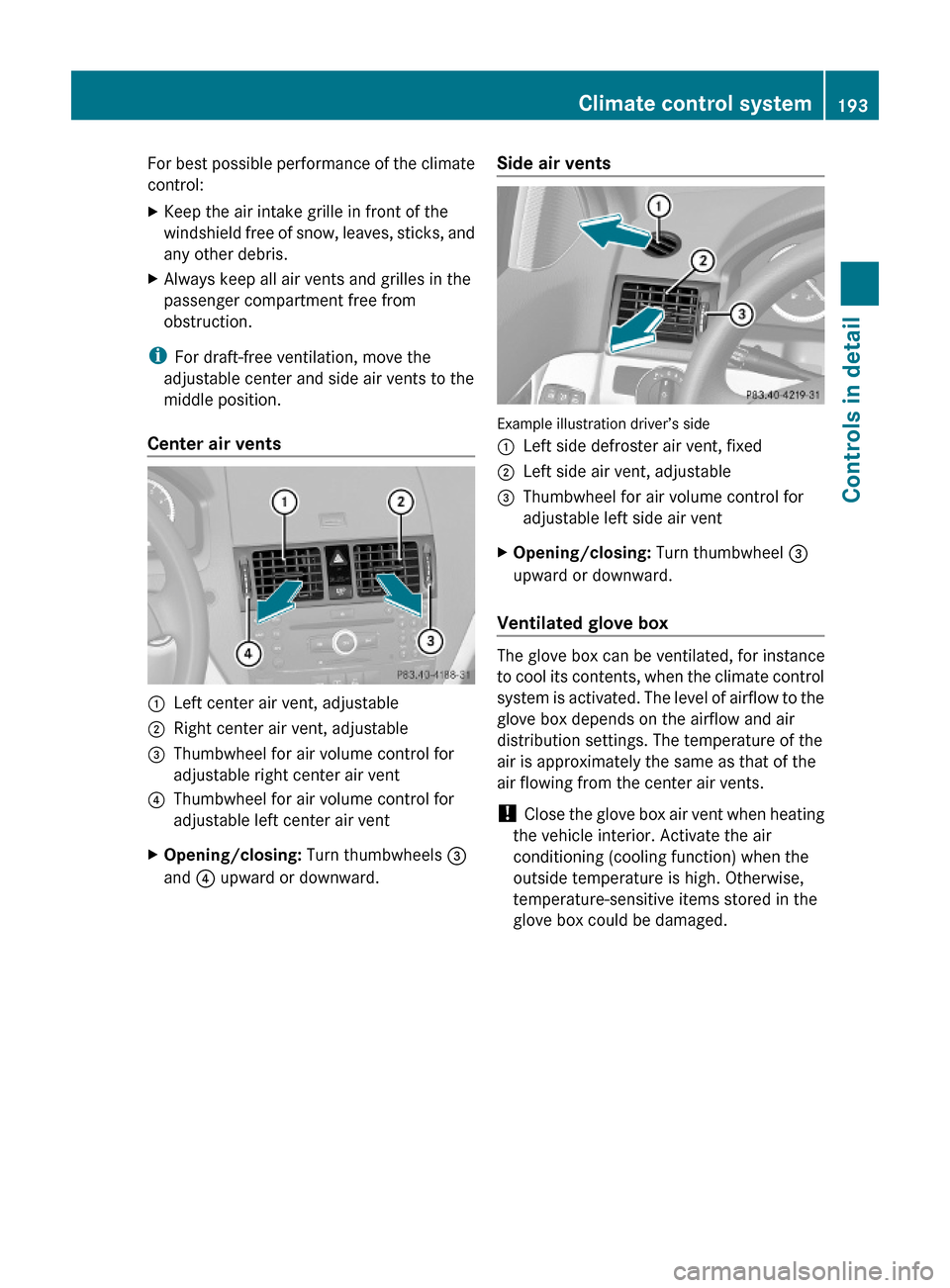
Center air vents
:Left center air vent, adjustable;Right center air vent, adjustable=Thumbwheel for air volume control for
adjustable right center air vent
?Thumbwheel for air volume control for
adjustable left center air vent
XOpening/closing: Turn thumbwheels =
and ? upward or downward.
Side air vents
Example illustration driver’s side
:Left side defroster air vent, fixed;Left side air vent, adjustable=Thumbwheel for air volume control for
adjustable left side air vent
XOpening/closing: Turn thumbwheel =
upward or downward.
Ventilated glove box
The glove box can be ventilated, for instance
to cool its contents, when the climate control
system is activated. The level of airflow to the
glove box depends on the airflow and air
distribution settings. The temperature of the
air is approximately the same as that of the
air flowing from the center air vents.
! Close the glove box air vent when heating
the vehicle interior. Activate the air
conditioning (cooling function) when the
outside temperature is high. Otherwise,
temperature-sensitive items stored in the
glove box could be damaged.
Climate control system193Controls in detail204_AKB; 5; 23, en-USd2ureepe,Version: 2.11.8.12009-07-16T17:54:06+02:00 - Seite 193Z
Page 229 of 364
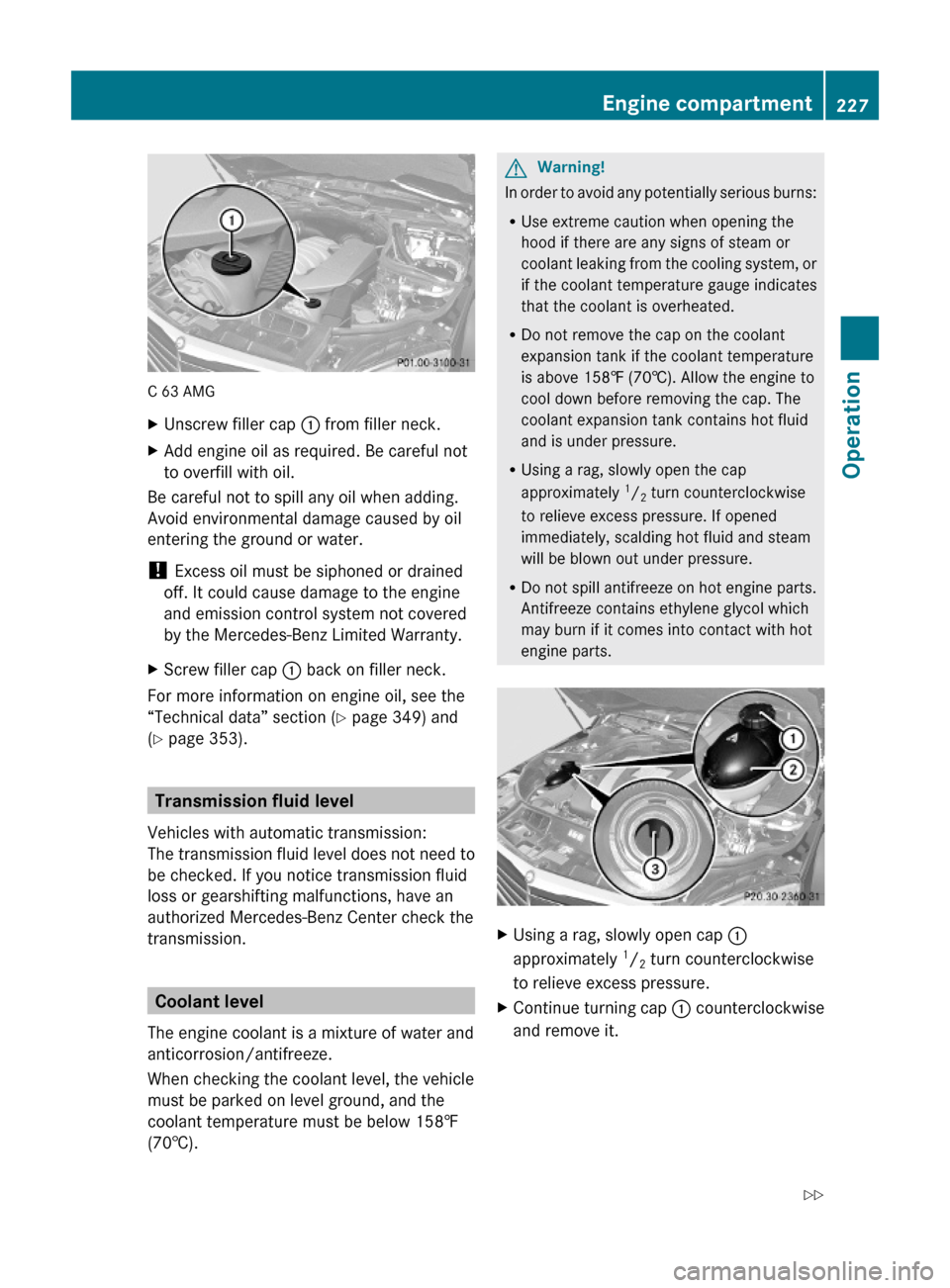
C 63 AMG
XUnscrew filler cap : from filler neck.XAdd engine oil as required. Be careful not
to overfill with oil.
Be careful not to spill any oil when adding.
Avoid environmental damage caused by oil
entering the ground or water.
! Excess oil must be siphoned or drained
off. It could cause damage to the engine
and emission control system not covered
by the Mercedes-Benz Limited Warranty.
XScrew filler cap : back on filler neck.
For more information on engine oil, see the
“Technical data” section (Y page 349) and
(Y page 353).
Transmission fluid level
Vehicles with automatic transmission:
The transmission fluid level does not need to
be checked. If you notice transmission fluid
loss or gearshifting malfunctions, have an
authorized Mercedes-Benz Center check the
transmission.
Coolant level
The engine coolant is a mixture of water and
anticorrosion/antifreeze.
When checking the coolant level, the vehicle
must be parked on level ground, and the
coolant temperature must be below 158‡
(70†).
GWarning!
In order to avoid any potentially serious burns:
RUse extreme caution when opening the
hood if there are any signs of steam or
coolant leaking from the cooling system, or
if the coolant temperature gauge indicates
that the coolant is overheated.
RDo not remove the cap on the coolant
expansion tank if the coolant temperature
is above 158‡ (70†). Allow the engine to
cool down before removing the cap. The
coolant expansion tank contains hot fluid
and is under pressure.
RUsing a rag, slowly open the cap
approximately 1/2 turn counterclockwise
to relieve excess pressure. If opened
immediately, scalding hot fluid and steam
will be blown out under pressure.
RDo not spill antifreeze on hot engine parts.
Antifreeze contains ethylene glycol which
may burn if it comes into contact with hot
engine parts.
XUsing a rag, slowly open cap :
approximately 1/2 turn counterclockwise
to relieve excess pressure.
XContinue turning cap : counterclockwise
and remove it.
Engine compartment227Operation204_AKB; 5; 23, en-USd2ureepe,Version: 2.11.8.12009-07-16T17:54:06+02:00 - Seite 227Z