Free MERCEDES-BENZ C300 4MATIC 2010 W204 User Guide
[x] Cancel search | Manufacturer: MERCEDES-BENZ, Model Year: 2010, Model line: C300 4MATIC, Model: MERCEDES-BENZ C300 4MATIC 2010 W204Pages: 364, PDF Size: 8.23 MB
Page 87 of 364
Make sure
Ryou can reach the steering wheel with your
arms slightly bent at the elbows
Ryou can move your legs freely
Rall displays (including malfunction and
indicator lamps) on the instrument cluster
are clearly visible
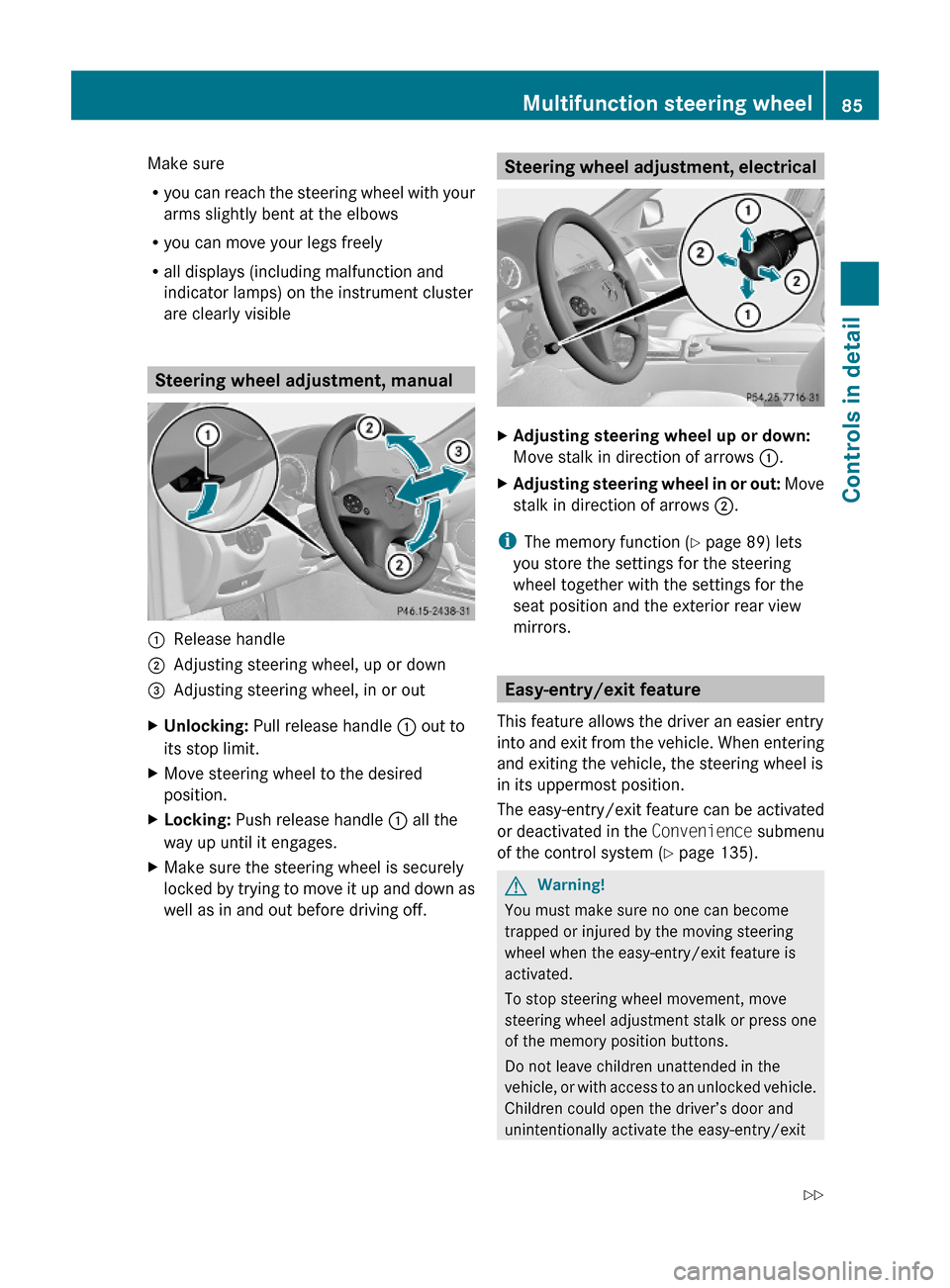
Steering wheel adjustment, manual
:Release handle;Adjusting steering wheel, up or down=Adjusting steering wheel, in or outXUnlocking: Pull release handle : out to
its stop limit.
XMove steering wheel to the desired
position.
XLocking: Push release handle : all the
way up until it engages.
XMake sure the steering wheel is securely
locked by trying to move it up and down as
well as in and out before driving off.
Steering wheel adjustment, electricalXAdjusting steering wheel up or down:
Move stalk in direction of arrows :.
XAdjusting steering wheel in or out: Move
stalk in direction of arrows ;.
iThe memory function (Y page 89) lets
you store the settings for the steering
wheel together with the settings for the
seat position and the exterior rear view
mirrors.
Easy-entry/exit feature
This feature allows the driver an easier entry
into and exit from the vehicle. When entering
and exiting the vehicle, the steering wheel is
in its uppermost position.
The easy-entry/exit feature can be activated
or deactivated in the Convenience submenu
of the control system (Y page 135).
GWarning!
You must make sure no one can become
trapped or injured by the moving steering
wheel when the easy-entry/exit feature is
activated.
To stop steering wheel movement, move
steering wheel adjustment stalk or press one
of the memory position buttons.
Do not leave children unattended in the
vehicle, or with access to an unlocked vehicle.
Children could open the driver’s door and
unintentionally activate the easy-entry/exit
Multifunction steering wheel85Controls in detail204_AKB; 5; 23, en-USd2ureepe,Version: 2.11.8.12009-07-16T17:54:06+02:00 - Seite 85Z
Page 112 of 364
EffectBPark position
Shift the automatic transmission
into park position P only when the
vehicle is stopped. The park position
is not intended to serve as a brake
when the vehicle is parked. Rather,
the driver should always engage the
parking brake in addition to shifting
the automatic transmission into
park position P to secure the
vehicle.
The SmartKey can only be removed
from the starter switch with the gear
selector lever in park position P.
With the SmartKey removed from
the starter switch, the gear selector
lever is locked in park position P.
If the vehicle’s electrical system is
malfunctioning, the gear selector
lever could remain locked in park
position P. To unlock the gear
selector lever manually, see
“Manually unlocking the gear
selector lever” ( Y page 311).CReverse gear
Shift the automatic transmission
into reverse gear R only when the
vehicle is stopped.EffectANeutral position
No power is transmitted from the
engine to the drive axle. When the
brakes are released, the vehicle can
be moved freely (pushed or towed).
To avoid damage to the
transmission, never shift the
automatic transmission into neutral
position N while driving.
Exception: If the ESP ®
is switched
off or malfunctioning, shift the
automatic transmission into neutral
position N if the vehicle is in danger
of skidding.
! Coasting the vehicle, or driving
for any other reason with the
automatic transmission in neutral
position N can result in
transmission damage that is not
covered by the Mercedes-Benz
Limited Warranty.7Drive position
The automatic transmission shifts
automatically. All forward gears are
available.
Driving tips
Kickdown
Use the kickdown when you want maximum
acceleration.
XU.S. vehicles except AMG vehicles:
Fully depress the accelerator pedal.
Depending on the engine speed the
automatic transmission shifts into a lower
gear.XCanada vehicles and AMG vehicles:
Depress the accelerator pedal past the
point of resistance.
Depending on the engine speed the
automatic transmission shifts into a lower
gear.110Automatic transmissionControls in detail
204_AKB; 5; 23, en-USd2ureepe,Version: 2.11.8.12009-07-16T17:54:06+02:00 - Seite 110
Page 120 of 364
Outside temperature indicator
The outside temperature indicator is
displayed in the multifunction display
(Y page 120).
GWarning!
The outside temperature indicator is not
designed to serve as an ice-warning device
and is therefore unsuitable for that purpose.
Indicated temperatures just above the
freezing point do not guarantee that the road
surface is free of ice. The road may still be icy,
especially in wooded areas or on bridges.
Fuel gauge
The fuel gauge is on the left-hand side of the
instrument cluster (Y page 28). Once the fuel
level has fallen below the reserve mark, the
yellow fuel tank reserve warning lamp 8
for the fuel reserve comes on.
Control system
Introduction
The control system is activated as soon as the
starter switch is in position 2.
The control system enables you to call up
information about your vehicle and to change
vehicle settings.
For example, you can use the control system
to find out when your vehicle is next due for
maintenance service, to call up statistical
data on your vehicle, and much more.
GWarning!
A driver’s attention to the road and traffic
conditions must always be his/her primary
focus when driving.
For your safety and the safety of others,
selecting features through the multifunction
steering wheel should only be done by the
driver when traffic and road conditions permit
it to be done safely.
Bear in mind that at a speed of just 30 mph
(approximately 50 km/h), your vehicle is
covering a distance of 44 feet (approximately
14 m) every second.
The control system relays information to the
multifunction display.
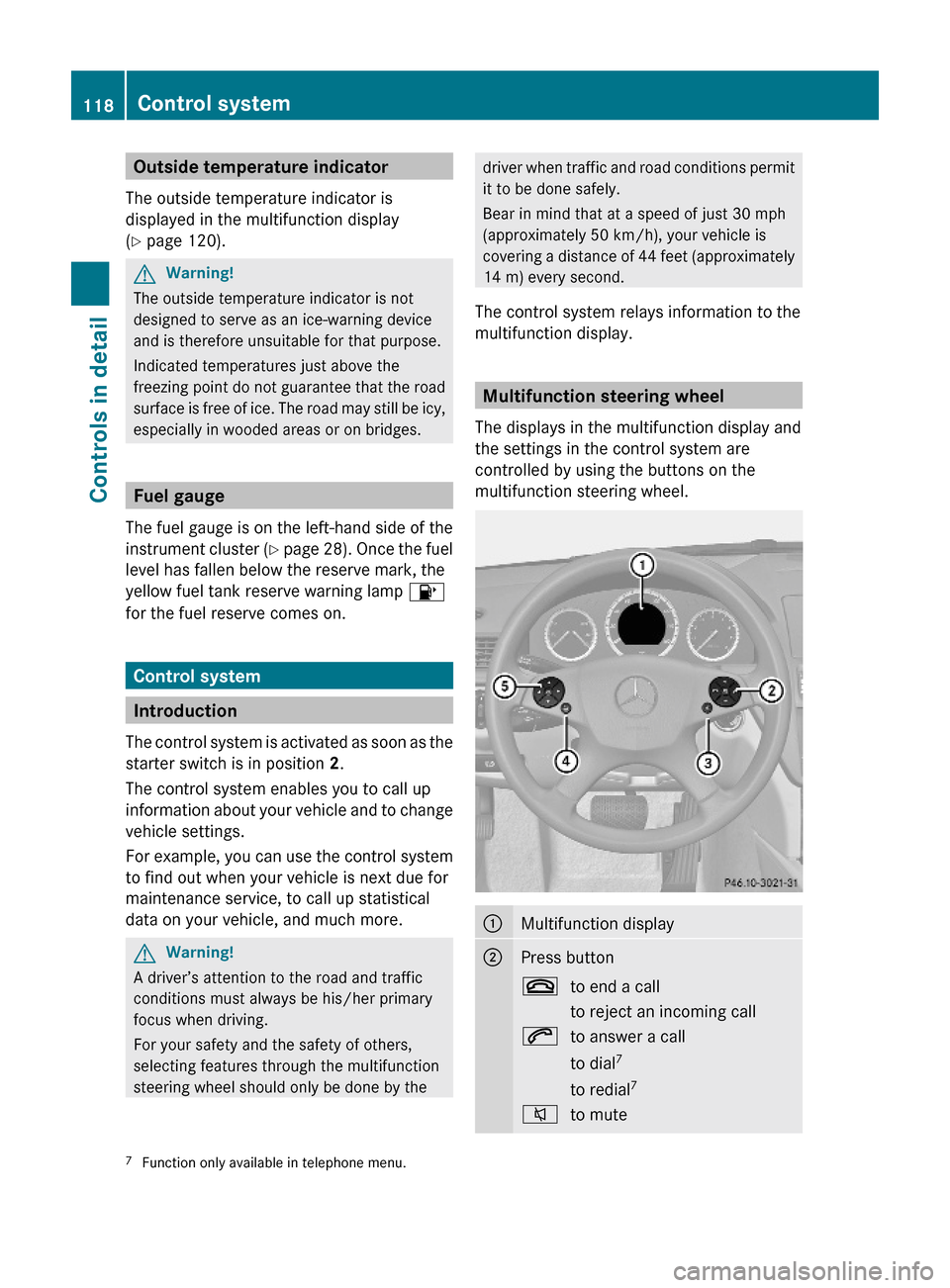
Multifunction steering wheel
The displays in the multifunction display and
the settings in the control system are
controlled by using the buttons on the
multifunction steering wheel.
:Multifunction display;Press button~to end a call
to reject an incoming call
6to answer a call
to dial7
to redial7
8to mute7Function only available in telephone menu.118Control systemControls in detail
204_AKB; 5; 23, en-USd2ureepe,Version: 2.11.8.12009-07-16T17:54:06+02:00 - Seite 118
Page 130 of 364
Tel menuGWarning!
A driver’s attention to the road must always
be his/her primary focus when driving. For
your safety and the safety of others, we
recommend that you pull over to a safe
location and stop before placing or taking a
telephone call. If you choose to use the
telephone while driving, please use the hands-
free device and only use the telephone when
weather, road and traffic conditions permit.
Some jurisdictions prohibit the driver from
using a mobile phone while driving a vehicle.
Bear in mind that at a speed of just 30 mph
(approximately 50 km/h), your vehicle is
covering a distance of 44 feet (approximately
14 m) every second.
You can connect your telephone to the audio
system (Y page 167) or to the COMAND
system via Bluetooth®, see separate
COMAND system operating instructions.
XSwitch on the audio system (Y page 144)
or the COMAND system, see separate
COMAND system operating instructions.
XPress button = or ; to select the
Tel menu.
One of the following messages will appear
in the multifunction display:
RNo Service: No network is available.
RReady for Bluetooth Telephony...:
The telephone has not been connected
to the audio system or COMAND system
via Bluetooth® yet.
XConnect the telephone to the audio
system or COMAND system via
Bluetooth®.
RPhone READY or name of the network
provider (if available): The telephone has
found a network and is ready for use. You
can operate it using the control system.
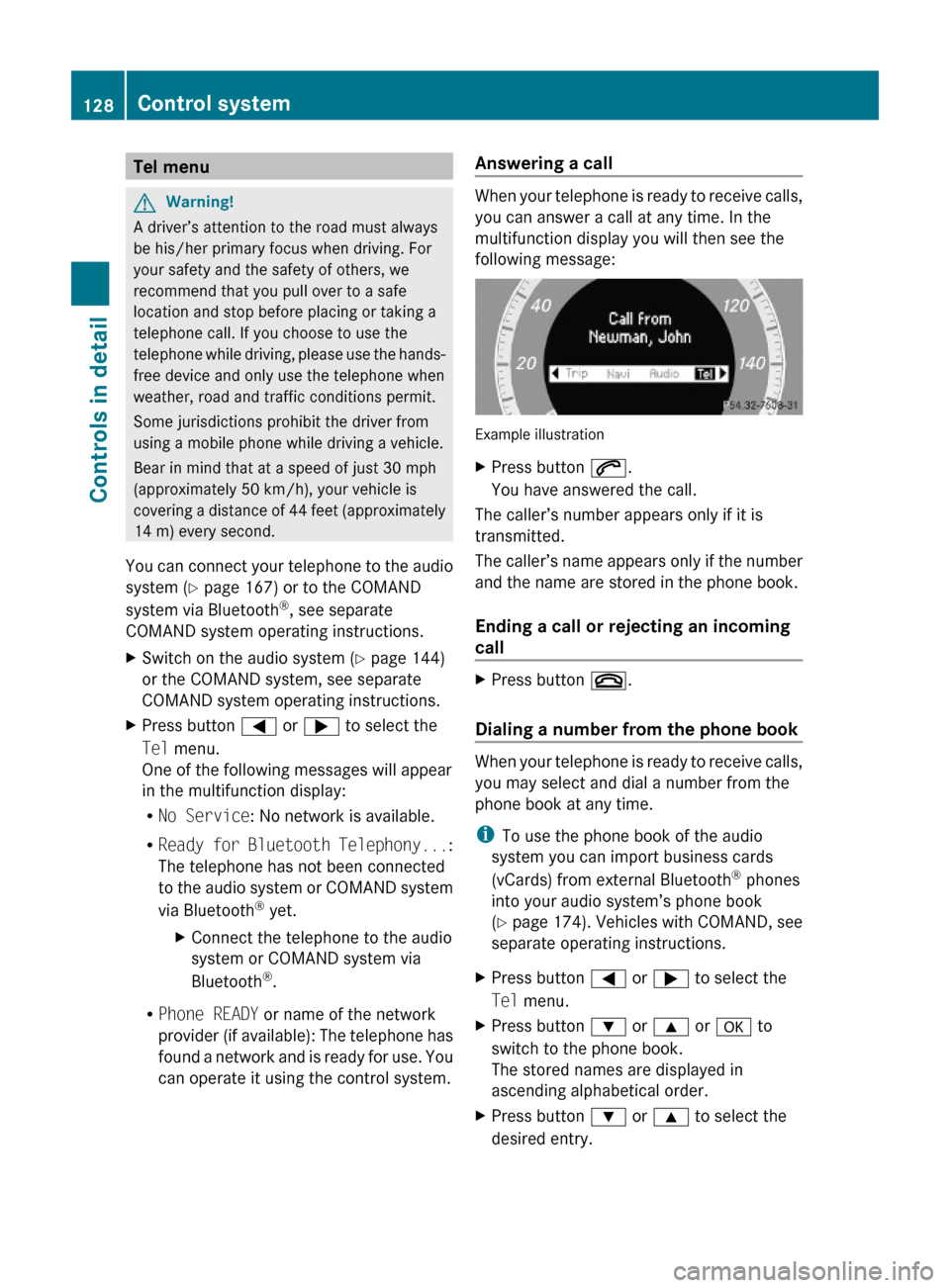
Answering a call
When your telephone is ready to receive calls,
you can answer a call at any time. In the
multifunction display you will then see the
following message:
Example illustration
XPress button 6.
You have answered the call.
The caller’s number appears only if it is
transmitted.
The caller’s name appears only if the number
and the name are stored in the phone book.
Ending a call or rejecting an incoming
call
XPress button ~.
Dialing a number from the phone book
When your telephone is ready to receive calls,
you may select and dial a number from the
phone book at any time.
iTo use the phone book of the audio
system you can import business cards
(vCards) from external Bluetooth® phones
into your audio system’s phone book
(Y page 174). Vehicles with COMAND, see
separate operating instructions.
XPress button = or ; to select the
Tel menu.
XPress button : or 9 or a to
switch to the phone book.
The stored names are displayed in
ascending alphabetical order.
XPress button : or 9 to select the
desired entry.
128Control systemControls in detail
204_AKB; 5; 23, en-USd2ureepe,Version: 2.11.8.12009-07-16T17:54:06+02:00 - Seite 128
Page 141 of 364
BKeypad
Tuning to a station via the station
memory (Y page 150)
Storing stations manually
(Y page 151)
Entering a passcode (Y page 171)
Entering a phone number
(Y page 177)
Sending DTMF tones (Y page 180)
CD changer: Selecting a CD
(Y page 162)
CD: Entering a track number directly
(Y page 164)
CTuning to a station via station search
(Y page 150)
Fast forward (Y page 165)
Skipping forwards to a track
(Y page 165)
DSwitching audio system on/off
(Y page 144)
EAdjusting the volume (Y page 144)FTuning to a station via station search
(Y page 150)
Fast rewind (Y page 165)
Skipping backwards to a track
(Y page 165)
GConfirming a passcode
(Y page 171)
Accepting a call (Y page 179)
Initiating a call (Y page 177)
Redial (Y page 178)
HRejecting a call (Y page 179)
Ending an active call (Y page 179)
IOpening system settings menu
(Y page 147)
JSwitching sound on/off
(Y page 145)
Switching hands-free microphone
on/off (Y page 179)
KSwitching to telephone mode
(Y page 167)
LSound settings (Y page 145)
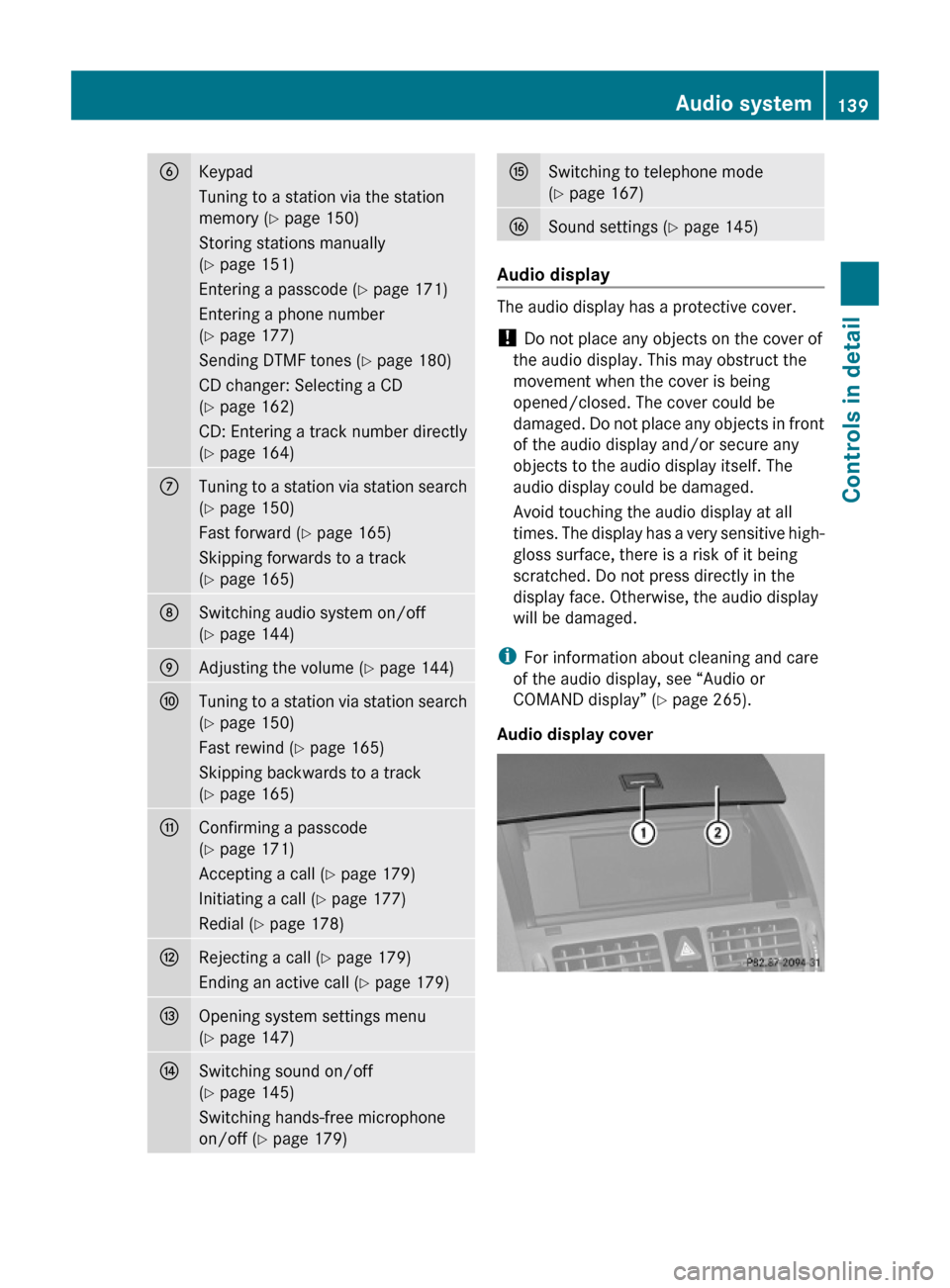
Audio display
The audio display has a protective cover.
! Do not place any objects on the cover of
the audio display. This may obstruct the
movement when the cover is being
opened/closed. The cover could be
damaged. Do not place any objects in front
of the audio display and/or secure any
objects to the audio display itself. The
audio display could be damaged.
Avoid touching the audio display at all
times. The display has a very sensitive high-
gloss surface, there is a risk of it being
scratched. Do not press directly in the
display face. Otherwise, the audio display
will be damaged.
iFor information about cleaning and care
of the audio display, see “Audio or
COMAND display” (Y page 265).
Audio display cover
Audio system139Controls in detail204_AKB; 5; 23, en-USd2ureepe,Version: 2.11.8.12009-07-16T17:54:06+02:00 - Seite 139Z
Page 147 of 364
XAdjusting: Turn rotary control :.
The volume will increase or decrease
depending on the direction turned.
Adjusting volume for telephone calls
In hands-free mode, you can adjust the
volume of a telephone call while the call is
currently active.
During a telephone call:
XTurn rotary control :.
The volume will increase or decrease
depending on the direction turned.
iThe volume of the audio system or a
telephone call can also be adjusted by
pressing the button W or X on the
multifunction steering wheel (Y page 118).
Sound
XSwitching on/off: Press button 8 on
the audio control unit (Y page 138).
The sound of the current audio source is
switched on or off.
iWhen the sound is switched off, the
symbol 8 appears in the status line.
If you change the audio source, or alter the
volume, the sound is automatically
switched on again.
Selecting sound settings
You can select different bass and treble
settings for each individual audio source. The
particular Sound menu can be opened from
the basic menu for the desired operating
mode, or by pressing the button J on the
audio control unit.
Example:
$ Q Sound Q Bass
Adjusting bass or trebleXPress button J and select Bass or
Treble.
or
XSelect Sound Q Bass or Treble.
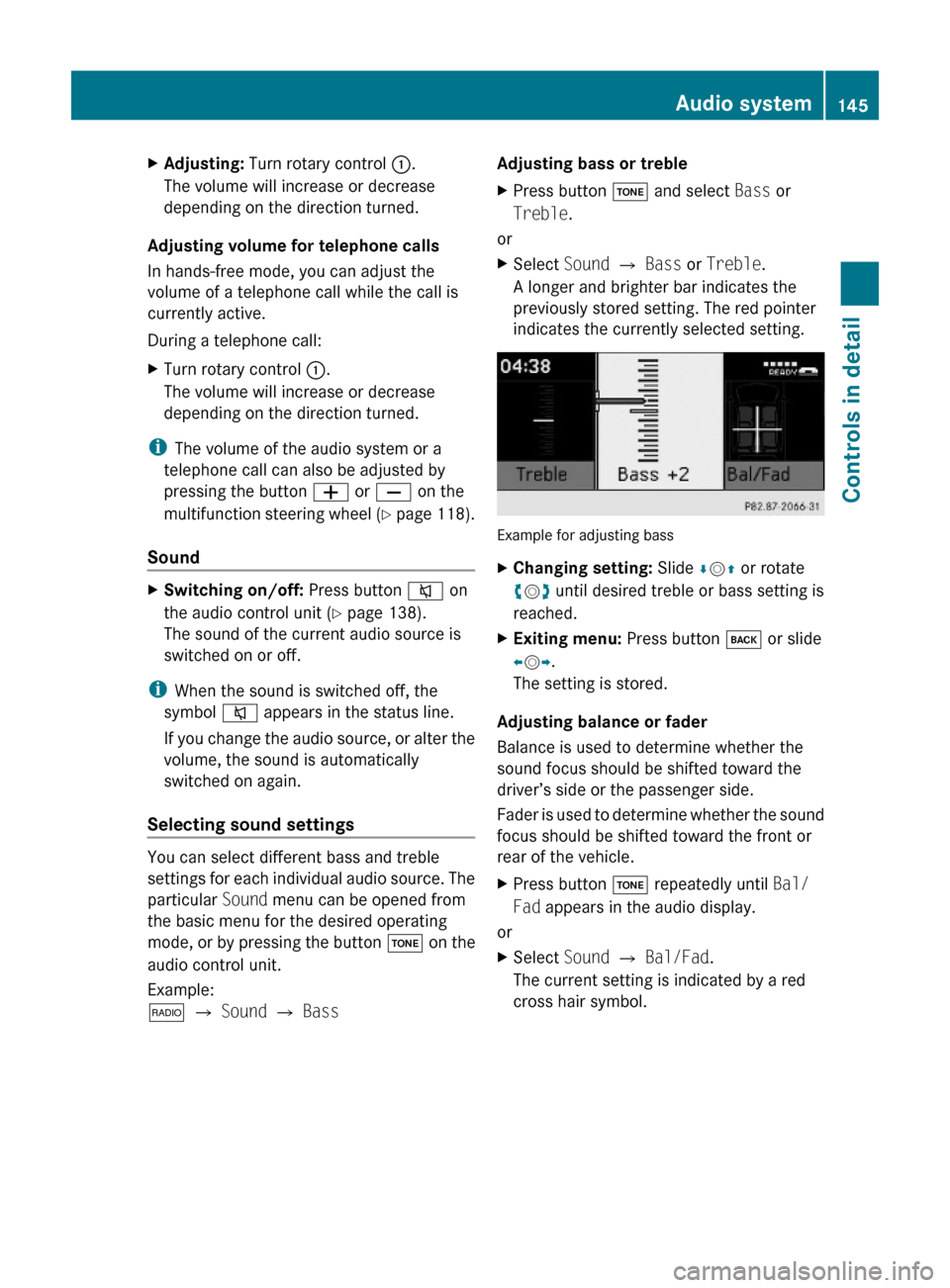
A longer and brighter bar indicates the
previously stored setting. The red pointer
indicates the currently selected setting.
Example for adjusting bass
XChanging setting: Slide ÆVZ or rotate
cVd until desired treble or bass setting is
reached.
XExiting menu: Press button k or slide
XVY.
The setting is stored.
Adjusting balance or fader
Balance is used to determine whether the
sound focus should be shifted toward the
driver’s side or the passenger side.
Fader is used to determine whether the sound
focus should be shifted toward the front or
rear of the vehicle.
XPress button J repeatedly until Bal/
Fad appears in the audio display.
or
XSelect Sound Q Bal/Fad.
The current setting is indicated by a red
cross hair symbol.
Audio system145Controls in detail204_AKB; 5; 23, en-USd2ureepe,Version: 2.11.8.12009-07-16T17:54:06+02:00 - Seite 145Z
Page 149 of 364
deviate from conventional stereo
playback.
SYS menu
System settings menu overview
MenuSystemDisplay (Y page 147)BrightnessDay ModeNight ModeAutomaticActivate Bluetooth®
(Y page 147)
Reset (Y page 147)Language (Y page 148)
Display settings
You can adapt the brightness of the audio
display to the prevailing light conditions.
Setting the display design
Xi Q System Q Display.XSelect Brightness, Day Mode, Night
Mode or Automatic.
iWhen you select Brightness, a scale
appears on which you can set the
brightness manually.
In the Automatic setting, the audio system
analyzes the automatic vehicle light sensor
and switches between the display designs
automatically.
Bluetooth® settings
General information about Bluetooth®
Bluetooth® technology is the standard for
short-range wireless technologies, suitable
for transmitting voice and data. It is possible
to connect Bluetooth® devices wirelessly.
Bluetooth® can be used to exchange vCards
or to make calls using a hands-free device.
Bluetooth® technology uses the freely
available ISM (Industrial Scientific Medical)
wave band that works at 2.45 GHz.
Bluetooth® works within a range of up to 33 ft
(10 m).
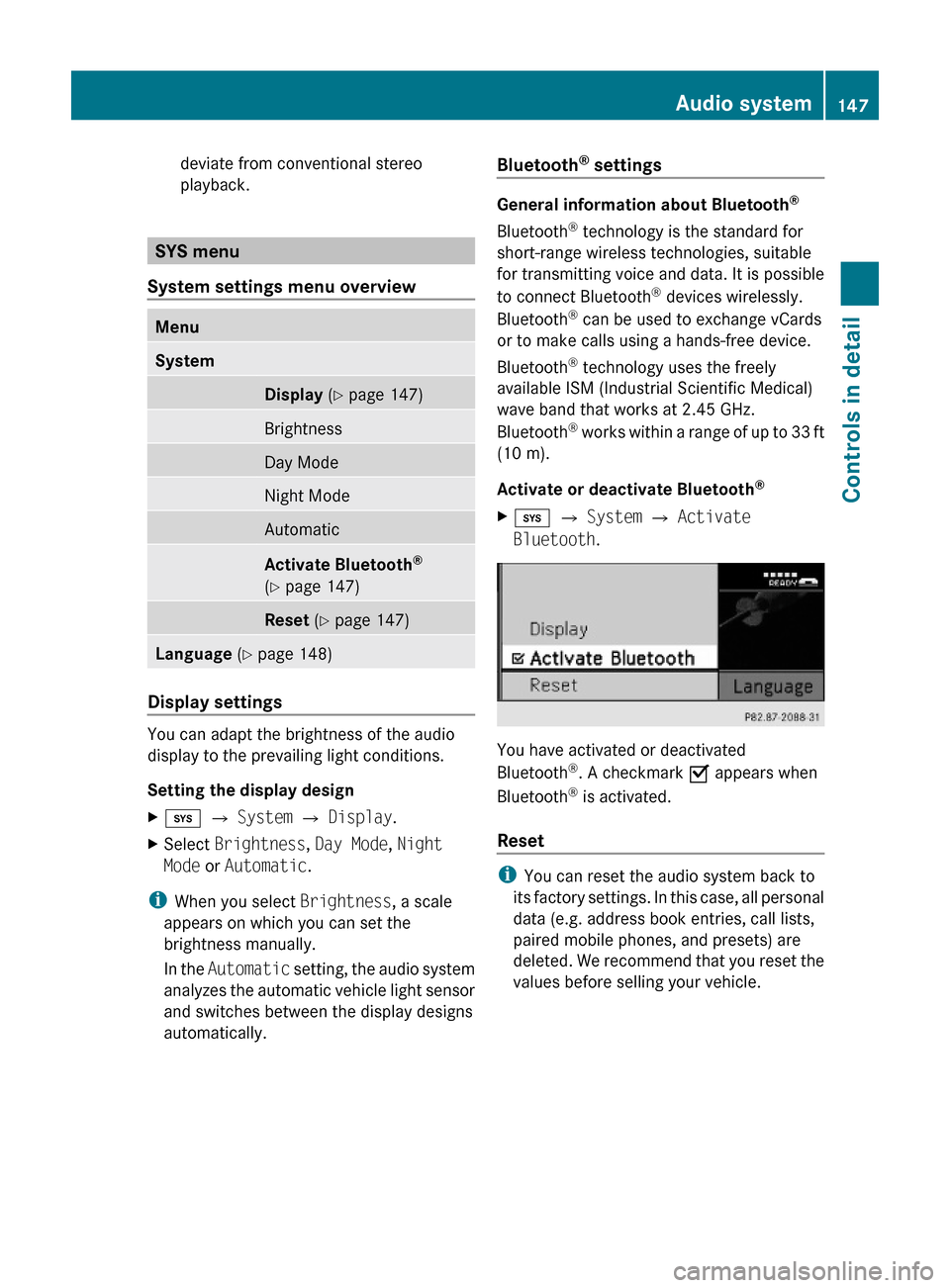
Activate or deactivate Bluetooth®
Xi Q System Q Activate
Bluetooth.
You have activated or deactivated
Bluetooth®. A checkmark O appears when
Bluetooth® is activated.
Reset
iYou can reset the audio system back to
its factory settings. In this case, all personal
data (e.g. address book entries, call lists,
paired mobile phones, and presets) are
deleted. We recommend that you reset the
values before selling your vehicle.
Audio system147Controls in detail204_AKB; 5; 23, en-USd2ureepe,Version: 2.11.8.12009-07-16T17:54:06+02:00 - Seite 147Z
Page 154 of 364
XPress button $ on audio control unit
repeatedly until desired wave band has
been selected.
The basic menu appears in the audio
display.XPress W when the main area is active.
or
XSelect Presets .
The station memory display appears in the
audio display.XSlide ZV Æ or rotate cV d to select
Autostore .XPress W.
The audio system searches for receivable
stations. A corresponding message is
displayed. The available stations are
automatically stored in the station
memory. The first received station will be
automatically played.XCanceling storage procedure: Select
Cancel and press W while the message
Rewriting Memory... is being displayed.
Displaying information
You can display program information or other
additional information when provided by the
radio station you are listening to.
X$ Q Info (if available).
The available information appears. The
content and scope of the information
depends on the radio station.XClosing screen: Slide XV Y, rotate cV d,
press W or press button k.
Satellite radio
GWarning!
Please devote your attention first and
foremost to the traffic situation you are in.
Before your journey, please familiarize
yourself with the radio functions.
Only use the audio system when road and
traffic conditions permit you to do so.
Otherwise you could be involved in an
accident in which you or others could be
injured.
Submenu overview
i The components and operating principles
of the audio system can be found on
( Y page 137) and ( Y page 143).
MenuSubmenuSatChannel ListEnter ChannelServicePresetsStation presetsInfoInformation menu (if
available)Category (Cat.)All channelsSelect categorySoundTrebleBassBalance/FaderSurround Sound
Satellite radio
i Additional satellite radio equipment and a
subscription to SIRIUS XM Satellite Radio
service provider are required for the
satellite radio operation described in this
chapter.
Contact an authorized Mercedes-Benz
Center for details and availability for your
vehicle.
SIRIUS XM Satellite Radio provides over
130 channels of digital-quality radio,
including 100 % commercial-free music,
sports, news and entertainment. SIRIUS XM
Satellite Radio uses a fleet of high-power
152Audio systemControls in detail
204_AKB; 5; 23, en-USd2ureepe,Version: 2.11.8.12009-07-16T17:54:06+02:00 - Seite 152
Page 169 of 364
vehicle may be much louder. You may need to
disable these system messages or adjust the
volume of these messages manually.
XSelecting audio AUX mode:
Press button h repeatedly until the
main menu for AUX operation appears.
or
XIn CD mode: Select CD/MP3 Q Aux.
The audio AUX menu appears. The medium in
the external audio source is heard, provided
it is connected and switched to playback.
iPlease refer to the relevant operating
guide for operation of the external audio
source.
The following settings can be made in the
audio AUX mode:
RVolume (Y page 144)
RBalance control and fader (Y page 145)
RBass and treble control (Y page 145)
RSurround sound (Y page 146)
iThe volume of external audio sources is
extremely variable. It is possible that a
device connected as an external audio
source will sound quieter or louder in the
vehicle or that the usual maximum volume
cannot be achieved. On certain devices the
volume can be set separately. In this case,
start at a moderate volume and increase it
slowly. In this way, you can determine
whether the system is capable of playback
without distortion, even at high volume.
Volume adjustment for the audio device
You can increase the volume for the AUX
socket in case the internal volume of the
connected audio device is too low. Use the
setting Boost for such devices.
You should set the system back to
Standard before connecting a different audio
device to the AUX socket.
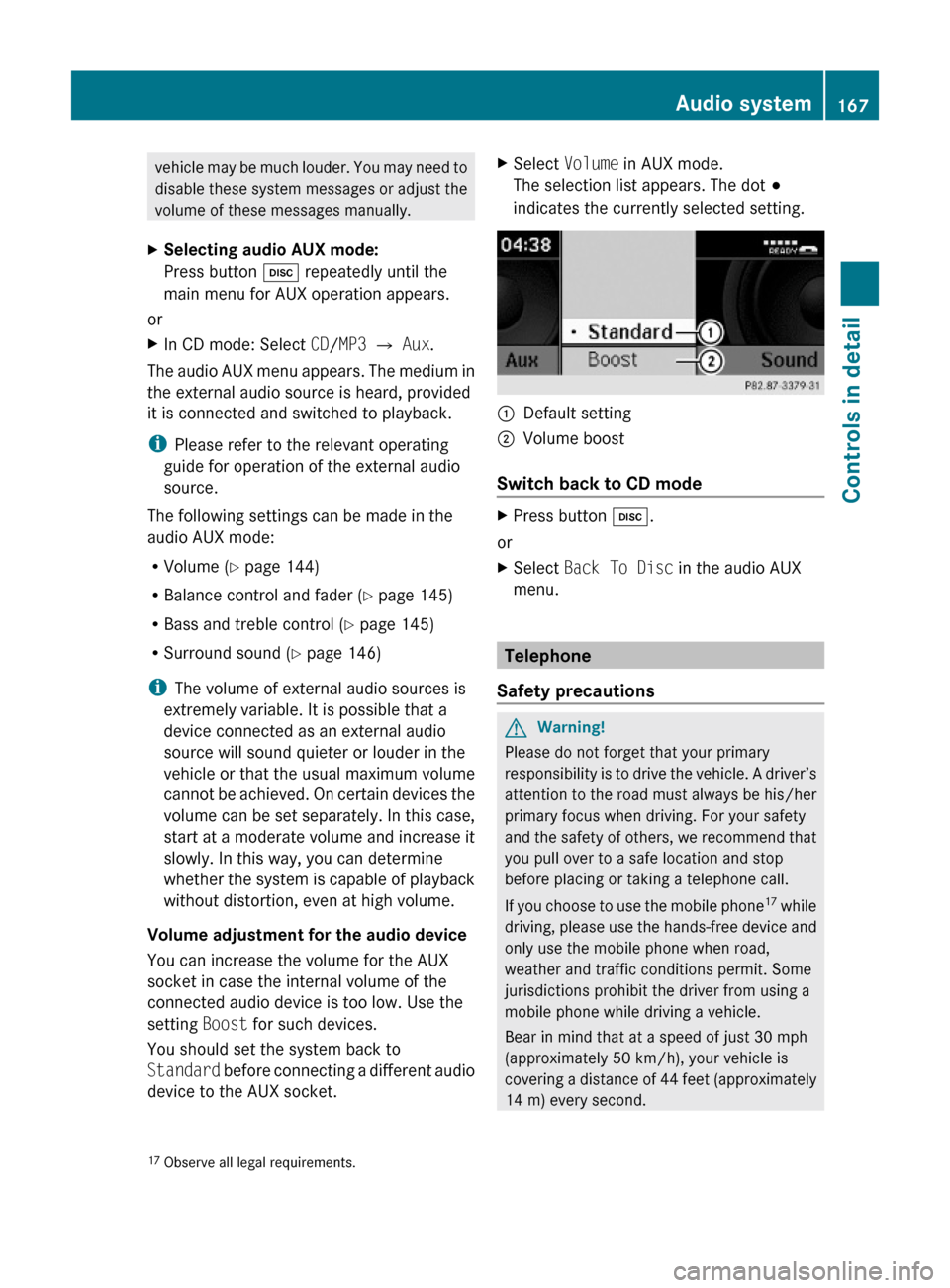
XSelect Volume in AUX mode.
The selection list appears. The dot #
indicates the currently selected setting.
:Default setting;Volume boost
Switch back to CD mode
XPress button h.
or
XSelect Back To Disc in the audio AUX
menu.
Telephone
Safety precautions
GWarning!
Please do not forget that your primary
responsibility is to drive the vehicle. A driver’s
attention to the road must always be his/her
primary focus when driving. For your safety
and the safety of others, we recommend that
you pull over to a safe location and stop
before placing or taking a telephone call.
If you choose to use the mobile phone17 while
driving, please use the hands-free device and
only use the mobile phone when road,
weather and traffic conditions permit. Some
jurisdictions prohibit the driver from using a
mobile phone while driving a vehicle.
Bear in mind that at a speed of just 30 mph
(approximately 50 km/h), your vehicle is
covering a distance of 44 feet (approximately
14 m) every second.
17Observe all legal requirements.Audio system167Controls in detail204_AKB; 5; 23, en-USd2ureepe,Version: 2.11.8.12009-07-16T17:54:06+02:00 - Seite 167Z
Page 170 of 364
iThe functions and services available to
you while using the mobile phone depend
on your service provider and the type of
mobile phone you are using. Also see
separate operating manual of your mobile
phone for instructions on how to use your
mobile phone.
When the mobile phone is connected via the
Bluetooth ®
interface to the audio system, you
can operate the mobile phone using the
following devices:
R Audio system ( Y page 177)
- Audio controller
- Audio control unit
R Buttons 6 and ~ on the
multifunction steering wheel ( Y page 118)
R Mobile phone keypad or similar input
device
Please note that these functions are only
available with Mercedes-Benz approved
mobile phones.
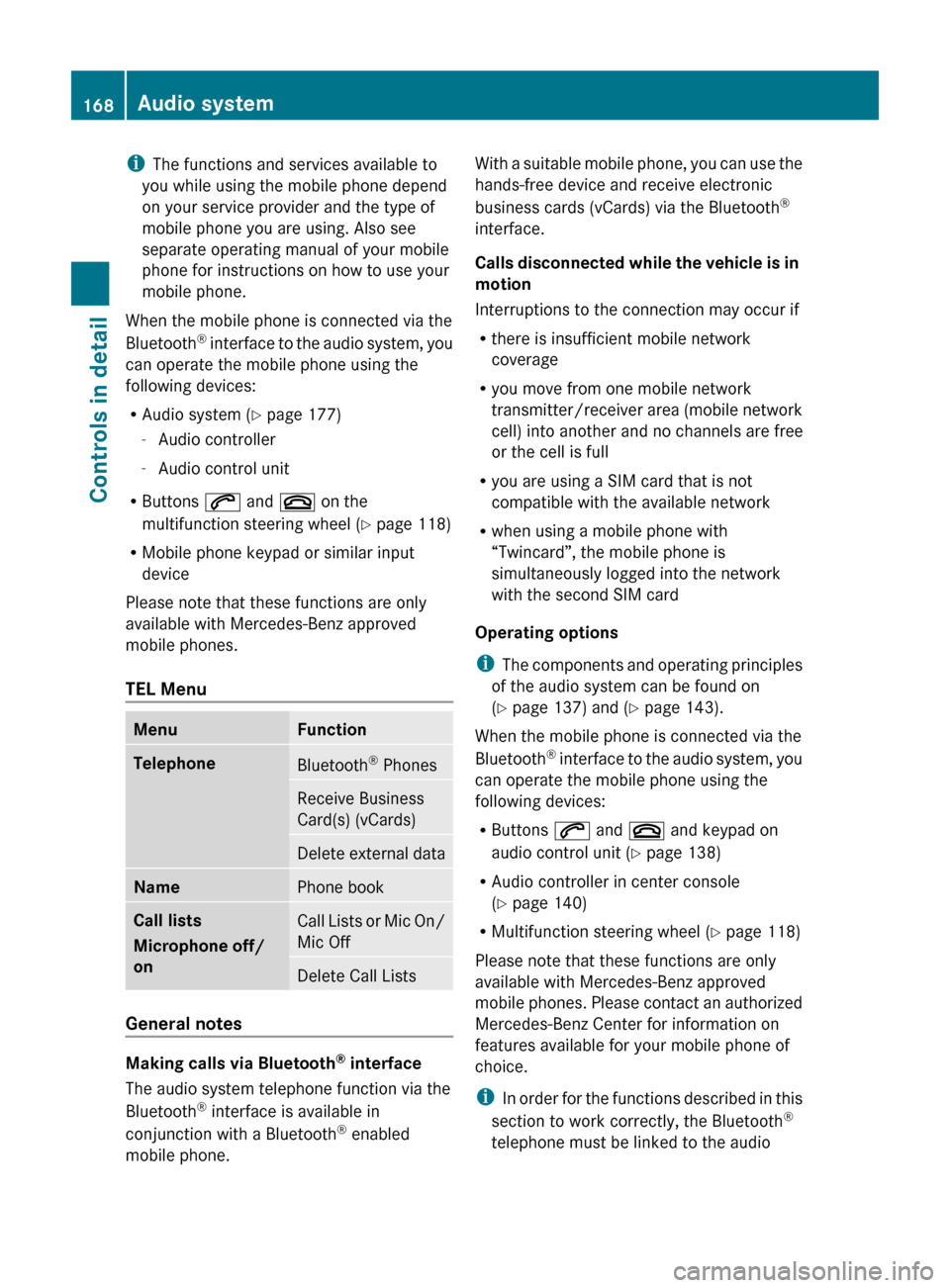
TEL MenuMenuFunctionTelephoneBluetooth ®
PhonesReceive Business
Card(s) (vCards)Delete external dataNamePhone bookCall lists
Microphone off/
onCall Lists or Mic On/
Mic OffDelete Call Lists
General notes
Making calls via Bluetooth ®
interface
The audio system telephone function via the
Bluetooth ®
interface is available in
conjunction with a Bluetooth ®
enabled
mobile phone.
With a suitable mobile phone, you can use the
hands-free device and receive electronic
business cards (vCards) via the Bluetooth ®
interface.
Calls disconnected while the vehicle is in
motion
Interruptions to the connection may occur if
R there is insufficient mobile network
coverage
R you move from one mobile network
transmitter/receiver area (mobile network
cell) into another and no channels are free
or the cell is full
R you are using a SIM card that is not
compatible with the available network
R when using a mobile phone with
“Twincard”, the mobile phone is
simultaneously logged into the network
with the second SIM card
Operating options
i The components and operating principles
of the audio system can be found on
( Y page 137) and ( Y page 143).
When the mobile phone is connected via the
Bluetooth ®
interface to the audio system, you
can operate the mobile phone using the
following devices:
R Buttons 6 and ~ and keypad on
audio control unit ( Y page 138)
R Audio controller in center console
( Y page 140)
R Multifunction steering wheel ( Y page 118)
Please note that these functions are only
available with Mercedes-Benz approved
mobile phones. Please contact an authorized
Mercedes-Benz Center for information on
features available for your mobile phone of
choice.
i In order for the functions described in this
section to work correctly, the Bluetooth ®
telephone must be linked to the audio168Audio systemControls in detail
204_AKB; 5; 23, en-USd2ureepe,Version: 2.11.8.12009-07-16T17:54:06+02:00 - Seite 168