tow MERCEDES-BENZ CL CLASS 2010 User Guide
[x] Cancel search | Manufacturer: MERCEDES-BENZ, Model Year: 2010, Model line: CL CLASS, Model: MERCEDES-BENZ CL CLASS 2010Pages: 500, PDF Size: 9.32 MB
Page 226 of 500
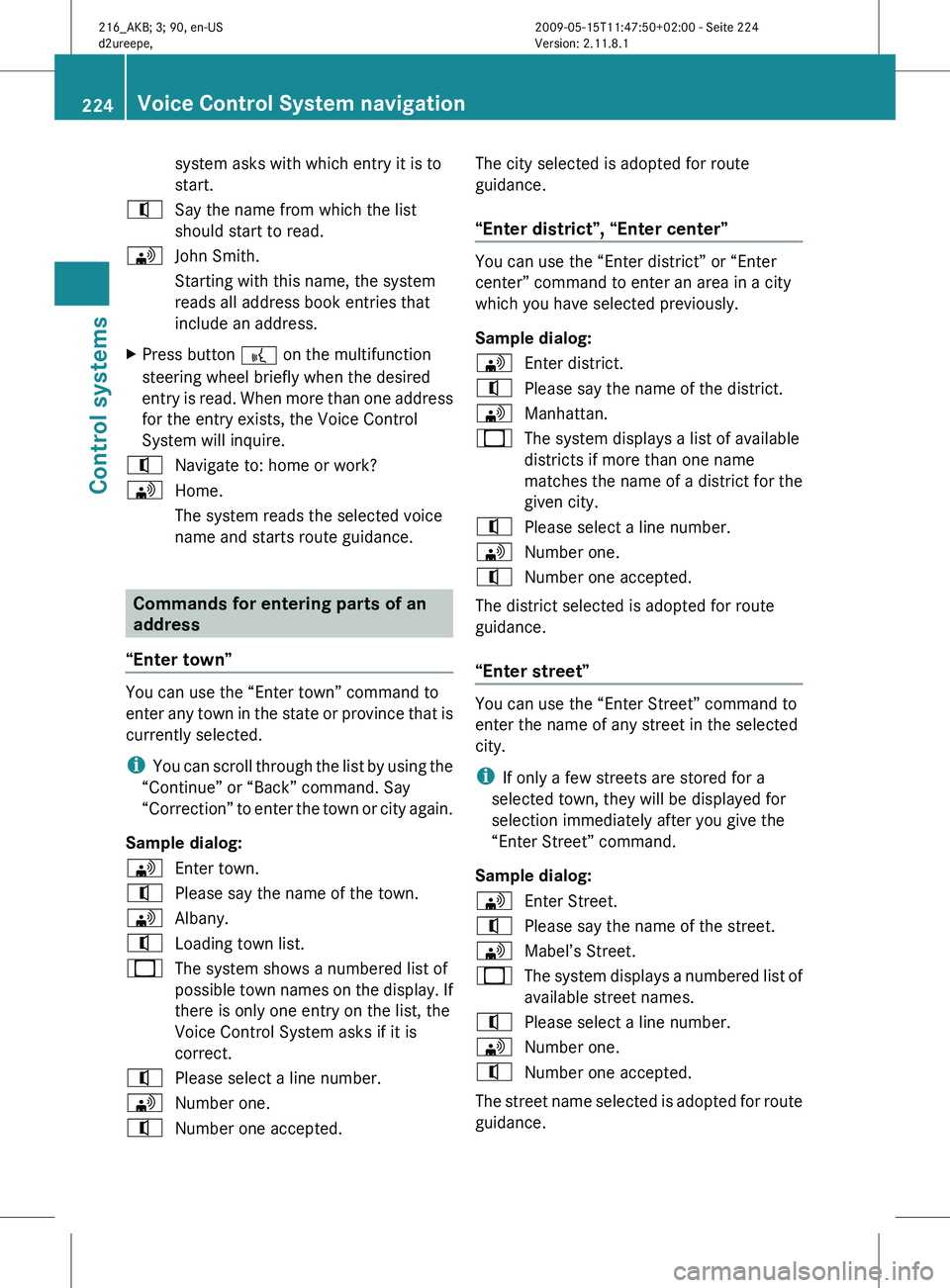
system asks with which entry it is to
start.
^ Say the name from which the list
should start to read.
\ John Smith.
Starting with this name, the system
reads all address book entries that
include an address.
X Press button ? on the multifunction
steering wheel briefly when the desired
entry is
read. When more than one address
for the entry exists, the Voice Control
System will inquire.
^ Navigate to: home or work?
\ Home.
The system reads the selected voice
name and starts route guidance. Commands for entering parts of an
address
“Enter town” You can use the “Enter town” command to
enter
any
town in the state or province that is
currently selected.
i You can scroll through the list by using the
“Continue” or “Back” command. Say
“Correction” to enter the town or city again.
Sample dialog:
\ Enter town.
^ Please say the name of the town.
\ Albany.
^ Loading town list.
_ The system shows a numbered list of
possible town
names on the display. If
there is only one entry on the list, the
Voice Control System asks if it is
correct.
^ Please select a line number.
\ Number one.
^ Number one accepted. The city selected is adopted for route
guidance.
“Enter district”, “Enter center” You can use the “Enter district” or “Enter
center” command to enter an area in a city
which you have selected previously.
Sample dialog:
\
Enter district.
^ Please say the name of the district.
\ Manhattan.
_ The system displays a list of available
districts if more than one name
matches the name of a district for the
given city.
^ Please select a line number.
\ Number one.
^ Number one accepted.
The district selected is adopted for route
guidance.
“Enter street” You can use the “Enter Street” command to
enter the name of any street in the selected
city.
i
If only a few streets are stored for a
selected town, they will be displayed for
selection immediately after you give the
“Enter Street” command.
Sample dialog:
\ Enter Street.
^ Please say the name of the street.
\ Mabel’s Street.
_ The system displays a numbered list of
available street names.
^ Please select a line number.
\ Number one.
^ Number one accepted.
The street name selected is adopted for route
guidance. 224
Voice Control System navigation
Control systems
216_AKB; 3; 90, en-US
d2ureepe,
Version: 2.11.8.1 2009-05-15T11:47:50+02:00 - Seite 224
Page 243 of 500
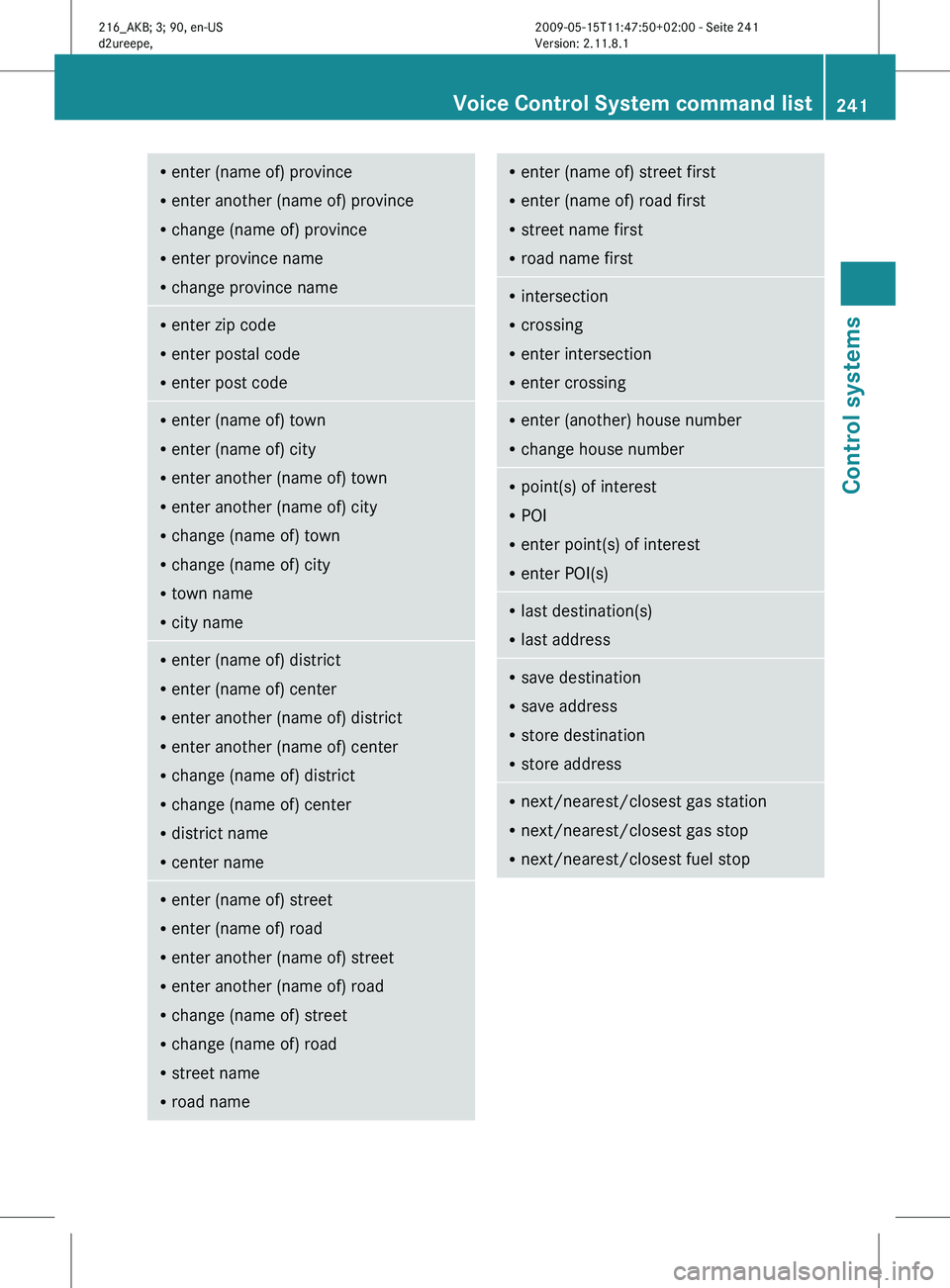
R
enter (name of) province
R enter another (name of) province
R change (name of) province
R enter province name
R change province name R
enter zip code
R enter postal code
R enter post code R
enter (name of) town
R enter (name of) city
R enter another (name of) town
R enter another (name of) city
R change (name of) town
R change (name of) city
R town name
R city name R
enter (name of) district
R enter (name of) center
R enter another (name of) district
R enter another (name of) center
R change (name of) district
R change (name of) center
R district name
R center name R
enter (name of) street
R enter (name of) road
R enter another (name of) street
R enter another (name of) road
R change (name of) street
R change (name of) road
R street name
R road name R
enter (name of) street first
R enter (name of) road first
R street name first
R road name first R
intersection
R crossing
R enter intersection
R enter crossing R
enter (another) house number
R change house number R
point(s) of interest
R POI
R enter point(s) of interest
R enter POI(s) R
last destination(s)
R last address R
save destination
R save address
R store destination
R store address R
next/nearest/closest gas station
R next/nearest/closest gas stop
R next/nearest/closest fuel stop Voice Control System command list
241Control systems
216_AKB; 3; 90, en-US
d2ureepe, Version: 2.11.8.1 2009-05-15T11:47:50+02:00 - Seite 241 Z
Page 259 of 500
Fix whatever is affecting the window before
trying to shut the door.
Automatic central locking
You can switch the automatic central locking
on or off using the COMAND system
(Y page 193).
The doors and the trunk lock automatically
when the vehicle is set into motion.
You can open a locked door from the inside.
Open door only when conditions are safe to
do so.
The doors are designed to unlock
automatically after an accident if the force of
the impact exceeds a preset threshold.
The vehicle locks automatically when the
ignition is switched on and the wheels are
turning at a vehicle speed of above 9 mph
(15 km/h). You could therefore lock yourself
out when the vehicle is pushed or towed or is
on a test stand. Locking and unlocking from the inside
G
Observe Safety notes, see page 51.
You can lock or unlock the vehicle from the
inside using the central locking or unlocking
switch. This can be useful, for example, if you
want to lock the vehicle before starting to
drive.
The central locking or unlocking switch does
not lock or unlock the fuel filler flap or the
interior storage compartments, such as the
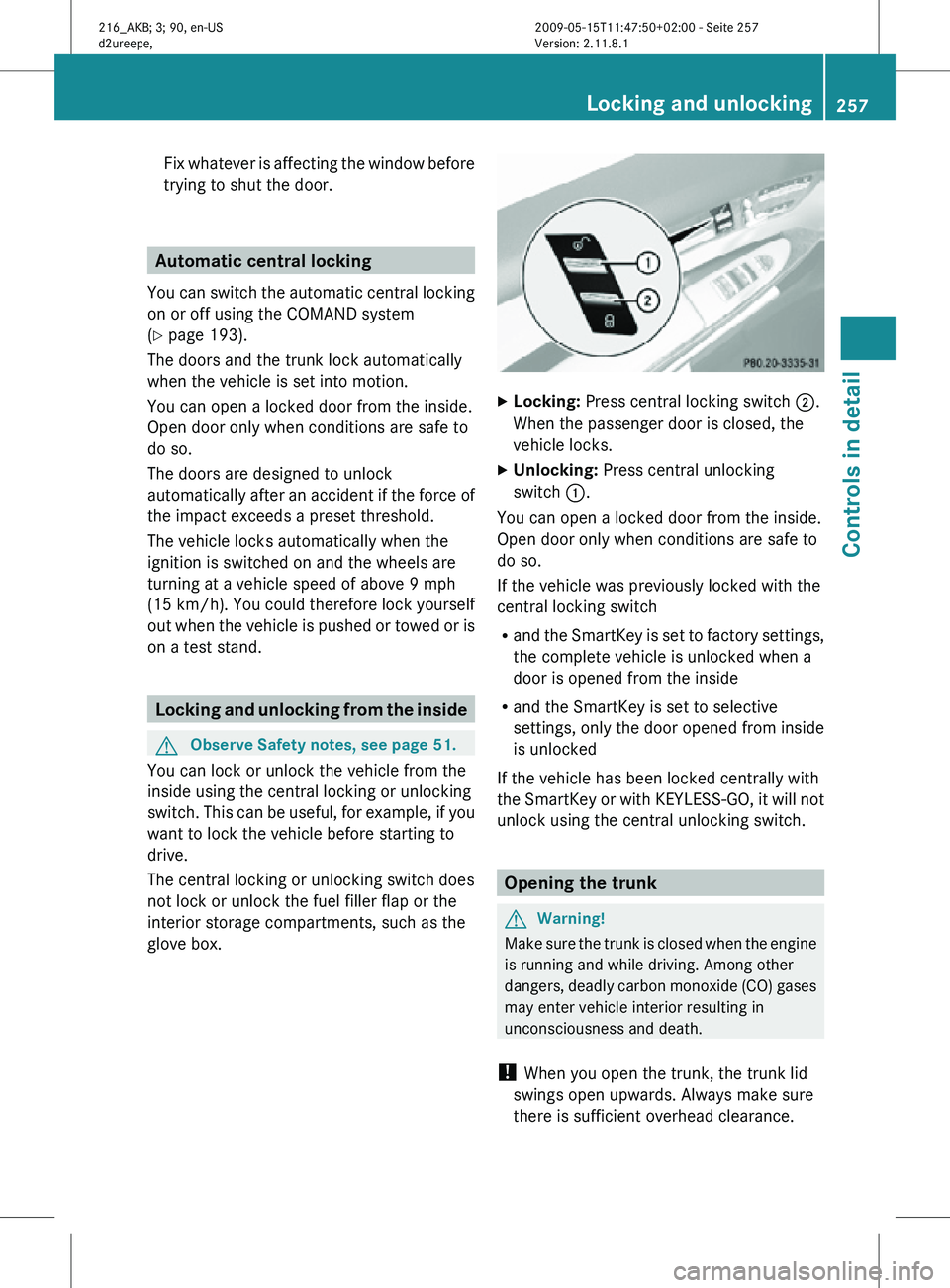
glove box. X
Locking: Press central locking switch ;.
When the passenger door is closed, the
vehicle locks.
X Unlocking: Press central unlocking
switch :.
You can open a locked door from the inside.
Open door only when conditions are safe to
do so.
If the vehicle was previously locked with the
central locking switch
R and the SmartKey is set to factory settings,
the complete vehicle is unlocked when a
door is opened from the inside
R and the SmartKey is set to selective
settings, only the door opened from inside
is unlocked
If the vehicle has been locked centrally with
the SmartKey or with KEYLESS-GO, it will not
unlock using the central unlocking switch. Opening the trunk
G
Warning!
Make sure the trunk is closed when the engine
is running and while driving. Among other
dangers, deadly carbon monoxide (CO) gases
may enter vehicle interior resulting in
unconsciousness and death.
! When you open the trunk, the trunk lid
swings open upwards. Always make sure
there is sufficient overhead clearance. Locking and unlocking
257Controls in detail
216_AKB; 3; 90, en-US
d2ureepe, Version: 2.11.8.1 2009-05-15T11:47:50+02:00 - Seite 257 Z
Page 290 of 500
The red indicator lamp
F (USA only)
or ! (Canada only) in the instrument
cluster goes out.
After a cold start, the automatic transmission
shifts at a higher engine speed. This allows
the catalytic converter to reach its operating
temperature earlier.
For more
information on driving, see “Driving
instructions” ( Y page 397). Problems while driving
The engine
runs erratically and misfires R
An ignition cable may be damaged.
R The engine electronics may not be
operating properly.
R Unburned gasoline may have entered the
catalytic converter and damaged it.
X Give very little gas.
X Have the problem checked at an authorized
Mercedes-Benz Center
as soon as possible.
The coolant temperature is above
248‡ (120†) The coolant is too hot and is no longer cooling
the engine.
X
Stop the vehicle in a safe location as soon
as possible.
X Turn off the engine immediately.
X Allow the engine and coolant to cool off.
X Check the coolant level and add coolant if
necessary ( Y page 372).
In case of accident If the vehicle is leaking fuel:
X
Do not start the engine under any
circumstances.
X Exit the vehicle at a safe distance from the
roadway.
X Notify local fire and/or police authorities. If the extent of the damage cannot be
determined:
X
Contact an authorized Mercedes-Benz
Center or call Roadside Assistance.
If no damage on major assemblies, fuel
system, and engine mount can be
determined:
X Start the engine in the usual manner. Parking
G
Warning!
Do not park in areas where the hot exhaust
system could come into contact with
combustible materials. Combustible
materials such as grass, hay or leaves could
be ignited and cause a vehicle fire.
Unintended vehicle movement could cause
serious personal injury or damage to the
vehicle or the vehicle drivetrain. To reduce
such risks, always do the following before
turning off
the engine and leaving the vehicle:
R Keep right foot on the brake pedal.
R Engage the electronic parking brake.
R Shift the automatic transmission into park
position P.
R Slowly release the brake pedal.
R When parked on an incline, always turn the
front wheels towards the road curb.
R Turn the SmartKey in the starter switch to
position 0 and remove the SmartKey from
the starter switch, or press the KEYLESS-
GO start/stop button.
R Take the SmartKey with you and lock the
vehicle when leaving.
Electronic parking brake G
Warning!
When leaving the vehicle, always remove the
SmartKey from
the starter switch, take it with
you, and lock the vehicle. Do not leave 288
Driving and parking
Controls in detail
216_AKB; 3; 90, en-US
d2ureepe,
Version: 2.11.8.1 2009-05-15T11:47:50+02:00 - Seite 288
Page 297 of 500
Effect
A
Neutral position
No power is transmitted from the
engine to the drive axle. When the
brakes are released, the vehicle can
be moved freely (pushed or towed).
To avoid damage to the
transmission, never shift the
automatic transmission into neutral
position N while driving.
Exception: If the ESC is switched off
or malfunctioning, shift the
automatic transmission into neutral
position
N if the vehicle is in danger
of skidding.
! Coasting the vehicle, or driving
for any other reason with the
automatic transmission in neutral
position N can result in
transmission damage that is not
covered by the Mercedes-Benz
Limited Warranty. 7
Drive position
The automatic transmission shifts
automatically. All forward gears are
available.
Driving tips
Kickdown Use the kickdown when you want maximum
acceleration.
X
U.S. vehicles except AMG vehicles:
Fully depress the accelerator pedal.
Depending on the engine speed the
automatic transmission shifts into a lower
gear.
X Canada vehicles and AMG vehicles:
Depress the accelerator pedal past the
point of resistance.
Depending on the engine speed the
automatic transmission shifts into a lower
gear. Rocking the vehicle Rocking the vehicle by shifting the automatic
transmission directly between drive position
D and reverse gear
R can help free a vehicle
stuck in mud or snow. The engine control
system of this vehicle electronically limits
directly shifting the automatic transmission
between drive position D and reverse gear R
to very low speeds, i.e. approximately 5 mph
(9 km/h). To shift the automatic transmission
directly between drive position D and reverse
gear R, move the gear selector lever up or
down past the resistance point.
Working on the vehicle G
Warning!
When working on the vehicle, engage the
electronic parking brake and shift the
automatic transmission into park position P.
Otherwise the vehicle could roll away which
could result in an accident and/or serious
personal injury. Gear ranges
With the automatic transmission in drive
position D and driving in automatic program
mode C or S, you can limit or extend the gear
range, see “One-touch gearshifting”
(Y page 297).
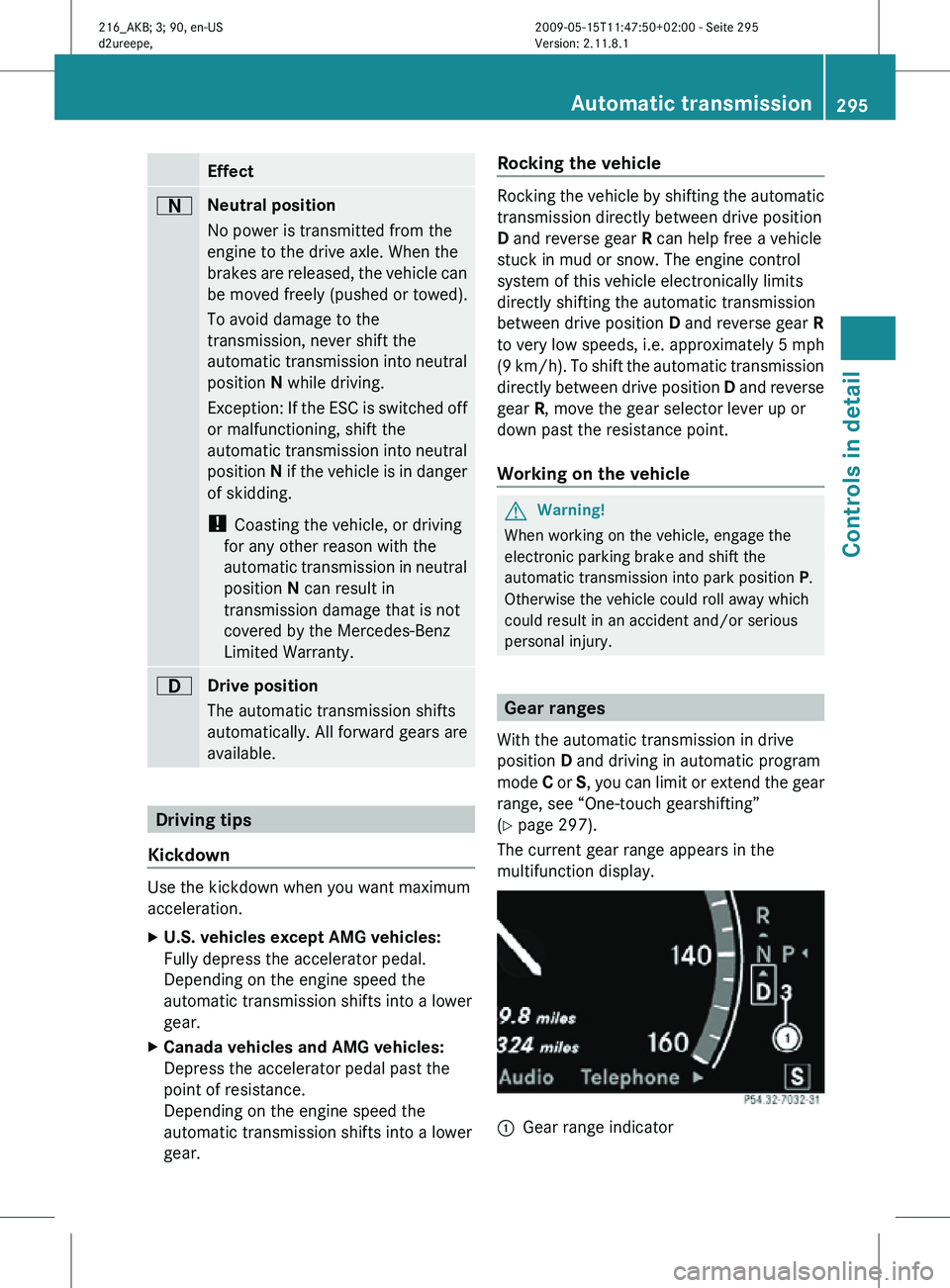
The current gear range appears in the
multifunction display. :
Gear range indicator Automatic transmission
295Controls in detail
216_AKB; 3; 90, en-US
d2ureepe, Version: 2.11.8.1 2009-05-15T11:47:50+02:00 - Seite 295 Z
Page 302 of 500

otherwise seriously damage the brake
system or the transfer case which is not
covered by the Mercedes-Benz Limited
Warranty.
! Because the ESC operates automatically,
the engine and ignition must be shut off
(SmartKey in starter switch position 0 or
1 or KEYLESS-GO start/stop button in
position 0 or 1) when the electronic parking
brake is being tested on a brake test
dynamometer or when the vehicle is being
towed with one axle raised.
Active braking action through the ESC may
otherwise seriously damage the brake
system which is not covered by the
Mercedes-Benz Limited Warranty. Instrument cluster
Introduction
For a full view illustration of the instrument
cluster, see “Instrument cluster”
(Y page 29). G
Warning!
No messages will be displayed if either the
instrument cluster or the multifunction
display is inoperative.
As a result, you will not be able to see
information about your driving conditions,
such as
R speed
R outside temperature
R warning/indicator lamps
R malfunction/warning messages
R failure of any systems
Driving characteristics may be impaired.
If you must continue to drive, do so with added
caution. Contact an authorized Mercedes-
Benz Center as soon as possible.
The language setting for the multifunction
display can be changed via COMAND
(Y page 81). Activating the instrument cluster
The instrument cluster is activated when you
R open a door
R switch on the ignition
R switch on the exterior lamps Adjusting the instrument cluster
illumination
X
To brighten illumination: Turn knob :
clockwise.
X To dim illumination: Turn knob :
counterclockwise.
i The instrument cluster illumination is
dimmed or brightened automatically to suit
ambient light conditions.
The instrument cluster illumination will also
be adjusted automatically when you switch
on the vehicle’s exterior lamps. Coolant temperature gauge
The coolant temperature gauge is located on
the left side in the instrument cluster
(Y page 29). G
Warning!
Driving when your engine is overheated can
cause some fluids which may have leaked into
the engine compartment to catch fire. You
could be seriously burned. 300
Instrument clusterControls in detail
216_AKB; 3; 90, en-US
d2ureepe,
Version: 2.11.8.1 2009-05-15T11:47:50+02:00 - Seite 300
Page 311 of 500

:
Preceding vehicle, if detected
; Actual distance to the preceding vehicle
= Preset distance threshold to the
preceding vehicle
? Your vehicle
DISTRONIC PLUS lever :
Setting current or higher speed
; Setting current or lower speed
= Deactivating the DISTRONIC PLUS
? Activating the DISTRONIC PLUS or
resuming to the last set speed
A Setting following distance
Activating DISTRONIC PLUS G
Warning!
When the DISTRONIC PLUS is switched on,
the vehicle can be braked. You should
therefore switch off the DISTRONIC PLUS if
the vehicle must be towed. You can activate the DISTRONIC PLUS when
the vehicle speed is above 20 mph
(30 km/h).
It is also possible to activate the DISTRONIC
PLUS when the vehicle speed is below
20 mph (30 km/h) and the DISTRONIC PLUS
has detected a preceding vehicle.
If the DISTRONIC PLUS is activated, the set
speed is indicated with marker
;
(Y page 307) in the speedometer dial.
The maximum vehicle speed you can set is
120 mph (Canada: 200 km/h).
If the DISTRONIC PLUS is not activated after
the DISTRONIC PLUS lever is pulled in
direction of arrow ? (Y page 309), you will
see the message: DISTRONIC PLUS ---
mph (Canada: DISTRONIC PLUS --- kmh) in
the multifunction display.
In the following cases you cannot activate the
DISTRONIC PLUS:
R within 2 minutes after driving off, following
an engine start
R if the vehicle is secured with the electronic
parking brake
R if the ESC is switched off or has switched
off due to a malfunction
R when the automatic transmission is in park
position P, reverse gear R, or neutral
position N
R if the hood is open
R if the driver’s door is open and the driver
has not fastened his or her seat belt
R if the passenger door is open
R if the radar sensors are switched off
(Y page 216)
Switching on while driving You can switch on the DISTRONIC PLUS when
the vehicle speed is above 20 mph
(30 km/h).
Below 20 mph (30 km/h), you can only switch
on the DISTRONIC PLUS if the preceding Driving systems
309Controls in detail
216_AKB; 3; 90, en-US
d2ureepe, Version: 2.11.8.1 2009-05-15T11:47:50+02:00 - Seite 309 Z
Page 318 of 500
HOLD function
The HOLD function can assist you
R when driving off, especially on steep slopes
R when maneuvering on steep slopes
R when waiting in traffic
The vehicle is kept stationary without the
driver having to depress the brake pedal.
Upon depressing the accelerator pedal, the
braking effect is canceled and the HOLD
function is deactivated.
Activation conditions You can activate the HOLD function when
R
the vehicle is stationary
R the engine is running
R your seat belt is fastened or the driver’s
door is closed
R the electronic parking brake is released
R the hood is closed
R the automatic transmission is in neutral
position N, drive position D, or reverse gear
R
When the automatic transmission is in
reverse gear R, the trunk lid must be
closed.
R the DISTRONIC PLUS is deactivated
(Y page 312).
Activating HOLD X
Make sure the activation conditions are
met.
X Depress the brake pedal.
X Continue to depress the brake pedal with
increased pedal pressure until the message
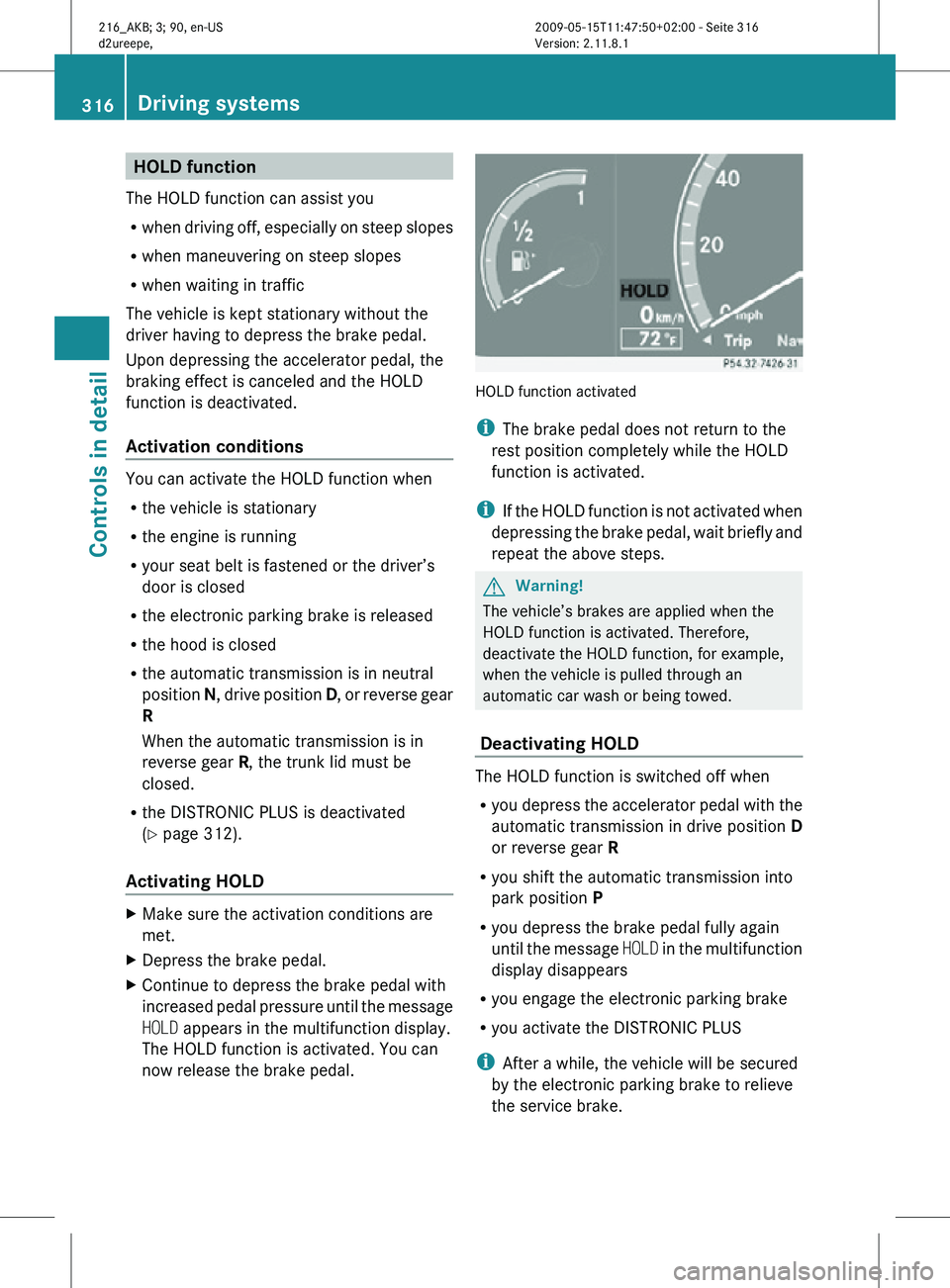
HOLD appears in the multifunction display.
The HOLD function is activated. You can
now release the brake pedal. HOLD function activated
i
The brake pedal does not return to the
rest position completely while the HOLD
function is activated.
i If the HOLD function is not activated when
depressing the brake pedal, wait briefly and
repeat the above steps. G
Warning!
The vehicle’s brakes are applied when the
HOLD function is activated. Therefore,
deactivate the HOLD function, for example,
when the vehicle is pulled through an
automatic car wash or being towed.
Deactivating HOLD The HOLD function is switched off when
R
you depress the accelerator pedal with the
automatic transmission in drive position D
or reverse gear R
R you shift the automatic transmission into
park position P
R you depress the brake pedal fully again
until the message HOLD in the multifunction
display disappears
R you engage the electronic parking brake
R you activate the DISTRONIC PLUS
i After a while, the vehicle will be secured
by the electronic parking brake to relieve
the service brake. 316
Driving systemsControls in detail
216_AKB; 3; 90, en-US
d2ureepe,
Version: 2.11.8.1 2009-05-15T11:47:50+02:00 - Seite 316
Page 323 of 500
Comfort suspension tuning
Vehicle handling in comfort driving mode is
softer. Select this mode when you prefer a
more comfortable driving style.
X
When indicator lamp ; is on: Press
button :.
Indicator lamp ; goes out. The
comfortable chassis
and suspension setup
is selected.
The message ABC Active Body Control
COMFORT appears in the multifunction
display. All-wheel drive (4MATIC)
In vehicles with all-wheel drive (4MATIC),
both axles
are powered at all times when the
vehicle is being operated. The 4MATIC
improves traction in conjunction with the ESC
(Y page 59) and the Electronic Traction
System (ETS/4-ETS) (Y page 60). G
Warning!
If a drive wheel is spinning due to insufficient
traction:
R While driving off, apply as little throttle as
possible.
R While driving, ease up on the accelerator
pedal.
R Adapt your speed and driving style to the
prevailing road conditions.
Failure to observe these guidelines could
cause the vehicle to skid.
The 4MATIC cannot prevent accidents
resulting from excessive speed.
! Do not
tow with one axle raised. Doing so
could damage the transfer case, which is
not covered by the Mercedes-Benz Limited
Warranty. All wheels must be on or off the
ground. Observe instructions for towing the
vehicle with all wheels on the ground. !
Only conduct
operational or performance
tests on a two-axle dynamometer. If such
tests are necessary, contact an authorized
Mercedes-Benz Center. You could
otherwise seriously damage the brake
system and/or the transfer case which is
not covered by the Mercedes-Benz Limited
Warranty.
i In winter operation, the maximum
effectiveness of the 4MATIC is only
achieved with winter tires ( Y page 395) or
snow chains as required. Parktronic system
The Parktronic system is an electronic
parking aid with ultrasonic sensors designed
to assist
the driver during parking maneuvers.
The Parktronic system indicates the relative
distance between the vehicle and an obstacle
visually and audibly.
The Parktronic system is activated
automatically when
R you switch on the ignition
and
R you release the electronic parking brake
or
R you start the engine
and
R shift the automatic transmission into drive
position D, reverse gear R, or neutral
position N
The Parktronic system deactivates at speeds
above approximately 11 mph (18 km/h). At
lower speeds, the Parktronic system
activates again.
The Parktronic system also deactivates when
you shift the automatic transmission into
park position P or engage the electronic
parking brake and turn off the engine.
The Parktronic system monitors the
surroundings of your vehicle with six sensors Driving systems
321
Controls in detail
216_AKB; 3; 90, en-US
d2ureepe, Version: 2.11.8.1 2009-05-15T11:47:50+02:00 - Seite 321 Z
Page 328 of 500

i
The sensors have a broad detection
range. Therefore, the Park Assist may also
issue warnings due to detected obstacles
on the ground, for example:
R Sewer canal covers
R Rails
R Bumps
R Gutters
Warnings may also be issued due to
obstacles that are moving up quickly, for
example rolling garage doors.
Front sensors Center approx. 40 in (100 cm)
Corners approx. 24 in (60 cm)
Rear sensors
Center approx. 50 in (125 cm)
Corners approx. 24 in (60 cm)
!
While parking, pay particular attention to
objects over or underneath the sensors,
e.g. flower boxes, an elevated crossbar or
a trailer tow hitch. The Park Assist does not
detect such nearby objects. You could
otherwise damage the vehicle or the
objects.
Warning indicators Visual signals indicate to the driver the
relative distance between the sensors and an
obstacle.
Front area warning indicators Rear area warning indicators
Each warning indicator is divided into five
yellow and two red distance segments for
left : and right side ; of the vehicle. The
Park Assist is ready to measure when the
yellow readiness indicators
= are
illuminated.
The current transmission position determines
which warning indicators will be activated. Current
transmission
position Warning indicator
D
Front area activated
R
Front and rear area
activated
N
With the electronic
parking brake
engaged: neither
activated.
With the electronic
parking brake
released: front and
rear area activated.
As your vehicle approaches an object, one or
more distance segments will illuminate,
depending on the distance. When the seventh
distance segment illuminates, you have
reached the minimum distance.
Front area:
As soon as the first red distance segment
illuminates, you will hear an intermittent
warning tone for approximately 2 seconds.326
Driving systemsControls in detail
216_AKB; 3; 90, en-US
d2ureepe,
Version: 2.11.8.1 2009-05-15T11:47:50+02:00 - Seite 326