seats MERCEDES-BENZ CL CLASS 2010 Owner's Manual
[x] Cancel search | Manufacturer: MERCEDES-BENZ, Model Year: 2010, Model line: CL CLASS, Model: MERCEDES-BENZ CL CLASS 2010Pages: 500, PDF Size: 9.32 MB
Page 253 of 500
Vehicle equipment ............................
252
Locking and unlocking .....................252
Starter switch positions ................... 262
Seats .................................................. 264
Multifunction steering wheel ..........270
Mirrors ............................................... 271
Memory function .............................. 273
Lighting .............................................. 274
Wipers ................................................ 280
Power windows ................................. 282
Driving and parking .......................... 285
Automatic transmission ................... 291
Transfer case .................................... 299
Instrument cluster ............................300
Driving systems ................................ 301
Climate control system ....................338
Rear window defroster ..................... 344
Power tilt/sliding sunroof ...............345
Loading and storing ..........................347
Useful features ................................. 350 251Controls in detail
216_AKB; 3; 90, en-US
d2ureepe,
Version: 2.11.8.1 2009-05-15T11:47:50+02:00 - Seite 251
Page 266 of 500
i
When you now press the KEYLESS-GO
start/stop button once and the driver’s
door is
open, the power supply is switched
off. Seats
Safety notes
G
Warning!
In order to avoid possible loss of vehicle
control the
following must be done before the
vehicle is put into motion:
R seat adjustment
R head restraint adjustment
R steering wheel adjustment
R rear view mirror adjustment
R fastening of seat belts G
Warning!
Do not adjust the driver’s seat while driving.
Adjusting the seat while driving could cause
the driver to lose control of the vehicle.
Never ride in a moving vehicle with the seat
backrest in
an excessively reclined position as
this can be dangerous. You could slide under
the seat belt in a collision. If you slide under
it, the seat belt would apply force at the
abdomen or neck. That could cause serious
or fatal injuries. The seat backrest and seat
belts provide the best restraint when the
wearer is in a position that is as upright as
possible and seat belts are properly
positioned on the body. G
Warning!
Your seat must be adjusted so that you can
correctly fasten your seat belt. Observe the following points:
R
Adjust the
seat backrest until your arms are
slightly angled when holding the steering
wheel.
R Adjust the seat to a comfortable seating
position that still allows you to reach the
accelerator/brake pedal safely. The
position should be as far back as possible
with the driver still able to operate the
controls properly.
R Adjust the head restraint so that it is as
close to the head as possible. The center of
the head restraint must support the back of
the head at eye level.
R Never place hands under the seat or near
any moving parts while a seat is being
adjusted.
Failure to do so could result in an accident
and/or serious personal injury. G
Warning!
The power seats can be operated at any time.
Therefore, do not leave children unattended
in the vehicle, or with access to an unlocked
vehicle. A child’s unsupervised access to a
vehicle could result in an accident and/or
serious personal injury. G
Warning!
According to accident statistics, children are
safer when properly restrained in the rear
seating positions than in the front seating
position. Thus, we strongly recommend that
children be
placed in the rear seats whenever
possible. Regardless of seating position,
children 12 years old and under must be
seated and properly secured in an
appropriately sized infant restraint, toddler
restraint, or booster seat recommended for
the size and weight of the child. For additional
information, see “Children in the vehicle”.
A child’s risk of serious or fatal injuries is
significantly increased if the child restraints
are not properly secured in the vehicle and/ 264
Seats
Controls in detail
216_AKB; 3; 90, en-US
d2ureepe,
Version: 2.11.8.1 2009-05-15T11:47:50+02:00 - Seite 264
Page 267 of 500
or the child is not properly secured in the child
restraint.
G
Warning!
For your protection, drive only with properly
positioned head restraints.
Adjust the head restraint so that it is as close
to the head as possible and the center of the
head restraint supports the back of the head
at eye level. This will reduce the potential for
injury to the head and neck in the event of an
accident or similar situation.
Do not drive the vehicle without the seat head
restraints. Head restraints are intended to
help reduce injuries during an accident. Seat adjustment
You can adjust the lumbar support,
multicontour seats, as well as drive-dynamic
multicontour seats using COMAND
(Y page 198).
! When moving the seats, make sure there
are no items in the footwell or behind the
seats. Otherwise, you could damage the
seats and/or the items.
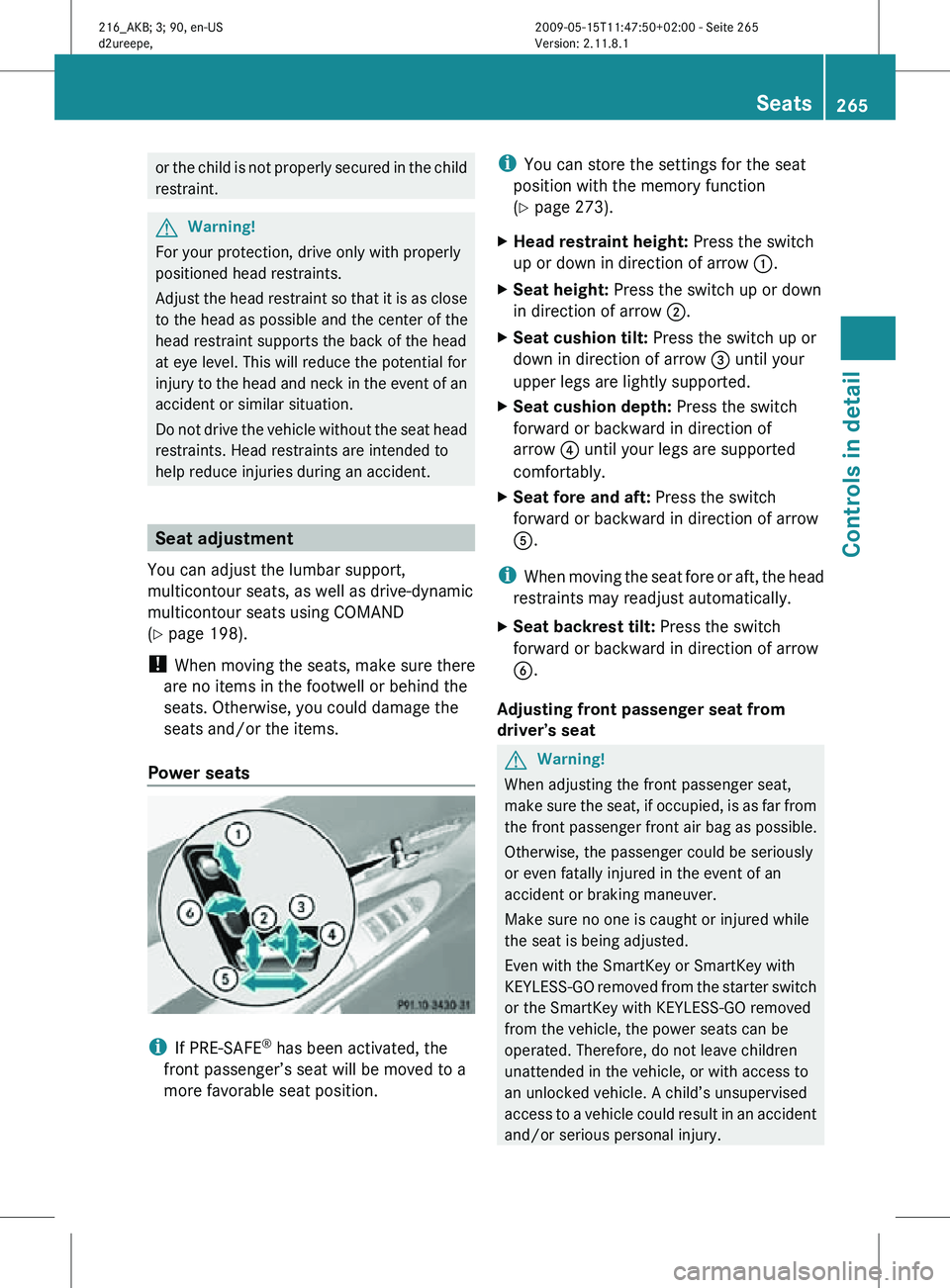
Power seats i
If PRE-SAFE ®
has been activated, the
front passenger’s seat will be moved to a
more favorable seat position. i
You can store the settings for the seat
position with the memory function
(Y page 273).
X Head restraint height: Press the switch
up or down in direction of arrow :.
X Seat height: Press the switch up or down
in direction of arrow ;.
X Seat cushion tilt: Press the switch up or
down in direction of arrow = until your
upper legs are lightly supported.
X Seat cushion depth: Press the switch
forward or backward in direction of
arrow ? until your legs are supported
comfortably.
X Seat fore and aft: Press the switch
forward or backward in direction of arrow
A.
i When moving the seat fore or aft, the head
restraints may readjust automatically.
X Seat backrest tilt: Press the switch
forward or backward in direction of arrow
B.
Adjusting front passenger seat from
driver’s seat G
Warning!
When adjusting the front passenger seat,
make sure the seat, if occupied, is as far from
the front passenger front air bag as possible.
Otherwise, the passenger could be seriously
or even fatally injured in the event of an
accident or braking maneuver.
Make sure no one is caught or injured while
the seat is being adjusted.
Even with the SmartKey or SmartKey with
KEYLESS-GO removed from the starter switch
or the SmartKey with KEYLESS-GO removed
from the vehicle, the power seats can be
operated. Therefore, do not leave children
unattended in the vehicle, or with access to
an unlocked vehicle. A child’s unsupervised
access to a vehicle could result in an accident
and/or serious personal injury. Seats
265Controls in detail
216_AKB; 3; 90, en-US
d2ureepe, Version: 2.11.8.1 2009-05-15T11:47:50+02:00 - Seite 265 Z
Page 268 of 500
!
Do not move the front passenger seat
completely forward if objects are stored in
the parcel net in the front passenger-side
footwell. Items in the net may be damaged.
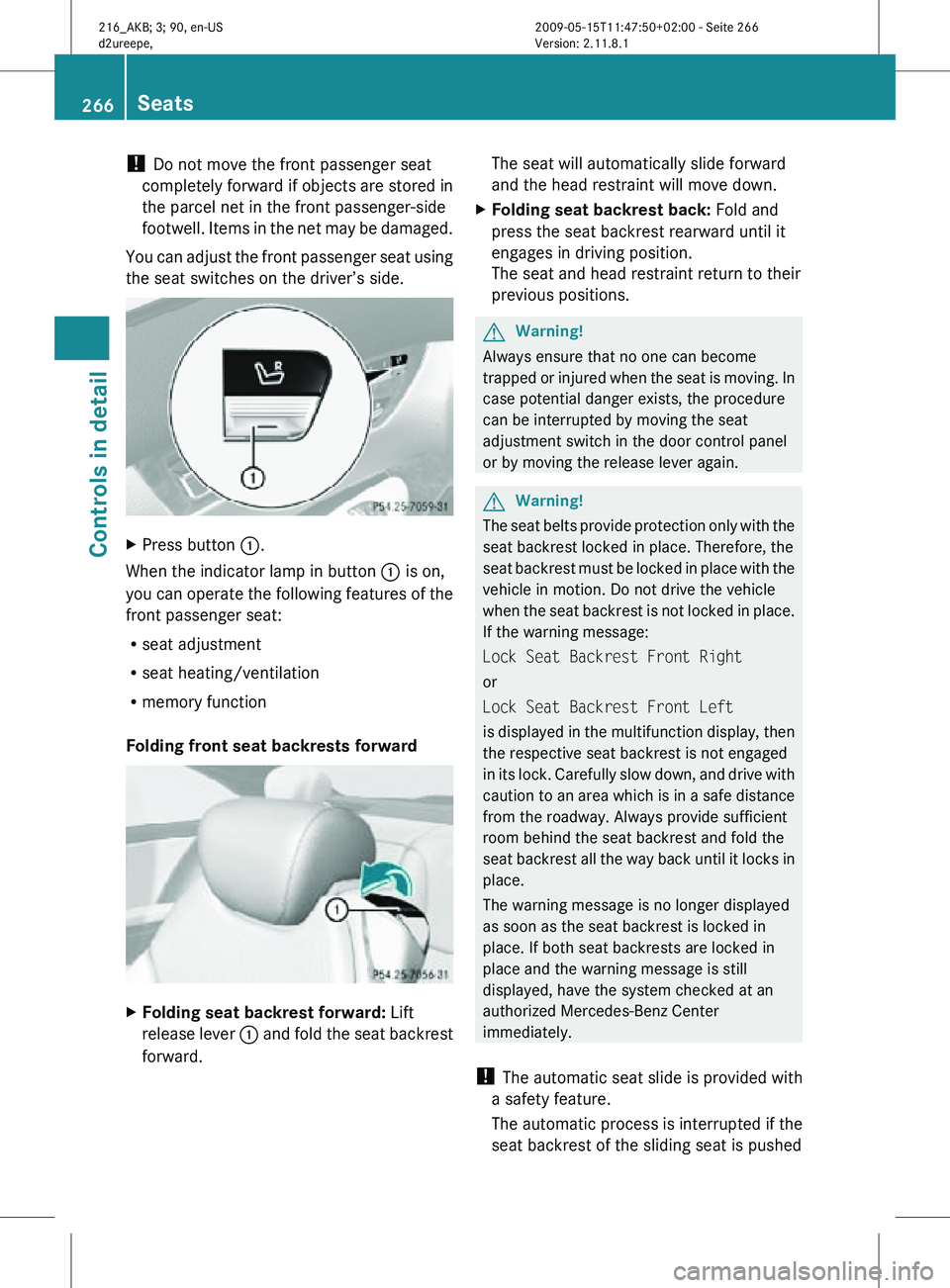
You can adjust the front passenger seat using
the seat switches on the driver’s side. X
Press button :.
When the indicator lamp in button : is on,
you can operate the following features of the
front passenger seat:
R seat adjustment
R seat heating/ventilation
R memory function
Folding front seat backrests forward X
Folding seat backrest forward: Lift
release lever : and fold the seat backrest
forward. The seat will automatically slide forward
and the head restraint will move down.
X Folding seat backrest back: Fold and
press the seat backrest rearward until it
engages in driving position.
The seat and head restraint return to their
previous positions. G
Warning!
Always ensure that no one can become
trapped or injured when the seat is moving. In
case potential danger exists, the procedure
can be interrupted by moving the seat
adjustment switch in the door control panel
or by moving the release lever again. G
Warning!
The seat belts provide protection only with the
seat backrest locked in place. Therefore, the
seat backrest must be locked in place with the
vehicle in motion. Do not drive the vehicle
when the seat backrest is not locked in place.
If the warning message:
Lock Seat Backrest Front Right
or
Lock Seat Backrest Front Left
is displayed in the multifunction display, then
the respective seat backrest is not engaged
in its lock. Carefully slow down, and drive with
caution to an area which is in a safe distance
from the roadway. Always provide sufficient
room behind the seat backrest and fold the
seat backrest all the way back until it locks in
place.
The warning message is no longer displayed
as soon as the seat backrest is locked in
place. If both seat backrests are locked in
place and the warning message is still
displayed, have the system checked at an
authorized Mercedes-Benz Center
immediately.
! The automatic seat slide is provided with
a safety feature.
The automatic process is interrupted if the
seat backrest of the sliding seat is pushed 266
SeatsControls in detail
216_AKB; 3; 90, en-US
d2ureepe,
Version: 2.11.8.1 2009-05-15T11:47:50+02:00 - Seite 266
Page 269 of 500
against an occupant or object. The seat will
slide forward and stop.
Investigate and correct the cause of
interruption.
Now use memory button or seat
adjustment switch to bring the seat into the
desired position.
When folding the seat backrest forward
from a reclined position, and then folding it
back, the seat backrest stops in a more
upright position for the safety of any rear-
seat passenger. Adjust the seat backrest
until your arms are slightly angled when
holding the steering wheel.
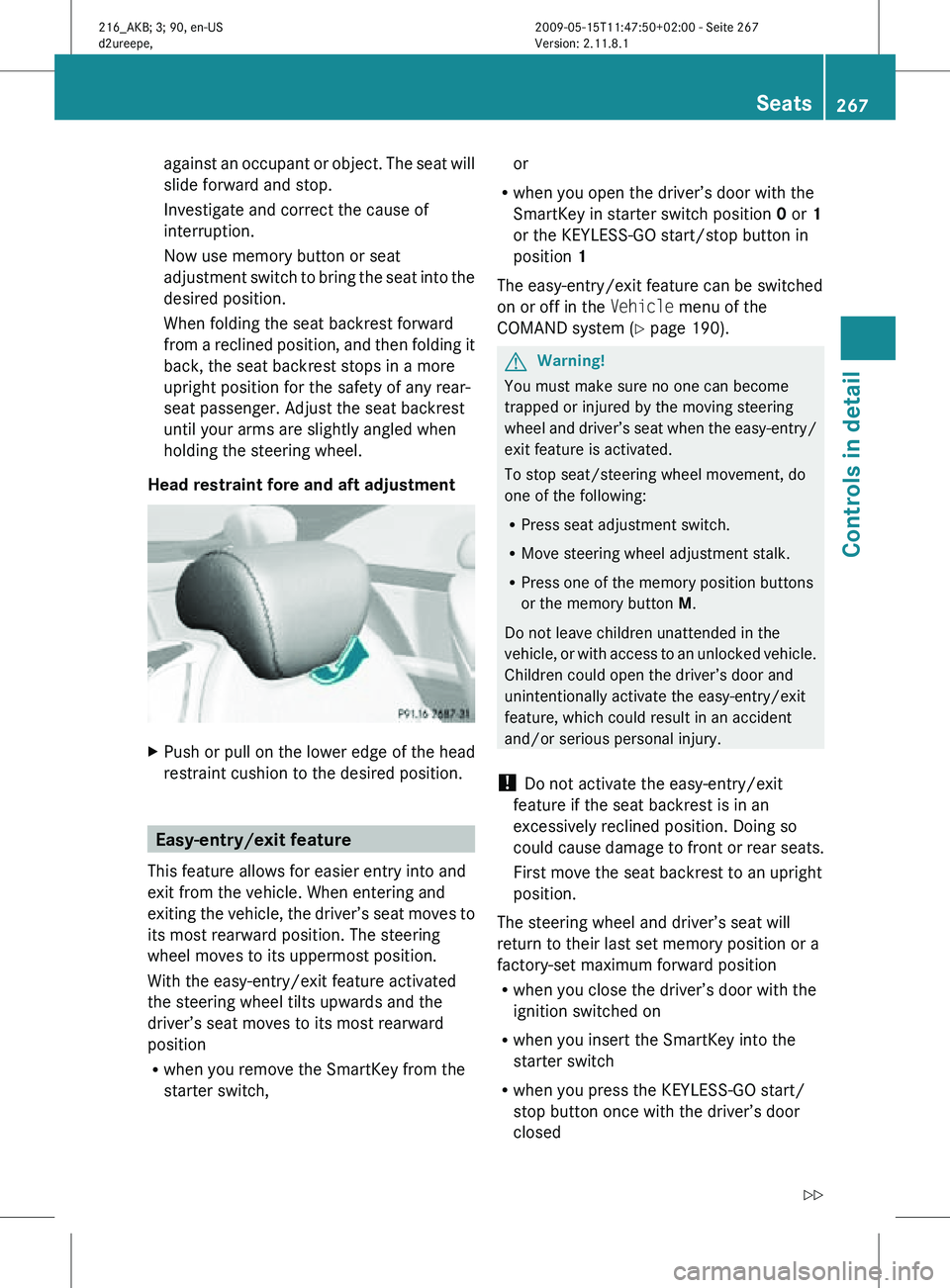
Head restraint fore and aft adjustment X
Push or pull on the lower edge of the head
restraint cushion to the desired position. Easy-entry/exit feature
This feature allows for easier entry into and
exit from the vehicle. When entering and
exiting the vehicle, the driver’s seat moves to
its most rearward position. The steering
wheel moves to its uppermost position.
With the easy-entry/exit feature activated
the steering wheel tilts upwards and the
driver’s seat moves to its most rearward
position
R when you remove the SmartKey from the
starter switch, or
R when you open the driver’s door with the
SmartKey in starter switch position 0 or 1
or the KEYLESS-GO start/stop button in
position 1
The easy-entry/exit feature can be switched
on or off in the Vehicle menu of the
COMAND system (Y page 190). G
Warning!
You must make sure no one can become
trapped or injured by the moving steering
wheel and driver’s seat when the easy-entry/
exit feature is activated.
To stop seat/steering wheel movement, do
one of the following:
R Press seat adjustment switch.
R Move steering wheel adjustment stalk.
R Press one of the memory position buttons
or the memory button M.
Do not leave children unattended in the
vehicle, or with access to an unlocked vehicle.
Children could open the driver’s door and
unintentionally activate the easy-entry/exit
feature, which could result in an accident
and/or serious personal injury.
! Do not activate the easy-entry/exit
feature if the seat backrest is in an
excessively reclined position. Doing so
could cause damage to front or rear seats.
First move the seat backrest to an upright
position.
The steering wheel and driver’s seat will
return to their last set memory position or a
factory-set maximum forward position
R when you close the driver’s door with the
ignition switched on
R when you insert the SmartKey into the
starter switch
R when you press the KEYLESS-GO start/
stop button once with the driver’s door
closed Seats
267Controls in detail
216_AKB; 3; 90, en-US
d2ureepe, Version: 2.11.8.1 2009-05-15T11:47:50+02:00 - Seite 267 Z
Page 270 of 500
i
For safety reasons, the driver’s seat will
not return to its last set position if the
system recognizes the last set position as
an extreme forward position. Instead, the
driver’s seat will remain at or move to a
factory-set maximum forward position. To
again fully return the driver’s seat to your
last set position or to memory position,
adjust the seat to the desired position or
press and hold the respective memory
position button (Y page 274).
i The last set driver’s seat and steering
wheel positions are stored when the
ignition is switched off and the position is
stored in memory.
i If the current position for the steering
wheel is in the uppermost tilt position, the
steering wheel will not move.
If the current seat position is within a
factory-set position range and the system
recognizes the current seat position to be
rearward enough for easy entry and exit,
the driver’s seat will not move to the rear.
The adjustment procedure is interrupted
briefly when the engine is started. G
Warning!
Let the system complete the adjustment
procedure before setting the vehicle in
motion. All driver’s seat and steering wheel
adjustments must be completed before
setting the vehicle in motion. Driving off with
the driver’s seat/steering wheel still
adjusting could cause the driver to lose
control of the vehicle.
Crash-responsive exit aid When you open the driver’s door after an
accident has occurred, the steering column
moves
up.
The position of the SmartKey in the
starter switch is insignificant. This function
facilitates exiting as well as rescue of vehicle
occupants. The crash-responsive exit aid can only be
triggered
when
the easy-entry/exit feature is
activated via the control system. Rear seat head restraints
G
Warning!
For safety reasons, always drive with the rear
head restraints in the upright position when
the rear seats are occupied.
Keep the
area around head restraints clear of
articles (e.g. clothing) to not obstruct the
folding operation of the head restraints. G
Warning!
For your protection, drive only with properly
positioned head restraints.
Adjust the
head restraint in such a way that it
is as close to the head as possible and the
center of the head restraint supports the back
of the head at eye level. This will reduce the
potential for injury to the head and neck in the
event of an accident or similar situation.
With a rear seat occupied, make sure to move
the respective head restraint up from the
lowest non-use position and have the
occupant adjust the head restraint properly.
Do not drive the vehicle without the seat head
restraints installed when the rear seats are
occupied. Head restraints are intended to
help reduce injuries during an accident. G
Warning!
Make sure the rear seat head restraints
engage when placing them upright manually.
Otherwise their
protective function cannot be
ensured.
The back of the head will not be supported in
the event of a collision. That could cause
serious or even fatal injuries. Rear seat
occupants can be seriously injured or killed.
Folding rear seat head restraints back The rear seat head restraints can be folded
backward for increased visibility.268
Seats
Controls in detail
216_AKB; 3; 90, en-US
d2ureepe,
Version: 2.11.8.1 2009-05-15T11:47:50+02:00 - Seite 268
Page 271 of 500
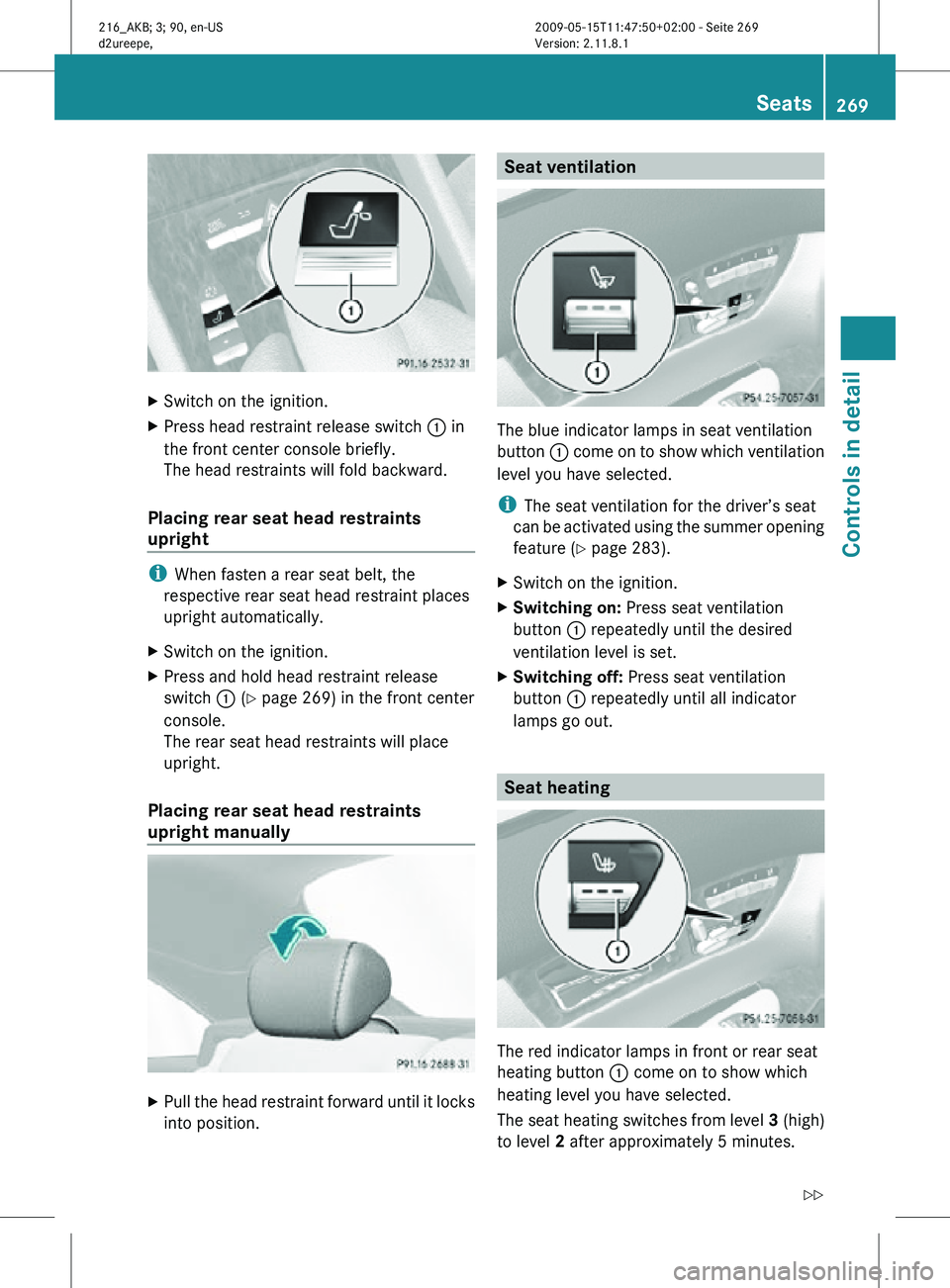
X
Switch on the ignition.
X Press head restraint release switch : in
the front center console briefly.
The head restraints will fold backward.
Placing rear seat head restraints
upright i
When fasten a rear seat belt, the
respective rear seat head restraint places
upright automatically.
X Switch on the ignition.
X Press and hold head restraint release
switch : (Y page 269) in the front center
console.
The rear seat head restraints will place
upright.
Placing rear seat head restraints
upright manually X
Pull the head restraint forward until it locks
into position. Seat ventilation
The blue indicator lamps in seat ventilation
button
: come on to show which ventilation
level you have selected.
i The seat ventilation for the driver’s seat
can be activated using the summer opening
feature ( Y page 283).
X Switch on the ignition.
X Switching on: Press seat ventilation
button : repeatedly until the desired
ventilation level is set.
X Switching off: Press seat ventilation
button : repeatedly until all indicator
lamps go out. Seat heating
The red indicator lamps in front or rear seat
heating button
: come on to show which
heating level you have selected.
The seat heating switches from level 3 (high)
to level 2 after approximately 5 minutes. Seats
269Controls in detail
216_AKB; 3; 90, en-US
d2ureepe, Version: 2.11.8.1 2009-05-15T11:47:50+02:00 - Seite 269 Z
Page 276 of 500

Each memory position button on the driver’s
side can store all of the following settings:
R
Seat position
R Lumbar support (CL 550 4MATIC)
R Multicontour seat: previously saved
settings
R Drive-dynamic multicontour seat:
activation/deactivation
R Steering wheel position
R Exterior rear view mirrors’ position G
Warning!
Do not activate the memory function while
driving. Activating the memory function while
driving could cause the driver to lose control
of the vehicle.
Each memory position button on the front
passenger side can store all of the following
settings:
R Seat position
R Multicontour seat: previously saved
settings
R Lumbar support (CL 550 4MATIC)
R Drive-dynamic multicontour seat:
activation/deactivation Storing positions into memory
X Adjust the seats.
X On the driver’s side, also adjust the
steering wheel and exterior rear view
mirrors to the desired positions.
X Press memory button M once and within
3 seconds press memory position button
1, 2 or 3.
When the settings are stored to the
selected position, an acknowledgement
signal sounds. Recalling positions from memory
X Press and hold desired memory position
button 1, 2 or 3 until the seat has moved
to the stored position completely. On the
driver’s side, also wait for the steering
wheel and exterior rear view mirrors to
move to the stored position.
i Releasing the memory position button
stops movement to the stored positions
immediately. Lighting
Notes
i If you drive in countries with left-hand
driving, you must have the headlamps
modified for symmetrical low beams.
Relevant information can be obtained at
any authorized Mercedes-Benz Center.
i The active Bi-Xenon headlamps increase
usable illumination over conventional
headlamps because they follow the
curvature of the road ahead. The beams of
the active Bi-Xenon headlamps shift to
either side according to the vehicle’s
steering angle and speed. 274
LightingControls in detail
216_AKB; 3; 90, en-US
d2ureepe,
Version: 2.11.8.1 2009-05-15T11:47:50+02:00 - Seite 274
Page 284 of 500

R
Turn off the engine by pressing the
KEYLESS-GO start/stop button and
open the driver’s door (with the driver’s
door open, starter switch is in position
0, same
as with SmartKey removed from
starter switch).
R Engage the parking brake.
R Remove blockage.
R Turn the windshield wipers on again.
If the windshield wipers fail to function at
all with the combination switch in position
Ä or Å,
R set the combination switch to the next
higher wiper speed
R have the windshield wipers checked at
the nearest authorized Mercedes-Benz
Center Power windows
Opening and closing
The windows are opened and closed
electrically. The switches for all windows are
located on
the driver’s door. The switches for
the respective windows are located on the
passenger door and the rear side trim panels.
i Operating the rear side windows from the
rear is not possible when you activate the
override switch ( Y page 55). G
Observe Safety notes, see page 51. G
Warning!
When opening or closing the windows, make
sure there is no danger of anyone being
harmed by the opening/closing procedure.
The door windows are equipped with the
express operation and automatic reversal
function. If
in express operation mode a door
window encounters an obstruction that
blocks its path, the automatic reversal
function will stop the door window and open
it slightly. The windows operate differently when the
switch is pulled and held. See the “Closing
when a window is blocked” section in this
chapter for details.
The closing of the door windows can be
immediately
halted
by releasing the switch or,
if the switch was pulled past the resistance
point and released, by either pressing or
pulling the respective switch.
The closing of the rear side windows can be
immediately halted by releasing the switch.
Activate the override switch when children
are riding in the back seats of the vehicle. The
children may otherwise injure themselves,
e.g. by becoming trapped in the window
opening. G
Warning!
Do not keep any part of your body up against
the window
pane when opening a window. The
downward motion of the pane may pull that
part of your body down between the window
pane and the door frame and trap it there. If
there is a risk of entrapment, release the
switch and pull it to close the window.
i You can also open or close the windows
using the SmartKey, see “Summer opening
feature” ( Y page 283) and “Convenience
closing feature” ( Y page 284).
i After switching off the ignition or
removing the SmartKey from the starter
switch, you can operate the windows until
you open a door. If no door was opened you
can operate the windows for up to
5 minutes. 282
Power windowsControls in detail
216_AKB; 3; 90, en-US
d2ureepe,
Version: 2.11.8.1 2009-05-15T11:47:50+02:00 - Seite 282
Page 395 of 500
Tire type code
Tire type code
? may, at the option of the
manufacturer, be used as a descriptive code
for identifying significant characteristics of
the tire.
Date of manufacture The date of manufacture
A identifies the
week and year of manufacture.
The first two figures identify the week,
starting with “01” to represent the first full
week of the calendar year. The second two
figures represent the year.
For example, “3208” represents the 32nd
week of 2008. Tire ply material
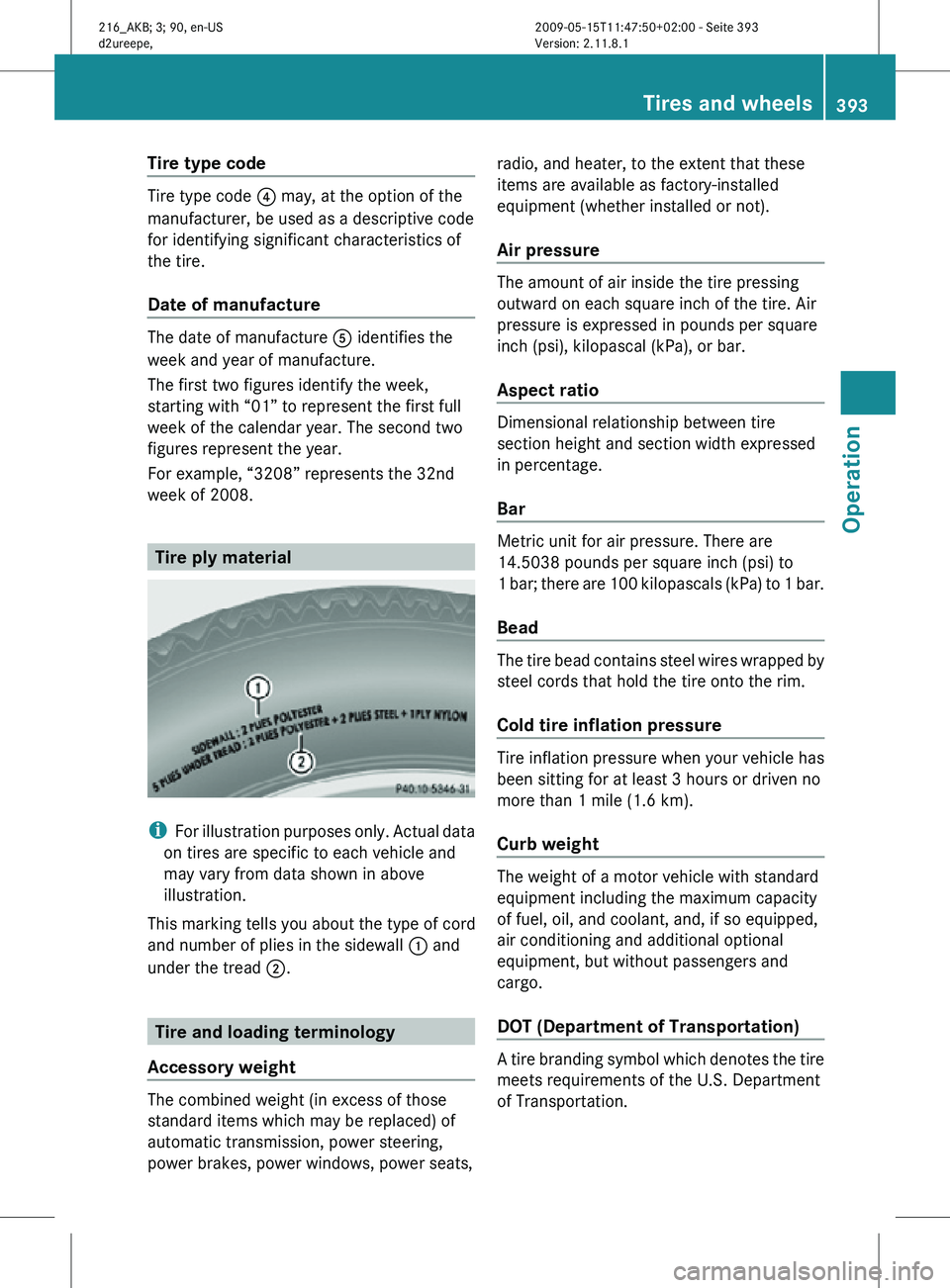
i
For illustration purposes only. Actual data
on tires are specific to each vehicle and
may vary from data shown in above
illustration.
This marking tells you about the type of cord
and number of plies in the sidewall : and
under the tread ;. Tire and loading terminology
Accessory weight The combined weight (in excess of those
standard items which may be replaced) of
automatic transmission, power steering,
power brakes, power windows, power seats, radio, and heater, to the extent that these
items are available as factory-installed
equipment (whether installed or not).
Air pressure The amount of air inside the tire pressing
outward on each square inch of the tire. Air
pressure is expressed in pounds per square
inch (psi), kilopascal (kPa), or bar.
Aspect ratio
Dimensional relationship between tire
section height and section width expressed
in percentage.
Bar
Metric unit for air pressure. There are
14.5038 pounds per square inch (psi) to
1 bar; there are 100 kilopascals (kPa) to 1 bar.
Bead
The tire bead contains steel wires wrapped by
steel cords that hold the tire onto the rim.
Cold tire inflation pressure
Tire inflation pressure when your vehicle has
been sitting for at least 3 hours or driven no
more than 1 mile (1.6 km).
Curb weight
The weight of a motor vehicle with standard
equipment including the maximum capacity
of fuel, oil, and coolant, and, if so equipped,
air conditioning and additional optional
equipment, but without passengers and
cargo.
DOT (Department of Transportation)
A tire branding symbol which denotes the tire
meets requirements of the U.S. Department
of Transportation. Tires and wheels
393Operation
216_AKB; 3; 90, en-US
d2ureepe, Version: 2.11.8.1 2009-05-15T11:47:50+02:00 - Seite 393 Z