steering MERCEDES-BENZ CL CLASS 2010 Owner's Guide
[x] Cancel search | Manufacturer: MERCEDES-BENZ, Model Year: 2010, Model line: CL CLASS, Model: MERCEDES-BENZ CL CLASS 2010Pages: 500, PDF Size: 9.32 MB
Page 193 of 500
To stop seat/steering wheel movement, do
one of the following:
R
Press seat adjustment switch.
R Move steering wheel adjustment stalk.
R Press one of the memory position buttons
or the memory button M.
Do not leave children unattended in the
vehicle, or with access to an unlocked vehicle.
Children could open the driver’s door and
unintentionally activate the easy-entry/exit
feature, which could result in an accident
and/or serious personal injury.
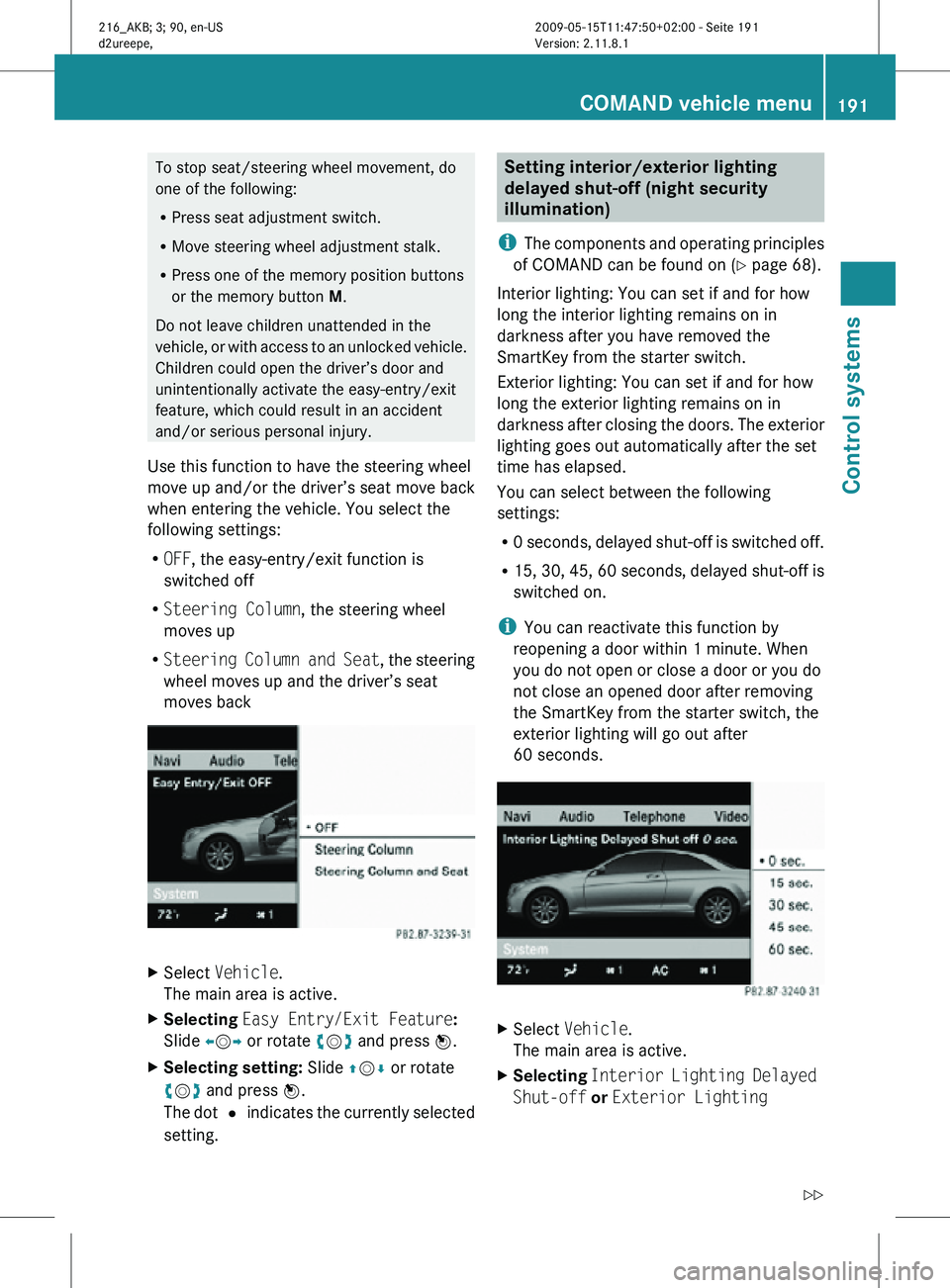
Use this function to have the steering wheel
move up and/or the driver’s seat move back
when entering the vehicle. You select the
following settings:
R OFF, the easy-entry/exit function is
switched off
R Steering Column, the steering wheel
moves up
R Steering Column and Seat , the steering
wheel moves up and the driver’s seat
moves back X
Select Vehicle.
The main area is active.
X Selecting Easy Entry/Exit Feature:
Slide XVY or rotate cVd and press W.
X Selecting setting: Slide ZVÆ or rotate
cVd and press W.
The dot # indicates the currently selected
setting. Setting interior/exterior lighting
delayed shut-off (night security
illumination)
i The components and operating principles
of COMAND can be found on ( Y page 68).
Interior lighting: You can set if and for how
long the interior lighting remains on in
darkness after you have removed the
SmartKey from the starter switch.
Exterior lighting: You can set if and for how
long the exterior lighting remains on in
darkness after closing the doors. The exterior
lighting goes out automatically after the set
time has elapsed.
You can select between the following
settings:
R 0 seconds, delayed shut-off is switched off.
R 15, 30, 45, 60 seconds, delayed shut-off is
switched on.
i You can reactivate this function by
reopening a door within 1 minute. When
you do not open or close a door or you do
not close an opened door after removing
the SmartKey from the starter switch, the
exterior lighting will go out after
60 seconds. X
Select Vehicle.
The main area is active.
X Selecting Interior Lighting Delayed
Shut-off or Exterior Lighting COMAND vehicle menu
191Control systems
216_AKB; 3; 90, en-US
d2ureepe, Version: 2.11.8.1 2009-05-15T11:47:50+02:00 - Seite 191 Z
Page 203 of 500
bolsters. This function improves driving
comfort and pleasure.
X
Select seat (Y page 198).
X Selecting Dynamic Seat: Slide XVY or
rotate cVd.
X Confirming selection: Press W.
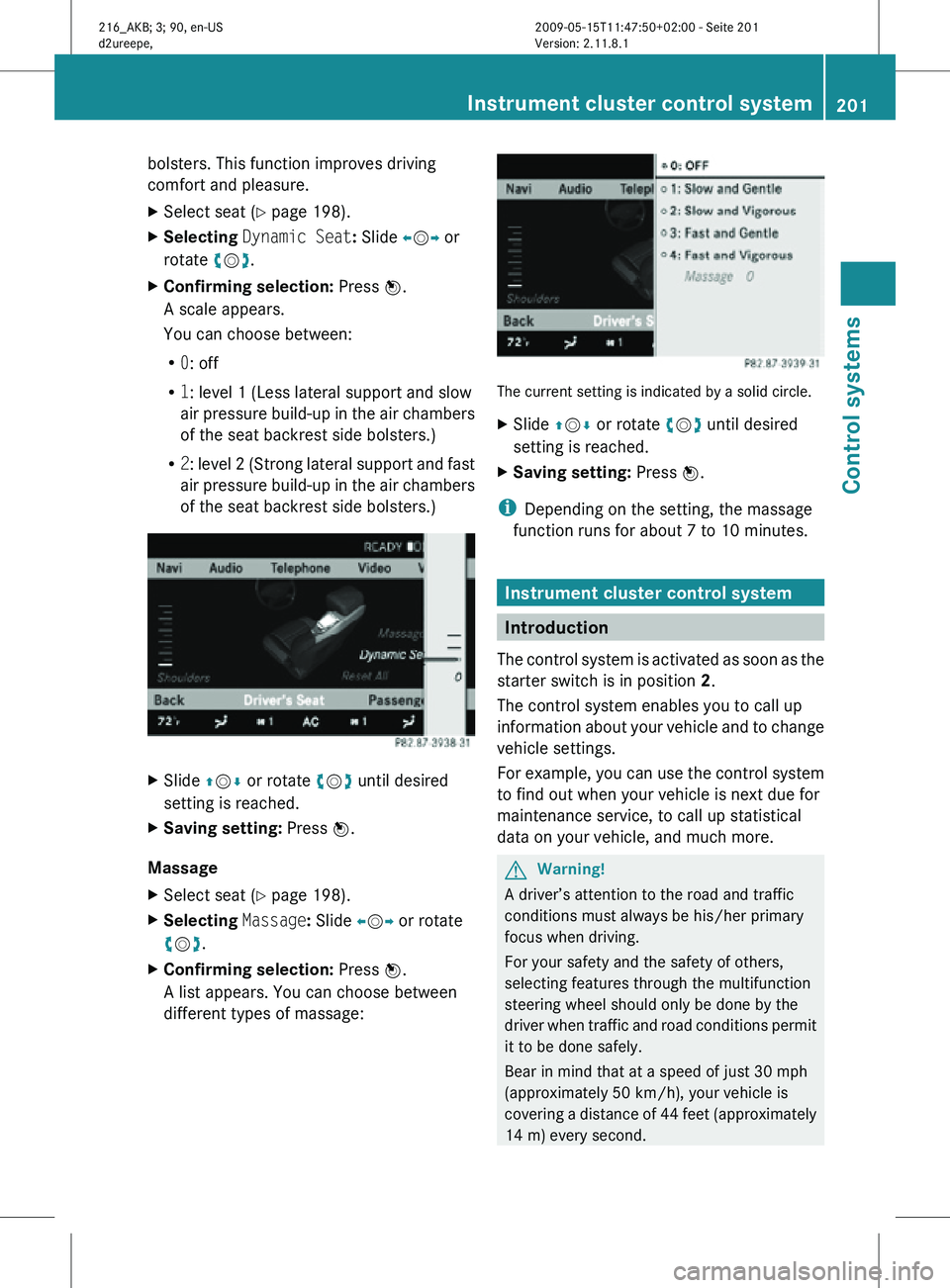
A scale appears.
You can choose between:
R 0: off
R 1: level 1 (Less lateral support and slow
air pressure build-up in the air chambers
of the seat backrest side bolsters.)
R 2: level 2 (Strong lateral support and fast
air pressure build-up in the air chambers
of the seat backrest side bolsters.) X
Slide ZVÆ or rotate cVd until desired
setting is reached.
X Saving setting: Press W.
Massage
X Select seat (Y page 198).
X Selecting Massage: Slide XVY or rotate
cVd.
X Confirming selection: Press W.
A list appears. You can choose between
different types of massage: The current setting is indicated by a solid circle.
X
Slide ZVÆ or rotate cVd until desired
setting is reached.
X Saving setting: Press W.
i Depending on the setting, the massage
function runs for about 7 to 10 minutes. Instrument cluster control system
Introduction
The control system is activated as soon as the
starter switch is in position 2.
The control system enables you to call up
information about your vehicle and to change
vehicle settings.
For example, you can use the control system
to find out when your vehicle is next due for
maintenance service, to call up statistical
data on your vehicle, and much more. G
Warning!
A driver’s attention to the road and traffic
conditions must always be his/her primary
focus when driving.
For your safety and the safety of others,
selecting features through the multifunction
steering wheel should only be done by the
driver when traffic and road conditions permit
it to be done safely.
Bear in mind that at a speed of just 30 mph
(approximately 50 km/h), your vehicle is
covering a distance of 44 feet (approximately
14 m) every second. Instrument cluster control system
201Control systems
216_AKB; 3; 90, en-US
d2ureepe, Version: 2.11.8.1 2009-05-15T11:47:50+02:00 - Seite 201 Z
Page 204 of 500
The control system relays information to the
multifunction display.
Multifunction steering wheel
The displays in the multifunction display and
the settings in the control system are
controlled by using the buttons on the
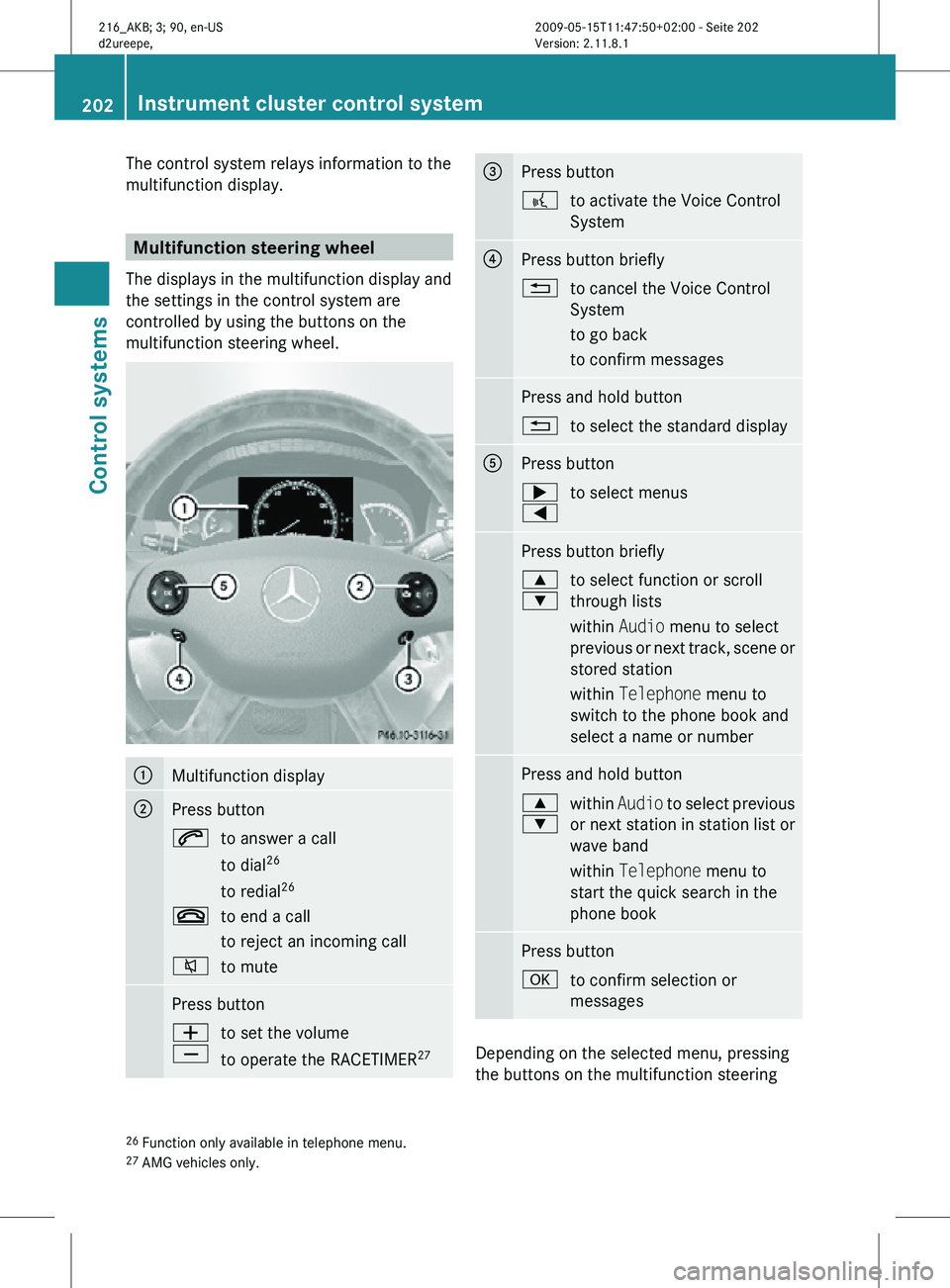
multifunction steering wheel. :
Multifunction display
;
Press button
6
to answer a call
to dial26
to redial 26
~ to end a call
to reject an incoming call
8 to mute Press button
W
X
to set the volume
to operate the RACETIMER
27 =
Press button
?
to activate the Voice Control
System ?
Press button briefly
%
to cancel the Voice Control
System
to go back
to confirm messages Press and hold button
%
to select the standard display A
Press button
;
=
to select menus Press button briefly
9
:
to select function or scroll
through lists
within Audio menu to select
previous or next track, scene or
stored station
within Telephone menu to
switch to the phone book and
select a name or number Press and hold button
9
:
within
Audio to select previous
or next station in station list or
wave band
within Telephone menu to
start the quick search in the
phone book Press button
a
to confirm selection or
messages Depending on the selected menu, pressing
the buttons on the multifunction steering
26 Function only available in telephone menu.
27 AMG vehicles only. 202
Instrument cluster control systemControl systems
216_AKB; 3; 90, en-US
d2ureepe,
Version: 2.11.8.1 2009-05-15T11:47:50+02:00 - Seite 202
Page 209 of 500
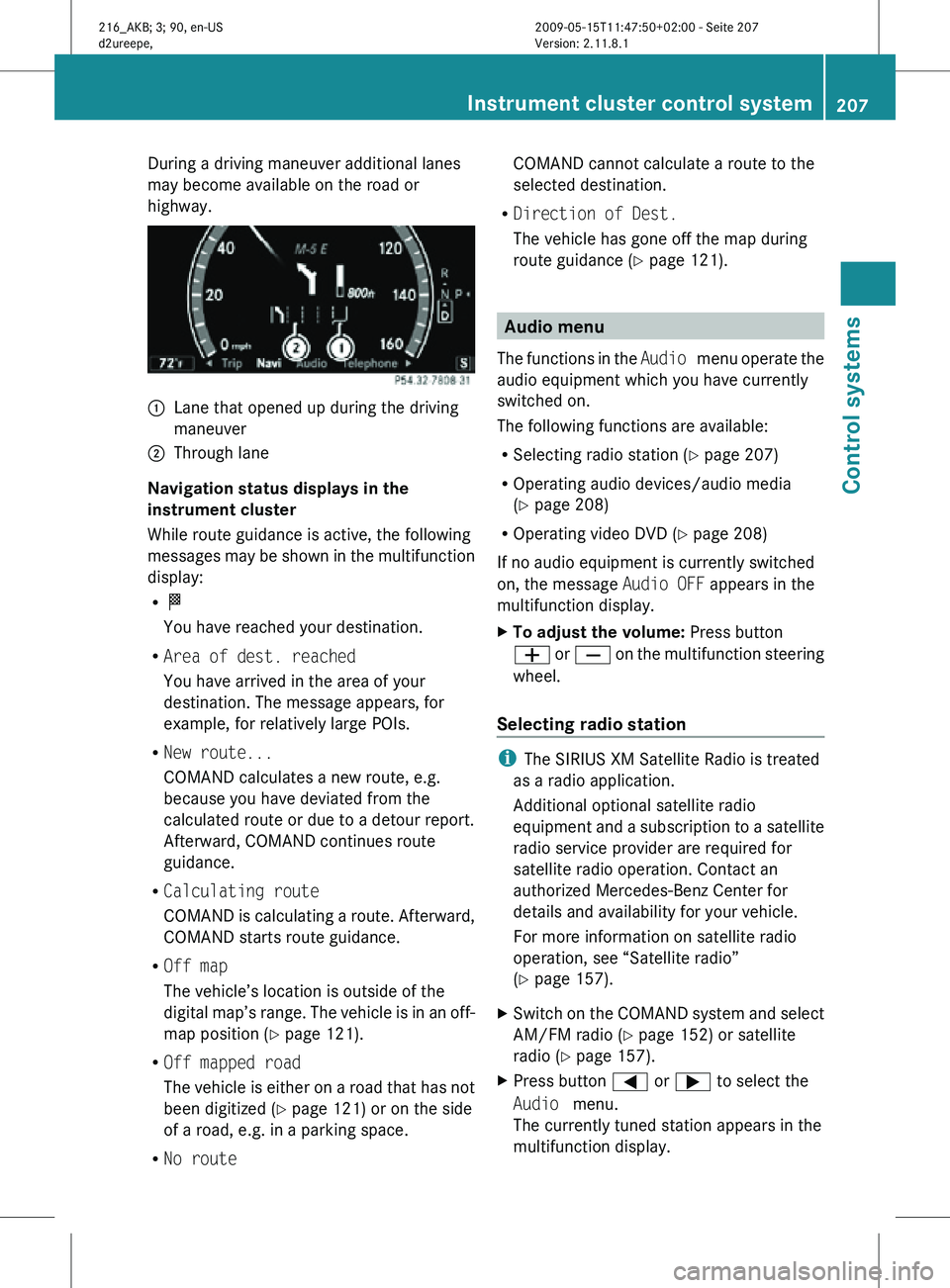
During a driving maneuver additional lanes
may become available on the road or
highway.
:
Lane that opened up during the driving
maneuver
; Through lane
Navigation status displays in the
instrument cluster
While route guidance is active, the following
messages may be shown in the multifunction
display:
R O
You have reached your destination.
R Area of dest. reached
You have arrived in the area of your
destination. The message appears, for
example, for relatively large POIs.
R New route...
COMAND calculates a new route, e.g.
because you have deviated from the
calculated route or due to a detour report.
Afterward, COMAND continues route
guidance.
R Calculating route
COMAND is calculating a route. Afterward,
COMAND starts route guidance.
R Off map
The vehicle’s location is outside of the
digital map’s range. The vehicle is in an off-
map position ( Y page 121).
R Off mapped road
The vehicle is either on a road that has not
been digitized ( Y page 121) or on the side
of a road, e.g. in a parking space.
R No route COMAND cannot calculate a route to the
selected destination.
R Direction of Dest.
The vehicle has gone off the map during
route guidance ( Y page 121). Audio menu
The functions in the Audio menu operate the
audio equipment which you have currently
switched on.
The following functions are available:
R Selecting radio station (Y page 207)
R Operating audio devices/audio media
(Y page 208)
R Operating video DVD (Y page 208)
If no audio equipment is currently switched
on, the message Audio OFF appears in the
multifunction display.
X To adjust the volume: Press button
W or X on the multifunction steering
wheel.
Selecting radio station i
The SIRIUS XM Satellite Radio is treated
as a radio application.
Additional optional satellite radio
equipment and a subscription to a satellite
radio service provider are required for
satellite radio operation. Contact an
authorized Mercedes-Benz Center for
details and availability for your vehicle.
For more information on satellite radio
operation, see “Satellite radio”
(Y page 157).
X Switch on the COMAND system and select
AM/FM radio (Y page 152) or satellite
radio ( Y page 157).
X Press button = or ; to select the
Audio menu.
The currently tuned station appears in the
multifunction display. Instrument cluster control system
207Control systems
216_AKB; 3; 90, en-US
d2ureepe, Version: 2.11.8.1 2009-05-15T11:47:50+02:00 - Seite 207 Z
Page 211 of 500
The engine oil temperature will be shown in
blue if the engine oil temperature has not yet
reached 176‡ (80†). During this time, avoid
driving at full engine speed.
If the engine reaches the overspeed range in
the manual shift program, you will see
up next
to gear indicator : as a reminder to upshift.
Use buttons : or 9 to select the
following functions in the AMG menu:
R RACETIMER (Y page 209)
R Overall analysis ( Y page 210)
R Lap analysis (Y page 210)
RACETIMER G
Warning!
The RACETIMER feature is only for use on
roads and in conditions where high speed
driving is permitted. Racing on public roads is
prohibited under all circumstances. The driver
is and must always remain responsible for
following posted speed limits.
The RACETIMER allows you to time and save
driving stretches.
X Press button = or ; to select the
AMG menu.
X Press button 9 to select the
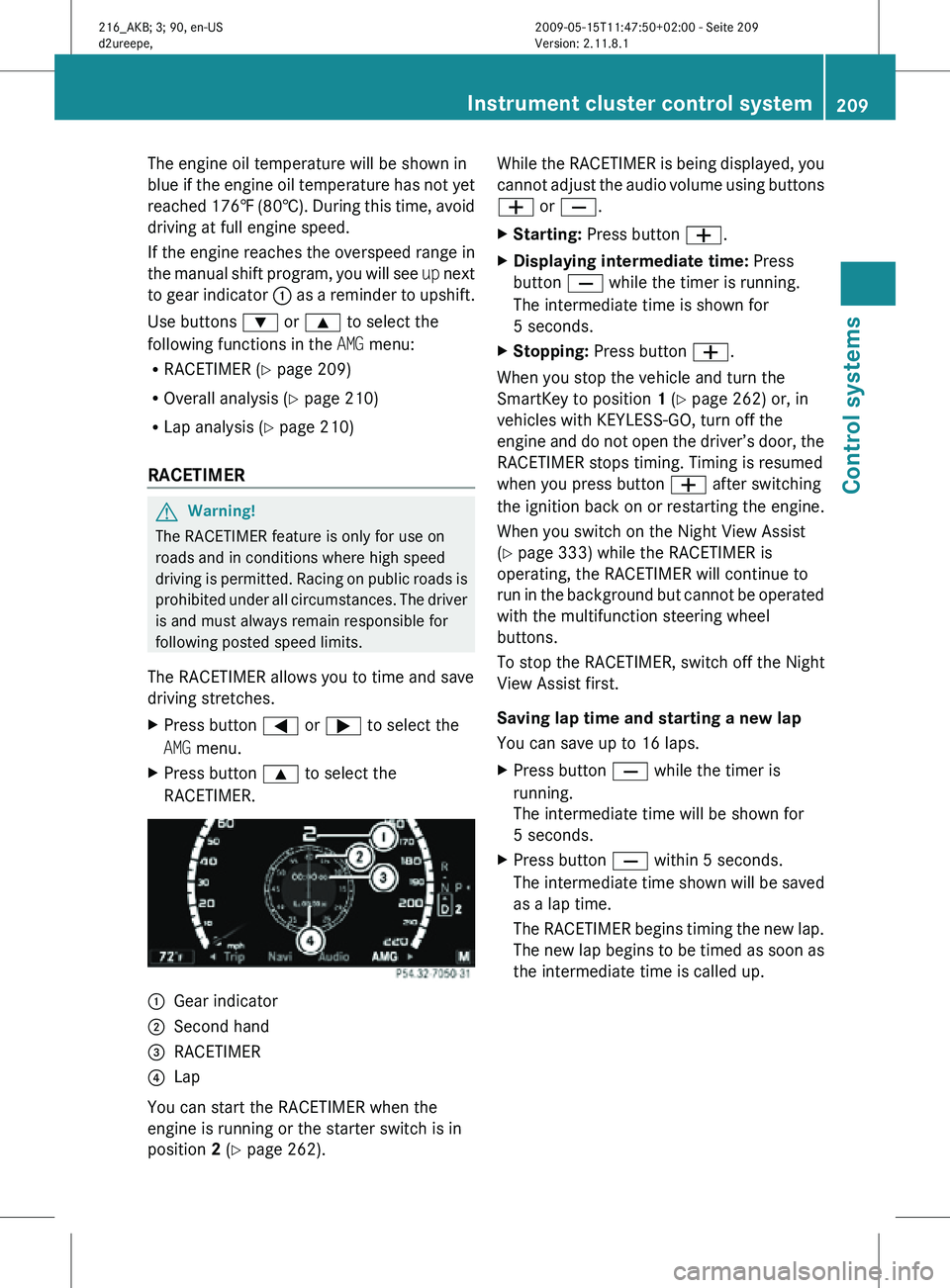
RACETIMER. :
Gear indicator
; Second hand
= RACETIMER
? Lap
You can start the RACETIMER when the
engine is running or the starter switch is in
position 2 (Y page 262). While the RACETIMER is being displayed, you
cannot adjust the audio volume using buttons
W or X.
X
Starting: Press button W.
X Displaying intermediate time: Press
button X while the timer is running.
The intermediate time is shown for
5 seconds.
X Stopping: Press button W.
When you stop the vehicle and turn the
SmartKey to position 1 (Y page 262) or, in
vehicles with KEYLESS-GO, turn off the
engine and do not open the driver’s door, the
RACETIMER stops timing. Timing is resumed
when you press button W after switching
the ignition back on or restarting the engine.
When you switch on the Night View Assist
(Y page 333) while the RACETIMER is
operating, the RACETIMER will continue to
run in the background but cannot be operated
with the multifunction steering wheel
buttons.
To stop the RACETIMER, switch off the Night
View Assist first.
Saving lap time and starting a new lap
You can save up to 16 laps.
X Press button X while the timer is
running.
The intermediate time will be shown for
5 seconds.
X Press button X within 5 seconds.
The intermediate time shown will be saved
as a lap time.
The RACETIMER begins timing the new lap.
The new lap begins to be timed as soon as
the intermediate time is called up. Instrument cluster control system
209Control systems
216_AKB; 3; 90, en-US
d2ureepe, Version: 2.11.8.1 2009-05-15T11:47:50+02:00 - Seite 209 Z
Page 219 of 500
Voice Control System introduction
Safety notes
G
Warning!
Only use the Voice Control System when road
and traffic conditions permit you to do so.
Otherwise you could be involved in an
accident in which you or others could be
injured. G
Warning!
Please devote your attention first and
foremost to the traffic situation you are in.
While the system permits hands-free phone
operation, attention
to traffic may be diverted
not only by physical operation of a phone, but
also by the distraction of a phone
conversation while driving. As such, for safety
reasons, we encourage the driver to stop the
vehicle in a safe place before answering or
placing a phone call.
For safety reasons, you should only select a
destination when the vehicle is stationary.
While the navigation system provides
directional assistance, the driver must remain
focused on safe driving behavior, especially
attention to traffic and street signs, and
should utilize the system’s audio cues while
driving.
The navigation system does not supply any
information on stop signs, yield signs, traffic
regulations or traffic safety rules. Their
observance always remains in the driver’s
personal responsibility. Maps do not cover all
areas nor all routes within an area.
Traffic regulations always have priority over
any route recommendations given.
Bear in mind that at a speed of just 30 mph
(approximately 50 km/h), your vehicle is
covering a distance of 44 feet (approximately
14 m) every second. G
Warning!
Navigation announcements are intended to
direct you
while driving without diverting your
attention from the road and driving.
Please always use navigation announcements
instead of consulting the map display for
directions. Consulting the symbols or map
display for directions may cause you to divert
your attention from driving and increase your
risk of an accident. G
Warning!
Please do not use the Voice Control System
in an emergency, as the tone of your voice
may change
in a stressful situation. This could
cause a delay in completing your phone call
in a timely manner. This could distract you in
an emergency situation and cause you to be
involved in an accident. General information
Depending on vehicle equipment, you can
operate the following systems via the Voice
Control System:
R Telephone ( Y page 225)
R Navigation ( Y page 219)
R Address book (Y page 229)
R Audio ( Y page 231) (AM/FM radio,
Satellite radio, CD/DVD changer, MP3
mode (SD
card, USB, Music Register, Media
Interface), AUX)
R Video
You control these systems using spoken
commands. Moreover, controls such as the
buttons on the multifunction steering wheel
(Y page 218) allow you to keep your hands
on the steering wheel.
The Voice Control System recognizes
commands and number sequences,
irrespective of the speaker. To optimize
speech recognition for your voice follow the
individualization process ( Y page 250). Voice Control System introduction
217
Control systems
216_AKB; 3; 90, en-US
d2ureepe, Version: 2.11.8.1 2009-05-15T11:47:50+02:00 - Seite 217 Z
Page 220 of 500
You can use the Voice Control System to call
up all of COMAND’s main menu items.
The commands can be spoken without
pausing between the individual words. If an
unavailable or incorrect command is used,
the Voice Control System will prompt you for
a new command by asking “Please repeat” or
“Please repeat your entry”.
The Voice Control System will confirm
important commands and inform you in case
of incorrect entries.
i
To support the user, the Voice Control
System contains an extensive help function
(Y page 247).
You can use the commands “Continue” or
“Back” to scroll up or down in lists.
The command “Correction” lets you repeat
the entry. Controls
Operation via the multifunction
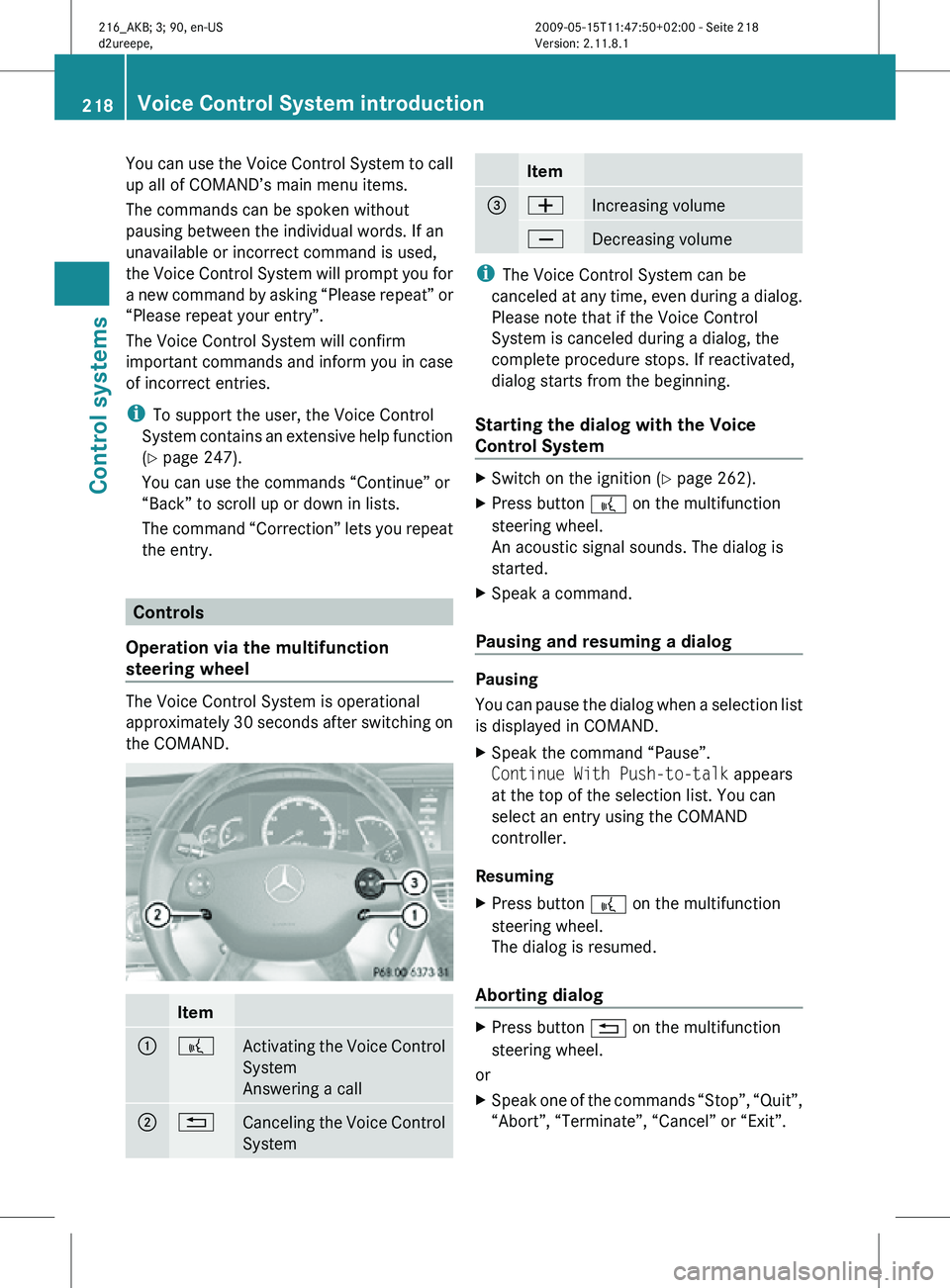
steering wheel The Voice Control System is operational
approximately 30 seconds after switching on
the COMAND.
Item
:
?
Activating the Voice Control
System
Answering a call
;
%
Canceling the Voice Control
System Item
=
W
Increasing volume
X
Decreasing volume
i
The Voice Control System can be
canceled at any time, even during a dialog.
Please note that if the Voice Control
System is canceled during a dialog, the
complete procedure stops. If reactivated,
dialog starts from the beginning.
Starting the dialog with the Voice
Control System X
Switch on the ignition (Y page 262).
X Press button ? on the multifunction
steering wheel.
An acoustic signal sounds. The dialog is
started.
X Speak a command.
Pausing and resuming a dialog Pausing
You can pause the dialog when a selection list
is displayed in COMAND.
X
Speak the command “Pause”.
Continue With Push-to-talk appears
at the top of the selection list. You can
select an entry using the COMAND
controller.
Resuming
X Press button ? on the multifunction
steering wheel.
The dialog is resumed.
Aborting dialog X
Press button % on the multifunction
steering wheel.
or
X Speak one of the commands “Stop”, “Quit”,
“Abort”, “Terminate”, “Cancel” or “Exit”. 218
Voice Control System introductionControl systems
216_AKB; 3; 90, en-US
d2ureepe,
Version: 2.11.8.1 2009-05-15T11:47:50+02:00 - Seite 218
Page 226 of 500
system asks with which entry it is to
start.
^ Say the name from which the list
should start to read.
\ John Smith.
Starting with this name, the system
reads all address book entries that
include an address.
X Press button ? on the multifunction
steering wheel briefly when the desired
entry is
read. When more than one address
for the entry exists, the Voice Control
System will inquire.
^ Navigate to: home or work?
\ Home.
The system reads the selected voice
name and starts route guidance. Commands for entering parts of an
address
“Enter town” You can use the “Enter town” command to
enter
any
town in the state or province that is
currently selected.
i You can scroll through the list by using the
“Continue” or “Back” command. Say
“Correction” to enter the town or city again.
Sample dialog:
\ Enter town.
^ Please say the name of the town.
\ Albany.
^ Loading town list.
_ The system shows a numbered list of
possible town
names on the display. If
there is only one entry on the list, the
Voice Control System asks if it is
correct.
^ Please select a line number.
\ Number one.
^ Number one accepted. The city selected is adopted for route
guidance.
“Enter district”, “Enter center” You can use the “Enter district” or “Enter
center” command to enter an area in a city
which you have selected previously.
Sample dialog:
\
Enter district.
^ Please say the name of the district.
\ Manhattan.
_ The system displays a list of available
districts if more than one name
matches the name of a district for the
given city.
^ Please select a line number.
\ Number one.
^ Number one accepted.
The district selected is adopted for route
guidance.
“Enter street” You can use the “Enter Street” command to
enter the name of any street in the selected
city.
i
If only a few streets are stored for a
selected town, they will be displayed for
selection immediately after you give the
“Enter Street” command.
Sample dialog:
\ Enter Street.
^ Please say the name of the street.
\ Mabel’s Street.
_ The system displays a numbered list of
available street names.
^ Please select a line number.
\ Number one.
^ Number one accepted.
The street name selected is adopted for route
guidance. 224
Voice Control System navigation
Control systems
216_AKB; 3; 90, en-US
d2ureepe,
Version: 2.11.8.1 2009-05-15T11:47:50+02:00 - Seite 224
Page 228 of 500
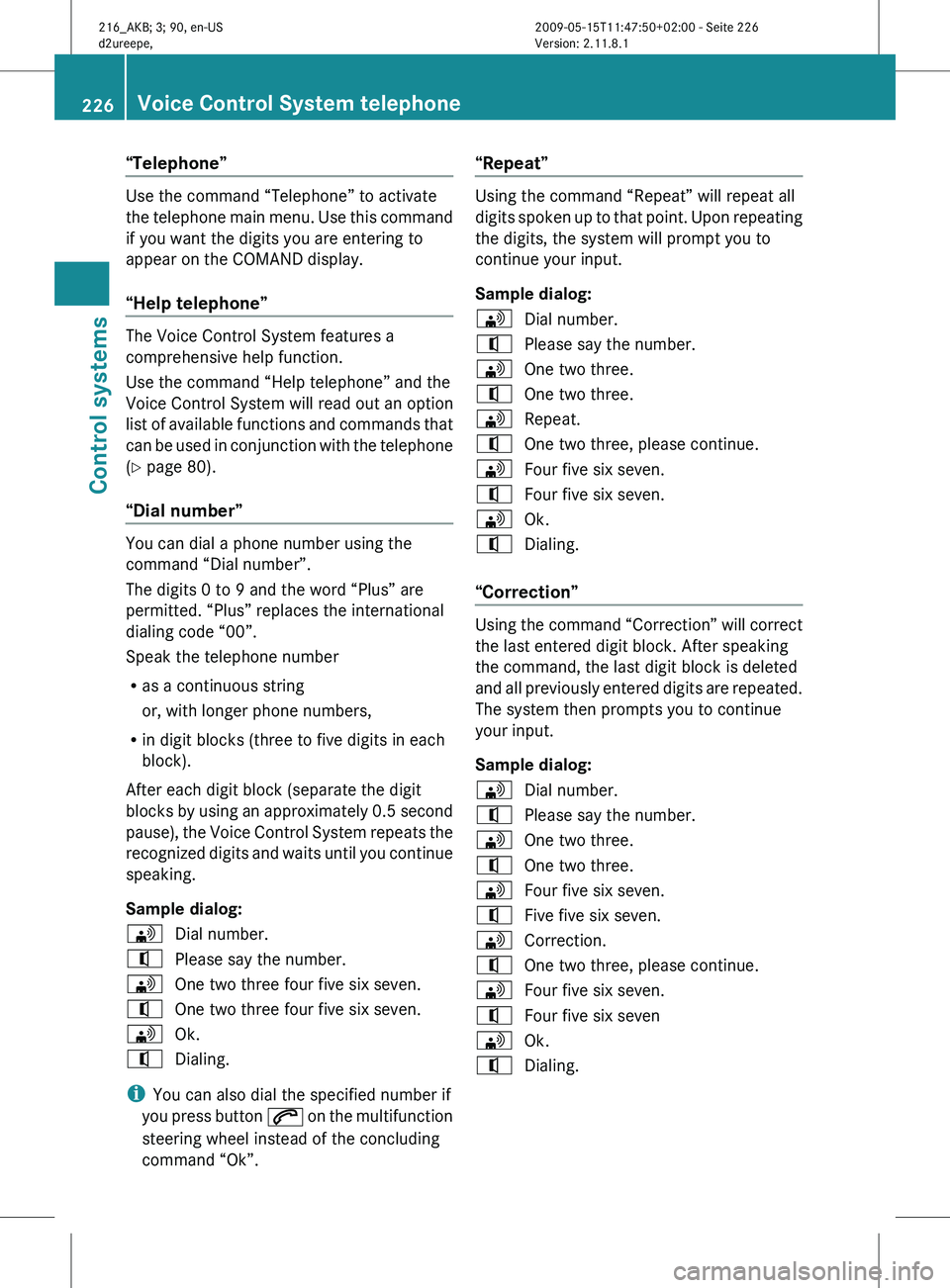
“Telephone”
Use the command “Telephone” to activate
the
telephone
main menu. Use this command
if you want the digits you are entering to
appear on the COMAND display.
“Help telephone” The Voice Control System features a
comprehensive help function.
Use the command “Help telephone” and the
Voice Control System will read out an option
list
of
available functions and commands that
can be used in conjunction with the telephone
(Y page 80).
“Dial number” You can dial a phone number using the
command “Dial number”.
The digits 0 to 9 and the word “Plus” are
permitted. “Plus” replaces the international
dialing code “00”.
Speak the telephone number
R
as a continuous string
or, with longer phone numbers,
R in digit blocks (three to five digits in each
block).
After each digit block (separate the digit
blocks by
using an approximately 0.5 second
pause), the Voice Control System repeats the
recognized digits and waits until you continue
speaking.
Sample dialog:
\ Dial number.
^ Please say the number.
\ One two three four five six seven.
^ One two three four five six seven.
\ Ok.
^ Dialing.
i You can also dial the specified number if
you press
button 6 on the multifunction
steering wheel instead of the concluding
command “Ok”. “Repeat” Using the command “Repeat” will repeat all
digits
spoken
up to that point. Upon repeating
the digits, the system will prompt you to
continue your input.
Sample dialog:
\ Dial number.
^ Please say the number.
\ One two three.
^ One two three.
\ Repeat.
^ One two three, please continue.
\ Four five six seven.
^ Four five six seven.
\ Ok.
^ Dialing.
“Correction” Using the command “Correction” will correct
the last entered digit block. After speaking
the command, the last digit block is deleted
and
all
previously entered digits are repeated.
The system then prompts you to continue
your input.
Sample dialog:
\ Dial number.
^ Please say the number.
\ One two three.
^ One two three.
\ Four five six seven.
^ Five five six seven.
\ Correction.
^ One two three, please continue.
\ Four five six seven.
^ Four five six seven
\ Ok.
^ Dialing. 226
Voice Control System telephone
Control systems
216_AKB; 3; 90, en-US
d2ureepe,
Version: 2.11.8.1 2009-05-15T11:47:50+02:00 - Seite 226
Page 232 of 500
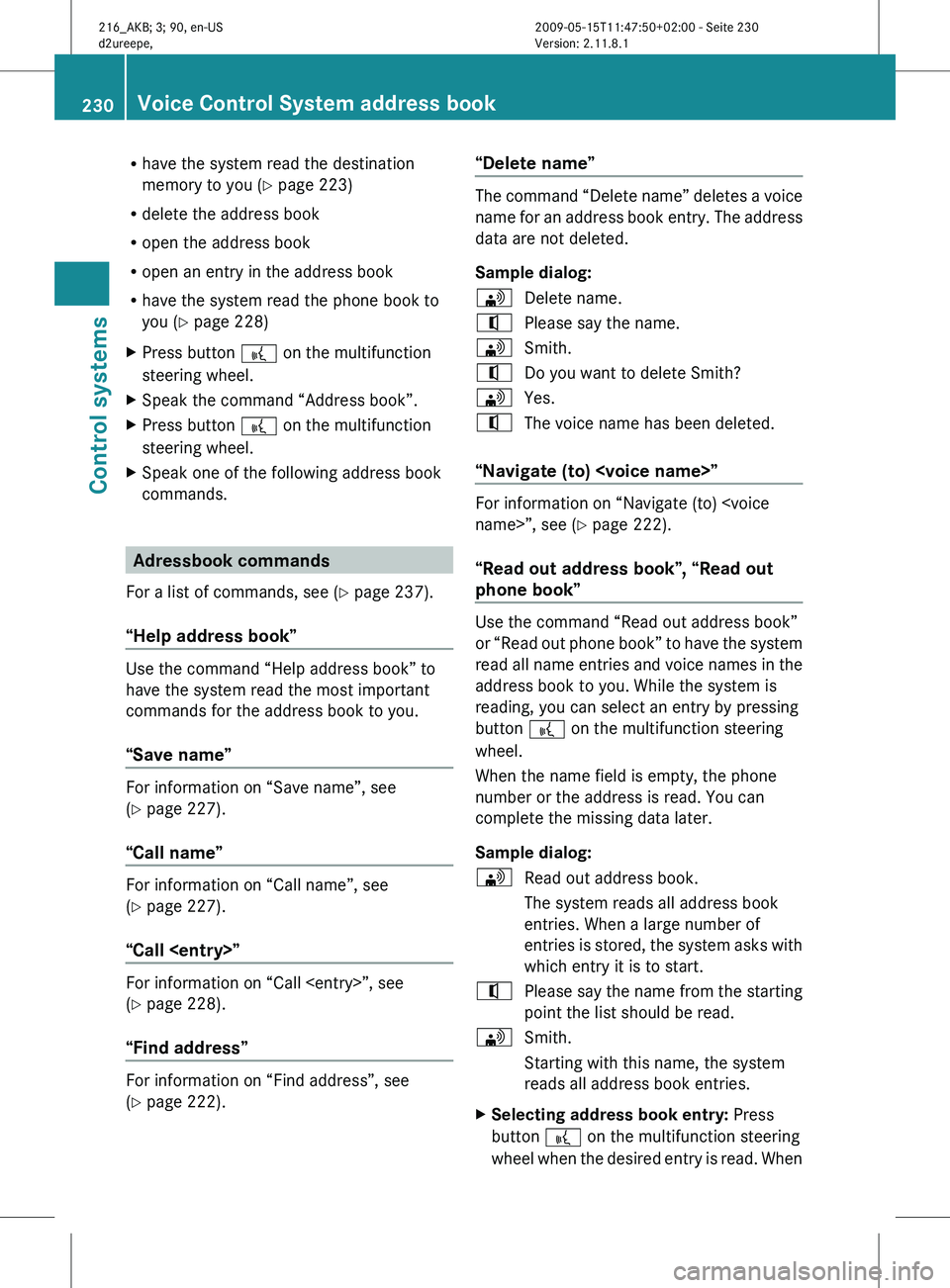
R
have the system read the destination
memory to you ( Y page 223)
R delete the address book
R open the address book
R open an entry in the address book
R have the system read the phone book to
you (
Y page 228)
X Press button ? on the multifunction
steering wheel.
X Speak the command “Address book”.
X Press button ? on the multifunction
steering wheel.
X Speak one of the following address book
commands. Adressbook commands
For a list of commands, see ( Y page 237).
“Help address book” Use the command “Help address book” to
have the system read the most important
commands for the address book to you.
“Save name”
For information on “Save name”, see
(Y page 227).
“Call name”
For information on “Call name”, see
(Y page 227).
“Call
For information on “Call
(Y page 228).
“Find address”
For information on “Find address”, see
(Y page 222). “Delete name” The command “Delete name” deletes a voice
name
for
an address book entry. The address
data are not deleted.
Sample dialog:
\ Delete name.
^ Please say the name.
\ Smith.
^ Do you want to delete Smith?
\ Yes.
^ The voice name has been deleted.
“Navigate (to)
Y page 222).
“Read out address book”, “Read out
phone book” Use the command “Read out address book”
or
“Read
out phone book” to have the system
read all name entries and voice names in the
address book to you. While the system is
reading, you can select an entry by pressing
button ? on the multifunction steering
wheel.
When the name field is empty, the phone
number or the address is read. You can
complete the missing data later.
Sample dialog:
\ Read out address book.
The system reads all address book
entries. When a large number of
entries is
stored, the system asks with
which entry it is to start.
^ Please say the name from the starting
point the list should be read.
\ Smith.
Starting with this name, the system
reads all address book entries.
X Selecting address book entry: Press
button ? on the multifunction steering
wheel when
the desired entry is read. When230
Voice Control System address book
Control systems
216_AKB; 3; 90, en-US
d2ureepe,
Version: 2.11.8.1 2009-05-15T11:47:50+02:00 - Seite 230