change wheel MERCEDES-BENZ CL-Class 2011 C216 Owner's Guide
[x] Cancel search | Manufacturer: MERCEDES-BENZ, Model Year: 2011, Model line: CL-Class, Model: MERCEDES-BENZ CL-Class 2011 C216Pages: 480, PDF Size: 19.76 MB
Page 326 of 480
Rthe windshield is dirty, fogged up or
covered, for instance by a sticker, in the
vicinity of the camera.
Rthe lane markings are worn away, dark or
covered up, e.g. by dirt or snow.
Rthe distance to the vehicle in front is too
small and the lane markings thus cannot be
detected.
Rthe lane markings on the road are unclear,
e.g. near roadworks.
Rthe lane markings change quickly, e.g.
lanes branch off, cross one another or
merge.
Rthe road is narrow and winding.
Active Lane Keeping Assist cannot detect
road and traffic conditions. It is not a
substitute for attentive driving. You are
responsible for the vehicle's speed, braking in
good time, and steering correctly. Always
adapt your driving style to suit the prevailing
road and weather conditions. Always pay
attention to traffic conditions and your
surroundings. Otherwise, you may fail to
recognize dangers in time, cause an accident
and injure yourself and others.
Warning vibration in the steering wheel
A warning can be given when a front wheel
passes over a lane marking. It will warn you
by means of intermittent vibration in the
steering wheel for up to 1.5 seconds.
In order that you are warned only when
necessary and in good time if you cross the
lane marking, the system recognizes certain
conditions and warns you accordingly.
The warning vibration occurs earlier if:
Ryou approach the outer lane marking on a
bend.
Rthe road has very wide lanes, e.g. a
freeway.
Rthe system recognizes solid lane markings.
The warning vibration occurs later if:
Rthe road has narrow lanes.
Ryou cut the corner on a bend.
No warning vibration occurs if:
Ryou clearly and actively steer, brake, or
accelerate.
Ryou cut the corner on a sharp bend.
Ra driving safety system intervenes, such as
ABS, BAS or ESP®.
Ryou switch on the turn signals. In this event,
the warnings are suppressed for a certain
period of time.
Lane-correcting brake application
If you leave your lane, under certain
circumstances the vehicle will brake briefly
on one side. This is designed to help you bring
the vehicle back into the original lane.
This function is available in the range between
40 mph and 120 mph (60 km/h and
200 km/h).
A lane-correcting brake application can only
be made after driving over a solid,
recognizable lane marking. Before this, a
warning must be emitted by means of
intermittent vibration in the steering wheel.
In addition, a lane with lane markings on both
sides must be recognized. The brake
application also slightly reduces driving
speed.
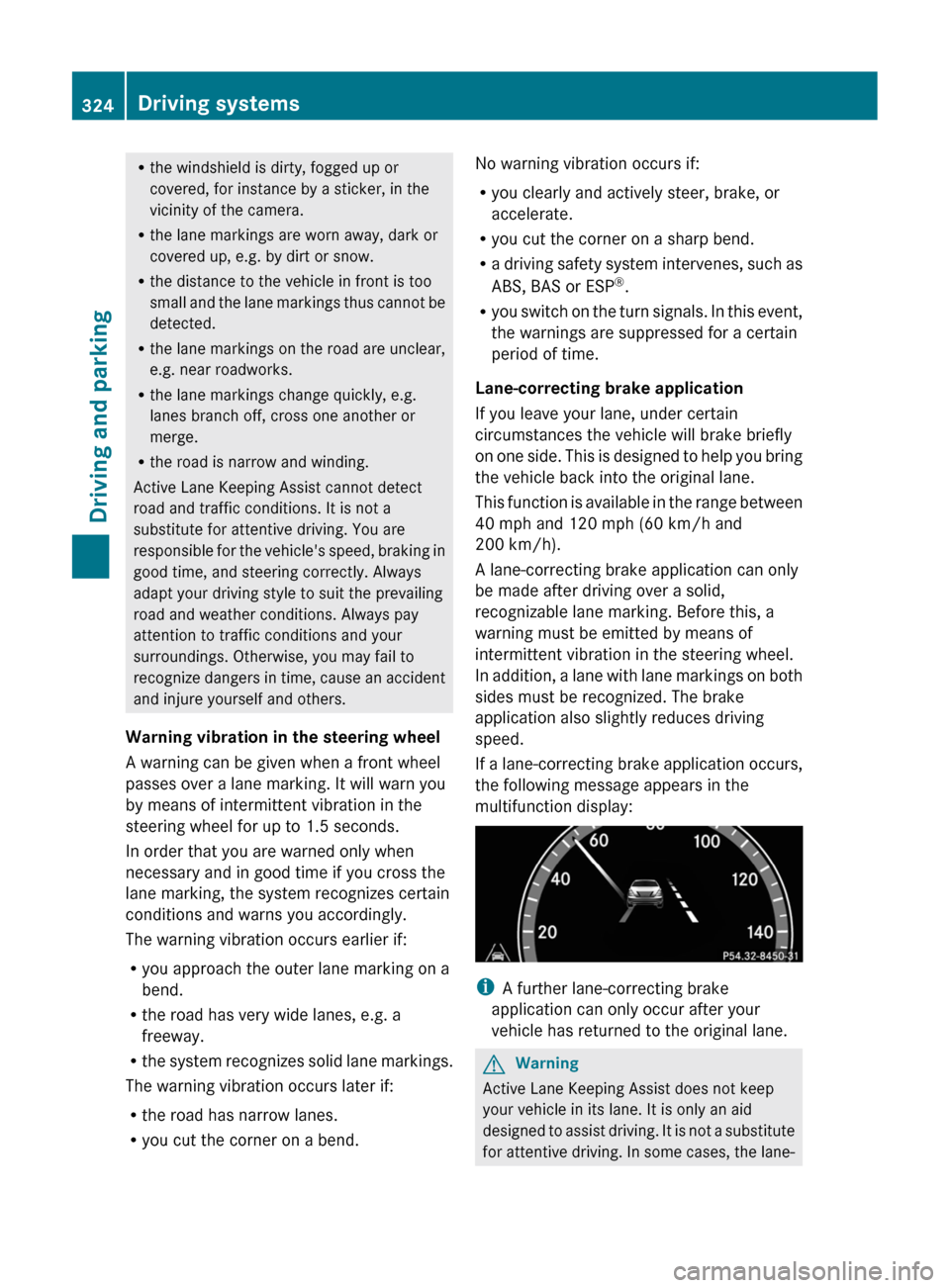
If a lane-correcting brake application occurs,
the following message appears in the
multifunction display:
iA further lane-correcting brake
application can only occur after your
vehicle has returned to the original lane.
GWarning
Active Lane Keeping Assist does not keep
your vehicle in its lane. It is only an aid
designed to assist driving. It is not a substitute
for attentive driving. In some cases, the lane-
324Driving systemsDriving and parking
Page 331 of 480
If the coolant temperature rises above
248 ‡(120 †), do not drive any further as
this could damage the engine.
Tachometer
The red band in the tachometer indicates the
engine's overrevving range.
! Do not drive in the overrevving range, as
this could damage the engine.
The fuel supply is interrupted to protect the
engine when the red band is reached.
Outside temperature display
The outside temperature display is in the
multifunction display.
GWarning!
The outside temperature indicator is not
designed to serve as an ice-warning device
and is therefore unsuitable for that purpose.
Indicated temperatures just above the
freezing point do not guarantee that the road
surface is free of ice. The road may still be icy,
especially in wooded areas or on bridges.
Changes in the outside temperature are
displayed after a short delay.
Operating the on-board computer
The on-board computer is activated as soon
as you turn the key to position 2 in the ignition
lock.
You can control the multifunction display and
the settings in the on-board computer using
the buttons on the multifunction steering
wheel.
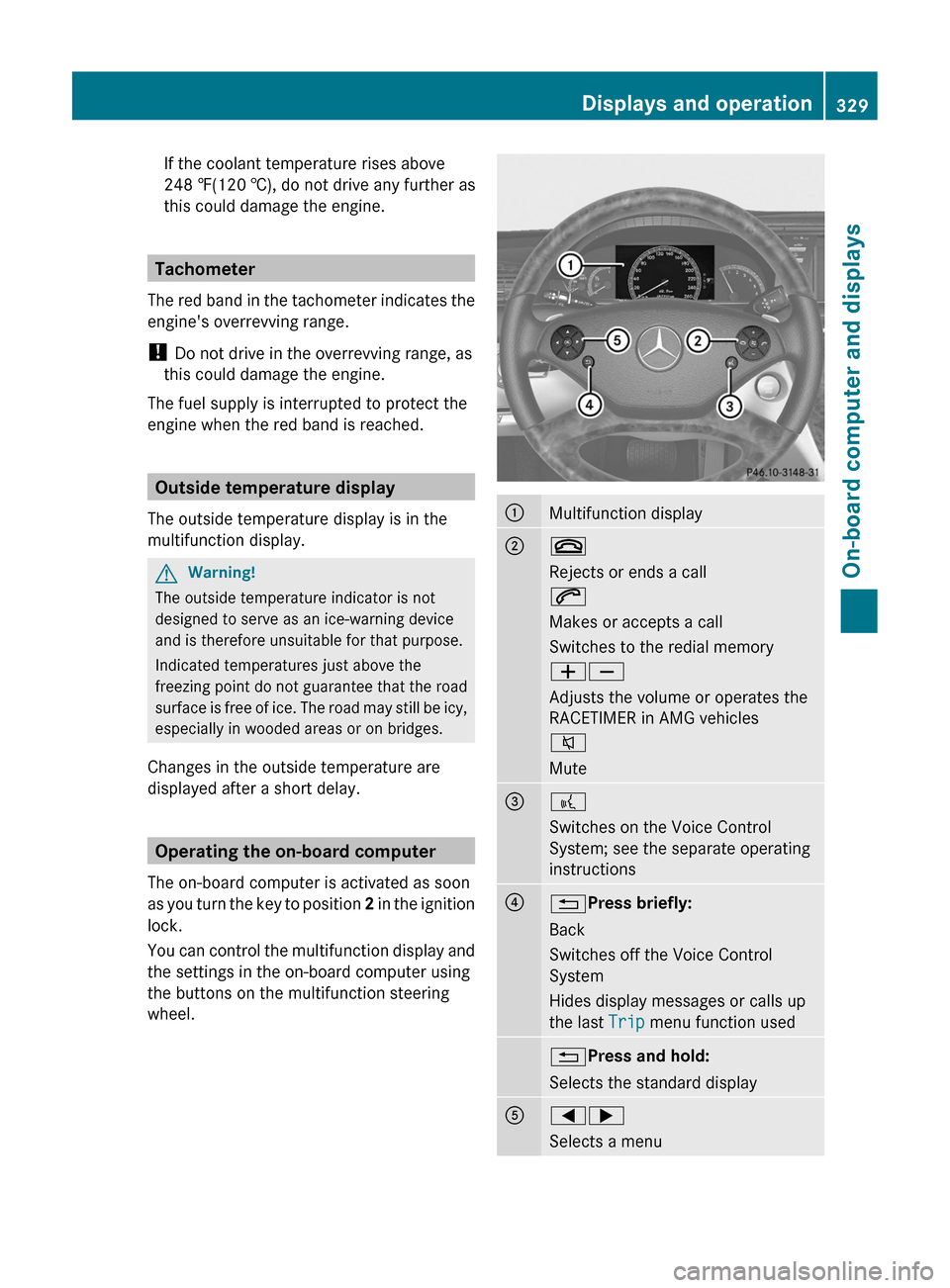
:Multifunction display;~
Rejects or ends a call
6
Makes or accepts a call
Switches to the redial memory
WX
Adjusts the volume or operates the
RACETIMER in AMG vehicles
8
Mute
=?
Switches on the Voice Control
System; see the separate operating
instructions
?%Press briefly:
Back
Switches off the Voice Control
System
Hides display messages or calls up
the last Trip menu function used
%Press and hold:
Selects the standard display
A=;
Selects a menu
Displays and operation329On-board computer and displaysZ
Page 335 of 480
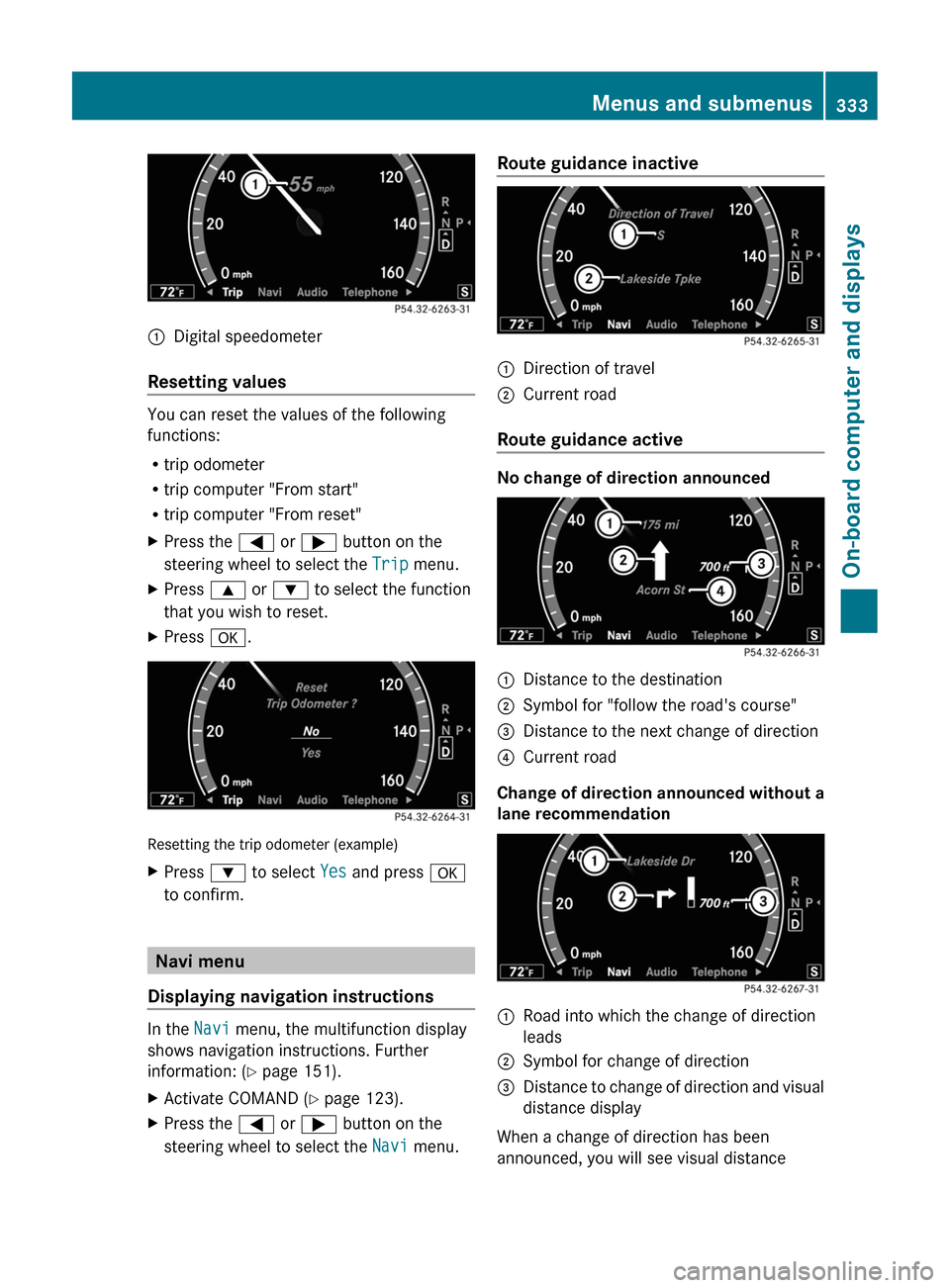
:Digital speedometer
Resetting values
You can reset the values of the following
functions:
Rtrip odometer
Rtrip computer "From start"
Rtrip computer "From reset"
XPress the = or ; button on the
steering wheel to select the Trip menu.
XPress 9 or : to select the function
that you wish to reset.
XPress a.
Resetting the trip odometer (example)
XPress : to select Yes and press a
to confirm.
Navi menu
Displaying navigation instructions
In the Navi menu, the multifunction display
shows navigation instructions. Further
information: (Y page 151).
XActivate COMAND (Y page 123).XPress the = or ; button on the
steering wheel to select the Navi menu.
Route guidance inactive:Direction of travel;Current road
Route guidance active
No change of direction announced
:Distance to the destination;Symbol for "follow the road's course"=Distance to the next change of direction?Current road
Change of direction announced without a
lane recommendation
:Road into which the change of direction
leads
;Symbol for change of direction=Distance to change of direction and visual
distance display
When a change of direction has been
announced, you will see visual distance
Menus and submenus333On-board computer and displaysZ
Page 336 of 480
display = next to the symbol for the change
of direction ;. This decreases in size as you
approach the announced change of direction.
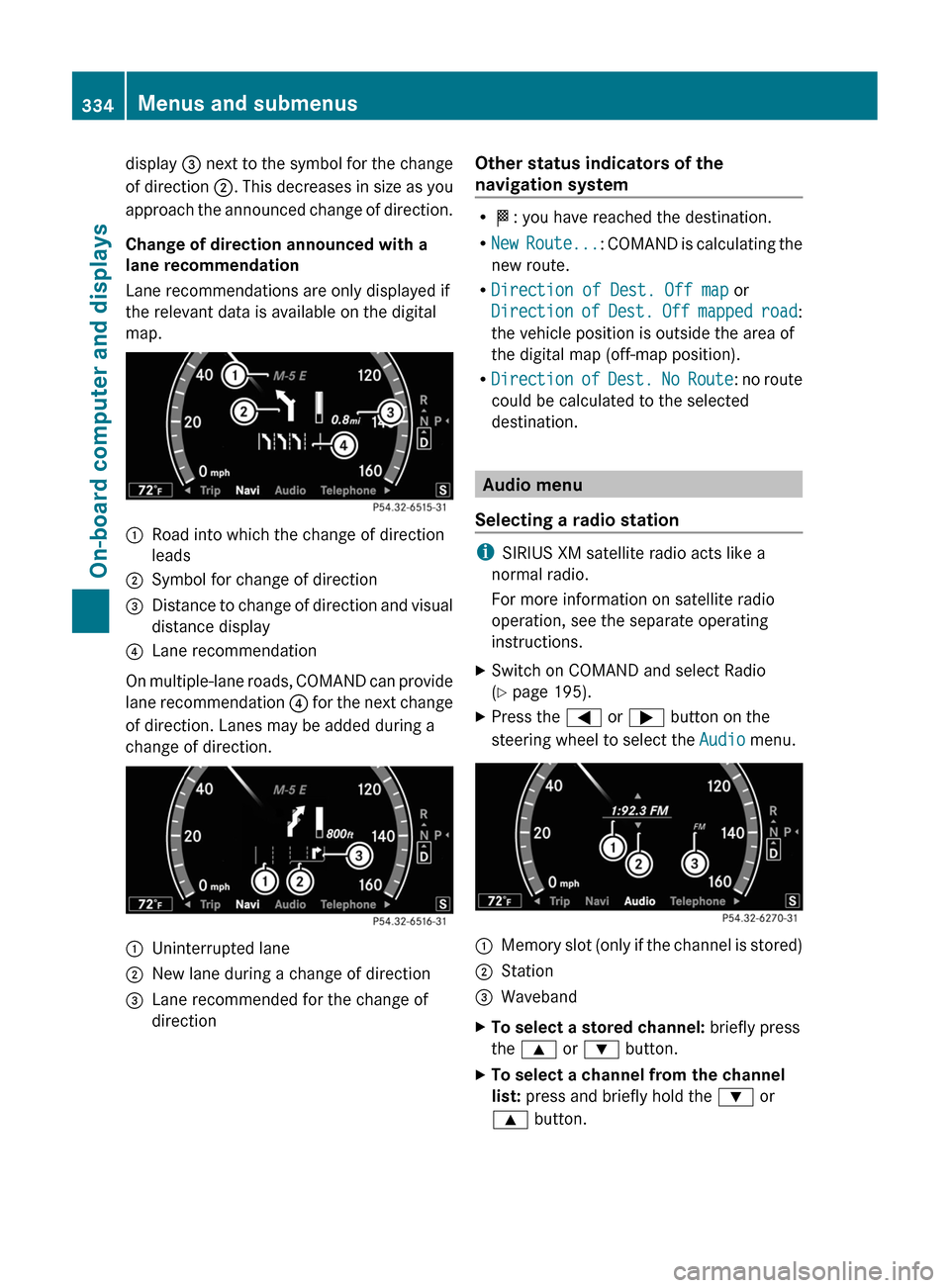
Change of direction announced with a
lane recommendation
Lane recommendations are only displayed if
the relevant data is available on the digital
map.
:Road into which the change of direction
leads
;Symbol for change of direction=Distance to change of direction and visual
distance display
?Lane recommendation
On multiple-lane roads, COMAND can provide
lane recommendation ? for the next change
of direction. Lanes may be added during a
change of direction.
:Uninterrupted lane;New lane during a change of direction=Lane recommended for the change of
direction
Other status indicators of the
navigation system
RO: you have reached the destination.
RNew Route...: COMAND is calculating the
new route.
RDirection of Dest. Off map or
Direction of Dest. Off mapped road:
the vehicle position is outside the area of
the digital map (off-map position).
RDirection of Dest. No Route: no route
could be calculated to the selected
destination.
Audio menu
Selecting a radio station
iSIRIUS XM satellite radio acts like a
normal radio.
For more information on satellite radio
operation, see the separate operating
instructions.
XSwitch on COMAND and select Radio
(Y page 195).
XPress the = or ; button on the
steering wheel to select the Audio menu.
:Memory slot (only if the channel is stored);Station=WavebandXTo select a stored channel: briefly press
the 9 or : button.
XTo select a channel from the channel
list: press and briefly hold the : or
9 button.
334Menus and submenusOn-board computer and displays
Page 337 of 480
XTo select a station using the station
search19: press and briefly hold the 9
or : button.
XPress a to stop the station search
function at the desired station.
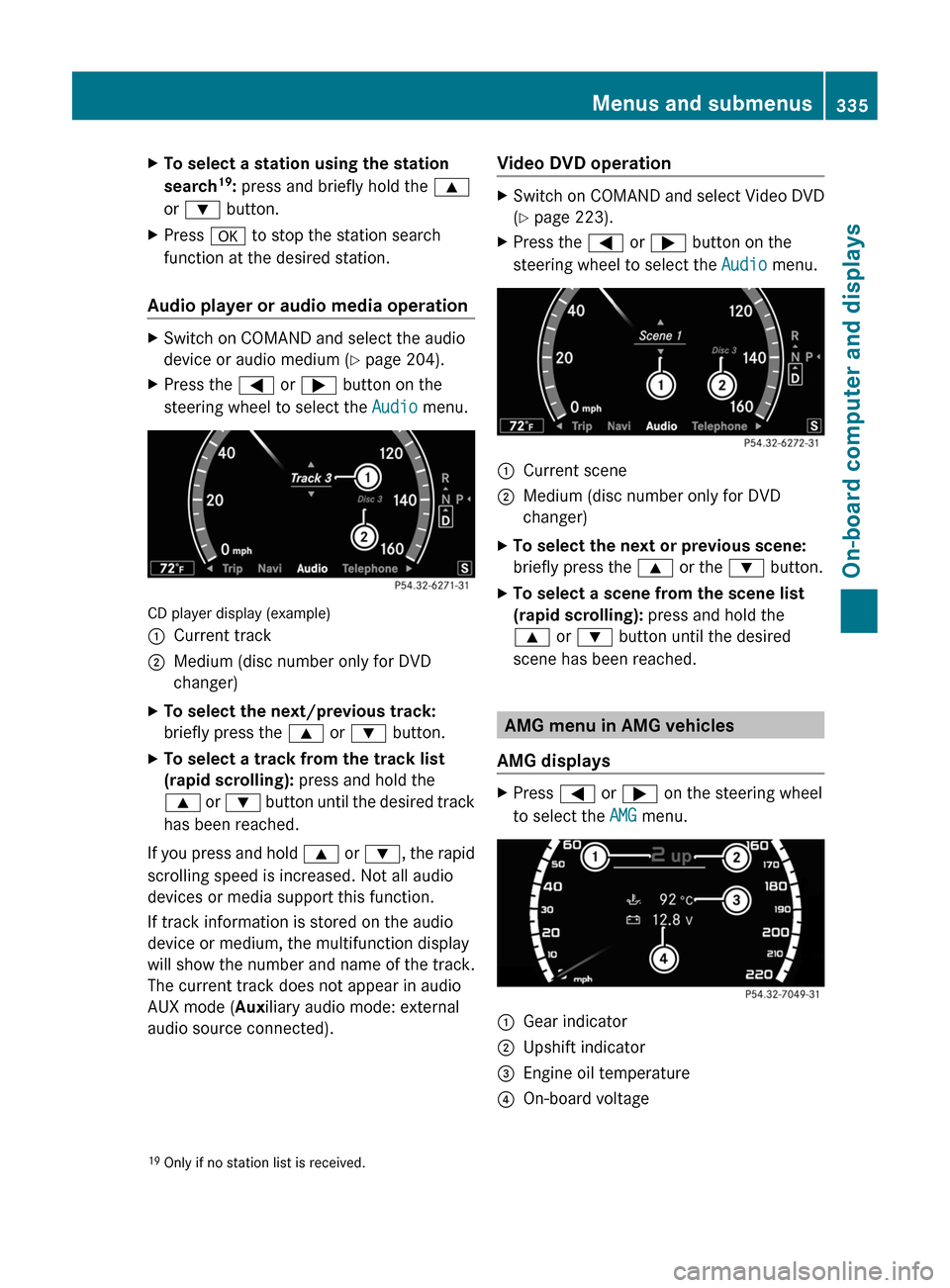
Audio player or audio media operation
XSwitch on COMAND and select the audio
device or audio medium (Y page 204).
XPress the = or ; button on the
steering wheel to select the Audio menu.
CD player display (example)
:Current track;Medium (disc number only for DVD
changer)
XTo select the next/previous track:
briefly press the 9 or : button.
XTo select a track from the track list
(rapid scrolling): press and hold the
9 or : button until the desired track
has been reached.
If you press and hold 9 or :, the rapid
scrolling speed is increased. Not all audio
devices or media support this function.
If track information is stored on the audio
device or medium, the multifunction display
will show the number and name of the track.
The current track does not appear in audio
AUX mode (Auxiliary audio mode: external
audio source connected).
Video DVD operationXSwitch on COMAND and select Video DVD
(Y page 223).
XPress the = or ; button on the
steering wheel to select the Audio menu.
:Current scene;Medium (disc number only for DVD
changer)
XTo select the next or previous scene:
briefly press the 9 or the : button.
XTo select a scene from the scene list
(rapid scrolling): press and hold the
9 or : button until the desired
scene has been reached.
AMG menu in AMG vehicles
AMG displays
XPress = or ; on the steering wheel
to select the AMG menu.
:Gear indicator;Upshift indicator=Engine oil temperature?On-board voltage19Only if no station list is received.Menus and submenus335On-board computer and displaysZ
Page 372 of 480
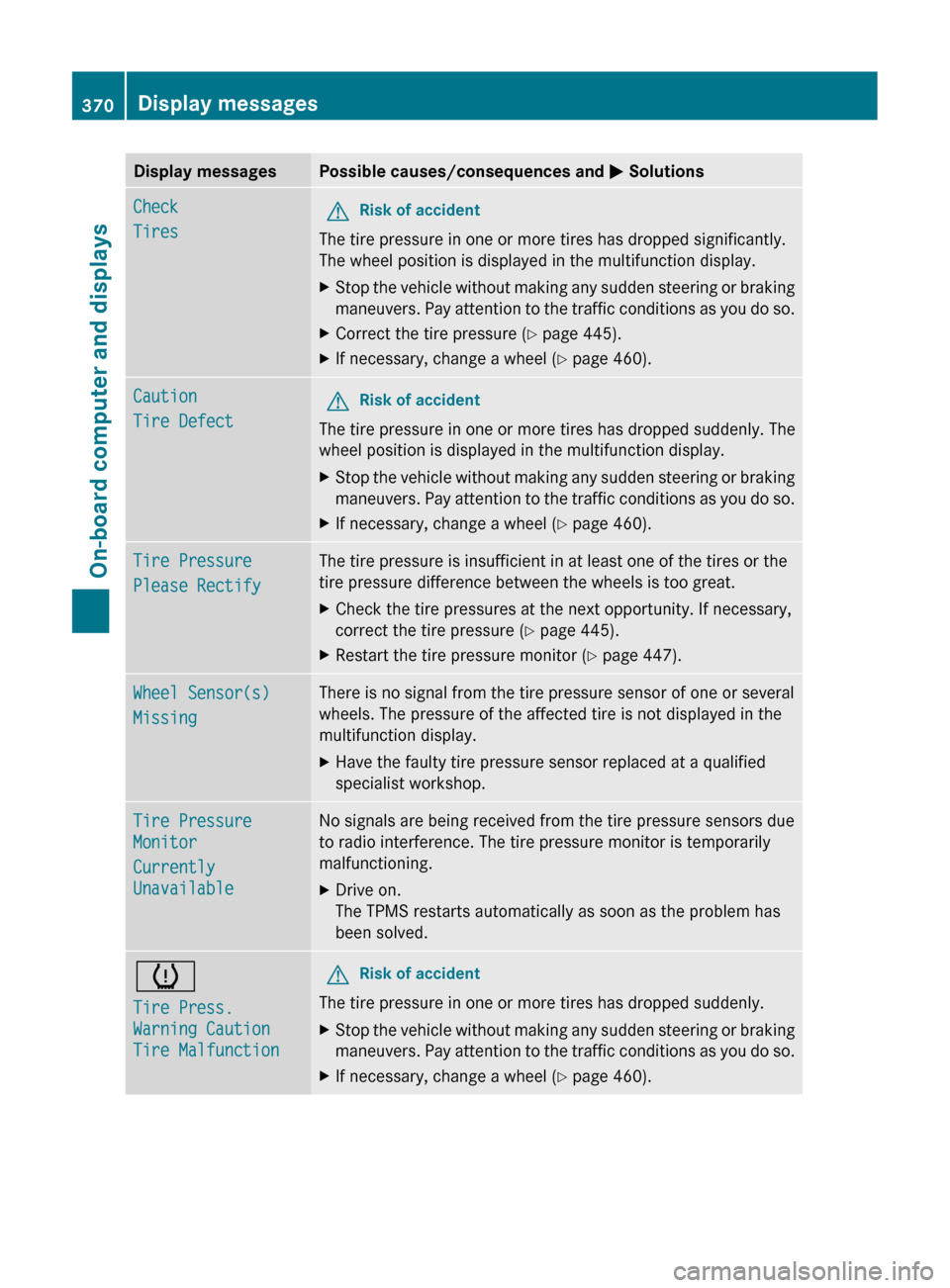
Display messagesPossible causes/consequences and M SolutionsCheck
TiresGRisk of accident
The tire pressure in one or more tires has dropped significantly.
The wheel position is displayed in the multifunction display.
XStop the vehicle without making any sudden steering or braking
maneuvers. Pay attention to the traffic conditions as you do so.XCorrect the tire pressure ( Y page 445).XIf necessary, change a wheel ( Y page 460).Caution
Tire DefectGRisk of accident
The tire pressure in one or more tires has dropped suddenly. The
wheel position is displayed in the multifunction display.
XStop the vehicle without making any sudden steering or braking
maneuvers. Pay attention to the traffic conditions as you do so.XIf necessary, change a wheel ( Y page 460).Tire Pressure
Please RectifyThe tire pressure is insufficient in at least one of the tires or the
tire pressure difference between the wheels is too great.XCheck the tire pressures at the next opportunity. If necessary,
correct the tire pressure ( Y page 445).XRestart the tire pressure monitor ( Y page 447).Wheel Sensor(s)
MissingThere is no signal from the tire pressure sensor of one or several
wheels. The pressure of the affected tire is not displayed in the
multifunction display.XHave the faulty tire pressure sensor replaced at a qualified
specialist workshop.Tire Pressure
Monitor
Currently
UnavailableNo signals are being received from the tire pressure sensors due
to radio interference. The tire pressure monitor is temporarily
malfunctioning.XDrive on.
The TPMS restarts automatically as soon as the problem has
been solved.h
Tire Press.
Warning Caution
Tire MalfunctionGRisk of accident
The tire pressure in one or more tires has dropped suddenly.
XStop the vehicle without making any sudden steering or braking
maneuvers. Pay attention to the traffic conditions as you do so.XIf necessary, change a wheel ( Y page 460).370Display messagesOn-board computer and displays
Page 373 of 480
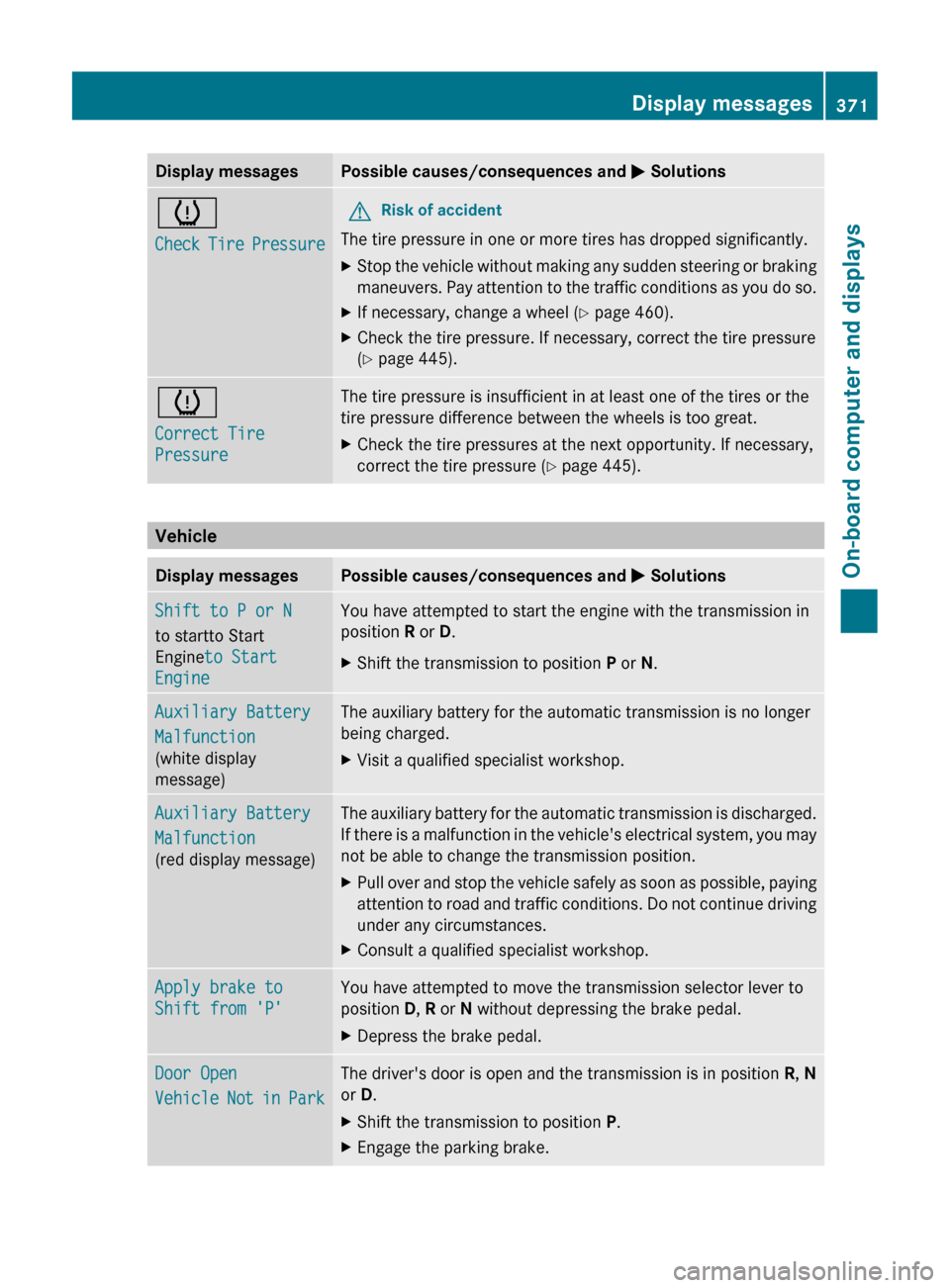
Display messagesPossible causes/consequences and M Solutionsh
Check Tire PressureGRisk of accident
The tire pressure in one or more tires has dropped significantly.
XStop the vehicle without making any sudden steering or braking
maneuvers. Pay attention to the traffic conditions as you do so.XIf necessary, change a wheel ( Y page 460).XCheck the tire pressure. If necessary, correct the tire pressure
( Y page 445).h
Correct Tire
PressureThe tire pressure is insufficient in at least one of the tires or the
tire pressure difference between the wheels is too great.XCheck the tire pressures at the next opportunity. If necessary,
correct the tire pressure ( Y page 445).
Vehicle
Display messagesPossible causes/consequences and M SolutionsShift to P or N
to startto Start
Engine to Start
EngineYou have attempted to start the engine with the transmission in
position R or D.XShift the transmission to position P or N.Auxiliary Battery
Malfunction
(white display
message)The auxiliary battery for the automatic transmission is no longer
being charged.XVisit a qualified specialist workshop.Auxiliary Battery
Malfunction
(red display message)The auxiliary battery for the automatic transmission is discharged.
If there is a malfunction in the vehicle's electrical system, you may
not be able to change the transmission position.XPull over and stop the vehicle safely as soon as possible, paying
attention to road and traffic conditions. Do not continue driving
under any circumstances.XConsult a qualified specialist workshop.Apply brake to
Shift from 'P'You have attempted to move the transmission selector lever to
position D, R or N without depressing the brake pedal.XDepress the brake pedal.Door Open
Vehicle Not in ParkThe driver's door is open and the transmission is in position R, N
or D.XShift the transmission to position P.XEngage the parking brake.Display messages371On-board computer and displaysZ
Page 383 of 480
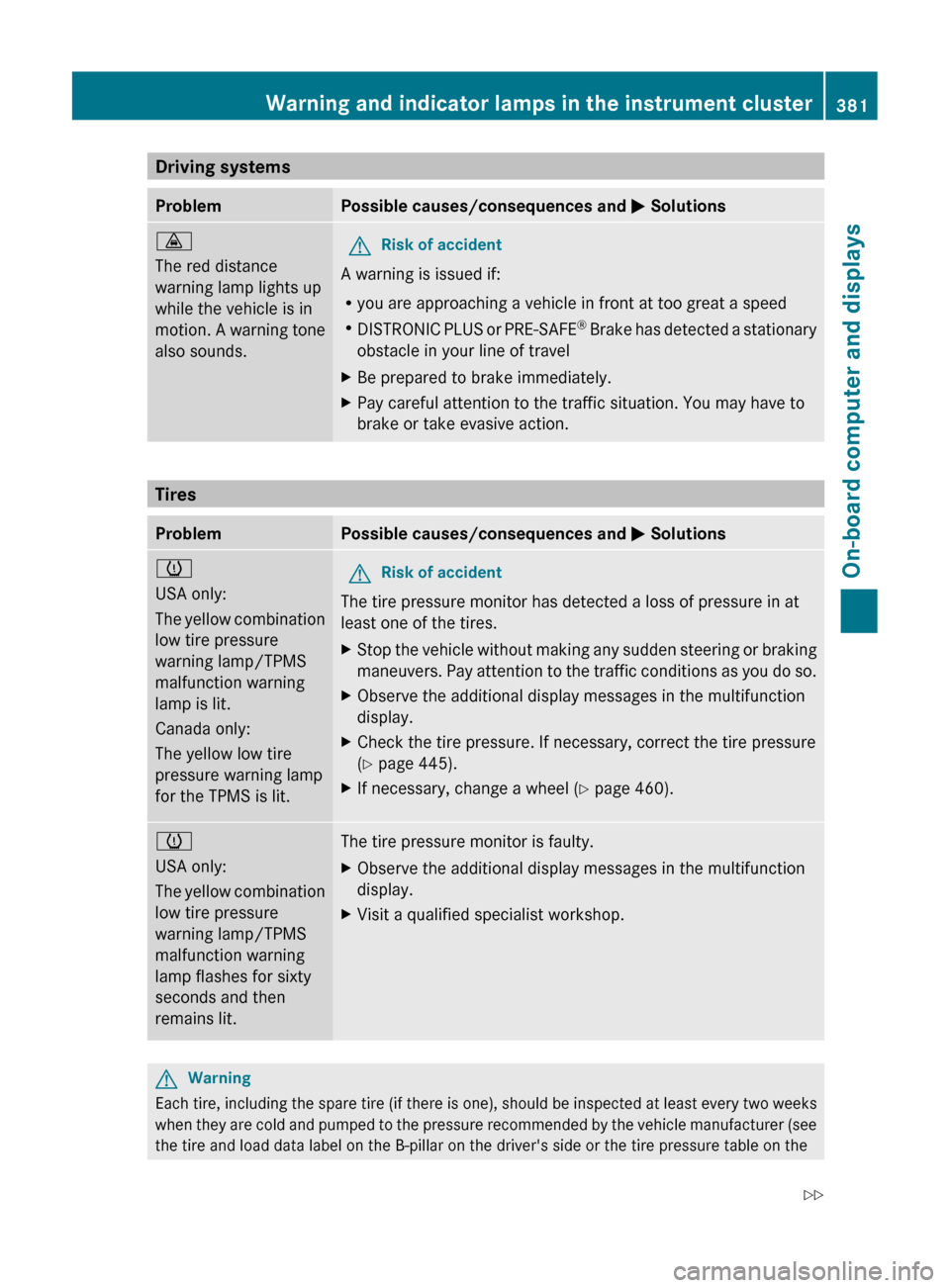
Driving systemsProblemPossible causes/consequences and M Solutions·
The red distance
warning lamp lights up
while the vehicle is in
motion. A warning tone
also sounds.GRisk of accident
A warning is issued if:
R you are approaching a vehicle in front at too great a speed
R DISTRONIC PLUS or PRE-SAFE ®
Brake has detected a stationary
obstacle in your line of travel
XBe prepared to brake immediately.XPay careful attention to the traffic situation. You may have to
brake or take evasive action.
Tires
ProblemPossible causes/consequences and M Solutionsh
USA only:
The yellow combination
low tire pressure
warning lamp/TPMS
malfunction warning
lamp is lit.
Canada only:
The yellow low tire
pressure warning lamp
for the TPMS is lit.GRisk of accident
The tire pressure monitor has detected a loss of pressure in at
least one of the tires.
XStop the vehicle without making any sudden steering or braking
maneuvers. Pay attention to the traffic conditions as you do so.XObserve the additional display messages in the multifunction
display.XCheck the tire pressure. If necessary, correct the tire pressure
( Y page 445).XIf necessary, change a wheel ( Y page 460).h
USA only:
The yellow combination
low tire pressure
warning lamp/TPMS
malfunction warning
lamp flashes for sixty
seconds and then
remains lit.The tire pressure monitor is faulty.XObserve the additional display messages in the multifunction
display.XVisit a qualified specialist workshop.GWarning
Each tire, including the spare tire (if there is one), should be inspected at least every two weeks
when they are cold and pumped to the pressure recommended by the vehicle manufacturer (see
the tire and load data label on the B-pillar on the driver's side or the tire pressure table on the
Warning and indicator lamps in the instrument cluster381On-board computer and displaysZ
Page 418 of 480
plastic trim. This maintains the high-quality
look of the surfaces.XWipe the plastic trim with a damp, lint-free
cloth, e.g. a microfiber cloth.XHeavy soiling: use car care and cleaning
products recommended and approved by
Mercedes-Benz.
The surface may change color temporarily.
Wait until the surface is dry again.
Cleaning the steering wheel and gear or
selector lever
XWash thoroughly with a damp cloth or use
a leather care agent that has been
recommended and approved by Mercedes-
Benz.
Cleaning real wood and trim strips
XWipe the wooden trim and trim strips with
a damp, lint-free cloth, e.g. a microfiber
cloth.XHeavy soiling: use car care and cleaning
products recommended and approved by
Mercedes-Benz.
! Do not use solvent-based cleaning agents
such as tar remover, wheel cleaners,
polishes or waxes. There is otherwise a risk
of damaging the surface.
! Do not use chrome polish for trim strips.
The trim strips have a chrome look but are
mostly made of anodized aluminum and
can lose their shine if chrome polish is
used. Use a damp, lint-free cloth instead
when cleaning the trim strips.
Chrome polish can be used to remove very
heavy soiling from trim strips which you are
sure are made of chrome. If you are unsure
as to whether a trim strip is chrome-plated
or not, consult an authorized Mercedes-
Benz Center.
Cleaning the seat covers
! Do not use microfiber cloths to clean
genuine leather, artificial leather or
Alcantara® covers. If used often, these can
damage the cover.
! Observe the following when cleaning:
R clean genuine leather covers carefully
with a damp cloth and then wipe the
covers down with a dry cloth. Make sure
that the leather does not become
soaked. It may otherwise become rough
and cracked. Only use leather care
agents that have been tested and
approved by Mercedes-Benz. You can
obtain these from a qualified specialist
workshop, e.g. an authorized Mercedes-
Benz Center.
R clean artificial leather covers with a cloth
moistened with a solution containing 1%
detergent (e.g. dish washing liquid).
R clean cloth covers with a microfiber cloth
moistened with a solution containing 1%
detergent (e.g. dish washing liquid). Rub
carefully and always wipe entire seat
sections to avoid leaving visible lines.
Leave the seat to dry afterwards.
Cleaning results depend on the type of
dirt and how long it has been there.
R clean Alcantara® covers with a damp
cloth. Make sure you wipe entire seat
sections to avoid leaving visible lines.
i Note that regular care is essential to
ensure that the appearance and comfort of
the covers is retained over time.
Cleaning the seat belts
XUse clean, luke-warm water and soap
solution.
! Do not clean the seat belts using chemical
cleaning agents. Do not dry the seat belts
by warming them above 176 ‡ (80 †) or
placing them in direct sunlight.
416CareMaintenance and care
Page 423 of 480
Flat tire
Preparing the vehicle
i Vehicle preparation is not necessary on
vehicles with the MOExtended run-flat
system.
XStop the vehicle as far away as possible
from traffic on solid, non-slippery and level
ground.XSwitch on the hazard warning lamps.XEngage the electric parking brake manually
( Y page 285).XBring the front wheels into the straight-
ahead position.XMove the DIRECT SELECT lever to P.XSwitch off the engine.XVehicles without KEYLESS-GO: remove
the key from the ignition lock.XVehicles with KEYLESS-GO: open the
driver's door.
The on-board electronics have status 0,
which is the same as the key having been
removed.XVehicles with KEYLESS-GO: remove the
Start/Stop button from the ignition lock
( Y page 267).XAll occupants must get out of the vehicle.
Make sure that they are not endangered as
they do so.XMake sure that no one is near the danger
area whilst a wheel is being changed.
Anyone who is not directly assisting in the
wheel change should, for example, stand
behind the barrier.XGet out of the vehicle. Pay attention to
traffic conditions when doing so.XClose the driver's door.Changing a wheel and mounting the
spare wheel
Preparing the vehicleGWarning
The wheel and tire size of the emergency
spare wheel/spare wheel may differ to that of
the damaged wheel. When using an
emergency spare wheel/spare wheel the
handling characteristics of the vehicle may
change.
Adapt your style of driving accordingly.
Never operate the vehicle with more than one
emergency spare wheel/spare wheel that
differs in size.
Only use an emergency spare wheel/spare
wheel of a differing size briefly and do not
switch off ESP ®
.
When using an emergency spare wheel, you
must not exceed the maximum speed of
50 mph (80 km/h).
GWarning
Have the different-sized emergency spare
wheel/spare wheel replaced with a new
wheel as soon as possible at a qualified
specialist workshop that has the necessary
specialist knowledge and tools to carry out
the work required. Mercedes-Benz
recommends that you use an authorized
Mercedes-Benz Center for this purpose. In
particular, work relevant to safety or on
safety-related systems must be carried out at
a qualified specialist workshop.
i Vehicles without an emergency spare
wheel/spare wheel are not equipped with
a tire-change tool kit at the factory. For
more information on which tools are
required to perform a wheel change on your
vehicle, e.g. wheel chock, alignment bolt,
or lug wrench, consult an authorized
Mercedes-Benz Center.
Flat tire421Roadside AssistanceZ