keyless MERCEDES-BENZ CL-Class 2011 C216 Owner's Manual
[x] Cancel search | Manufacturer: MERCEDES-BENZ, Model Year: 2011, Model line: CL-Class, Model: MERCEDES-BENZ CL-Class 2011 C216Pages: 480, PDF Size: 19.76 MB
Page 10 of 480
Cup holder ......................................... 387
Center console .............................. 387
Rear compartment .........................388
Current fuel consumption (on-
board computer) ............................... 332
Customer Assistance Center (CAC) ............................................... 26
Customer Relations Department ....... 26
D
Dashboard see Cockpit
Data carrier
MUSIC REGISTER ........................... 213
Data medium
Audio DVD ..................................... 211
CD/DVD ........................................ 212
MP3 ............................................... 211
Date format
Setting ........................................... 130
Daytime running lamps
Display message ............................ 358
Switching on/off (on-board
computer) ...................................... 341
Delayed switch-off
Exterior lighting (COMAND) ...........232
Interior lighting (COMAND) ............232
Destination
Adopting from the list of previous
destinations ................................... 163
Destination entry
Point of interest ............................. 147
Destination information ................... 156
Destination input .............................. 138
Address ......................................... 138
Destination memory ......................144
Intermediate stop .......................... 146
Last destination ............................. 144
Map ............................................... 145
Destination memory ......................... 162
Deleting an entry ........................... 165
My address .................................... 162
Storing a destination .....................163
Digital speedometer ......................... 332
DIRECT SELECT lever see Automatic transmission
Display (cleaning instructions) ........ 415
Display messages
Brakes ........................................... 350
Calling up (on-board computer) .....343
Clearing (on-board computer) ........343
Driving systems ............................. 363
Engine ............................................ 359
KEYLESS-GO .................................. 373
Lamps ............................................ 355
Safety systems .............................. 344
Service interval display ..................409
SmartKey ....................................... 373
Tires ............................................... 369
Vehicle ........................................... 371
Distance
see Route overview
Distance recorder ............................. 332
Distance warning lamp ..................... 381
DISTRONIC PLUS ............................... 293
Deactivating ................................... 300
Display message ............................ 368
Displays in the multifunction
display ........................................... 300
Driving tips .................................... 301
Setting the specified minimum
distance ......................................... 299
Warning lamp ................................. 381
Door
Automatic locking ............................ 79
Display message ............................ 372
Emergency locking ........................... 80
Emergency unlocking .......................80
Opening (from inside) ......................79
Power closing feature ......................80
Door control panel
Overview .......................................... 37
Doors
Important safety notes ....................78
Drinking and driving ......................... 287
Drinks holder see Cup holder
Drive program
Automatic ...................................... 278
Manual ........................................... 279
Driving abroad ................................... 291
Driving on flooded roads .................. 2908Index
Page 12 of 480
EngineIrregular running ............................ 273
Starting problems ..........................273
Starting the engine with the key ....269
Starting with KEYLESS-GO .............269
Switching off .................................. 284
Warning lamp Check Engine ..........380
Engine electronics
Malfunction .................................... 273
Engine emergency stop .................... 435
Engine number .................................. 467
Engine oil Adding ........................................... 406
Checking the oil level ..................... 405
Display message ............................ 361
Filling capacity ............................... 469
Lubricant additives ........................472
Notes about oil grades ................... 471
Temperature (on-board computer) . 335
Viscosity ........................................ 472
Entering characters
In the address and the phone
book .............................................. 122
Using the number pad ...................120
Entry
Deleting ......................................... 121
Saving ............................................ 123
ESP ®
(Electronic Stability
Program) Activating/deactivating ...................64
Activating/deactivating (on-
board computer) ............................ 339
Display message ............................ 344
ETS/4ETS ........................................ 64
Important safety information ...........63
Warning lamp ................................. 378
ETS/4ETS (Electronic Traction
System) ................................................ 64
Example: entering an address .......... 139
Example display Audio CD mode .............................. 206
Example of operation ........................ 118
Exhaust check ................................... 288
Exhaust tail pipe (cleaning
instructions) ...................................... 414
Exterior lighting see Exterior lighting Exterior mirror parking position
Adjusting (COMAND) .....................231
Exterior mirrors
Adjusting ....................................... 100
Dipping (automatic) .......................101
Folding in/out (automatically) .......101
Folding in/out (electrically) ...........101
Out of position ............................... 101
Storing settings (memory
function) ........................................ 102
Storing the parking position ..........101
Exterior view ........................................ 30
External authorization ...................... 134
Eyeglasses compartment ................. 385
F
Favorites (COMAND) ......................... 109
First-aid kit ......................................... 420
First list entry Accepting ...................................... 121
Flat tire
Changing a wheel/mounting the
spare wheel ................................... 421
MOExtended run-flat system .........425
Preparing the vehicle .....................421
Raising the vehicle .........................422
Floormat ............................................. 400
Freeway information ......................... 172
Frequency input Manual ........................................... 196
Front fog lamp (display message) ... 357
Front multicontour seat
(COMAND) .......................................... 238
Front-passenger seat Adjusting from the driver's seat .......94
Fuel
Additives ........................................ 471
Notes ............................................. 470
Premium-grade unleaded gasoline . 470
Refueling ........................................ 281
Specifications ................................ 470
Tank content/reserve fuel .............469
Troubleshooting ............................. 284
Fuel consumption
Current (on-board computer) .........332
Notes ............................................. 287
Fuel filler cap (display message) ..... 362
10Index
Page 14 of 480
iPod®
Alphabetic track selection .............220
Connecting to the Media
Interface ........................................ 216
Device version ............................... 216
Selecting a category/playlist .........219
iTunes ®
............................................... 220
J
Jack Storage location ............................ 420
Using ............................................. 422
Jump-starting ..................................... 429
K
KEYLESS-GO Button ............................................ 267
Convenience closing feature ............87
Display message ............................ 373
Locking ............................................ 73
Starting the engine ........................269
Unlocking ......................................... 73
Key positions
KEYLESS-GO .................................. 267
SmartKey ....................................... 267
Kickdown ................................... 277, 280
Knee bag .............................................. 44
L
Lane-change assistant see Active Blind Spot Assist
Lane recommendations .................... 153
Explanation .................................... 154
Presentation .................................. 154
LATCH-type (ISOFIX) child seat
anchors ................................................ 58
License plate lamp (display
message) ............................................ 357
Lights Automatic headlamp mode ............245
Cornering light function .................248
Daytime running lamps ..................245
Driving abroad ............................... 244
Fog lamps ...................................... 246
Hazard warning lamps ...................248
High-beam headlamps ...................246
Light switch ................................... 244
Low-beam headlamps ....................245
Rear fog lamp ................................ 246
Switching the Adaptive Highbeam
Assist on/off (on-board
computer) ...................................... 341
Switching the daytime driving
lights on/off (on-board computer) . 341
Light sensor (display message) ....... 359
List as selection list Calling up ....................................... 121
Loading guidelines ............................ 384
Locator lighting Adjusting (COMAND) .....................233
Locking
Automatic ........................................ 79
Emergency locking ........................... 80
From inside the vehicle (central
locking button) ................................. 79
Setting to automatic (COMAND) ....233
Locking verification signal (on-
board computer) ............................... 342
Logic 7 ®
see harman/kardon ®
Logic 7 ®
Surround Sound system
Low-beam headlamp (display
message) ............................................ 356
Luggage net ....................................... 386
Lumbar support ................................... 97
see Lumbar support
Lumbar supports (COMAND) ............ 237
M
Main-beam headlamps (display
message) ............................................ 357
Malfunction message see Display messages
Malfunctions relevant to safety
Reporting ......................................... 26
Manual drive program ...................... 279
Map Arrival time/distance to
destination ..................................... 169
Calling up ....................................... 145
City model ..................................... 170
Map display ................................... 168
Moving ................................... 145, 167
12Index
Page 51 of 480
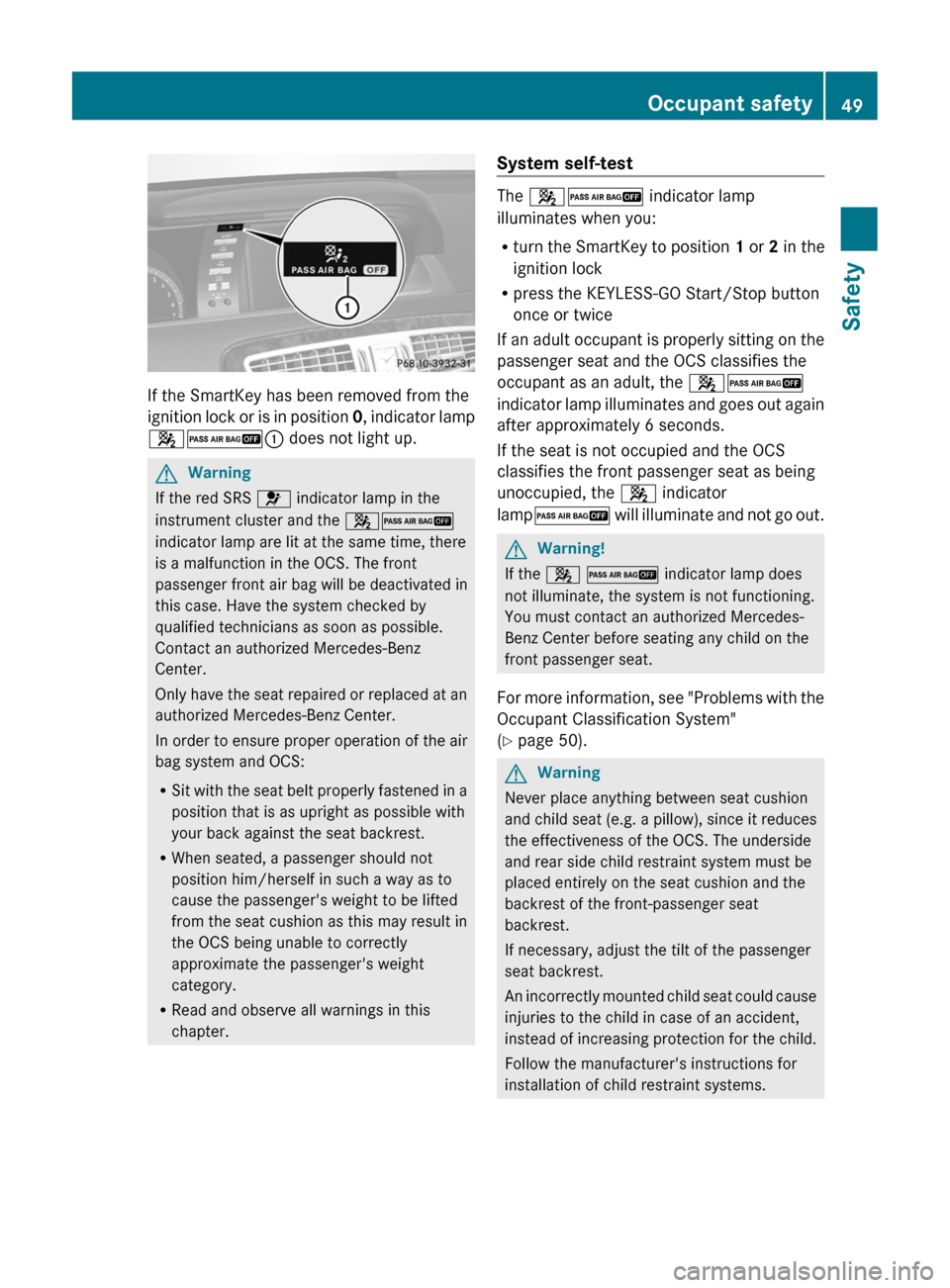
If the SmartKey has been removed from the
ignition lock or is in position 0, indicator lamp
42: does not light up.
GWarning
If the red SRS 6 indicator lamp in the
instrument cluster and the 42
indicator lamp are lit at the same time, there
is a malfunction in the OCS. The front
passenger front air bag will be deactivated in
this case. Have the system checked by
qualified technicians as soon as possible.
Contact an authorized Mercedes-Benz
Center.
Only have the seat repaired or replaced at an
authorized Mercedes-Benz Center.
In order to ensure proper operation of the air
bag system and OCS:
RSit with the seat belt properly fastened in a
position that is as upright as possible with
your back against the seat backrest.
RWhen seated, a passenger should not
position him/herself in such a way as to
cause the passenger's weight to be lifted
from the seat cushion as this may result in
the OCS being unable to correctly
approximate the passenger's weight
category.
RRead and observe all warnings in this
chapter.
System self-test
The 42 indicator lamp
illuminates when you:
Rturn the SmartKey to position 1 or 2 in the
ignition lock
Rpress the KEYLESS-GO Start/Stop button
once or twice
If an adult occupant is properly sitting on the
passenger seat and the OCS classifies the
occupant as an adult, the 42
indicator lamp illuminates and goes out again
after approximately 6 seconds.
If the seat is not occupied and the OCS
classifies the front passenger seat as being
unoccupied, the 4 indicator
lamp2 will illuminate and not go out.
GWarning!
If the 4 2 indicator lamp does
not illuminate, the system is not functioning.
You must contact an authorized Mercedes-
Benz Center before seating any child on the
front passenger seat.
For more information, see "Problems with the
Occupant Classification System"
(Y page 50).
GWarning
Never place anything between seat cushion
and child seat (e.g. a pillow), since it reduces
the effectiveness of the OCS. The underside
and rear side child restraint system must be
placed entirely on the seat cushion and the
backrest of the front-passenger seat
backrest.
If necessary, adjust the tilt of the passenger
seat backrest.
An incorrectly mounted child seat could cause
injuries to the child in case of an accident,
instead of increasing protection for the child.
Follow the manufacturer's instructions for
installation of child restraint systems.
Occupant safety49SafetyZ
Page 62 of 480
installation instructions. Make sure that
Top Tether belt ? is taut.
The child restraint system with Top Tether
belt ? has been removed:
XSlide protective cap : onto Top Tether
anchorage ;.
Child-proof locks
Override feature for the rear side
windows
GWarning
Observe "Important safety notes"
(Y page 56).
GWarning
When children ride on the vehicle's rear seats,
activate the override switch. Otherwise the
children could be injured, e.g. by trapping
themselves in the rear side window.
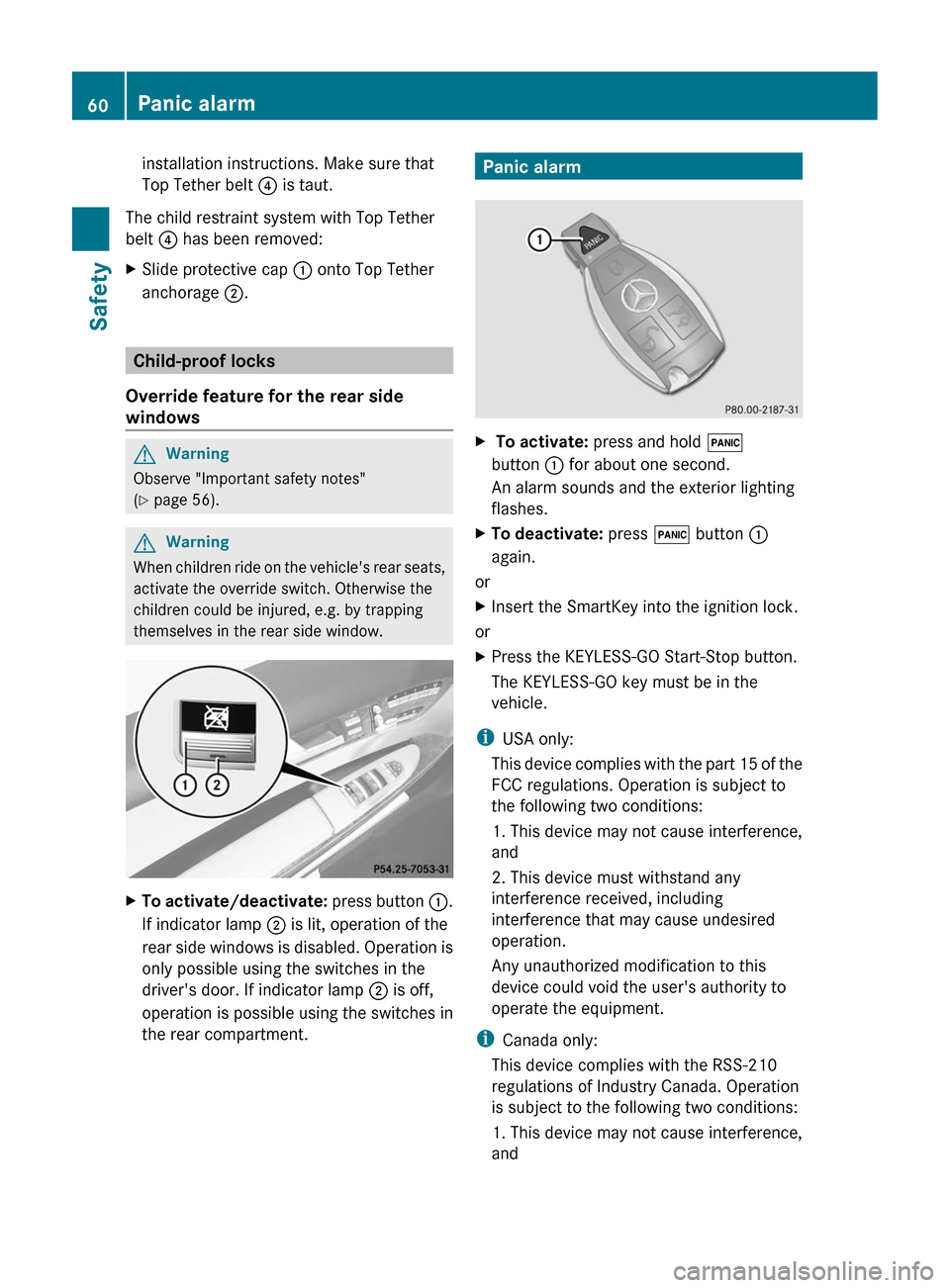
XTo activate/deactivate: press button :.
If indicator lamp ; is lit, operation of the
rear side windows is disabled. Operation is
only possible using the switches in the
driver's door. If indicator lamp ; is off,
operation is possible using the switches in
the rear compartment.
Panic alarmX To activate: press and hold !
button : for about one second.
An alarm sounds and the exterior lighting
flashes.
XTo deactivate: press ! button :
again.
or
XInsert the SmartKey into the ignition lock.
or
XPress the KEYLESS-GO Start-Stop button.
The KEYLESS-GO key must be in the
vehicle.
iUSA only:
This device complies with the part 15 of the
FCC regulations. Operation is subject to
the following two conditions:
1. This device may not cause interference,
and
2. This device must withstand any
interference received, including
interference that may cause undesired
operation.
Any unauthorized modification to this
device could void the user's authority to
operate the equipment.
iCanada only:
This device complies with the RSS-210
regulations of Industry Canada. Operation
is subject to the following two conditions:
1. This device may not cause interference,
and
60Panic alarmSafety
Page 70 of 480
Anti-theft systems
Immobilizer
The immobilizer prevents your vehicle from
being started without the correct key.
When leaving the vehicle, always take the
SmartKey with you and lock the vehicle. The
engine can be started by anyone with a valid
key that is left inside the vehicle.
XTo activate with the SmartKey: remove
the SmartKey from the ignition lock.
XTo activate with KEYLESS-GO: switch the
ignition off and open the driver's door.
XTo deactivate: switch on the ignition.
iThe immobilizer is always deactivated
when you start the engine.
In the event that the engine cannot be
started when the starter battery is fully
charged, the immobilizer may be faulty.
Contact an authorized Mercedes-Benz
Center or call 1-800-FOR-MERCedes (in
USA) or 1-800-387-0100 (in Canada).
ATA (Anti-Theft Alarm system)
A visual and audible alarm is triggered if the
alarm system is armed and you open:
Ra door
Rthe vehicle with the mechanical key
Rthe trunk lid
Rthe hood
The alarm is not switched off, even if you
close the open door that has triggered it, for
example.
iIf the alarm stays on for more than 30
seconds, the emergency call system
mbrace (USA only) or TELEAID (Canada
only) initiates a call to the Customer
Assistance Center automatically. The
emergency call system initiates the call
provided that:
Ryou have subscribed to the mbrace/
TELEAID service.
Rthe mbrace/TELEAID service has been
activated properly.
Rthe required mobile phone, power supply
and GPS are available.
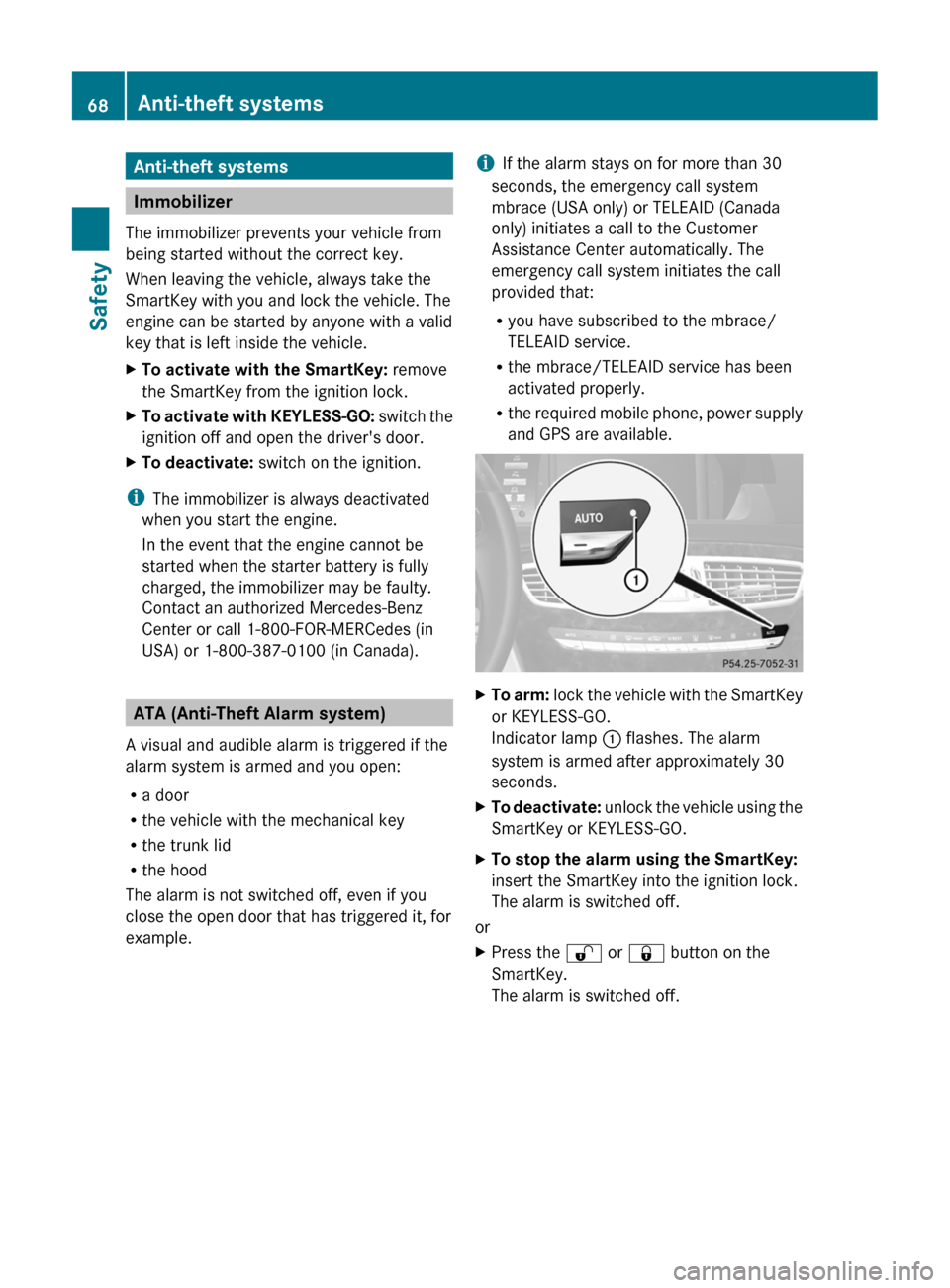
XTo arm: lock the vehicle with the SmartKey
or KEYLESS-GO.
Indicator lamp : flashes. The alarm
system is armed after approximately 30
seconds.
XTo deactivate: unlock the vehicle using the
SmartKey or KEYLESS-GO.
XTo stop the alarm using the SmartKey:
insert the SmartKey into the ignition lock.
The alarm is switched off.
or
XPress the % or & button on the
SmartKey.
The alarm is switched off.
68Anti-theft systemsSafety
Page 71 of 480
XTo stop the alarm using KEYLESS-GO:
grasp the outside door handle. The key
must be outside the vehicle.
The alarm is switched off.
or
XPress the Start/Stop button on the
dashboard. The key must be inside the
vehicle.
The alarm is switched off.Anti-theft systems69SafetyZ
Page 75 of 480
Unapproved modifications to this device
may lead to withdrawal of permission to
operate it.
i Canada only:
This device complies with Industry
Canada's RSS–210 regulations. Operation
is subject to the following conditions:
1. This device must not cause any harmful
interference, and
2. This device must be able to
accommodate interference that is
received, including interference which
could cause unwanted functions.
Unapproved modifications to this device
may lead to withdrawal of permission to
operate it.
Locking and unlocking centrally
The SmartKey centrally locks/unlocks:
R the doors
R the trunk lid
R the fuel filler flap
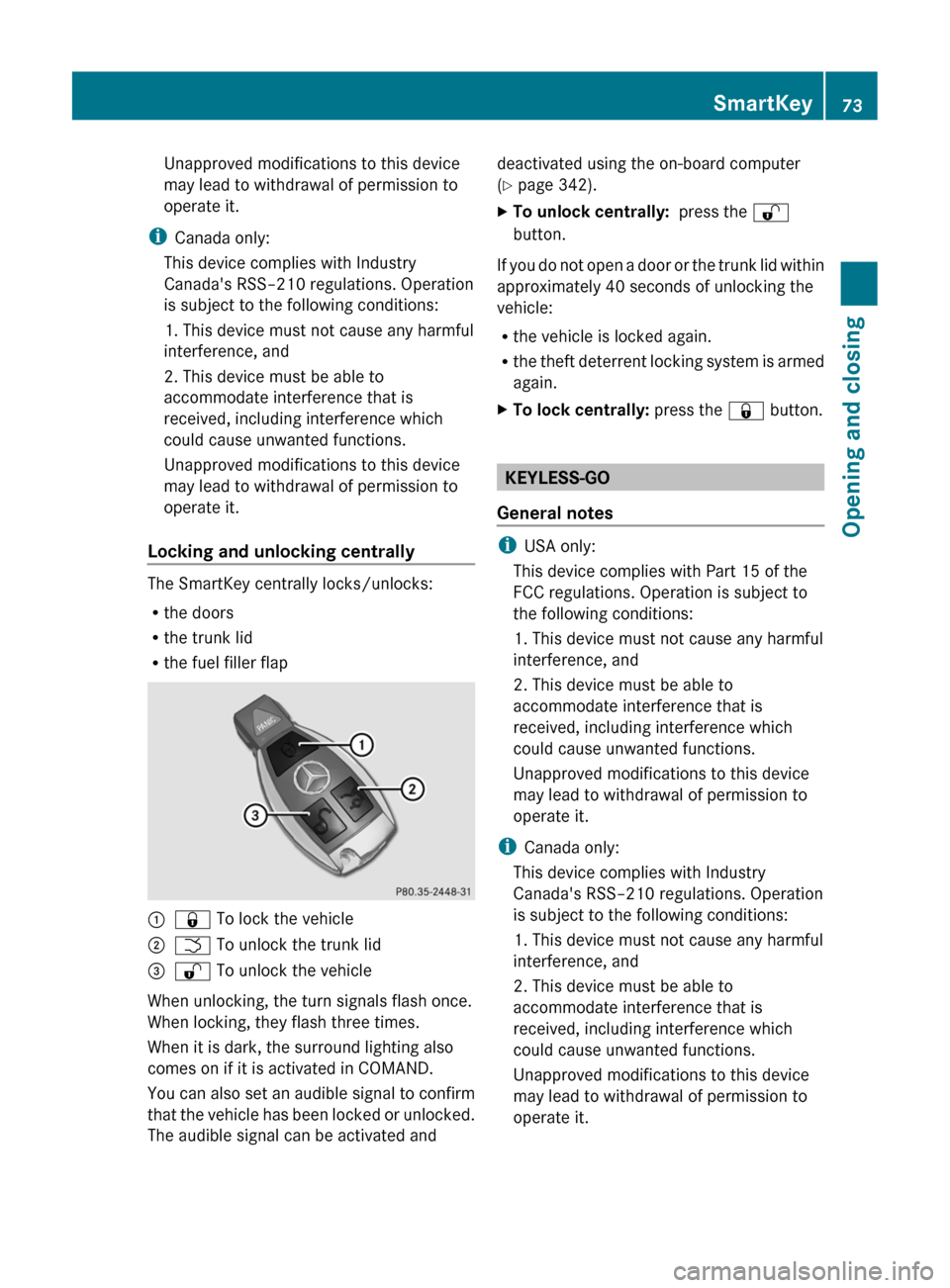
:& To lock the vehicle;F To unlock the trunk lid=% To unlock the vehicle
When unlocking, the turn signals flash once.
When locking, they flash three times.
When it is dark, the surround lighting also
comes on if it is activated in COMAND.
You can also set an audible signal to confirm
that the vehicle has been locked or unlocked.
The audible signal can be activated and
deactivated using the on-board computer
( Y page 342).XTo unlock centrally: press the %
button.
If you do not open a door or the trunk lid within
approximately 40 seconds of unlocking the
vehicle:
R the vehicle is locked again.
R the theft deterrent locking system is armed
again.
XTo lock centrally: press the & button.
KEYLESS-GO
General notes
i USA only:
This device complies with Part 15 of the
FCC regulations. Operation is subject to
the following conditions:
1. This device must not cause any harmful
interference, and
2. This device must be able to
accommodate interference that is
received, including interference which
could cause unwanted functions.
Unapproved modifications to this device
may lead to withdrawal of permission to
operate it.
i Canada only:
This device complies with Industry
Canada's RSS–210 regulations. Operation
is subject to the following conditions:
1. This device must not cause any harmful
interference, and
2. This device must be able to
accommodate interference that is
received, including interference which
could cause unwanted functions.
Unapproved modifications to this device
may lead to withdrawal of permission to
operate it.
SmartKey73Opening and closingZ
Page 76 of 480
Important information about using
KEYLESS-GO
RYou can use the KEYLESS-GO key as a
conventional SmartKey.
RYou can combine KEYLESS-GO functions
with those of a conventional SmartKey, e.g.
you can open the vehicle with KEYLESS-GO
and close it with the & button.
RAlways carry your KEYLESS-GO key on your
person.
RNever store the KEYLESS-GO key together
with:
-electronic devices, such as a mobile
phone or other SmartKey
-metal objects, such as coins or metal foil
Doing so may impair the function of
KEYLESS-GO.
RTo open or close the vehicle, the KEYLESS-
GO key should not be more than 3 ft (1 m)
from the door or trunk.
RIf the vehicle is parked for more than
72 hours, the KEYLESS-GO function is
deactivated. Pull an outer door handle and
switch on the ignition to reactivate the
KEYLESS-GO function.
RIf the KEYLESS-GO key is removed from the
vehicle, the system may not be able to
recognize the SmartKey anymore. The
vehicle can then no longer be locked or
started with KEYLESS-GO.
RIf the KEYLESS-GO key has been removed
from the vehicle, e.g. when another vehicle
occupant with a KEYLESS-GO key leaves
the vehicle:
-when the Start/Stop button is pressed,
or when trying to lock the vehicle using
the locking button on the outside door
handle, the Key Not Detected message
appears in the multifunction display.
-when the engine is running, the red Key
Not Detected message appears in the
multifunction display as you pull away.
Look for the KEYLESS-GO key and place
it somewhere else in the vehicle. Place
the KEYLESS-GO key on the front-
passenger seat, for example, or in your
shirt pocket.
RIf you have switched on the engine with the
Start/Stop button, you can switch it off
again by:
-pressing the Start/Stop button
-inserting the KEYLESS-GO key into the
ignition lock while the vehicle is at a
standstill and the automatic
transmission is in park position P.
RYou may inadvertently unlock the vehicle if
the KEYLESS-GO key is less than 3 ft (1 m)
from the vehicle and:
-an exterior door handle is hit by a jet of
water, or
-you clean an exterior door handle
RPlease note that any vehicle occupant can
start the engine when there is a KEYLESS-
GO key in the vehicle.
Scenario 1: There is a KEYLESS-GO key in
the vehicle and a second one outside the
vehicle. If you leave the KEYLESS-GO key
in the vehicle when you leave and lock the
vehicle, no message appears in the
multifunction display.
Scenario 2: There is a KEYLESS-GO key in
the vehicle, but none outside the vehicle. If
you get out of the vehicle and attempt to
lock it, the Key Detected In Vehicle
message appears in the multifunction
display. The vehicle is not then locked.
When starting the engine and whilst driving,
KEYLESS-GO also checks whether a valid
SmartKey is in the vehicle by periodically
establishing radio contact.
74SmartKeyOpening and closing
Page 77 of 480
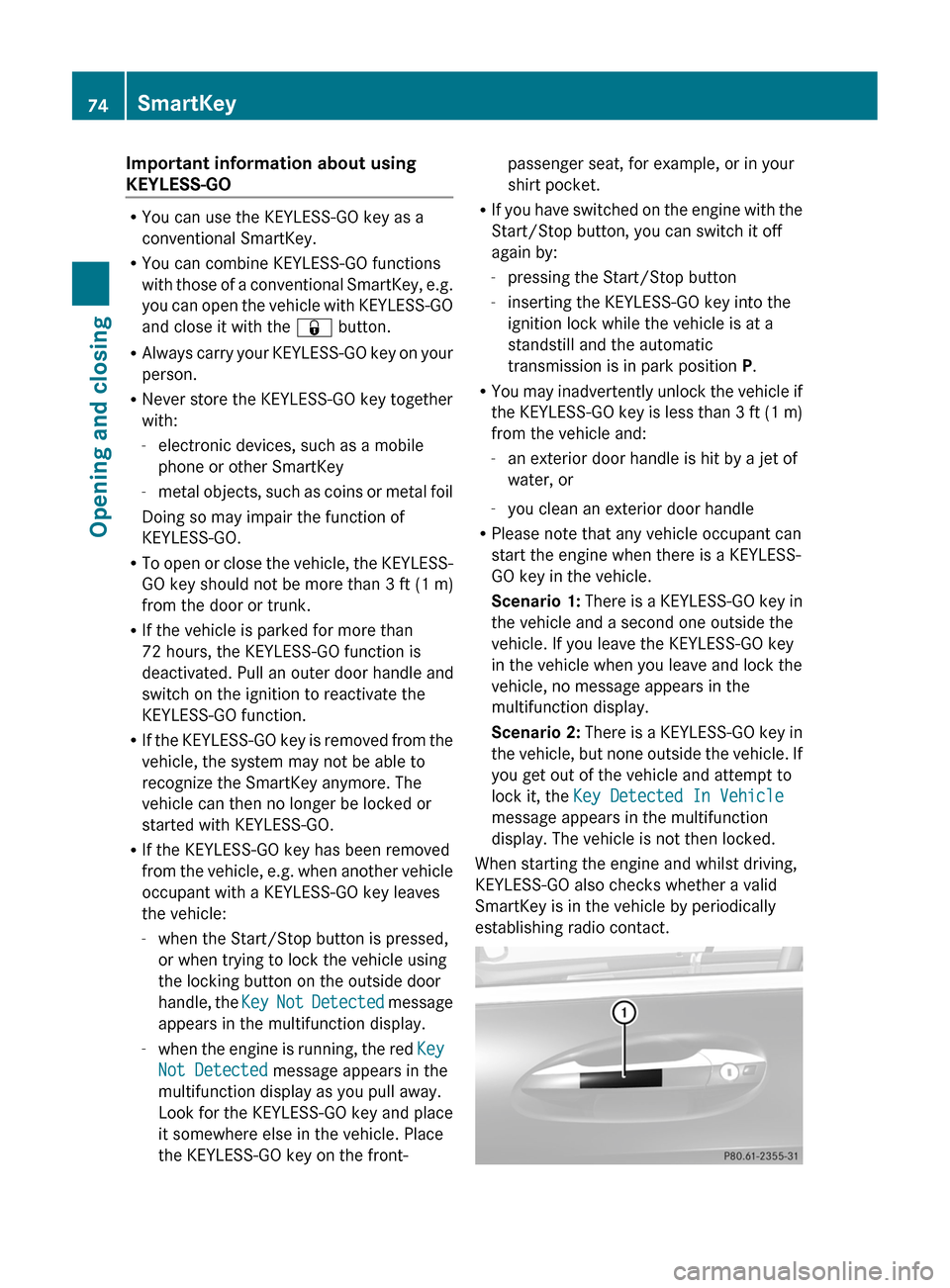
X To unlock the vehicle: pull the door
handle.XTo lock the vehicle: touch sensor
surface :.
If you pull on the handle of the trunk lid, only
the trunk of the vehicle is unlocked.
Changing the settings of the locking
system
You can change the setting of the locking
system in such a way that only the driver's
door and the fuel filler flap are unlocked. This
is useful if you frequently travel on your own.
XTo change the setting: press and hold
down the % and & buttons
simultaneously for approximately six
seconds until the battery check lamp
( Y page 76) flashes twice.
The SmartKey now functions as follows:
XTo unlock the driver's door: press the
% button once.XTo unlock centrally: press the %
button twice.XTo lock centrally: press the & button.
The KEYLESS-GO function is changed as
follows:
XTo unlock the driver's door : pull the door
handle on the driver's door.XTo unlock centrally: pull the front-
passenger door handle.XTo lock centrally: touch sensor
surface : on one of the door handles.
Restoring the factory settings
XPress the % and & buttons
simultaneously for approximately six
seconds until the battery check lamp
flashes twice.Mechanical key
General notes
If you use the mechanical key to unlock and
open the driver's door or the trunk lid, the
anti-theft alarm system will be triggered
( Y page 68).
There are several ways to turn off the alarm:
XPress the % or & button on the
SmartKey.
or
XInsert the SmartKey into the ignition lock.
or
XPress the Start/Stop button in the ignition
lock. The SmartKey must be in the vehicle.
or
XLock or unlock the vehicle using KEYLESS-
GO. The SmartKey must be outside the
vehicle.
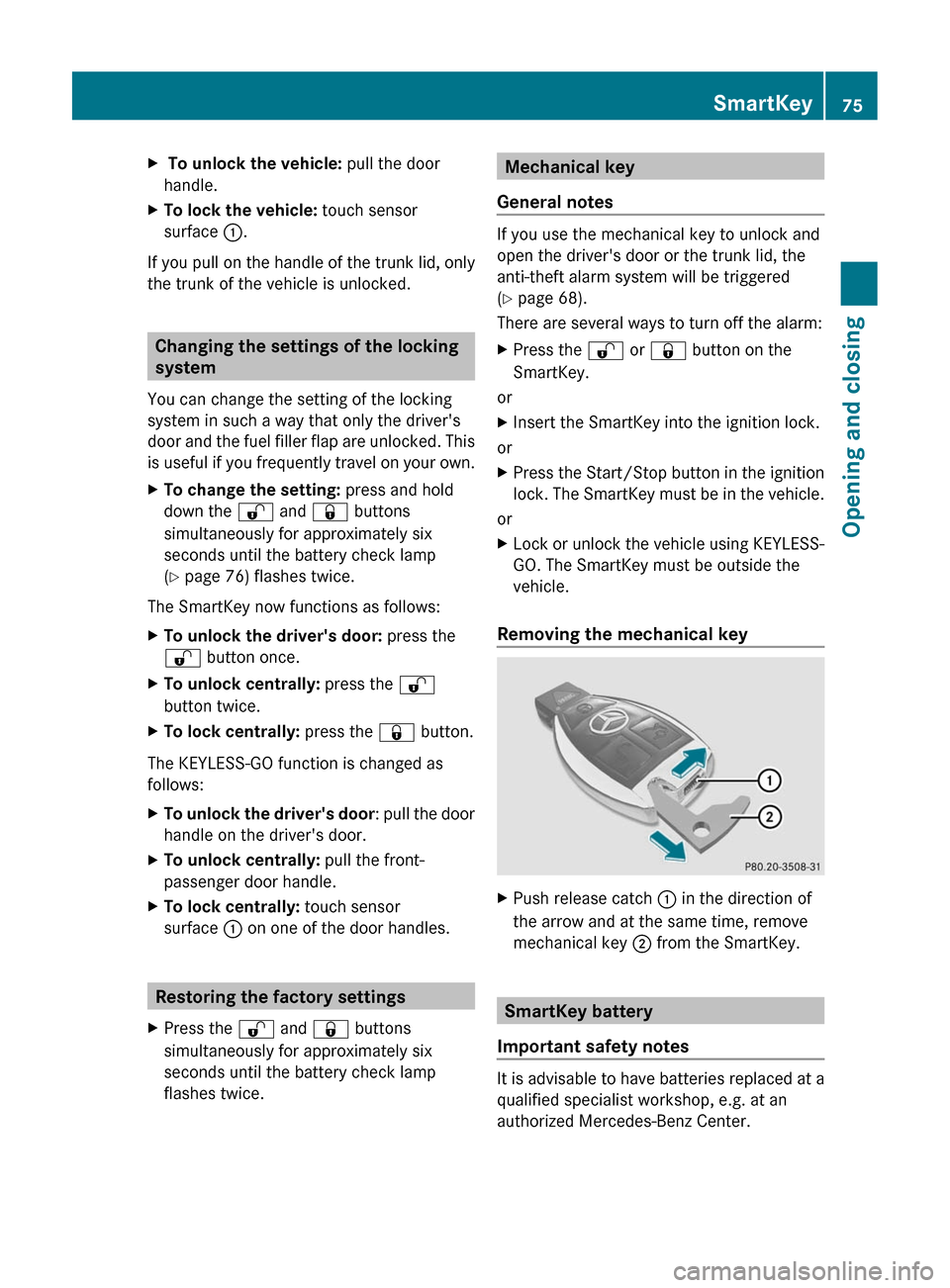
Removing the mechanical key
XPush release catch : in the direction of
the arrow and at the same time, remove
mechanical key ; from the SmartKey.
SmartKey battery
Important safety notes
It is advisable to have batteries replaced at a
qualified specialist workshop, e.g. at an
authorized Mercedes-Benz Center.
SmartKey75Opening and closingZ