light MERCEDES-BENZ CL CLASS 2013 Owners Manual
[x] Cancel search | Manufacturer: MERCEDES-BENZ, Model Year: 2013, Model line: CL CLASS, Model: MERCEDES-BENZ CL CLASS 2013Pages: 496, PDF Size: 7.5 MB
Page 315 of 496
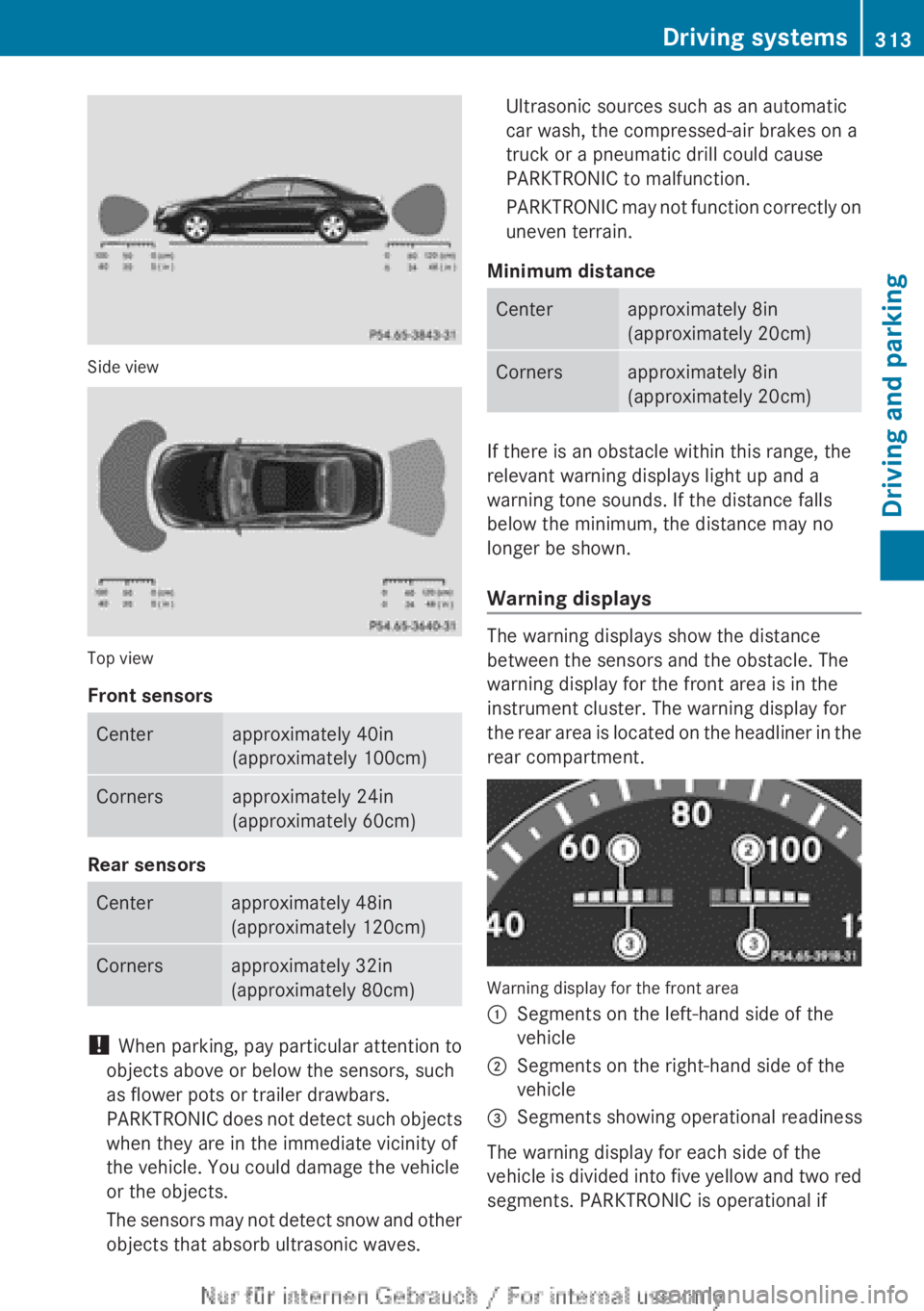
Side view
Top view
Front sensors
Centerapproximately 40in
(approximately 100cm)Cornersapproximately 24in
(approximately 60cm)
Rear sensors
Centerapproximately 48in
(approximately 120cm)Cornersapproximately 32in
(approximately 80cm)
! When parking, pay particular attention to
objects above or below the sensors, such
as flower pots or trailer drawbars.
PARKTRONIC does not detect such objects
when they are in the immediate vicinity of
the vehicle. You could damage the vehicle
or the objects.
The sensors may not detect snow and other
objects that absorb ultrasonic waves.
Ultrasonic sources such as an automatic
car wash, the compressed-air brakes on a
truck or a pneumatic drill could cause
PARKTRONIC to malfunction.
PARKTRONIC may not function correctly on
uneven terrain.
Minimum distanceCenterapproximately 8in
(approximately 20cm)Cornersapproximately 8in
(approximately 20cm)
If there is an obstacle within this range, the
relevant warning displays light up and a
warning tone sounds. If the distance falls
below the minimum, the distance may no
longer be shown.
Warning displays
The warning displays show the distance
between the sensors and the obstacle. The
warning display for the front area is in the
instrument cluster. The warning display for
the rear area is located on the headliner in the
rear compartment.
Warning display for the front area
:Segments on the left-hand side of the
vehicle;Segments on the right-hand side of the
vehicle=Segments showing operational readiness
The warning display for each side of the
vehicle is divided into five yellow and two red
segments. PARKTRONIC is operational if
Driving systems313Driving and parkingZ
Page 316 of 496
yellow segments showing operational
readiness = light up.
The selected transmission position
determines which warning display is active
when the engine is running.Transmission
positionWarning displayDFront area activatedRRear and front areas
activatedNIf the electric parking
brake is engaged: no
areas are activated
If the electric parking
brake is released:
rear and front areas
are activatedPNo areas activated
One or more segments light up as the vehicle
approaches an obstacle, depending on the
vehicle's distance from the obstacle.
When the first red segment lights up, you hear
an intermittent warning for about two
seconds. From the second red segment, you
hear a continuous warning. This indicates that
you have now reached the minimum distance.
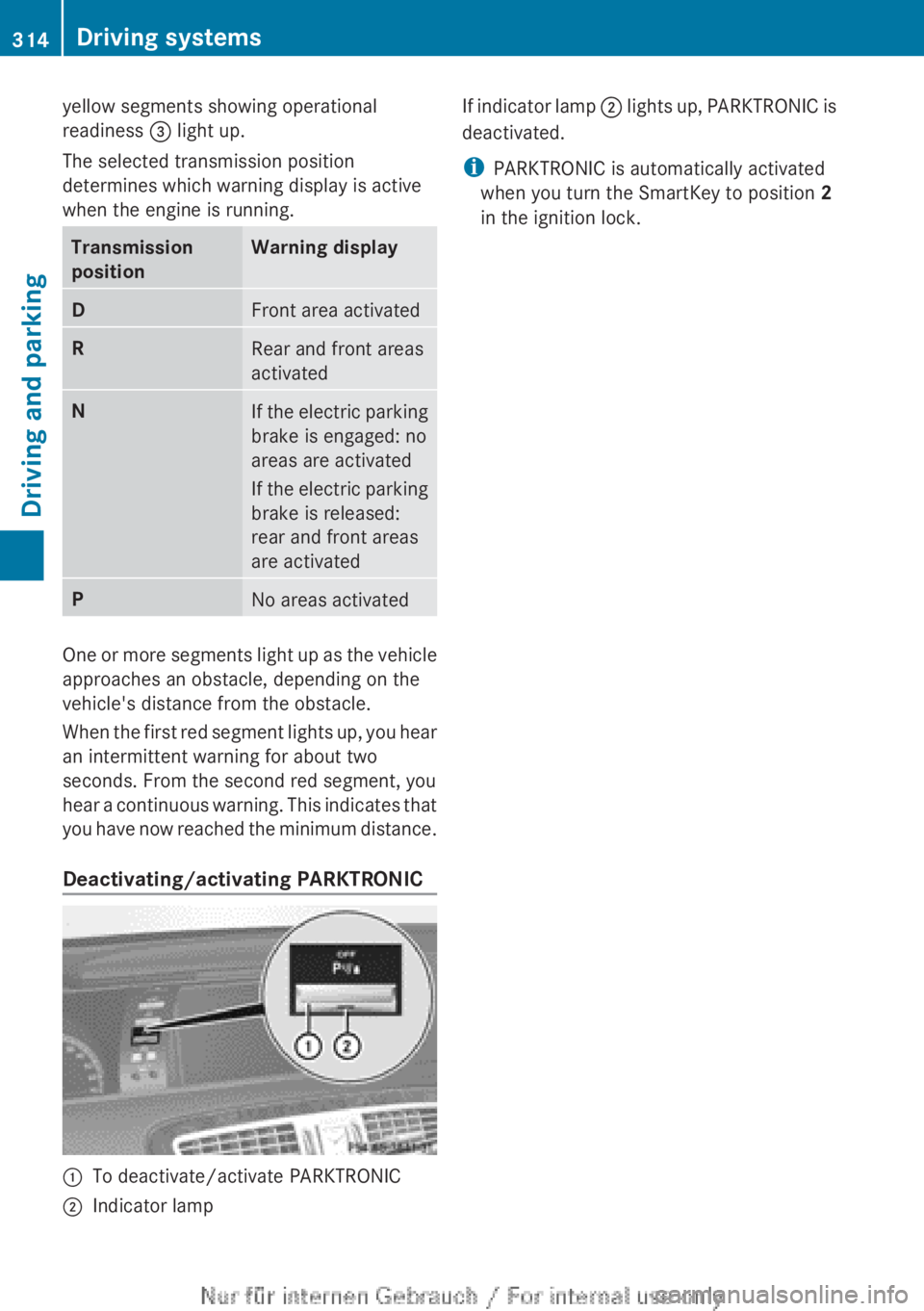
Deactivating/activating PARKTRONIC
:To deactivate/activate PARKTRONIC;Indicator lampIf indicator lamp ; lights up, PARKTRONIC is
deactivated.
i PARKTRONIC is automatically activated
when you turn the SmartKey to position 2
in the ignition lock.314Driving systemsDriving and parking
Page 317 of 496
Problems with PARKTRONICProblemPossible causes/consequences and M SolutionsOnly the red segments
in the PARKTRONIC
warning displays are lit.
You also hear a warning
tone for approximately
two seconds.
PARKTRONIC is
deactivated after
approximately
20 seconds, and the
indicator lamp in the
PARKTRONIC button
lights up.PARKTRONIC has malfunctioned and has switched off.XIf problems persist, have PARKTRONIC checked at a qualified
specialist workshop.Only the red segments
in the PARKTRONIC
warning displays are lit.
PARKTRONIC is
deactivated after
approximately
20 seconds.The PARKTRONIC sensors are dirty or there is interference.XClean the PARKTRONIC sensors ( Y page 431).XSwitch the ignition back on.The problem may be caused by an external source of radio or
ultrasound waves.XSee if PARKTRONIC functions in a different location.Parking Guidance
Important safety notes
Parking Guidance is an electronic parking aid
with ultrasound. Ultrasound is used to
measure the road on both sides of the vehicle.
A suitable parking space is indicated by the
parking symbol. You receive steering
instructions when parking. You may also use
PARKTRONIC ( Y page 312).
GWARNING
Parking Guidance is merely an aid and may
display parking spaces that are not suitable
for parking, for example:
R no-parking areas
R parking spaces with unsuitable surfaces
(road surface)
R driveways
R entrances and exits
Parking Guidance detects and measures
potential parking spaces while driving past.
Changes to the parking space after this point
are not taken into account, for example if the
vehicle in front of or behind the parking space
changes position or objects in the parking
space are moved.
Even when using Parking Guidance, you are
still responsible for driving carefully. If you
rely on Parking Guidance alone, you could
cause an accident and injure yourself and
others.
Safety always remains your responsibility and
you must continue paying careful attention to
your immediate surroundings when parking
and maneuvering.Driving systems315Driving and parkingZ
Page 322 of 496
Rthe trunk lid is open
R it is raining or snowing strongly or if it is
foggy
R it is night or if you are parking/
maneuvering your vehicle in a very dark
area
R a very bright white light is affecting the
camera
R the immediate vicinity is illuminated with
fluorescent light (the display of the
COMAND system can flicker)
R temperature changes abruptly, for example
if you drive out of the cold into a heated
garage (condensation on the lens)
R the camera lens is dirty or covered
R the rear of your vehicle is damaged
In this case, have the position and the
setting of the camera checked at a
specialist workshop. Mercedes-Benz
recommends that you consult a Mercedes-
Benz Center for this purpose.
Do not use the rear view camera in these
situations. You could otherwise injure
yourself and other people and/or cause
damage - including damage to your vehicle -
while parking/maneuvering.
Activating the rear view cameraXMake sure that the SmartKey is in position
2 in the ignition lock.XEngage reverse gear.
The area behind the vehicle is shown in the
COMAND display with guide lines.
Guide lines in the COMAND display
GWARNING
Use of rear view camera can be dangerous if
you are color-blind or have impaired color
vision.
Only use rear view camera if you can see and
distinguish all colored guidelines shown by
rear view camera on the COMAND system
display.
GWARNING
Please note that objects that do not touch the
ground may appear to be further away than
they actually are, for example:
R the bumper of a vehicle parked behind you
R the trailer drawbar
R the ball coupling of a trailer tow hitch
R the rear end of a truck
R a slanted post
In such cases, you should not use the guide
lines to judge the distance. You may misjudge
the distance, which increases the risk of
impacting the objects.
Even if the object you approach is directly on
the ground, do not approach the object any
closer than the red guide line.
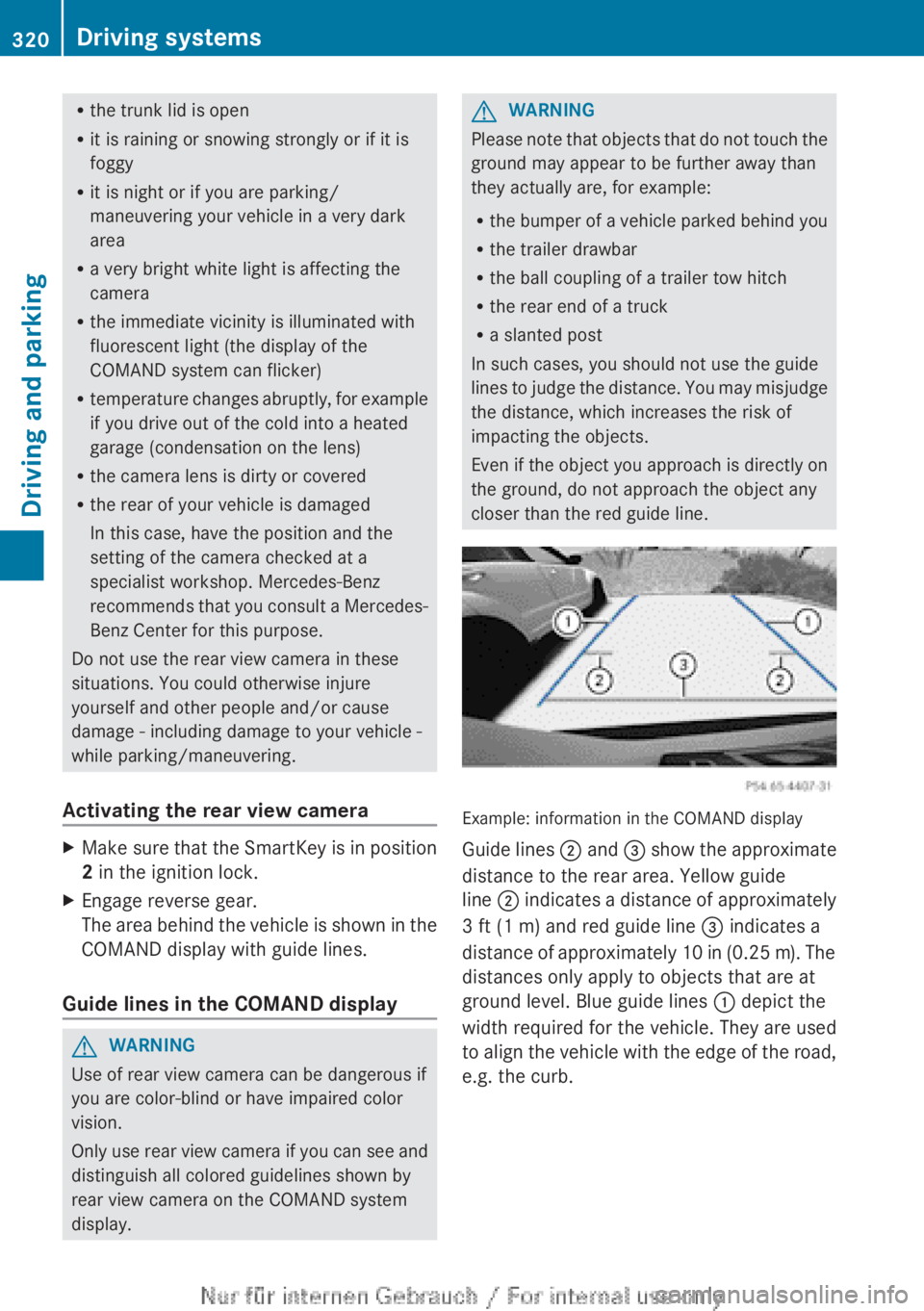
Example: information in the COMAND display
Guide lines ; and = show the approximate
distance to the rear area. Yellow guide
line ; indicates a distance of approximately
3 ft (1 m) and red guide line = indicates a
distance of approximately 10 in (0.25 m). The
distances only apply to objects that are at
ground level. Blue guide lines : depict the
width required for the vehicle. They are used
to align the vehicle with the edge of the road,
e.g. the curb.
320Driving systemsDriving and parking
Page 324 of 496
ATTENTION ASSIST is reset when you
continue your journey and starts assessing
your tiredness again if:
R you switch off the engine.
R you take off your seat belt and open the
driver's door, e.g. for a change of drivers or
to take a break.
Night View Assist Plus with spotlight
function
Important safety notes
In addition to the illumination provided by the
normal headlamps, Night View Assist Plus
uses infrared light to illuminate the road. The
Night View Assist Plus camera picks up the
infrared light and shows a black-and-white
image in the multifunction display. The image
shown in the multifunction display
corresponds to a road lit up by high-beam
headlamps. This enables you to see the road's
course and any obstacles in good time. If
pedestrian recognition is activated,
pedestrians recognized by the system are
highlighted in the Night View Assist Plus
display.
The spotlight function also illuminates
individual detected pedestrians with a
spotlight that flashes four times in quick
succession. After this targeted illumination,
the headlamps return to the original driving
position again.
GWARNING
Night View Assist Plus is only an aid designed
to assist driving. It is not a substitute for
attentive driving. Do not rely solely on the
Night View Assist Plus display. Continue to
look through the windshield. You are
responsible for safety and must drive in
accordance with traffic conditions. You could
otherwise put yourself and others in danger.
The system may be impaired or unavailable if:
R there is poor visibility, e.g. due to snow,
rain, fog or heavy spray.
R the windshield is dirty, fogged up or
covered, for instance by a sticker, in the
vicinity of the camera.
R you are driving on bends, uphill gradients
or downhill gradients.
Light from the headlamps of oncoming
vehicles does not affect the Night View Assist
Plus display in the multifunction display. This
is also the case if you cannot switch on the
high-beam headlamps due to oncoming
traffic.GWARNING
The Night View Assist Plus cannot record
objects immediately in front of or next to the
vehicle. When maneuvering, continue to look
through the windshield. Make sure no
persons or animals are in the area in which
you are maneuvering. You could otherwise
injure them.
i Infrared light is not visible to the human
eye and therefore does not glare. Night
View Assist Plus can therefore remain
switched on even if there is oncoming
traffic.
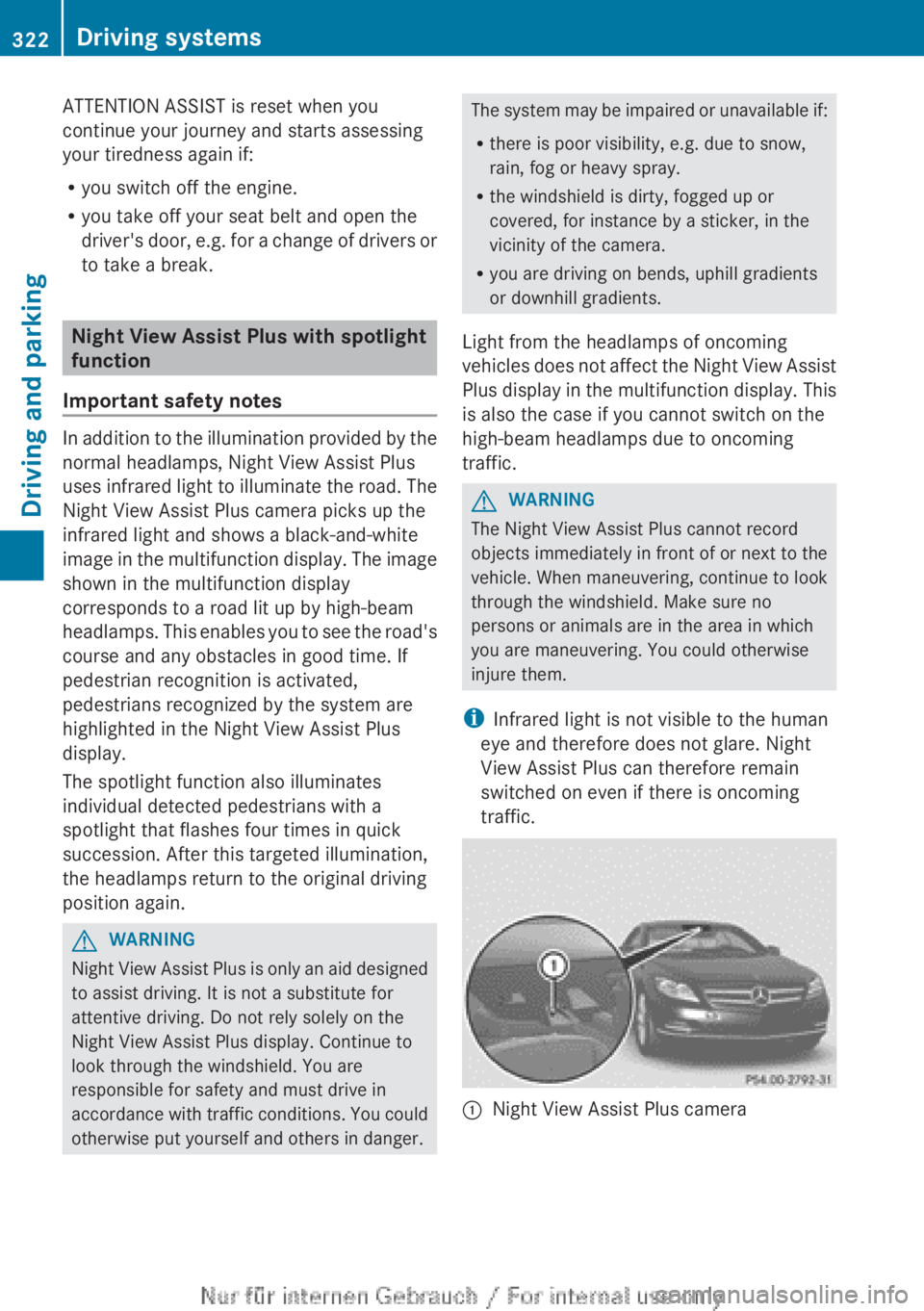
:Night View Assist Plus camera322Driving systemsDriving and parking
Page 325 of 496
Pedestrian recognitionGWARNING
Pedestrian recognition may be impaired or
inoperative if:
R pedestrians are partially or entirely
obscured by objects, e.g. parked vehicles.
R the silhouette of the pedestrian in the Night
View Assist Plus display is incomplete or
interrupted, e.g. by powerful light
reflections.
R pedestrians do not contrast with the
surroundings.
R pedestrians are not standing upright, for
example, if they are sitting, crouching or
lying down.
i Animals are not recognized by pedestrian
recognition.
Night View Assist Plus is able to recognize
pedestrians by typical characteristics, e.g. a
silhouette in the shape of a person.
Pedestrian recognition is then switched on
automatically if:
R Night View Assist Plus is activated.
R you are driving faster than 6 mph
(10 km/h).
R the surroundings are dark, e.g. when
driving outside built-up areas without
street lighting.
If pedestrian recognition is active, the symbol
for active pedestrian recognition
( Y page 325) appears in the multifunction
display. If a pedestrian is now recognized,
they are framed and thereby highlighted. If
the pedestrian recognition system has
brought a pedestrian to your attention, look
through the windshield to evaluate the
situation. The actual distance to objects and
pedestrians cannot be gauged accurately by
looking at a screen.
It may be the case that objects are highlighted
as well as pedestrians.
Spotlight function
Pedestrian recognition with spotlight
function is activated automatically if:
R Night View Assist Plus with spotlight
function is activated.
R you are driving faster than 28 mph
(45 km/h).
R the surroundings are dark, e.g. when
driving outside built-up areas without
street lighting.
Only one person or object can be illuminated
by the spotlight at any one time.
The spotlight function will not function if:
R pedestrians or objects cannot be
recognized due to fast cornering.
R pedestrians or objects are on the driver's
side of the vehicle.
Conversely, if you switch to symmetrical
low beams ( Y page 250), pedestrians or
objects located on the passenger side of
the vehicle will not be detected.
It may be the case that pedestrians and other
objects are inadvertently illuminated.
Activating/deactivating Night View
Assist Plus with spotlight function
You can only activate Night View Assist Plus
with spotlight function if:
R the SmartKey is in position 2 in the ignition
lock.
R it is dark.
R the "Adaptive Highbeam Assist" function is
activated via the on-board computer
( Y page 350).
R the light switch is in position c.
R the combination switch is pushed forward
beyond the point of resistance.
R reverse gear has not been engaged.
Driving systems323Driving and parkingZ
Page 326 of 496
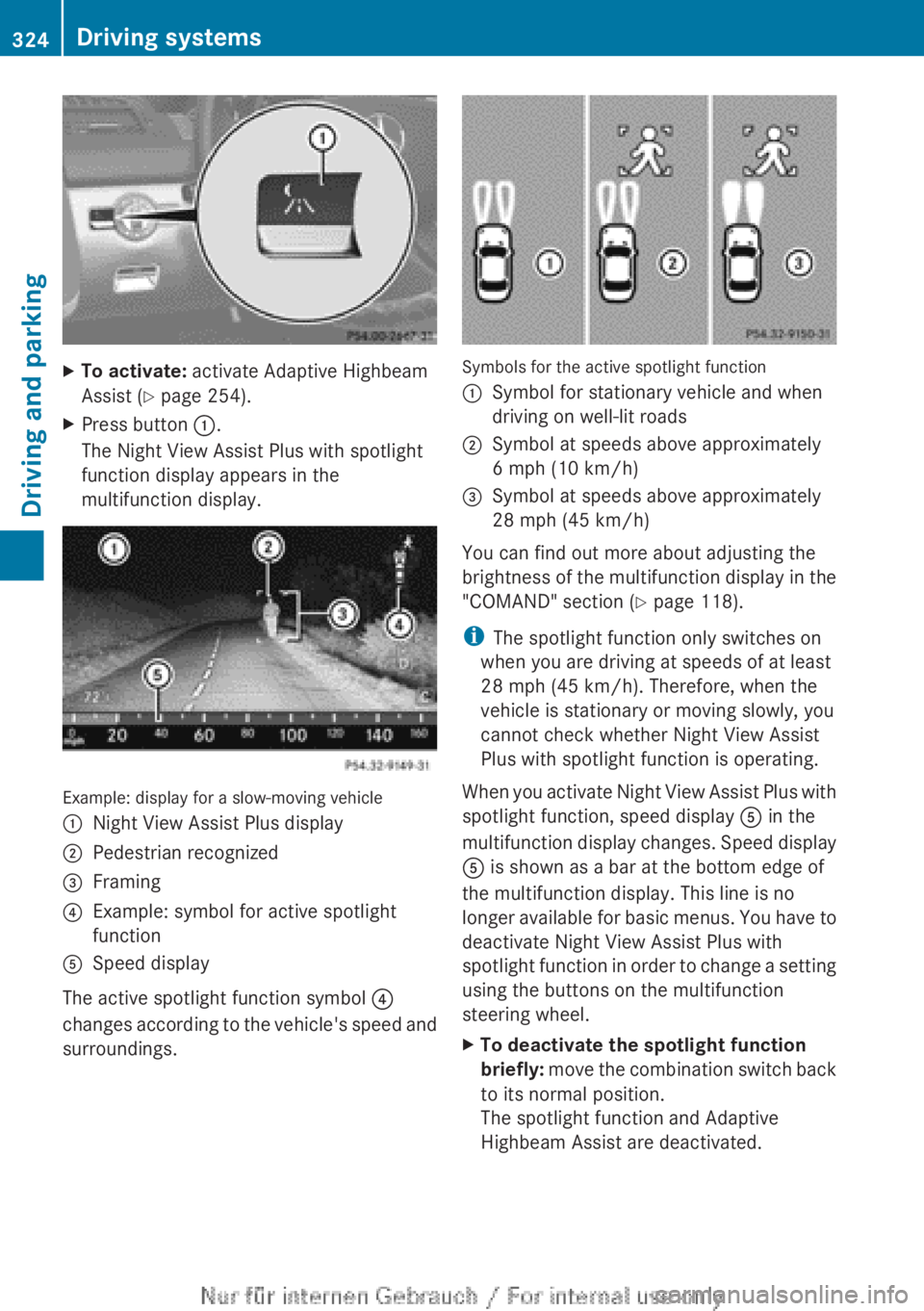
XTo activate: activate Adaptive Highbeam
Assist ( Y page 254).XPress button :.
The Night View Assist Plus with spotlight
function display appears in the
multifunction display.
Example: display for a slow-moving vehicle
:Night View Assist Plus display;Pedestrian recognized=Framing?Example: symbol for active spotlight
functionASpeed display
The active spotlight function symbol ?
changes according to the vehicle's speed and
surroundings.
Symbols for the active spotlight function
:Symbol for stationary vehicle and when
driving on well-lit roads;Symbol at speeds above approximately
6 mph (10 km/h)=Symbol at speeds above approximately
28 mph (45 km/h)
You can find out more about adjusting the
brightness of the multifunction display in the
"COMAND" section ( Y page 118).
i The spotlight function only switches on
when you are driving at speeds of at least
28 mph (45 km/h). Therefore, when the
vehicle is stationary or moving slowly, you
cannot check whether Night View Assist
Plus with spotlight function is operating.
When you activate Night View Assist Plus with
spotlight function, speed display A in the
multifunction display changes. Speed display
A is shown as a bar at the bottom edge of
the multifunction display. This line is no
longer available for basic menus. You have to
deactivate Night View Assist Plus with
spotlight function in order to change a setting
using the buttons on the multifunction
steering wheel.
XTo deactivate the spotlight function
briefly: move the combination switch back
to its normal position.
The spotlight function and Adaptive
Highbeam Assist are deactivated.324Driving systemsDriving and parking
Page 327 of 496
If you push the combination switch forward
beyond the point of resistance again, both
systems are reactivated.XTo deactivate: press button : again.XDeactivate Adaptive Highbeam Assist
( Y page 254).
i
If you do not wish to use the spotlight
function, you first need to deactivate Night
View Assist Plus and then activate it again
without the spotlight function
( Y page 325).
Activating/deactivating Night View
Assist Plus without spotlight function
You can only activate Night View Assist Plus
without spotlight function if:
R the SmartKey is in position 2 in the ignition
lock.
R it is dark.
R the light switch is in the c or L
position.
R reverse gear has not been engaged.
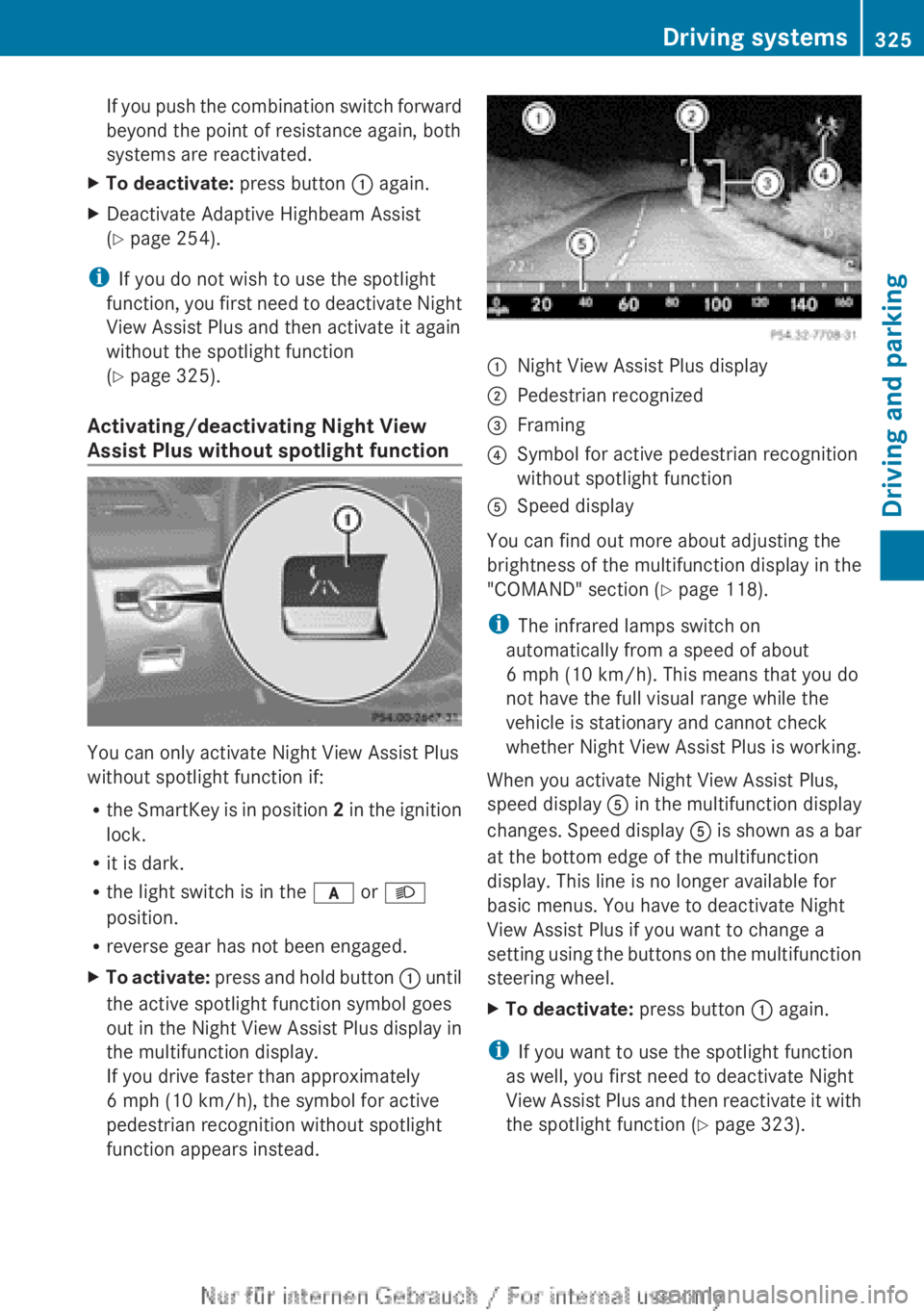
XTo activate: press and hold button : until
the active spotlight function symbol goes
out in the Night View Assist Plus display in
the multifunction display.
If you drive faster than approximately
6 mph (10 km/h), the symbol for active
pedestrian recognition without spotlight
function appears instead.:Night View Assist Plus display;Pedestrian recognized=Framing?Symbol for active pedestrian recognition
without spotlight functionASpeed display
You can find out more about adjusting the
brightness of the multifunction display in the
"COMAND" section ( Y page 118).
i The infrared lamps switch on
automatically from a speed of about
6 mph (10 km/h). This means that you do
not have the full visual range while the
vehicle is stationary and cannot check
whether Night View Assist Plus is working.
When you activate Night View Assist Plus,
speed display A in the multifunction display
changes. Speed display A is shown as a bar
at the bottom edge of the multifunction
display. This line is no longer available for
basic menus. You have to deactivate Night
View Assist Plus if you want to change a
setting using the buttons on the multifunction
steering wheel.
XTo deactivate: press button : again.
i
If you want to use the spotlight function
as well, you first need to deactivate Night
View Assist Plus and then reactivate it with
the spotlight function ( Y page 323).
Driving systems325Driving and parkingZ
Page 331 of 496
Due to the nature of the system:
R warnings may be issued in error when
driving close to crash barriers or similar
solid lane borders.
R the warning is canceled when driving for an
extended period next to long vehicles, such
as trucks.
Two Active Blind Spot Assist radar sensors
are integrated into the front and rear bumpers
respectively. An additional radar sensor is
located behind the cover in the radiator grill.
Make sure that the sensors and areas around
them are free of dirt, ice or slush. The rear
sensors must not be covered, for example by
cycle racks or overhanging cargo. Following
a severe impact or in the event of damage to
the bumpers, have the function of the sensors
checked at a qualified specialist workshop.
Blind Spot Assist may otherwise not work
properly.
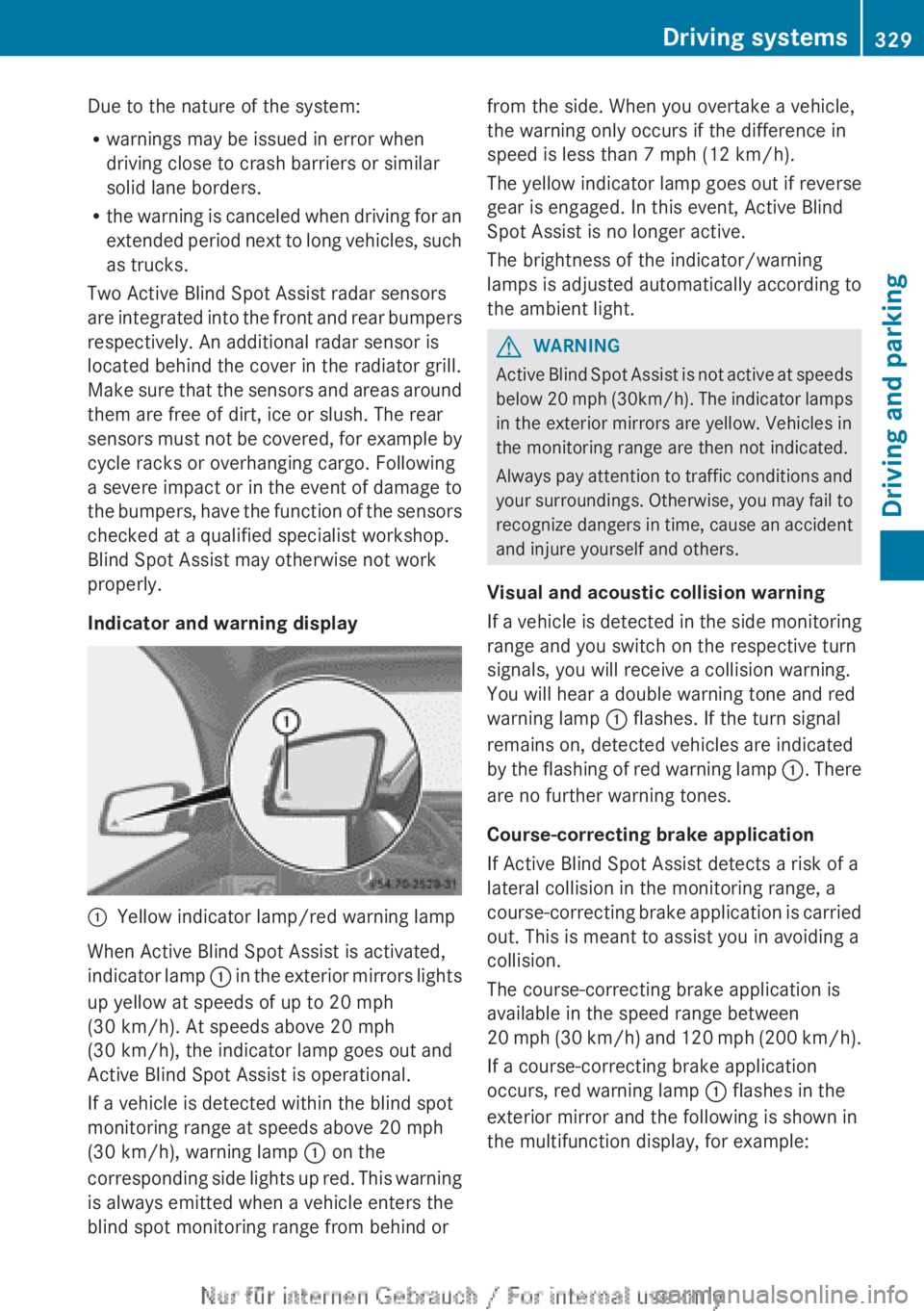
Indicator and warning display:Yellow indicator lamp/red warning lamp
When Active Blind Spot Assist is activated,
indicator lamp : in the exterior mirrors lights
up yellow at speeds of up to 20 mph
(30 km/h). At speeds above 20 mph
(30 km/h), the indicator lamp goes out and
Active Blind Spot Assist is operational.
If a vehicle is detected within the blind spot
monitoring range at speeds above 20 mph
(30 km/h), warning lamp : on the
corresponding side lights up red. This warning
is always emitted when a vehicle enters the
blind spot monitoring range from behind or
from the side. When you overtake a vehicle,
the warning only occurs if the difference in
speed is less than 7 mph (12 km/h).
The yellow indicator lamp goes out if reverse
gear is engaged. In this event, Active Blind
Spot Assist is no longer active.
The brightness of the indicator/warning
lamps is adjusted automatically according to
the ambient light.GWARNING
Active Blind Spot Assist is not active at speeds
below 20 mph ( 30km/h). The indicator lamps
in the exterior mirrors are yellow. Vehicles in
the monitoring range are then not indicated.
Always pay attention to traffic conditions and
your surroundings. Otherwise, you may fail to
recognize dangers in time, cause an accident
and injure yourself and others.
Visual and acoustic collision warning
If a vehicle is detected in the side monitoring
range and you switch on the respective turn
signals, you will receive a collision warning.
You will hear a double warning tone and red
warning lamp : flashes. If the turn signal
remains on, detected vehicles are indicated
by the flashing of red warning lamp :. There
are no further warning tones.
Course-correcting brake application
If Active Blind Spot Assist detects a risk of a
lateral collision in the monitoring range, a
course-correcting brake application is carried
out. This is meant to assist you in avoiding a
collision.
The course-correcting brake application is
available in the speed range between
20 mph (30 km/h) and 120 mph (200 km/h ).
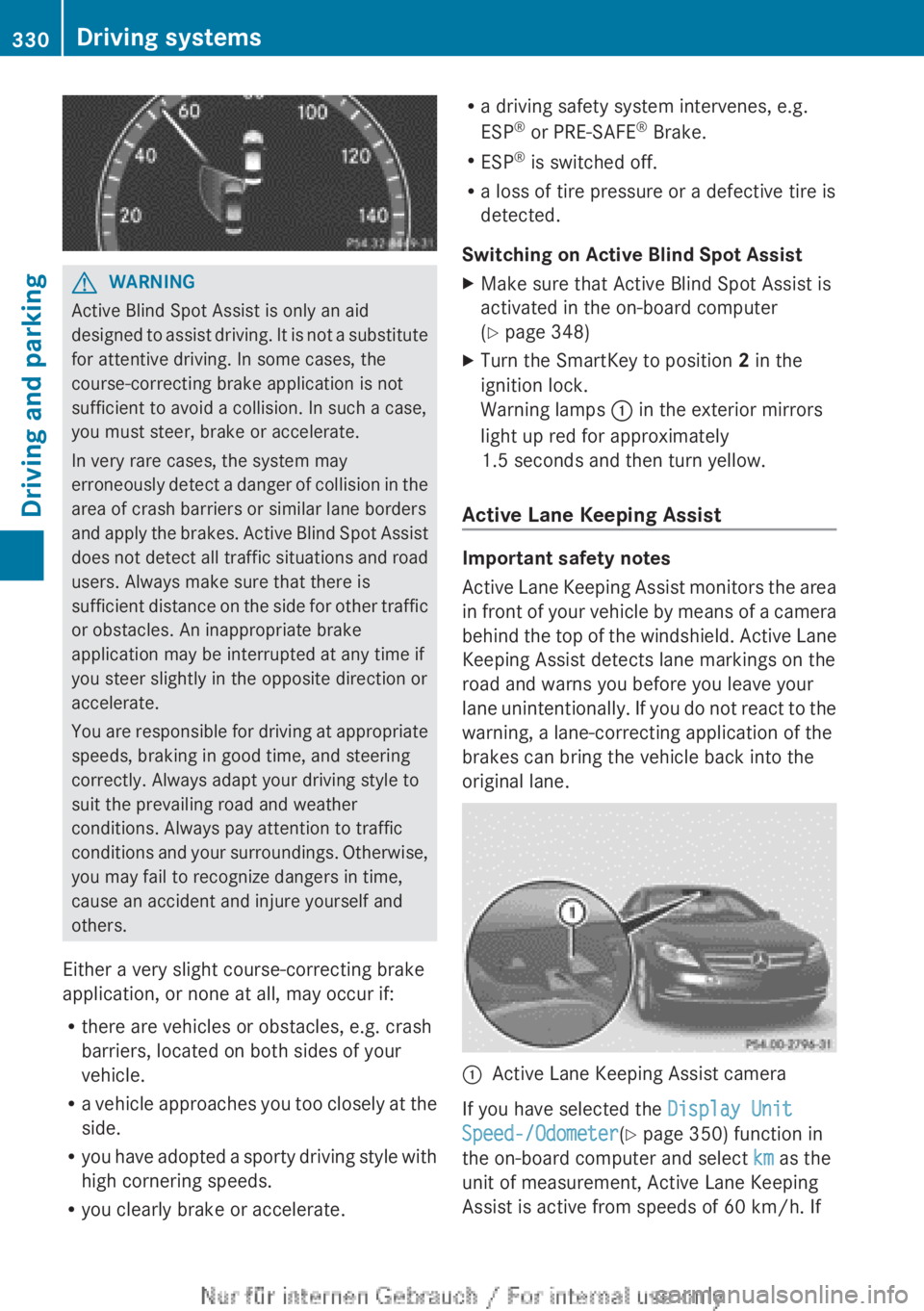
If a course-correcting brake application
occurs, red warning lamp : flashes in the
exterior mirror and the following is shown in
the multifunction display, for example:
Driving systems329Driving and parkingZ
Page 332 of 496
GWARNING
Active Blind Spot Assist is only an aid
designed to assist driving. It is not a substitute
for attentive driving. In some cases, the
course-correcting brake application is not
sufficient to avoid a collision. In such a case,
you must steer, brake or accelerate.
In very rare cases, the system may
erroneously detect a danger of collision in the
area of crash barriers or similar lane borders
and apply the brakes. Active Blind Spot Assist
does not detect all traffic situations and road
users. Always make sure that there is
sufficient distance on the side for other traffic
or obstacles. An inappropriate brake
application may be interrupted at any time if
you steer slightly in the opposite direction or
accelerate.
You are responsible for driving at appropriate
speeds, braking in good time, and steering
correctly. Always adapt your driving style to
suit the prevailing road and weather
conditions. Always pay attention to traffic
conditions and your surroundings. Otherwise,
you may fail to recognize dangers in time,
cause an accident and injure yourself and
others.
Either a very slight course-correcting brake
application, or none at all, may occur if:
R there are vehicles or obstacles, e.g. crash
barriers, located on both sides of your
vehicle.
R a vehicle approaches you too closely at the
side.
R you have adopted a sporty driving style with
high cornering speeds.
R you clearly brake or accelerate.
Ra driving safety system intervenes, e.g.
ESP ®
or PRE-SAFE ®
Brake.
R ESP ®
is switched off.
R a loss of tire pressure or a defective tire is
detected.
Switching on Active Blind Spot AssistXMake sure that Active Blind Spot Assist is
activated in the on-board computer
( Y page 348)XTurn the SmartKey to position 2 in the
ignition lock.
Warning lamps : in the exterior mirrors
light up red for approximately
1.5 seconds and then turn yellow.
Active Lane Keeping Assist
Important safety notes
Active Lane Keeping Assist monitors the area
in front of your vehicle by means of a camera
behind the top of the windshield. Active Lane
Keeping Assist detects lane markings on the
road and warns you before you leave your
lane unintentionally. If you do not react to the
warning, a lane-correcting application of the
brakes can bring the vehicle back into the
original lane.
:Active Lane Keeping Assist camera
If you have selected the Display Unit
Speed-/Odometer (Y page 350) function in
the on-board computer and select km as the
unit of measurement, Active Lane Keeping
Assist is active from speeds of 60 km/h. If
330Driving systemsDriving and parking